Simple Booth vs PicPic Social: Which Photo Booth Platform Fits Your Business in 2026?

Choosing between Simple Booth and PicPic Social for your photo booth business comes down to five questions:
- Do you want a turnkey iPad system that handles everything from capture to delivery, or a sharing layer that works with your existing Windows-based capture setup?
- Are you looking for a platform you can set up in under a minute and run unattended, or a tool that integrates with your established booth workflow?
- Do you need built-in template design, AI photo effects, and professional lighting, or offline file delivery that works at venues without internet?
- Are you starting a photo booth business or looking to simplify your setup, or do you already run Windows-based 360, DSLR, or mirror booths?
- Would you rather pay per device starting at $14.99/week with no event limits, or pay per month with a set number of events?
In short, here’s what we recommend:
PicPic Social is a software platform built for photo booth operators who already own Windows-based capture hardware. Its Sharing Station monitors any booth software’s output folder and gives guests a kiosk to retrieve and share their photos, GIFs, or videos via email, SMS, or social media. The standout feature is 100% offline QR-based file delivery for 360 video booths at venues with no internet. With pricing from $74/month for 5 events to $299/month for unlimited events, plus free unlimited SMS in the US and Canada, it serves operators who need a sharing and delivery tool without replacing their existing workflow.
Simple Booth is an iPad photo booth platform for operators who want a turnkey system they can set up in under a minute and trust to run without an attendant. Starting at $14.99/week, the subscription app pairs with the optional HALO ring-light chassis to deliver professional lighting, a full Layout Designer with 60+ customizable themes, AI photo effects, background blur, and multi-channel sharing including WhatsApp and AirDrop.
With 30,000+ customers and a 4.7-star rating from 2,400+ App Store reviews, it serves everyone from solo operators starting a photo booth side hustle to multi-booth rental companies managing devices remotely, along with brand marketers who need lead capture with opt-in rates as high as 87%.
Both platforms serve photo booth professionals, but they solve different problems. PicPic Social adds sharing and delivery to your existing setup. Simple Booth provides a complete system from capture to delivery for operators who want simplicity without losing capability.
Simple Booth vs PicPic Social at a glance
| PicPic Social | Simple Booth | |
|---|---|---|
| Core Philosophy | Hardware-agnostic sharing platform | Turnkey capture-to-delivery system |
| Capture Hardware | Works with existing Windows booths | Optional HALO ring light + iPad |
| Starting Price | $74/month (5 events) | $14.99/week (~$72/month), no event limits |
| Pricing Model | Monthly with event quotas | Per-device subscription (weekly/monthly/annual) |
| Offline Capability | 100% offline QR file delivery | Offline upload queue for later delivery |
| AI Effects | AI background removal ($0.20/photo) | AI photo transformations ($0.10/credit) |
| Template Design | Paddee browser editor (5,000+ templates) | Built-in Layout Designer (60+ themes) |
| Virtual Booth | Browser-based, any device | Browser-based, any device |
| SMS Delivery | Free unlimited (US/Canada) | Included on all plans |
| White Label | Available on all paid tiers | Available on Plus+ plans |
| Device Management | Event dashboard | Remote device monitoring, live stats, preset switching |
| Best For | Operators with existing Windows booth hardware | Operators wanting a single-vendor, full-featured system |
The core difference: Sharing layer vs integrated system
The fundamental split between these platforms is what they assume you already own.
PicPic Social assumes you have a working photo booth and need a better way to deliver content to guests.
Founded by Seye Omisore, who ran a photo booth rental company in New England starting in 2010, the platform grew from an operator’s daily frustrations: slow sharing, missed social exposure, and unreliable venue Wi-Fi. The result is a sharing layer that monitors a Watch Folder on your booth PC and makes every captured file available for guests to retrieve and share, regardless of which capture software produced it.
Compatible software includes DZENTECH, Spinner 360, Darkroom Booth, Social Booth, FOTO MASTER, Breeze, and DSLR Booth.
This design means operators keep their existing hardware, capture app, and workflow. PicPic Social slots in as a delivery and sharing tool. The trade-off: it doesn’t control the capture experience, so photo quality, lighting, and the guest-facing capture interface depend on what the operator already runs.
Simple Booth assumes you want one vendor for everything, and that the experience should be simple to set up yet capable enough to handle professional customization and data capture.
Co-founded in 2013 by Mark Hennings (a self-taught app developer and former wedding videographer) and Jeremy Cox (a DJ and event professional), the company builds the hardware, capture software, delivery system, and analytics dashboard as a single product. The HALO chassis is machined from a single billet of aluminum with a patented ring-light system, the iPad app handles capture and post-processing, and the cloud platform manages galleries, lead data, and reporting.
This integration gives Simple Booth control over every step from lighting to delivery and cuts the time operators spend assembling and troubleshooting equipment from multiple vendors. The booth mode lets guests navigate the experience without an attendant, making the platform suited for unattended selfie stands and drop-off events where rental companies leave equipment on-site and service multiple bookings in one night.
The practical limit of that integration is the iPad ecosystem: the HALO app runs exclusively on iPad, so operators who already run Windows-based 360 or DSLR rigs would need to transition rather than add Simple Booth alongside their existing setup.
PicPic Social is built for operators who already have capture hardware
PicPic Social’s value shows most clearly when an operator already owns a working photo booth and needs to solve the delivery problem.
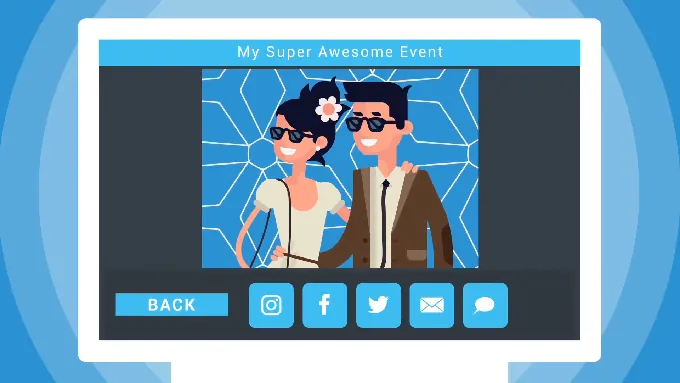
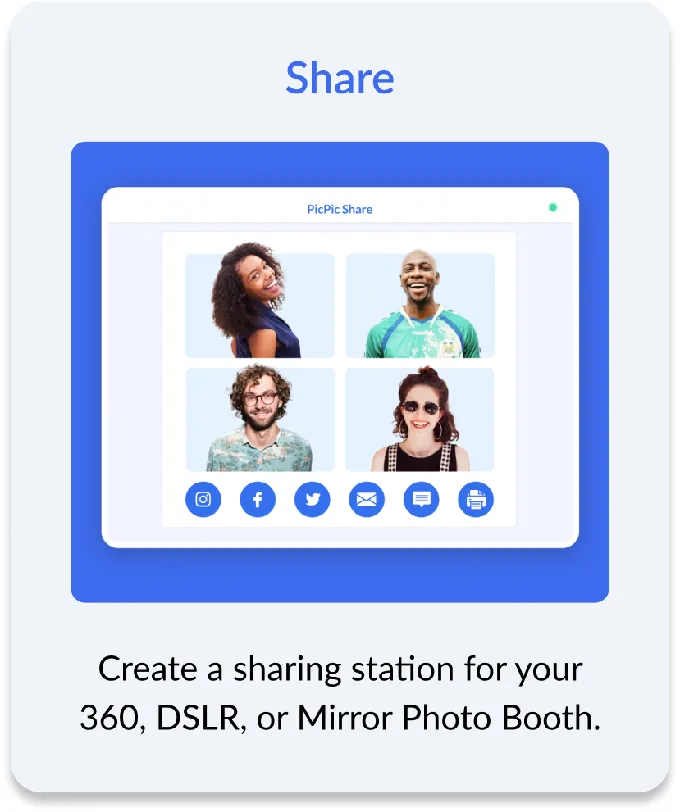
The Sharing Station creates a separate kiosk where guests find and share their photos without queuing at the booth itself. As PicPic Social puts it: “Sharing stations are a double whammy. They let you shorten your photo booth lines and promote your business via social media at the same time.” The station runs in two forms: a Virtual/Web version that works in any browser on any device, and an iPad/PC version as a native kiosk app. Both come with all paid plans.
Source: PicPic Social
For 360 booth operators, the offline QR delivery system (PicPic Slide) solves a problem that cloud-dependent platforms cannot: large video files at venues with no internet.
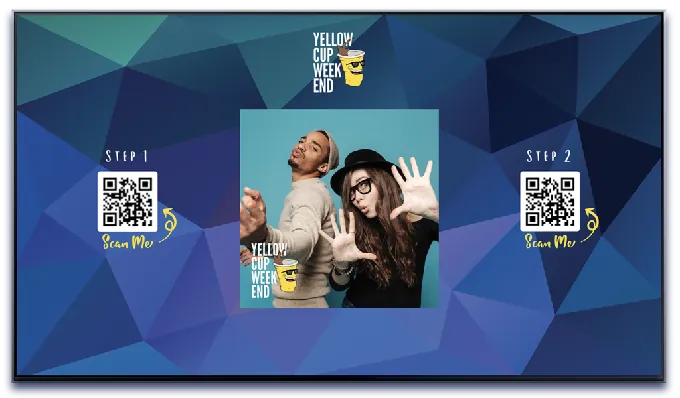
The offline Direct mode creates a local Wi-Fi network using a router connected to the booth PC. Guests scan one QR code to join the network and a second to download their file directly from the computer. No internet required at any point. This matters because 360 video files are too large for email or text delivery, and many event venues (ballrooms, rooftops, outdoor tents) have unreliable or nonexistent Wi-Fi.
Source: PicPic Social
The platform also includes a Virtual Booth that runs in-browser with no app install, producing branded photos, GIFs, and boomerangs. PicPic Social positions it as an add-on revenue stream for operators who want to serve remote or hybrid event guests alongside their physical booth.
The companion template product Paddee provides 5,000+ pre-made templates editable in-browser without Photoshop, covering iPad, 360, DSLR, and mirror booth formats. For operators without a graphic designer, this library cuts per-event setup time.
Where PicPic Social falls short is in the areas it deliberately leaves to other software. It doesn’t control photo quality, lighting, or the capture interface. It has no proprietary hardware. And it has no public API or integrations marketplace, so operators who need to push lead data into a CRM or marketing automation platform must handle exports manually.
Simple Booth controls the full experience from capture to delivery
Simple Booth’s advantage is that it owns every step of the guest experience while keeping setup and operation straightforward.
The hardware sets the lighting. The software handles capture, post-processing, branding, delivery, and analytics. Nothing depends on a third-party app or a separate vendor, and operators can deploy the system in under one minute and trust it to run without supervision.
The HALO ring light produces up to 2,100 lumens from 112 LEDs rated for 50,000 hours of operation, housed in a chassis machined from anodized aluminum. Groups can stand 6 to 8 feet back and still be properly lit. The iPad snaps in via a tool-less faceplate with a concealed USB-C cable for continuous charging.

- Source: Simple Booth
Even without the HALO chassis, the app produces professional results through Background Blur (Core plans and up), which creates a bokeh effect that keeps subjects sharp while softening the background (a look that previously required a DSLR, now available from the iPad camera). Background Blur works alongside Glam mode, color filters, and other editing tools, and all these features are compatible with each other, so operators don’t have to figure out which settings conflict.
The software adds capabilities that sharing-only platforms don’t offer.
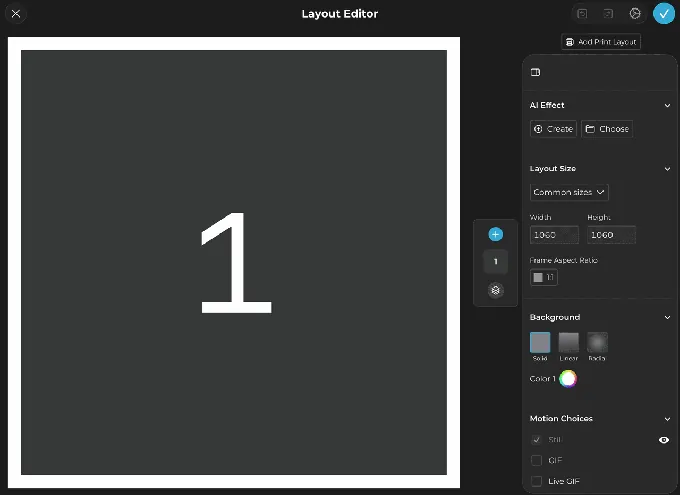
The Layout Designer (introduced in HALO 5.0, November 2025) is a design tool available on both the iPad app and web dashboard across all plans, with layers, fonts, gradients, QR code embedding, and multi-layout support. The Simple Booth library includes roughly 60+ themes that operators can import and customize, and the designer eliminates the need for separate graphics programs.
On Plus plans and up, Guest-Editable Text Layers let guests type names, captions, or messages directly onto their photos before sharing, enabling uses like digital guest books and personalized keepsake templates that add interactivity without extra setup.
Source: Simple Booth
AI Effects transform guest photos using text prompts, with the platform automatically preserving identity so guests remain recognizable regardless of the artistic transformation. Operators can test prompts outside of booth mode at zero credit cost. Image previews in the app appear up to 12x faster thanks to rendering optimizations, so guests see results instantly.
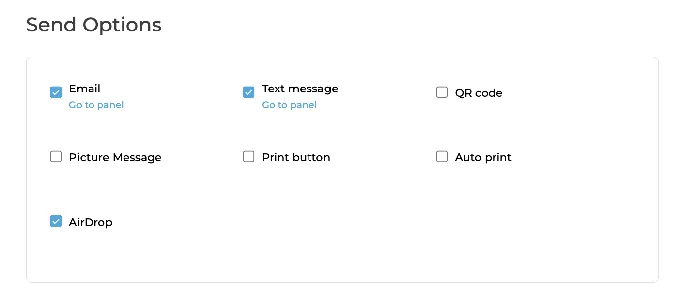
On the delivery side, Simple Booth supports QR code, email, SMS, AirDrop, and WhatsApp. AirDrop (available on all plans) lets guests receive photos instantly without typing emails or phone numbers, and works even when the booth is offline. WhatsApp delivery (added in HALO 5.0) opens international markets where SMS-only systems fall short. An offline upload queue stores sessions when connectivity drops and delivers automatically when the connection returns.
Source: Simple Booth
For Canon camera owners, DSLR and mirrorless camera integration (Core plan and above) routes professional images through the full HALO feature set, including AI effects, layouts, and branded delivery. The integration supports both wired USB connections for long-event reliability and wireless Wi-Fi connections for flexible setups (wireless DSLR is a feature most competing platforms don’t offer).
G7 Entertainment Marketing has used Simple Booth for over 10 years, generating 136,000+ fan interactions across their events. (Simple Booth)
The primary constraint is the iPad ecosystem.
The HALO app runs exclusively on iPad, and the HALO hardware is designed for that device. Operators running Windows-based 360 booths or Android tablets cannot use the system. For operators starting fresh or willing to work within the iPad ecosystem, this is a non-issue, and the result is a simpler experience with fewer variables to troubleshoot.
Branding and white-label options
Both platforms offer white-label capabilities, but availability differs by plan tier.
PicPic Social includes white-label options on all paid tiers, starting at the $74/month Starter plan.
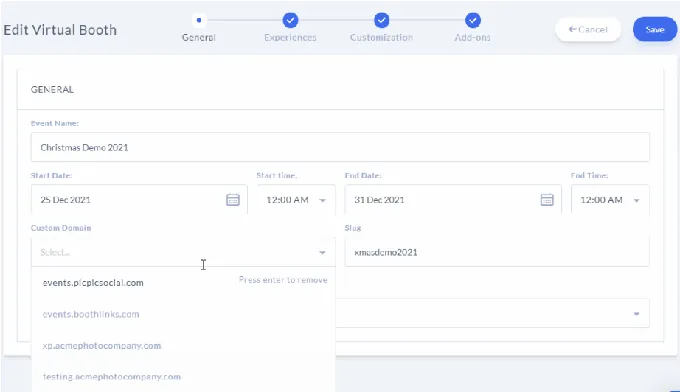
Two levels are available: Grey Label replaces PicPic Social’s default URLs with a generic domain so guests can’t identify the underlying platform, and White Label lets operators use their own custom domain. This applies across the Sharing Station, Virtual Booth, and Web Gallery.
For operators who resell event services to corporate clients under their own brand, white-label access without an enterprise-tier commitment is a real advantage.
Source: PicPic Social
Simple Booth gates custom branding to the Plus plan ($49.99/week) and above.
The Lite ($14.99/week) and Core ($24.99/week) plans do not include custom branding, and the Lite plan displays ads within the app. On Plus and higher tiers, operators control start screens, overlays, delivery messages, and gallery appearance. White-label link options for Virtual Booth are available on Plus+ plans.
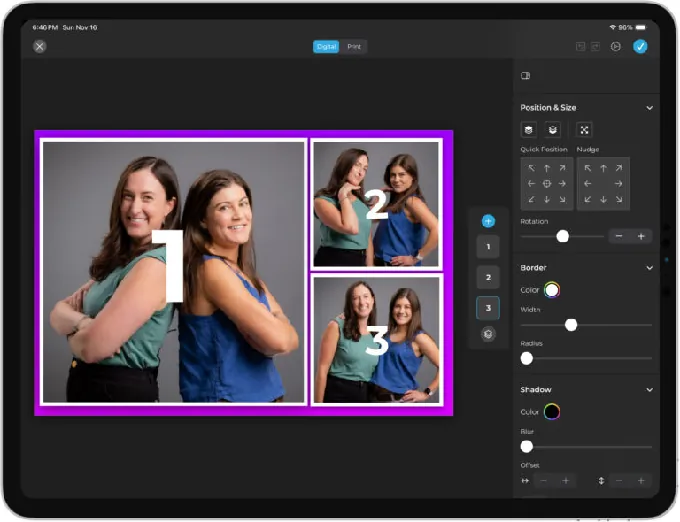
Where Simple Booth’s branding stands apart is the Layout Designer’s depth. With 60+ importable themes, control over photo placement, backgrounds, fonts, borders, and multi-layout options per event, operators design every detail of the photo output within the app or web dashboard (no external graphics software required).
Source: Simple Booth
Guest-Editable Text Layers (Plus plans and up) take this further by letting guests personalize their photos with names, captions, or custom messages, adding an interactive layer that PicPic Social’s template system doesn’t provide.
For operators who need their brand visible at every price point, PicPic Social starts at a lower tier. For operators on the Plus plan or above, Simple Booth’s Layout Designer offers deeper design control over the actual photo output, along with interactive text elements.
Lead capture and marketing tools
PicPic Social captures names, email addresses, and mobile numbers as part of the sharing flow. Every guest who emails or texts themselves a file submits contact information with explicit opt-in permissions for GDPR compliance.
The Web Gallery adds a second data capture layer, gating gallery access behind a social login or email form to turn post-event visitors into leads. Analytics and reports come with all plan tiers. However, PicPic Social has no documented native integrations with CRM or marketing automation platforms. Operators must export and import lead data manually.
Simple Booth treats lead capture as a core marketing function, not a byproduct of sharing.
Data collection is embedded in the photo-taking flow rather than presented as a separate task, which is why the platform reports opt-in rates as high as 87-89% (guests share their information naturally as part of receiving their photos). The Pro plan includes 6 standard capture fields (email, first name, last name, phone, postal code, date of birth). The Select plan extends this to 10 custom fields including checkboxes and required legal terms.
Data flows to the dashboard for CSV export, native MailChimp sync (no developer required), or delivery to custom CRMs via an Open API on Pro and above. The analytics dashboard tracks gallery views, social shares, and engagement over time. The Select tier adds demographic insights via face detection (estimated age, gender breakdown, average group size), which is uncommon in photo booth software.
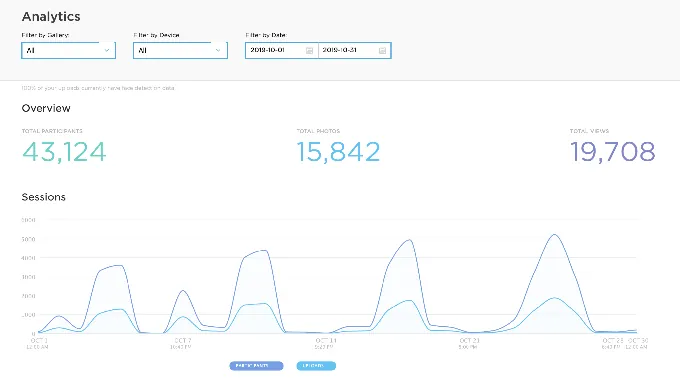
Source: Simple Booth
Arizona Opera grew its email list by 1,000 addresses in a few events using Simple Booth’s lead capture. (Simple Booth)
For operators whose clients measure event ROI in leads and social impressions, Simple Booth’s deeper capture fields, CRM integrations, and demographic analytics provide a more complete marketing toolkit. PicPic Social covers the basics but lacks the integration layer to automate what happens after the data is collected.
Virtual booth comparison
Both platforms offer browser-based virtual photo booths, but their feature sets and positioning differ.
PicPic Social’s Virtual Booth runs in-browser with no app download, producing branded photos, GIFs, and boomerangs. It includes Snapchat-style AR props with face tracking, AI background removal at $0.20 per photo, and built-in lead capture with GDPR compliance.
PicPic Social frames it as an add-on revenue stream for existing physical booth operators. Event duration ranges from 1-7 days on Starter and Leader plans up to 30 days or 1 year on Agency. Configuration happens from the same dashboard that manages sharing events, so operators manage in-person and virtual events in one place.
Simple Booth’s Virtual Booth also runs in any browser without an app install.
Its distinguishing feature is AI Effects, where three Nano Banana AI models transform captured photos using text prompts. The Guest Input system injects participant responses directly into the AI prompt as named variables, producing personalized outputs per guest. Magic Background Replacement works without a green screen.
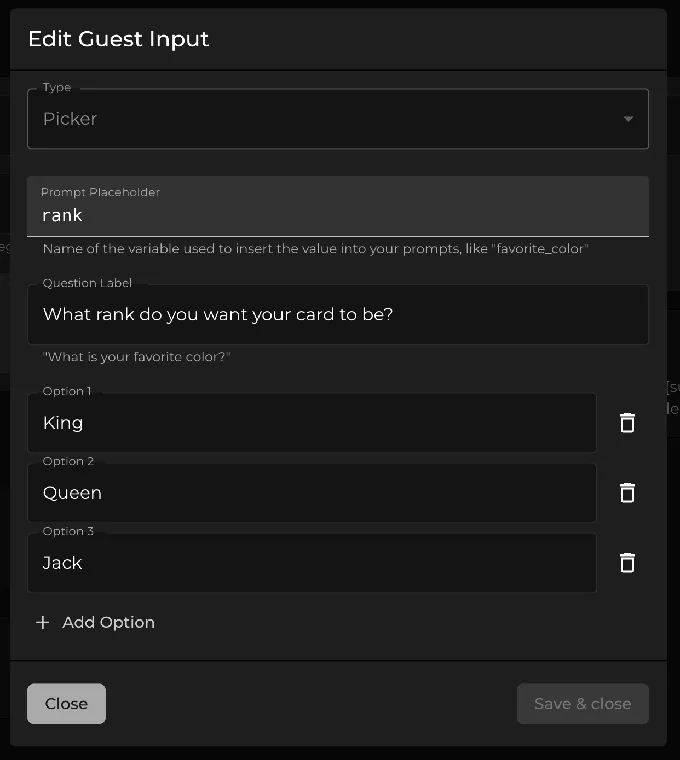
Source: Simple Booth
The Virtual Booth connects to the same analytics, Live Feed, and Gallery infrastructure as HALO hardware, so brands running hybrid events see all submissions in a single view. Multi-language support automatically localizes into English, Hebrew, Spanish, Polish, Italian, German, French, Dutch, and Danish.
PicPic Social’s Virtual Booth includes white-label links on all paid tiers. Simple Booth’s Virtual Booth does not offer white-label except on Plus+ plans, and pre-made templates are not included, so operators must design and upload all graphics themselves.
Pricing and cost structure
The two platforms use different pricing models, making direct cost comparisons dependent on how you run your business.
PicPic Social prices by monthly event quota:
- Starter: $74/month (5 events)
- Leader: $149/month (15 events)
- Agency: $299/month (unlimited events)
- Per-event: $99.99 (no subscription required)
Every plan includes the full feature set: Sharing Station (both web and iPad/PC versions), Virtual Booth, QR Sharing (online and offline), Web Gallery, white-label links, and free unlimited SMS for US and Canada. A 14-day free trial with no credit card required is available, though photos carry a draft watermark during the trial.
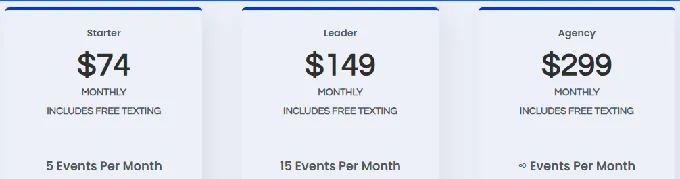
Source: PicPic Social
Additional costs come from the Virtual Credits system for AI effects and international SMS. Credit bundles range from $10 for 200 credits to $3,500 for 100,000 credits. No setup or onboarding fees.
Simple Booth prices by per-device subscription with no event limits on any tier:
- Lite: $14.99/week (~$72/month) or $290/year
- Core: $24.99/week (~$49/month) or $490/year
- Plus: $49.99/week (~$99/month) or $990/year
- Pro: $149/month or $1,490/year
- Select: $249/month or $2,490/year
The $14.99/week Lite plan is an accessible entry point for operators starting out or running a photo booth as a side hustle. The weekly pricing lets operators activate per-event while building clientele, and every tier includes unlimited events per device.
Features are gated by tier: Lite includes ads and excludes custom branding, analytics, DSLR connectivity, and lead capture. Custom branding starts at Plus. Lead capture starts at Pro.
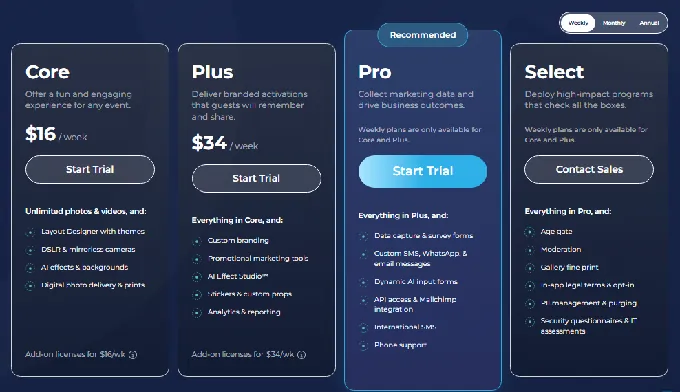
Source: Simple Booth
Each plan covers one device. Additional devices require add-on licenses at the same rate. A company running 3 booths on the Plus plan pays roughly $684/month in software, though each device runs unlimited events (operators with high event volume per booth may find the per-device model cheaper than an event-quota model).
AI effect credits cost $0.10 each and do not expire. HALO hardware kits are sold separately, starting at roughly $2,090 for an Event Kit. A Simple Care protection plan at $299 extends the warranty to 2 years. A 7-day free trial is available with 25 free AI credits.
The cost math depends on event volume and booth count.
An operator running 10 events per month on a single booth pays $149/month with PicPic Social (Leader) versus roughly $49/month with Simple Booth (Core, monthly rate). But PicPic Social includes white-label branding and all features at that price, while Simple Booth requires the Plus tier ($99/month) for custom branding and the Pro tier ($149/month) for lead capture.
For operators just getting started, Simple Booth’s $14.99/week entry is the lowest-commitment way to test the waters, while PicPic Social’s $99.99 per-event option serves the same purpose for operators who already own their hardware.
Setup complexity and learning curve
PicPic Social organizes its workflow around two event types: Share events (sharing station alongside existing hardware) and Capture events (Virtual Booth or PicPic Booth app).
Source: PicPic Social
The platform runs across multiple components including a Launcher for the booth PC, a web-based Virtual Sharing Station, an iOS Sharing Station app, and the PicPic Booth iPad app. First-time setup means installing and configuring more than one component, which adds complexity. The knowledge base contains 117 articles across seven collections. Support includes live chat and telephone on all tiers.
The Virtual Sharing Station (launched September 2023) simplified things by moving the sharing station off iPad hardware to a web-based model, which PicPic Social describes as “10X easier setup” compared to the prior iPad app-based flow.
Simple Booth is designed for operators without technical backgrounds, and its ease of use extends from initial setup through daily operation.
The company positions the system as “set up in minutes, manage from anywhere”, and the HALO hardware deploys in under one minute on its stand. The preset editor uses a visual workflow that displays the entire booth flow upfront with settings grouped by section.
Instead of scrolling through panels, operators see and navigate the complete guest journey from start screen to photo delivery. This layout makes it faster to build booth flows, with most settings available on both the iPad app and web dashboard. A Preflight Check screen catches configuration issues before each event launch, including automatic camera detection for DSLR setups.
The booth mode is particularly valuable for unattended and drop-off events. Guests navigate the experience without an attendant, which means operators can leave equipment at a venue, service multiple events in one night, and trust that the experience runs smoothly.
For growing rental companies, this translates to a real advantage: new staff learn Simple Booth quickly because the interface is clear, which reduces the overhead of scaling a team.
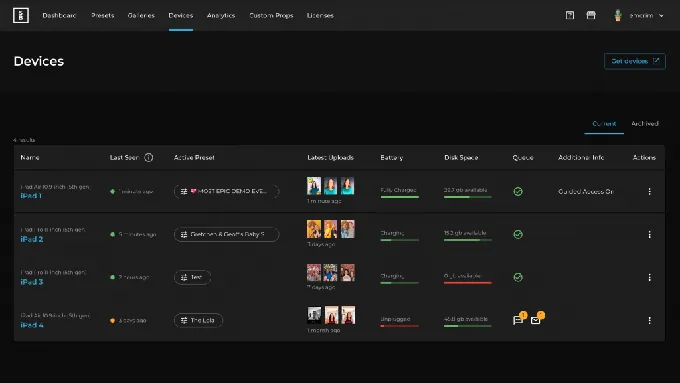
The Devices page on the Simple Booth web dashboard extends this to multi-booth businesses. Operators can monitor all iPad booths in real time, checking which preset runs on each device, previewing latest uploads, and tracking battery level, disk space, and upload queue status. Remote preset switching lets operators adjust configurations without being on-site, which matters for those juggling multiple events, teams, or locations.
Source: Simple Booth
Onboarding follows a numbered step-by-step Start Guide covering plan selection through event-day operations. The help center contains 148+ articles across 10 collections plus a separate 5.0 Transition Guide with an AI assistant for natural-language documentation queries. Support is available 7 days a week, with tiers scaling by plan: email and chat on Lite through Plus, phone support on Pro, and a dedicated account manager on Select.
“I knew nothing about photo booths when we started,” says Amore Entertainment, who launched during COVID and scaled to multiple Simple Booth units. (Simple Booth)
Both platforms are approachable for non-technical users, but they solve different setup problems.
PicPic Social requires more initial configuration because it integrates with existing hardware and runs across multiple components. Simple Booth is simpler to deploy because it controls the entire stack with organized, visual settings, and its guest-facing experience means operators spend less time troubleshooting and more time booking events.
Gallery and post-event delivery
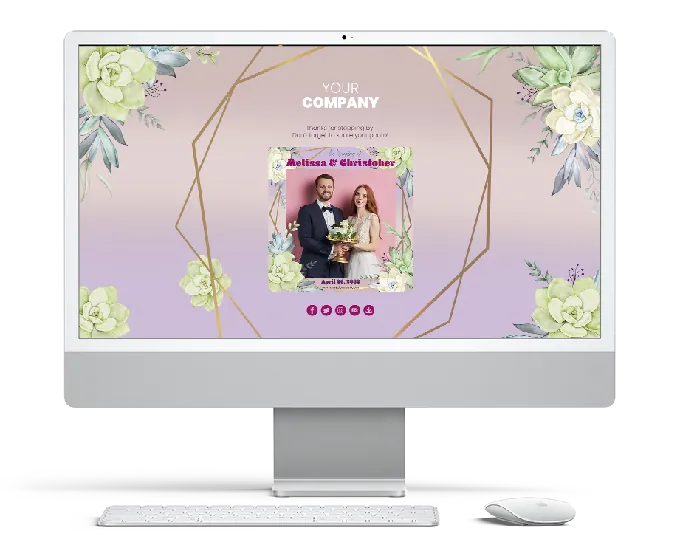
PicPic Social’s Web Gallery auto-populates during events as photos are captured, with unlimited file hosting on all plans. Galleries are brandable with custom logos, colors, and navigation links.
The 1 Click Delivery feature sends the complete gallery to the client in a single action. Gallery access can be gated behind a data-capture form, turning post-event visitors into leads. Content moderation lets operators screen photos before they go public. Grey Label and White Label links ensure the operator’s brand (not PicPic Social’s) faces the client.
Source: PicPic Social
Simple Booth’s online galleries generate automatically for each event. Gallery privacy levels (Public, Unlisted, Private) control access. Galleries can be customized with titles, hashtags, color themes, header images, interstitial ads, and external links.
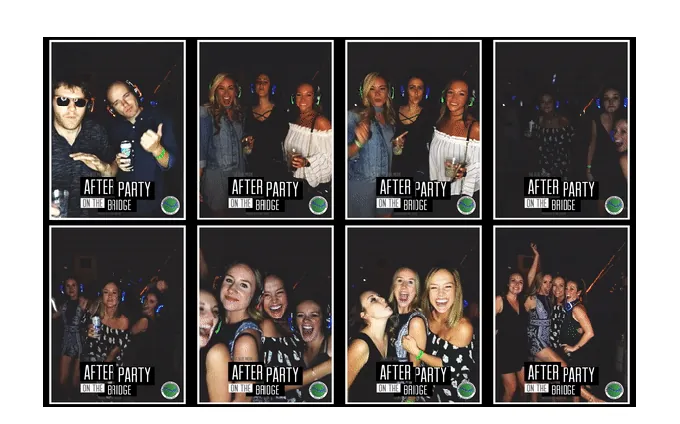
Any public gallery can become a Live Feed for real-time display on a TV or projector, activated with a single tap. This dual-purpose gallery-and-slideshow function eliminates the need for separate slideshow software. The Live Feed respects individual upload privacy settings, so guests who opt out of public sharing remain private.
Source: Simple Booth
PicPic Social also offers a slideshow through PicPic Slide, which combines a looping display with QR-based file delivery in a single Windows application. The slideshow supports advertisement rotation with dedicated ad slots for sponsor content and Chromecast output for wireless TV display.
Both platforms handle post-event delivery well. PicPic Social’s white-label gallery links and 1 Click Delivery work well for operators who resell services to clients. Simple Booth’s Live Feed and interstitial ad support add real-time event engagement that extends beyond post-event delivery.
Simple Booth vs PicPic Social: Which should you choose?
The choice between these platforms depends on what you already own, how you run events, and where your business is headed.
Choose PicPic Social if:
- You already run Windows-based 360, DSLR, or mirror photo booths and want to keep that hardware
- Offline file delivery at venues with no internet is a frequent requirement
- You need white-label branding at an accessible price point ($74/month)
- Your event volume fits the 5, 15, or unlimited events-per-month tiers
- You want free unlimited SMS delivery in the US and Canada without managing Twilio
- You prefer a per-event purchasing option ($99.99) for irregular booking schedules
- CRM integrations and marketing automation are not current priorities
Choose Simple Booth if:
- You want a system you can set up in under a minute and run unattended at drop-off events
- You need in-app customization with the Layout Designer, AI photo effects, and background blur
- You’re starting out or running a photo booth side hustle and want to begin at $14.99/week with room to scale
- You want a single-vendor system covering hardware, capture, delivery, and analytics with no third-party dependencies
- Lead capture, CRM integration, and marketing analytics drive your business decisions
- You need straightforward staff training as your team grows
- WhatsApp delivery matters for international events
Start with Simple Booth’s 7-day free trial to experience the full HALO app workflow.
Treetop Golf built 150,000 unique email addresses across locations using Simple Booth’s lead capture system. (Simple Booth)
These platforms reflect different philosophies about how photo booth software should work.
PicPic Social builds on the assumption that operators have already invested in capture hardware and need an affordable sharing and delivery layer. Simple Booth builds on the assumption that controlling the entire experience while keeping it simple to operate produces a better result for both operators and their clients.
Your choice depends on where you are in your business.
Operators with established Windows-based booth setups will find PicPic Social slots in without disruption. Operators starting fresh, simplifying their setup, or prioritizing ease of use alongside first-party data capture and AI capabilities will find Simple Booth’s approach worth the investment. Both platforms are built by people who understand the photo booth business firsthand, and both continue to ship updates to their product lines.
Simple Booth vs PicPic Social FAQ
What is the main difference between Simple Booth and PicPic Social?
Simple Booth is an iPad photo booth platform that handles capture, branding, delivery, and analytics in one turnkey system, with optional HALO ring-light hardware for professional lighting. PicPic Social is a software-only sharing and delivery platform that works with existing Windows-based photo booth hardware, monitoring any capture software’s output folder to give guests a kiosk for retrieving and sharing their content.
Which platform works with 360 photo booths?
PicPic Social was built with 360 booth operators in mind. Its offline QR sharing mode transfers large video files directly from the booth PC to guests’ phones over a local network with no internet required. Simple Booth does not support 360 booth hardware directly, though its HALO app produces GIFs, boomerang clips, and video on iPad.
Can I use PicPic Social with Simple Booth hardware?
PicPic Social’s Sharing Station works with Windows-based photo booth software by monitoring a Watch Folder. Since Simple Booth runs exclusively on iPad with its own delivery system, the two platforms are not designed to work together. Each operates as a self-contained solution for its hardware ecosystem.
Which platform is more affordable for a single-booth operator?
For a single device, costs are comparable at the lower tiers. Simple Booth’s Lite plan starts at $14.99/week (~$72/month) with unlimited events, making it one of the most accessible entry points for new operators. PicPic Social’s Starter plan is $74/month for 5 events.
Simple Booth’s Core plan is roughly $49/month, also with no event limits. PicPic Social includes white-label branding and all features at every tier, while Simple Booth requires the Plus plan ($99/month) for custom branding and the Pro plan ($149/month) for lead capture. The right comparison depends on which features your business needs now versus as it grows.
Does either platform require the internet to operate?
PicPic Social’s QR Sharing Direct mode works 100% offline by transferring files over a local Wi-Fi network with no internet connection. Simple Booth’s HALO app queues sessions in an offline upload queue and delivers them when connectivity returns, but AI effects require an active internet connection. AirDrop sharing on Simple Booth also works without the internet.
Which platform has better AI capabilities?
Simple Booth offers more advanced AI features, including text-prompt-based photo transformations using three Nano Banana AI models, AI-generated layout images, and a Guest Input system that personalizes AI outputs per participant. PicPic Social offers AI background removal at $0.20 per photo and AI image generation through Virtual Credits, but its AI feature set is narrower.
Which platform supports international events better?
Simple Booth added WhatsApp delivery in November 2025, supports multi-language Virtual Booth localization in nine languages, and runs on dual-voltage hardware (110V-240V) for international use. PicPic Social’s free SMS is limited to the US and Canada, with international texts requiring Virtual Credits at 4 to 33 credits per message depending on the country. PicPic Social’s documentation is available only in English.
Do I need to buy hardware to use either platform?
PicPic Social is software-only and requires no proprietary hardware. It works with your existing Windows-based booth setup. Simple Booth sells optional HALO hardware kits starting at roughly $2,090, though the iPad app works on any compatible iPad without the HALO chassis. The Virtual Booth products from both platforms are browser-based and require no hardware at all.
Keep reading
 Showdowns
Simple Booth vs Darkroom Booth: Which Photo Booth Software Fits Your Business in 2026?
iPad turnkey vs Windows DSLR veteran. Simple Booth or Darkroom Booth?
 Showdowns
Simple Booth vs Flassh: Which Photo Booth Platform Fits Your Events in 2026?
Integrated system vs speedy setup. Simple Booth or Flassh?
 Showdowns
Simple Booth vs LumaBooth: Which Photo Booth Software Fits Your Business in 2026?
Turnkey hardware vs budget cross-platform app. Simple Booth or LumaBooth?