Flassh Review 2026: Is This Photo Booth App Right for Your Events?

Flassh promises something appealing: turn the iPhone or iPad you already own into a photo booth, no extra hardware required. The app has powered 10,000+ events since 2016, attracting clients from DIY wedding hosts to big brands. Its pitch is simplicity: download the app, configure an event, and go live in under 10 minutes.
To write this Flassh review, we analyzed it in detail. It’s a good fit if:
- You want a photo booth that runs on your iPhone or iPad with no extra hardware
- You’re hosting a one-time event and want pay-per-use pricing at $29
- You value fast setup and simplicity over feature depth
- You need photo capture, instant sharing, and an online guest gallery
- You’re a small photo booth operator looking to cut setup time and post-event labor
However, Flassh might not be the best choice if:
- You need GIFs, boomerangs, video capture, or AI photo effects
- Your events require offline operation at venues with unreliable WiFi
- You want built-in lead capture forms with CRM or email marketing integrations
- You need a dedicated hardware system with ring lighting
- You’re running brand activations that require analytics, moderation, or compliance tools
In this case, consider Simple Booth: a photo booth platform that pairs a subscription-based iPad app with HALO ring-light hardware, plus a browser-based Virtual Booth for remote activations. With AI effects, a layout designer, multi-channel photo delivery (SMS, email, QR, AirDrop, WhatsApp), lead capture with 87%+ opt-in rates, and compliance features, Simple Booth goes well beyond photo capture into a marketing tool for events of any scale.
We’ve included a detailed look at Simple Booth later in this Flassh review as the natural upgrade for anyone who needs more than basic photo booth functionality. If you’re ready to see what a full photo booth platform offers, you can start your free trial of Simple Booth here.
What is Flassh?
Source: Flassh
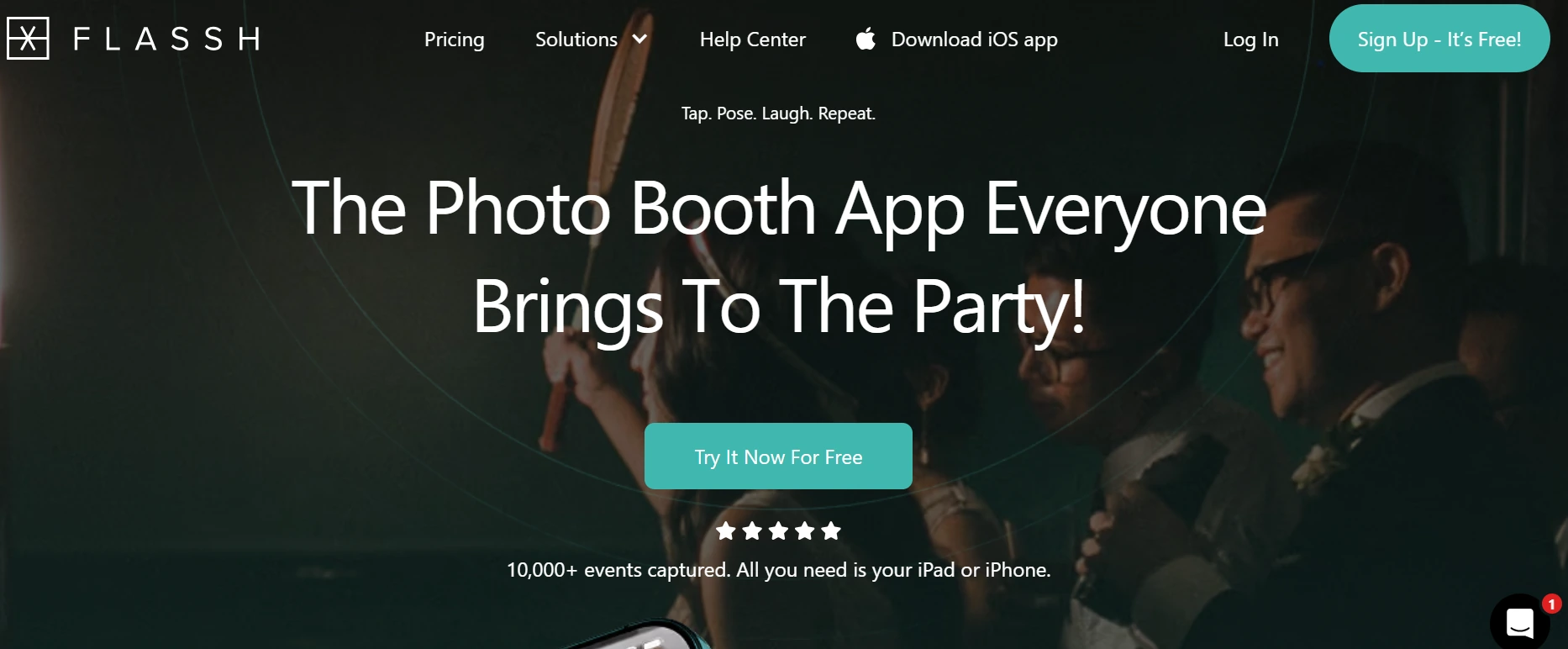
Flassh is an iOS photo booth app that turns any iPhone or iPad into a self-service photo booth. Founded in 2016 and run by a small team of 2 to 10 employees out of Detroit, MI, the app was built on the premise that dedicated photo booth hardware and legacy desktop software were unnecessary barriers for most event hosts.
The platform serves several audiences: DIY party hosts who want a booth for a birthday or wedding, professional photographers adding a photo booth revenue stream to their event work, event organizers looking for audience engagement, and photo booth companies switching from legacy Windows-based software.
Flassh focuses on three things: fast setup, instant photo sharing through online galleries, and a low barrier to entry. The app is free to download, with paid activation per event ($29) or a $99/month subscription for unlimited use. For operators who need higher image quality, Flassh also supports Canon and Nikon DSLRs connected via USB to a Windows tablet.
Flassh Pros & Cons
| Pros | Cons |
|---|---|
| Runs on iPhone or iPad with no extra hardware | Requires a live internet connection at all events |
| 10-minute setup with no technical skills needed | No GIF strips, boomerangs, or video capture |
| Permanent free tier for unlimited test events | Only Canon and Nikon DSLRs supported (no Sony) |
| Cloud-based: galleries available instantly, no post-event uploads | 24-hour event window; multi-day events cost $29/day |
| Pay-per-event pricing ($29) suits occasional users | No built-in lead capture or CRM integrations |
| Canon/Nikon DSLR support for professional image quality | Very limited third-party review coverage |
| Non-destructive editing presets and overlays | No offline fallback mode |
| Kiosk Mode built into the iOS app | Limited feature set compared to dedicated platforms |
Flassh Review: How It Works & Key Features
Photo Booth Capture: Flassh turns any iOS device into a self-service photo booth with optional DSLR support.
Flassh’s capture system is entirely self-service. Guests tap the screen, a configurable countdown begins, and the app captures and previews photos automatically. The default settings are 3 photos per session, a 3-second countdown, and a 3-second preview, with each parameter adjustable from 1 to 10.
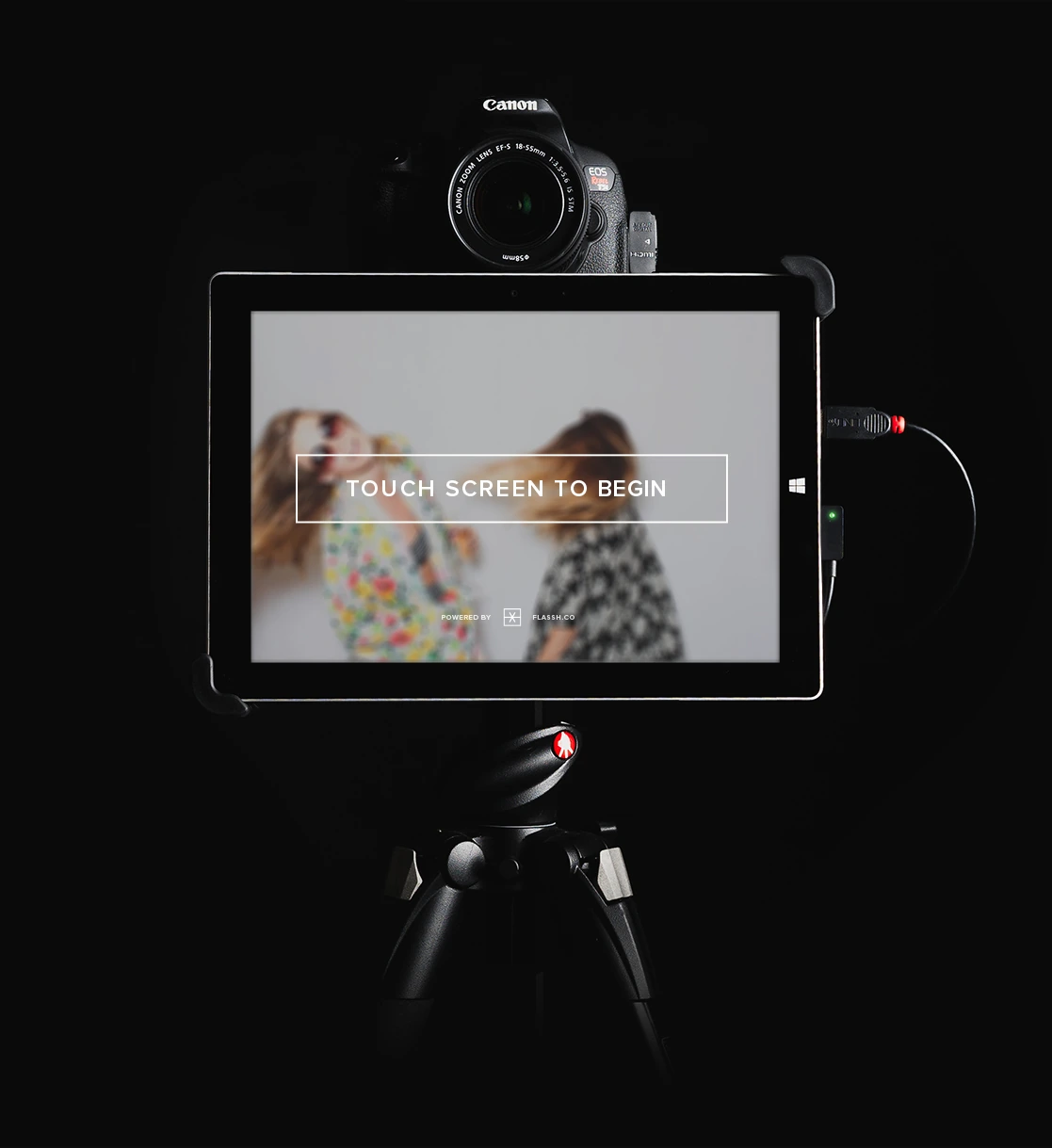
There are two hardware paths. The simpler route uses the iPhone or iPad’s front-facing camera (no cables, no accessories, no configuration beyond the app itself). The professional route connects a Canon or Nikon DSLR to a Windows touch-screen tablet via USB, using two companion apps (Flassh Connect and Flassh Booth) to handle camera communication and the guest-facing interface. Captured images are resized to 2560px wide and uploaded immediately.
 *Source: [Flassh](https://www.flassh.co/solutions/photographers)*
 The Canon compatibility list is extensive, spanning models from the EOS 40D through the EOS 4000D/Rebel T100. Nikon support includes the D3 through D7200 range. Sony and other camera brands are not supported, a notable gap given Sony’s growing share of event photography. The App Store description notes that “additional camera brands will be supported soon”, but gives no timeline.
Flassh publishes recommended camera settings for flash, indoor ambient, and outdoor ambient scenarios, which helps operators who aren’t professional photographers. The team also recommends switching to manual focus before events to prevent autofocus failures with flash.
For operators who want to test before committing, the free tier allows up to 25 test photos per event, enough to validate camera connections, overlays, and lighting at the actual venue.
Instant Sharing & Kiosk Mode: Photos are available to guests the moment they’re taken, with a locked-down sharing station option.
Traditional photo booth workflows leave guests empty-handed until someone manually exports and distributes files after the event. Flassh solves this with a cloud-based approach: photos appear in the online gallery immediately after capture, with no manual publish step.
 *Source: [Flassh](https://www.flassh.co/)*
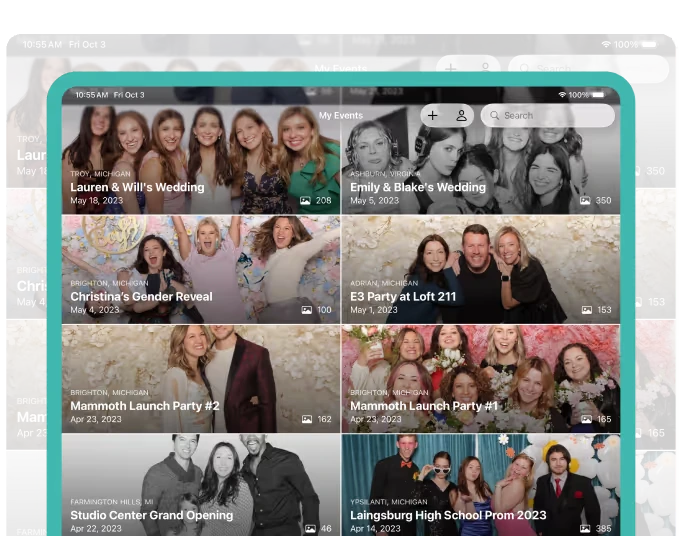
 The Flassh iOS app (free on the App Store) lets account owners and guests browse, download, email, and create animated GIFs or short MP4 videos from selected photos on the device. Physical prints are also possible via AirPrint to any compatible printer on the same WiFi network.
For unattended setups, Kiosk Mode locks an iPad into the current event view, preventing guests from editing or deleting photos, navigating away, or accessing the operator’s account. It activates with a single long-press on the navigation bar and can be combined with Apple’s iOS Guided Access for full OS-level lockdown.
In Kiosk Mode, sharing is restricted to email only (sent from Flassh’s servers, not the device’s mail client), and the screen stays permanently bright.
Online Photo Galleries: Every event gets a hosted web gallery accessible from any device without an app download.
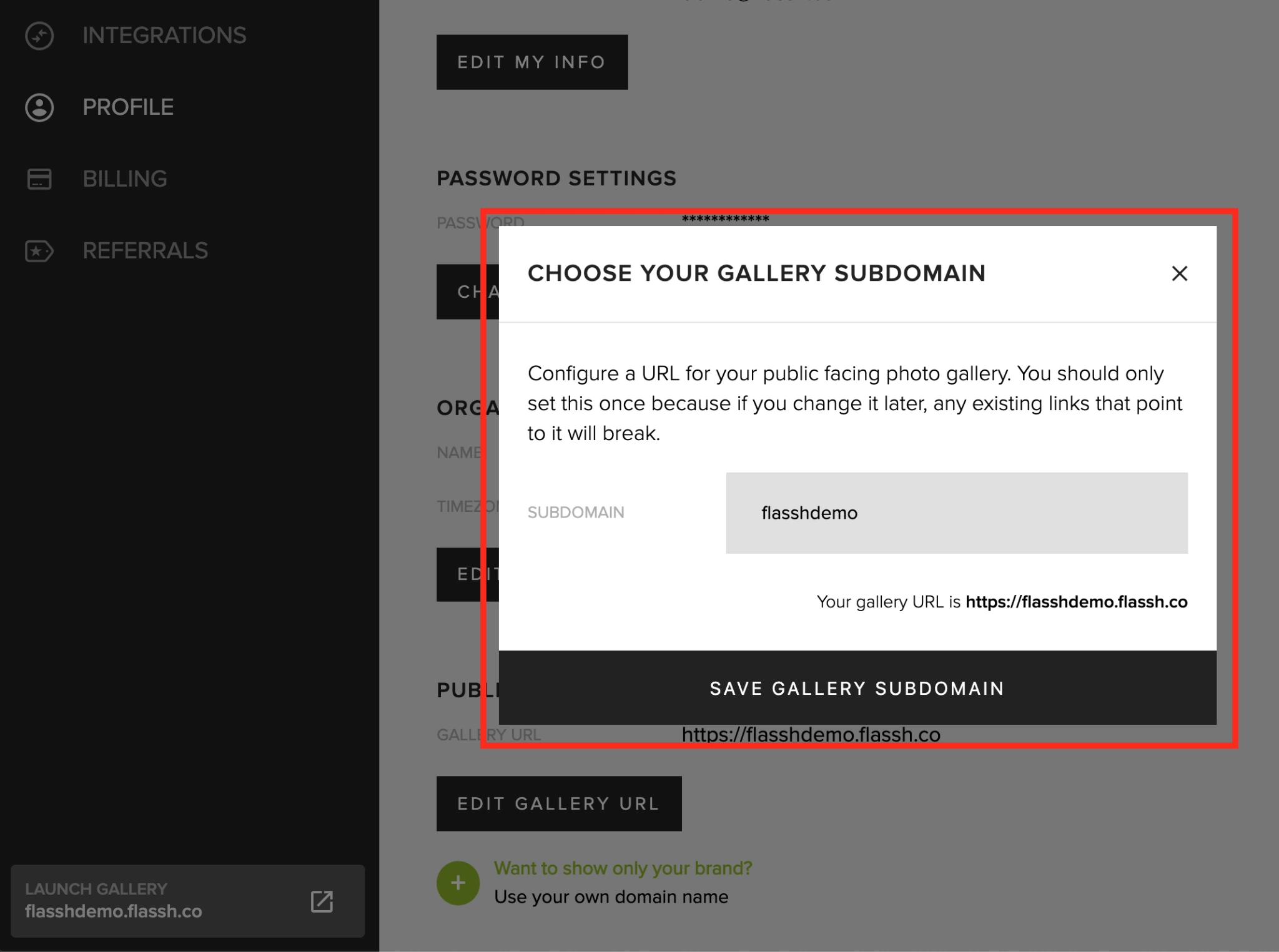
Each Flassh account receives a custom subdomain (e.g., yourname.flassh.co), and every live event’s photos publish there in real time. Guests access the gallery from any phone or computer by visiting the URL. No app, no login, no QR code.
Source: Flassh
The gallery system includes several useful controls. Events can be password-protected or hidden from public discovery. Operators can upload PNG watermarks with adjustable size, alignment, offset, and opacity, and because watermarking is non-destructive, it can be changed after the event. A downloadable photo archive is available per event via an emailed link.
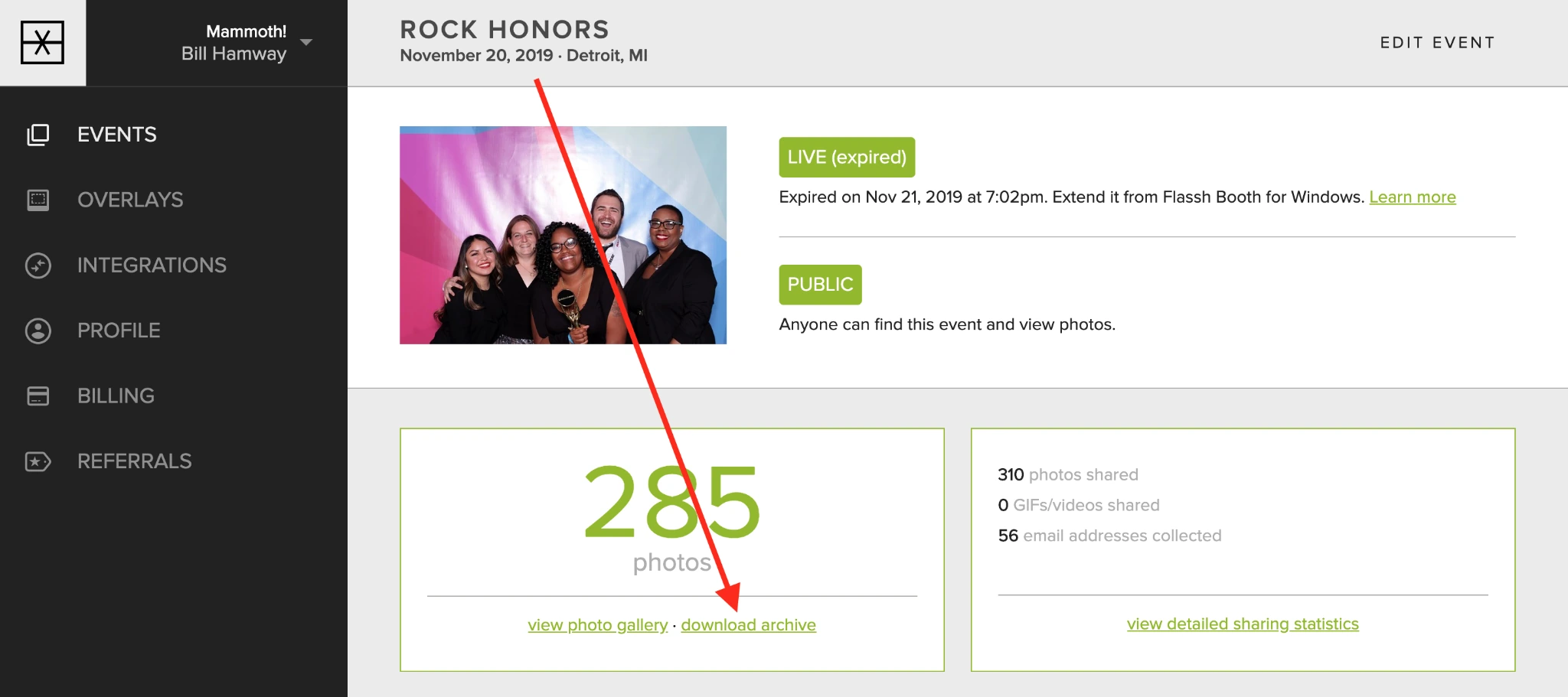
Source: Flassh
Photo retention depends on the plan: 6 months on the free tier, 2 years on the per-event plan, and unlimited retention on the $99/month subscription. Pro accounts can also map a custom domain for white-label gallery delivery.
The only native third-party integration is Dropbox, which syncs photos in real time as they’re captured. The sync is scoped to an isolated “Flassh” folder, so the integration doesn’t touch the rest of your Dropbox. Beyond Dropbox, the documentation suggests using Zapier as a bridge to route photos to other services, but there is no native Flassh Zapier app.
Event Management & Customization: Each event is an independent container with its own branding, privacy controls, and capture settings.
Flassh organizes every photo session under a named, configurable event. Events can be created from the web admin panel, the iOS app, or the Windows booth application. Each event has its own name, date, privacy settings, shooting parameters, editing preset, and graphic overlay.
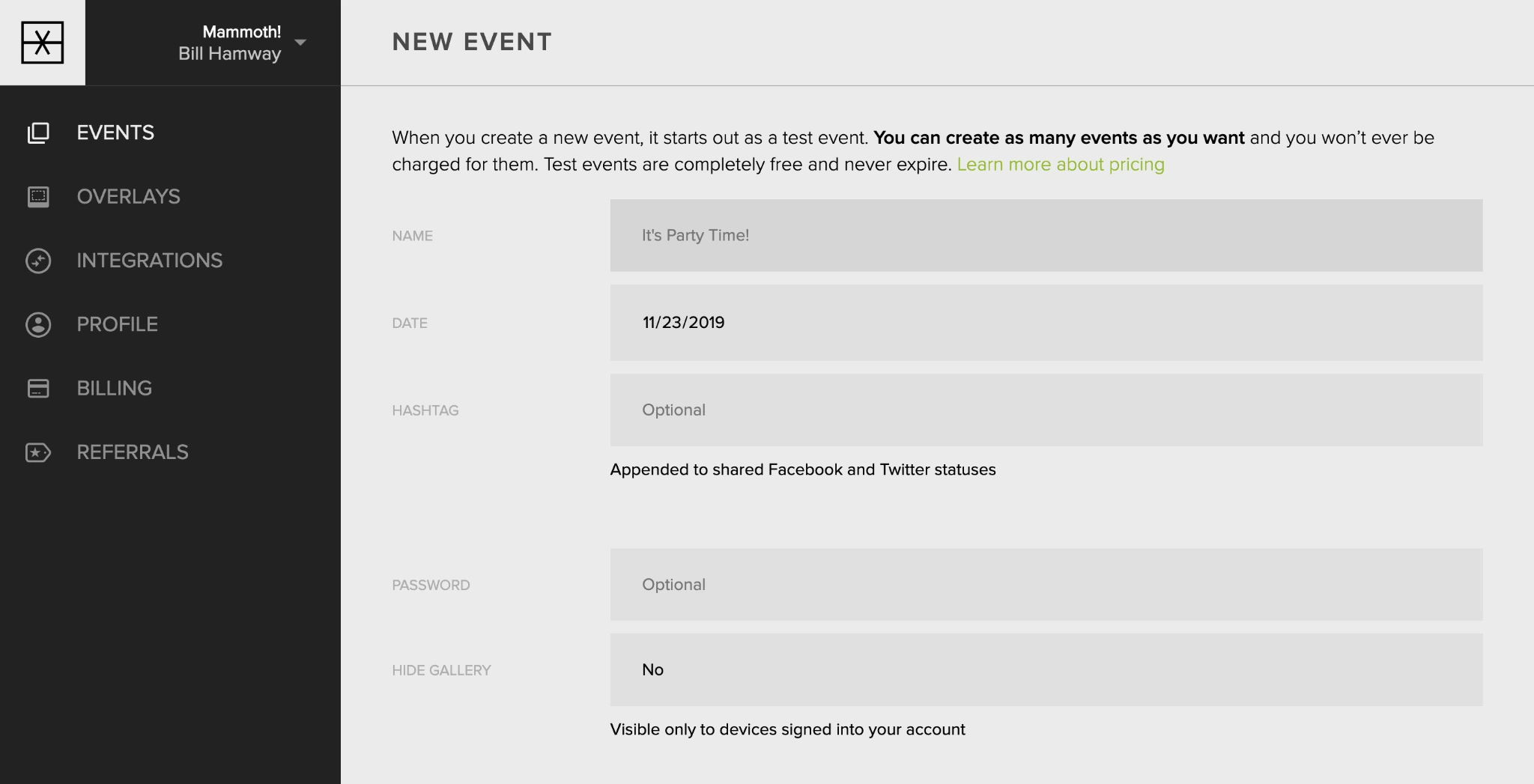
Source: Flassh
Five non-destructive editing presets are available (None, Enhanced, Enhanced Black & White, Film, Film Black & White). Because Flassh retains the original image and creates versioned copies, operators can change or remove a look after the event without losing data.
Graphic overlays (PNG files up to 2 MB) can be uploaded to an account-level library and assigned per event, with adjustable scale, corner alignment, offset, and opacity.
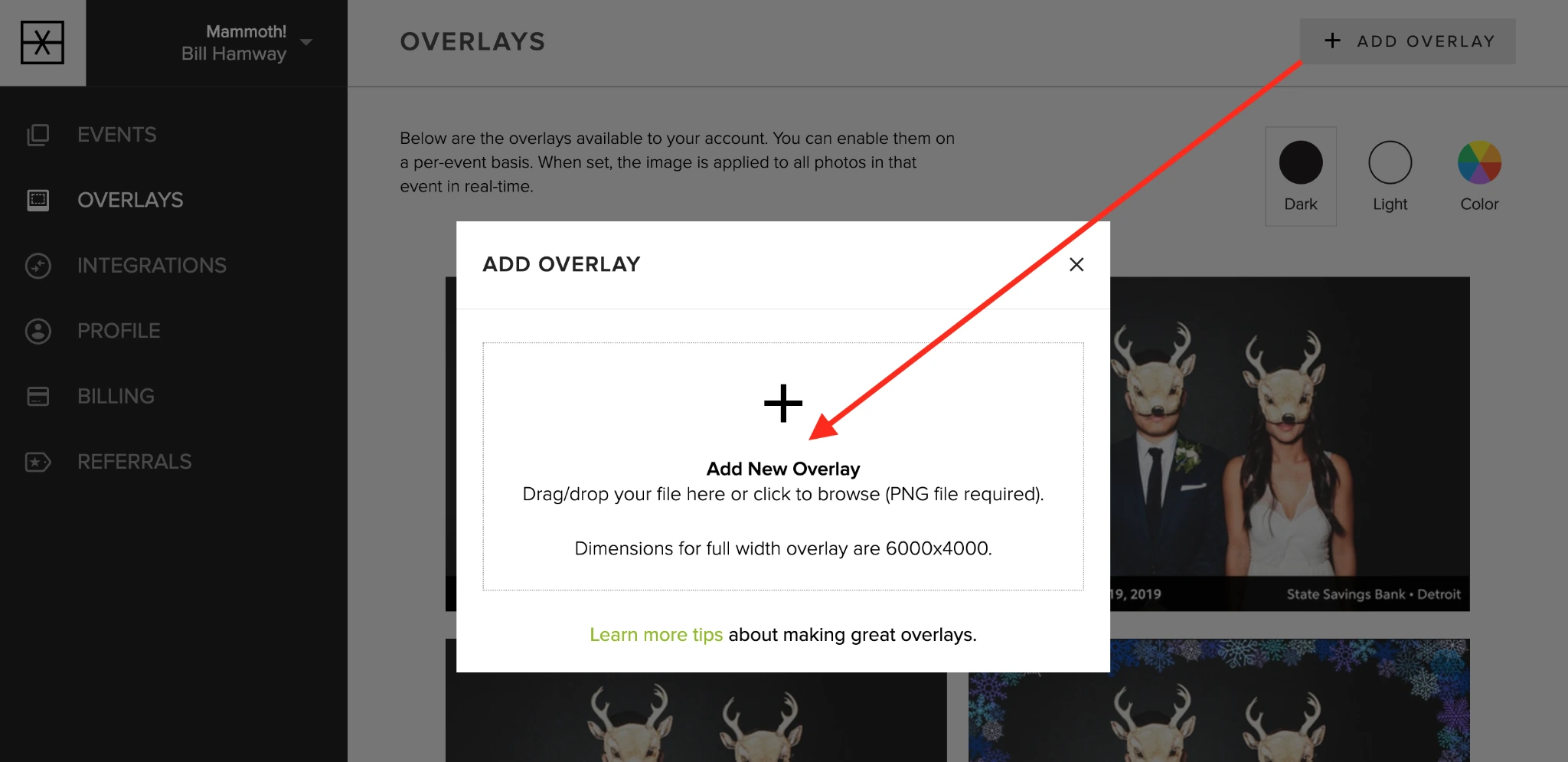
Source: Flassh
The prompt screen text is customizable in any language, useful for international events.
Privacy controls are layered: events can be password-gated and/or hidden from public search independently, so organizers can keep corporate event photos private while still allowing on-site sharing.
Pricing Structure: Flassh offers a permanent free tier, pay-per-event credits, and a flat monthly subscription.
Flassh’s pricing is straightforward:
Free (Setup Mode):
- Unlimited test events, up to 25 photos each
- Events are not publicly accessible
- No credit card required
- 6-month photo retention
Per-Party Pass ($29 per event):
- One live event for a 24-hour window with unlimited photos
- Online guest gallery, downloadable archive, Dropbox sync
- 2-year photo retention
- Credits never expire and are non-refundable
Unlimited Celebrations ($99/month):
- Unlimited events and photos across unlimited devices
- Audience email capture (CSV export) and sharing analytics
- Flassh branding removed from booth interface, gallery, and emails
- Custom domain support
- Unlimited photo retention while subscribed
The $99/month plan is month-to-month with no minimum commitment. If an operator switches from per-event credits to the subscription, unused credits convert to account balance and apply against the first month’s payment. One cost to watch: multi-day events on the per-event plan require a new $29 credit each day, since each activation lasts 24 hours.
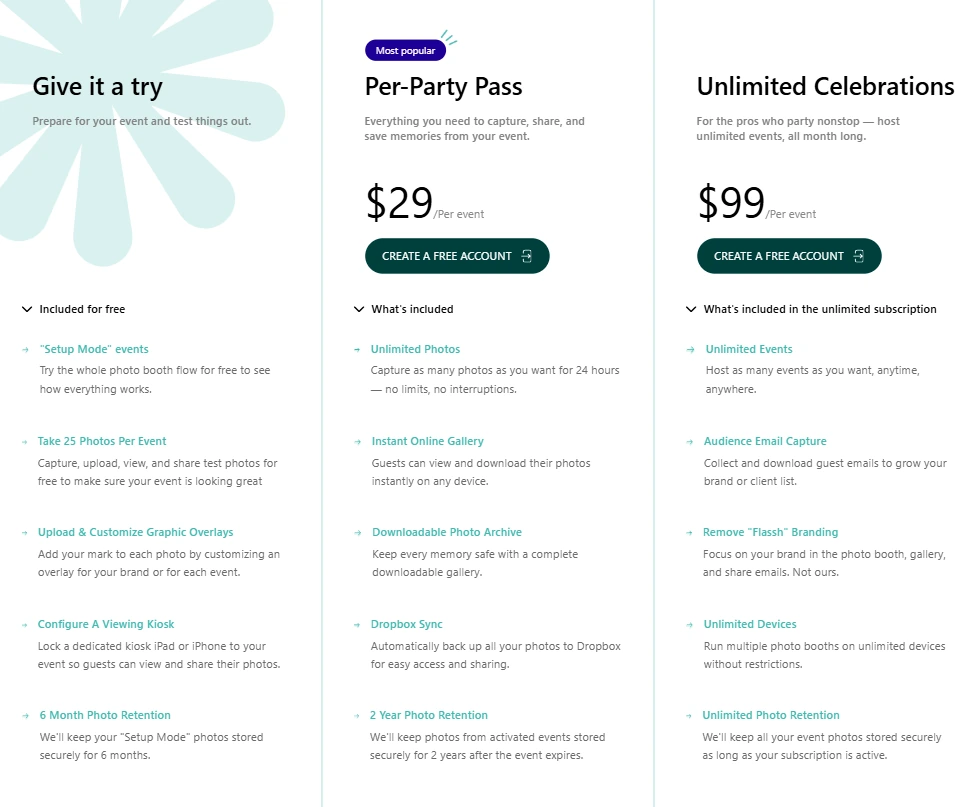
Source: Flassh
Where Flassh Falls Short
Flassh delivers on its promise of simplicity, but several limitations surface for anyone moving beyond basic photo capture. These are less failures than natural consequences of building for simplicity above all else.
Internet dependency with no offline fallback. Flassh requires an active internet connection to operate. At venues with unreliable WiFi (warehouses, rural estates, basements, tented outdoor events), this becomes a single point of failure. The documentation suggests a mobile hotspot as backup, but the app has no offline queue that stores photos and syncs them later.
For event professionals whose reputation depends on reliability, this is a real operational risk.
Limited capture modes. Flassh captures still photos only. There are no animated GIF strips, boomerang clips, or video recording options. For brand activations and social-media-driven events where guests expect shareable motion content, this limits the platform’s usefulness. The iOS app can compile selected stills into GIFs and short videos after the fact, but that’s not the same as native capture.
No lead capture or marketing integrations. The $99/month plan includes guest email collection, but the data exports only as a CSV download. There are no direct integrations with email marketing platforms like Mailchimp, Klaviyo, or HubSpot. For event organizers and brand marketers who use photo booths as a lead generation channel, this manual step adds friction to every event.
Sony camera exclusion. The supported cameras page states that Sony and other non-Canon/Nikon brands are not supported. Sony’s Alpha mirrorless cameras have grown popular among event photographers, making this a practical barrier for a significant segment of professional users.
No API or developer access. Flassh does not offer a public API, webhooks, or programmatic access. The platform is entirely self-contained, meaning it cannot send data to or receive instructions from external systems. For operators who need photo booth data to feed into larger event or marketing systems, this is a hard limitation.
Thin independent review coverage. Flassh does not appear on B2B review platforms like G2 or Capterra. The App Store listing carries a 4.7-star rating from only 3 ratings. For buyers doing due diligence, the near-absence of independent reviews makes evaluation difficult.
These limitations reflect a platform built for the solo event host or small operator who prioritizes setup speed above all else. But they create a clear gap for businesses that need their photo booth to capture leads, produce varied content formats, work reliably offline, and integrate with the rest of their marketing stack.
Top Flassh Alternative for Growing Event Businesses: Simple Booth
Source: Simple Booth
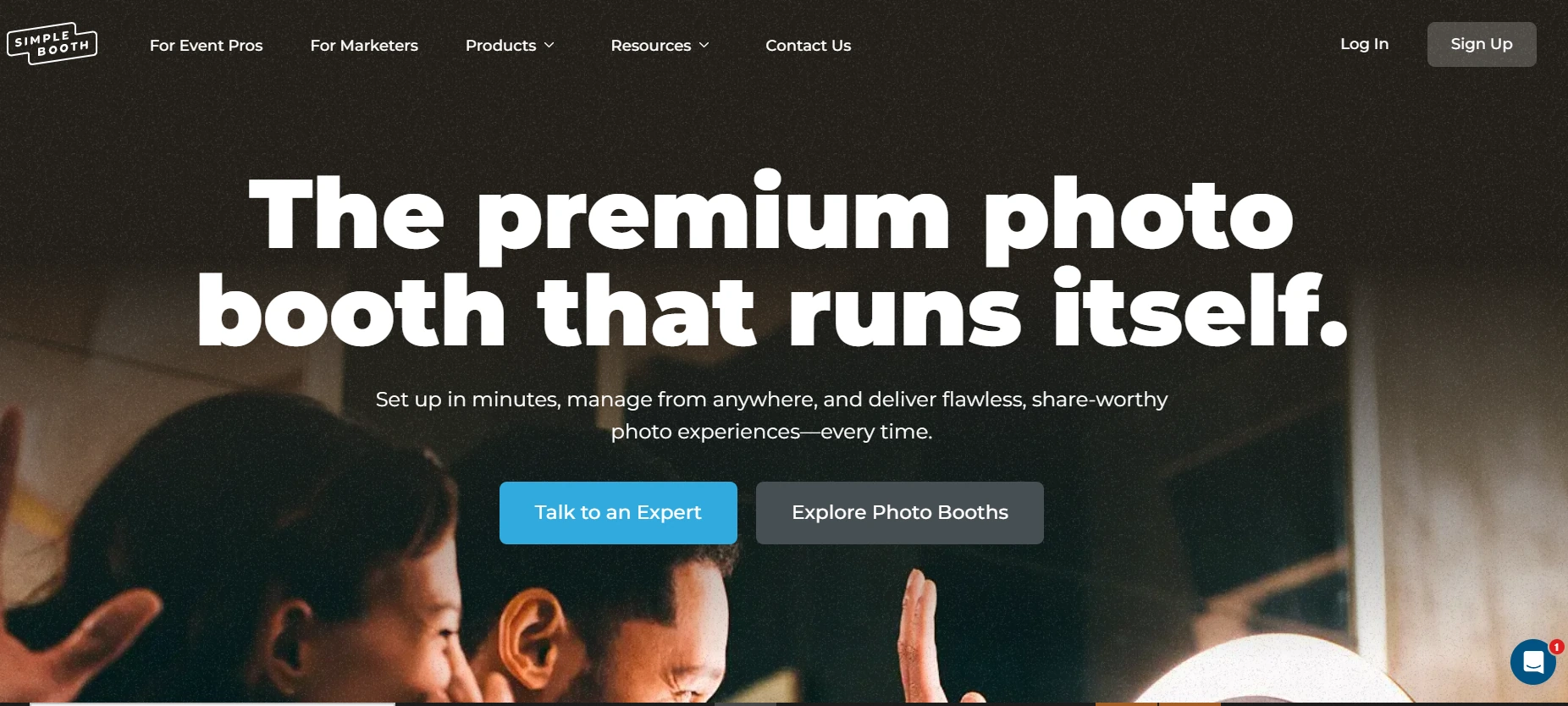
Simple Booth addresses Flassh’s limitations with a broader photo booth platform: hardware designed for photo booths, an iPad app, a browser-based Virtual Booth, AI effects, lead capture, and compliance tools. In development since 2012 as one of the first photo booth apps for iPad, Simple Booth now serves 30,000+ customers globally with 40 million+ moments captured and a 4.7-star App Store rating from 2,400+ reviews.
Purpose-Built Hardware with Studio-Grade Lighting: The HALO kit pairs a machined aluminum ring light with the iPad for consistent, professional photo quality.
Where Flassh relies on whatever lighting exists at the venue, Simple Booth’s HALO hardware solves lighting from the ground up. The chassis is machined from a single billet of anodized aluminum with a patented ring-light system housing 112 LEDs producing up to 2,100 lumens, rated for 50,000 hours of operation.

The ring-light design provides even illumination for groups standing 6 to 8 feet from the camera, solving the dim, inconsistent results that come from iPad-camera-only setups in low-light venues.
The iPad snaps into the HALO body via a tool-less faceplate, and a concealed USB-C cable keeps it charged all night. The full Event Kit (including a selfie stand and waterproof rolling travel case) weighs 49 lbs and sets up in under one minute. For venues, a wall-mounted Install Kit provides a permanent, unattended option.
The hardware also supports Canon DSLR and mirrorless camera connections (Core tier and above) via wired USB and wireless WiFi. Operators get professional image quality through the same HALO workflow, without needing a separate Windows setup like Flassh requires for DSLR use.
Kurt Nielson Photography shared that their HALO setup “paid for itself pretty quickly. Now it’s just extra money coming in.” (Simple Booth)
Expanded Capture Modes and AI Effects: Still photos, GIFs, boomerangs, video, and AI-powered transformations from one app.
Flassh captures still photos. Simple Booth captures still photos (single and multi-frame), animated GIFs, Live GIFs, Rebound boomerang clips, and full-length video from 5 to 120 seconds. This range of formats matters for brand activations where social-media-ready motion content drives sharing.
Image previews in the app render up to 12x faster thanks to rendering optimizations, and all capture features (filters, effects, background blur) work together across stills, GIFs, video, DSLR integration, and offline mode, so operators don’t need to worry about compatibility rules.
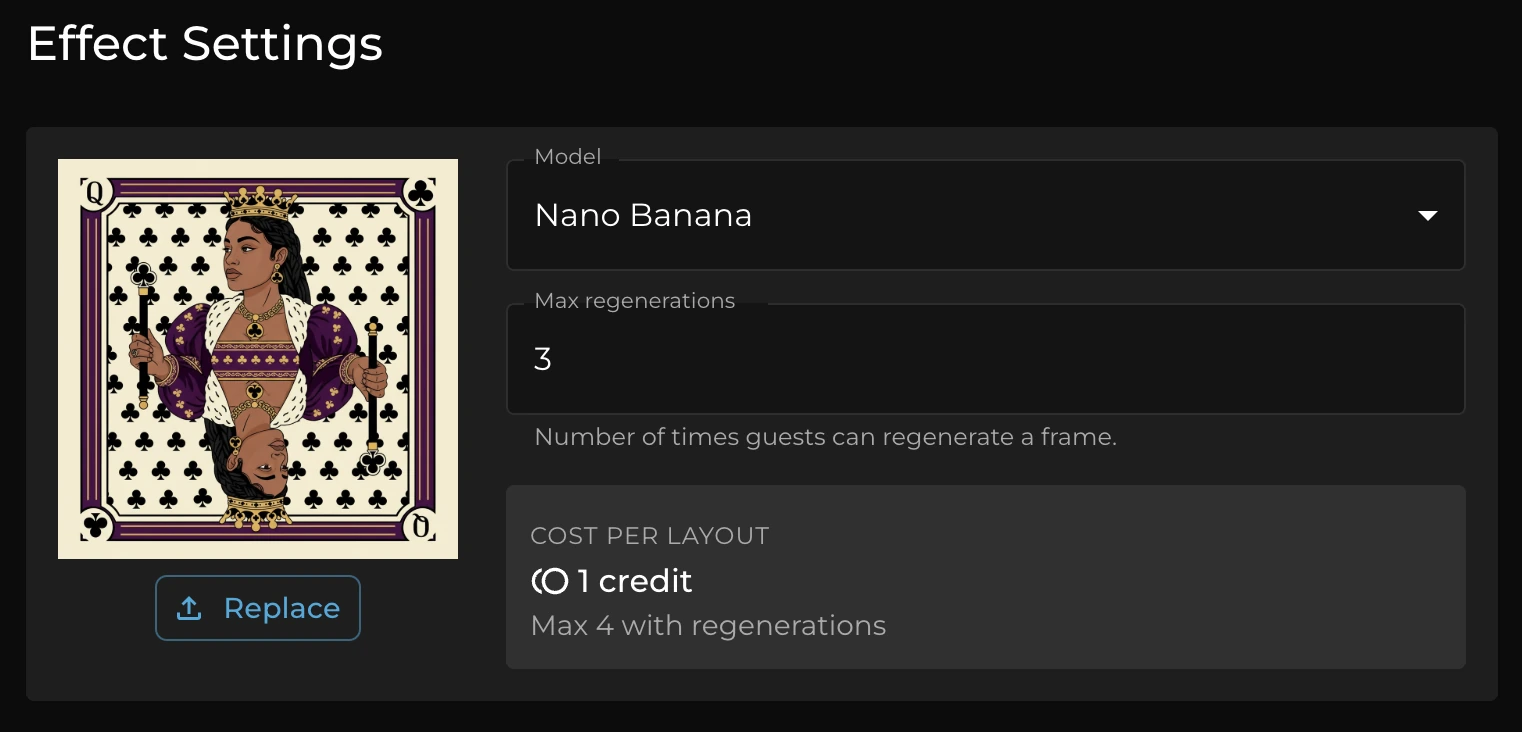
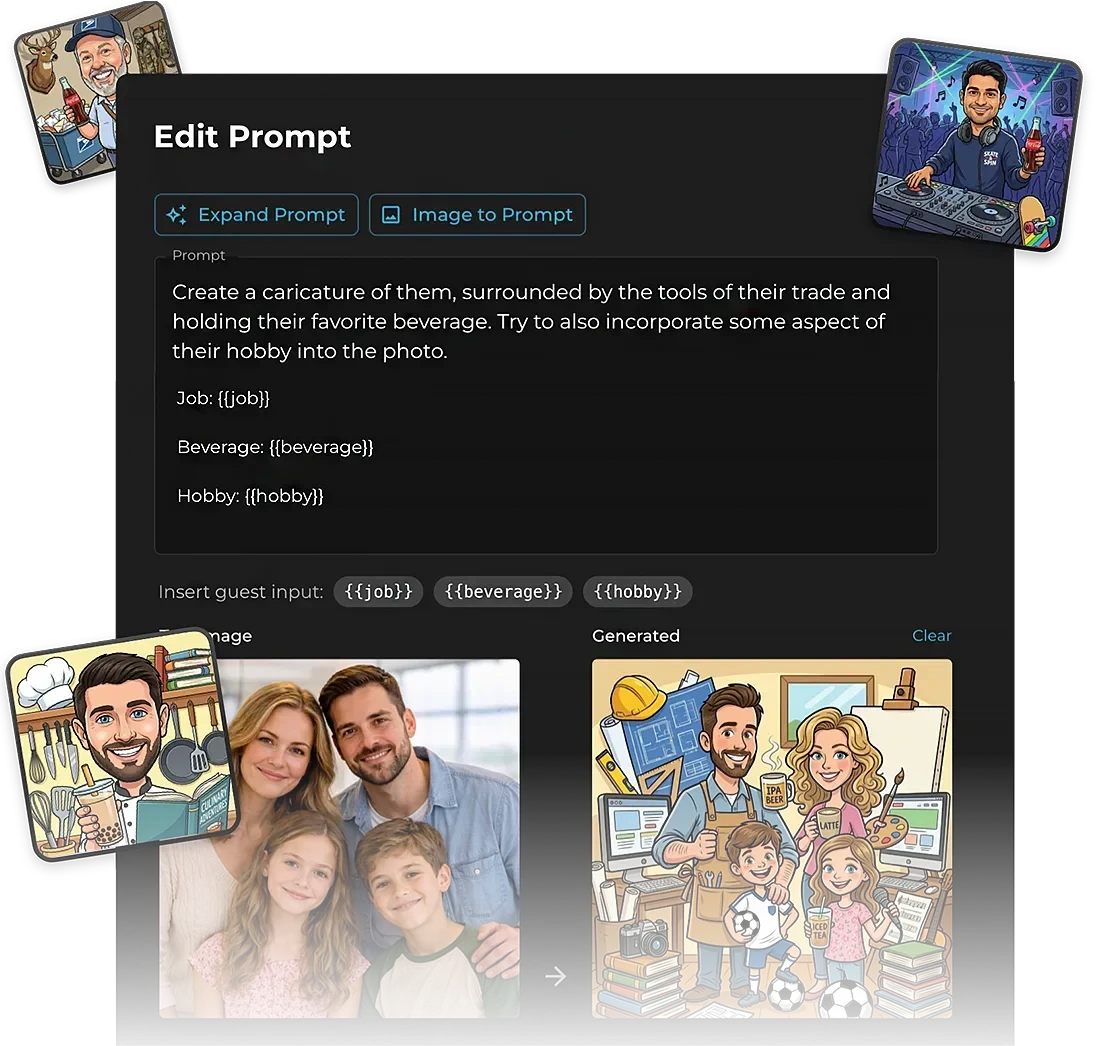
Beyond standard capture, Simple Booth’s AI Photo Booth adds something Flassh doesn’t offer. Three Nano Banana AI models transform guest photos using text prompts, turning a standard portrait into an oil painting, comic book panel, or any custom style the operator defines.
Source: Simple Booth
The system preserves guest likeness regardless of how dramatic the transformation, and operators can test prompts outside of booth mode without consuming credits.
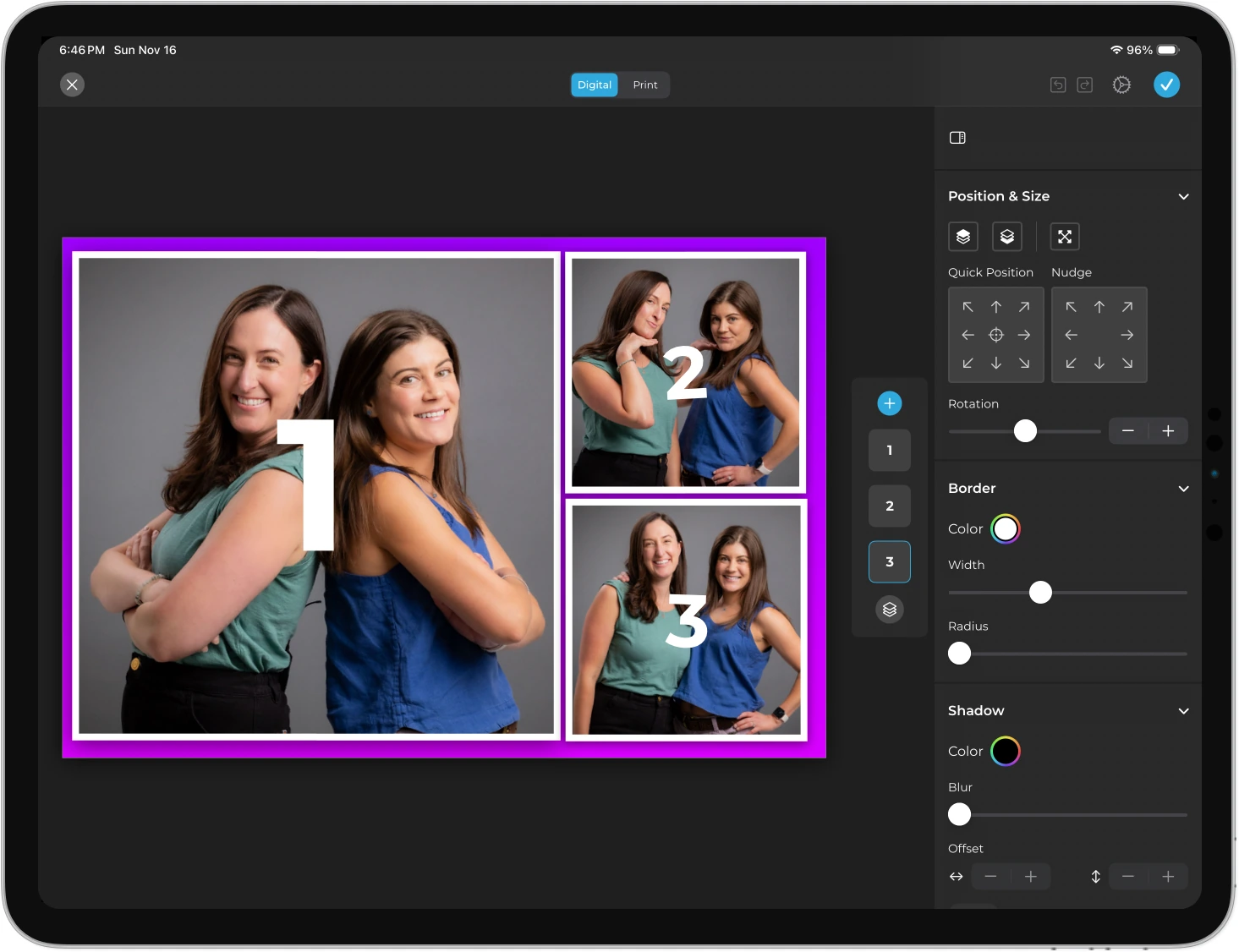
The Layout Designer (introduced in HALO 5.0) is a full in-app design tool with layers, fonts, gradients, QR code embedding, and multi-layout support, eliminating the need for Photoshop or other external design software.
Source: Simple Booth
Operators can assign a unique AI prompt to every individual frame in a multi-frame layout, creating sequential narrative strips.
Lead Capture and Marketing Analytics: Simple Booth turns every photo session into a measurable marketing interaction.
This is the widest gap between the two platforms.
Flassh’s email collection (available only on the $99/month plan) exports as a CSV file with no integrations.
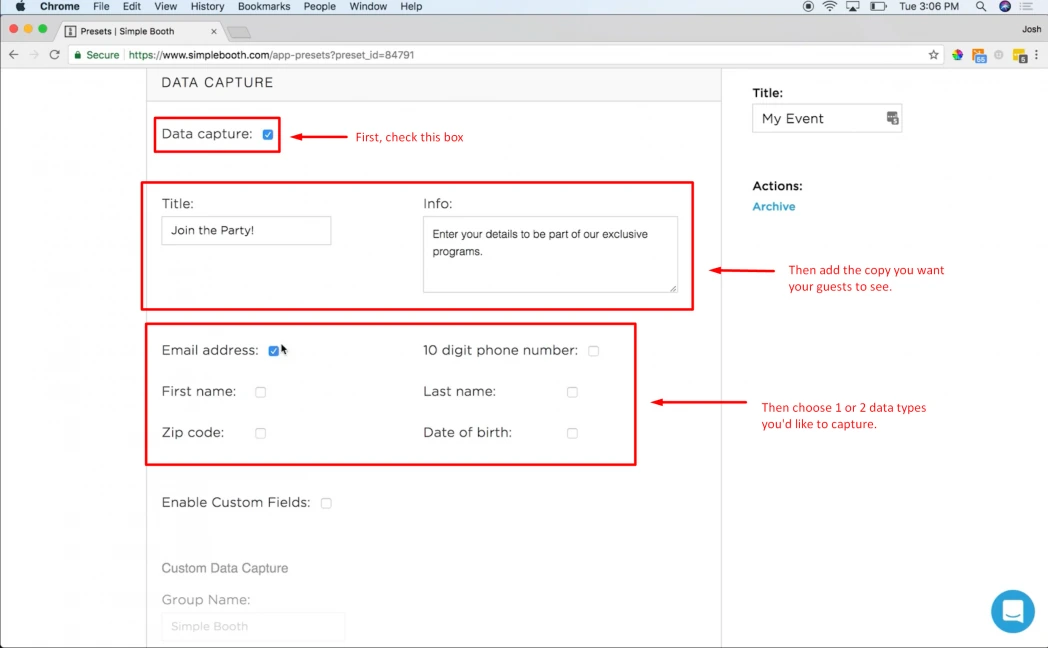
Simple Booth builds lead capture into the photo experience, with customizable data capture forms that collect email, name, phone, postal code, and more, achieving opt-in rates of 87 to 89%.
Source: Simple Booth
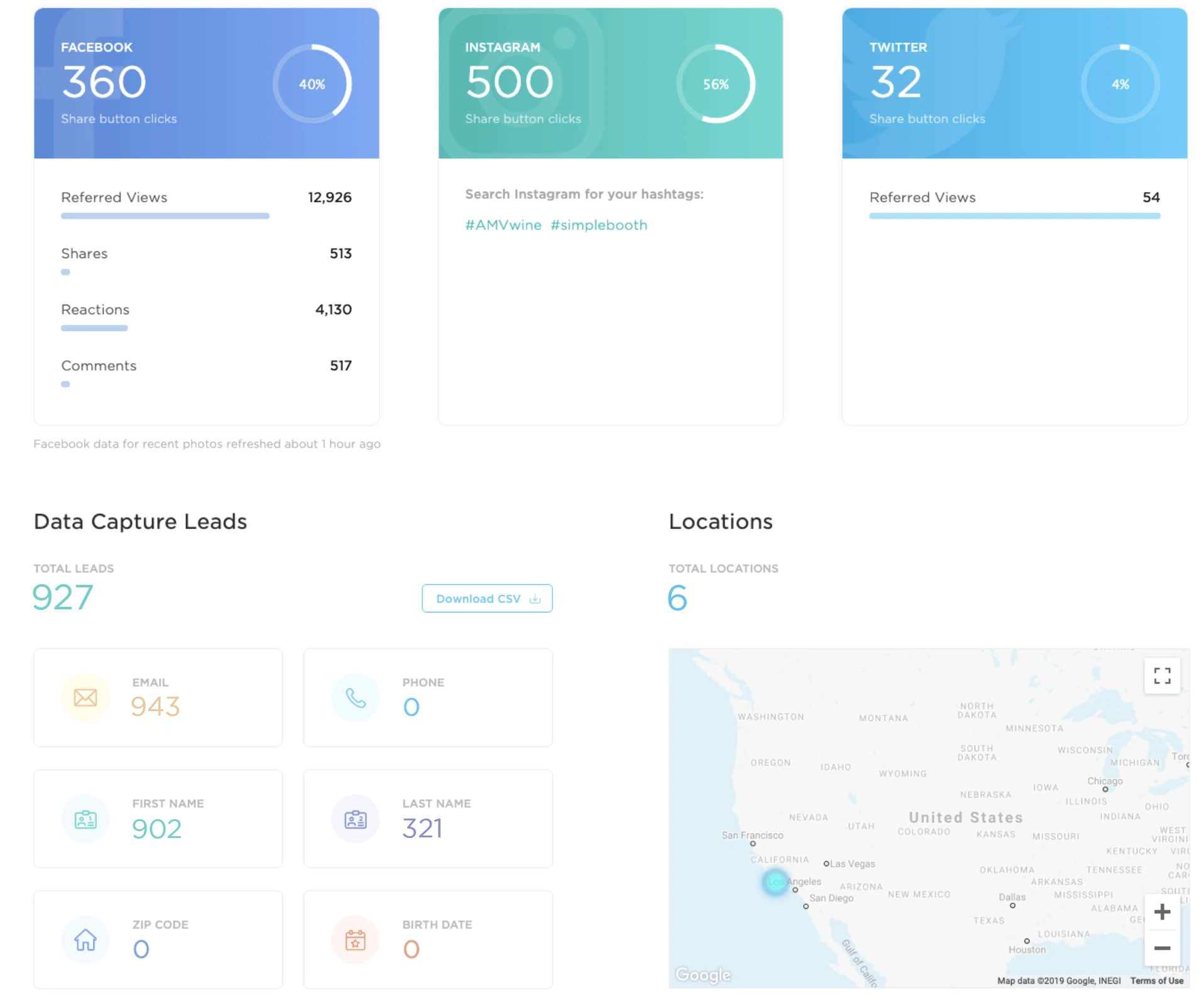
Captured data flows to the dashboard for CSV export, native MailChimp sync, or delivery to any CRM via the Open API (Pro tier and above). The analytics dashboard tracks gallery views, social shares, Facebook reactions, and referred traffic.
Source: Simple Booth
The Select tier adds demographic insights via face detection (estimated age, gender breakdown, and average group size), giving brand marketers audience composition data from activations.
For brands concerned about content quality, moderation tools (Pro/Select) let operators approve photos before they appear in the gallery or reach guests. An age gate ensures compliance for age-restricted activations.
Arizona Opera grew its email list by 1,000 addresses in a few events using Simple Booth’s lead capture. (Simple Booth)
Offline Resilience and Multi-Channel Delivery: Sessions queue locally and deliver when connectivity returns, with SMS, email, QR, AirDrop, and WhatsApp options.
Flassh’s internet dependency means a WiFi outage stops the booth entirely. Simple Booth’s HALO app queues sessions in offline mode and delivers them automatically when connectivity returns, a safety net for venues with unreliable coverage.
Photo delivery goes well beyond Flassh’s email-only kiosk sharing.
Simple Booth offers QR code, email, SMS, AirDrop, and WhatsApp on all plans, with international SMS on Core and above. AirDrop works even offline with no internet access and requires no personal information from guests.
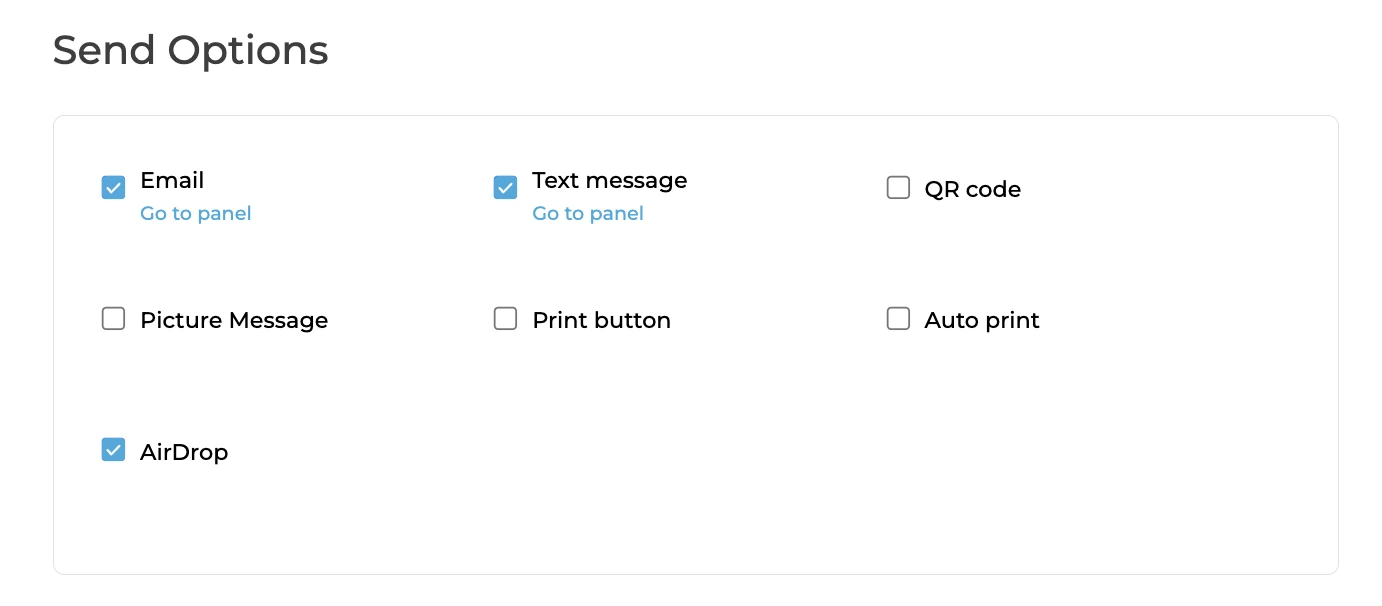
The WhatsApp option (added in HALO 5.0) matters for international events where SMS coverage is limited, delivering photos over WiFi or cellular networks worldwide.
The web dashboard also provides remote device management: operators can monitor battery levels, disk space, upload queues, and active presets across all iPads in real time, switch presets without being on-site, and verify content quality from the latest uploads. For rental companies running multiple drop-off events at once, this remote oversight catches problems before they compound.
Virtual Booth for Remote and Always-On Activations: A browser-based photo experience with no hardware required.
Simple Booth’s Virtual Booth extends the platform beyond physical events. Participants join from their own phone or laptop via a link or QR code, take a photo (or upload one), apply brand overlays and AI effects, and share to social media, all in the browser with no app installation.
Source: Simple Booth
Virtual Booth includes background replacement without a green screen, the same AI effects available on HALO, and data capture fields. All submissions feed the same analytics, Live Feed, and gallery infrastructure as HALO sessions, enabling hybrid events with both physical and remote participants in a single view.
The product also works as an always-on marketing channel, embeddable in email campaigns, product packaging, or brand websites.
Flassh has no equivalent remote or virtual offering.
Pricing: Simple Booth offers weekly, monthly, and annual billing across five tiers.
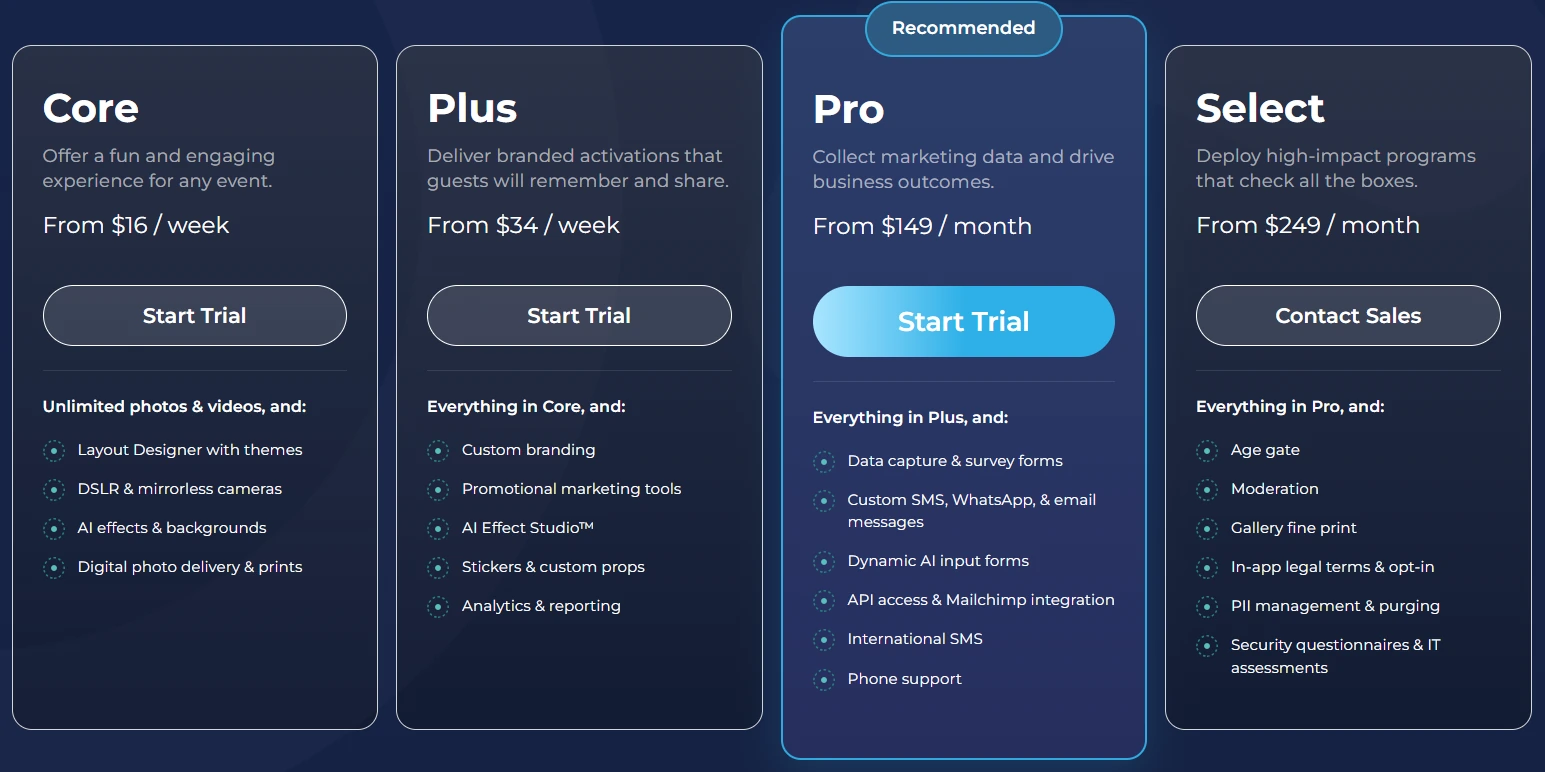
Simple Booth’s pricing scales from personal use to enterprise:
Lite, $14.99/week:
- 1 device license; still and motion capture; online galleries; 60+ themes and 100+ digital props
- Includes ads in app; excludes custom branding, DSLR, video, AI effects, analytics, and lead capture
Core, $24.99/week:
- Ads removed; multiple layouts; DSLR/mirrorless camera support; full-length video; background replacement and blur; Dropbox sync; AI effects; Virtual Booth
Plus, $49.99/week:
- Custom branding; analytics and reporting; guest-editable text layers; custom AI effects
Pro, $149/month:
- Lead capture; API integration; phone support; moderation; age gate; data compliance tools
Select, $249/month:
- In-app custom legal terms; demographic analytics; security questionnaires and IT assessments
All plans offer weekly, monthly, or annual billing, with annual plans saving approximately 45%. Each plan includes one device license; additional devices require add-on licenses at the same rate. AI effects consume credits at $0.10 each, purchased separately.
A 7-day free trial is available with 25 bonus AI credits.
Source: Simple Booth
Flassh or Simple Booth: Comparison Summary
| Flassh | Simple Booth | |
|---|---|---|
| Target audience | DIY hosts and small photo booth operators | Rental companies, venues, and brand marketers |
| Hardware | Uses your existing iPhone/iPad (no proprietary hardware) | HALO ring-light kit in machined aluminum |
| Capture modes | Still photos only | Still photos, GIFs, boomerangs, video (5 to 120 sec) |
| AI effects | Not available | AI photo transformations with identity preservation |
| DSLR support | Canon and Nikon via Windows tablet | Canon DSLR/mirrorless via iPad, wired or wireless (Core+) |
| Offline capability | Not available; internet required | Offline queue with automatic delivery on reconnect |
| Photo delivery | Email (kiosk), gallery link | QR, email, SMS, AirDrop, WhatsApp |
| Lead capture | Email collection only ($99/mo); CSV export | Customizable forms; MailChimp sync; API (Pro+) |
| Analytics | Sharing statistics ($99/mo) | Gallery views, social tracking, demographic insights |
| Virtual/remote booth | Not available | Virtual Booth (browser-based, no hardware) |
| Layout design | PNG overlay upload with positioning controls | Full in-app Layout Designer with layers, fonts, gradients |
| Moderation | Not available | Approve before delivery/gallery (Pro+) |
| Free tier | Permanent free plan (25 photos per test event) | 7-day free trial |
| Entry price | $29/event or $99/month | $14.99/week (Lite) or $24.99/week (Core) |
| App Store reviews | 4.7 stars from 3 ratings | 4.7 stars from 2,400+ ratings |
| Remote device management | Not available | Real-time monitoring of battery, storage, presets across all iPads |
| Setup experience | Simple app-based setup | Visual preset editor with full booth-flow preview; intuitive guest mode |
| Enterprise features | Not available | Age gate, compliance tools, security questionnaires |
Final Verdict
The choice between Flassh and Simple Booth comes down to what you need a photo booth to do beyond taking photos.
Choose Flassh if you want the simplest path to running a photo booth at a personal event or occasional gig. It works well for DIY hosts planning a wedding or birthday, freelance photographers who want to leave a booth running on an iPad while they shoot the event, and small operators who prefer the $29 pay-per-event model over a recurring subscription.
Setup takes minutes, the online galleries work well, and the free tier is generous enough to validate the workflow before spending anything.
Choose Simple Booth if you’re building a photo booth business, running brand activations, or operating permanent venue installations where photo quality, reliability, lead capture, and marketing analytics matter. The HALO hardware solves the lighting problem that plagues iPad-only setups, the offline queue protects against WiFi failures at live events, and the lead capture and analytics tools turn every session into measurable marketing data.
Simple Booth’s visual preset editor displays the entire booth flow upfront for fast event setup, and the guest-facing interface is intuitive enough for unattended operation, making it easy to train new staff and run drop-off events with confidence. Entry starts at $14.99 per week, so operators can scale from a side hustle to a full rental business on one platform.
For operators who need motion content, AI effects, multi-channel delivery, or enterprise compliance, Simple Booth offers a depth of features that Flassh’s intentionally minimal approach does not attempt to match.
Get started with Simple Booth here.
The distinction is not quality versus value, but scope. Flassh is a photo booth app. Simple Booth is a photo booth platform. If all you need is the app, Flassh delivers it cleanly. If you need the platform, Simple Booth is where to look.
Flassh FAQ
Is Flassh free to use?
Flassh offers a permanent free tier called Setup Mode, which allows unlimited test events with up to 25 photos each. Test events are not publicly accessible and are meant for configuration and testing. No credit card is required. To run a live, public event, you need either a Per-Party Pass at $29 per event or the Unlimited Celebrations subscription at $99 per month.
Simple Booth does not offer a permanent free plan but provides a 7-day free trial with access to the full feature set.
Does Flassh work without an internet connection?
No. Flassh requires an active internet connection because it is a cloud-based, instant-sharing platform. The documentation suggests using a mobile hotspot as backup. There is no offline mode that queues photos for later upload. Simple Booth’s HALO app includes an offline queue that stores sessions locally and delivers them automatically when connectivity returns.
What cameras does Flassh support?
Flassh supports Canon and Nikon DSLRs connected via USB to a Windows touch-screen tablet. The Canon compatibility list spans from the EOS 40D through the EOS 4000D/Rebel T100. Nikon support includes models from the D3 through D7200. Sony and other camera brands are not supported, though the App Store description indicates additional brands are planned.
Simple Booth supports Canon DSLR and mirrorless cameras connected directly to the iPad via wired USB or wireless WiFi, without needing a separate Windows device.
Can Flassh capture GIFs, boomerangs, or video?
No. Flassh captures still photos only. After capture, guests can compile selected photos into animated GIFs or short MP4 videos through the iOS app, but these are created from stills rather than captured natively. Simple Booth offers native GIF, boomerang (Rebound), and full-length video capture (5 to 120 seconds) directly within the booth experience.
Does Flassh offer lead capture or email marketing integrations?
The $99 per month Unlimited Celebrations plan includes guest email collection, which exports as a CSV file. There are no direct integrations with email marketing platforms like Mailchimp or HubSpot, no CRM connectors, and no public API.
Simple Booth offers customizable lead capture forms with native MailChimp sync and API integration for custom CRM delivery on its Pro and Select tiers, with documented opt-in rates of 87 to 89 percent.
How much does a multi-day event cost on Flassh?
Each Per-Party Pass activates one event for a 24-hour window. Multi-day events on the per-event plan require a new $29 credit for each additional day. Operators running four or more events per month typically find the $99 per month subscription more cost-effective, as it includes unlimited events with no daily activation limits.
Does Flassh have a public API or integrations?
Flassh does not offer a public API, webhooks, or programmatic access. The only documented third-party integration is Dropbox, which syncs photos in real time to an isolated Flassh folder. The documentation suggests using Zapier as a bridge via Dropbox to connect to other services, but there is no native Flassh Zapier app.
Simple Booth offers an Open API on its Pro and Select tiers for custom CRM and data delivery.
Can I remove Flassh branding from the booth and gallery?
Yes, but only on the $99 per month Unlimited Celebrations plan. This plan removes Flassh branding from the photo booth interface, the online gallery, and share emails, and adds custom domain support for white-label gallery delivery. The free and per-event tiers display Flassh branding throughout.
Keep reading
 Showdowns
Simple Booth vs Flassh: Which Photo Booth Platform Fits Your Events in 2026?
Integrated system vs speedy setup. Simple Booth or Flassh?
 Alternatives
7 Flassh Alternatives: Photo Booth Software for Every Operator and Event Type (2026)
Ready to move on from Flassh? Here are the booths worth switching to.
 Pricing
Flassh Pricing: Worth It or Consider Simple Booth? June 2026
Per-event or monthly? Flassh pricing, fully unpacked.