funEvent Review 2026: Is This Photo Booth App Right for Your Events?

funEvent offers a simple premise: turn any Android or iOS device into a 360 photo booth at a fraction of the cost of traditional hardware. Built by a Madrid-based event entertainment company with 20 years of live event experience, it delivers AI-enhanced photos, GlamBot-style slow-motion video, and WhatsApp-first sharing from a single smartphone and a light ring.
To write this funEvent review, we analyzed it closely. We believe it’s the right choice if:
- You want the lowest hardware investment to start a photo booth business
- You operate in WhatsApp-dominant markets (Europe, Latin America, Middle East)
- You need a booth that works without internet connectivity
- You want 360 video, GlamBot effects, and AI photos from a single smartphone app
- You prefer Android devices and want the widest feature set on that platform
However, funEvent might not be the best choice if:
- You need professional lighting and photo quality without external gear
- You require lead capture, analytics, and marketing tools
- You want a proven platform with documentation and enterprise support
- You need DSLR or mirrorless camera integration for studio-quality output
- You’re building a brand activation program with compliance and moderation requirements
In this case, consider Simple Booth, an iPad-based photo booth system that pairs proprietary ring-light hardware with a cloud-connected app and web dashboard. With 30,000+ customers, a 4.7-star App Store rating from 2,400+ reviews, and features like lead capture with 87%+ opt-in rates, DSLR camera support, and a built-in Layout Designer, Simple Booth turns photo booths into a marketing channel.
We’ve included a detailed look at Simple Booth at the end of this review as the best alternative for operators and marketers who need more than a capture-and-share app. If you’re ready to explore it, you can start your free trial of Simple Booth here.
What is funEvent?
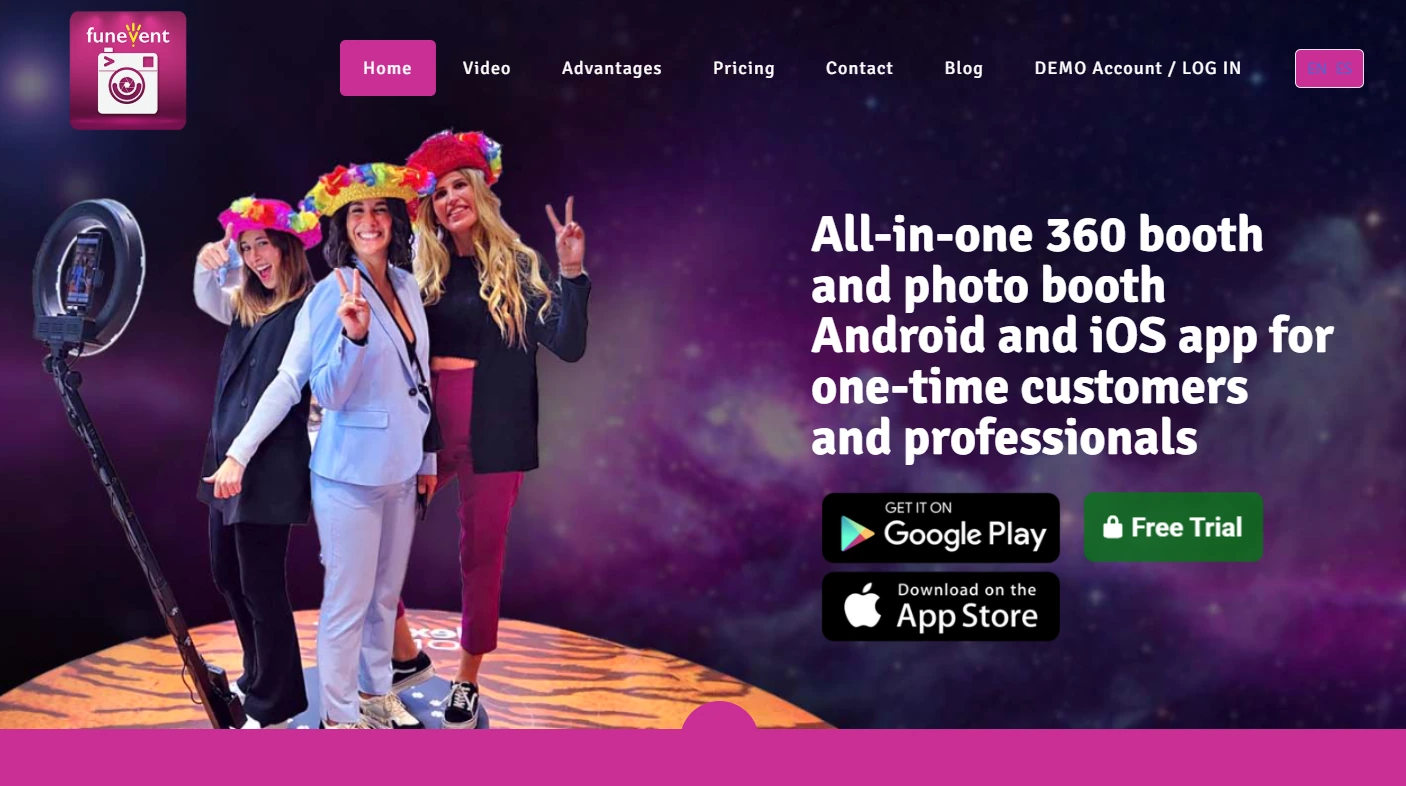
Source: funEvent
funEvent is a mobile photo booth app available on Android and iOS that transforms a smartphone into a 360 photo booth, video booth, and AI photo booth. The app launched in 2015 as a software spin-off from eventoDivertido, a Madrid-based event entertainment company that has provided photo booth and live event photography services for over 20 years.
funEvent positions itself as a 360 photo booth for both one-time customers and professionals. Its central pitch: the minimum setup is one Android or iOS device and a light ring, compared to the thousands of dollars dedicated photo booth hardware typically costs.
In 2017, funEvent became what it claims was the first photo booth app to support WhatsApp image sharing, a real differentiator in markets where WhatsApp dominates. More recently, the app added Nano Banana AI photo effects and GlamBot-style slow-motion video, both included in all paid plans.
funEvent Pros & Cons
| Pros | Cons |
|---|---|
| - Low hardware investment (smartphone + light ring) | - Many flagship features are Android-only |
| - WhatsApp-first sharing since 2017 | - Limited independent reviews (1 App Store rating) |
| - AI photo effects work entirely offline | - No public API, webhooks, or CRM integrations |
| - GoPro Black and Max integration for 360 capture | - 30-day online gallery retention limit |
| - One-month free trial with no credit card required | - Small team with WhatsApp-only support |
| - GlamBot slow-motion without robotic hardware | - No desktop dashboard for multi-event management |
| - Lenticular “Pictures in Motion” physical prints | - No enterprise support tiers or SLAs |
| - $29/week for 2 devices | - Thin documentation beyond 8 video tutorials |
funEvent Review: How It Works & Key Features
360 Photo Booth & Video: funEvent turns a single smartphone into a 360 video booth with instant WhatsApp delivery.
The 360 booth is funEvent’s core product. An Android device mounted on a rotating arm captures slow-motion video as it sweeps around the guest. The app detects when the spinner moves and begins recording automatically.
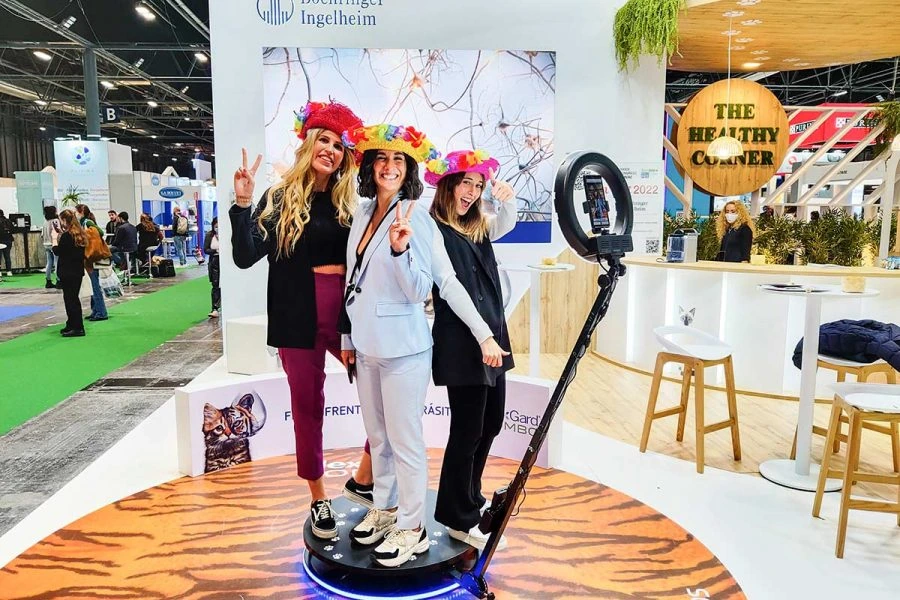
Source: funEvent
Operators configure all settings in the web-based control panel before the event: recording duration, playback speed, boomerang effects, and overlay designs. At the venue, they download the app, enter the event name, and the booth is ready in under 2 minutes.
Videos play at slow-motion, normal, or fast-motion speed with boomerang loop and reverse playback options. Operators can apply animated overlays with effects like fireworks and confetti, upload custom frames, and add an MP3 soundtrack.
For better capture quality, the app connects to GoPro Black models 7 through 13 and GoPro Max for 360 VR photos via Wi-Fi, giving operators a camera upgrade that costs far less than dedicated 360 rigs. Canon and Nikon DSLRs also work for photo capture via USB OTG on Android.
The finished video shares via WhatsApp, SMS, email, or QR code. At venues with poor connectivity, the app operates entirely offline, storing WhatsApp numbers and sending videos once connectivity returns.
One caveat: 360 video, slow-motion, MP3 soundtracks, animated overlays, and GoPro integration are Android-only. iOS received 360 video support in April 2025 with front and rear camera support and speed options, but the feature gap between platforms remains large.
Nano Banana AI: On-device AI photo transformations that work without internet.
Nano Banana AI is funEvent’s generative AI feature, introduced in early 2025. It applies AI transformations to captured photos, producing stylized versions of each guest’s image in seconds.
What matters most: Nano Banana AI processes entirely on-device. Most AI photo booth tools rely on cloud processing, which means they fail at events with poor connectivity. One App Store reviewer praised that “background replacements with no internet connection required, since most events take place where the signal is very low.”
Operators can set up to 8 AI transformation prompts per event through the control panel. The feature runs on both Android and iOS and is included in all paid plans with no upsell. Competing platforms often gate AI effects behind higher tiers or charge per-use credits.
GlamBot Effect: Red-carpet slow-motion video without robotic hardware.
The GlamBot effect replicates the slow-motion video style seen on Hollywood red carpets, where a robotic camera arm swoops around a subject. A real GlamBot rig costs tens of thousands of dollars to rent. funEvent produces a similar result using only a smartphone recording at 60 FPS or higher.
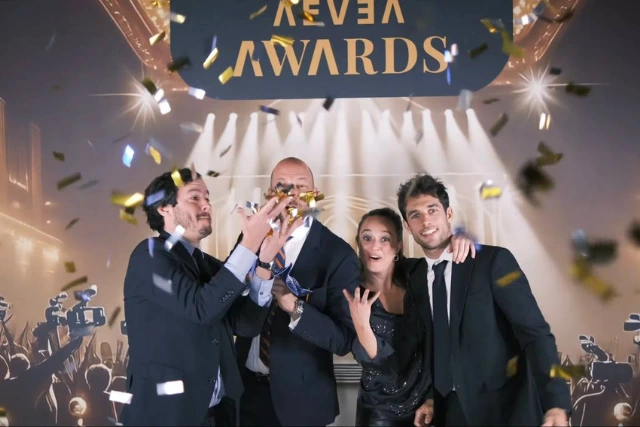
Source: funEvent
The app processes short video clips (typically 2 to 8 seconds) into smooth slow-motion output. Videos can include animated overlays, watermarks, event branding, and hashtags. For best results, funEvent recommends devices with higher frame rates, with the Google Pixel 6 cited for its 120 FPS wide-angle camera.
The GlamBot feature lives in the same app as the 360 video booth, so operators can offer both from one device. It is currently Android-only, with iOS support planned.
Lenticular Photos: Physical “Pictures in Motion” prints that stand out from digital-only output.
funEvent claims to be “the first 360 photo booth with lenticular photo feature”. The lenticular feature produces a physical print that shows two images in alternating motion when the viewer tilts it, creating flip animations, zoom, morph transitions, and 3D depth effects.
The process is straightforward: two photos are taken and printed, then a lenticular lens sheet is applied on top. The result is a physical keepsake that a digital file cannot replicate. funEvent sells compatible adhesive lenticular lens sheets directly, making procurement easy for operators.
Compatible printers include DNP 620 and RX1 models. Unlike GlamBot, the lenticular feature is available on both iOS and Android, and digital sharing via QR code, WhatsApp, and email complements the physical print.
SHARE App & Social Sharing: A dedicated sharing kiosk that works with any photo booth software.
The funEvent SHARE app is a standalone Android app that turns any tablet or smartphone into a sharing station. It solves a practical bottleneck: when a single device handles both capture and sharing, queues form as guests browse and share while others wait.
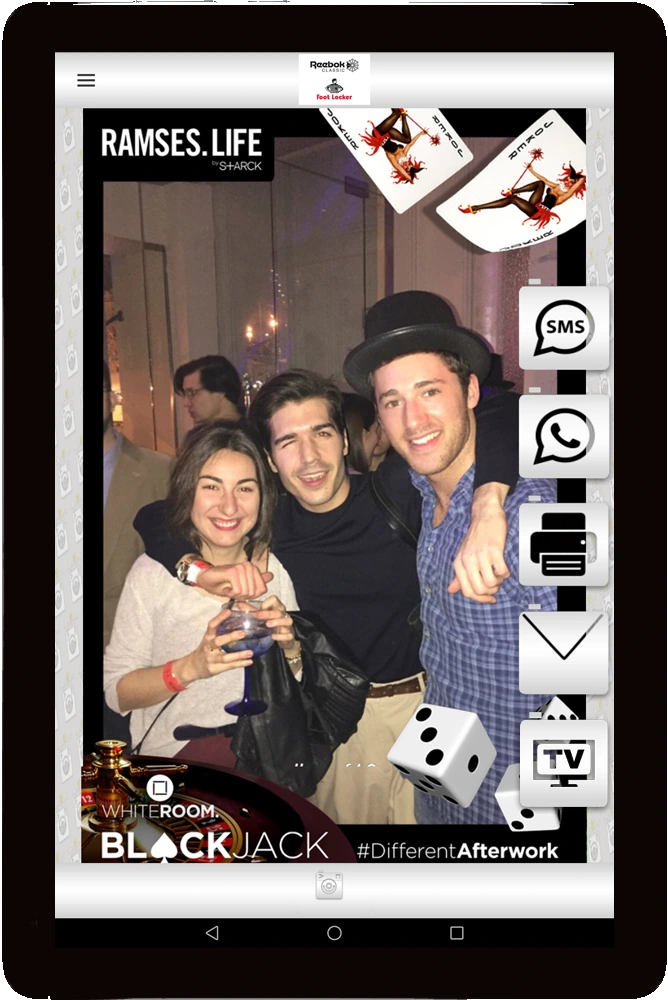 *Source: [funEvent](https://play.google.com/store/apps/details?id=com.funeventapp.funeventappshare&hl=en)*
 The SHARE app monitors a folder on the device, displaying thumbnails for photos, GIFs, Boomerangs, strips, and videos as they appear. Guests select their content and receive it via WhatsApp, SMS, email, or QR code. For printing, photos transfer from the Android device to a Windows computer with a connected printer over Wi-Fi, no internet required.
A useful feature: the SHARE app works with any photo booth software by monitoring an output folder. Operators running Darkroom Booth, dslrBooth, or other platforms can add a funEvent sharing station without switching their capture software.
Multiple SHARE kiosks can sync with the photo booth simultaneously. Each additional kiosk requires a separate paid license, though pricing for extra kiosks is not published on the website.
Pricing: All features included on every plan, with a free one-month trial.
funEvent uses a duration-based model where every Android plan unlocks the full feature set. There are no tiered gates on Android.
Android plans:
| Plan | Price | Devices |
|---|---|---|
| One Week | $29 USD | 2 devices |
| One Month | $79 USD | 2 devices |
| One Year | $599 USD | 2 devices |
All plans include unlimited events, Nano Banana AI, 360 video, GlamBot, WhatsApp sharing, GoPro compatibility, lenticular photos, custom branding, wireless printing, data capture, and Dropbox integration.
The iOS app is free throughout 2025 but excludes several Android-only features: 360 videos, GlamBot, GoPro compatibility, and WhatsApp/SMS sharing.
New customers get a one-month free trial with no credit card required. During the trial, all photos carry a funEvent watermark. A fair usage policy applies to WhatsApp/SMS messages and AI background removal, though specific limits are not published.
Where funEvent Falls Short
funEvent delivers a lot for its price, but several limitations reflect its origins as a small, bootstrapped operation. These gaps widen as operators scale up or as corporate buyers evaluate the platform.
Android-First Feature Disparity. The biggest issue is that many of funEvent’s headline features are Android-only. GlamBot slow-motion, reverse video, MP3 soundtracks, animated overlays, GoPro integration, and the free SHARE station all require Android.
iOS users get a stripped-down experience, which hurts operators standardized on Apple devices and limits the platform’s appeal where iPads dominate the professional event space.
Minimal Independent Validation. funEvent has only one verified review on the App Store and no presence on G2, Capterra, or TrustRadius. Corporate procurement teams that rely on peer reviews and analyst coverage will find it hard to assess the platform beyond its own claims.
Limited Marketing and Analytics Tools. funEvent includes data capture and branded email, but it lacks the marketing infrastructure that brand activators need. There’s no analytics dashboard, no CRM integration, no API or webhooks, and no way to connect captured data to marketing automation workflows. Data collection works but stays isolated.
Support and Documentation Gaps. Primary support runs through WhatsApp with a 1 to 2 business day response window via the web form. The video tutorial library covers 8 topics, which is thin for a feature-dense app. There’s no searchable help center, no FAQ page, and no community forum. Operators who hit issues during a live event may find the support doesn’t match the urgency.
30-Day Gallery Retention. Per the Terms of Use, the online gallery deletes event photos one month after the event. Operators who deliver post-event galleries to clients need longer storage, and there’s no documented option to extend this window.
No Desktop Management Layer. All event management happens through the mobile app and a basic web control panel. There’s no browser-based dashboard for managing multiple events, no fleet management for multi-booth operations, and no team collaboration tools. Beyond a few events per week, this becomes a bottleneck.
These limitations follow naturally from funEvent’s design: keep hardware costs low and features accessible on a smartphone. But they create clear gaps for operators and marketers who need professional infrastructure around their photo booth.
Top funEvent Alternative: Simple Booth
Source: Simple Booth
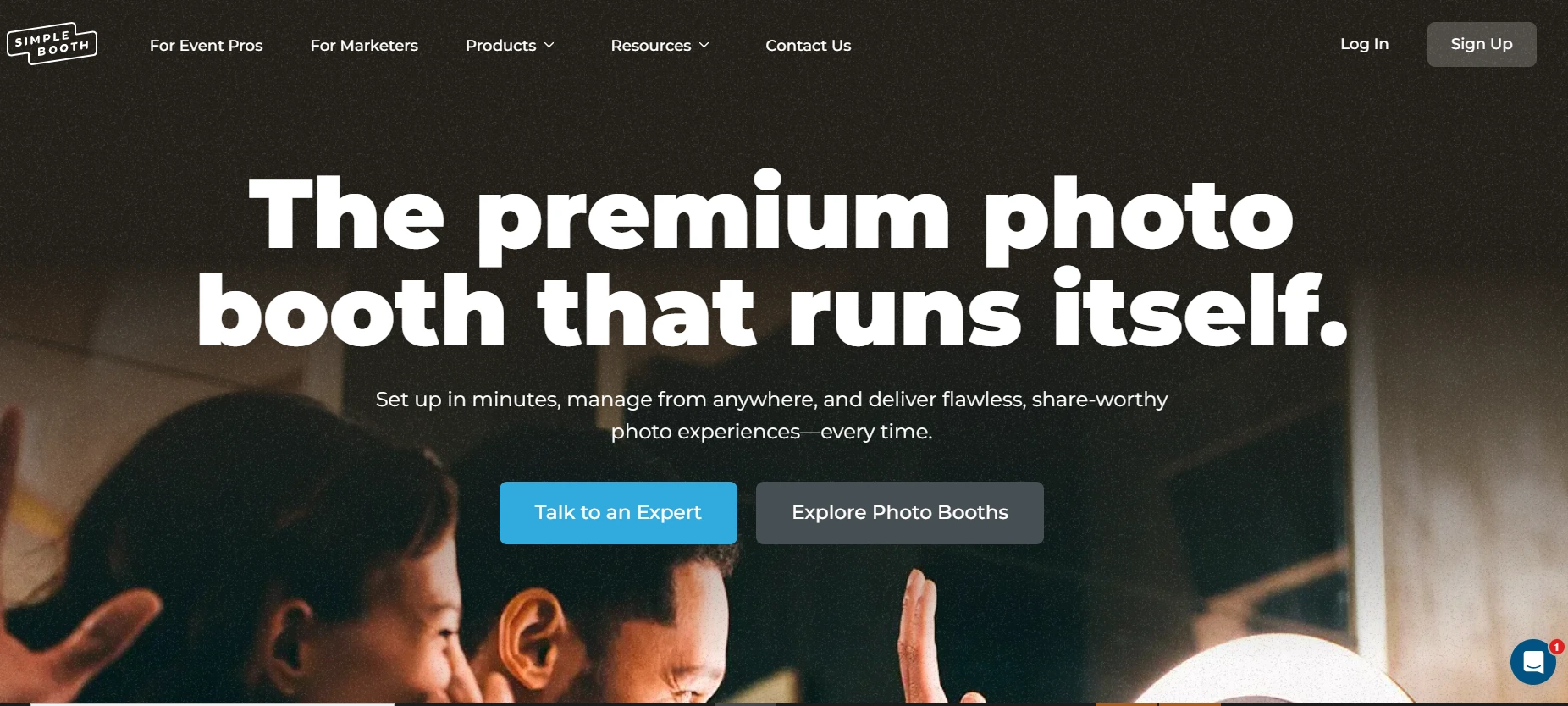
Simple Booth addresses funEvent’s professional and marketing limitations with a system that pairs proprietary hardware with a cloud-connected iPad app and web dashboard. The company has built iPad photo booth apps since 2012 (one of the first in the space) and has grown to serve 30,000+ customers globally with 40 million+ moments captured.
It ranked #414 on the Inc. 5000 in 2018 with 1,210% three-year revenue growth. The design is intuitive enough for unattended events yet loaded with the customization and marketing tools that professional operators and brand teams need.
HALO Hardware with Integrated Lighting: The HALO ring light delivers consistent, professional photo quality without external equipment.
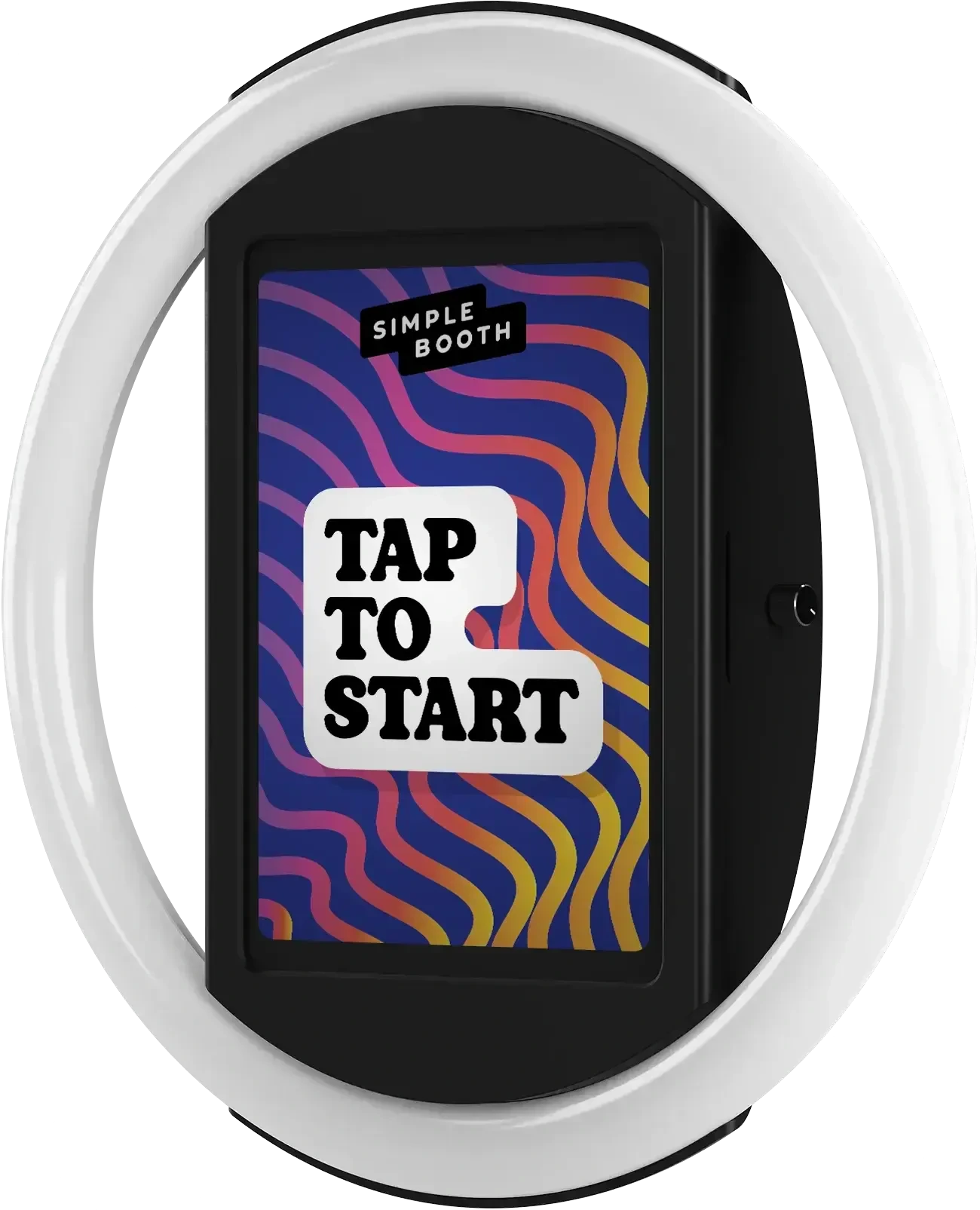
The Simple Booth HALO is a photo booth chassis machined from a single billet of aluminum with a patented ring-light system. Its 112 LEDs produce up to 2,100 lumens with a diffuser that flatters subjects standing 6 to 8 feet from the camera. The LEDs are rated for 50,000 hours.
Source: Simple Booth
Where funEvent relies on ambient lighting or whatever ring light the operator finds, HALO integrates illumination, iPad mounting, and charging into one unit. The iPad snaps in via a tool-less faceplate, and a concealed USB-C cable keeps it charged throughout the event. Setup takes under one minute with no tools.
The HALO Event Kit includes a rolling hard case with wheels and an extendable handle, weighing 49 lbs total. For permanent installations at bars, hotels, and entertainment venues, the Install Kit provides a steel wall mount. The hardware supports dual voltage (110V–240V) for international use.
The software adds processing that pushes beyond what iPad hardware alone can do: background blur and bokeh, AI background replacement without a green screen, Glam skin smoothing, and rendering that displays image previews up to 12x faster.
For operators who already own Canon cameras, DSLR and mirrorless camera integration (Core plans and above) supports both wired USB and wireless Wi-Fi connections, a flexibility most competing platforms lack. The camera feeds studio-quality images through the full HALO feature set, with all effects working across stills, GIFs, and video.
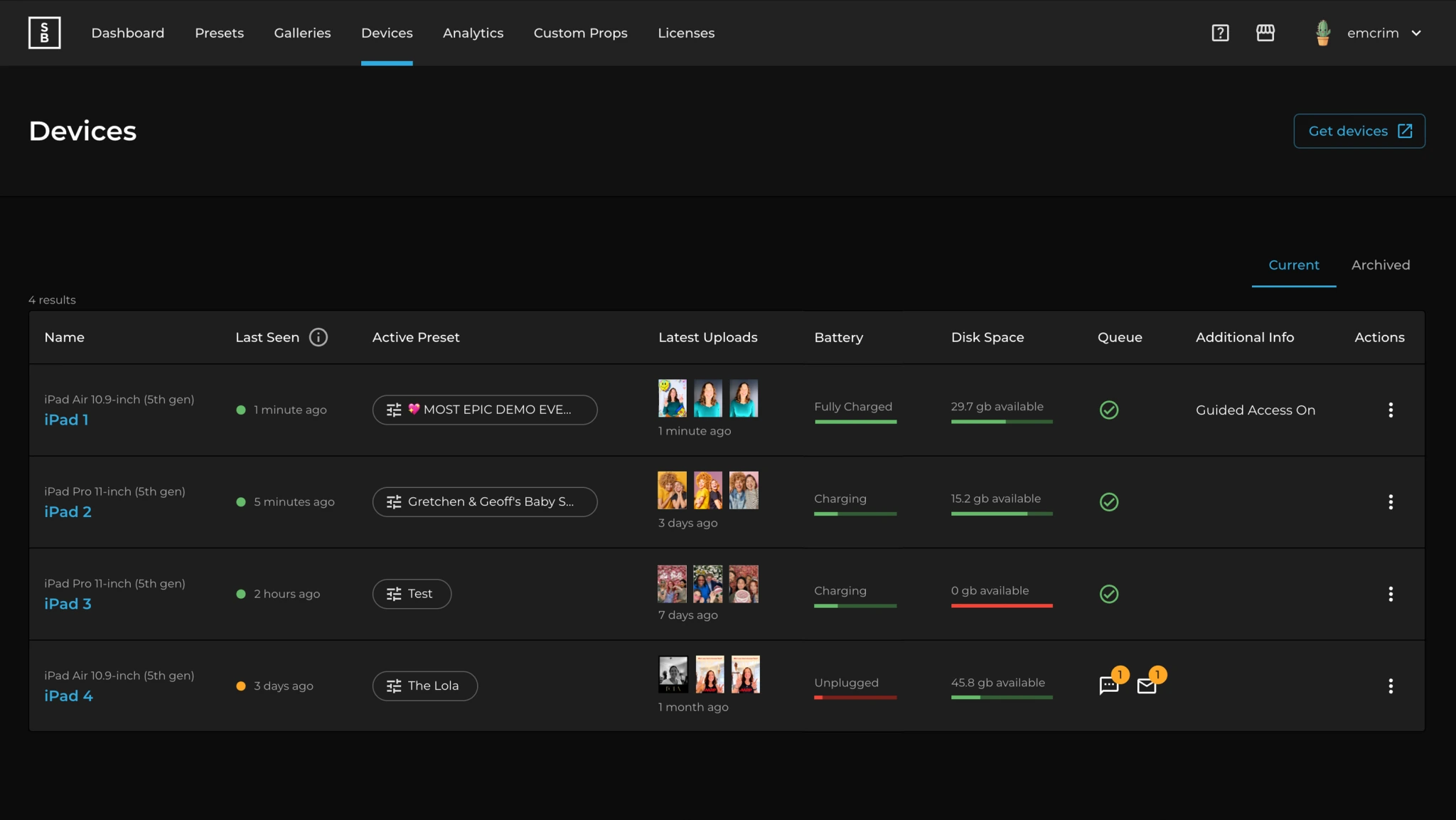
The web dashboard extends control beyond the venue. Operators monitor all connected iPads in real time (battery levels, upload queues, running presets) and switch configurations remotely. For businesses running multiple events, teams, or locations, this remote oversight means catching problems early and managing operations from one screen.
Source: Simple Booth
Arizona Opera grew its email list by 1,000 addresses in a few events using Simple Booth’s lead capture at their activations. (Simple Booth)
Built-In Marketing Engine: Simple Booth captures first-party data with opt-in rates that most marketing forms can’t match.
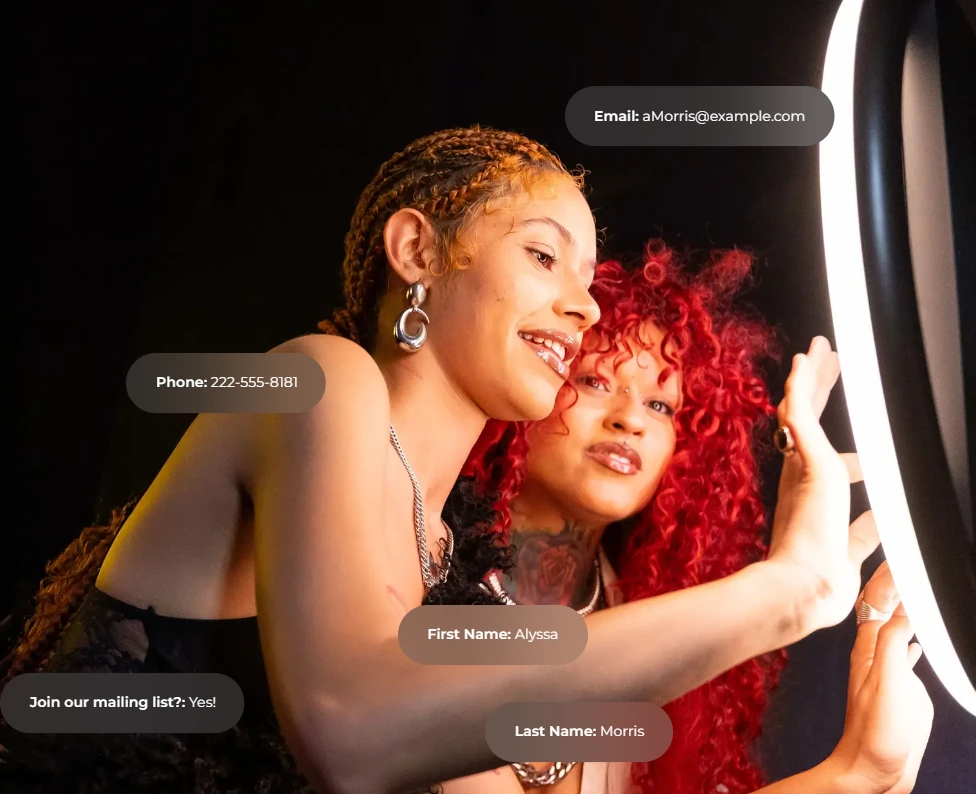
funEvent includes basic data capture fields, but Simple Booth treats every photo session as a marketing opportunity. The platform captures opt-in rates of 87 to 89% because data collection is embedded in the photo delivery flow. Guests give their information to receive their photo, not because they’re filling out a form.
Source: Simple Booth
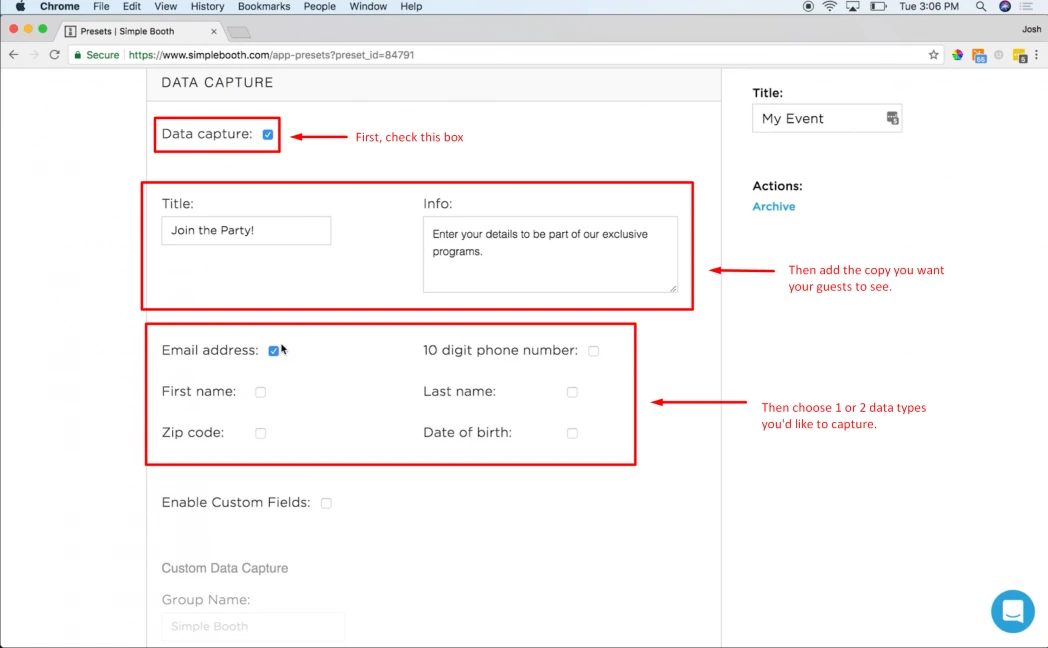
Lead capture fields scale with the plan: 6 standard fields on Pro (email, name, phone, postal code, date of birth) and up to 10 custom fields on Select, including checkboxes and required legal terms. Data exports as CSV, syncs with MailChimp, and can route to custom CRMs via the Open API.
Source: Simple Booth
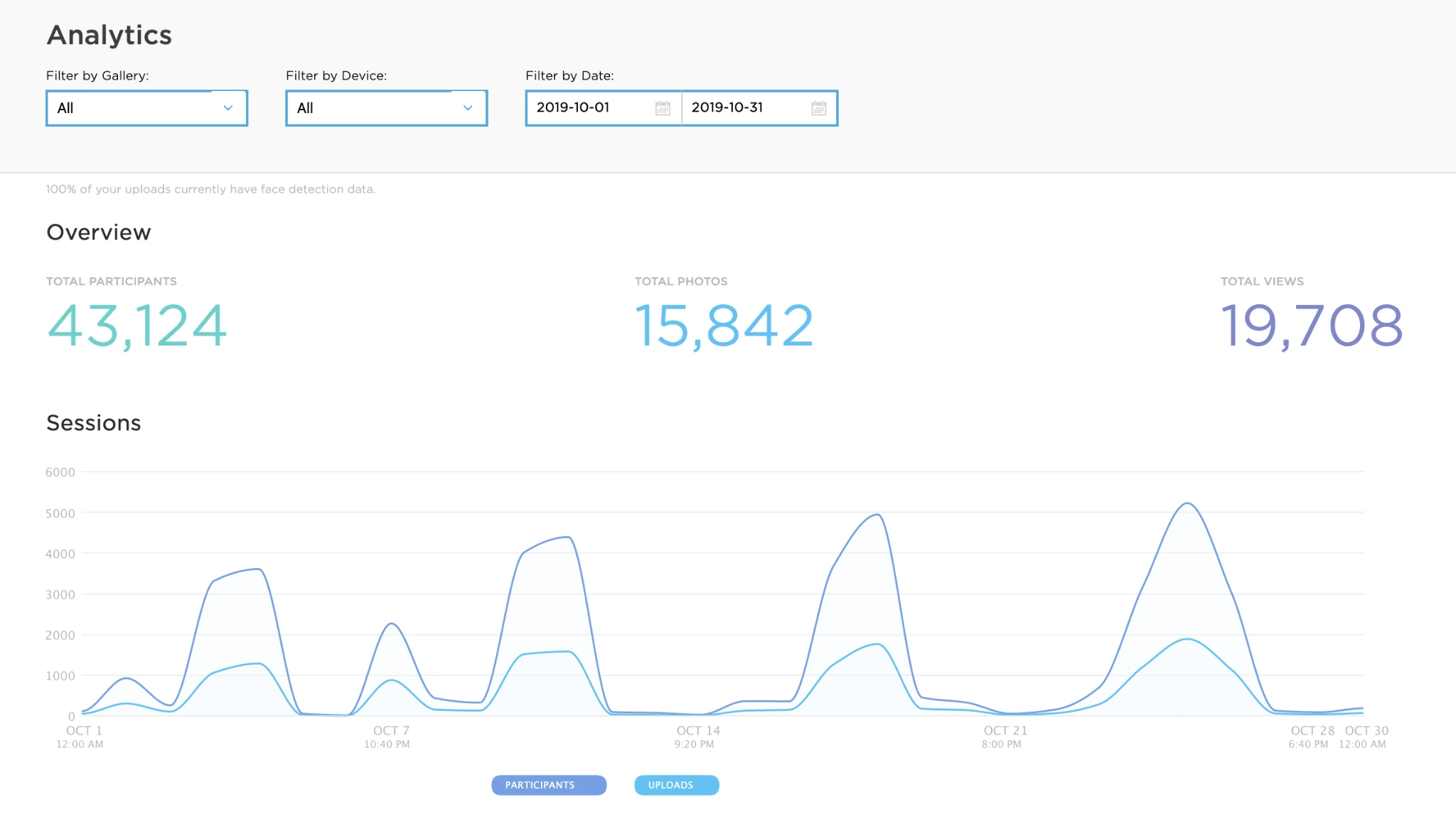
The analytics dashboard tracks participants, gallery views, social sharing (Facebook, X/Twitter, LinkedIn, Instagram), and referred traffic. The Select tier adds demographic insights via face detection, estimating age, gender breakdown, and average group size from captured photos.
Source: Simple Booth
For brand safety, moderation tools on Pro and Select let operators approve photos before they appear in public galleries or reach guests. An age gate adds verification for age-restricted activations.
Treetop Golf built 150,000 unique email addresses across their locations using Simple Booth’s lead capture. (Simple Booth)
Layout Designer and AI Effects: A design toolkit that eliminates external software.
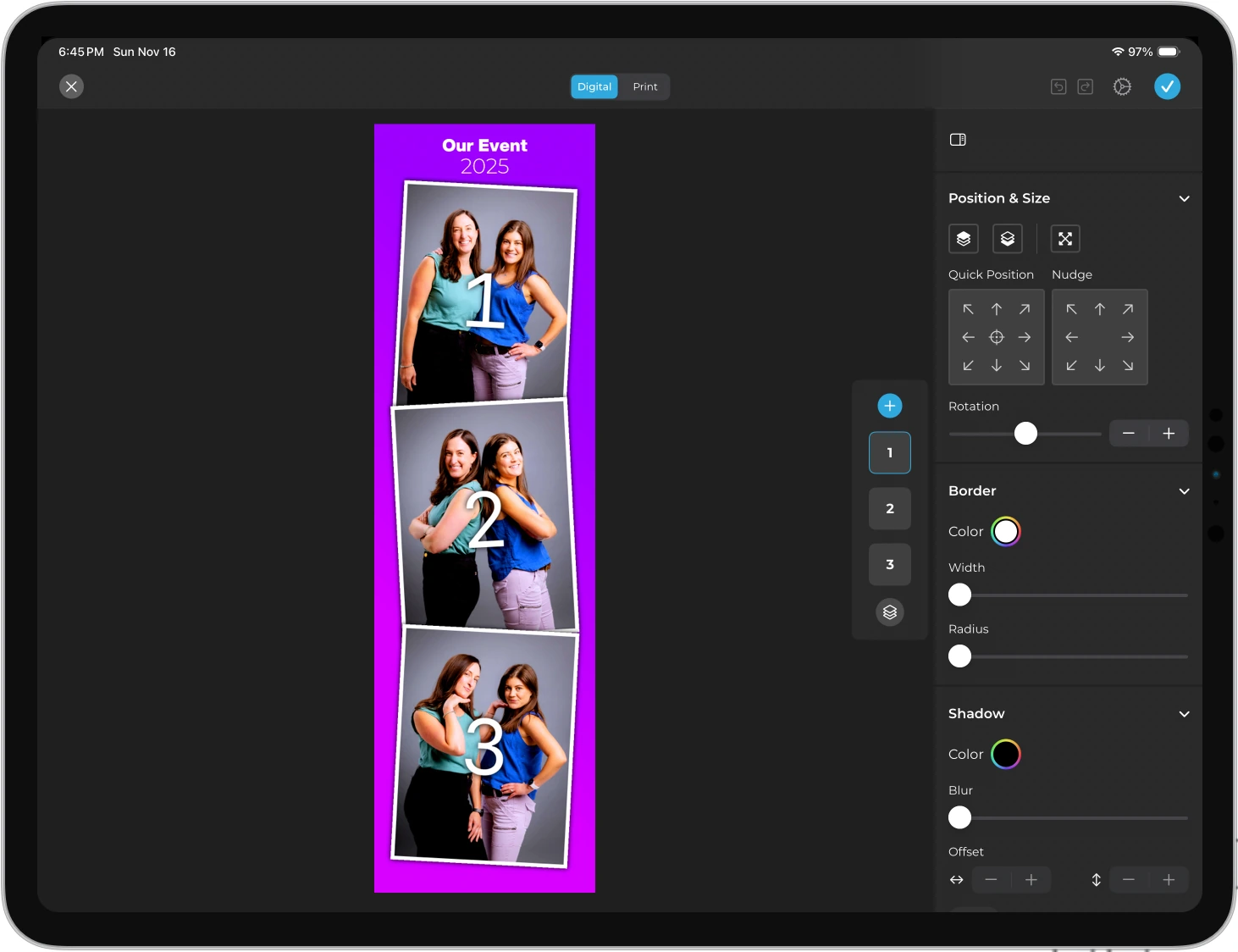
HALO 5.0 introduced the Layout Designer, available on all plans in both the app and web dashboard. It’s a design tool with layers, fonts, gradients, QR code embedding, and multi-layout support. Operators create branded templates directly inside the app or web dashboard, with no need for Photoshop or Canva.
Source: Simple Booth
Photo placement, text layers with font and color controls, background gradients, logo positioning, and border styling all live within the designer.
Guest-Editable Text Layers (Plus tier and above) let guests type their own names, captions, or hashtags onto their photo before sharing. Dynamic text sizing keeps designs clean regardless of message length.
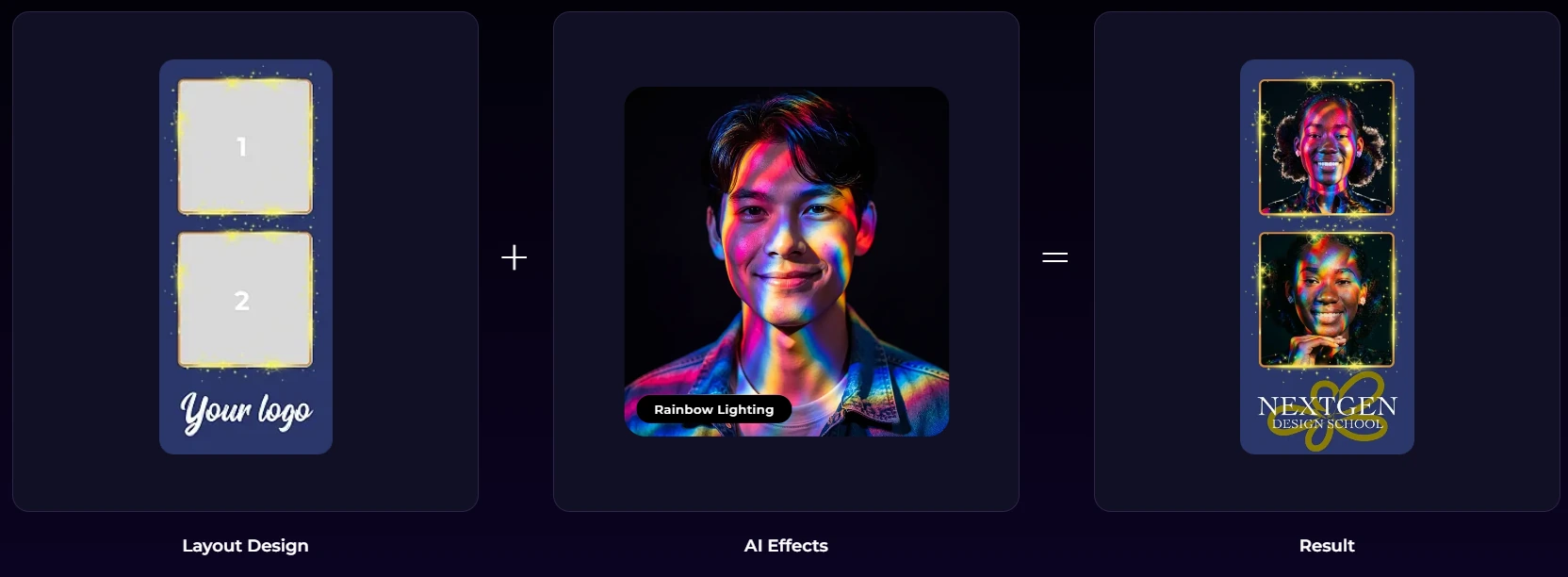
On the AI side, Simple Booth offers AI Effects powered by Nano Banana models that transform photos using text prompts. Three models balance speed and quality: Nano Banana 1 (fastest, individuals), Nano Banana 2 (balanced, groups up to 5), and Nano Banana Pro (highest quality, groups up to 5).
Source: Simple Booth
Unlike funEvent’s on-device AI, Simple Booth’s AI requires an internet connection but produces higher-fidelity output with automatic identity preservation.
Operators can test prompts outside of booth mode at zero credit cost. On Pro and Select plans, Guest Input lets participants answer questions that feed into the AI prompt as template variables, producing a personalized output for every guest.
Virtual Booth: A hardware-free photo experience delivered through any browser.
Simple Booth’s Virtual Booth goes beyond physical hardware. Participants join via a QR code or link from their own phone or laptop. No app needed. The experience runs in any browser and includes background replacement, overlay frames, digital props, and the same AI effects available on the HALO app.
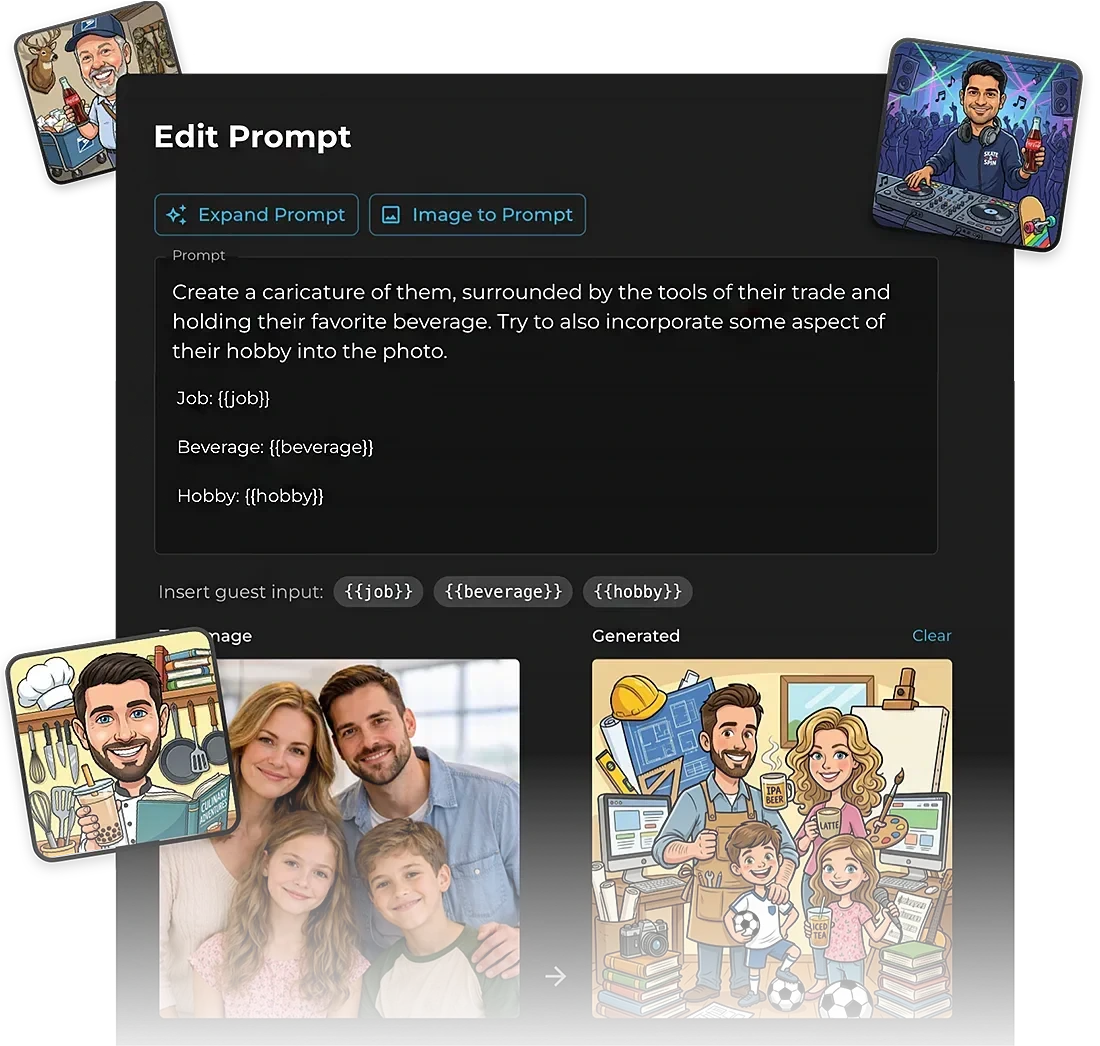
Source: Simple Booth
Virtual Booth supports data capture before booth access, making it a lead generation tool at virtual events, hybrid conferences, or as an always-on campaign on a website or product packaging. All submissions feed into the same analytics, galleries, and Live Feed as physical HALO sessions, so in-room attendees can use the kiosk while remote participants use Virtual Booth.
Source: Simple Booth
The product localizes automatically into English, Spanish, French, Dutch, German, Italian, Polish, Hebrew, and Danish based on browser language.
funEvent has no equivalent. Its products require a physical device at the venue, which means no remote participation and no persistent digital campaign use cases.
Pricing: Tiered plans from casual use to enterprise, with weekly billing for variable-volume operators.
Simple Booth’s pricing scales from personal use to enterprise activations:
| Plan | Weekly | Monthly | Yearly |
|---|---|---|---|
| Lite | $14.99 | — | $290 |
| Core | $24.99 | $49 | $490 |
| Plus | $49.99 | $99 | $990 |
| Pro | — | $149 | $1,490 |
| Select | — | $249 | $2,490 |
Each plan includes one device license, with additional licenses at a discounted rate. A 7-day free trial comes with 25 free AI credits. AI effects cost $0.10 per credit, and purchased credits don’t expire.
The Lite tier includes ads and excludes custom branding, analytics, and lead capture. Most professional operators will start at Core (which adds DSLR support, video, background replacement, and Dropbox sync) or Plus (which adds custom branding, analytics, and guest-editable text layers).
HALO hardware kits are sold separately through the online configurator, with 0% financing available.
G7 Entertainment Marketing has used Simple Booth for 10+ years across 136,000+ fan interactions, describing themselves as “big Simple Booth believers.” (Simple Booth)
funEvent or Simple Booth: Comparison Summary
| funEvent | Simple Booth | |
|---|---|---|
| Primary platform | Android (iOS limited) | iPad |
| Hardware required | Any smartphone + light ring | HALO ring-light kit (proprietary) |
| Setup time | Under 2 minutes | Under 1 minute |
| 360 video | Yes (Android; iOS since April 2025) | No (GIFs, Rebound clips, video) |
| GlamBot slow-motion | Yes (Android only) | No |
| Lenticular prints | Yes (both platforms) | No |
| AI photo effects | Nano Banana (on-device, offline) | Nano Banana (cloud, higher fidelity) |
| WhatsApp sharing | Since 2017 (Android only) | Since November 2025 (all plans) |
| DSLR/mirrorless support | GoPro via Wi-Fi (Android only) | Canon DSLR/mirrorless, wired + wireless (Core+) |
| Lead capture | Basic data fields | Up to 10 custom fields with 87%+ opt-in |
| Analytics | Not available | Dashboard with social tracking, demographics |
| CRM integrations | None | MailChimp native, Open API |
| Virtual/remote booth | Not available | Virtual Booth (browser-based) |
| Layout designer | Overlays via control panel | Full in-app designer with layers, fonts, QR |
| Enterprise features | Not available | Moderation, age gate, compliance, legal terms |
| Support | WhatsApp, email (1 to 2 day response) | 7-day support via email, chat, phone (Pro+), account manager (Select) |
| App Store validation | 1 rating (5.0 stars) | 2,400+ ratings (4.7 stars) |
| Starting price | $29/week (2 devices) | $14.99/week (1 device) |
| Free trial | 1 month (watermarked) | 7 days |
Final Verdict
The choice between funEvent and Simple Booth comes down to what you need your photo booth to do and where you are in building your business.
Choose funEvent if you want the lowest barrier to entry for a photo booth business or a one-time event. Its strength is delivering 360 video, GlamBot slow-motion, AI photos, and lenticular prints from a single smartphone app at a price that lets anyone test the market without significant capital.
If you operate in WhatsApp-dominant markets, need offline reliability at venues with poor connectivity, or want features like 360 video and lenticular prints that Simple Booth doesn’t offer, funEvent fills that niche.
Choose Simple Booth if you’re building a photo booth rental business at any stage, whether you’re starting out or scaling to multiple locations. At $14.99 per week, the entry point is lower than funEvent’s $29 per week, and the intuitive interface makes setup fast and staff training easy as your team grows.
The combination of dedicated hardware with integrated lighting, a cloud-connected app with wireless DSLR support, and marketing tools that turn every photo session into a lead capture opportunity creates a system that generates returns beyond the photo itself.
For unattended drop-off events, Simple Booth’s guest experience and remote device management mean the booth runs reliably without an attendant. For those who need analytics that demonstrate ROI and enterprise features that satisfy corporate procurement, Simple Booth provides the professional infrastructure that a smartphone app cannot.
Get started with Simple Booth here.
The photo booth market has room for both approaches. funEvent proves that a smartphone can deliver capable event experiences at minimal cost. Simple Booth proves that dedicated hardware and a cloud-connected platform (starting at $14.99 per week) turn those experiences into a measurable business asset with professional quality, marketing insights, and operational tools that scale with your business.
funEvent FAQ
Is there a free version of funEvent?
funEvent offers a one-month free trial with no credit card required that unlocks all features. Photos carry a funEvent watermark during the trial. The iOS app is free throughout 2025, though it excludes several Android-only features like 360 video, GlamBot, GoPro integration, and WhatsApp sharing. Simple Booth offers a 7-day free trial with 25 AI credits.
How much does funEvent cost?
Android plans are $29 per week, $79 per month, or $599 per year, each covering two devices with all features. There are no tiered feature gates on Android. The annual plan works out to roughly $50 per month. Simple Booth’s plans start at $14.99 per week for Lite (with ads), scaling to $249 per month for the Select tier, with each plan covering one device.
Does funEvent work on iOS?
Yes, but with significant limitations. The iOS app launched in February 2024 and received 360 video support in April 2025. However, GlamBot slow-motion, MP3 soundtracks, animated overlays, GoPro integration, WhatsApp sharing, and SMS sharing remain Android-only. Simple Booth runs exclusively on iPad and delivers the same feature set across all supported devices.
Does funEvent require internet to work?
No. funEvent operates entirely offline. Photos can be captured and printed without internet, AI background removal and Nano Banana AI effects process on-device, and WhatsApp numbers are stored and messages sent once connectivity returns. This is a real advantage for venues with unreliable Wi-Fi. Simple Booth also supports offline mode, queuing sessions and uploading when connectivity returns.
What hardware does funEvent support?
funEvent runs on any Android or iOS device. For better capture, it connects to GoPro Black models 7 through 13, GoPro Max for 360 VR photos, and Canon and Nikon DSLRs via USB OTG (all Android-only). For printing, it supports dye-sublimation printers from DNP, Hiti, Brava, Mitsubishi, Sinfonia, Kodak, and Fuji. Simple Booth uses its HALO hardware kit with an iPad and supports Canon DSLR and mirrorless cameras on Core plans and above.
Does funEvent have analytics or lead capture?
funEvent includes basic data capture fields and branded emails but offers no analytics dashboard, CRM integrations, API access, or marketing automation connections. Simple Booth provides a full analytics dashboard tracking participants, gallery views, social shares, and referred traffic, with MailChimp integration, Open API access, and opt-in rates of 87 to 89 percent.
Can funEvent produce physical prints?
Yes, in two ways. Standard photos print wirelessly to compatible dye-sublimation printers in 4x6 inch format or strips. The lenticular photo feature produces a “Pictures in Motion” print using adhesive lenticular lens sheets that funEvent sells directly. Lenticular prints work on both Android and iOS. Simple Booth supports wireless printing through compatible printers but does not offer lenticular prints.
What sharing options does funEvent support?
funEvent shares via WhatsApp, SMS, email, QR code, and AirDrop (iOS only). A real-time TV slideshow displays images on monitors as they’re captured. All event media auto-syncs to Dropbox. WhatsApp and SMS sharing are Android-only. Simple Booth delivers via QR code, email, SMS, AirDrop, and WhatsApp (added November 2025), with online galleries and a Live Feed slideshow for TV or projector display.
Keep reading
 Reviews
Snapbar Review 2026: Is This Experiential Marketing Platform Right for You?
Enterprise AI experiences, no self-serve or public pricing. Snapbar, reviewed.
 Reviews
Snappic Review 2026: Is This Photo Booth Software Right for Your Business?
360, Glambot and mirror booths, but no hardware of its own. Snappic, reviewed straight.
 Reviews
TapSnap Review 2026: Is This Photo Booth Rental Right for Your Event?
Full-service rental with DSLR prints, but hazy pricing. TapSnap, put to the test.