Snappic Review 2026: Is This Photo Booth Software Right for Your Business?

Snappic is a photo booth platform for event professionals who need more than a standard iPad booth. It supports 360-degree video, robot arm/Glambot, mirror booths, and roaming photography alongside traditional iPad setups. Used at 100,000+ events worldwide by 8,000+ operators, it targets booth businesses that want to run multiple formats from a single app.
To write this Snappic review, we analyzed the platform thoroughly. We believe it’s a strong choice if:
- You operate multiple booth types (360, Glambot, mirror) and want one platform for all of them
- You need video production tools built into your booth software
- You want AI photo transformations to charge higher event rates
- You’re building a multi-booth agency and need sub-account management and white-labeling
- 24/7/365 live support is a hard requirement for your event business
However, Snappic might not be the best choice if:
- You primarily run iPad photo booths and want hardware designed to match your software
- You need a virtual, browser-based booth that works without any hardware at all
- You want an in-app design tool that replaces external graphic design software
- You serve marketing teams who need lead capture and first-party data collection
- You prefer a system that sets up in under a minute with no technical assembly
In this case, you should consider Simple Booth: an integrated photo booth system pairing a subscription-based iPad app with proprietary HALO ring-light hardware, plus a browser-based Virtual Booth product.
With its patented aluminum chassis, built-in Layout Designer, and 87%+ opt-in lead capture rates, Simple Booth delivers a self-operating photo experience for both event rental companies and marketing teams.
We’ve included a detailed look at Simple Booth at the end of this review as the top alternative for operators and marketers who want integrated hardware and software with a marketing edge. If you’re ready to try it, you can start your free trial of Simple Booth here.
What is Snappic?
Source: Snappic
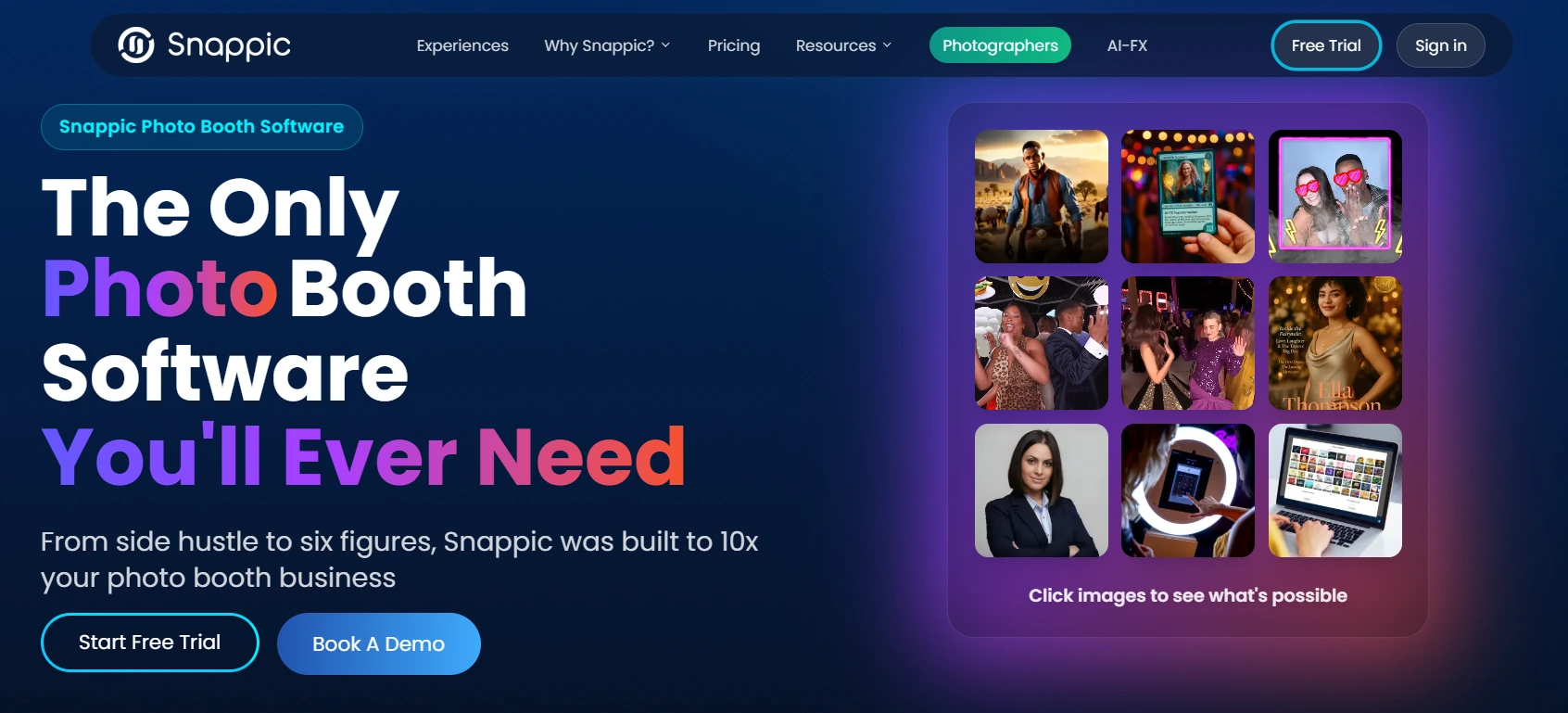
Snappic is photo booth software for professional event operators, developed by Algoritmo Software Inc. in Toronto, Canada. Founded in 2016 by Julio Amorim, Rossella Kruger, Marco De Freitas, and Rayman Rosevear, the platform started from the idea that traditional photo booth solutions were clunky, limited, and often detracted from the events they were meant to enhance.
The company changed direction during the pandemic, when the halt in live events forced Snappic to build virtual and web-based booth capabilities.
That investment paid off when in-person events returned, leaving Snappic with a broader product than before. In July 2024, Banyan Software acquired Snappic, citing its customer base across 90 countries. All four co-founders stayed on.
Today, Snappic runs on iPad, iPhone, and Mac, covering every major booth format: standard iPad photo booths, 360-degree video, robot arm/Glambot, mirror, and roaming photography.
Its main features include AI-FX photo transformations, VideoFX for slow-motion production, branded microsite galleries, social sharing, and SmartShare face-recognition delivery. The platform targets independent photo booth operators, event entertainment companies, and brand activation agencies.
Snappic Pros & Cons
| Pros | Cons |
|---|---|
| Supports every major booth type from one platform (iPad, 360, Glambot, mirror, roaming) | iOS/Apple-only (no Windows or Android app) |
| Multiple AI engines (AI-FX, PersonaFX, BananaFX) for different transformation styles | Higher monthly cost than one-time-purchase alternatives |
| All features available on every plan (tiers differ by device count) | AI credits, background removal credits, and SMS credits billed separately |
| 24/7/365 live support | Cloud-dependent features degrade at venues with poor connectivity |
| VideoFX produces slow-motion video without post-production | No proprietary hardware (operators source their own rigs) |
| SmartShare eliminates repeat contact entry via face recognition | Can feel like more platform than needed for single-booth operators |
| 14-day free trial with no credit card required | Only 93 App Store ratings (limited independent review data) |
Snappic Review: How It Works & Key Features
AI-FX & Capture Experiences: Three AI engines turn standard booth photos into shareable content.
Snappic’s AI runs through three systems, each built for a different type of transformation.
The core AI-FX pipeline applies style transfers, branded avatars, magazine covers, trading cards, and artistic effects to captured photos. After the booth captures a guest’s photo, the image uploads to Snappic’s cloud, where processing takes 2 to 5 minutes depending on server load.
Operators choose effects from a preset filter library covering art styles, seasonal themes, pop culture, and professional scenarios, or write custom prompts. Each generation costs one AI credit; test images cost 0.25 credits.
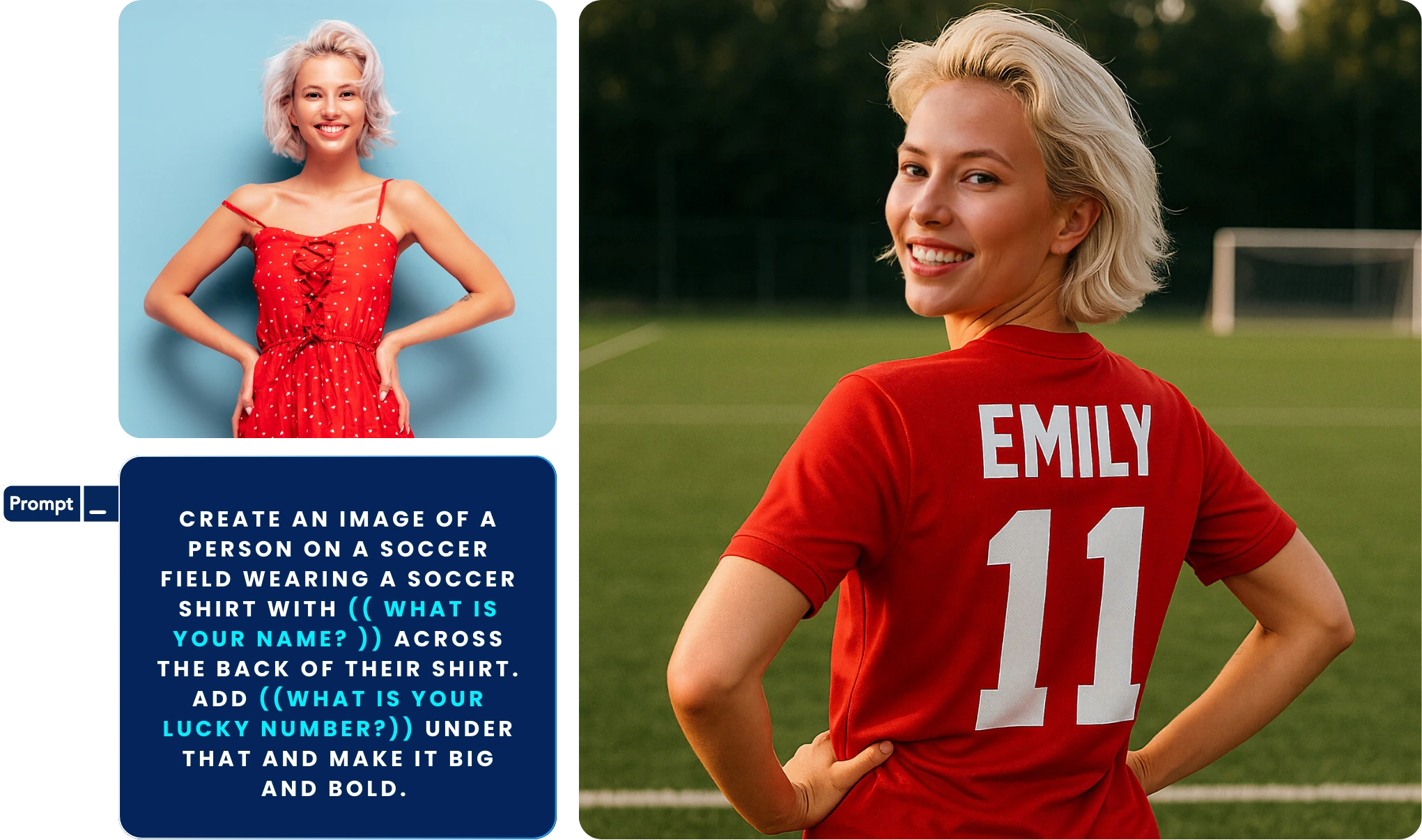
PersonaFX generates photorealistic portraits, artistic interpretations, and styled avatars for up to three people. It supports survey-driven customization, so guests can enter details (like a custom jersey number) that feed directly into the AI prompt.
Source: Snappic
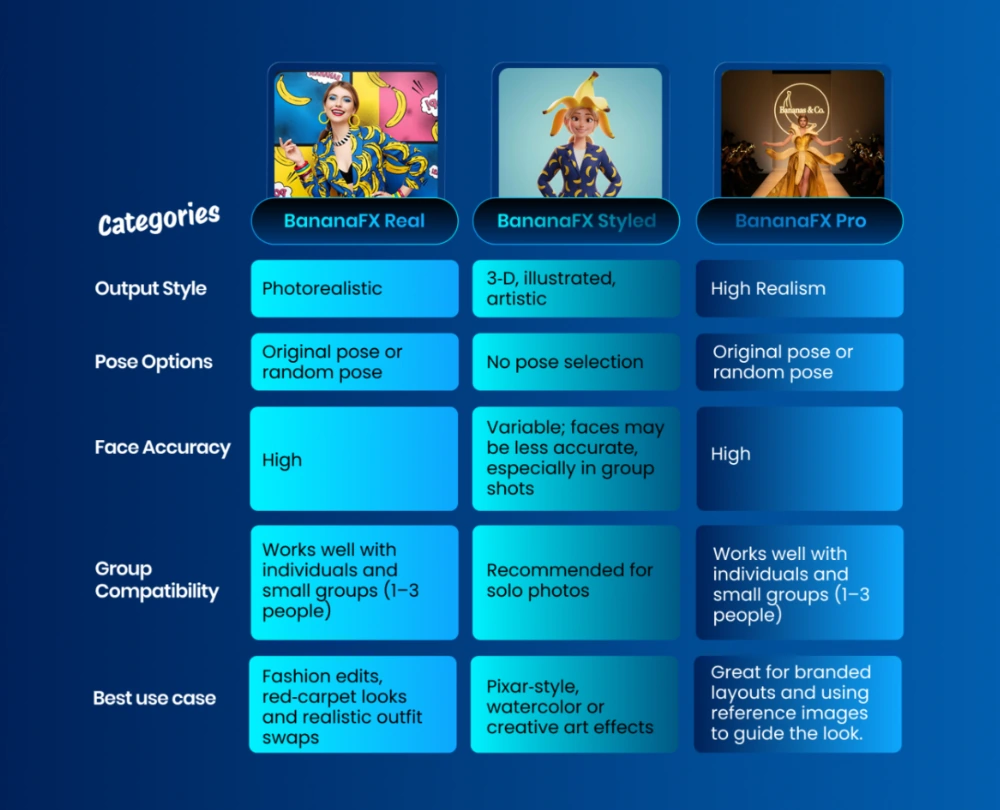
BananaFX, powered by Google’s Gemini 2.5, creates new images from text prompts rather than filtering the original photo. It comes in four variants (Real, Styled, Animated, and Pro 2.0) and renders faster than the core AI-FX pipeline.
Source: Snappic
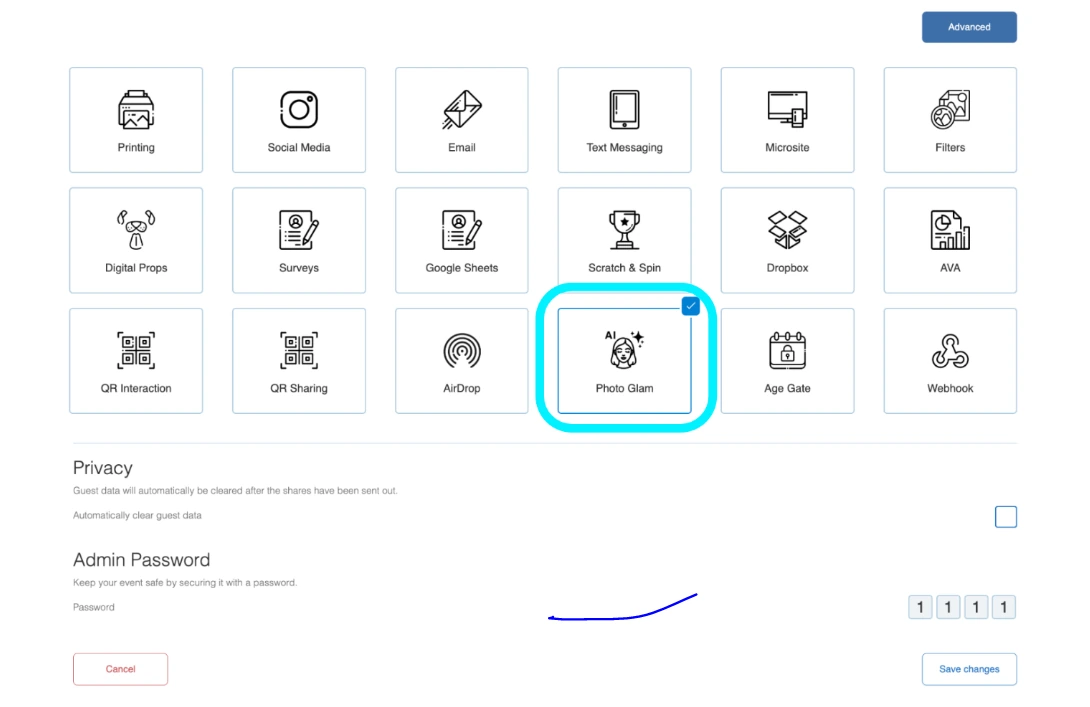
Beyond AI transformations, Snappic includes Photo Glam for offline skin smoothing and teeth whitening (no internet or credits required), AI Touchups with 40+ enhancement parameters, and four background removal methods covering offline and online use.
Source: Snappic
The offline background removal option (available on app v1.31+) works at venues with unreliable Wi-Fi.
Standard capture modes include still photo, GIF, burst, and boomerang, each compatible with animated overlays, digital props using face detection, and filters.
VideoFX, 360 Booth & Robot/Glambot: Video production from capture to branded output, no post-production required.
Snappic’s VideoFX system is the platform’s clearest differentiator from iPad-only photo booth software. It handles video capture, effects, branding, and rendering across four hardware setups: 360-degree booths, robot arm/Glambot, mirror booths, and roaming mode.
Source: Snappic
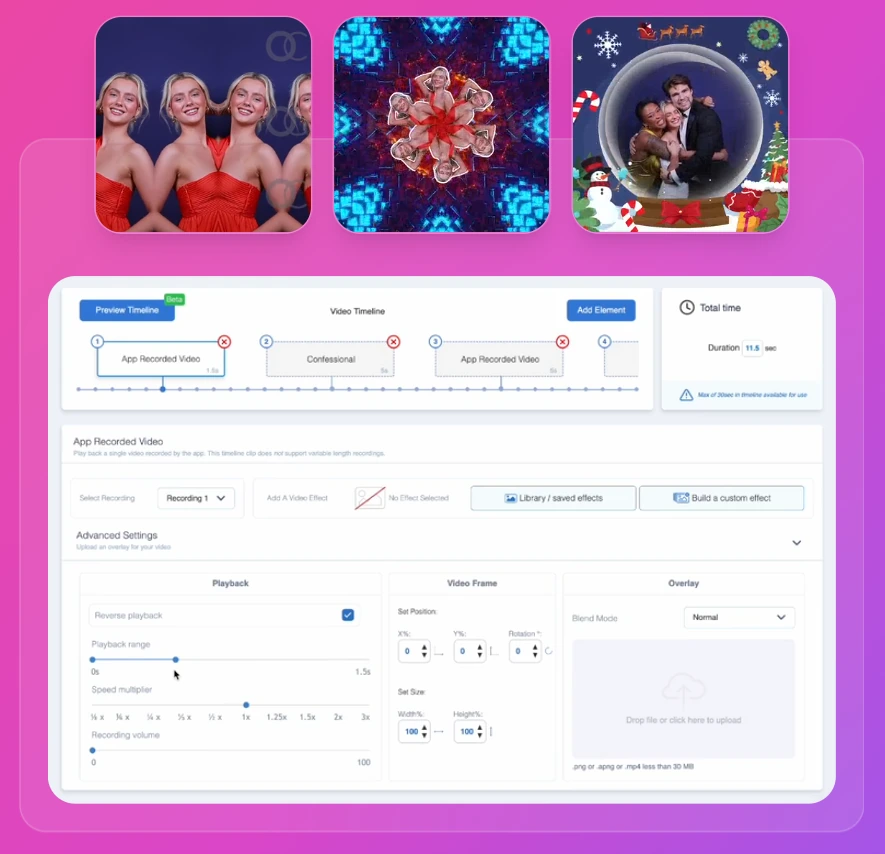
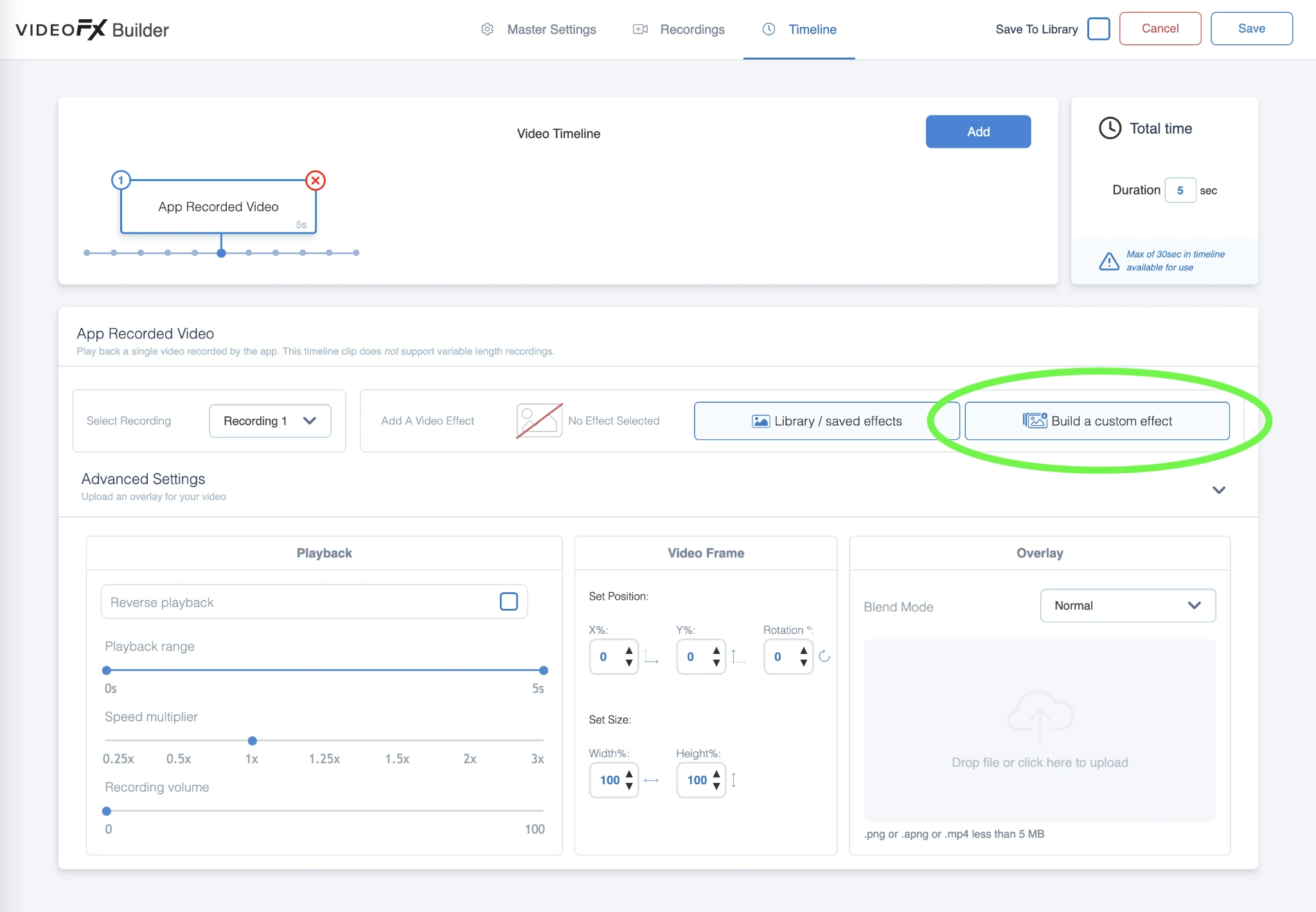
Everything runs through the VideoFX Template Builder, a three-tab editor that controls output settings (resolution, soundtracks, frame rate), recording segments (countdown, duration, confessional mode), and a timeline that assembles clips into the final output (30 seconds max). Per-clip controls include reverse playback, range trimming, speed multiplier, and animated overlays.
Source: Snappic
For Glambot and high-speed capture, Snappic records at 60 to 240 fps with documented compatibility for iPhone 11+, iPad Pro 2020+, GoPro, and Canon DSLRs (the Canon R5 Mark II and R3 reach 240 fps at 1080p). Three pre-built Glambot templates ship ready to use: MultiZoom (2-second capture, 8-second output), FastZoom, and DoubleSlowMo (3-second capture, 11-second output).
AI Segmentation removes backgrounds from video clips in real time without a physical green screen. The result is a branded slow-motion video with music, overlays, and virtual backgrounds, delivered to the guest with no post-production.
Source: Snappic
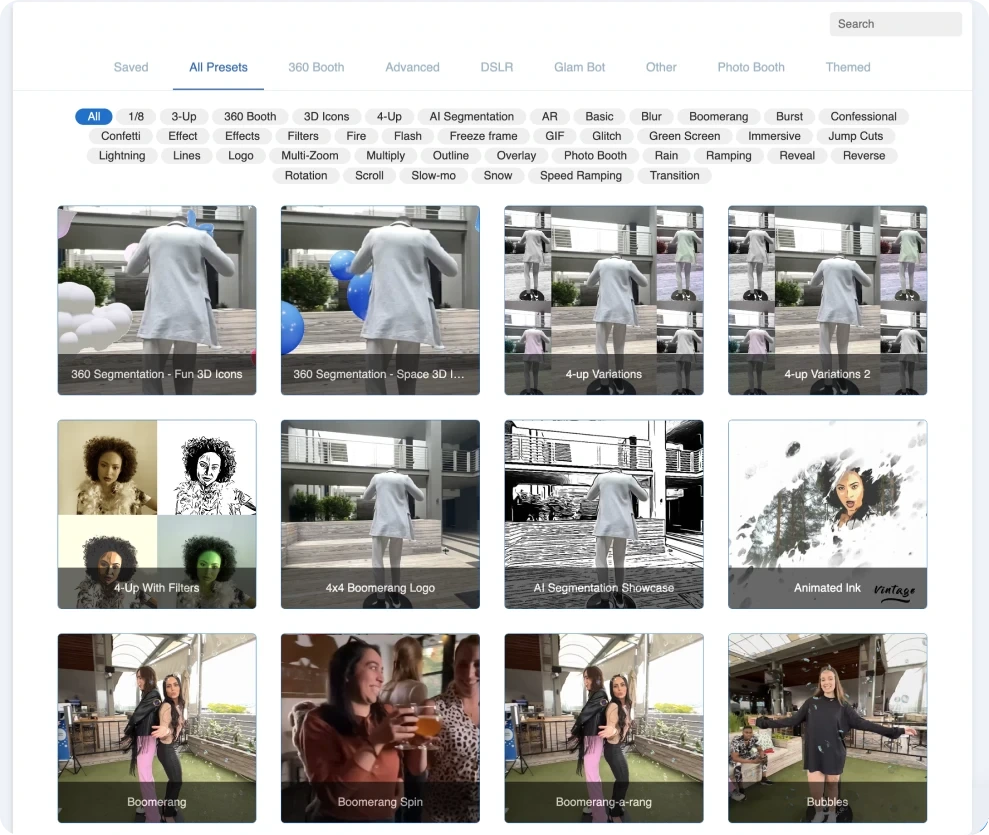
The platform includes 60+ video effects including Light Trail Slo-Mo, Outline FX, and overlay effects.
Sharing, Printing & Microsites: Multiple delivery channels, face-recognition sharing, and branded event galleries.
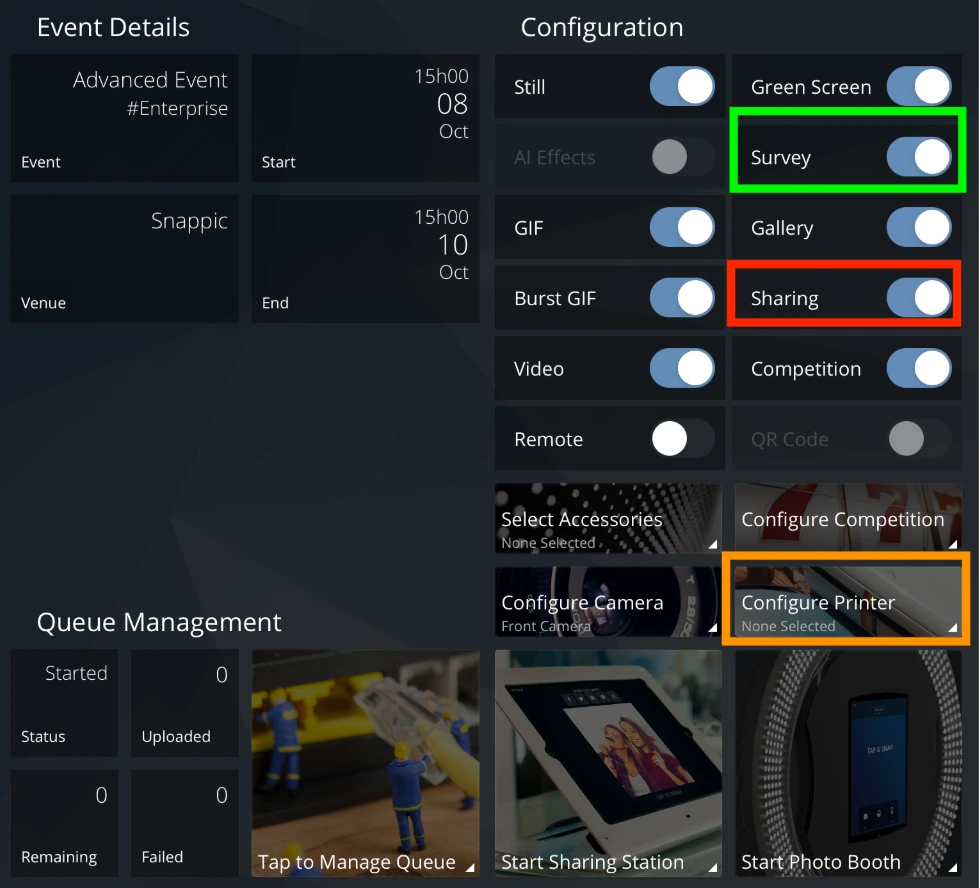
Snappic offers several ways to deliver photos to guests. SMS and email are available on all plans, with unlimited texts for the US and Canada under a fair-usage policy. QR sharing generates an on-screen code that guests scan for instant access without entering contact details.
The most notable delivery feature is SmartShare, which eliminates repeat data entry. In Face Linking mode, the AI recognizes a guest in every subsequent capture and sends a share notification automatically. In QR Code Linking mode, guests carry a pre-generated QR card that links each session.
SmartShare requires internet and is available as a paid add-on on Business ($35/month for 800 credits) or included on Premium and Scale.
The Sharing Station turns a second iPad into a dedicated sharing device that syncs captured media from the main booth in real time. The booth line keeps moving while guests share from a separate device. Multiple stations can run at once.
Source: Snappic
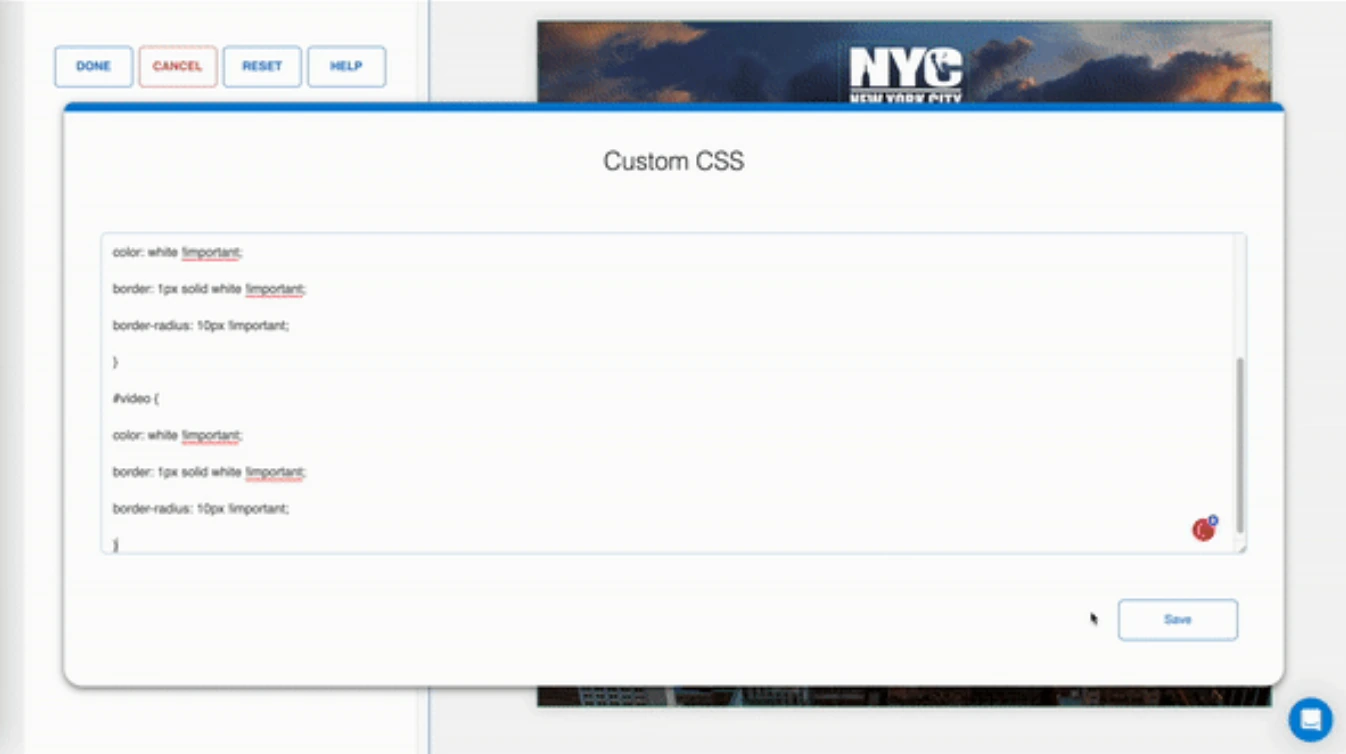
Each event can generate a branded microsite gallery with custom logos, banners, and optional password protection. The microsite accepts custom CSS for branding control. Microsites come with Business and above, or cost $19/event on Starter.
Source: Snappic
Printing is included on every plan via wired, wireless Print Server (Mac and Windows), or AirPrint.
Analytics, Data & Business Tools: Event measurement and agency management tools.
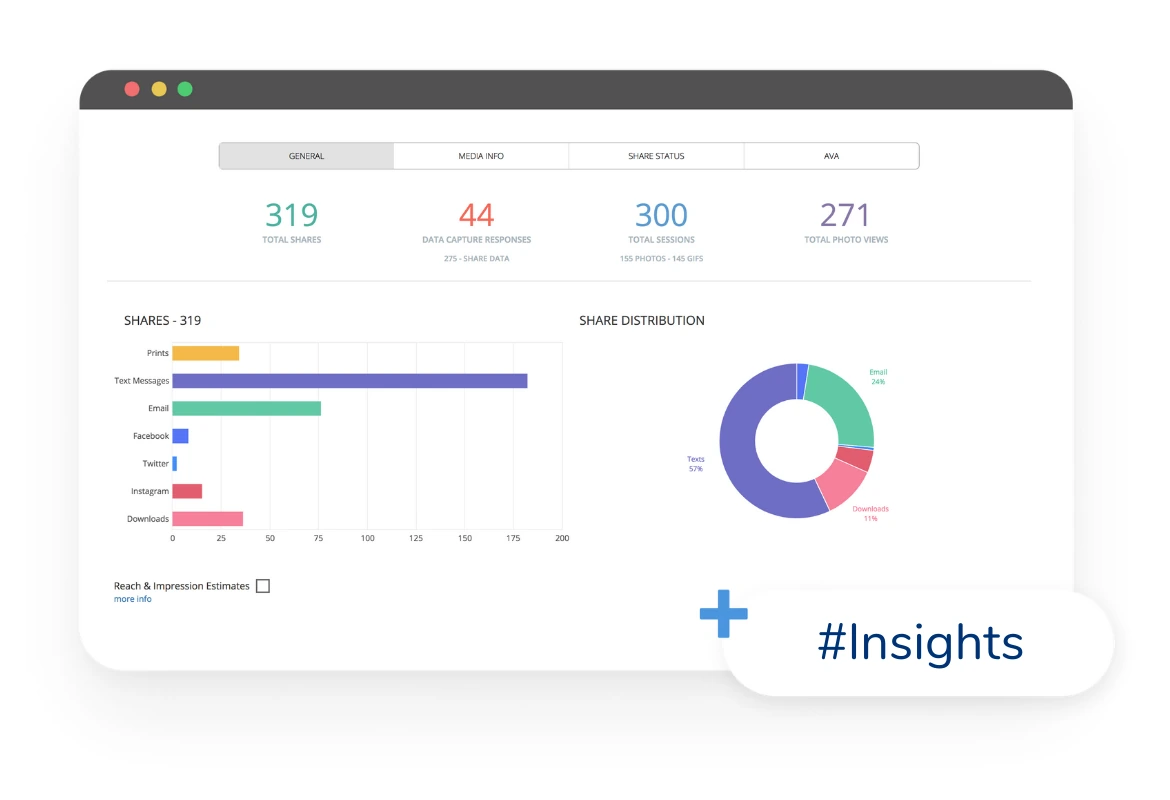
Snappic’s analytics turn photo booth events into measurable marketing deliverables. Built-in event analytics track shares by channel, session counts, photo views, peak engagement periods, and estimated reach.
Source: Snappic
On Business and above, operators use Send to Client to deliver a live analytics page with gallery access, downloadable guest data, and share metrics.
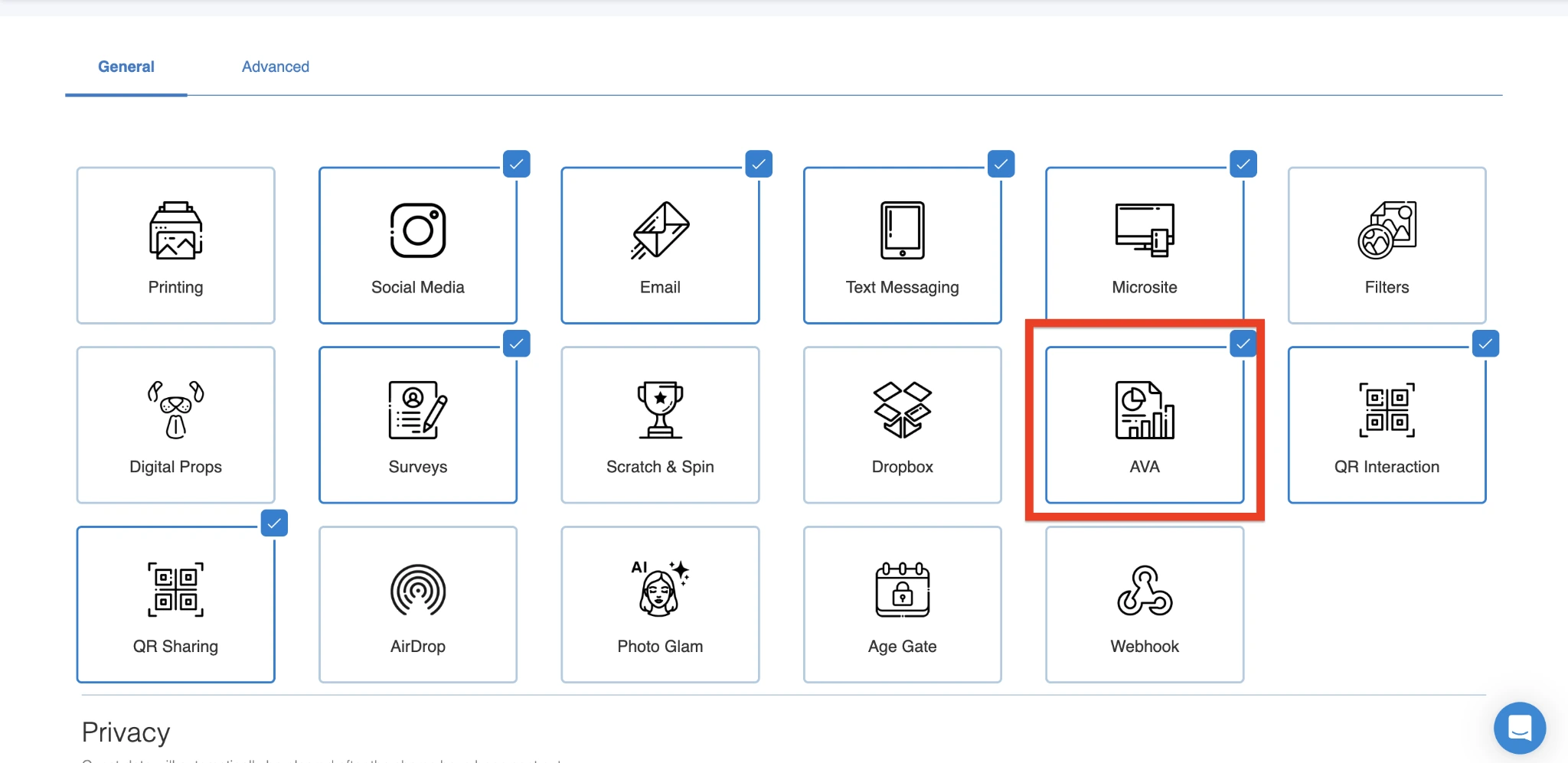
AVA (Advanced Vision Analytics) uses facial recognition to extract anonymized demographic data: gender distribution, approximate age ranges, face count, and average group size per photo.
Source: Snappic
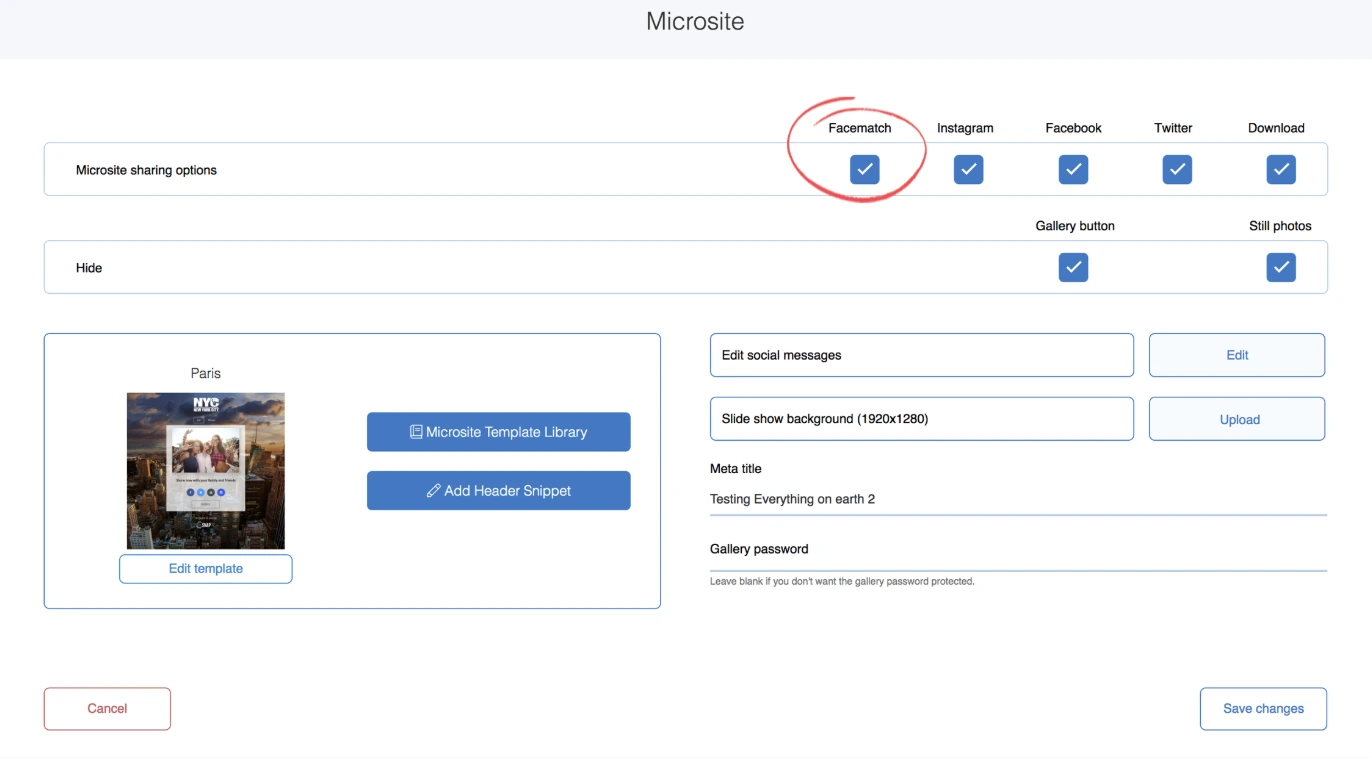
FaceMatch lets guests find their own photos on the event microsite by uploading a selfie. Both features are available on all plans.
Source: Snappic
For data collection, operators can enable custom surveys with text fields, ratings, checkboxes, and dropdowns, tied to individual photo sessions. A GDPR consent checkbox and guest data anonymization tools handle privacy compliance.
Business tools include webhooks that push event data to CRMs or Google Sheets in real time, LiveConnect for remote booth control from any browser, Stripe-powered in-app payments, and event codes for pre-configured event launch. The Scale plan adds sub-account management, an unbranded grey-label app, and a dedicated success manager.
Pricing: Tiered by device count with add-on credits for AI and delivery features.
Source: Snappic
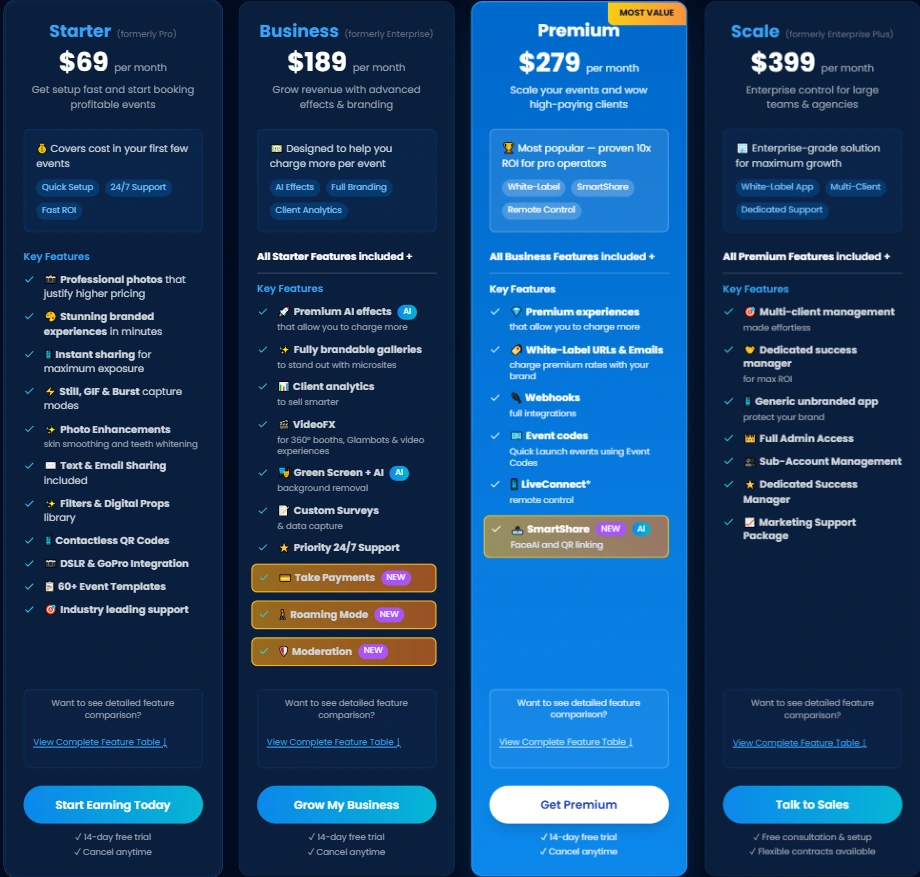
Snappic uses a per-booth license subscription. All features are included on every tier; plans differ by the number of device licenses and bundled add-ons. A 14-day free trial is available with no credit card required.
Starter: $69/month ($499/year)
- 1 Photo Booth License
- Still photo, GIF, burst capture; SMS and email sharing (US/Canada unlimited); 60+ event templates; filters; digital props; QR codes; DSLR and GoPro integration; 24/7 support
- Does not include: VideoFX, AI-FX, client analytics, surveys, white-label, or webhooks
Business: $189/month ($1,799/year)
- 1 Photo Booth License + 1 Sharing Station License
- Adds: VideoFX (360, Glambot, video); AI-FX; branded microsites; green screen + AI background removal; client analytics; surveys; Stripe payments; roaming mode; content moderation; priority support
- White-label, webhooks, event codes, LiveConnect, and SmartShare available as paid add-ons
Premium: $279/month
- All Business features plus: white-label URLs and emails; webhooks; event codes; LiveConnect; SmartShare AI (400 credits included, non-rolling)
Scale: $399/month ($3,999/year)
- All Premium features plus: multi-client management; unlimited sub-accounts; unbranded grey-label app; dedicated success manager; marketing support package
A per-event license is available at $29 (Starter-level) or $79 (Business-level) for 48-hour access, useful for operators running fewer than three events per month.
Additional device licenses range from $39–$119/month depending on plan and device type. AI-FX credits cost $20 per 200, background removal credits cost $15 per 100, and international SMS credits cost $39 per 1,000. Annual billing saves 20% on plans that offer it.
Where Snappic Falls Short
Snappic covers more booth types than most competitors, but several limitations show up with regular use. These reflect a platform built for software breadth across hardware configurations rather than an integrated hardware-and-software experience.
No Proprietary Hardware. Snappic is software-only. Operators buy their own iPad enclosures, ring lights, stands, and 360 platforms from third-party manufacturers. Lighting quality, build durability, and setup speed vary by what the operator purchases. The hardware may not match the software’s quality, and troubleshooting hardware falls outside Snappic’s support.
Credit Costs Add Up. Beyond the monthly subscription, operators pay separately for AI-FX credits, background removal credits, AI sharing credits, and international SMS credits.
For operators running AI-heavy corporate events, these variable costs are hard to predict and can increase per-event expenses substantially. SmartShare credits on Premium and Scale don’t roll over, which pressures operators to use them within each billing period.
Processing Wait Times for AI Effects. AI-FX generation takes 2 to 5 minutes on average depending on server load. At high-volume events where guests expect instant results, this creates bottlenecks. The feature goes offline entirely at venues without internet.
iOS-Only Limitation. Snappic runs only on iPad, iPhone, and Mac. There is no Windows or Android app. Operators with Windows-based DSLR setups, or those in markets where Android tablets are more accessible, must switch to Apple hardware to use the platform.
Complexity for Simple Use Cases. Snappic acknowledges that the platform “can feel like more platform than needed if you only run one booth type.”
For operators who want a reliable iPad photo booth for weddings and parties, the volume of settings creates a steep learning curve, and the VideoFX templates, multi-engine AI systems, and agency management tools become overhead rather than value.
Limited Independent Review Data. With 93 App Store ratings and no substantial G2 or Capterra presence, it’s harder to verify the platform’s reliability at scale compared to competitors with thousands of reviews.
These limitations aren’t failures. They follow naturally from building a broad, software-only platform that spans every booth format. But they create an opening for solutions that pair software with dedicated hardware, offer faster AI processing, and keep things simpler for operators who center their work on iPad photo booths.
Top Snappic Alternative: Simple Booth
Simple Booth takes a different approach. Instead of covering every booth format through software alone, it provides an integrated system where hardware, software, and cloud management are designed together.
Founded in 2013 by Mark Hennings and Jeremy Cox, the platform serves 30,000+ customers with 40 million+ moments captured and holds a 4.7-star App Store rating from 2,400+ reviews.
HALO Hardware: Ring-light hardware that sets up in under a minute with no tools.
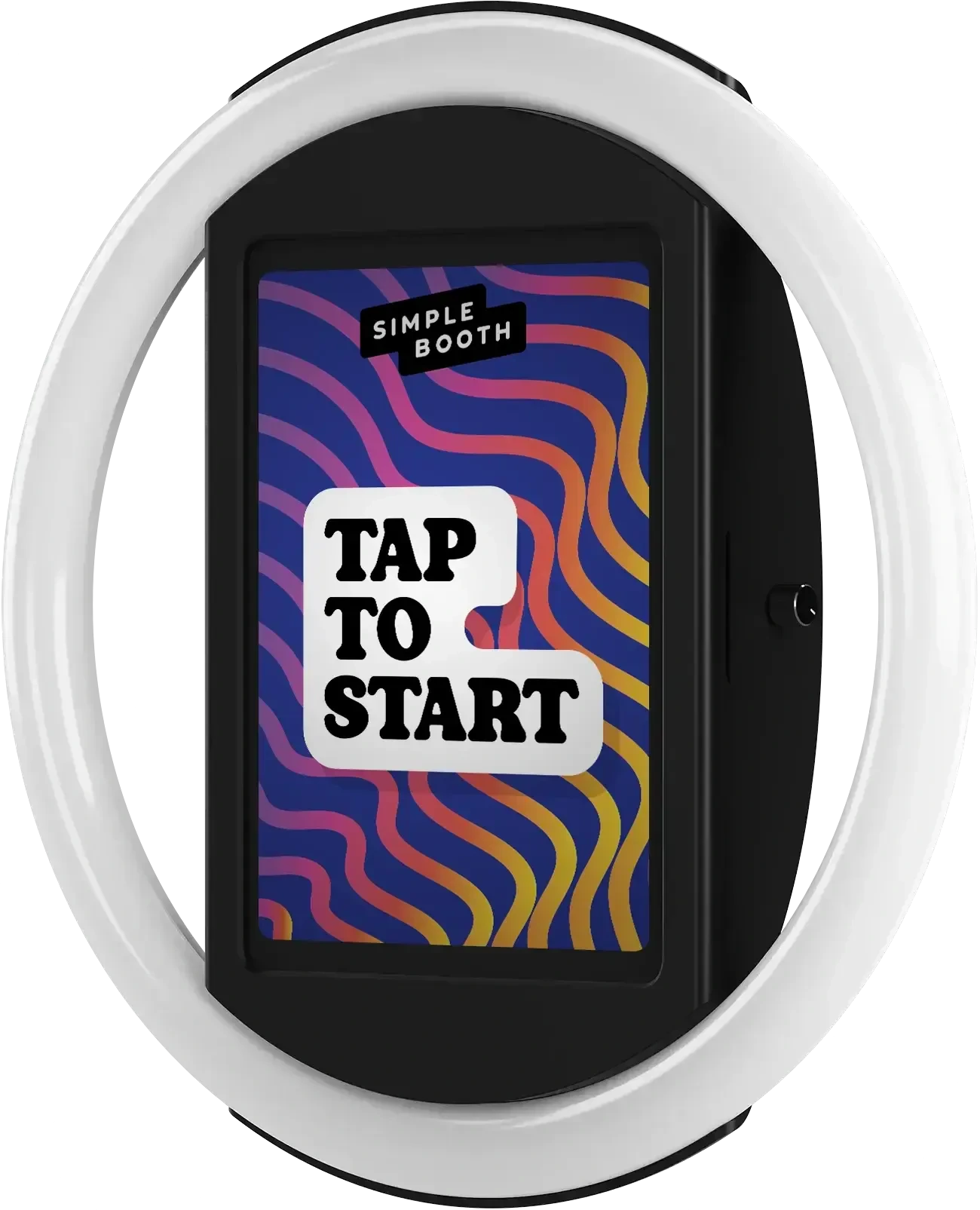
The HALO photo booth kit is what separates Simple Booth from software-only competitors. The chassis is machined from a single billet of anodized aluminum with a patented ring-light system producing up to 2,100 lumens from 112 LEDs, rated for 50,000 hours of operation.
Source: Simple Booth
Setup requires no tools. The iPad snaps in via a tool-less faceplate, a concealed USB-C cable keeps it charged throughout the event, and the selfie stand deploys without assembly. Simple Booth claims setup in under one minute, which matters for operators running multiple events per week.
The Event Kit travels in a rolling hard case at 49 lbs with wheels and an extendable handle. An Install Kit with a steel wall mount is available for permanent venue deployments.
The hardware supports portrait and landscape orientation, and a steel baby pin on the back works with standard grip accessories. For events without wall power, compatible portable batteries provide 6+ hours of runtime.
“It paid for itself pretty quickly. Now it’s just extra money coming in.” (Kurt Nielson Photography)
Layout Designer & AI Effects: An in-app design tool and AI effects that replace external software.
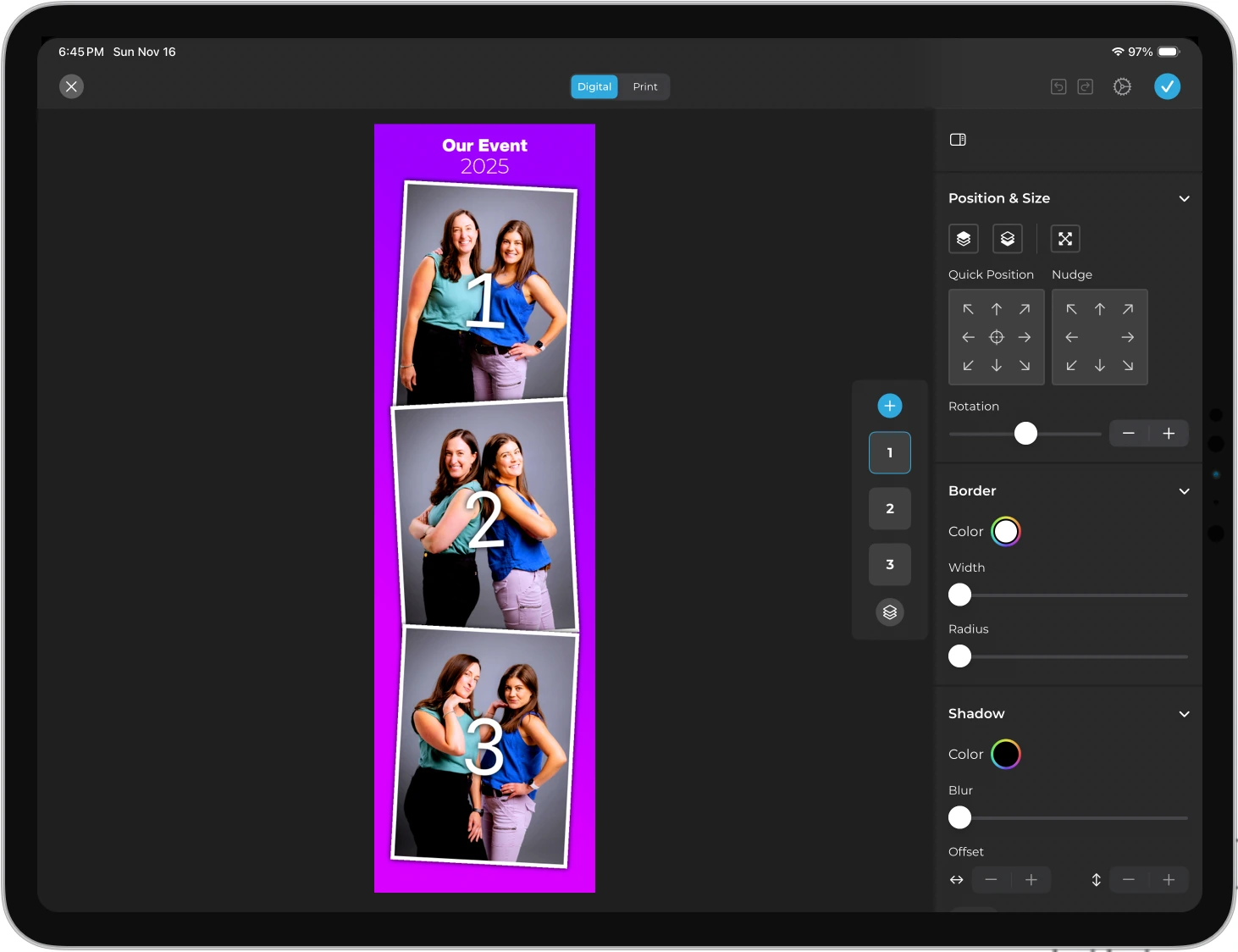
HALO 5.0 introduced the Layout Designer, a full template creation tool inside the app and web dashboard: photo placement, text layers with font and color controls, background gradients, logo positioning, border rounding, and dynamic QR code embedding. Operators build branded layouts without opening Photoshop or Canva.
Source: Simple Booth
Guest-editable text layers (on Plus and above) let participants type names, captions, or hashtags directly onto their photo before sharing. Dynamic text sizing keeps the design clean regardless of message length.
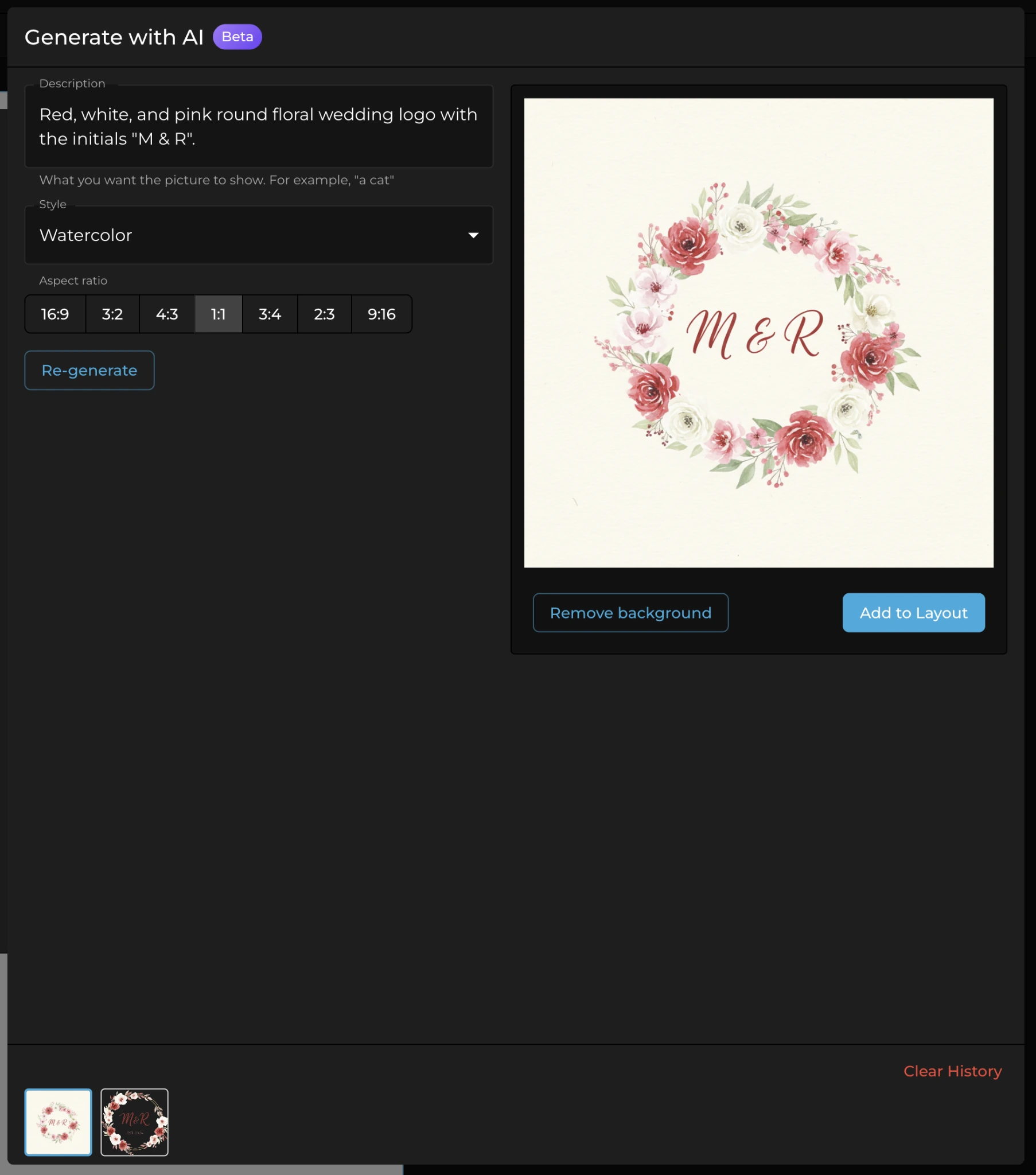
Simple Booth’s AI effects use Nano Banana models to transform captured photos from text prompts. The platform handles identity preservation automatically, so guests stay recognizable without operator prompt engineering.
Operators can test prompts outside booth mode without consuming credits, and the system supports assigning a unique AI prompt to each frame in a multi-frame layout for sequential narrative strips.
AI credits cost $0.10 each, and purchased credits never expire. AI-generated layout images (for graphic elements like borders and themed frames) are free.
Source: Simple Booth
HALO 5.0 also added Canon and Sony DSLR and mirrorless camera support on Core and above, with both wired USB and wireless Wi-Fi connectivity, a capability most competitors lack. Operators who already own compatible cameras get studio-grade image quality through the full HALO feature set.
Virtual Booth: A browser-based photo experience with no hardware required.
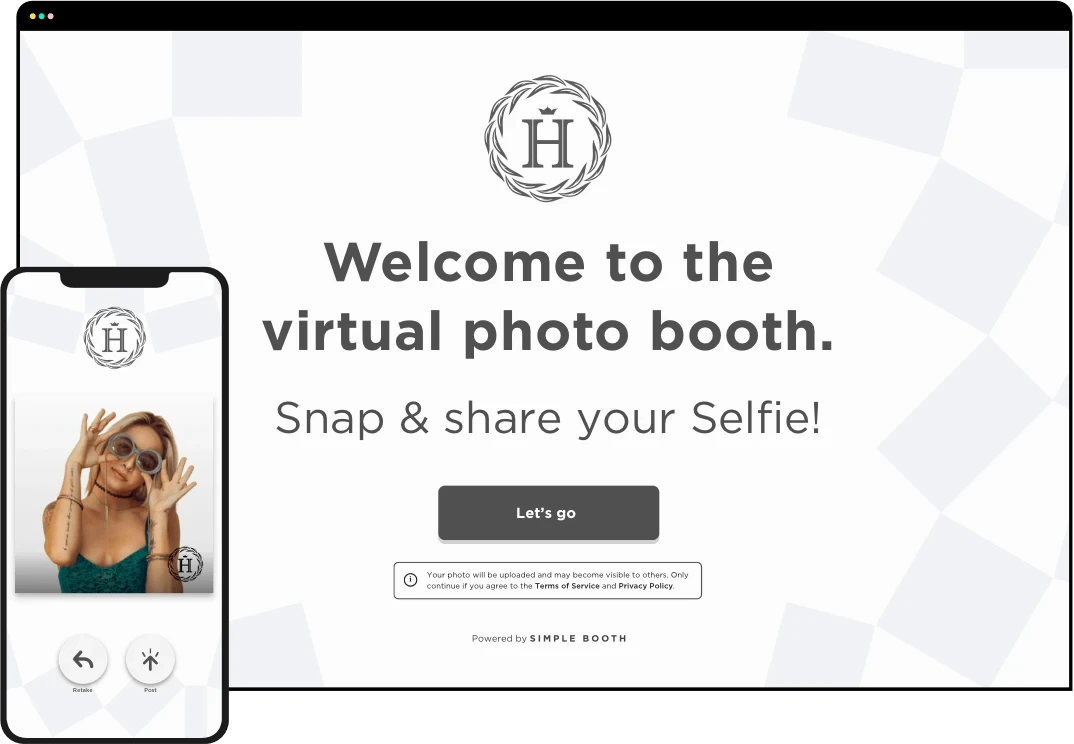
Virtual Booth is Simple Booth’s hardware-free product. It delivers a branded photo experience on any device through a web browser, with no app install required.
Source: Simple Booth
The host configures branding, effects, and data capture fields through the online dashboard, and each event generates a unique link and QR code to share via email, website, or print.
Participants visit the link, grant camera permissions or upload a photo, apply effects (overlays, stickers, AI effects, background replacement), and submit to the gallery. Standard submissions are unlimited on all plans.
Virtual Booth supports nine languages (English, Hebrew, Spanish, Polish, Italian, German, French, Dutch, and Danish), runs any number of concurrent events under one account, and connects to the same analytics, Live Feed, and gallery tools as the HALO hardware.
This makes it useful for hybrid events where in-room attendees use the physical booth and remote participants join via Virtual Booth, with all submissions feeding one gallery.
Because it’s link- and QR-based, Virtual Booth can also be embedded in email campaigns, printed on product packaging, or placed on a brand website as a persistent activation.
Lead Capture & Marketing Tools: First-party data collection with documented opt-in rates above 87%.
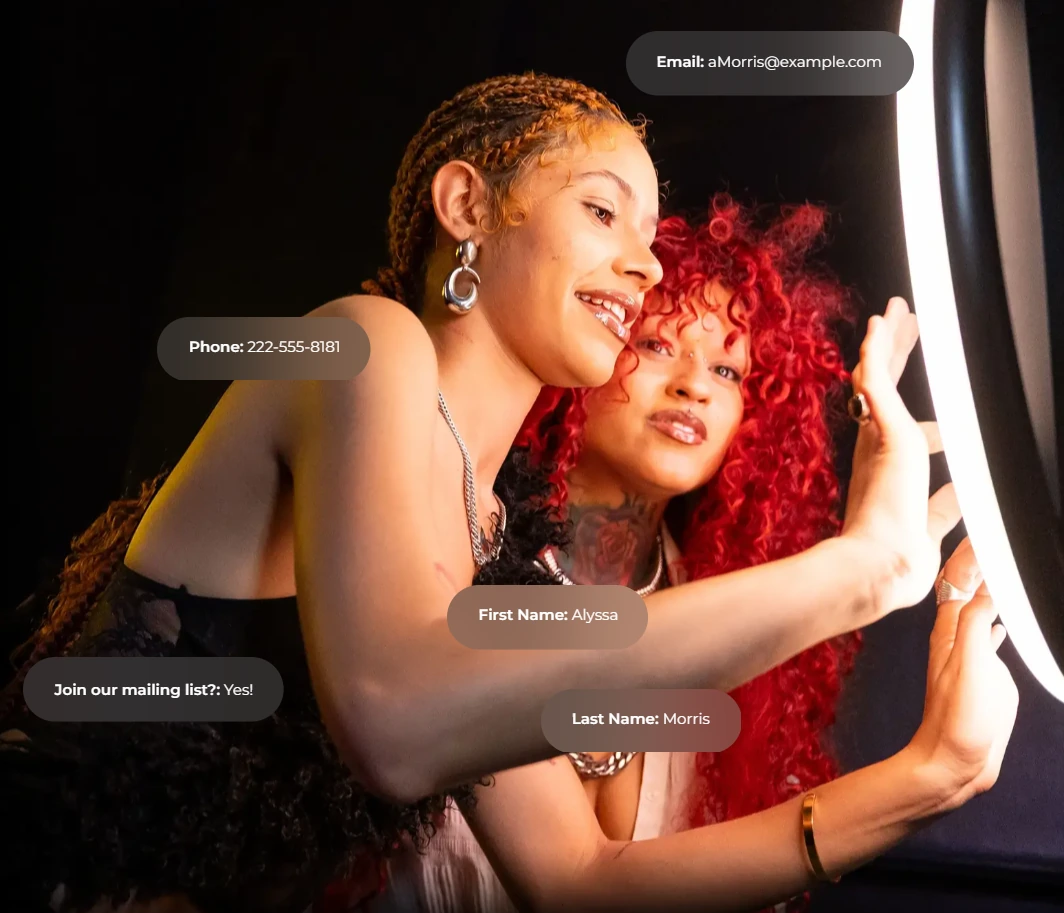
Simple Booth was designed for marketing teams as much as event operators. The platform captures opt-in rates of 87 to 89% when guests receive photos, well above typical marketing form rates.
Source: Simple Booth
Lead capture forms support up to 6 standard fields on Pro (email, name, phone, postal code, date of birth) and up to 10 custom fields on Select, including checkboxes and required legal terms. Data exports as CSV, syncs with MailChimp, or routes to a CRM via the Open API on Pro and above.
Photo delivery options include QR code, email, SMS, AirDrop, and WhatsApp on all plans. WhatsApp delivery, added in HALO 5.0, opens international deployments that SMS-only systems can’t serve. Each event generates a branded online gallery that can double as a Live Feed display on any TV or projector.
Analytics track participants, uploads, gallery views, social shares, and referred views by platform. The Select tier adds demographic insights via face detection: estimated age, gender breakdown, and average group size.
“10+ years, we’re big Simple Booth believers.” (G7 Entertainment Marketing, 136,000+ fan interactions)
Pricing: Weekly, monthly, and annual options with no hidden feature gating by tier.
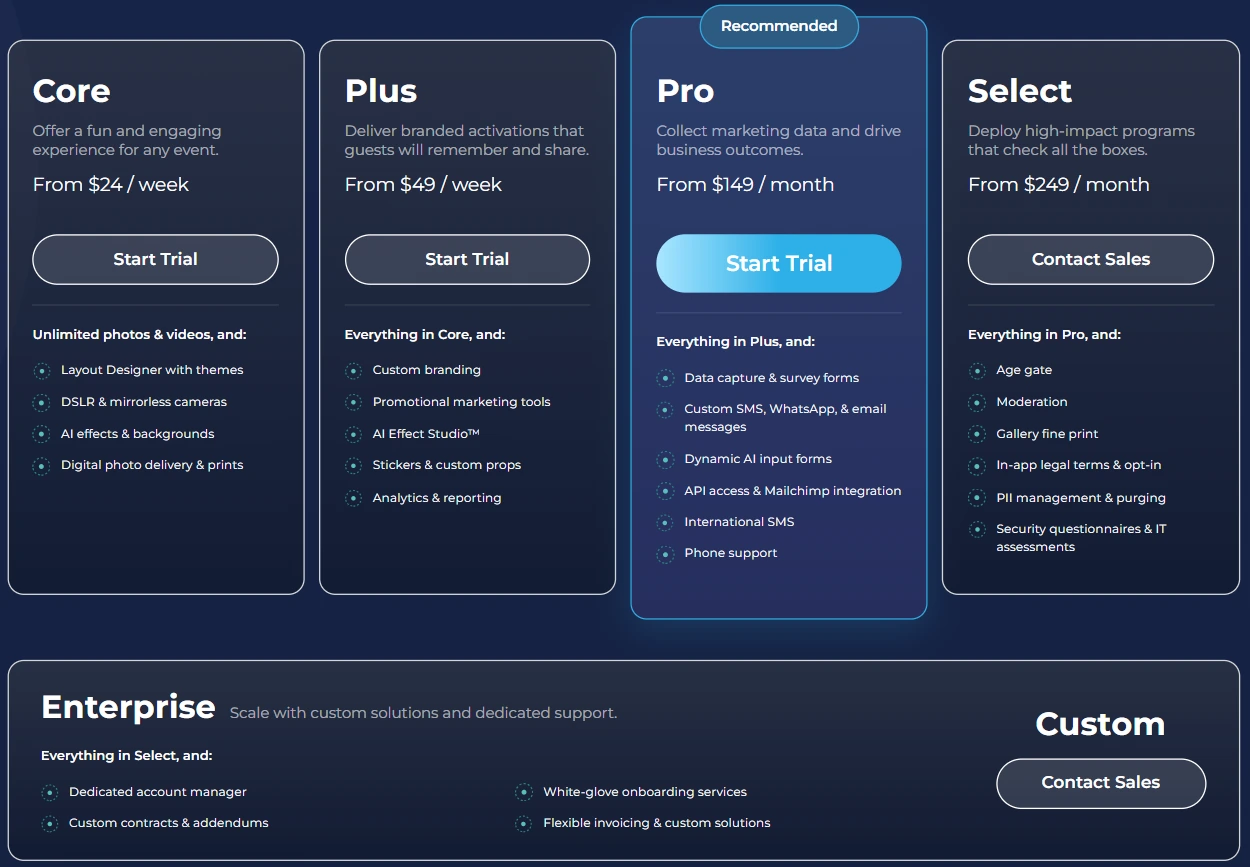
Simple Booth uses a per-license subscription with three billing cycles: weekly, monthly, and annual. Weekly billing is unusual in this category and suits rental operators with variable event schedules.
Lite: $14.99/week, $29.99/month, $289.99/year (App Store only)
- 1 license; custom layouts; motion and still capture; photo delivery; online galleries; themes and props; 7-day support
- Shows in-app ads; excludes DSLR, video, custom branding, AI effects, analytics, lead capture
Core: $24/week, $49/month, $490/year
- Ads removed; multiple layouts; DSLR/mirrorless camera connection; full-length video; background replacement and blur; Dropbox integration; AI effects; Virtual Booth; AI-generated layout images
- 50 bonus AI credits on new subscription
Plus: $49/week, $99/month, $990/year
- Custom branding; custom photo delivery messages; analytics and reporting; guest-editable text layers; custom AI effects
- 100 bonus AI credits on new subscription
Pro: $149/month, $1,490/year
- Lead capture; API integration; phone support; AI guest inputs; moderation; age gate; data compliance tools
- 150 bonus AI credits on new subscription
Select: $249/month, $2,490/year
- In-app custom legal terms; security questionnaires; demographic analytics via face detection
- 200 bonus AI credits on new subscription
A 7-day free trial is available with 25 free AI credits.
Snappic or Simple Booth: Comparison Summary
| Snappic | Simple Booth | |
|---|---|---|
| Booth types supported | iPad, 360, Glambot, mirror, roaming | iPad (with HALO hardware), Virtual Booth (browser-based) |
| Proprietary hardware | None (software only) | HALO ring-light kit in machined aluminum |
| Setup time | Varies by third-party hardware | Under 1 minute, no tools required |
| AI effects | AI-FX, PersonaFX, BananaFX (three engines) | Nano Banana models with identity preservation |
| AI processing time | 2 to 5 minutes (cloud) | Cloud-based (time not publicly specified) |
| Video production | VideoFX with 60+ effects, Glambot templates | Video capture (5 to 120 sec), no production suite |
| In-app design tool | Template Designer (browser-based) | Layout Designer with layers, fonts, gradients, QR codes |
| Virtual / remote booth | Virtual Booth (web-based) | Virtual Booth (browser-based, multi-language) |
| Lead capture opt-in rate | Not publicly quantified | 87 to 89% documented |
| Photo delivery | SMS, email, QR, SmartShare (face recognition), AirDrop | QR, email, SMS, AirDrop, WhatsApp |
| App Store rating | 4.5 stars (93 ratings) | 4.7 stars (2,400+ ratings) |
| Support | 24/7/365 live support | 7-day (Lite) to phone support + dedicated manager (Select) |
| White-labeling | Available (Premium+ or add-on) | Not available on Virtual Booth (Simple Booth branding appears) |
| Operating system | iOS only (iPad, iPhone, Mac) | iOS only (iPad) |
| Starting price | $29/event or $69/month | $24/week or $49/month (Core) |
| Free trial | 14 days, no credit card | 7 days |
| Best for | Multi-format operators running 360, Glambot, and agency work | iPad booth operators and marketing teams wanting integrated hardware + lead capture |
Final Verdict
The choice between Snappic and Simple Booth comes down to what kind of photo booth business you’re building and who you’re building it for.
Choose Snappic if you run or plan to run multiple booth formats. If you have a 360 booth at a corporate gala on Friday, a Glambot at a product launch on Saturday, and an iPad booth at a wedding on Sunday, Snappic handles all three from one app.
The VideoFX template builder, slow-motion production, and Glambot templates address event work that iPad-only booth software can’t touch. For agencies building a multi-client operation, the Scale plan’s sub-account management, grey-label app, and dedicated success manager support that growth.
Choose Simple Booth if you want integrated hardware and software that delivers a self-operating experience with a marketing edge. The HALO’s patented ring light, sub-one-minute setup, and aluminum construction make it the choice for operators who want consistent photo quality without sourcing and troubleshooting third-party hardware.
For marketing teams and brand activators, the 87%+ opt-in lead capture rate, built-in Layout Designer, WhatsApp delivery, and Virtual Booth extend the platform beyond event entertainment into measurable first-party data collection. \
With 30,000+ customers and a 4.7-star rating from 2,400+ reviews, the platform’s track record is verified independently at a scale most competitors haven’t reached.
Get started with Simple Booth here.
Both platforms run on iPad and share a commitment to professional event experiences. The difference is philosophy: Snappic asks “How do I cover every booth format from one app?” while Simple Booth asks “How do I make the iPad photo booth so good it runs itself?”
Snappic FAQ
Is there a free version of Snappic?
Snappic does not offer a permanent free plan. It provides a 14-day free trial with no credit card required, giving operators time to test before committing. A per-event license at $29 (Starter) or $79 (Business) grants 48-hour access for operators who don’t need a recurring subscription. Simple Booth offers a 7-day free trial with 25 free AI credits.
How much does Snappic cost per month?
Snappic’s monthly plans range from $69 (Starter) to $399 (Scale). Starter covers standard iPad photo booths; Business at $189/month adds VideoFX, AI-FX, and client analytics; Premium at $279/month includes white-labeling and webhooks; Scale at $399/month adds agency management tools and a dedicated success manager.
Annual billing saves 20% on plans that offer it. Simple Booth’s monthly plans start at $49 (Core), ranging up to $249 (Select).
Does Snappic work on Windows or Android?
No. Snappic runs only on iPad, iPhone, and Mac. Operators using Windows-based DSLR setups or Android tablets can’t run Snappic without switching to Apple hardware. Simple Booth is also iPad-only for its HALO app, though Virtual Booth runs in any browser on any device.
What booth types does Snappic support?
Snappic supports standard iPad photo booths, 360-degree video booths, robot arm/Glambot booths, mirror booths, and roaming photography from one platform. This is the broadest booth-type coverage in the category. Simple Booth focuses on iPad photo booths with HALO hardware and adds a browser-based Virtual Booth for remote and hybrid events.
Does Snappic require an internet connection?
Photo capture and printing work offline once the event downloads to the iPad. AI-FX, SmartShare, SMS/email sharing, and microsite uploads all require internet. Snappic queues shares and uploads in the background and resumes when connectivity returns. Cloud-based AI effects are unavailable entirely at venues without internet.
What are Snappic’s AI effects?
Snappic runs three AI systems. AI-FX applies style transfers and transformations using a preset library or custom prompts. PersonaFX generates photorealistic or styled avatars for up to three people with survey-driven personalization. BananaFX, powered by Google Gemini 2.5, creates new images from text prompts. Processing takes 2 to 5 minutes on average.
Each generation costs one AI credit ($20 per 200 credits). Simple Booth uses Nano Banana models with automatic identity preservation and offers free prompt testing outside booth mode.
Does Snappic include hardware?
No. Snappic is software-only. Operators buy their own iPad enclosures, ring lights, stands, 360 platforms, and robot arms from third-party manufacturers. Snappic lists hardware partners including Mobibooth, OrcaVue, Dzen Tech, and others. Simple Booth sells the HALO, a proprietary ring-light kit machined from aluminum with a patented lighting system, with a protection plan and 0% financing available.
Can Snappic integrate with my CRM?
Snappic offers no native CRM integrations with platforms like Salesforce or HubSpot. Instead, it uses webhooks (available on Premium and Scale, or as a paid add-on on Business) to push event data to external systems in real time.
A no-code Google Sheets integration is available via the Webhooks for Sheets add-on. Simple Booth offers a native MailChimp integration and an Open API on Pro and Select for custom CRM connections.
Keep reading
 Showdowns
Simple Booth vs Snappic: Which Photo Booth Software Fits Your Business in 2026?
Integrated iPad system vs multi-format fleet. Simple Booth or Snappic?
 Alternatives
7 Snappic Alternatives: Photo Booth Software for Every Operator (2026)
Beyond Snappic: booths that ditch the credit fees and add hardware.
 Pricing
Snappic Pricing: Worth It or Consider Simple Booth? (September 2026)
Monthly tiers plus layered credit fees. Snappic pricing, fully unpacked.