7 Gifyyy Alternatives: Photo Booth Solutions for Growing Event Businesses (2026)

Gifyyy has built a loyal following among wedding photographers and event professionals with its portable, self-running GIF photobooth system. Combining a hardware kit with integrated SMS delivery and gallery hosting, it offers a turnkey way to add photobooth revenue to any event business, with the entire unit carried in one hand, set up in 5 minutes, and left to run by itself.
But the event photography industry is changing. GIF and slow-motion capture alone may not meet what clients now expect. Whether it’s corporate activations that need AI-enhanced content, luxury weddings requiring professional camera quality, or brand marketers who want data capture, you might need a platform that goes further.
That’s where this guide comes in. We’ll explore Gifyyy alternatives that excel where you need them most, whether you’re looking to:
- Improve photo quality with AI-powered effects, custom design tools, and professional camera support
- Scale into multi-booth-type operations with 360 spin, GlamBot, and mirror booth formats
- Access professional features through flexible subscriptions without a large upfront hardware purchase
- Build a dedicated 360 spinning booth business with specialized rig control software
- Run corporate brand activations with AR effects, consent-based lead capture, and video guest books
- Deliver real-time event photos to guests through AI face recognition without a dedicated booth station
- Deploy DSLR-quality captures across iPad, Mac, and Windows from a single low-cost subscription
This isn’t about finding a “better” photobooth. It’s about finding the right fit for your business model and growth plans. Some operators might use these tools alongside their existing Gifyyy setup, while others might switch to an alternative that better matches their evolving needs. Let’s dive in.
| The Best Gifyyy Alternatives | ||
|---|---|---|
 | Simple Booth Best Alternative for AI-Powered Photo Experiences and Built-In Marketing Tools We chose Simple Booth because it pairs AI-powered photo effects and an in-app Layout Designer with integrated lead capture achieving 87%+ opt-in rates, giving operators a complete system for branded experiences and measurable marketing ROI. | |
 | Snappic Best Alternative for Fleet Management and Multi-Booth-Type Operations We chose Snappic because it supports 360 spin booths, GlamBot, mirror booths, and iPad setups from a single subscription with centralized fleet management and a full AI content generation suite. | |
 | LumaBooth Best Alternative for DSLR-Quality Captures at the Lowest Professional Subscription Price We chose LumaBooth because it delivers Canon, Nikon, and Sony camera support with every major capture format included across iPad, Mac, and Windows at the lowest paid professional subscription in the category. | |
 | TouchPix Best Alternative for Building a Dedicated 360 Spin Booth Business We chose Touchpix because it offers native Bluetooth rig control, GoPro integration, and cross-platform support across iOS, Android, Windows, Mac, and Linux for operators specializing in the 360 spinning video format. | |
 | Curator Live Best Alternative for Brand Activation with AR Effects and Lead Capture We chose Curator Live because it combines consent-based lead capture, AR cinematic compositing, video guest books, and an 11-role permission model for agency operators running corporate activations. | |
 | Booth.Events Best Alternative for Professional Cloud Features Without Hardware Buy-In We chose Booth Events because it offers a functional free tier with three complete events, DSLR camera support, and AI background removal, letting operators validate demand before committing capital. | |
 | Honcho Best Alternative for Real-Time Photo Delivery Without a Dedicated Booth We chose Honcho because its AI face recognition delivers every event photo to guests within seconds via a selfie lookup, with built-in photo sales and instant Stripe payouts, all without dedicated booth hardware. | |
What is Gifyyy?
Source: Gifyyy
Gifyyy is a portable GIF photobooth system designed for event professionals who want a self-running booth that fits into a busy workflow. Founded in 2015 by wedding photographer Benjamin Chernivsky and digital product designer David Miller, Gifyyy was built so operators could carry the entire setup in one hand, set up in five minutes, and leave it to run unattended.
Its key features include:
- Multiple capture formats including boomerang-style animated GIFs, slow-motion video, and still photos with a hybrid mode letting guests choose between two formats per event
- Automated SMS delivery via TXTOMATION that sends GIF links to guests’ phones within seconds of capture
- GifGo gallery hosting on a grey-label domain powered by Amazon AWS
- Brandable overlays with custom logos and frames
- Offline mode with Trigger Upload for venues with unreliable Wi-Fi, giving operators control over delivery timing
- Built-in camera filters including Noir, FaceBrush, FaceBrush+, and Bang!
- Post-event remarketing through bulk SMS follow-up messages linking back to the operator’s website
Gifyyy operates on a hardware-purchase model, with kits ranging from $2,595 for the Starter Kit to $3,895 for the Pro Kit Plus+, plus a per-event fee of $29 after five complimentary events included with each purchase. The system pairs an LED ring light and iPad bracket with USA-made wooden tripod legs, creating a polished look for upscale events.
For solo wedding photographers looking for a portable, no-fuss GIF photobooth add-on, Gifyyy delivers what it promises. But as event businesses grow and clients expect AI-enhanced content, professional camera quality, and data capture, you may need a platform that goes further.
Looking for a photo booth platform with AI effects, custom design tools, and built-in lead capture? Start your free Simple Booth trial.
How We Curated Our List of Gifyyy Alternatives
After testing Gifyyy and researching the photo booth market, we found that operators’ needs are expanding beyond animated GIF capture and SMS delivery. While Gifyyy works well for wedding photographers who want a portable self-running booth, growing event businesses often need more:
- AI-enhanced photo experiences that justify higher event pricing
- Custom branded layouts built without external design software
- Lead capture and marketing data from event attendees with measurable ROI
- 360 spin booths, GlamBot, mirror booths, and other multi-format setups
- DSLR and mirrorless camera support for professional-grade image quality
- Real-time photo delivery to guests without requiring them to visit a booth station
- Multi-device fleet management across simultaneous events
Each tool on this list leads in one or more of these areas. You might use them alongside your existing setup or switch entirely; it depends on what your business needs most.
| ❗DISCLAIMER: We aren’t covering every photo booth tool on the market! Our focus is on the best alternatives that address Gifyyy’s limitations for various use cases. The goal is to highlight tools that serve specific business needs. |
|---|
1. Simple Booth: Best Alternative for AI-Powered Photo Experiences and Built-In Marketing Tools
Source: Simple Booth
Simple Booth is a photo booth platform that pairs proprietary ring-light hardware with a cloud-connected iPad app, plus a browser-based Virtual Booth product, to deliver branded, AI-enhanced photo experiences with integrated lead capture and marketing analytics. Its key features include:
- AI-powered effects: Nano Banana AI models transform guest photos post-capture using text prompts, with identity preservation handled automatically
- Layout Designer: A full in-app design tool with layers, fonts, gradients, and QR code embedding, replacing external design software
- DSLR and mirrorless camera support: Canon camera integration for high-quality image output (Core plan and above)
- Multi-channel photo delivery: QR code, SMS, email, AirDrop, and WhatsApp on all plans
- Lead capture: Customizable forms achieving 87% opt-in rates with fields for email, phone, and custom data
- Virtual Booth: A browser-based photo experience requiring no hardware, reaching audiences on any device
With 30,000+ customers, a 4.7-star App Store rating from 2,400+ ratings, and 40 million+ moments captured, Simple Booth is a broader photo booth ecosystem than Gifyyy’s GIF-focused platform. Where Gifyyy is built for wedding photographers who want a portable side service, Simple Booth serves both event rental operators looking to “build a more profitable photo booth business” and marketing teams who need a “new marketing engine for your brand”.
Why Choose Simple Booth Over Gifyyy for Photo Experiences
Gifyyy delivers a clean, reliable GIF photobooth experience.
Simple Booth adds AI creative tools, professional camera support, and marketing capabilities that help operators charge higher rates and show measurable brand value. Its visual preset editor displays the entire booth flow upfront, making event setup fast and new staff training straightforward (a real advantage for rental companies running multiple drop-off events).
Built on over a decade of continuous development since 2012, the platform has a stable foundation with contingencies for everything from Wi-Fi outages to high-traffic web serving.
AI Effects and Creative Design Tools: Transform Every Photo Into Branded Content
Gifyyy’s creative output relies on basic overlays, logo frames, and a small set of camera filters (Noir, FaceBrush, Bang!). The final product is a looped GIF or short video clip.
Simple Booth treats photo capture as a creative canvas.
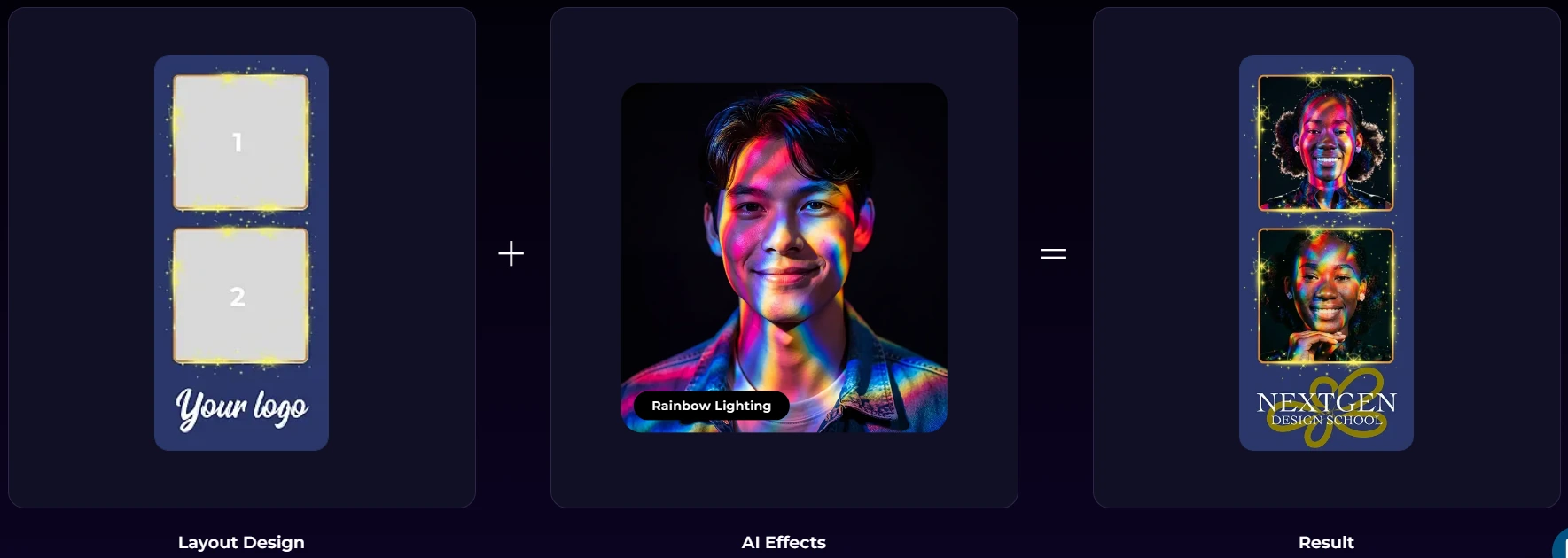
AI Effects use Nano Banana AI models to transform captured photos into new artistic outputs: illustrated portraits, branded avatars, stylized scenes, or themed transformations that keep guests recognizable while delivering something they’ve never seen before.
Source: Simple Booth
Three model tiers (Nano Banana 1, 2, and Pro) balance speed, quality, and group size, with unlimited test generations at zero credit cost outside of booth mode so operators can iterate before the event.
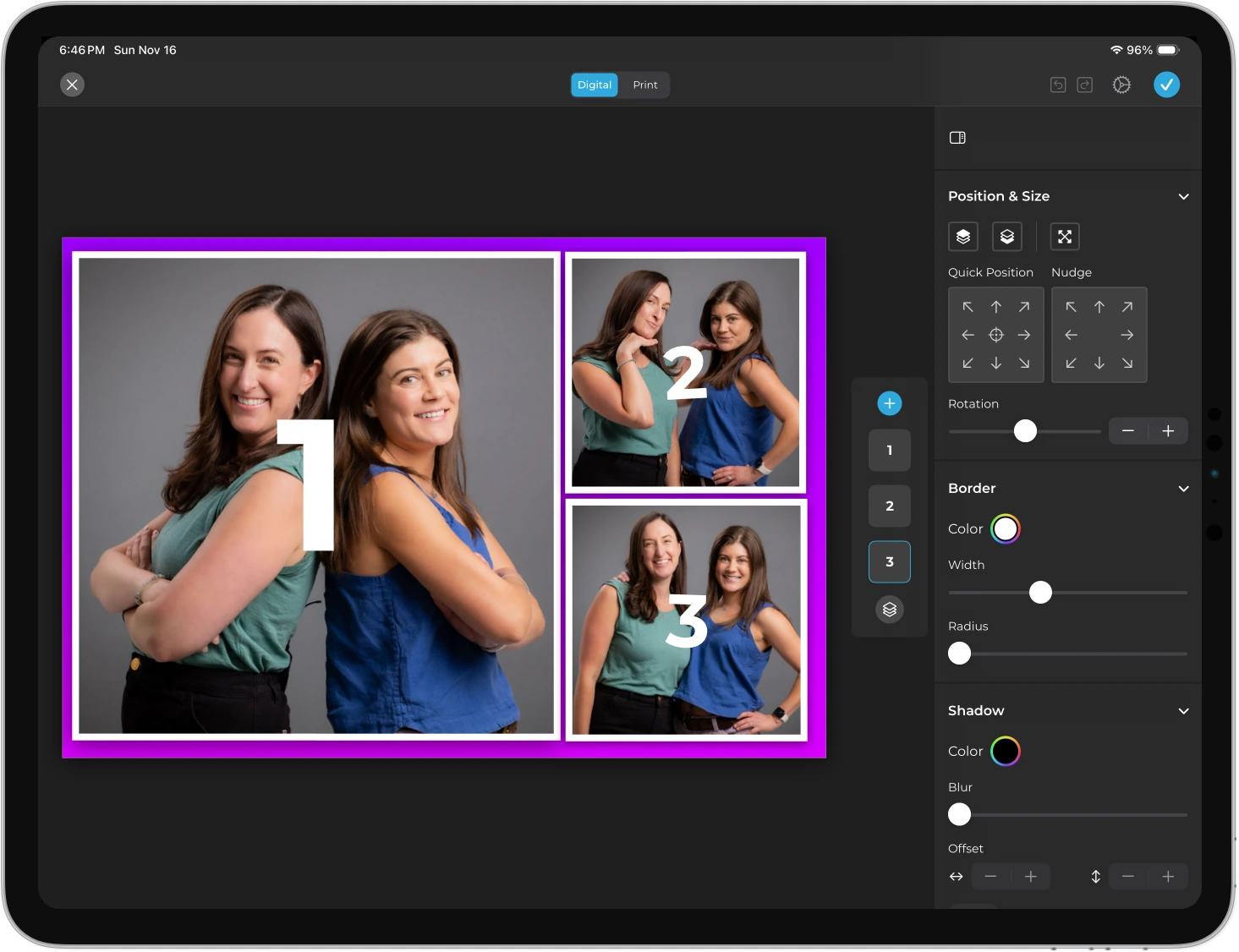
The Layout Designer puts the entire template design workflow inside the app or web dashboard: photo placement, text layers with fonts and colors, background gradients, logo positioning, and embeddable QR codes.
Source: Simple Booth
Operators can assign unique AI prompts to individual frames in a multi-frame layout, creating sequential narrative strips or comic-book-style outputs. Guest-editable text layers let participants type names, hashtags, or captions directly onto their photo before sharing, scaling personalization to high-volume events without adding operational steps.
⚡ Simple Booth in Action: At a corporate product launch, guests step up to the HALO booth and pose. The AI Effect transforms their photo into a branded illustration matching the event’s visual theme, composited with the client’s logo and event hashtag via the Layout Designer.
Each guest walks away with a personalized, branded image they share on social media, and the client gains both branded UGC and the guest’s contact information from the lead capture form.
Deep Eddy Vodka generated over 14,000 social posts through Simple Booth activations across their spirits brand marketing tour. (Deep Eddy Vodka Case Study)
Professional Camera Support: Break Through the iPad Camera Ceiling
Gifyyy captures all content through the iPad’s built-in front-facing camera. That’s intentional and practical for its target audience, but it limits image quality to what works for social sharing rather than large-format output.
Simple Booth’s DSLR and mirrorless camera integration (Core plan and above) connects Canon cameras via USB for reliability or wirelessly over WiFi for creative setups (a capability most competitors in this list don’t offer). The iPad becomes a controller and display while the DSLR handles capture.
Additional image enhancement includes background blur and bokeh (a claimed first for iPad photo booths), Glam skin smoothing, and AI background replacement without a physical green screen. All effects work together with DSLR integration and in offline mode, and image previews render up to 12x faster than previous versions.
Source: Simple Booth
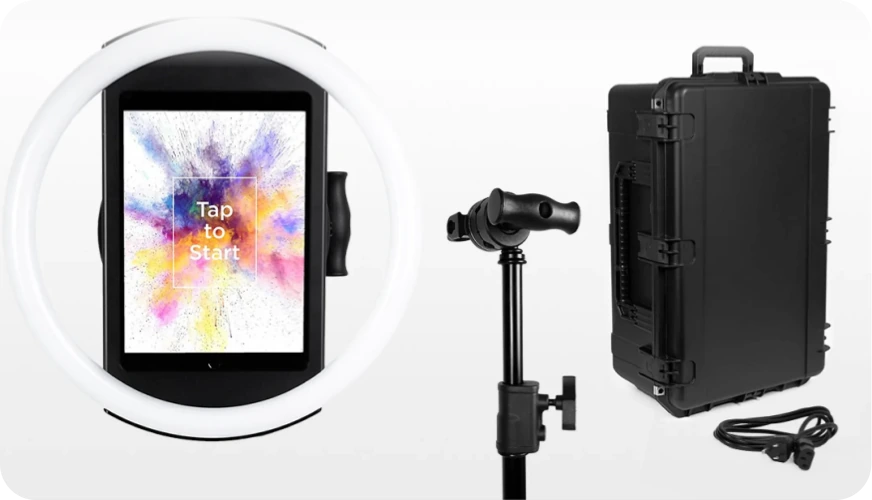
The hardware matches the positioning: the HALO chassis is machined from a single billet of aluminum with 112 LEDs producing up to 2,100 lumens, rated for 50,000 hours of operation. The tool-less faceplate and deployable selfie stand enable setup in under one minute, with a concealed USB-C cable keeping the iPad charged throughout the event.
⚡ Simple Booth in Action: A wedding photographer arrives at a luxury reception venue with their HALO Event Kit. Setup takes under a minute: snap in the iPad, connect the Canon camera via USB, select the pre-configured event preset from the dashboard, and walk away.
The HALO’s ring light illuminates groups standing 6-8 feet from the camera, producing DSLR-quality portraits that match the photographer’s primary coverage. If the venue Wi-Fi drops, the offline mode queues all sessions and delivers them when connectivity returns.
Lead Capture and Marketing Analytics: Turn Photo Sessions Into Business Growth
Gifyyy collects phone numbers from guests who use the booth and lets operators send up to three bulk SMS messages per event via TXTOMATION. It also provides basic page view and visitor statistics. Simple Booth goes further with lead capture and analytics designed for both operators and their brand clients.
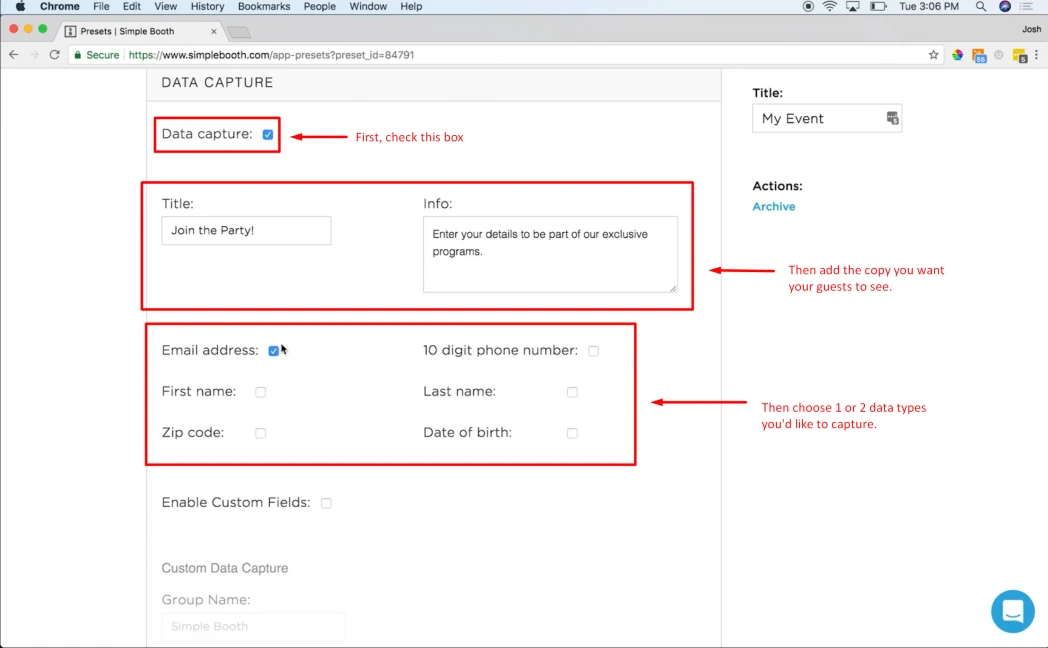
Simple Booth’s data capture form collects up to 6 standard fields on Pro (email, first name, last name, phone, postal code, date of birth) and up to 10 custom fields on Select, including checkboxes and required legal terms. The platform achieves opt-in rates as high as 87-89% because data collection is embedded naturally in the photo delivery flow.
Source: Simple Booth
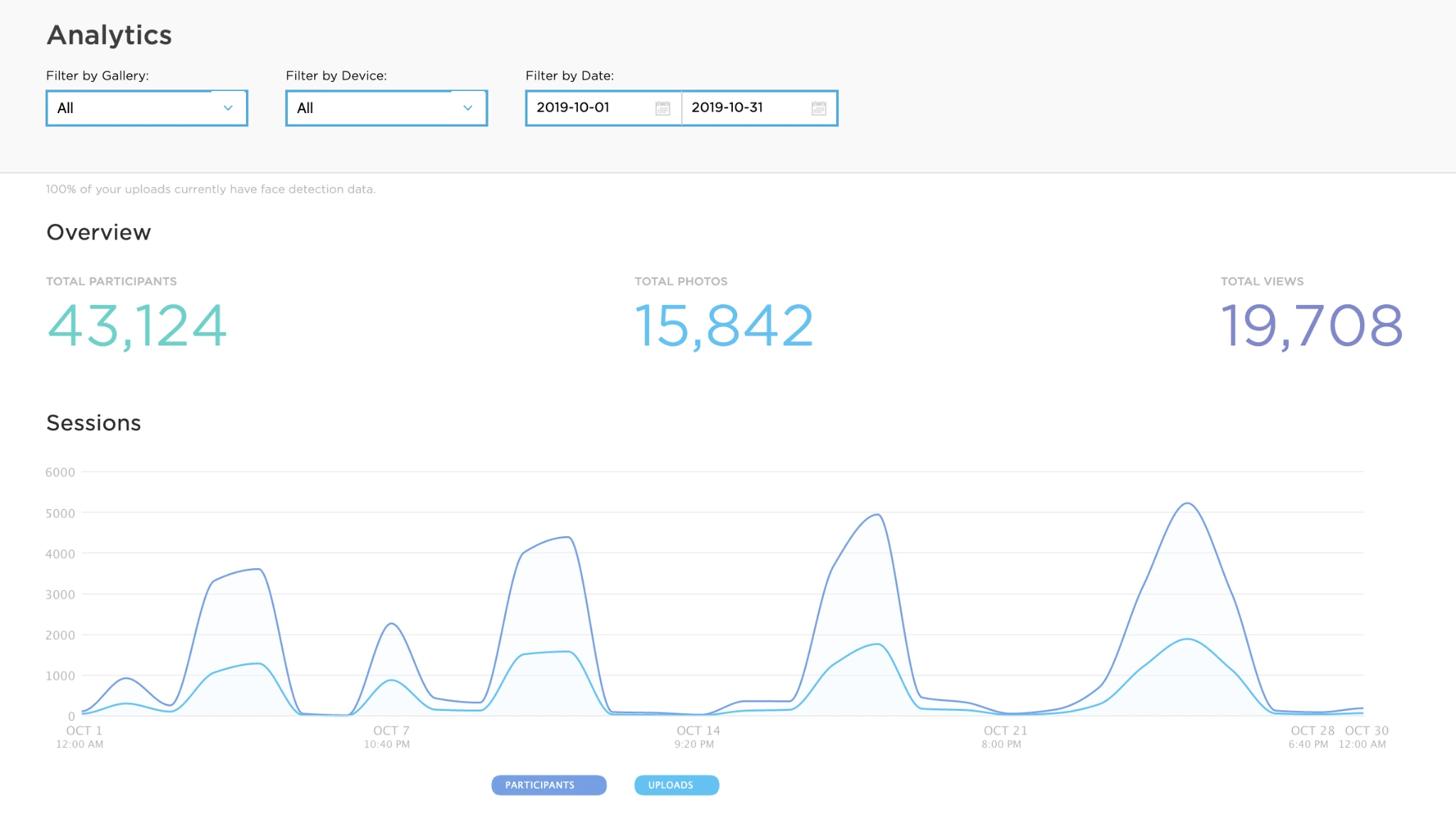
The analytics dashboard tracks total participants, uploads, gallery views, and social sharing metrics across Facebook, X/Twitter, LinkedIn, and Instagram.
Source: Simple Booth
The Select tier adds demographic insights via face detection, including estimated age, gender breakdown, and average group size. Data integrates natively with MailChimp and exports as CSV, with an Open API available for custom CRM delivery on Pro and above.
⚡ Simple Booth in Action: A venue operator installs a HALO wall mount in their restaurant lobby. Over six months, the booth captures guest emails with every photo session, automatically syncing new contacts to MailChimp for the monthly newsletter.
The analytics dashboard shows which nights generate the most engagement, helping the marketing team schedule promotions around peak activity. Meanwhile, guests share branded photos to Instagram with the venue’s hashtag, creating organic UGC without a social media manager.
Treetop Golf built 150,000 unique email addresses across their locations using Simple Booth’s built-in data capture. (Treetop Golf Case Study)
Virtual Booth: Extend Your Reach Beyond Physical Events
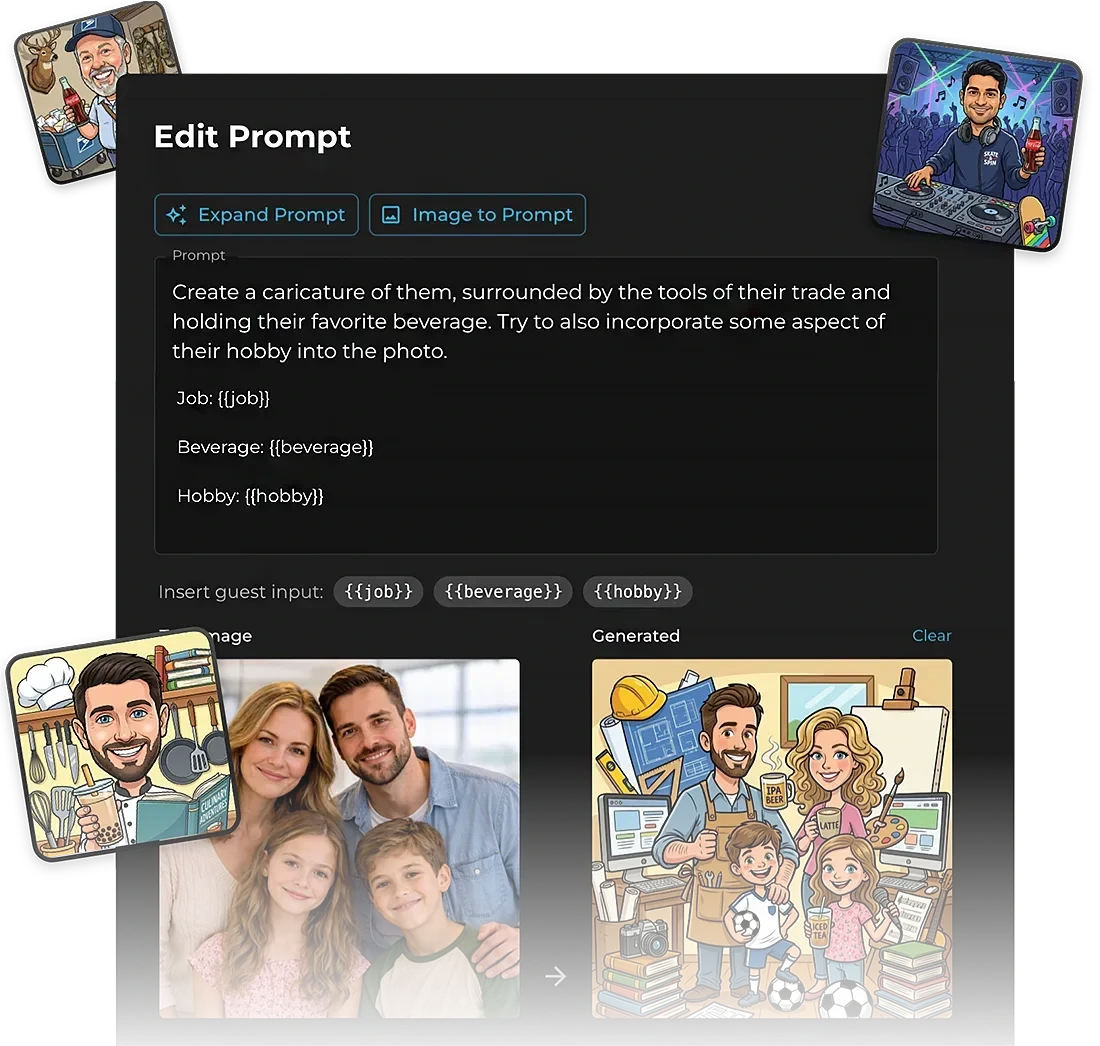
Gifyyy requires guests to be physically present at the booth to create and receive content. Simple Booth’s Virtual Booth removes that constraint: participants join from their own phone or laptop via a QR code or link, with no app installation required.
Source: Simple Booth
Virtual Booth supports Magic Background Replacement (no green screen needed), overlays and digital props, and AI Effects with Guest Input where participant responses feed directly into AI prompts for personalized outputs.
It collects lead data before access, automatically localizes into English, Spanish, French, Dutch, German, Italian, Polish, Danish, and Hebrew, and connects to the same analytics and gallery infrastructure as the HALO hardware.
Because Virtual Booth runs via a shareable link, it can be embedded in email campaigns, printed on product packaging, or placed on a brand website as a persistent activation, turning the photo booth from a one-night event tool into an always-on marketing channel.
⚡ Simple Booth in Action: A consumer brand launches a new product and wants nationwide engagement. They share a Virtual Booth link on social media and print QR codes on packaging. Customers across the country take branded selfies from their phones, apply the brand’s custom AI Effect, and share the results on social media.
The brand captures email opt-ins from every participant and tracks engagement analytics from the same dashboard that manages their in-store HALO installations.
G7 Entertainment Marketing has captured over 136,000 fan interactions across 10+ years as Simple Booth users. (G7 Entertainment Marketing Case Study)
Simple Booth Pricing
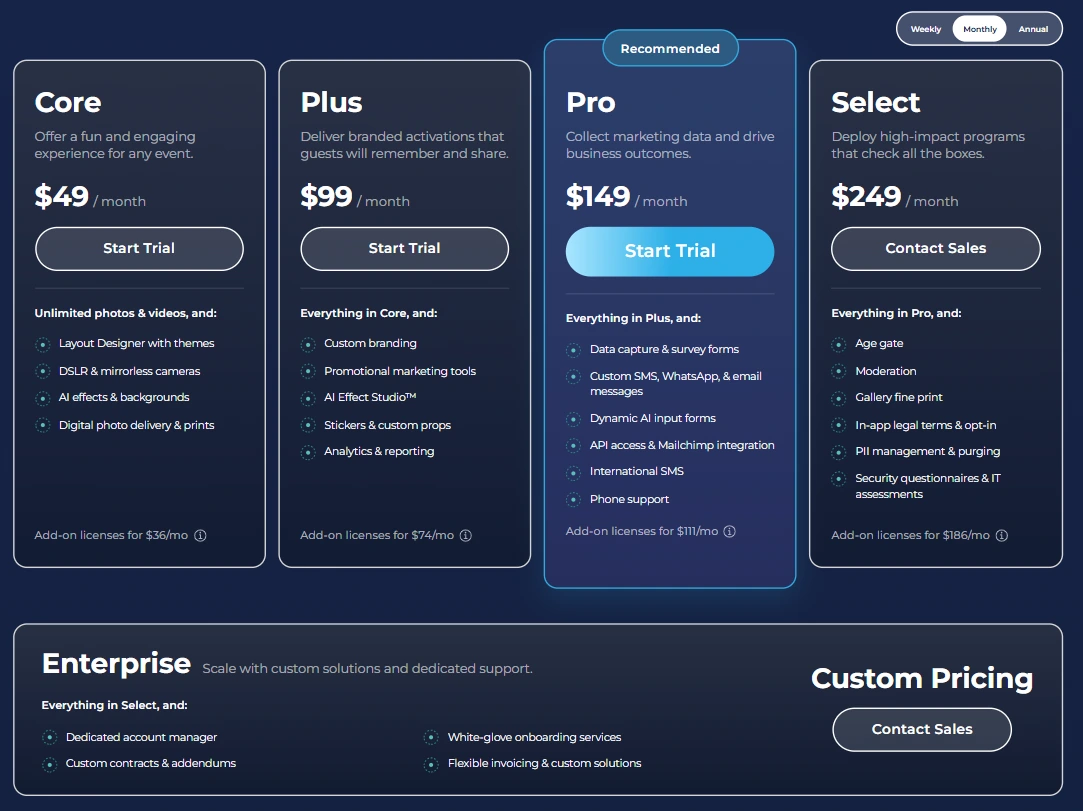
Simple Booth uses a per-license subscription model with weekly, monthly, and yearly billing. Each plan includes one license for one iPad; additional devices require add-on licenses at the same tier rate. A 7-day free trial is available with 25 free AI credits.
Everyday Plans:
- Lite: $14.99/week ($290/year). Custom layouts, motion and still capture, photo delivery, online galleries, themes, props. Includes in-app ads; excludes custom branding, DSLR, AI effects, analytics, and lead capture.
- Core: $24.99/week ($49/month, $490/year). Adds ad removal, DSLR camera connection, full-length video, background replacement and blur, Dropbox integration, AI effects, Virtual Booth, and AI-generated layout images. 50 bonus AI credits.
- Plus: $49.99/week ($99/month, $990/year). Adds custom branding, analytics and reporting, guest-editable text, custom AI effects, and custom photo delivery messages. 100 bonus AI credits.
Business Plans:
- Pro: $149/month ($1,490/year). Adds lead capture, API integration, phone support, AI guest inputs, moderation, age gate, and data compliance tools. 150 bonus AI credits.
- Select: $249/month ($2,490/year). Adds in-app custom legal terms, security questionnaires, and demographic analytics via face detection. 200 bonus AI credits.
AI effect credits cost $0.10 each and do not expire once purchased. HALO hardware kits are sold separately at buy.simplebooth.com, starting at approximately $2,090 for the Event Kit with 0% financing available.
Source: Simple Booth
Who Should Use Simple Booth?
Choose Simple Booth if:
- You run a photo booth rental business and want to charge higher rates with AI-powered effects, professional camera quality, and custom branded layouts that set your service apart.
- You’re starting a photo booth side business or scaling a new rental operation and want an accessible entry point at $14.99/week with a platform that minimizes setup time and equipment tinkering.
- You’re a venue operator (restaurant, bar, hotel, entertainment venue) looking for a permanent-install photo experience that captures guest data, generates organic social media content, and requires no staff supervision.
- You manage brand activations or experiential marketing campaigns and need a platform that captures first-party data with high opt-in rates, produces branded UGC at scale, and provides measurable ROI through analytics.
- You want to extend photo booth experiences beyond physical events with Virtual Booth, reaching remote audiences through a browser-based experience requiring no hardware or app install.
Ready to upgrade your photo booth business with AI-powered effects and built-in marketing tools? Start your free 7-day Simple Booth trial and see the difference.
2. Snappic: Best Alternative for Fleet Management and Multi-Booth-Type Operations
Source: Snappic
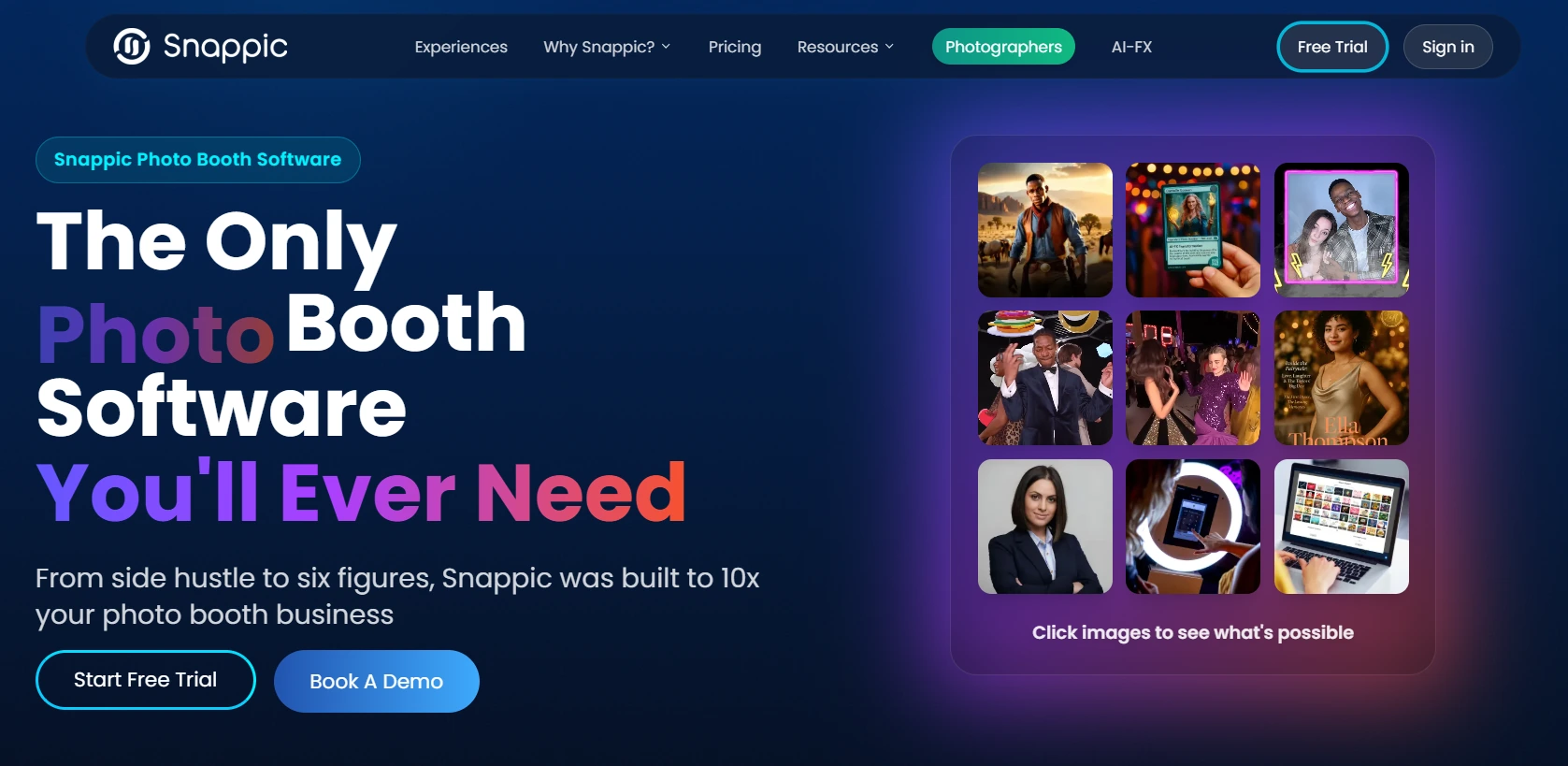
Snappic is a professional photo booth platform for event operators who have outgrown a single-unit, single-format business. It supports every major booth type (360 spin booths, GlamBot robot arms, mirror booths, and iPad setups) managed from a single subscription and cloud dashboard. Its key capabilities include:
- AI-FX suite with multiple transformation engines (AI-FX, PersonaFX, BananaFX) for generating branded avatars, magazine covers, and stylized portraits
- Multi-booth-type support for iPad, 360-degree video, robot arm/GlamBot, Mirror, and Roaming configurations from one subscription
- DSLR and mirrorless camera support for Canon, Nikon, and Sony cameras via USB
- Centralized fleet management pushing template updates across devices from a cloud dashboard
- Client analytics reporting with guest engagement tracking and AI-powered demographic insights
Snappic’s 8,000+ operator user base across 100,000+ events shows platform maturity for operators scaling beyond single-booth operations. That breadth comes with trade-offs: operators often report a steep learning curve navigating Snappic’s settings panels, and features like green screen and branded galleries require paid add-ons beyond the base subscription.
The entry-level Starter plan limits photo delivery to email and text only, without QR code, AirDrop, or WhatsApp sharing. Following a private equity acquisition in 2024, Snappic has shifted toward a more enterprise-oriented direction.
Why Choose Snappic Over Gifyyy for Multi-Booth Operations
Snappic stands out in the following areas:
- AI Content Generation Beyond GIF Capture
Gifyyy’s output is a looped animated GIF or slow-motion video delivered via SMS. Snappic’s AI-FX transforms captured photos into AI-generated magazine covers, trading cards, or branded avatars. PersonaFX adds survey-driven personalization where custom text is injected into the output. BananaFX, powered by Google’s Gemini 2.5 model, generates new images from custom prompts. These AI experiences can justify $50-$100 per person or $1,500-$3,000 per event pricing at corporate activations.
- Multi-Booth-Type Platform Under One Subscription
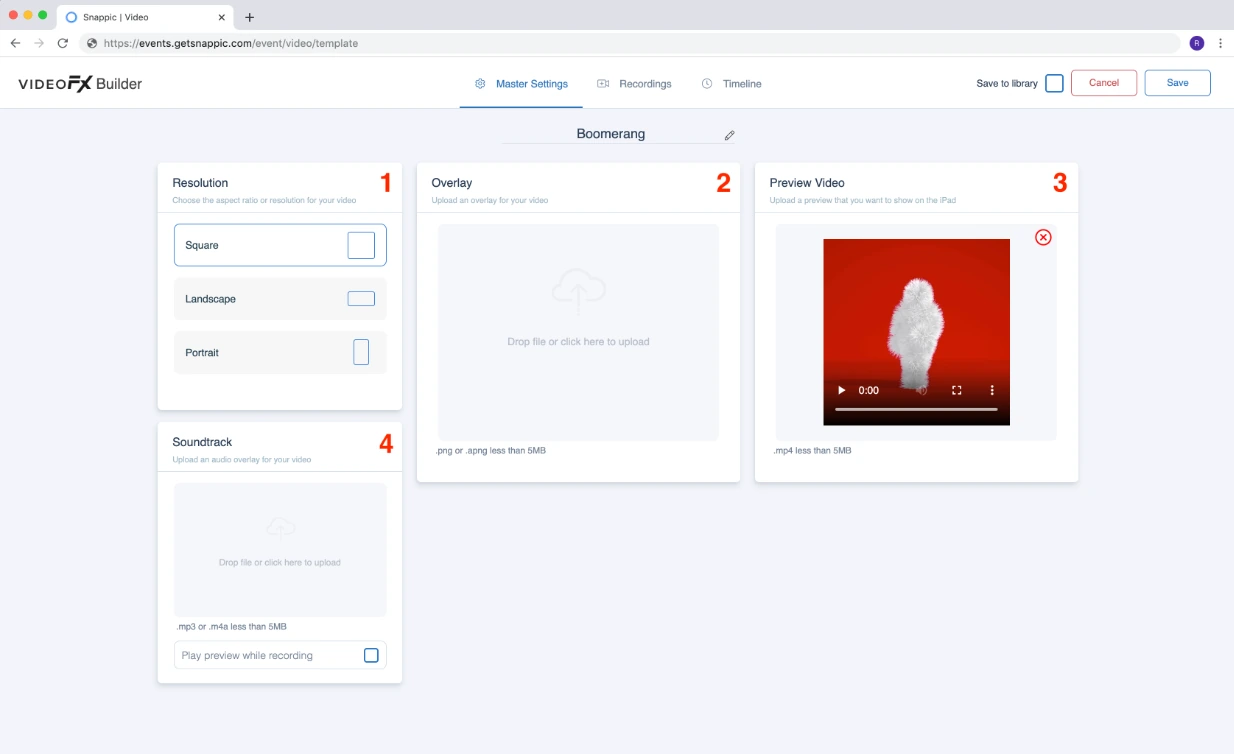
Gifyyy is a single-format GIF photobooth system. As operators scale, they typically add booth types: 360 spin booths for corporate events, GlamBot for fashion activations, mirror booths for galas. Snappic runs all of these from one account. The VideoFX template builder handles slow-motion (up to 240fps with compatible Canon DSLRs), branded intros and outros, animated overlays, and soundtrack upload, producing 8-11 second outputs without post-production.
- Professional DSLR Camera Support
Snappic integrates with Canon, Nikon, and Sony cameras via USB, enabling full-resolution professional output. The VideoFX frame rate guide shows compatible Canon bodies reaching 240fps at 1080p for slow-motion quality no iPad camera can match.
Source: Snappic
🏅 NOTE: We also evaluated Curator Live and TouchPix for this slot. While Curator Live excels at high-touch brand activation work and TouchPix is a strong 360-specialist option, Snappic offers the widest combined coverage of AI effects, multi-booth-type support, and proven operator scale.
Snappic Pricing
Snappic uses a per-booth license subscription model; annual plans save approximately 20%. A 14-day free trial is available with no credit card required.
- Starter: $69/month ($499/year). One license, core capture modes, SMS/email delivery, 60+ templates, DSLR integration, 24/7 support.
- Business: $189/month ($1,799/year). Adds VideoFX (360/GlamBot), AI-FX, microsite galleries, client analytics, content moderation, Roaming Mode, priority support.
- Premium: $279/month. Adds white-label URLs, webhooks, LiveConnect remote control, SmartShare AI (400 credits included).
- Scale: $399/month ($3,999/year). Multi-client management, unlimited sub-accounts, Grey Label App, dedicated Customer Success Manager.
Per-event licensing is also available: $29/event (Starter) or $79/event (Business) for 48-hour access. AI-FX, background removal, and SmartShare each consume per-image credits purchased separately from any subscription tier.
Who Should Use Snappic?
Choose Snappic if:
- You operate multiple booth types and need one platform to manage 360, GlamBot, Mirror, iPad, and Roaming setups under a single subscription.
- You’re targeting corporate brand activations and need AI-generated branded experiences that justify higher event pricing.
- You’re building toward a multi-operator agency business and need sub-account management, fleet-level controls, and a dedicated success manager.
3. LumaBooth: Best Alternative for DSLR-Quality Captures at the Lowest Professional Subscription Price
Source: LumaBooth
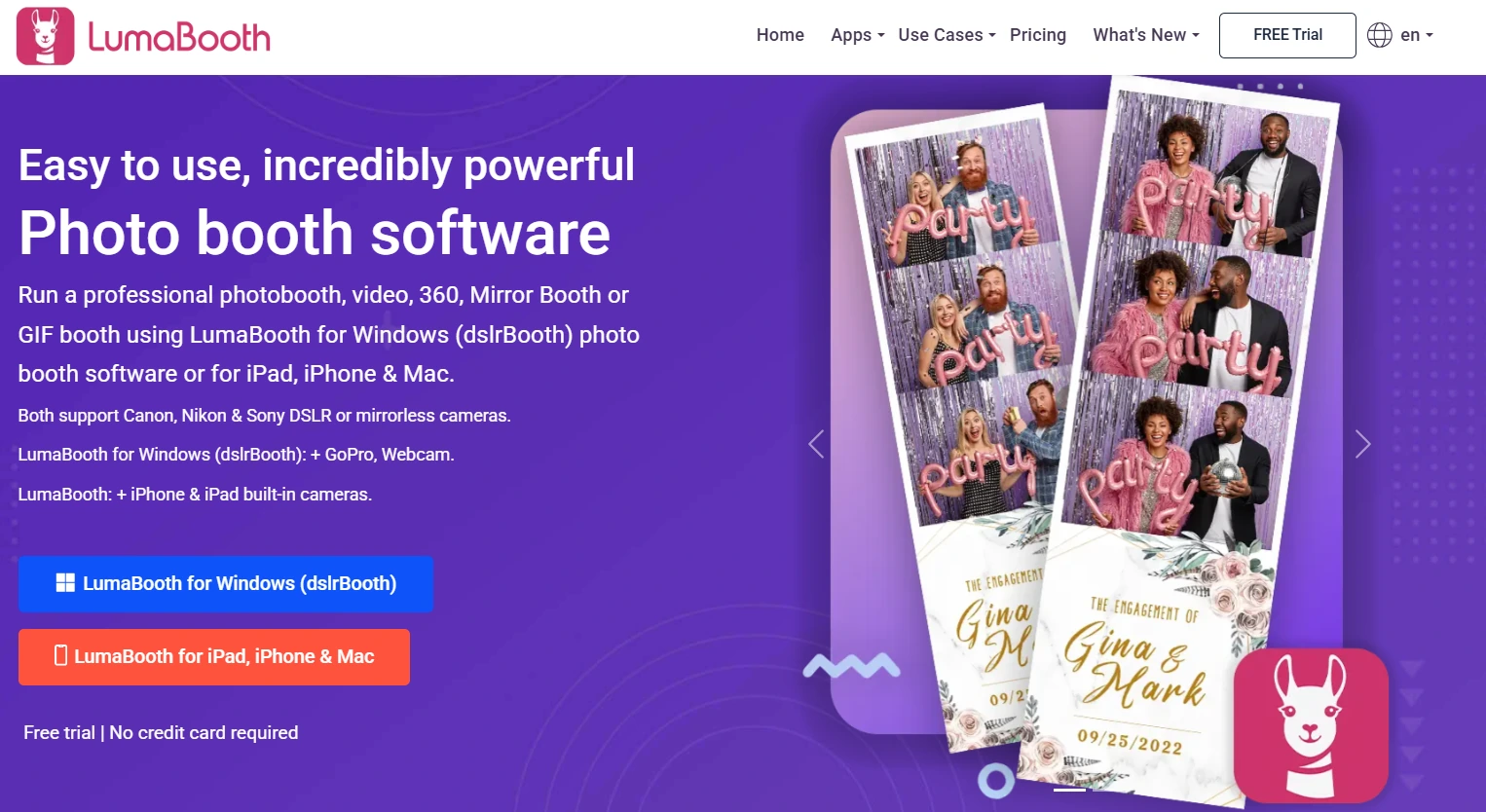
LumaBooth by Lumasoft is professional photo booth software that runs natively on iPad, iPhone, Mac, and Windows under a single subscription. It connects to Canon, Nikon, and Sony DSLR and mirrorless cameras for full-resolution output while covering every major capture format at the base subscription price. Its key capabilities include:
- Professional DSLR and mirrorless camera support on Windows (Canon, Nikon, Sony, GoPro) and Canon/Nikon via USB on Apple devices
- All capture formats included: photos, GIFs, boomerangs, video, 360 video, Mirror Booth, Glam Booth, Green Screen, AI Background Removal, and Video Guestbook
- Cross-platform coverage on iPad, iPhone, Mac, and Windows under one account
- 820+ designed templates included in the subscription
- AI Portraits with 170+ presets and a custom prompt builder
- Offline mode with automatic sync
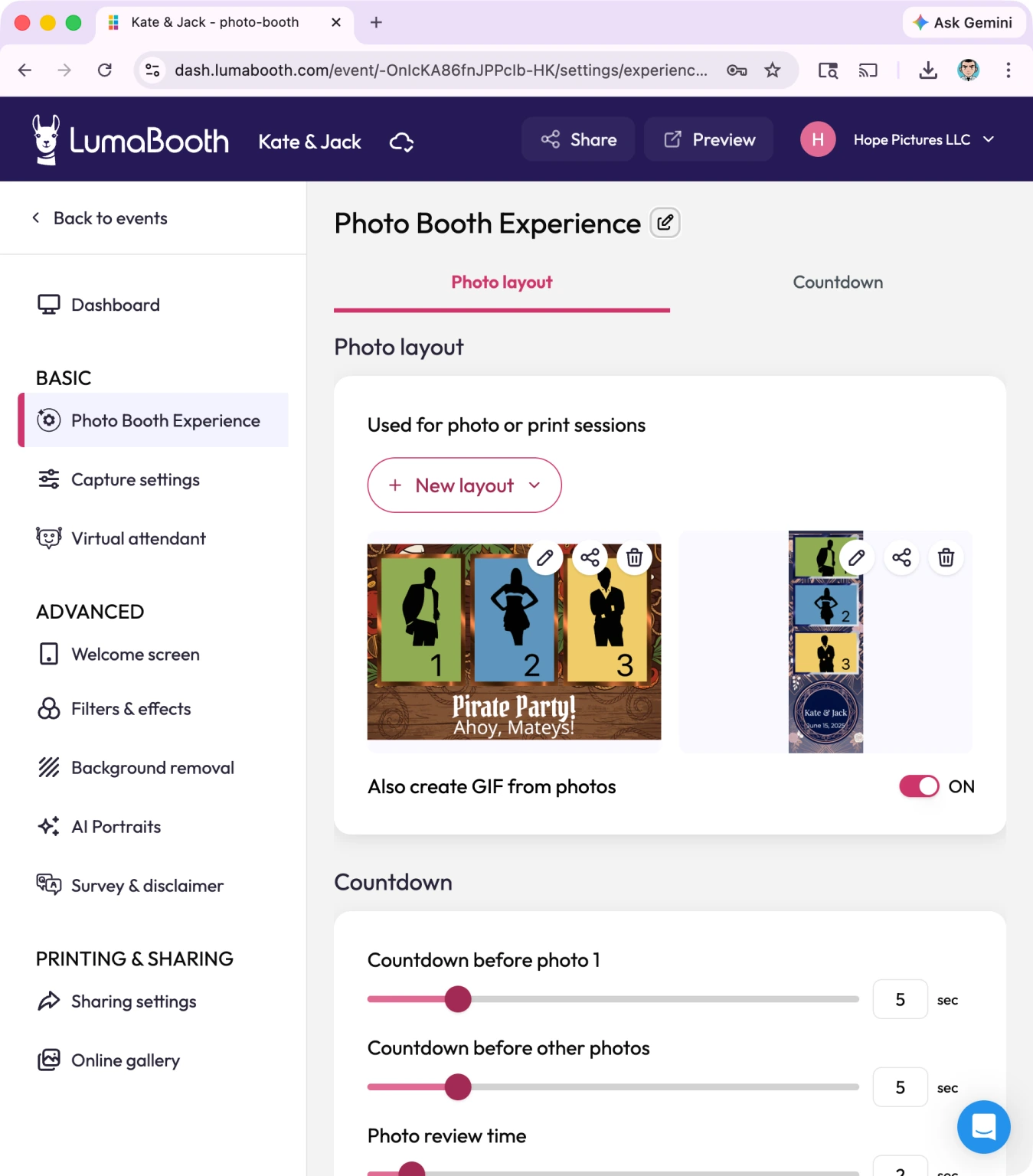
LumaBooth’s breadth comes with trade-offs. Nearly all configuration happens within the app itself; there is no web dashboard for remote device management or advance event setup. The interface carries the utilitarian design of Lumasoft’s DSLR Booth origins, and its built-in design tools are more limited than layout editors on competing platforms.
LumaBooth also requires a monthly subscription with no weekly or per-event pricing for operators who prefer pay-as-you-go access.
Why Choose LumaBooth Over Gifyyy for DSLR-Quality Captures
LumaBooth stands out in the following areas:
- DSLR and Mirrorless Camera Support
Gifyyy captures all content through the iPad’s built-in camera. LumaBooth for Windows connects to Canon EOS, Nikon D-series and Z-series, Sony mirrorless cameras (18+ supported models), and GoPro 5-13 via USB. For operators who already own professional cameras, LumaBooth turns existing gear into a photo booth capture engine at no additional hardware cost.
- Every Capture Format Included in One Subscription
Photos, GIFs, boomerangs, standard video, 360 slow-motion video, Mirror Booth, Glam Booth, Green Screen, AI Background Removal, and Video Guestbook are all covered at the base subscription price with no format-specific add-ons. An operator running a 360 spinner at a corporate event on Friday, a traditional photo strip at a wedding on Saturday, and a Video Guestbook at an anniversary party the next weekend can do all of that from a single LumaBooth account. Gifyyy has no 360 booth mode, no video guestbook mode, and no mirror booth capability in any tier.
- Cross-Platform Hardware Flexibility
Gifyyy is iOS/iPad only. LumaBooth operates natively on iPad, iPhone, Mac, and Windows under the same subscription and fotoShare account. Operators who own both a Windows PC and an iPad can cover different event formats from both devices without managing separate software licenses or paying for duplicate platform access.
Source: LumaBooth
🏅 NOTE: We also evaluated Sparkbooth and Mini Photobooth as lower-cost alternatives. While Sparkbooth offers a free personal version for Windows and Mac, it lacks professional DSLR support and cloud sync. LumaBooth was selected because it delivers a professional feature set at the lowest paid subscription price in the category.
LumaBooth Pricing
LumaBooth uses a subscription model with annual billing recommended for savings:
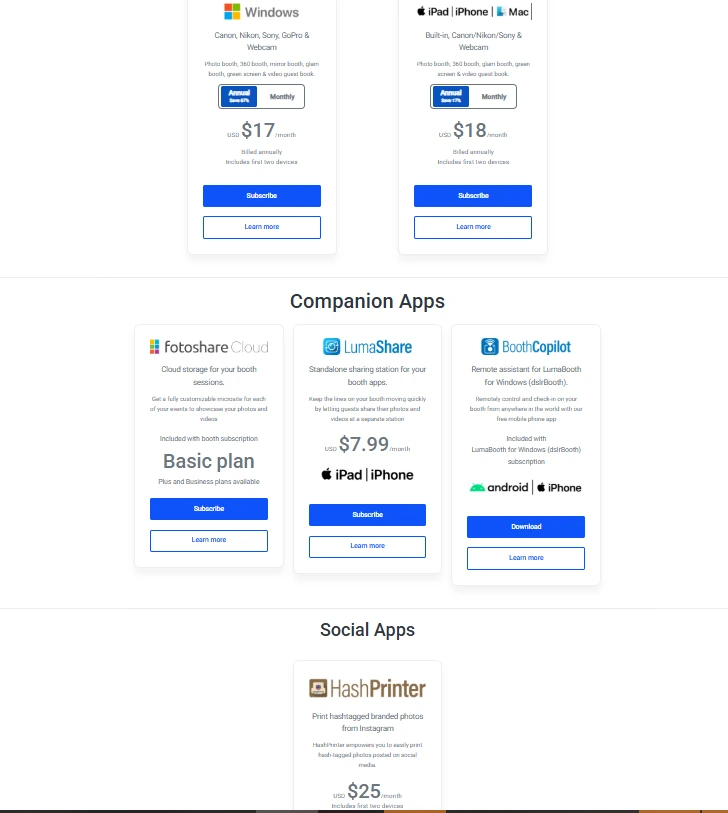
- LumaBooth for Apple (iPad/iPhone/Mac): $18/month billed annually (~$216/year). Covers two devices; all features and booth modes included. 20 free AI Portrait credits on signup. No time-limited free trial; unlimited trial with permanent watermark.
- LumaBooth for Windows: $17/month billed annually (~$204/year). Covers two devices; all features included, plus cashless payments and Booth CoPilot remote management app.
Additional costs: fotoShare Cloud Plus (+$19.99/month), SMS plans for US/Canada (+$10/month), AI Portrait Credits ($14.99-$199.99/month; pay-as-you-go packs never expire).
Source: LumaBooth
Who Should Use LumaBooth?
Choose LumaBooth if:
- You already own Canon, Nikon, or Sony cameras and want to run professional-resolution captures through your existing gear at the lowest paid subscription price in the category.
- You need all major capture formats in a single subscription without per-format add-on fees.
- You run events on both Apple and Windows hardware and need one subscription to cover both platforms without separate licensing.
4. Touchpix: Best Alternative for Building a Dedicated 360 Spin Booth Business
Source: TouchPix
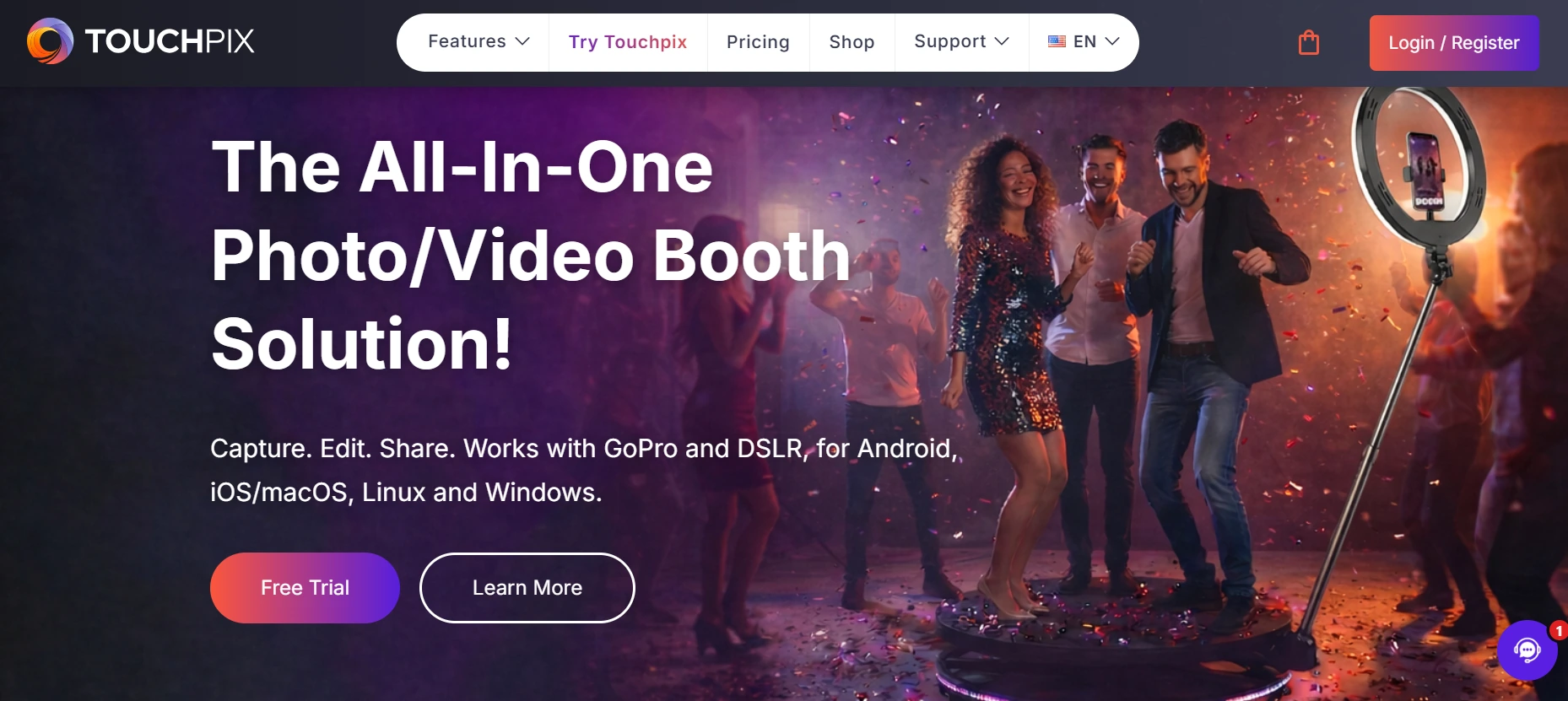
Touchpix is a subscription-based photo and video booth platform built for operators who want to specialize in the 360-degree spinning booth format. It offers native Bluetooth triggering for automated rig activation, wired GoPro integration, and slow-motion video rendering that produces the viral spinning content commanding high pricing at events. Its key capabilities include:
- 360 spin booth capture with Bluetooth-automated arm triggering and slow-motion video rendering
- AI face replacement in photos and videos, running on-device without internet
- Six capture modes: AI photos, standard photos, boomerangs, animated GIFs, video, and slow-motion
- Cross-platform support across iOS, Android, macOS, Windows, Linux, and Raspberry Pi with GoPro 7-14 and Canon/Nikon/Sony DSLR integration
- 80+ AI transformation styles plus custom text prompt support
- Unlimited devices per subscription across all platforms
Touchpix launched in 2020 and grew quickly around the 360 booth trend, but as a newer platform it’s still maturing. Some operators report reliability concerns (including a notable cloud service outage) and image and video rendering that can lag behind more established competitors. The user interface can also confuse guests at unattended setups.
Why Choose Touchpix Over Gifyyy for 360 Spin Booth Operations
Touchpix stands out in the following areas:
- Native 360 Spin Booth Capture
Gifyyy captures flat-format content (GIFs, slow-motion, stills) from an iPad’s built-in camera. Touchpix controls spinning arm 360 rigs: the capture sequence triggers automatically via native Bluetooth integration with GoPro 7-14 wired USB connectivity and a slow-motion rendering engine. Operators can charge $500-$1,500 per booking for 360 spinning video, a format Gifyyy’s hardware was never designed to support.
- On-Device AI Transformation Without Internet
Gifyyy’s visual options are limited to overlay frames and camera filters. Touchpix’s AI Photo Booth provides 80+ transformation styles plus custom prompt support, running on-device without internet. Operators can deploy AI portrait transformations regardless of venue Wi-Fi, unlike cloud-dependent AI processing on other platforms.
- Cross-Platform Hardware Flexibility
Gifyyy is iOS/iPad only. Touchpix runs on iOS, Android, macOS, Windows, Linux, and Raspberry Pi with unlimited devices per subscription. An operator can run a 360 rig using a GoPro on a Windows laptop, deploy a flat photo booth on an iPad, and set up a selfie station on an Android tablet, all under a single annual subscription.
🏅 NOTE: We also evaluated funEvent and CyraTok. While funEvent specializes in Android-based 360 booth control, it lacks iOS support. CyraTok locks operators into proprietary hardware. Touchpix offers the most accessible entry point for Gifyyy users moving into 360 booth operations, with iOS compatibility for existing iPad operators plus cross-platform breadth for expansion.
Touchpix Pricing
Touchpix subscriptions are priced by the number of simultaneous active event slots; yearly billing saves approximately 40%:
- PhotoPass: $439.90/year (2 active events). Photos, AI photos, GIFs. Does not include video or slow-motion.
- MultiPass: $879.99/year (4 active events). Adds video, slow-motion, and boomerang. Required tier for 360 spin booth operations.
- MultiPass Pro: $1,407.99/year (8 active events). Adds Virtual Booth and Advanced Surveys.
- MultiPass Enterprise: $2,199.99/year (12 active events). Adds Mosaic photo wall and RAW cloud backups.
AI Pro credits for cloud-processed transformations are purchased separately (100 credits for $12, up to 5,000 credits for $375). A 14-day free trial is available with no credit card required.
Who Should Use Touchpix?
Choose Touchpix if:
- You operate or are building a dedicated 360 spinning arm booth service and need software with native Bluetooth rig control and GoPro integration.
- You want AI face replacement and branded style transformations that work offline at the device level.
- Your hardware setup includes non-Apple devices and you need a single subscription covering iOS, Android, Windows, Mac, and Linux without per-device fees.
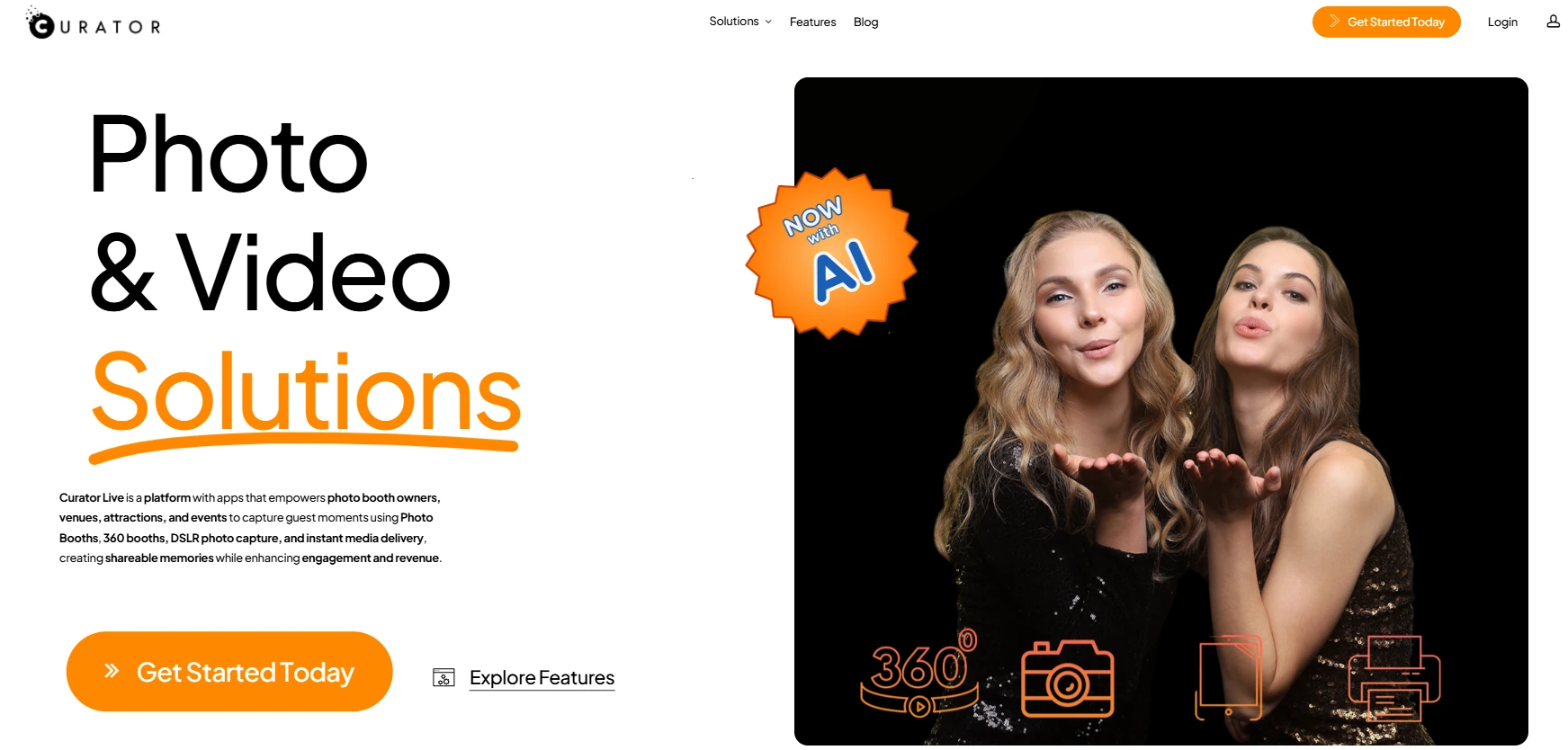
5. Curator Live: Best Alternative for Brand Activation with AR Effects and Lead Capture
Source: Curator Live
Curator Live is an iOS-native photo and video capture platform built for operators serving corporate brand activations, trade shows, and large-scale venue installations. Its capabilities go beyond standard photo booth outputs into structured brand engagement. Key features include:
- Consent-based lead capture with custom data collection fields and marketing opt-in screens and built-in GDPR compliance
- Video Guest Book mode recording branded video messages from guests
- CustomFX Timeline Builder for AR effects and cinematic 360 video compositing
- White-label media delivery under the operator’s brand
- 11-role permission model for multi-user agency operations
- DSLR Photography Mode supporting 100+ Canon, Nikon, Olympus, and Sony camera bodies
Why Choose Curator Live Over Gifyyy for Brand Activations
Curator Live stands out in the following areas:
- Structured Lead Capture with Consent and Custom Fields
Gifyyy collects phone numbers for the operator’s remarketing via TXTOMATION. Curator Live integrates custom disclaimer screens, marketing opt-in checkboxes, and configurable data collection fields directly into the booth flow. Corporate clients receive structured lead lists with documented consent status, turning every activation into a measurable marketing asset rather than a gallery of photos.
- Video Guest Book Alongside Photo Content
Gifyyy produces GIFs, boomerangs, and short videos but does not support full-length video guest book recording. Curator Live’s Video Guest Book runs on the CustomFX engine with branded intro/outro bumpers, overlays, and background music applied to every guest recording. Up to 6 experiences can run simultaneously per event, so guests can choose between a still photo, an animated GIF, and a video recording without switching apps.
- AR Effects and Cinematic Compositing
Curator Live’s CustomFX Timeline Builder layers captured footage with branded backgrounds, transparent HEVC video overlays (particle effects, logo animations), audio, and intro/outro sequences. AR Background Mode runs on-device without internet, replacing the real environment with brand-specified scenes. This production-level compositing has no equivalent in Gifyyy’s feature set.
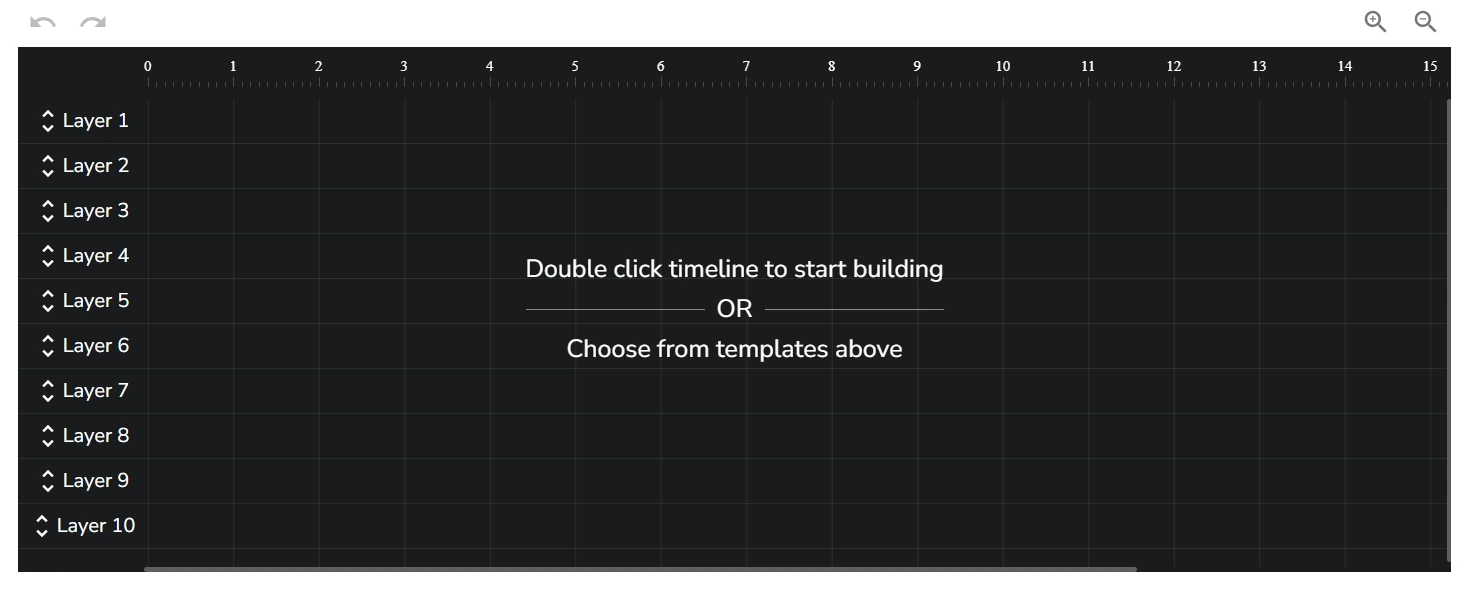
Source: Curator Live
🏅 NOTE: We also evaluated Snappic and TouchPix for this slot. While Snappic excels at scalable high-volume booth operations and TouchPix is the 360 specialist, Curator Live offers the most complete platform for operators who need AR effects, consent-based lead capture, video guest books, and agency-grade white-labeling in a single iOS subscription.
Curator Live Pricing
Curator Live uses a per-device licensing model across three tiers with per-event, monthly, and yearly billing:
- Standard: $29/event, $69/month, or $499/year. One device, basic analytics, all capture experiences including GIF, Boomerang, 360 CustomFX, Video Guest Book, and AI Photo Rendering.
- Event Pro: $59/event, $149/month, or $1,499/year. Adds Sharing Station, full analytics, Facial Recognition.
- Agency Pro: $99/event, $249/month, or $2,499/year. Adds Photography Mode, white-label URL included on yearly plans.
AI photo rendering uses separate per-image credits (~$0.45-$1.00/image). SMS delivery routes through the operator’s own Twilio account. A 14-day free trial and free DEMO watermark mode are both available.
Who Should Use Curator Live?
Choose Curator Live if:
- Your clients are corporate sponsors or brand activation teams who need structured lead collection with consent screens and downloadable contact data.
- You need AR-enhanced video, 360 CustomFX cinematic effects, or video guest book capabilities alongside standard photo booth outputs.
- You operate as a multi-person agency needing distinct access levels for designers, field operators, and account managers across simultaneous activations.
6. Booth Events: Best Alternative for Professional Cloud Features Without Hardware Buy-In
Source: Booth.Events
Booth Events is a professional iPad photo booth platform that delivers cloud-based management, DSLR camera support, and multi-format capture, all accessible without a four-figure hardware purchase.
Where Gifyyy ties professional features to a $2,595-$3,895 physical kit, Booth Events provides a comparable feature set through an iPad app backed by a browser-based web dashboard, with a free entry tier requiring no credit card. Its key capabilities include:
- Three functional free events with 100 photos and SMS delivery included per event (USA and Canada)
- Non-expiring Pro Event Credits for pay-per-event access to full Pro features
- USB tethering for Canon, Nikon, and Sony cameras
- Five capture formats: still photos, boomerangs, GIFs, slow-motion video, and video testimonials up to two minutes
- SceneSelect AI background removal that works offline without a green screen
- Live Sync pushing template changes to running iPads instantly
Why Choose Booth Events Over Gifyyy for Starting Without Hardware
Booth Events stands out in the following areas:
- No Hardware Minimum to Access Professional Features
Gifyyy’s entry price is $2,595 for the Starter Kit (without iPad). Booth Events inverts this: all new accounts start with three complete free events, each including 100 photos and SMS delivery, with no credit card required. Operators can run real paying events, validate demand, and then decide whether to subscribe or buy non-expiring Pro Event Credits that mirror Gifyyy’s per-event pricing through cloud software rather than proprietary hardware.
- DSLR Camera Support for Professional Output
Booth Events supports USB tethering with Canon, Nikon, and Sony cameras using only the cable that shipped with the camera. For photographers who already own professional gear, this provides an upgrade path from iPad camera quality that Gifyyy cannot offer at any price tier.
- SceneSelect AI Background Removal Without a Green Screen
Gifyyy’s customization is built around graphic overlays and logo watermarks. Booth Events includes SceneSelect, AI-powered background replacement that runs on the iPad, detects subjects automatically, and swaps in operator-uploaded scenes at capture time, offline. It’s included on all pricing tiers with no per-image credit cost, including the free Starter plan.

Source: Booth.Events
🏅 NOTE: We also evaluated Sparkbooth and Photo Booth Pro. While Sparkbooth offers a free Windows/Mac version for personal use, it lacks professional DSLR support and cloud sync. Booth Events is the only option on this list offering a cloud-based professional platform with a functional free entry tier designed for operators running real paid events.
Booth Events Pricing
Booth Events uses a flat-fee subscription model; AI-generated content uses separate consumable credits.
- Starter (Free): 3 free events, 100 photos per event, 7-day gallery, SMS delivery (USA/Canada), single device. Booth Events banner on gallery.
- Basic Plan: 1 iPad or iPhone, 3-month gallery storage, expanded SMS countries, online support.
- Pro Plan: 1 iPad + unlimited iPhones, 1-year gallery, worldwide SMS, custom HTML microsites.
- Pro+ Plan: 4 iPads included, 2-year gallery, white-label app, custom domain, webhooks, emergency phone support.
Non-subscription options include 1-Week Passes and 4x Pro Event Credits that never expire. AI credits cost $8 per 100. All paid subscriptions include a 14-day free trial.
Who Should Use Booth Events?
Choose Booth Events if:
- You already own an iPad and want a professional photo booth platform without purchasing proprietary hardware, especially if you’re evaluating options before committing to a larger capital purchase.
- You run seasonal or occasional events and want per-event credits that never expire, so you’re not paying a subscription during your off-season.
- Your venues frequently lack reliable Wi-Fi and you need AI background replacement that works offline on the device.
7. Honcho: Best Alternative for Real-Time Photo Delivery Without a Dedicated Booth
Source: Honcho
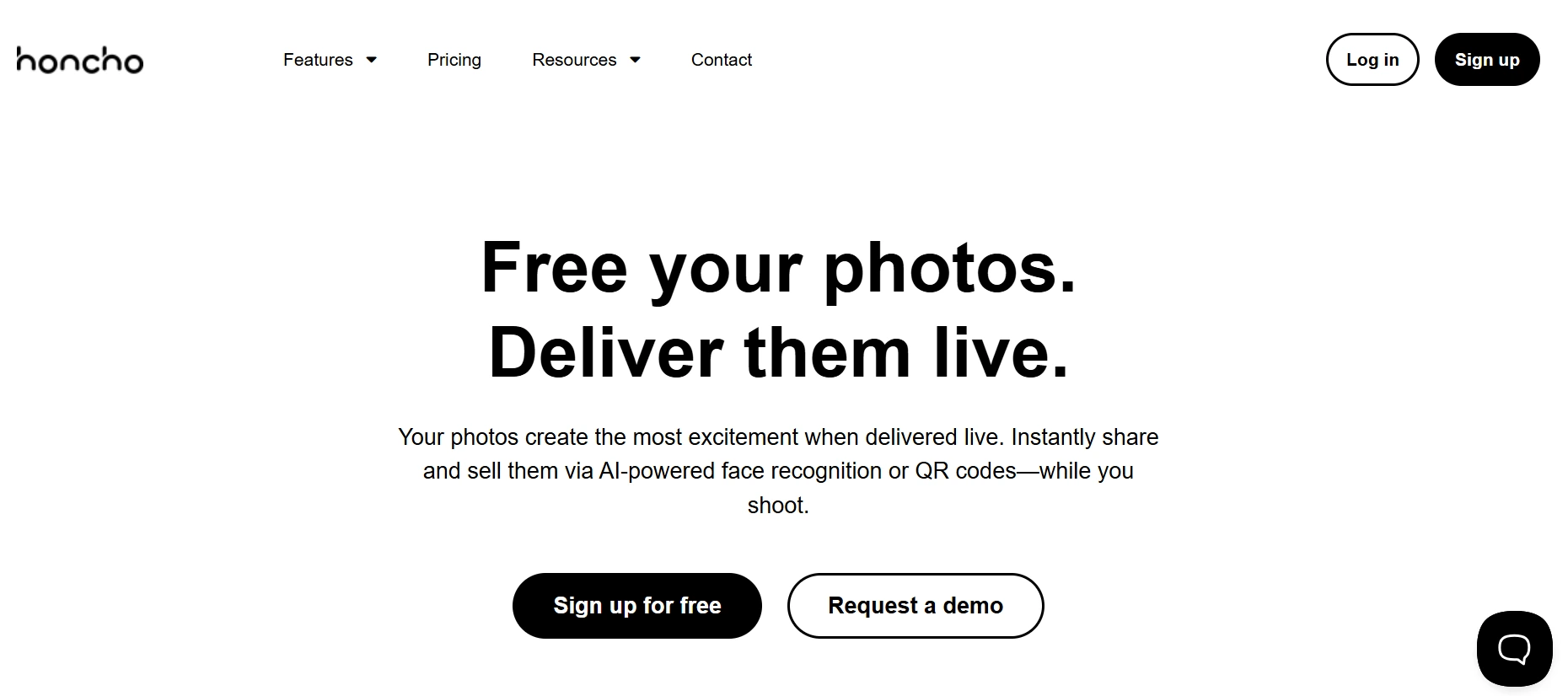
Honcho is a live event photo delivery platform built for professional photographers who want to deliver photos to guests in real time using AI face recognition instead of a physical kiosk. Its key capabilities include:
- AI face recognition that automatically matches guests to every photo they appear in via a selfie taken on their own phone
- Camera-to-cloud wireless tethering from 100+ verified Canon, Nikon, and Sony camera bodies via USB cable and a smartphone app
- Real-time gallery delivery with photos appearing within 3-4 seconds of capture
- Built-in online store with Stripe payments, Apple Pay, Google Pay, and instant per-order payouts
- Live slideshow running on any screen via a browser link
- Roaming capability replacing the fixed kiosk with ambient, candid capture across the entire venue
Why Choose Honcho Over Gifyyy for Real-Time Event Photo Delivery
Honcho stands out in the following areas:
- AI Face Recognition Replaces Kiosk-Based Delivery
Gifyyy requires guests to approach the booth, create a GIF, and enter their phone number to receive it. Honcho inverts this: guests scan a QR code, take a quick selfie, and Honcho surfaces every photo they appear in from the full event gallery, including candid shots taken throughout the evening by a roaming photographer. The face recognition runs across galleries of 10,000+ photos, and automatically notifies guests whenever new photos of them are published.
- No Dedicated Hardware Required
Gifyyy requires its $2,595-$3,895 hardware kit. Honcho requires only a USB cable and a smartphone. The photographer connects their camera to their phone via USB, opens the app, and every photo uploads to the cloud within seconds of capture.
- Built-In Photo Sales When Guests Are Most Engaged
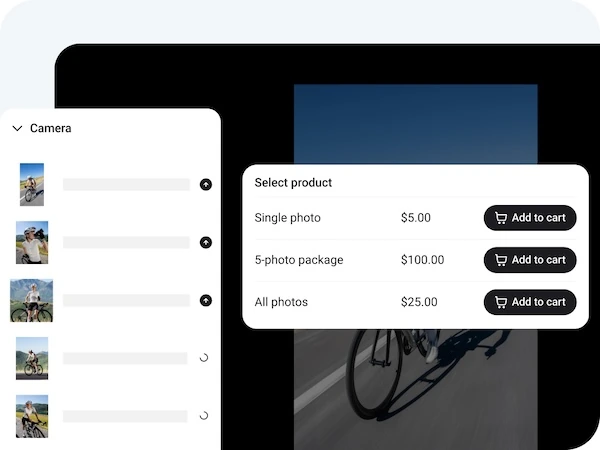
Gifyyy does not include a native purchase flow; monetization comes through the booth rental fee charged to clients. Honcho’s Online Store is built directly into the gallery, so guests can immediately purchase individual photos or multi-photo packages via Stripe with instant payouts per order. The platform also supports privacy-mode selling where photos are blurred until the guest’s face is matched.
Source: Honcho
🏅 NOTE: We also evaluated Fotomaster and traditional post-event gallery tools like Pic-Time and Pixieset. While post-event galleries deliver polished client experiences after the fact, Honcho offers the best real-time delivery and on-the-day photo sales for photographers who already own professional cameras. Note that Honcho is a photo delivery platform, not a GIF creation tool; it complements rather than replaces a kiosk-based photo booth experience.
Honcho Pricing
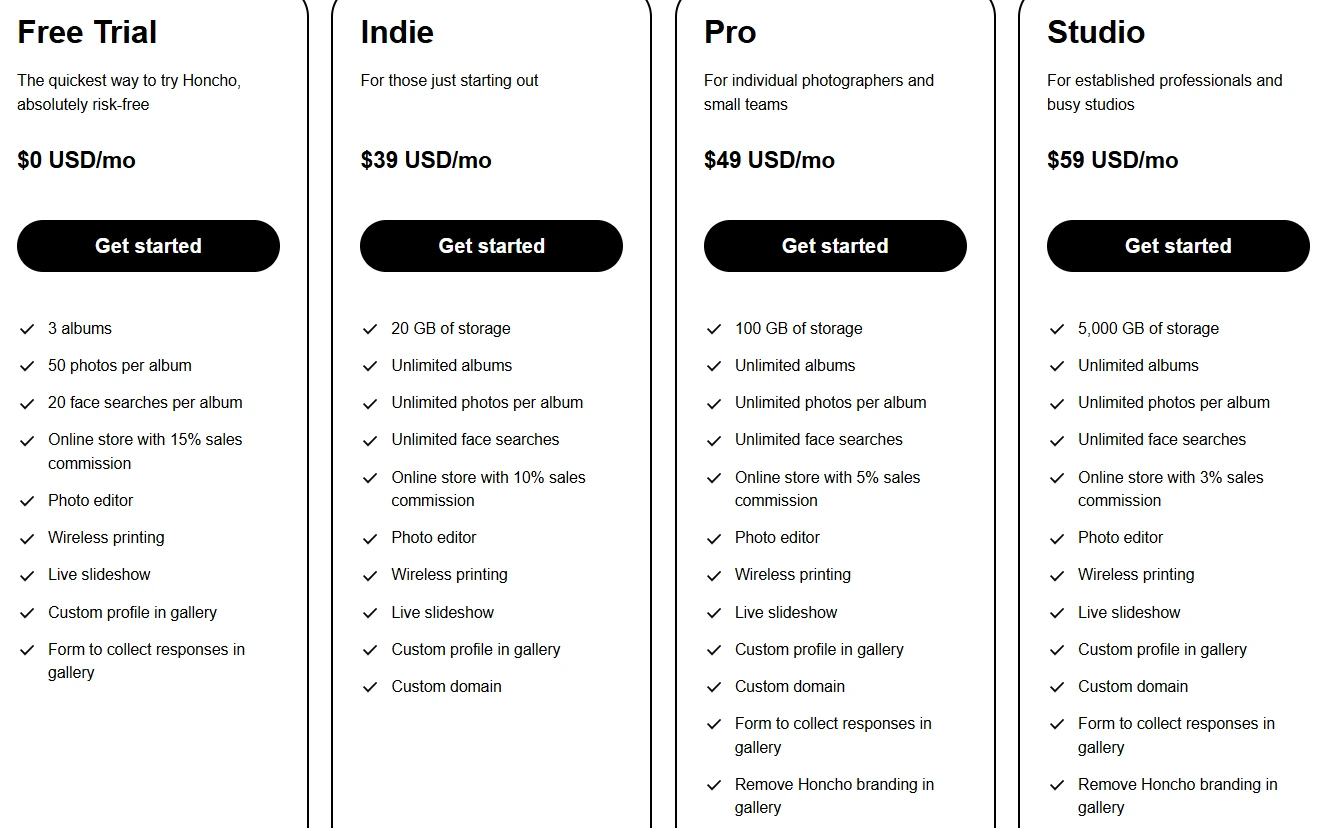
Honcho uses a flat monthly subscription with no per-event fees. Commission on photo sales decreases at higher tiers:
- Free Trial: $0/month (7 days). 3 albums, 50 photos per album, 20 face searches per album. 15% commission on sales. No custom domain.
- Indie: $39/month ($34/month billed annually). Unlimited albums/photos/face searches, 20 GB storage, 10% commission, custom domain.
- Pro: $49/month ($42/month billed annually). 100 GB storage, 5% commission, branding removal from galleries.
- Studio: $59/month ($50/month billed annually). 5 TB storage, 3% commission, full feature set for multi-photographer studios.
Source: Honcho
Who Should Use Honcho?
Choose Honcho if:
- You’re a wedding or event photographer who wants to add real-time photo delivery and on-the-day sales without purchasing separate booth hardware.
- You shoot high-volume events where guests can’t practically visit a fixed kiosk, and AI face recognition is more practical than directing everyone to a station.
- Your business model includes direct photo sales to event guests, and you want checkout, fulfillment, and Stripe payouts handled inside a single platform.
The Final Verdict
Gifyyy delivers a reliable, portable GIF photobooth experience for solo wedding photographers. But growing event businesses often need specialized tools with deeper capabilities. Based on our research, here are the best alternatives:
- Simple Booth for AI-powered photo experiences with built-in design tools, lead capture, and marketing analytics
- Snappic for fleet management across 360, GlamBot, mirror, and iPad booth formats
- LumaBooth for DSLR-quality captures at the lowest professional subscription price across iPad, Mac, and Windows
- Touchpix for building a dedicated 360 spin booth business with cross-platform hardware flexibility
- Curator Live for corporate brand activations with AR effects, consent-based lead capture, and video guest books
- Booth Events for professional cloud-based features with a free entry tier and no hardware buy-in
- Honcho for real-time photo delivery and on-the-day sales through AI face recognition
You don’t have to choose between Gifyyy and these alternatives exclusively. Many operators use multiple tools to cover different event types and client needs. Consider your business model, growth plans, and the types of events you serve when deciding which solution works best.
Ready to upgrade your photo booth business? Start your free 7-day Simple Booth trial and see what AI-powered photo experiences, built-in design tools, and marketing analytics can do for your rates and your clients.
Gifyyy Alternatives FAQ
Why do event professionals look for Gifyyy alternatives?
Gifyyy works well as a portable, self-running GIF photobooth for wedding photographers, but operators often outgrow it as their businesses expand.
Common reasons include needing DSLR-quality image output beyond the iPad camera, wanting AI-powered creative effects that justify higher event pricing, requiring lead capture and marketing analytics for corporate clients, or expanding into booth formats like 360 spin or video guest books that Gifyyy’s hardware does not support.
What is the best overall Gifyyy alternative?
There is no single best alternative because different operators have different needs. Simple Booth is the top choice for photo experiences with AI effects and marketing tools. Snappic leads for multi-booth operations at scale. LumaBooth offers the lowest subscription price for DSLR-quality captures. The right choice depends on your business model, event types, and growth plans.
Is there a free alternative to Gifyyy?
Booth Events offers a functional free tier with three complete events including 100 photos and SMS delivery per event, no credit card required. Honcho provides a 7-day free trial. LumaBooth offers an unlimited trial with a watermark on output. Most platforms on this list provide trial periods ranging from 7 to 14 days, so you can test before committing.
Which Gifyyy alternative is best for wedding photographers?
Simple Booth and LumaBooth are both strong choices. Simple Booth offers AI effects, DSLR camera support, and a polished guest experience with its integrated HALO hardware, plus lead capture and analytics. LumaBooth provides the most affordable subscription for photographers who already own Canon, Nikon, or Sony cameras and want multi-format capture across iPad and Windows.
How does Gifyyy’s per-event pricing compare to subscription alternatives?
Gifyyy charges $29 per event after five free events included with the hardware purchase ($2,595-$3,895). At two or more events per month, subscription platforms like LumaBooth ($17-$18/month) and Honcho ($39/month) become more cost-effective per event. Booth Events offers non-expiring per-event credits as a middle ground.
For seasonal operators who run fewer than two events per month, Gifyyy’s pay-per-use model avoids paying during off-months.
Which alternative is best for 360 spin booth operations?
Touchpix is built for 360 spin booth operations, with native Bluetooth triggering, GoPro 7-14 integration, and slow-motion video rendering. The MultiPass plan ($879.99/year) is the minimum tier required for 360 operations. Snappic also supports 360 booths alongside other formats through its VideoFX system, making it better suited for operators who need 360 as one of several booth types rather than a standalone specialization.
Can I use these alternatives without buying new hardware?
Yes. Booth Events, LumaBooth, Touchpix, and Honcho all work with hardware you may already own. Booth Events and LumaBooth support DSLR camera tethering via USB. Honcho works with any Canon, Nikon, or Sony camera plus a smartphone. Touchpix supports GoPro cameras, DSLR bodies, and runs on iOS, Android, Windows, Mac, and Linux. Simple Booth’s Virtual Booth runs in a browser with no hardware required at all.
Which Gifyyy alternative works best for corporate brand activations?
Curator Live is designed for corporate activations, offering consent-based lead capture with custom data fields, AR effects via the CustomFX Timeline Builder, video guest books, and white-label delivery under the client’s brand. Simple Booth is also strong for corporate use with its high opt-in lead capture rates (87%+), AI effects, and analytics dashboard. Snappic serves activations at scale with AI-generated branded content and client analytics reporting.
Keep reading
 Pricing
Gifyyy Pricing: Worth It or Consider Simple Booth? (June 2026)
Big upfront, then per-event nibbles. Gifyyy pricing, fully unpacked.
 Reviews
Gifyyy Review 2026: Is This GIF Photobooth Right for Your Events?
A portable iPad GIF booth with buy-it-once pricing. Gifyyy, reviewed straight.
 Alternatives
7 Snapbar Alternatives: Photo Booth & Event Engagement Solutions for Every Budget (2026)
Priced out of Snapbar's custom quotes? These alternatives fit every budget.