Gifyyy Pricing: Worth It or Consider Simple Booth? (June 2026)

Gifyyy Pricing: Worth It or Consider Simple Booth? June 2026
If you’ve priced out Gifyyy’s hardware kits (calculating whether the $2,595 Starter Kit covers your needs or whether the $3,895 Pro Kit Plus+ is worth the stretch, while remembering you still need to buy your own iPad and pay $29 for every event after five free ones) you know that photo booth pricing can feel less like a software decision and more like a capital equipment purchase with a meter running.
Gifyyy sells a portable, self-running GIF photobooth for wedding photographers who want to add a revenue stream without hiring staff. The product combines hardware with software in a package light enough to carry in one hand, set up in minutes, and leave unattended while you shoot. Guests touch the screen, pose for a GIF or still photo, enter their phone number, and receive their image via SMS. The operator walks away with a booking add-on and a guest contact list for post-event marketing.
We’ve analyzed Gifyyy’s hardware kits, per-event fees, and total cost of ownership. We believe it’s the right choice if:
- You’re a solo wedding photographer who wants a photobooth that runs itself during receptions
- You prefer paying per event rather than committing to a monthly subscription
- You value portability and a unit that weighs roughly 12 pounds
- Your events are primarily weddings in the U.S. or Canada where SMS delivery works reliably
- You want a focused product without a long feature list to learn
However, Gifyyy might not be the right choice if:
- You need video capture, DSLR camera support, or AI photo effects
- You’re running a multi-booth operation and need remote fleet management
- You want delivery options beyond SMS (WhatsApp, AirDrop, QR codes)
- You serve brand activations or permanent venue installations, not just weddings
- You need analytics, lead capture forms, or CRM integrations
In that case, consider Simple Booth: a photo booth platform that pairs subscription software with HALO hardware, offering AI effects, DSLR camera support, a Virtual Booth product, and lead capture with analytics for operators who need more than a GIF machine at weddings.
We’ve included a detailed pricing comparison with Simple Booth in this review for photo booth professionals who want a platform that grows with their business.
Gifyyy Pricing Summary
| Gifyyy | Simple Booth | |
|---|---|---|
| Free Trial | • No free trial or plan • 5 free event credits at purchase • Events under 10 uploads are free | • 7-day free trial • 25 free AI credits • Full platform access |
| Entry Level | • Starter Kit: $2,595 one-time • $29/event after 5 free events • iPad not included | • Lite: $14.99/week ($290/year) • Unlimited events and photos • Custom layouts included |
| Mid-Tier | • Pro Kit: $3,645 with iPad • Front-Plate + battery + BAGG case • Same $29/event fee | • Core: $24.99/week ($490/year) • DSLR camera support • AI effects + Virtual Booth |
| Top Tier | • Pro Kit Plus+: $3,895 with iPad • Promo Pack + Workflow Pack • Business launch materials | • Pro: $149/month ($1,490/year) • Lead capture + phone support • API integration + moderation |
| Best For | Solo wedding photographers wanting a portable, pay-per-event GIF booth with no monthly fees | Photo booth businesses, venues, and brand marketers needing a platform with AI, analytics, and enterprise tools |
Gifyyy Pricing: In-Depth Overview
Source: Gifyyy
Gifyyy operates on a hardware-purchase model, not a subscription. Buyers pay once for a physical photobooth kit that bundles the hardware, an app license, and web account access. After that, software costs $29 per event once the five included events are used.
There is no monthly fee during months when you don’t run events. The iPad is not included in base kit pricing, adding $300 to $600+ to the entry cost depending on which model you supply. Here is what each kit tier costs and what it includes.
Gifyyy Starter Kit: From $2,595
| Feature | Details |
|---|---|
| Price | From $2,595 (regular $2,945) |
| Includes | Top Unit (LED light + iPad bracket), wood tripod legs, app license, web account, soft case |
| iPad | Not included (bring your own; iPad Air 2+ recommended) |
| Free Events | 5 included |
| Per-Event Fee | $29 after free credits |
The Starter Kit is the entry point, providing the hardware and full software access. The Top Unit combines an LED ring light with an iPad bracket, mounted on wooden tripod legs. Operators get all capture modes (GIF, still, slow-mo, boomerang), brandable overlays, SMS delivery via TXTOMATION, and the GifGo gallery platform. The kit ships with a soft carrying case rather than the upgraded BAGG case in higher tiers.
| Starter Kit | ||
|---|---|---|
| Pros | Cons | |
| - Lowest hardware entry price | - iPad not included ($300–$600+ extra) | |
| - Full software and web platform access | - Soft case, not the rugged BAGG | |
| - 5 free event credits included | - No battery pack for wireless operation | |
| - No monthly subscription fees | - No Front-Plate for premium look | |
👉 The Bottom Line: The Starter Kit works for photographers testing whether photobooth add-on revenue makes sense, but the missing accessories (battery, Front-Plate, upgraded case) mean most regular operators will want the Pro Kit.
Gifyyy Pro Kit: From $3,345 Without iPad, $3,645 With iPad
| Feature | Details |
|---|---|
| Price | From $3,345 without iPad; $3,645 with 10” iPad (regular $3,995) |
| Includes | Everything in Starter Kit plus Front-Plate, Go-Pack Battery, BAGG carrying case |
| Savings | Over $150 vs. buying accessories individually |
| iPad Options | Bring your own (10 to 11” or 12.9”) or included 10” WiFi iPad |
The Pro Kit bundles all hardware upgrades into one discounted package. The Front-Plate ($195 standalone) is a bead-blasted aluminum cover that magnetically attaches over the iPad for a clean, professional look.
The Go-Pack Battery ($195 standalone) provides 6 to 9 hours of ring light power with a USB port to keep the iPad charged, enabling wireless operation at venues without convenient outlets. The BAGG carrying case replaces the soft case with a sturdier option.
| Pro Kit | ||
|---|---|---|
| Pros | Cons | |
| - All hardware accessories included | - $1,050 more than Starter Kit | |
| - Wireless battery operation (6 to 9 hours) | - Same $29/event software fee applies | |
| - Professional aluminum Front-Plate | - No business launch materials | |
| - Saves $150+ over individual purchases | - Still iPad-dependent (iOS only) | |
👉 The Bottom Line: The Pro Kit is the practical choice for operators who plan to run events regularly. The battery pack alone solves the venue power problem that can make or break a photobooth setup.
Gifyyy Pro Kit Plus+: From $3,595 Without iPad, $3,895 With iPad
| Feature | Details |
|---|---|
| Price | From $3,595 without iPad; $3,895 with 10” iPad (regular $4,245) |
| Includes | Everything in Pro Kit plus Promo Pack and more payment options |
| Savings | $300 vs. buying components separately |
| Promo Pack | Unbranded promotional video, high-res photos, editable pricing PSD |
The Pro Kit Plus+ adds business launch materials on top of the full hardware bundle. The Promo Pack ($495 standalone) provides unbranded promotional content for the operator’s website, and additional payment options are available for the purchase. This tier targets photographers who want to launch a standalone photobooth brand rather than just add the service to existing wedding packages.
| Pro Kit Plus+ | ||
|---|---|---|
| Pros | Cons | |
| - Complete hardware + business launch package | - $3,895 with iPad is a significant investment | |
| - Promo Pack saves time on marketing content | - Workflow Pack sold separately ($295) | |
| - More payment options available | - Same $29/event ongoing cost | |
| - $300 savings vs. buying separately | - No additional software features over Starter | |
👉 The Bottom Line: The Pro Kit Plus+ makes sense for operators building a dedicated photobooth brand who want marketing materials from day one.
Gifyyy Per-Event Software Fee: $29 Per Event
| Feature | Details |
|---|---|
| Price | $29 per event |
| Free Events | 5 included with any kit purchase |
| Free Threshold | Events with fewer than 10 uploads are free |
| Test Events | Always free regardless of upload count |
| Monthly Fee | None |
The per-event fee is Gifyyy’s ongoing revenue model. After the five included events, every event with 10 or more uploads costs $29. This model has a clear advantage for seasonal operators: a wedding photographer who works October through May pays nothing during summer months.
But it also means high-volume operators running 50+ events per year spend $1,450+ annually in software fees alone, approaching or exceeding the annual cost of subscription competitors.
| Per-Event Fee | ||
|---|---|---|
| Pros | Cons | |
| - No cost during off-season months | - $29 adds up at high volume (50 events = $1,450/year) | |
| - Small events under 10 uploads are free | - No volume discounts documented | |
| - Predictable per-event budgeting | - Must factor into per-booking pricing | |
| - Test events always free | - No feature differences at any volume | |
👉 The Bottom Line: The per-event model rewards seasonal, low-volume operators. High-volume operators paying $29 per event may find subscriptions more cost-effective.
Gifyyy Accessories and Hidden Costs
Beyond the kit tiers, Gifyyy’s total cost of ownership includes several additional items:
Individual Accessories (if not buying a bundled kit):
| Accessory | Price |
|---|---|
| Front-Plate | $195 |
| Go-Pack Battery | $195 |
| BAGG Carrying Case | $425 |
| Promo Pack | $495 |
| Workflow Pack | $295 |
| Business Card Holder | $155 |
Other Costs to Consider:
- iPad purchase ($300–$600+) if not bundled with kit
- 12-month payment plan available with a $1,500 deposit
- All sales are final with a 10% restocking fee on returns permitted at company discretion
- Warranty repairs outside the one-year period cost approximately 20% of the current retail price plus a $100 restocking fee
- $100 diagnostic fee plus $100 shipping if no defect is found on warranty claims
- Account transfer fee applies when reselling the kit (exact amount requires contacting Gifyyy)
Where Gifyyy Falls Short
Gifyyy works well as a lightweight, self-running GIF photobooth for solo wedding photographers. But its focused design creates limitations for operators who need more:
iPad Camera Quality Ceiling
- Gifyyy relies on the iPad’s built-in camera, with no option to connect a DSLR or mirrorless camera
- Output quality suits social sharing and group chats, not large-format prints or professional brand content
- The 2018 shift to MP4 format was partly driven by complaints about “grainy or choppy Instagram stories” from the original GIF format
No Video, No AI Effects, Limited Capture Modes
- Capture formats are limited to GIFs, stills, slow-motion, and boomerangs
- No full-length video recording, no AI photo transformations, no background replacement
- Competitors now offer AI effects that transform guest photos with text prompts, creating content that drives more social sharing
Thin Analytics and Lead Capture
- Analytics are limited to page views, unique visitors, and sharing engagement rates per event
- No demographic insights, no conversion tracking, no downloadable reports
- Lead capture is restricted to phone numbers and optional emails collected at the booth, with no custom form fields
No Integrations or API
- Gifyyy does not publish a public API or offer integrations with CRM, marketing automation, or event management platforms
- No Zapier, no webhooks, no MailChimp sync
- Operators must manually export and manage guest contact data
iOS-Only with Update Risk
- Gifyyy requires an iPad running iOS 12.3 or newer, with no Android support
- A documented compatibility issue with the latest iPad Air has surfaced, and Apple OS updates can break functionality
- The most recent blog post is from September 2022, raising questions about active maintenance
These limitations have led many photo booth operators to explore platforms with broader capabilities for events, venues, and brand activations beyond weddings.
Best Gifyyy Alternative: Simple Booth
Source: Simple Booth
Simple Booth is a photo booth platform that goes well beyond Gifyyy’s GIF-focused approach, serving event rentals, permanent venues, and brand marketing from one system.
For operators who find Gifyyy’s iPad camera quality limiting, the absence of AI effects and video constraining, and the lack of analytics and integrations insufficient for growing a photo booth business, Simple Booth offers DSLR camera support, AI photo transformations, a Virtual Booth product that requires no hardware at all, and lead capture with analytics.
Simple Booth has been developing iPad photo booth apps since 2012 and was ranked #414 on the Inc. 5000. It serves 30,000+ customers globally with a 4.7-star App Store rating from 2,400+ reviews.
The platform combines HALO ring-light hardware (machined from a single billet of aluminum) with subscription software covering still photos, GIFs, full-length video, AI effects, background replacement, and branded galleries with social sharing.
Simple Booth fits photo booth rental companies scaling to multiple units, venues wanting permanent self-service installations, and brand marketers who need measurable lead capture from activations.
Arizona Opera grew its email list by 1,000 addresses in a few events using Simple Booth’s lead capture tools. (Simple Booth)
Simple Booth Lite Plan: $14.99/week ($290/year)
| Feature | Details |
|---|---|
| Price | $14.99/week or $290/year |
| Events & Photos | Unlimited |
| Capture Modes | Still photos, GIFs, Rebound clips |
| Delivery | QR code, email, SMS, AirDrop, WhatsApp |
| Includes | Custom layouts, themes, props, filters, Glam effect |
Unlike Gifyyy’s $29-per-event fee that adds up with volume, Simple Booth’s Lite plan offers unlimited events and photos for a flat weekly or annual rate. At $290/year, an operator running 30 events annually pays less than $10 per event in software, compared to Gifyyy’s fixed $29. The plan includes 60+ themes and 100+ digital props plus delivery options including WhatsApp and AirDrop that Gifyyy doesn’t support.
| Lite Plan | ||
|---|---|---|
| Pros | Cons | |
| - Unlimited events at a flat rate | - Ads displayed in the app | |
| - WhatsApp + AirDrop delivery | - No DSLR camera support | |
| - Cheaper per event at high volume | - No custom branding | |
| - Multiple capture formats | - No analytics or lead capture | |
👉 The Bottom Line: Lite suits operators who want more delivery options and lower per-event costs than Gifyyy without needing advanced features.
Simple Booth Core Plan: $24.99/week ($490/year)
| Feature | Details |
|---|---|
| Price | $24.99/week, $49/month, or $490/year |
| Key Additions | DSLR/mirrorless camera support, full-length video, background replacement and blur |
| AI Features | AI effects (Beta), AI-generated layout images |
| Virtual Booth | Included (browser-based, no hardware needed) |
| Integrations | Dropbox sync |
Core removes ads and unlocks features that expand what a photo booth can do. Canon DSLR and mirrorless camera integration gives operators studio-grade image quality through the same app, with both wired USB and wireless WiFi connections. Background replacement works without a physical green screen.
The included Virtual Booth lets operators run branded photo experiences through a browser link, with no hardware required. AI effects transform guest photos using text prompts, a capability Gifyyy doesn’t offer at any price.
| Core Plan | ||
|---|---|---|
| Pros | Cons | |
| - DSLR camera support for professional quality | - $490/year is higher than Gifyyy’s seasonal model | |
| - Background replacement without green screen | - Still no custom branding | |
| - Virtual Booth included | - No lead capture forms | |
| - AI effects for unique guest experiences | - AI credits cost $0.10 each beyond 50 bonus | |
👉 The Bottom Line: Core turns the photo booth from a GIF machine into a professional content creation tool. Video, DSLR integration, background replacement, and offline mode all work together, offering capabilities Gifyyy’s hardware cannot match at any kit tier.
Simple Booth Plus Plan: $49.99/week ($990/year)
| Feature | Details |
|---|---|
| Price | $49.99/week, $99/month, or $990/year |
| Key Additions | Custom branding, analytics and reporting, guest-editable text layers |
| Custom Content | Custom digital props, stickers, delivery messages |
| AI Features | Custom AI effects with operator-written prompts |
| Bonus Credits | 100 AI credits on new subscription |
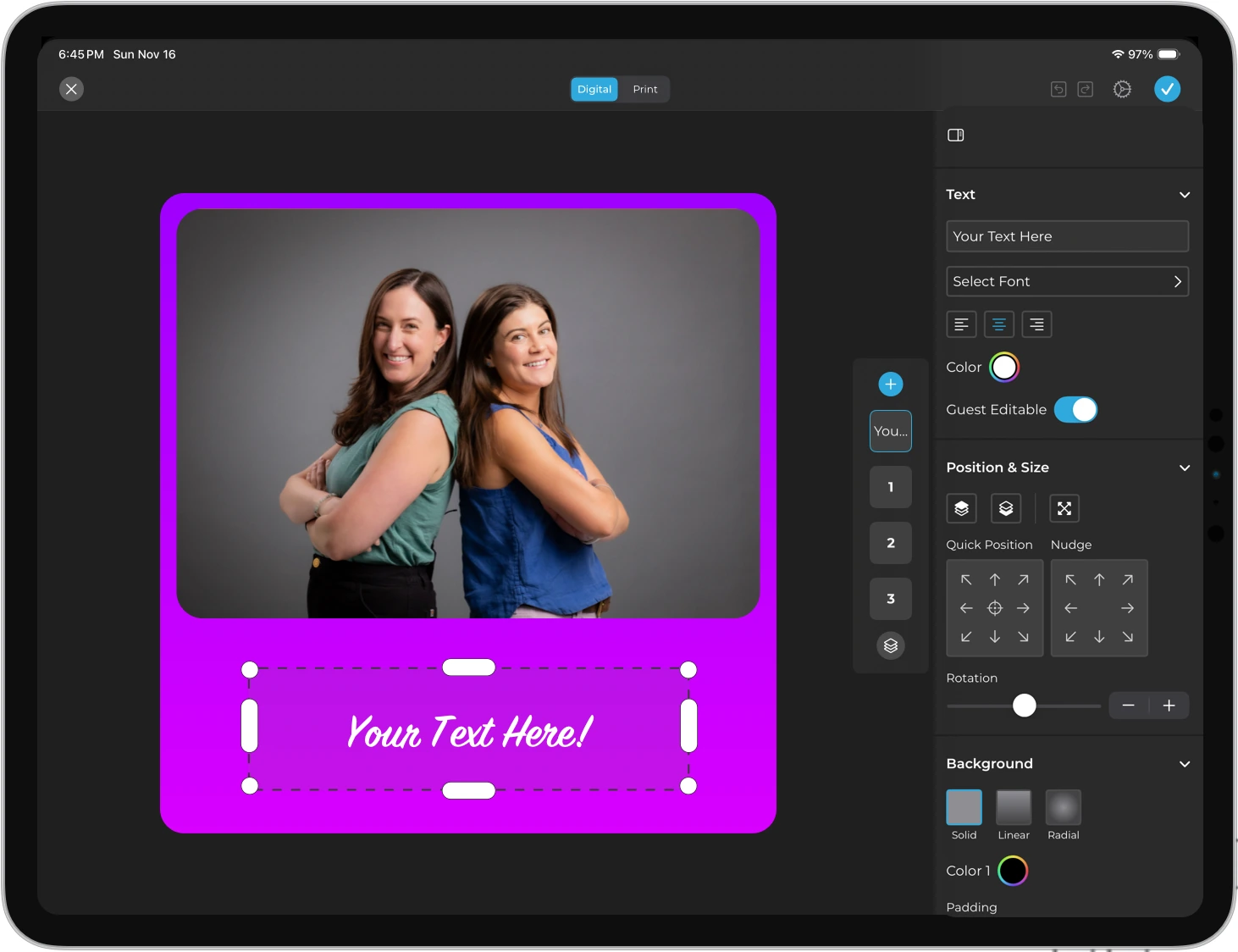
Plus adds branding and analytics that turn a photo booth into a marketing tool. Operators can customize the booth experience with their own branding, create custom AI effects with their own prompts, and access analytics and reporting dashboards.
Source: Simple Booth
Guest-editable text layers let participants type names or captions onto their photos before sharing, adding personalization without operator involvement.
| Plus Plan | ||
|---|---|---|
| Pros | Cons | |
| - Full custom branding | - $990/year is a meaningful commitment | |
| - Analytics and reporting dashboard | - Still no lead capture forms | |
| - Custom AI effect prompts | - Add-on licenses double cost per additional device | |
| - Guest-editable personalization | - No phone support | |
👉 The Bottom Line: Plus is where Simple Booth becomes a branded marketing tool, giving operators the analytics and customization that Gifyyy’s platform doesn’t provide.
Simple Booth Pro and Select Plans: $149 to $249/month
| Feature | Pro ($149/month) | Select ($249/month) |
|---|---|---|
| Annual Price | $1,490/year | $2,490/year |
| Lead Capture | 6 standard fields | Up to 10 custom fields |
| Support | Phone support | Phone + dedicated account manager |
| Compliance | Age gate, data deletion tools | Custom legal terms, security questionnaires |
| Moderation | Approve photos before delivery | Same |
| API | Open API for CRM integration | Same |
| AI Features | Guest input AI effects | Same + demographic analytics |
Pro and Select target businesses where lead capture and compliance matter. Data capture forms achieve an 87%+ opt-in rate, turning every photo session into a lead generation opportunity. Pro includes API access for connecting captured data to external CRMs, phone support for live-event troubleshooting, and moderation to approve photos before they reach galleries.
Select adds compliance features including in-app custom legal terms, security questionnaire support, and demographic analytics via face detection.
| Pro/Select Plans | ||
|---|---|---|
| Pros | Cons | |
| - Lead capture with high opt-in rates | - $149–$249/month is significant | |
| - API for CRM integration | - Add-on licenses at $111–$186/month each | |
| - Phone support for live events | - Requires annual billing for best rates | |
| - Compliance tools for regulated industries | - Enterprise features may exceed SMB needs | |
👉 The Bottom Line: Pro and Select serve operators who treat their photo booth as a data capture and marketing channel, not just entertainment, providing capabilities absent from Gifyyy’s platform.
Treetop Golf built 150,000 unique email addresses across locations using Simple Booth’s lead capture tools at their permanent installations. (Simple Booth)
Simple Booth Hardware and Additional Costs
Simple Booth’s HALO hardware is sold separately from software subscriptions at buy.simplebooth.com:
HALO Hardware:
- Event Kit (selfie stand + waterproof travel case): starts at approximately $2,090 with iPad and Simple Care
- Install Kit (wall mount for permanent venues): available via configurator
- HALO body weight: 6.5 lbs; full Event Kit with case: 49 lbs
- 0% financing available on hardware purchases
Other Costs:
- Add-on licenses for additional devices (same rate as primary license per plan)
- AI credits: $0.10 per credit beyond plan bonuses (purchased credits do not expire)
- Simple Care protection plan: $299 for extended warranty and accidental damage coverage
- Compatible portable batteries for wireless operation: 6+ hours runtime
Gifyyy Feature Value Breakdown (vs Simple Booth)
Pricing Model and Total Cost of Ownership
Gifyyy’s Approach: Gifyyy uses a one-time hardware purchase ($2,595 to $3,895) plus a flat $29 per event after five free credits. No subscription means seasonal operators pay nothing during off-months. This model rewards low-volume, seasonal use: a photographer running 20 weddings per year pays roughly $435 in annual event fees (after free credits).
But as volume increases, so does cost, with no volume discounts or feature upgrades at higher spending levels.
Simple Booth’s Approach: Simple Booth separates hardware (HALO kits starting around $2,090) from software subscriptions ($290 to $2,490/year). The subscription includes unlimited events and photos, so the 50th event costs the same as the first. Higher tiers unlock more features, not just more capacity. A visual workflow displays the entire booth flow upfront, making event setup fast.
This model rewards volume: operators running 40+ events per year pay less per event than Gifyyy’s fixed $29 rate while gaining features Gifyyy doesn’t offer at any price.
🪙 Value Verdict: Gifyyy is better for low-volume, seasonal wedding photographers who want to minimize fixed costs. Simple Booth is better for operators running frequent events where unlimited usage and feature depth provide more value than per-event pricing.
Photo Quality and Capture Options
Gifyyy’s Approach: Gifyyy captures content through the iPad’s built-in camera, producing output suited for social sharing. Capture modes include animated GIFs, slow-motion video, stills, and boomerangs, with a hybrid mode that lets guests choose between two formats per event. Built-in filters include Noir, FaceBrush, and others. Gifyyy claims to be the “World’s first SLOWMO compatible iPad photo booth”.
Simple Booth’s Approach: Simple Booth supports both iPad camera and Canon DSLR/mirrorless cameras (Core and above) via wired or wireless connections, enabling studio-grade image quality. Capture options include stills, multi-frame strips, GIFs, Rebound clips, and full-length video (5 to 120 seconds).
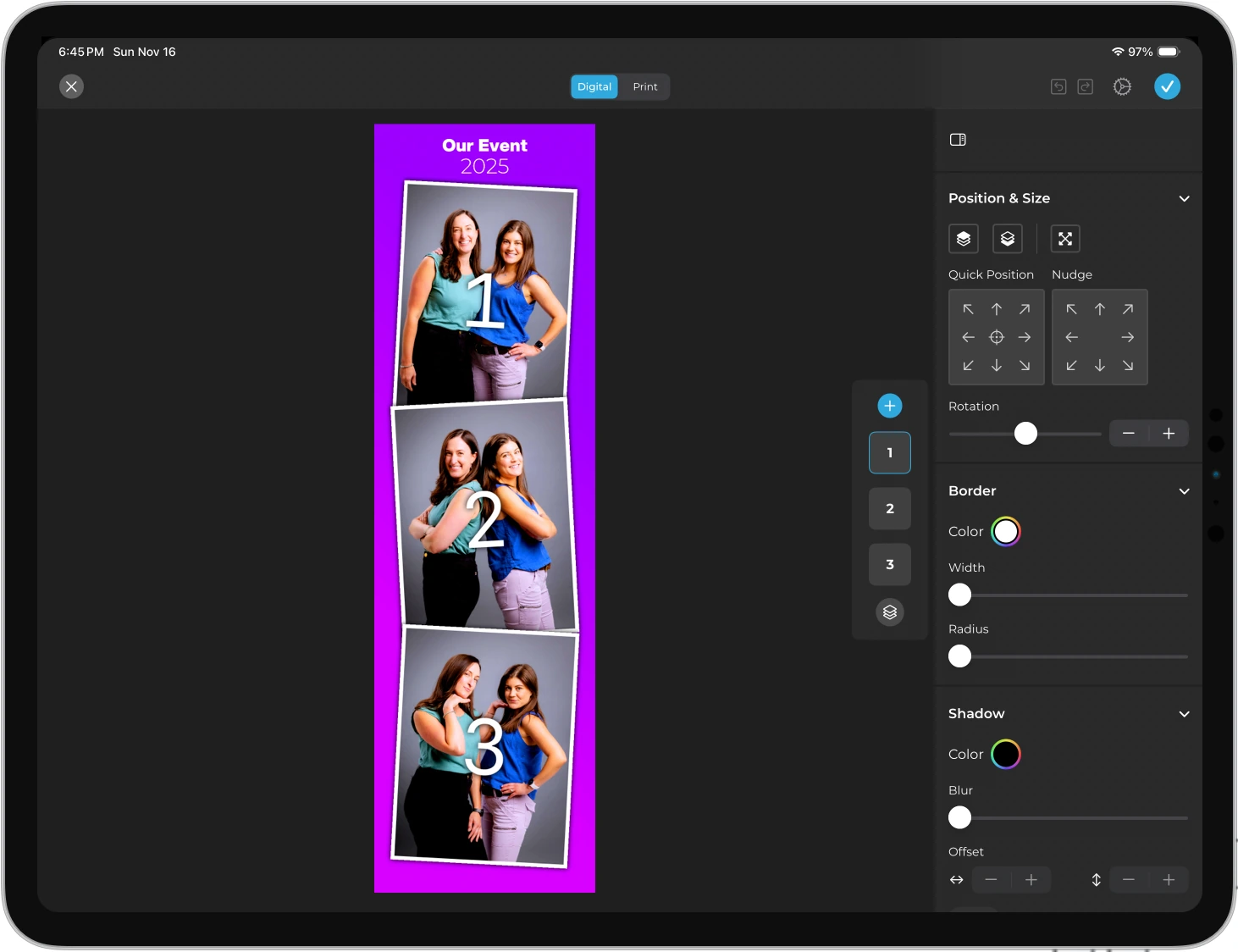
AI background replacement works without a physical green screen. Image previews appear up to 12x faster thanks to optimized rendering, so guests see results right away. The Layout Designer, available on both the iPad app and web dashboard, lets operators create templates with layers, fonts, gradients, and QR code embedding.
Source: Simple Booth
🪙 Value Verdict: Simple Booth is better for operators who need professional-quality output and creative flexibility, offering camera options and design tools that Gifyyy’s iPad-only approach cannot match.
Guest Delivery and Sharing
Gifyyy’s Approach: Gifyyy delivers content via SMS through its TXTOMATION system built on the SimpleTexting API. Guests enter a phone number, receive an SMS link to a GifGo gallery page, and share from there.
Delivery is confirmed for the U.S. and Canada, though the system has experienced carrier filtering incidents that temporarily disrupted service. The GifGo galleries run on a neutral domain, keeping the operator’s brand visible without exposing the Gifyyy brand.
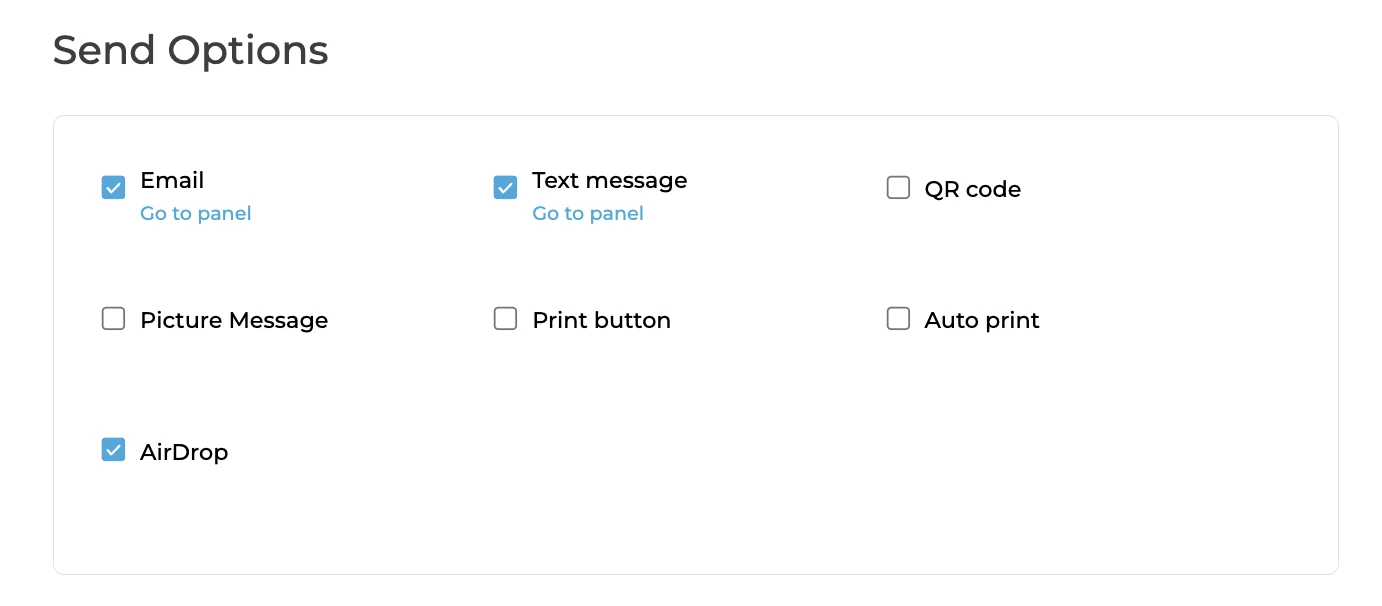
Simple Booth’s Approach: Simple Booth offers five delivery methods: QR code, email, SMS, AirDrop, and WhatsApp. WhatsApp support (added in HALO 5.0) opens international markets that SMS-only systems cannot serve.
Source: Simple Booth
AirDrop provides instant delivery at venues with poor carrier coverage. Social sharing flows are built into the gallery experience with automatic Instagram format conversion and pre-populated hashtags.
🪙 Value Verdict: Simple Booth is better for operators serving diverse venues and international events, providing five delivery channels compared to Gifyyy’s SMS-only approach.
Post-Event Marketing and Data
Gifyyy’s Approach: Gifyyy captures phone numbers and optional email addresses during the event, then provides up to three bulk SMS messages per event for follow-up. Operators can link back to galleries, their website, or promotional offers. Event statistics show page views, unique visitors, and sharing rates. There are no CRM integrations, no API, and no automated workflows beyond the three SMS blasts.
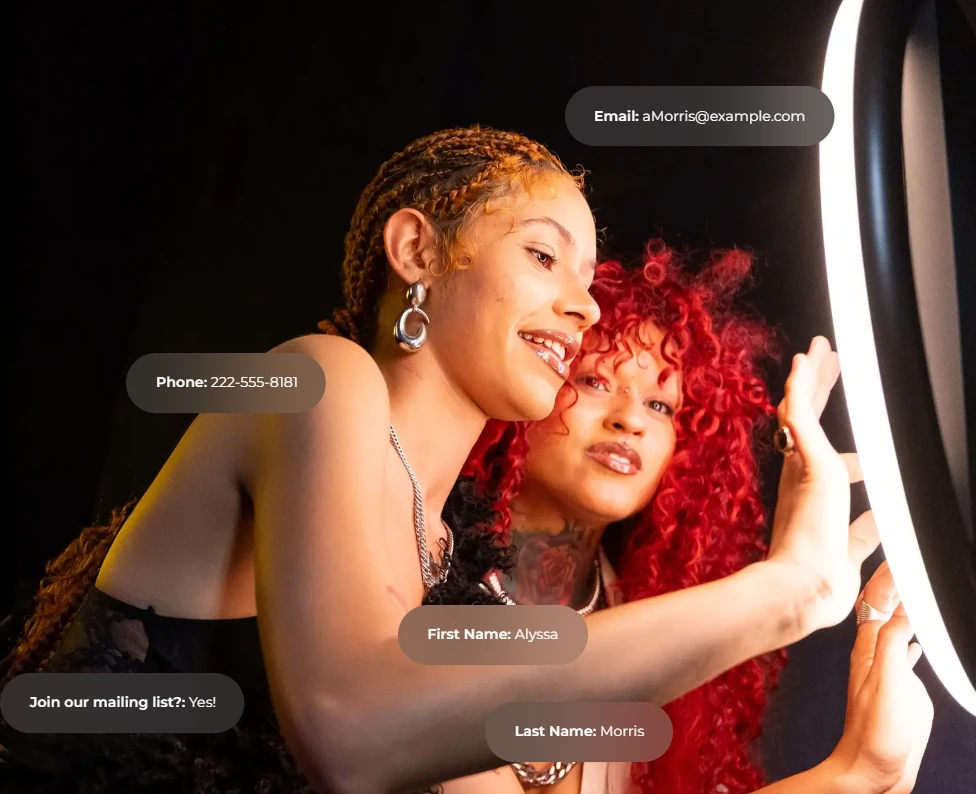
Simple Booth’s Approach: Simple Booth captures up to 6 standard fields on Pro (email, name, phone, postal code, date of birth) and 10 custom fields on Select, achieving 87%+ opt-in rates. Data syncs to MailChimp natively or to any CRM via the Open API. Analytics track sessions, gallery views, social shares, and (on Select) demographic insights via face detection. Reports export as PDF and CSV.
Source: Simple Booth
🪙 Value Verdict: Simple Booth is better for operators who treat the photo booth as a lead generation channel, offering structured data capture, CRM integration, and analytics that Gifyyy’s SMS-based system doesn’t approach.
G7 Entertainment Marketing has used Simple Booth for 10+ years, capturing 136,000+ fan interactions across brand activations. (Simple Booth)
Final Verdict: Gifyyy vs Simple Booth
The choice between Gifyyy and Simple Booth depends on whether you need a focused photobooth add-on or a complete photo booth business platform.
Gifyyy is a portable, self-running GIF photobooth for solo wedding photographers who want to add a revenue stream without complicating their workflow. With a one-time hardware investment of $2,595 to $3,895 and a $29-per-event software fee, photographers can carry the entire setup in one hand, set it up in minutes, and let it run unattended while they shoot.
The pay-per-event model works best for seasonal wedding photographers running 10 to 25 events per year, operators who value zero monthly costs during off-seasons, and solo professionals who need the simplest possible setup.
Simple Booth is a photo booth platform built on the idea that a photo booth should be a marketing engine, not just entertainment. By pairing HALO hardware with subscription software from $290 to $2,490/year, it provides unlimited events, wireless DSLR camera support, AI photo effects, a browser-based Virtual Booth, and lead capture with analytics and CRM integration.
The guest interface runs without an attendant, and the visual preset editor lets operators set up multiple events in advance through the web dashboard. This subscription model fits photo booth rental companies scaling to multiple units, venues wanting permanent self-service installations with lead capture, and brand marketers who need measurable ROI from activations with 87%+ opt-in rates and data compliance tools.
Get started with Simple Booth here.
The difference isn’t just pricing structure but ambition. Gifyyy asks “How can we give wedding photographers the simplest photobooth add-on?” Simple Booth asks “How can we turn every photo booth interaction into a business growth opportunity?”
Kurt Nielson Photography found that the Simple Booth HALO “paid for itself pretty quickly. Now it’s just extra money coming in.” (Simple Booth)
Gifyyy Pricing FAQ
How much does Gifyyy cost in total?
The minimum investment is the Starter Kit at $2,595 plus your own iPad ($300 to $600+), totaling roughly $2,900 to $3,200 before any events. After five free events, each subsequent event costs $29. A photographer running 25 weddings per year pays approximately $580 in annual event fees (20 paid events at $29 each), making the first-year total cost roughly $3,480 to $3,780.
Simple Booth’s entry point is lower upfront: around $2,090 for the HALO Event Kit plus $290/year for the Lite software plan.
Does Gifyyy charge a monthly subscription fee?
No. Gifyyy has no monthly or annual subscription. You pay a one-time hardware price and then $29 per event with 10 or more uploads. Events with fewer than 10 uploads and all test events are free. This model benefits seasonal operators but becomes expensive at high volume.
Can Gifyyy connect to a DSLR camera?
No. Gifyyy uses the iPad’s built-in camera only, with no support for external cameras. Simple Booth’s Core plan and above support Canon DSLR and mirrorless cameras through the same HALO app via wired or wireless connections, enabling professional image quality alongside all standard photo booth features.
Does Gifyyy work internationally?
Gifyyy’s hardware works worldwide, but SMS delivery via TXTOMATION is confirmed only for the U.S. and Canada. International delivery may be limited. Simple Booth offers WhatsApp delivery (available globally), AirDrop, QR codes, email, and SMS, providing broader international reach.
What happens if there’s no Wi-Fi at the venue?
Gifyyy stores all captured content on the iPad when offline and provides a manual Trigger Upload feature to push content when connectivity returns. This prevents unwanted 3am SMS deliveries. Simple Booth similarly queues sessions in offline mode and delivers automatically when connectivity returns.
Is Gifyyy’s hardware refundable?
Per Gifyyy’s Sale of Goods Agreement, all sales are final. Returns permitted at company discretion carry a 10% restocking fee plus return shipping costs. Simple Booth offers a structured refund policy with declining percentages over time (95% within 30 days down to 0% after 120 days for annual subscribers).
Which is cheaper for high-volume operators: Gifyyy or Simple Booth?
At 50 events per year, Gifyyy’s software fees total $1,305 (45 paid events at $29 each). Simple Booth’s Lite plan costs $290/year for unlimited events, Core costs $490/year, and Plus costs $990/year. Even at Simple Booth’s Plus tier (which includes custom branding and analytics), high-volume operators pay less annually than Gifyyy’s per-event model while gaining more features.
Does Gifyyy offer AI photo effects?
No. Gifyyy offers built-in camera filters (Noir, FaceBrush, and others) but no AI photo transformations. Simple Booth offers AI effects that transform guest photos using text prompts, with identity preservation handled automatically. AI credits cost $0.10 each, and testing prompts outside of booth mode is free.
Keep reading
 Alternatives
7 Gifyyy Alternatives: Photo Booth Solutions for Growing Event Businesses (2026)
Outgrowing Gifyyy? These alternatives scale with your event business.
 Reviews
Gifyyy Review 2026: Is This GIF Photobooth Right for Your Events?
A portable iPad GIF booth with buy-it-once pricing. Gifyyy, reviewed straight.
 Pricing
Snapbar Pricing: Worth It or Consider Simple Booth? August 2026
Custom quotes and hidden costs. Snapbar pricing, dragged into the light.