Photobooth-App Review 2026: Is This Open-Source Photo Booth Software Right for You?

Photobooth-App Review 2025: Is This Open-Source Photo Booth Software Right for You?
Photobooth-App is a free, open-source photo booth application built for people who want to construct their own photo booth from scratch. Written in Python with a Vue3 frontend, it runs on a Raspberry Pi or Windows PC and supports DSLRs, webcams, and Raspberry Pi camera modules. For DIY builders willing to work through terminal commands and hardware wiring, it offers a wide range of capture modes (stills, collages, animated GIFs, videos, and 3D wigglegrams) without spending a dollar on software.
To write this Photobooth-App review, we analyzed it extensively. We believe it’s the right choice if:
- You enjoy building hardware projects and are comfortable with Python, pip, and Linux
- You want full control over every layer of your photo booth, from camera backend to post-processing pipeline
- You need a free, self-hosted solution with no subscription fees or vendor lock-in
- You want to experiment with capture formats like wigglegrams or animated GIFs from DSLR stills
- Privacy matters to you (all data stays on your own hardware unless you configure otherwise)
However, Photobooth-App is not a good choice if:
- You need a turnkey system that works out of the box for paying clients
- You run a photo booth rental business where reliability and support are non-negotiable
- You want built-in lead capture, analytics, branding tools, or marketing features
- You need professional lighting and hardware designed for high-volume events
- You prefer managing your booth remotely from a cloud dashboard rather than on-device
In this case, you should consider Simple Booth: a professional photo booth platform that pairs a subscription iPad app with ring-light hardware designed for the purpose. With its cloud dashboard, AI effects, and lead capture forms achieving 87%+ opt-in rates, and a design that lets operators set up in under a minute with no tools, Simple Booth turns photo booths into both an entertainment experience and a marketing channel for rental companies, venues, and brand activators.
We’ve included a detailed look at Simple Booth at the end of this review as the professional alternative for anyone who needs more than a DIY project. If you’re ready to explore a turnkey photo booth solution, you can start a free trial of Simple Booth here.
What is Photobooth-App?
Photobooth-App is a free, open-source photo booth application licensed under MIT and distributed via PyPI. A single EU-based developer (mgineer85) created and maintains it. First released in 2023, it has moved through eight major versions, reaching v8.7.0 in January 2026.
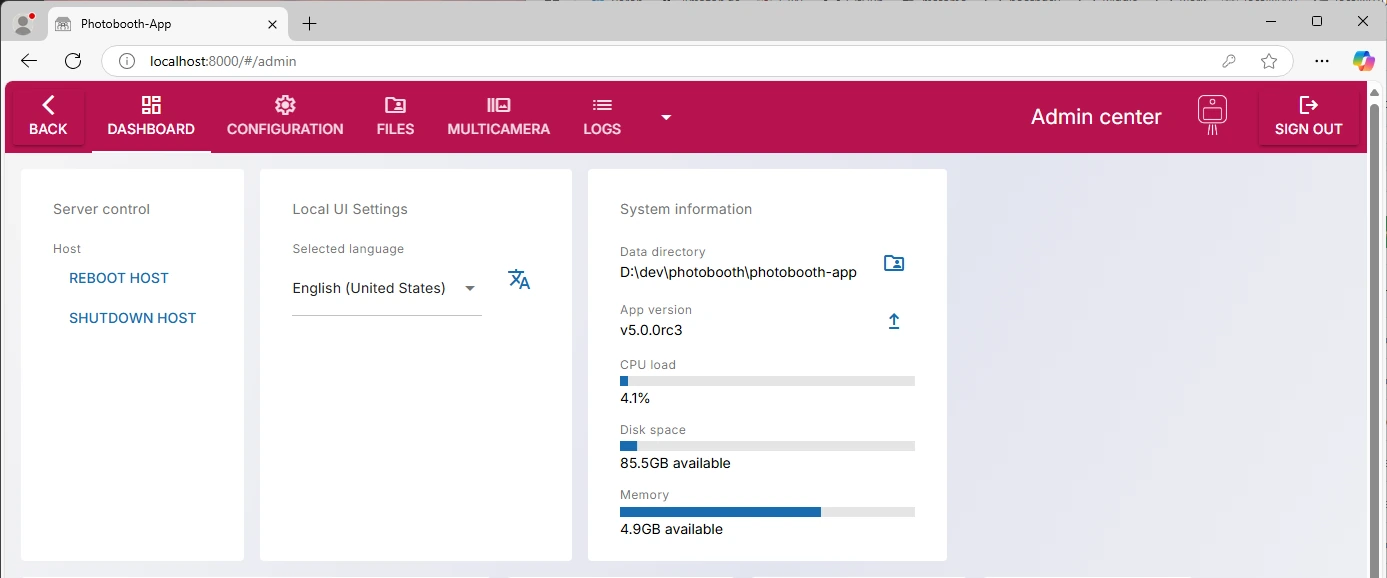
The project targets DIY enthusiasts (Raspberry Pi hobbyists, makers, and event photographers) who want to build a functioning photo booth for weddings, birthdays, and parties without paying for commercial software. The app handles capture, post-processing, sharing, and gallery management through a browser-based interface at http://localhost:8000, configured entirely through an Admin Center.
Photobooth-App positions itself as the most technically capable open-source photobooth, differentiating from older alternatives like PhotoboothProject (launched 2016) and PiBooth (launched 2017) with broader capture mode support, a plugin architecture, a REST API, and the 3D wigglegram feature introduced in v8.5.
The project has accumulated 296 GitHub stars and 72 forks and maintains a steady development pace with 3,474 commits across its history.
Photobooth-App Pros & Cons
| Pros | Cons |
|---|---|
| - Completely free, open-source (MIT license) | - Requires Linux/Python comfort for setup |
| - Five capture modes: stills, collages, GIFs, video, wigglegrams | - Single maintainer (development depends on one person) |
| - Supports DSLRs, Raspberry Pi cameras, and USB webcams | - No commercial support (community-only via GitHub) |
| - Built-in REST API and plugin system | - Video capture has no audio support |
| - AI background removal without a green screen | - Known Chromium memory leak in live preview |
| - Rclone-powered sync to dozens of cloud storage providers | - 32-bit Raspberry Pi OS not supported |
| - 3D-printable enclosure designs available | - No built-in lead capture, analytics, or marketing tools |
Photobooth-App Review: How it Works & Key Features
Capture Modes: Five output formats from one application, covering stills through 3D wigglegrams.
Most photo booth software captures only still photos. Photobooth-App offers five capture modes (single photos, collages, animated GIFs, videos, and wigglegrams), each with its own configurable post-processing pipeline.
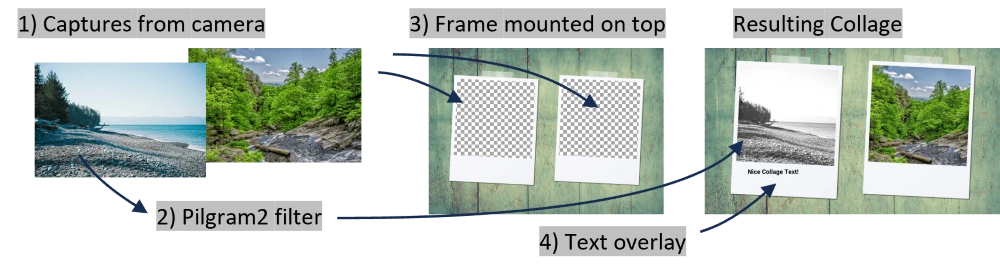
Single photos pass through chromakey or AI background removal, a color filter, background fill, PNG frame overlay, and text overlay, in that fixed sequence. Collages run each shot through the single-image stages first, then composite all captures onto one canvas with additional framing.
Animated GIFs are assembled from individual still captures rather than extracted from video, so DSLRs without video streaming can still produce animations. Videos are created from the camera’s live stream with configurable duration and an optional boomerang effect that appends the clip in reverse.
Source: Photobooth-App
The standout feature is the wigglegram camera system, introduced in v8.5. It uses a multi-camera array built from Raspberry Pi Zero 2W nodes, each with a Camera Module 3, all firing simultaneously to capture a scene from slightly different perspectives. The app assembles the images into a looping 3D-effect animated GIF. An automatic calibration process using a ChAruCo board aligns the camera outputs for smooth animation. The reference design uses 4 cameras, but the array size is not limited.
According to the official features comparison, both PhotoboothProject and PiBooth lack animated GIF capture, video capture, and wigglegram support entirely.
Camera Backend Support: One application drives DSLRs, Raspberry Pi cameras, and webcams, simultaneously if needed.
Photobooth-App’s hardware abstraction layer eliminates the need to choose software built for a specific camera type.
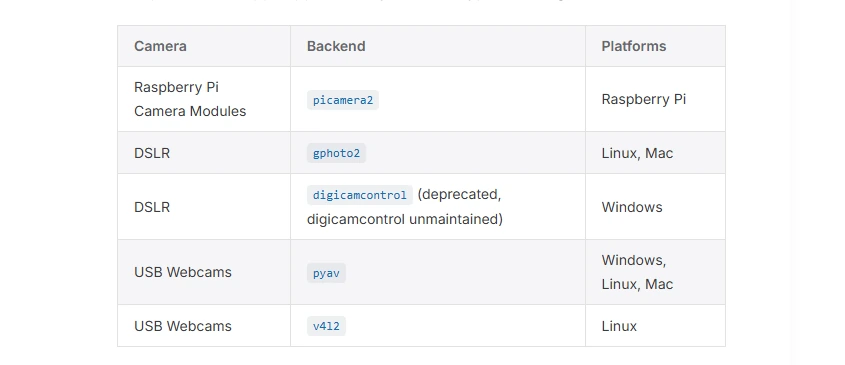
It supports five named backends: picamera2 for Raspberry Pi Camera Modules, gphoto2 for DSLRs and mirrorless cameras (covering the full gphoto2 supported camera list), pyav for USB webcams on all platforms, and v4l2 for USB webcams on Linux. A deprecated digicamcontrol backend for Windows DSLRs is explicitly marked as such.
Source: Photobooth-App
Backends are composable, not mutually exclusive.
Multiple backends can run simultaneously, letting operators pair a DSLR for high-quality stills with a cheap webcam for live preview. The picamera2 backend switches between a high-resolution mode for stills and a lower-resolution mode for liveview, and supports the Raspberry Pi Camera Module 3 with autofocus. PiBooth, by comparison, supports only Picamera1 and camera modules up to v2.1.
Live preview auto-pauses when no stream is requested, a feature absent in PiBooth.
Post-Processing Pipeline: AI background removal, color filters, and frame overlays applied automatically after every capture.
The configurable post-processing system transforms raw captures into finished, event-ready media before storing them in the gallery. Each media type has its own pipeline with stages that can be enabled or disabled through the Admin Center.
Key processing capabilities include:
- AI background removal that works without a physical green screen, creating transparent regions you can fill with a solid color or a custom background image
- Instagram-style color filters via the pilgram2 library, with an option for users to switch filters directly in the gallery UI
- PNG frame overlays that auto-scale to fit the captured image
- Text overlays with configurable position, content, and custom fonts
All stages are configured through the browser-based Admin Center without writing code. Custom assets like frames and backgrounds are uploaded via the admin’s built-in file browser.
Source: Photobooth-App
Sharing & Printing: QR code delivery and command-driven printing with any OS-supported printer.
Photobooth-App delivers photos to guests two ways: QR code-based digital sharing and command-driven physical printing.
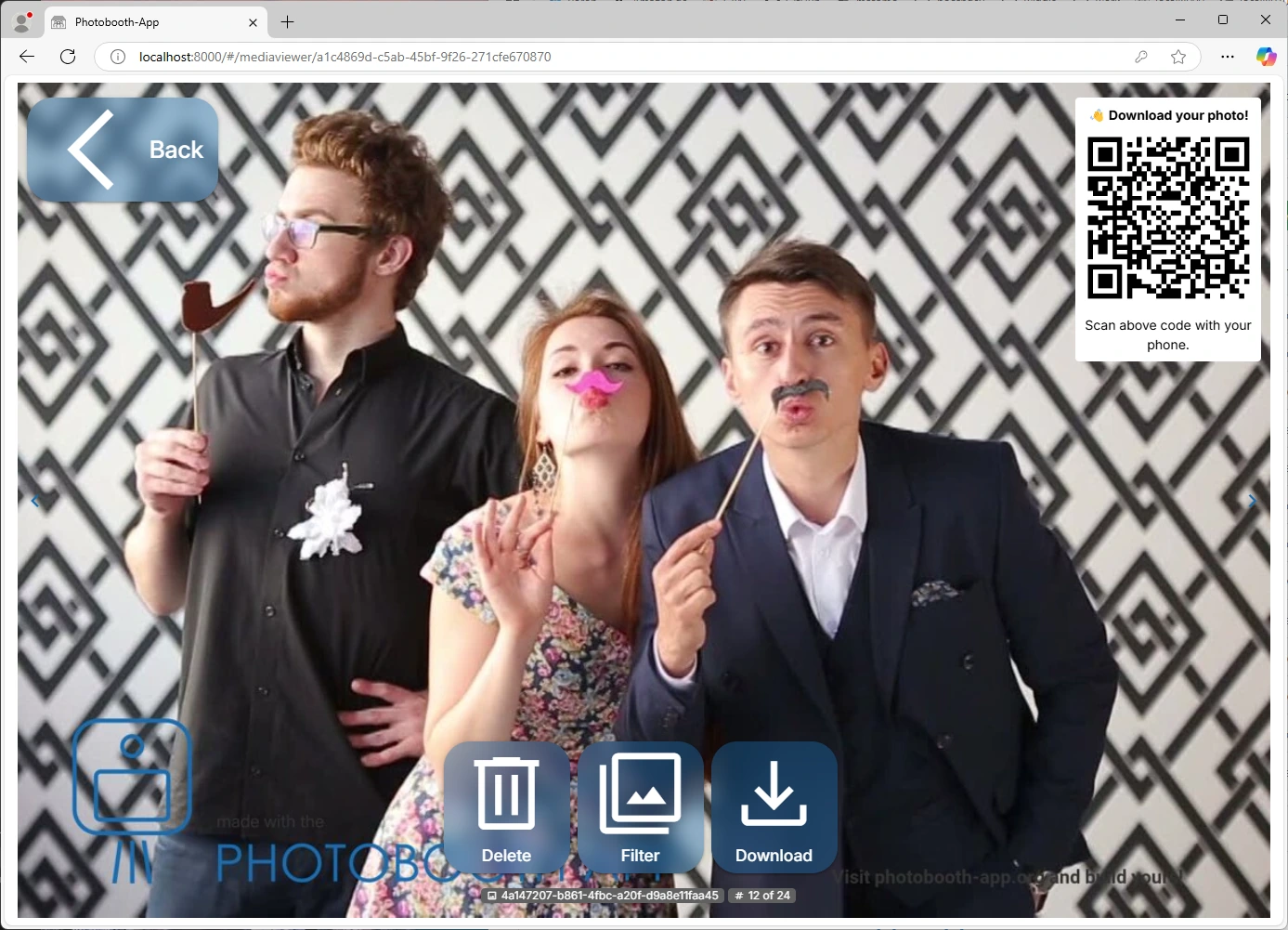
For digital sharing, the app syncs captured files to remote storage via Rclone, which supports FTP, NextCloud, S3, and dozens of other storage providers. It then generates a QR code that guests scan to download their photo. An optional sharepage surfaces the phone’s native share sheet for one-tap forwarding. For events without internet, a local WiFi hotspot mode lets guests download photos offline.
Source: Photobooth-App
For printing, the app invokes any user-defined shell command, making it compatible with any printer the host OS can address, including dye-sublimation printers like the DNP DS-RX1HS via Gutenprint on Linux. Share targets like Telegram can also be configured through HTTP commands.
The QR documentation surfaces the privacy tradeoff between internet-hosted sharing and local WiFi sharing, a GDPR-conscious distinction that few open-source photo booth tools document.
REST API & Plugin System: The only open-source photobooth with a documented API and extensible architecture.
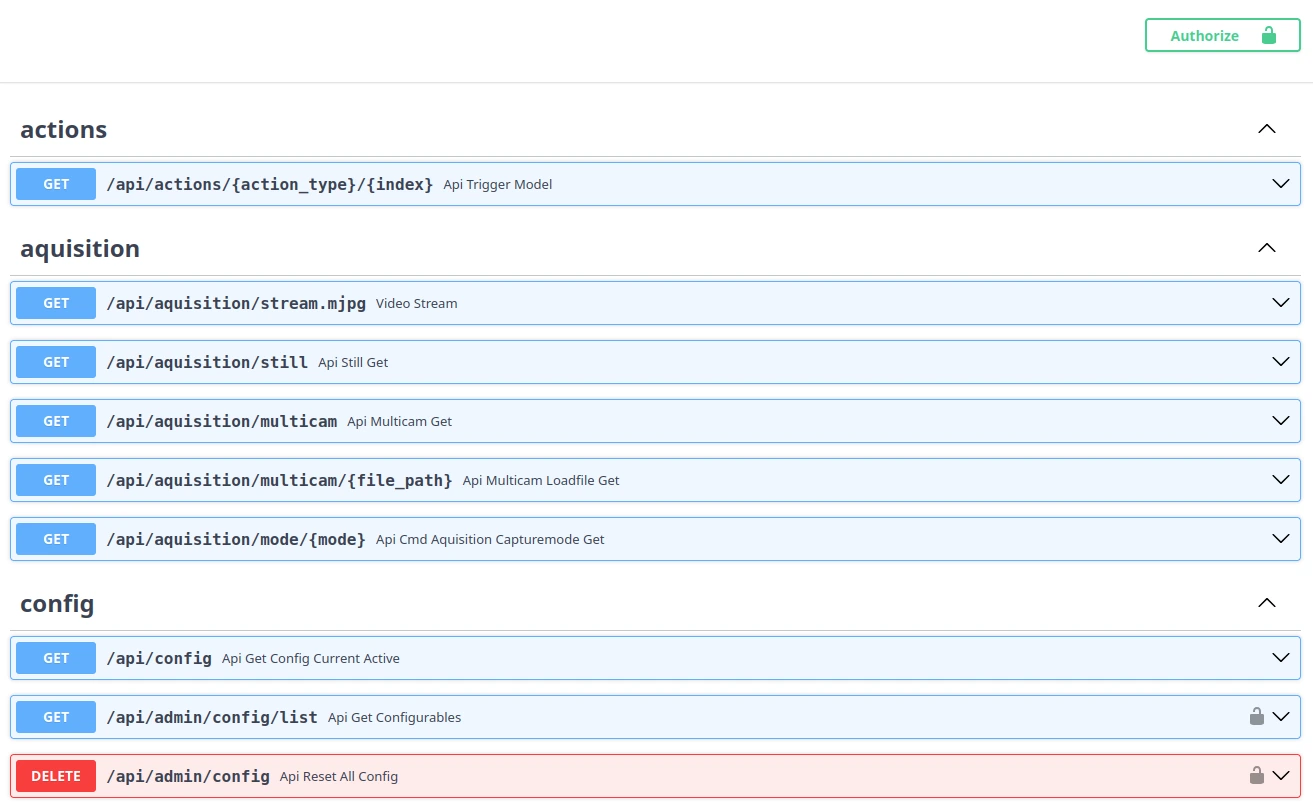
Photobooth-App ships a built-in REST API built on FastAPI, accessible at http://localhost:8000/api/doc via interactive Swagger UI. The API exposes all operations the Vue3 frontend relies on, including live video streaming, capture triggering, and media file management. External integrators can use it to control the photobooth programmatically without forking the codebase.
Source: Photobooth
The plugin system uses the pluggy hook framework and exposes four hookspec categories covering startup/shutdown, state machine events, camera acquisition, and post-processing filter insertion. Five built-in plugins ship with the app:
- GPIO plugin that controls lights or devices connected to Raspberry Pi GPIO pins
- WLED plugin that integrates with WLED LED controllers for countdown ring lighting
- Commander plugin that fires HTTP calls or shell commands in response to eleven internal events (counting, capture, finished, etc.)
- Synchronizer plugin for Rclone-based media sync
- pilgram2 filter plugin for Instagram-style color filters
Neither PhotoboothProject nor PiBooth offers a REST API or plugin architecture, per the features comparison.
Where Photobooth-App Falls Short
Photobooth-App’s limitations follow naturally from being a solo-maintained open-source project built for technically confident users. They show most clearly when measured against the demands of professional event work.
Steep Setup for Non-Linux Users.
The homepage claims a “5-minute setup” via pip, which is accurate for the Python install step itself. A production deployment requires installing system dependencies (ffmpeg, libturbojpeg0, libgphoto2-dev), configuring camera backends, scripting Chromium autostart for kiosk mode, and troubleshooting OS-specific issues.
DSLR users face a non-obvious access failure caused by competing OS services, and must manually disable system executables. The Debian/Ubuntu path lacks a dedicated guide entirely.
Single Maintainer Bottleneck.
The entire project depends on one developer. While the commit history shows sustained productivity, there are 7 watchers and 1 open pull request as of recent check. An open bug reporting a Chromium memory leak in live preview remains unresolved. For anyone deploying at a wedding or corporate event, no guaranteed support or timely bug fixes means real operational risk.
No Audio in Video Capture.
Video capture supports no sound, limiting its usefulness for video guestbook applications where guests typically record short spoken messages.
No Lead Capture, Analytics, or Marketing Features.
Photobooth-App captures photos. It does not collect guest emails, phone numbers, or any contact data. It has no analytics dashboard, no social sharing tracking, no CRM integration, and no branded galleries. For event rental companies or brand activators whose business model depends on turning photo booth interactions into leads, these capabilities don’t exist.
No Professional Hardware Ecosystem.
The project publishes 3D-printable enclosure designs and a buzzer accessory, but there is no integrated lighting solution, no stand, and no travel case. Operators source and assemble all hardware themselves. The result may impress as a DIY project, but it won’t match the photo quality or presentation of a system designed around professional lighting.
Community-Only Support.
There is no email support, no phone support, no ticketing system, and no SLA. Help comes from GitHub Issues and GitHub Discussions, where response time depends on the maintainer’s availability. The troubleshooting page covers three entries. Edge-case failures require posting in discussions and waiting.
These gaps aren’t defects. They reflect a project built for tinkerers and hobbyists who find the building process itself rewarding. But they mark a clear boundary between a fun weekend project and a tool you’d stake your business on.
Top Photobooth-App Alternative for Professional Use: Simple Booth
Simple Booth fills Photobooth-App’s professional gaps by packaging everything an event operator needs (hardware, software, cloud platform, marketing tools, and support) into one system.
Founded in 2013 by Mark Hennings and Jeremy Cox, Simple Booth serves 30,000+ customers globally, has captured 40 million+ moments, and earned a 4.7-star App Store rating from 2,400+ ratings. The company ranked #414 on the Inc. 5000 in 2018 with 1,210% three-year revenue growth.
Turnkey Hardware and Software: Set up a professional photo booth in under a minute with no tools required.
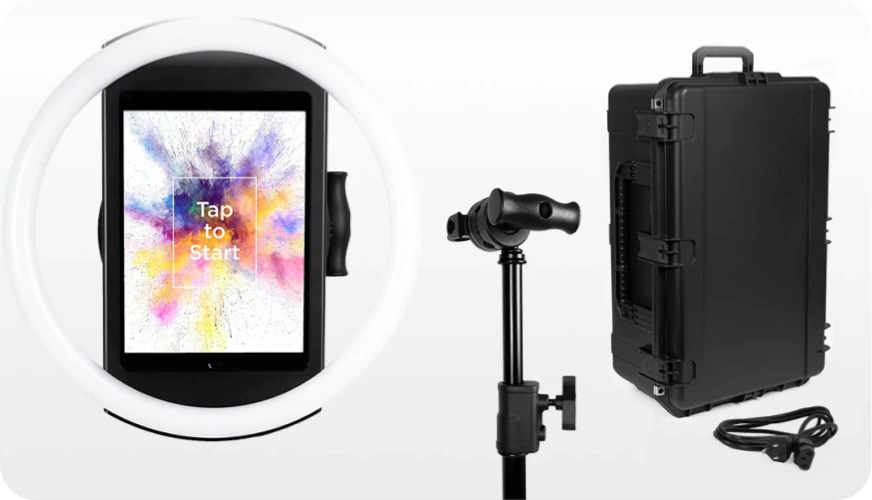
The HALO photo booth kit integrates a ring light, iPad mount, and mounting system into a single aluminum chassis.
The body is machined from a single billet of anodized aluminum with a patented ring-light system delivering 2,100 lumens from 112 LEDs, rated for 50,000 hours of operation. The iPad snaps in via a tool-less faceplate with a concealed USB-C cable for continuous charging.
Source: Simple Booth
Two kit configurations serve different use cases: the Event Kit with an adjustable selfie stand and waterproof rolling travel case for mobile operators, and the Install Kit with a steel wall mount for permanent venue installations.
The software runs as the HALO iPad app, capturing still photos, photo strips, custom layouts, GIFs, looping Rebound clips, and video. HALO 5.0, released in November 2025, added Canon and Sony DSLR/mirrorless camera support for operators who want higher image quality, with both wired USB and wireless WiFi connections (wireless being a feature most competitors don’t offer).
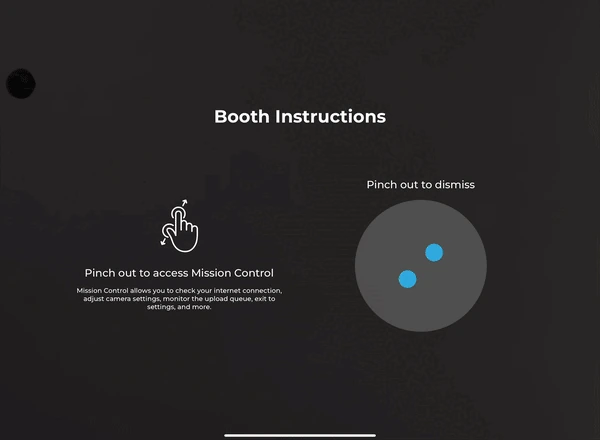
A Preflight Check screen catches configuration issues before launch, and Mission Control lets operators monitor device health during events via a hidden two-finger pinch gesture. The app queues sessions in offline mode and delivers them when connectivity returns, which matters at venues with unreliable Wi-Fi.
Source: Simple Booth
“It paid for itself pretty quickly. Now it’s just extra money coming in.” (Kurt Nielson Photography)
Lead Capture and Marketing Tools: Turn every photo into a data capture opportunity with near-90% opt-in rates.
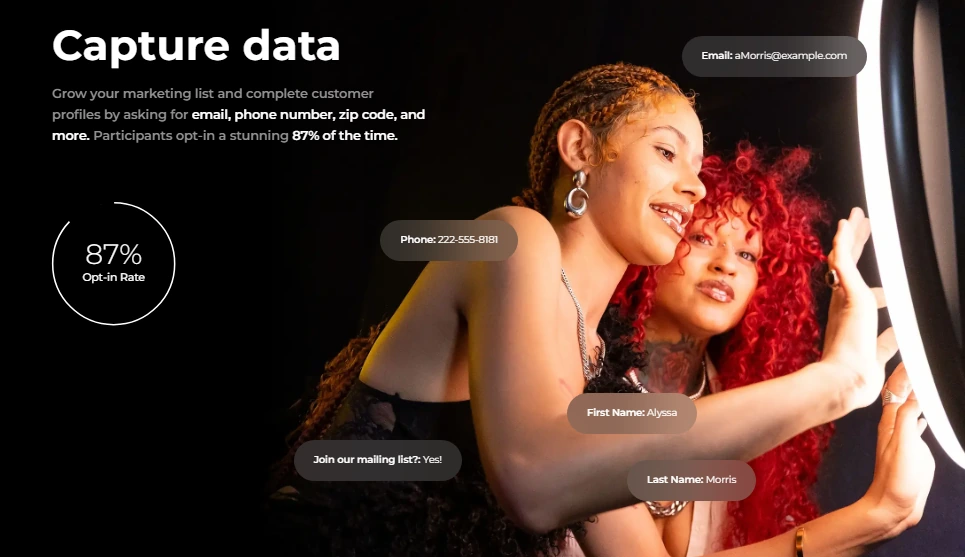
Where Photobooth-App captures photos and stops, Simple Booth captures photos and contact data at the same time. A customizable lead capture form appears as a natural part of the photo-taking flow, collecting email, phone, name, and custom fields with opt-in rates as high as 87 to 89%.
Source: Simple Booth
The online gallery system aggregates all event captures into branded, shareable galleries. Participants share to Facebook, X, LinkedIn, and Instagram directly from the gallery. Simple Booth automatically converts incompatible layouts into Instagram-compatible files and delivers them via MMS, reducing friction between capture and post. Any public gallery can become a Live Feed display on a TV or projector with a single tap.
The analytics dashboard tracks participants, uploads, gallery views, social shares, and referred traffic. On the Select plan, face-detection demographic analytics estimate age breakdown, gender distribution, and average group size from captured photos. Lead data exports as CSV, syncs natively with MailChimp, or routes to a custom CRM via the Open API.
“We use Simple Booth’s data capture to add people to our email list — we’ve collected 150,000 unique email addresses across our locations.” (Treetop Golf)
AI Photo Booth: Built-in AI effects with identity preservation, zero-cost testing, and per-frame storyboarding.
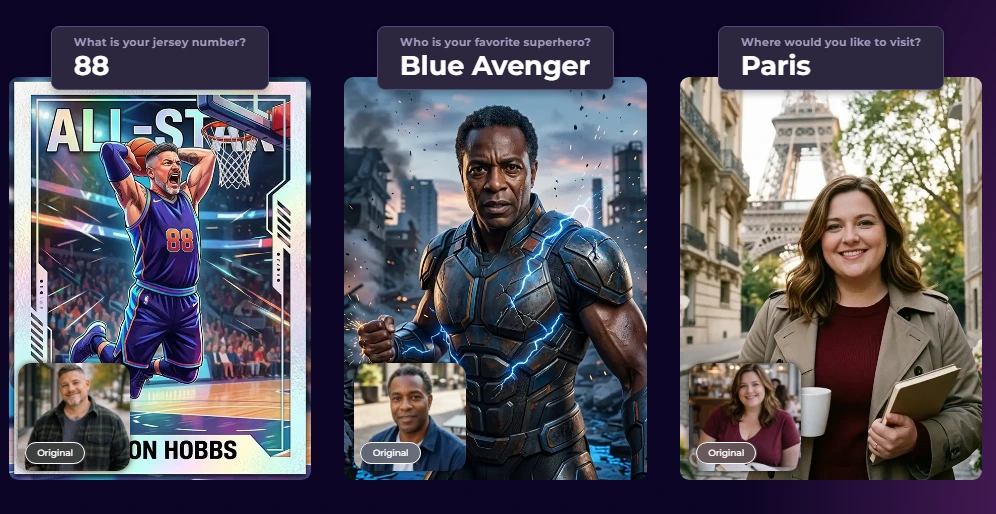
Simple Booth’s AI Photo Booth transforms guest photos using text prompts through three Nano Banana AI models: one optimized for speed with individual subjects (1 credit), one balanced for groups up to 5 (2 credits), and one for highest quality output (3 credits). The platform preserves guest identity automatically, so guests stay recognizable no matter how extreme the transformation, without requiring prompt engineering from the operator.
Source: Simple Booth
Operators can test prompts outside booth mode at zero credit cost, iterating freely before the event. Credits cost $0.10 each and never expire.
The system supports assigning a unique AI prompt to every individual frame in a multi-frame layout, enabling comic strip or cinematic narrative strips. On Pro and Select plans, the Guest Input system lets participants answer dropdown or free-text questions that feed directly into the AI prompt as template variables, producing a unique generation per guest while the operator controls the surrounding prompt structure.
AI effects composite directly with the Layout Designer, so brand logos, overlays, and graphic frames layer on top of the AI-generated photo in one workflow.
Virtual Booth: A hardware-free photo experience accessible from any browser.
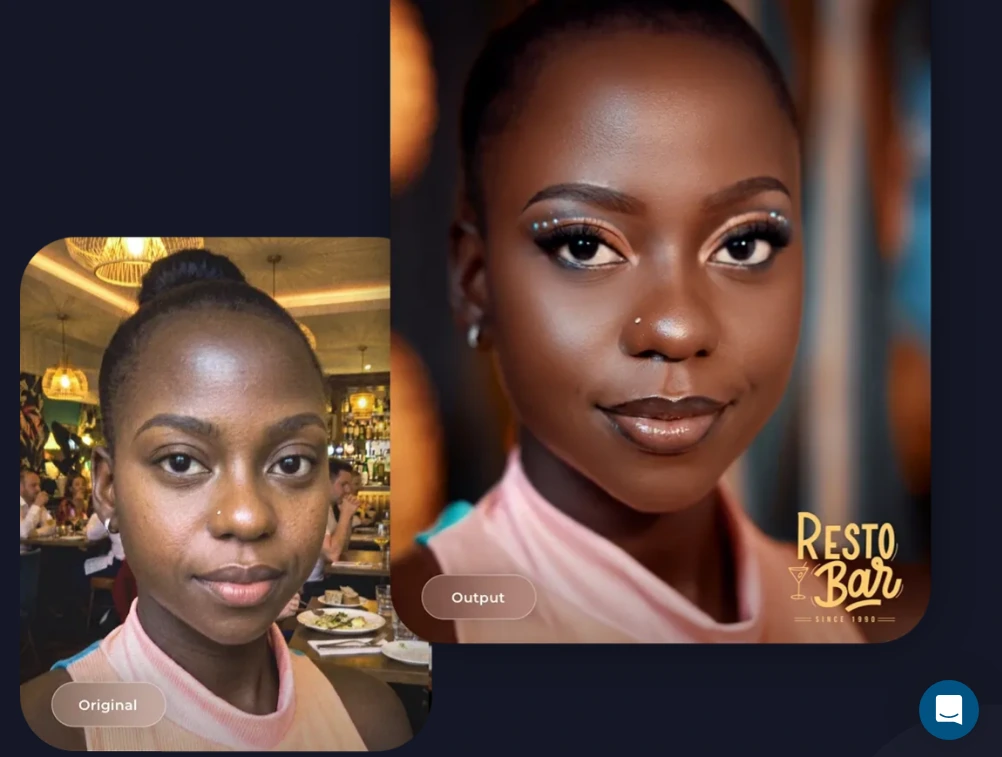
Virtual Booth extends Simple Booth beyond physical kiosks. Participants join via a QR code or link from their own phone or laptop, with no app installation required. It runs in any browser on iOS, Android, and desktop.
Hosts configure branding, overlays, stickers, AI effects, background replacement, data capture fields, and gallery privacy from the online dashboard. Each event generates a unique link and QR code. Participants land on a branded welcome page, take or upload a photo, apply enabled effects, and submit to a shared gallery.
Source: Simple Booth
Virtual Booth supports multiple languages (English, Spanish, French, German, Dutch, and others), unlimited concurrent events, and connects to the same analytics and gallery infrastructure as HALO hardware, making it suitable for hybrid events where in-person and remote participants feed one combined gallery.
Cloud Dashboard and Remote Management: Configure, monitor, and update booths from anywhere.
Simple Booth’s online dashboard centralizes booth management across devices and events. Operators create and edit presets (event profiles defining the full booth experience) from a web browser, with changes syncing automatically to iPads without exiting booth mode.
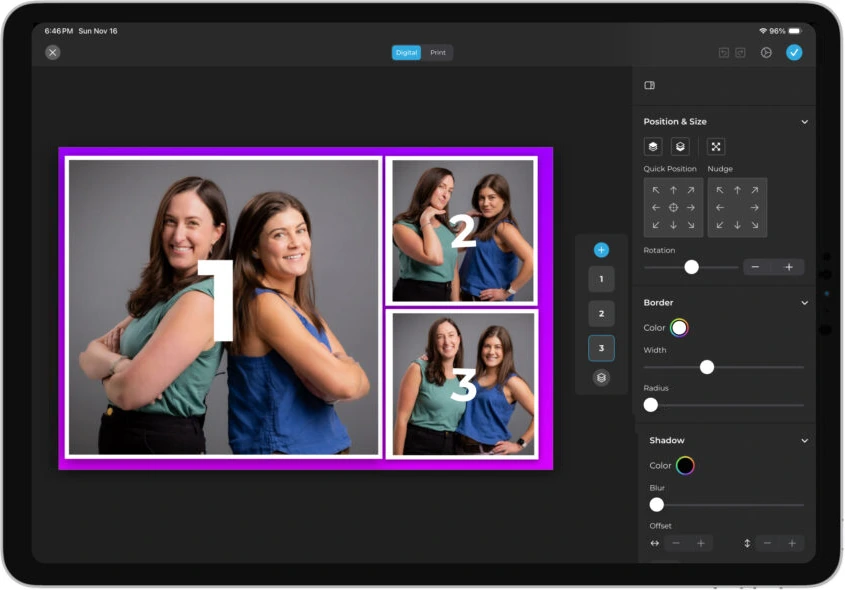
The Layout Designer, available on both the iPad app and the web dashboard on Core plans and up, is a full design tool with layers, fonts, gradients, QR code embedding, and multi-layout support. It eliminates dependence on external graphic design software. Operators with multiple iPads manage all devices under one account, share settings with staff accounts, and track performance across events from a single view.
Source: Simple Booth
Photobooth-App or Simple Booth: Comparison Summary
| Photobooth-App | Simple Booth | |
|---|---|---|
| Target user | DIY makers and Raspberry Pi hobbyists | Event rental companies, venues, brand marketers |
| Setup experience | Terminal commands, pip install, manual hardware assembly | Tool-less hardware, iPad app, under 1 minute |
| Hardware | Self-sourced (Raspberry Pi, camera, screen) | HALO kits with integrated ring light |
| Camera support | DSLRs, Pi cameras, webcams (composable backends) | iPad camera + Canon/Sony DSLR/mirrorless, wired or wireless (Core+) |
| Capture modes | Stills, collages, GIFs, video, wigglegrams | Stills, strips, GIFs, Rebound clips, video |
| AI features | AI background removal (local processing) | AI background removal, AI effects, AI layout graphics |
| Lead capture | Not available | Built-in forms with 87%+ opt-in rates |
| Analytics | Not available | Dashboard with social tracking, demographic insights |
| Photo delivery | QR code (self-hosted), local print commands | QR code, email, SMS, AirDrop, WhatsApp |
| Cloud management | Not available (all on-device) | Remote dashboard with preset sync and Live Feed |
| Branding tools | PNG frame overlays, text overlays | Layout Designer with layers, fonts, gradients, props |
| Integrations | REST API, GPIO, WLED, Rclone sync | MailChimp, Dropbox, Open API, DSLR cameras |
| Support | GitHub Issues and Discussions (community-only) | Email, chat, phone (Pro+), account manager (Select) |
| Pricing model | Free (hardware costs only) | From $24/week or $49/month (Core) to $249/month (Select); Enterprise custom |
| Free plan | Entire product is free, permanently | 7-day free trial |
| Best for | DIY builders who want full control and zero software cost | Professionals who need reliability, marketing tools, and support |
Final Verdict
The choice between Photobooth-App and Simple Booth comes down to what you value more: control or reliability.
Choose Photobooth-App if you’re a maker who enjoys the build as much as the result.
It’s the right tool when you have a Raspberry Pi, a spare camera, and the patience to configure backends, wire GPIO triggers, and troubleshoot Linux services. The reward is a free, self-hosted photo booth that can produce wigglegrams, animated GIFs, and videos (formats that most commercial software doesn’t touch). For personal events, hobby projects, and technical experimentation, nothing else in the open-source space offers this much capability at zero cost.
Explore Photobooth-App on GitHub.
Choose Simple Booth if your photo booth needs to work every time, for paying clients, with professional-quality output.
It’s the right platform when your business depends on reliable hardware, when you need to capture leads and track marketing ROI from booth interactions, and when setup time and support availability directly affect your bottom line. Simple Booth turns a photo booth from a weekend project into a revenue-generating business tool for rental operators, permanent venue installations, and brand activations alike.
Start your free trial of Simple Booth here.
The two products serve different needs. Photobooth-App gives technical builders everything they need to create something unique on their own terms. Simple Booth gives professionals everything they need to deliver a polished, branded experience that captures data and drives results, without thinking about the underlying infrastructure.
Photobooth-App FAQ
Is Photobooth-App really free?
Yes. Photobooth-App is free and open-source under the MIT license, distributed through PyPI at no cost. There are no subscription fees, licensing charges, premium tiers, or feature gates. Every documented feature (DSLR support, wigglegrams, the REST API, plugins, AI background removal) is included.
The only costs are hardware: a Raspberry Pi or PC, a camera, and a touchscreen. The project accepts voluntary PayPal donations but offers no paid tier.
What hardware do I need to run Photobooth-App?
At minimum, you need a computing device (Raspberry Pi 4 or 5 recommended, or a Debian/Ubuntu/Windows PC), a touchscreen with at least 1024x600 resolution, and a camera. Supported cameras include Raspberry Pi Camera Modules (including Module 3 with autofocus), DSLRs via gphoto2 on Linux/Mac, and USB webcams.
For the wigglegram feature, you’ll need additional Raspberry Pi Zero 2W nodes with Camera Module 3 units and an Ethernet switch. The project also provides 3D-printable enclosure designs for builders with access to a 3D printer.
Can Photobooth-App print photos at an event?
Yes. The app invokes any shell command you configure, making it compatible with any printer your operating system supports.
On Linux, this means CUPS via the lp command; on Windows, mspaint /p is the documented starting point. Dye-sublimation printers like the DNP DS-RX1HS work via Gutenprint on Linux. Multiple print configurations can run simultaneously, each triggered via touchscreen, GPIO pin, keyboard, or the REST API.
Does Photobooth-App work on Windows?
Yes, but with limitations.
The app runs on Windows using USB webcams via the PyAV backend. DSLR support through gphoto2 is not available on Windows (the digicamcontrol backend exists but is deprecated). Raspberry Pi camera modules are not compatible with Windows. Linux (particularly Raspberry Pi OS) remains the primary supported platform with the broadest camera and feature support.
What is a wigglegram and how does Photobooth-App create them?
A wigglegram is a short looping animated image that creates a 3D depth illusion. Photobooth-App creates them using a multi-camera array of Raspberry Pi Zero 2W nodes, each with a Camera Module 3, that all fire at the same instant to capture the scene from slightly different horizontal perspectives.
The software assembles these images into a looping GIF with an automatic calibration process that corrects for lens and positional misalignment. The reference design uses 4 cameras, but the array size is not capped.
Does Photobooth-App collect guest contact information?
No. Photobooth-App is a capture-and-deliver tool with no built-in lead capture, email collection, or contact form functionality. If you need to collect guest data at events for marketing or follow-up, you would need to build a custom solution using the REST API or pair the app with a separate form tool.
Simple Booth, by contrast, includes customizable data capture forms achieving 87%+ opt-in rates, with native MailChimp integration and CSV export.
How does Photobooth-App compare to commercial photo booth software?
Photobooth-App competes primarily with other open-source alternatives like PhotoboothProject and PiBooth, and offers more capture modes, camera flexibility, and extensibility than both. Compared to commercial solutions, it provides more customization and zero software cost, but lacks professional hardware, cloud management, marketing tools, analytics, and commercial support.
For hobby and personal events, the trade-off favors Photobooth-App. For professional rental businesses or brand activations, commercial platforms like Simple Booth provide the reliability, support, and business features that open-source tools cannot.
What kind of support is available for Photobooth-App?
Support is community-driven through GitHub Issues (for bug reports) and GitHub Discussions (for configuration help and troubleshooting). There is no email support, phone support, ticketing system, or guaranteed response time. The documentation site covers setup, configuration, and camera-specific topics, with a FAQ addressing common installation failures. Response quality and speed depend on the sole maintainer’s availability.
Keep reading
 Reviews
Snapbar Review 2026: Is This Experiential Marketing Platform Right for You?
Enterprise AI experiences, no self-serve or public pricing. Snapbar, reviewed.
 Reviews
Snappic Review 2026: Is This Photo Booth Software Right for Your Business?
360, Glambot and mirror booths, but no hardware of its own. Snappic, reviewed straight.
 Reviews
TapSnap Review 2026: Is This Photo Booth Rental Right for Your Event?
Full-service rental with DSLR prints, but hazy pricing. TapSnap, put to the test.