Whova Pricing: Worth It or Add Simple Booth? June 2026

If you’ve ever tried to find out what Whova costs, you know the frustration: a pricing page with no prices, a quote request form just to learn whether your 300-person conference fits the “standard” or “premium” tier. Event management pricing can feel like a conference where the agenda is hidden behind a registration wall.
Whova has built its name as an all-in-one event management platform, serving 15 million users across 50,000+ events in 170+ countries. It covers the full event lifecycle: registration and ticketing, a mobile attendee app with networking tools, hybrid and virtual streaming, exhibitor management, abstract submission, and post-event analytics. But as organizers face growing pressure to justify ROI through first-party data capture and measurable engagement, Whova’s strength in logistics leaves a gap in experiential activation and attendee-generated content.
We’ve analyzed Whova’s capabilities, pricing model, and feature scope. It’s the right choice if:
- You need one platform covering registration, attendee networking, hybrid streaming, and post-event analytics
- Your events require abstract management and call-for-speakers workflows
- You value exhibitor and sponsor management with lead retrieval and ROI reporting
- Your organization runs multiple events per year and wants consolidated tooling
- You need enterprise compliance features like SOC 2 Type 2 certification
Whova falls short if:
- You need interactive photo experiences that capture first-party data at high opt-in rates
- You want branded user-generated content that attendees share on social media organically
- You require a physical activation that draws foot traffic to specific locations at your event
- You need AI-powered photo transformations that create shareable moments
- You want a lead capture tool that collects contact information as a natural part of an entertainment experience
In that case, consider adding Simple Booth: a photo booth platform that pairs ring-light hardware with cloud-connected iPad software to deliver branded photo experiences, capturing first-party data and generating social shares at events where Whova handles the logistics.
We’ve included a detailed analysis of how Simple Booth extends Whova’s value in this review.
Whova Pricing Summary
| Whova | Simple Booth | |
|---|---|---|
| Free Tier | • Free trial available (scope undisclosed) • Demo download option • App free for attendees | • 7-day free trial • 25 free AI credits • Full feature access |
| Entry Level | • Standard package (quote required) • Core event app and management tools • Community support | • Lite: $14.99/week ($290/year) • Custom layouts, themes, props • Photo delivery and galleries |
| Mid-Tier | • Premium package (quote required) • Enhanced features and support • 30-minute response time | • Core: $24.99/week ($490/year) • DSLR camera support, video • Background replacement, AI effects |
| High-Tier | • Enterprise package (quote required) • Full platform access • Dedicated account management | • Plus: $49.99/week ($990/year) • Custom branding and analytics • Guest-editable text layers |
| Business | • Multi-event packages available • Custom pricing per event • Volume discounts negotiable | • Pro: $149/month ($1,490/year) • Lead capture with 6 fields • API integration, phone support |
| Best For | Organizations needing full event lifecycle management from registration through post-event analytics | Event teams wanting branded photo experiences that capture first-party data and generate social shares |
Whova Pricing: In-Depth Overview
Whova uses a quote-only pricing model with no published dollar amounts. The pricing page shows a quote request form under the headline “Let’s Work Together!” and the tagline “We’ll find a price that fits your budget.”
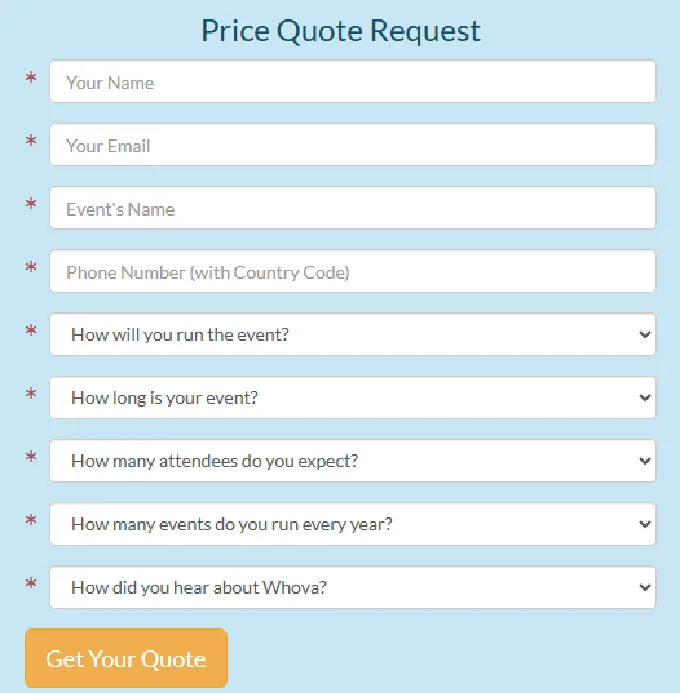
Source: Whova
Pricing depends on event size and selected services, pointing to a per-event, variable-fee structure rather than a flat subscription.
Three package tiers exist (standard, premium, and enterprise), though no feature breakdowns or prices are published. Organizers can pick features beyond the package defaults, suggesting modular add-on pricing. Attendees use the Whova app at no charge; all fees fall on the organizer.
Whova Standard Package: Quote Required
| Feature | Details |
|---|---|
| Price | Custom quote |
| Event App | Core mobile and web app |
| Management Tools | Badge generation, check-in, surveys |
| Support | Q&A site and email during business hours |
| Analytics | Basic event reporting |
The Standard package provides Whova’s core event management tools. Support includes Q&A site and email during business hours (9am, 5pm Pacific, weekdays, excluding holidays). The package covers the event app with agenda management, attendee networking via the Community Board and messaging, and tools for badges, check-in, and surveys.
| Standard Package | |
|---|---|
| Pros | Cons |
| Full event app with networking | No published pricing |
| Badge generation and check-in | Business-hours-only support |
| Community Board engagement | Feature scope unclear without quote |
| Attendee app is free | May lack premium analytics |
👉 The Bottom Line: Standard likely suits smaller conferences and single-track events, but without published pricing, organizers must go through the sales process before knowing if Whova fits their budget.
Whova Premium Package: Quote Required
| Feature | Details |
|---|---|
| Price | Custom quote |
| Support | Reportedly within 30 minutes on business days |
| Additional Features | Enhanced management tools |
| Weekend/Holiday | Support available |
| Analytics | Enhanced reporting |
The Premium package appears to unlock sub-30-minute response times on business days with weekend and holiday availability. This tier likely includes expanded features from the eight-module suite: exhibitor management, hybrid event streaming, and more advanced analytics.
| Premium Package | |
|---|---|
| Pros | Cons |
| Faster support response times | Still requires quote process |
| Weekend and holiday coverage | Feature differences not documented |
| Enhanced platform capabilities | Unclear upgrade path from Standard |
| Likely includes hybrid features | Total cost unknown until negotiation |
👉 The Bottom Line: Premium is where Whova’s support matches the urgency of live events, but the lack of published feature differences between tiers makes comparison difficult.
Whova Enterprise Package: Quote Required
| Feature | Details |
|---|---|
| Price | Custom quote |
| Support | Dedicated account management |
| Security | SOC 2 Type 2 compliant |
| Compliance | GDPR, PCI DSS, EU-U.S. DPF |
| Infrastructure | AWS-hosted, 99.95% uptime SLA |
Enterprise is Whova’s full platform deployment: all eight modules, dedicated account management, and the compliance infrastructure that large organizations require. Whova holds SOC 2 Type 2 compliance and PCI DSS certification with a publicly available attestation document.
| Enterprise Package | |
|---|---|
| Pros | Cons |
| Full platform access | Requires sales negotiation |
| SOC 2 Type 2 certified | Likely requires annual commitment |
| Dedicated account manager | Multi-event commitment for best rates |
| All eight modules available | Total cost potentially significant |
👉 The Bottom Line: Enterprise delivers the compliance and scale that Fortune 500 companies and government agencies require, but the commitment and cost are only discoverable through the sales process.
Whova Registration & Ticketing Fees
| Fee Type | Details |
|---|---|
| Free Tickets | No platform fee, no quantity limit |
| Paid Tickets | Per-ticket fee |
| Payment Processing | Stripe standard fees apply separately |
| Fee Handling | Option to pass fees to registrants |
| Payout | Instant via connected Stripe account |
Whova’s registration module charges no fees for free tickets and claims lower ticket fees than competing platforms for paid tickets.
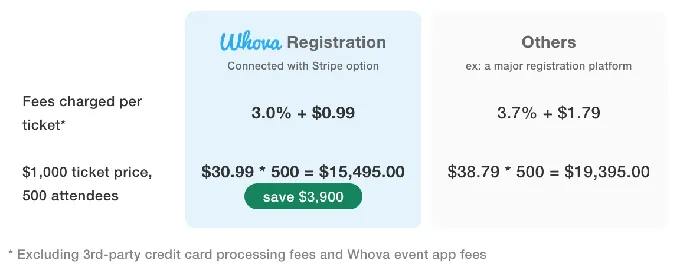
Source: Whova
Stripe’s processing fees apply on top of Whova’s fee. Organizers can pass fees to registrants and receive instant payouts via their connected Stripe account.
Whova Additional and Hidden Costs
Beyond the base package, several cost layers affect total spend:
Modular Feature Add-Ons:
- Organizers can pick features beyond the package defaults, implying add-on fees for modules like Abstract Management, Hybrid Events, or MicroEvents
- The MicroEvents add-on (launched February 2025) extends the platform to smaller events and webinars, but pricing is not disclosed
Volume and Multi-Event Pricing:
- A multi-event package deal is available for organizations running multiple events, requiring upfront commitment to all events simultaneously
Third-Party Estimates:
- Per ITQlick, small organizations reportedly pay approximately $18/user/month
- Per Vendr, average institutional spend is reportedly around $36,000/year, with large deployments reaching up to $140,000/year
- These are third-party estimates and may not reflect current Whova pricing
Taxes and Processing:
- Whova’s fees do not include taxes, levies, duties, or similar charges
- Stripe payment processing fees apply on every paid ticket transaction
Where Whova Needs Experiential Engagement
Whova excels at managing event operations and logistics, but its platform centers on information delivery and attendee networking, not experiential activation or first-party data capture:
No Photo or Visual Content Capture Tools
- Whova’s engagement features are text-based: Community Board posts, messaging, polls, and surveys
- No native photo booth, branded photo experience, or visual content creation tools exist within the platform
- Organizers who want shareable visual content from their events must find separate solutions
Limited First-Party Data Capture at Point of Engagement
- Whova captures registration data at signup but has no tools for capturing new contact information during the event
- The platform’s networking tools connect existing attendees rather than capturing data from walk-up guests, VIP parties, or expo floor visitors who never registered
- No mechanism exists for collecting emails and phone numbers through an entertainment experience with high opt-in rates
No User-Generated Content Pipeline
- Whova’s Social Wall aggregates organizer announcements and event photos but doesn’t create branded content that attendees share on their personal channels
- No tool exists for generating branded, shareable photos or AI-transformed images that carry event branding into attendees’ social feeds
- Organic reach from attendee sharing is left to chance
Missing Physical Activation and Foot Traffic Drivers
- Whova’s gamification (leaderboards, trivia, Passport Contest) drives in-app engagement
- No physical installation draws attendees to specific locations like sponsor booths, expo areas, or branded zones
- Exhibitors and sponsors lack an interactive attraction beyond their digital booth profiles
These gaps have led many organizers to pair Whova’s management tools with dedicated experiential platforms that create shareable moments and capture measurable data.
Simple Booth as the Perfect Whova Add-On
Simple Booth adds the experiential engagement layer that Whova’s logistics-focused platform doesn’t provide. It turns event attendees into content creators and willing data sources.
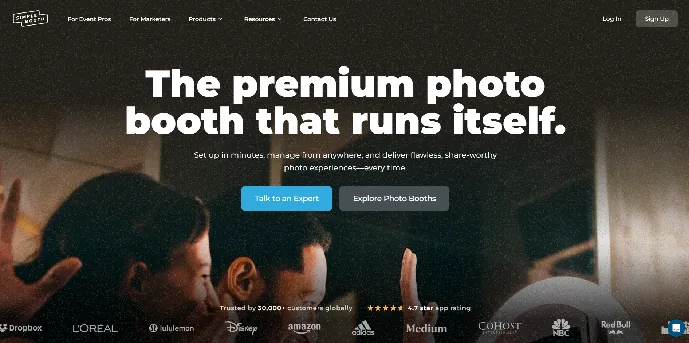
For organizers who value Whova’s registration, networking, and management capabilities but need branded photo experiences, first-party data capture with 87%+ opt-in rates, and organic social sharing from attendee-generated content, Simple Booth fills the gap with its hardware-software photo booth system, AI-powered photo effects, and a marketing analytics dashboard.
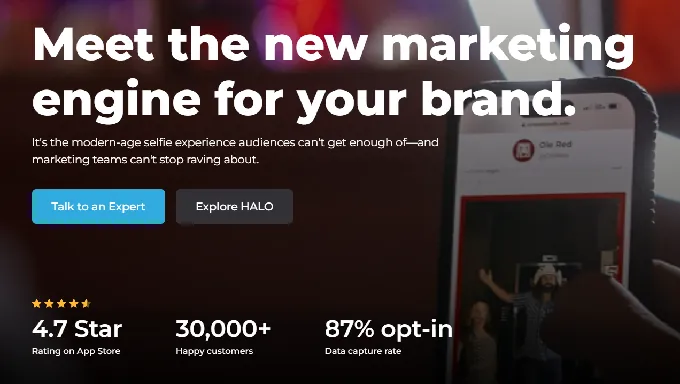
In development since 2012, Simple Booth serves 30,000+ customers with 40 million+ moments captured and holds a 4.7-star App Store rating from 2,300+ reviews.
The platform pairs its HALO ring-light hardware (machined aluminum with 112 LEDs producing up to 2,100 lumens) with a cloud-connected iPad app and a browser-based Virtual Booth. The combination delivers photo, GIF, video, and AI-transformed experiences that guests choose to interact with, generating branded content while providing their contact information as a natural step in receiving their photos.
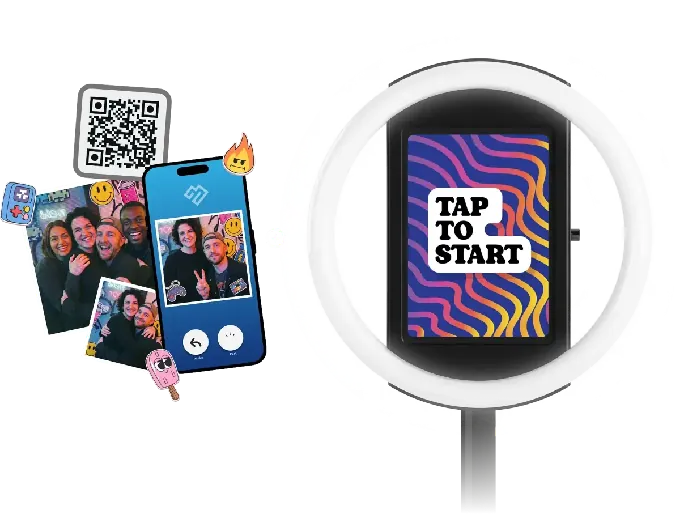
Simple Booth works well for conferences needing sponsor activation at expo booths, corporate events wanting branded social content from attendees, and any organizer who wants to turn a fun moment into a measurable marketing asset.
Treetop Golf built 150,000 unique email addresses across locations using Simple Booth’s lead capture during photo experiences. (Simple Booth)
Simple Booth Lite Plan: $14.99/week ($290/year)
| Feature | Details |
|---|---|
| Price | $14.99/week, ~$72/month, or $290/year |
| Licenses | 1 device (add-ons at $14.99/week each) |
| Capture Modes | Still photos, photo strips, GIFs |
| Photo Delivery | QR code, email, SMS, AirDrop, WhatsApp |
| Galleries | Online galleries with dashboard |
| Design Tools | Custom digital and print layouts |
The Lite plan provides the core photo booth experience with the Layout Designer, a library of 60+ themes and 100+ digital props, and multi-channel photo delivery. Guests share photos via QR code, text, email, AirDrop, or WhatsApp.
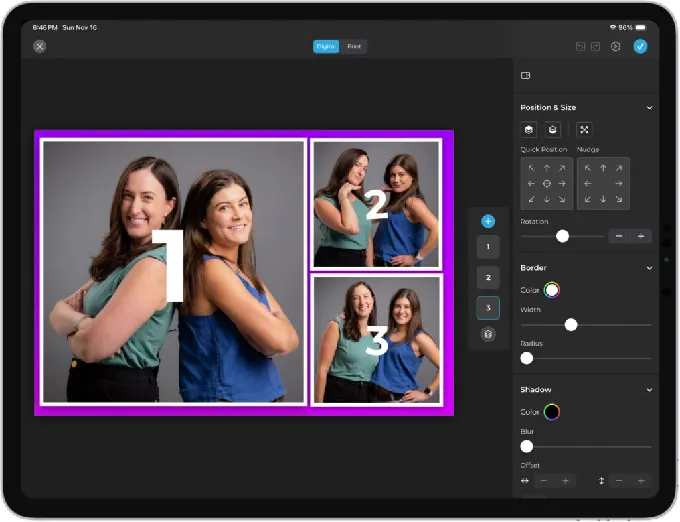
Each photo flows into an online gallery that doubles as a Live Feed for display on TVs or projectors. The plan includes 7-day support but shows ads in the app and excludes custom branding, analytics, video, and DSLR support.
| Lite Plan | |
|---|---|
| Pros | Cons |
| Low weekly commitment for testing | Ads display in the app |
| Full photo delivery options | No custom branding |
| Online galleries included | No analytics or lead capture |
| Layout Designer access | No DSLR or video support |
👉 The Bottom Line: Lite works for personal events and operators testing whether photo booths fit their program, but the ads and missing branding make it unsuitable for corporate or sponsored activations.
Simple Booth Core Plan: $49/month ($490/year)
| Feature | Details |
|---|---|
| Price | $49/month or $490/year |
| Licenses | 1 device (add-ons at $24.99/week each) |
| Additional Modes | Full-length video (5-120 seconds) |
| Camera Support | iPad camera + Canon DSLR/mirrorless |
| Background Tools | Replacement and blur (no green screen) |
| AI Features | AI Effects (public library), AI-generated layout images |
Core removes ads and adds the features that make Simple Booth a professional event tool. Canon DSLR and mirrorless camera integration delivers high-quality images.
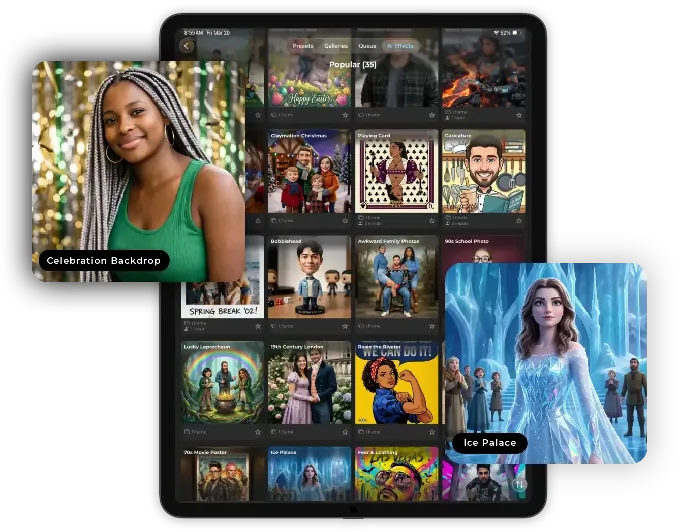
Background replacement works without a green screen, and AI Effects using Nano Banana models transform guest photos with text prompts.
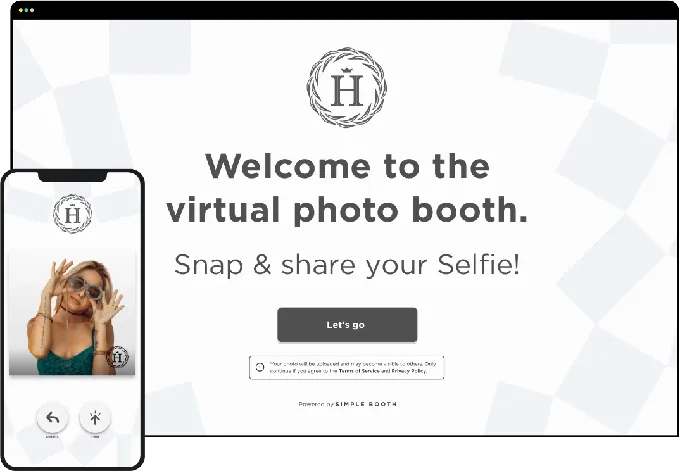
The plan includes 50 bonus AI credits and access to Virtual Booth for browser-based experiences that need no hardware.
| Core Plan | |
|---|---|
| Pros | Cons |
| Ads removed for clean experience | No custom branding yet |
| DSLR camera support | No analytics or lead capture |
| AI effects and background tools | AI credits consumed per generation |
| Virtual Booth included | No custom photo delivery messages |
👉 The Bottom Line: Core is the entry point for professional event use, particularly for operators who need camera quality and AI effects but don’t yet need data capture or branded overlays.
Simple Booth Plus Plan: $99/month ($990/year)
| Feature | Details |
|---|---|
| Price | $99/month or $990/year |
| Licenses | 1 device (add-ons at $49.99/week each) |
| Branding | Custom overlays, start screens, delivery messages |
| Analytics | Full analytics and reporting dashboard |
| Guest Interaction | Editable text layers, custom props and stickers |
| AI Features | Custom AI effects with own prompts |
Plus unlocks the branding and analytics that event marketers need. Custom overlays, branded start screens, and personalized photo delivery messages ensure every touchpoint carries the event’s visual identity.
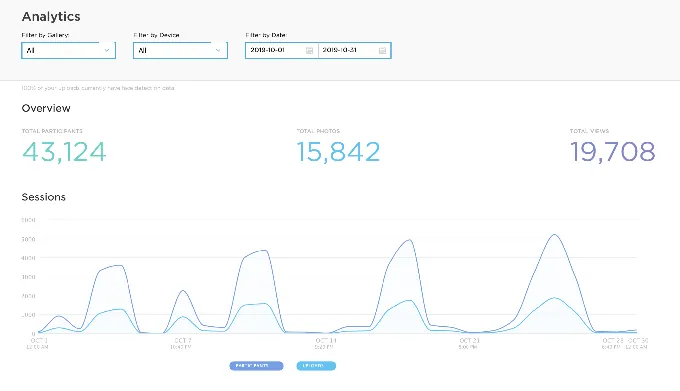
The analytics dashboard tracks total participants, gallery views, and social sharing activity.
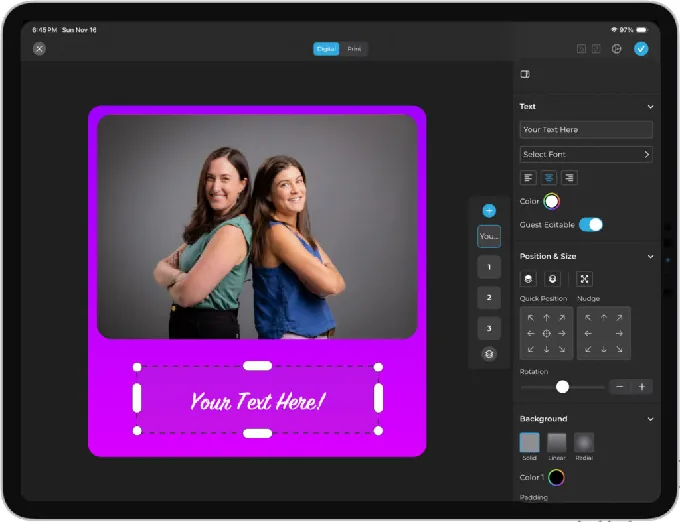
Guest-editable text layers let attendees type names or captions onto their photos before sharing. Custom AI effects let operators write their own transformation prompts instead of selecting from the public library.
| Plus Plan | |
|---|---|
| Pros | Cons |
| Full custom branding | No lead capture fields |
| Analytics and reporting | No API or CRM integration |
| Guest-editable personalization | No moderation tools |
| Custom AI prompt creation | No phone support |
👉 The Bottom Line: Plus suits branded event activations where visual consistency and engagement metrics matter, but teams needing lead capture must step up to Pro.
Simple Booth Pro Plan: $149/month ($1,490/year)
| Feature | Details |
|---|---|
| Price | $149/month or $1,490/year |
| Licenses | 1 device (add-ons at $111/month each) |
| Lead Capture | Up to 6 fields (email, name, phone, postal code, DOB) |
| Integration | API access for CRM delivery |
| Support | Phone support included |
| Enterprise Features | Moderation, age gate, data compliance tools |
Pro is where Simple Booth becomes a marketing tool, not just a photo experience. Lead capture forms with up to 6 fields collect contact information as a natural step in the photo delivery flow, achieving the 87%+ opt-in rate that makes photo booths effective data capture tools.
API integration routes lead data to CRMs. Brand moderation lets operators approve photos before delivery or gallery display. AI Guest Input lets attendees answer questions that personalize their AI transformation, with each response injected into the prompt as a template variable.
| Pro Plan | |
|---|---|
| Pros | Cons |
| Lead capture with high opt-in rates | $149/month is a significant step up |
| API for CRM data routing | Add-on licenses at $111/month each |
| Phone support for live events | No custom legal terms (Select only) |
| Brand moderation and age gate | No demographic analytics |
👉 The Bottom Line: Pro is the natural choice for event marketers pairing Simple Booth with Whova, combining Whova’s registration data with Simple Booth’s on-site lead capture for a complete attendee data picture.
Arizona Opera grew its email list by 1,000 addresses in just a few events using Simple Booth’s lead capture during photo experiences. (Simple Booth)
Simple Booth Select Plan: $249/month ($2,490/year)
| Feature | Details |
|---|---|
| Price | $249/month or $2,490/year |
| Licenses | 1 device (add-ons at $186/month each) |
| Custom Fields | Up to 10 (including checkboxes and legal terms) |
| Compliance | In-app custom legal terms, PII deletion |
| Analytics | Demographic insights via face detection |
| Enterprise | Security questionnaires and IT assessments |
Select adds enterprise compliance features for regulated industries and Fortune 500 activations. Up to 10 custom data capture fields (including checkboxes and required legal terms) handle complex consent workflows.
Demographic analytics via face detection estimate age and gender breakdown of booth participants, providing audience composition data that complements Whova’s post-event reporting. Security questionnaires and IT assessments support enterprise procurement.
| Select Plan | |
|---|---|
| Pros | Cons |
| 10 custom data fields | $249/month plus add-on licenses |
| In-app legal terms for compliance | Highest recurring cost tier |
| Demographic analytics | Face detection features require Select |
| Enterprise IT assessment support | Overkill for most mid-market events |
👉 The Bottom Line: Select targets enterprise activations where custom legal terms, demographic reporting, and IT compliance reviews are required, complementing Whova Enterprise’s SOC 2 compliance with Simple Booth’s own data handling controls.
Simple Booth Additional Costs
Add-On Licenses: Each additional iPad booth requires a per-device license at the same tier rate. A team running 3 booths on Plus pays $49.99/week x 3 = $149.97/week in software alone.
AI Credits: $0.10 per credit. Models consume 1x (Nano Banana 1), 2x (Nano Banana 2), or 3x (Nano Banana Pro) credits per generation. Testing prompts outside of booth mode costs nothing. Purchased credits do not expire.
HALO Hardware Kits: Sold separately through the Simple Booth store. The Event Kit (selfie stand + travel case) and Install Kit (wall mount) are priced via configurator, with 0% financing available.
Simple Care Protection: $299 at time of hardware purchase, extending warranty to 2 years with 2 accidental damage repairs included.
Whova Feature Value (Extended by Simple Booth)
Event Data Capture: Registration vs. Experience
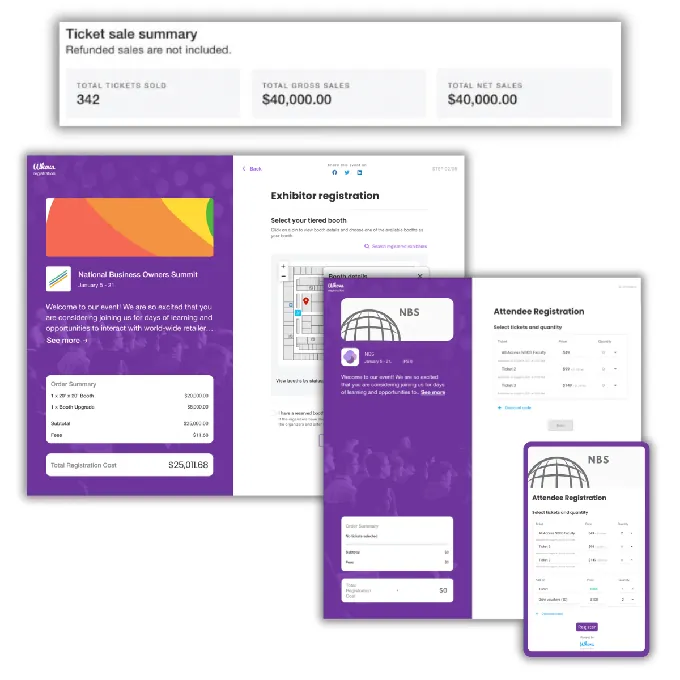
Whova’s Approach: Whova captures attendee data at registration through customized forms with custom fields, session sign-ups, and attendee segmentation. This data populates the event app, name badges, and analytics dashboard.
Source: Whova
The system also includes abandoned registration retargeting to recover incomplete sign-ups. But data collection ends when registration closes. Walk-up guests, expo visitors, and event-adjacent audiences go uncaptured.
Simple Booth’s Addition: Simple Booth captures data during the event, at the moment of highest engagement. When a guest takes a photo and wants to receive it, the lead capture form collects email, name, phone, and other fields as a natural exchange, achieving 87-90% opt-in rates.
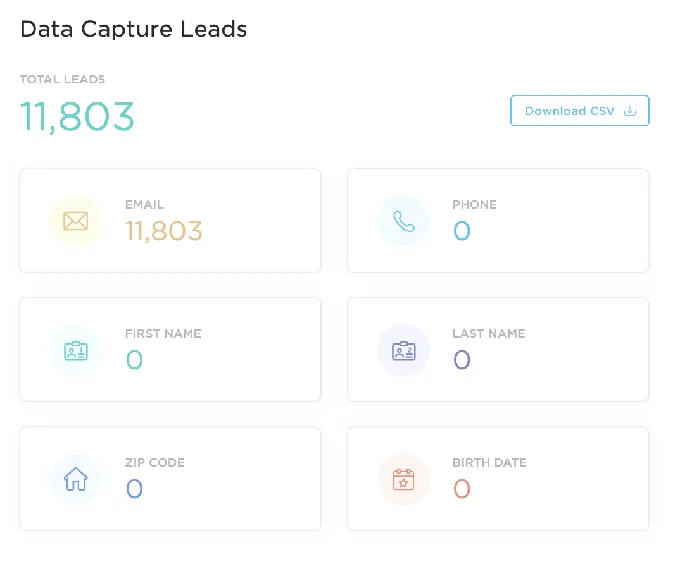
This reaches contacts Whova’s registration never touches: VIP party guests, expo walk-ups, and attendees who registered through a third party.
🪙 Value Verdict: Together they build a complete data pipeline. Whova captures pre-event registration data; Simple Booth captures on-site engagement data. The combined dataset gives organizers and sponsors a fuller picture of who attended and who engaged.
Attendee Engagement: Digital vs. Experiential
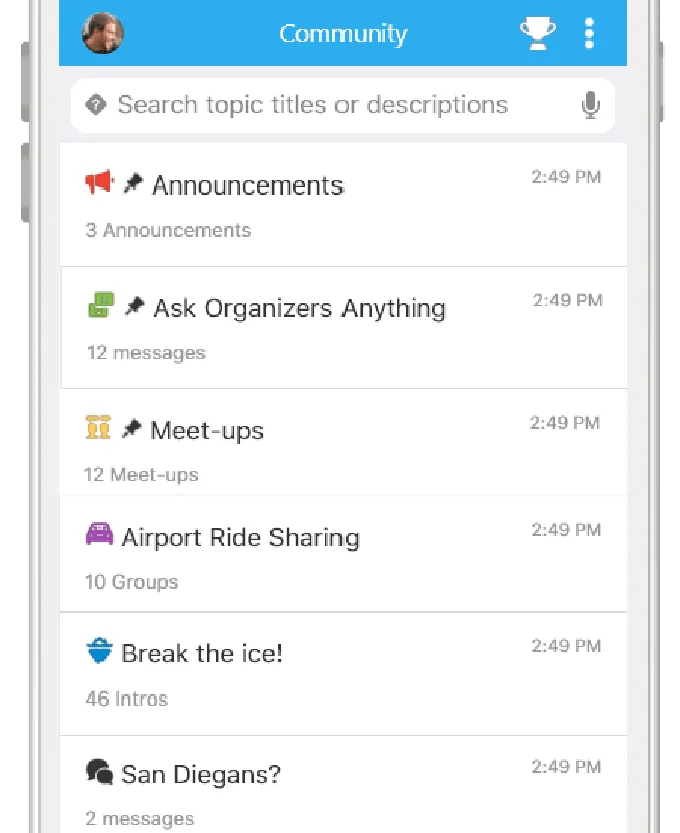
Whova’s Approach: Whova drives engagement through digital channels: the Community Board for discussions and meetups, live polls, gamification leaderboards, trivia contests, and a Passport Contest that incentivizes visiting exhibitor booths digitally.
Source: Whova
These tools generate real numbers. But all interaction happens on-screen, within the app.
Simple Booth’s Addition: Simple Booth adds a physical engagement point. A HALO booth with its 112-LED ring light creates a visual destination that draws foot traffic. Guests interact in person (posing, choosing effects, personalizing photos), then share branded content to their social channels.

The Live Feed displays gallery photos on TVs or projectors, creating energy that pulls more attendees toward the booth.
🪙 Value Verdict: Whova keeps attendees engaged digitally throughout the event. Simple Booth creates physical moments of engagement at specific locations. Together, attendees stay connected through their phones via Whova and in person through Simple Booth.
Sponsor and Exhibitor ROI: Impressions vs. Interactions
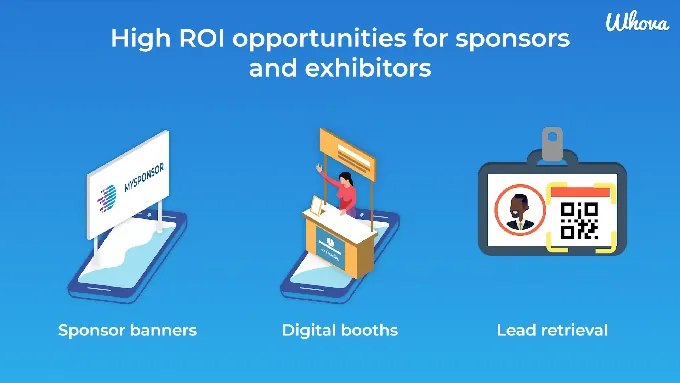
Whova’s Approach: Whova gives exhibitors digital booth profiles, sponsor banner ads across 20+ placements, QR-code lead retrieval, outreach campaigns, and impression analytics.
Source: Whova
One event recorded 62,971 vendor impressions and 17,593 leads captured. Those are solid numbers for digital engagement. But impressions are passive. A banner viewed is not the same as a person who chose to interact with a brand.
Simple Booth’s Addition: A branded Simple Booth at a sponsor’s expo space turns passive impressions into active interactions. Every photo carries the sponsor’s branding. Every social share extends that branding to the attendee’s personal network. The lead capture form collects contact data that flows to the sponsor’s CRM via API.
Deep Eddy Vodka generated 14,000 social posts through branded photo activations.

G7 Entertainment Marketing captured 136,000+ fan interactions across its events.

🪙 Value Verdict: Whova provides sponsor visibility and digital impression data. Simple Booth provides the activation that converts booth visitors into leads and social advocates. Sponsors get both reach (Whova) and depth (Simple Booth).
G7 Entertainment Marketing captured 136,000+ fan interactions across events using Simple Booth’s branded photo experiences. (Simple Booth)
Content Generation: Organizer-Driven vs. Attendee-Generated
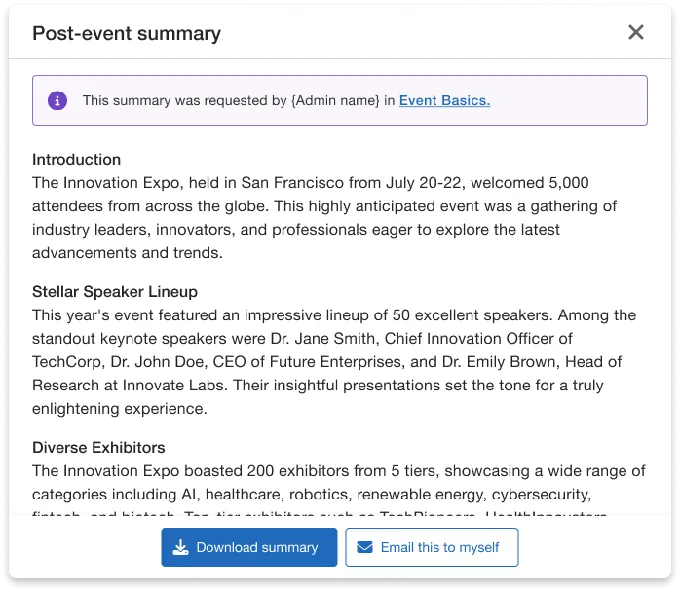
Whova’s Approach: Whova’s content tools serve the organizer: push announcements, agenda updates, speaker slides, and a Social Wall that aggregates event photos and sponsor logos.
Source: Whova
The AI-Generated Event Summary auto-produces a post-event recap. But the content flows one direction, from organizer to attendee.
Simple Booth’s Addition: Simple Booth reverses the content direction. Attendees create the content (branded photos, AI-transformed images, GIFs, videos) and share it to their own social channels with the event’s hashtag.
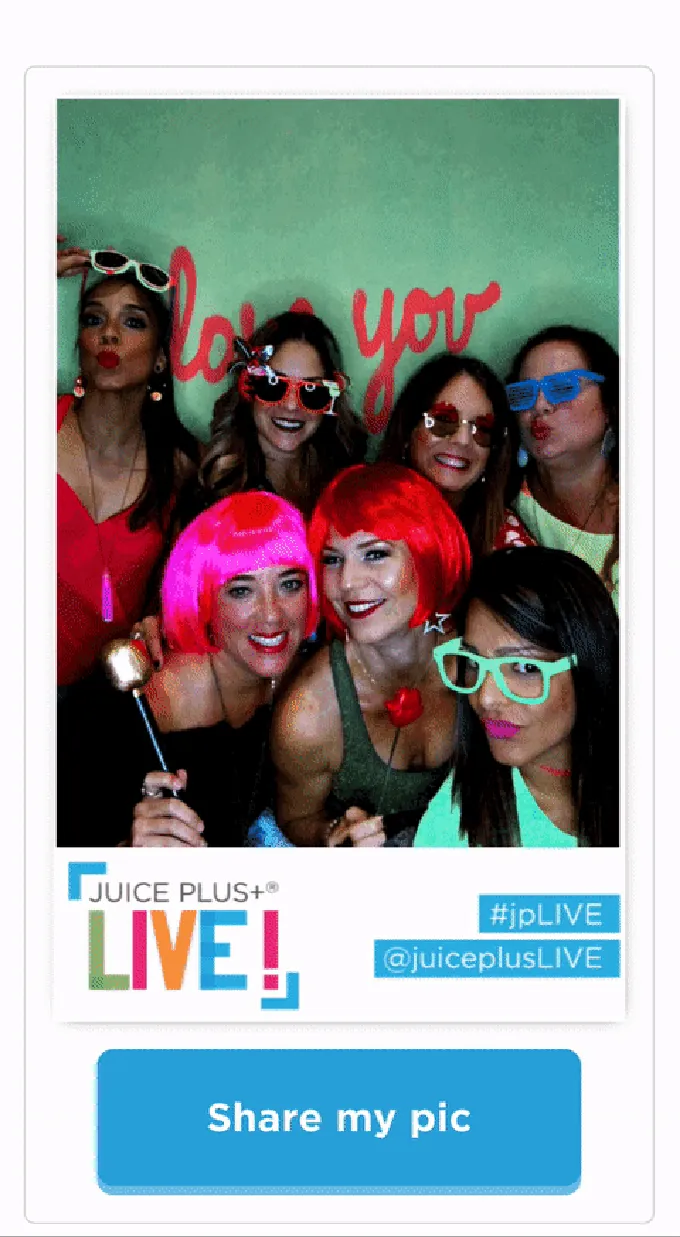
The platform pre-populates event hashtags on X/Twitter and Facebook shares and converts layouts into Instagram-compatible formats. This creates a stream of user-generated content that carries event branding into networks the organizer could never reach through its own channels.
🪙 Value Verdict: Whova handles official event communication. Simple Booth generates organic social reach through attendee-created content. The combination gives events both controlled messaging and authentic word-of-mouth.
Final Verdict: Whova + Simple Booth
The choice isn’t between Whova and Simple Booth. They solve different problems at the same event:
Whova is an event management platform that handles the operational backbone of conferences, trade shows, and hybrid events. With custom pricing scaled to event size and a platform spanning registration, networking, exhibitor management, and analytics, it lets organizers run complex, multi-track events from a single dashboard. Whova’s SOC 2 Type 2 compliance and 4.8-star reviews across 4,000+ verified reviews make it a trusted choice for organizations that need enterprise event infrastructure. It works best for associations running annual conferences, corporate event teams managing hybrid formats, and any organization that wants its event tools in one system.
Simple Booth adds the experiential layer that logistics platforms cannot provide, turning attendees into willing data sources and organic content creators. With pricing from $14.99/week for basic photo experiences to $249/month for enterprise activations, it gives event teams a physical activation that captures first-party data at 87%+ opt-in rates, generates branded social content, and delivers measurable ROI for sponsors. It fits conferences needing sponsor activation tools, brands wanting user-generated content from events, and any organizer who knows the most valuable event data comes from moments of real engagement.
Get started with Simple Booth here.
The combination works: Whova asks “How do we manage every aspect of this event?” Simple Booth asks “How do we turn this event into a data capture and content creation opportunity?” Together, they deliver both operational control and experiential impact.
Whova Pricing FAQ
How much does Whova cost?
Whova does not publish pricing. The platform uses a custom quote model where pricing depends on event size and selected services. Third-party sources estimate costs ranging from approximately $18/user/month for small organizations to $36,000/year average, with large deployments reaching $140,000/year. The only way to get accurate pricing is to submit a quote request through Whova’s website.
Is Whova free for attendees?
Yes. Attendees download and use the Whova mobile app at no charge on iOS, Android, or through a web browser. All costs fall on the event organizer. Attendees who don’t download the app can still receive announcements and messages through alternative delivery channels.
Does Whova charge per ticket sold?
Whova charges no platform fee for free tickets, with no quantity limit. Paid tickets carry a per-ticket fee that Whova describes as lower than competing platforms, though the specific amount is not published. Stripe processing fees apply separately on all paid transactions. Organizers can choose to pass fees to registrants.
What is included in Whova’s standard package?
Whova provides most features in whatever package tier an organizer selects. The platform offers eight modules covering the Event App, Event Management Tools, Registration and Ticketing, Hybrid and Virtual Events, Abstract Management, MicroEvents, Event Website Builder, and Exhibitor and Sponsor Management. Organizers can add features beyond the defaults in their package for additional cost.
Can I use Simple Booth at a Whova-managed event?
Yes. Simple Booth operates independently and does not require integration with Whova. The HALO hardware sets up in under a minute, runs on an iPad, and captures data through its own cloud dashboard. Lead data can be exported as CSV or sent to CRMs via API. Organizers use Whova for event logistics and Simple Booth for on-site photo activations and data capture at the same time.
How does Simple Booth pricing work?
Simple Booth charges per device license on a weekly, monthly, or annual billing cycle. Plans range from Lite at $14.99/week to Select at $249/month. Each plan includes one device license, with additional devices at a discounted add-on rate. AI effects consume credits at $0.10 each. HALO hardware kits are purchased separately with 0% financing available.
Does Whova work offline?
Whova’s FAQ states the app works offline for agenda and basic content access. However, multiple Capterra reviewers note that the app does not work well without wifi for features that need real-time data, like messaging and community boards. Simple Booth’s HALO app includes an offline upload queue that stores photo sessions and delivers them when connectivity returns.
Which platform handles exhibitor lead capture better?
Whova provides digital lead retrieval through QR code scanning in the app, outreach campaigns, and impression analytics. Simple Booth captures leads through branded photo experiences where guests provide contact information to receive their photos. The approaches complement each other: Whova captures leads from digital booth interactions, while Simple Booth captures leads from physical booth interactions with higher opt-in rates.
Keep reading
 Pricing
Snapbar Pricing: Worth It or Consider Simple Booth? August 2026
Custom quotes and hidden costs. Snapbar pricing, dragged into the light.
 Pricing
Snappic Pricing: Worth It or Consider Simple Booth? (September 2026)
Monthly tiers plus layered credit fees. Snappic pricing, fully unpacked.
 Pricing
LumaBooth Pricing: Worth It or Consider Simple Booth? (August 2026)
Cheap sticker price, pricey add-ons. LumaBooth pricing, fully unpacked.