LumaBooth Pricing: Worth It or Consider Simple Booth? (August 2026)

LumaBooth Pricing: Worth It or Consider Simple Booth? August 2026
If you’ve tried navigating LumaBooth’s pricing calculator (choosing between the $17/month annual Windows plan or the $49.99/month option, then adding AI credits, SMS messaging, cloud gallery upgrades, and extra device slots), you know that photo booth software pricing can feel like assembling an invoice one add-on at a time.
LumaBooth (formerly dslrBooth) has served the photo booth industry since 2012, powering tens of thousands of operators in over 150 countries across Windows, iPad, iPhone, and Mac. It covers a wide range of booth types (photo, video, 360, mirror, glam, GIF, and AI portraits) under a single subscription.
But as LumaBooth has grown from a DSLR tethering tool into a multi-platform ecosystem with a browser-based Dashboard, cloud galleries, companion apps, and AI features, the cost of running a booth business on it has become harder to pin down without tallying several separate line items.
We’ve analyzed LumaBooth’s pricing structure, add-on costs, and platform-specific differences. We believe it’s the right choice if:
- You run booths on Windows PCs and want broad DSLR/mirrorless camera compatibility across Canon, Nikon, Sony, and GoPro
- You need a single subscription that covers 360 booth, mirror booth, green screen, glam, and video guestbook modes
- You want to configure events remotely through a browser-based Dashboard before arriving at the venue
- Your event business benefits from cashless pay-per-print monetization (Windows)
- You value an unlimited free trial to test every feature before committing
However, LumaBooth’s pricing is not a good choice if:
- You want a turnkey system with hardware and software designed together by the same vendor
- You need a tiered pricing structure where each plan level adds defined capabilities
- Your marketing strategy depends on high-conversion lead capture and first-party data collection
- You prefer AI effects with built-in identity preservation and zero-cost prompt testing
- You want a single vendor for hardware, software, and support without sourcing components separately
In this case, you should consider Simple Booth: an iPad photo booth platform that pairs proprietary HALO ring-light hardware with subscription software, offering tiered plans from weekly to annual billing, built-in AI effects, a Layout Designer, and lead capture tools that achieve 87%+ opt-in rates at events.
Because of that, we’ve included a detailed pricing comparison with Simple Booth in this review, as the best choice for operators seeking an integrated hardware-software system with structured pricing tiers.
LumaBooth Pricing Summary
| LumaBooth | Simple Booth | |
|---|---|---|
| Free Trial | Unlimited duration, all features, watermark on output until subscription activated; 20 free AI credits | 7-day free trial; 25 free AI credits |
| Entry Level | Windows: $17/month annual ($49.99/month monthly); Apple: $18/month annual ($19.99/month monthly); includes 2 devices | Lite: $14.99/week ($29.99/month, $289.99/year); 1 device; App Store only |
| Mid-Tier | No separate mid-tier; single subscription unlocks all booth features | Core: $24/week ($49/month, $490/year); adds Layout Designer, DSLR support (Canon/Sony, wired + wireless), video, background replacement, AI effects |
| Premium Add-Ons | fotoShare Cloud Plus $19.99/month; Business $39.99/month; AI credits from $14.99/month (150 credits) to $199.99/month (2,000 credits) | Plus: $49/week ($99/month, $990/year); adds custom branding, analytics, guest-editable text, custom AI effects |
| Enterprise | No enterprise tier; volume discounts for 10+ subscriptions via reseller program | Pro: $149/month ($1,490/year); Select: $249/month ($2,490/year); adds lead capture, API, moderation, compliance tools |
| Best For | Operators who own DSLR cameras and want cross-platform flexibility with every booth type in one subscription | Businesses wanting structured plan tiers with integrated hardware, built-in lead capture, and a turnkey setup |
LumaBooth Pricing: In-Depth Overview
LumaBooth uses a per-device subscription model with two separate product lines: one for Windows and one for Apple (iPad/iPhone/Mac).
Unlike most SaaS platforms that gate features behind tiers, LumaBooth takes a different approach: a single subscription unlocks every booth mode and feature. The cost complexity comes not from choosing the right tier, but from adding companion services, AI credits, and additional devices on top of the base subscription. Here is each component.
LumaBooth Free Trial: Unlimited Duration
| Feature | Details |
|---|---|
| Duration | No time limit |
| Features | All features accessible |
| Output | Permanent watermark on all photos, GIFs, and videos |
| AI Credits | 20 free credits on signup |
| Credit Card | Not required |
LumaBooth offers an unlimited free trial with no expiration date. Every feature is available, including 360 booth, mirror booth, AI portraits, and green screen.
The only restriction is a permanent watermark on all output, which cannot be removed without a paid subscription. Operators can test the full platform at actual events (with watermarked output) before spending anything.
| Free Trial | ||
|---|---|---|
| Pros | Cons | |
| - No time limit | - Watermark makes output unusable for paid events | |
| - Full feature access for testing | - Watermark not retroactively removed from trial content | |
| - No credit card required | - Only 20 AI credits for testing AI portraits | |
| - Test with your actual camera gear | - No way to deliver unwatermarked photos to clients | |
👉 The Bottom Line: The unlimited trial is useful for testing camera compatibility, template design, and workflow configuration, but operators cannot use it for client work.
LumaBooth for Windows: $17/month Annual or $49.99/month Monthly
| Billing Cycle | Price | Per Year | Savings vs Monthly |
|---|---|---|---|
| Annual | $17/month | ~$204 | ~67% |
| Monthly | $49.99/month | ~$600 | — |
The Windows subscription is LumaBooth’s flagship product, covering photo booth, 360 booth, mirror booth, glam booth, green screen, AI background removal, video guestbook, and cashless payments. It includes two devices, the fotoShare Cloud basic plan, the Booth CoPilot mobile management app, built-in email delivery, and the LumaShare companion app.
The annual plan at $17/month saves roughly 67% over the $49.99 monthly rate, making the annual commitment the clear choice for any operator running events regularly. Camera support spans Canon, Nikon, Sony DSLR/mirrorless, GoPro 5 to 13, and webcams.
| Windows Subscription | ||
|---|---|---|
| Pros | Cons | |
| - Every booth mode included in one price | - $49.99/month is expensive without annual commitment | |
| - Two devices included | - Cashless payments are Windows-only | |
| - Broad DSLR/mirrorless camera support | - AI credits cost extra | |
| - Booth CoPilot remote management included | - fotoShare Cloud upgrades cost extra | |
👉 The Bottom Line: The annual Windows plan at $17/month is good value for operators with Windows hardware and DSLR cameras. Monthly billing nearly triples the cost, making it practical only for occasional or seasonal use.
LumaBooth for Apple: $18/month Annual or $19.99/month Monthly
| Billing Cycle | Price | Per Year | Savings vs Monthly |
|---|---|---|---|
| Annual | $18/month | ~$216 | ~17% |
| Monthly | $19.99/month | ~$240 | — |
The Apple subscription covers iPad, iPhone, and Mac with the same booth modes as Windows (minus cashless payments). The gap between monthly and annual pricing is small on Apple ($19.99 vs $18), making monthly billing reasonable for operators who want flexibility. The subscription includes two devices and the fotoShare Cloud basic plan.
Notable differences from Windows: cashless payments, Booth CoPilot, and Hot-Folder importing are Windows-only features. Apple operators who need remote booth monitoring or pay-per-print monetization face a feature gap.
| Apple Subscription | ||
|---|---|---|
| Pros | Cons | |
| - Affordable monthly rate at $19.99 | - Missing cashless payments | |
| - Two devices included | - No Booth CoPilot remote management | |
| - iPad portability for roaming photography | - Sony cameras can’t capture boomerang or video | |
| - AI background removal supports video | - No Hot-Folder importing | |
👉 The Bottom Line: The Apple plan is the more accessible entry point for operators who prefer iPad portability, but the feature gaps compared to Windows matter for operators who need monetization or remote management tools.
LumaBooth AI Credits: $14.99/month to $199.99/month
| Plan | Monthly Price | Credits per Month | Cost per Credit |
|---|---|---|---|
| Basic | $14.99 | 150 | $0.10 |
| Pro | $49.99 | 500 | $0.10 |
| Premium | $199.99 | 2,000 | $0.10 |
| Pay-as-you-go packs | Varies | Varies | Varies (credits never expire) |
AI Portraits consume 1 credit per generation, with 170+ preset styles and the ability to write custom prompts with per-guest personalization. The per-credit cost is flat at $0.10 across all monthly plans. Pay-as-you-go packs are also available, and those credits never expire, giving operators with irregular event schedules more flexibility than the monthly plans.
For context, an operator running AI portraits at a 200-guest wedding would use roughly 200 credits ($20 in cost), assuming one generation per guest.
| AI Credits | ||
|---|---|---|
| Pros | Cons | |
| - Pay-as-you-go credits never expire | - No credits included in the base subscription | |
| - 170+ presets plus custom prompt builder | - Monthly plan credits don’t roll over | |
| - Custom AI prompts with per-guest personalization | - Requires stable internet at events | |
| - 20 free credits on signup for testing | - $0.10/credit adds up at high-volume events | |
👉 The Bottom Line: AI credits are add-on costs for operators offering AI portrait experiences. The pay-as-you-go option is the safer bet for operators with variable event volumes.
LumaBooth Add-On Costs: The Full Picture
Beyond the base subscription, LumaBooth’s monthly cost depends on which companion services an operator needs:
Cloud Gallery Upgrades (fotoShare Cloud):
| Tier | Price | Video Archive | Key Additions |
|---|---|---|---|
| Basic (included) | Free | 3 months | Basic gallery, guest sharing |
| Plus | $19.99/month | 6 months | Password protection, custom homepage, embeddable albums |
| Business | $39.99/month | 12 months | Custom subdomain, Google Analytics, per-event analytics |
Companion Apps and Services:
| Add-On | Price | Platform |
|---|---|---|
| LumaShare (sharing/slideshow station) | $7.99/month | Apple |
| HashPrinter (Instagram hashtag printing) | $25/month | — |
| SMS Plan (unlimited US/Canada) | $10/month | — |
Additional Devices:
Each subscription includes two devices. Additional devices require purchasing extra subscriptions or single-event vouchers at $199.99. Resellers purchasing 10+ subscriptions qualify for bulk discounts.
Cost Example: A Typical Professional Setup
An operator running a Windows booth with AI portraits, cloud gallery upgrades, SMS sharing, and a LumaShare station on iPad:
| Item | Annual Rate |
|---|---|
| LumaBooth for Windows (annual) | $17/month |
| AI Credits Basic (150/month) | $14.99/month |
| fotoShare Cloud Plus | $19.99/month |
| SMS Plan | $10/month |
| LumaShare | $7.99/month |
| Total | $69.97/month |
That is four times the base subscription price, and it does not include additional devices. Operators who need only the core booth software will pay $17/month, but those building a full-service operation should budget for the add-ons.
Where LumaBooth Falls Short
LumaBooth covers a wide range of booth types and runs on multiple platforms. But its pricing structure and product design create problems for operators who want a streamlined, all-in-one business tool:
Add-On Pricing Obscures Costs
- The $17/month headline price covers only the booth software
- Cloud gallery upgrades, AI credits, SMS, and companion apps each carry separate monthly charges
- A professional setup easily reaches $70–$100/month once the necessary add-ons are stacked
- Operators must piece together their own cost estimate across multiple pricing pages
Feature Gaps Between Windows and Apple
- Cashless payments, Booth CoPilot, and Hot-Folder importing are exclusive to Windows
- Event settings sync works only between Windows computers, not across platforms
- Apple operators who need pay-per-print or remote booth monitoring face a feature gap
- Operators running mixed Windows and Apple fleets cannot achieve feature parity
No Built-In Lead Capture or Marketing Tools
- LumaBooth’s survey feature collects basic data (name, email) but was not designed for marketing lead capture
- No CRM integration, no automated email list sync, no opt-in rate analytics
- Operators focused on brand activations or data collection need external tools to build a marketing workflow
- No demographic analytics or social sharing tracking built into the platform
No Structured Tier Progression
- Every subscriber gets every feature, which sounds generous but means there is no upgrade path as a business grows
- The pricing complexity lives in add-ons rather than tiers, making it harder to compare plans or budget for growth
- No enterprise tier with dedicated support, compliance tools, or SLA guarantees
These limitations have led many operators (especially those focused on brand activations and turnkey event businesses) to explore platforms with structured pricing and integrated marketing capabilities.
Best LumaBooth Alternative - Simple Booth
Simple Booth takes the opposite approach to pricing: structured tiers where each level adds defined capabilities, paired with proprietary hardware designed to work with the software out of the box.
For operators who find LumaBooth’s add-on pricing confusing, the Windows-Apple feature gaps frustrating, and the absence of built-in lead capture limiting, Simple Booth offers a clear alternative with tiered plans from Lite to Select, HALO ring-light hardware designed for the platform, and marketing tools that turn every photo booth session into a data capture opportunity.
Founded in 2013 and trusted by 30,000+ customers globally, Simple Booth has built its reputation on the premise that a photo booth should run itself. The HALO hardware is machined from a single billet of aluminum with 112 LEDs producing 2,100 lumens, and it sets up in under one minute with no tools.
The software handles capture, branding, AI effects, sharing, and analytics from one iPad app managed through a web dashboard. A visual preset editor displays the entire booth flow upfront rather than burying settings in nested menus.
Image previews render up to 12x faster than previous generations, and all features (filters, effects, background blur, DSLR integration) work together across photo, video, and offline modes without compatibility restrictions.
Simple Booth excels for rental companies scaling a multi-booth business, venues installing permanent photo experiences, and brand marketers who need first-party data from every activation.
Simple Booth Lite Plan: $14.99/week or $29.99/month or $289.99/year
| Feature | Details |
|---|---|
| Price | $14.99/week, $29.99/month, or $289.99/year (App Store only) |
| Devices | 1 license |
| Capture Modes | Still photos, custom layouts, GIFs, motion clips |
| Design Tools | Pre-designed themes and layout templates |
| Sharing | QR code, email, SMS, AirDrop, WhatsApp |
| Extras | Library of 60+ themes and 100+ digital props |
Lite is Simple Booth’s entry point for operators testing the platform or running personal events. At $29.99/month, it costs less than LumaBooth for Windows on monthly billing ($49.99) while including photo delivery, online galleries, and 60+ pre-designed themes.
The limitation: ads appear in the app, and it excludes DSLR camera support, video capture, custom branding, AI effects, and lead capture.
| Lite Plan | ||
|---|---|---|
| Pros | Cons | |
| - Lower monthly cost than LumaBooth monthly | - Ads displayed in the app | |
| - 60+ pre-designed themes and online galleries | - No DSLR/mirrorless camera support | |
| - WhatsApp and AirDrop delivery included | - No video capture | |
| - Weekly billing for occasional use | - No lead capture or analytics | |
👉 The Bottom Line: Lite suits personal events and operators evaluating Simple Booth, but professional use requires Core at minimum.
Simple Booth Core Plan: $24/week or $49/month or $490/year
| Feature | Details |
|---|---|
| Price | $24/week, $49/month, or $490/year |
| Devices | 1 license (add-ons: $36/month or $360/year each) |
| Camera Support | iPad camera + Canon and Sony DSLR/mirrorless (wired USB and wireless WiFi) |
| Design Tools | Full Layout Designer with 60+ themes, custom layouts, dynamic QR codes |
| Video | Full-length video (5 to 120 seconds) |
| Background | AI background replacement, background blur |
| AI Effects | Beta access to public library |
| Extras | Dropbox integration, Virtual Booth access |
Core is where Simple Booth becomes a professional tool. The full Layout Designer unlocks, giving operators complete control over photo placement, text, graphics, backgrounds, and dynamic QR codes.
Canon and Sony DSLR and mirrorless camera integration delivers studio-grade image quality through the iPad workflow, with both wired USB and wireless WiFi connections (wireless being a differentiator most competitors don’t offer). AI background replacement works without a physical green screen.
At $490/year, it is comparable to LumaBooth for Windows annual ($204) plus a fotoShare Cloud Plus upgrade ($240/year), while including video capture and AI effects that LumaBooth charges separately for.
| Core Plan | ||
|---|---|---|
| Pros | Cons | |
| - Canon and Sony DSLR support with wired and wireless connections | - $490/year is higher than LumaBooth’s base annual | |
| - AI background replacement without green screen | - Add-on devices at $360/year each | |
| - Full video capture included | - No custom branding | |
| - Virtual Booth for remote activations | - AI effects still in beta | |
👉 The Bottom Line: Core delivers the features most professional operators need (the full Layout Designer, DSLR quality with Canon and Sony wireless support, video, background replacement, and AI effects) in a single predictable subscription.
Simple Booth Plus Plan: $49/week or $99/month or $990/year
| Feature | Details |
|---|---|
| Price | $49/week, $99/month, or $990/year |
| Devices | 1 license (add-ons: $74/month or $740/year each) |
| Branding | Custom branding throughout the experience |
| Analytics | Performance reporting and analytics |
| AI Effects | Custom prompt creation |
| Guest Tools | Guest-editable text layers, custom digital props |
| Delivery | Custom photo delivery messages |
Plus adds the branding and analytics layer that rental companies and brand activators need. Custom AI effects let operators write their own transformation prompts.
Guest-editable text layers let participants type names or captions directly onto their photo before sharing, a personalization feature that LumaBooth’s survey-to-print approach handles differently.
| Plus Plan | ||
|---|---|---|
| Pros | Cons | |
| - Full custom branding | - $990/year is a significant commitment | |
| - Analytics for measuring event performance | - Add-on devices at $740/year each | |
| - Custom AI prompts for unique experiences | - No lead capture or API access | |
| - Guest-editable text for personalization at scale | - No moderation or compliance tools | |
👉 The Bottom Line: Plus is the right tier for operators whose clients expect branded experiences and who need analytics to demonstrate event ROI.
Simple Booth Pro and Select Plans: $149/month to $249/month
| Feature | Pro ($149/month) | Select ($249/month) |
|---|---|---|
| Annual Price | $1,490/year | $2,490/year |
| Lead Capture | 6 standard fields | Up to 10 custom fields |
| API Access | Open API for CRM integration | Same + compliance tools |
| Moderation | Approve photos before delivery | Same |
| Support | Phone support | Phone + dedicated account manager |
| Compliance | Age gate, PII deletion | Custom legal terms, security questionnaires |
| AI | Guest input AI (personalized per guest) | Same |
| Add-On License | $111/month or $1,110/year | $186/month or $1,860/year |
Pro and Select target brand marketers and enterprise accounts. The lead capture system achieves 87%+ opt-in rates by collecting data as a natural part of receiving a photo.
MailChimp integration syncs contacts automatically. The Open API enables custom CRM delivery. Select adds compliance features (custom legal terms, security questionnaires, demographic analytics via face detection) for regulated industries.
| Pro/Select | ||
|---|---|---|
| Pros | Cons | |
| - Lead capture with documented 87%+ opt-in | - $149–$249/month is a serious investment | |
| - API and MailChimp integration for CRM workflows | - iPad-only; no Windows support | |
| - Moderation prevents off-brand content from publishing | - Add-on device costs are high | |
| - Compliance tools for enterprise and regulated sectors | - No 360 booth or mirror booth modes | |
👉 The Bottom Line: Pro and Select justify their price for operators whose primary value is data capture and brand-safe activations, capabilities LumaBooth does not offer at any price point.
Arizona Opera grew its email list by 1,000 addresses in a few events using the HALO lead capture system. (Simple Booth)
LumaBooth Feature Value Breakdown (vs Simple Booth)
Pricing Transparency and Predictability
LumaBooth’s Approach: LumaBooth advertises a low base price ($17/month annual for Windows) that includes every booth mode. The complexity surfaces when operators need AI credits, cloud gallery upgrades, SMS messaging, and companion apps, each on its own billing cycle.
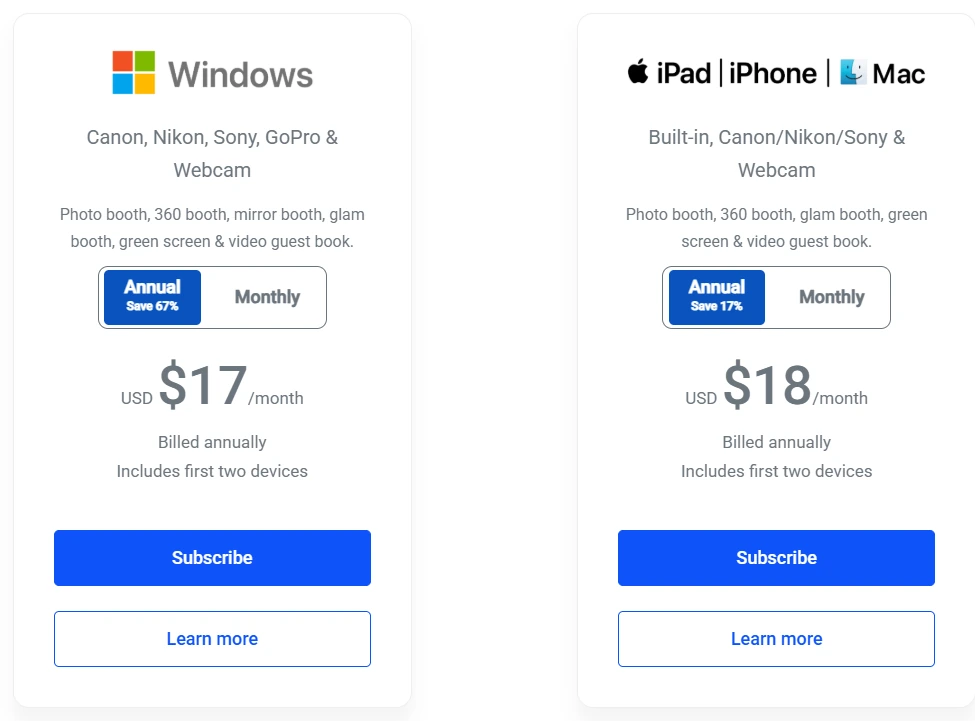
An operator who budgets $17/month based on the headline price may end up spending $70–$100/month once the operational necessities are added. There is no mid-tier or premium tier to upgrade to; spending grows through layered add-ons rather than a clear plan progression.
Simple Booth’s Approach: Simple Booth uses a tiered structure where each plan level adds a defined set of capabilities. Lite handles personal events, Core adds professional tools, Plus adds branding and analytics, Pro adds lead capture and API access, and Select adds enterprise compliance.
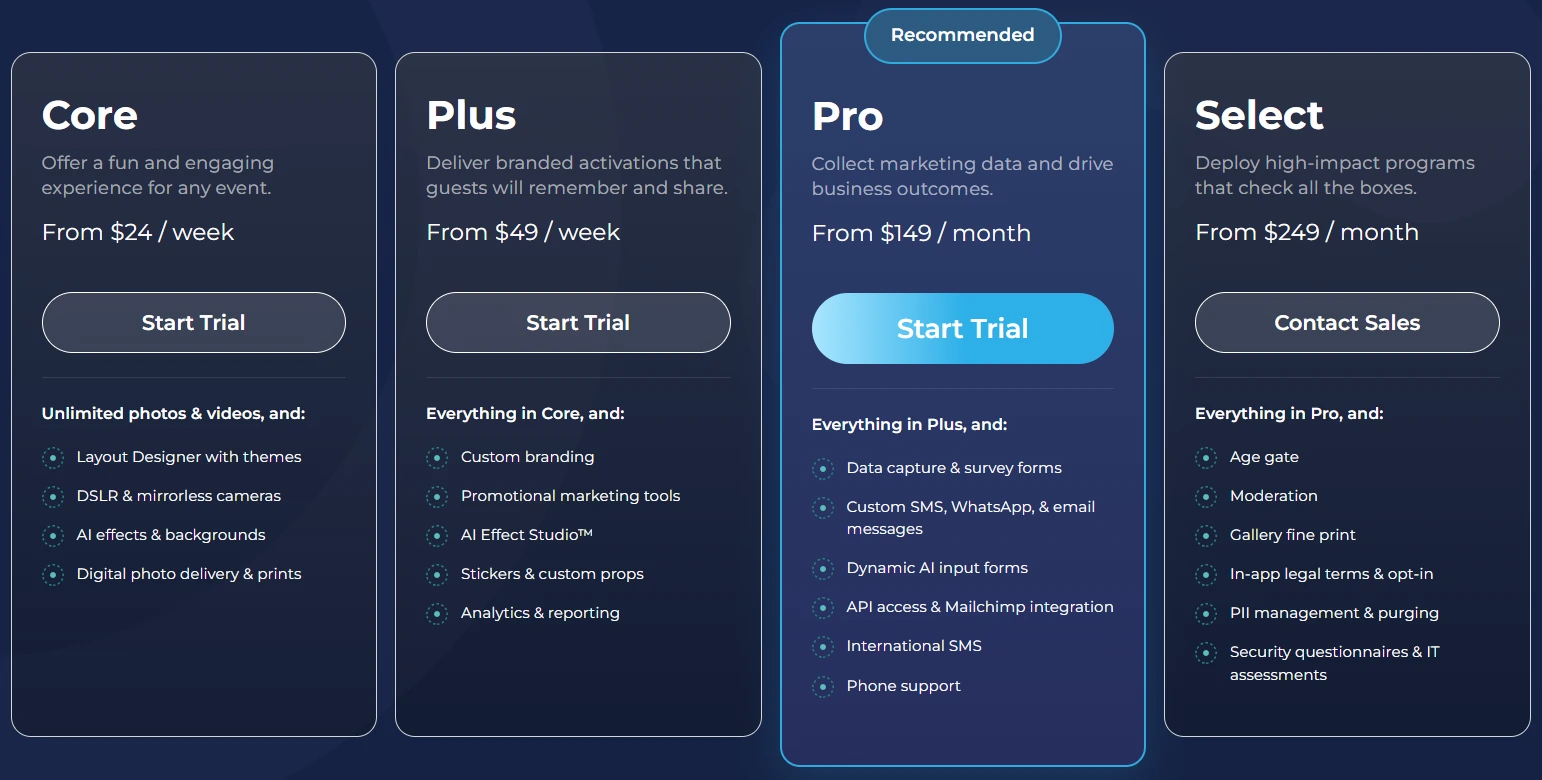
An operator knows exactly what each tier includes before purchasing, and upgrades happen by moving to the next tier rather than stacking separate subscriptions.
🪙 Value Verdict: Simple Booth is better for operators who want to know their total cost upfront and grow into higher tiers predictably. LumaBooth’s approach works for operators who need only the base software and can skip the add-ons.
Hardware and Setup Experience
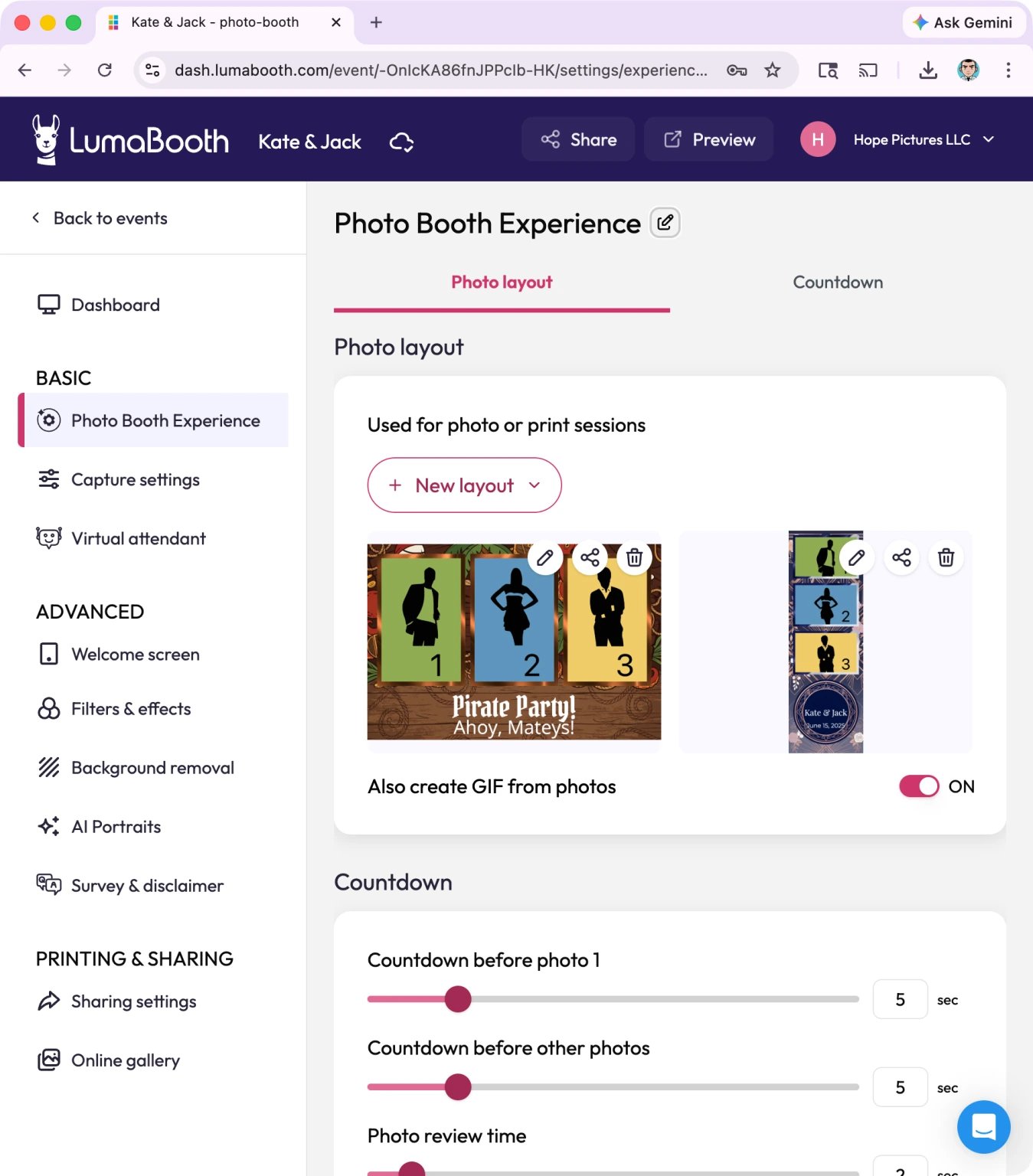
LumaBooth’s Approach: LumaBooth is software-only. Operators source their own hardware: camera, computer or iPad, lighting, enclosure, printer, and stand. This gives flexibility in hardware selection (especially for operators with existing DSLR investments) but puts the burden of assembly, compatibility testing, and troubleshooting on the operator.
The LumaBooth Dashboard and cloud sync reduce on-site configuration time, but the physical setup is entirely the operator’s job.
Source: LumaBooth
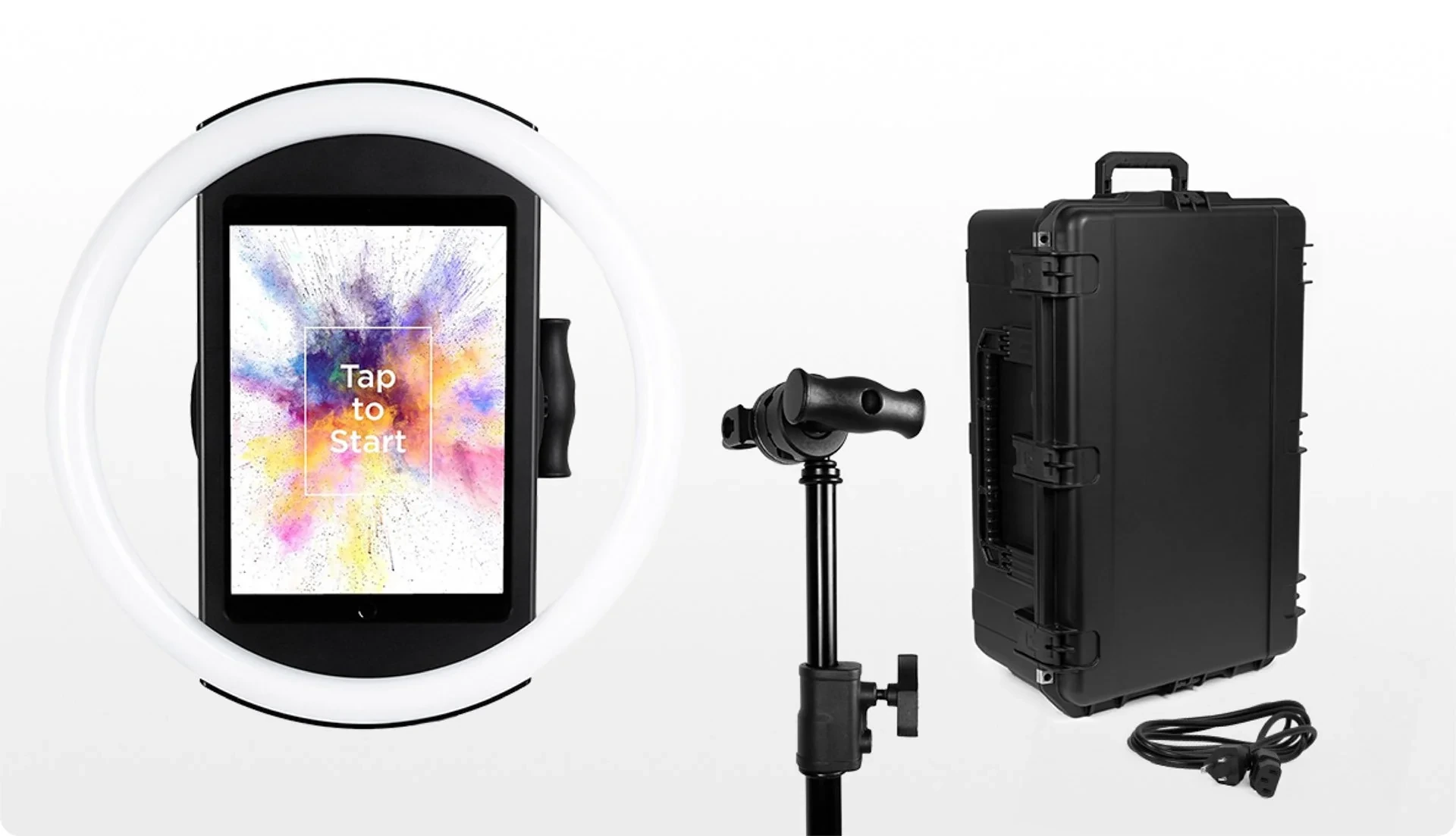
Simple Booth’s Approach: Simple Booth sells an integrated HALO hardware kit alongside the software. The aluminum chassis with 112 LEDs and 2,100 lumens sets up in under one minute with a tool-less iPad faceplate and a concealed charging cable. The tradeoff is cost (hardware kits start around $2,090) and platform lock-in (iPad only), but the result is a tested, consistent setup at every event.
🪙 Value Verdict: LumaBooth is better for operators who already own professional camera gear and want hardware flexibility. Simple Booth is better for operators who want a tested, ready-to-deploy system with wireless DSLR connectivity and are willing to invest in dedicated hardware.
Booth Type Coverage
LumaBooth’s Approach: A single subscription covers photo, 360, mirror, glam, green screen, AI portraits, GIF, boomerang, video guestbook, and slow-motion.
This breadth is one of LumaBooth’s strongest selling points: operators can offer different booth types at different events without paying for separate products. The 360 booth with speed ramps and animated overlays, the mirror booth with Virtual Attendant animations, and the video guestbook are all included.
Simple Booth’s Approach: Simple Booth focuses on photo, GIF, boomerang (Rebound), and video capture modes, with AI effects and background replacement as enhancement layers. It does not offer dedicated 360 booth, mirror booth, or glam booth modes. Operators who need a full 360 spinner workflow or a guided mirror booth experience will not find those capabilities in Simple Booth.
🪙 Value Verdict: LumaBooth is better for operators who need specialized booth types like 360, mirror, and glam. Simple Booth is better for operators whose events center on photo and video with AI enhancements, where the specialized modes are not required.
Lead Capture and Marketing Value
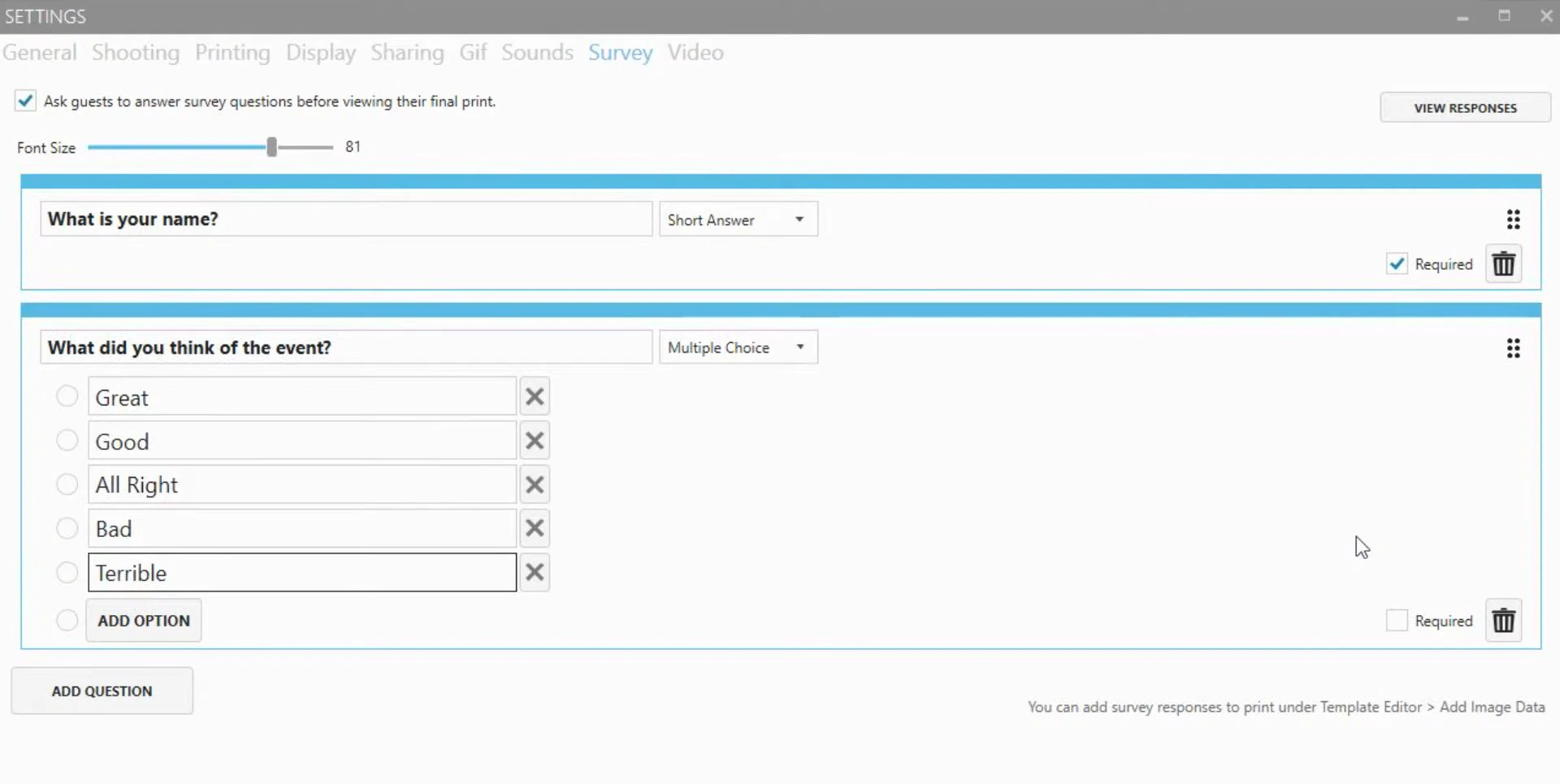
LumaBooth’s Approach: LumaBooth includes a survey feature with short answer, long answer, and multiple-choice questions. Responses export to CSV. Survey answers can print onto the photo strip as personalized text. Email and phone numbers are logged from sharing interactions. There is no CRM integration, no automated list sync, and no analytics on opt-in rates or social sharing performance.
Source: LumaBooth
Simple Booth’s Approach: Simple Booth treats lead capture as a core capability, not a peripheral feature. The data capture system on Pro and Select supports up to 10 custom fields including required legal checkboxes.
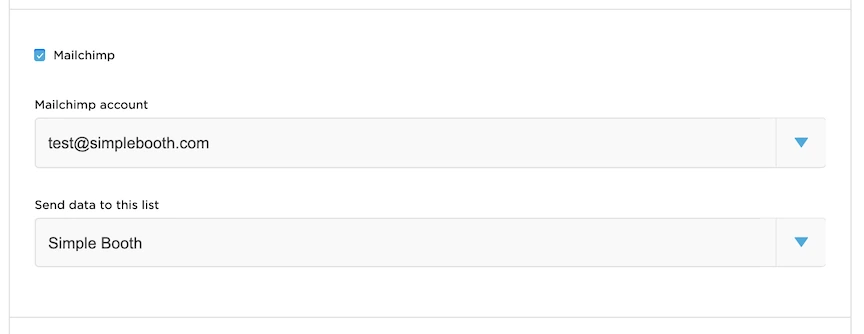
MailChimp integration syncs contacts automatically. The analytics dashboard tracks gallery views, social shares, and referred views. Demographic insights via face detection (age estimation, gender breakdown) are available on Select.
Source: Simple Booth
🪙 Value Verdict: Simple Booth is better for brand activations and marketing-driven deployments where lead capture, CRM integration, and analytics are primary goals. LumaBooth’s survey tool handles basic data collection but is not a marketing engine.
Treetop Golf built 150,000 unique email addresses across its locations using the Simple Booth data capture system. (Simple Booth)
AI Effects
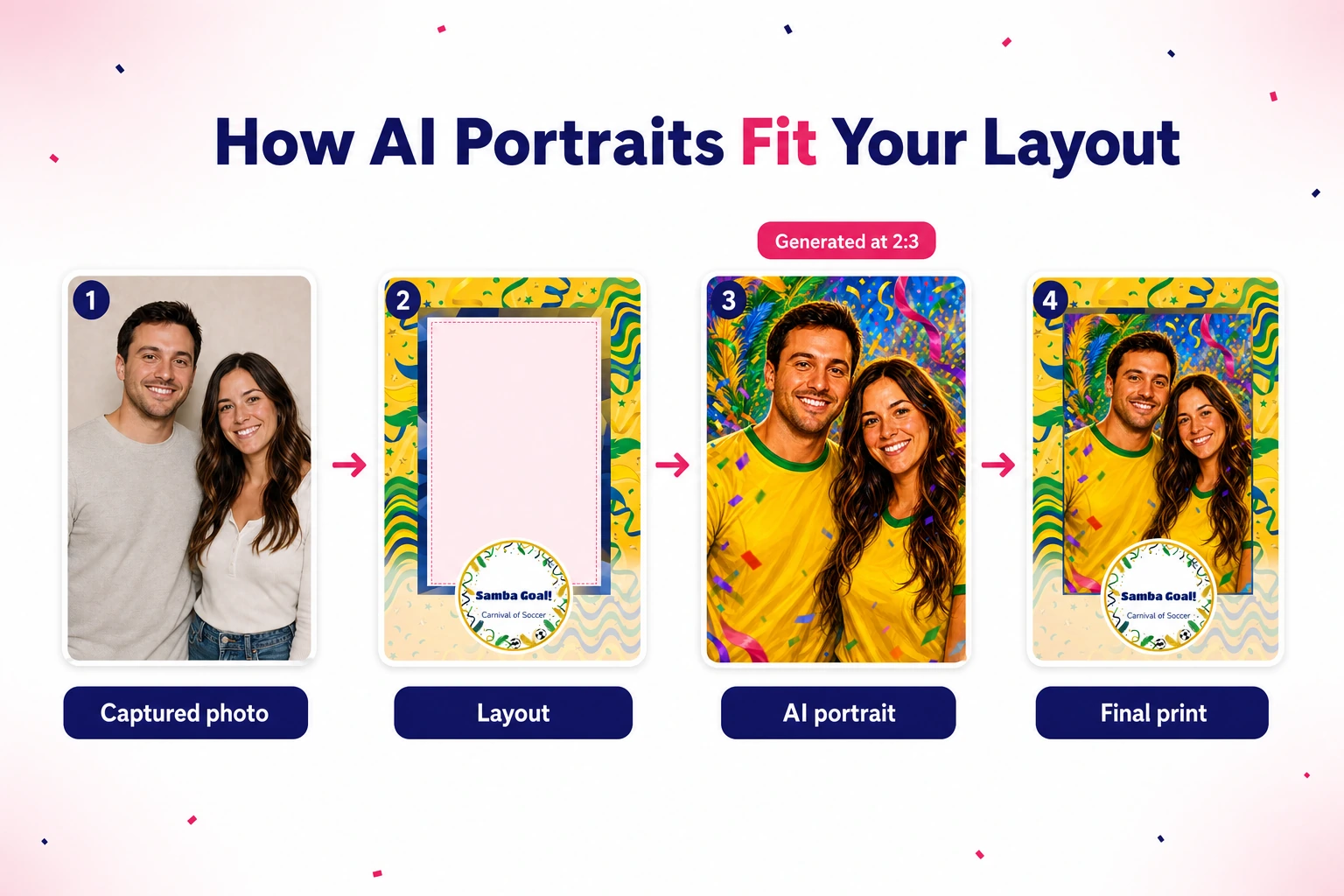
LumaBooth’s Approach: AI Portraits offer 170+ presets with custom prompt creation and per-guest personalization. The system processes portraits in roughly 10 seconds via cloud AI. Credits cost $0.10 each across all purchasing options. Custom AI Prompts let operators write free-text descriptions and upload reference images. The feature works identically on Windows and Apple.
Source: LumaBooth
Simple Booth’s Approach: AI Effects use three Nano Banana models (1x, 2x, and 3x credit consumption) balancing speed, quality, and group handling.
The platform handles identity preservation automatically without operator prompt engineering. Prompt testing outside booth mode consumes zero credits. Credits are also $0.10 each and never expire when purchased. Per-frame multi-prompt storyboarding enables different AI transformations on each frame of a multi-frame layout.
🪙 Value Verdict: LumaBooth has more preset variety (170+ vs a growing library) and explicit reference-image support for custom prompts. Simple Booth offers zero-cost testing, automatic identity preservation, and multi-frame storyboarding. Both charge $0.10 per credit. The better choice depends on whether an operator values preset volume or testing flexibility.
Final Verdict: LumaBooth vs Simple Booth
The choice between LumaBooth and Simple Booth comes down to your hardware preferences, booth type requirements, and whether marketing and data capture are central to your business.
LumaBooth is cross-platform photo booth software for operators who want booth type flexibility on the hardware they already own. With annual pricing at $17/month for Windows or $18/month for Apple (each including two devices), it covers 360, mirror, glam, green screen, video guestbook, AI portraits, and standard photo booths in a single subscription.
This model works best for operators with existing DSLR camera investments, businesses running 360 and mirror booth setups, and professionals who want to configure events on Windows or Apple through one unified Dashboard.
Get started with LumaBooth here.
Simple Booth is an iPad photo booth platform built on the principle that the best booth runs itself. By pairing HALO hardware with tiered subscription plans from $14.99/week to $249/month, it delivers a system where hardware, software, lead capture, AI effects, and analytics are designed together.
This integrated approach makes it the stronger choice for rental companies building a scalable booth business, brand marketers who need 87%+ opt-in lead capture at every activation, and venues installing permanent photo experiences that need no staff supervision.
Get started with Simple Booth here.
The main difference is not just pricing structure but product philosophy. LumaBooth asks “How do we give operators every booth type on any device they own?” Simple Booth asks “How do we make the entire photo booth experience, from hardware to data capture, work as one system?”
LumaBooth Pricing FAQ
Is LumaBooth free to use?
LumaBooth offers an unlimited free trial with no time restriction and no credit card required. Every feature is accessible during the trial, including 360 booth, mirror booth, green screen, and AI portraits (with 20 free credits).
The only limitation is a permanent watermark on all output. The watermark disappears once a paid subscription is activated but is not retroactively removed from content created during the trial.
How much does LumaBooth actually cost per month?
The base subscription starts at $17/month for Windows (annual) or $18/month for Apple (annual). However, most professional operators also need AI credits ($14.99+/month), cloud gallery upgrades ($19.99+/month), and possibly SMS ($10/month) and LumaShare ($7.99/month). A typical professional setup runs $50–$100/month depending on which add-ons are needed.
Does LumaBooth offer volume discounts?
Resellers who purchase a minimum of 10 subscriptions or single-event vouchers qualify for bulk discounts. Specific pricing requires contacting support@lumasoft.co directly. There is no published volume pricing schedule on the website.
What is the difference between LumaBooth for Windows and LumaBooth for Apple?
Both platforms cover photo, 360, glam, green screen, and video guestbook modes. Windows exclusively supports cashless payments, Booth CoPilot remote management, Hot-Folder importing, and event settings sync across devices.
Windows also supports a broader range of cameras including Canon, Nikon, Sony, and GoPro. Apple supports AI background removal on video sessions, which Windows does not.
Can I run LumaBooth on more than two devices?
Each subscription includes two devices. Additional devices require purchasing extra subscriptions through the fotoShare Cloud account settings. Single-event vouchers are available at $199.99 each for operators who need temporary additional capacity. The first voucher activates two devices; subsequent vouchers add one device each.
How do LumaBooth AI credits work?
Each AI portrait generation consumes 1 credit. Credits are available through monthly plans ($14.99/month for 150 credits, $49.99 for 500, $199.99 for 2,000) or pay-as-you-go packs that never expire. New subscribers receive 20 free credits. At events, AI portrait generation takes roughly 10 seconds and requires a stable internet connection.
Does LumaBooth include a sharing station?
LumaShare is a companion app (available for iPad, iPhone, Mac, and Android) that works as a dedicated sharing and slideshow station.
It downloads images from LumaBooth over a local network and supports sharing via email, SMS, AirDrop, QR code, and printing. On Apple, LumaShare costs $7.99/month as a separate subscription. LumaShare also supports offline QR code sharing when no internet is available.
Which is better for brand activations: LumaBooth or Simple Booth?
Simple Booth is the stronger choice for brand activations. Its tiered plans include built-in lead capture with documented 87%+ opt-in rates, MailChimp integration, analytics and reporting, brand moderation (approve photos before delivery), and compliance tools for regulated industries.
LumaBooth focuses on booth operation rather than marketing workflow, offering basic survey data collection and CSV export but no CRM integration or activation analytics.
Keep reading
 Showdowns
Simple Booth vs LumaBooth: Which Photo Booth Software Fits Your Business in 2026?
Turnkey hardware vs budget cross-platform app. Simple Booth or LumaBooth?
 Reviews
LumaBooth Review 2026: Is This Photo Booth Software Right for You?
Loads of booth formats, no hardware or leads. LumaBooth, reviewed straight.
 Showdowns
LumaBooth vs Snappic (vs Simple Booth): Which Photo Booth Software Fits Your Business in 2026?
Budget multi-format app vs enterprise fleet platform. LumaBooth or Snappic?