LumaBooth Review 2026: Is This Photo Booth Software Right for You?

LumaBooth has built one of the more versatile photo booth platforms available. Originally launched in 2012 as dslrBooth, the software rebranded in March 2026 to unify its Windows and Apple product lines under a single name and a browser-based Dashboard that lets operators configure events from any device.
The result is a platform covering photo, video, 360, mirror, glam, and GIF booths across Windows PC, iPad, iPhone, and Mac, all within one subscription.
To create this LumaBooth review, we’ve analyzed it extensively. We believe it’s the ideal choice if:
- You own Canon, Nikon, or Sony cameras and want to use them in your booth setup
- You need cross-platform flexibility to run booths on both Windows PCs and iPads
- You want a single subscription covering multiple booth types (360, mirror, glam, green screen, video guestbook)
- You value an unlimited free trial to evaluate the software before committing
- You prefer configuring events remotely through a browser-based dashboard
However, LumaBooth might not be the best choice if:
- You want hardware designed to work with your software from a single vendor
- You need strong first-party data capture and lead generation tools built into the booth experience
- You prioritize a polished, unattended guest experience that runs without an operator
- You want a browser-based virtual booth product for remote or hybrid events
- Marketing ROI and analytics matter as much to you as photo quality
In this case, you should consider Simple Booth: an iPad-based photo booth platform that pairs proprietary HALO ring-light hardware with cloud-connected software, designed for operators who want a self-running system that doubles as a data capture and marketing tool.
With a 4.7-star App Store rating from 2,400+ ratings and 30,000+ customers globally, Simple Booth turns every photo booth into a marketing channel.
We’ve included a detailed look at Simple Booth at the end of this LumaBooth review as the best alternative for operators seeking an integrated hardware-software system with built-in marketing capabilities. If you’re ready to explore it, you can start a free trial of Simple Booth here.
What is LumaBooth?
LumaBooth is professional photo booth software by Lumasoft LLC, a privately held company based in New Jersey.

The software first appeared in 2012 under the name dslrBooth, reflecting its original focus on DSLR camera tethering for Windows-based photo booths. Over 14 years, the platform expanded to support iPads, iPhones, Macs, and a growing list of camera brands, eventually outgrowing its original name.
In March 2026, Lumasoft unified the product line under the LumaBooth brand with version 8.0 for Windows and 5.0 for Apple, introducing the LumaBooth Dashboard as the central browser-based configuration tool. The company says the Dashboard makes LumaBooth the only photo booth platform that connects Windows and iOS under one roof.
LumaBooth targets photo booth operators at every experience level: from first-time DIY users setting up a booth at a wedding to full-time event companies running multiple rigs across venues. The platform serves tens of thousands of operators in over 150 countries and carries a 4.8-star rating from 1,668 reviews on its Windows product.
LumaBooth Pros & Cons
| Pros | Cons |
|---|---|
| - Cross-platform support (Windows, iPad, iPhone, Mac) | - Cashless payments available on Windows only |
| - Broad camera compatibility (Canon, Nikon, Sony, GoPro) | - Feature gaps between Windows and Apple versions |
| - All booth types included in one subscription | - No Android booth app |
| - Unlimited free trial with no time limit | - Add-on costs accumulate (AI credits, SMS, cloud tiers) |
| - 820+ included templates | - Cloud sync limited to Windows-to-Windows |
| - AI Portraits with custom prompt support | - Sony cameras cannot capture boomerang or video |
| - Browser-based Dashboard for remote event configuration | - No built-in lead capture or marketing analytics |
| - Active development with weekly updates | - Apple app ratings (4.6) trail the Windows version (4.8) |
LumaBooth Review: How it Works & Key Features
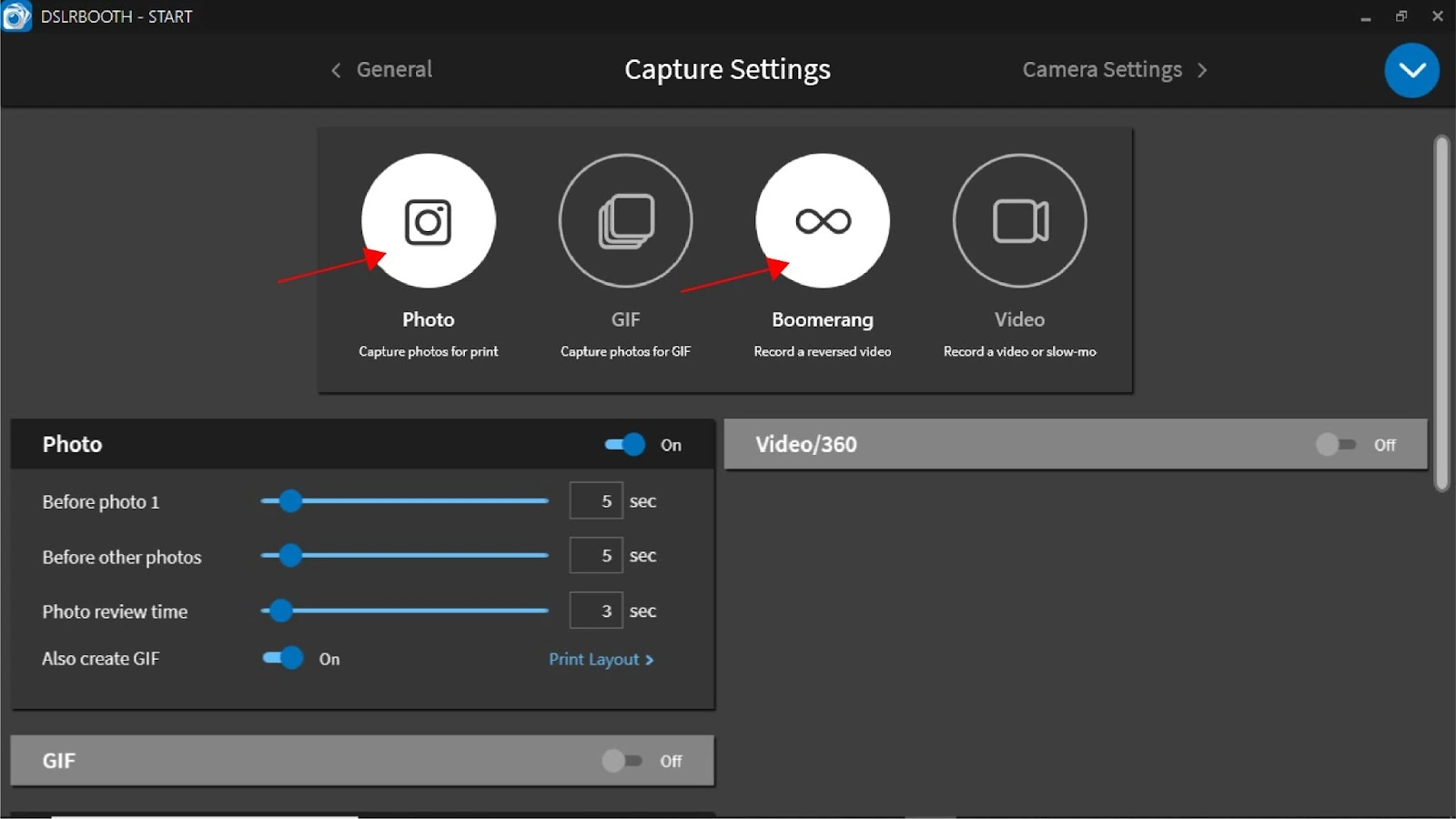
Core Capture Engine: LumaBooth consolidates photo, GIF, boomerang, video, and 360 capture into a single settings panel.
LumaBooth’s capture system handles the full session workflow: triggering the camera, processing the output, compositing it into a branded layout, and delivering the final image or video to the guest.
Instead of requiring separate software for each format, operators manage everything from a single Capture Settings interface.
Source: LumaBooth
Five session types are available: Photo (single or multi-shot), GIF (animated sequences with configurable frame delay), Boomerang (looping forward-backward clips), standard Video (up to 60 seconds per clip with soundtrack and overlay support), and 360/Slow Motion. Multiple types can be active at once, letting guests choose their format at the booth.
Camera compatibility is one of LumaBooth’s clear advantages. On Windows, the software supports Canon, Nikon, and Sony DSLRs and mirrorless cameras, GoPro models 5 through 13, and webcams. On Apple devices, built-in cameras are supplemented by USB-connected Canon, Nikon, and Sony bodies. One limitation: Sony cameras cannot capture boomerang or video on either platform.
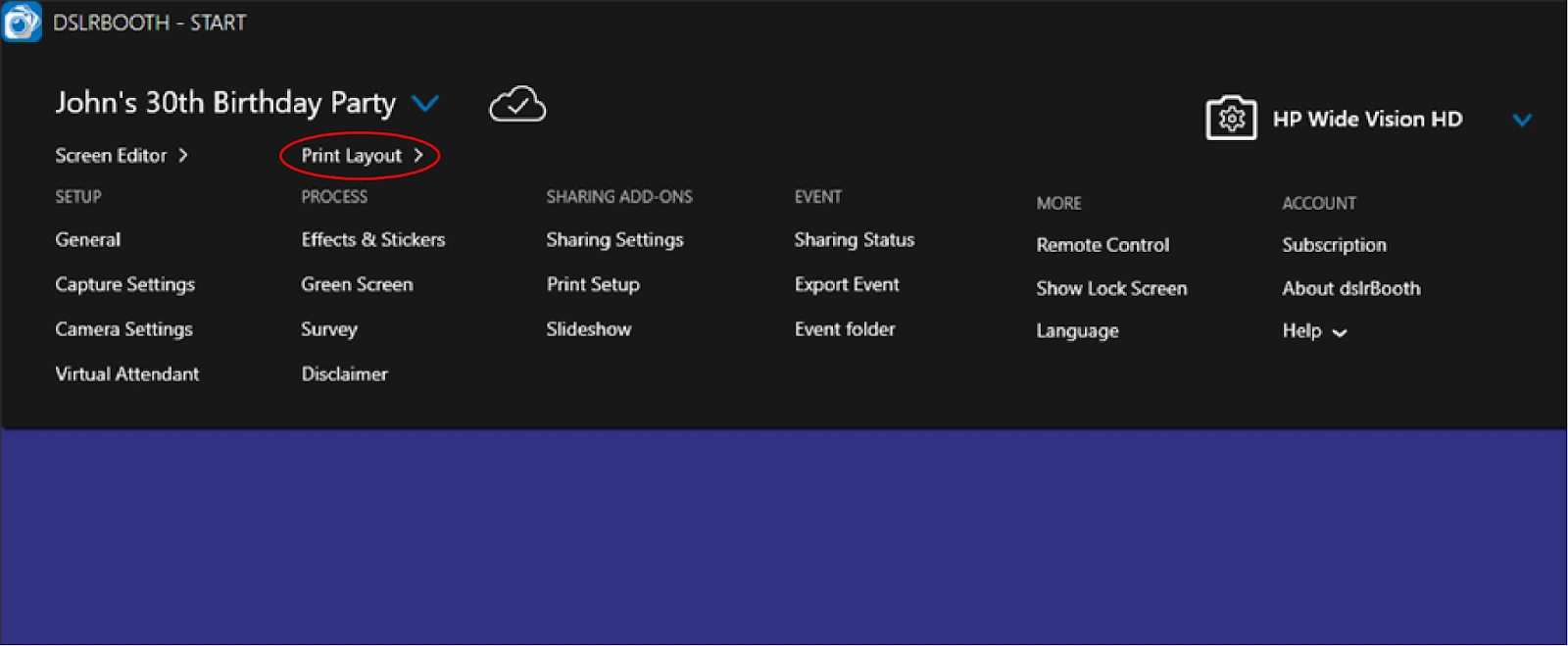
The number of photos captured per session is set by the photo placeholders in the active Print Layout, so the template design and capture count stay linked automatically. Operators can build layouts within the app using backgrounds, text, photo placeholders with adjustable aspect ratios, and drop shadows, or import designs from Canva via PDF-to-Dashboard import with automatic layer recognition.
Built-in filters include black-and-white, beauty/skin-smoothing (the basis of the Glam Booth mode), and custom LUT filters imported as .cube files. LUT support applies consistently across photos, GIFs, boomerangs, and videos.
360 Booth and Mirror Booth: LumaBooth includes specialized booth modes that competing platforms often sell separately.
The 360 Booth captures high frame-rate footage (up to 120 fps on Windows, up to 240 fps on recent iPads) as a motorized arm spins around guests.
The software applies speed ramps, animated overlays, soundtracks, and intro/outro clips to produce a finished, branded video automatically. Operators configure multiple clips within a single recording, each with independent speed settings, and can preview the result before deploying. Motion-activated recording starts capture when the spinner moves, enabling unattended operation.
On Windows, LumaBooth offers real-time overlay color and opacity editing for 360 videos directly in the app, a capability the documentation describes as an industry first. Custom overlays can be created in After Effects and exported as transparent WEBM files.
The Mirror Booth turns a large touch display into a guided interactive experience.
The Virtual Attendant plays video and audio animations at each session stage (start screen, before capture, after capture, processing, end of session), walking guests through the process without a human operator. Guests touch the mirror surface to add signatures, stickers, and emojis to their print.
Source:LumaBooth
The app ships with built-in animations, and operators can purchase additional packs from the LumaBooth store or upload custom MP4 files.
Both modes are included in the standard LumaBooth subscription, alongside Green Screen/AI Background Removal, Video Guestbook, and Glam Booth.
AI Portraits: Cloud-based generative AI transforms guest photos into custom-styled artwork.
AI Portraits is a cloud-based feature that transforms a guest’s booth photo into a stylized portrait in roughly 10 seconds. Over 170 presets are included, organized into categories like Superheroes & Comics, Fantasy & Adventure, Historical Eras, Sports, Art Styles, and Figurines & Toys.
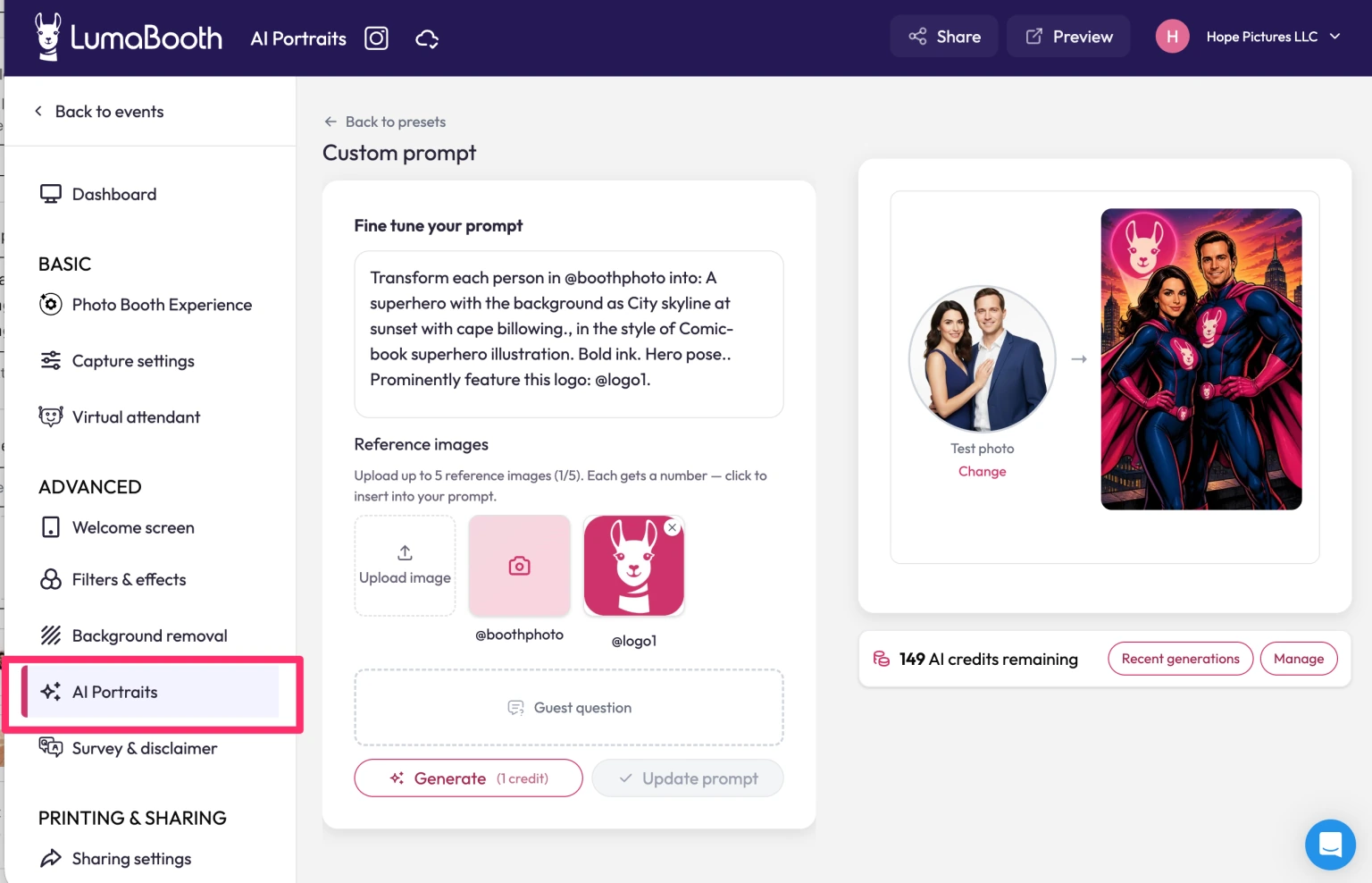
The feature that sets LumaBooth apart here is Custom AI Portraits, launched in May 2026.
Source: LumaBooth
Operators write free-text prompts from scratch, upload reference images to match a real jersey or venue, and attach guest-facing questions so each person’s answers (name, team colors, chosen theme) get rendered into the generated artwork. Six pre-seeded example combinations ship with every install.
AI Portraits require a stable internet connection and consume 1 credit per generation. Credits are available through monthly plans ($14.99/month for 150 credits up to $199.99/month for 2,000 credits) or pay-as-you-go packs that never expire. New subscribers receive 20 free credits. The feature works on both Windows and Apple without special hardware and supports up to 4 people per photo.
Dashboard and Remote Management: LumaBooth’s browser-based Dashboard centralizes event configuration across all devices.
The LumaBooth Dashboard at dash.lumabooth.com is a browser-based control center where operators configure events before arriving at a venue.
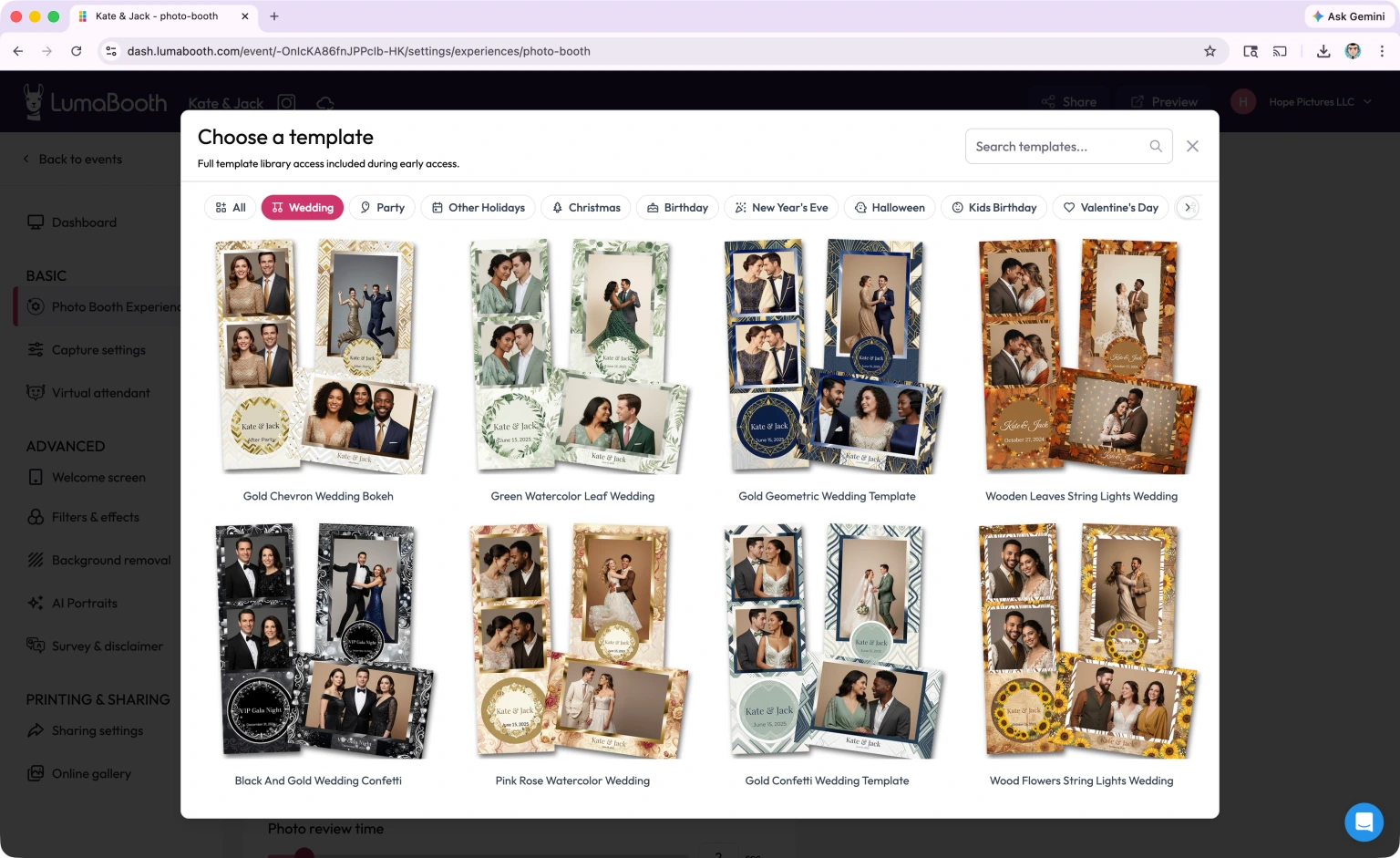
Templates, overlays, sharing settings, and AI presets are all set up in the Dashboard and sync automatically to connected Windows, iPad, iPhone, or Mac devices. If a last-minute change is needed at the event, the operator opens the Dashboard on their phone and pushes updates remotely.
The Dashboard provides access to 820+ professionally designed templates covering weddings, birthdays, corporate events, and holidays. For operators who design custom layouts, the Canva Direct Import feature converts PDFs with automatic layer recognition.
Source: LumaBooth
For Windows operators, Booth CoPilot adds mobile monitoring. This free companion app (available on Android and iOS) lets operators view session counts, share status, and trigger printing or sessions remotely from anywhere with internet access.
Event settings can also be synchronized across multiple Windows machines under the same account. This sync doubles as disaster recovery: if a booth computer fails mid-event, a replacement machine pulls the full event configuration automatically. One limitation: this sync is Windows-to-Windows only. Mac-to-Windows synchronization is not supported.
Sharing and Cloud Hosting: Multiple delivery channels and an included cloud gallery keep photos moving after the session.
LumaBooth offers built-in sharing via email, SMS, WhatsApp, AirDrop, Instagram, and QR code.
The sharing queue is reliable: emails and SMS messages queue and send when internet is available, so connectivity interruptions at the venue don’t lose shares.
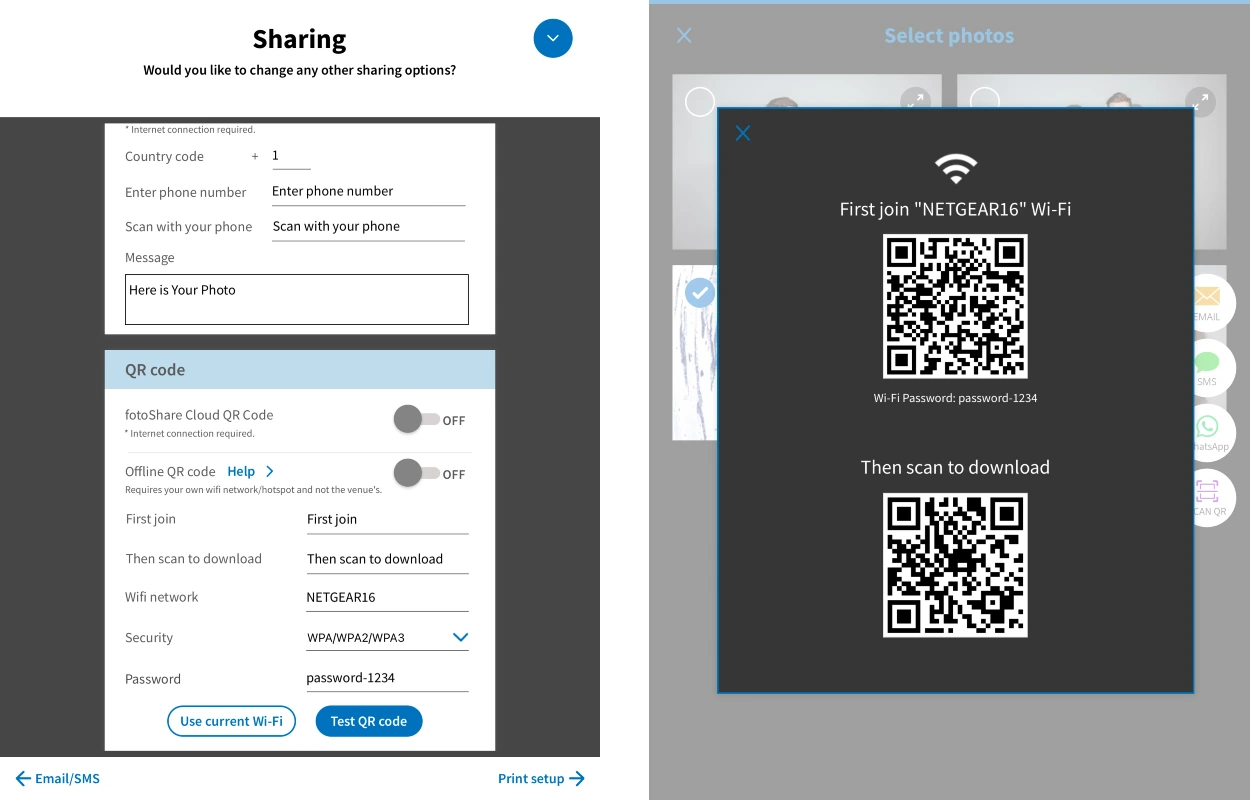
LumaShare, a companion app for iPad, iPhone, Mac, and Android, acts as a dedicated sharing and slideshow station. It downloads images directly from LumaBooth over local Wi-Fi and supports a completely internet-free delivery mode where guests scan a QR code to join the local network and receive their photos without any internet connection.
Source: LumaBooth
Every LumaBooth subscription includes fotoShare Cloud Basic, which automatically uploads event media and gives each event a customizable microsite and gallery. Operators can share a private link with event organizers for full-event downloads.
Upgraded tiers (Plus at $19.99/month, Business at $39.99/month) add password protection, custom subdomains, Google Analytics integration, and longer video archive periods.
Pricing: LumaBooth charges per device with monthly and annual billing options.
LumaBooth uses a subscription-based, per-device model with separate pricing for Windows and Apple:
| Platform | Annual | Monthly |
|---|---|---|
| LumaBooth for Windows | $17/month (billed annually) | $49.99/month |
| LumaBooth for Apple | $18/month (billed annually) | $19.99/month |
Both plans include the first two devices and unlock every feature in the app, with no feature-gated tiers. Additional devices require purchasing additional subscriptions.
The free trial has no time limit and no credit card requirement. The only restriction is a permanent watermark on all output until a subscription is activated.
Beyond the base subscription, operators may face add-on costs:
| Add-on | Cost |
|---|---|
| LumaShare (Apple) | $7.99/month |
| fotoShare Cloud Plus | $19.99/month |
| fotoShare Cloud Business | $39.99/month |
| SMS Plan (in-app, US/Canada) | $10/month |
| AI Credits (Basic) | $14.99/month for 150 credits |
| AI Credits (Pro) | $49.99/month for 500 credits |
| AI Credits (Premium) | $199.99/month for 2,000 credits |
| HashPrinter | $25/month |
| Single-event voucher (Windows) | $199.99 one-time |
Cancellation is self-serve, and access continues until the end of the paid period. Lumasoft does not offer refunds, pointing users to the unlimited free trial as the evaluation mechanism.
Where LumaBooth Falls Short
LumaBooth covers a wide range of booth types and platforms, but several limitations show a product built primarily as a capture tool rather than a complete event business solution.
Feature Disparity Between Platforms: LumaBooth’s two platform versions don’t offer the same experience. Cashless payments, Booth CoPilot, and Hot-Folder importing are Windows-only features. Cloud sync works only between Windows machines. For operators choosing between platforms or running mixed fleets, these gaps create real operational limitations.
No Integrated Hardware: LumaBooth is software only. Operators assemble their own rig from cameras, tablets, ring lights, stands, and enclosures sourced from different vendors.
This flexibility helps experienced operators who already own professional gear, but it means every new operator faces decisions about hardware compatibility, lighting quality, and physical setup that an integrated system would handle.
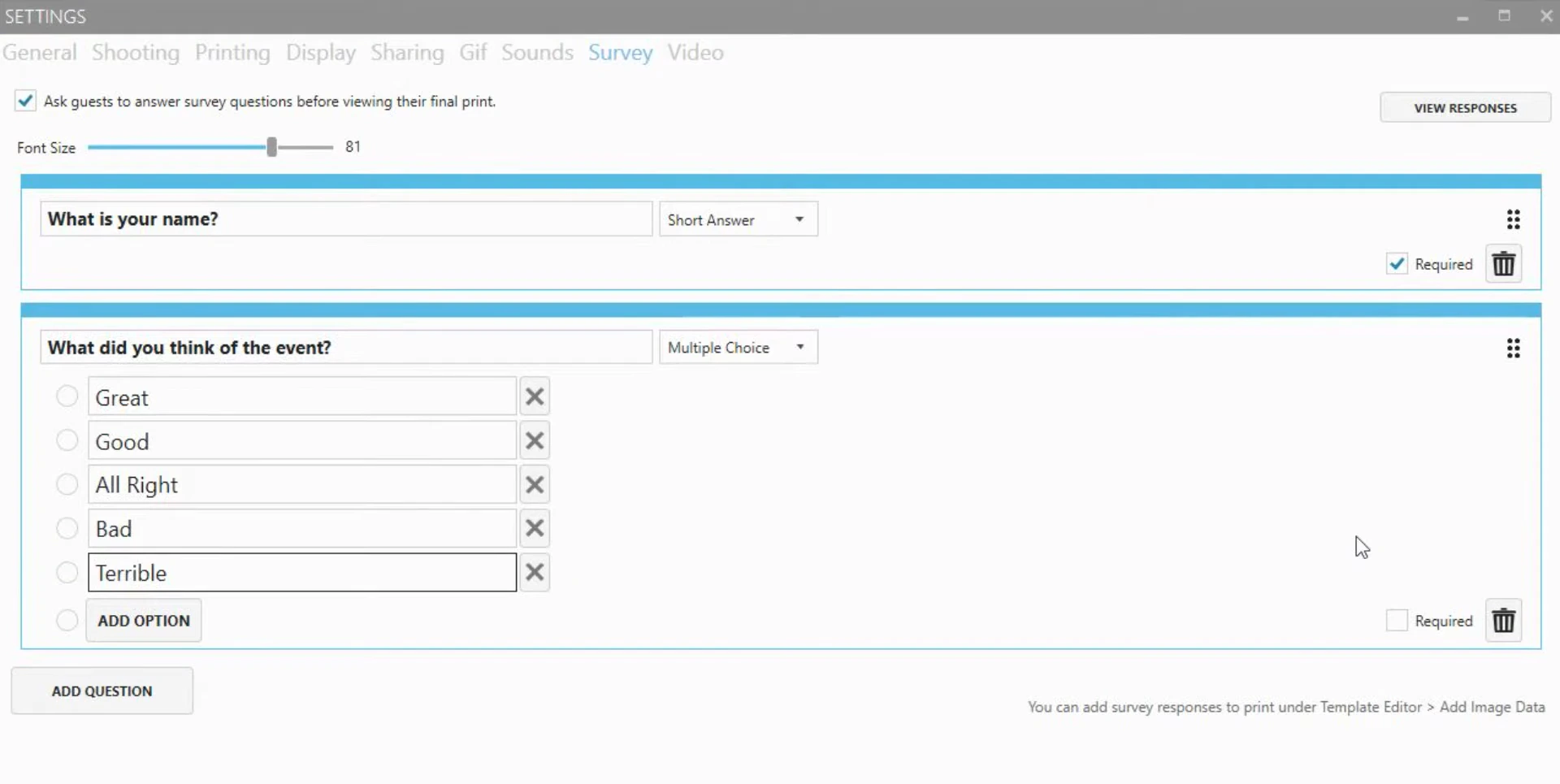
Limited Marketing and Data Capture Tools: LumaBooth can collect emails and phone numbers through built-in surveys and sharing data, with responses exportable as CSV files. But there’s no CRM integration, no marketing analytics dashboard, no opt-in rate tracking, and no native connection to platforms like MailChimp or Salesforce.
Source: LumaBooth
For operators whose clients care about lead capture and measurable marketing outcomes, this gap matters.
Add-on Cost Accumulation: The base subscription covers the booth app, but a full professional deployment often requires LumaShare ($7.99/month), a fotoShare Cloud upgrade ($19.99–$39.99/month), SMS plans ($10/month), and AI credits ($14.99–$199.99/month).
An operator running AI Portraits with cloud hosting and SMS sharing could spend $50–$75/month on top of the base subscription.
Apple App Experience Trails Windows: The Apple version carries a 4.6 average versus 4.8 for Windows, with reviewers noting configuration complexity and occasional friction with external camera connections.
The interface on both platforms reflects LumaBooth’s origins as a Windows desktop application, with dense settings panels that can feel unintuitive compared to mobile-first alternatives. Since many operators choose iPad for portability, these experience gaps matter.
No Virtual or Remote Booth Product: LumaBooth requires physical hardware at every event. There’s no browser-based option for virtual events, hybrid activations, or always-on digital campaigns. Operators who need to reach remote audiences must look elsewhere.
These limitations reflect LumaBooth’s heritage as a camera-control tool that evolved into a broader booth platform.
For operators who primarily need flexible capture software for existing hardware, they’re manageable trade-offs. But for those building a photo booth business where data capture, marketing value, and hardware reliability matter as much as the photos themselves, they point toward a different kind of platform.
Top LumaBooth Alternative: Simple Booth
Simple Booth takes a different approach to the photo booth problem.
Building iPad photo booth apps since 2013, Simple Booth pairs its subscription-based HALO iPad app with proprietary HALO ring-light hardware, creating an integrated system designed to set up in under a minute and run without an attendant. The platform serves 30,000+ customers globally across both event rental companies and brand marketing teams.
Integrated Hardware-Software System: HALO combines high-output lighting and iPad in a single chassis.
The HALO hardware is machined from a single billet of anodized aluminum with a patented ring-light system using 112 LEDs that produce up to 2,100 lumens. The iPad snaps into a tool-less faceplate and stays charged via a concealed built-in USB-C cable, eliminating dangling wires.
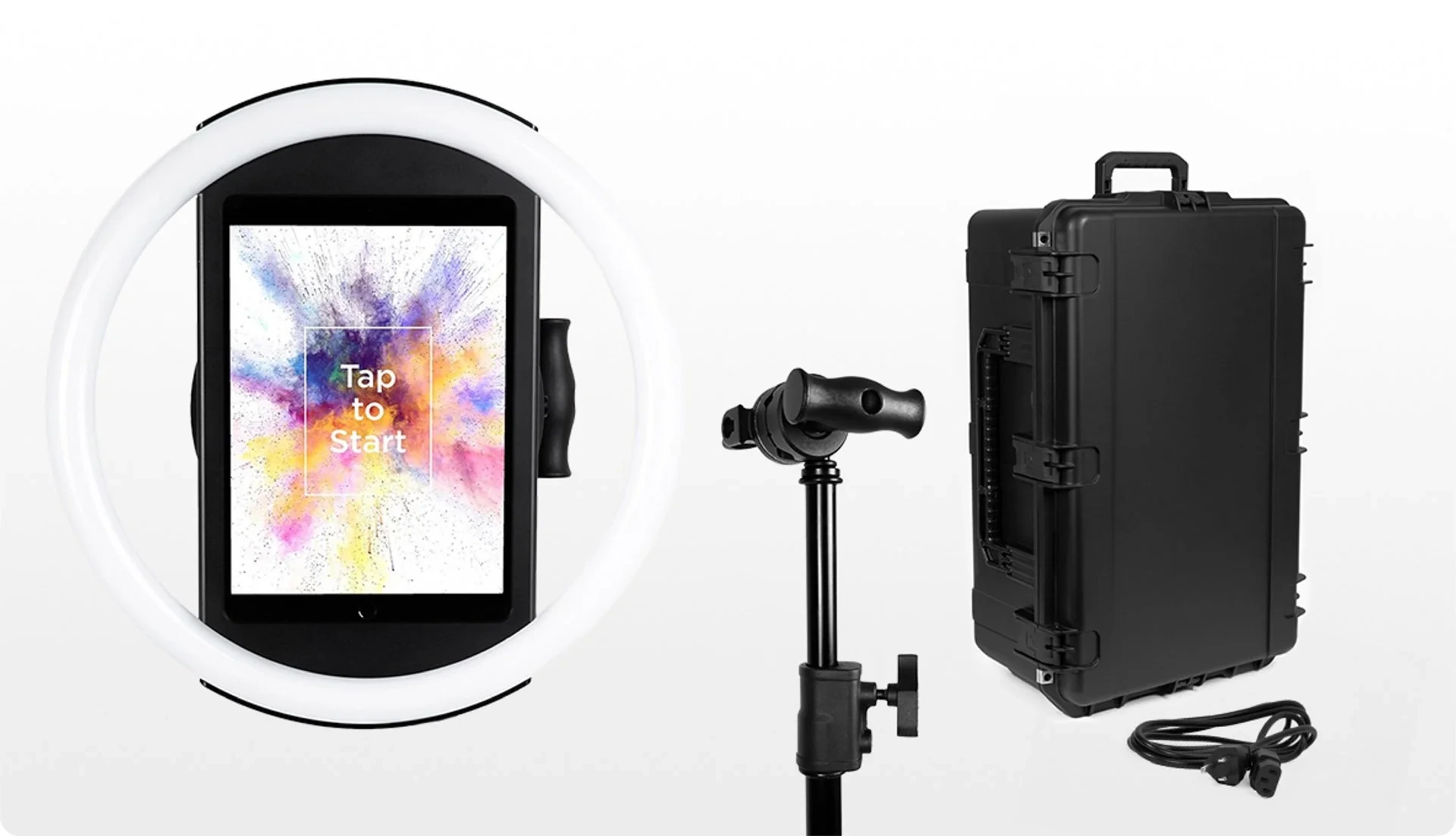
Two configurations serve different use cases: the Event Kit includes an adjustable selfie stand and a waterproof rolling travel case for rental operators, while the Install Kit provides a wall mount for permanent venues. The full Event Kit weighs 49 lbs and deploys in under one minute without tools.
This integration extends to the software layer. HALO’s image processing includes Glam skin smoothing, background blur and bokeh (claimed as a first for iPad photo booths), and AI background replacement without a physical green screen.
The layout designer on Core plans and above gives operators control over photo placement, text, graphics, backgrounds, and dynamic QR codes with 60+ importable themes, replacing the need for external design software. The redesigned preset editor displays the entire booth flow as a visual workflow, making event setup fast and clear.
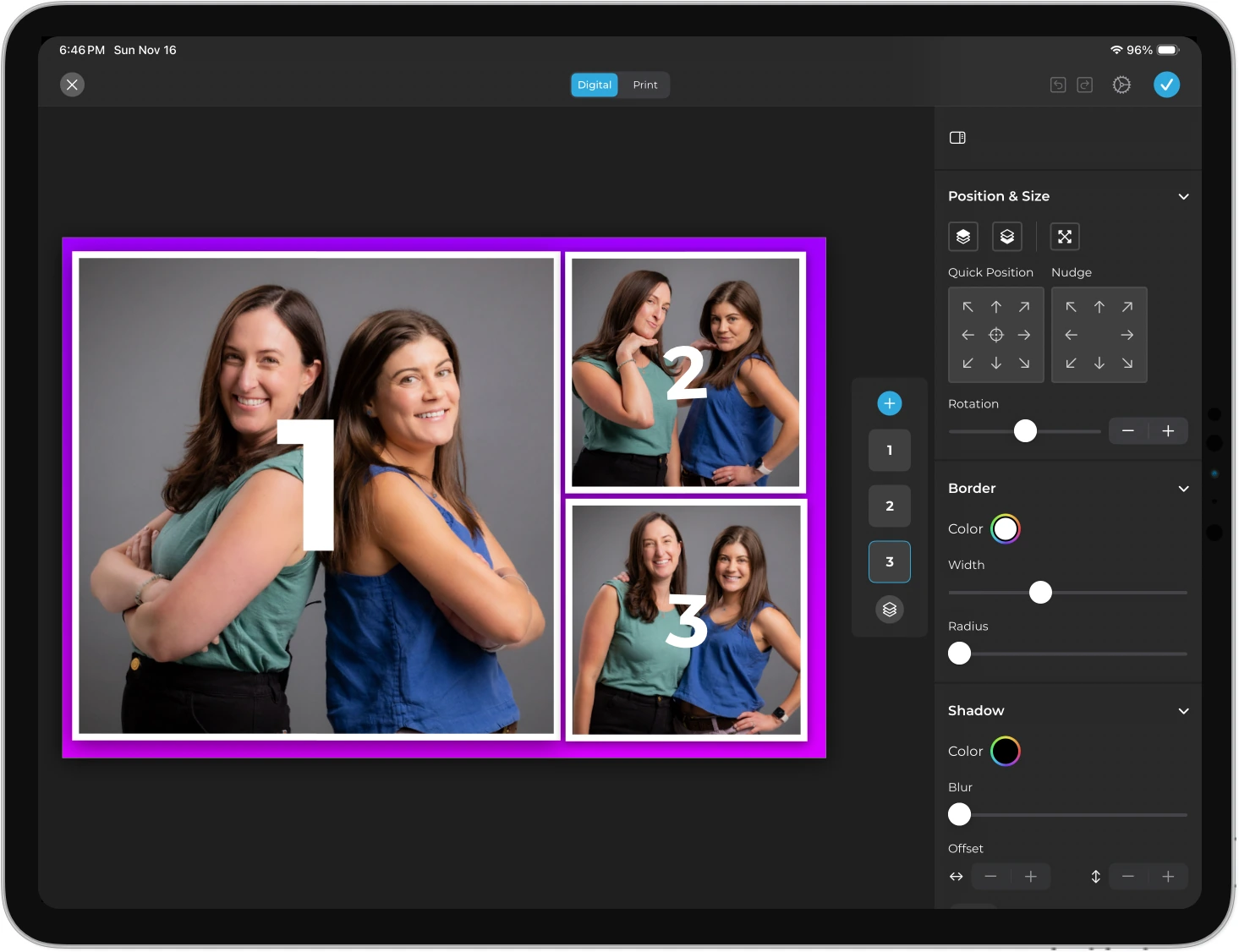
Source: Simple Booth
Image previews render up to 12x faster, and all effects work across stills, GIFs, video, and DSLR capture. Canon and Sony DSLR and mirrorless cameras connect via wired USB or wireless Wi-Fi on Core plans and above, with Nikon support coming soon. Wireless DSLR is a differentiating capability most competing platforms lack.
Arizona Opera grew its email list by 1,000 addresses in just a few events using Simple Booth’s lead capture capabilities. (Simple Booth)
Built-in Lead Capture and Marketing Analytics: Every photo booth session becomes a measurable marketing touchpoint.
Where LumaBooth focuses on capture and delivery, Simple Booth builds marketing tools into the booth experience itself.
The platform reports opt-in rates as high as 87 to 89% when guests receive their photos through a data capture form. This form supports up to 6 standard fields on the Pro plan and up to 10 custom fields (including checkboxes and legal terms) on Select.
The analytics dashboard tracks total participants, gallery views, social shares, and demographic data. Face-detection analytics on the Select tier estimate age distribution, gender breakdown, and average group size. These metrics give marketing teams audience composition data that photo booth software traditionally doesn’t provide.
Data flows to external systems through native MailChimp integration (no developer required) or a REST API for custom CRM delivery on Pro and Select plans. Social sharing supports Facebook, X, LinkedIn, and Instagram, with Simple Booth automatically reformatting layouts into Instagram-compatible files and pre-populating event hashtags on social posts.
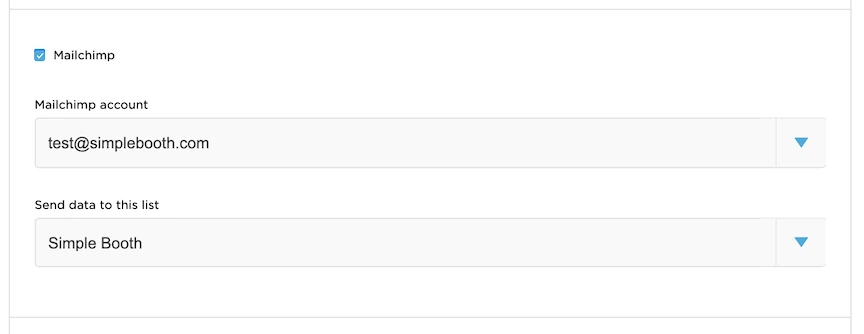
Source: Simple Booth
Treetop Golf collected 150,000 unique email addresses across locations using Simple Booth’s built-in data capture. (Simple Booth)
AI Effects and Virtual Booth: Simple Booth extends beyond physical hardware into AI transformation and browser-based activations.
Simple Booth’s AI Effects use Nano Banana models to transform captured photos through text prompts.
Three models balance speed and quality: Nano Banana 1 for individuals (1 credit per generation), Nano Banana 2 for groups up to 5 (2 credits), and Nano Banana Pro for highest quality (3 credits). Operators can assign unique prompts to each frame in a multi-frame layout, enabling comic strip or multi-scene narrative strips.
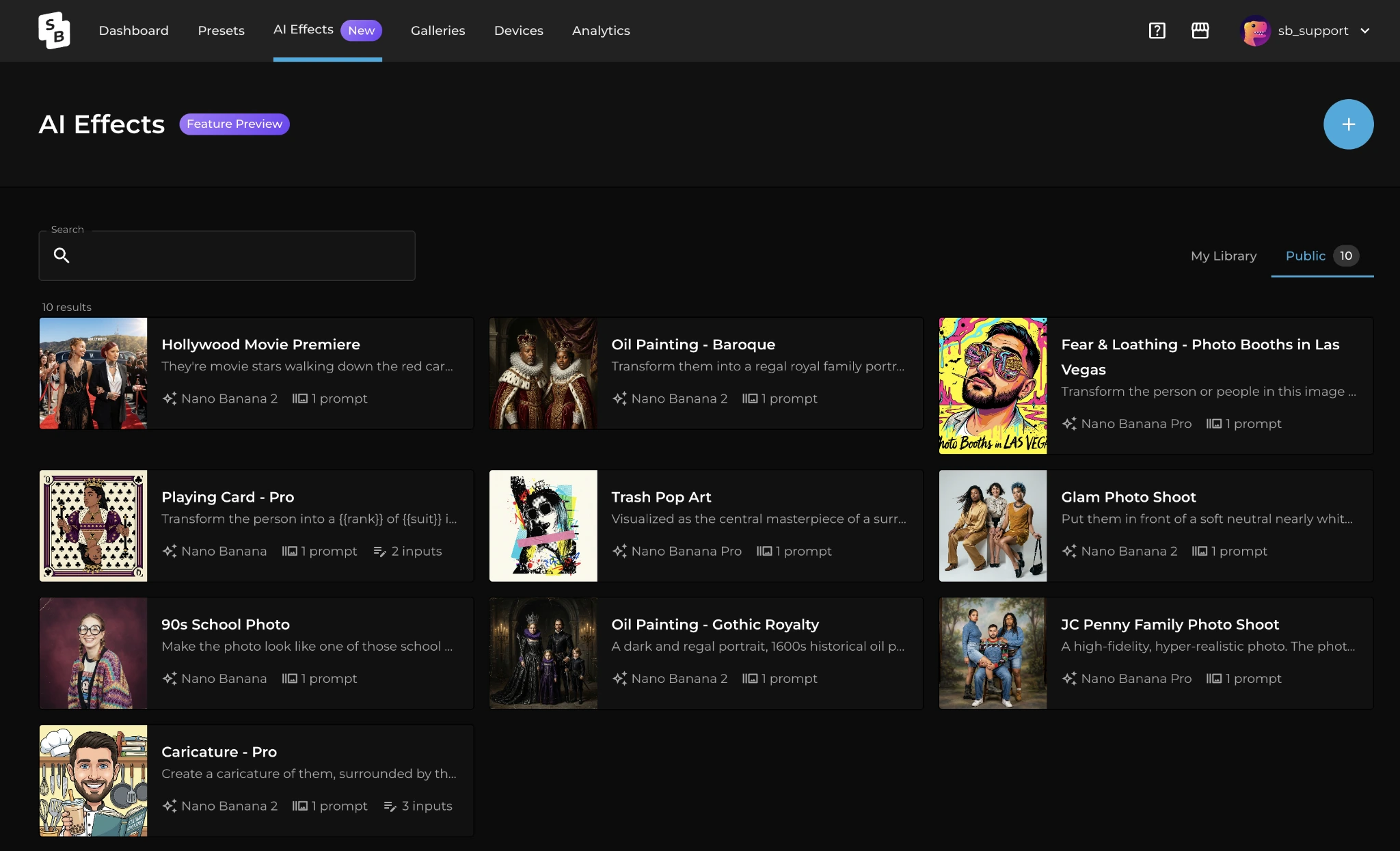
Source: Simple Booth
A notable capability is the Guest Input system, where participants answer questions (dropdown pickers or free text) that feed directly into the AI prompt as template variables. Every guest receives a personalized generation while the operator controls the prompt structure.
AI prompt testing outside of booth mode costs zero credits, letting operators iterate freely before an event. Purchased credits are $0.10 each and never expire.
Virtual Booth, a browser-based product requiring no hardware, extends branded photo experiences to remote participants. Guests join via a link or QR code from any device, apply overlays and AI effects, and submit to a shared gallery. Virtual Booth connects to the same analytics and gallery infrastructure as the HALO app, giving operators running hybrid events a single view across physical and digital activations.
Plan Structure: Simple Booth offers tiered plans from weekly to annual billing.
Simple Booth uses a per-license model with five tiers:
| Plan | Weekly | Monthly | Annual |
|---|---|---|---|
| Lite | $14.99 | $29.99 | $289.99 |
| Core | $24 | $49 | $490 |
| Plus | $49 | $99 | $990 |
| Pro | — | $149 | $1,490 |
| Select | — | $249 | $2,490 |
Core and above remove ads, add DSLR camera support, background replacement, video, and AI effects. Plus adds custom branding, analytics, and guest-editable text layers. Pro adds lead capture, phone support, moderation, and API access.
Select adds compliance tools, demographic analytics, and custom legal terms. A 7-day free trial is available with 25 bonus AI credits.
LumaBooth or Simple Booth: Comparison Summary
| LumaBooth | Simple Booth | |
|---|---|---|
| Platform | Windows, iPad, iPhone, Mac | iPad only |
| Hardware | Bring your own (DSLR, GoPro, webcam) | Proprietary HALO ring-light hardware |
| Camera support | Canon, Nikon, Sony, GoPro, webcam | iPad camera, Canon & Sony DSLR/mirrorless (Core+), Nikon coming soon |
| Booth types | Photo, GIF, Boomerang, Video, 360, Mirror, Glam, Green Screen, Video Guestbook | Photo, GIF, Rebound, Video, Green Screen, Glam |
| 360 Booth | Included | Not available |
| Mirror Booth | Included with Virtual Attendant | Not available |
| AI features | 170+ AI Portrait presets, custom prompts | AI Effects with 3 model tiers, per-frame prompts |
| Template library | 820+ included templates | 60+ themes, Layout Designer for custom creation |
| Lead capture | Basic survey with CSV export | Up to 10 custom fields, MailChimp sync, API, 87%+ opt-in |
| Marketing analytics | Share counts only | Gallery views, social shares, demographic insights |
| Virtual/remote booth | Not available | Virtual Booth (browser-based, no hardware) |
| Cashless payments | Built-in via Stripe (Windows only) | Not available |
| Offline operation | Share queue with auto-retry | Offline upload queue with auto-delivery |
| Free trial | Unlimited (watermark only) | 7 days |
| Pricing (annual) | $17–$18/month | $490–$2,490/year |
| Best for | Cross-platform flexibility with existing camera gear | Integrated experience with marketing ROI |
Final Verdict
The choice between LumaBooth and Simple Booth depends on what you’re building your photo booth business around.
Choose LumaBooth if you want flexibility in how you build and run your booths. It fits operators who already own Canon, Nikon, or Sony cameras, need to run specialized formats like 360 video or mirror booths, or work across both Windows and Apple devices.
The cross-platform Dashboard, broad camera compatibility, and all-inclusive booth mode subscription make it a strong choice for experienced operators who want to use professional camera hardware they already own. The unlimited free trial makes it easy to evaluate without financial commitment.
Get started with LumaBooth here.
Choose Simple Booth if you want a self-running system where the hardware, software, and marketing tools work together from day one. It’s built for operators who want to show up, deploy in under a minute, and leave the booth to run itself (with an interface that makes training new staff straightforward) and for marketers who need measurable outcomes from every activation.
The integrated HALO hardware delivers consistent photo quality regardless of venue lighting, the built-in lead capture turns every session into a data collection opportunity, and Virtual Booth extends branded experiences beyond the physical event. If your clients care as much about email lists and social shares as they do about photo strips, Simple Booth is built for that conversation.
Get started with Simple Booth here.
The photo booth industry has moved well past “point a camera and print a strip.”
LumaBooth gives operators the tools to build the setup they want across any platform and camera. Simple Booth gives operators a complete system where every component (from the aluminum chassis to the analytics dashboard) is designed to work together. Your choice depends on whether flexibility or integration matters more to how you run events.
LumaBooth FAQ
What camera brands does LumaBooth support?
On Windows, LumaBooth supports Canon, Nikon, and Sony DSLRs and mirrorless cameras, GoPro models 5 through 13, and webcams. On Apple devices, Canon, Nikon, and Sony cameras connect via USB alongside the built-in iPad or iPhone cameras. Sony cameras have one limitation: they cannot capture boomerang or video on either platform.
Simple Booth supports the iPad’s built-in camera on all plans and Canon and Sony DSLR/mirrorless cameras on Core and above, with Nikon support coming soon.
Does LumaBooth have a free trial?
Yes. LumaBooth offers an unlimited free trial with no time limit and no credit card required. The only restriction is a permanent watermark on all output until a paid subscription is activated. New subscribers also receive 20 free AI Portrait credits. Simple Booth offers a 7-day free trial with 25 AI credits.
How much does LumaBooth cost?
The base subscription costs $17/month billed annually for Windows or $18/month for Apple, with both plans including the first two devices.
Monthly billing is also available at $49.99 (Windows) or $19.99 (Apple). Add-ons for LumaShare, fotoShare Cloud upgrades, SMS plans, and AI credits can increase the total cost. Simple Booth pricing starts at $24/week or $490/year for the Core plan, which includes ad-free operation, DSLR support, and background replacement.
Does LumaBooth support 360 video booths?
Yes. 360 Booth is included in the standard subscription on both platforms. The Windows version supports cameras up to 120 fps, while recent iPads capture at up to 240 fps. Features include speed ramps, animated overlays, soundtracks, and motion-activated recording for unattended operation. Simple Booth does not offer a 360 booth mode.
Can LumaBooth run without an internet connection?
Partially. Core capture and printing work offline on both platforms. Email and SMS shares queue locally and send when connectivity returns. The offline QR code sharing feature in LumaShare delivers photos over a local Wi-Fi network with no internet required.
However, AI Portraits require a stable internet connection for cloud processing, and Dashboard sync needs connectivity to push or pull event configurations.
Does LumaBooth include cashless payment capabilities?
Yes, but only on Windows. LumaBooth for Windows includes a built-in cashless payment system powered by Stripe. Guests pay via QR code using Apple Pay, Google Pay, Amazon Pay, PayPal, or credit/debit cards. Operators can charge separately for prints and downloads, and can request payment before or after the booth session. This feature is not available on the Apple version.
What is the LumaBooth Dashboard?
The LumaBooth Dashboard is a browser-based control center at dash.lumabooth.com where operators create and configure events from any device. Settings configured in the Dashboard (including templates, overlays, sharing preferences, and AI presets) sync automatically to all connected Windows and Apple booth devices. It provides access to 820+ templates and supports Canva PDF imports.
Simple Booth offers a similar online dashboard for remote preset management with automatic sync to iPad devices.
Does LumaBooth offer lead capture or CRM integration?
LumaBooth includes basic surveys with short answer, long answer, and multiple choice questions. Responses can be exported as CSV files, and survey answers can be printed on photo output for personalization.
However, there are no native CRM integrations, no automated marketing workflows, and no third-party connectors like Zapier. Simple Booth offers native MailChimp integration, a REST API for custom CRM delivery on Pro plans, and reports opt-in rates as high as 87% through its built-in data capture forms.
Keep reading
 Showdowns
Simple Booth vs LumaBooth: Which Photo Booth Software Fits Your Business in 2026?
Turnkey hardware vs budget cross-platform app. Simple Booth or LumaBooth?
 Pricing
LumaBooth Pricing: Worth It or Consider Simple Booth? (August 2026)
Cheap sticker price, pricey add-ons. LumaBooth pricing, fully unpacked.
 Showdowns
LumaBooth vs Snappic (vs Simple Booth): Which Photo Booth Software Fits Your Business in 2026?
Budget multi-format app vs enterprise fleet platform. LumaBooth or Snappic?