7 Best 360 Photo Booth Platforms and Software [2026]

360 photo booths are a growing category in event entertainment. A guest stands on a platform while a camera rotates around them, capturing slow-motion footage that clients want and social media rewards.
But the operators making the most money rarely depend on a single format.
Successful rental companies combine 360 spinning booths with stationary photo stations, mirror booths, and AI portrait experiences to give clients a full menu. The software powering each format determines video quality, branding, lead capture, and post-event analytics.
We’ve been building photo booth technology since 2013, and we’ve watched the 360 space grow from a novelty into a revenue stream for event professionals. We tested the leading platforms to help you find the right fit, whether you’re:
- Starting a dedicated 360 booth rental operation
- Expanding an existing photo booth business into new formats
- Managing multi-booth events at scale
- Looking for the best value on a tight budget
- Adding a stationary booth to complement your 360 setup
Here’s a quick summary.
What Is 360 Photo Booth Software?
360 photo booth software powers a spinning photo booth.
It handles camera triggering, video capture, slow-motion processing, overlay compositing, and guest sharing. It runs on a device mounted to a rotating arm that orbits the guest, producing an orbital video clip.
The better platforms include branding tools, AI effects, speed ramping, offline operation, and multi-channel delivery (QR code, WhatsApp, SMS, email) so every video leaves the booth ready to share. Some platforms on this list also cover adjacent formats (stationary selfie booths, mirror booths, AI portrait stations) for operators who want one subscription for their entire fleet.
| Best 360 Photo Booth Platforms and Software | |
|---|---|
 | Simple Booth App Store: 4.7 (2,400+) Best photo booth platform for event professionals who want high-quality photos, first-party lead capture, and branded experiences across stationary and virtual booth formats. |
 | TouchPix Best dedicated 360 platform for operators who need broad device and camera compatibility across iOS, Android, Windows, Mac, Linux, and Raspberry Pi. |
 | Snappic Best for event agencies managing multi-format 360 operations with client management and VideoFX output. |
 | LumaBooth Best all-in-one option for operators running multiple booth formats (360, mirror, glam, photo, and more) at the lowest monthly rate. |
 | Snap360 Best mobile-first 360 platform for operators on Android, iOS, or both. |
 | ChackTok Best hardware-software ecosystem for 360 operators who want wireless multi-brand booth control and hardware bundles. |
 | Fun Event App Best entry-level 360 platform for operators who want AI photo effects and physical lenticular prints at the lowest startup cost. |
How To Choose the Best 360 Photo Booth Platform
Here’s a checklist to narrow down the right platform:
- Hardware Compatibility: Check that the software supports the devices and cameras you already own. Some platforms are iOS-only; others run on Android, Windows, or Mac. If you own a GoPro or DSLR, confirm the platform supports your specific model.
- Capture Quality: Look for high frame-rate recording (120fps or higher for smooth slow motion), speed ramping, and AI effects that go beyond basic spinning video.
- Branding and Customization: Clients expect branded output. Prioritize platforms that let you create custom overlays, add logos, and configure branded sharing pages without external design software.
- Sharing and Delivery: Guests should receive their content instantly via QR code, SMS, email, WhatsApp, or AirDrop. Fewer steps between capture and share mean higher engagement.
- Offline Reliability: Event venues are unpredictable. Choose a platform that records, processes, and shares content even when WiFi drops or never existed.
- Pricing Model: Understand whether you’re paying per device, per event, or per active slot. Factor in add-on costs for AI credits, SMS, and cloud storage to get the true monthly cost.
How We Curated Our List of Platforms
We started with the most widely used 360 platforms based on operator feedback, app store ratings, and industry forum discussions.
We evaluated each through demos, free trials, documentation reviews, and feature testing across four criteria:
- Ease of Use: How quickly can an operator set up and run an event?
- Feature Depth: Does the platform cover the full workflow from capture to branded delivery?
- Hardware Flexibility: How many devices, cameras, and booth formats does it support?
- Value for Money: What do you actually get for the price, including add-on costs?
That process brought us to seven platforms serving different segments of the market.
1. Simple Booth: Best Photo Booth Platform for Event Professionals
Simple Booth isn’t a 360 spinning platform. It takes a different approach to event photo experiences, and that’s why it earned a place on this list.
While 360 booths capture orbital video, Simple Booth delivers a stationary photo booth experience built around ring lighting, AI effects, and lead capture.
Many rental companies run Simple Booth alongside their 360 rigs for events where a self-operating photo station fits better: corporate activations requiring lead data, permanent venue installations, or any event where photo quality and branding take priority over spinning video.
With 30,000+ customers, a 4.7-star App Store rating from 2,400+ reviews, and over 40 million moments captured since 2013, Simple Booth is one of the most established platforms in the photo booth industry. Its products include:
- HALO Photo Booth Kits: ring-light hardware in machined aluminum with a selfie stand (Event Kit) or wall mount (Install Kit)
- HALO iPad App: cloud-connected photo booth software with a dashboard, AI effects, custom branding, and analytics
- Virtual Booth: browser-based photo experience that requires no hardware
| Simple Booth Pros | Simple Booth Cons |
|---|---|
| Ring lighting with 2,100 lumens from 112 LEDs | iPad-only (no Android support) |
| Sub-one-minute setup with no tools required | No 360 spinning booth support |
| 87%+ opt-in rate on lead capture forms | AI credits purchased separately ($0.10 each) |
| AI effects, wired and wireless DSLR support, and in-app Layout Designer | Lite plan includes in-app ads |
| Virtual Booth for remote and hybrid events |
Why Simple Booth Made Our 360 Photo Booth List
If you’re building a photo booth business, chances are 360 isn’t the only format you’ll offer.
Simple Booth covers the other side: the stationary photo booth that clients book for branding, lead generation, and polished guest experiences.
The two formats complement each other. A 360 booth creates the attention-grabbing moment, while a Simple Booth HALO station captures professional-quality photos with first-party data at opt-in rates of 87-89%. For operators pitching multi-booth packages to corporate clients, running both formats from dedicated platforms covers both needs.
Simple Booth’s guest interface makes it reliable for unattended events, and its visual preset editor means new staff learn the platform quickly.
HALO Hardware: Ring Lighting in a One-Minute Setup
The HALO chassis is machined from a single billet of aluminum with a patented ring-light system rated for 50,000 hours of operation.
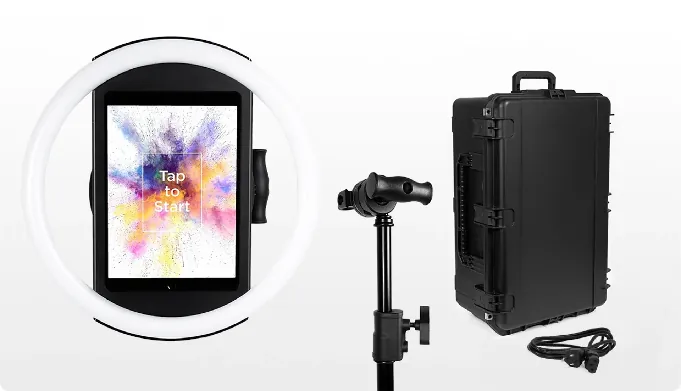
The iPad snaps in via a tool-less faceplate with a concealed USB-C cable for continuous charging, and the unit deploys in under a minute on its selfie stand with no assembly required. Groups can stand 6-8 feet back and still get even illumination in most indoor environments.
For operators with Canon cameras, HALO 5.0 added DSLR and mirrorless camera integration (Core plan and above) with wired USB and wireless WiFi connectivity. Wireless camera support gives operators more flexibility in booth setups, something most competitors don’t offer.
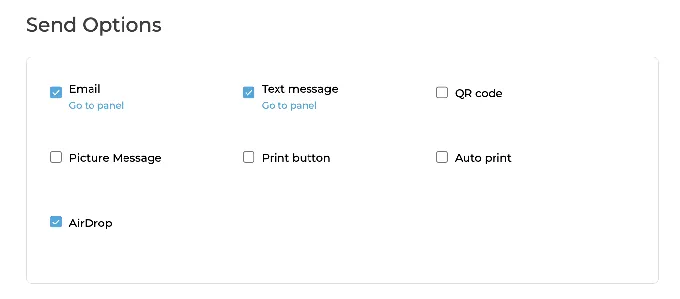
Photos reach guests via QR code, email, SMS, AirDrop, or WhatsApp, and an offline upload queue ensures nothing is lost when venue WiFi drops.
Source: Simple Booth
AI Effects, Layout Designer, and Lead Capture
Simple Booth’s AI Effects use Nano Banana models to transform photos using text prompts, with identity preservation that keeps guests recognizable regardless of the transformation.
Operators can test prompts at zero credit cost outside booth mode, iterating freely before the event. The Layout Designer lets operators build branded templates with layers, fonts, gradients, and embedded QR codes inside the app or web dashboard, eliminating external design software.
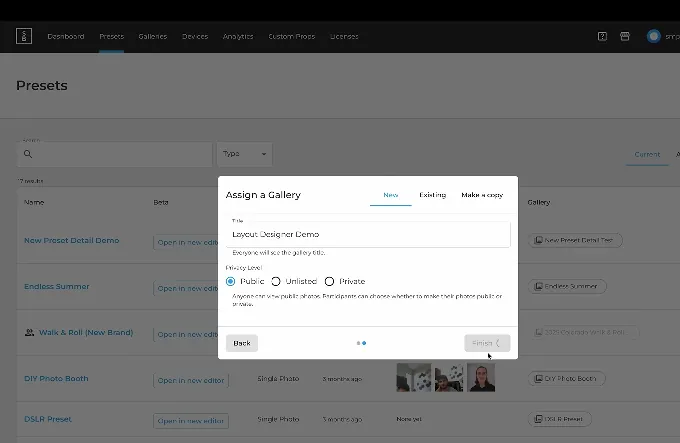
Source: Simple Booth
Background Blur (Core plan and above) keeps subjects sharp while softening the background, delivering a portrait look without DSLR hardware. Guest-editable text layers (Plus plan and above) let attendees type names, captions, or messages onto photos before sharing.
The web dashboard provides remote device management with real-time monitoring of battery levels, disk space, and upload queues across every active booth. In-app image previews render up to 12x faster.
The lead capture system collects email, phone, and custom fields as part of the photo-sharing flow. Data exports as CSV, syncs with MailChimp, or routes to custom CRMs via the Open API on Pro and above.
Treetop Golf collected 150,000 email addresses across its locations using Simple Booth’s lead capture in permanent HALO installations. (Simple Booth)
G7 Entertainment Marketing has captured 136,000+ fan interactions over 10+ years as a Simple Booth customer, calling themselves “big Simple Booth believers.” (Simple Booth)
For operators reaching remote audiences, Virtual Booth delivers the same branded photo experience through a web browser, with no app install required. It connects to the same analytics, galleries, and Live Feed as the HALO hardware.
Simple Booth Pricing
Simple Booth uses a per-license subscription model with weekly, monthly, and yearly billing. Each plan includes one device license:
- Lite: $14.99/week | ~$72/month | $290/year (includes ads; excludes custom branding, AI, and analytics)
- Core: $24.99/week | ~$49/month | $490/year (adds DSLR support, video, background replacement, AI effects, Virtual Booth)
- Plus: $49.99/week | ~$99/month | $990/year (adds custom branding, analytics, guest-editable text layers)
- Pro: $149/month | $1,490/year (adds lead capture, API integration, phone support, moderation)
- Select: $249/month | $2,490/year (adds custom legal terms, demographic analytics, security questionnaires)
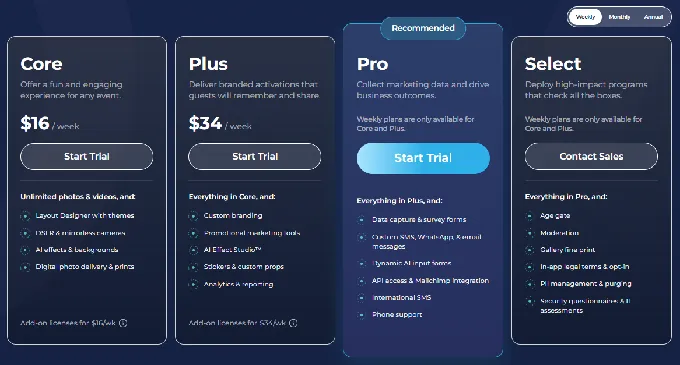
AI credits cost $0.10 each and never expire. A 7-day free trial is available with no permanent free plan.
Use Simple Booth if:
- You want a stationary photo booth to complement your 360 setup, giving clients a multi-format package
- Lead capture and first-party data collection are priorities for your events
- You need a self-operating booth for drop-off events or permanent installations where guests use it without an attendant
- You’re scaling a rental operation and need software that new staff can learn quickly
- You’re running brand activations where photo quality, branding, and analytics matter as much as the guest experience
Start a free trial and test Simple Booth at your next event.
2. TouchPix: Best Dedicated 360 Platform for Broad Device Compatibility
Most 360 photo booth software picks a side: iOS or Windows, iPad or PC, GoPro or DSLR. TouchPix does not make that choice for you.
TouchPix is a subscription-based photo and video booth platform with native support across iOS, Android, macOS, Windows, Linux, and Raspberry Pi, all covered under a single subscription with unlimited devices.
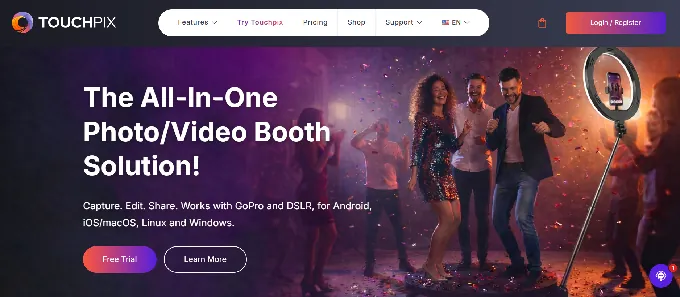
Its camera compatibility is equally broad: GoPro models 7 through 14 via wired USB and wireless WiFi/Bluetooth, plus Canon, Nikon, and Sony DSLR and mirrorless cameras. For operators who have accumulated mixed hardware over years of business, TouchPix makes all of it work under one license.
| TouchPix Pros | TouchPix Cons |
|---|---|
| Runs on six operating systems, unlimited devices | PhotoPass tier excludes video and slow motion |
| GoPro 7-14 plus Canon, Nikon, and Sony DSLR support | AI Pro cloud credits sold separately |
| Offline AI background removal (no internet required) | Complex add-on pricing for advanced features |
| 300+ overlays and 60+ built-in filters | Newer platform (launched 2020); some operators report slower rendering on effects-heavy output |
TouchPix: Top 3 Unique Features
- Cross-platform device and camera compatibility that no other platform on this list matches
- Offline-first architecture with on-device AI processing and Scanpix 2 offline guest sharing
- 80+ AI transformation styles with custom text-prompt generation
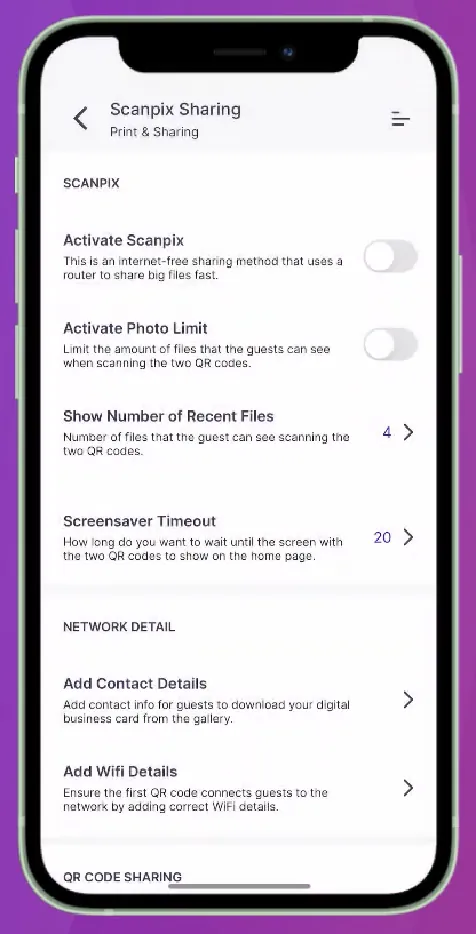
Source: Touchpix
TouchPix offers six capture modes: Still Photos, AI Photos, Boomerangs, Video, Animated GIFs, and Slow-Motion Video, all configurable from a single event setup.
The Bluetooth-triggered 360 automation handles spinning-arm capture sequences without a manual button press, reducing staffing needs for high-volume deployments.
What sets TouchPix apart for field deployments is its offline-first design. AI background removal and face replacement process entirely on-device without any internet connection, while Scanpix 2 delivers photos and videos to guests via QR code even when WiFi is unavailable. An offline queue holds cloud uploads and delivers them automatically once connectivity returns.
For outdoor festivals, basement venues, rural weddings, and international deployments, these capabilities hold their value regardless of connectivity.
TouchPix Pricing
TouchPix uses a subscription model priced per active event slot rather than per device. All plans include unlimited devices:
- PhotoPass: $439.90/year (2 active events; photos, AI Photos, and GIFs only)
- MultiPass: $879.99/year (4 active events; adds video, slow motion, and boomerang)
- MultiPass Pro: $1,407.99/year (8 active events; adds Virtual Booth and Advanced Surveys)
- MultiPass Enterprise: $2,199.99/year (12 active events; adds Mosaic and RAW cloud backups)
A 14-day free trial with no credit card required is available. AI Pro cloud credits are sold separately, starting at $12 for 100 credits.
Use TouchPix if:
- Your core business is 360 spinning-arm video, and you need software with Bluetooth-triggered automation
- You operate a mixed hardware fleet across Android, Windows, Mac, and iOS, and need one subscription to cover all of it
- You work venues where reliable internet cannot be guaranteed, and need offline AI processing and offline guest sharing
- You want to offer AI-transformed photo experiences as an activation service alongside 360 video
3. Snappic: Best for Agencies Managing Multi-Format 360 Operations
Snappic is photo booth software built for professional agencies who need a single platform capable of running every major booth hardware format under one account, with management tools layered on top.
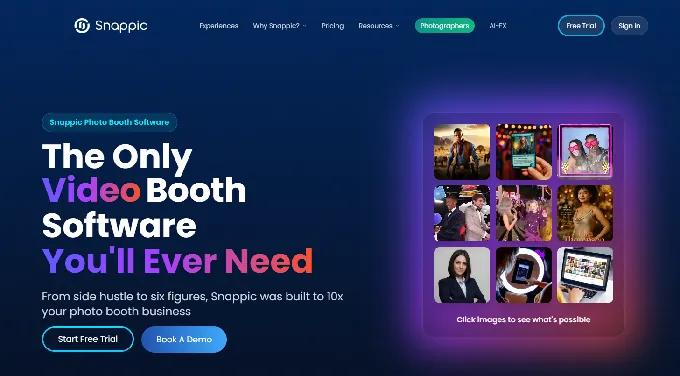
It supports iPad, 360-degree video, robot arm/Glambot, mirror, and roaming booths from a single subscription and shared template system, with no separate licensing per hardware type.
| Snappic Pros | Snappic Cons |
|---|---|
| VideoFX Builder with 60+ effects for 360 and Glambot output | Business plan requires paid add-ons for white-label and webhooks |
| All booth formats under one account | Variable credit costs for AI-FX, background removal, and SmartShare |
| White-label Grey Label App on Scale plan | Premium and Scale tiers are pricey for solo operators |
| Unlimited sub-accounts for multi-client agencies | Dense settings interface presents a steep learning curve for new operators |
Snappic: Top 3 Unique Features
- VideoFX Template Builder for automatic 360 and Glambot output
- White-label agency infrastructure with CNAME custom domains and unbranded Grey Label App
- AVA demographic insights and one-click client analytics reporting
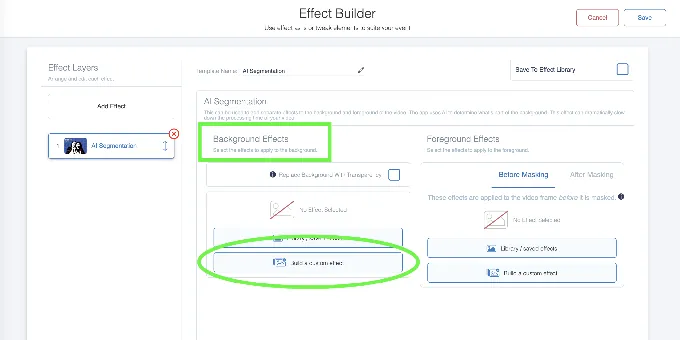
Snappic’s VideoFX Builder is its standout feature for 360-focused operators.
The browser-based editor lets operators configure output resolution, speed multipliers, reverse playback, soundtracks, animated overlays, and intro/outro clips before the event. At runtime, each guest session is captured and rendered into a branded final video automatically, with no post-production step.
The effect library spans 60+ video effects, including AI Segmentation for real-time background removal in motion video without a physical green screen. Operators have filmed and processed 100 branded videos in under an hour using the Glambot integration.
Source: Snappic
For agencies, the Scale plan provides unlimited sub-accounts with separate client logins, consolidated billing, a Dedicated Customer Success Manager, and a fully unbranded Grey Label App. Each client or franchise operator gets their own scoped login while billing and permissions consolidate at the master account level.
Snappic Pricing
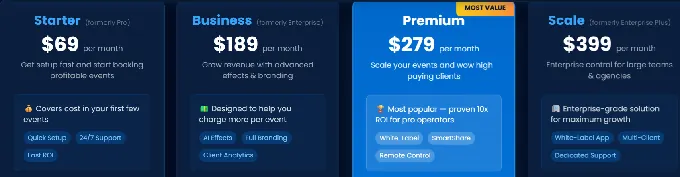
- Starter: $69/month ($499/year); one license, core photo/GIF capture, SMS/email sharing
- Business: $189/month ($1,799/year); adds VideoFX, AI-FX, branded microsites, client analytics, and surveys
- Premium: $279/month; adds white-label URLs, webhooks, event codes, SmartShare AI (400 credits included)
- Scale: $399/month ($3,999/year); adds unlimited sub-accounts, Grey Label App, Dedicated Customer Success Manager
A 14-day free trial with no credit card required is available. Per-event licenses start at $29 (Starter) or $79 (Business) for 48-hour access.
Note: agencies on the Business plan who need white-label ($79/month add-on), webhooks ($35/month), and SmartShare ($19/month) would pay $322/month total, making Premium at $279/month the more economical choice.
Use Snappic if:
- Your agency manages multiple clients across diverse booth types and needs one platform with full sub-account separation
- You’re producing 360 video or Glambot content and need output rendered automatically per guest, without post-production
- You need to deliver photo booth software entirely under your own brand with no third-party attribution
- Your clients expect post-event analytics packages as a formal deliverable
4. LumaBooth: Best Affordable All-in-One for Multiple Booth Formats
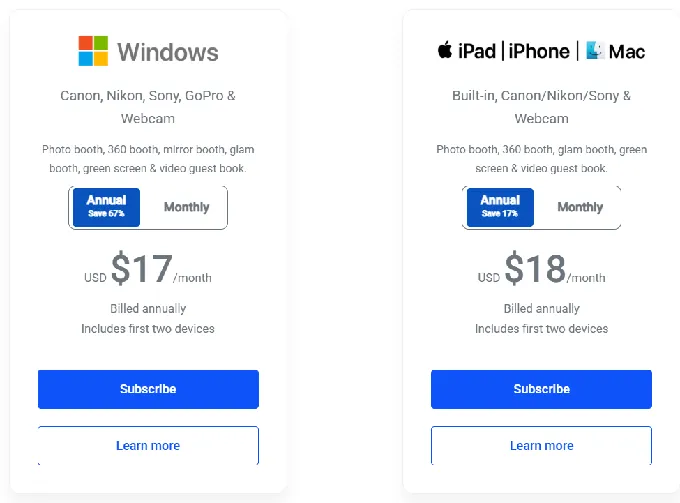
LumaBooth is professional photo booth software by Lumasoft that lets operators run six booth formats under a single subscription at the lowest monthly rate among professional-tier platforms in this comparison: $17/month on an annual plan for Windows, $18/month for Apple.
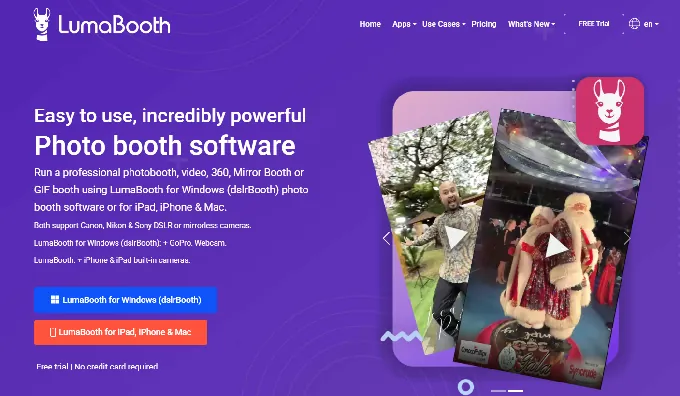
Those six formats (photo, 360, mirror, glam, green screen, and video guestbook) are all included without add-on fees.
| LumaBooth Pros | LumaBooth Cons |
|---|---|
| Six booth formats in one subscription | Monthly plan ($49.99) is significantly more than annual |
| 360 capture at 120fps on Windows, 240fps on iPad | Sony cameras cannot capture boomerang or video |
| Canon, Nikon, Sony, and GoPro 5-13 support on Windows | Add-ons for SMS, cloud upgrades, and AI credits increase total cost |
| Free trial with no time limit, no credit card | No web-based dashboard for remote device management or advance event setup |
LumaBooth: Top 3 Unique Features
- Six booth modes under one subscription at the lowest professional monthly rate in this comparison
- High frame-rate 360 capture with automatic speed ramping and animated WEBM overlays
- Real-time overlay color and opacity adjustment inside the booth app
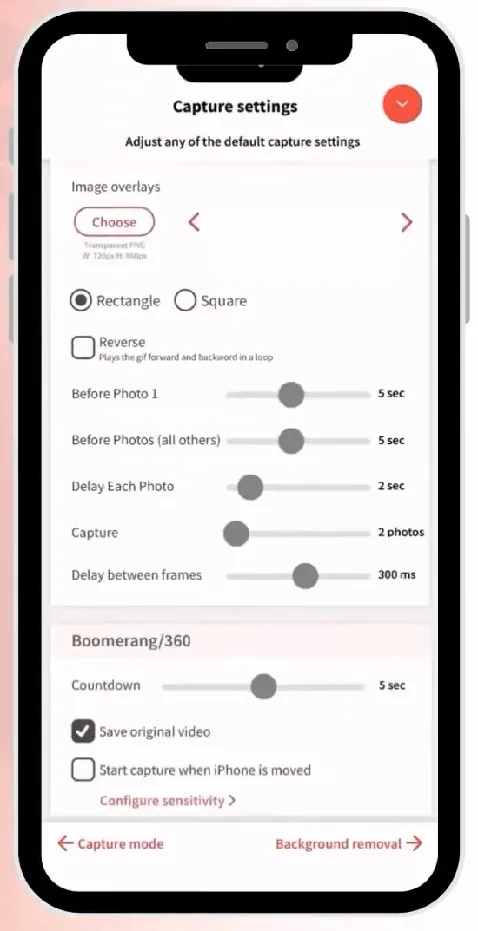
LumaBooth’s 360 implementation captures at up to 120fps on Windows and 240fps on compatible recent iPads.
The software handles speed ramping automatically, stitching pre-configured clips with independent speed settings, animated overlays, background music, and pre/post-roll video into a shareable file within seconds. Motion detection starts recording when the spinner moves, removing a common friction point in high-volume deployments.
Source: LumaBooth
Camera support on Windows is extensive: Canon EOS, Nikon D-series and Z-series, Sony mirrorless (18+ models), GoPro 5 through 13, and webcams. The GoPro integration automatically configures resolution and framerate based on your timeline settings and handles WiFi switching between the GoPro and venue network automatically.
LumaBooth Pricing
- Windows: $17/month (annual) or $49.99/month. Includes two devices and fotoShare Cloud Basic hosting.
- Apple (iPad/iPhone/Mac): $18/month (annual) or $19.99/month. Includes two devices and fotoShare Cloud Basic hosting.
- Optional add-ons: fotoShare Cloud Plus (+$19.99/month), SMS plan (+$10/month), AI Credits ($14.99/month for 150 credits)
A free trial with no expiration and no credit card is available; output carries a watermark until subscription activation. New subscribers receive 20 free AI portrait credits.
Use LumaBooth if:
- You want one subscription to handle every booth type in your fleet, including 360, mirror, glam, and video guestbook
- You already own Canon, Nikon, Sony, or GoPro cameras and want to use that existing investment
- Your priority is the lowest professional monthly rate among the platforms on this list
- You need a full-featured Windows application for 360 booth work, not just an iPad app
5. Snap360: Best Mobile-First 360 Platform for Growing Operators
Snap360 is a mobile-first 360 photo booth app built for event professionals who run branded 360 experiences using only the smartphone or tablet they already carry.
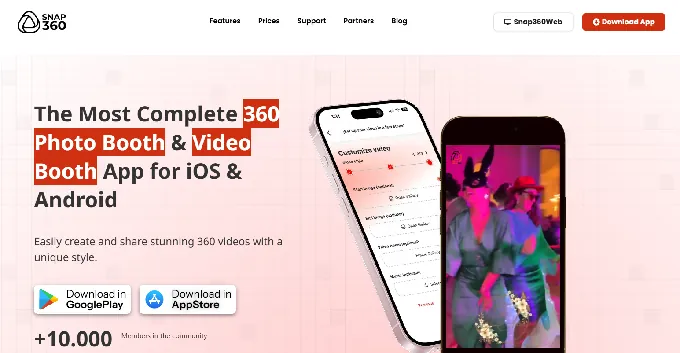
It’s the only major 360 platform with native apps on both iOS and Android, holding a 4.9/5 rating across 699 reviews on Google Play and a 4.8/5 across 100 ratings on the App Store.
| Snap360 Pros | Snap360 Cons |
|---|---|
| Native on both iOS and Android with matching feature sets | PRO plan limited to a single device |
| Motion detection auto-recording for solo operation | Cloud storage capped at 4-15 GB depending on plan |
| AI frame generation from text descriptions | |
| Offline-first recording with automatic sync |
Snap360: Top 3 Unique Features
- Cross-platform Android and iOS operation with identical feature sets and near-monthly update cadence
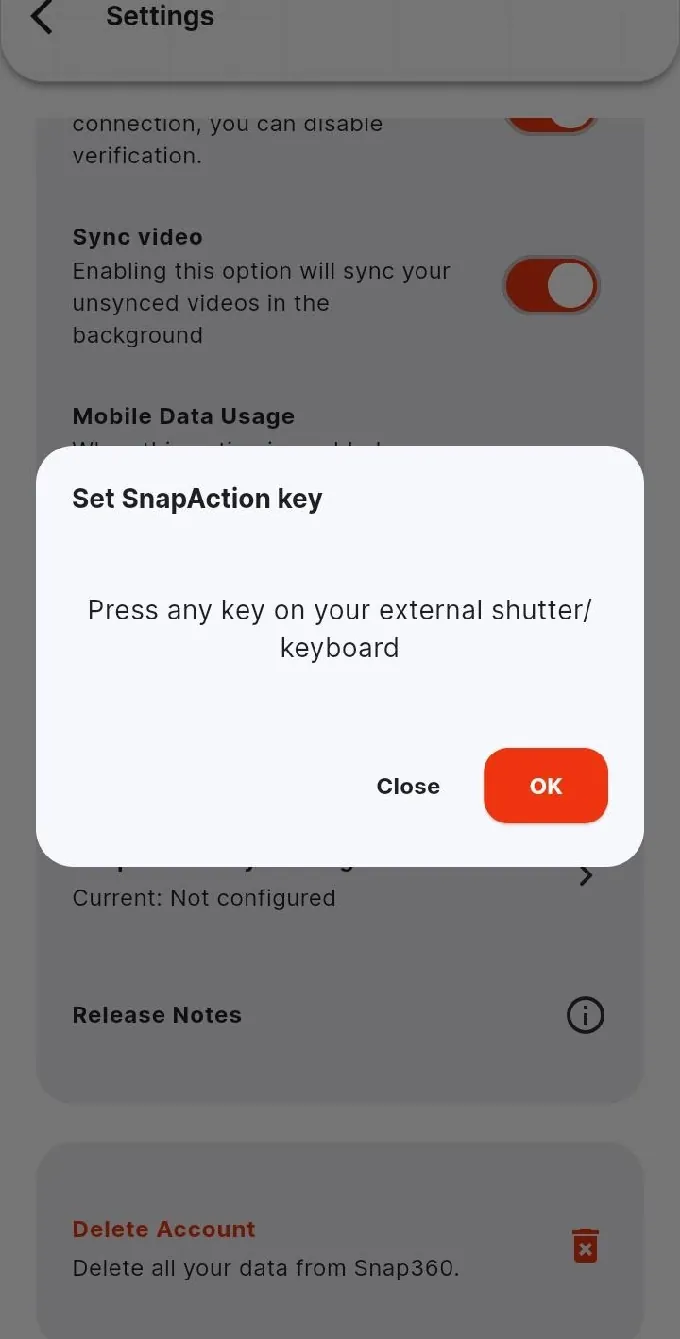
- Motion detection auto-recording and SnapAction Bluetooth remote for unattended 360 operation
- Built-in AI frame generator that creates branded overlays from plain-text descriptions
Source: Snap360
For solo operators, Snap360’s motion detection auto-recording starts sessions the moment it detects movement, with no operator or guest interaction required.
The recording workflow includes custom time ramping with independent speed controls at the start, middle, and end of each up-to-12-second clip, producing smooth speed transitions within the booth app. Snap360’s offline sync system treats internet connectivity as optional; videos record and process locally, then upload in bulk when connectivity returns.
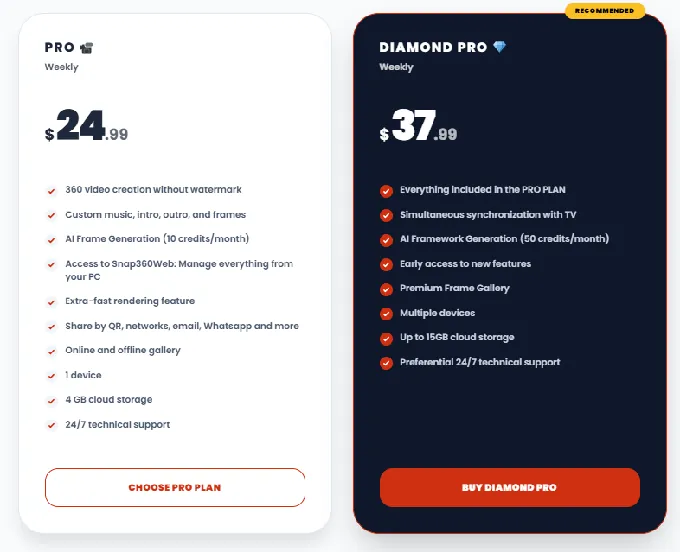
The Diamond Pro tier includes 50 AI frame generation credits per month and access to the Diamond Frames gallery, a library of overlays organized by event theme. GoPro camera integration lets operators capture higher-resolution footage via USB cable or Wi-Fi.
Snap360 Pricing
Prices below are from the Snap360 website, which is approximately 20% cheaper than purchasing through the App Store or Google Play.
- Free: Permanently available; watermarked output, no cloud storage, single device
- PRO: $24.99/month; watermark-free, custom frames and music, 4 GB cloud storage, 10 AI frame credits/month, single device
- Diamond Pro: $37.99/month; up to 15 GB cloud storage, 50 AI frame credits/month, unlimited simultaneous devices, TV synchronization, priority support
Use Snap360 if:
- You operate on Android or want cross-platform flexibility between Android and iOS
- You run events solo and need motion detection auto-recording to manage the booth without an attendant
- You need custom branded output without hiring a designer, using the AI frame generator to produce overlays in seconds
- You’re building a 360 rental business and want the lowest entry cost with a clear upgrade path
6. ChackTok: Best Hardware-Software 360 Ecosystem
ChackTok is the only platform on this list that both manufactures its own spinning hardware and controls third-party spinning hardware through a wireless protocol.
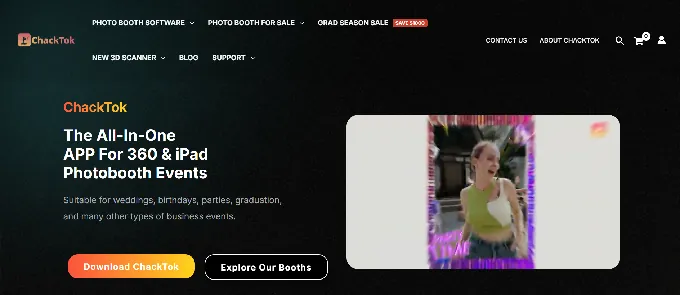
With more than 10,000 active booths and 500,000+ events powered by the app, it has enough installed base to validate its vertically integrated approach.
| ChackTok Pros | ChackTok Cons |
|---|---|
| Wireless hardware control for 12+ booth brands | Less suited for buyers needing CRM integrations |
| Sky Overhead 360 for aerial capture angles | 1 GB cloud storage across all plans |
| Hardware + software bundles starting at $560 | No presence on B2B review platforms (G2, Capterra) |
| One vendor for hardware, software, and fulfillment |
ChackTok: Top 3 Unique Features
- Wireless multi-brand 360 hardware control from a single app (supports 12+ booth brands)
- Sky Overhead 360 Photo Booth for top-down aerial capture that competitors can’t replicate with software alone
- Vertical integration with US and UK warehouses and hardware bundles with Affirm financing
The platform’s built-in wireless protocol lets operators adjust rotation speed, direction, and duration from the recording app, without switching to a separate hardware controller. For operators who already own a non-ChackTok spinning arm, this simplifies operations.
ChackTok’s Sky Overhead 360 mounts the camera above guests for top-down aerial footage, producing a format that looks different from standard orbital 360 video.
In crowded urban markets where every rental company offers similar spinning output, the Sky Booth creates a real differentiator. It’s available as a complete unit at $1,799, a spin arm only at $899, or a booth tent at $900.
The hardware line covers platform sizes from 22.5” to 45.3”, Magic Glass models with multicolor LED lighting for club environments, and battery-powered options running 8+ hours and 300+ recording sessions outdoors. All ChackTok-brand booths are motorized rather than manual crank variants.
ChackTok Pricing
All paid plans include the same full feature set (300+ overlays, 60+ effects, GoPro 9/10/11, DSLR support, up to 8 devices); tiers differ only by duration:
- Weekly: $21.99/week (auto-renewing)
- Monthly: $59.99/month (auto-renewing)
- 12-Month Prepaid: $399/year (~$33.25/month)
- Hardware bundles: From $560 (12-month app + touchscreen) to $1,498 (12-month app + Sky 360 booth)
A 30-day free trial with no credit card required is available. The Campus Program offers 30% off for student operators.
Use ChackTok if:
- You want hardware and software from one vendor, with a single support contact for both the motor and the app
- You already own a third-party spinning platform and want software that controls it wirelessly
- You want to offer overhead Sky Booth content as a differentiator
- You’re a new operator who wants to finance hardware and software as a single bundle to minimize upfront cost
7. Fun Event App: Best Entry-Level 360 Platform with AI and Lenticular Prints
Fun Event App turns a single smartphone and a light ring into a functional 360 booth capable of AI photo transformations, physical lenticular prints, and instant WhatsApp delivery.
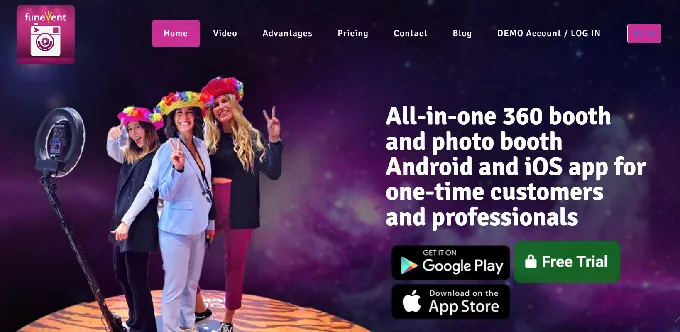
It’s built for operators who want to launch or expand a 360 booth business with the smallest financial footprint.
| Fun Event App Pros | Fun Event App Cons |
|---|---|
| Lenticular photo output: physical flip-effect prints no other 360 platform offers | 360 video and GlamBot are Android-only features |
| Nano Banana AI processes entirely on-device, no internet required | iOS app has a more limited feature set than Android |
| GoPro Hero 7-13 and GoPro Max compatibility | Smaller user base than more established competitors |
| AI transformation included at no extra cost on all paid plans |
Fun Event App: Top 3 Unique Features
- Lenticular photography: the only 360 platform to produce physical flip-effect prints that animate when tilted
- On-device Nano Banana AI with up to 8 transformation prompts per event, no internet dependency
- GoPro Black (7-13) and GoPro Max for wireless 360 VR photo capture
Fun Event App’s main differentiator is lenticular photo output. The booth captures two images, the operator prints them using a DNP dye-sublimation printer, and applies an adhesive lenticular lens sheet. The guest walks away with a printed item that animates when held, with flip, zoom, morph, and 3D depth effects available.
For operators whose clients want a physical take-home souvenir beyond a standard photo print, this is a format that digital-only platforms cannot match.
The Nano Banana AI processes entirely on-device without sending images to the cloud, solving the connectivity dependency that affects other AI photo booth products at venues with unreliable WiFi.
AI transformation is included at no extra charge across all paid plans; there is no consumption-based AI credit pricing. Operators configure up to 8 style prompts per event, and guests choose their transformation before the photo is captured and processed within seconds.
Fun Event App Pricing
Android plans include the full feature set (Nano Banana AI, lenticular, GoPro, 360 video, GlamBot):
- One Week: $29 (2 devices)
- One Month: $79 (2 devices)
- One Year: $599 (2 devices; approximately $50/month)
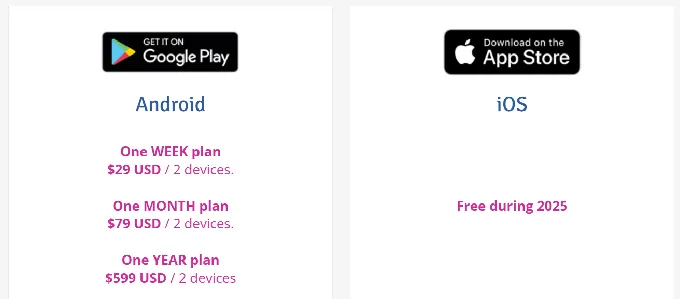
The iOS app offers a more limited feature set (no 360 video, GoPro, WhatsApp, or GlamBot). A one-month free trial with all features unlocked and watermarked output is available with no credit card required.
Use Fun Event App if:
- You’re launching a 360 booth business and want to minimize hardware investment, starting with just a smartphone and a light ring
- You already own a GoPro Hero 7 or newer and want to put it to commercial use without buying dedicated 360 camera hardware
- You want to offer physical lenticular keepsakes that differentiate your service from competitors running digital-only booths
- You operate at venues with unreliable WiFi and need AI photo transformation that works entirely offline
Final Verdict
The 360 photo booth market offers options at every price point and experience level.
Some platforms specialize in spinning video; others cover the full spectrum of booth formats. The right choice depends on your hardware, your budget, and the types of events you’re booking.
Here are our top picks for three common scenarios:
- Simple Booth: If you want a stationary photo booth that delivers high-quality photos, first-party lead capture, and branded experiences with a self-operating design. A strong complement to any 360 setup for operators building a multi-format business. Start a free trial with Simple Booth here!
- TouchPix: If you need the widest device and camera compatibility for dedicated 360 operations, with offline AI processing and six capture modes under one subscription.
- LumaBooth: If you want the most affordable all-in-one platform that covers 360, mirror, glam, photo, green screen, and video guestbook at $17/month annually.
Best 360 Photo Booth Platforms FAQ
What is a 360 photo booth and how does it work?
A 360 photo booth uses a rotating arm with a mounted camera (typically a smartphone or GoPro) that orbits around the guest standing on a platform. The software captures slow-motion video of the full rotation, applies effects and branded overlays, and outputs a shareable clip. The guest receives their video via QR code, WhatsApp, SMS, or email within seconds of the capture completing.
How much does 360 photo booth software cost?
Pricing varies widely by platform and tier. LumaBooth offers the lowest entry at $17/month annually.
Snap360 starts at approximately $25/month.
ChackTok’s annual plan works out to about $33/month.
TouchPix starts at $440/year for photo-only capture or $880/year for the full video tier.
Snappic starts at $69/month for basic operation or $189/month for VideoFX and 360 capabilities. Most platforms offer free trials ranging from 7 to 30 days.
Can I use my phone as a 360 photo booth camera?
Yes. Snap360 and Fun Event App run 360 booths using a smartphone mounted on a spinning arm.
Snap360 works natively on both Android and iOS with matching feature sets.
Fun Event App offers full 360 video on Android, with a more limited iOS version. Both capture and process footage on the phone without needing an external computer.
Do I need a GoPro for a 360 photo booth?
A GoPro is not required but it improves video quality. TouchPix supports GoPro models 7-14, LumaBooth supports GoPro 5-13, Fun Event App supports GoPro 7-13 and GoPro Max, and ChackTok supports GoPro 9-11. A smartphone-only setup is a viable starting point, and GoPro integration can be added later once the business justifies the investment.
Which 360 photo booth software works on Android?
TouchPix, Snap360, Fun Event App, and ChackTok all support Android.
Snap360 has the strongest Android presence with a 4.9/5 rating across 699 Google Play reviews and an identical feature set between Android and iOS.
TouchPix offers the broadest platform support overall, running natively on Android plus iOS, Windows, Mac, Linux, and Raspberry Pi.
What is the best 360 photo booth software for beginners?
Fun Event App has the lowest barrier to entry: a single smartphone plus a light ring is all the hardware needed, and the one-month free trial provides time to test at real events before committing.
Snap360 is another strong beginner option with its permanently free tier (watermarked output) and motion detection that runs the booth automatically. Both platforms let operators start booking events before investing in expensive hardware.
Can I run a photo booth business with only 360 booths?
You can, but the most profitable operators diversify across formats. 360 spinning booths create attention-grabbing video content, while stationary photo booths deliver better still-photo quality, lead capture, and branded experiences. Offering both formats lets you serve a wider range of client needs and command higher per-event pricing for multi-booth packages.
Do 360 photo booth platforms work offline?
Several platforms on this list offer meaningful offline capabilities. TouchPix provides on-device AI processing and offline guest sharing via Scanpix 2.
Snap360 records and processes to local storage with automatic cloud sync when connectivity returns.
Fun Event App’s Nano Banana AI runs entirely on-device with no cloud dependency. For events at venues with unreliable WiFi, offline capability should be a key factor in your platform selection.
Keep reading
 Best Of
7 Best Photo Booth Software with Video Message and Slo-Mo Capture [2026]
Booths that capture heartfelt video notes and buttery slo-mo. The moving stuff.
 Best Of
6 Best Photo Booth Software With QR Code Sharing [August 2026]
Booths that beam every snap to a phone with a quick scan. QR sharing done right.
 Best Of
7 Best Photo Booth Software With Real-Time Analytics and Dashboards [August 2026]
Booths that show the numbers as the party happens. Live dashboards, real insight.