7 Best Photo Booth Software With Real-Time Analytics and Dashboards [August 2026]

Photo booths have moved past snap-and-print. For rental companies, venue operators, and brand marketers, they now generate leads, amplify social media, and measure engagement.
But capturing a great photo is only half the value. The other half is knowing what happened next. How many guests shared to Instagram? How many opted into your email list? Which of your five booths pulled the most engagement last Saturday?
Without real-time analytics and a dashboard, you’re guessing. Guessing doesn’t help you justify costs to a brand client or improve your next activation.
We researched and tested the leading platforms and picked the best photo booth software with built-in analytics and dashboards for these use cases:
- Tracking lead capture and sharing behavior with dedicated hardware,
- Consolidating analytics across multiple booth formats in one dashboard,
- Monitoring revenue and engagement for permanent commercial kiosks,
- Getting cloud analytics at the lowest subscription price,
- Delivering client-ready analytics via shareable reporting links,
- Managing event data across mixed Windows-and-Apple booth fleets,
- And analyzing 360 video booth performance across diverse hardware setups.
Here’s a summary of these platforms.
What Is Photo Booth Software With Real-Time Analytics?
Photo booth software with real-time analytics means platforms that go beyond basic photo capture to give operators live dashboards, session tracking, sharing metrics, and post-event reporting. These platforms help event professionals, venue operators, and brand marketers measure engagement, prove ROI, and run their operations on data instead of guesswork.
The best platforms typically include:
- Live session monitoring during events, showing capture counts and device health
- Sharing breakdowns by delivery channel (email, SMS, QR code, WhatsApp, social media)
- Lead capture with opt-in tracking and CRM integration or CSV export
- Client-facing reports, branded galleries, and exportable analytics
- Multi-device or multi-location fleet management dashboards
- Revenue tracking and dynamic pricing for commercial deployments
Best Photo Booth Software With Real-Time Analytics and Dashboards
 | Simple Booth Best for event rental operators and brand marketers who want analytics, lead capture, and dedicated hardware in one iPad-based system. |
|---|---|
 | Snappic Best for operators running mixed booth fleets who need analytics across iPad, 360, mirror, and GlamBot formats in one dashboard. |
 | Foto ATM Best for operators running permanent kiosks who need financial analytics and dynamic pricing from a remote dashboard. |
 | BoothLedger Best for small photo booth businesses who want cloud analytics in the cheapest subscription in the category. |
 | Pictor.pro Best for event operators who want a client-ready analytics dashboard with shareable reporting links. |
 | LumaBooth Best for operators running mixed Windows-and-Apple fleets who want cross-platform event analytics at the lowest annual cost. |
 | Touchpix Best for 360 photo booth specialists who need session analytics across the widest range of hardware and operating systems. |
How To Choose the Best Photo Booth Software With Analytics
Here’s what to focus on when evaluating photo booth software with analytics:
- Analytics Depth: Look for platforms that go beyond session counts. Per-channel sharing breakdowns, lead capture metrics, gallery engagement data, and demographic insights give you actionable information. “Photos taken” counts don’t.
- Real-Time Visibility: During a live event, you should be able to monitor session activity, device health, and queue status without interrupting guests. Remote monitoring matters if you run multiple booths at once.
- Client Reporting: If you serve brand clients or corporate accounts, look for built-in tools to generate or share post-event analytics. Some platforms offer shareable URLs, white-labeled reports, or branded microsites that cut out manual report assembly.
- Lead Capture Integration: Your booth should collect email addresses, phone numbers, and other contact data as a natural part of the photo experience. Look for high opt-in rates and direct CRM export (CSV, MailChimp, or API).
- Hardware Compatibility: Make sure the platform supports your hardware. Some are iPad-only, others Windows-only, and a few span multiple operating systems. If you run mixed hardware, cross-platform dashboard access matters.
- Pricing That Fits Your Volume: Rental operators with variable weekly volumes need flexible billing (weekly or monthly plans). Permanent venue operators benefit from annual commitments. Match the pricing model to how you operate.
How We Picked the Platforms
We identified the most widely used photo booth software platforms based on operator communities, App Store ratings, and industry recognition. We evaluated each on four criteria:
- Analytics Quality: How detailed are the dashboards? Do they offer per-channel sharing data, lead capture metrics, and gallery engagement tracking?
- Real-Time Capabilities: Can operators monitor sessions and manage configuration during live events without interrupting guests?
- Ease of Use: How quickly can an operator set up the booth, configure an event, and access analytics?
- Value for Money: What analytics capabilities come with each price tier? Are reporting tools locked behind expensive enterprise plans, or available broadly?
These factors narrowed our list to seven platforms with the best combination of real-time analytics, dashboard depth, and operational value.
1. Simple Booth: Best for Event Operators and Brand Marketers Who Want Integrated Analytics With Dedicated Hardware
If you run photo booths for events, you’ve probably wrestled with the gap between what happens at the booth and what you can prove happened afterward. You know the booth was busy, but you can’t tell your client how many leads you captured, which sharing channels guests preferred, or whether the activation drove social engagement.
Simple Booth solves this by building analytics, lead capture, and marketing tools directly into its platform. There’s no separate analytics product to buy and no manual data export to assemble. The booth captures the photo, collects the lead, tracks the share, and surfaces everything in a dashboard you can access from anywhere.
Simple Booth is a subscription-based iPad photo booth platform paired with proprietary HALO ring-light hardware and a cloud dashboard for remote management. It serves two audiences: event rental companies looking to “build a more profitable photo booth business” and marketing teams seeking “a new marketing engine for your brand.”
The platform has 30,000+ customers globally, a 4.7-star App Store rating from 2,400+ ratings, and 40 million+ moments captured since 2013.
| Simple Booth Pros | Simple Booth Cons |
|---|---|
| - Integrated hardware, software, and cloud analytics from one vendor | - iPad-only (no Android or Windows support) |
| - 87%+ opt-in rate on lead capture forms | - Analytics and reporting require Plus plan ($99/month) or above |
| - AI effects with built-in brand integration | - No native Salesforce or HubSpot CRM integration |
| - Remote dashboard management with real-time preset sync | - API access limited to Pro and Select tiers |
| - WhatsApp, SMS, email, QR, and AirDrop delivery options |
Why Choose Simple Booth for Analytics and Lead Capture?
Top brands and organizations, including Live Nation VIP events, Sports Illustrated Tickets, and Gibson Brands, have deployed Simple Booth for high-volume activations. The company ranked #414 on the Inc. 5000 in 2018 with 1,210% three-year revenue growth.
Analytics Dashboard: Track Sessions, Shares, and Gallery Engagement From Anywhere
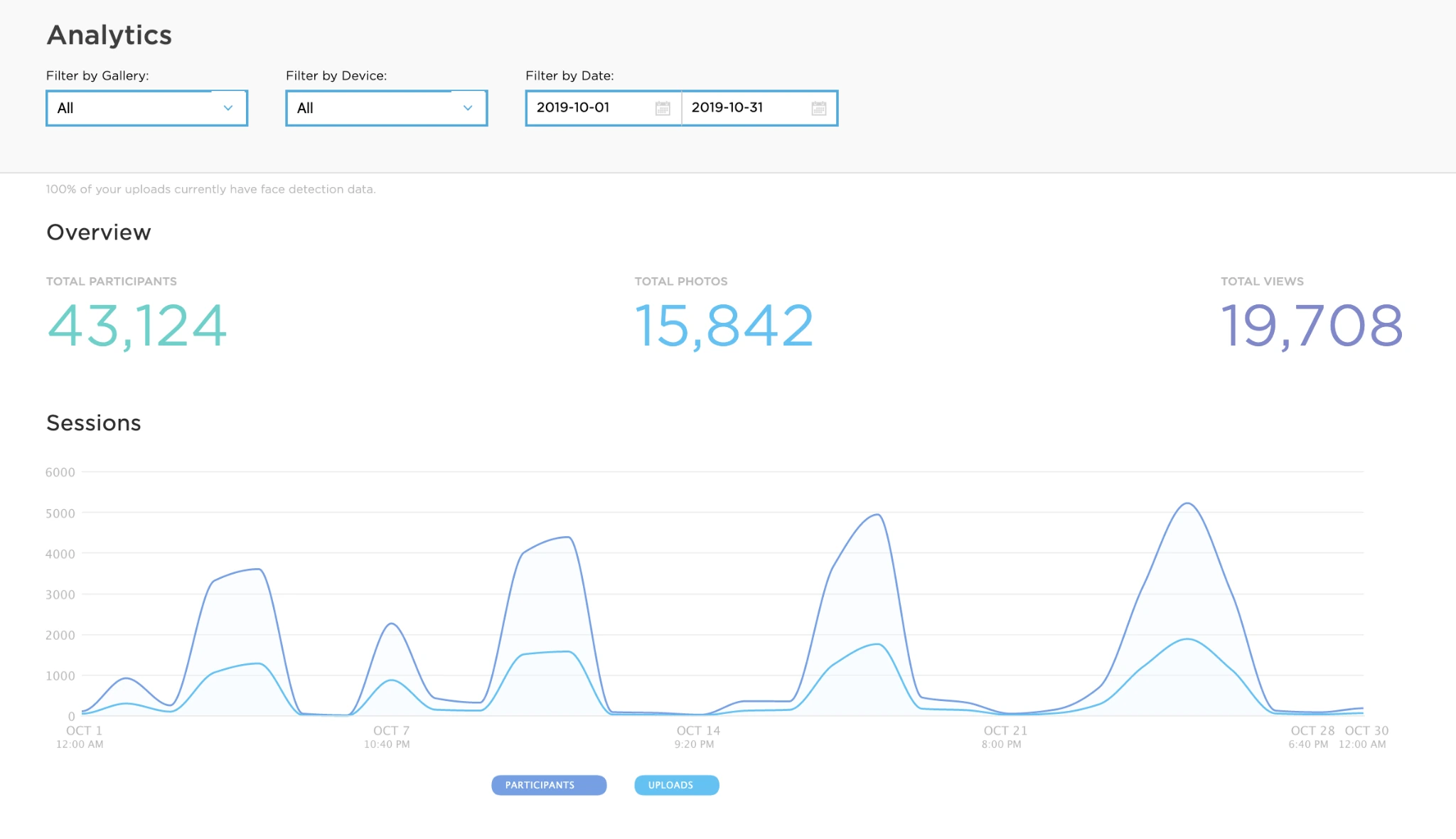
Simple Booth’s online dashboard is where analytics come together. Operators filter by date, device, or gallery to analyze booth performance, and reports download as PDF and CSV.
The dashboard tracks total participants, uploads, gallery views over time, and session activity. On the social side, it captures Facebook share clicks, referred views, reactions, and comments; X/LinkedIn referred views and share clicks; and Instagram share clicks with hashtag search links. For brand marketers, these per-channel breakdowns answer the question clients actually ask: not “how many photos were taken,” but “where did those photos go?”
Source: Simple Booth
On the Select plan, demographic insights via face detection (age estimation, gender breakdown, average people per photo) add audience data uncommon in the photo booth category.
Each event generates a branded online gallery you can customize with event titles, hashtags, color themes, header images, and external links. Any public gallery can become a Live Feed display for TV or projector, creating a real-time slideshow without separate media server software.
The W Hotel Austin’s ongoing HALO installation recorded 12,765 photos, 31,730 participants, and 92,579 gallery views from a single deployment. (Simple Booth)
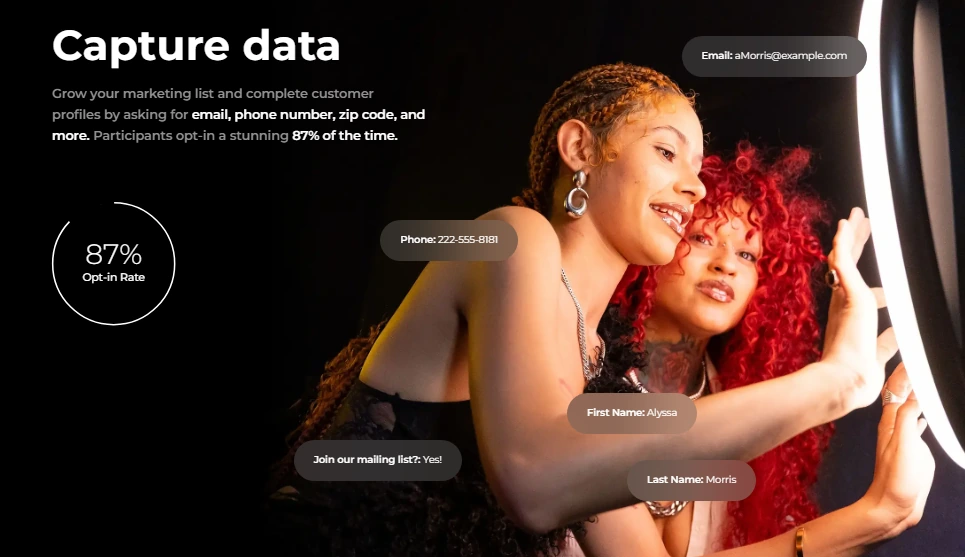
Lead Capture: 87%+ Opt-In Rate Built Into the Photo Experience
What makes Simple Booth’s analytics valuable for marketers is the lead capture workflow built into the photo experience. Before or after capture, participants fill a customizable data capture form inside the booth app. On Pro, it supports 6 standard fields (email, first name, last name, phone, postal code, date of birth). On Select, up to 10 custom fields including checkboxes and required legal terms.
The platform captures opt-in rates as high as 87-89% because it collects data as a natural part of receiving the photo, not as a separate form. Data exports as CSV, integrates natively with MailChimp, and can reach custom CRM systems via the Open API on Pro and Select tiers.
Source: Simple Booth
Treetop Golf built 150,000 unique email addresses across locations using Simple Booth’s built-in lead capture. (Simple Booth)
Remote Dashboard and Device Management: Configure and Monitor From Anywhere
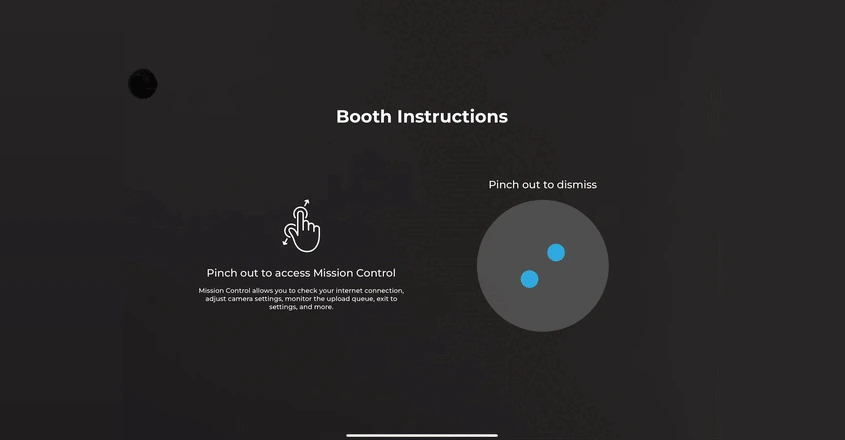
Operators configure and update presets remotely via the online dashboard, and changes sync to the iPad without exiting booth mode. The Mission Control overlay, triggered by a two-finger pinch, lets operators check device health (network, storage, queue), adjust camera settings, and sync dashboard changes during live events without disrupting the guest interface.
Source: Simple Booth
For multi-booth operators, multiple iPads run under one account using add-on licenses, with settings shareable across staff accounts. A Preflight Check screen runs before each event launch to catch configuration issues before they become on-site problems.
Hardware: Ring Light With Sub-One-Minute Setup
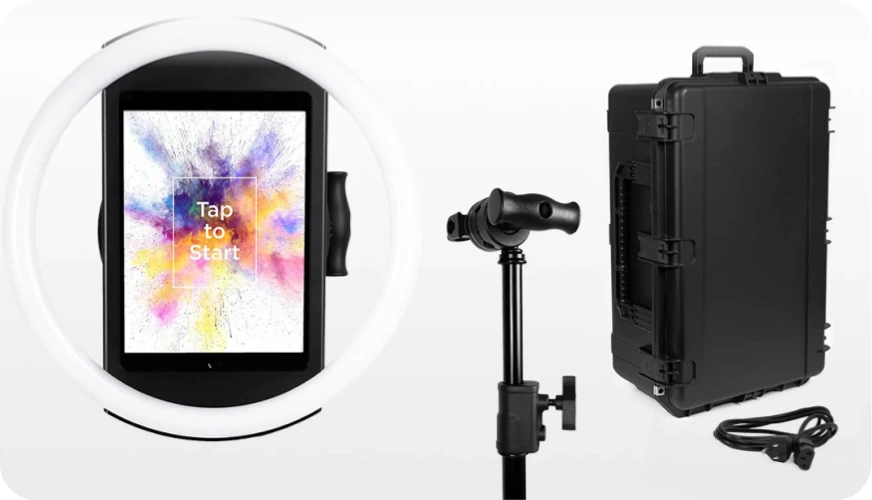
The HALO photo booth kit uses a precision-machined aluminum chassis with a patented ring-light system: 112 LEDs producing up to 2,100 lumens, rated for 50,000 hours. Groups can stand 6-8 feet back and still get even lighting. The iPad snaps in via a tool-less faceplate with a concealed USB-C cable for continuous charging, and the whole system sets up in under one minute.
Source: Simple Booth
HALO 5.0 (November 2025) added the Layout Designer, an in-app design tool for overlays, text layers, gradients, and brand assets. It also brought DSLR/mirrorless camera support (Canon and Sony), WhatsApp delivery for international events, and AI Effects that transform guest photos using text prompts while preserving identity and likeness.
Simple Booth Pricing
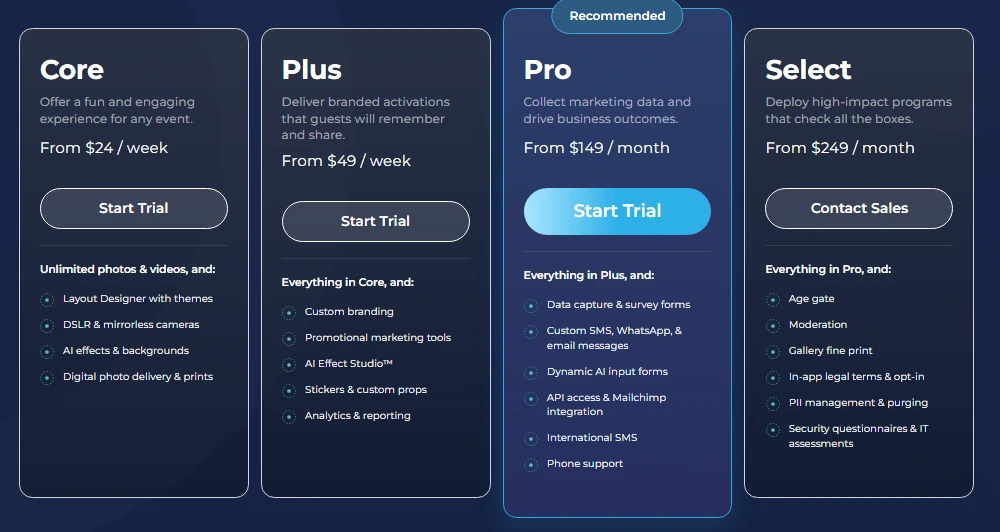
Simple Booth uses a per-license subscription model with weekly, monthly, and yearly billing. Each plan includes one device license; additional devices require add-on licenses.
Everyday Plans:
- Lite: $14.99/week, $29.99/month, or $289.99/year (App Store only; for personal and casual use). Custom layouts, motion and still capture, photo delivery, galleries. Excludes analytics, lead capture, custom branding, and DSLR support.
- Core: $24/week, $49/month, or $490/year. Adds DSLR support, video, background replacement, Dropbox integration, AI effects, and Virtual Booth. 50 bonus AI credits.
- Plus: $49/week, $99/month, or $990/year. Adds custom branding, analytics and reporting, custom AI effects, and guest-editable text layers. 100 bonus AI credits.
Business Plans:
- Pro: $149/month or $1,490/year. Adds lead capture, API integration, phone support, moderation, and age gate. 150 bonus AI credits.
- Select: $249/month or $2,490/year. Adds demographic analytics (face detection), in-app custom legal terms, and security questionnaires. 200 bonus AI credits.
A 7-day free trial is available with 25 free AI credits.
Source: Simple Booth
Use Simple Booth if:
- You want analytics, lead capture, and photo delivery built into one platform with dedicated hardware
- You need high opt-in lead capture (87%+ rates) at events, activations, or permanent venue installations
- You run multiple booths and need remote dashboard management with real-time configuration sync
- You serve brand clients who expect social sharing metrics and gallery engagement data as post-event deliverables
Why Simple Booth Topped Our List
Simple Booth earned the top spot because its analytics are built into the photo experience itself. The lead capture form, social sharing prompts, and gallery engagement tracking all belong to the same workflow that captures and delivers the photo. Every session generates the data an operator or marketer needs to measure ROI, without asking guests to fill a separate survey or use a different tool.
For operators and marketers who treat the photo booth as a data capture and engagement channel (not just entertainment), that integration sets Simple Booth apart from platforms where analytics feel bolted on.
Deep Eddy Vodka generated 14,000 social posts through Simple Booth brand marketing activations. (Simple Booth)
2. Snappic: Best Unified Analytics for Operators Running Multiple Booth Formats
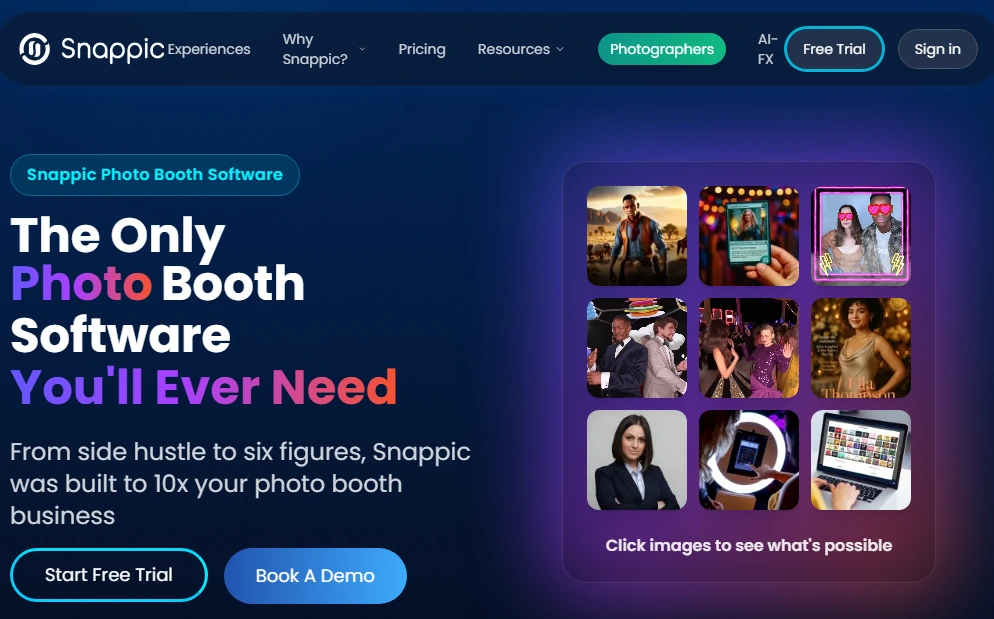
When you own a 360 spinner, a mirror booth, and a couple of iPad setups, tracking performance across your fleet usually means juggling separate dashboards, exporting data from different systems, and assembling client reports by hand. Snappic solves that.
Snappic is a subscription-based platform for professional event operators who run mixed booth fleets: iPad booths, 360 video spinners, mirror booths, robot arm/GlamBot setups, and roaming photography. Its analytics dashboard consolidates session data, sharing metrics, and client reporting across all formats in one place.
The platform runs at 100,000+ events worldwide across 8,000+ operators. Banyan Software acquired Snappic in July 2024, describing it as “the leader in photo booth software.”
| Snappic Pros | Snappic Cons |
|---|---|
| - Unified analytics across iPad, 360, mirror, GlamBot, and roaming formats | - Client analytics requires Business plan ($189/month) or above |
| - White-labeled client analytics reports on Premium and Scale plans | - International SMS requires credit top-ups or a Twilio account |
| - Share tracking segmented by delivery channel with reach and impressions | - AI effects and SmartShare credits add variable costs |
| - Automated demographic analytics (AVA) on all plans |
Snappic: Top 3 Analytics Features
- Unified multi-format session analytics across iPad, 360, GlamBot, mirror, and roaming booth formats in a single dashboard
- Send to Client branded analytics reports delivered as a live webpage with gallery, share data, and engagement metrics
- Automated Vision Analytics (AVA) for aggregate demographic data (gender distribution, age ranges, face counts) on all plans
For operators with a mixed booth fleet, Snappic’s advantage is structural: all session data, regardless of which hardware captured it, flows into one dashboard. That consolidation makes cross-format analytics possible. You can see how many captures the 360 spinner produced, how many still photos came off the mirror booth, and how many roaming photos were delivered, all in one timeline.
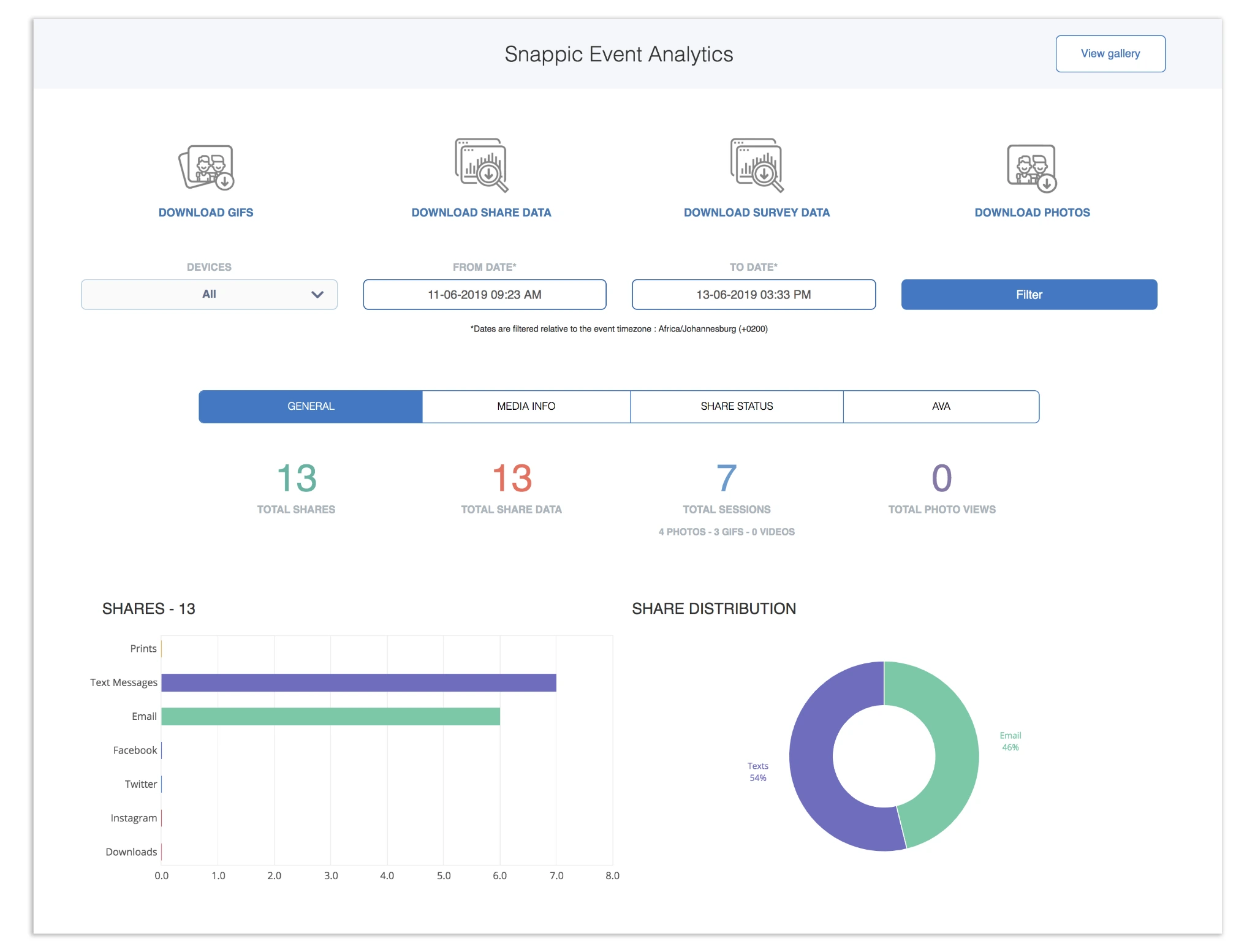
The built-in event analytics break down shares by channel (email, SMS, Facebook, Instagram, QR download, and print) with reach and impressions per channel. A media timeline maps capture volume across the event and identifies peak engagement periods, so operators can build a complete performance narrative for client reporting. On Premium and Scale plans, white-label URLs and emails mean the client sees only the operator’s branding.
Source: Snappic
Snappic Pricing
Snappic uses a per-booth-license subscription model. Annual billing saves 20%. A 14-day free trial is available, no credit card required.
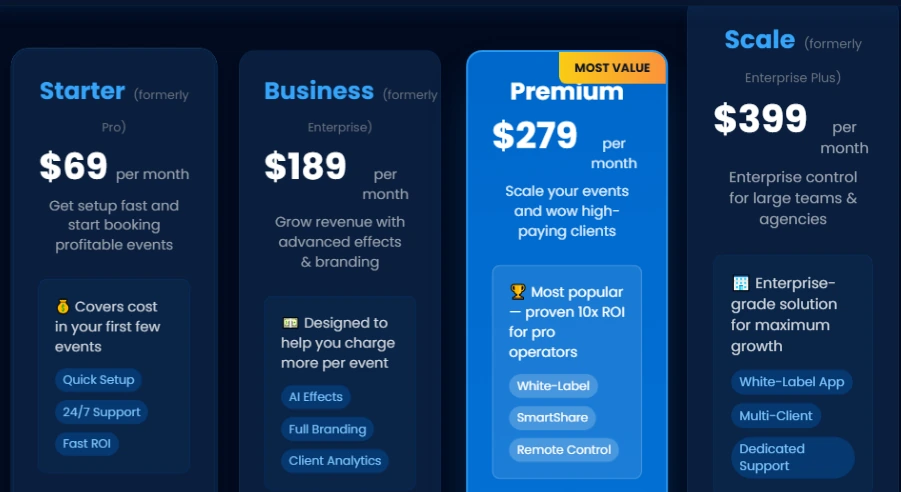
- Starter: $69/month ($499/year). One booth license. Standard iPad photo booth features, 60+ event templates, DSLR integration, 24/7 support. Client analytics, surveys, and VideoFX not included.
- Business: $189/month ($1,799/year). Adds VideoFX for 360 and GlamBot, AI-FX effects, client analytics and custom surveys, content moderation, and priority support. White-label features available as paid add-ons.
- Premium: $279/month. All Business features plus white-label URLs and emails, webhooks, LiveConnect remote control, and 400 SmartShare AI credits.
- Scale: $399/month ($3,999/year). Unlimited sub-account management, grey label iPad app, dedicated customer success manager, and marketing support.
Source: Snappic
Use Snappic if:
- You run more than one booth format and need analytics consolidated across all of them in a single dashboard
- Your clients expect branded post-event analytics reports with sharing and engagement data
- You’re scaling toward a multi-client agency structure with sub-account management
- You need aggregate demographic audience data (AVA) alongside session metrics
3. Foto ATM: Best Revenue Analytics for Permanent Commercial Kiosk Deployments
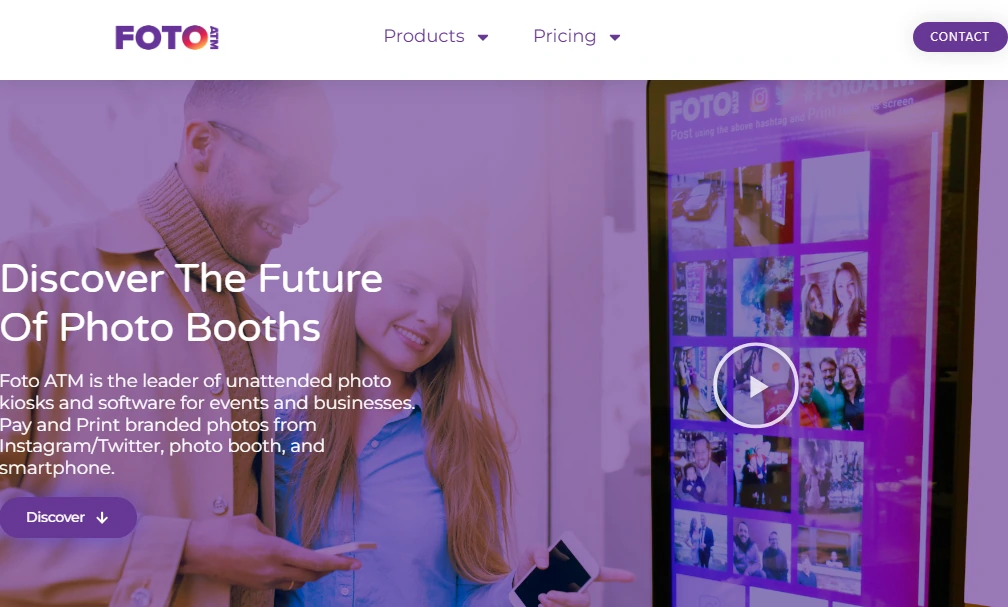
Photo booths at events are staffed, temporary setups. Photo kiosks in bars, arcades, and hotel lobbies are permanent, unattended, and need to make money every hour they run. If your booth generates revenue rather than renting for events, you need analytics built around economics, not engagement.
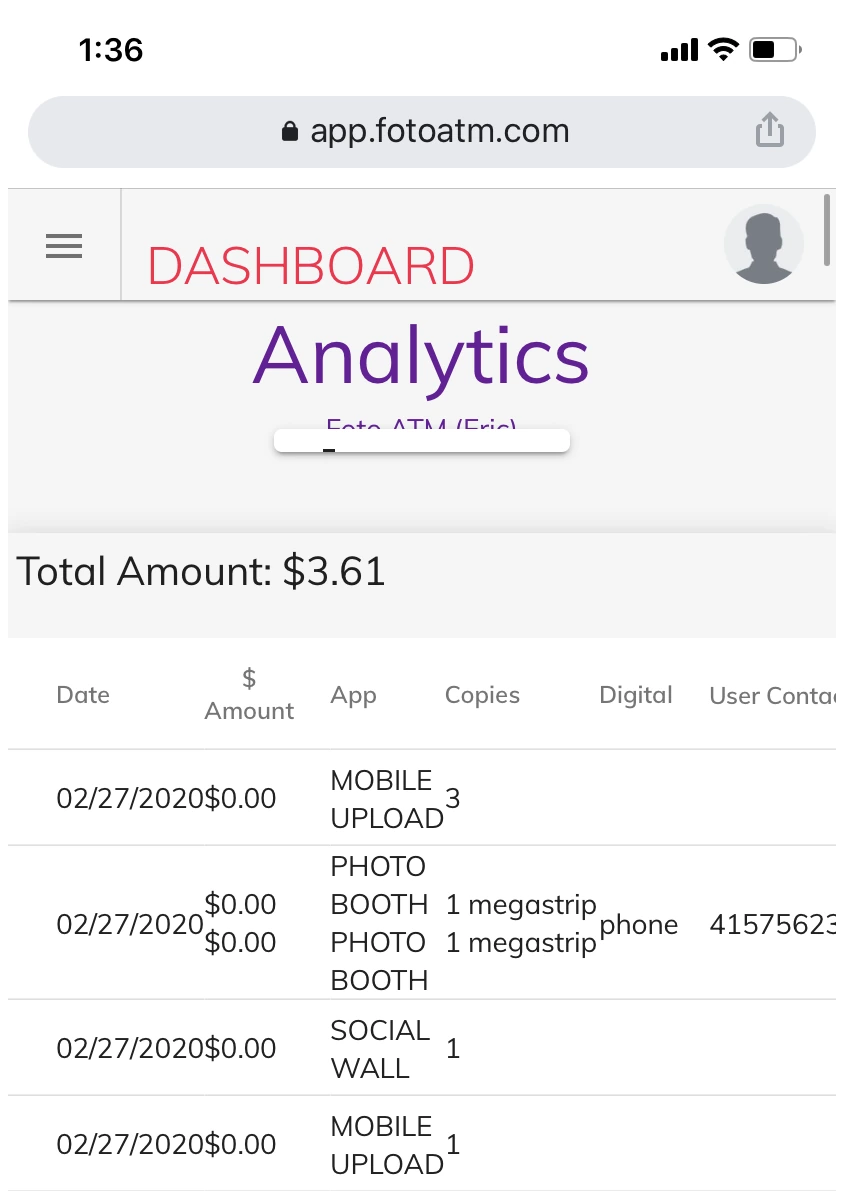
Foto ATM is a combined hardware-and-software platform designed for permanent venue deployments. Its analytics section tracks financial performance with a real-time revenue dashboard covering gross income, processing fees, and per-kiosk transaction data, all exportable to CSV for bookkeeping.
| Foto ATM Pros | Foto ATM Cons |
|---|---|
| - Revenue dashboard with per-kiosk financial tracking | - Hardware starts at $6,999+ (one-time purchase) |
| - Dynamic pricing adjustable remotely in real time | - Windows-only (no iPad, Mac, or Android) |
| - Multi-kiosk fleet management from one cloud dashboard | - SMS delivery limited to US, Canada, Australia, and UK |
| - Automated low-supply alerts for print media | - Enterprise plan includes only 2 software licenses |
Foto ATM: Top 3 Analytics Features
- Real-time revenue dashboard tracking gross income, fees, and per-kiosk transaction data segmented by product type (Mobile Upload, Print Strip, Digital, Postcard)
- Dynamic Product Pricing configurable remotely from any device, with live price adjustments per kiosk and no site visit needed
- Multi-kiosk fleet management with email alerts when print supply runs low so restocking happens before downtime
What sets Foto ATM apart is that its analytics match how an unattended vending business actually runs. Transaction data segments by date, revenue breaks down per kiosk, and per-product performance tracks separately. An operator with three bar installations can see which kiosk earned the most last Saturday, not just how many photos were taken.
Source: Foto ATM
Dynamic Product Pricing comes with every plan, including the $49/month Standard tier. Operators set per-product prices and change them from the dashboard or smartphone app without touching the kiosk: lower prices on a slow Tuesday, raise them on a packed Friday night, run a promo window, and revert afterward. Pricing changes take effect on the kiosk in real time with no restart.
Foto ATM Pricing
Foto ATM combines a one-time hardware purchase with recurring SaaS software. Annual billing saves approximately 15%.
Hardware: $6,999+ one-time purchase for the 49” LED touchscreen kiosk (pre-installed with software). Hardware rental is also available.
Software:
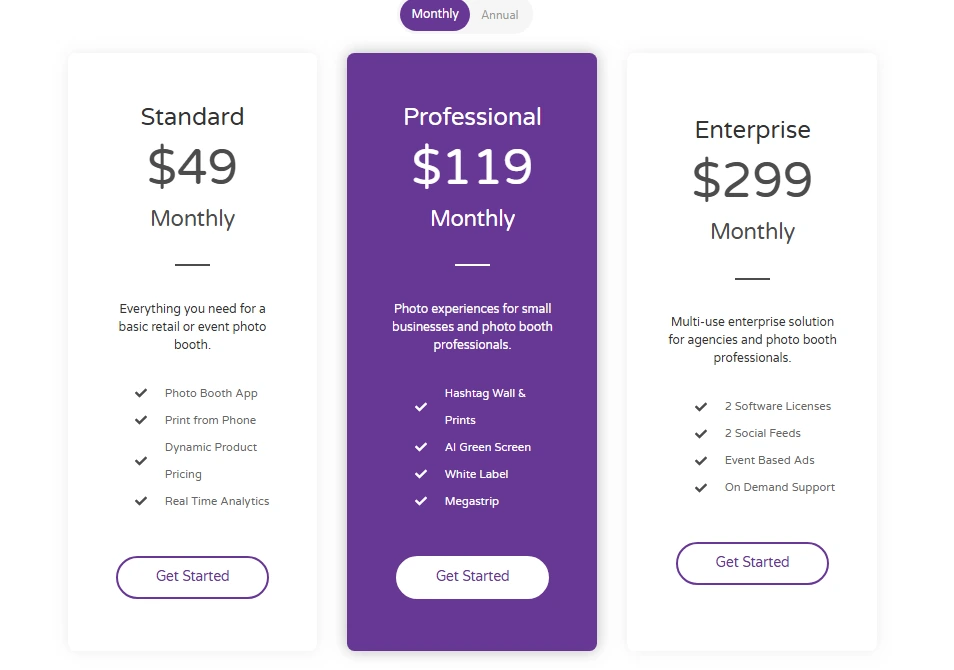
- Standard: $49/month (or $42/month annually). Photo Booth App, Print from Phone, Dynamic Product Pricing, Real-Time Analytics, Unlimited Events, Data Capture, Email Support.
- Professional: $119/month (or $101/month annually). Adds Hashtag Wall, AI Green Screen, White Label branding, Phone Support.
- Enterprise: $299/month (or $254/month annually). Adds 2 Software Licenses, 2 Social Feeds, Event-Based Ads, On-Demand Support.
Source: Foto ATM
Use Foto ATM if:
- You operate permanent kiosks in bars, arcades, hotels, or entertainment venues
- You need per-kiosk financial analytics and dynamic pricing from a remote dashboard
- Your venues use token or credit payment systems (Foto ATM integrates with Embed and Sacoa pulse readers)
- You want a combined hardware-and-software stack from one vendor on Windows
4. BoothLedger: Best Budget Cloud Analytics for Small Photo Booth Businesses
Not every photo booth operator runs a multi-booth empire. If you’re a one-to-five booth operation, you still want cloud analytics and reporting, but you shouldn’t pay $100+ per month to get them.
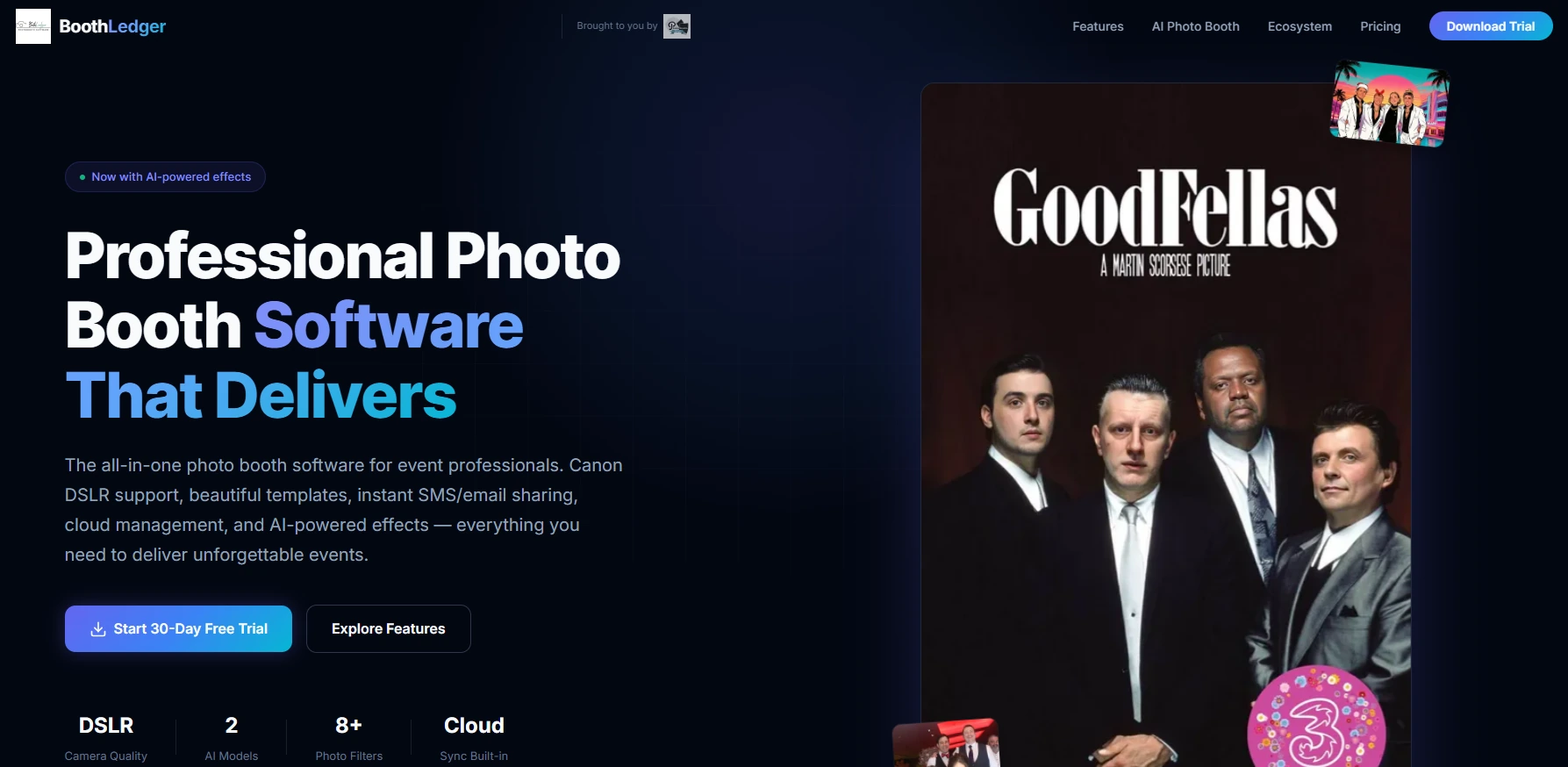
BoothLedger is a Windows photo booth platform built by PhotoBooth Guys, an active Irish event hire company that still runs real events. Its cloud analytics come with the base subscription (not as a separate add-on), making it the cheapest entry point for small operators who want session tracking, remote management, and per-event reporting in one product.
| BoothLedger Pros | BoothLedger Cons |
|---|---|
| - Cloud analytics included at €12/month | - Windows-only (no iPad, Mac, or Android) |
| - 45-second cloud sync cycle for near-real-time dashboard updates | - Limited ecosystem (no CRM integrations beyond CSV export) |
| - Offline photo queuing keeps analytics data gapless | - 2 device licenses per plan |
| - Canon DSLR tethering on all plans |
BoothLedger: Top 3 Analytics Features
- BoothLedger Cloud included in the base plan: capture count, share count, print count, and gallery view data per event with automatic photo upload and thumbnails
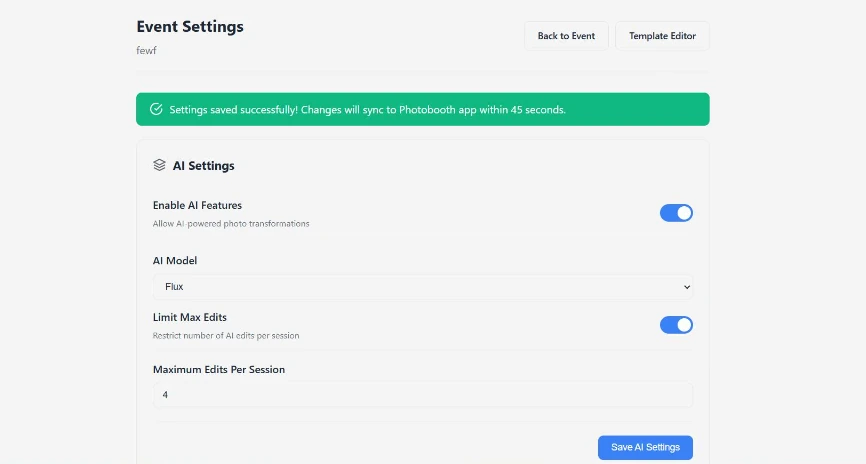
- Remote event management dashboard where AI prompts, camera settings, and templates sync to the on-site booth within 45 seconds
- Offline photo queuing that captures, prints, and queues shares locally when WiFi drops, then syncs to cloud when connectivity returns
The practical difference is structural. BoothLedger Cloud comes with the €12/month Basic plan rather than as a separate product. Some competing Windows platforms sell cloud analytics separately, so operators pay two bills for what BoothLedger bundles into one.
The 45-second sync cycle means the dashboard shows near-real-time event performance instead of requiring an end-of-night export. For operators who promise clients a post-event analytics summary, this removes the manual data-gathering step.
Source: BoothLedger
The offline queue is especially useful at venues with unreliable WiFi (marquee tents, rural estates, festival grounds). The booth keeps running and queuing locally, then syncs everything when connectivity returns. The analytics record stays complete.
BoothLedger Pricing
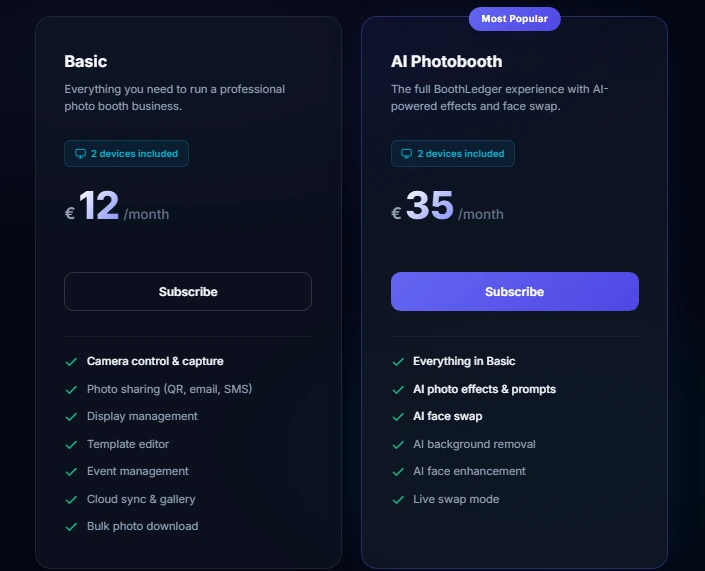
BoothLedger uses flat-rate monthly or annual billing in euros. Annual billing saves approximately 15%. Both tiers include 2 device licenses.
- Basic: €12/month. Canon DSLR tethering, QR/email/SMS sharing (via Twilio), template editor, BoothLedger Cloud gallery and event analytics, offline queue with automatic sync.
- AI Photobooth: €35/month. Everything in Basic plus 50+ AI creative styles, AI face swap, AI background removal, and two selectable AI engines.
Source: BoothLedger
Use BoothLedger if:
- You run a small (1-5 booth) operation and want cloud analytics at the lowest subscription price in the category
- You own Canon DSLR hardware and run events on Windows 10/11
- You regularly work at venues with unreliable WiFi and need offline-first reliability that keeps analytics data complete
- You want AI effects at a flat monthly rate without per-image credit purchases
5. Pictor.pro: Best Client-Facing Analytics Dashboard With Shareable Reporting
When your client asks “how did the booth perform?” after an event, most operators scramble to screenshot dashboards, export CSVs, and paste data into a slide deck. Pictor.pro replaces that workflow with a single shareable link.
Pictor.pro is an AI-focused photo booth platform that generates operator and client-facing analytics from inside the same event builder used for capture and delivery setup. Its main feature is a shareable, read-only analytics URL per event that clients can open without creating a Pictor account.
| Pictor.pro Pros | Pictor.pro Cons |
|---|---|
| - Shareable read-only analytics URL per event for client handoff | - No per-event or weekly pricing available |
| - Native DSLR tethering for Canon, Nikon, and Sony on iPad | - SMS sharing requires Pro plan ($99/month) or above |
| - Emergency phone support on every paid plan, including Basic | - Token-based AI pricing adds variable costs on top of subscription |
| - AI tokens never expire |
Pictor.pro: Top 3 Analytics Features
- Shareable read-only analytics URL per event for instant client handoff with no login required
- Output-level engagement tracking by content type (stills, GIFs, boomerangs, AI images, videos) with per-channel sharing data (email, SMS, QR scan, and direct download)
- DSLR tethering on iPad for Canon, Nikon, and Sony cameras (Pro and above), with DSLR sessions tracked through the same analytics layer
For operators running brand activations, the shareable analytics URL is the main advantage.
When the event ends, you send the client a link. They see sessions, content type splits, and sharing metrics in their browser without creating an account or waiting for a report. Lead capture data from built-in survey workflow stages feeds into the reporting, and CSV export with tokenized survey data is available on Premium for clients who want raw data.
Pictor also tracks content by type: stills, GIFs, boomerangs, AI-generated images, and videos appear as distinct categories. When AI effects are on, operators can see which formats generated the most shares and adjust templates for future events based on actual guest behavior.
AI cost transparency is a strength.
Every AI action has a published token cost shown before generation, and tokens never expire. A worked example from Pictor’s documentation: a 200-guest event using high-compute AI images plus background removal uses roughly 600 tokens (about $60 at the 2,000-token bundle rate).
Emergency phone support is available on every paid plan, including Basic, not just enterprise tiers. For operators whose analytics deliverables are part of a corporate account relationship, live escalation during the event protects the output the client expects.
Pictor.pro Pricing
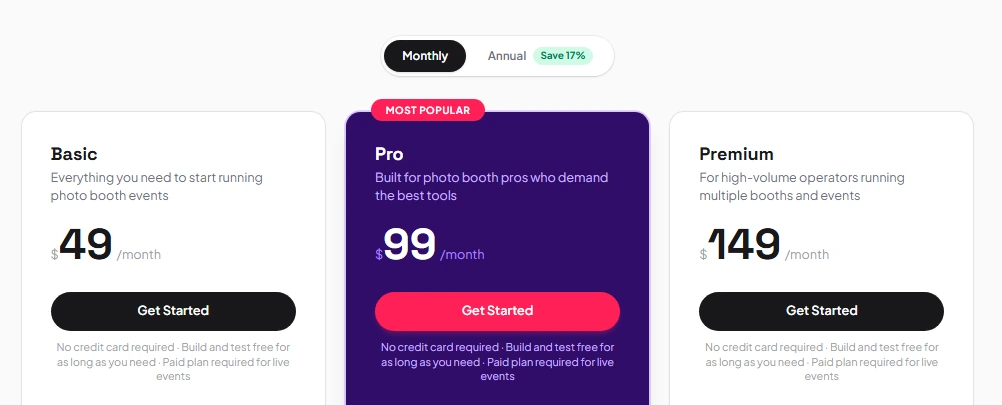
Pictor uses a subscription plus token model. Monthly or annual billing available; no long-term contracts required.
- Basic: $49/month (annual billing). Photos, GIFs, boomerangs, video, printing, AI preset filters (no token cost), basic analytics, community forums and email support, emergency phone support.
- Pro: $99/month (annual billing). Custom prompt editor, advanced analytics, CSV export, SMS sharing, DSLR tethering, webhooks, Zapier and Dropbox integrations, live chat.
- Premium: $149/month (annual billing). AI Video Effects, embeddable iframes, desktop browser booth access.
AI Tokens (purchased separately, never expire): 100 tokens at $20 ($0.20 each) up to 5,000 tokens at $450 ($0.09 each). New accounts receive 25 free tokens.
Source: Pictor.pro
Use Pictor.pro if:
- Your post-event reporting to corporate clients is a formal deliverable, and the shareable read-only URL replaces manual report building
- You want to track which AI effect types drive the most guest sharing across events
- You operate on Android hardware or want cross-platform flexibility (native Android support at feature parity with iOS)
- You need AI cost predictability with never-expiring token bundles
6. LumaBooth: Best Cross-Platform Analytics at the Lowest Annual Cost
Most photo booth platforms lock analytics to one operating system: iOS-only or Windows-only. If you run iPads at weddings and Windows rigs at corporate activations, your event data lives in two separate worlds.
LumaBooth (by Lumasoft, the company behind dslrBooth) bridges that gap. It spans Windows PC, iPad, iPhone, and Mac under a single brand with a browser-based dashboard, making it the only platform in this category that manages analytics across all major desktop and mobile operating systems from one place.
| LumaBooth Pros | LumaBooth Cons |
|---|---|
| - Cross-platform analytics across Windows, iPad, iPhone, and Mac | - Per-event analytics and Google Analytics require fotoShare Business add-on ($39.99/month) |
| - Lowest annual subscription cost in the category ($17/month for Windows) | - No Android support |
| - fotoShare Cloud Basic included free with every license | - Booth CoPilot remote management app is Windows-only |
| - 820+ professionally designed templates via browser-based Dashboard |
LumaBooth: Top 3 Analytics Features
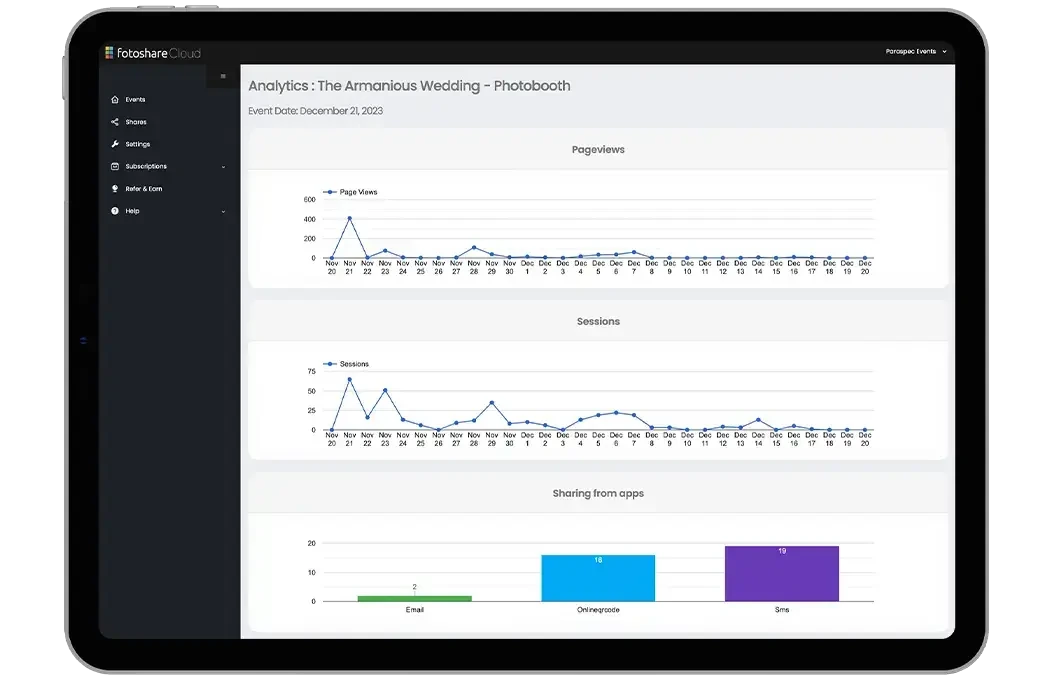
- fotoShare Cloud unifying gallery page views, unique visitors, social referrers, and engagement data across Windows and Apple devices in a single account
- Google Analytics integration with custom tracking ID per event on the Business plan, funneling booth gallery traffic into an operator’s existing GA property
- LumaBooth Dashboard for browser-based event configuration across all devices, with Canva Direct Import and 820+ templates
Every photo, GIF, boomerang, and video captured on any device uploads to the same fotoShare Cloud account.
The result is a single Shares list showing every guest interaction, the delivery channel used, and the corresponding email or phone number, regardless of which device ran the session. For operators splitting their fleet across operating systems, analytics never fragment between separate dashboards.
Source: LumaBooth
The cost is straightforward.
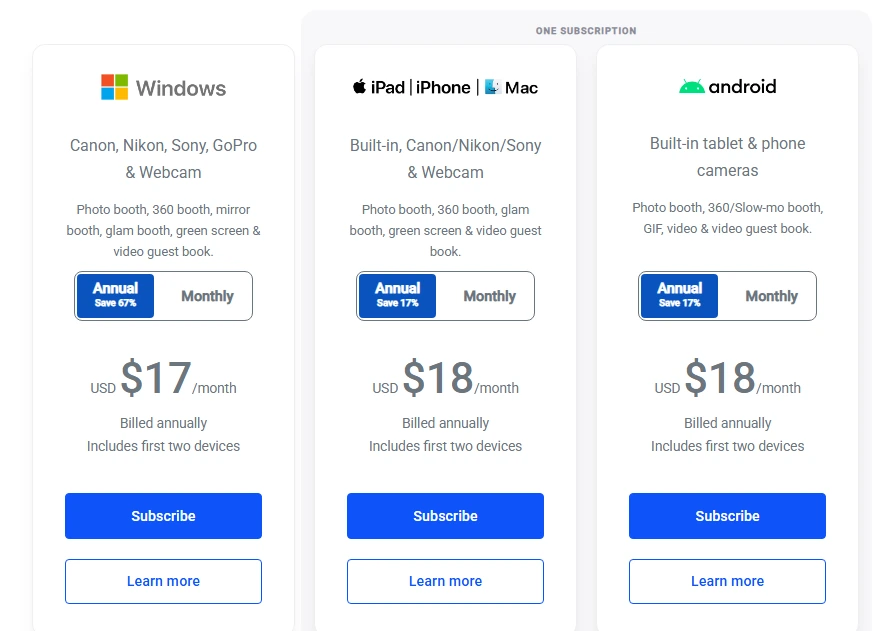
LumaBooth for Windows costs $17/month billed annually (roughly $204/year for two devices), and fotoShare Cloud Basic is included free. Gallery hosting, shareable links, contact data export, and baseline engagement tracking cost nothing beyond the booth subscription. Operators who need more (password-protected events, custom subdomains, Google Analytics passthrough, per-event analytics) upgrade to fotoShare Cloud Plus ($19.99/month) or Business ($39.99/month).
The LumaBooth Dashboard at dash.lumabooth.com works from any browser for pre-event and mid-event configuration. Templates, overlays, backgrounds, and sharing settings sync when the booth loads the event.
LumaBooth Pricing
LumaBooth uses per-device subscriptions with separate Windows and Apple product lines. All subscriptions include fotoShare Cloud Basic at no additional cost.
LumaBooth for Windows:
- Annual: $17/month (billed annually, covers two devices)
- Monthly: $49.99/month
LumaBooth for Apple (iPad/iPhone/Mac):
- Annual: $18/month (billed annually, covers two devices)
- Monthly: $19.99/month
fotoShare Cloud Add-ons (optional):
- Plus: $19.99/month (password-protected events, embeddable albums, custom homepage)
- Business: $39.99/month (custom subdomain, Google Analytics integration, per-event analytics)
Free trial available with no time limit; output carries a watermark until a subscription is activated. New subscribers receive 20 free AI Portrait credits.
Source: LumaBooth
Use LumaBooth if:
- You run a mixed Windows-and-Apple fleet and need event analytics consolidated in a single cloud account
- You want the lowest annual subscription cost in the category without giving up cloud gallery hosting and engagement tracking
- You want browser-based event configuration that works across all devices in your fleet
- Your clients expect event data in Google Analytics or want branded microsites on a custom subdomain
7. Touchpix: Best Analytics for 360 Photo Booth Specialists
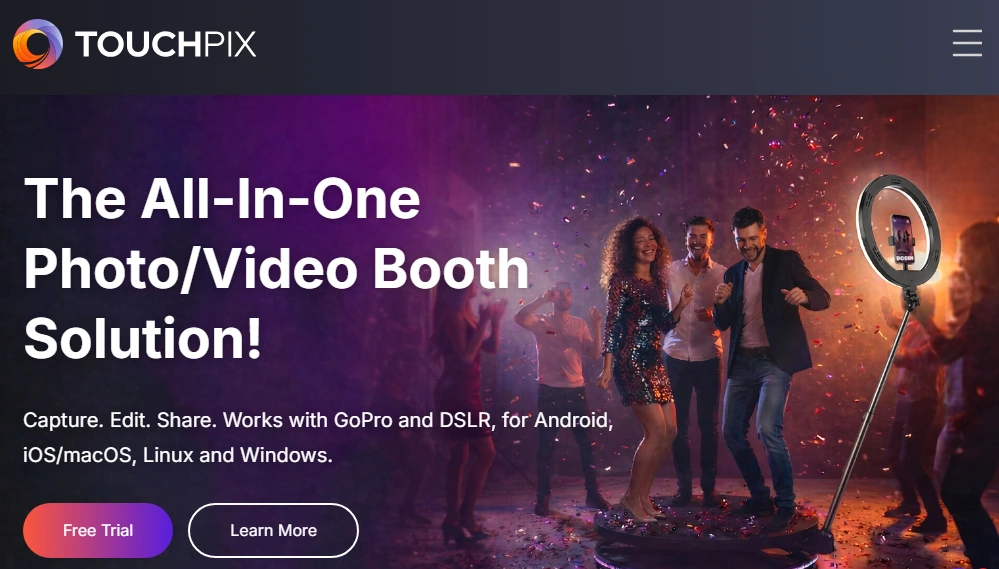
If your flagship product is a spinning-arm 360 video booth, most photo booth software treats that format as a secondary mode attached to a traditional photo booth core. Session tracking reflects the afterthought: 360 captures get lumped with static photos, and the nuances of multi-format events get lost.
Touchpix inverts this. Built around 360-degree spinner workflows, it consolidates session data from iOS, Android, Windows, Mac, Linux, and Raspberry Pi into a single online event dashboard. With a 4.8-star rating across more than 6,600 App Store reviews, it’s the most popular platform among operators whose 360 booths are their primary hardware.
| Touchpix Pros | Touchpix Cons |
|---|---|
| - 360 spinner session analytics as the primary data unit | - PhotoPass plan excludes video and slow-motion (core 360 features) |
| - Broadest OS support in the category (6 platforms) | - AI Pro credits required for cloud AI transformations |
| - GoPro 7-14 plus Canon, Nikon, and Sony DSLR support | - 6-month default cloud media storage |
| - Unlimited devices on all subscription tiers |
Touchpix: Top 3 Analytics Features
- 360 spinner session analytics tracking session counts, capture types, and completion rates across six capture modes (photos, AI photos, video, slow-motion, boomerangs, GIFs)
- Centralized online dashboard consolidating session data from iOS, Android, macOS, Windows, Linux, and Raspberry Pi in a single event view accessible from any browser
- Multi-camera session data from GoPro 7-14 (wired and wireless) alongside Canon, Nikon, and Sony DSLR/mirrorless cameras in one analytics view
The platform’s Bluetooth integration automatically triggers the 360 spinner without a button press, and that trigger becomes the unit for per-session analytics. After a multi-format activation, operators can see that 360 video sessions produced a different share-through rate than GIF sessions, or that boomerangs generated more WhatsApp shares than email deliveries.
Each event generates a gallery with a shareable link, and gallery views feed back into event analytics. Touchpix’s roadmap includes custom domain URLs for event galleries, social media integration within galleries, and gallery embedding on third-party websites.
The MultiPass and MultiPass Pro tiers support 4 and 8 active events simultaneously, and the unlimited-device policy across all subscriptions means operators never pay per-device fees as their fleet grows. For venues without reliable internet, Touchpix’s Scanpix 2 offline sharing system delivers media to guests via QR code without any network access.
Touchpix Pricing
Annual subscriptions save approximately 39-40% versus monthly billing. All tiers include unlimited devices.
- PhotoPass: $439.90/year. 2 simultaneous events. Photos, AI photos, and GIFs. Video and slow-motion excluded.
- MultiPass: $879.99/year. 4 simultaneous events. Full capture set including video, slow-motion, and boomerangs.
- MultiPass Pro: $1,407.99/year. 8 simultaneous events. Adds Virtual Booth and Advanced Surveys.
- MultiPass Enterprise: $2,199.99/year. 12 simultaneous events. Adds Mosaic display and RAW cloud backups.
A 14-day free trial with no watermarks is available, no credit card required.
Use Touchpix if:
- Your flagship product is a spinning-arm 360 video booth and you need session analytics built around that format
- Your hardware spans multiple operating systems and you need centralized dashboard access without per-device logins
- You run GoPro and DSLR cameras at the same events and want session data consolidated in one view
- You want unlimited devices on every subscription tier as your fleet grows
Final Verdict
Every platform on this list offers real analytics value, but each serves a different operator. The best fit depends on your hardware, event volume, and what your clients expect from post-event reporting.
Our top picks for the three most common use cases:
- Simple Booth: If you want integrated analytics, high-converting lead capture (87%+ opt-in rates), and dedicated hardware in one iPad-based platform with remote dashboard management for multi-booth operations. Start your free trial with Simple Booth.
- Snappic: If you run mixed booth fleets (iPad, 360, mirror, GlamBot, roaming) and need unified analytics and white-labeled client reporting across all formats from one dashboard.
- Pictor.pro: If your corporate clients expect a polished analytics deliverable after every event and a shareable URL replaces manual report building.
Best Photo Booth Software With Analytics and Dashboards FAQ
Which photo booth software has the best real-time analytics?
Simple Booth and Snappic offer the most thorough real-time analytics. Simple Booth tracks sessions, social sharing by channel (Facebook, X, Instagram, LinkedIn), gallery views, and demographics (face detection on Select) from a centralized online dashboard.
Snappic consolidates analytics across multiple booth formats (iPad, 360, mirror, GlamBot) with per-channel share tracking, reach and impressions estimates, and a media timeline showing engagement peaks across the event.
Is there free photo booth software with analytics?
No platform on this list offers a free plan with full analytics.
Several offer low-cost entry points. LumaBooth includes fotoShare Cloud Basic (gallery hosting and engagement tracking) free with every subscription starting at $17/month annually. BoothLedger includes cloud analytics in its €12/month Basic plan. Most platforms offer free trials: Simple Booth provides 7 days, Snappic and Touchpix each offer 14 days.
Which platform is best for client-facing analytics reports?
Pictor.pro and Snappic.
Pictor generates a shareable, read-only analytics URL per event that clients open without creating an account. Snappic’s Send to Client feature packages analytics into a branded live webpage with gallery, share data, and engagement metrics. On Snappic’s Premium and Scale plans, these reports are fully white-labeled under the operator’s own domain.
What is the cheapest photo booth software with built-in analytics?
BoothLedger at €12/month is the cheapest subscription with cloud analytics included. LumaBooth for Windows at $17/month annually is the cheapest base subscription overall, with fotoShare Cloud Basic included free. Per-event analytics and Google Analytics integration on LumaBooth require the fotoShare Business add-on at $39.99/month.
Which photo booth software supports the most hardware types?
Touchpix supports the broadest range: iOS, Android, Windows, Mac, Linux, and Raspberry Pi, with GoPro 7-14 and Canon, Nikon, and Sony DSLR/mirrorless cameras. Snappic covers the most booth format types (iPad, 360, mirror, GlamBot, roaming) but runs on fewer operating systems. LumaBooth spans Windows, iPad, iPhone, and Mac under one platform.
Do I need premium plans to get meaningful analytics?
On most platforms, yes.
Simple Booth requires Plus ($99/month) for analytics and reporting. Snappic requires Business ($189/month) for client analytics and surveys. Foto ATM includes real-time analytics on its Standard plan ($49/month). BoothLedger includes cloud analytics on its base €12/month plan. The analytics depth at lower price tiers varies, so match the plan to the reporting depth your clients expect.
Which platform is best for permanent venue installations?
Foto ATM is designed for permanent commercial kiosks, with revenue dashboards, dynamic pricing, and automated low-supply alerts for unattended 24/7 operation.
Simple Booth also supports permanent installs via its Install Kit (wall mount) and a Permanent Install Guide. The choice depends on whether you’re running the booth for venue entertainment and data capture (Simple Booth on iPad) or as a revenue-generating kiosk (Foto ATM on Windows).
Can photo booth analytics integrate with my CRM?
Integration depth varies.
Simple Booth offers native MailChimp sync and an Open API (Pro and Select tiers) for custom CRM delivery. Pictor.pro integrates with Zapier and webhooks on Pro and above. LumaBooth’s fotoShare Cloud passes gallery traffic through Google Analytics on the Business plan. Snappic supports webhooks on Premium and above. Most platforms also export lead capture data as CSV for manual import into any CRM.
Keep reading
 Best Of
7 Best Photo Booth Software with Video Message and Slo-Mo Capture [2026]
Booths that capture heartfelt video notes and buttery slo-mo. The moving stuff.
 Best Of
6 Best Photo Booth Software With QR Code Sharing [August 2026]
Booths that beam every snap to a phone with a quick scan. QR sharing done right.
 Best Of
7 Best Photo Booths for Comic Cons and Fan Conventions [August 2026]
Booths built for cosplay crowds and superfan energy. Con-ready and quick.