6 Best Photo Booth Software With QR Code Sharing [August 2026]

The days of waiting in line, printing a strip, and hoping nobody loses it before the end of the night are over. Today’s photo booth guests expect one thing: scan a code, get the photo on their phone, done.
QR code sharing has become the standard because it removes the two biggest friction points. Guests don’t need to download an app, and they don’t have to give up their email or phone number for a picture. One scan, instant download, no barriers.
For operators and event professionals, that speed means higher share rates, happier clients, and a more polished guest experience. But not every platform handles QR code sharing the same way. Some treat it as a paid add-on. Others include it on every plan but stumble when venue Wi-Fi drops. A few have built their entire delivery system around making QR sharing work offline.
We tested the leading platforms and narrowed the field to six that handle QR code sharing well, each for a different operator profile:
- Delivering a self-running photo experience,
- Managing brand activations at scale,
- Running multiple booth formats under one subscription,
- Specializing in 360-degree spin booth video delivery,
- Eliminating recurring software costs,
- And scaling a growing booth business with AI effects and DSLR quality at competitive pricing.
Let’s look at the best photo booth software with QR code sharing in 2026.
What Is Photo Booth Software With QR Code Sharing?
Photo booth software with QR code sharing refers to platforms that power digital photo booth experiences at events, venues, and brand activations, then deliver photos and videos to guests through scannable QR codes. Instead of printing physical strips or requiring guests to type contact information, a QR code appears on screen after each session. Guests scan it with their phone camera, and their photo opens for download or sharing.
The strongest platforms go beyond basic QR delivery. They combine professional capture quality, branded overlays, AI effects, lead capture, analytics, and multi-channel sharing (SMS, email, WhatsApp, AirDrop) alongside QR codes, giving operators everything they need for polished, data-driven photo experiences.
Here’s a quick look at our top picks.
Best Photo Booth Software With QR Code Sharing
 | Simple Booth Best for event professionals and brand marketers who want a self-running photo booth with integrated hardware, AI effects, and multi-channel QR code delivery. |
|---|---|
 | Snappic Best for photo booth businesses and brand activation agencies needing AI-powered sharing automation and post-event analytics. |
 | LumaBooth Best for multi-format booth operators who need one subscription covering six booth types across Windows and Apple devices. |
 | Touchpix Best for operators whose core service is 360-degree spin booths and who need dedicated video capture and QR delivery tools. |
 | SparkBooth Best for solo operators on Windows or Mac who want a one-time lifetime license with no recurring software fees. |
 | Booth.Events Best for growing photo booth businesses that want AI background removal, DSLR quality, and fleet management without enterprise pricing. |
How To Choose Photo Booth Software With QR Code Sharing
Here’s a short checklist to help you find the right platform:
- QR Code Reliability: Does QR sharing work offline, or does it fail when venue Wi-Fi drops? Platforms with offline queuing or local-network QR delivery protect your guest experience at any venue.
- Photo Quality: Does the platform support DSLR or mirrorless cameras, or is it limited to the iPad’s built-in camera? Image quality often separates a high-end booth rental from a basic one.
- Branding and Customization: Can you brand the guest experience with custom overlays, layouts, start screens, and gallery designs? White-label capabilities matter when serving corporate clients.
- Ease of Setup: How fast can you go from arrival to a running booth? For operators managing multiple events per week, setup time is a direct cost driver.
- Sharing Options Beyond QR: Does the platform also support SMS, email, WhatsApp, and AirDrop? Guests have different preferences, and the strongest platforms offer multiple delivery channels.
- Lead Capture: Can you collect guest email addresses and phone numbers during the photo experience? For brand marketers, data capture with high opt-in rates is often the primary reason for running a booth.
- Pricing Model Fit: Does the pricing work for your event volume? Weekly plans suit variable-volume rental operators, annual plans suit permanent installations, and lifetime licenses suit budget-conscious solo operators.
How We Curated Our List of Platforms
We identified the most widely adopted photo booth software platforms based on App Store ratings, professional community reputation, and documented operator adoption. We focused on platforms where QR code sharing is a core feature, not an afterthought.
We then evaluated each platform on four criteria:
- QR Code Implementation: How well does QR sharing work in practice? Does it function offline? Is it locked behind higher tiers?
- Capture Quality and Format Range: What cameras and capture modes are supported? Can the platform deliver professional-grade output?
- Operator Experience: How easy is setup, configuration, and multi-event management? Does the platform support remote monitoring and fleet operations?
- Value for the Price: What does each pricing tier include, and are there hidden costs that change the total cost of ownership?
By weighing these factors against distinct operator profiles, we narrowed the field to six platforms that each excel for a specific use case.
1. Simple Booth: Best for a Premium, Self-Running Photo Booth With Integrated Hardware and AI Effects
Running a photo booth business means showing up at venues you’ve never seen, setting up fast, and trusting that everything works while you’re not standing next to it. That last part is where most platforms fall short.
Simple Booth is built around that problem.
It pairs a subscription-based iPad app (HALO) with dedicated ring-light hardware and a cloud dashboard to deliver what the company calls “the photo booth that runs itself.” Hardware, software, and cloud management are designed together, so operators can set up in under a minute, walk away, and manage everything remotely.
With 30,000+ customers, a 4.7-star App Store rating from 2,400+ reviews, and 40 million+ moments captured since 2013, Simple Booth is one of the most widely adopted platforms in the industry.
| Simple Booth Pros | Simple Booth Cons |
|---|---|
| - Sub-one-minute setup with no tools required | - iPad-only (no Android or Windows support) |
| - Integrated ring light with 2,100 lumens in machined aluminum | - Occasional post-update bugs reported in App Store reviews |
| - AI effects, background replacement, and DSLR support | - Lite plan includes ads and excludes custom branding |
| - QR code, SMS, email, AirDrop, and WhatsApp delivery | |
| - Remote preset management via cloud dashboard |
Why Choose Simple Booth for QR Code Photo Sharing?
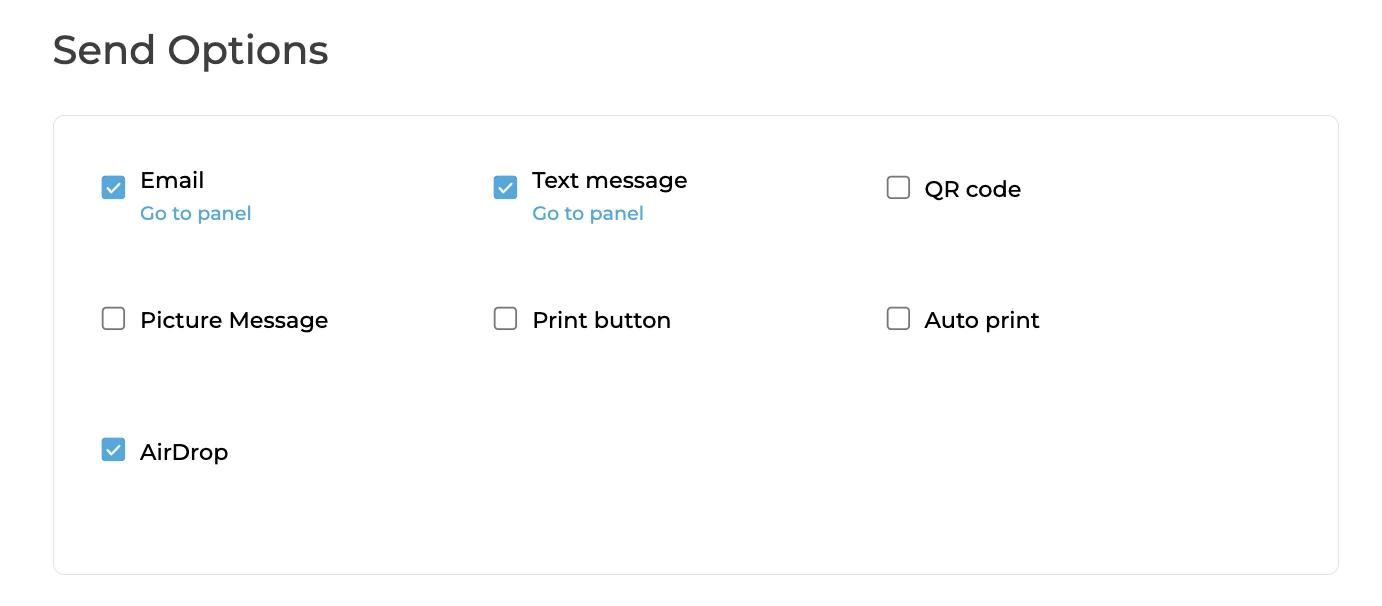
Simple Booth includes QR code sharing on every plan, from Lite through Select. After each session, a QR code appears on screen that opens the photo on the guest’s phone. No app download, no typing an email address, no waiting. The HALO app queues sessions in offline mode and delivers them when connectivity returns, so QR sharing works even at venues with unreliable Wi-Fi.
QR is one of five delivery channels. Guests can also receive photos via SMS, email, AirDrop, or WhatsApp, with WhatsApp added in HALO 5.0 for international deployments where SMS coverage is limited.
Source: Simple Booth
Integrated Hardware That Sets the Standard for Photo Quality
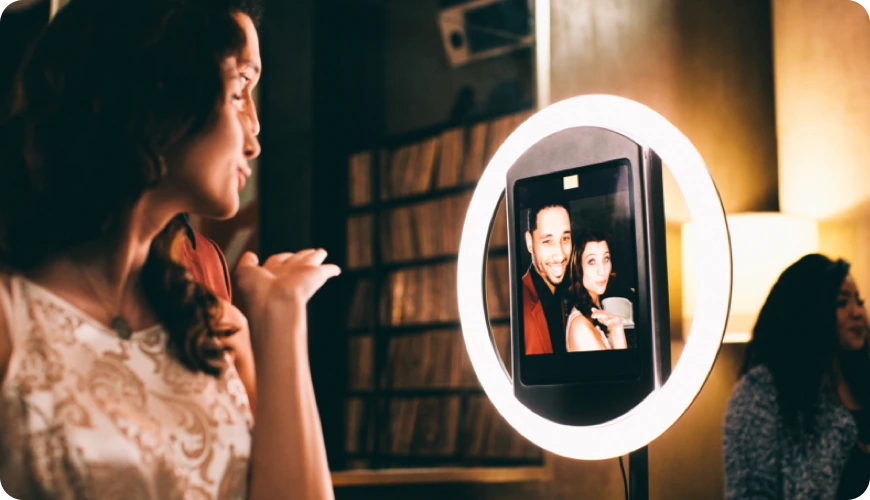
The HALO hardware kit is machined from a single billet of aluminum with a patented ring-light system producing up to 2,100 lumens from 112 LEDs, rated for 50,000 hours of operation. The iPad snaps in via a tool-less faceplate, and a concealed USB-C cable keeps it charged throughout the event. Groups can stand 6 to 8 feet back and still be evenly lit.
For operators who need higher image quality, HALO 5.0 added Canon and Sony DSLR and mirrorless camera integration on Core plans and above, bringing professional depth-of-field and dynamic range to the HALO workflow.
Source: Simple Booth
AI Effects and the Layout Designer
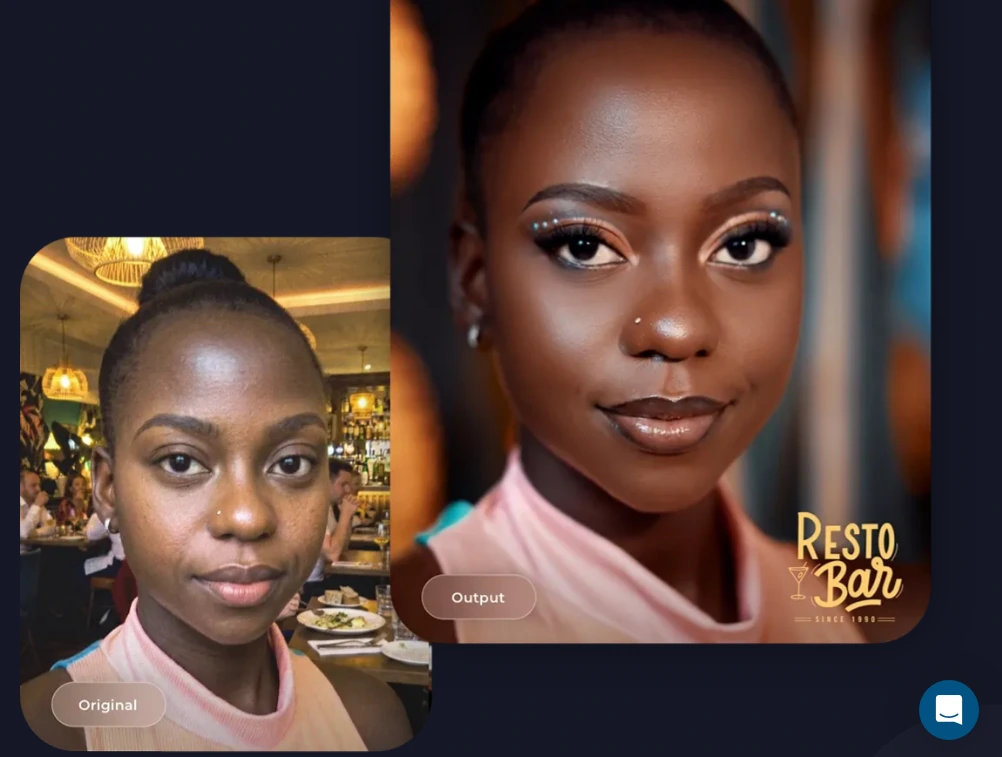
Simple Booth’s AI Photo Booth uses Nano Banana AI models to transform guest photos in real time using text prompts. The system handles identity preservation automatically, so guests remain recognizable no matter how extreme the transformation. Operators can test prompts outside booth mode at zero credit cost, iterating before the event.
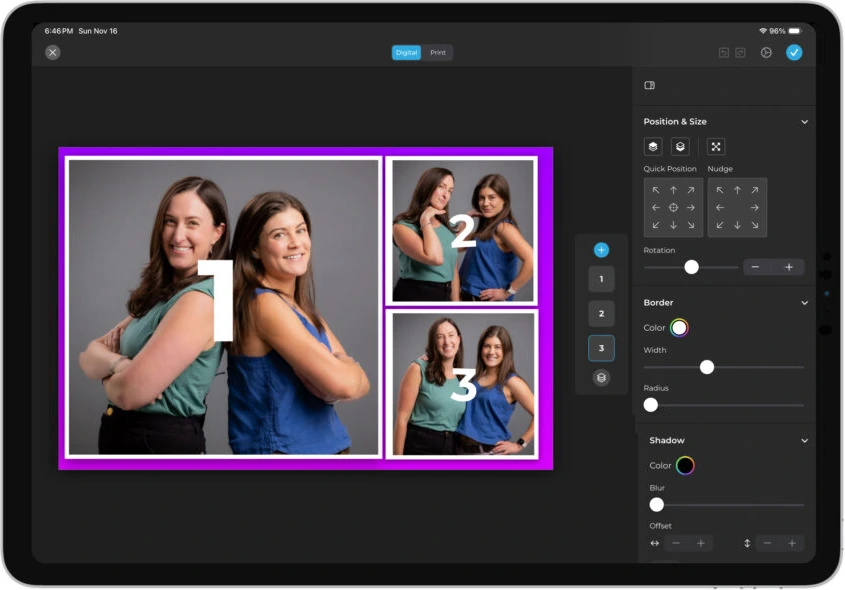
The Layout Designer, introduced in HALO 5.0, is a design tool available on both the iPad app and web dashboard, with layers, fonts, gradients, QR code embedding, and multi-layout support. It eliminates the need for external design software like Photoshop or Canva.
Source: Simple Booth
Lead Capture and Marketing Tools
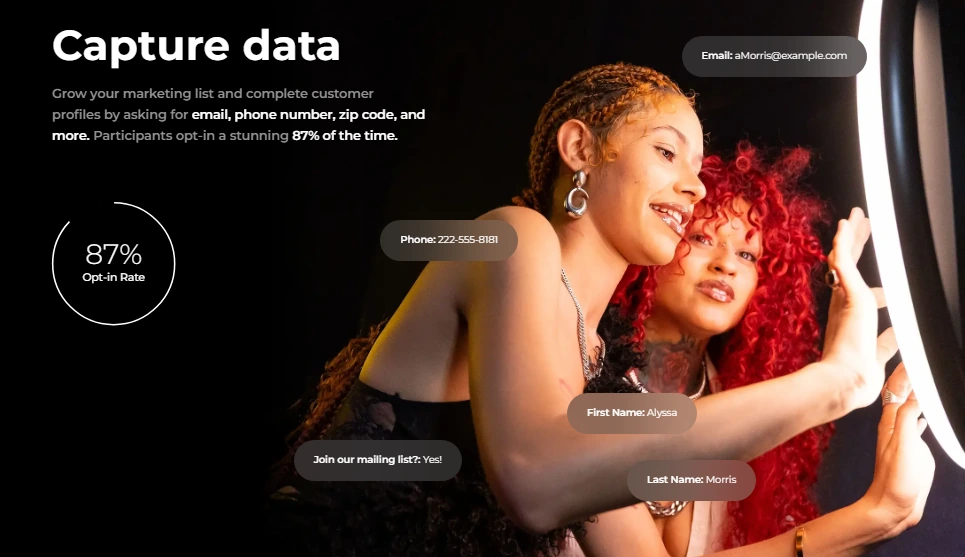
For brand marketers and experiential agencies, data capture is where Simple Booth stands apart. The platform achieves opt-in rates of 87 to 89% when guests receive photos, well above typical form conversion rates. Captured data exports as CSV, syncs with MailChimp, or routes to custom CRMs via the Open API on Pro and Select plans.
Source: Simple Booth
Arizona Opera grew its email list by 1,000 addresses in just a few events using Simple Booth’s lead capture. (Simple Booth)
Virtual Booth for Remote and Hybrid Events
Virtual Booth extends the photo experience beyond physical hardware. Participants join from their own phone or laptop via a QR code or link, with no app required. It supports background replacement, overlays, AI effects, and data capture, all feeding the same analytics and gallery system as the HALO hardware.
For hybrid events, both in-room kiosks and remote participants contribute to a single gallery.
Source: Simple Booth
Simple Booth Pricing
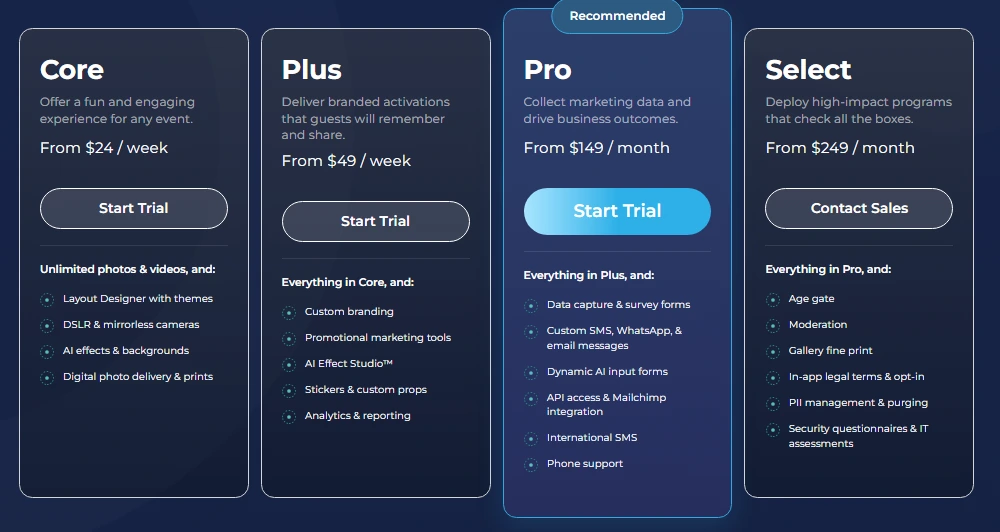
Simple Booth uses a per-license subscription model with weekly, monthly, and yearly billing:
- Lite starts at $14.99/week (App Store only; includes ads)
- Core starts at $24/week, $49/month, $490/year
- Plus starts at $49/week, $99/month, $990/year
- Pro starts at $149/month, $1,490/year
- Select starts at $249/month, $2,490/year
- Enterprise: custom pricing
A 7-day free trial is available with 25 free AI credits. AI effect credits cost $0.10 each and do not expire once purchased.
Source: Simple Booth
Use Simple Booth if:
- You want an integrated hardware and software system that sets up in under a minute with no tools
- You need QR code, SMS, email, AirDrop, and WhatsApp delivery across every plan
- You want AI-powered effects with built-in identity preservation and zero-cost prompt testing
- You need lead capture with near-90% opt-in rates for brand activations and marketing events
- You want to manage multiple booth setups remotely from a single cloud dashboard
Why Simple Booth Topped Our List
Simple Booth earned the top spot because it combines the most complete QR code delivery (five channels, offline queuing, WhatsApp for international events) with an integrated hardware and software system no other platform on this list matches.
The HALO’s patented ring light, sub-one-minute setup, and remote dashboard make it the strongest option for operators who need their booth to work reliably whether they’re on-site or not.
2. Snappic: Best for Enterprise Photo Booth Businesses and Brand Activation Agencies
When a brand activation agency manages a 500-person corporate event and needs every guest to receive their photo without a line forming at the booth, the standard “scan, enter email, wait” workflow becomes a bottleneck. Snappic is built to eliminate that bottleneck.
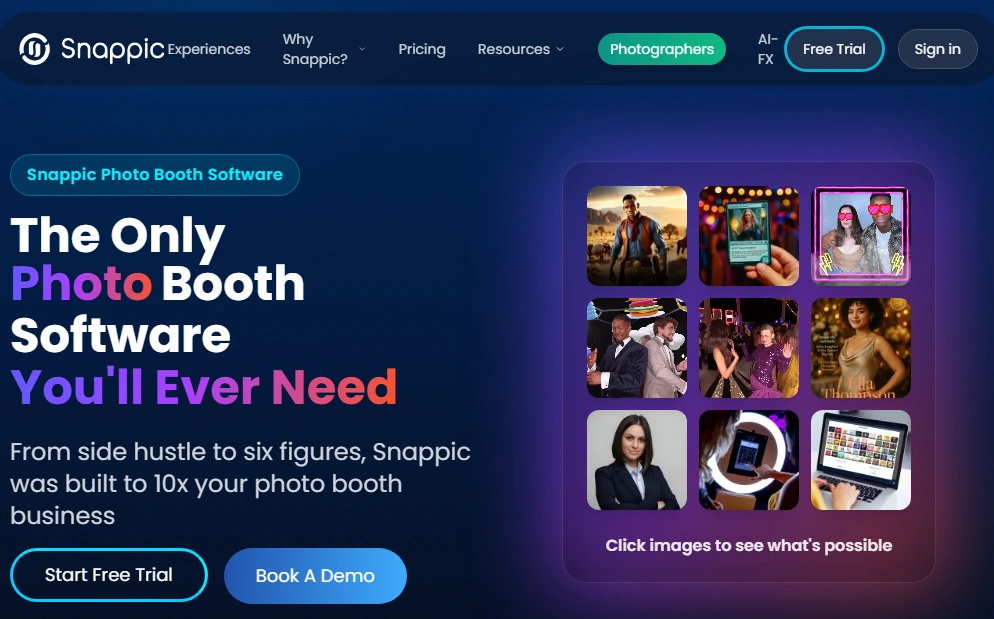
Snappic is a cloud-backed, iOS-first photo booth platform built for professional operators running large-volume events. Following its 2024 acquisition by Banyan Software, it offers AI-powered sharing automation, branded microsite galleries, and analytics built for agencies who need to show event ROI to their clients.
| Snappic Pros | Snappic Cons |
|---|---|
| - SmartShare AI-powered photo delivery via face-linking or QR cards | - AI credits and SmartShare credits billed separately on top of subscription |
| - Branded microsites with custom CSS and CNAME domain support | - Higher price point starting at $69/month |
| - AVA demographic analytics included on all plans | - Most features locked to Business tier and above |
| - Send to Client one-click analytics reporting |
Snappic: Top 3 Unique Features
- SmartShare AI-powered delivery with face-linking and QR card modes
- Branded microsite galleries with custom CSS, logo, and domain control
- AVA (Automated Vision Analytics) for anonymized demographic insights
Every Snappic tier from Starter through Scale includes on-screen QR code sharing.
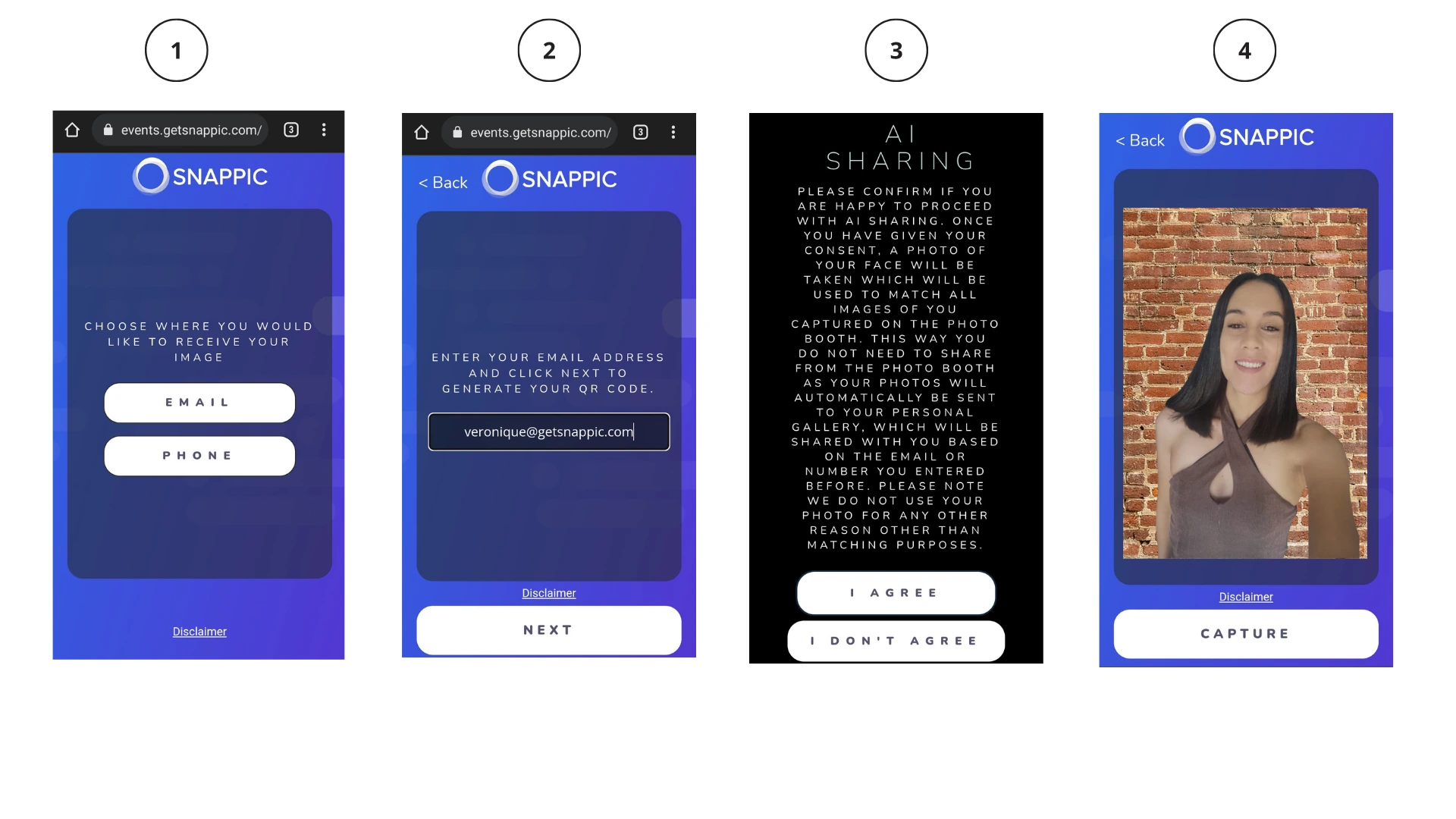
The platform’s main differentiator is SmartShare, an AI-powered delivery system that eliminates contact-entry friction at high-volume events. In Face Linking mode, facial recognition connects a guest’s contact info to their face once; every later capture of that guest ships automatically with no further action. In QR Code Linking mode, guests carry pre-printed personal QR cards for instant delivery, fitting events where biometric data collection raises privacy concerns.
Source: Snappic
The Send to Client feature packages an event’s analytics (share metrics, estimated reach, engagement timeline, and downloadable guest data) into a shareable webpage that operators send to clients. This turns the post-event deliverable from a ZIP of photos into a structured report.
Snappic Pricing
Snappic uses a per-booth license subscription model. A 14-day free trial is available with no credit card required.
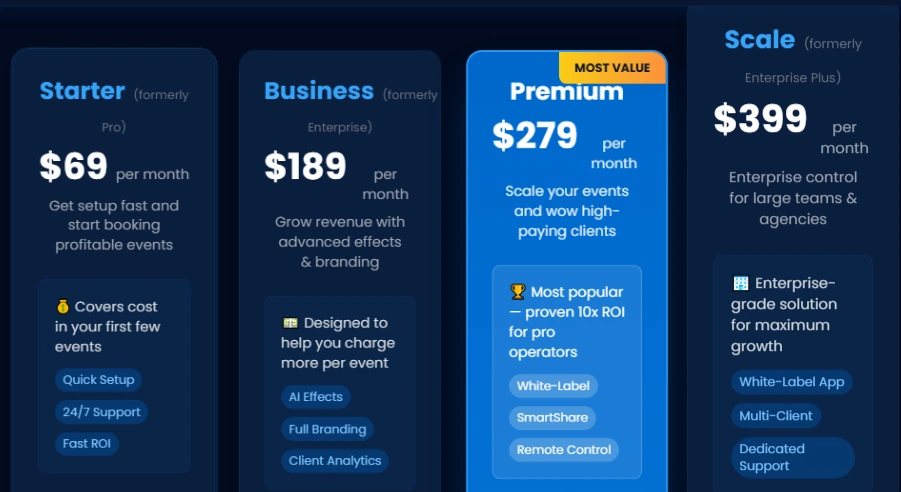
- Starter costs $69/month ($499/year) with QR code delivery, 60+ templates, and DSLR integration
- Business costs $189/month ($1,799/year) and adds VideoFX, AI-FX filters, client analytics, and surveys
- Premium costs $279/month and adds white-label, webhooks, and SmartShare (400 credits/month)
- Scale costs $399/month ($3,999/year) and adds unlimited sub-accounts, Grey Label App, and a dedicated success manager
Source: Snappic
Use Snappic if:
- You serve brand activation clients who expect structured post-event analytics and demographic data
- You need AI-powered sharing automation to handle contact-free delivery at high-volume events
- You’re scaling toward a multi-client agency model and need sub-account management and white-labeling
3. LumaBooth: Best for Multi-Format Booth Operators Under One Subscription
If your business runs a 360 spinner at a corporate gala on Friday, a mirror booth at a wedding on Saturday, and a traditional photo booth at a birthday party on Sunday, you don’t want three separate software subscriptions and three separate learning curves.
LumaBooth (by Lumasoft, the company behind dslrBooth for Windows) covers six booth formats under one subscription: traditional photo, GIF and boomerang, 360-degree slow-motion video, mirror booth, glam booth, and video guestbook. It runs on Windows, iPad, iPhone, and Mac with a unified browser-based dashboard, and tens of thousands of operators in over 150 countries have used it over 14+ years.
| LumaBooth Pros | LumaBooth Cons |
|---|---|
| - Six booth formats under one subscription | - Add-ons (SMS, cloud hosting, sharing station) increase the total cost |
| - Cross-platform: Windows, iPad, iPhone, and Mac | - Booth CoPilot remote management is Windows-only |
| - Offline QR code sharing via LumaShare local network | - Base price covers two devices; additional devices need separate subscriptions |
| - 820+ professionally designed templates |
LumaBooth: Top 3 Unique Features
- Six booth formats under one subscription with no per-format upsell
- Windows and Apple support under one LumaBooth Dashboard
- Offline QR Code sharing via LumaShare that works without venue internet
LumaBooth handles QR code sharing at two levels.
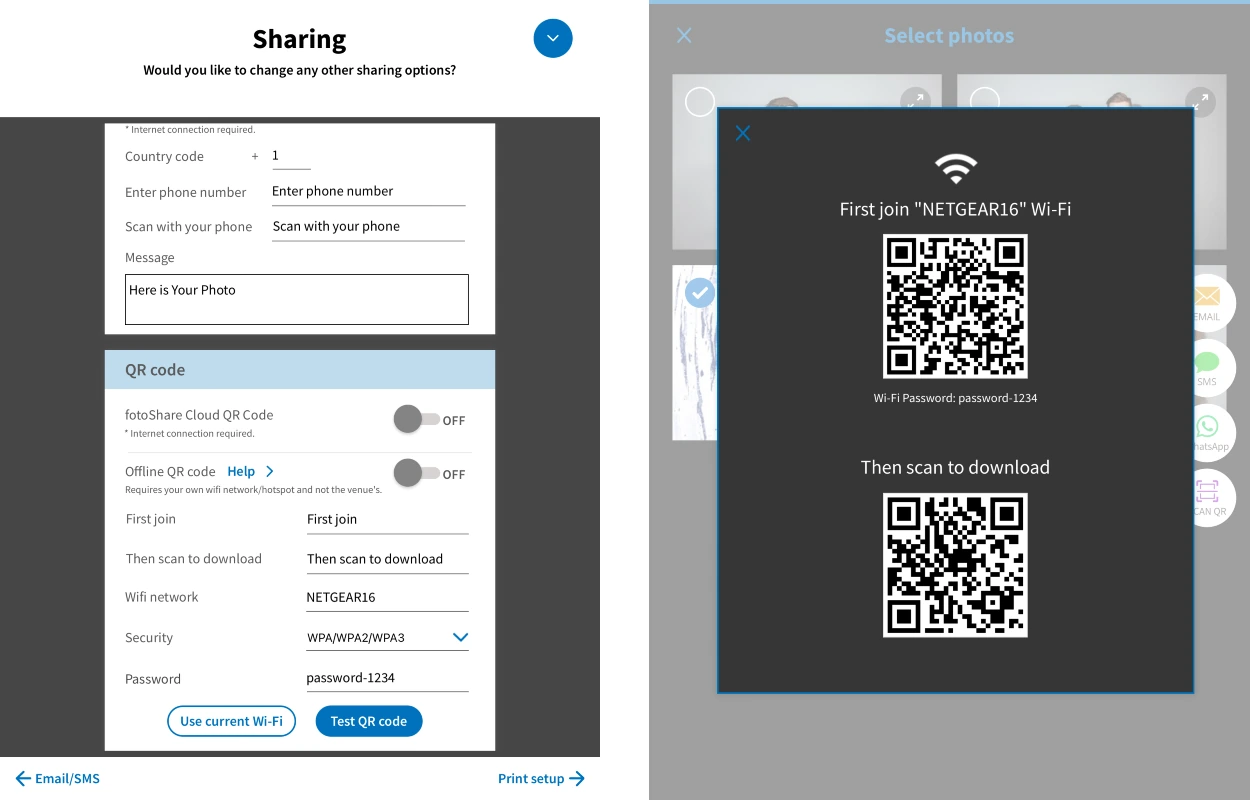
The first is standard internet-based delivery through fotoShare Cloud. The second, and more useful, is Offline QR Code sharing via LumaShare: guests scan a QR code to join a local Wi-Fi network created by the operator’s device, then scan a second code to receive their media, with no venue internet required.
Source: LumaBooth
For operators working warehouses, outdoor festivals, or historic buildings with poor connectivity, this offline fallback keeps delivery running regardless of infrastructure. The platform also supports email, SMS (via LumaBooth’s own plan at $10/month for unlimited US/Canada, or bring-your-own Twilio), WhatsApp, AirDrop, and Instagram hashtag printing via the HashPrinter companion app.
LumaBooth Pricing
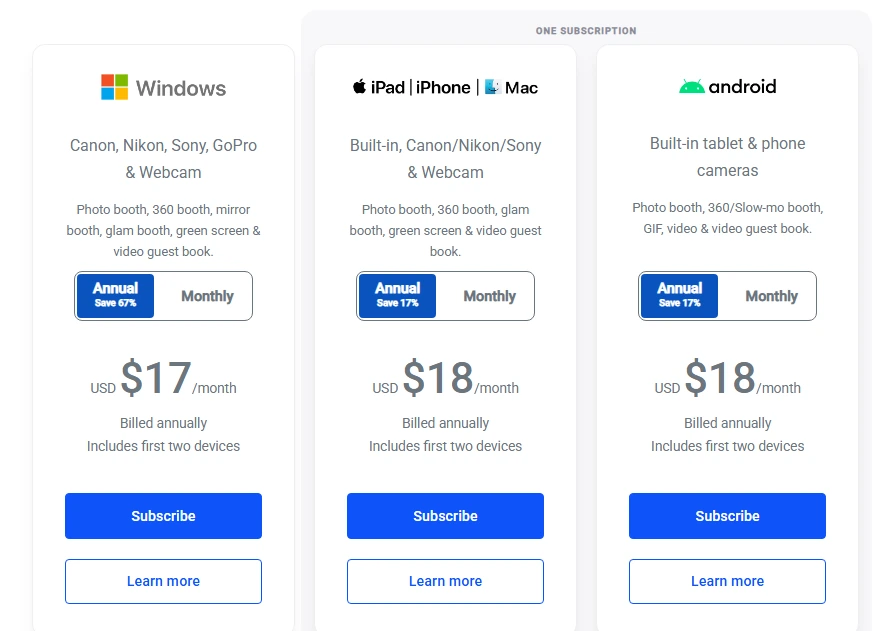
- Windows: $17/month billed annually (~$204/year) or $49.99/month
- Apple (iPad, iPhone, Mac) and Android: $18/month billed annually (~$216/year) or $19.99/month
Both include two devices and all six booth formats. An unlimited-duration free trial is available (watermarked output until subscription activates).
Source: LumaBooth
Use LumaBooth if:
- You operate multiple booth types and want one subscription covering all of them without per-format upsells
- You work across Windows and Apple hardware and need a unified dashboard that syncs configurations to both
- You need QR code delivery to work even when venue internet is unavailable
4. Touchpix: Best for 360-Degree Spin Booth Specialists
Most photo booth software treats 360-degree spinning as one module among many. Touchpix built its product around it.
Touchpix is a photo and video booth platform built for 360-degree capture that has held a strong position in the spinning booth market since 2020. Its 4.8-star rating from 6,600+ App Store reviews reflects wide adoption in this format.
| Touchpix Pros | Touchpix Cons |
|---|---|
| - 360-degree capture engine with video speed controls | - PhotoPass plan excludes video capture |
| - Runs on iOS, Android, Windows, macOS, Linux, and Raspberry Pi | - AI credits sold separately from subscription |
| - Native GoPro 7-14 and Canon/Nikon/Sony DSLR integration | - Less suited for operators who primarily run traditional photo booths |
| - Scanpix 2 offline QR delivery with no guest data required |
Touchpix: Top 3 Unique Features
- Bluetooth 360 trigger integration for automated spin-booth capture sequences
- Scanpix 2 offline QR sharing with no internet and no contact information required
- Cross-platform support across iOS, Android, Windows, macOS, Linux, and Raspberry Pi
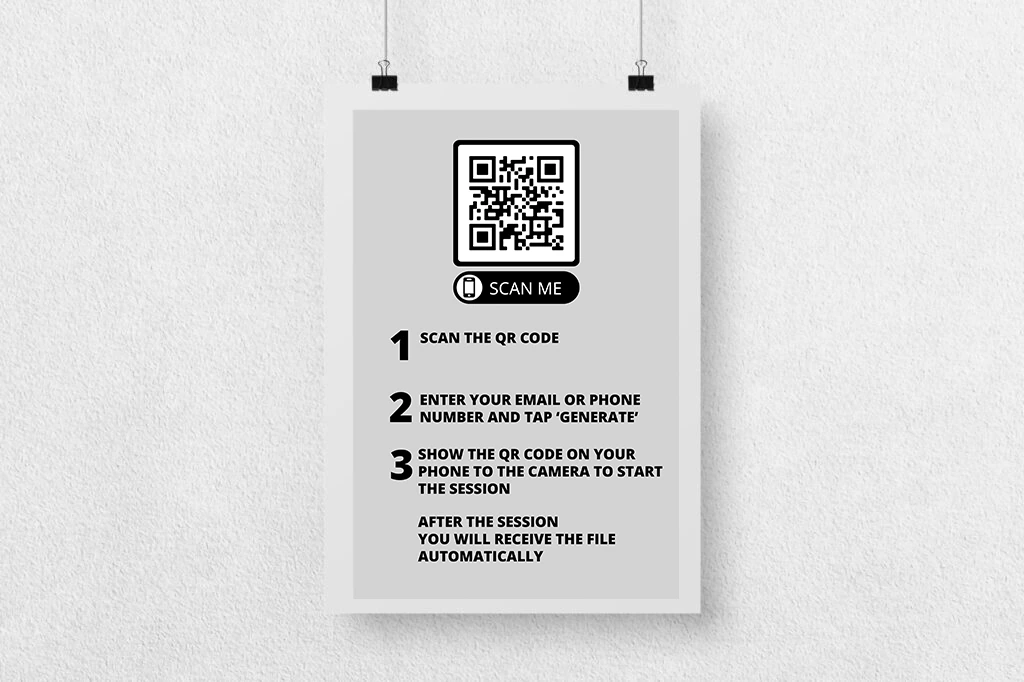
The Scanpix 2 offline sharing system matters for 360 booth operators because video files are large and 360 events often happen at venues with poor Wi-Fi. Guests scan a QR code after capture and download their 360 video to their phone, with no internet connection and no guest data collected. The offline queue handles cloud uploads in the background, holding shares until connectivity returns without interrupting the guest experience.
Source: Touchpix
For camera hardware, Touchpix offers native integration with GoPro models 7 through 14 (wired and wireless) alongside tethered support for Canon, Nikon, and Sony DSLRs and mirrorless cameras. The Bluetooth rig automation starts capture sequences without manual triggering, and Video Speed Control produces the slow-motion effect that defines the format’s visual appeal.
Touchpix Pricing
Touchpix is priced by simultaneous active event slots, with unlimited device installs across all platforms:
- PhotoPass costs $439.90/year (2 events; photos and GIFs only, no video)
- MultiPass costs $879.99/year (4 events; adds video, Slomo, and Boomerang)
- MultiPass Pro costs $1,407.99/year (8 events; adds Virtual Booth and surveys)
- MultiPass Enterprise costs $2,199.99/year (12 events; adds Mosaic and RAW backup)
A 14-day free trial is available with no credit card required. Note: 360 video operators must be on MultiPass or higher, as PhotoPass excludes video capture.
Use Touchpix if:
- Your business centers on 360-degree spinning arm booths and you need dedicated tools for the format
- You already own GoPro or Canon/Nikon/Sony hardware for your 360 rig and want native camera integration
- You need offline QR code video delivery at venues without stable Wi-Fi
5. SparkBooth: Best One-Time Lifetime License for Small Operators
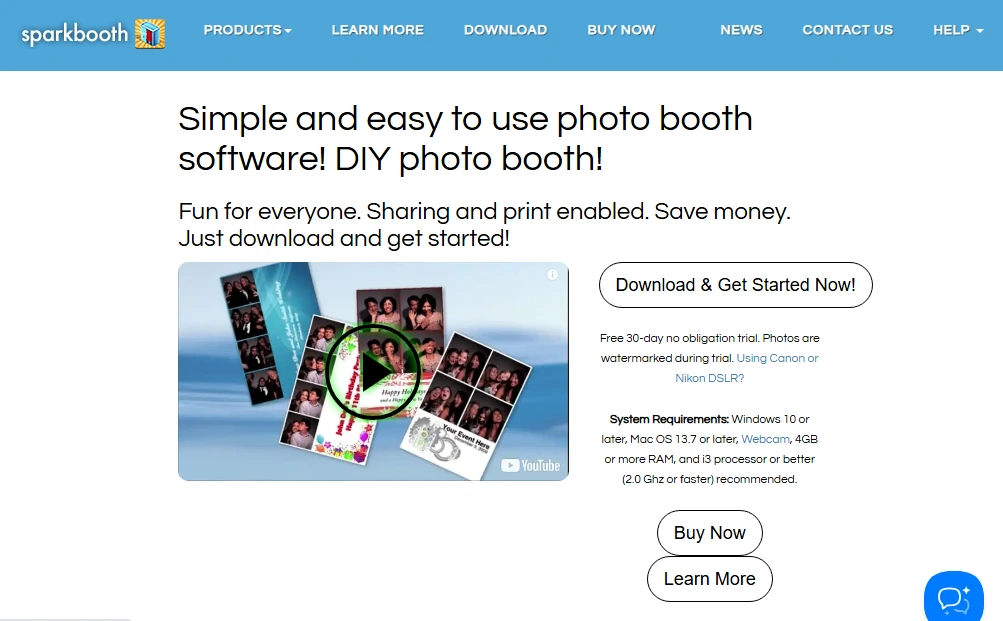
For a solo operator running 10 to 15 events per month, paying $49 to $99 monthly for software adds up. After two or three years, that subscription cost is a chunk of revenue that could have gone toward hardware upgrades or marketing.
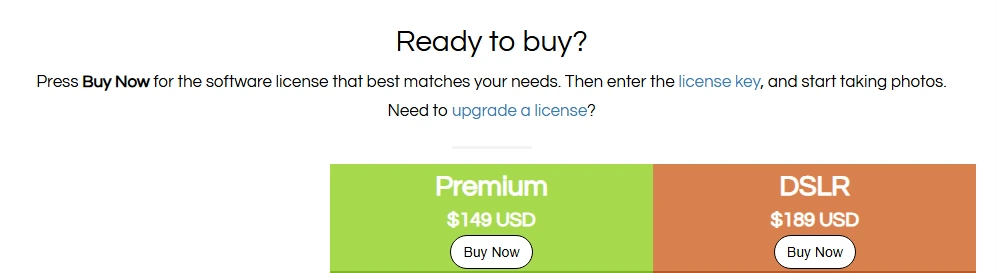
SparkBooth takes a different approach: you pay once and the software is yours. The Premium license is $149 and the DSLR license is $189, each covering 3 activations, with no monthly or annual renewal fees.
| SparkBooth Pros | SparkBooth Cons |
|---|---|
| - One-time lifetime license with no recurring fees | - Windows and Mac only (no iPad or mobile support) |
| - Offline QR code generation (beta) | - Canon DSLR support is Windows-only; Mac limited to Nikon |
| - Canon and Nikon DSLR/mirrorless camera support | - QR delivery service and AI background removal are separate subscriptions |
| - 60-day refund window on un-activated licenses |
SparkBooth: Top 3 Unique Features
- One-time lifetime purchase at $149 (Premium) or $189 (DSLR) with no recurring costs
- Offline QR code beta that generates guest QR codes even without internet
- Version 7.2 with 64-bit architecture, unified Canon+Nikon DSLR support, and 11 languages
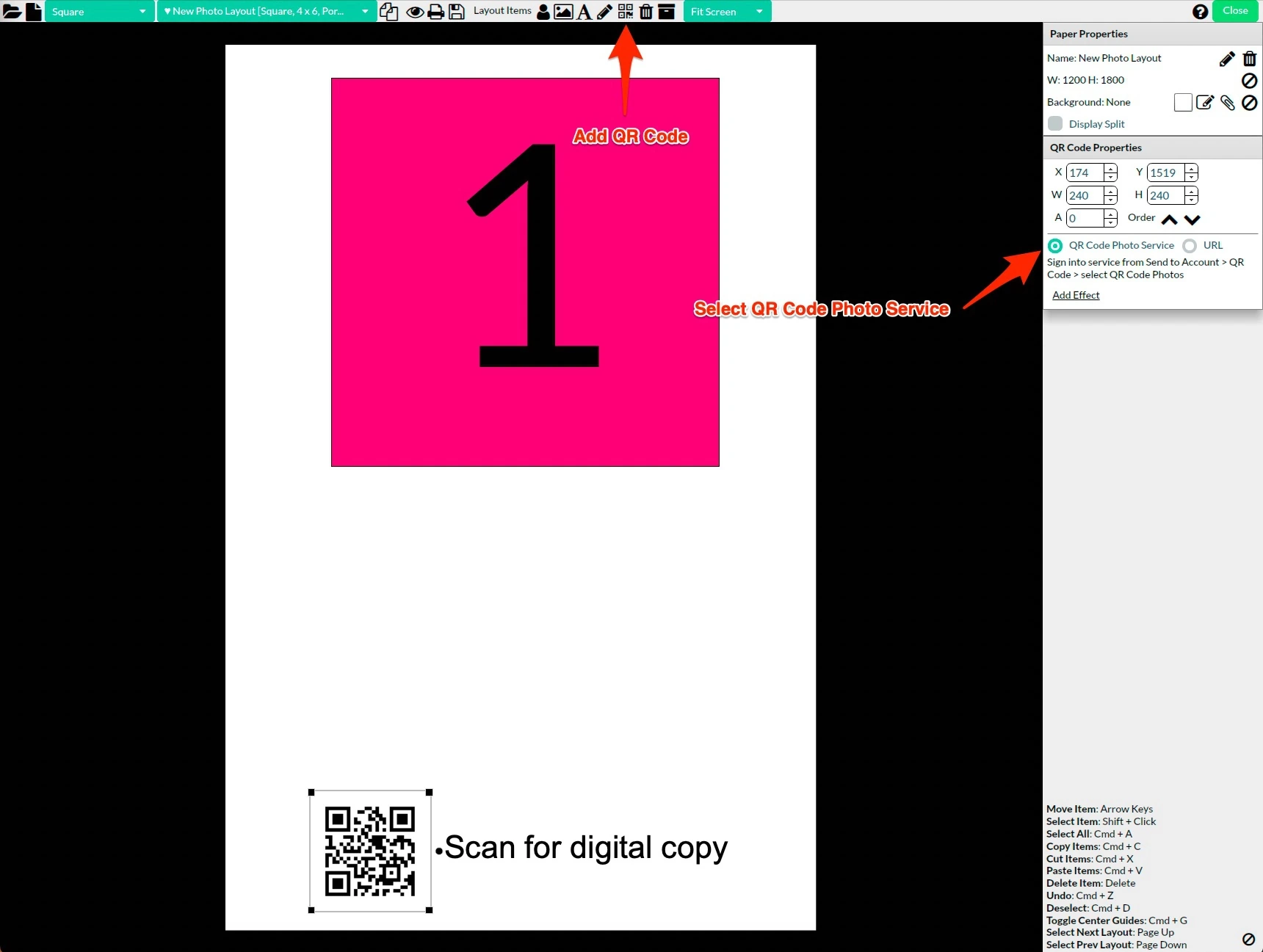
SparkBooth’s qrcode.photos integration generates a QR code after each session so guests retrieve their photo without providing contact information. The offline QR beta goes further: even without internet, SparkBooth generates a QR code at the end of each session. Photos queue for upload when connectivity returns. The Send Photo Later queue extends this offline approach to email and SMS delivery.
Source: Sparkbooth
Updates within the same major version cost nothing. Version 7.2, released July 2025, added 64-bit architecture, unified Canon+Nikon DSLR support, and expanded language support, all free for existing license holders. The DSLR license supports current-generation bodies including the Canon EOS R5 Mark II, R1, R6 Mark II and Nikon Z5, Z6 II, Z7 II, Z8, Z9.
SparkBooth Pricing
- Premium License: $149, one-time lifetime purchase (webcam, Windows 10+ or Mac OS 13.7+)
- DSLR License: $189, one-time lifetime purchase (adds Canon and Nikon DSLR/mirrorless support)
A 30-day trial is available with full features (watermark only). The QR code delivery service and UnlimitedBG offline AI background removal are optional add-on subscriptions.
Source: SparkBooth
Use SparkBooth if:
- You want to eliminate monthly subscription fees with a one-time purchase
- You already own a compatible Canon or Nikon DSLR and want to convert it into a booth rig without recurring costs
- You frequently work venues with poor internet and need offline QR code generation and delivery queuing
6. Booth.Events: Best for Growing Photo Booth Businesses With AI and DSLR Quality at Competitive Pricing
For independent photo booth professionals outgrowing their starter setup, the jump to a full-featured platform often means a jump to enterprise pricing. Booth.Events sits between those tiers.
Booth.Events is a cloud-connected iPad photo booth platform offering DSLR tethering, on-device AI background removal, white-label branding, and remote fleet management at flat-rate pricing below larger competitors. Its 4.8-star rating from 897 App Store reviews reflects strong operator satisfaction.
| Booth.Events Pros | Booth.Events Cons |
|---|---|
| - 3 complete free events with no credit card required | - AI Prompts and AI Portraits require separate credit purchases |
| - AI SceneSelect background removal runs on-device, offline, unlimited | - Basic plan limits SMS to US plus a small set of countries |
| - USB DSLR tethering for Canon, Nikon, and Sony cameras | - Remote-In live control limited to Pro+ tier |
| - Remote fleet monitoring with auto-uploaded screenshots on all plans |
Booth.Events: Top 3 Unique Features
- 3 complete free events with QR code sharing, SMS delivery, and no credit card required
- SceneSelect on-device AI background removal that works offline, unlimited, with no per-image cost
- Remote-In live browser-based iPad control with drawing mode for guiding on-site staff
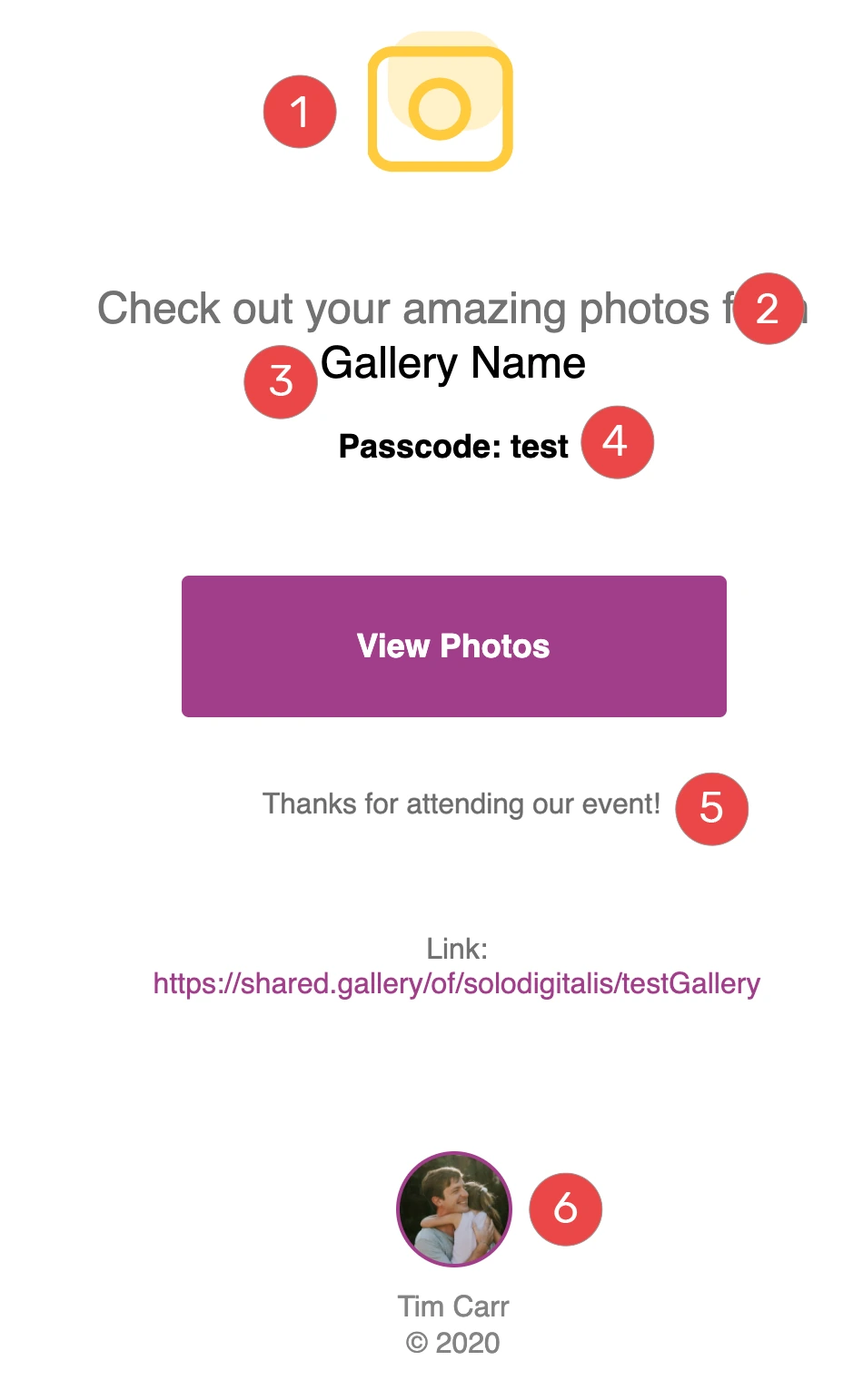
Booth.Events includes QR-code-based photo retrieval on every plan, including the free tier. After capture, guests scan a QR code at a Share Station to reach their session on their phone. All plans include email delivery with customizable sender name and message, and Booth.Events handles SMS infrastructure internally, so operators don’t need to register a Twilio A2P campaign (which can take a week or longer and adds per-message costs).
Source: Booth.Events
SceneSelect uses on-device AI to isolate guests from the background and swap in custom images, with no physical green screen, no internet connection, and no per-image cost on any plan. It works with video captures and USB-connected DSLR cameras. For operators who work outdoor venues or pop-up events, this removes both the physical gear and the connectivity requirements of traditional green screen setups.
Booth.Events Pricing
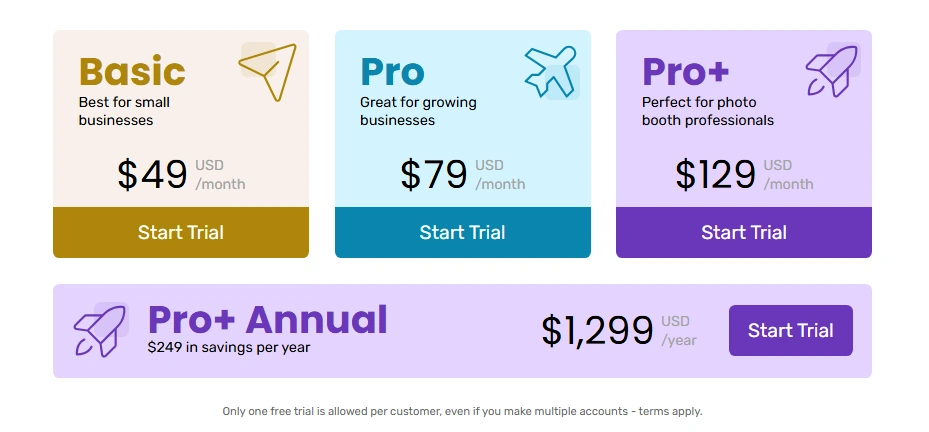
Booth.Events uses flat-rate subscriptions with no per-image overages on core features. Current figures are on the pricing page.
- Free/Starter: 3 events, 100 photos each, 7-day gallery, QR and SMS sharing (US + Canada)
- Basic: 1 iPad, 3-month gallery storage, US SMS
- Pro: 1 iPad + unlimited iPhones, 1-year gallery, worldwide SMS, custom microsites
- Pro+: 4 iPads included, 2-year gallery, custom domain, white-label app, Remote-In, webhooks, and emergency phone support
Non-subscription options include 1 Week Passes and non-expiring 4x Pro Event Credits. AI credits cost $8 per 100; SceneSelect and Glam Filter are unlimited at no added cost.
Source: Booth.Events
Use Booth.Events if:
- You want to evaluate photo booth software by running actual events before committing financially
- You need on-device AI background removal that works offline without a green screen or per-image fees
- You already own a Canon, Nikon, or Sony DSLR and want USB tethering on an iPad-based platform
- You manage multiple iPads across concurrent events and need remote monitoring and live control
Final Verdict
Every platform on this list handles QR code sharing well, but each is built for a different operator profile. The right choice depends on your booth types, event volume, hardware preferences, and budget model.
Here are our top three recommendations:
- Simple Booth: If you want the most complete, integrated photo booth system with quality hardware, AI effects, five-channel delivery (QR, SMS, email, AirDrop, WhatsApp), near-90% opt-in lead capture, and remote management from a single cloud dashboard. No other platform on this list matches the hardware and software integration.
Get started with a free trial with Simple Booth.
- Snappic: If you’re a large photo booth business or brand activation agency that needs AI-powered sharing automation, branded microsite galleries with custom CSS, and structured post-event analytics to show ROI to clients.
- LumaBooth: If you run multiple booth types (photo, 360, mirror, glam, video guestbook) and need one subscription covering all of them across Windows and Apple devices, with offline QR code delivery that works even when venue Wi-Fi is unavailable.
Photo Booth Software With QR Code Sharing FAQ
Which photo booth software has the best QR code sharing?
Simple Booth offers the most complete QR code delivery, with QR sharing on every plan alongside four additional channels (SMS, email, AirDrop, and WhatsApp). The HALO app queues sessions in offline mode and delivers them when connectivity returns, so QR sharing works even at venues with unreliable Wi-Fi.
Is there free photo booth software with QR code sharing?
Yes. Booth.Events provides three complete free events with QR sharing and no credit card required, and LumaBooth offers an unlimited-duration free trial with watermarked output.
Which photo booth app works best for 360 spin booths?
Touchpix is built for 360-degree spinning arm booths. It offers Bluetooth rig automation, video speed controls, native GoPro 7-14 integration, and the Scanpix 2 offline QR delivery system, designed for large video files at venues with poor connectivity.
Can I use photo booth software without an internet connection?
Several platforms support offline operation. Simple Booth’s HALO app queues sessions offline and delivers them when connectivity returns. LumaBooth’s LumaShare creates a local Wi-Fi network for QR delivery without internet. SparkBooth’s offline QR beta generates guest QR codes without connectivity, and Booth.Events’ SceneSelect AI background removal runs on-device.
What is the cheapest photo booth software with QR code sharing?
SparkBooth offers the lowest long-term cost with its one-time license at $149 (Premium) or $189 (DSLR), eliminating recurring fees. For operators who prefer subscriptions, LumaBooth starts at $17-18/month on annual billing, and Booth.Events offers three free events before any payment.
Do I need special hardware for QR code photo sharing?
No. QR code sharing is a software feature that works with any device running the app. Most platforms on this list run on iPads, though some (LumaBooth, SparkBooth, Touchpix) also support Windows, Mac, or Android. The software generates the QR code and displays it on screen; guests scan it with their phone camera.
Which photo booth software is best for brand activations and lead capture?
Simple Booth is the strongest option for brand marketers, with documented opt-in rates of 87-89% during photo sessions, MailChimp integration, API access for custom CRM delivery, and analytics including social sharing metrics and demographic insights on the Select plan. Snappic is the enterprise alternative, offering SmartShare AI-powered delivery, AVA demographic analytics, and one-click client-facing reporting.
Can photo booth software share photos via WhatsApp?
Yes. Simple Booth added WhatsApp delivery in HALO 5.0, available on all plans for international deployments where SMS coverage is limited. LumaBooth also supports WhatsApp as a delivery channel alongside QR code, email, SMS, and AirDrop.
Keep reading
 Best Of
7 Best Photo Booth Software with Video Message and Slo-Mo Capture [2026]
Booths that capture heartfelt video notes and buttery slo-mo. The moving stuff.
 Best Of
7 Best Photo Booth Software With Real-Time Analytics and Dashboards [August 2026]
Booths that show the numbers as the party happens. Live dashboards, real insight.
 Best Of
7 Best Photo Booths for Comic Cons and Fan Conventions [August 2026]
Booths built for cosplay crowds and superfan energy. Con-ready and quick.