7 Best All-in-One Photo Booth Systems (No DIY Required) [June 2026]
Building a photo booth from scratch sounds straightforward until you’re knee-deep in it. You source a ring light from one vendor, a tablet stand from another, download software that crashes on your specific iPad model, and pray it all holds together at a live event with 200 guests waiting in line. When it works, the photos look great. When it doesn’t, you’re troubleshooting cables and restarting apps in front of a client who paid for a smooth experience.
That’s the DIY photo booth trap, and it’s why all-in-one photo booth systems exist.
These platforms bundle hardware, software, sharing, branding, and analytics into a single package that works out of the box. No sourcing components from four vendors. No compatibility guesswork. No crossing your fingers at setup.
We researched and tested the leading photo booth systems on the market and shortlisted the best options for key operator use cases:
- Delivering a polished, ready-to-go photo experience,
- Building a photo booth business from scratch,
- Managing multi-format booth fleets at scale,
- Running specialty interactive experiences like mirror booths and AI stations,
- Specializing in 360-degree and high-motion video,
- Starting a photo booth business on a budget,
- And operating permanent venue activations.
Here’s a look at the top all-in-one photo booth systems in 2026.
| Best All-in-One Photo Booth Systems | |
|---|---|
![7 Best All-in-One Photo Booth Systems (No DIY Required) [June 2026]](/content/best-all-in-one-photo-booth-systems-no-diy-required/image1.webp) | Simple Booth Best for event professionals who want a photo booth system that sets up in under a minute and runs itself. |
![7 Best All-in-One Photo Booth Systems (No DIY Required) [June 2026]](/content/best-all-in-one-photo-booth-systems-no-diy-required/image2.webp) | Photobooth Supply Co. Best for entrepreneurs who want hardware, software, business training, and marketing tools from a single vendor. |
![7 Best All-in-One Photo Booth Systems (No DIY Required) [June 2026]](/content/best-all-in-one-photo-booth-systems-no-diy-required/image3.webp) | Snappic Best for operators managing multi-format booth fleets across corporate brand activations. |
![7 Best All-in-One Photo Booth Systems (No DIY Required) [June 2026]](/content/best-all-in-one-photo-booth-systems-no-diy-required/image4.webp) | Fotomaster Best for operators who want interactive experiences like mirror booths, AI stations, and robotic drawing machines. |
![7 Best All-in-One Photo Booth Systems (No DIY Required) [June 2026]](/content/best-all-in-one-photo-booth-systems-no-diy-required/image5.webp) | TouchPix Best for operators specializing in 360-degree spinning-arm video and high-motion capture formats. |
![7 Best All-in-One Photo Booth Systems (No DIY Required) [June 2026]](/content/best-all-in-one-photo-booth-systems-no-diy-required/image6.webp) | LumaBooth Best budget entry point for solo operators who want to start running events with no upfront software cost. |
![7 Best All-in-One Photo Booth Systems (No DIY Required) [June 2026]](/content/best-all-in-one-photo-booth-systems-no-diy-required/image7.webp) | Curator Live Best for venue operators running permanent photo activations at attractions, restaurants, and entertainment centers. |
What Is an All-in-One Photo Booth System?
An all-in-one photo booth system combines hardware (or software compatible with standard hardware), capture modes, photo delivery, branding tools, and analytics into a single package. The goal: an operator can unbox, set up, and run a professional photo booth without assembling separate components or troubleshooting compatibility issues between vendors.
The “no DIY required” distinction matters because photo booth operations happen at live events where reliability is non-negotiable. A wedding, a corporate activation, or a permanent venue installation has no room for a ring light that won’t pair with the app or a sharing system that can’t find the Wi-Fi. All-in-one systems eliminate those failure points by designing every component to work together.
How To Choose the Best All-in-One Photo Booth System
A short checklist to find the right photo booth system for your operation:
- Hardware and Software Integration: The tighter the integration between hardware and software, the fewer compatibility issues you’ll face at live events. Systems that bundle proprietary hardware with their own software eliminate the guesswork.
- Setup Speed and Ease of Use: Your booth needs to go from case to capturing in minutes, not hours. Look for tool-free assembly, intuitive app interfaces, and preflight checks that catch issues before guests arrive.
- Photo and Video Quality: Ring light brightness, camera support (iPad, DSLR, GoPro), and AI enhancements like background replacement and skin smoothing all affect the final output guests share on social media.
- Lead Capture and Marketing Tools: If you’re using photo booths to capture first-party data, evaluate opt-in rates, CRM integration options, and analytics depth. Some platforms capture email addresses; others capture demographic insights.
- Pricing Model Fit: Per-event, weekly, monthly, and annual billing models serve different business types. A rental company running 20 events per month needs different economics than a venue running one permanent installation.
- Reliability and Offline Resilience: Wi-Fi goes down at events. The best systems queue photos offline and deliver them when connectivity returns, so your booth never stops working.
- Scalability: Consider whether the platform supports multi-device management, fleet administration, and remote preset syncing as you grow from one booth to several.
How We Curated Our List
We started by identifying the most-used photo booth platforms based on operator reviews, App Store ratings, industry community feedback, and documented deployments.
We then evaluated each platform on four criteria:
- Completeness: Does it deliver a genuine all-in-one experience, or does the operator still need to assemble significant components themselves?
- Ease of Use: Can a new operator set up and run their first event without extensive technical knowledge?
- Output Quality: How do the photos and videos compare in lighting, AI enhancement, and branded presentation?
- Value: What does the operator get for the price, and how does the pricing model scale with event volume?
This gave us our final list of seven platforms, each serving a distinct operator profile. Let’s dive in.
1. Simple Booth (Best All-in-One Photo Booth System for Event Professionals)
Source: Simple Booth
Finding a photo booth solution that “just works” is harder than it sounds. Plenty of apps can turn an iPad into a camera, but the moment you factor in professional lighting, branded templates, photo delivery, data capture, and event-day reliability, you’re managing half a dozen moving parts.
Simple Booth eliminates that complexity.
Simple Booth is a photo booth system pairing a subscription-based iPad app with proprietary ring-light hardware, plus a browser-based Virtual Booth that requires no hardware at all. It’s designed for event rental professionals, venue operators, and brand marketing teams who want a system that sets up in under a minute and runs without a booth attendant on-site.
The platform serves 30,000+ customers globally, holds a 4.7-star App Store rating from 2,400+ ratings, and has captured 40 million+ moments since 2013. Its core features include:
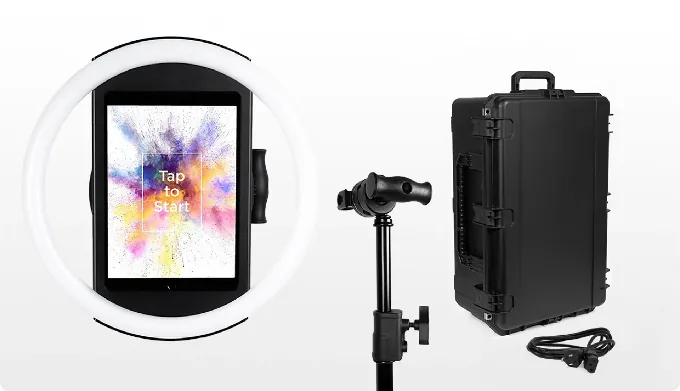
- Proprietary HALO ring-light hardware machined from a single billet of aluminum with 112 LEDs producing up to 2,100 lumens
- HALO iPad app with a Layout Designer, DSLR camera support, AI effects, and remote management dashboard
- Virtual Booth for browser-based photo experiences with no hardware required
- Photo delivery via QR code, SMS, email, AirDrop, and WhatsApp
- Lead capture with opt-in rates as high as 87-89%
| Simple Booth Pros | Simple Booth Cons |
|---|---|
| Machined aluminum hardware with patented ring light | iPad-only (no Android support) |
| Sub-one-minute setup, no tools required | DSLR support limited to Canon cameras |
| AI effects, background replacement, and skin smoothing built in | Lite plan includes ads in the app |
| Offline mode queues sessions when Wi-Fi drops | AI credits cost $0.10 each beyond plan bonuses |
| 4.7-star App Store rating from 2,400+ reviews |
Why Choose Simple Booth as Your All-in-One Photo Booth System?
Simple Booth earned the top spot because it balances depth and simplicity: a feature set thorough enough for large deployments, wrapped in an interface intuitive enough that new staff can run events with minimal training.
From Live Nation VIP events to Gibson Brands activations and Sports Illustrated Tickets fan experiences, the platform has proven reliable at scale, particularly for rental companies running multiple unattended, drop-off events.
To see why 30,000+ operators trust Simple Booth, start with a free trial.
Hardware That Sets Up in Under a Minute
The HALO hardware kit is the physical differentiator. Its chassis is machined from a single billet of anodized aluminum with a patented ring-light system rated for up to 50,000 hours of operation. Groups can stand 6-8 feet back from the camera and still be evenly lit in most indoor environments.
Source: Simple Booth
Setup requires no tools: the iPad snaps in via a tool-less faceplate, a concealed built-in USB-C cable keeps the iPad charged, and the selfie stand deploys in under one minute. The full Event Kit travels in a rolling hard case weighing 49 lbs, and an Install Kit offers a wall mount for permanent venues. For international events, HALO supports dual voltage (110V-240V), needing only a plug adapter.
Kurt Nielson Photography reports that Simple Booth “paid for itself pretty quickly. Now it’s just extra money coming in.” (Simple Booth)
Software and AI: Layout Designer, DSLR Support, and AI Effects
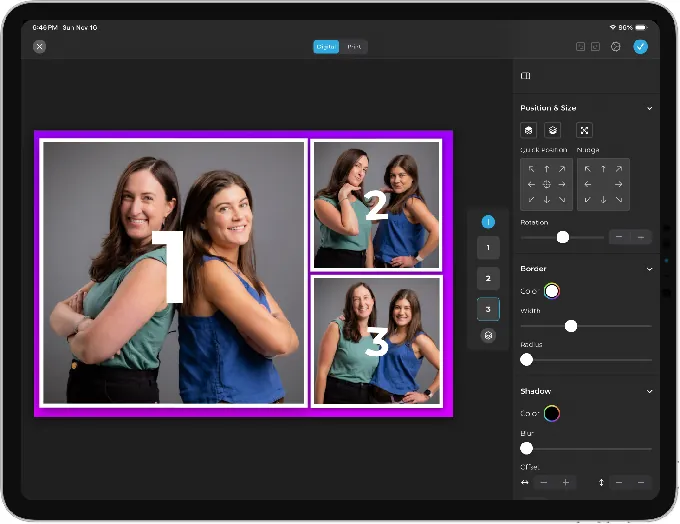
The HALO app pairs with a cloud-based dashboard where operators build and manage event presets. The 5.0 update introduced the Layout Designer, a full in-app design tool with layers, fonts, gradients, QR code embedding, and multi-layout support.
Source: Simple Booth
Canon DSLR and mirrorless camera integration (Core plan and above) connects via wired USB for long-event reliability or wirelessly over Wi-Fi for flexible setups, giving operators studio-grade image quality through the full HALO feature set. Most competitors don’t offer this.
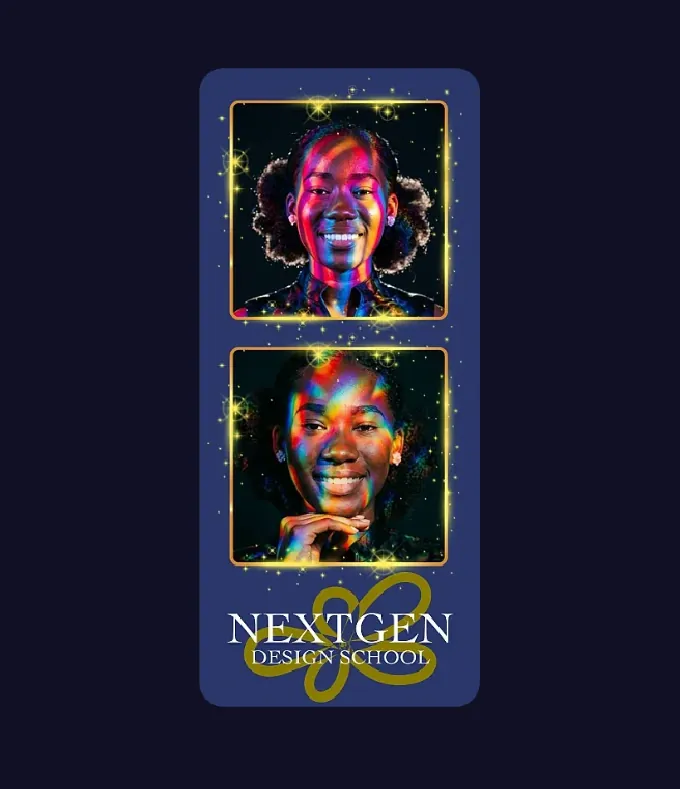
The AI Effects suite uses Nano Banana models to transform guest photos post-capture using text prompts. Operators can assign a unique AI prompt to every individual frame in a multi-frame layout, creating narrative photo strips.
Source: Simple Booth
The system preserves identity and likeness at the platform level, so guests stay recognizable regardless of the transformation. AI prompts can be tested outside of booth mode without consuming credits, letting operators iterate freely before an event.
Background Blur (Core plan and above) keeps subjects sharp while blurring the background for a bokeh effect, delivering polished portraits straight from the iPad without additional equipment. Optimized rendering makes image previews appear up to 12x faster, so guests see results quickly rather than waiting for processing.
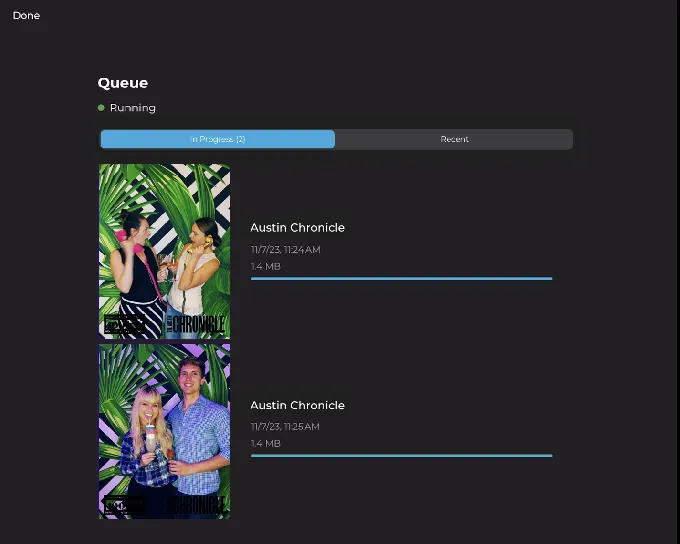
An offline upload queue stores sessions locally and delivers them when connectivity returns. The Mission Control overlay (triggered by a two-finger pinch gesture) lets operators monitor device health and adjust settings during live events without disrupting the guest experience.
Source: Simple Booth
Lead Capture and Marketing Tools
For operators using photo booths as a marketing channel, Simple Booth captures opt-in rates as high as 87-89% when guests receive their photos. Data flows to the dashboard for CSV export or automatic MailChimp sync, with API integration available on Pro plans and above.
Each event generates an online gallery that doubles as a Live Feed slideshow on any TV or projector. Social sharing prompts pre-populate event hashtags on X and Facebook, turning guests into content creators for the brand.
Treetop Golf built 150,000 unique email addresses across their locations using Simple Booth’s lead capture system. (Treetop Golf Case Study)
Virtual Booth: No Hardware Required
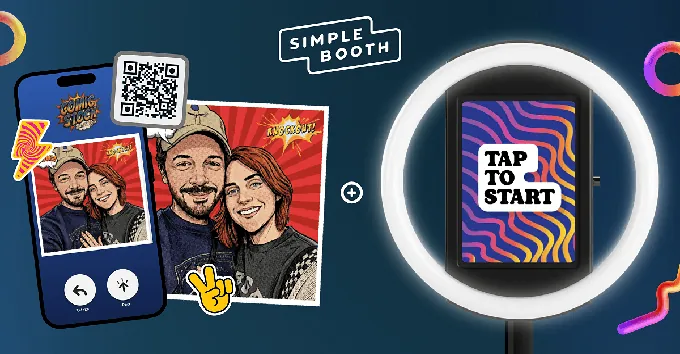
Virtual Booth extends Simple Booth beyond physical hardware. Participants join from their own phone or laptop via a QR code or link, apply overlays, stickers, and AI effects, and submit to a shared gallery.
Source: Simple Booth
It runs in a browser with no app installation required, supports multiple languages (English, Spanish, French, Dutch, German, and more), and connects to the same analytics and gallery infrastructure as HALO. This makes Virtual Booth a good fit for hybrid events or always-on campaigns tied to product packaging and email outreach.
G7 Entertainment Marketing generated over 136,000 fan interactions across a 10+ year partnership with Simple Booth. (G7 Entertainment Marketing Case Study)
Simple Booth Pricing
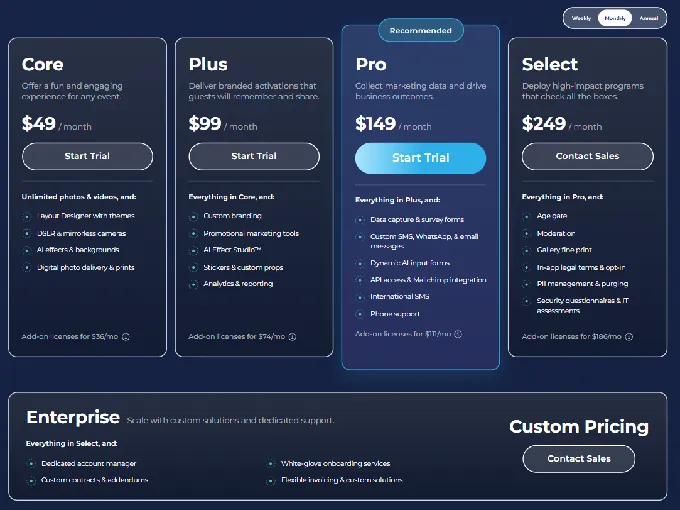
Simple Booth uses a per-license subscription model with weekly, monthly, and yearly billing. Each plan includes one license (one active iPad). Additional devices require add-on licenses.
Everyday Plans:
- Lite: $14.99/week, ~$72/month, $290/year. Digital and print layouts, motion and still capture, photo delivery, online galleries. Includes ads in the app.
- Core: $24.99/week, ~$49/month, $490/year. Adds: ads removed, DSLR support, video, background replacement, Dropbox, AI effects, Virtual Booth.
- Plus: $49.99/week, ~$99/month, $990/year. Adds: custom branding, analytics and reporting, guest-editable text, custom AI effects.
Business Plans:
- Pro: $149/month, $1,490/year. Adds: lead capture, API integration, phone support, moderation, age gate, data compliance tools.
- Select: $249/month, $2,490/year. Adds: custom legal terms, security questionnaires, demographic analytics via face detection.
Hardware: HALO Event Kits start at approximately $2,090 with 0% financing available. A Simple Care protection plan ($299) extends the warranty to 2 years and covers 2 accidental damage repairs.
AI Credits: $0.10 per credit, with bonus credits included on new subscriptions (50-200 depending on plan). Purchased credits do not expire. A 7-day free trial is available with 25 free AI credits.
Source: Simple Booth
Use Simple Booth if:
- You want an integrated hardware-and-software system that sets up in under a minute with no tools
- You run unattended, drop-off events and need an interface guests can navigate without an attendant
- You need high-converting lead capture (87%+ opt-in rates) for marketing and brand activation events
- You want AI photo effects, background blur, and wireless DSLR support in a single platform
- You want remote dashboard management to run multiple booths without being on-site
Why Simple Booth Topped Our List
We know what this looks like: Simple Booth putting Simple Booth at number one. But the facts support it: 30,000+ customers, a 4.7-star App Store rating from 2,400+ reviews, documented deployments with Live Nation and Gibson Brands, and a proprietary hardware ecosystem that no software-only competitor can replicate.
Of all the platforms we evaluated, Simple Booth delivered the most complete all-in-one experience, from unboxing to live event, with the least friction.
That said, it’s not for everyone. If you need Android support, mirror booth hardware, or the lowest possible entry price, the platforms below may be a better fit.
Read on!
2. Photobooth Supply Co.: Best for Entrepreneurs Who Want a Complete Photo Booth Business Ecosystem
Source: Photobooth Supply Co.
Starting a photo booth business involves more than buying hardware and installing an app. You need marketing materials, a portfolio website, pricing templates, sample contracts, and a plan for getting your first clients. Most platforms leave that problem to you.
Photobooth Supply Co. (PBSCO) doesn’t.
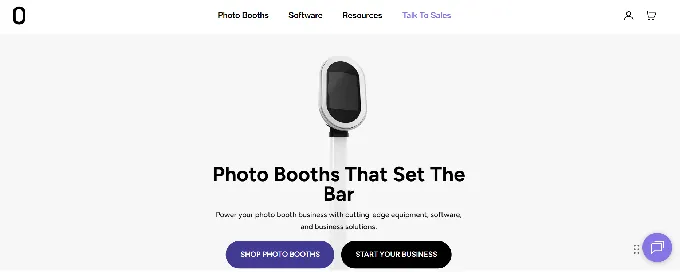
PBSCO designs and manufactures its own hardware (the Salsa 2), builds its own software (Fiesta), and bundles business-building resources into the subscription. 9,000+ photo booth businesses run on Fiesta, and PBSCO has sold 6,000+ booths with 500 million captures across its installed base.
| PBSCO Pros | PBSCO Cons |
|---|---|
| Three-mode hardware (stationary, roaming, wall-mount) | iPads not included in any hardware package |
| Flat-rate unlimited pricing with no per-event fees | Requires PBSCO hardware ecosystem |
| Business training via Photobooth Academy (100+ classes) | Higher upfront hardware investment |
| Portfolio website and proposal builder included |
Why Choose PBSCO?
The Salsa 2 operates in three modes within a single unit: stationary backdrop, hand-held roaming (the head detaches from the stand), and VESA wall-mounted for permanent venues. A single USB-C cord handles power, an internal battery compartment enables cordless roaming, and the whole system fits in a rolling case weighing 34.6 lbs.
Fiesta software includes unlimited events, captures, and SMS and email sharing with no per-event charges at any tier. The Fiesta Business Tools layer includes a portfolio website, a Proposal Builder for generating event-specific proposals, and Photobooth Academy with 100+ video classes taught by active booth owners covering pricing, client acquisition, and scaling.
PBSCO documents operator success publicly through its Millionaires Club, naming photo booth business owners who have crossed seven figures in revenue, with documented earnings from $114K to $6.6M+. Its client list includes Delta, Reddit, NFL, YSL, Bacardi, and Four Seasons.
PBSCO Pricing
Software: Plus: $59/month ($590/year) with unlimited events and sharing. Pro: $119/month ($1,190/year) adds unlimited Sharing Stations, phone support, and FTP delivery.
Hardware: Salsa 2 Starter from $2,999. Essentials from $4,999 (includes 1 year Fiesta Pro). Growth from $9,399 (two booths). Guac DSLR from $7,999. Tortilla 360 from $3,499. Annual Fiesta subscribers receive hardware discounts: $250 off on Plus Annual; $750 off on Pro Annual.
Use PBSCO if:
- You’re launching a photo booth business from scratch and want one vendor for hardware, software, training, and marketing
- You need hardware that adapts to stationary, roaming, and wall-mounted formats without buying multiple units
- You run 15+ events per month and want flat-rate unlimited pricing
- You want structured business-building resources and a community of operators who have scaled to six and seven figures
3. Snappic: Best for Operators Managing Multi-Format Booth Fleets
Source: Snappic
When your agency runs a 360 spin booth on the main floor, a Glambot arm at the VIP entrance, and iPad photo stations at breakout tables, the last thing you need is three separate software subscriptions with three separate dashboards.
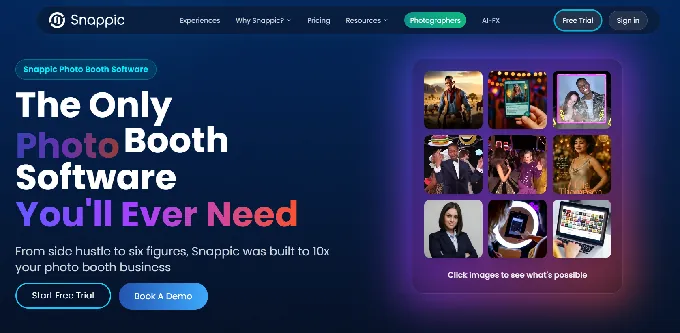
Snappic solves that with a single platform that supports iPad, 360, Robot Arm/Glambot, Mirror, DSLR, and Roaming Mode under one subscription at any tier. Staff train once, templates work across hardware types, and clients like Google, Netflix, and Meta use the platform for large-scale brand activations. The trade-off for that breadth is a dense settings interface that takes real ramp-up time for new operators.
| Snappic Pros | Snappic Cons |
|---|---|
| All booth formats under one subscription | Dense settings interface with a steep learning curve |
| VideoFX engine for 360 and Glambot video | AI credits, green screen, and branded galleries cost extra |
| AVA demographic analytics and webhook integrations | Starter plan limits photo delivery to email and text only |
| 14-day free trial, no credit card required | No proprietary hardware (operators source their own) |
Why Choose Snappic?
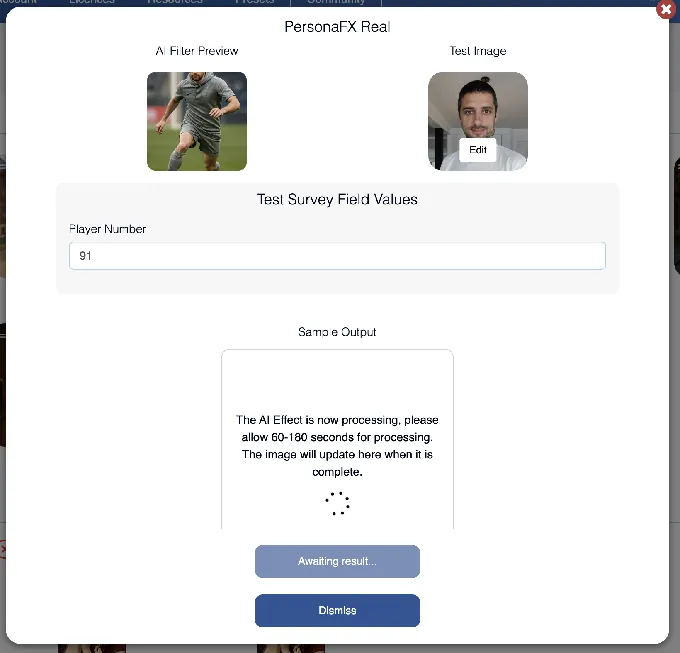
Snappic’s AI-FX suite offers separate AI subsystems for different transformation types. Pers`onaFX generates survey-driven personalized avatars, while BananaFX runs on Google’s Gemini 2.5 for regenerated images in photorealistic, 3D-illustrated, animated, and high-fidelity outputs.
Source: Snappic
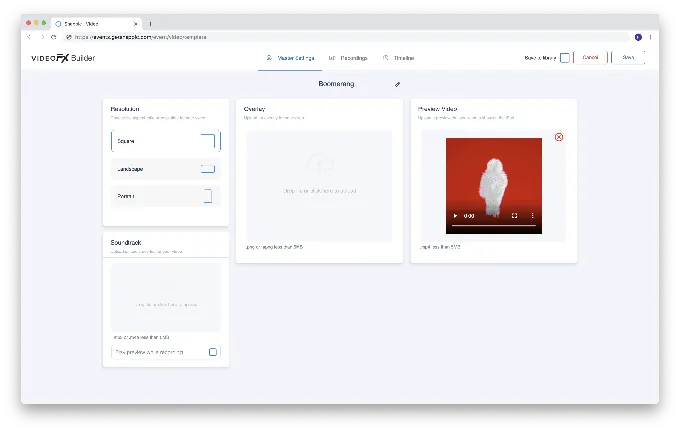
The VideoFX Template Builder handles slow-motion production for 360 and Glambot events with per-clip speed multipliers, animated overlays, and intro/outro inserts, all processed and delivered automatically after each guest session. Pre-built Glambot templates include MultiZoom and DoubleSlowMo (8x slow motion).
Source: Snappic
For data capture, Automated Vision Analytics (AVA) extracts anonymized demographic insights from uploaded images, and webhooks push data to CRMs in real time via four event triggers, secured with HMAC-SHA256 signatures.
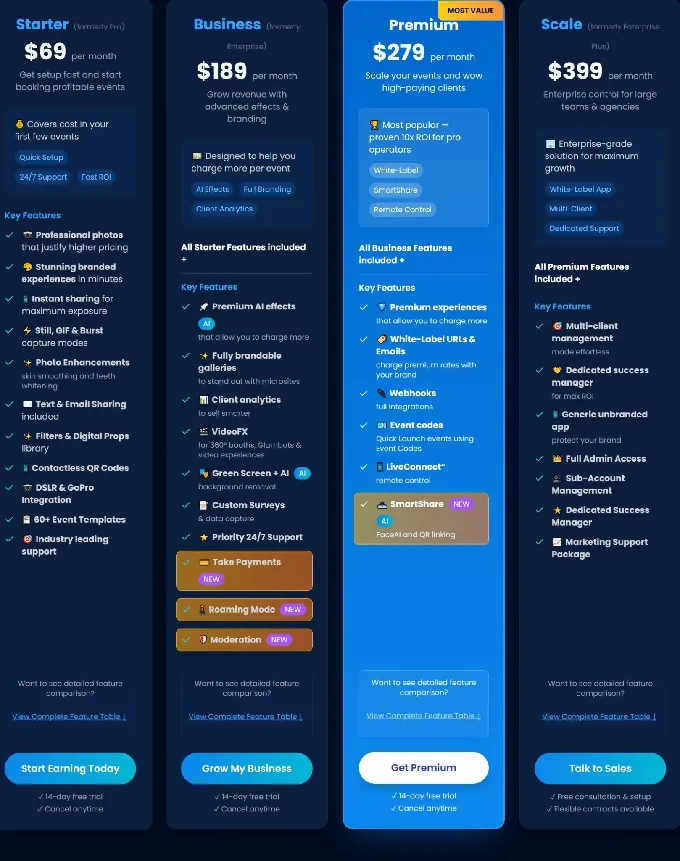
Snappic Pricing
All plans include a 14-day free trial with no credit card required. Annual billing saves 20%.
- Starter: $69/month ($499/year). Core iPad photo booth with unlimited SMS/email (USA/Canada).
- Business: $189/month ($1,799/year). Adds VideoFX, AI-FX, client analytics, surveys, content moderation.
- Premium: $279/month. Adds white-label, webhooks, LiveConnect, SmartShare AI (400 credits/month).
- Scale: $399/month ($3,999/year). Sub-accounts, Grey Label App, dedicated Customer Success Manager.
AI-FX credits and AI Background Removal are billed separately at all tiers.
Source: Snappic
Use Snappic if:
- You operate multiple booth types (360, Glambot, iPad, Mirror) and need one platform for all of them
- Your clients are corporate brands expecting AI-generated content, demographic analytics, and white-labeled deliverables
- You need video production from 360 or Glambot rigs without post-processing software
- You’re building an agency with multiple operators and need sub-account management
4. Fotomaster: Best for Operators Who Want Interactive Experiences
Source: Fotomaster
Standard iPad photo booths handle weddings and corporate parties well. But when a client asks for a full-length mirror booth at a gala, a robotic drawing machine at a trade show, or a digital graffiti wall at a brand activation, commodity hardware can’t deliver.
Fotomaster is a manufacturer that designs, builds, and ships its own hardware in Savannah, Georgia, while running every product on a single proprietary software ecosystem called FMX.
Its catalog spans seven mirror booth models, iPad and video booths, and interactive stations including a Draw Me Bot AI robotic drawing machine ($2,950), a Fortuna AI holographic fortune teller ($6,950), a Photo Mosaic Wall ($6,700), and an Air Graffiti Wall ($2,950).
| Fotomaster Pros | Fotomaster Cons |
|---|---|
| Widest hardware catalog in the category, all on one software | Higher price points (mirror booths $4,950-$15,950) |
| AI Workflow Builder generates event flows from plain text | No consolidated public pricing page |
| Lead Distribution Platform routes inquiries to operators | Annual software and cloud subscriptions add ongoing costs |
| US-manufactured hardware (Savannah, GA) |
Why Choose Fotomaster?
All hardware runs on FMX software and connects to the same Foto Master Cloud account. An operator running a mirror booth at a wedding and a Draw Me Bot at a corporate expo manages both through identical workflows.
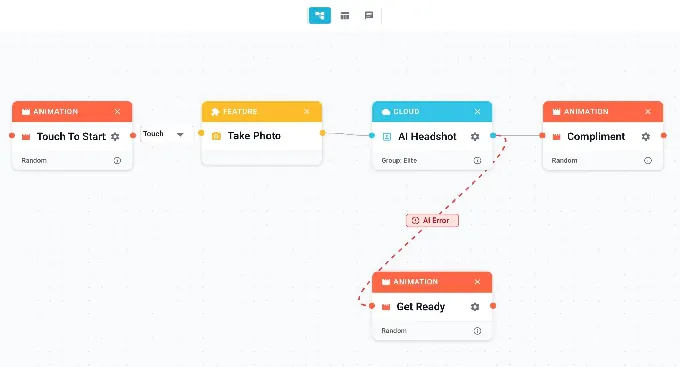
The AI Workflow Builder accepts a plain-language description of the event and generates the full booth workflow automatically, including animations, conditional logic, and capture modes. The Node View visual editor maps the guest journey as a drag-and-drop canvas with conditional branching, making it straightforward to maintain reusable event presets across hardware types.
Source: Snappic
Fotomaster’s Lead Distribution Platform is unique in the category: it routes inbound rental inquiries to Fotomaster operators by geography. Every active software license with a 24/7 Support plan grants five LDP coins that operators place on a map, each covering an adjustable radius.
When a prospect submits a rental inquiry, the platform geocodes the event location and routes the lead to the nearest available operator.
Mirror booth options range from the Beauty Mirror at $4,950 to the flagship Tower Mirror at $15,950.
Fotomaster Pricing
- Hardware (one-time): Mirror booths from $4,950 to $15,950. Interactive stations from $2,950 (Air Graffiti Wall) to $6,950 (Fortuna AI). Financing available.
- Software (per device, after first year included free): FMX for Windows: $33/month. FMX for iPad: $32/month. Specialty software: $59-$79/month.
- Cloud: Basic: $39/month (galleries, analytics, LDP). Pro: $79/month (custom domains, white-label, operator SMS via Twilio).
- Support: $27/mosnth per license for 24/7 support (required to keep LDP coins active).
Use Fotomaster if:
- You want to expand beyond iPad booths into mirror booths, interactive AI stations, or robotic drawing machines
- You want hardware, software, cloud management, and a client referral network from a single vendor
- You run brand activations requiring novelty hardware that commodity booths cannot replicate
- You run permanent installations at entertainment centers or retail venues with pay-per-play support
5. TouchPix: Best for 360-Degree and High-Motion Video Specialists
Source: TouchPix
If your core business is spinning-arm video booths at corporate events and nightlife activations, you need software built for that workflow from the ground up, not a photo booth app with 360 support added as an afterthought.
TouchPix launched in 2020 and grew on the back of the 360 booth trend. It’s built for 360-degree and high-motion video capture. It supports GoPro models 7 through 14 (wired and wireless), plus Canon, Nikon, and Sony DSLRs and mirrorless cameras.
It runs on iOS, Android, macOS, Windows, Linux, and Raspberry Pi, the widest OS footprint in the photo booth software category. And it carries a 4.8-star App Store rating across more than 6,600 reviews.
| TouchPix Pros | TouchPix Cons |
|---|---|
| GoPro 7-14 support plus DSLR/mirrorless cameras | Software-only (no proprietary hardware) |
| Runs on 6 operating systems including Raspberry Pi | Launched in 2020; less platform maturity than established alternatives |
| Offline AI face replacement and background removal | Users report slower image and video rendering times |
| 360 Bluetooth trigger integration | Interface can be confusing for unattended, drop-off setups |
Why Choose TouchPix?
TouchPix consolidates six capture modes into a single app: still photos, AI-transformed photos, boomerangs, video, animated GIFs, and slow-motion video.
The 360 Bluetooth trigger integration communicates with spinning platforms to start capture sequences automatically, removing the need for an attendant to press a remote trigger. 60+ built-in filters and 300+ animated overlays minimize design prep between events.
The offline-first architecture stands out: AI face replacement and background removal run entirely on-device without an internet connection, and the Scanpix 2 system delivers media to guests via QR code even when there is no Wi-Fi or cellular signal on either device. An offline queue holds cloud uploads until connectivity resumes.
For AI activations, TouchPix offers 80+ ready-made AI styles plus custom text prompt capability for branded transformations at corporate events.
TouchPix Pricing
Pricing is based on the number of active event slots (simultaneous events), not per device. Devices are unlimited within each plan.
- PhotoPass: $439.90/year (2 active events). Photos, Photo AI, and animated GIFs.
- MultiPass: $879.99/year (4 active events). Adds video, slow-motion, and boomerang.
- MultiPass Pro: $1,407.99/year (8 active events). Adds Virtual Booth and Advanced Surveys.
- MultiPass Enterprise: $2,199.99/year (12 active events). Adds Mosaic and RAW cloud backups.
14-day free trial available with no credit card required.
Use TouchPix if:
- Your primary service is 360-degree spinning-arm video booths and you need software built for that workflow
- You work across multiple device types and operating systems (iOS, Android, Windows, macOS, Linux, Raspberry Pi)
- You frequently deploy at venues with unreliable internet and need offline AI processing and sharing
- You use GoPro or DSLR cameras and want hardware-agnostic software
6. LumaBooth: Best Budget Entry Point for New Operators
Source: LumaBooth
Not every photo booth operator is ready to commit $2,000+ in hardware and a monthly subscription before they’ve run their first event. If you’re testing whether photo booths fit your event business, your DJ services, or your photography side hustle, you need a way to evaluate the software on real events before investing.
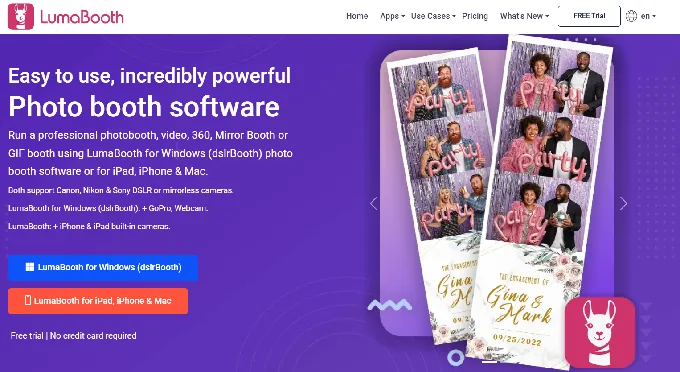
LumaBooth (by Lumasoft) is a photo booth app for iPad, iPhone, Mac, and Windows that starts with an unlimited free trial, covers two devices under a single paid subscription, and includes DSLR camera support at the base price.
| LumaBooth Pros | LumaBooth Cons |
|---|---|
| Permanent free trial with no expiration date | No web dashboard for remote device management |
| Two devices per single subscription | Interface navigation can feel dated and unintuitive |
| 170+ AI Portrait presets included | Limited design tools compared to advanced layout editors |
| Canon, Nikon, and Sony DSLR at base price | Full professional setup requires multiple paid add-ons |
Why Choose LumaBooth?
The free version runs indefinitely with no expiration date and no payment required. Operators can run a live 360 booth, configure green screen sessions, test AI Portraits, and share media via QR code. The only limitation is a watermark on outputs, removed when a paid subscription is activated.
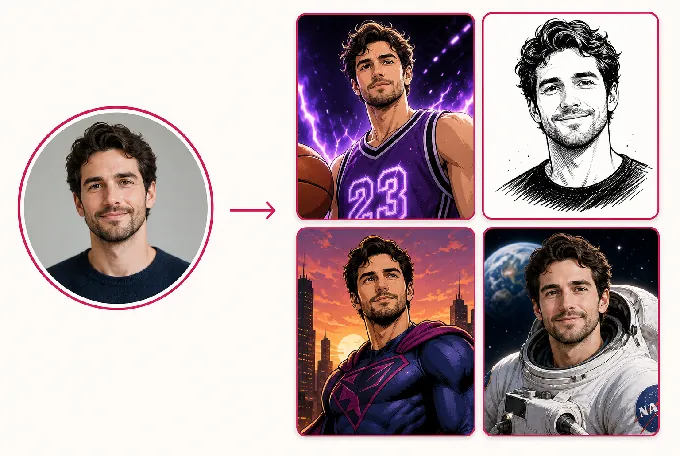
Paid subscriptions include two devices under a single license, giving you a built-in backup device at no extra cost. Over 170 AI Portrait presets organized into categories (Superheroes and Comics, Movies, Fantasy, Sports, Art Styles, Seasonal) are included with no separate AI provider setup required.
Custom AI Portraits allow free-text prompts and reference image uploads for branded activations.
Source: LumaBooth
The platform also includes 820+ templates accessible via the browser-based LumaBooth Dashboard and supports Canon, Nikon, and Sony DSLR/mirrorless cameras at the base subscription price on Windows.
The trade-off is operational workflow: LumaBooth lacks remote device management, and most booth configuration happens within the app rather than a web interface, which can limit operators managing multiple simultaneous events.
LumaBooth Pricing
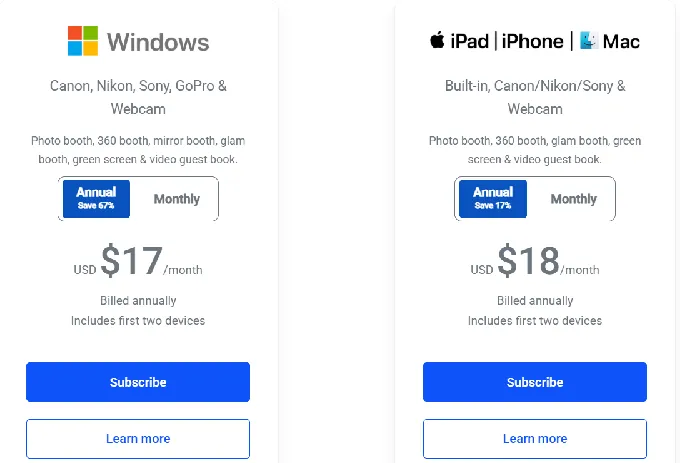
Apple (iPad/iPhone/Mac): $18/month billed annually (~$216/year) or $19.99/month. Covers two devices.
Windows PC: $17/month billed annually (~$204/year) or $49.99/month. Covers two devices. Includes cashless pay-per-print payments via Stripe and Booth CoPilot remote management.
Add-ons to consider: fotoShare Cloud Plus (+$19.99/month), SMS plan (+$10/month), AI Credits (+$14.99/month for 150 credits or +$49.99/month for 500 credits).
Source: LumaBooth
Use LumaBooth if:
- You’re entering the photo booth market and want to evaluate software on real events before paying anything
- You already own a Canon, Nikon, or Sony DSLR and want to use it without upgrading to a higher software tier
- You need a built-in backup device at no extra license cost
- You want AI Portrait experiences as an upsell without setting up external AI infrastructure
7. Curator Live: Best for Venue Operators Running Permanent Photo Activations
Source: Curator Live
Rental photo booth software is designed around the per-event cycle: show up, set up, capture, tear down, repeat. But a family entertainment center, museum, resort, or restaurant running a photo activation from open to close every day has a fundamentally different operating model. It needs to deliver personalized content to hundreds of guests daily without gallery browsing bottlenecks or staff-assisted photo delivery.
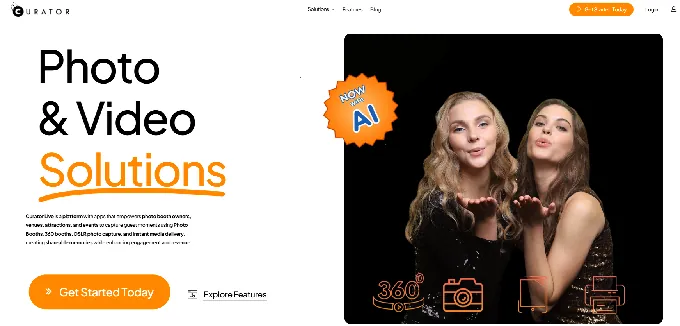
Curator Live is an iOS-native photo and video platform built for that scenario. It combines capture, AI image transformation, branded video production, facial recognition delivery, and analytics into a single iPad-based system designed for continuous, permanent activations.
| Curator Live Pros | Curator Live Cons |
|---|---|
| Facial recognition groups and delivers photos automatically | iOS-only (iPad and iPhone) |
| CustomFX video timeline with compositing tools | SMS delivery requires a separate Twilio account |
| On-device AI background removal works fully offline | AI rendering credits billed separately |
| 100+ DSLR/mirrorless camera bodies supported |
Why Choose Curator Live?
Facial recognition delivery groups every photo of a specific individual captured during the activation and delivers a secure private link directly to that guest via text or email. Sensitivity is adjustable across three levels per event, and a private gallery mode prevents cross-visibility between visitors.
At the throughput levels that justify a permanent installation, manual gallery assistance would be impossible to sustain; Curator Live automates the entire lookup.
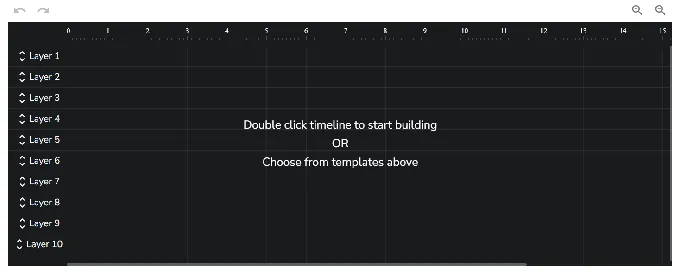
The CustomFX Timeline Builder is a layer-based video editor where operators stack Overlay, Background, Pre-Roll, Post-Roll, and Audio layers along a visual timeline.
Source: Curator Live
The overlay system supports transparent HEVC video files for compositing effects in front of and behind the recorded subject in a single render. Guests stepping off a 360 platform receive a finished, branded video clip with animated overlays and background music, ready to share.
Magic AI Background Removal processes entirely on-device using the iPad’s Neural Engine with no internet, no cloud latency, and no per-use credit charge. This works across all capture formats: photos, boomerangs, GIFs, and 360 video. Curator Live also supports 100+ DSLR and mirrorless camera bodies across Canon, Nikon, Sony, and Olympus via USB tethering.
Curator Live Pricing
All tiers include all capture formats, AI background removal, green screen, and 24-hour support.
Per-Event (3-day activation): Standard: $29/event. Event Pro: $59/event. Agency Pro: $99/event.
Monthly: Standard: $69/month. Event Pro: $149/month (Facial Recognition, Sharing Station, Slideshow App included). Agency Pro: $249/month.
Yearly: Standard: $499/year. Event Pro: $1,499/year. Agency Pro: $2,499/year.
AI Photo Rendering credits are priced separately (approximately $0.45 per image for standard quality; $1.00 per image for groups of eight or more).
Use Curator Live if:
- You operate a venue, attraction, FEC, museum, or resort where a photo activation runs continuously
- You need facial recognition delivery to handle high-volume guest throughput without staff assistance
- You need branded video output from 360 rigs without external editing software
- You run activations in venues with unreliable Wi-Fi and need fully offline AI background removal
And That’s Our List of…
…the best all-in-one photo booth systems that let you skip the DIY headaches and get straight to running professional, revenue-generating photo experiences. Each platform serves a distinct operator profile, so the right choice depends on where your business is today and where you want to take it.
Here are our top three recommendations for the most common starting points:
Simple Booth: If you want an integrated system that pairs proprietary ring-light hardware with polished software, AI effects, and lead capture, delivering a complete experience from unboxing to live event. Start with a Simple Booth free trial.
Photobooth Supply Co.: If you’re building a photo booth business from scratch and want one vendor for hardware, software, business training, and a community of operators who’ve scaled to six and seven figures.
Snappic: If you run an agency managing multiple booth types across corporate brand activations and need fleet management, AI content generation, and client analytics under one subscription.
Best All-in-One Photo Booth Systems FAQ
What makes a photo booth system “all-in-one”?
An all-in-one photo booth system bundles the key components of a professional photo booth into a single platform: hardware or software, capture modes, photo delivery, branding tools, and analytics. The operator doesn’t need to source a ring light, tablet stand, sharing app, and photo editing software separately.
Simple Booth and Photobooth Supply Co. take this furthest by bundling proprietary hardware with their own software; platforms like Snappic and TouchPix achieve it through software that natively supports all major booth formats and camera hardware.
Which all-in-one photo booth system is best for beginners?
LumaBooth offers the lowest-friction entry point with a permanent free trial that never expires (outputs carry a watermark), two devices per paid subscription starting at $17-18/month, and Canon, Nikon, and Sony DSLR support at the base price.
Simple Booth’s Lite plan at $14.99/week is another accessible option, with the advantage of optional proprietary hardware and a visual preset editor designed for fast event setup. For operators who want hardware included from day one, Photobooth Supply Co.’s Essentials bundle ($4,999) includes the Salsa 2 booth, a year of Fiesta Pro software, business training, and marketing materials.
How much does an all-in-one photo booth system cost?
Costs vary widely depending on whether you need hardware. Software-only subscriptions range from $18/month (LumaBooth) to $399/month (Snappic Scale).
Proprietary hardware adds a one-time cost: Simple Booth HALO Event Kits start at approximately $2,090, Photobooth Supply Co. Salsa 2 starts at $2,999, and Fotomaster mirror booths range from $4,950 to $15,950. Most platforms offer financing to spread hardware costs over monthly payments.
Which platform is best for 360-degree video booths?
TouchPix is the specialist choice for 360-degree spinning-arm video. It supports GoPro models 7 through 14 (wired and wireless), runs on six operating systems including Raspberry Pi, and includes 360 Bluetooth trigger integration for automated capture sequences. Snappic also supports 360 video with its VideoFX engine, which suits operators who also need Glambot, Mirror, and iPad booth support under a single subscription.
Can I use an all-in-one photo booth system without internet?
Yes, several platforms work offline. Simple Booth’s HALO app queues sessions in offline mode and delivers them when connectivity returns. TouchPix runs AI face replacement and background removal entirely on-device, and its Scanpix 2 system shares media via QR code without any internet connection. Curator Live processes AI background removal on-device using the iPad’s Neural Engine with no cloud dependency.
Which system is best for capturing leads and marketing data?
Simple Booth leads in lead capture with documented opt-in rates of 87-89% when guests receive their photos. Data exports as CSV, syncs natively with MailChimp, and connects to custom CRMs via API on Pro plans and above. Snappic offers deeper analytics with AVA demographic insights, custom surveys, and real-time webhook integrations.
The right choice depends on whether you need high opt-in simplicity (Simple Booth) or granular corporate reporting (Snappic).
Which platform is best for permanent venue installations?
Curator Live is built for ongoing venue activations. Its facial recognition delivery automatically groups and sends personalized galleries to high volumes of daily guests without staff assistance.
The CustomFX Timeline Builder produces branded video output in real time, and on-device AI background removal works without internet. Simple Booth’s Install Kit (wall mount) and remote dashboard management also serve permanent venues well, particularly those focused on lead capture and social sharing.
Do I need to buy specific hardware, or can I use equipment I already own?
It depends on the platform. Simple Booth requires an iPad and optionally the HALO hardware kit. Photobooth Supply Co. and Fotomaster sell proprietary hardware designed for their software. Software-only platforms like TouchPix, Snappic, LumaBooth, and Curator Live work with a range of existing hardware.
TouchPix has the broadest compatibility (GoPro 7-14, Canon, Nikon, Sony, six operating systems), while LumaBooth covers Canon, Nikon, and Sony DSLRs at the base subscription price.
Keep reading
 Best Of
7 Best Photo Booth Software with Video Message and Slo-Mo Capture [2026]
Booths that capture heartfelt video notes and buttery slo-mo. The moving stuff.
 Best Of
6 Best Photo Booth Software With QR Code Sharing [August 2026]
Booths that beam every snap to a phone with a quick scan. QR sharing done right.
 Best Of
7 Best Photo Booth Software With Real-Time Analytics and Dashboards [August 2026]
Booths that show the numbers as the party happens. Live dashboards, real insight.