7 Best Compact Photo Booth Setups That Fit in a Car Trunk [June 2026]

The photo booth rental industry has a logistics problem nobody talks about until they’re loading gear at midnight after a four-hour wedding reception.
Traditional enclosed photo booths weigh hundreds of pounds, require cargo vans or trailers, and need a two-person crew just to move from the vehicle to the venue. For independent operators and growing rental businesses, that overhead eats into profit margins, limits the events you can service in a weekend, and forces vehicle upgrades long before the business justifies them.
The good news: compact photo booth setups now make it possible to run a professional photo booth business from the trunk of a standard sedan. Today’s best systems pack quality lighting, AI effects, branded photo delivery, and lead capture into packages that weigh under 50 pounds and deploy in minutes.
We tested and researched the leading compact photo booth platforms to find the best options for operators who need trunk-portable gear without sacrificing the output quality that commands higher rental rates.
What Is a Compact Photo Booth Setup?
A compact photo booth setup is a portable photo booth system designed to fit in a standard car trunk, typically weighing under 50 pounds and requiring no specialized vehicle or multi-person crew to transport. These setups combine hardware (ring lights, tablet mounts, stands, or camera rigs) with software (capture apps, sharing platforms, analytics dashboards) into a single system that deploys in minutes at any venue.
Unlike traditional enclosed booths, compact setups use open-air configurations, meaning guests interact with a visible screen and light rather than stepping inside a curtained enclosure. This open format reduces weight, increases portability, and often produces better guest engagement since passersby can see the action.
We researched and tested the top platforms and shortlisted the best compact photo booth setups for key operator needs:
- Running a self-operating booth from a single rolling case
- Handling multi-format activations (360, Glambot, mirror) for enterprise clients
- Bundling hardware and software from one vendor with fleet growth incentives
- Maximizing production value at the lowest monthly rate
- Using existing Windows hardware and DSLR cameras with no recurring fees
- Starting a photo booth side business with minimal investment
- Offering 360 video and interactive activations on any device
Here’s a quick summary of these platforms.
| Best Compact Photo Booth Setups | |
|---|---|
 | Simple Booth Best for operators who want a self-operating system with integrated lighting that deploys in under a minute from a single rolling case. |
 | Snappic Best for enterprise operators running brand activations who need multi-format booth support from one iPad. |
 | Photobooth Supply Co. Best for growing rental businesses that want hardware, software, and training bundled from a single vendor. |
 | LumaBooth Best for solo operators who want the most production value at the lowest monthly subscription. |
 | Darkroom Booth Best for Windows operators who want DSLR quality and a one-time perpetual license. |
 | Sparkbooth Best no-subscription entry point for part-time operators on a minimal budget. |
 | TouchPix Best cross-platform app for operators offering 360 video and interactive activations on any device. |
How To Choose the Best Compact Photo Booth Setup
Here’s a checklist to help you find the right trunk-portable photo booth system:
- Portability & Weight: The entire system (hardware, stand, case) should fit in a standard car trunk and be manageable for one person. Look for rolling cases, tool-free assembly, and total weights under 50 lbs.
- Setup Speed: Minutes matter when you’re running back-to-back events. The best compact setups deploy in under five minutes with no tools.
- Photo Quality: Compact doesn’t have to mean compromised. Look for integrated lighting, DSLR/mirrorless camera support, or AI-enhanced processing that delivers professional output.
- Unattended Operation: For operators running multiple events or working solo, a booth that runs itself (with remote monitoring) is an advantage over one requiring constant supervision.
- Software Features: Capture modes (photo, GIF, video, 360), branding tools, AI effects, and guest sharing options determine what you can offer clients and what you can charge.
- Pricing Model: Weekly, monthly, annual, or one-time license? Match the pricing structure to your booking volume and seasonality.
- Data Capture & Analytics: For corporate and brand activation clients, lead capture and post-event reporting turn a one-off booking into a repeat contract.
How We Curated Our List
We started by identifying photo booth platforms that support compact, car-trunk-portable deployments. We evaluated each on the physical portability of the full system, output quality under real event conditions, the breadth of capture modes available, and total cost of ownership for operators at different business stages.
We tested platforms through free trials, product demos, and documentation review, assessing them on four criteria:
- Portability: Total system weight, case design, and one-person load-in feasibility
- Output Quality: Photo/video quality under varied lighting conditions
- Feature Depth: Capture modes, branding tools, AI effects, sharing options
- Value: What you get relative to what you pay at each pricing tier
This produced our final list of seven platforms, each excelling for a specific operator profile. Let’s dive in.
1. Simple Booth: Best Self-Operating System That Deploys in Under a Minute
Source: Simple Booth
Running a photo booth business from your car trunk only works if the gear performs at the same level as a full-sized setup once it’s in the venue. Guests don’t know (or care) that your entire operation fits in a sedan. They expect professional lighting, polished branding, and instant photo delivery regardless of how the equipment arrived.
That’s where Simple Booth separates itself from the field.
Simple Booth is an integrated photo booth system pairing a subscription-based iPad app (the HALO app) with proprietary ring-light hardware (the HALO kits). The company calls it “the premium photo booth that runs itself.”
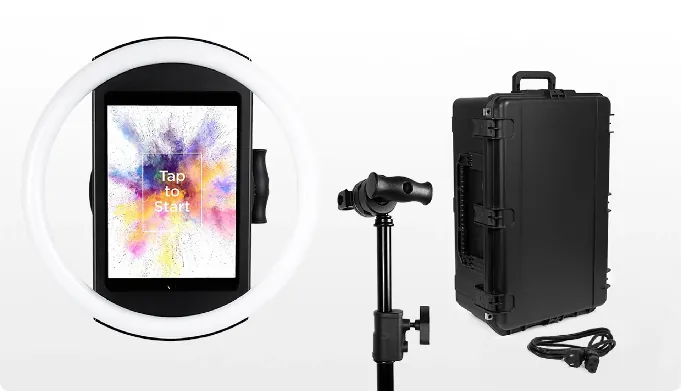
The complete HALO Event Kit packs into a single rolling hard case, deploys in under a minute with no tools, and operates unattended throughout an event while the operator manages everything remotely from a phone or laptop. Its core capabilities include:
- Machined aluminum ring light with 112 LEDs producing up to 2,100 lumens, rated for 50,000 hours
- Tool-less iPad faceplate and deployable selfie stand enabling sub-one-minute setup
- Multiple capture modes: still photos, photo strips, custom layouts, GIFs, Rebound clips, and full-length video
- Built-in layout designer (available in-app and on the web dashboard) with 60+ importable themes, dynamic QR codes, and multiple layout options per event
- AI background replacement without a physical green screen, plus AI Effects that transform guest photos using text prompts
- 87%+ opt-in rate on lead capture forms, with data export to CSV, MailChimp, or custom CRM via API
- Offline mode that queues sessions and delivers them when connectivity returns
- Remote management via online dashboard, with preset changes syncing to the iPad without exiting booth mode
| Simple Booth Pros | Simple Booth Cons |
|---|---|
| Sub-one-minute setup with no tools | iPad-only (no Android support) |
| Ring light in durable aluminum chassis | AI effects require internet connection |
| Operates unattended with remote monitoring | Entry-tier (Lite) includes ads |
| 4.7-star rating from 2,400+ App Store reviews | |
| Flexible weekly pricing for variable-volume operators |
Why Choose Simple Booth for a Trunk-Portable Setup?
Simple Booth has 30,000+ customers globally, a 4.7-star App Store rating, and over 40 million moments captured since 2012. For trunk-portable operators, three things set it apart.
Trunk-Ready Hardware That Sets Up in Under a Minute
The HALO Event Kit is designed for repeated transport. The HALO body weighs 6.5 lbs; the full kit (HALO, selfie stand, rolling hard case) comes to 49 lbs with wheels and an extendable handle. It rolls like airline luggage from the trunk to the venue.
Source: Simple Booth
Setup is straightforward: extend the stand, mount the HALO body, snap in the iPad via the tool-less faceplate, and power on. A built-in USB-C cable keeps the iPad charged throughout the event without visible dangling cords. A Preflight Check screen verifies everything is configured correctly before the first guest walks up. For events without wall power, compatible portable batteries provide 6+ hours of runtime.
The 1-minute setup matters: operators running two or three events on a busy Saturday can load in, set up, and be operational before the event coordinator finishes the walkthrough.
Professional Lighting Without Extra Equipment
The reason most compact setups produce mediocre photos is lighting. Venue lighting is unpredictable; dim ballrooms, harsh fluorescents, and mixed color temperatures make guests look washed out or unflattering. External ring lights add bulk, cords, and another piece of gear to transport.
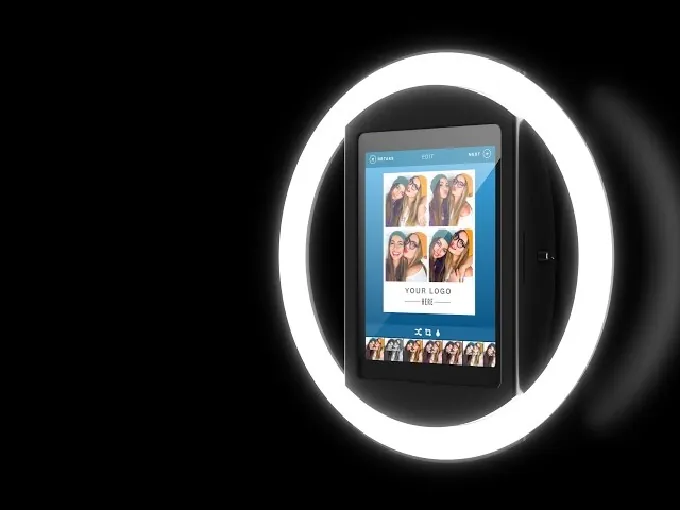
Simple Booth solves this structurally. The HALO chassis integrates a patented ring-light system with 112 LEDs and a refined diffuser, producing even, flattering illumination for groups standing 6-8 feet from the camera. The chassis is machined from a single billet of anodized aluminum, built to withstand repeated transport. No separate light stand, no power adapter for the ring light, no color-temperature adjustments at each venue.
Source: Simple Booth
Combined with software processing (Glam skin smoothing, DSLR-style background blur, and AI background replacement), the output quality from an iPad inside HALO competes with dedicated camera rigs that take three times as long to deploy.
For operators who want full DSLR quality, Simple Booth’s external camera integration (Core plan and up) supports both wired USB and wireless Wi-Fi connections (a wireless option most competing platforms don’t offer), keeping cable clutter minimal in a trunk-portable setup.
Self-Operating Design for Solo Operators
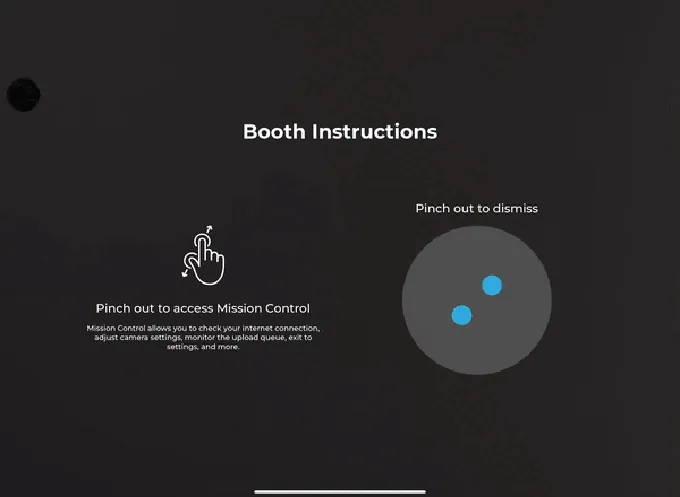
The main advantage for trunk-portable operators is that Simple Booth runs without an attendant. The Mission Control overlay (triggered by a two-finger pinch) lets operators monitor device health, check the upload queue, and adjust camera settings from the booth itself.
Source: Simple Booth
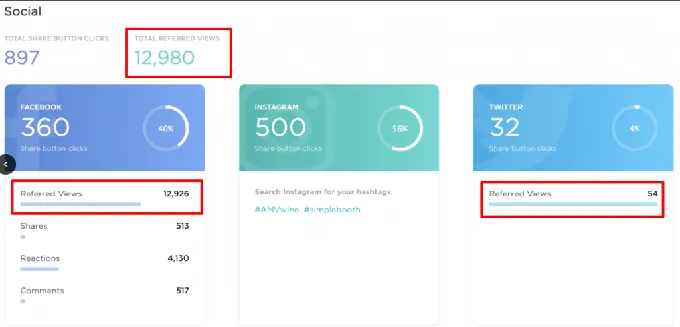
The online dashboard extends that monitoring to any device with a browser, so an operator can manage the booth from across the room, from a second event, or from home.
Source: Simple Booth
iPad Guided Access prevents guests from navigating away from the app. The offline upload queue handles connectivity drops without losing photos. Image previews appear up to 12x faster thanks to optimized rendering, so guests see their results instantly rather than waiting at high-volume events.
For operators running two booths at different venues, this remote management turns a one-person operation into a scalable business.
“It paid for itself pretty quickly. Now it’s just extra money coming in.” (Kurt Nielson Photography)
Simple Booth Pricing
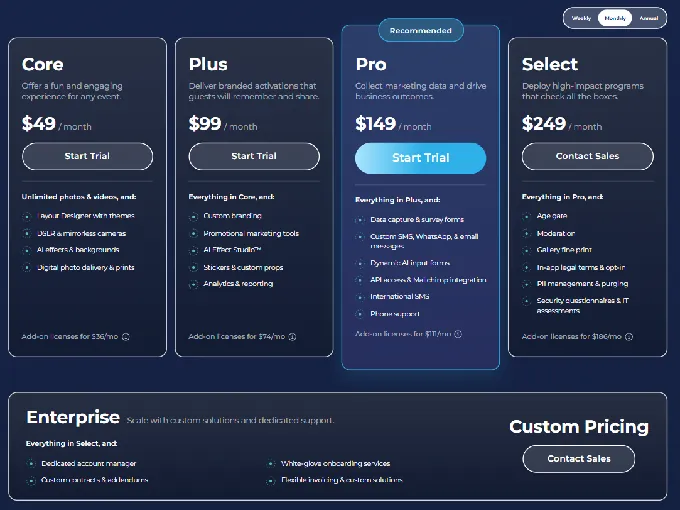
Simple Booth uses per-license subscription pricing with weekly, monthly, and annual billing:
- Lite: $14.99/week, ~$72/month, $290/year (includes ads; excludes DSLR, branding, analytics, lead capture)
- Core: $24.99/week, ~$49/month, $490/year (ads removed, DSLR support, video, background replacement, AI effects)
- Plus: $49.99/week, ~$99/month, $990/year (custom branding, analytics, guest-editable text, custom AI effects)
- Pro: $149/month, $1,490/year (lead capture, phone support, API, moderation, age gate)
- Select: $249/month, $2,490/year (custom legal terms, demographic analytics, security questionnaires)
AI effects consume credits at $0.10 each; purchased credits do not expire. Hardware kits are sold separately at buy.simplebooth.com with 0% financing available.
Source: Simple Booth
Use Simple Booth if:
- You want a complete system (hardware + software + cloud) from a single vendor that deploys in under a minute from a rolling case
- You need integrated lighting built into the device rather than carrying a separate ring light and stand
- You run events unattended and need remote monitoring, offline resilience, and self-service guest operation
- You want flexible weekly pricing that scales with your event volume rather than fixed monthly costs during slow months
- Your clients value data capture, branded galleries, and social sharing as part of the photo booth experience
2. Snappic: Best for Enterprise Operators Running Multi-Format Brand Activations
Source: Snappic
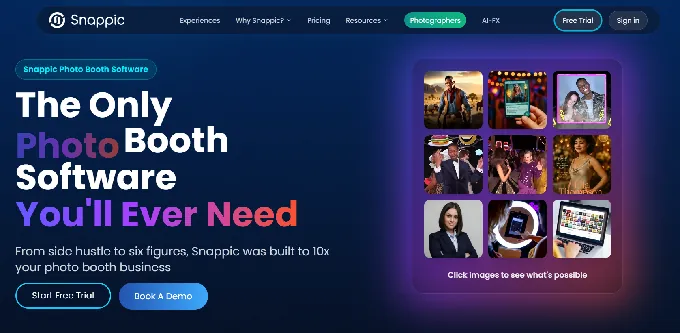
Snappic is an iPad-based photo booth software platform that runs every major booth format from a single license: 360 video, open-air iPad, DSLR-connected, mirror booth, robot arm/Glambot, and roaming photography.
For operators pitching corporate brand activations, Snappic’s format range means one subscription covers whatever the client requests, and the iPad-native architecture keeps the software side trunk-portable regardless of the booth configuration.
The platform has been used at 100,000+ events across 90 countries by 8,000+ operators, with brand activation agencies serving clients like Google, Netflix, and Meta on the roster. Following its 2024 acquisition by a private equity firm, Snappic has shifted toward a more enterprise-focused approach.
| Snappic Pros | Snappic Cons |
|---|---|
| Multi-format support (360, Glambot, mirror, roaming) under one license | AI credits and background removal charged separately |
| VideoFX with slow-motion and branded overlays | White-label features require Business plan or above |
| Built-in analytics with client-facing reporting | Per-event pricing ($29-$79) adds up for high-volume operators |
| 24/7 live support | Dense settings interface creates a steeper learning curve for new operators |
Snappic: Top 3 Unique Features
- Every booth format from one license, eliminating multi-platform management
- VideoFX system with slow-motion, branded overlays, and synchronized music for social-ready 360 output
- Send Analytics to Client feature that packages engagement data into a branded deliverable for sponsors
The multi-format coverage is what sets Snappic apart. When a corporate client wants a 360 video experience in the lobby and an AI photo transformation station near the stage, both run on the same platform, same login, same template system. For trunk-portable operators, the iPad hardware stays constant; only the physical rig around it changes between events.
The trade-off is complexity: Snappic’s settings interface is extensive, and operators who value quick configuration may find the learning curve steeper than more streamlined alternatives. Features like green screen and branded galleries also require higher-tier plans, and the Starter plan limits photo delivery to email and text only.
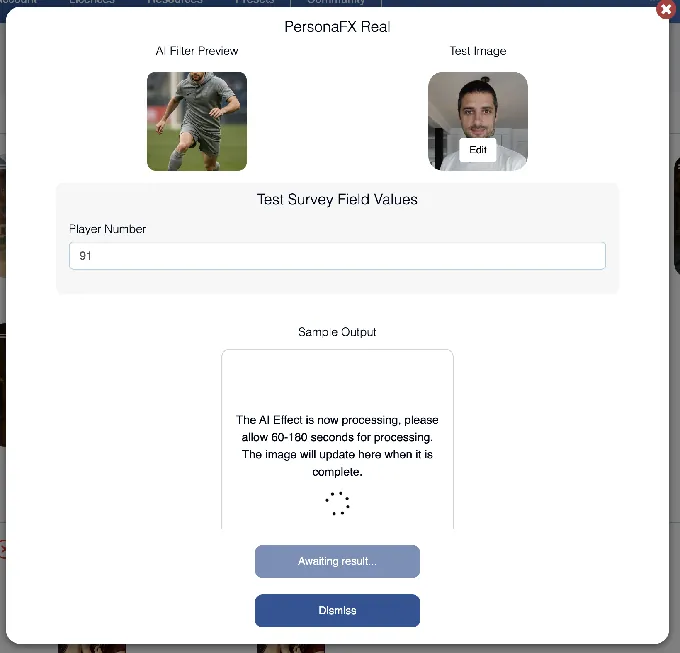
The AI-FX suite runs multiple engines at once: core AI-FX for style transfers, PersonaFX for photorealistic avatars, and BananaFX (powered by Google Gemini 2.5) for full image regeneration from custom prompts.
Source: Snappic
The analytics infrastructure turns one-off corporate bookings into repeat contracts. AVA (Automated Vision Analytics) extracts aggregate demographic data (gender distribution, age ranges, face count) presented as population-level statistics, giving brand clients the audience data they expect from any digital activation.
Snappic Pricing
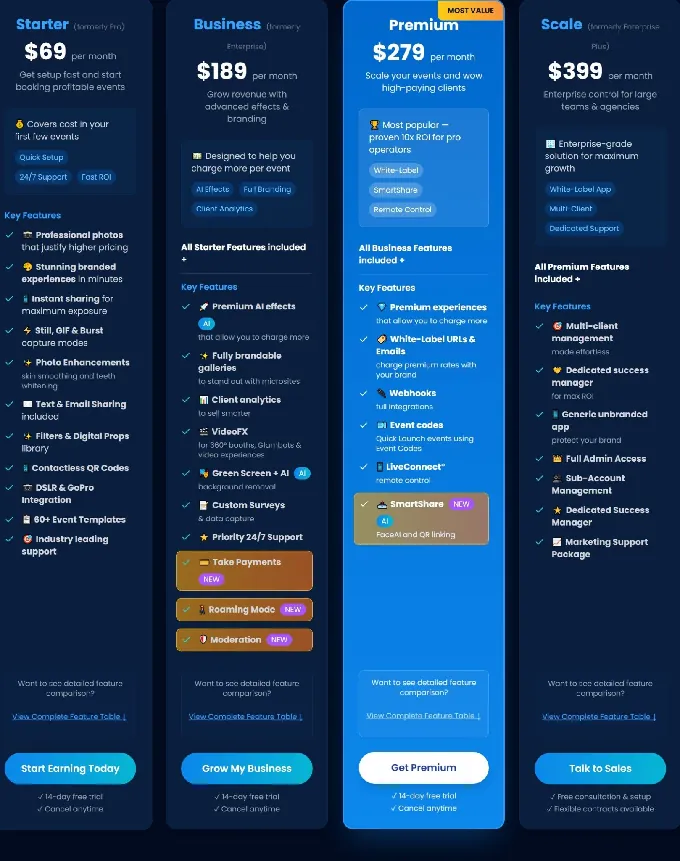
- Per-Event License: $29/event (Starter) or $79/event (Business)
- Starter: $69/month ($499/year). Core photo, GIF, burst capture; SMS/email sharing; 60+ templates; DSLR integration
- Business: $189/month ($1,799/year). Adds VideoFX, AI-FX, client analytics, branded galleries, roaming mode
- Premium: $279/month. Adds white-label URLs, webhooks, LiveConnect, SmartShare AI
- Scale: $399/month ($3,999/year). Multi-client management, unlimited sub-accounts, dedicated CSM
AI-FX credits ($20/200), background removal credits ($15/100), and AI sharing credits are charged separately.
Source: Snappic
Use Snappic if:
- You operate multiple booth formats (360, Glambot, mirror, iPad, roaming) and want one platform managing all of them
- Your clients are corporate brands expecting post-event ROI reporting, branded galleries, and demographic audience data
- You need VideoFX output (slow-motion, branded overlays) to justify higher activation rates
- You want 24/7 live support available during weekend evening events
3. Photo Booth Supply Co. (Salsa 2 + Fiesta): Best All-in-One Bundle for Growing Rental Businesses
Source: Photobooth Supply Co.
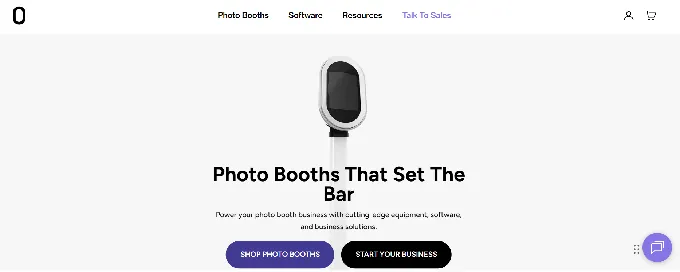
Photo Booth Supply Co. sells photo booth operators a complete bundled system: hardware, software, business tools, and training from one vendor.
For trunk-portable operators, the entry point is the Salsa 2, an iPad-based open-air booth that ships with a custom soft roller carrying case and weighs 34.6 lbs packed, alongside Fiesta, their SaaS platform managing event capture, sharing, and analytics with no per-event fees.
| PBSCO Pros | PBSCO Cons |
|---|---|
| Single vendor for hardware, software, and training | Higher monthly floor than some competitors |
| Unlimited events and captures on all plans | Best hardware discounts require annual commitment |
| Fleet discount program rewards multi-booth expansion | 360 capture and green screen are Pro-only features |
| Three-mode hardware (stationary, roaming, wall mount) |
PBSCO: Top 3 Unique Features
- Three-mode hardware design (stationary, roaming handheld, VESA wall mount) from a single unit with no additional accessories
- Unlimited events and captures on both pricing tiers with no overage charges
- Hardware discount program that rewards annual subscribers with up to $750 off future Salsa 2 purchases
At 34.6 lbs in its custom soft roller case, the Salsa 2 is lighter than most competing kits and converts between configurations without additional accessories. A single unit handles a formal gala (backdrop mode), a corporate activation floor (roaming mode), or a permanent venue (VESA mount).
The pricing model eliminates the growth penalty that per-event or per-capture platforms impose as operators scale. Whether you book 4 events per month or 40, Fiesta charges the same flat subscription. AI background removal in the Pro plan means operators don’t need to pack a physical green screen rig, saving trunk space.
For operators planning to expand, the fleet discount structure (Pro annual subscribers save $750 on each additional Salsa 2, $1,000 off each Tortilla 360) makes staying in the ecosystem financially predictable. Combined with Photobooth Academy (100+ classes) and a peer community, PBSCO wraps the equipment in a business-building ecosystem.
PBSCO Pricing
- Fiesta Plus: $49/month annual ($590/year) or $59/month monthly. Unlimited events/captures; photos, GIFs, video, boomerangs, face masks, multi-capture, virtual booth
- Fiesta Pro: $99/month annual ($1,190/year) or $119/month monthly. Adds printing, 360 capture, slow-motion, green screen (AI), glam, advanced analytics, surveys
- Salsa 2 hardware: $2,999 (includes one year Fiesta Pro credit on purchases after April 2026)
Use PBSCO if:
- You want to purchase hardware and software from one vendor with no integration decisions
- You’re planning to expand to two or more booths and want fleet growth incentives built in
- You need unlimited events and captures without worrying about overage charges as you scale
- You value the business-building ecosystem (training, community, growth resources) alongside the equipment
4. LumaBooth: Best Production Value at the Lowest Monthly Rate
Source: LumaBooth
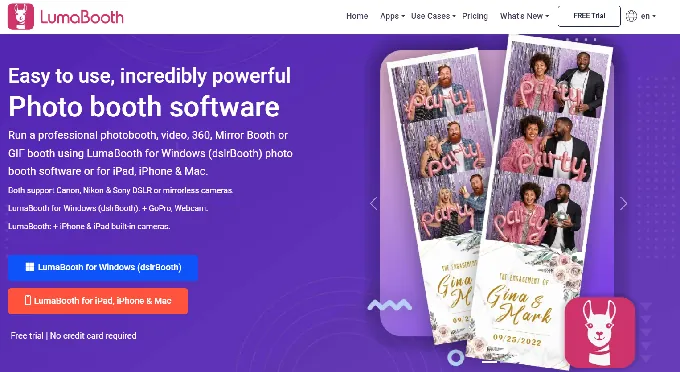
LumaBooth is a professional photo booth software platform covering photo, GIF, boomerang, 360, mirror, glam, and video booth modes across iPad, iPhone, Mac, and Windows. For solo operators building trunk-portable setups, LumaBooth’s advantage is straightforward: a single Apple subscription at $18/month billed annually covers two device licenses.
| LumaBooth Pros | LumaBooth Cons |
|---|---|
| Two device licenses under one $18/month subscription | AI credits are an additional cost |
| 820+ professionally designed cloud templates | fotoShare gallery upgrades add to total cost |
| AI Portraits with 170+ preset styles | Monthly commitment vs. per-event flexibility |
| Supports iPad, iPhone, Mac, and Windows | Most setup and control happens in-app with no web-based remote device management |
LumaBooth: Top 3 Unique Features
- Two active devices under one subscription ($18/month annual), covering a primary booth and a backup
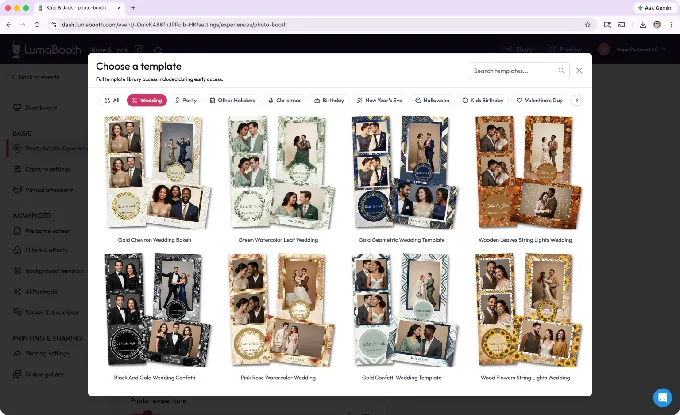
- 820+ professionally designed templates accessible from the cloud dashboard before arriving at a venue
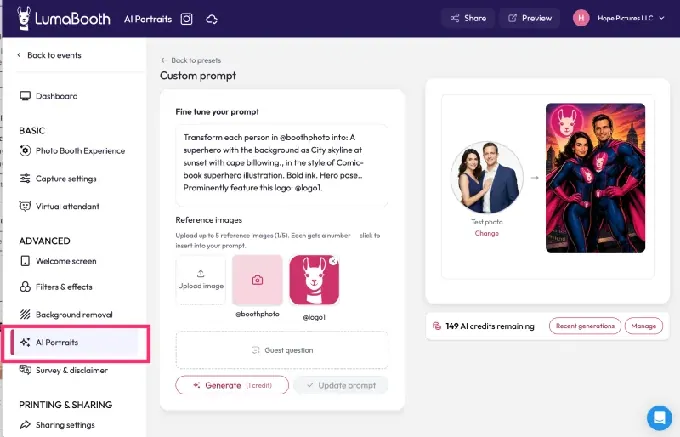
- AI Portraits with 170+ preset styles generating transformed guest images in about 10 seconds
The two-device coverage is a practical benefit. The first license runs the primary booth iPad; the second covers a backup device or a smaller deployment running at the same time. Competing platforms that charge per device double the cost for operators wanting any redundancy.
The cloud template library removes the design bottleneck. Operators browse 820+ layouts by event type (weddings, birthdays, corporate, holidays) and deploy them from the LumaBooth Dashboard without graphic design work.
Source: LumaBooth
Canva Direct Import is available for operators who prefer custom designs. Operators who need to build custom layouts beyond the template library will find LumaBooth’s design tools more limited than dedicated layout designers offered by some competitors.
The interface also reflects its roots as a sister product to DSLR Booth (a Windows application), and there’s no online dashboard for remotely managing devices or switching presets during live events. Most configuration happens within the app itself.
AI Portraits transform guests into superheroes, historical figures, anime characters, or vintage oil paintings. The Custom AI Portraits option lets operators write their own prompts, including per-guest personalization. The feature is positioned as generating $1,000-$3,000 in additional revenue per event when offered as an add-on.
Source: LumaBooth
LumaBooth Pricing
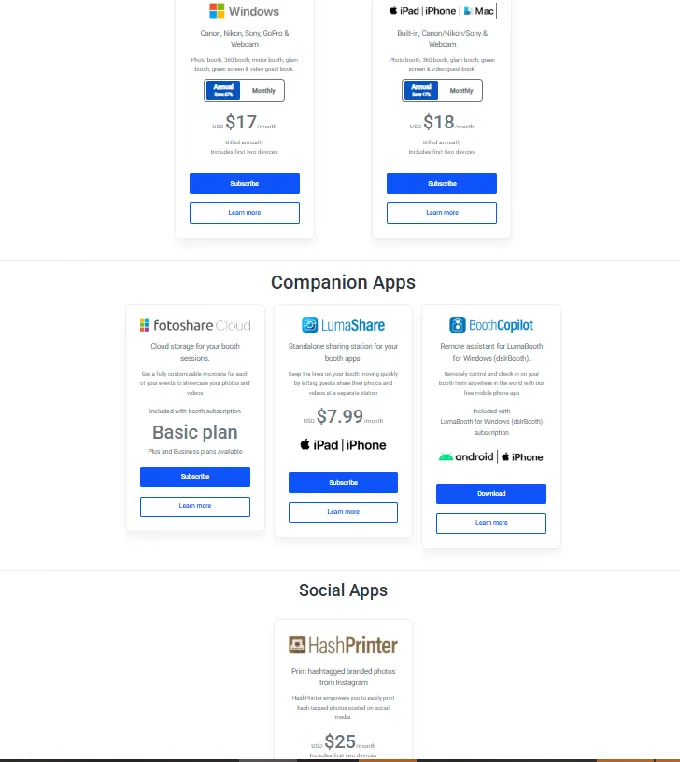
- LumaBooth for Apple: $18/month annual (~$216/year) or $19.99/month monthly. Two device licenses; all booth modes included
- AI Credits: from $14.99/month (150 credits) to $199.99/month (2,000 credits); pay-as-you-go packs available that never expire; 20 free credits on signup
- fotoShare Cloud Plus: $19.99/month (password-protected events, 6-month video archive)
- SMS plan: $10/month for unlimited US/Canada SMS
Source: LumaBooth
Use LumaBooth if:
- You’re running regular monthly events and want the lowest recurring cost for two active devices
- You want a large template library that eliminates graphic design work before events
- You want to offer AI portrait experiences as an upsell without separate software
- You run both iPad and Windows booths and want a unified dashboard spanning both platforms
5. Darkroom Booth: Best for Windows Operators Who Want DSLR Quality and a One-Time License
Source: Darkroom Booth
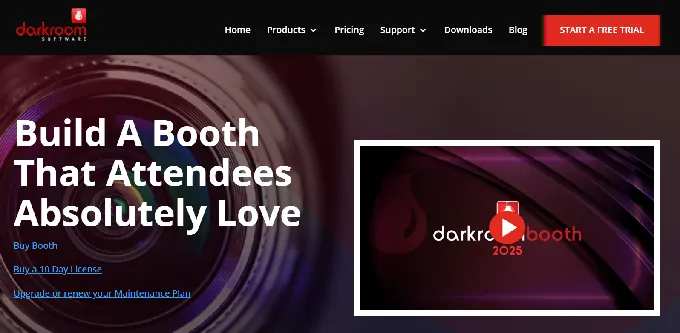
Darkroom Booth is Windows-native photo booth software that runs on any Windows laptop, all-in-one, or tablet. It’s the most hardware-flexible option for operators who already own Windows machines and want to build a compact setup without proprietary hardware or recurring subscriptions.
| Darkroom Booth Pros | Darkroom Booth Cons |
|---|---|
| One-time $295 license with no required recurring fees | Windows only (no native macOS version) |
| Direct tether to Canon EOS and Nikon Z/D cameras | Cloud sharing features require maintenance plan |
| Runs on any Windows 10/11 PC you already own | No centralized multi-venue analytics dashboard |
| Booth Control remote monitoring from any phone |
Darkroom Booth: Top 3 Unique Features
- Runs on any Windows 10/11 PC with an Intel i3 and 4GB RAM with no dedicated device required
- Direct cable or wireless tether to Canon EOS and Nikon Z/D series cameras plus GoPro HERO 9/10
- One-time $295 perpetual license that activates on up to 2 computers
The hardware flexibility is direct: a Windows laptop folds flat and fits alongside a collapsible stand and Canon mirrorless kit in the same roller bag. No proprietary kiosk, no separate iPad to protect. The booth computer is your laptop; the camera tethers via USB or Wi-Fi.
For seasonal operators, the pricing model flips the subscription math. Photo booth businesses are seasonal (wedding season, holiday parties, prom season), and subscription software bills during three-month dry stretches.
Darkroom Booth’s one-time $295 purchase includes one year of updates and support. After that, an optional $95/year maintenance plan restores access to updates, but the core software keeps running whether you renew or not.
Booth Control lets operators monitor booth status and pull stats from any phone on the same Wi-Fi network. 75+ free customizable templates are included, with additional templates available through DarkroomTemplates.com.
Darkroom Booth Pricing
- Full License: $295 one-time. Activates on 2 computers; includes one year of updates and support
- Annual Maintenance: $95/year after the first included year. Required for cloud sharing features; core functions continue without it
- 10-Day Temporary License: $45 for operators needing a second machine briefly
Use Darkroom Booth if:
- You already own a Windows laptop and a Canon or Nikon camera and want to add photo booth software without buying new hardware
- You prefer fixed, known software costs rather than monthly bills arriving during dead months
- You need broad hardware configuration flexibility (printers, GoPros, coin mechanisms, custom buttons)
- You need remote booth monitoring during live events from your phone
6. Sparkbooth: Best No-Subscription Entry Point for Part-Time Operators
Source: Sparkbooth
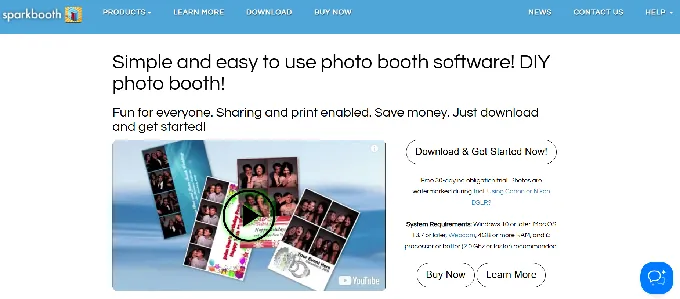
Sparkbooth is DIY photo booth software for Windows and Mac that turns any computer with a webcam into a working event photo booth. No dedicated tablet, no proprietary hardware, and no recurring subscription fees. The entire setup fits in a laptop bag.
| Sparkbooth Pros | Sparkbooth Cons |
|---|---|
| $149 one-time lifetime license, full feature set | Built-in laptop webcams produce lower quality output |
| Runs on any Windows 10+ or Mac OS 13.7+ machine | No mobile app or iPad version |
| Full offline operation with capture queue | No cloud dashboard for remote management |
| 11-language guest interface |
Sparkbooth: Top 3 Unique Features
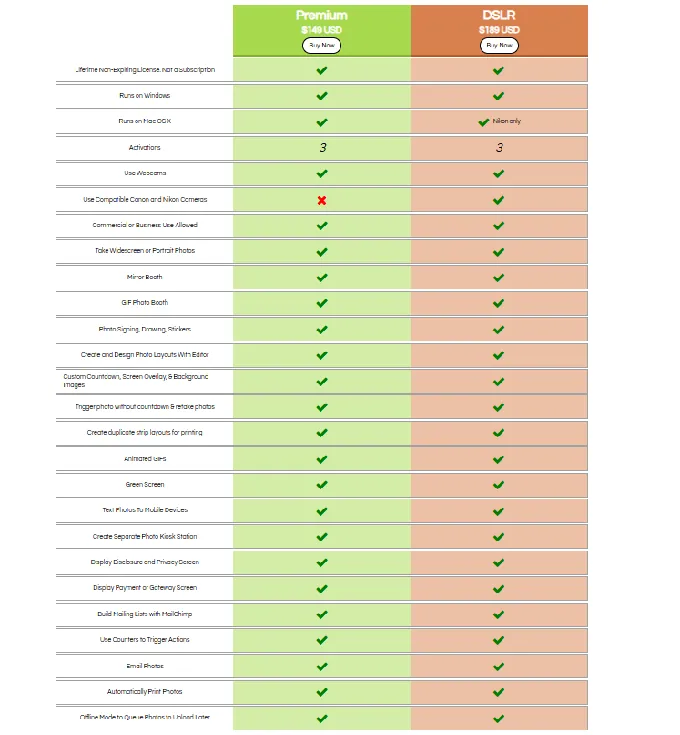
- One-time $149 license covering 3 machine activations with the complete feature set (green screen, GIF, mirror booth, SMS, printing, offline queue)
- Runs on any Windows 10+ or Mac OS 13.7+ computer with 4GB RAM, requiring nothing beyond a USB webcam
- Guest-interactive drawing tools, stickers, and drag-and-resize virtual props that keep unattended booths engaging
Sparkbooth is the lowest-risk entry point for testing the photo booth business. The $149 Premium license is a single purchase covering the full feature set with 3 machine activations. For operators running 20 events per year, the lifetime cost beats any subscription alternative within the first few months.
The DSLR tier at $189 adds Canon and Nikon camera tethering for operators who want professional image quality from their existing camera kit. The software operates fully offline, queuing photos for delivery when internet is restored. Touchscreen operation with application lock, configurable hot corners, and voice prompts enables unattended deployment.
A 30-day free trial with all features unlocked (watermarked output) lets operators test real event workflows, and a 60-day refund window applies to unactivated licenses.
Sparkbooth Pricing
- Premium: $149 one-time. Webcam support; 3 activations; full feature set including green screen, GIF booth, mirror booth, SMS, MailChimp, printing, offline queue
- DSLR: $189 one-time. Adds Canon and Nikon DSLR/mirrorless tethering (Canon DSLR support Windows-only)
Add-on services (separate subscriptions): UnlimitedBG offline AI background removal, qrcode.photos QR delivery service, and SMS delivery (requires Twilio, Vonage, Vivial Connect, or Telnyx account).
Source: Sparkbooth
Use Sparkbooth if:
- You run a small number of events per year and refuse to pay monthly fees during the off-season
- You want to test the photo booth business with a $149 investment plus a USB webcam
- You regularly work at venues where internet is unreliable or absent and need reliable offline operation
- You own a Canon or Nikon DSLR and want to convert it into a booth camera for $189
7. Touchpix: Best Cross-Platform App for 360 Video and Interactive Activations on Any Device
Source: TouchPix
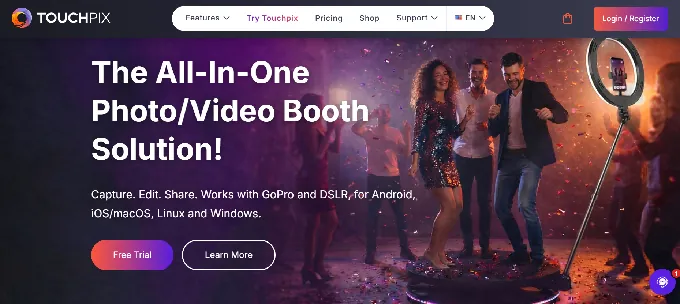
Touchpix is a subscription-based photo and video booth platform that runs natively on iOS, Android, macOS, Windows, Linux, and Raspberry Pi, with native support for GoPro 7-14, Canon/Nikon/Sony cameras, iPhones, iPads, and Android tablets. For operators who want to build a compact 360 video rig from hardware they already own, Touchpix offers the widest device compatibility in the category.
| Touchpix Pros | Touchpix Cons |
|---|---|
| Runs on virtually any device and operating system | Video capture requires MultiPass ($879.99/year minimum) |
| Native 360 booth workflow with Bluetooth triggering | Cloud AI styles require credits beyond subscription |
| Offline AI background removal and face replacement | No integrated hardware; bring your own rig |
| Scanpix 2 offline sharing without internet | Users report slower rendering speeds for processed images and videos |
Touchpix: Top 3 Unique Features
- True cross-platform operation across six operating systems with native GoPro 7-14 support for wired and wireless connectivity
- Bluetooth-triggered 360 capture automating the spinning-arm sequence without a manual button press
- Offline AI background removal and face replacement processing entirely on-device with no internet required
Touchpix calls itself “the industry standard 360 Photo Booth App”, and the 360 workflow reflects that focus. The Bluetooth trigger automates the spinning-arm activation so the rig starts without an attendant. Super Slow Motion, boomerangs, and animated GIFs are all available within the same session. Worth noting: Touchpix launched in 2020 and has grown quickly with its 360 focus, but the platform is still maturing.
Some operators report slower image and video rendering compared to more established platforms, and the interface can feel less intuitive for unattended setups. The platform has also experienced cloud service disruptions that affected reliability for some users.
The offline AI processing directly addresses the highest-risk scenario for compact portable setups: the basement venue, outdoor festival, or remote space with spotty connectivity. AI Face Replacement runs entirely on-device; automatic background removal works the same way. The Scanpix 2 system delivers media to guests via QR code without Wi-Fi or cellular data.
Because Touchpix runs on any device, an operator can run a GoPro-based 360 rig at one event and a DSLR flat booth on a Windows tablet at another, all under the same subscription without per-device fees.
Touchpix Pricing
- PhotoPass: $439.90/year. 2 simultaneous events; photos, AI photos, GIFs only (no video)
- MultiPass: $879.99/year. 4 simultaneous events; adds video, Super Slow Motion, boomerang. Also available weekly at $43.99/week
- MultiPass Pro: $1,407.99/year. 8 simultaneous events; adds Virtual Booth and Advanced Surveys
- MultiPass Enterprise: $2,199.99/year. 12 simultaneous events; adds Mosaic photo wall and RAW cloud backups
AI Pro credits for cloud styles: $12 for 100 credits, $49 for 500 credits. 14-day free trial with full features, no credit card required.
Use Touchpix if:
- You run 360-degree spinning-arm video booths and need native Bluetooth trigger integration with wired GoPro support
- You want to build a compact setup from whatever hardware you already own, across any operating system
- Your events include outdoor venues or locations with unreliable Wi-Fi and you need AI effects to work fully offline
- You need multiple content types (360 video, Super Slow Motion, AI photos) from one subscription to justify higher rental rates
Final Verdict
Every platform on this list fits in a car trunk. The right choice depends on what you’re building toward and what you already own.
Some operators need a self-running system with integrated lighting that commands top-tier rental rates. Others need multi-format flexibility for corporate clients. Some want the lowest ongoing cost, and others want to pay once and never think about software fees again.
Here are our top recommendations for the three most common operator profiles:
- Simple Booth: If you want a complete system that deploys in under a minute from a single rolling case, operates unattended, and delivers quality output with professional ring lighting built into the hardware. The combination of sub-one-minute setup, remote management, and offline resilience makes it the most efficient choice for serious rental operators. Start with a free trial of Simple Booth HALO.
- Photo Booth Supply Co.: If you want to purchase hardware, software, and training from a single vendor with fleet expansion discounts that reward you as you grow from one booth to multiple units.
- Darkroom Booth: If you already own a Windows laptop and Canon/Nikon camera kit and want the lowest lifetime cost of ownership with a one-time $295 license and no recurring fees.
Best Compact Photo Booth Setups FAQ
What is the most portable professional photo booth setup?
The Simple Booth HALO Event Kit packs into a single rolling hard case at 49 lbs total, including the stand, ring light, and iPad mount. It deploys in under a minute with no tools. The Photo Booth Supply Co. Salsa 2 is slightly lighter at 34.6 lbs in its soft roller case. Both are manageable for one person and fit in a standard sedan trunk.
Can I run a photo booth business from a car without a van?
Yes. All seven platforms on this list are designed for car-trunk transport. iPad-based systems (Simple Booth, Snappic, PBSCO, LumaBooth) pair a lightweight tablet with a portable stand and ring light. Laptop-based systems (Darkroom Booth, Sparkbooth) fit alongside a collapsible stand and camera in a single roller bag. The key is choosing compact hardware that avoids bulky enclosed enclosures.
Which photo booth software has the lowest cost to get started?
Sparkbooth offers the lowest entry point at $149 for a lifetime license that works with any laptop and USB webcam. Darkroom Booth is $295 one-time with DSLR support. For subscription models, LumaBooth starts at $18/month for two devices, and Simple Booth offers weekly pricing starting at $14.99/week for operators with variable booking volumes.
Do I need a DSLR camera for a compact photo booth setup?
Not necessarily. iPad-based systems like Simple Booth and Snappic produce professional results using the iPad camera enhanced by integrated ring lighting and AI processing (background blur, skin smoothing, background replacement). However, if you already own a Canon or Nikon DSLR, platforms like Darkroom Booth, Sparkbooth, LumaBooth, and Simple Booth (Core plan and above) all support camera tethering for the best image quality.
Which compact photo booth works best without internet?
Simple Booth queues all sessions offline and delivers them when connectivity returns. Sparkbooth operates fully offline with a local capture queue. Touchpix processes AI background removal and face replacement entirely on-device without any cloud connection. For venues with unreliable Wi-Fi (barns, basements, outdoor events), these offline capabilities prevent lost photos and frustrated guests.
What should I look for when choosing a compact photo booth setup?
Prioritize total system weight and case design (can one person carry it?), setup time (under 5 minutes is ideal), photo quality under challenging venue lighting, and whether the system can operate unattended. Then consider your pricing model preference (weekly, monthly, annual, or one-time), the capture modes your clients request (photo, GIF, video, 360), and whether you need lead capture and analytics for corporate clients.
Which platform is best for corporate brand activations?
Snappic offers the broadest format coverage for corporate clients (360, Glambot, mirror, roaming from one license) with built-in client analytics reporting and demographic insights. Simple Booth serves corporate clients through its lead capture (87%+ opt-in rate), branded galleries, and enterprise compliance features on Pro and Select plans. Both platforms deliver the ROI data that brand sponsors expect from event activations.
Can I offer 360 video from a compact, trunk-portable setup?
Yes. Touchpix specializes in 360 video with native Bluetooth triggering and GoPro support, keeping the rig compact. Snappic handles 360 from its iPad platform. Photo Booth Supply Co.’s Fiesta Pro plan includes 360 capture. The physical spinning arm adds bulk, but the software and camera components remain trunk-friendly across all three platforms.
Keep reading
 Best Of
7 Best Photo Booth Software with Video Message and Slo-Mo Capture [2026]
Booths that capture heartfelt video notes and buttery slo-mo. The moving stuff.
 Best Of
6 Best Photo Booth Software With QR Code Sharing [August 2026]
Booths that beam every snap to a phone with a quick scan. QR sharing done right.
 Best Of
7 Best Photo Booth Software With Real-Time Analytics and Dashboards [August 2026]
Booths that show the numbers as the party happens. Live dashboards, real insight.