7 Best Compact Photo Booths for Mobile Event Operators [July 2026]

Mobile event operators live and die by logistics. Every pound in the vehicle, every minute at load-in, and every cable that needs troubleshooting mid-reception affects how many events you can book in a weekend and how much profit you keep from each one.
Traditional enclosed photo booths solved the entertainment problem years ago, but they created a logistics headache: bulky enclosures, complicated wiring, multi-person setup crews, and software that crashes when venue Wi-Fi drops. For operators running two or three events on the same Saturday, that overhead is the difference between growing the business and staying stuck at one booking per night.
That is why compact photo booths have become the standard for mobile event professionals.
What Are Compact Photo Booths for Mobile Event Operators?
Compact photo booths are lightweight, portable photo systems that combine a tablet or camera, a ring light or lighting rig, and cloud-connected software into a single unit. One person can transport, set up, and operate them without technical help. They replace the traditional enclosed booth with an open-air design that takes up less floor space, weighs a fraction of a full enclosure, and delivers branded photos, GIFs, videos, and AI effects.
For mobile event operators, the “compact” distinction matters because it determines how quickly you can set up at a venue, how many events you can run per day, and whether you need staff on-site or can drop off the booth and let it run itself.
We researched, tested, and compared the leading compact photo booth platforms to find the best options for key mobile operator needs:
- A self-operating system that sets up in under a minute,
- Ready-made design libraries that eliminate template creation time,
- Multi-booth fleet management for operators scaling beyond one device,
- Cross-platform hardware flexibility for mixed-device fleets,
- Budget-friendly entry for operators using existing DSLR gear,
- Risk-free market entry for first-time operators,
- And AI-powered experiences for corporate brand activations.
Here is a quick summary of the best compact photo booths for mobile event operators.
Best Compact Photo Booths for Mobile Event Operators
 | Simple Booth Best for operators who want a self-operating photo booth with sub-one-minute setup and integrated ring-light hardware. |
|---|---|
 | Fiesta (Photobooth Supply Co) Best for established operators who want hundreds of ready-made professional templates and a built-in business education ecosystem. |
 | Snappic Best for operators managing multi-booth fleets across simultaneous events with centralized cloud configuration. |
 | TouchPix Best for 360 video specialists and operators who need cross-platform hardware flexibility across iOS, Android, and Windows. |
 | LumaBooth Best for budget-conscious operators who already own Canon, Nikon, or Sony DSLR equipment and want multi-format booth coverage under $20/month. |
 | Booth.Events Best for new operators who want to run real client events before committing to a subscription. |
 | Curator Live Best for operators targeting brand activations and corporate events with AI transformation and analytics reporting. |
How To Choose the Best Compact Photo Booth
Finding the right compact photo booth means matching the platform to how you actually run your business. Here is a short checklist to guide your decision:
- Setup Speed and Portability: Your booth needs to go from vehicle to venue-ready in minutes, not hours. Look for systems that deploy without tools, without multi-step assembly, and without a second person. Weight and case design matter when you are loading in and out of venues multiple times per week.
- Unattended Operation: If you run multiple events on the same night, or if your business model includes drop-off rentals, the software needs to run reliably without an attendant. Look for guided access lockdown, offline queuing, and remote monitoring.
- Photo Quality in Any Venue: Ambient lighting varies wildly between hotel ballrooms, outdoor tents, and dimly lit bars. A booth with integrated, adjustable lighting and AI image enhancement (skin smoothing, background blur, background replacement) delivers consistent results regardless of venue conditions.
- Branding and Customization: Corporate clients and wedding planners expect branded overlays, custom start screens, and personalized layouts. The easier it is to create and apply those designs, the less prep time each booking requires.
- Photo Delivery Options: Guests expect their photos instantly. QR codes, SMS, email, AirDrop, and WhatsApp are the standard channels. International events require WhatsApp support specifically.
- Offline Reliability: Venue Wi-Fi is unreliable. Cellular coverage is inconsistent. Your booth software must capture, process, and queue photos without an active internet connection, then sync automatically when connectivity returns.
- Pricing That Matches Your Volume: Some platforms charge per event, some per device, some per month. Match the pricing model to your booking pattern: weekly plans for variable-volume operators, annual plans for year-round businesses, per-event credits for seasonal work.
How We Picked the Platforms
We started with the most widely used compact photo booth platforms based on App Store ratings, operator community feedback, and documented enterprise deployments. We evaluated each platform through four criteria:
- Ease of Setup and Operation: How quickly can one person get the booth running, and how reliably does it operate without supervision?
- Photo and Video Quality: What is the output quality across different lighting conditions, and what post-processing tools (AI effects, filters, background replacement) are available?
- Business Features: Does the platform support lead capture, analytics, branding, and the operational tools that turn a photo booth into a revenue-generating business?
- Value for the Price: What does the operator get for each dollar spent, and how does the pricing model scale as the business grows?
By focusing on these factors, we narrowed the field to seven platforms that each serve a distinct mobile operator need.
1. Simple Booth — Best for a Self-Operating Photo Booth That Sets Up in Under a Minute
When you are running back-to-back events on a Saturday night, the minutes between load-in and the first guest photo determine whether you are calm or panicking. Every extra cable to connect, every software setting to configure, and every piece of hardware to assemble adds friction that compounds across a busy event schedule.
Simple Booth eliminates that friction.
Simple Booth is an integrated photo booth system pairing a subscription-based iPad app (the HALO app) with proprietary ring-light hardware (the HALO kits), plus a browser-based Virtual Booth product that requires no hardware at all.
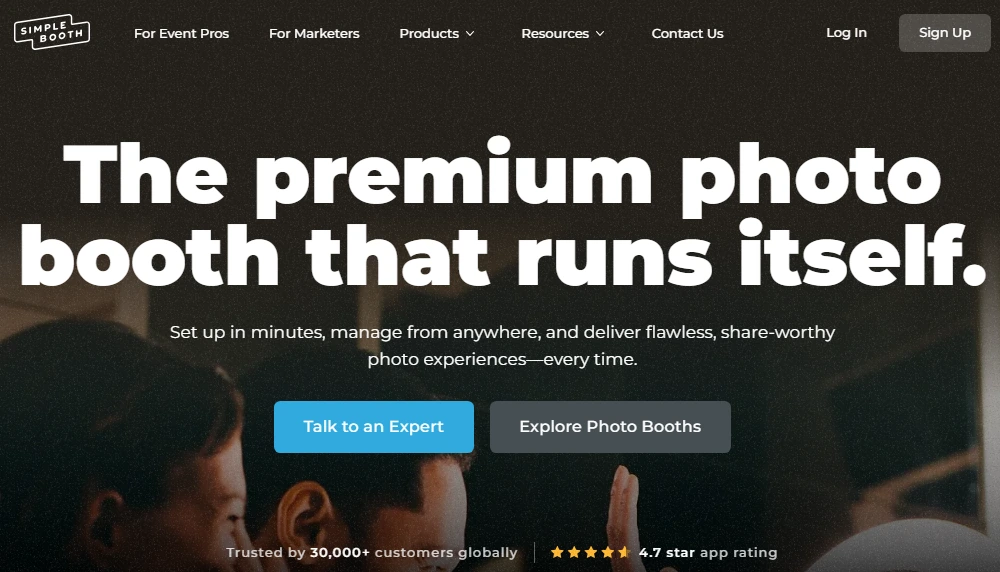
The company’s tagline, “the premium photo booth that runs itself”, maps directly to how it works in practice: set up in minutes, manage from anywhere, and deliver share-worthy photo experiences every time.
With 30,000+ customers globally, a 4.7-star App Store rating from 2,400+ ratings, and 40 million+ moments captured since 2012, Simple Booth has the longest track record and largest install base of any platform on this list.
| Simple Booth Pros | Simple Booth Cons |
|---|---|
| - Sub-one-minute setup with no tools required | - iPad-only (no Android or Windows support) |
| - Integrated ring light with 2,100 lumens in machined aluminum chassis | - AI effects require purchased credits ($0.10 each) |
| - Offline mode queues photos for automatic delivery when connectivity returns | - Lite plan includes ads and excludes custom branding |
| - AI background replacement, Glam smoothing, and DSLR-quality bokeh on iPad | |
| - WhatsApp, AirDrop, SMS, email, and QR code delivery | |
| - Remote preset management from the online dashboard |
Why Simple Booth Is Our Top Pick for Mobile Event Operators
1. Hardware-Software Integration That No Competitor Can Replicate by Assembling Separate Parts
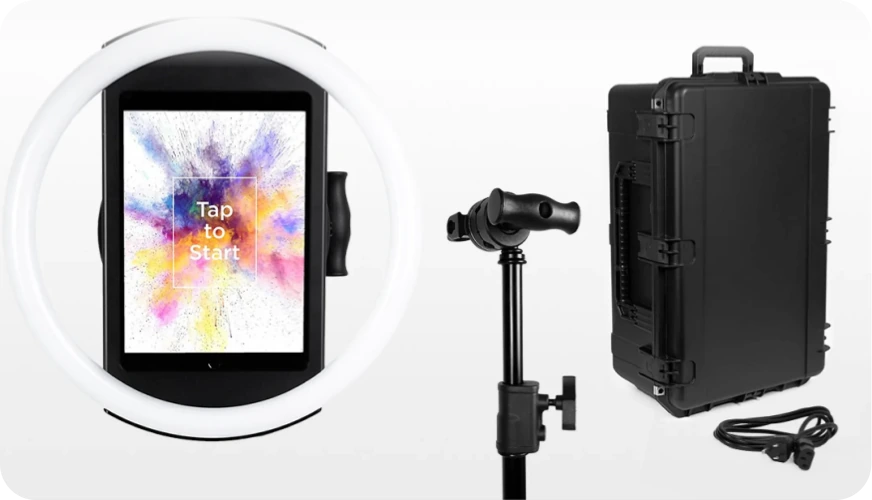
The HALO photo booth kit is not a tablet stand with a ring light bolted on. It is a chassis machined from a single billet of anodized aluminum with a patented ring-light system housing 112 LEDs producing up to 2,100 lumens, rated for up to 50,000 hours of operation. The iPad snaps in via a tool-less faceplate, and a concealed built-in USB-C cable keeps it charged throughout the event without dangling cables.
The result: setup in under one minute on the adjustable selfie stand, no tools needed.
The full Event Kit weighs 49 lbs with its wheeled travel case, and the HALO body itself weighs just 6.5 lbs. Groups can stand 6 to 8 feet back from the camera and still be evenly lit in most indoor environments. For international events, HALO supports dual voltage (110V to 240V) and works with compatible portable batteries for 6+ hours of cordless runtime.
Source: Simple Booth
This matters for mobile operators because the HALO is the only compact booth on this list where the hardware, lighting, mounting, charging, and software were designed together by a single vendor.
2. Self-Operating Reliability That Lets You Drop Off and Walk Away
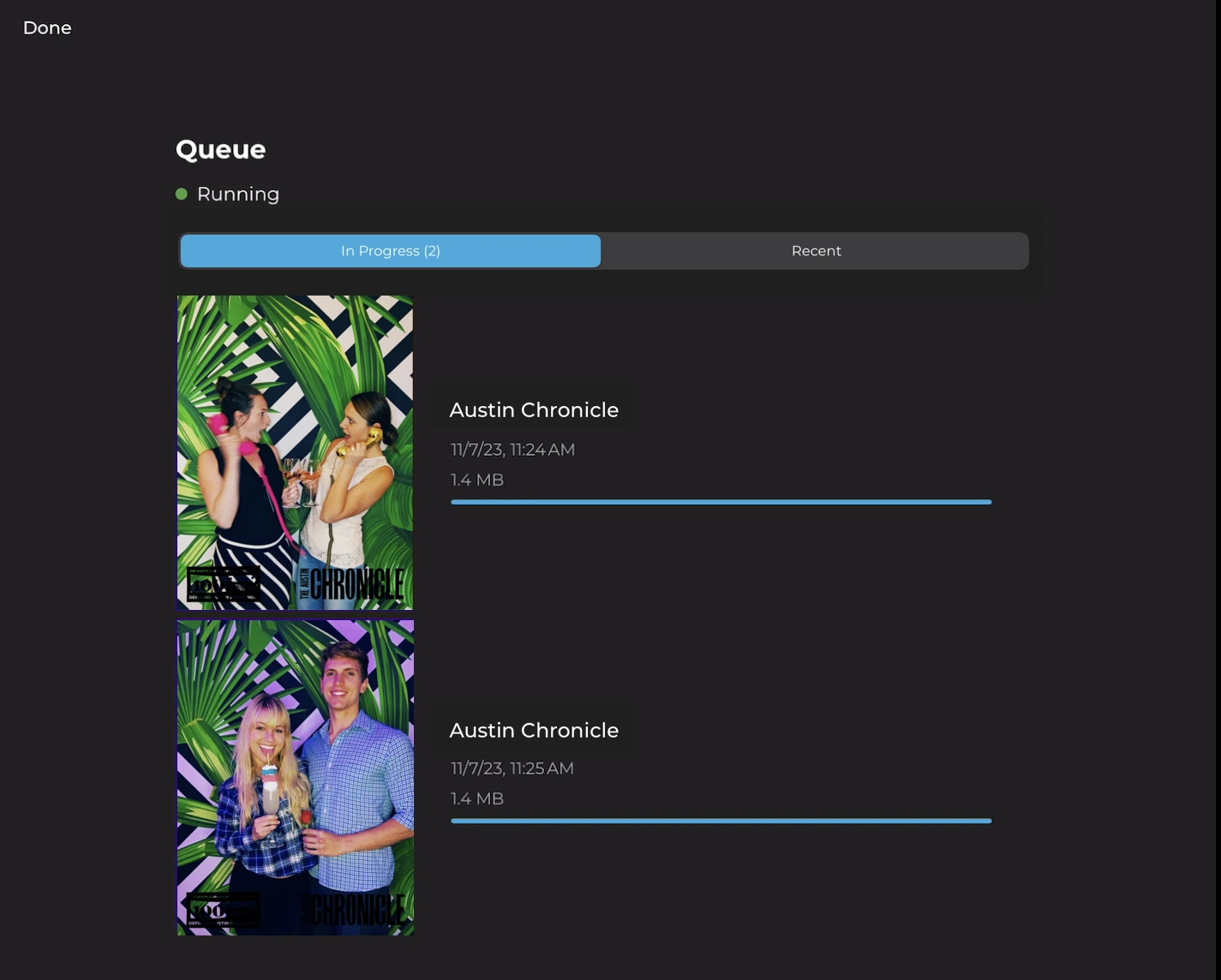
Simple Booth is built for unattended operation. The HALO app locks into booth mode using iPad Guided Access, preventing guests from accidentally navigating away. A Preflight Check screen runs before each event to catch configuration issues.
And Mission Control, a hidden overlay triggered by a two-finger pinch, lets operators monitor device health, adjust camera settings, and sync dashboard changes without breaking the guest-facing interface.
When venue Wi-Fi drops, the offline upload queue stores every session and delivers photos automatically once connectivity returns. Operators configure and update presets remotely via the online dashboard, with changes syncing to the iPad in real time.
Source: Simple Booth
For operators managing multiple booths on the same night, this remote management eliminates the need to be physically present at every location. When staff are on-site, the intuitive interface means training new hires is fast, an advantage cited repeatedly by growing rental companies.
3. AI Photo Quality and a Full Design Toolkit Built Into the App
HALO 5.0, launched in November 2025, introduced the Layout Designer: a full in-app design tool with layers, fonts, gradients, QR code embedding, and multi-layout support. Simple Booth calls it “the most powerful design tool in the photo booth industry”, and it eliminates the need for external graphic design software.
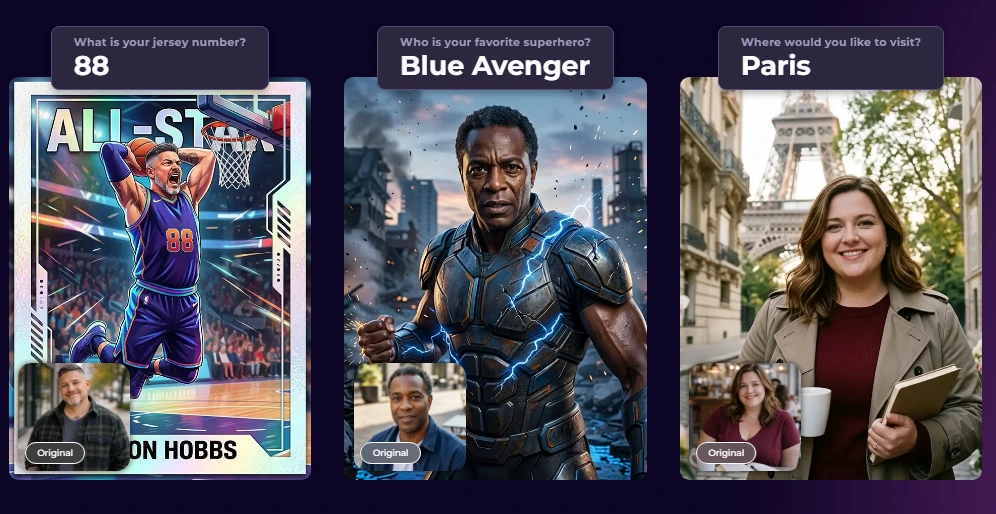
On the AI side, Booth Mode AI Effects use Nano Banana models to transform captured photos using text prompts, with automatic identity preservation that keeps guests recognizable regardless of artistic style. Background replacement works without a physical green screen. Glam skin smoothing delivers polished output. And DSLR-quality background blur and bokeh (which Simple Booth claims as a first for iPad photo booths) give iPad-captured photos the output quality of dedicated camera rigs.
Source: Simple Booth
For true camera-grade capture, the HALO app connects to Canon DSLR and mirrorless cameras via both wired USB and wireless WiFi, a capability most competitors in this category do not offer. Image previews now render up to 12x faster, and all effects, filters, and capture modes work together across DSLR, video, and offline mode without compatibility restrictions.
Capture formats span still photos, classic photo strips, custom layouts, GIFs, looping Rebound clips, and video. Lead capture forms achieve opt-in rates as high as 87 to 89%, and data flows to the dashboard for CSV export or MailChimp sync.
Arizona Opera grew its email list by 1,000 addresses in just a few events using Simple Booth’s lead capture. (Simple Booth)
Simple Booth Pricing
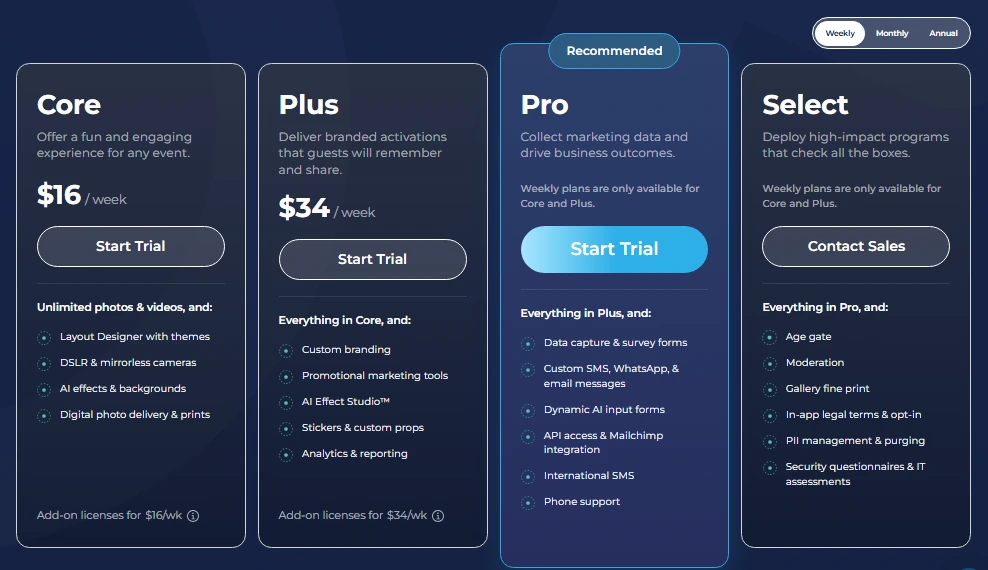
Simple Booth uses a per-license subscription model with weekly, monthly, and yearly billing. Each plan includes one license (one iPad). Additional devices require add-on licenses.
- Lite starts at $14.99/week ($290/year): Custom layouts, motion and still capture, photo delivery, online galleries, themes and props. Includes ads; excludes custom branding, analytics, DSLR, AI effects, and lead capture.
- Core starts at $24.99/week ($490/year): Adds DSLR/mirrorless camera support, full-length video, background replacement and blur, Dropbox integration, AI effects, and Virtual Booth. 50 bonus AI credits.
- Plus starts at $49.99/week ($990/year): Adds custom branding, analytics and reporting, guest-editable text layers, and custom AI effects. 100 bonus AI credits.
- Pro at $149/month ($1,490/year): Adds lead capture, API integration, phone support, moderation, and age gate. 150 bonus AI credits.
- Select at $249/month ($2,490/year): Adds in-app custom legal terms, security questionnaires, and demographic analytics via face detection. 200 bonus AI credits.
A 7-day free trial is available with 25 free AI credits. AI credits beyond plan bonuses cost $0.10 each and do not expire.
Source: Simple Booth
Use Simple Booth if:
- You want an integrated hardware-software system from a single vendor, with studio-grade lighting, sub-one-minute setup, and no tools required.
- You run drop-off or unattended events and need a booth that operates reliably without on-site staff, with offline queuing and remote management.
- You want AI photo effects, an in-app design tool, and DSLR camera support on a single iPad platform.
- You need high-converting lead capture (87%+ opt-in rates) alongside branded photo experiences for marketing-focused activations.
“10+ years, we’re big Simple Booth believers,” reports G7 Entertainment Marketing, which has captured 136,000+ fan interactions on the platform. (Simple Booth)
2. Fiesta (Photobooth Supply Co) — Best for Ready-Made Professional Design at Scale
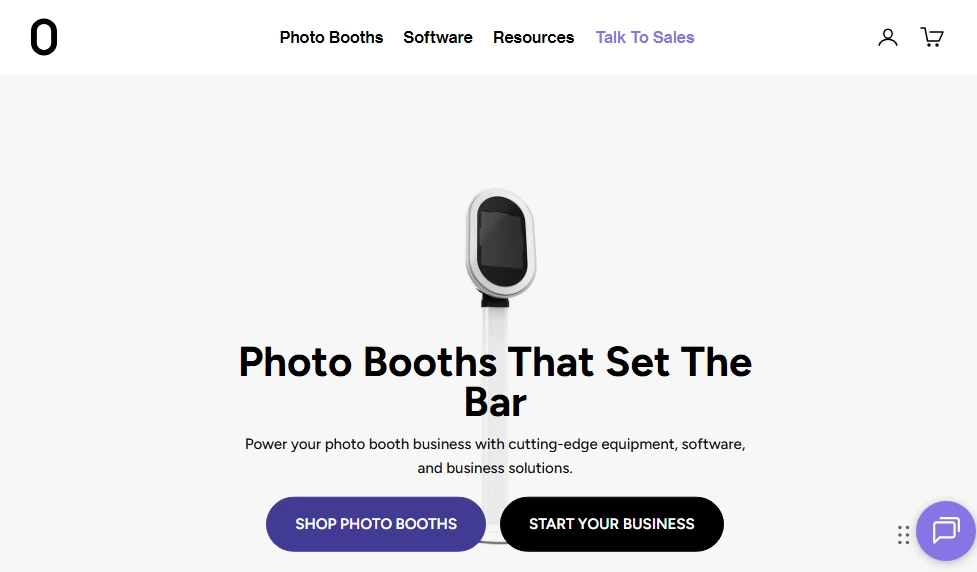
For operators running five or more events per week, template creation is a hidden time cost. Every new booking means a new overlay, a new start screen, a new branded layout. Most photo booth software hands you a blank canvas and leaves you to fill it.
Fiesta takes a different approach.
Built by Photobooth Supply Co (PBSCO), Fiesta is a photo booth platform whose pitch is “No need to purchase, learn, and coordinate six separate apps”. Its standout feature is a built-in Design Studio containing “hundreds of professionally made, done-for-you Photo Templates and Overlays” that operators can apply to any event in minutes, without opening Photoshop or Canva.
| Fiesta Pros | Fiesta Cons |
|---|---|
| - Hundreds of ready-made professional templates | - 360 capture, green screen, and slow motion locked to Pro plan |
| - Built-in 360 video booth support with auto-triggered capture | - Hardware discounts only apply to PBSCO products |
| - Unlimited events, captures, and SMS/email sharing on all plans | - iOS-only (iPad and iPhone) |
| - Annual plan hardware discounts up to $1,000 off |
Why Choose Fiesta for Ready-Made Professional Design
Fiesta’s Design Studio replaces external design tools: “Eliminate the need for Photoshop, Canva, and other design tools with Fiesta.”
The library spans vertical, square, landscape, and photo strip formats, covering both single and multi-capture layouts. For an operator running 5 to 10 events per month, selecting a template from this library takes minutes compared to the 30 to 90 minutes that custom design work requires per event.
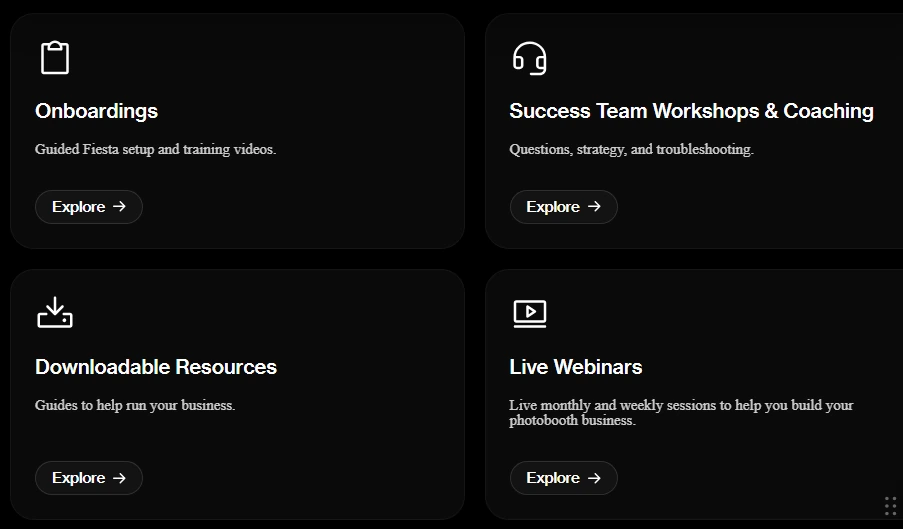
Beyond the software, every Fiesta subscription includes access to the Photobooth Academy: 100+ pre-recorded classes covering how to start and grow a photo booth business, plus live webinars through the Success Hub. PBSCO also maintains a public Millionaires Club naming operators who have reached $1M+ in cumulative revenue using PBSCO products.
Source: Fiesta
For operators who offer 360 video booths, Fiesta is “the first photo booth software engineered alongside its 360 booth counterpart”.
The 360 mode runs from iPhone, integrates with PBSCO’s Tortilla 360 arm for direct spin-speed control, and also supports third-party 360 arms via motion-triggered auto-start. A single Pro subscription covers both traditional photo booth and 360 spin booth events.
Fiesta Pricing
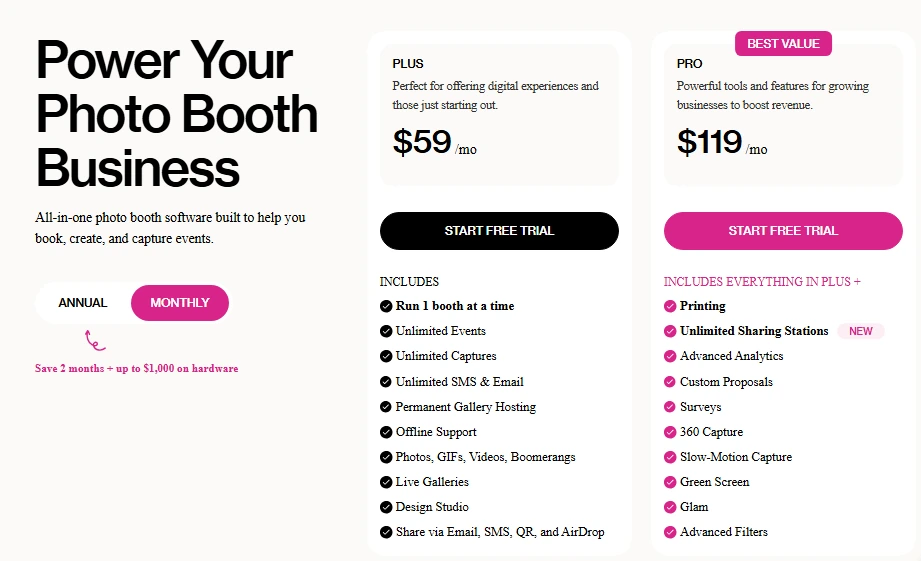
- Plus at $59/month ($590/year): 1 booth license, unlimited events and captures, full Design Studio, unlimited SMS and email sharing, AirDrop and QR code delivery. Excludes 360 capture, green screen, printing, and advanced analytics.
- Pro at $119/month ($1,190/year): Everything in Plus, plus 360 capture, slow motion, green screen, AI background removal, Glam filters, advanced analytics, custom proposals, and unlimited Sharing Stations.
Annual plans unlock standing hardware discounts: up to $750 off Salsa 2, $1,000 off Tortilla, and $500 off Guac & Chips, with no cap on qualifying purchases. A free trial with full feature access is available, no credit card required.
Source: Fiesta
Use Fiesta if:
- You want a large library of professional templates that lets you configure branded events quickly without spending design time on each booking.
- You already own or plan to purchase PBSCO hardware and want tighter hardware-software integration, including LED ring light control and direct Tortilla arm communication.
- You want a built-in business education ecosystem (Photobooth Academy, live webinars, owners community) included in your subscription.
- You offer both traditional photo booth and 360 spin booth events and want one subscription covering both formats.
3. Snappic — Best for Multi-Booth Fleet Management at High-Volume Events
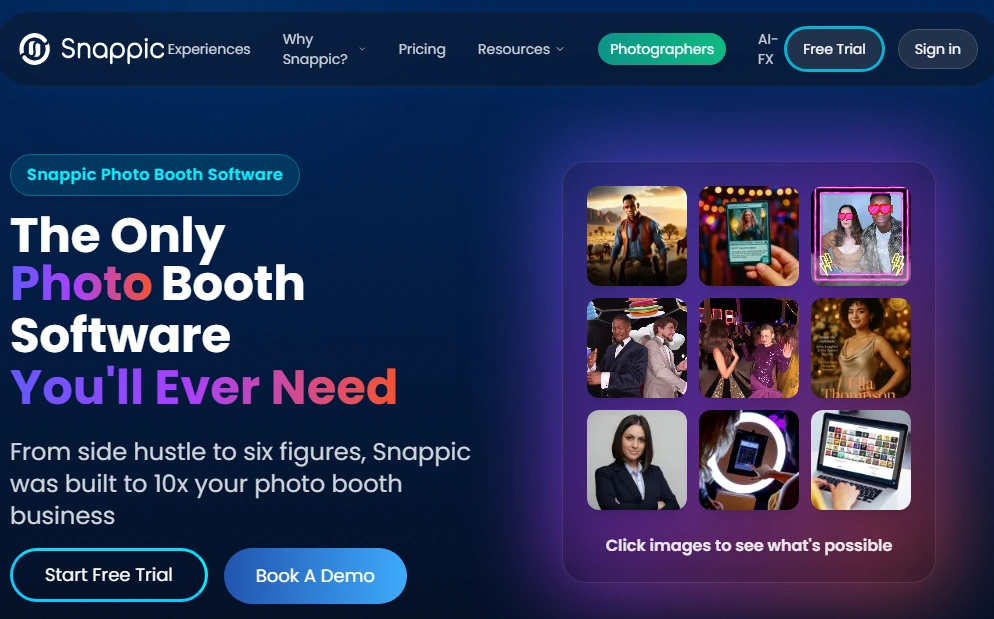
Running one booth is straightforward. Running three booths at three different venues on the same Friday night, each with a different client, different branding, and different sharing settings, requires infrastructure that most photo booth software was never designed to handle.
Snappic is built around that problem.
It is a cloud-first photo booth platform where preset updates, template changes, and settings adjustments push to any number of active devices simultaneously from a single dashboard. Used at 100,000+ events worldwide by 8,000+ event businesses, including brand activations for Google, Netflix, and Meta, Snappic targets the operator who has grown beyond a single booth and a single event per weekend.
| Snappic Pros | Snappic Cons |
|---|---|
| - Cloud-based fleet configuration across all active devices | - AI, VideoFX, and 360 support excluded from Starter plan |
| - Supports iPad, 360 spinner, GlamBot, Mirror booth, and Roaming mode | - Credit-based AI and SmartShare add ongoing per-image costs |
| - 24/7/365 live support including during weekend events | - Starter-to-Business pricing jump is significant ($69 to $189/month) |
| - AI-FX suite with magazine covers, trading cards, and full transformations | - Starter plan limits photo delivery to email and SMS only |
Why Choose Snappic for Multi-Booth Fleet Operations
Snappic’s cloud dashboard pushes configuration changes to every active device simultaneously.
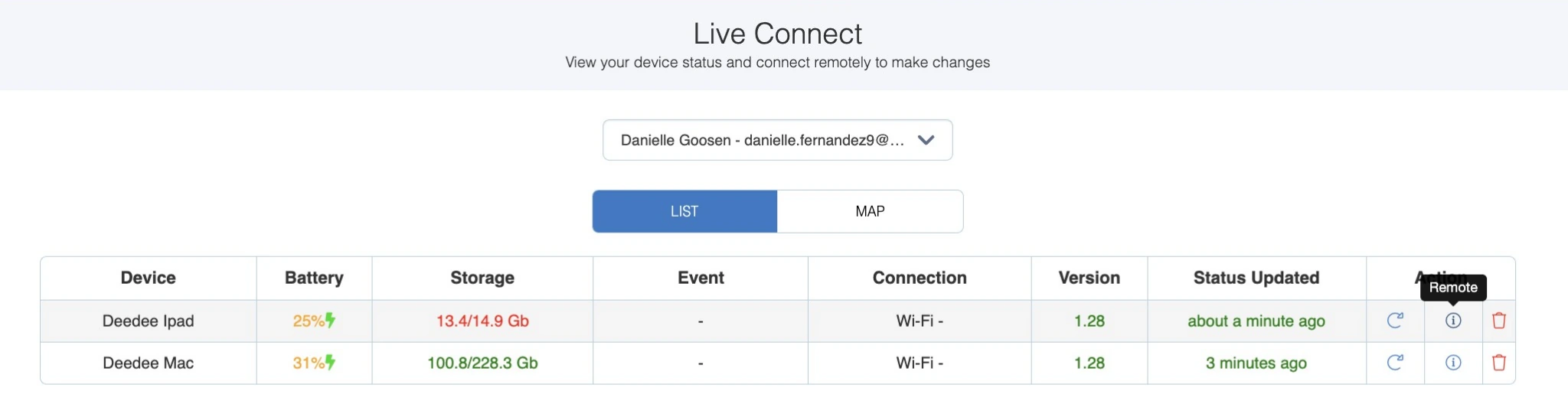
LiveConnect (Premium and Scale plans) adds real-time remote control, letting operators see booth status, switch presets, and monitor activity from any browser. The Scale plan’s sub-account management provides separate client logins with billing control retained by the master account.
Source: Snappic
The platform supports five booth configurations from a single account: iPad, 360-degree spinner, Robot Arm/GlamBot, Mirror booth, and Roaming mode. Snappic’s 360 software connects to spinners from any hardware manufacturer, so operators are not locked into specific branded hardware.
For background replacement, Snappic offers four methods: physical chroma key (offline, no credits), offline AI background removal (on-device, no internet required), online AI background removal (cloud-processed, credit-based), and AI Segmentation for video. The offline AI option lets operators deliver clean composites without a green screen and without depending on venue Wi-Fi.
The trade-off for this feature density is interface complexity; operators new to Snappic report a steep learning curve navigating the platform’s settings and configuration options.
Snappic Pricing
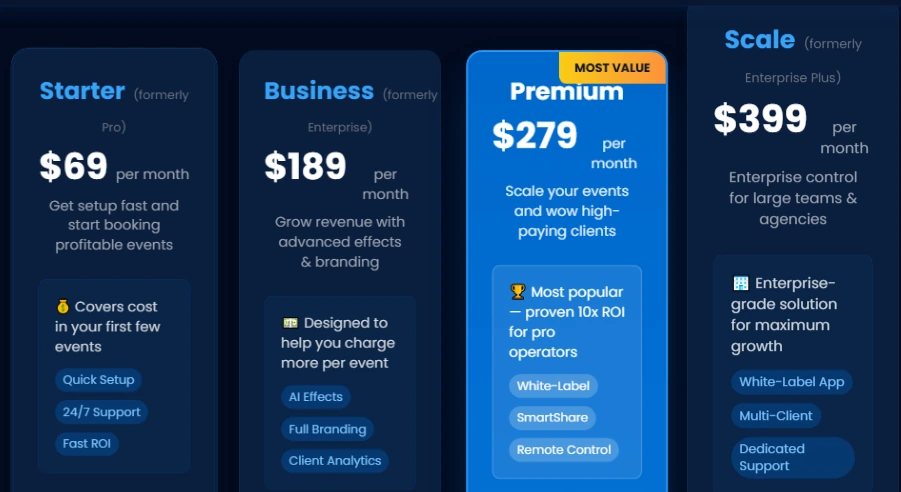
- Starter at $69/month ($499/year): 1 Photo Booth License, photos, GIFs, Burst capture, unlimited SMS/email sharing, 60+ templates, 24/7 support. Excludes AI-FX, VideoFX, 360/GlamBot support, and analytics.
- Business at $189/month ($1,799/year): Adds VideoFX for 360 and GlamBot, AI-FX, green screen, AI background removal, analytics, surveys, Roaming Mode, and content moderation.
- Premium at $279/month: All Business features plus white-label, webhooks, LiveConnect remote control, and SmartShare AI (400 credits/month).
- Scale at $399/month ($3,999/year): Adds multi-client sub-accounts, Grey Label App, and a Dedicated Customer Success Manager.
Source: Snappic
Per-event pricing is also available: $29/event (Starter level) or $79/event (Business level). A 14-day free trial is available with no credit card required.
Use Snappic if:
- You operate more than one booth simultaneously and need centralized cloud configuration and remote monitoring across all active devices.
- Your booth lineup includes 360 spinners, GlamBot rigs, or Mirror booths alongside standard iPad booths, and you want one platform covering all formats.
- You target corporate clients and brand activations where AI experiences (magazine covers, trading cards, cinematic video) justify higher per-event pricing.
- You need 24/7/365 live support for high-stakes weekend and evening events.
4. TouchPix — Best for 360 Video Specialists and Cross-Platform Hardware Flexibility
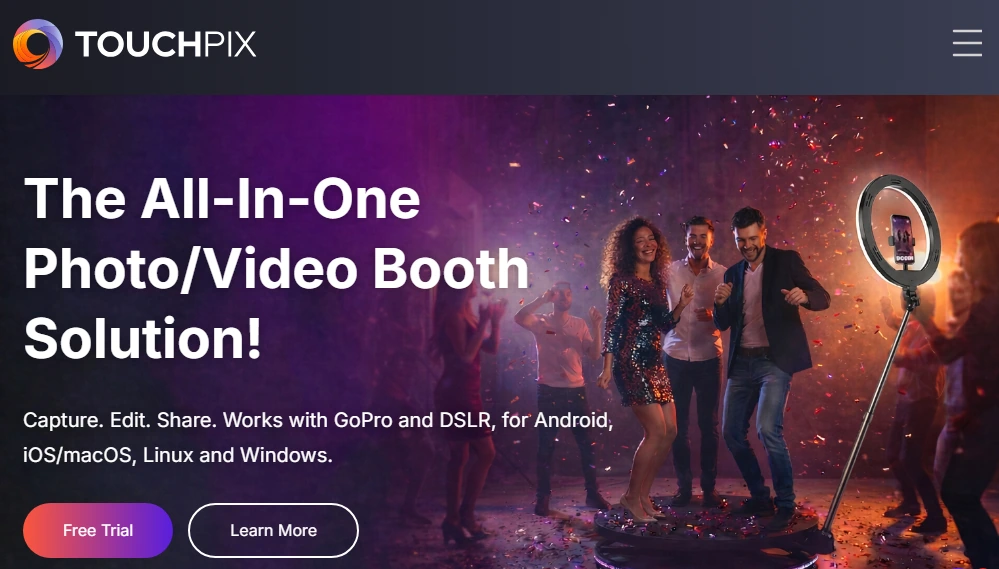
Most photo booth software is built for Apple. If your equipment inventory includes Android tablets, Windows mini-PCs, or a mix of devices accumulated over years of building your business, finding software that supports all of them is a real challenge.
TouchPix solves this with a single subscription covering iOS, Android, macOS, Windows, Linux, and Raspberry Pi, with unlimited devices per account. It is designed for operators who specialize in 360-degree spinning arm video booths, offering native GoPro integration from models 7 through 14 via wired USB.
| TouchPix Pros | TouchPix Cons |
|---|---|
| - Runs on iOS, Android, Windows, Linux, macOS, and Raspberry Pi | - AI cloud transformations consume credits (purchased separately) |
| - Native GoPro integration (Hero 7 through 14) via wired USB | - Video and slow motion excluded from PhotoPass tier |
| - Offline AI background removal processing entirely on-device | - Cloud storage limited to 6 months per event |
| - 300+ animated overlays and 60+ filters | - Image and video rendering can be slower than longer-established competitors |
Why Choose TouchPix for 360 Specialization and Cross-Platform Flexibility
TouchPix provides the deepest native GoPro integration in the category.
The direct wired USB connection covers every relevant model from the Hero 7 through 14, with exact firmware requirements documented per camera model. 360 Bluetooth automation triggers the spinning platform automatically, removing the need for a manual button press or a dedicated attendant.
The formats bundled into a single subscription include still photos, AI-transformed photos, boomerangs, video, animated GIFs, and slow-motion video. Super Slow Motion capture at high frame rates produces social-media-ready content that helps operators justify higher rental pricing at entertainment and nightlife events.
For venues with unreliable connectivity, offline AI background removal runs entirely on-device, and the proprietary Scanpix 2 offline sharing system delivers content via QR code without Wi-Fi on both iOS and Android. TouchPix launched in 2020 and grew rapidly around its 360 focus, though some operators report that captured images and videos can be slower to render than on more mature platforms, and user interfaces can feel confusing for unattended setups.
TouchPix Pricing
TouchPix prices by simultaneous active event slots, with unlimited devices per account:
- PhotoPass at $439.90/year (2 active events): Photos, Photo AI, and animated GIFs. Video and slow motion not included.
- MultiPass at $879.99/year (4 active events): Adds video, slow motion, and boomerang. Also available weekly at $43.99/week.
- MultiPass Pro at $1,407.99/year (8 active events): Adds Virtual Booth and Advanced Surveys.
- MultiPass Enterprise at $2,199.99/year (12 active events): Adds Mosaic photo wall and RAW cloud backups.
AI cloud transformations use a separate credit system, with 80+ ready-to-use styles and custom text prompt support. Credits start at $12 for 100.
Use TouchPix if:
- You operate a 360-degree spinning arm video booth and want native GoPro integration across models 7 through 14 without adapters or third-party apps.
- Your equipment includes Android tablets, Windows mini-PCs, or Linux devices that most photo booth software will not support.
- You serve diverse event types across a single season and want one app covering photos, GIFs, boomerangs, video, slow motion, and 360 under one subscription.
- You regularly work at venues with limited internet and need offline AI background removal and offline guest sharing via QR code.
5. LumaBooth — Best for Budget-Conscious Operators Who Already Own DSLR Equipment
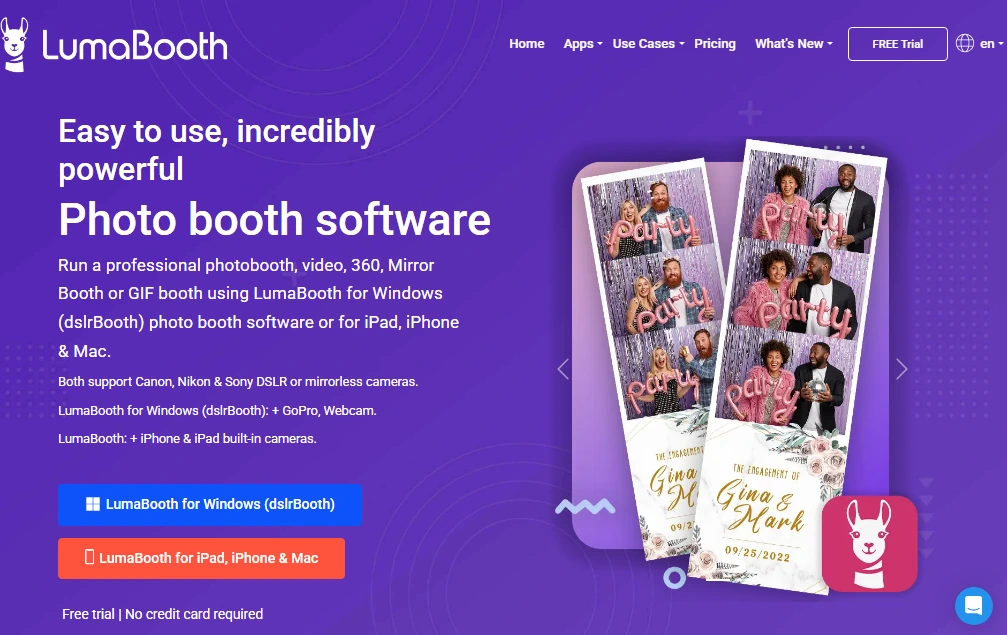
If you already own a Canon, Nikon, or Sony camera from photography work, you are sitting on the most expensive component of a professional photo booth setup. The question is whether your software can use it.
LumaBooth (by Lumasoft, formerly dslrBooth) delivers a broad feature set (360 booth, AI Portraits, Mirror Booth, Green Screen, Video Guestbook, and GIF capture) under a single subscription starting at $18 per month for two device licenses. That is one of the lowest monthly price points in professional photo booth software with two licenses included by default.
| LumaBooth Pros | LumaBooth Cons |
|---|---|
| - $18/month covers two device licenses with all booth modes included | - SMS requires a separate $10/month plan or personal Twilio account |
| - Canon, Nikon, and Sony DSLR/mirrorless support via USB | - AI Portrait credits purchased separately (from $14.99/month) |
| - 170+ AI Portrait styles with no per-style licensing fees | - LumaShare sharing app is an additional $7.99/month |
| - Runs on both Apple (iPad, iPhone, Mac) and Windows | - No web-based dashboard for remote device management or event setup |
Why Choose LumaBooth on a Tight Budget
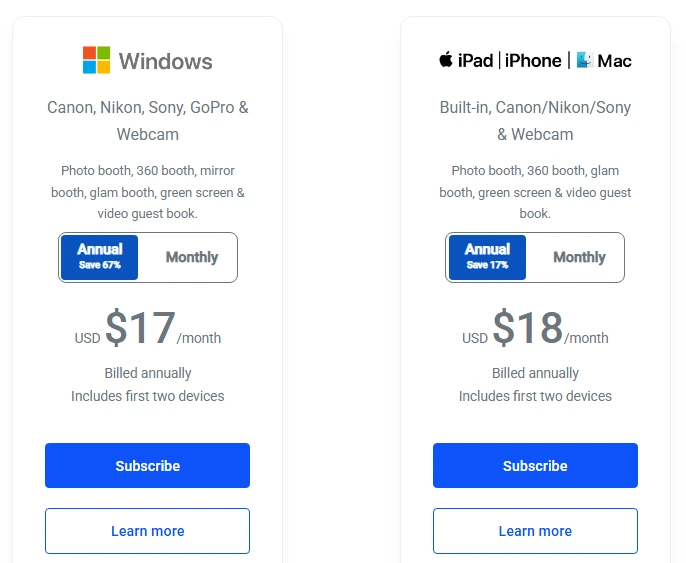
LumaBooth for Apple starts at $18/month billed annually (approximately $216/year). This covers photo, GIF, boomerang, standard video, 360/slow-motion, Mirror Booth, Glam Booth, Green Screen with AI Background Removal, Video Guestbook, and the full AI Portraits style library. No booth modes are locked behind higher tiers or module paywalls.
The trade-off is that LumaBooth handles nearly all configuration in-app, with no web-based dashboard for remote device management or advanced event setup from a browser. The interface also carries the visual legacy of its dslrBooth Windows origins, which some operators find less intuitive than mobile-first alternatives.
Canon EOS bodies (approximately 2010 onward), Nikon D-series and Z-series (approximately 2012 onward), and Sony mirrorless models including the a7 IV, a6700, and ZV-E1 connect via USB and deliver studio-quality output with the gear you already own.
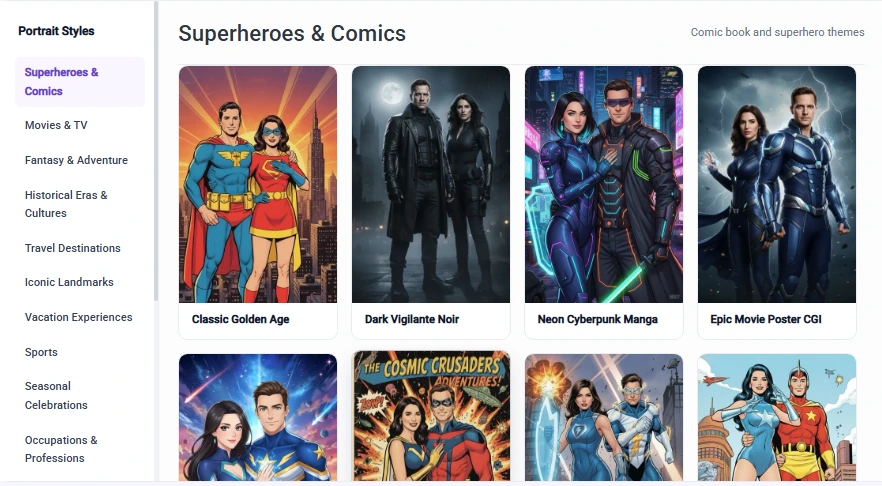
AI Portraits spans 170+ preset styles. Each generation consumes one AI credit from separately purchased plans (starting at $14.99/month for 150 credits). All styles are accessible without per-style licensing fees. As of May 2026, Custom AI Portraits allow operators to write freeform prompts, upload reference images, and attach per-guest questions for personalized output.
Source: LumaBooth
The 360 Booth on iPad captures at up to 240 fps on recent iPad Pro models with automatic motion-detection recording and configurable speed ramp timelines, all processed on-device.
LumaBooth Pricing
- LumaBooth for Apple at $18/month billed annually (~$216/year) or $19.99/month billed monthly: 2 device licenses, all booth modes, fotoShare Cloud Basic plan. 20 free AI Portrait credits on signup.
- LumaBooth for Windows at $17/month billed annually (~$204/year): 2 device licenses, all Apple-version booth modes, plus Cashless Pay-Per-Print and Booth CoPilot remote management.
Source: LumaBooth
Notable add-ons: LumaShare sharing app (+$7.99/month), SMS Plan (+$10/month for unlimited US/Canada), fotoShare Cloud Plus (+$19.99/month). A free trial with no time limit is available (watermarked output until subscription activates).
Use LumaBooth if:
- You already own Canon, Nikon, or Sony DSLR or mirrorless gear and want to connect it directly to a booth setup via USB without purchasing dedicated hardware.
- Your monthly platform budget is under $20 and you need access to multiple booth formats (photo, 360, AI Portraits, Mirror Booth, Video Guestbook) without module unlock fees.
- You operate events on both Windows PCs and iPads and want a single platform spanning both environments under one brand and dashboard.
- You work international events and need WhatsApp and AirDrop sharing alongside offline QR code delivery for venues with unreliable connectivity.
6. Booth.Events — Best for New Operators Testing the Photo Booth Market Before Making a Financial Commitment
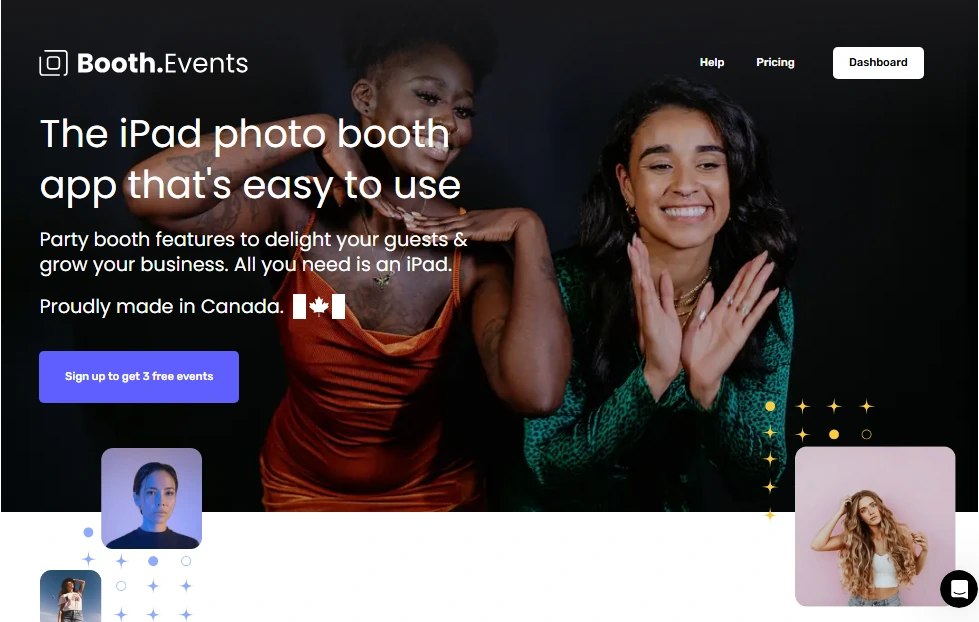
Starting a photo booth business means investing in software before you know whether the market will pay for your services. Most platforms offer time-limited trials that do not match how event businesses operate: an operator who signs up today but books their first job three weeks from now may burn through the entire trial period before running a single real event.
Booth.Events solves this with a per-event free model.
All new accounts begin at the Starter tier, which grants three complete free events with no expiration clock and no credit card required. Each free event supports up to 100 photo uploads and includes a 7-day online gallery with full sharing features (email, SMS, AirDrop, QR code) and AI output tools enabled.
| Booth.Events Pros | Booth.Events Cons |
|---|---|
| - 3 complete free events before any payment required | - Free events limited to 100 photo uploads each |
| - AI Glam Filter included on all paid plans with no per-image credit cost | - iOS-only (iPad and iPhone) |
| - SceneSelect AI background removal works offline, no green screen needed | - Custom domain and white-label limited to Pro+ plan |
| - 4.8-star App Store rating from 897 ratings |
Why Choose Booth.Events for Risk-Free Market Entry
The three free events let operators deliver professional, AI-enhanced, gallery-backed experiences to real clients before entering a credit card number.
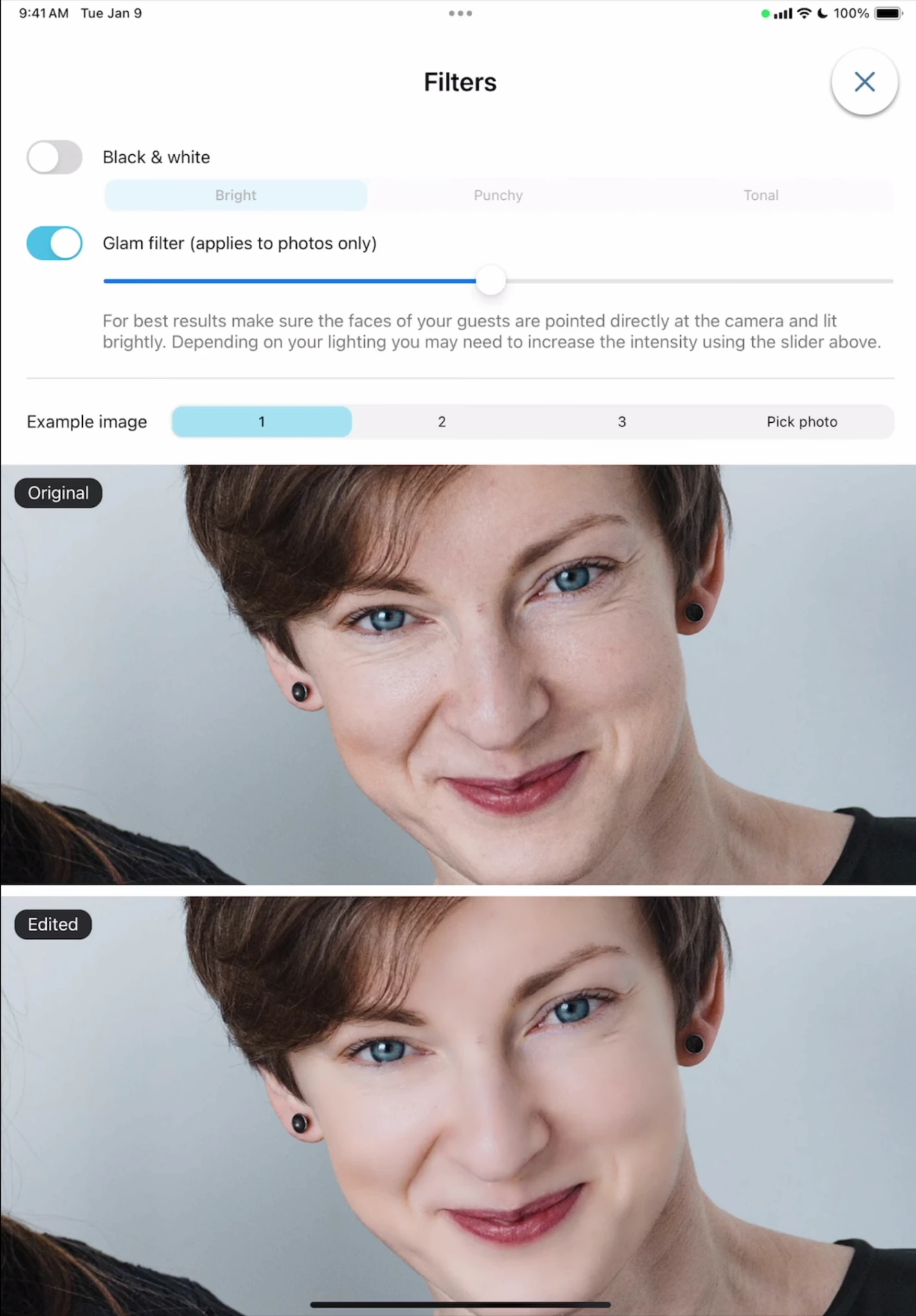
The AI Glam Filter applies automatic skin smoothing, acne removal, and teeth whitening with an adjustable intensity slider that stacks on top of 12 color presets. SceneSelect uses on-device AI to remove and replace backgrounds without a physical green screen, processing entirely offline on the iPad. Both features are included on all paid plans with no per-image credit consumption.
Source: Booth.Events
For DSLR operators, Booth.Events supports USB tethering for Canon, Nikon, and Sony cameras using only the camera’s stock cable. Templates are created via browser with Canva PDF import and no requirement for external design software.
Photos captured during connectivity outages are stored locally and queued for automatic upload when the connection returns, with no operator intervention required. Following the three free events, all paid memberships include a 14-day free trial before any charge, plus 200 free AI credits for new subscribers.
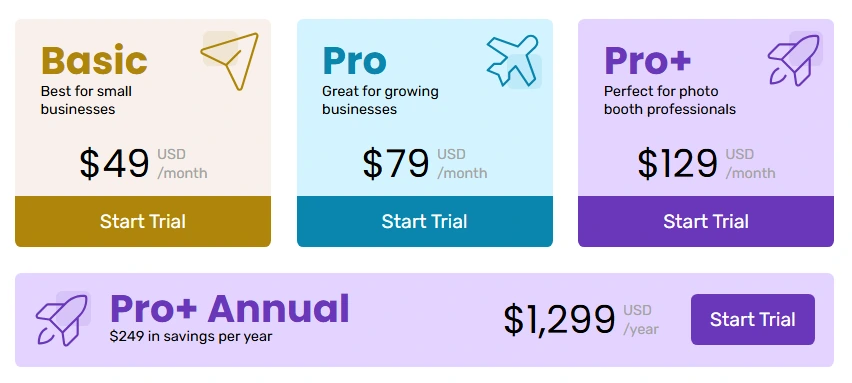
Booth.Events Pricing
- Starter (Free): 3 complete events, up to 100 uploads per event, 7-day gallery, email and SMS sharing (US and Canada).
- Basic: 1 iPad or 1 iPhone (not simultaneously), 3-month gallery, SMS to USA + 4 countries, online support.
- Pro: 1 iPad + unlimited iPhones as share stations, 1-year gallery, worldwide SMS, custom HTML microsites.
- Pro+: 4 iPads + unlimited iPhones, 2-year gallery, custom domain, white-label app, per-device event scheduling, Remote-In live iPad control, emergency phone support.
Source: Booth.Events
Non-subscription options include a Week Pass (Basic-level access for one non-renewing week) and 4x Pro Event Credits (four non-expiring credits with full Pro features).
Use Booth.Events if:
- You are entering the photo booth market for the first time and want to run real client events with professional output before committing to a subscription.
- You run occasional or seasonal events and prefer per-event credits or a week pass over a recurring monthly cost.
- You need AI background replacement at no per-image cost and without the physical space or setup overhead of a green screen.
- Your venues frequently have unpredictable internet and you need a platform that stores photos locally and syncs automatically when connectivity returns.
7. Curator Live — Best for Operators Targeting Brand Activations and Corporate Events
Corporate brand activations are a different business from weekend rental events. The client expects branded microsites, post-event analytics reports, and AI photo experiences that justify higher per-event pricing. Most photo booth software does not deliver the data or creative depth that brand managers need.
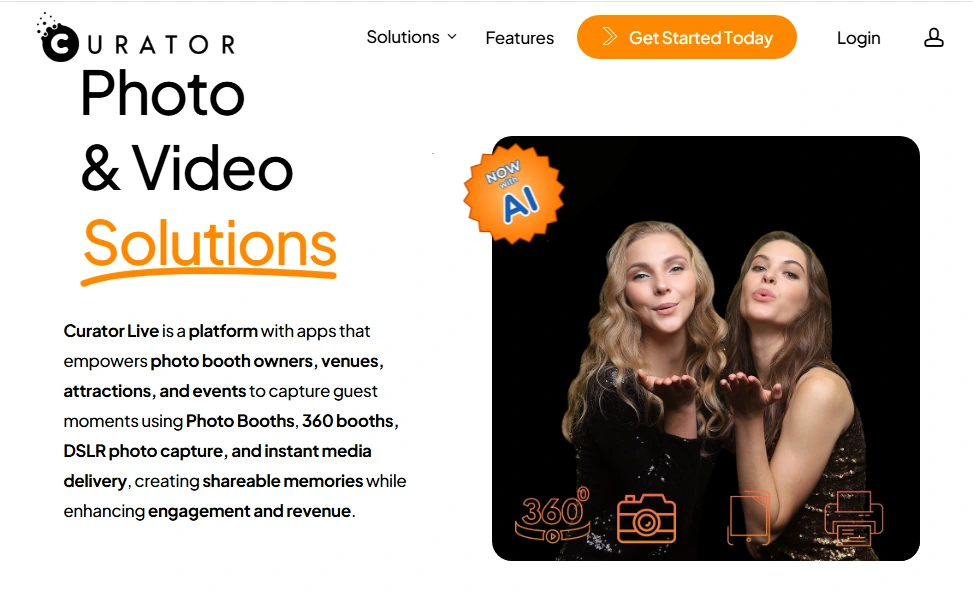
Curator Live is an iOS-native capture platform that combines AI transformation effects, 360 video, DSLR tethering, and branded media delivery in a single subscription.
Its AI-FX engine, powered by Nano Banana, generates transformed guest images while preserving recognizable facial features. Operators can load up to 40 distinct AI prompts per experience, with up to six AI-FX experiences active simultaneously per event, giving brand clients a menu of creative options without switching tools.
| Curator Live Pros | Curator Live Cons |
|---|---|
| - Up to 40 AI prompts and 6 simultaneous AI-FX experiences per event | - AI rendering costs $0.45 to $1.00 per image on top of subscription |
| - Cloud-based analytics with Google Analytics and Facebook Pixel integration | - iOS-only (iPad and iPhone) |
| - 24-hour emergency phone support during live events | - White-label URL is a $449/year add-on on lower tiers |
| - Face Swap at zero credit cost | - Per-event Agency Pro pricing ($99/event) plus AI costs adds up quickly |
Why Choose Curator Live for Brand Activations
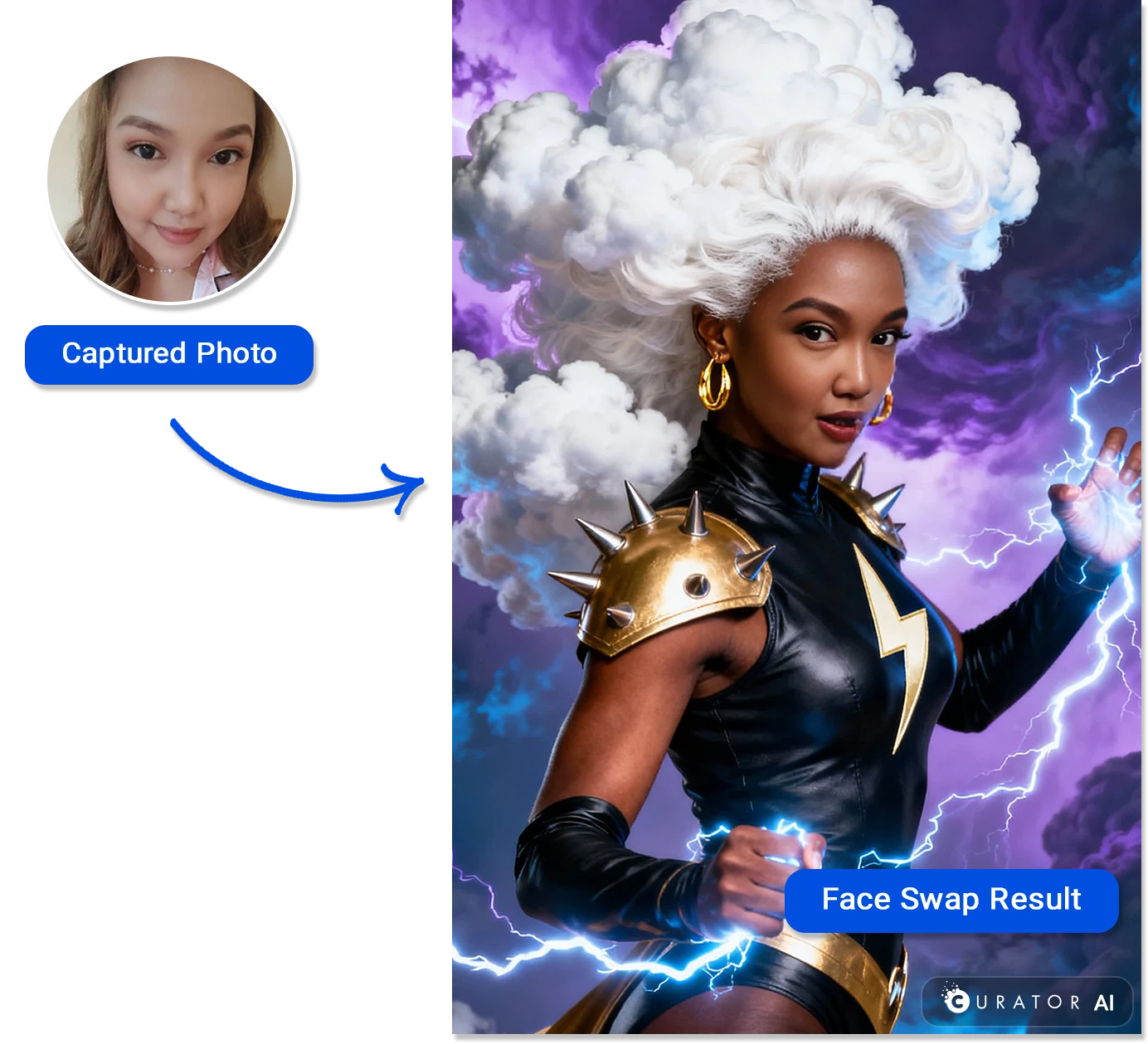
Curator Live’s AI engine offers two processing tiers: a standard Nano Banana model at approximately $0.45 per image for most activations, and a Nano Banana Pro model at approximately $1.00 per image designed for group photos with eight or more subjects. Face Swap, which morphs a guest’s face onto any uploaded target image, costs zero credits.
Source: Curator Live
Event Pro and Agency Pro subscribers access full cloud-based analytics with session-level data, engagement metrics, and built-in Google Analytics and Facebook Pixel integration on microsites and galleries. This gives operators the material for post-event reports that brand clients expect, without third-party tracking tools.
The platform stores all captured media locally on-device first, then uploads when connectivity is available. 24-hour emergency phone support is available across all paid tiers, with App Store reviewers noting that Curator answers calls during event times when competing platforms do not.
Curator Live Pricing
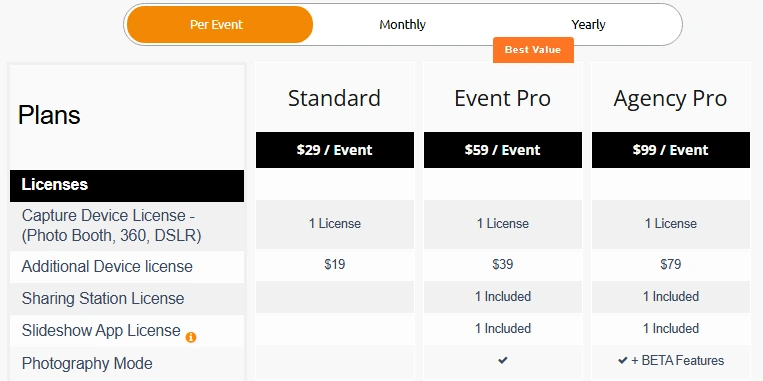
Per-event, monthly, and yearly billing is available across three tiers:
- Standard: $29/event, $69/month, $499/year. All capture experiences, basic analytics, 24-hour support.
- Event Pro: $59/event, $149/month, $1,499/year. Adds Sharing Station, full analytics, Slideshow App License, and Facial Recognition.
- Agency Pro: $99/event, $249/month, $2,499/year. Adds Photography Mode and all features; yearly includes one White-Label URL.
Source: Curator Live
Additional costs: AI rendering ($0.45 to $1.00/image), SMS via operator’s own Twilio account, White-Label URL ($449/year add-on on lower tiers), and additional device licenses ($19 to $99/device depending on tier and billing).
Use Curator Live if:
- Your target market is brand activations, product launches, or corporate events where clients expect analytics-backed post-event deliverables alongside the photo output.
- You want to offer AI photo transformations (generative composites, face-swapped characters, stylized portraits) as an upsell.
- You run high-volume events (trade shows, conventions, resort activations) and need software that maintains performance across thousands of captures over continuous multi-hour sessions.
- You need live event support at any hour, including evenings and weekends, with a direct emergency phone number rather than a ticket queue.
Final Verdict
Every platform on this list addresses a real operational need for mobile event operators. The right choice depends on where you are in your business and what kind of events you are booking.
Here are our top picks for the three most common mobile operator profiles:
- Simple Booth: If you want the most complete photo booth system that sets up in under a minute, runs unattended, and delivers branded experiences with integrated hardware, AI effects, and lead capture out of the box.
Start your free trial with Simple Booth.
- Fiesta (Photobooth Supply Co): If you are an established operator who wants hundreds of ready-made professional templates, a built-in business education ecosystem, and combined photo booth plus 360 video support under one subscription.
- LumaBooth: If you are a budget-conscious operator who already owns DSLR gear and wants the widest multi-format booth coverage (photo, 360, AI, Mirror, Video Guestbook) at the lowest monthly price point on the market.
Best Compact Photo Booths for Mobile Event Operators FAQ
What is the most portable compact photo booth for mobile operators?
Simple Booth’s HALO Event Kit is one of the most portable professional options available.
The HALO body weighs 6.5 lbs, and the full kit (including the selfie stand and wheeled travel case) weighs 49 lbs. It sets up in under one minute with no tools required, and the iPad snaps in via a tool-less faceplate with a concealed USB-C charging cable. For operators running multiple events per day, this setup speed and portability is a real operational advantage.
Can I run a photo booth without Wi-Fi or cellular service?
Yes, most platforms on this list support offline operation.
Simple Booth’s HALO app queues sessions in offline mode and delivers them automatically when connectivity returns. TouchPix offers offline AI background removal and an offline QR code sharing system (Scanpix 2). Booth.Events stores photos locally and syncs when connectivity is restored. LumaBooth’s LumaShare app supports offline QR delivery over a local Wi-Fi network. Always bring a mobile hotspot as a backup for venues with unreliable connectivity.
How much does compact photo booth software cost?
Pricing ranges widely depending on features and scale.
LumaBooth starts at $18/month for two device licenses with all booth modes included. Simple Booth starts at $14.99/week ($290/year) for its Lite plan, with professional plans starting at $24.99/week ($490/year). Fiesta starts at $59/month. Snappic starts at $69/month but its Business plan ($189/month) is the effective entry for operators needing 360, AI, or GlamBot support. Booth.Events offers three free events before any payment is required. Curator Live’s per-event pricing starts at $29/event.
Which photo booth software supports DSLR cameras?
LumaBooth offers the broadest DSLR support, connecting Canon, Nikon, and Sony cameras via USB. Simple Booth’s HALO app supports Canon DSLR and mirrorless cameras via wired USB or wireless WiFi on its Core plan and above. Booth.Events supports Canon, Nikon, and Sony via USB tethering. Snappic and Fiesta also support DSLR and GoPro integration.
If you already own professional camera equipment, LumaBooth is the most budget-friendly way to connect it to a booth workflow.
What is the best photo booth for 360 video spinning booths?
TouchPix is the standout choice for dedicated 360 operators, offering native GoPro integration from Hero 7 through 14 via wired USB, Bluetooth-triggered spinning platform automation, and slow-motion capture.
Snappic also supports 360 spinners from any manufacturer and adds GlamBot/robot arm capabilities. Fiesta integrates with PBSCO’s Tortilla 360 arm with direct spin-speed control. LumaBooth includes 360 capture in its base plan at up to 240 fps on iPad Pro.
Which photo booth is best for someone just starting out?
Booth.Events is designed for new operators, offering three complete free events (with full sharing, AI effects, and gallery features) before any payment is required. There is no expiration clock on those free events, so you can book at your own pace. LumaBooth’s unlimited free trial (watermarked output) also lets you test every feature without time pressure.
Both platforms let you validate market demand and generate revenue before committing to a subscription.
Do I need to buy special hardware, or can I use my iPad?
Most platforms on this list run on an iPad you already own.
Simple Booth, Fiesta, Snappic, Booth.Events, and Curator Live are all iPad-compatible. Simple Booth’s HALO hardware kit adds integrated studio-grade lighting and a professional mounting system, but the software runs on the iPad itself. TouchPix extends compatibility beyond iPad to Android, Windows, Linux, and Raspberry Pi. LumaBooth runs on iPad, iPhone, Mac, and Windows.
What is the best photo booth software for corporate brand activations?
Curator Live is built for corporate work, with up to 40 AI prompts per experience, cloud-based analytics with Google Analytics and Facebook Pixel integration, branded microsites, and 24-hour emergency phone support.
Snappic also targets corporate activations with its AI-FX suite (magazine covers, trading cards, branded avatars) and multi-format booth support. Simple Booth’s lead capture capabilities (87%+ opt-in rates) and enterprise-tier compliance tools (Select plan) serve brand marketers who need measurable data collection alongside the photo experience.
Keep reading
 Best Of
7 Best Photo Booth Software with Video Message and Slo-Mo Capture [2026]
Booths that capture heartfelt video notes and buttery slo-mo. The moving stuff.
 Best Of
6 Best Photo Booth Software With QR Code Sharing [August 2026]
Booths that beam every snap to a phone with a quick scan. QR sharing done right.
 Best Of
7 Best Photo Booth Software With Real-Time Analytics and Dashboards [August 2026]
Booths that show the numbers as the party happens. Live dashboards, real insight.