7 Best Photo Booth Enclosures and Shells You Can Buy or Build [July 2026]

The photo booth industry is booming. Weddings, corporate galas, brand activations, permanent restaurant installations: the demand keeps growing. And while software and camera quality matter, the physical enclosure is what guests see first.
Your enclosure shapes first impressions, protects equipment, integrates lighting, and signals professionalism. Choose the right one, and you earn premium pricing and repeat bookings. Choose the wrong one, and you spend weekends wrestling with flimsy hardware that undermines an otherwise solid photo experience.
We researched the top enclosures and shells available in 2026, covering every budget and use case:
- An integrated hardware-and-software system, so you buy from one vendor instead of five,
- A commercial touchscreen shell for operators moving into corporate events,
- A luxury enclosure for high-end productions,
- A modular starter kit with integrated lighting for first-time operators,
- A lightweight aluminum shell for solo operators who prioritize portability,
- An entry-level shell with built-in RGB LED flash sync,
- And a DIY build option for budget-conscious operators and hobbyists.
Let’s look at a quick summary, then examine each one.
What Are Photo Booth Enclosures and Shells?
Photo booth enclosures and shells are the physical housings that hold your camera, tablet or monitor, lighting, and printing hardware in a guest-facing configuration. They range from full kiosk-style enclosed structures to open-air stands and integrated ring-light mounts.
A good enclosure does more than hold equipment. It positions your camera at the right height, integrates lighting for flattering photos, protects your gear during transport, and presents a polished look that fits the event. Some enclosures are hardware-only shells designed to pair with your own camera and software. Others, like the first option on our list, combine hardware and software into a single system.
| Best Photo Booth Enclosures and Shells | ||
|---|---|---|
 | Simple Booth HALO Best all-in-one photo booth system combining ring-light hardware, iPad software, AI effects, and lead capture in one package. | |
 | Photo Booth Place T20R Best touchscreen shell for growing rental businesses moving into corporate events and brand activations. | |
 | PartyBoxTO Nova Best enclosed shell for luxury weddings, high-end productions, and touring events. | |
 | ATA Photo Booths M1 Best modular shell kit with integrated lighting for operators launching their first rental business. | |
 | EZ Photo Booths T11 Vision Best lightweight aluminum shell for solo operators who prioritize portability above all else. | |
 | RBA Photo Booths T12 Best entry-level shell with built-in RGB LED accent lighting and flash-sync ring light. | |
| / | DIY PVC or Wood Frame Best zero-cost option for hobbyists, learners, and budget-conscious operators who want full creative control. | |
How to Choose the Best Photo Booth Enclosure or Shell
Here’s a checklist to help you find the right enclosure:
- Build Quality and Durability: Your enclosure gets loaded into vehicles, set up in ballrooms, broken down at midnight, and cycled through this dozens of times a year. Aircraft-grade aluminum and powder-coat finishes hold up. Thin composites and bare steel do not.
- Portability and Weight: If you operate solo, every pound matters. Consider how many pieces the shell breaks into, whether it fits in your vehicle, and how long setup takes.
- Lighting Integration: Some shells include lighting (ring lights, strobe flashes, LED accents); others are bare enclosures. Sourcing lighting separately adds cost and complexity, especially for first-time operators.
- Device Compatibility: Confirm the shell fits your camera body, tablet, or monitor. Some are built around specific iPad or Surface Pro form factors; others accommodate DSLRs with standard camera holes.
- Software Flexibility: Hardware-only shells let you run any photo booth software. Integrated systems pair hardware with proprietary software for a tighter experience, but with less flexibility to swap components.
- Total Cost of Ownership: The shell price is just the start. Factor in software subscriptions, cameras, printers, lighting, travel cases, and financing terms to understand the real cost of getting your booth running.
How We Curated Our List
We identified the most common enclosure categories: integrated systems, commercial touchscreen kiosks, luxury enclosed shells, entry-level DSLR shells, portable lightweight options, and DIY builds. Within each category, we evaluated manufacturers on:
- Build Quality: Material specification, finish durability, and real-world transport resilience
- Operator Experience: Setup time, breakdown complexity, and vehicle compatibility
- Lighting and Image Quality: Integrated lighting output, DSLR compatibility, and the resulting photo quality for guests
- Value: What you get at each price point, including bundled accessories, software, and support
We tested configurations through product demos, manufacturer tutorials, operator community feedback, and hands-on evaluation to narrow the field to seven options covering every budget and use case.
1. Simple Booth HALO: Best All-in-One Photo Booth System with Integrated Ring Light Hardware
Source: Simple Booth
Most photo booth enclosures on this list are hardware shells. You buy the enclosure, then separately source a camera, tablet, software license, lighting, and travel case. It works, but you manage multiple vendors, troubleshoot compatibility issues, and build your own stack before your first event.
Simple Booth takes a different approach.
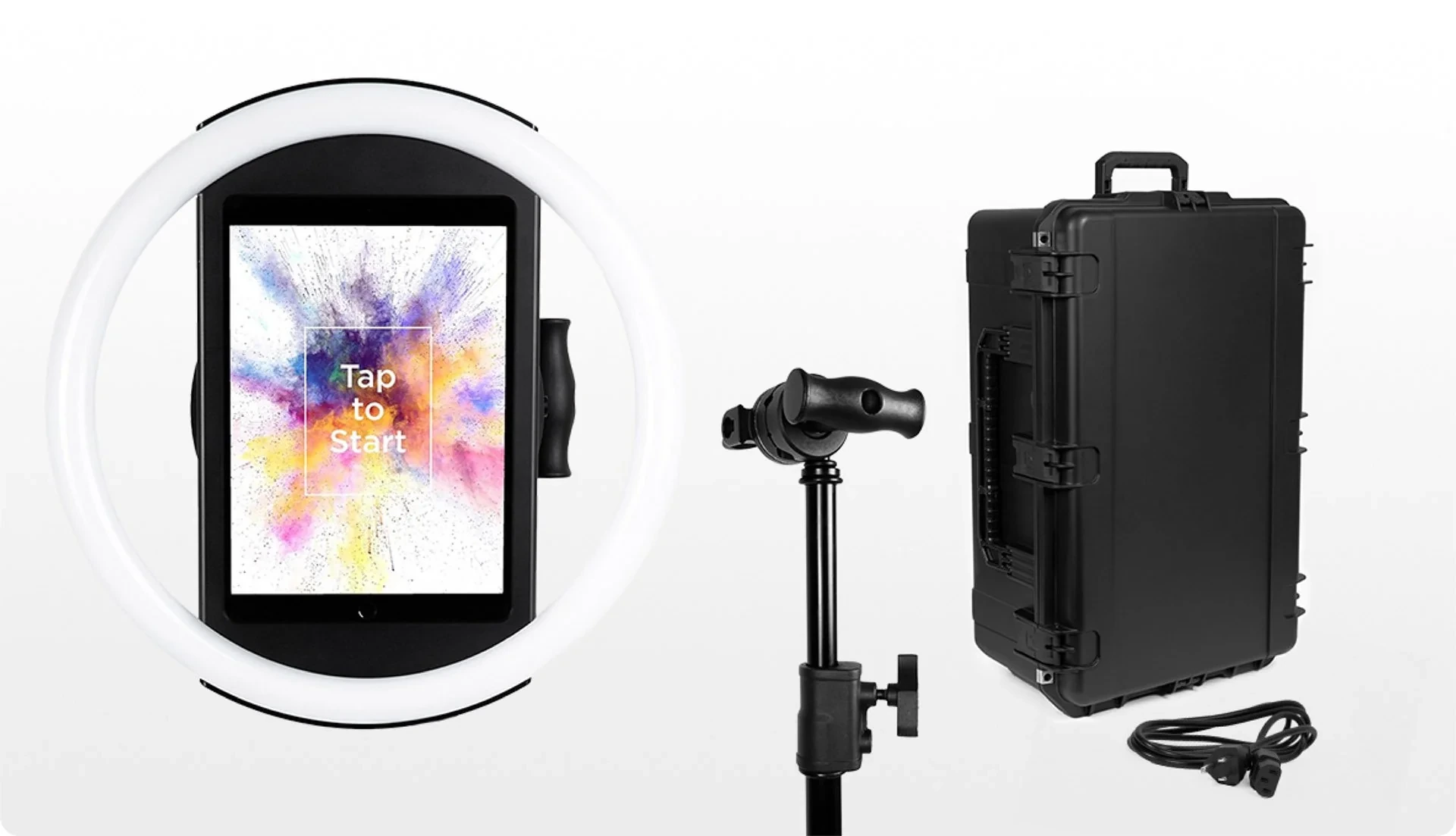
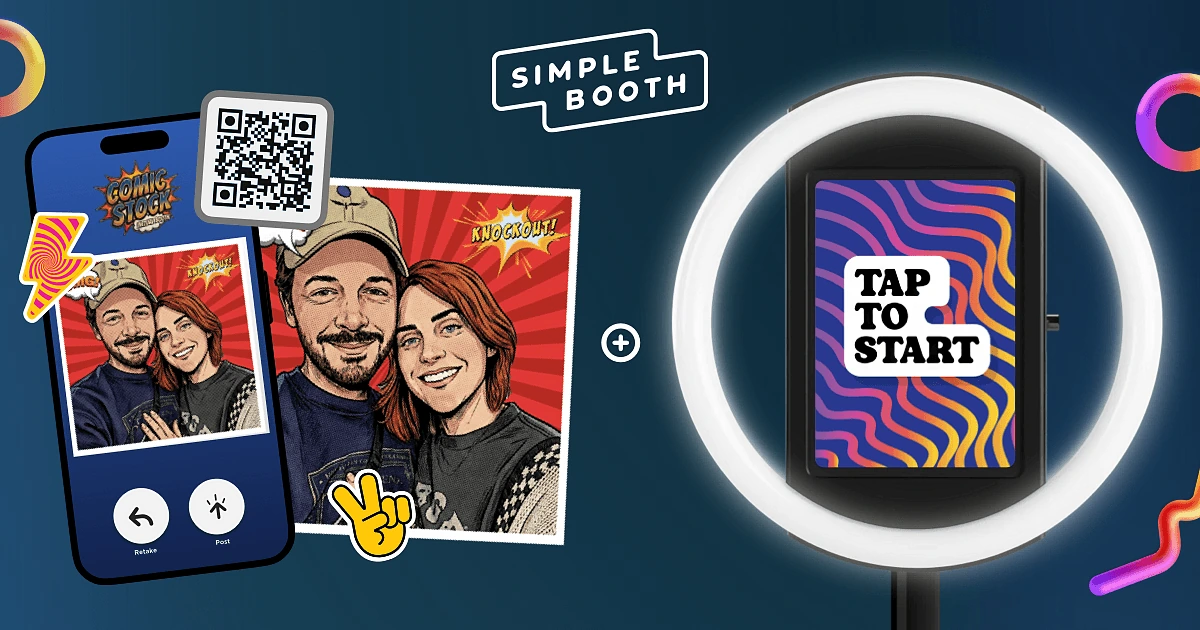
Simple Booth HALO is a photo booth system that pairs its own ring-light hardware (machined from a single billet of aluminum) with a subscription-based iPad app, cloud dashboard, AI photo effects, and built-in lead capture. Instead of assembling a booth from parts, you snap the iPad into the HALO chassis, launch the app, and you’re running in under a minute.
| Simple Booth Pros | Simple Booth Cons |
|---|---|
| - Patented ring light with 112 LEDs (2,100 lumens) in machined aluminum | - iPad-only; no Android support |
| - Sub-one-minute setup with no tools required | - Software subscription required (not a one-time purchase) |
| - 4.7-star App Store rating from 2,400+ ratings | - AI effects require purchased credits ($0.10 each) |
| - AI background replacement, Layout Designer, and 60+ themes built in | - Entry-tier Lite plan shows ads in the app |
| - Lead capture with 87%+ opt-in rates | |
| - DSLR/mirrorless camera support, wired or wireless (Core plan and above) |
Why Choose Simple Booth HALO as Your Photo Booth System?
30,000+ customers globally and 40 million+ moments captured since 2013 make Simple Booth one of the most established platforms in the photo booth industry. Its 4.7-star App Store rating from 2,400+ ratings reflects sustained satisfaction at scale, not a spike from a recent launch.
Enterprise brands like Live Nation, Sports Illustrated Tickets, and Gibson Brands use the platform, along with thousands of independent rental operators who run their photo booth businesses on it.
G7 Entertainment Marketing has used Simple Booth for over 10 years, capturing more than 136,000 fan interactions across brand activations. (Simple Booth)
Hardware: Ring Light in a Portable Package
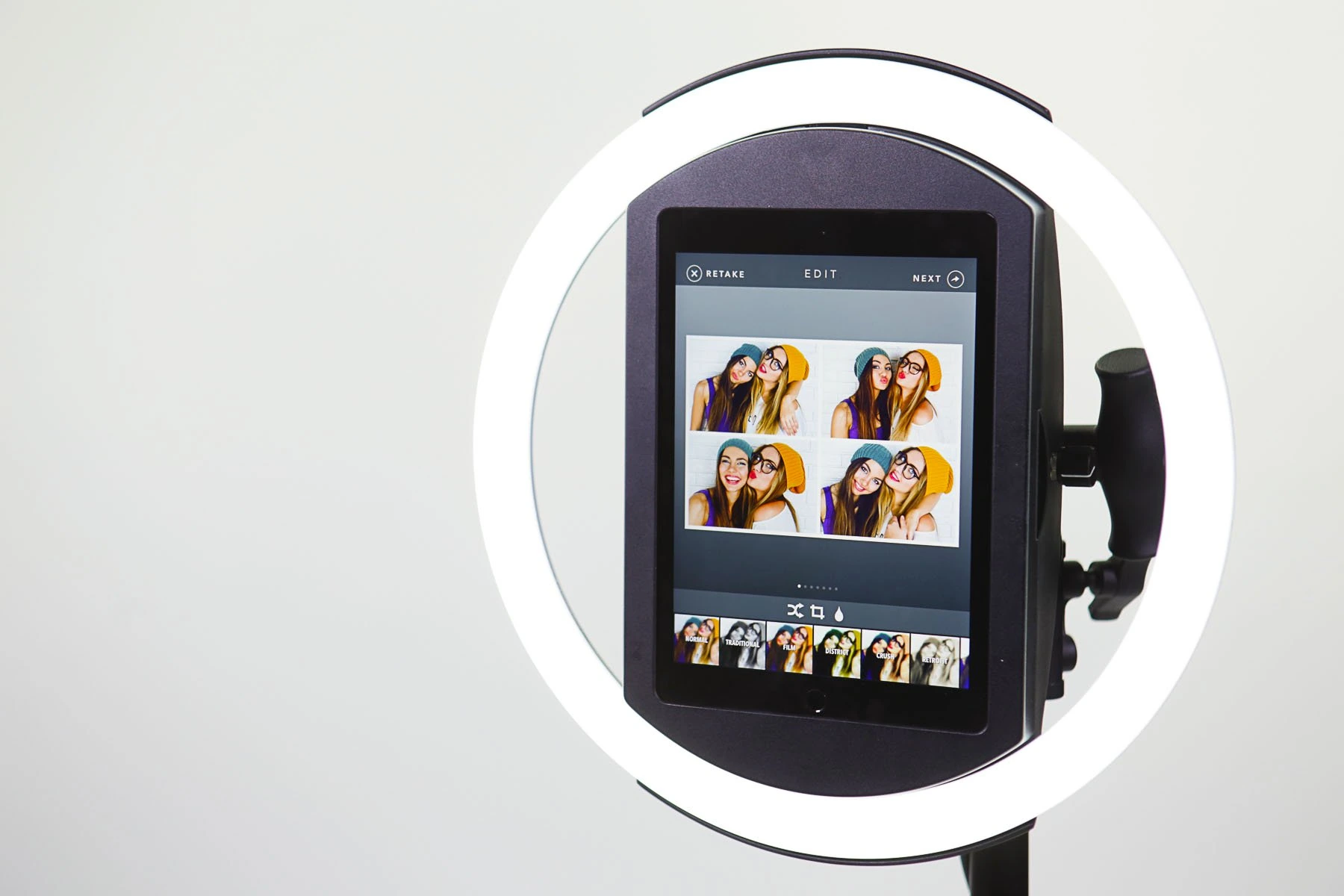
The HALO chassis is machined from a single billet of anodized aluminum with a patented ring-light system. Its 112 LEDs produce up to 2,100 lumens through a diffuser, illuminating groups 6 to 8 feet back from the camera. The LEDs are rated for up to 50,000 hours of operation.
 *Source: [Simple Booth](https://www.simplebooth.com/blog/the-simple-booth-story/?srsltid=AfmBOopZj7ZqnQE_f22w1FbG6LWUb0XToVdkqs6fdayzOk2ST-Rmkxpt)*
 Setup is fast: the iPad snaps in via a tool-less faceplate, a concealed USB-C cable keeps it charged, and the selfie stand deploys without tools. The Event Kit includes a waterproof rolling travel case (49 lbs total with the case), while the Install Kit provides a steel wall mount for permanent venues. A steel baby pin on the back accepts cinematic grip accessories for custom mounting.
For events without wall power, compatible portable batteries provide 6+ hours runtime. For international use, HALO supports dual voltage (110V to 240V) and requires only a plug adapter.
Software: More Than a Camera App
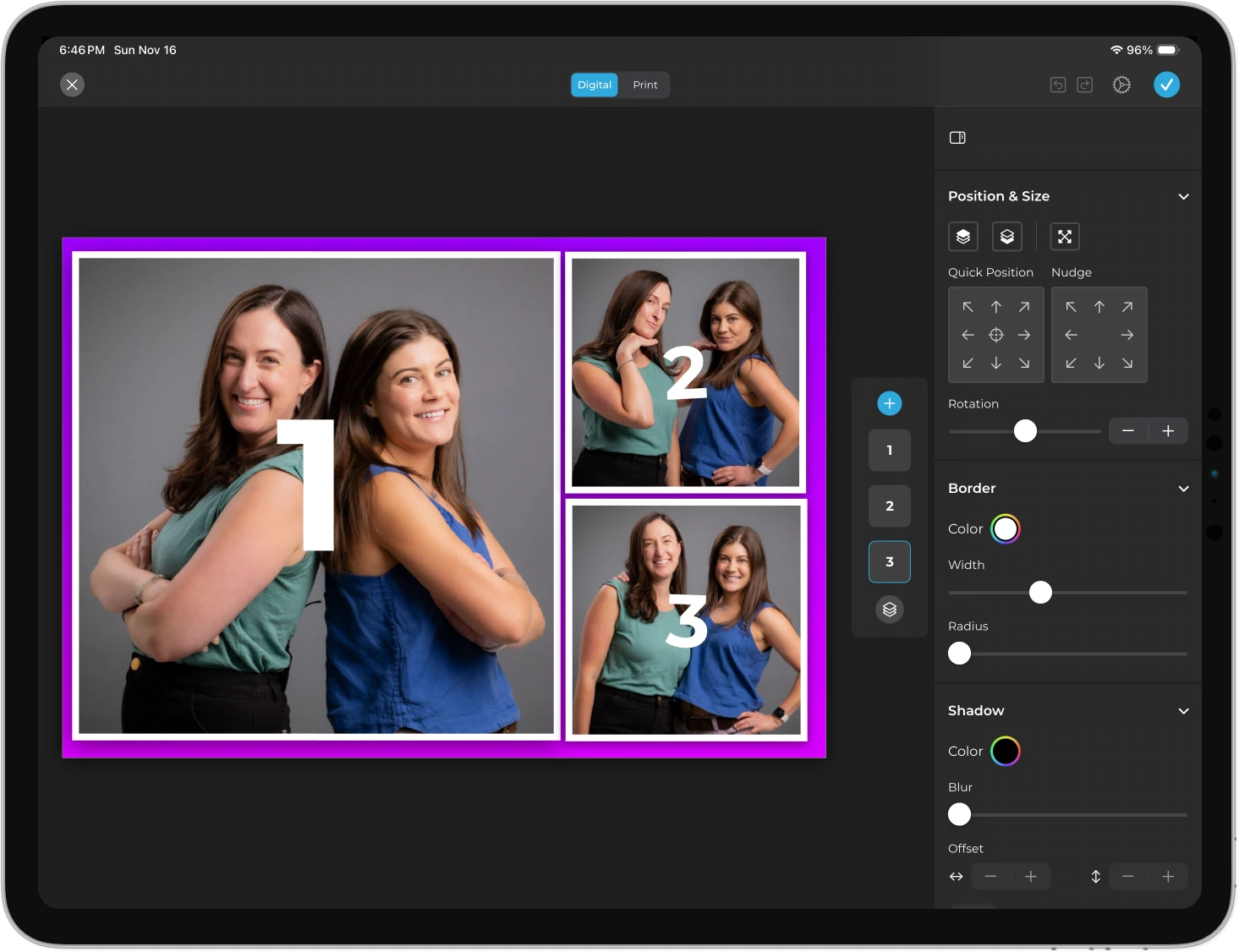
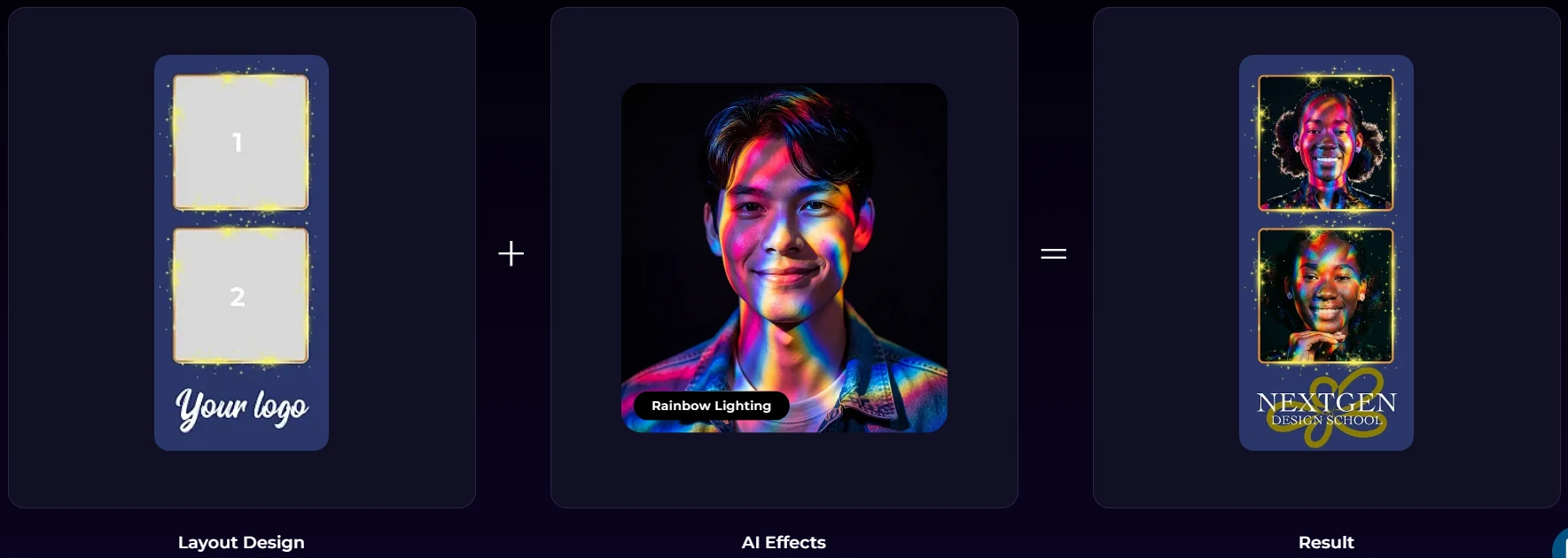
The HALO iPad app handles capture (still photos, classic photo strips, GIFs, Rebound boomerang clips, and full-length video), branding (the Layout Designer with layers, fonts, gradients, and embedded QR codes), and delivery (QR code, email, SMS, AirDrop, and WhatsApp).
Source: Simple Booth
AI Effects transform guest photos using text prompts with automatic identity preservation. The system supports assigning unique AI prompts to each frame in a multi-frame layout for narrative photo strips. DSLR/mirrorless camera integration (Core and above) connects Canon cameras via USB or WiFi through the full HALO workflow for higher image quality.
Source: Simple Booth
For marketers, the built-in lead capture achieves opt-in rates of 87 to 89% when guests receive their photos. Data flows to the dashboard for CSV export, MailChimp sync, or CRM delivery via the Open API.
The guest-facing interface works unattended, so guests navigate capture, editing, and sharing without staff on-site. A built-in offline queue uploads photos automatically once connectivity returns, keeping events running even without internet.
Simple Booth also offers Virtual Booth, a browser-based photo experience requiring no hardware, which connects to the same analytics and gallery infrastructure for hybrid events.
Source: Simple Booth
Treetop Golf built 150,000 unique email addresses across locations using Simple Booth’s lead capture, turning a guest entertainment feature into a measurable marketing channel. (Treetop Golf Case Study)
Simple Booth Pricing
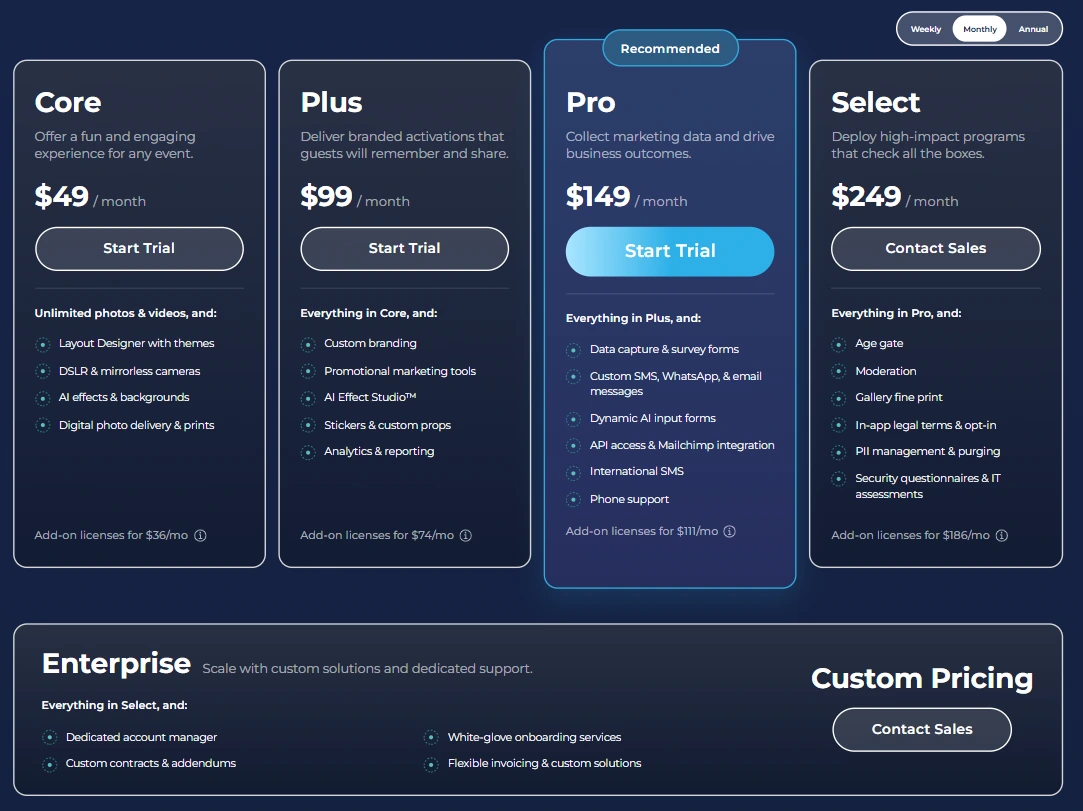
Simple Booth uses a per-license subscription model with weekly, monthly, and yearly billing:
- Lite starts at $14.99/week ($290/year): custom layouts, motion and still capture, photo delivery, online galleries. Includes ads.
- Core starts at $24.99/week ($490/year): ads removed, DSLR support, video, background replacement, Dropbox integration, AI effects, Virtual Booth.
- Plus starts at $49.99/week ($990/year): custom branding, analytics, guest-editable text layers, custom AI effects.
- Pro at $149/month ($1,490/year): lead capture, API integration, phone support, moderation, age gate.
- Select at $249/month ($2,490/year): in-app legal terms, security questionnaires, demographic analytics.
Hardware kits are sold separately at buy.simplebooth.com with 0% financing available. A Simple Care protection plan ($299) extends the hardware warranty to 2 years with accidental damage coverage. A 7-day free trial is available for the software.
Source: Simple Booth
Use Simple Booth if:
- You want hardware and software from a single vendor, so you don’t source and troubleshoot components from multiple manufacturers
- You need lead capture, analytics, and social sharing built into the booth experience
- You run unattended selfie stands or drop-off events and need a guest interface that works without staff, with sub-one-minute setup and remote device management
- You want AI photo effects and a built-in Layout Designer without relying on external design software
- You prefer an iPad-based workflow and want the option to connect a DSLR or mirrorless camera for higher image quality
Why Simple Booth Topped Our List
This article covers enclosures and shells, and Simple Booth is not a traditional shell. It replaces the shell-plus-separate-software approach entirely. We gave it the top spot because for many operators, the biggest challenge isn’t finding a shell; it’s getting everything to work together reliably, event after event. Simple Booth solves that by designing the hardware, software, lighting, and cloud platform as one product.
That said, if you need a traditional enclosure for a large-format touchscreen, DSLR-first imaging at the highest sensor quality, or a specific visual footprint on the event floor, the standalone shells below offer capabilities that Simple Booth’s open-air ring light form factor does not. Read on to find the right one for your operation.
2. Photo Booth Place T20R: Best Professional Touchscreen Shell for Growing Rental Businesses
Source: Photo Booth Place
When your rental business moves beyond weddings and birthday parties into corporate events and brand activations, clients expect more than a tablet on a stand. They expect a large, interactive installation that commands attention from across the room.
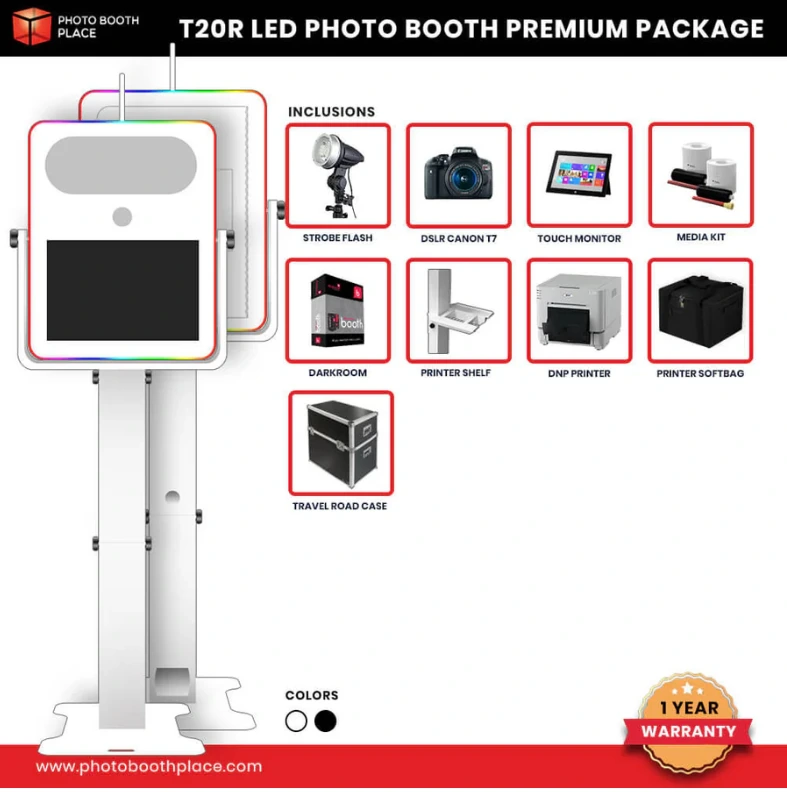
The Photo Booth Place T20R is a commercial-grade open-air shell built around a 21.5-inch shatterproof touchscreen, with aircraft-grade aluminum construction and full-surround RGB LED lighting on front and back.
| T20R Pros | T20R Cons |
|---|---|
| - 21.5” commercial-grade shatterproof touchscreen | - Heavier than iPad-based shells (less ideal for solo operators) |
| - Full-surround RGB LED lighting with remote control | - Premium pricing ($8,200+ for complete package) |
| - Standard DSLR camera hole at 57” eye-level height | - Software licensed separately (Darkroom Booth bundled only in Premium Package) |
| - 17” rear cutout for live slideshow monitor | |
| - Aircraft-grade aluminum in white or black powder coat |
T20R: What Sets It Apart
The touchscreen is the T20R’s defining feature. Commercial-grade displays maintain brightness and legibility in ambient event lighting where consumer tablets wash out. The rear-facing 17-inch display cutout lets operators run a live slideshow of captures, turning the booth into entertainment visible from both sides.
The RGB LED strips on front and back are controlled by remote, letting operators match the booth’s glow to client brand colors without approaching the unit between guests. The standard 3-inch DSLR camera hole positions the camera at 57 inches from the ground with a tilting head unit and 3-stage adjustable locking design for height adjustment.
The Premium Package pairs the shell with a 180W strobe flash and Beauty Dish Umbrella, a Canon T7 DSLR, a Mini PC with an i5 processor, and a DNP RX1HS dye-sublimation printer with a 1,400-print media kit. The shell breaks down into 4 pieces for sedan or SUV transport.
T20R Pricing
The T20R is a one-time hardware purchase with no recurring fees for the shell.
- Shell Only: Available from photoboothplace.com; contact Photo Booth Place for current pricing
- T20R LED Premium Package: Regular $9,900 / Sale $8,200 (free shipping to the 48 contiguous US states). Includes shell, strobe flash, Canon T7 DSLR, 21.5” Acer commercial touchscreen, Mini PC, DNP RX1HS printer, 1,400-print media kit, Darkroom Booth Software license with 12 months of support, and a 1-on-1 virtual tutoring session. Financing available through a third-party partner.
Returns accepted within 14 days of receipt with a 20% restocking fee; sale items are non-refundable. 1-year hardware warranty; 30-day warranty on accessories.
Use the Photo Booth Place T20R if:
- Your rental business quotes corporate clients and brand activations where a large-format commercial touchscreen is expected
- You want a DSLR-native enclosure with strobe lighting and a dual-screen presence (front touchscreen plus rear slideshow display)
- You want RGB LED lighting that makes the shell a branded visual centerpiece at events
- You’re ready to invest in a turnkey system from a manufacturer with 25+ years in photo booth production
3. PartyBoxTO Nova: Best Enclosed Shell for Luxury Events and High-End Productions
Source: PartyBoxTO
When event planners at luxury venues evaluate your vendor proposal, they look at your equipment as carefully as your portfolio. A booth that reads as assembled gear loses to one that looks like it belongs in the room.
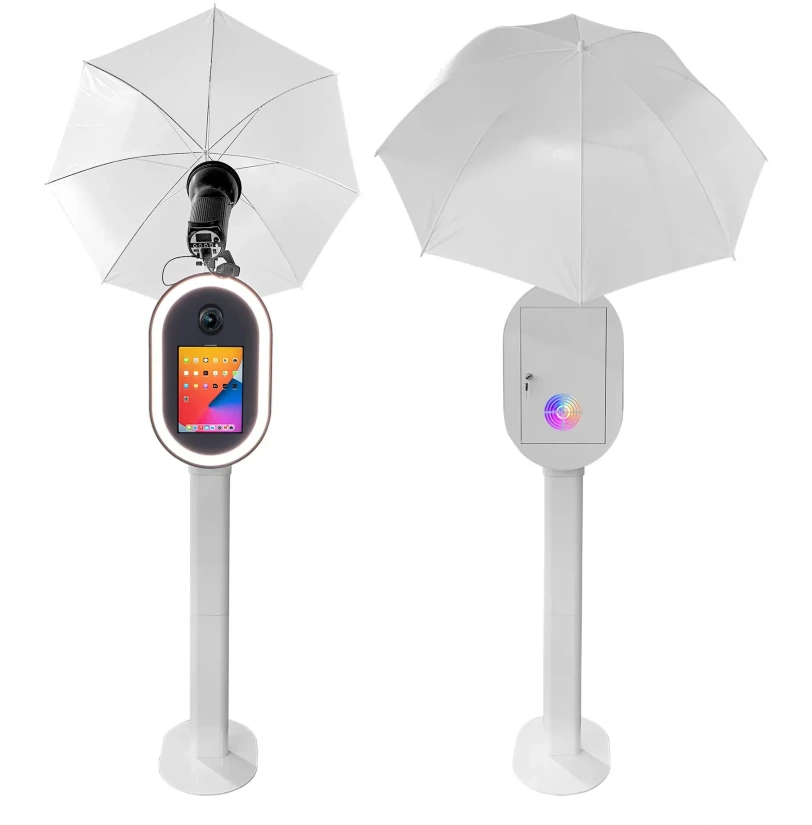
The PartyBoxTO Nova, sold under the Infinitbooth sub-brand by Toronto-based Partybox Entertainment, is an enclosure shell with architectural lines designed for luxury event settings.
| Nova Pros | Nova Cons |
|---|---|
| - Architectural design for luxury venues | - Hardware-only (no camera, iPad, printer, or software included) |
| - Dual DSLR and 12.9” to 13” iPad compatibility | - $4,200 CAD (approximately $3,100 USD) for the shell alone |
| - Integrated oval LED ring light built into the structure | - No turnkey bundle or package option |
| - Protective flight case included as standard | |
| - Worldwide shipping on DDP terms (no hidden customs costs) |
Nova: What Sets It Apart
The Nova’s oval LED ring light is built into the shell structure rather than bolted on as a separate accessory, creating a clean, continuous visual that reads as a designed object. The shell supports both DSLR cameras and 12.9” to 13” iPads within the same enclosure, with Godox flash lighting and umbrella diffusion support for the DSLR configuration.
An adjustable camera angle accommodates different framing requirements across venue setups.
The protective flight case comes standard, not as an add-on. For operators running multiple events per week, the flight case reduces cosmetic and structural wear over time. Worldwide shipping on DDP terms removes customs complexity for international buyers, making the Nova one of the few shells at this price point accessible to rental companies outside North America without a local distributor.
Nova Pricing
- $4,200 CAD one-time purchase (approximately $3,100 USD)
- Includes: enclosure shell with integrated oval LED ring light, Godox flash support, adjustable camera angle, protective flight case, and essential accessories
- Camera, iPad, printer, and software not included
- Optional printer stand add-ons available at checkout ($650 CAD each for DNP DS 620A, DNP DS RX1, and HITI P525L)
- No financing or installment options currently disclosed
For context, the Infinitbooth lineup ranges from $2,950 CAD (GlowSnap, iPad-only) to $4,200 CAD (Nova, DSLR/iPad hybrid).
Use the PartyBoxTO Nova if:
- You serve luxury weddings, corporate activations, or touring productions where booth aesthetics factor into vendor selection
- You want DSLR and iPad flexibility in a single shell without buying separate enclosures for each workflow
- You need worldwide DDP shipping without customs complexity
- You already have your photo booth software and want a software-agnostic enclosure
4. ATA Photo Booths M1: Best Modular Shell Kit with Integrated Lighting for First-Time Operators
Source: ATA Photo Booths
Starting a photo booth business means making many purchasing decisions at once: enclosure, camera, software, lighting, travel case, printer. Sourcing lighting separately is one of the most common traps for new operators, adding hundreds of dollars and hours of compatibility research before the first event.
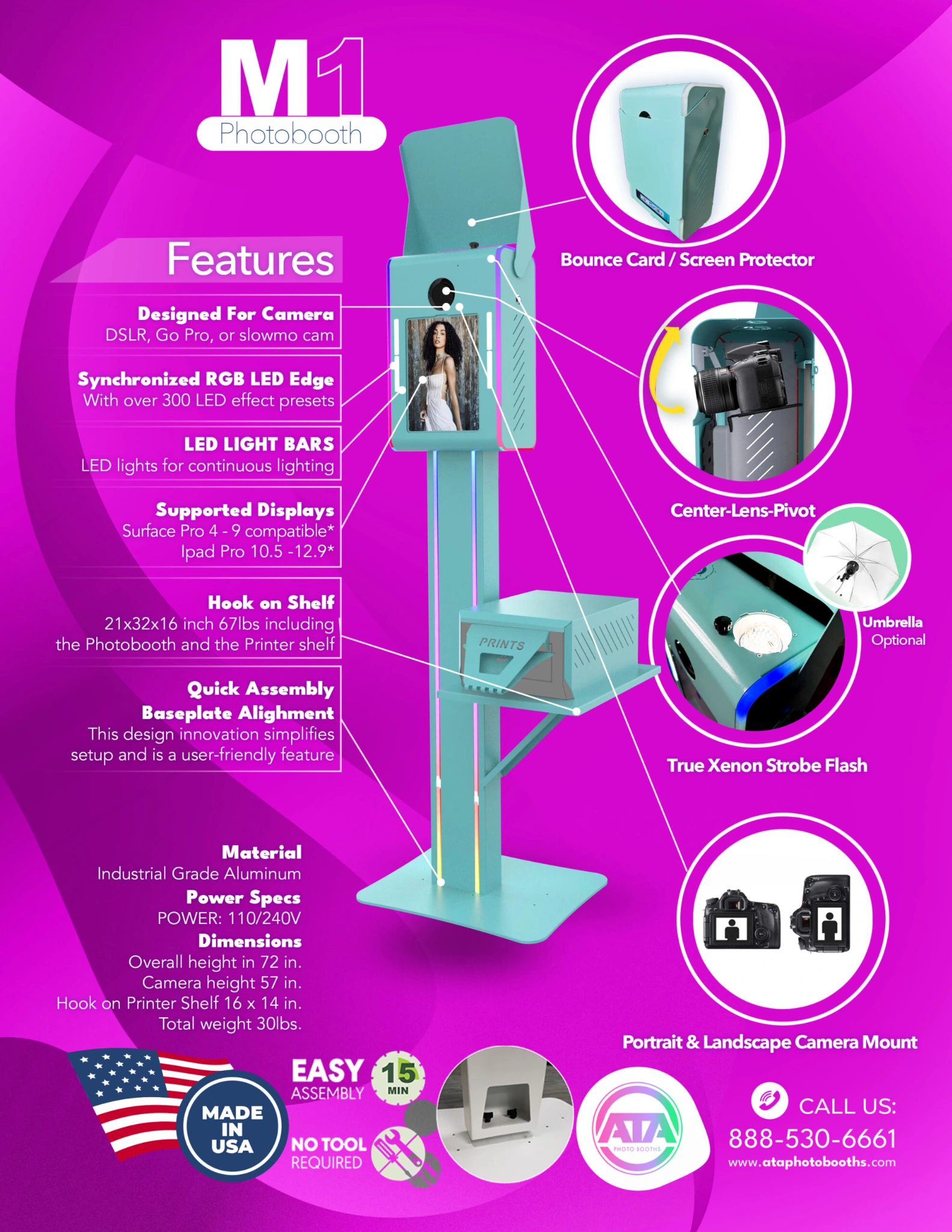
The ATA Photo Booths M1 bundles both dimmable constant light bars and a 160W strobe flash into the enclosure, eliminating the separate lighting step. Built from laser-cut aircraft-grade aluminum at their Chino, California facility, the M1 also includes remote-controlled LED edge accents with programmable chasing effects.
| M1 Pros | M1 Cons |
|---|---|
| - Integrated 160W strobe flash and dimmable constant light bars | - Software must be licensed separately |
| - USA-manufactured aircraft-grade aluminum | - Camera not included in shell-only configuration |
| - Remote-controlled LED edge accents with chasing effects | - Pricing can vary by configuration; verify directly with ATA |
| - Financing available to spread startup costs | |
| - Spring-assisted tiltable camera mount (no tools needed) |
M1: What Sets It Apart
The integrated lighting is the M1’s main advantage. The constant bars provide ambient illumination for the booth’s attract mode and preview screen, while the 160W strobe handles image capture. This two-light combination gives new operators a professional starting configuration without sourcing separate components.
A spring-assisted tiltable camera mount allows tool-free angle adjustments for different camera bodies and guest heights. The large bounce card protects the camera and screen during transport and doubles as a light diffuser during events.
ATA supplements the hardware with “Startup Success” resources, a YouTube tutorial channel, a knowledge base, and phone-accessible US-based support (888-530-6661). ATA’s BBB profile shows an A- rating, with customer reviews citing support responsiveness as a strength.
M1 Pricing
- Shell-only (DIY): Entry price for ATA enclosure shells starts at approximately $1,399 and runs to $2,199 depending on model and accessories. Integrated lighting and LED edge accents included in the M1 build.
- Complete system packages: Start from approximately $3,675 and range upward depending on camera, printer, and accessories. “Startup Success” business training included.
- Software licensed separately; ATA recommends Darkroom3 for DSLR setups and Booth.Events/Fotofliqs for iPad configurations.
- Financing available. 1-year manufacturer’s warranty on enclosure hardware.
Use the ATA Photo Booths M1 if:
- You’re launching your first rental business and want integrated lighting out of the box
- You want USA-manufactured aluminum construction with domestic warranty support and phone-accessible customer service
- You’re working with startup capital constraints and need financing
- You already own or plan to buy a DSLR camera and need an enclosure with a spring-assisted tiltable mount
5. EZ Photo Booths T11 Vision: Best Lightweight Shell for Portability-First Operators
Source: RBA Photobooths
If you operate solo, haul your own equipment, and drive a sedan instead of a cargo van, every pound and every inch matters. Most professional aluminum shells weigh 35 to 60 pounds. The EZ Photo Booths T11 Vision weighs 27.
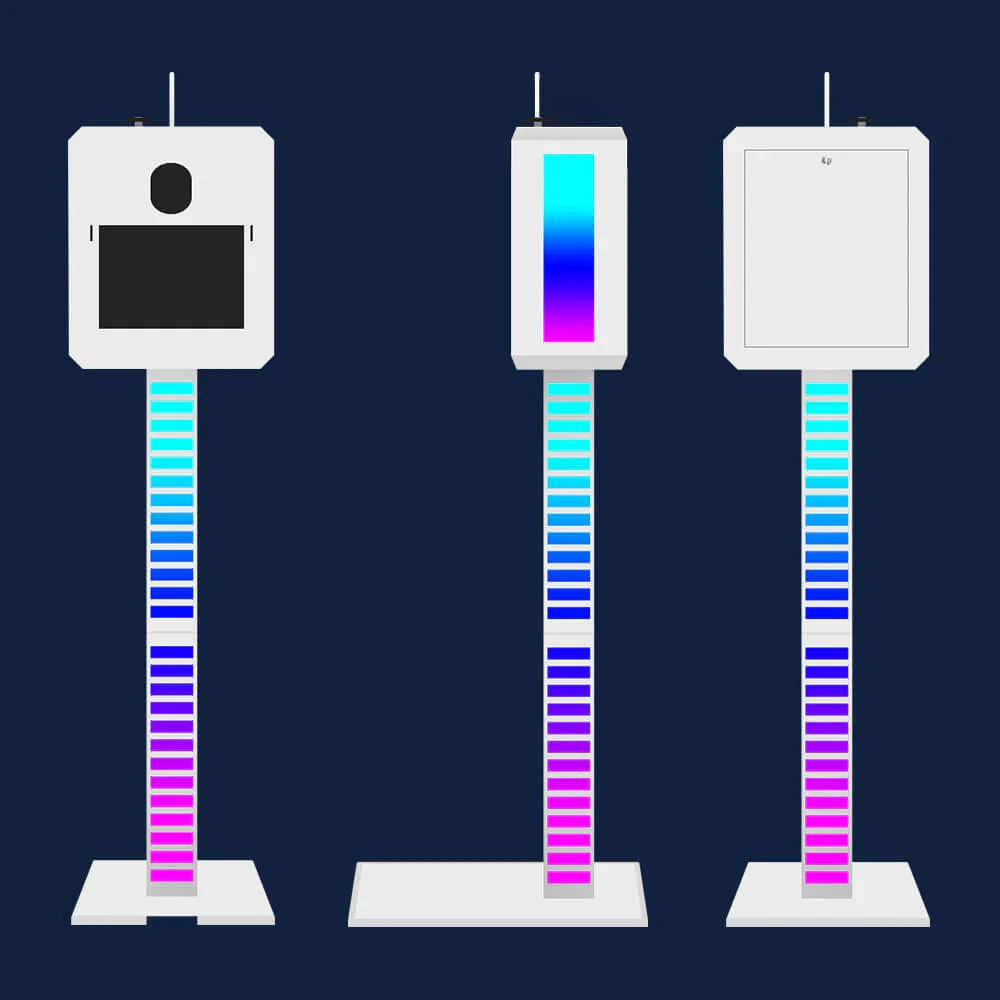
Built by EZ Photo Booths (parent company RBA Photobooths has been in the photo booth equipment business since before the first Photo Booth Expo), the T11 Vision is an aircraft-grade aluminum shell that breaks into six pieces small enough to fit in a sedan trunk.
| T11 Vision Pros | T11 Vision Cons |
|---|---|
| - 27 pounds (lightest professional aluminum shell in this roundup) | - No integrated lighting; operators must source separately |
| - Six-piece breakdown fits a sedan trunk or hatchback | - Shell only; no camera, tablet, software, or printer included |
| - Aircraft-grade aluminum at approximately $1,700 | - Designed for DSLR and Surface Pro; not iPad-specific |
| - Camera tilt knob for on-the-fly height adjustment | |
| - White or black powder coat finish |
T11 Vision: What Sets It Apart
At 27 pounds and six pieces, the T11 Vision stays below the fatigue threshold where solo operators feel weight compound across a busy event weekend. Every pound saved on the shell frees capacity for printers (25 to 30 pounds), camera bags, backdrops, and accessories.
The six-piece breakdown produces shorter, narrower segments that fit through stairwell turns, narrow service corridors, and hotel freight elevators more easily than shells with longer segments. The camera tilt knob lets the operator angle the camera head up or down to frame guests of different heights without repositioning the full enclosure.
The shell fits most DSLR cameras and Microsoft Surface Pro versions 3 through 6, with a powder-coat finish (white or black) that resists corrosion and handles repeated transport.
T11 Vision Pricing
- Starts at approximately $1,700 for the standalone shell
- Aircraft-grade aluminum in white or black powder coat
- Ships from EZ Photo Booths’ Southern California operations
- Camera, tablet, software, and printing hardware sourced separately
For operators wanting a complete system, EZ Photo Booths’ LUX-11 (the current successor model) starts at $6,700 and includes a Canon T7 DSLR, DNP RX1HS printer, Darkroom Booth 3 license, travel cases, virtual training, and 12 months of software support.
Use the EZ Photo Booths T11 Vision if:
- You operate solo and need to carry equipment into venues without a loading crew or freight access
- You work out of a compact car and want to avoid a cargo vehicle
- You already have your camera, tablet, and software selected and just need the enclosure
- You want aircraft-grade aluminum build quality at an entry-level price from a manufacturer with a decades-long track record
6. RBA Photo Booths T12: Best Entry Shell with Built-In RGB LED Flash Sync
Source: RBA Photo Booths
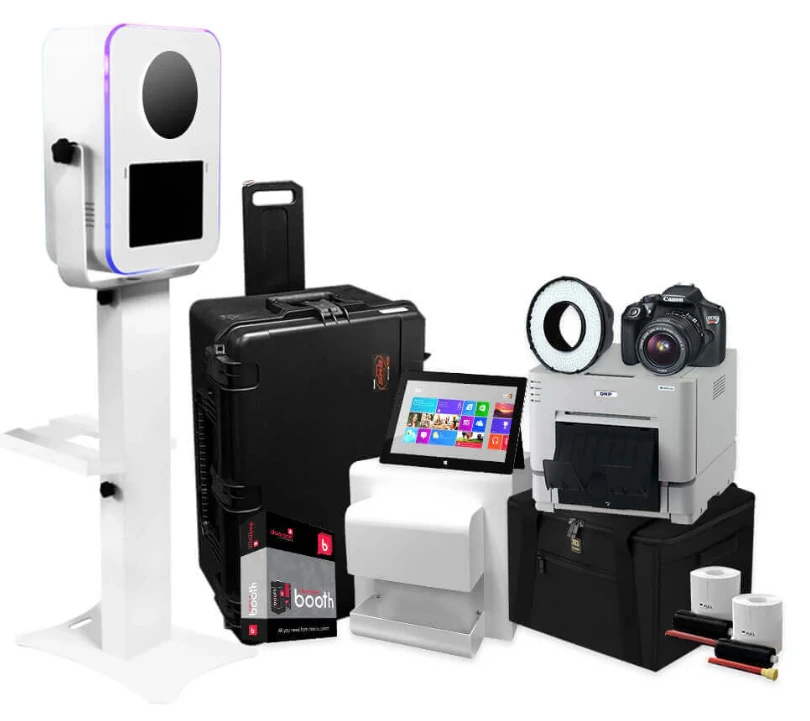
Most photo booth shells in the $1,500 to $2,500 range are plain enclosures. Visual interest comes from the backdrop or the guests, not the shell. The RBA Photo Booths T12 changes that with a two-layer LED system that makes the shell itself a visual draw.
RBA has operated since 2009 to 2010, holds a BBB A+ accreditation, and counts institutional buyers including NYC public schools and Northern Arizona University among its customers.
| T12 Pros | T12 Cons |
|---|---|
| - RGB LED surround on front and back with remote control | - Shell-only at the entry tier; electronics sourced separately |
| - Flash-sync ring light (RL-400) with 240 daylight-balanced LEDs | - Business Premium Package ($9,400) is final sale |
| - Faceplate upgrade path for newer tablet generations ($350) | - Black finish adds a $40 premium on some tiers |
| - Six purchasing tiers from $1,900 to $9,400 | |
| - Financing available (ClickLease and Acima, no hard credit pull) |
T12: What Sets It Apart
The T12’s first LED layer is ambient: RGB LED strips on the front and back of the head unit, controlled by remote, that make the booth glow on a crowded event floor and draw guests toward it. The second layer is functional: the RBA RL-400 ring light ($228) with 240 LEDs calibrated at 5500K to 6500K fires in sync with the camera shutter at roughly 4x the output of constant-on, producing the round catch-light found in professional portrait photography.
The faceplate upgrade system saves money for fleet operators. When a new tablet generation launches, operators swap the $350 faceplate rather than replacing the full $1,900 shell. Current faceplates accommodate both Surface Pro 12.3” and iPad Pro 13” at purchase, with upgrade faceplates supporting Surface Pro 8 to 11 and iPad Pro Gen 4 to 7.
The shell weighs 27 pounds at 5.2 feet assembled, breaks into six pieces, and assembles in under three minutes. Six purchasing tiers let operators enter at their capital level, from the $1,900 bare shell to the $9,400 complete business package with Canon DSLR, Surface Pro, DNP printer, Darkroom Booth license, and 1-on-1 virtual training.
T12 Pricing
- Shell Only: $1,900 with selectable faceplate
- Shell + SKB Travel Case: $2,325 to $2,365
- DIY Bundle: $2,524 to $2,564 (ring light, marketing kit, rental contract template)
- Basic Package: $3,023 to $3,063 (first print-ready tier with DNP printer)
- Professional Package: $3,173 (saves $1,609 off individual pricing)
- Business Premium Package: $9,400 (complete turnkey with Canon DSLR, Surface Pro, printer, software, training. Final sale.)
Financing through ClickLease and Acima: no hard credit pull, instant approvals up to $20,000, with a 90-day purchase option.
Use the RBA Photo Booths T12 if:
- You want built-in RGB LED ambient lighting and a flash-sync ring light in the shell from day one
- You need a clear upgrade path as your tablet hardware evolves, without replacing the full enclosure
- You’re launching a first booth or expanding a small fleet and want to enter at your capital level with six tiered purchasing options
- You need financing with no-credit-check options that most shell manufacturers don’t offer
7. DIY Build (PVC Pipe or Wood Frame): Best Zero-Cost Option for Budget-Conscious Operators and Hobbyists
Not every operator needs a manufactured shell. If you’re testing the photo booth business before committing capital, setting up a booth for a personal event, or want to learn how the hardware works before investing, a DIY enclosure is the most accessible starting point.
| DIY Build Pros | DIY Build Cons |
|---|---|
| - Lowest cost entry point ($10 to $50 in materials) | - No professional finish; less polished at upscale events |
| - Fully customizable dimensions and mounting options | - No warranty, no manufacturer support |
| - Hardware-agnostic (any tablet, DSLR, or webcam) | - Build quality depends entirely on your skills |
| - Build time under 30 minutes for a basic PVC frame | - Limited structural durability under repeated transport |
How to Build a Basic DIY Photo Booth Enclosure
PVC Pipe Frame (Easiest): Buy 1-inch PVC pipe and T/elbow connectors from any hardware store. Cut the pipe to your dimensions (typically 5 to 6 feet tall, 2 to 3 feet wide) and assemble a freestanding frame. No glue needed for a friction-fit frame you can disassemble after each use. Mount your tablet or camera with a standard clamp or bracket on the top crossbar.
Drape fabric over the frame for a backdrop, and attach LED strip lights with adhesive clips for accent lighting. Total material cost: about $15 to $30.
Wood Frame (More Durable): Basic lumber (2x2s or 1x3s) and wood screws produce a sturdier frame that holds up to repeated use. You need only straight cuts and basic screw assembly. Sand and paint or stain the frame for a cleaner appearance.
A simple wood kiosk can include a shelf for a tablet or laptop, a cutout for a camera lens, and a flat surface for props. Total material cost: about $25 to $50. Build time: one to two hours.
Mounting Your Gear: Both frame types support any device. Use a standard tablet clamp or tripod mount on the crossbar for iPad or Surface Pro mounting. For DSLR cameras, a standard 1/4-inch tripod screw mount works on any crossbar bracket. LED strip lights with adhesive backing attach directly to PVC or wood for accent lighting.
The Trade-Offs
A DIY build is the cheapest and most flexible option, but it has clear limitations. The finish won’t match a powder-coated aluminum shell at a corporate event. Structural durability under repeated transport is limited, especially for PVC frames. There’s no warranty, no manufacturer support, and no pre-tested device compatibility. If a joint fails during an event, you troubleshoot on the spot.
Use a DIY Build if:
- You’re exploring the photo booth business and want to test demand before investing in a manufactured shell
- You’re setting up a photo booth for a personal event (birthday party, graduation, family reunion) and need a one-time solution
- You want complete control over dimensions, mounting, and design
- Your budget is under $50 and you’re willing to trade professional finish for flexibility
Final Verdict
The photo booth enclosure market runs from $15 in PVC pipe to $9,400 turnkey systems. The right choice depends on where you are in your business, what events you serve, and how much integration you want between hardware and software.
Our top picks for the most common scenarios:
- Simple Booth HALO: If you want an integrated system where hardware, software, lighting, AI effects, and lead capture work together out of the box, with sub-one-minute setup and remote management.
- Photo Booth Place T20R: If you’re scaling into corporate events and need a commercial touchscreen shell with strobe lighting and full-surround RGB LEDs.
- PartyBoxTO Nova: If you serve the luxury event market and need an architecturally refined enclosure with dual DSLR and iPad flexibility.
- RBA Photo Booths T12: If you want built-in LED lighting, tiered purchasing options, and no-credit-check financing at an accessible entry price.
- DIY Build: If you’re testing the waters, working a personal event, or learning the hardware before investing. Start with PVC pipe, prove demand, then upgrade.
Best Photo Booth Enclosures and Shells FAQ
What is the difference between a photo booth enclosure and a photo booth system?
An enclosure or shell is the physical housing that holds your camera, tablet, monitor, and lighting. It is hardware only. A photo booth system, like Simple Booth HALO, integrates the hardware with proprietary software, cloud management, and features like AI effects and lead capture. With a standalone shell, you source and configure your own software.
How much does a professional photo booth enclosure cost?
Prices range widely. Entry-level aluminum shells like the EZ Photo Booths T11 Vision start at about $1,700. Mid-range options with integrated lighting (the ATA M1 and RBA T12) range from $1,400 to $2,500 for shell-only configurations.
The PartyBoxTO Nova runs $4,200 CAD (about $3,100 USD). Complete turnkey packages with camera, printer, and software range from $3,675 to $9,400. DIY builds cost $10 to $50 in materials.
Can I build my own photo booth enclosure?
Yes. A PVC pipe frame with connectors costs $15 to $30 and assembles in under 30 minutes with no special tools. A wood frame runs $25 to $50 and takes one to two hours. Either supports any tablet, DSLR, or webcam via standard mounting hardware. The trade-off is finish quality and structural durability compared to manufactured aluminum shells.
Do I need a DSLR camera for a professional photo booth?
Not necessarily. iPad-based systems like Simple Booth HALO produce professional results with built-in image processing (background blur, AI effects, and Glam skin smoothing). Simple Booth also supports external DSLR and mirrorless camera connections (wired via USB or wirelessly over WiFi) on Core plans and above for operators who want higher sensor quality. Many standalone shells are designed around DSLR cameras, but several also accept iPads or Surface Pro tablets.
Which photo booth enclosure is best for solo operators?
The EZ Photo Booths T11 Vision is the lightest professional shell in this roundup at 27 pounds, with a six-piece breakdown that fits in a sedan trunk. For operators who want an integrated system that avoids multi-component setup, Simple Booth HALO’s Event Kit weighs 49 pounds total (including the rolling travel case) and sets up in under a minute with no tools.
What software do I need with a standalone photo booth shell?
Standalone shells are software-agnostic. The most commonly recommended option is Darkroom Booth (bundled in several packages on this list). Other popular choices include Booth.Events, Fotofliqs, and dslrBooth. If you choose a shell that accepts iPads, you can also run iPad-native software like Simple Booth HALO. Each platform has its own subscription or licensing model.
What should I look for when choosing a photo booth enclosure?
Prioritize build quality (aircraft-grade aluminum resists repeated transport stress), portability (weight, breakdown piece count, vehicle compatibility), integrated lighting (saves sourcing cost and setup time), device compatibility (confirm your camera and tablet fit), and total cost of ownership (shell price plus camera, software, printer, travel case, and recurring fees).
If you serve corporate or luxury clients, the visual finish of the enclosure matters as much as the photos it produces.
Is it worth buying a complete turnkey package or sourcing components separately?
Turnkey packages (like the Photo Booth Place T20R Premium or RBA T12 Business Premium) save time and eliminate compatibility guesswork, and they often include meaningful bundle discounts. The RBA Professional Package, for example, saves $1,609 off individual component pricing. Sourcing separately gives you more control over each component and can cost less if you already own some equipment. For first-time operators, turnkey packages reduce the risk of buying incompatible parts.
Keep reading
 Best Of
7 Best Photo Booth Software with Video Message and Slo-Mo Capture [2026]
Booths that capture heartfelt video notes and buttery slo-mo. The moving stuff.
 Best Of
6 Best Photo Booth Software With QR Code Sharing [August 2026]
Booths that beam every snap to a phone with a quick scan. QR sharing done right.
 Best Of
7 Best Photo Booth Software With Real-Time Analytics and Dashboards [August 2026]
Booths that show the numbers as the party happens. Live dashboards, real insight.