6 Best Photo Booth Software for Events and Activations [August 2026]

Photo booths have moved far beyond the curtained kiosks of the past. Today, they’re marketing tools, lead generators, and shareable content machines, all powered by software that can make or break the guest experience.
But with dozens of platforms on the market, finding the right one takes work. Some are built for full-time rental operators who need a complete business suite. Others serve enterprise brand activations with managed creative teams. Others still serve solo photographers testing the waters with hardware they already own. The wrong fit means wasted time, frustrated guests, and missed revenue.
We tested and researched the leading platforms to find the six best photo booth software solutions for events and activations in 2026, each targeting a distinct use case:
- Delivering a self-operating photo booth experience
- Running your entire booth business from one platform
- Powering enterprise-scale brand activations with managed creative
- Getting started affordably with hardware you already own
- Specializing in 360 spinning video booths
- Creating AI-generated, personalized brand moments
Here’s a quick summary before we get into the details.
What Is Photo Booth Software for Events and Activations?
Photo booth software is the application that turns a tablet, phone, or PC into a self-service photo station at events, venues, and brand activations.
At its core, it handles capture (photos, GIFs, videos, or 360 clips), applies overlays and branding, and delivers the final output to guests via text, email, QR code, or social sharing.
Modern platforms go well beyond basic capture. The best photo booth software also handles lead collection, branded template design, AI effects, real-time analytics, and remote device management, turning a guest interaction into a measurable marketing asset.
| Best Photo Booth Software for Events and Activations | ||
|---|---|---|
 | Simple Booth Best self-operating photo booth system for event professionals and brand marketers who want integrated hardware, fast setup, and lead capture. | |
 | Fiesta Best all-in-one business suite for full-time photo booth operators who want to manage proposals, portfolio, design, capture, and analytics from a single platform. | |
 | Snapbar Best for enterprise marketing teams running large-scale brand activations where browser-based delivery, managed creative, and measurable ROI are the priorities. | |
 | LumaBooth Best affordable, cross-platform photo booth app for solo operators and small event companies getting started with gear they already own. | |
 | TouchPix Best for event operators who specialize in 360 spinning video booths and need software built for that format, with offline AI and unlimited device coverage. | |
 | Snapmatic AI Best emerging AI-first platform for creating fully generated, brand-specific photo experiences at events, fan zones, and campaigns. | |
How to Choose the Best Photo Booth Software
A short checklist to help you find the right platform:
- 📸 Photo Quality and Lighting: Look for software that works with professional lighting or integrates with external cameras. The difference between a ring light setup and ambient venue lighting shows immediately in guest photos.
- ⚡ Setup Speed and Ease of Use: Your platform should be simple enough for a non-technical operator or venue staff member to set up and run without training. Minutes matter on event day.
- 📊 Lead Capture and Data Collection: If marketing ROI matters, look for built-in data capture with high opt-in rates, not a bolted-on form that guests skip.
- 🎨 Branding and Customization: The ability to design branded overlays, start screens, and delivery messages should be native to the platform, not require external design tools.
- 📱 Photo Delivery Options: Guests expect fast delivery. Platforms that offer QR codes, SMS, email, AirDrop, and WhatsApp cover the widest range of situations.
- 🔒 Reliability Under Live Conditions: Offline mode, stable connectivity handling, and hardware durability matter when you’re running a booth at a one-time event with no second chances.
How We Picked the Platforms
We started with a broad survey of photo booth software used by event professionals, rental companies, and brand activation teams. We narrowed the field by testing each platform through demos, free trials, help center documentation, and published user reviews.
We evaluated every platform on four criteria:
- Ease of Use: How quickly can an operator set up and run the booth without technical support?
- Feature Depth: Does the platform handle capture, branding, sharing, data collection, and analytics in one place?
- Reliability: How does it perform under live event conditions, including venues with poor Wi-Fi?
- Value: What do you get for the price, and are there hidden costs?
These factors distilled our list to the six platforms below, each targeting a specific use case within events and activations.
1. Simple Booth — Best Premium, Self-Operating Photo Booth for Event Professionals and Brand Marketers
Setting up a photo booth shouldn’t mean hauling bulky equipment, wiring together mismatched hardware, or stationing an attendant behind the screen all night.
That’s the premise behind Simple Booth: a photo booth system that pairs proprietary ring-light hardware with subscription-based iPad software and a cloud dashboard. The result sets up in under a minute and runs itself.
Simple Booth targets two buyer segments. For event rental professionals, it’s a way to “build a more profitable photo booth business” by scaling rentals, commanding higher rates, and delivering events without a booth attendant on site.
For marketing teams, it’s a “new marketing engine for your brand” that captures first-party data with an 87%+ opt-in rate, generates social sharing, and produces user-generated content with measurable ROI.
| Simple Booth Pros | Simple Booth Cons |
|---|---|
| - Integrated ring-light hardware with consistent illumination | - iPad-only (no Android) |
| - Sub-one-minute setup with no tools required | - DSLR support requires Core plan or above |
| - 4.7-star App Store rating from 2,400+ ratings | - API access limited to Pro and Select plans |
| - AI effects with built-in identity preservation | |
| - Offline mode for unreliable Wi-Fi venues | |
| - WhatsApp, AirDrop, SMS, email, and QR code delivery |
Why Choose Simple Booth for Events and Activations?
30,000+ customers globally use Simple Booth, including Live Nation VIP events, Sports Illustrated Tickets, and Gibson Brands.
It holds a 4.7-star rating from 2,400+ App Store reviews and has powered 40 million+ moments captured since 2013.
To see why event professionals choose Simple Booth, start a free 7-day trial.
HALO Hardware: Professional Lighting in a One-Minute Setup
The HALO photo booth kit is machined from a single billet of aluminum with a patented ring-light system featuring 112 LEDs producing up to 2,100 lumens, rated for 50,000 hours of operation. Groups can stand 6 to 8 feet from the camera and still get flattering, even illumination.
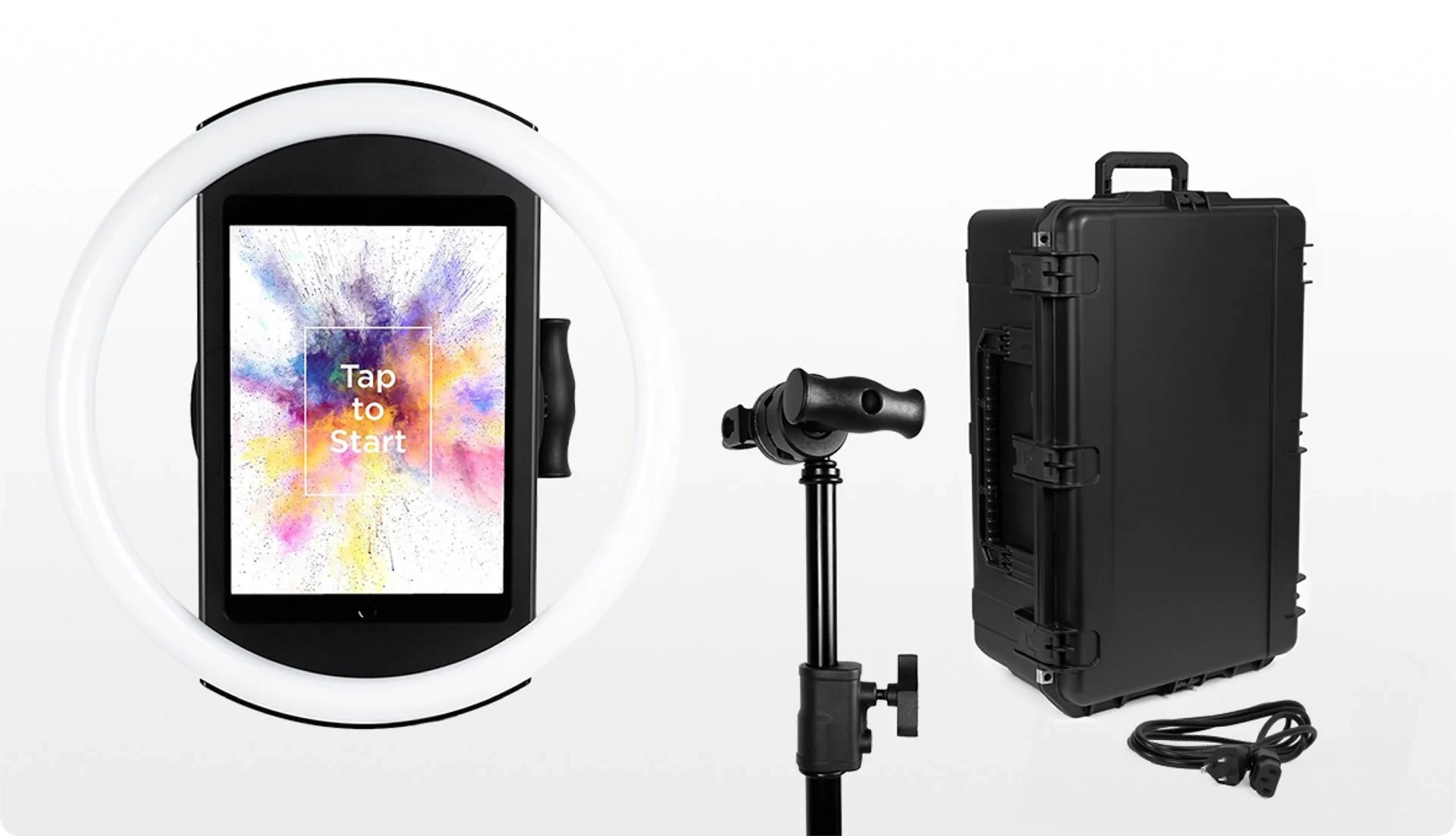
The iPad snaps in via a tool-less faceplate and stays charged through a concealed USB-C cable. It ships as an Event Kit (adjustable selfie stand with waterproof travel case) or Install Kit (heavy-duty wall mount for permanent venues). Either version deploys in under a minute with no tools.
Creole Cuisine has captured over 200,000 photos across their restaurant locations using permanently installed Simple Booth systems, turning guest entertainment into a long-term engagement tool. (Creole Cuisine Case Study)
HALO App: A Complete Photo Booth Platform
The HALO app handles the full capture-to-delivery workflow.
Capture modes include still photos, classic photo strips, custom layouts, GIFs, looping Rebound clips, and video. Canon and Sony DSLR and mirrorless camera support (Core plan and above) adds higher image quality through the same software, with both wired USB and wireless Wi-Fi connectivity, a feature most competitors lack.
The Layout Designer, introduced in HALO 5.0, is a full in-app design tool with layers, fonts, gradients, QR code embedding, and multi-layout support. It eliminates the need for external graphic design software. Simple Booth calls it “the most powerful design tool in the photo booth industry.”
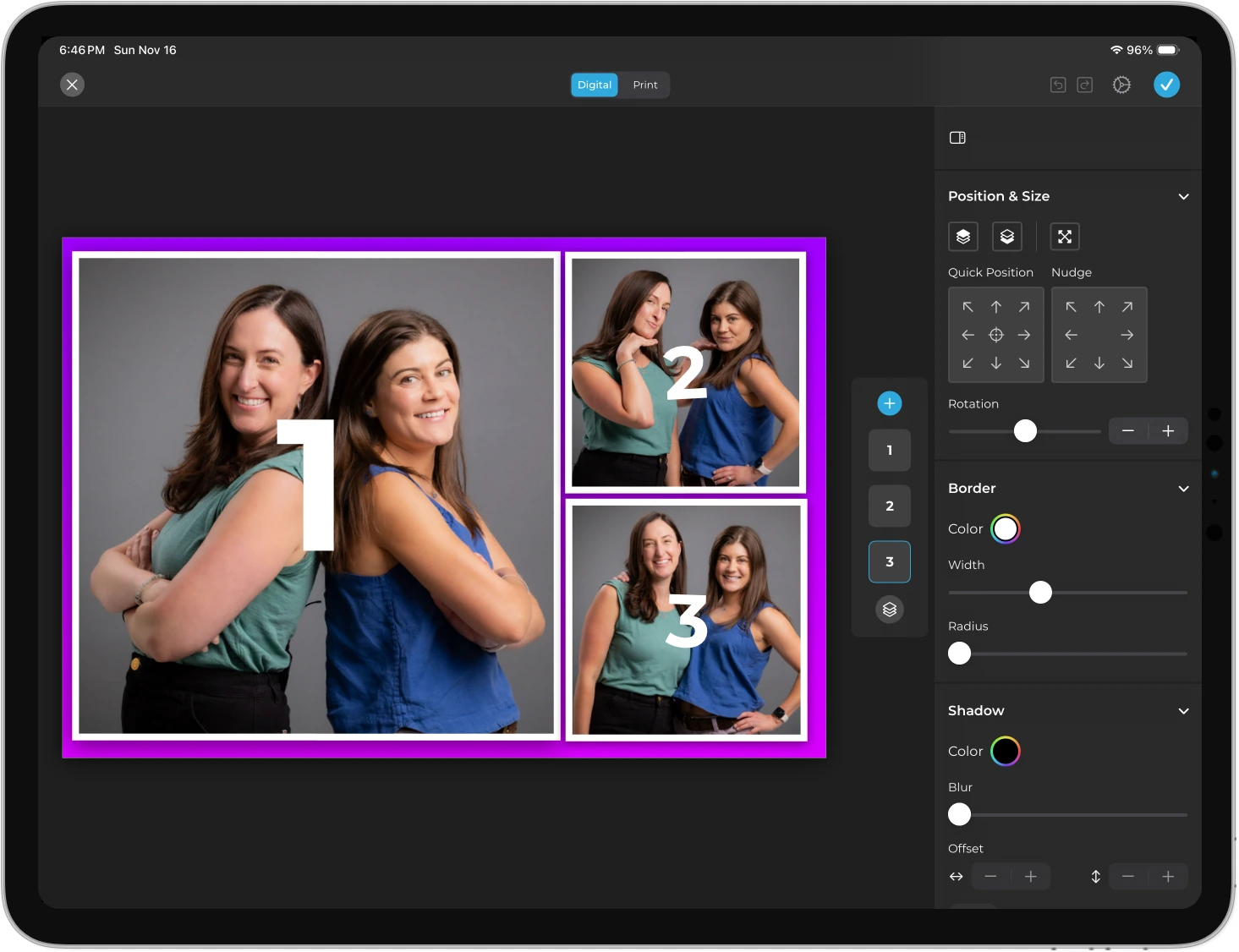
Source: Simple Booth
AI Effects transform guest photos using text prompts with three Nano Banana models that balance speed and quality.
The platform handles identity preservation and likeness at the system level, keeping guests recognizable without prompt engineering. Operators can test prompts unlimited times outside of booth mode without consuming credits, a useful advantage for iterating before event day.
Per-frame multi-prompt support enables unique AI prompts on every frame in a multi-frame layout, making comic strip and narrative strip effects possible.
The offline upload queue stores sessions when connectivity drops and delivers them once the connection returns. For operators managing multiple booths, the online dashboard lets you configure and update presets remotely, with changes syncing to iPads without exiting booth mode.
Lead Capture and Marketing Tools
Simple Booth captures opt-in rates of 87 to 89% when guests receive photos, well above typical marketing form conversions.
Data capture fields include email, name, phone, postal code, and date of birth, with custom fields and legal consent checkboxes on higher tiers. Data exports as CSV, syncs with MailChimp, or connects to custom CRMs via the Open API (Pro and above).
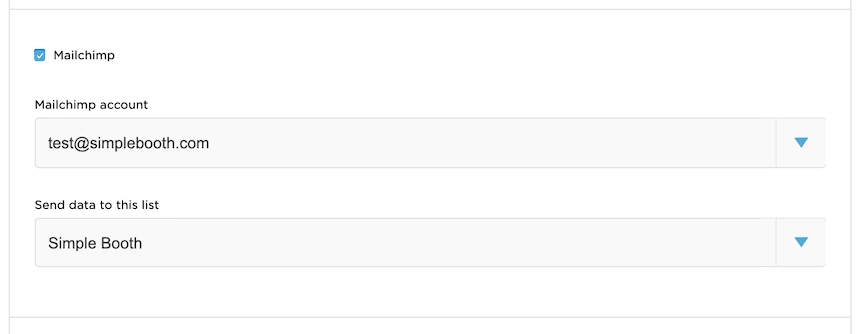
Source: Simple Booth
Each event generates a branded online gallery with social sharing to Facebook, X, LinkedIn, and Instagram. The gallery feeds a Live Feed slideshow for TVs and projectors with a single tap. Analytics track participants, uploads, gallery views, and social sharing activity, with demographic insights via face detection on the Select tier.
Virtual Booth extends the same branded experience to a browser, requiring no app download and no hardware. Guests access it via QR code or link from any device, enabling hybrid events, always-on campaigns, and activations tied to product packaging or email outreach.
Virtual Booth connects to the same analytics, Live Feed, and Gallery infrastructure as the HALO app, giving hybrid event operators a single combined view.
Treetop Golf collected 150,000 unique email addresses across their locations using Simple Booth’s lead capture in their photo booth installations. (Treetop Golf Case Study)
Simple Booth Pricing
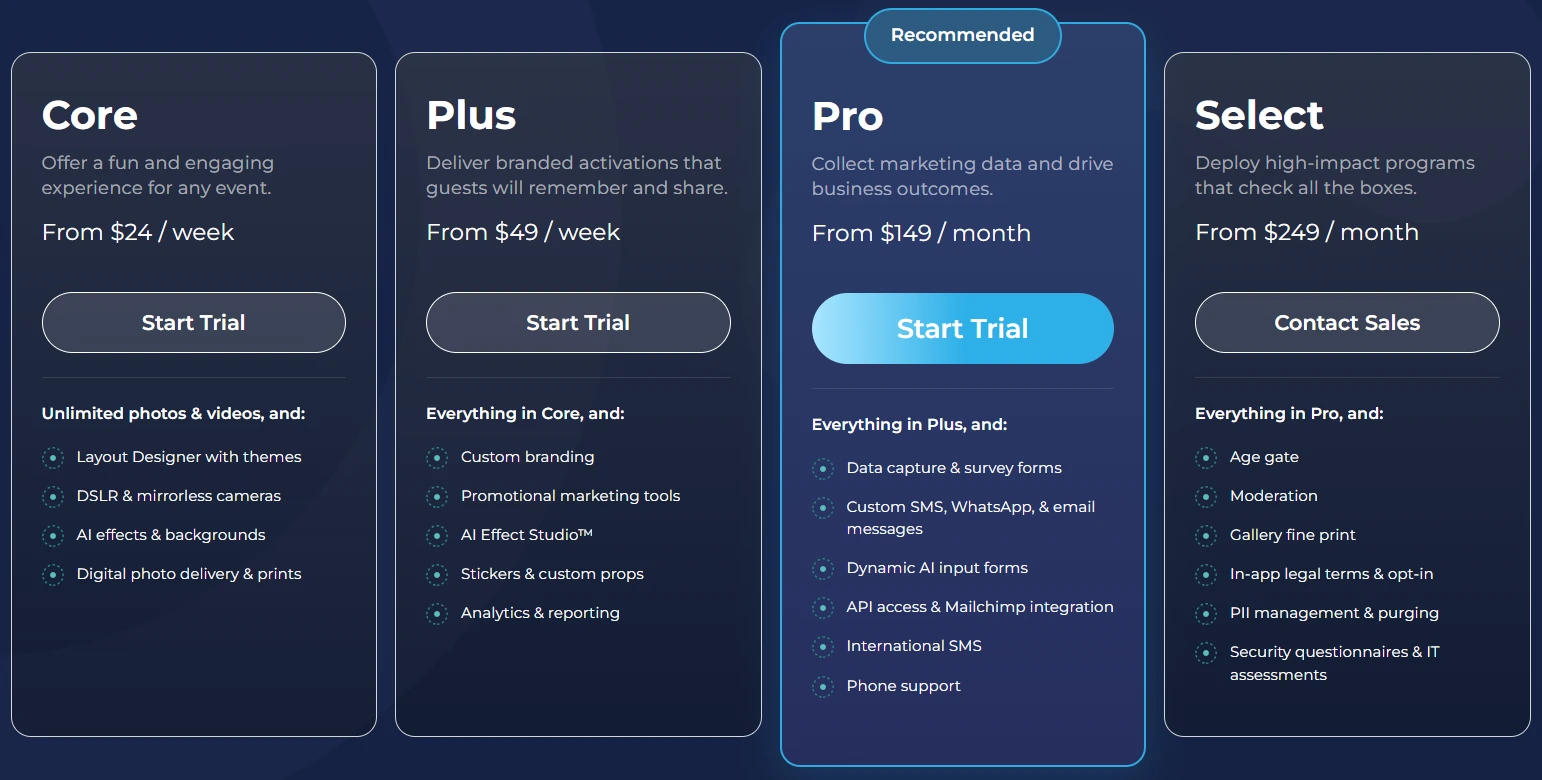
Simple Booth uses a per-license subscription model with weekly, monthly, and yearly billing.
Each plan includes one device license; additional devices are add-ons. AI effect credits cost $0.10 each and never expire.
- Lite — $14.99/week, $29.99/month, or $289.99/year (App Store only). Custom layouts, motion and still capture, photo delivery, galleries, and dashboard. Includes ads; excludes custom branding, DSLR, video, AI effects, analytics, and lead capture.
- Core — $24/week, $49/month, or $490/year. Adds DSLR camera support, video, background replacement, Dropbox integration, Virtual Booth, and AI effects. 50 bonus AI credits.
- Plus — $49/week, $99/month, or $990/year. Adds custom branding, analytics and reporting, guest-editable text layers, and custom AI effects. 100 bonus AI credits.
- Pro — $149/month or $1,490/year. Adds lead capture, API integration, phone support, moderation, age gate, and data compliance tools. 150 bonus AI credits.
- Select — $249/month or $2,490/year. Adds custom legal terms, security questionnaires, and demographic analytics via face detection. 200 bonus AI credits.
- Enterprise — Custom pricing for large-scale deployments with dedicated support.
A 7-day free trial is available with 25 free AI credits.
Use Simple Booth if:
- You want an integrated hardware-software system that sets up in under a minute and runs unattended
- You need lead capture with opt-in rates above 87%
- You want AI effects with built-in identity preservation and free prompt testing
- You serve both event rentals and brand activations and need one platform for both
- You need photo delivery across QR codes, SMS, email, AirDrop, and WhatsApp
Why Simple Booth Topped Our List
We’ll be transparent: Simple Booth is our platform. But the reason it tops this list isn’t brand loyalty; it’s the integrated approach.
While Fiesta bundles business management tools and LumaBooth competes on price, Simple Booth is the only platform in this category that pairs patented ring-light hardware with subscription software delivering AI effects, lead capture, and a virtual booth in one system.
Rental operators and marketing teams can deploy it in under a minute and manage it remotely, with a 30,000-customer track record and 4.7-star rating behind it.
G7 Entertainment Marketing has partnered with Simple Booth for over 10 years, powering 136,000+ fan interactions across their brand activation programs. (G7 Entertainment Marketing Case Study)
2. Fiesta — Best All-in-One Business Suite for Full-Time Photo Booth Operators
For operators running a photo booth business as their primary income, the real pain isn’t just the event itself. It’s the full cycle: writing proposals, building a portfolio, designing templates, managing clients, capturing photos, and reporting results. Most operators stitch this together with five or six separate tools.
Fiesta, built by Photobooth Supply Co., collapses that stack into a single subscription.
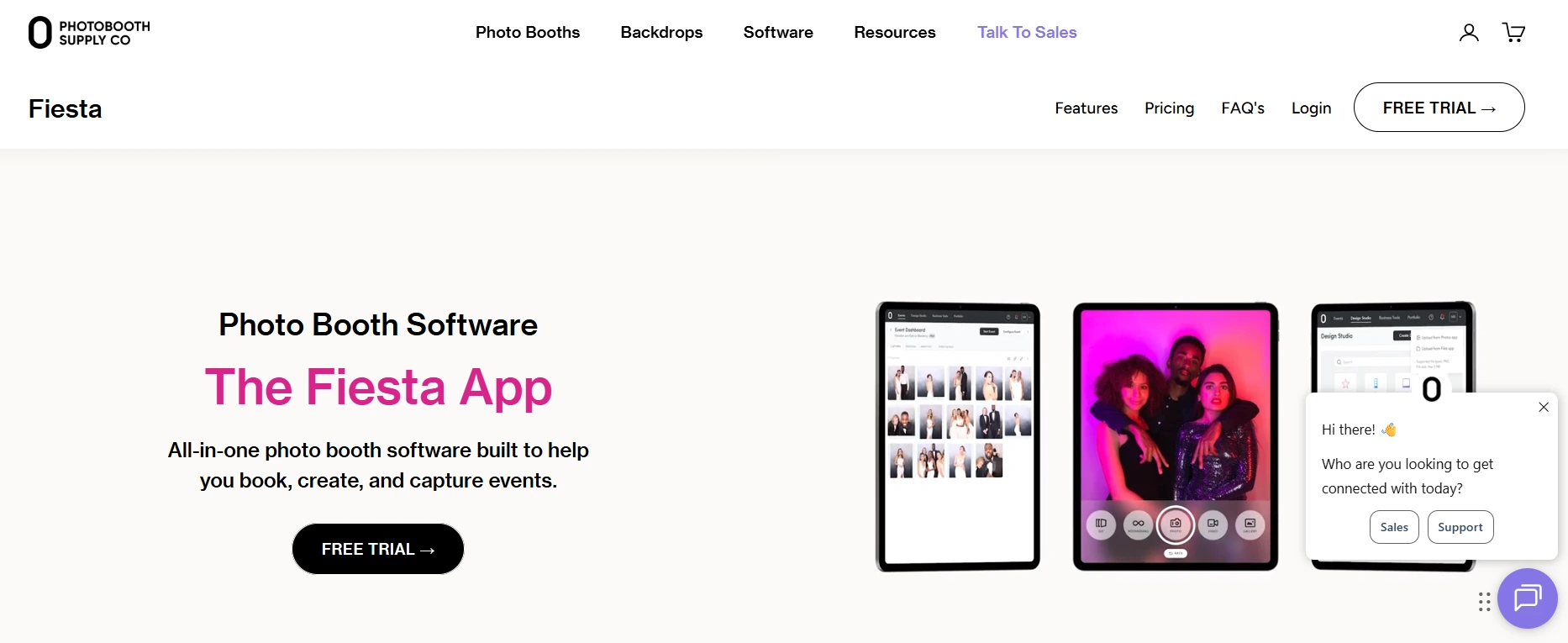
Its Proposal Builder lets operators create branded, visual proposals showing clients what their event will look like (including LED lighting, start screen previews, and pricing) and send them without leaving Fiesta. Its built-in portfolio website populates automatically with recent event galleries, giving new operators a “drag-and-drop website ready to attract clients and take bookings from day one.”
Design Studio handles template creation inside the platform with drag-and-drop editing across multiple canvas types. A library of thousands of ready-made templates, overlays, and start screens is available for operators who want polished designs without building from scratch. Operators who prefer external tools can import files from Canva or Photoshop.
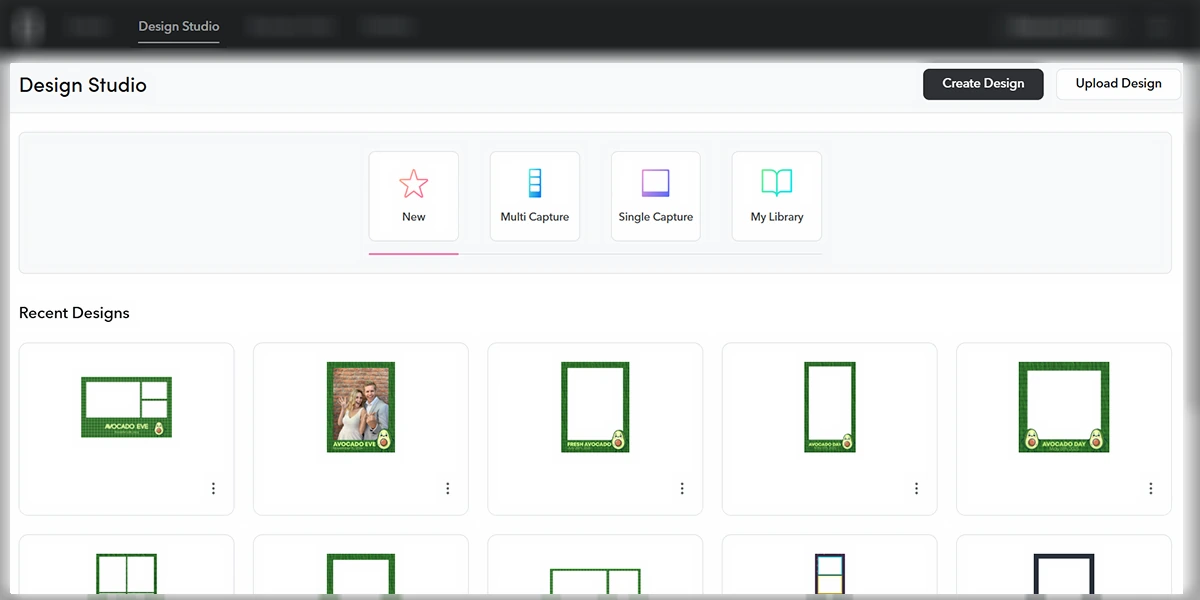
Source: Fiesta
On the capture side, photos, GIFs, boomerangs, video (up to 120 seconds on Pro), slow-motion, 360-degree video, AI background removal, and a browser-based Virtual Booth are all included with no per-format add-ons. Every event generates a permanent live gallery that stays online for the life of the subscription.
The Pro plan adds an event analytics dashboard with a shareable report link operators can send to clients. SMS and email delivery are bundled with no third-party billing accounts required.
| Fiesta Pros | Fiesta Cons |
|---|---|
| - Complete business suite (proposals, portfolio, design, capture, analytics) | - Design Studio may not satisfy advanced creative needs |
| - All capture formats included with no per-format add-ons | - iOS-only (not available on Windows or Android) |
| - Permanent live galleries with shareable client analytics | - Hardware integration is exclusive to PBSCO products |
| - Free trial with no credit card required |
Fiesta Pricing
Fiesta uses a flat monthly subscription with no per-event fees. PBSCO notes that competitors charge $69+ per event; at four bookings per month, the Plus plan drops to roughly $15 per event.
- Plus — $59/month (monthly) or $49/month billed annually ($590/year). Unlimited events and captures, all capture formats including Virtual Booth, Design Studio, basic proposals, basic portfolio, unlimited sharing, and data collection.
- Pro — $119/month (monthly) or $99/month billed annually ($1,190/year). Everything in Plus, plus printing, unlimited sharing stations, 360 and slow-motion capture, green screen, advanced analytics with CSV export, advanced proposals and portfolio, and phone support.
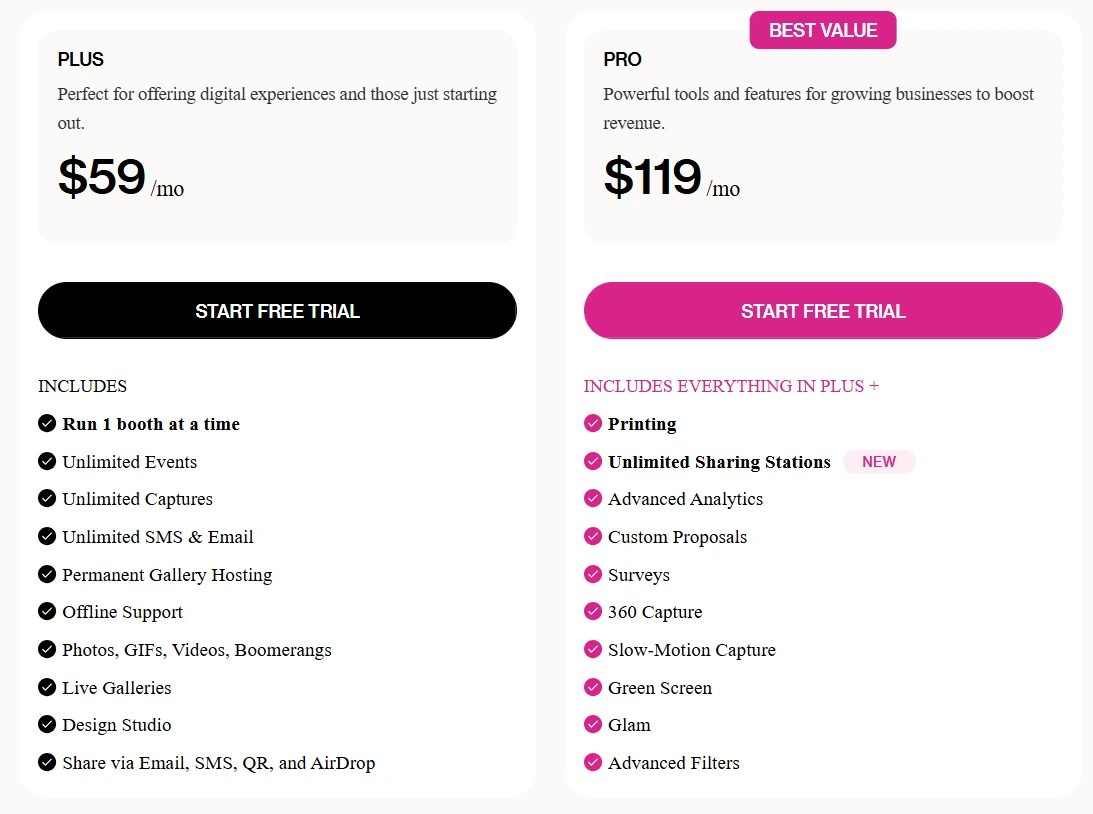
A free trial with no credit card required is available.
Use Fiesta if:
- You run photo booth rentals as a primary business and want proposals, portfolio, design, capture, and analytics in one subscription
- You want every capture format (including 360 and virtual) without paying separately for each
- You serve corporate clients who expect post-event reporting and want to hand them a shareable analytics link
3. Snapbar — Best for Enterprise Brand Activations with Managed Creative and Measurable ROI
Trade show exhibits, product launches, and large conferences demand more than a photo booth with a branded frame. They need measurable leads, brand-consistent content, and activation infrastructure that scales to thousands of attendees without shipping hardware across the country.
Snapbar is an experiential marketing platform that has operated for 14 years across 10,000+ brand activations.
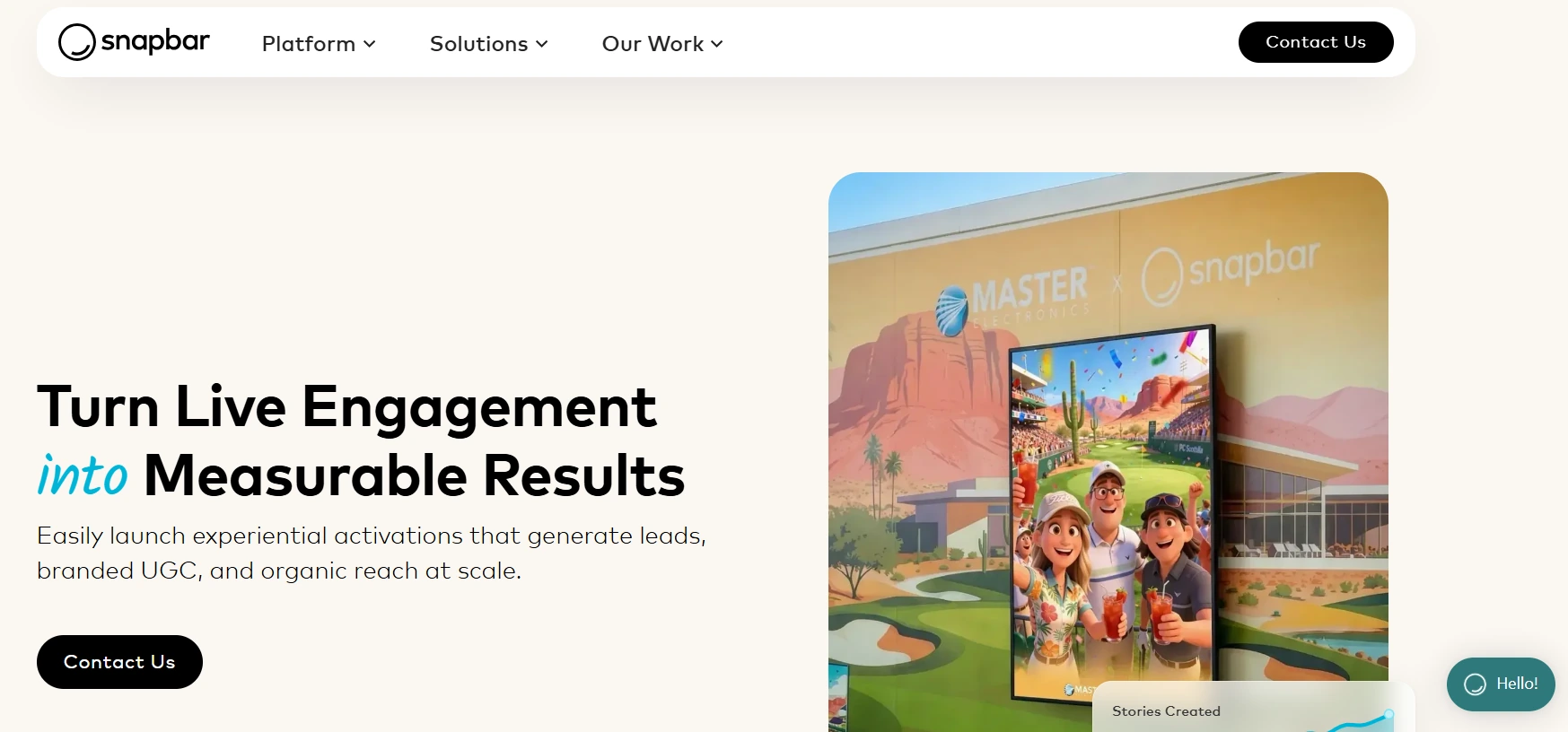
Its entire attendee-facing experience runs in a browser: guests access activations by scanning a QR code or visiting a URL from any camera-equipped device, with no app download, no proprietary kiosk, and no IT staff required. The platform scales from 50 to 50,000+ attendees without configuration changes.
Unlike self-service subscription tools, Snapbar operates as a managed creative partner. Each activation features a proprietary AI style built for that brand, designed by Snapbar’s creative team from brief to launch in two to three weeks. Snapbar rates its own DIY capability at 3 out of 10; for enterprise buyers who want a creative partner rather than a self-service tool, that’s the point.
Lead capture works as a value exchange: guests provide contact information to receive their personalized output, producing a 95% email open rate on delivery emails. The platform captures name, email, company, job title, and custom fields, exporting in CRM-ready CSV format for Salesforce, HubSpot, and Marketo.
The dashboard tracks submissions, leads, social reach, and audience demographics in real time, with branded stakeholder reports exportable as PDFs or shareable URLs formatted for executive presentations.
| Snapbar Pros | Snapbar Cons |
|---|---|
| - Browser-based delivery eliminates hardware logistics | - Not self-service; requires managed engagement |
| - Custom AI experiences designed per brand | - No published pricing tiers |
| - 95% email open rate on activation delivery emails | - Not suitable for small operators or rental businesses |
| - Built-in ROI reporting for stakeholder presentations |
Snapbar Pricing
Snapbar uses a custom quote model priced by product selection, experience level, and expected attendance.
Snapbar acknowledges its starting cost is higher than alternatives and that it is “not the most budget-friendly option for smaller events or organizations.” No free trial or self-serve tier is available.
Use Snapbar if:
- You are an enterprise marketing team running trade shows or product launches where qualified lead capture and post-event CRM integration are the primary objectives
- Your events involve 500 to 50,000+ attendees and you need browser-based delivery that scales without hardware logistics
- You want a creative partner who designs the activation with you rather than a tool to configure yourself
4. LumaBooth — Best Affordable Cross-Platform Photo Booth App for Operators Getting Started
Starting a photo booth business shouldn’t require a four-figure software investment before you’ve booked your first event. For solo operators and small event companies testing the waters, the ideal platform works with hardware they already own and costs less than a single event rental fee per month.
LumaBooth (formerly dslrBooth) is a cross-platform photo booth app available on Windows, iPad, iPhone, and Mac that packs every booth mode into a single subscription at the lowest price in the category.
The company has shipped photo booth software since approximately 2012 and reports tens of thousands of operators in over 150 countries, with a 4.8-star rating from 1,668 reviews on Windows and 4.6 stars from 1,400+ ratings on the Apple App Store.
Two things set LumaBooth apart at the entry level.
First, it’s the only full-featured photo booth app that runs natively on iPhone as well as iPad and Mac, meaning operators who already own an iPhone can launch a functional booth without buying new hardware. Second, the free trial never expires: no countdown and no credit card required. The only limitation is a watermark on output until a paid subscription activates.
Every booth mode comes in one subscription: photo, GIF, boomerang, video, 360 booth, Mirror Booth, Glam Booth, green screen, video guestbook, and AI Portraits. On Windows, LumaBooth offers the broadest DSLR and mirrorless camera compatibility in the category, supporting Canon, Nikon, Sony, and GoPro Hero 5-11 via USB.
The 170+ built-in AI portrait presets covering Superheroes, Fantasy, Historical Eras, and Art Styles are included in the base plan, though AI credits are required for generation. The Windows version also includes a built-in cashless payment system accepting Google Pay, Apple Pay, and PayPal via QR code for per-print or per-download monetization.
| LumaBooth Pros | LumaBooth Cons |
|---|---|
| - Lowest subscription price among full-featured photo booth apps | - AI credits cost extra for portrait generation |
| - No-expiry free trial with no credit card required | - Cloud gallery features require paid add-ons |
| - iPhone compatibility (unique in the category) | - Windows version has more features than Apple version |
| - Broadest DSLR/mirrorless camera support on Windows | - Limited built-in design tools compared to more advanced layout designers |
LumaBooth Pricing
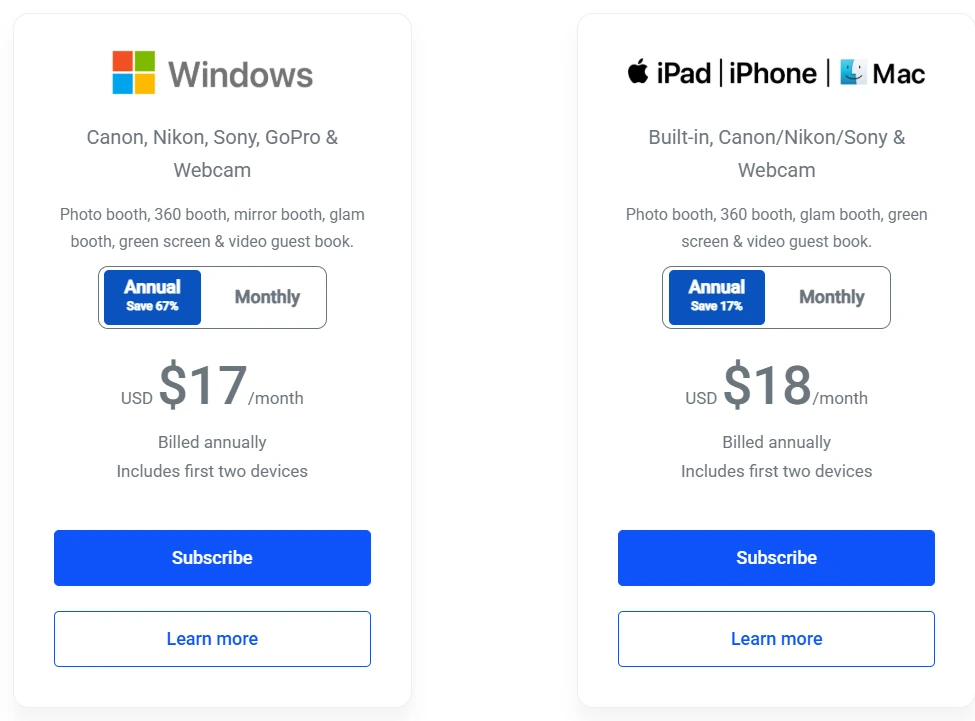
LumaBooth subscriptions cover two devices and include all in-app booth modes.
- Windows — $17/month billed annually or $49.99/month. Includes all booth modes, 820+ templates, Booth CoPilot remote management app, and fotoShare Cloud Free tier.
- Apple (iPad/iPhone/Mac) — $18/month billed annually or $19.99/month. Includes Mac DSLR support for Canon, Nikon, and Sony cameras.
Optional add-ons include fotoShare Cloud Plus ($19.99/month), SMS sharing ($10/month for unlimited US/Canada), and AI Credits starting at $14.99/month for 150 credits. Pay-as-you-go AI credit packs are also available and never expire.
Use LumaBooth if:
- You’re launching your first photo booth business and want the lowest monthly software cost
- You already own an iPhone and don’t want to invest in a dedicated iPad to get started
- You own Canon, Nikon, or Sony cameras and want full tethering support on Windows or Mac
- You want every booth mode (360, mirror, glam, green screen, AI portraits) under one subscription
5. TouchPix — Best for 360 Spinning Video Booth Specialists
The 360-degree spinning video booth has become one of the highest-demand formats in the event industry.
But its workflow differs from a flat photo booth: it requires triggering a spinning mechanical arm, processing slow-motion video, applying overlays designed for landscape and circular formats, and delivering a video file rather than a JPEG. Platforms built around still-photo capture can bolt on 360 as a feature, but the seams tend to show.
TouchPix was built for this workflow.
Launched in 2020, the platform grew quickly through its 360 focus. The developer behind it ran a physical 360 booth rental operation before writing the software, which means the Bluetooth trigger integration, GoPro 7-14 native connectivity, and the 300+ animated overlays and 60+ filters designed for landscape and circular output were first-class requirements, not afterthoughts.
TouchPix runs on iOS, Android, macOS, Windows, Linux, and Raspberry Pi with unlimited devices per subscription.
Pricing gates by simultaneous active event slots (2, 4, 8, or 12), not device count, making it cost-effective for multi-booth operations. GoPro connectivity covers both wired USB (recommended for speed and reliability) and wireless modes across seven consecutive hardware generations, with Canon, Nikon, and Sony DSLRs also supported for flat photo work.
A key advantage for outdoor and festival deployments: AI face replacement and background removal run entirely on-device without internet, and the Scanpix 2 offline sharing system distributes media through a local QR code with no external network. The AI Photo Booth feature with 80+ cloud-based styles does require internet, but the core 360 video effects work regardless of venue connectivity.
| TouchPix Pros | TouchPix Cons |
|---|---|
| - Built specifically for 360 spinning booth workflow | - PhotoPass tier covers photos and GIFs only (no video) |
| - Unlimited devices across every major OS | - Cloud-based AI photo booth requires internet |
| - GoPro 7-14 native support (wired and wireless) | - Cloud storage retains media for 6 months only |
| - Offline AI and offline sharing for venues without Wi-Fi | - Rendering and preview speeds can lag behind more mature platforms |
TouchPix Pricing
Subscriptions are priced by simultaneous active event slots, with unlimited devices at every tier. Yearly billing saves roughly 39-40% versus monthly rates.
- PhotoPass — $439.90/year. 2 active events. Photos, Photo AI, and animated GIFs only (no video).
- MultiPass — $879.99/year. 4 active events. All PhotoPass features plus video, slow-motion, and boomerang. Also available weekly ($43.99/week).
- MultiPass Pro — $1,407.99/year. 8 active events. Adds Virtual Booth and advanced surveys.
- MultiPass Enterprise — $2,199.99/year. 12 active events. Adds mosaic and RAW cloud backups.
All plans include a 14-day free trial with no credit card required. AI credits for the cloud-based AI Photo Booth start at 100 credits for $12.
Use TouchPix if:
- Your primary product is a 360 spinning arm video booth and you want software built for that format
- You run multi-device operations across mixed hardware (GoPros, DSLRs, iPhones, Android tablets, PCs) and want unlimited device coverage
- You regularly deploy at venues with unreliable Wi-Fi and need AI effects and guest sharing to work offline
- You have existing GoPro investment (models 7-14) and want native, well-documented connectivity
6. Snapmatic AI — Best AI-First Platform for Personalized Brand Activations
Most “AI photo booths” apply a filter to a guest’s photo or swap a face onto a preset template. Snapmatic AI does something different: it generates a new image from scratch around each guest’s likeness, composited into a custom branded scene. The result looks like campaign content, not a framed selfie.
Snapmatic AI has run live deployments since May 2023 and now operates three product lines: AI Photo Booth, AI Video Booth, and AI Trading Cards.
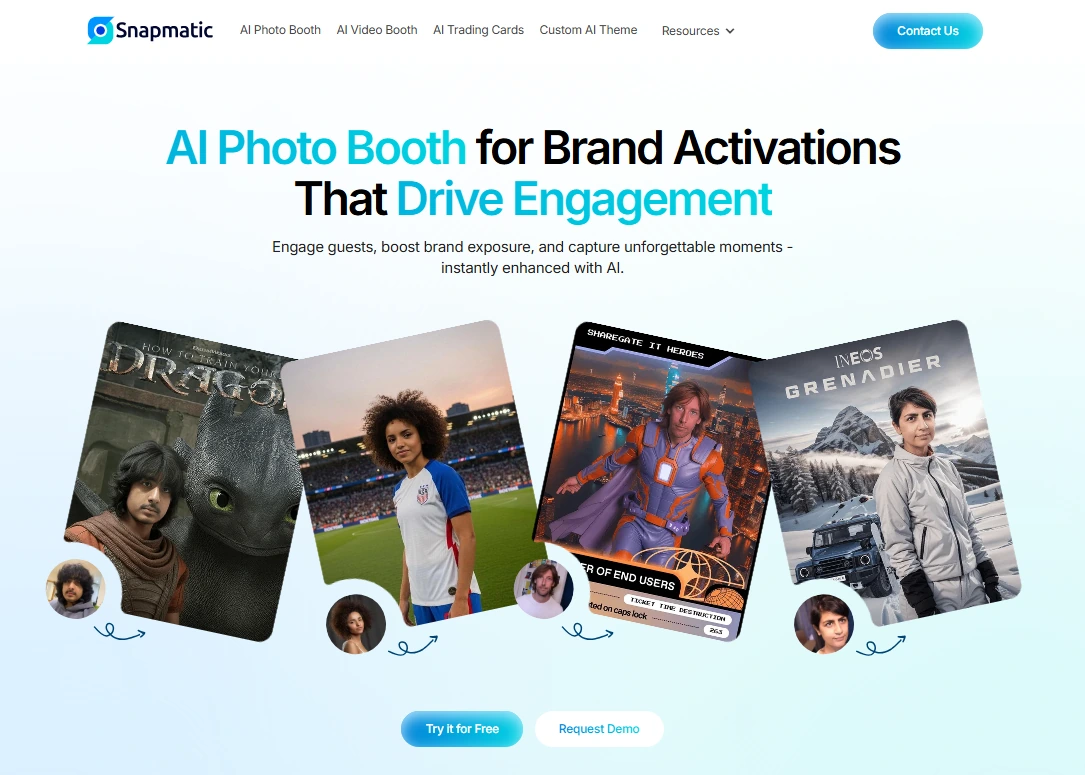
In the company’s own taxonomy, the market breaks into face mappers (pasting faces onto stock images), AI green screens (background removal only), and full generative AI. Snapmatic operates in that third tier, delivering sub-30-second image generation at live events.
Every activation starts with a Custom AI Theme built around the client’s brand assets and campaign, following a six-step production process: pose selection, background generation, art style selection, merge and adjust, branded overlay, and final output.
The platform’s gallery showcases completed activations across enterprise clients. Gen 3, announced August 2025, addresses logo and uniform consistency for brand-sensitive enterprise clients.
Three deployment modes cover different event scenarios. Staffed booth mode uses high-brightness outdoor touchscreens with on-site crews. Self-serve kiosk mode runs the same hardware unattended. Web-based mode requires no physical hardware: guests scan a QR code and run the AI experience on their own device. The same theme and analytics infrastructure operates across all three.
| Snapmatic AI Pros | Snapmatic AI Cons |
|---|---|
| - Full generative AI (not a filter or face-swap) | - Managed service only, no self-serve option |
| - Three deployment modes (staffed, unattended, web-based) | - No published pricing; quote-only |
| - Custom branded AI themes per activation | - Not suitable for rental operators or small businesses |
| - Sub-30-second image generation at live events |
Snapmatic AI Pricing
Snapmatic AI uses a custom, quote-on-request model.
No pricing tiers or rate cards are published; every activation is scoped individually based on event size, deployment mode, theme complexity, and geography. Contact via email or the contact form. A browser-based interactive demo is freely accessible for evaluating output quality before contacting sales.
Use Snapmatic AI if:
- You’re an enterprise brand or experiential agency running tradeshows, fan zones, or roadshows where the activation needs to produce content that looks like polished campaign work
- You need deployment flexibility across physical kiosks, unattended hardware, and web-based activations from a single creative build
- You want a physical keepsake option through AI Trading Cards produced in about one minute on-site
Final Verdict
Each platform on this list serves a distinct audience. The best choice depends on your operation, your clients, and your goals. Here are our top picks for the three most common scenarios:
- Simple Booth: If you want an integrated hardware-software system that captures leads with 87%+ opt-in rates and runs unattended with a one-minute setup.
Start a free 7-day trial with Simple Booth.
- Fiesta: If you’re a full-time photo booth operator who wants proposals, portfolio, design, capture, and analytics in one subscription rather than stitching together separate tools.
- LumaBooth: If you’re getting started and want the most affordable full-featured photo booth software that works with hardware you already own, including iPhone.
For enterprise brand activations at scale, Snapbar and Snapmatic AI offer managed creative services with browser-based delivery and measurable ROI. For 360 spinning video specialists, TouchPix is the dedicated platform built for that workflow.
Best Photo Booth Software FAQ
What is the best photo booth software for event rentals?
Simple Booth is the top choice for event rental professionals. Its HALO hardware sets up in under a minute with no tools, the iPad app runs unattended, and the remote dashboard lets operators manage multiple booths across venues. The 4.7-star App Store rating from 2,400+ reviews reflects 13 years of reliability in live event conditions.
Is there free photo booth software worth using?
LumaBooth offers the most practical free evaluation: a no-expiry free trial with no credit card required that includes every booth mode. The only limitation is a watermark on output until a paid subscription ($17-18/month annually) activates.
TouchPix also offers a 14-day free trial with no watermarks and no credit card required.
Which photo booth software is best for brand activations and marketing?
It depends on your team’s operating model. Simple Booth works best for teams that want to run activations themselves with built-in lead capture (87%+ opt-in rates), analytics, and a Virtual Booth for hybrid events.
Snapbar works best for enterprise teams that want a managed creative partner to design and run activations at scale.
Snapmatic AI works best for brands that want fully AI-generated, brand-specific imagery that looks like campaign content.
How much does photo booth software cost?
Pricing varies widely. LumaBooth starts at $17/month on annual billing.
Fiesta starts at $49/month annually.
Simple Booth’s Core plan starts at $24/week or $49/month.
TouchPix starts at $439.90/year.
Snapbar and Snapmatic AI use custom quote models with no published rates.
Can I run a photo booth from my iPhone?
LumaBooth is the only full-featured photo booth app that runs natively on iPhone with the same capabilities as on iPad.
Simple Booth requires an iPad.
TouchPix supports iPhone through its iOS app. For professional events, an iPad with a ring light or DSLR setup will produce better results than an iPhone alone, but an iPhone works as a starter setup or backup device.
What is a 360 photo booth and which software supports it?
A 360 photo booth uses a spinning arm with a camera (typically a GoPro) to capture slow-motion video of guests from all angles. TouchPix is the most capable dedicated platform for this format, with Bluetooth trigger integration, GoPro 7-14 native support, and offline AI processing.
Fiesta and LumaBooth also support 360 capture as part of their broader feature sets.
Do I need special hardware for photo booth software?
Not necessarily. Software-only solutions like LumaBooth, Fiesta, and TouchPix run on devices you may already own (iPads, iPhones, Windows PCs, or Android tablets).
Simple Booth’s HALO hardware kit adds a ring light and mount system for consistent lighting and a polished guest experience, but the HALO software also works with the iPad’s built-in camera alone.
Snapbar and Snapmatic AI handle all hardware logistics as part of their managed services.
What is the difference between a virtual photo booth and a physical photo booth?
A physical photo booth uses on-site hardware (a tablet, camera, and ring light) for guests to take photos in person. A virtual photo booth runs in a web browser; guests access it via a link or QR code from their own device with no hardware required.
Simple Booth offers both through its HALO app (physical) and Virtual Booth (browser-based), so hybrid events can share a single gallery and analytics view between in-room and remote guests.
Fiesta and TouchPix also offer virtual booth capabilities within their subscriptions.
Keep reading
 Best Of
7 Best Photo Booth Software with Video Message and Slo-Mo Capture [2026]
Booths that capture heartfelt video notes and buttery slo-mo. The moving stuff.
 Best Of
6 Best Photo Booth Software With QR Code Sharing [August 2026]
Booths that beam every snap to a phone with a quick scan. QR sharing done right.
 Best Of
7 Best Photo Booth Software With Real-Time Analytics and Dashboards [August 2026]
Booths that show the numbers as the party happens. Live dashboards, real insight.