6 Best Photo Booth Software for Running a Rental Business [August 2026]

The photo booth rental industry has exploded. What used to be a bulky box at a wedding reception is now a technology category: AI-powered transformations, 360-degree spinning arms, DSLR-quality captures, and cloud-managed fleets running multiple events at once.
That growth created a new problem for rental operators. The software powering your booth now determines your photo quality, your efficiency, your ability to scale, and your profitability.
Choose the wrong platform and you wrestle with mid-event crashes, sync settings by hand across devices, or pay for features you never use. Choose the right one and you set up in minutes, manage remotely, and deliver output that commands higher rates.
We researched and tested the leading photo booth software platforms to find the best options for rental businesses at every stage:
- Running unattended drop-off events on iPad
- Managing large multi-booth fleets across corporate activations
- Getting the widest hardware and format flexibility across platforms
- Getting started affordably on Apple hardware
- Growing a rental business within an integrated hardware-software ecosystem
- Specializing in print output at attended events on Windows
Let’s look at the best photo booth software for rental businesses in 2026.
What Is Photo Booth Software for Rental Businesses?
Photo booth software is the application that turns a tablet, laptop, or camera rig into a working photo booth.
For rental operators, it handles everything from guest-facing capture (photos, GIFs, boomerangs, video, 360 clips) to backend operations like branding, photo delivery, lead capture, analytics, and fleet management.
The right software turns your hardware into a repeatable, scalable business. It determines what formats you offer clients, how fast you set up and tear down, whether you need an attendant on-site, and how the final output looks to guests.
For rental companies, the software shapes your business model: per-event profitability, the types of clients you serve, and how many booths you run at once without headaches.
| Best Photo Booth Software for Rental Businesses | ||
|---|---|---|
 | Simple Booth App Store: 4.7 (2,400+) Best for rental operators who want a self-running iPad photo booth that sets up in under a minute and manages from anywhere. | |
 | Snappic App Store: 4.5 (93) Best for enterprise operators managing large multi-booth fleets across corporate activations and brand events. | |
 | TouchPix Best for operators who need the widest platform and format flexibility across six operating systems. | |
 | LumaBooth Best budget-friendly iPad option for rental businesses getting started with DSLR camera support. | |
 | Fiesta App Store: 4.6 (1,300+) Best for growing rental businesses that want an integrated hardware-software ecosystem with built-in business tools. | |
 | Darkroom Booth Best for print-focused specialists running attended events on Windows. | |
How to Choose the Best Photo Booth Software for Your Rental Business
Here’s a checklist to help you find the right software for your operation:
- Hardware Compatibility: Does the software run on the devices you already own? iPad-only, Windows-only, or cross-platform support matters depending on your equipment and future plans.
- Capture Formats: Can you offer the formats your clients want? Photos, GIFs, boomerangs, video, slow motion, and 360 are all distinct sellable services. Make sure the platform covers your menu.
- Setup Speed and Unattended Operation: How quickly can you deploy, and does the booth need a babysitter? For high-volume rental businesses, sub-one-minute setup and reliable unattended operation determine how many events you can book per week.
- Remote Management: Can you configure, update, and monitor booths from your phone or laptop? As you scale beyond one or two devices, remote management is the difference between sanity and chaos.
- Branding and Customization: Can you deliver branded, professional output that matches each client’s event? Templates, overlays, custom layouts, and start screens shape the perceived value of your service.
- Photo Delivery and Sharing: How do guests receive their photos? QR codes, SMS, email, AirDrop, and WhatsApp each serve different audiences and venue conditions.
- Pricing Model Fit: Does the billing model match your booking volume? Weekly plans suit seasonal operators; annual plans reward year-round businesses; per-event pricing works for occasional use.
How We Picked the Platforms
We identified the most widely used photo booth software among professional rental operators through industry forums, user reviews, and direct testing. Our initial research covered over a dozen platforms.
We narrowed the list by evaluating each platform against four criteria that matter most to rental businesses:
- Reliability at Live Events: Does the software perform consistently under real event conditions, including venues with poor Wi-Fi, back-to-back bookings, and unattended operation?
- Operational Efficiency: How fast is setup, how easy is configuration, and how much can be managed remotely?
- Feature Depth vs. Complexity: Does the platform offer the capture formats, branding tools, and delivery options rental clients expect, without burying operators in unnecessary complexity?
- Value for the Business Model: Does the pricing structure make sense for a rental operation’s booking volume and growth trajectory?
These four criteria narrowed the list to six platforms, each serving a distinct segment of the rental market.
1. Simple Booth: Best for Rental Operators Who Want a Self-Running iPad Photo Booth
Running a photo booth rental business means your software has to work when you’re not standing next to it. A booth that crashes, loses settings, or produces mediocre photos under venue lighting doesn’t just cost you one event. It costs you the referral chain that event would have generated.
That’s the problem Simple Booth was built to solve.
Simple Booth is an iPad photo booth system that pairs subscription software (the HALO app) with proprietary ring-light hardware (HALO kits), designed to “set up in minutes, manage from anywhere, and deliver share-worthy photo experiences, every time.” It targets rental operators who want to scale their booth business, command higher rates, and run events without a booth attendant on-site.
| Simple Booth Pros | Simple Booth Cons |
|---|---|
| - Sub-one-minute setup with no tools required | - iPad-only (no Android or Windows support) |
| - 4.7-star App Store rating from 2,400+ ratings | - Lite plan includes ads and excludes custom branding |
| - Offline mode queues sessions and delivers when connectivity returns | - DSLR camera support requires Core plan ($24/week) or above |
| - Remote preset management from web dashboard | |
| - AI effects with identity preservation |
Why Choose Simple Booth for Your Rental Business?
30,000+ customers and 40 million+ photos captured since 2013 make Simple Booth a tested choice for rental professionals.
Operators from one-booth startups to large companies like Live Nation and Gibson Brands use it.
Hardware-Software Integration: A Complete System, Not a Cobbled-Together Setup
Most photo booth setups require operators to source a ring light, a tablet stand, software, and charging cables separately.
Simple Booth eliminates that with an integrated product where the chassis, ring light, iPad mount, charging, and software are designed together.
The HALO hardware is machined from a single billet of aluminum with a patented ring-light system producing 2,100 lumens from 112 LEDs, rated for 50,000 hours. The iPad snaps in via a tool-less faceplate and stays charged through a concealed USB-C cable. The full Event Kit travels in a rugged rolling case weighing 49 lbs.
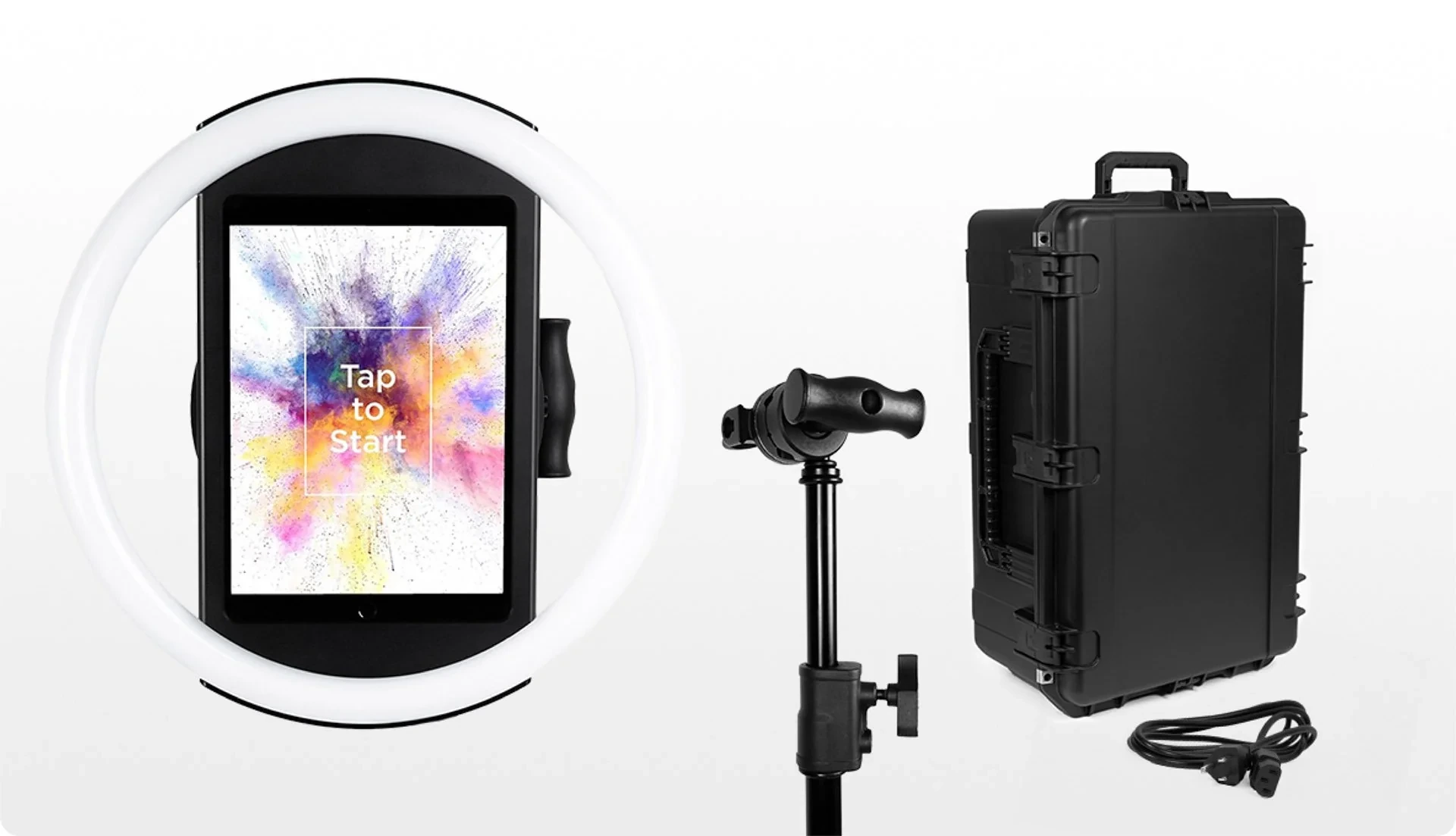
The result for rental operators: setup in under one minute, no tools needed, with lighting that covers groups standing 6-8 feet from the camera in most indoor settings.
Remote Management and Reliability: Run Multiple Events Without Being On-Site
For operators scaling beyond one booth, Simple Booth’s cloud dashboard lets you configure and update presets remotely, syncing changes to the iPad without exiting booth mode.
The preset editor displays the full booth flow upfront, so operators configure events faster than they would navigating settings panels. Mission Control (a hidden overlay triggered by a two-finger pinch) lets operators monitor device health, adjust camera settings, and sync dashboard changes during live events without interrupting guests.
When venue Wi-Fi fails (and it will), the HALO app queues sessions in offline mode and delivers them automatically when connectivity returns. A Preflight Check screen runs before each event to catch configuration issues before the first guest arrives.
Capture, Branding, and AI: Output That Commands Higher Rates
Simple Booth supports still photos, classic photo strips, custom layouts, GIFs, looping Rebound clips, and video.
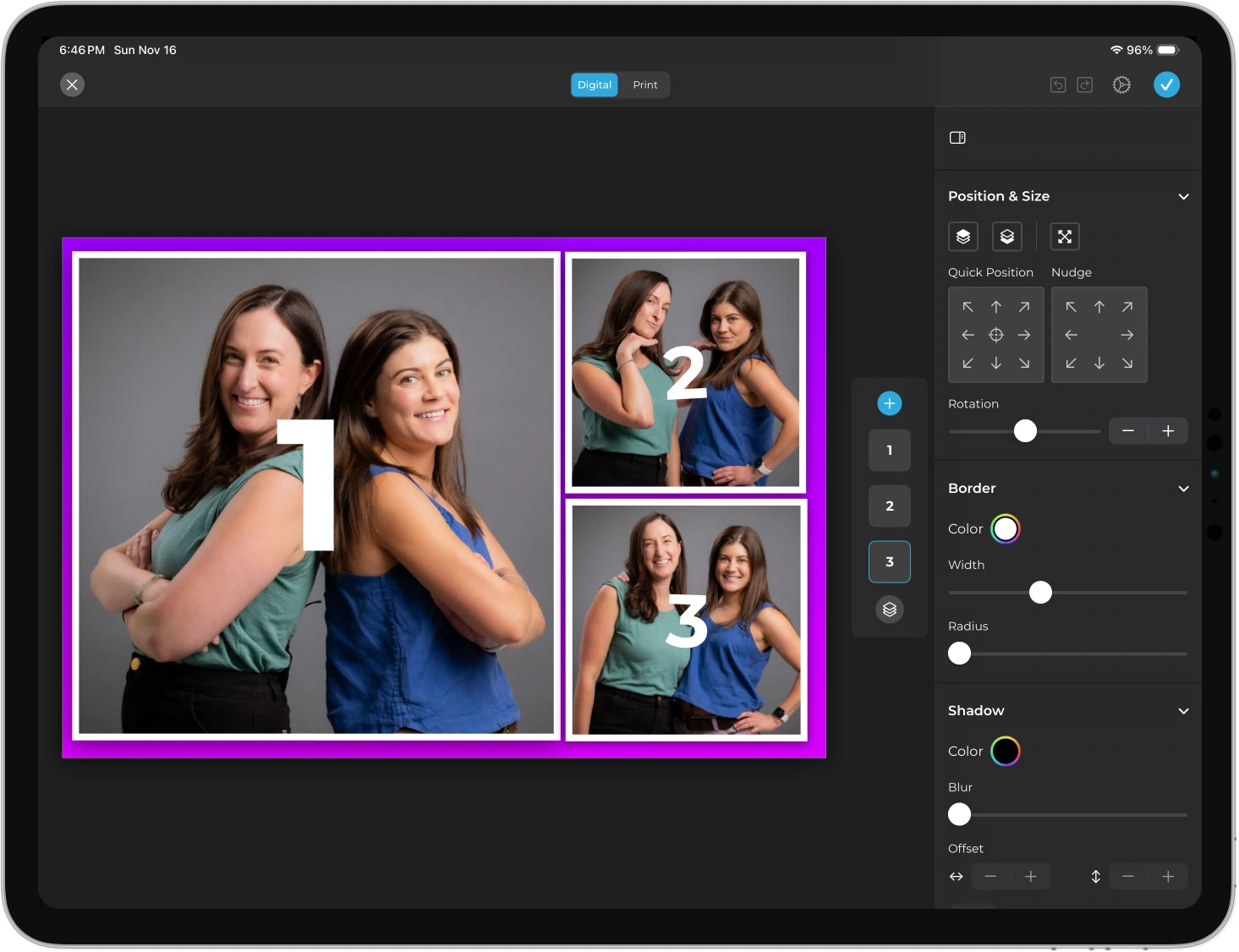
The Layout Designer in HALO 5.0 puts template design (frames, text layers, gradients, brand assets, motion types) inside the app or web dashboard. Operators create branded designs for each event without external design software.
Source: Simple Booth
For operators who want to offer AI experiences, AI Effects powered by Nano Banana models transform guest photos using text prompts while preserving identity, so guests stay recognizable regardless of the transformation. Operators can test prompts outside booth mode without spending credits, and each frame in a multi-frame layout can receive its own AI prompt for narrative strips.
HALO 5.0 also added DSLR/mirrorless camera integration (Canon and Sony via wired USB or wireless Wi-Fi, Core plan and above; Nikon coming soon) and WhatsApp delivery alongside SMS, email, QR code, and AirDrop, opening international deployments that SMS-only systems cannot serve.
Image previews render up to 12x faster than previous versions, and all effects, filters, and features work together (with video, with DSLR cameras, and in offline mode), so operators never need to check compatibility rules between settings.
“It paid for itself pretty quickly. Now it’s just extra money coming in.” (Kurt Nielson Photography)
Simple Booth Pricing
Simple Booth uses a per-license subscription.
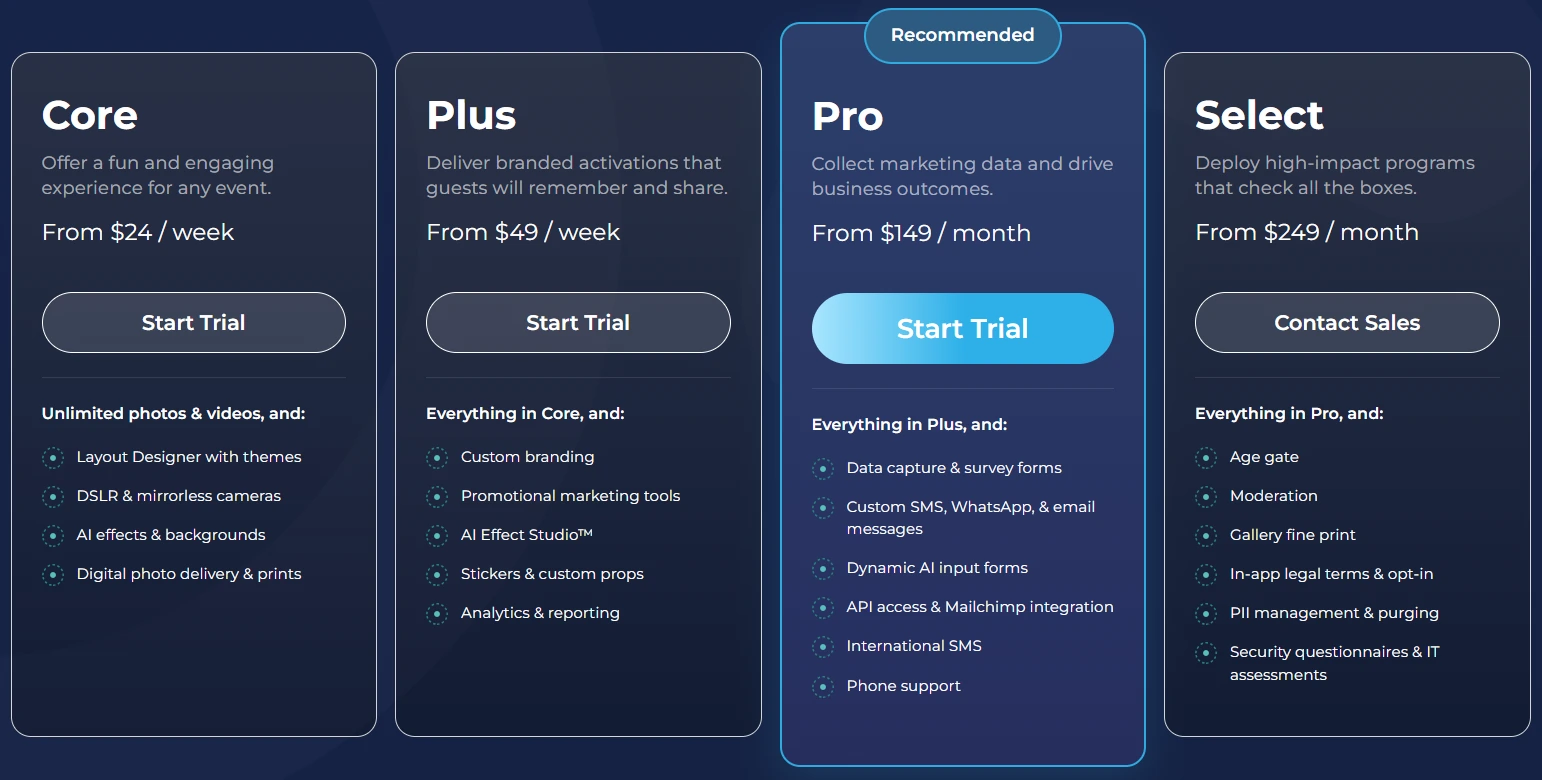
Each plan covers one device. Additional devices require add-on licenses. No caps on photo or event counts. For rental businesses, Simple Booth recommends starting at Core, which includes the Layout Designer and DSLR camera support.
- Lite — $14.99/week, $29.99/month, $289.99/year (App Store only; designed for personal and casual use)
Core capture with ads, excludes custom branding, analytics, DSLR, and lead capture
- Core — $24/week, $49/month, $490/year
Ads removed, DSLR/mirrorless camera support, background replacement, video, Virtual Booth, Dropbox integration
- Plus — $49/week, $99/month, $990/year
Custom branding, analytics, guest-editable text layers, custom AI effects
- Pro — $149/month, $1,490/year
Lead capture, API integration, phone support, moderation, age gate, data compliance
- Select — $249/month, $2,490/year
Custom legal terms, security questionnaires, demographic analytics
AI effect credits cost $0.10 each, purchased separately. New subscriptions include bonus credits (50-200 depending on tier). HALO hardware kits are sold separately, with 0% financing available. A 7-day free trial is available with 25 free AI credits.
Use Simple Booth If:
- You want an integrated iPad photo booth system with sub-one-minute setup
- You run unattended drop-off events and need offline resilience and remote management
- You want AI photo effects with identity preservation and free prompt testing
- You’re scaling to multiple booths and need a web dashboard to manage presets across devices
Why Simple Booth Topped Our List
Simple Booth earned the top spot because it delivers the most reliable iPad photo booth experience for rental operators who need their software to work when they’re not standing next to it.
Snappic offers broader multi-format fleet management, and LumaBooth enters at a lower price, but for operators who value photo quality, sub-one-minute setup, and reliability across 30,000+ customers and 40 million photos, Simple Booth is the standard.
2. Snappic: Best for Enterprise Operators Managing Large Multi-Booth Fleets
When your rental business graduates from one or two booths to five, ten, or twenty devices deployed simultaneously across corporate activations, the bottleneck shifts.
It’s no longer about whether the booth takes good photos. It’s about whether you can push a template change to ten devices at once, offer 360 video and Glambot alongside standard photo booths under one license, and hand your corporate clients a branded analytics report proving their activation worked.
That’s where Snappic excels.
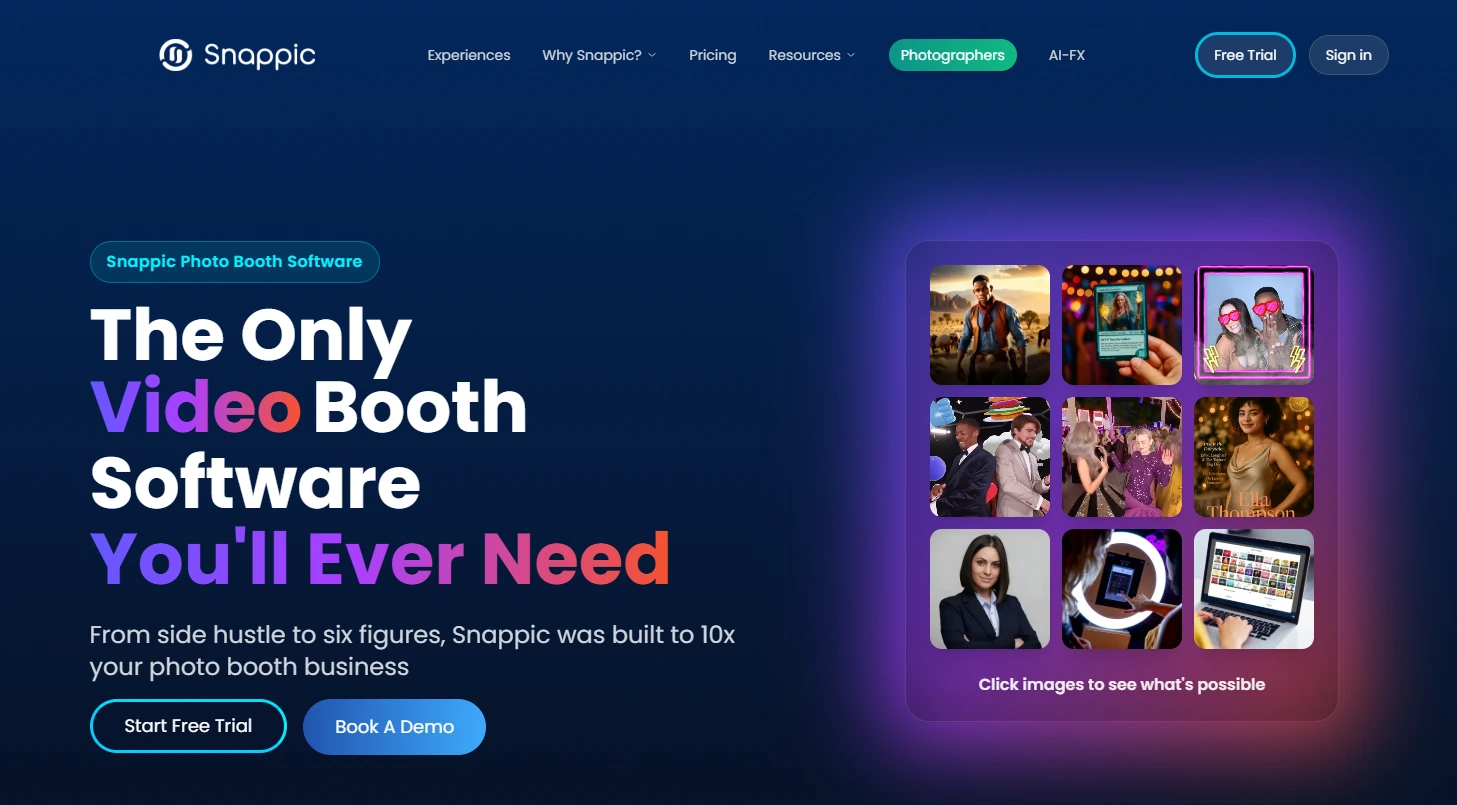
Snappic is cloud-first photo booth software for professional event operators running diverse, multi-device fleets. A single subscription covers iPad booths, 360° video booths, DSLR setups, Robot Arm/Glambot configurations, Mirror booths, and Roaming photography, the broadest booth-type coverage in the category.
| Snappic Pros | Snappic Cons |
|---|---|
| - Cloud-based fleet management across all devices | - AI-FX and AI Background Removal consume per-image credits on top of subscription |
| - One subscription covers every major booth format | - More complex interface suited to experienced operators |
| - Multi-engine AI-FX suite for corporate activations | - White-label URLs and webhooks require Business tier add-ons or Premium plan |
| - Client-facing analytics and branded reporting | |
| - 24/7/365 live chat support |
Why Choose Snappic for Enterprise Multi-Booth Fleet Management?
Cloud-First Fleet Management.
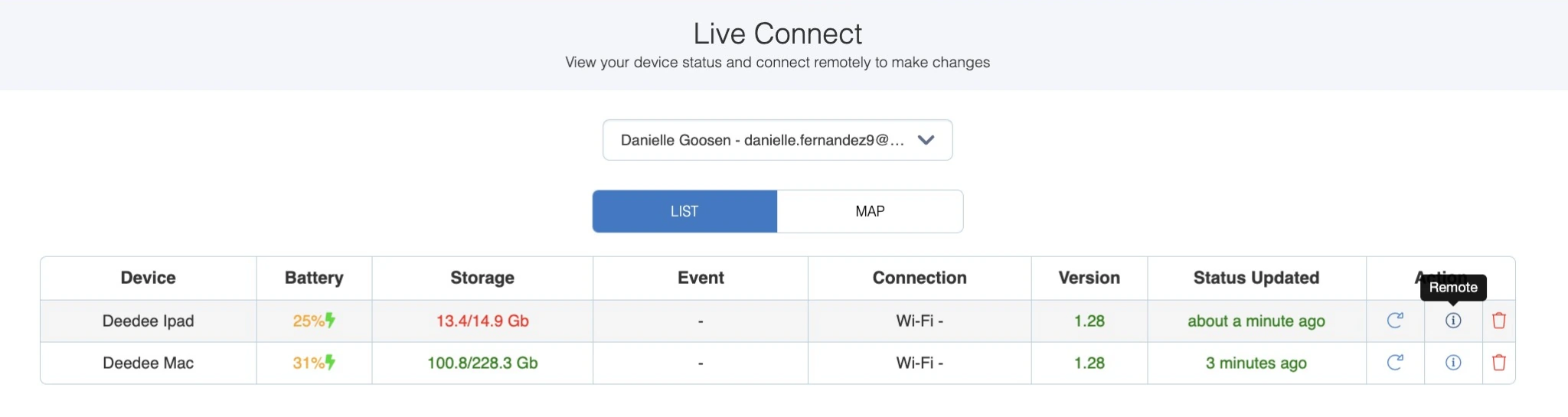
Configuration changes pushed from the dashboard propagate across every active device without the operator touching a single iPad.
LiveConnect on Premium and Scale plans extends this into real-time remote control during live events. Event Codes let on-site staff launch a fully pre-configured event on any iPad instantly, eliminating the risk of a booth going live with the wrong setup.
Source: Snappic
One Platform, Every Booth Format.
Most photo booth software is optimized for one hardware category. Operators building multi-format fleets have historically managed separate software licenses per booth type. Snappic resolves this structurally: the same template system, analytics stack, and effects library apply across every format.
The VideoFX Template Builder handles high-speed slow-motion production natively (60-240 fps with per-clip speed multipliers from 1/8x to 3x+), formatted for Instagram Reels and TikTok output.
AI-FX as a Revenue Multiplier.
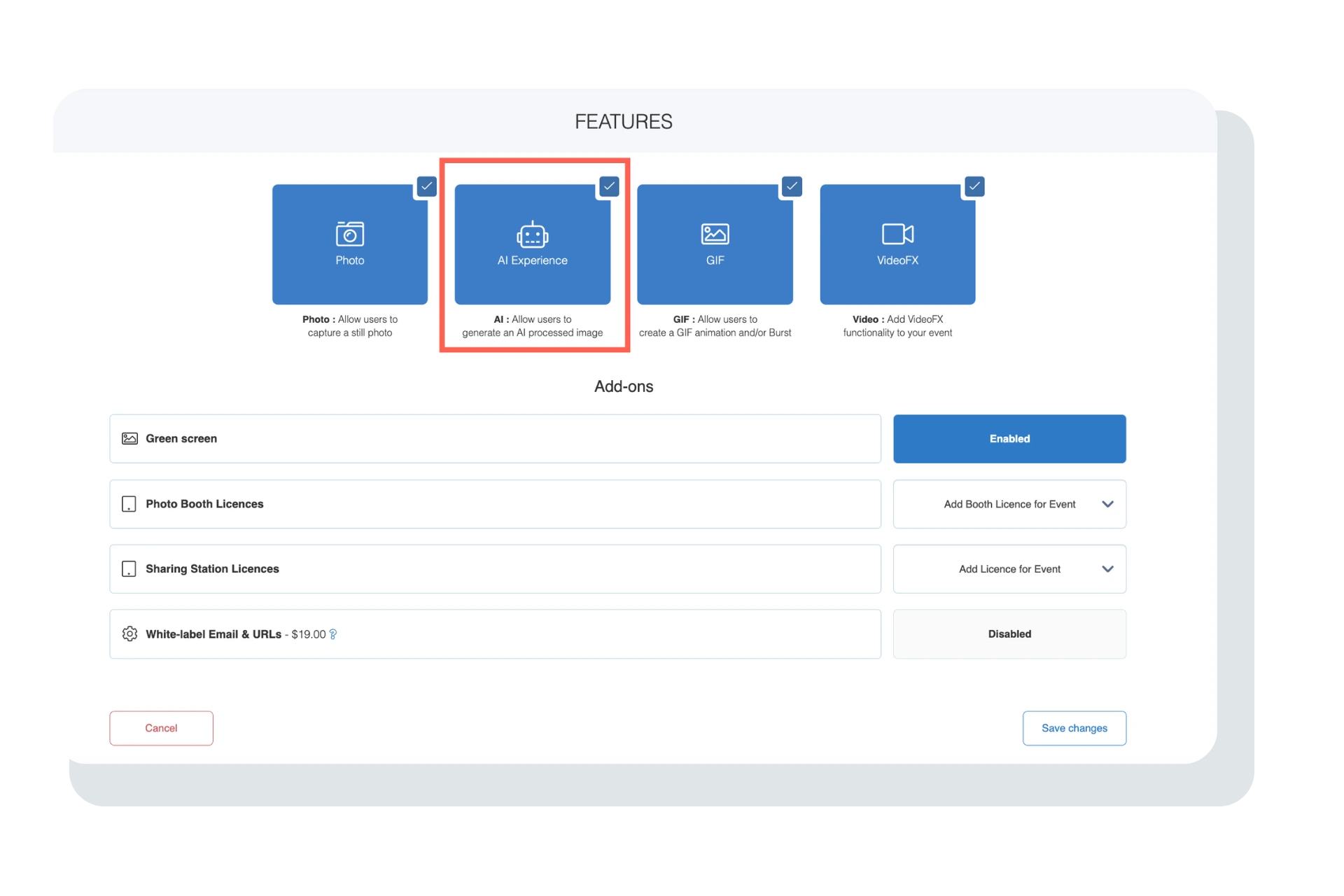
Snappic runs parallel AI subsystems: the core AI-FX pipeline for style transfers and presets; PersonaFX for avatar generation with survey-driven personalization; and BananaFX (powered by Google Gemini 2.5) for full image regeneration from custom prompts.
Source: Snappic
Photo Glam applies skin smoothing on-device at no per-image cost. Every AI capability is available on every plan tier; tiers differ only by the number of simultaneous device licenses.
Analytics That Become Client Deliverables.
Automated Vision Analytics (AVA) processes every image through a facial recognition neural network to generate anonymized demographic data. Send Analytics to Client on Business plans and above converts this into a live, shareable client-facing webpage with gallery access, engagement metrics, and survey responses, all servable under the operator’s own white-label URLs.
Snappic Pricing
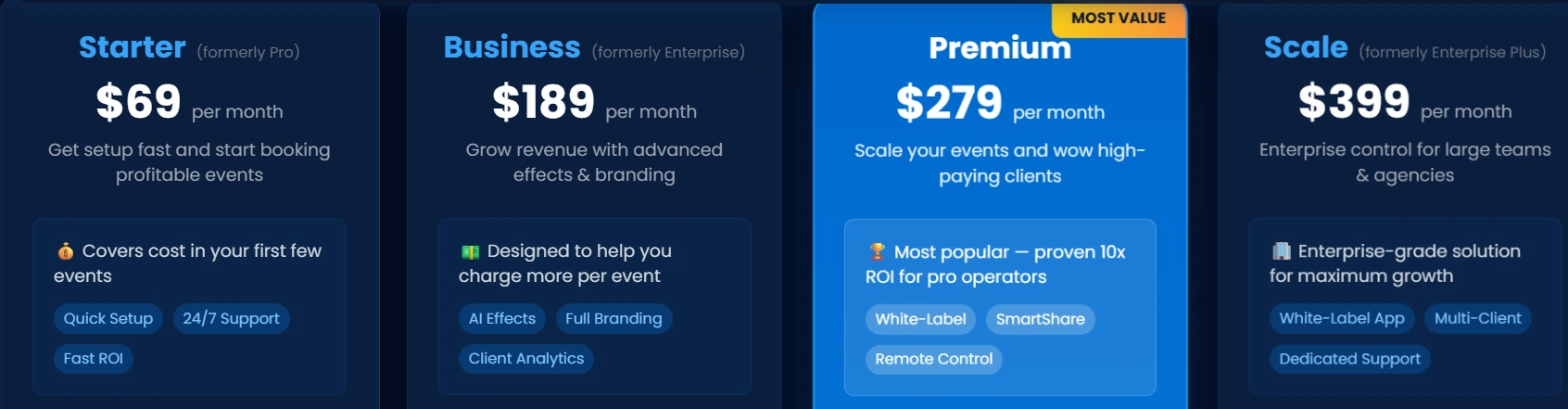
All plans include every feature; tiers differ by the number of simultaneous device licenses.
- Starter — $69/month ($499/year)
1 Photo Booth License; core capture modes, unlimited SMS/email sharing (US/Canada), 60+ templates, 24/7 support
- Business — $189/month ($1,799/year)
1 Photo Booth + 1 Sharing Station License; adds VideoFX, full AI-FX suite, branded microsites, client analytics, Roaming Mode
- Premium — $279/month ($2,799/year)
All Business features plus white-label URLs, webhooks, Event Codes, LiveConnect remote control, SmartShare AI
- Scale — $399/month ($3,999/year)
All Premium features plus multi-client management, unlimited sub-accounts, fully unbranded app, Dedicated Customer Success Manager
Per-event pricing is also available: $29/event (Starter features) or $79/event (Business features). AI-FX credits cost $20 per 200 credits (1-6 credits per image depending on effect); AI Background Removal costs $15 per 100 credits. A 14-day free trial with no credit card required is available on all plans.
Use Snappic If:
- You operate five or more photo booths across simultaneous deployments and need centralized fleet management
- You run multiple booth formats (360°, Glambot, mirror, iPad) and want one subscription covering everything
- Your business targets corporate clients who expect AI-generated branded experiences and post-event analytics reports
- You’re building toward a multi-client agency model with sub-accounts and white-label branding
3. TouchPix: Best for Operators Who Want the Widest Platform and Format Flexibility
Not every rental business runs an all-Apple fleet. Maybe you started with an iPhone, added a Windows PC for a 360 rig, picked up a Raspberry Pi for a low-cost event kiosk, and inherited an Android tablet along the way. Most photo booth software forces a hard choice: buy hardware to match the software, or juggle multiple licenses across platforms.
TouchPix eliminates that constraint.
TouchPix is a subscription-based platform that runs natively on iOS, Android, macOS, Windows, Linux, and Raspberry Pi, the widest hardware footprint in the photo booth software category. Every plan includes unlimited devices, so a single license can simultaneously support an iPad at one venue, an Android tablet at a second, and a Windows PC driving a 360 rig at a third.
| TouchPix Pros | TouchPix Cons |
|---|---|
| - Runs on six operating systems with unlimited devices | - Cloud AI transformations consume per-image credits |
| - Native GoPro integration (models 7-14) for 360 booths | - 6-month default cloud media storage |
| - Six capture modes in one app | - Sony cameras limited to still photos on Apple platform |
| - Offline AI effects and internet-free sharing via Scanpix 2 | - Image and video rendering can be slower than competing platforms |
Why Choose TouchPix for the Widest Flexibility?
Cross-Platform Reach.
A single MultiPass license covers all six operating systems simultaneously. Operators who want to repurpose hardware they already own can do so without buying dedicated enclosures to satisfy software platform requirements.
Dedicated 360 Booth Workflow.
GoPro models 7 through 14 connect via both wired USB and wireless modes, with Bluetooth-triggered automatic spinning arm activation, video processing, effects, and guest media delivery all handled natively.
Wired GoPro connection is documented per camera model with exact firmware version requirements, reflecting thorough integration, not surface-level compatibility. Canon, Nikon, and Sony DSLRs and mirrorless cameras are also supported for traditional flat booths.
Offline AI Effects.
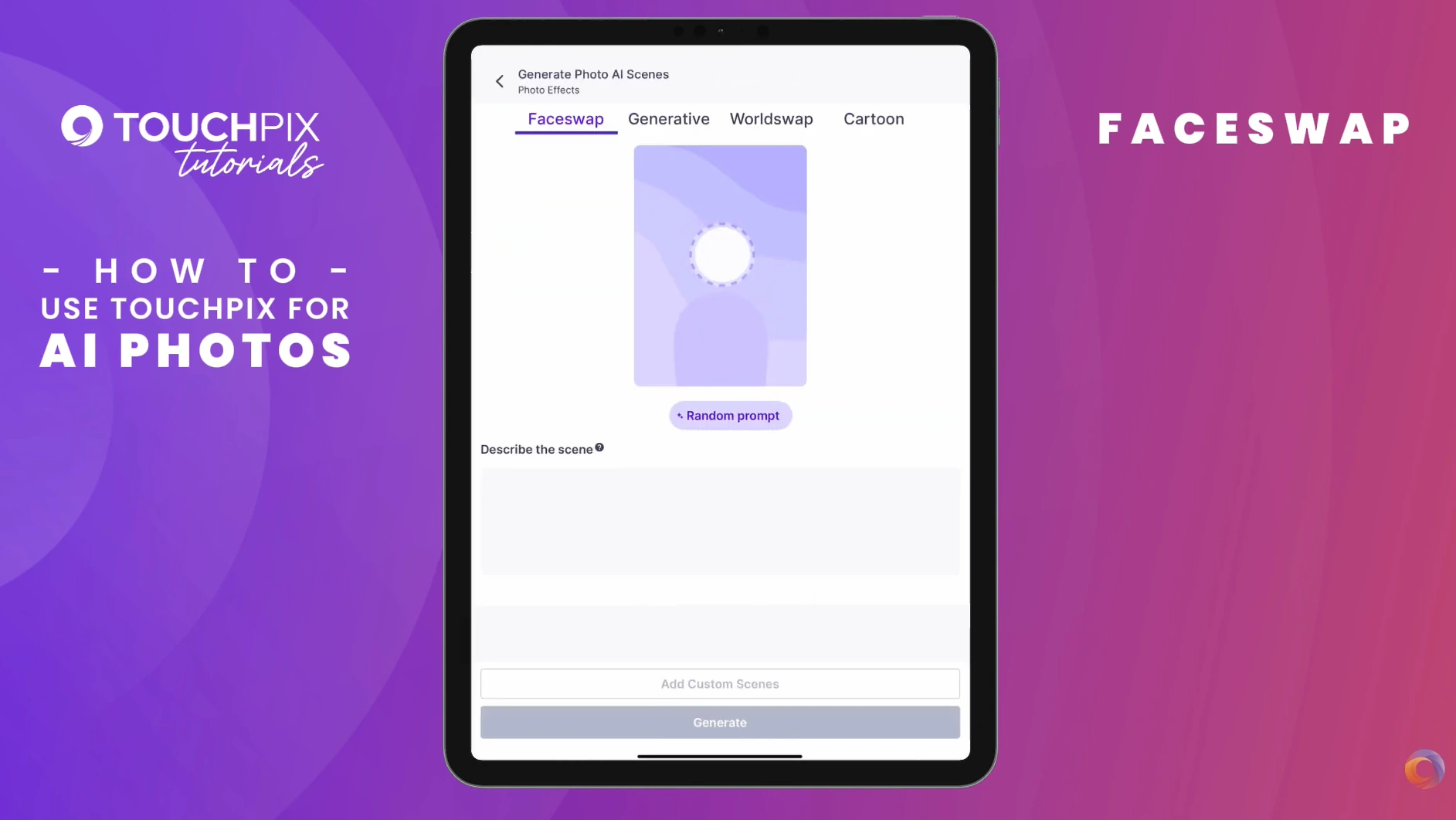
AI Face Replacement and automatic background removal both run on-device without internet, working at outdoor festivals, basement venues, or any location with poor connectivity. The background removal eliminates the need for a physical green screen. For guest media delivery at venues without Wi-Fi, the Scanpix 2 internet-free sharing system delivers media via QR code on both iOS and Android without any event-site internet.
Source: TouchPix
Six Capture Modes.
Still Photos, AI Photos, Boomerang, Video, Animated GIFs, and Slow-Motion Video are all selectable per event on the MultiPass tier with no separate module purchase.
TouchPix Pricing
Pricing is based on the number of simultaneous active event slots, not device count. Devices are unlimited on all tiers.
- PhotoPass — $439.90/year Photos and GIFs only; 2 simultaneous events; 6-month cloud storage
- MultiPass — $879.99/year (also $43.99/week) All capture formats including video, slow motion, and boomerang; 4 simultaneous events
- MultiPass Pro — $1,407.99/year Adds Virtual Booth and Advanced Surveys; 8 simultaneous events
- MultiPass Enterprise — $2,199.99/year Adds Mosaic and RAW cloud backups; 12 simultaneous events
Cloud AI credits are purchased separately, starting from $12 for 100 credits (offline effects are free). A 14-day free trial with no watermarks is available.
Use TouchPix If:
- Your rental fleet spans multiple hardware types (GoPro 360 rigs, DSLR flat booths, consumer tablets) and you want one subscription covering all of them
- 360-degree booth rentals are your primary or growing revenue stream
- You regularly work at venues with unreliable Wi-Fi and need offline capture, effects, and sharing
- You want to match software cost to capabilities you actually use (photo-only vs. full video)
4. LumaBooth: Best Budget-Friendly iPad Option for Rental Businesses Getting Started
Starting a photo booth rental business doesn’t require a large upfront software investment. But the cheapest options often force a trade-off: you either get real DSLR camera support or you get an affordable monthly bill, rarely both.
LumaBooth breaks that pattern.
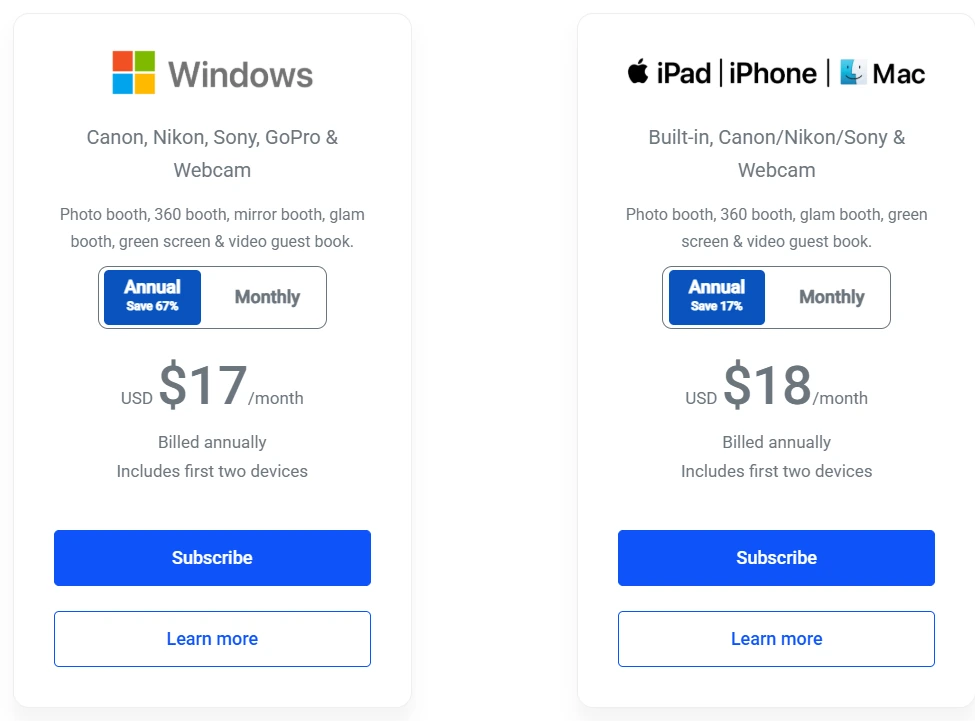
LumaBooth (by Lumasoft, the team behind the long-running dslrBooth for Windows) is a professional photo booth platform for iPad, iPhone, and Mac that delivers professional capabilities at just $18/month billed annually, the lowest monthly cost among iPad photo booth platforms with DSLR support.
| LumaBooth Pros | LumaBooth Cons |
|---|---|
| - Lowest entry price with DSLR support ($18/month annually) | - No built-in CRM, quoting, or business management tools |
| - Canon, Nikon, and Sony camera support via USB tethering | - SMS sharing and LumaShare app are paid add-ons |
| - 360 booth, green screen, and 170+ AI portrait presets included | - Sony cameras cannot capture boomerangs or video on Apple platform |
| - Free trial with no time limit and no credit card required | - More limited design tools compared to dedicated layout designers |
Why Choose LumaBooth for Entry-Level Rental Operations?
Three DSLR Brands on iPad at $18/Month.
LumaBooth supports Canon EOS cameras, Nikon D-series and Z-series, and Sony mirrorless models via USB tethering, with two devices included in the base subscription. If you already own a Canon EOS R50, a Nikon Z50, or a Sony a6700, LumaBooth works with what you have.
Everything Bundled Into One Plan.
A single subscription covers 360 Booth, Green Screen with AI Background Removal, and 170+ AI Portrait presets with no tier upgrades. The 360 Booth captures at up to 240 fps on recent iPads with motion-activated recording.
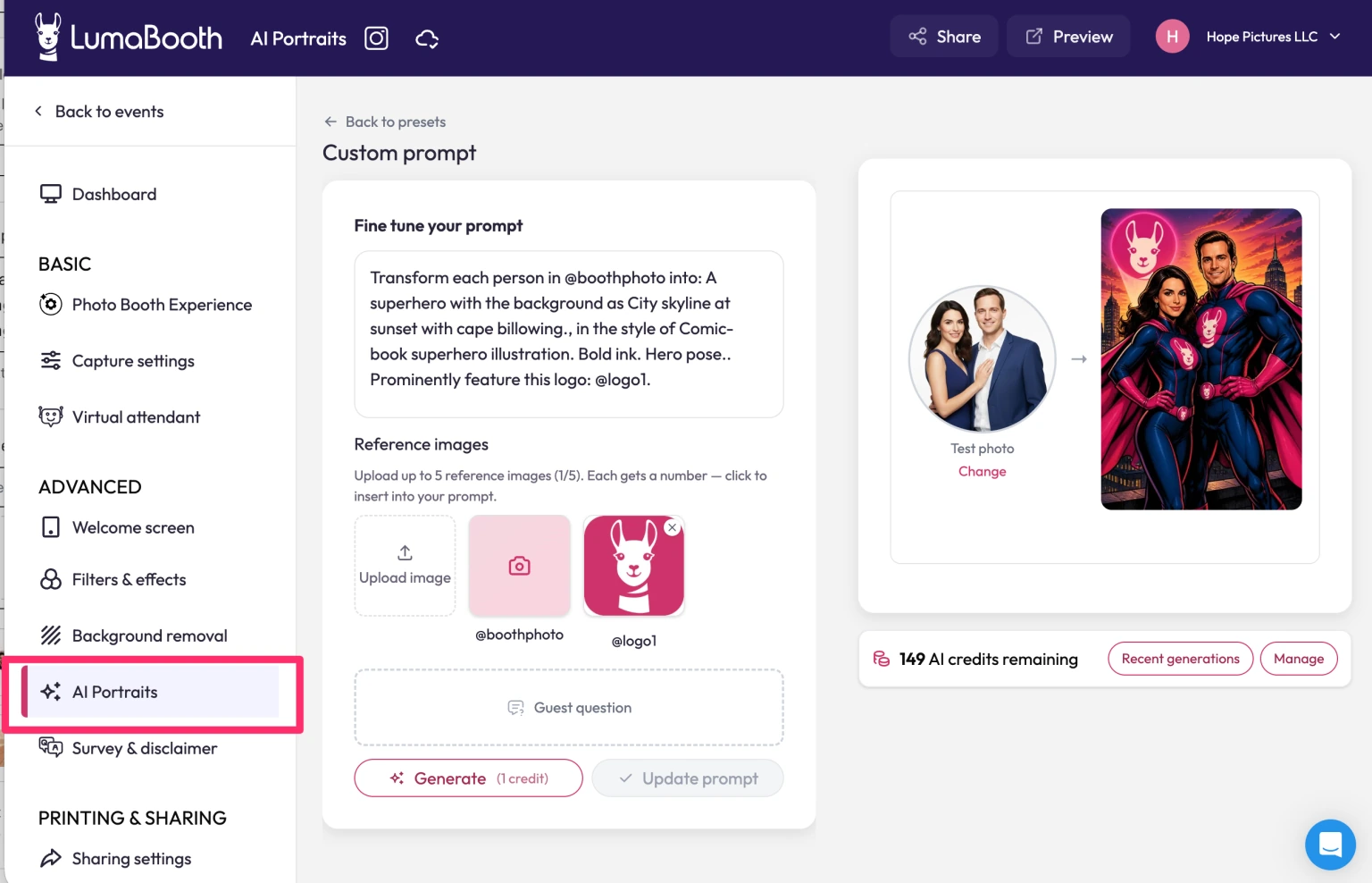
The AI Portraits library covers 170+ presets across superheroes, historical eras, sports, art styles, and more. Custom AI Portraits let operators write their own prompts and inject per-guest answers directly into the generated artwork.
Source: LumaBooth
No-Risk Evaluation.
The free trial is unlimited in duration with no credit card required; the only limitation is a permanent watermark on output until a subscription activates.
LumaBooth Pricing
- LumaBooth for Apple — $18/month billed annually (~$216/year); $19.99/month on monthly billing. Two devices included. All booth modes, fotoShare Cloud basic plan, and 20 free AI portrait credits on signup.
Additional costs to plan for:
- AI Credits: $14.99/month for 150 credits, $49.99/month for 500 credits, or pay-as-you-go packs
- LumaShare companion sharing/slideshow app: +$7.99/month
- SMS sharing: +$10/month for unlimited US and Canada messaging
- fotoShare Cloud Plus: +$19.99/month
- Additional device slots: priced as additional subscriptions
The practical cost for a professional rental setup with SMS sharing and the LumaShare display app runs closer to $36/month, still less than most iPad-based competitors at comparable feature depth.
Use LumaBooth If:
- You’re entering the rental market and want the lowest monthly commitment that still supports professional DSLR cameras
- You already own Canon, Nikon, or Sony equipment and want to protect that gear investment
- You want to offer multiple booth formats (360 video, AI portraits, green screen, traditional photo) from one subscription
- You prefer to test extensively before committing, using the unlimited free trial
5. Fiesta: Best for Growing Rental Businesses That Want an Integrated Hardware-Software Ecosystem
Most photo booth software stops at capture and delivery. It takes your photo, shares it, and calls it a day. But if you’re growing a rental business, you also need to close bookings, brand your output, offer more formats, and save money on your next booth purchase.
Fiesta is built for that growth trajectory.
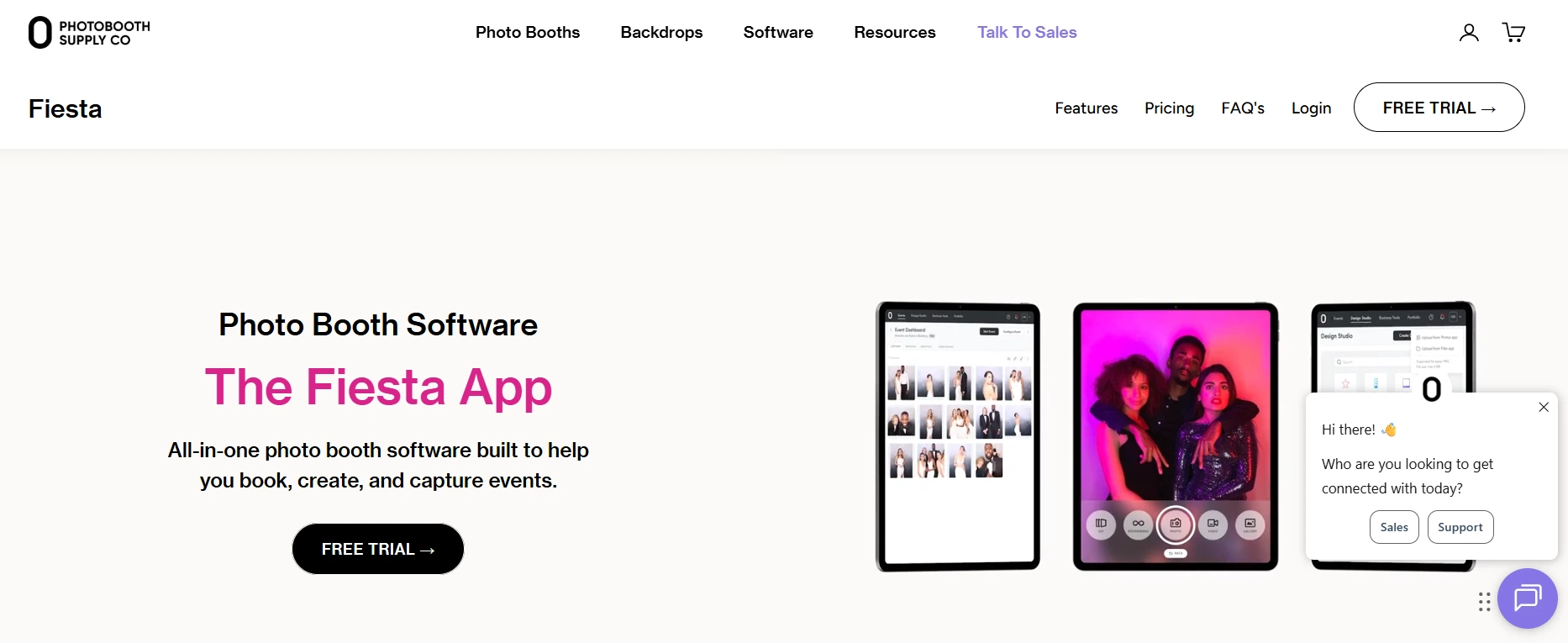
Fiesta is an all-in-one photo booth software platform built by Photobooth Supply Co. (PBSCO), described as “more than just an app for your events, but software to run your business.” It pairs six capture modes with built-in business development tools and a hardware discount structure that reduces the per-unit cost of each additional booth purchase.
| Fiesta Pros | Fiesta Cons |
|---|---|
| - Built-in Proposal Builder and Portfolio website | - 360 and Slow Motion require Pro plan ($99/month annually) |
| - Hardware discounts for annual subscribers on PBSCO booths | - iOS only |
| - Design Studio with thousands of ready-made templates | - Design Studio lacks advanced typography controls of dedicated tools |
| - 30-day free trial of full Pro features | |
| - Photobooth Academy business education bundled with all plans |
Why Choose Fiesta for Growing Rental Businesses?
A Hardware-Software Ecosystem That Scales Together.
Fiesta integrates directly with PBSCO’s hardware line: the Salsa 2, the Guac & Chips, and the Tortilla 360. The Tortilla’s Bluetooth-controlled spinning arm can be started and speed-configured from within Fiesta.
Annual subscribers receive standing hardware discounts: up to $1,000 off the Tortilla, up to $750 off the Salsa 2, and up to $500 off the Guac & Chips on the Pro plan, applicable to unlimited future purchases for the life of the subscription.
Business Tools That Convert Leads Before the Event.
The Proposal Builder lets operators send visual, interactive quotes showing clients what their event will look like, including Tap-to-Start Screen designs, LED lighting add-ons, and pricing tiers. A Portfolio website activates from day one. The Photobooth Academy bundles 100+ classes covering pricing strategy, client marketing, and operations scaling.
Six Capture Modes in One App.
Photos, GIFs, Boomerangs, Video (up to 120 seconds on Pro), Slow Motion (120 fps), and 360 Video are available under a single subscription. Real-time AI Background Removal without a green screen was added in May 2026. The Design Studio provides thousands of ready-made templates with a drag-and-drop editor, replacing the need to switch between Photoshop, Canva, and booth configuration tools.
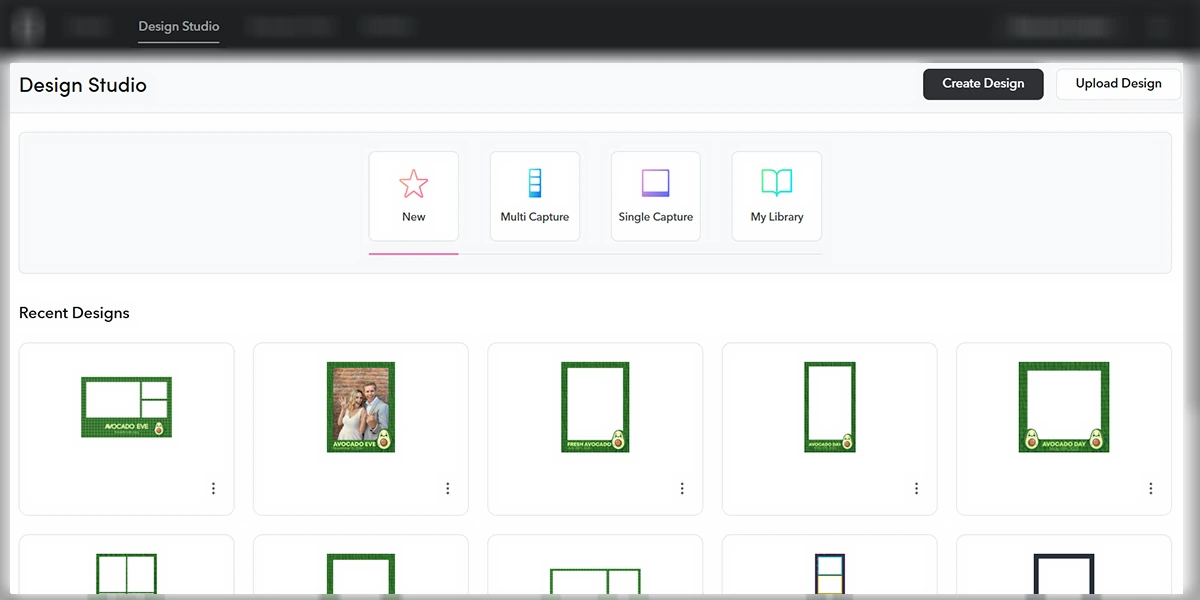
Source: Fiesta
Fiesta Pricing
All plans cover unlimited events and captures.
- Plus — $59/month ($49/month annually)
Photos, GIFs, Boomerangs, Video (15 seconds), AI Background Removal, Design Studio, Virtual Booth, Basic Proposals, Portfolio, unlimited sharing, data collection. Annual subscribers: Save $500 on Tortilla/Salsa 2; $250 on Guac & Chips.
- Pro — $119/month ($99/month annually)
Adds 360 Capture, Slow Motion, Green Screen, Glam, Printing, Unlimited Sharing Stations, Advanced Proposals, Surveys, Advanced Analytics, phone support. Annual subscribers: Save $1,000 on Tortilla; $750 on Salsa 2; $500 on Guac & Chips.
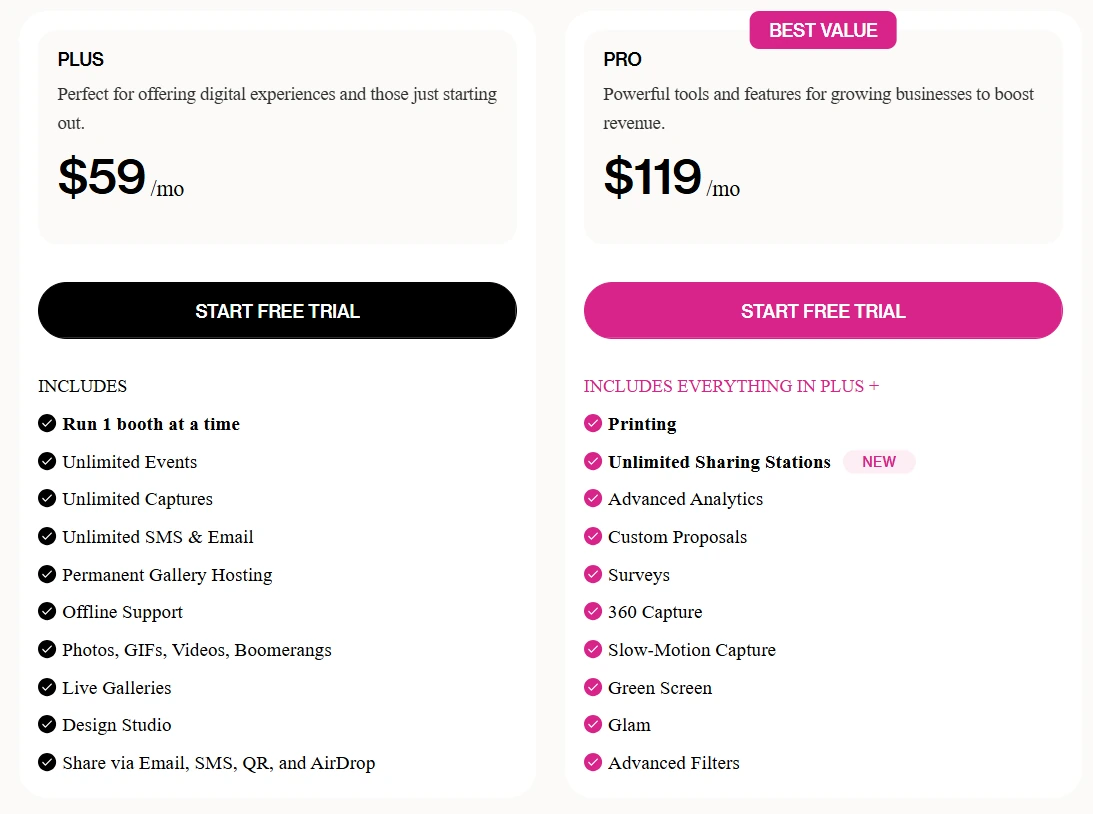
A 30-day trial of the full Pro feature set is available with no credit card required.
Use Fiesta If:
- You are buying or already own PBSCO hardware and want software designed for that ecosystem
- You are actively growing your fleet and want annual subscriptions that reduce the cost of each additional booth
- You want proposal-building and portfolio-display tools built into the same platform you use to run events
- You want structured business education (Photobooth Academy, live webinars) bundled alongside capture software
6. Darkroom Booth: Best for Print-Focused Specialists Running Attended Events on Windows
Not every rental operator is building a fleet of unattended iPad booths. Some operators show up at every event, run the booth alongside guests, and deliver printed keepsakes as their primary product. For that operator, the software’s job is different: reliable DSLR tethering, extensive print template libraries, and a cost structure that doesn’t penalize you with recurring fees.
Darkroom Booth is built for that business model.
Darkroom Booth is a Windows-native photo booth application built by Darkroom Software LLC, a family-owned company with professional photography roots going back to 1992. It operates on a one-time perpetual license at $295 with an optional $95/year renewal for updates and support.
| Darkroom Booth Pros | Darkroom Booth Cons |
|---|---|
| - One-time $295 license, no forced subscription | - Windows only (Boot Camp on Intel Macs) |
| - 75+ included print and screen templates | - Business-hours-only support (Mon-Fri, 9am-5pm Central) |
| - Canon and Nikon DSLR tethering via USB and Wi-Fi | - Online gallery requires separate Event Gallery subscription |
| - Activates on 2 computers simultaneously | |
| - Native bill acceptor, coin mechanism, and arcade button support |
Why Choose Darkroom Booth for Print-Focused Attended Events?
Perpetual Ownership.
The $295 license includes the first year of updates and support. The critical detail: the software continues to run after the optional $95/year maintenance plan expires.
An operator who lets maintenance lapse still has a functioning booth. Over a two-to-three year horizon, total cost of ownership compares favorably to monthly subscription models. A $45 temporary 10-day license is available for overflow events.
75+ Templates Ready to Deploy.
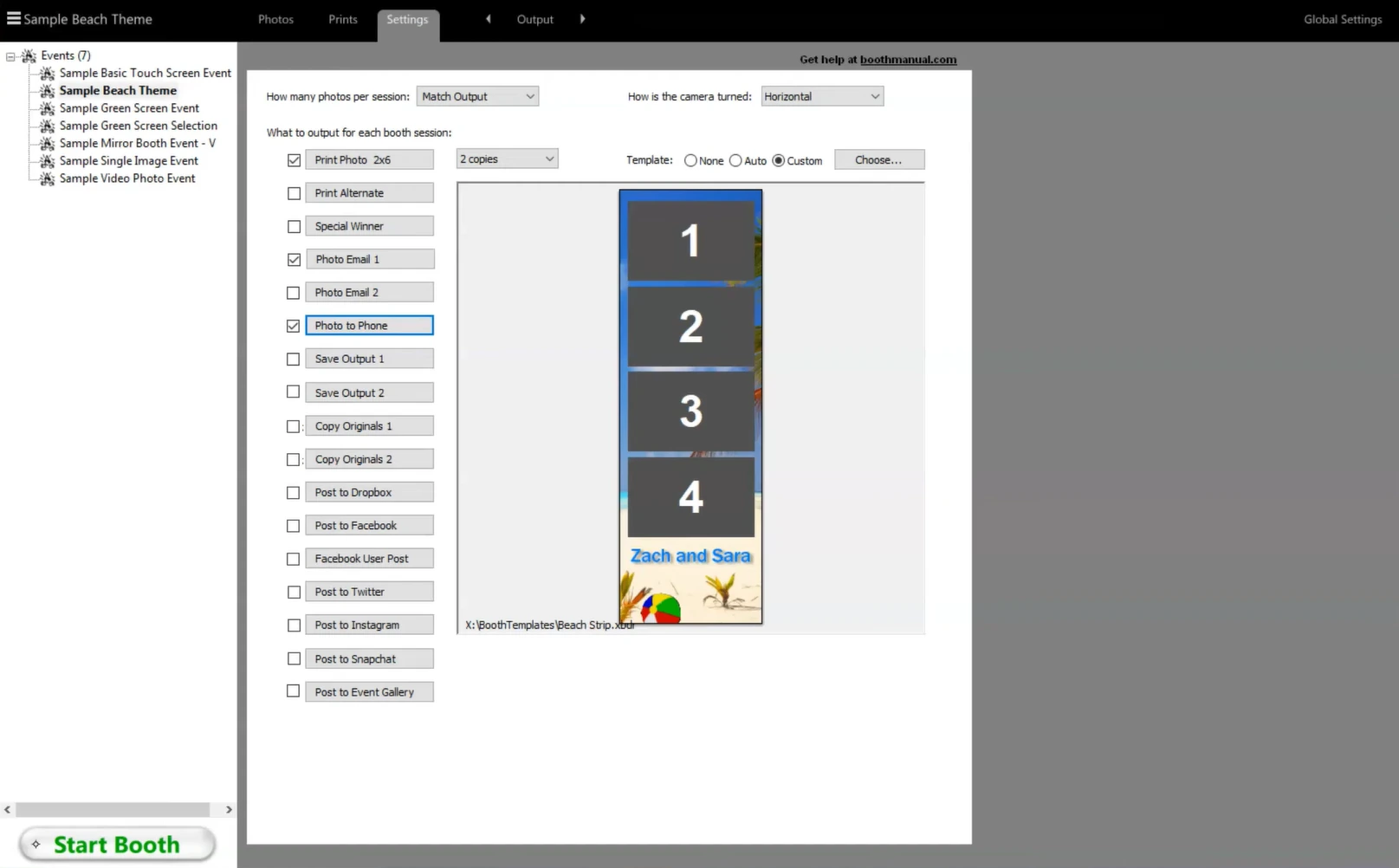
Darkroom Booth’s template library covers the full calendar of attended event types: wedding strips, birthday overlays, bar mitzvah layouts, corporate frames, and holiday themes. The built-in drag-and-drop template editor is designed for operators without graphic design experience. The third-party Darkroom Templates marketplace carries additional designs.
Source: Darkroom Booth
DSLR and Print Hardware Integration.
Direct tethering to Canon EOS series and Nikon Z/D series cameras via USB or Wi-Fi, plus GoPro HERO 9 and 10 support for 240 fps slow-motion capture. Accelerated drivers for DNP, Fujifilm, Mitsubishi, Sony, Shinko/Sinfonia, HiTi, and Ciaat dye-sublimation printers ship with the software.
Kiosk Mode for Attended-But-Not-Hovering Events.
Kiosk Mode lets guests select photos and start printing independently, while Booth Control gives the operator remote monitoring from any phone or tablet on the same Wi-Fi network.
Darkroom Booth Pricing
- Full License — $295 (one-time)
Complete software for Windows 10/11; first year of updates and support; 2 simultaneous computer activations; all core features including photos, GIFs, boomerangs, slow-motion video, green screen, surveys, payments, all 75+ templates
- Annual Maintenance — $95/year (optional)
Restores access to updates, new versions, and support; required for email server and Twilio texting features
- 10-Day Temporary License — $45
For existing customers needing a second booth
- Event Gallery (separate add-on)
Online galleries and Facebook uploads: $30/month (Pro, 50 GB) to $75/month (Enterprise, 500 GB)
A free trial is available with watermarked prints and disabled video recording. Templates built during the trial transfer to a licensed install.
Use Darkroom Booth If:
- You run attended events on Windows and want a one-time purchase with no recurring license fees
- Your business revolves around printed takeaways and you need 75+ ready-to-deploy templates with Canon and Nikon DSLR tethering
- You want to own your software outright and can accept business-hours-only support
- You’re running coin-op, bill-acceptor, or hardware-triggered installations
And That’s Our List…
…of the best photo booth software platforms for running a rental business. Each platform excels in a different segment of the market, because a one-booth startup running weekend weddings has fundamentally different needs than a ten-booth fleet serving corporate brand activations.
The key is matching the software to your business model, your hardware, and where you’re headed. Here are our top picks for the three most common rental business profiles:
- Simple Booth: If you want the most reliable iPad photo booth system that sets up in under a minute and manages from anywhere, with AI effects and DSLR support built in.
Get started with a free 7-day trial.
- Snappic: If you’re managing a multi-booth fleet across corporate activations and need cloud-based fleet management, every booth format under one subscription, and client-facing analytics reporting.
- LumaBooth: If you’re starting out and want the lowest-cost entry point that still supports professional DSLR cameras from Canon, Nikon, and Sony on iPad.
Best Photo Booth Software for Rental Businesses FAQ
What is the best photo booth software for a startup rental business?
Simple Booth is the best option for new rental businesses that want a reliable system on iPad. Its sub-one-minute setup, offline resilience, and remote management let solo operators run professional events without technical expertise.
For budget-conscious startups, LumaBooth offers DSLR camera support at just $18/month billed annually, the lowest entry price among commercial iPad platforms.
Is there free photo booth software for rental businesses?
Most professional platforms offer free trials rather than permanent free plans. Simple Booth provides a 7-day free trial with 25 AI credits.
LumaBooth offers an unlimited-duration free trial (output carries a watermark until you subscribe).
Fiesta gives a 30-day trial of the full Pro feature set.
Snappic and TouchPix both offer 14-day free trials with no credit card required.
Darkroom Booth has a free trial with watermarked output and disabled video.
Can I use my existing DSLR camera with photo booth software?
Yes, several platforms support external cameras. Simple Booth supports Canon and Sony DSLR and mirrorless cameras on its Core plan and above, with Nikon support coming soon.
LumaBooth supports Canon, Nikon, and Sony via USB tethering on iPad.
TouchPix supports Canon, Nikon, Sony, and GoPro across all its supported operating systems.
Darkroom Booth supports Canon and Nikon on Windows. BoothLedger supports the full Canon EOS and R-series lineup on Windows.
Which photo booth software is best for 360-degree spinning arm booths?
TouchPix has the most thorough 360 booth integration, with native GoPro support for models 7-14 including Bluetooth rig activation and model-specific wired-mode documentation.
Snappic supports 360 video as one of its many booth formats under a single subscription.
Fiesta offers 360 capture on its Pro plan with native Tortilla spinning arm control via Bluetooth.
LumaBooth includes 360 booth capability in its base subscription on iPad.
How much does photo booth software cost for a rental business?
Costs vary widely by platform and billing model. LumaBooth starts at $18/month annually.
Simple Booth’s Core plan runs $49/month or $490/year.
Fiesta ranges from $49-$99/month annually.
Snappic spans $69-$399/month depending on fleet size.
TouchPix ranges from $440-$2,200/year based on capacity.
Darkroom Booth is a one-time $295 purchase. Most platforms have additional costs for AI credits, SMS sharing, or add-on features.
What should I look for when choosing photo booth software for a rental business?
Prioritize reliability and setup speed over feature count. The best software is the one that works at every event without you standing next to it.
Beyond that, match the platform to your hardware (iPad vs. Windows vs. cross-platform), your service menu (photo-only vs. 360 and video), your growth trajectory (single booth vs. fleet), and your pricing model preference (subscription vs. perpetual license). Test with a free trial at a real event before committing.
Can I run multiple photo booths simultaneously with one software subscription?
It depends on the platform. TouchPix includes unlimited devices on all plans. Snappic scales device licenses by tier (1-4+ devices). Simple Booth requires add-on licenses per additional device.
LumaBooth includes two devices in the base subscription.
Fiesta covers unlimited events per subscription.
Darkroom Booth activates on two computers per license, with a $45 temporary license available for overflow events.
Do I need an iPad to run photo booth software?
Not necessarily. TouchPix runs on six operating systems including Android, Windows, and Raspberry Pi. Darkroom Booth and BoothLedger are Windows-native.
Simple Booth, LumaBooth, and Fiesta are Apple-ecosystem platforms (iPad, iPhone, and/or Mac). Your choice of software may determine your hardware investment (or vice versa), so evaluate both together.
Keep reading
 Best Of
7 Best Photo Booth Software with Video Message and Slo-Mo Capture [2026]
Booths that capture heartfelt video notes and buttery slo-mo. The moving stuff.
 Best Of
6 Best Photo Booth Software With QR Code Sharing [August 2026]
Booths that beam every snap to a phone with a quick scan. QR sharing done right.
 Best Of
7 Best Photo Booth Software With Real-Time Analytics and Dashboards [August 2026]
Booths that show the numbers as the party happens. Live dashboards, real insight.