7 Best Photo Booth Software with Green Screen and Background Removal [August 2026]

Green screen used to mean wrestling with physical backdrops, clamp stands, and finicky chroma-key calibration before every event. Today, AI-powered background removal lets photo booth operators deliver the same branded experiences with no fabric, no frame, and no setup time lost to lighting a backdrop.
But “green screen” and “background removal” mean different things across platforms. Some rely on physical colored backdrops. Others use cloud AI that consumes credits per image. A few handle everything on-device, keeping your booth running at venues where Wi-Fi does not cooperate.
Choosing the right photo booth software for background replacement comes down to how you operate: what hardware you own, how many events you run per week, whether your venues have reliable internet, and whether you need a physical green screen as a fallback.
We researched and tested the leading platforms and narrowed the list to seven that cover the full range of green screen and background removal needs:
- Delivering AI background removal on iPad with integrated lighting
- Supporting the widest range of camera brands on Windows
- Managing multiple booth formats from a single subscription
- Specializing in 360 video booths across multiple operating systems
- Offering live-preview green screen compositing with a one-time perpetual license
- Combining AI removal and traditional chroma key as equal options in a single subscription
- Providing a lifetime license for budget-conscious solo operators and hobbyists
Let’s look at a quick summary of these platforms in 2026.
What Is Photo Booth Software with Green Screen and Background Removal?
Photo booth software with green screen and background removal refers to applications that let event operators replace or remove the background behind guests in photos and videos.
This is done either by using a physical green (or blue) screen with chroma-key processing, or by using AI-powered subject detection that requires no physical backdrop at all. These platforms are used by photo booth rental companies, venue operators, brand marketers, event photographers, and hobbyists to create branded photo experiences at weddings, corporate events, trade shows, festivals, and permanent installations.
The best platforms combine background removal with capture formats (photo, GIF, boomerang, video, 360), branded templates and overlays, guest photo delivery, lead capture, and analytics, all from a single piece of software.
Best Photo Booth Software with Green Screen and Background Removal
 | Simple Booth Best for iPad-based operators who want AI-powered background removal with integrated lighting, no physical green screen required. |
|---|---|
 | dslrBooth Best for Windows operators needing the widest camera brand support with dual green screen and AI background removal. |
 | Snappic Best for growing rental businesses managing multiple booth formats with offline green screen from a single iPad subscription. |
 | TouchPix Best for 360 video booth specialists needing cross-platform AI background removal across five operating systems. |
 | Darkroom Booth Best for event photographers wanting live-preview green screen compositing and a one-time perpetual license. |
 | BoothLedger Best newcomer for Windows operators wanting dual-mode green screen and AI background removal at a low monthly rate. |
 | SparkBooth Best for solo operators and DIY hobbyists wanting simple green screen and background removal with a one-time lifetime license. |
How To Choose Photo Booth Software with Green Screen and Background Removal
Here’s a checklist to help you find the right platform for your operation:
- Background Removal Method: Does the platform support traditional chroma-key green screen, AI-powered background removal (no physical screen), or both? Having both lets you adapt to different venues and client needs.
- Camera Compatibility: Make sure the software supports the camera hardware you already own, whether that’s an iPad, a Canon DSLR, a Nikon mirrorless, a GoPro, or a standard webcam.
- Offline Reliability: Events happen in basements, ballrooms, and rural venues with spotty Wi-Fi. Prioritize platforms where background removal works on-device without an internet connection.
- Output Formats: Consider whether you need background removal across still photos only, or across video, GIF, boomerang, and 360 formats as well. Not all platforms support background removal across every capture mode.
- Pricing Model: Some platforms charge monthly or annual subscriptions, others offer one-time perpetual licenses, and a few layer per-credit AI processing fees on top. Choose the model that matches your event volume and budget.
- Setup and Ease of Use: If you run unattended booths or multiple events per week, fast setup and remote management matter more than customization options.
How We Curated Our List of Platforms
We started by identifying widely used photo booth software platforms that offer green screen chroma keying, AI background removal, or both. We then tested each platform through product demos, free trials, documentation, and user feedback, evaluating them on four criteria:
- Background Removal Quality: How well does the platform handle chroma key and AI subject detection? Does it support both methods?
- Camera and Hardware Support: What cameras, devices, and operating systems are compatible?
- Operational Reliability: Does background removal work offline? How does the platform handle connectivity issues during live events?
- Value for Money: What do you get for the price? Are there hidden per-credit or per-image costs beyond the subscription?
By focusing on these factors, we narrowed the field to seven platforms that cover the full range of needs, from professional rental operations to solo hobbyists. Let’s dive in.
1. Simple Booth — Best for iPad-Based Operators Who Want AI Background Removal with Integrated Lighting
If you’re running a photo booth business on iPad, you already know that lighting makes or breaks the photo quality. A dark venue means soft, grainy images. An off-the-shelf ring light means inconsistent illumination across different group sizes. And if you’re relying on a physical green screen, you’re adding setup time (plus the fabric, the frame, and the lighting rig for the backdrop itself) to every event.
Simple Booth takes a different approach.
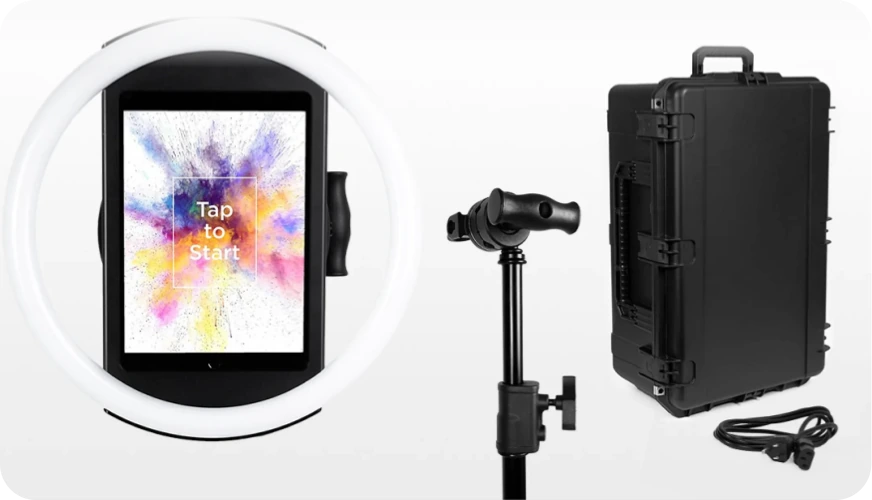
Simple Booth is a photo booth platform pairing a subscription-based iPad app (HALO) with proprietary ring-light hardware, built to deliver background removal without a physical green screen. Its AI background replacement detects and replaces backgrounds digitally, while the HALO ring light’s 112 LEDs (producing up to 2,100 lumens) ensure clean, even lighting that helps the AI separate subjects from their surroundings.
The result: background removal with setup in under a minute, no backdrop stand, no fabric, no chroma-key calibration.
| Simple Booth Pros | Simple Booth Cons |
|---|---|
| - AI background removal, no physical green screen needed | - iPad-only (no Android or Windows support) |
| - Integrated 2,100-lumen ring light for consistent illumination | - Background replacement requires Core plan ($49/month) or higher |
| - Sub-one-minute setup with tool-less hardware | - AI effects consume credits at $0.10 each |
| - DSLR/mirrorless camera support (Canon, Sony; Nikon coming soon) on Core+ | - Limited native CRM integrations beyond MailChimp |
| - 4.7-star App Store rating from 2,400+ ratings |
Why Choose Simple Booth for Green Screen and Background Removal?
30,000+ customers globally use Simple Booth, with documented deployments at Live Nation VIP events, Sports Illustrated Tickets, and Gibson Brands. The platform maintains a 4.7-star App Store rating from 2,400+ ratings, placing it among the highest-rated photo booth apps.
Ready to see how Simple Booth’s AI background removal works at your next event? Start with a free trial.
Background Removal and AI Effects: Professional backgrounds without the physical setup
Simple Booth’s background capabilities work at two levels.
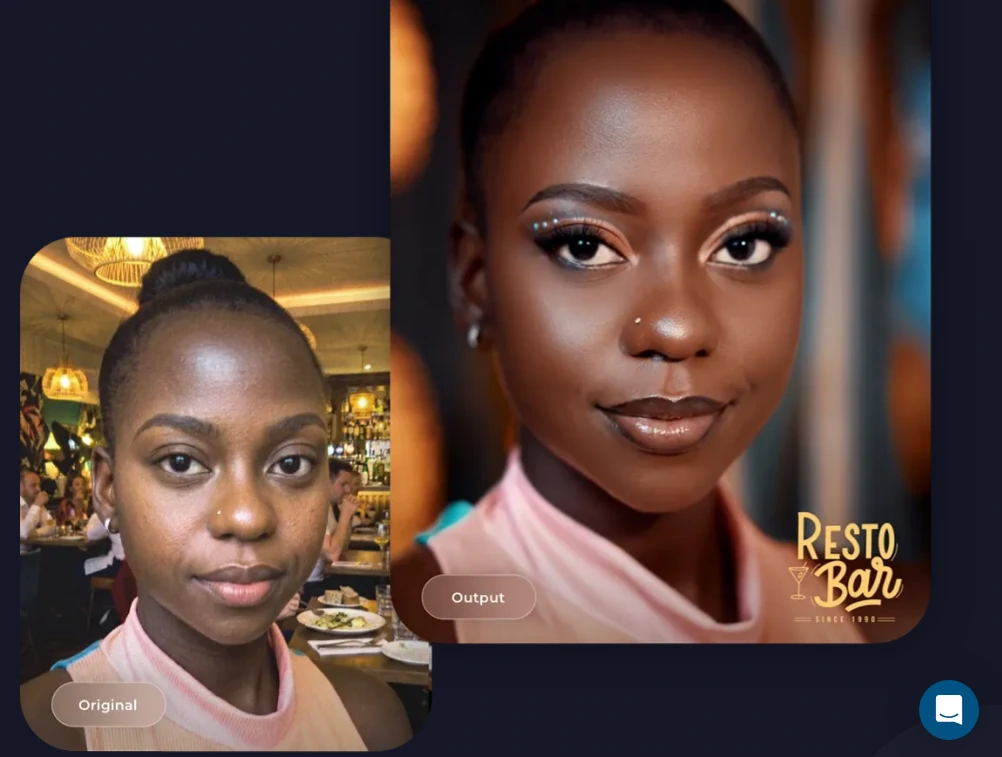
Background replacement (green screen mode) and background blur are available on Core plans and above, handling both physical chroma-key backdrops and AI-powered digital replacement. The AI system detects subject boundaries and composites guests onto custom backgrounds without any physical screen, while Auto Blur mode adds a DSLR-style bokeh effect that Simple Booth calls a first for iPad photo booths.
Source: Simple Booth
Beyond background replacement, the platform offers AI Effects powered by Nano Banana models that transform guest photos using text prompts: artistic style transfers, scene generation, and themed transformations. The system preserves identity and likeness automatically at the platform level, so guests remain recognizable regardless of how extreme the transformation. Operators can test prompts outside booth mode at zero credit cost, iterating before the event.
A notable design choice: AI effects are composited directly with the Layout Designer, meaning brand overlays, logos, and graphic frames layer on top of AI-generated photos in a single workflow. Operators can assign a unique AI prompt to every individual frame in a multi-frame layout, enabling sequential narrative strips like comic books or cinematic scenes.
Hardware and Setup: Lighting built into the booth
The HALO chassis is precision-machined from a single billet of aluminum with a patented ring-light system. Its LEDs are rated for up to 50,000 hours of operation, and the ring illumination lights groups standing 6-8 feet back from the camera. Setup is tool-less: the iPad snaps in via a faceplate, and a concealed USB-C cable keeps the device charged throughout the event.
Source: Simple Booth
For operators who need higher image quality, HALO 5.0 added Canon and Sony DSLR and mirrorless camera integration on Core plans and above, with Nikon support coming soon. The integration supports both wired USB connections for long-event reliability and wireless WiFi connections for flexible setups, something most competitors don’t offer.
The Layout Designer puts the entire template design workflow inside the app or web dashboard, with photo placement, text layers, gradients, brand assets, and motion types.
The platform also offers Virtual Booth, a browser-based photo experience with Magic Background Replacement that requires no hardware or app installation, extending background removal to remote and virtual event participants.
Creole Cuisine captured 200,000+ photos across their restaurant photo booth installations, building a brand experience from guest photos. (Simple Booth)
Data Capture and Marketing: Turn every session into a lead
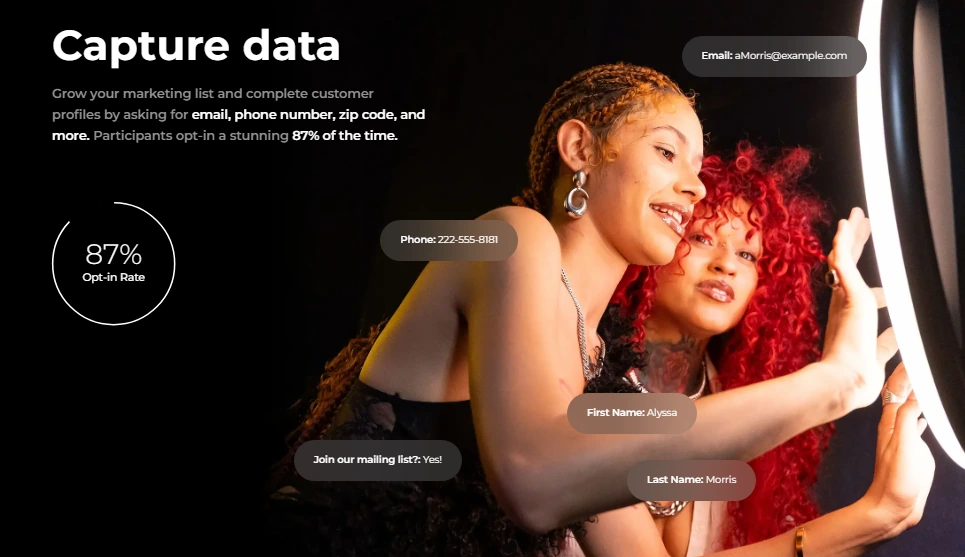
Simple Booth captures opt-in rates as high as 87-89% when guests receive their photos. The lead capture form supports up to 6 standard fields on Pro and up to 10 custom fields on Select, with data flowing to the dashboard for CSV export or automatic MailChimp sync. An Open API on Pro and Select plans enables custom CRM delivery.
Source: Simple Booth
Every event generates an online gallery that can double as a Live Feed display for TVs or projectors, and guests share to social media with pre-populated event hashtags. Photo delivery options span QR code, email, SMS, AirDrop, and WhatsApp, with an offline upload queue that delivers automatically when connectivity returns.
Treetop Golf built 150,000 unique email addresses across locations using Simple Booth’s in-booth lead capture at their permanent installations. (Simple Booth)
Simple Booth Pricing
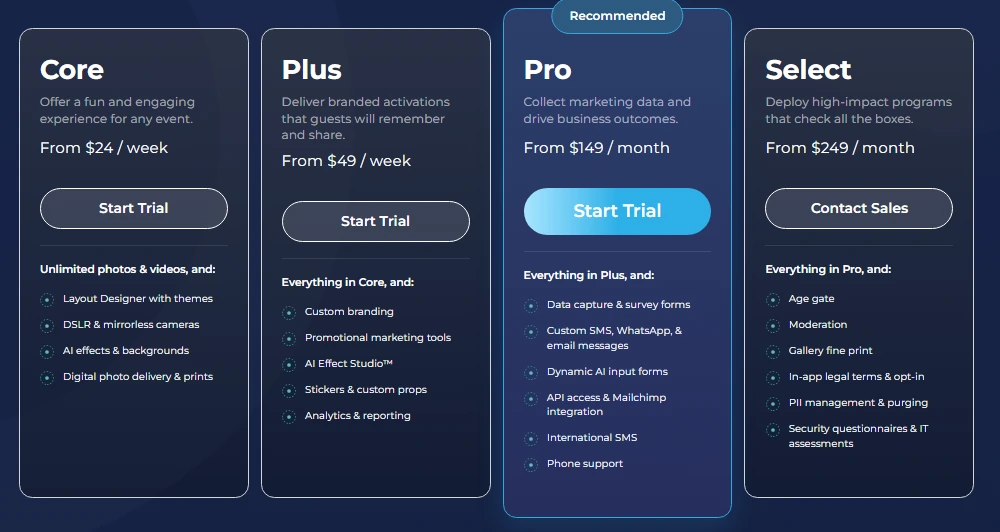
Simple Booth uses a per-license subscription model. Background replacement and blur require Core ($49/month) or above. AI Effects consume credits at $0.10 per credit. HALO hardware kits are sold separately at buy.simplebooth.com with 0% financing available.
- Lite starts at $29.99/month (App Store only; includes ads; excludes background replacement)
- Core starts at $24/week or $49/month (adds background replacement, blur, DSLR support, Virtual Booth)
- Plus starts at $99/month (adds custom branding, analytics, guest-editable text layers)
- Pro starts at $149/month (adds lead capture, API, phone support, moderation)
- Select starts at $249/month (adds custom legal terms, demographic analytics, security assessments)
Source: Simple Booth
A 7-day free trial is available with 25 free AI credits. Weekly billing is also offered for operators with variable event schedules.
Use Simple Booth if:
- You want AI-powered background removal that works without a physical green screen, backed by integrated lighting
- You run iPad-based photo booth operations and value sub-one-minute setup with remote cloud management
- You need lead capture and marketing analytics alongside the photo experience
- You want Canon or Sony DSLR camera integration (Nikon coming soon) through a cloud-managed iPad app
- You need both in-person (HALO) and virtual (Virtual Booth) background removal under one platform
Why Simple Booth Topped Our List
Of all the platforms we tested, Simple Booth delivers the cleanest path from “unbox” to “event-ready booth with background removal” for iPad-based operators. The combination of dedicated lighting hardware, AI background replacement, and a cloud dashboard that manages everything remotely makes it the most complete package for operators who want background effects without the setup complexity of traditional green screen rigs.
But Simple Booth isn’t for everyone. It’s iPad-only, and background replacement requires at least the Core plan at $49/month. Read on to find the best fit for your specific setup, budget, and booth format.
2. dslrBooth — Best for Windows Operators Needing the Widest Camera Brand Support and Dual Green Screen/AI Background Removal
Most photo booth software locks you into one or two camera brands. If your operation runs Canon bodies for portrait work and a GoPro on a 360 spinner arm, you’re typically licensing separate software for each, or replacing gear to standardize.
dslrBooth (rebranded as LumaBooth for Windows in March 2026) eliminates that constraint.
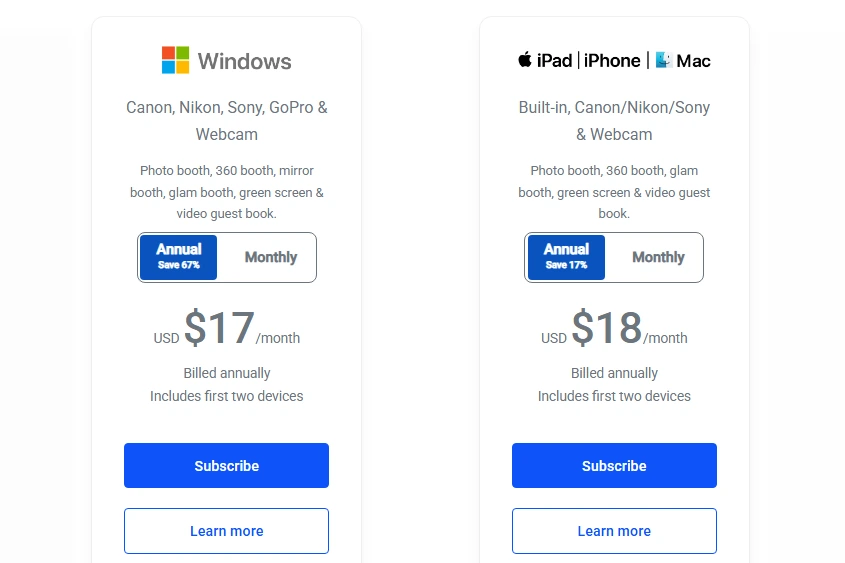
It supports Canon, Nikon, Sony DSLR and mirrorless cameras, GoPro Hero 5 through 11, and USB webcams from a single subscription, with Canon coverage spanning Rebel-series through EOS R5, R6, R7, and R8, and Nikon coverage running from D-series through Z30, Z6, Z7, and Z9.
| dslrBooth Pros | dslrBooth Cons |
|---|---|
| - Widest camera brand support (Canon, Nikon, Sony, GoPro, webcams) | - Windows only (no Mac or iPad) |
| - Dual green screen and AI background removal in one subscription | - Monthly plan at $49.99 is higher than most competitors |
| - All booth formats included (360, mirror, glam, video guestbook) | - AI background removal limited to still photos |
| - Browser-based remote template configuration |
dslrBooth: Top 3 Unique Features
- Near-universal camera brand support across Canon, Nikon, Sony, GoPro, and webcams
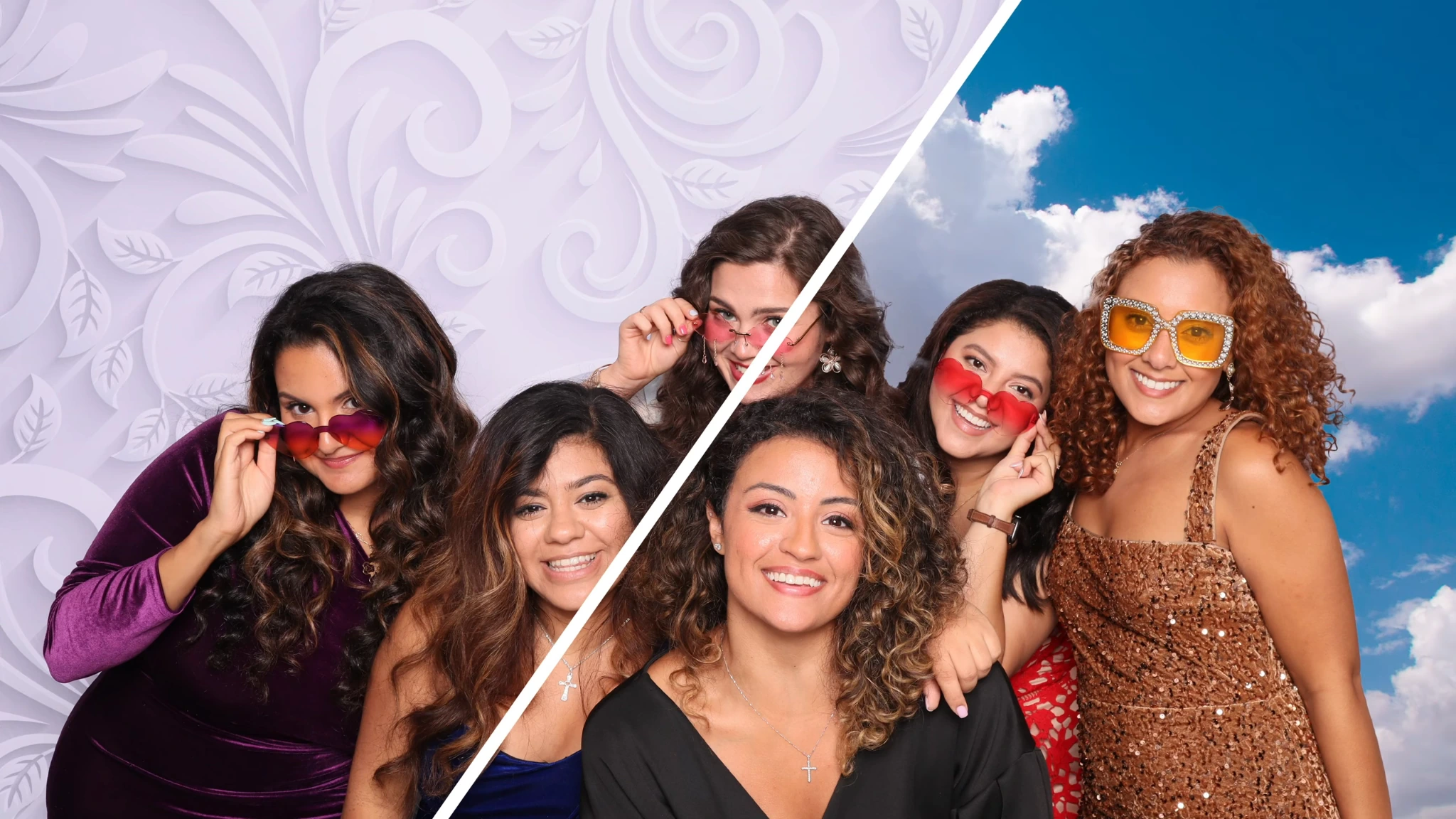
- Traditional chroma-key green screen with multi-background cycling for both photo and video captures
- AI background removal without a physical green screen, with optional Nvidia GPU acceleration
dslrBooth’s traditional chroma-key engine supports a full virtual backdrop library that cycles automatically between sessions or lets guests choose their own, covering both photo and video captures. A test photo workflow lets operators calibrate chroma-key settings before guests arrive.
The AI background removal system detects subject boundaries and composites guests digitally with no physical screen, optimized for machines with a dedicated Nvidia GPU. These two methods are complementary: AI removal handles venues without backdrop infrastructure (still photos only), while chroma key covers both photo and video when a physical green screen is available.
Source: LumaBooth
Every major booth format is included in a single subscription: photo, GIF, boomerang, video, 360, Mirror Booth, Glam Booth, Video Guestbook, AI Portraits, and roaming photography.
The LumaBooth Dashboard lets operators configure templates, overlays, and backgrounds from any browser, with cloud-synced event settings carrying changes to every booth on the account without manual file transfers.
dslrBooth Pricing
- Annual plan: $17/month billed annually, covers 2 simultaneous devices
- Monthly plan: $49.99/month, covers 2 simultaneous devices
- Additional devices: one-time vouchers at $199.99 each
- AI Portrait credits available from $14.99/month (150 credits) up to $199.99/month (2,000 credits)
- Free trial with no time limit and no credit card required (output watermarked until subscription activated)
Source: LumaBooth
Use dslrBooth if:
- Your operation runs mixed camera brands (Canon, Nikon, Sony, GoPro) and you need one subscription covering all of them
- You work venues where green screen setup space varies, and you need both AI removal for no-backdrop scenarios and chroma key for video sessions with physical screens
- You want every booth format (360, mirror, glam, video guestbook, AI portraits) in a single license with no module upgrades
3. Snappic — Best for Growing Rental Businesses Managing Multiple Booth Formats with Offline Green Screen from a Single iPad Subscription
Scaling a photo booth rental business usually means licensing different software for each booth format: one app for standard iPad booths, another for 360 video, another for mirror setups. Snappic consolidates all of those into one iPad-based platform, with green screen and AI background removal working across every format.
| Snappic Pros | Snappic Cons |
|---|---|
| - Offline chroma-key green screen (no internet, no credits) | - Online AI background removal credits cost $0.15/image on top of subscription |
| - All booth formats in one subscription (standard, 360, mirror, Glambot) | - Microsite gallery is a $19/event add-on on Starter |
| - Corporate analytics and Send to Client reporting | - AI-FX and VideoFX require Business plan or higher |
| - Offline AI background removal (no credits) on app v1.31+ |
Snappic: Top 3 Unique Features
- Four distinct background removal methods: offline chroma key, offline AI, online AI (credit-based), and AI Segmentation for real-time video
- Single subscription covering standard, 360, mirror, and Glambot booth formats
- Automated Vision Analytics (AVA) with demographic insights and Send to Client post-event reporting
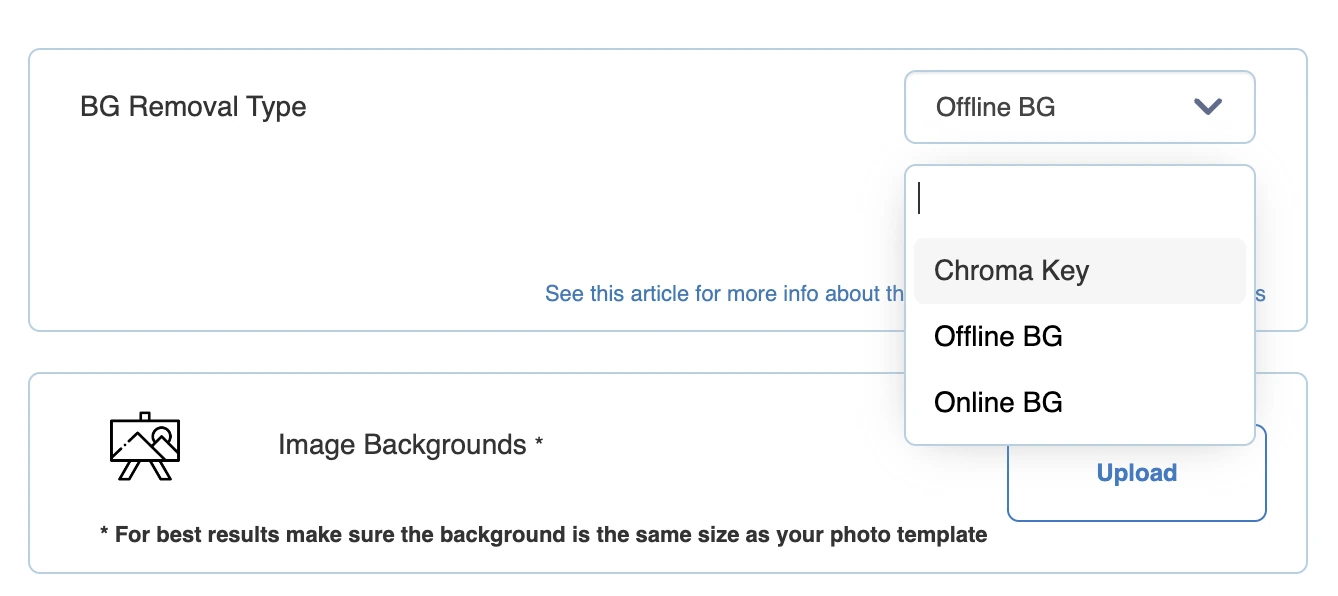
Snappic’s offline chroma-key green screen runs entirely on-device with no internet required and no credits consumed. Operators configure Chroma Key in event settings, and the background swap happens locally on the iPad regardless of venue Wi-Fi.
For backdrop-free scenarios, Offline AI Background Removal (app v1.31+) uses on-device AI to separate subjects without a colored backdrop, also at no per-image cost. A third option, Online AI Background Removal, delivers higher-quality cloud-processed results at $15 per 100 credits. A fourth mode, AI Segmentation, handles real-time background removal in video capture without credits or internet.
Source: Snappic
All four methods live under the same platform; operators choose per event, with only one active at a time. This four-method structure is Snappic’s differentiator for operators who need background removal to work across every venue type. Corporate clients can access lead capture, surveys, and demographic analytics through the Business plan and above. A Send to Client feature delivers a branded analytics webpage after the event.
Snappic Pricing
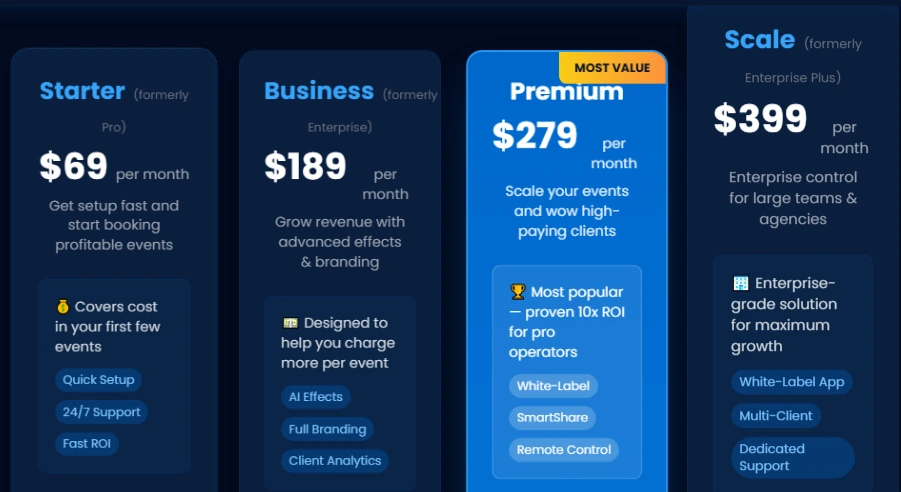
- Starter: $69/month ($499/year), 1 booth license, offline chroma key, basic features
- Business: $189/month ($1,799/year), adds VideoFX, AI-FX, AI background removal, client analytics, surveys
- Premium: $279/month ($2,799/year), adds white-label, webhooks, LiveConnect
- Scale: $399/month ($3,999/year), adds multi-client management, dedicated success manager
- Per-event licenses also available: $29 (Starter) or $79 (Business) for 48-hour access
- 14-day free trial, no credit card required
Source: Snappic
Use Snappic if:
- You’re expanding from standard iPad booths into 360, mirror, or Glambot formats and want one subscription covering all of them
- You run events at venues with unreliable internet and need green screen to work offline without credits
- Your corporate clients expect lead capture, demographic analytics, and branded post-event reports alongside the visual content
4. TouchPix — Best for 360 Video Booth Specialists Needing Cross-Platform AI Background Removal
Most photo booth software restricts you to one platform: iPad-only, Windows-only, or Mac-only. TouchPix runs natively on iOS, Android, macOS, Windows, Linux, and Raspberry Pi under a single subscription with unlimited devices per account, giving operators the widest hardware coverage in the category.
| TouchPix Pros | TouchPix Cons |
|---|---|
| - Cross-platform (iOS, Android, Windows, macOS, Linux, Raspberry Pi) | - No monthly billing option (annual subscription only) |
| - Offline AI background removal (no credits, no internet) | - Entry plan starts at $439.90/year |
| - AI background replacement in both photos and video | - Cloud AI Photo Booth styles consume separate credits |
| - Native GoPro 7-14 integration with Bluetooth arm trigger |
TouchPix: Top 3 Unique Features
- Offline AI background removal across both photo and video captures, no credits consumed
- GoPro models 7-14 integration (wired and wireless) with Bluetooth spinning-arm trigger for automated 360 capture
- Dedicated Mirrorbooth module included in the same subscription
TouchPix’s automatic background removal runs entirely on-device using embedded AI, requiring no internet connection and consuming no per-session credits.
What sets it apart: the AI background replacement applies to both still photos and video captures. Most competitors limit background removal to stills only. When a guest shoots a photo and then a slow-motion video in the same session, the same branded replacement background persists across both outputs without mode switching. AI Face Replacement also runs offline in photo and video modes.
For 360-degree spinning booths, TouchPix integrates with GoPro models 7 through 14 via both wired USB and wireless WiFi/Bluetooth modes, with wired mode recommended for reliability during multi-hour events. The Bluetooth trigger integration fires the spinning arm automatically at session start, reducing the need for a dedicated attendant.
Six capture modes are available within the same app: still photos, AI-transformed photos, boomerangs, video, animated GIFs, and slow-motion video.
Operators managing multiple booth formats benefit from the subscription structure: the Mirrorbooth module for full-length interactive mirror setups runs on any Windows PC or Mac from 2018 onwards, and the standard photo booth mode and 360 workflow are all covered under the same account.
TouchPix Pricing
TouchPix prices by the number of simultaneous active events, not devices. All plans include unlimited devices.
- PhotoPass: $439.90/year, 2 active events, photos and GIFs only
- MultiPass: $879.99/year, 4 active events, adds video and slow-motion
- MultiPass Pro: $1,407.99/year, 8 active events, adds Virtual Booth and surveys
- MultiPass Enterprise: $2,199.99/year, 12 active events, adds Mosaic and RAW backups
- Cloud AI credits: 100 for $12.00 up to 5,000 for $375.00
- 14-day free trial with no watermarks and no credit card required
Use TouchPix if:
- Your primary format is 360 video booths and you need GoPro integration with Bluetooth arm automation
- You operate across multiple device types or operating systems and want one subscription covering unlimited devices
- You need AI background replacement that applies across both photo and video captures, fully offline
5. Darkroom Booth — Best for Professional Event Photographers Wanting Live-Preview Green Screen and a One-Time License
For operators who run attended events where guests leave with a physical print, Darkroom Booth delivers the most print-focused green screen experience on this list, paired with a perpetual license that eliminates recurring subscription costs.
Darkroom Booth is a Windows-native photo booth application from Darkroom Software, LLC, a family-owned Plano, Texas company whose photography software roots stretch back to 1992.
| Darkroom Booth Pros | Darkroom Booth Cons |
|---|---|
| - Live View green screen preview (guests see composite before shooting) | - Windows only (no Mac, iPad, or Android) |
| - 75+ included print templates with built-in drag-and-drop editor | - Cloud sharing features require $95/year maintenance plan |
| - $295 one-time perpetual license | - No centralized multi-venue cloud dashboard |
| - AI face swap, generative backgrounds, and AI lenticular prints |
Darkroom Booth: Top 3 Unique Features
- Live View green screen preview: background replacement renders in the camera feed before the shutter fires, so guests see the finished composite while posing
- 75+ customizable print templates included, editable via a built-in drag-and-drop editor with no external software required
- $295 perpetual license that runs indefinitely, even if the optional annual maintenance plan lapses
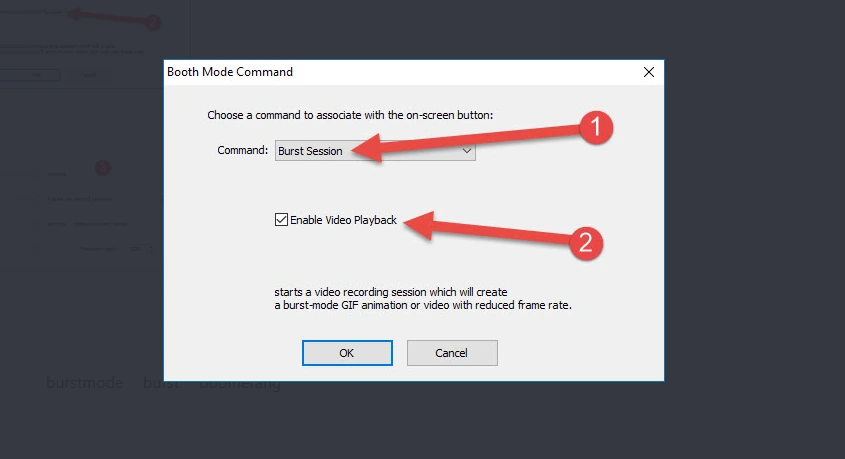
Live View preview is Darkroom Booth’s main green screen differentiator. Operators and guests see the composited background in the live camera feed before any photo is taken, catching edge artifacts, color spill, or misalignment before printing. The chroma-key engine supports green, blue, or auto-detection knockout modes with static images and moving video backgrounds. For venues without a physical screen, Remove.bg integration provides AI-powered background removal.
The 75+ customizable templates cover weddings, corporate events, birthdays, and seasonal themes. The built-in editor handles photo placement, text layers, graphic overlays, and brand elements without requiring Photoshop.
Templates save as portable .xbdr files, allowing designers to build them on a separate machine and transfer to the event PC. Green screen compositing carries through every output format: still photos, slow-motion video, Boomerangs, and animated GIFs all support chroma-key background replacement.
Source: Darkroom Software
Darkroom Booth Pricing
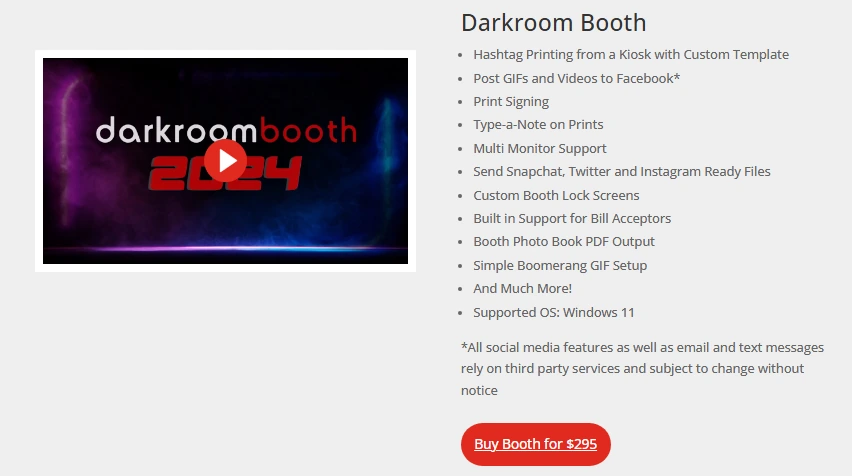
- Full license: $295 one-time purchase, activates on up to 2 computers simultaneously
- Annual maintenance: $95/year for updates, support, and cloud email/SMS delivery
- 10-day temporary license: $45 for a second concurrent event
- Core software runs indefinitely even if maintenance lapses; cloud sharing features stop
Source: Darkroom Software
Use Darkroom Booth if:
- You run attended events where guests leave with a physical print and want Live View green screen preview to catch artifacts before printing
- You prefer owning your software outright with no ongoing subscription
- You need 75+ templates you can customize without external design software
- You’re a Windows-based operator with Canon, Nikon, or GoPro hardware
6. BoothLedger — Best Newcomer for Windows Operators Wanting Dedicated Dual-Mode Green Screen and AI Background Removal
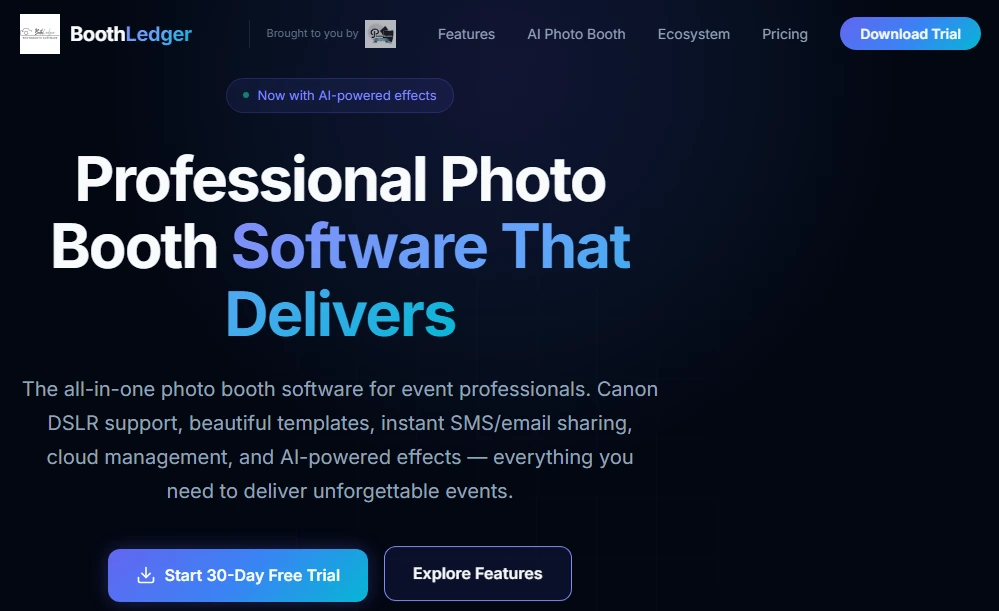
BoothLedger launched publicly in early 2026, built by PhotoBooth Guys, an active Irish event rental company that developed the software for its own hire fleet before opening it to other operators.
Because the platform was designed from the ground up in 2026, both AI background removal and traditional chroma-key green screen were built in as equal, per-event-configurable options from day one.
| BoothLedger Pros | BoothLedger Cons |
|---|---|
| - Dual-mode: AI removal and chroma key selectable per event | - Windows only (Mac listed as “coming soon”) |
| - 50+ AI effects at €35/month with no per-image surcharges | - Canon DSLR only (Nikon and Sony on roadmap) |
| - Offline-first: captures, prints, and queues shares without internet | - No third-party review platform presence yet |
| - 30-day free trial, no credit card required | - Limited to 2 devices per plan |
BoothLedger: Top 3 Unique Features
- Per-event dual-mode background system: AI removal and traditional chroma key, selectable or combined per session
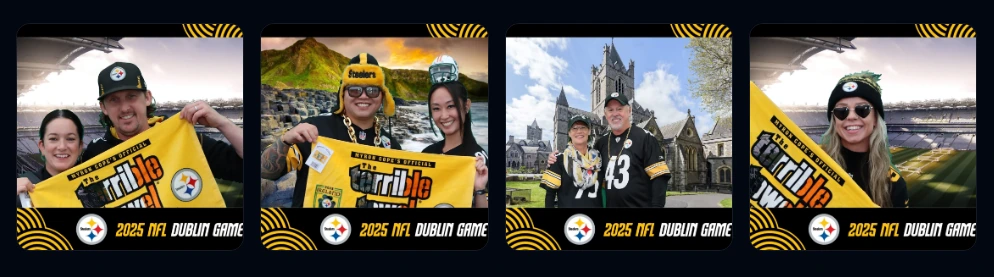
- 50+ creative AI effects including face swap, magazine covers, movie posters, and artistic styles across two selectable processing engines
- Direct Canon DSLR tethering with live view preview, per-shot autofocus, and simultaneous RAW+JPEG capture
Operators can run traditional chroma key at a corporate event with a physical screen, switch to AI removal at a wedding where floor space is tight, and configure a single session offering both options at a festival activation. The software handles mode selection at the event configuration level, so the change is software-side rather than a physical setup change.
Source: BoothLedger
The AI Photobooth plan at €35/month bundles 50+ effects across two processing engines: Core (optimized for high-volume efficiency) and Nano Banana Pro (optimized for fidelity). The entire library is included at the flat monthly rate with no per-image surcharges.
Canon tethering uses Canon’s EDSDK directly, providing native per-shot autofocus, remote exposure control, and real-time live view, supporting the full EOS lineup from Rebel T7 through the EOS R mirrorless range. For venues with unreliable Wi-Fi, BoothLedger captures, prints, and queues share requests completely offline, with SMS and email shares delivering automatically when connectivity returns.
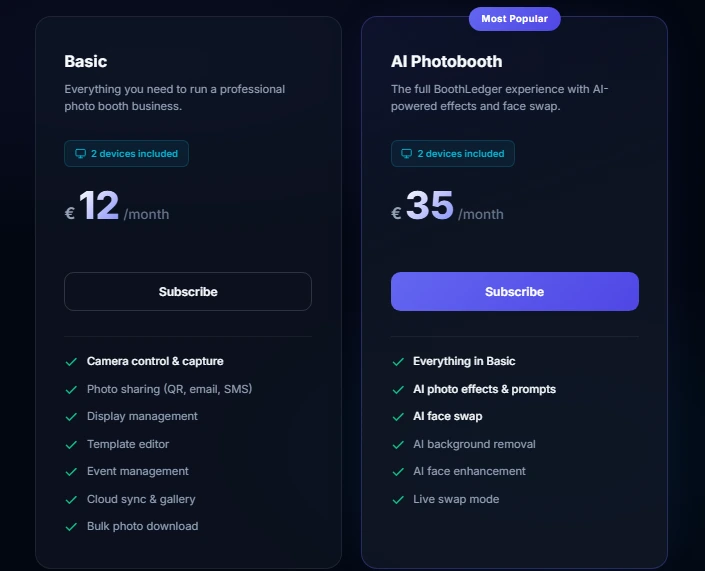
BoothLedger Pricing
- Basic: €12/month, 2 devices, Canon DSLR tethering, templates, QR/email/SMS sharing
- AI Photobooth: €35/month, everything in Basic plus AI background removal, chroma key, face swap, 50+ AI effects, dual engine selection
- 30-day free trial with no credit card required
- Annual billing saves approximately 15% versus monthly
Source: BoothLedger
Use BoothLedger if:
- You run Windows-based Canon DSLR setups and want both green screen and AI background removal in a single, affordable subscription
- You want a large AI effects library at the lowest price in this category
- You operate at venues with unpredictable Wi-Fi and need offline-first reliability for captures, prints, and shares
7. SparkBooth — Best for Solo Operators and DIY Hobbyists Wanting Simple Green Screen with a Lifetime License
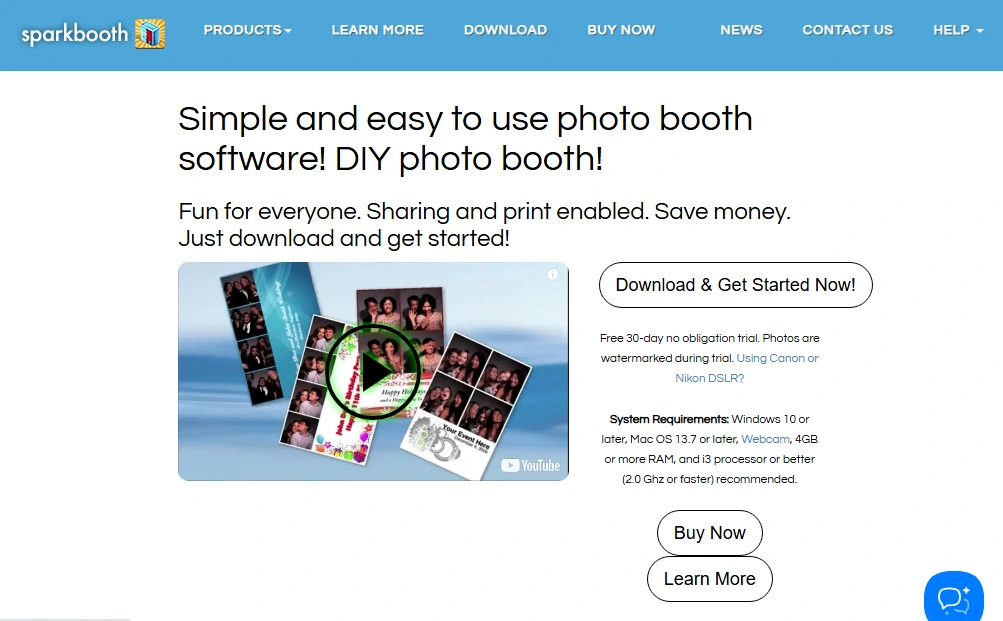
Not everyone running a photo booth is managing a fleet of rental units. Some operators run a single booth at periodic events, or are entering the industry and want to test green screen capabilities before committing to a monthly subscription.
SparkBooth is DIY photo booth software for Windows and Mac that turns any computer with a webcam, or a compatible Canon or Nikon DSLR, into an event photo booth with built-in green screen and AI background removal, all for a one-time purchase.
| SparkBooth Pros | SparkBooth Cons |
|---|---|
| - One-time lifetime license ($149 webcam, $189 DSLR) | - No integrated hardware (bring your own everything) |
| - Both Windows and Mac support | - AI background removal requires third-party API subscription |
| - Offline chroma-key green screen with no internet needed | - No cloud dashboard for remote management |
| - Multiple booth modes (photo, GIF, mirror, kiosk) in one license | - No 360 or video booth support |
SparkBooth: Top 3 Unique Features
- Traditional chroma-key green screen running fully offline with animated GIF backgrounds supported
- AI background removal via five third-party services (UnlimitedBG, Remove.bg, PhotoRoom, Removal.ai, Slazzer), including offline AI removal via UnlimitedBG
- One-time lifetime license at $149-$189 covering commercial use with no recurring fees
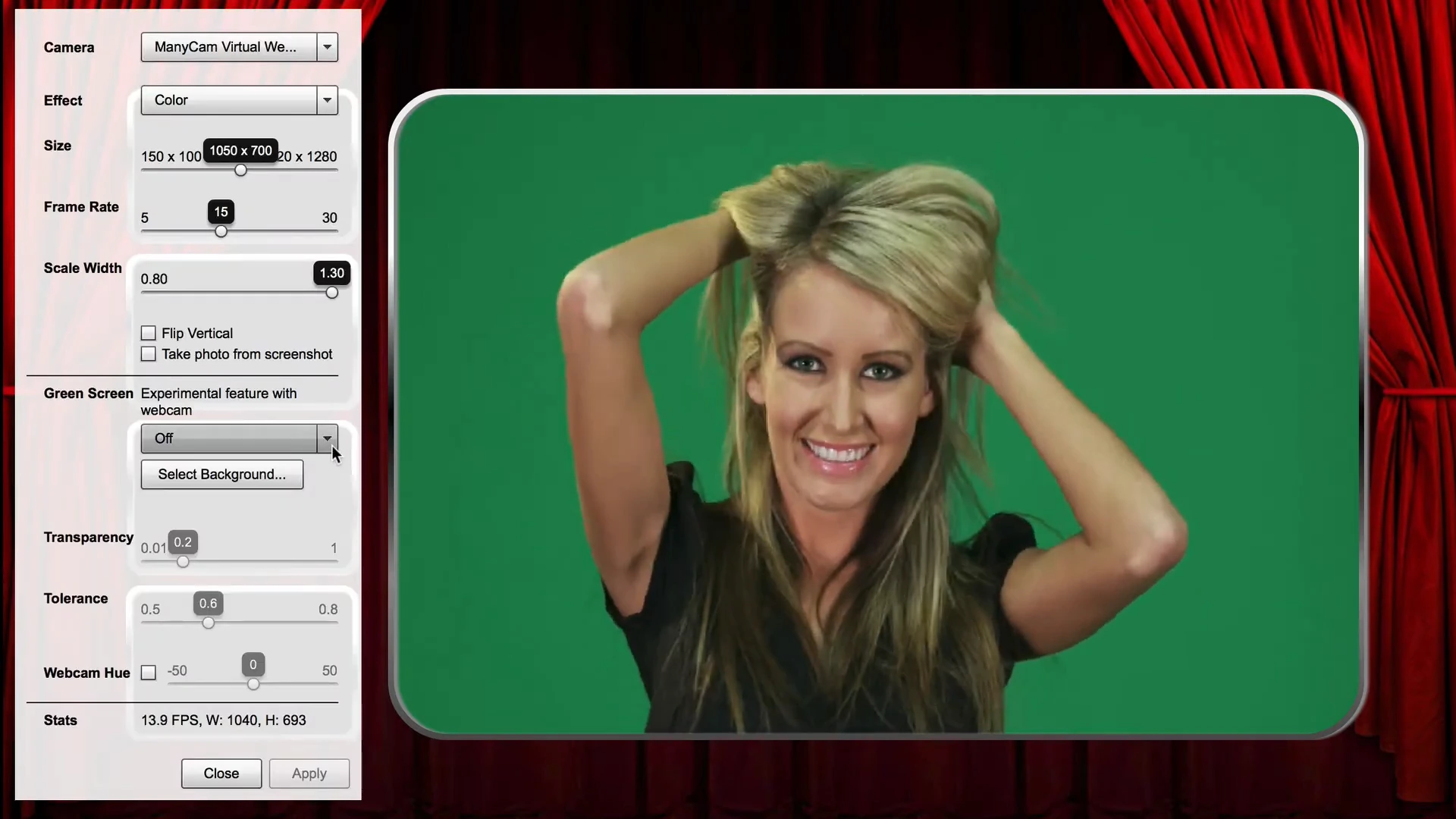
SparkBooth’s chroma-key path works fully offline: configure it in the camera settings, select a JPEG, PNG, or animated GIF replacement background, and the software swaps the green backdrop in real time. For backdrop-free operation, operators connect one of five supported AI services using their own API key.
Source: Sparkbooth
UnlimitedBG runs entirely offline, making it the best option for AI background removal at venues without internet. For high-volume events using multi-photo layouts, SparkBooth’s “Upload combined photos” option merges all slots into a single image before sending to the AI service, consuming only one API credit per session rather than one per photo.
The DSLR version supports an actively maintained list of Canon and Nikon bodies. Canon EOS R1 and R50V support was added as recently as November 2025, and version 7.2 (July 2025) unified Canon and Nikon support into a single 64-bit binary. Both Windows 10+ and Mac OS 13.7+ are supported, letting operators use the computer they already own.
A 30-day free trial includes all features (output watermarked), with a 60-day refund window on unactivated licenses.
SparkBooth Pricing
SparkBooth uses a one-time, perpetual flat-fee model:
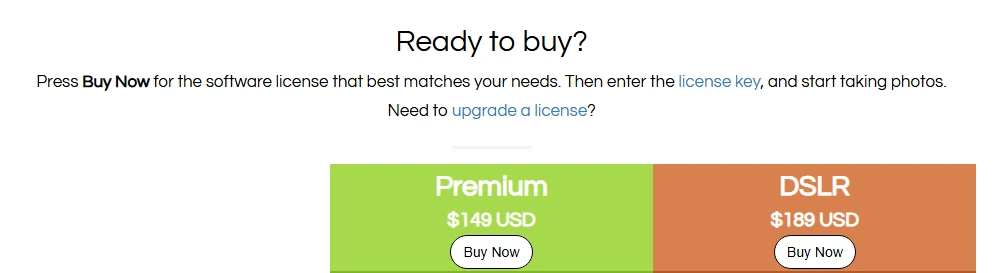
- Premium: $149 USD, webcam support, all features, 3 activations, commercial use
- DSLR: $189 USD, adds Canon and Nikon camera support
- AI background removal services (UnlimitedBG, Remove.bg, etc.) are optional third-party subscriptions billed separately
- SMS delivery requires a third-party provider (Twilio, Vonage, Telnyx, or Vivial Connect) at the operator’s cost
Source: Sparkbooth
Use SparkBooth if:
- You’re a solo operator or DIY hobbyist who wants green screen capability without a monthly software subscription
- You already own a Canon or Nikon DSLR and want to convert it into a photo booth rig at the lowest possible software cost
- You need cross-platform software that runs natively on both Mac and Windows
- You’re entering the photo booth business and want to test the market before committing to a recurring subscription
And That’s Our List of…
…the best photo booth software with green screen and background removal for every type of operator. Some platforms offer broad camera compatibility, others prioritize offline reliability, and a few let you own your software outright. The right choice depends on your hardware, your event volume, and whether you need a physical green screen as a fallback or want to go fully digital.
Here are our top picks for the three most common use cases:
- Simple Booth: If you want AI-powered background removal on iPad with integrated lighting, cloud management, and lead capture built into the experience, no physical green screen required. Start with a free trial.
- dslrBooth: If you run a Windows-based operation with mixed camera brands (Canon, Nikon, Sony, GoPro) and need both traditional chroma key and AI background removal across every booth format in a single subscription.
- Darkroom Booth: If you run attended events where physical prints are the primary deliverable and you want Live View green screen preview, 75+ templates, and a one-time $295 license with no ongoing fees.
Best Photo Booth Software with Green Screen and Background Removal FAQ
Which photo booth software offers the best AI background removal without a physical green screen?
Simple Booth, TouchPix, Snappic, and BoothLedger all offer AI background removal that works without a physical green screen. Simple Booth’s approach is distinctive because it pairs AI removal with the integrated HALO ring light (producing 2,100 lumens), giving the AI clean, well-lit subjects to work with regardless of venue lighting conditions. TouchPix stands out for applying AI background replacement across both photo and video captures entirely on-device.
Is there free photo booth software with green screen capabilities?
Several platforms offer generous free trials. dslrBooth provides a free trial with no time limit (output is watermarked). TouchPix offers a 14-day trial with no watermarks and no credit card required. Simple Booth includes a 7-day free trial with 25 AI credits. BoothLedger and Snappic offer 30-day and 14-day trials respectively. SparkBooth provides a 30-day trial with watermarked output and a 60-day refund window on unactivated licenses.
Which photo booth software works best for 360 video booths with background removal?
TouchPix is the platform most specifically designed for 360 video booths, with native GoPro integration spanning models 7 through 14 (wired and wireless), a Bluetooth spinning-arm trigger for automated capture, and offline AI background replacement that applies to both photo and video. Snappic and dslrBooth also support 360 booth formats, but TouchPix’s cross-platform compatibility and unlimited-device licensing give it the widest hardware flexibility for 360 specialists.
What is the cheapest photo booth software with green screen support?
SparkBooth offers the lowest total cost of ownership at $149-$189 for a one-time lifetime license with built-in chroma-key green screen. Darkroom Booth is the next most affordable long-term option at $295 one-time. For subscription models, BoothLedger’s AI Photobooth plan at €35/month includes both green screen and AI removal, and dslrBooth’s annual plan at $17/month billed annually is the lowest recurring rate for a professional-grade platform.
Do I need a physical green screen, or can software handle background removal digitally?
All seven platforms on this list offer some form of digital background removal that works without a physical green screen.
However, traditional chroma-key with a physical screen still produces the cleanest edges and works across all capture types (including video), while AI removal quality varies based on lighting, subject clothing, and the complexity of the real background. Most professional operators keep a physical green screen available for high-stakes events while using AI removal at venues where setup space is limited.
Which platform works on both Mac and Windows?
SparkBooth and TouchPix are the only two platforms on this list that run natively on both Mac and Windows. TouchPix extends further to iOS, Android, Linux, and Raspberry Pi. Simple Booth runs on iPad (iOS). dslrBooth, Darkroom Booth, and BoothLedger are Windows-only.
Can photo booth software handle green screen in video, or just photos?
Traditional chroma-key green screen works in both photo and video on most platforms, including dslrBooth, Snappic, Darkroom Booth, and TouchPix.
AI background removal (without a physical screen) is typically limited to still photos on most platforms. TouchPix is the notable exception, offering AI background replacement across both photo and video captures entirely on-device. Snappic also offers AI Segmentation for real-time video background removal without credits or internet.
What camera brands work with photo booth green screen software?
Camera support varies widely. dslrBooth offers the broadest compatibility with Canon, Nikon, Sony, GoPro Hero 5-11, and USB webcams. TouchPix supports GoPro 7-14 plus Canon, Nikon, and Sony. Darkroom Booth and SparkBooth support Canon and Nikon. BoothLedger currently supports Canon only (Nikon and Sony on roadmap). Simple Booth runs on iPad’s built-in camera with Canon and Sony DSLR/mirrorless support on Core plans and above, with Nikon support coming soon.
Keep reading
 Best Of
7 Best Photo Booth Software with Video Message and Slo-Mo Capture [2026]
Booths that capture heartfelt video notes and buttery slo-mo. The moving stuff.
 Best Of
6 Best Photo Booth Software With QR Code Sharing [August 2026]
Booths that beam every snap to a phone with a quick scan. QR sharing done right.
 Best Of
7 Best Photo Booth Software With Real-Time Analytics and Dashboards [August 2026]
Booths that show the numbers as the party happens. Live dashboards, real insight.