7 Best Photo Booth Software With AI-Generated Backgrounds [August 2026]

Physical green screens, bulky enclosures, and dedicated operators used to be requirements for any photo booth worth renting. AI changed that.
Modern photo booth software generates backgrounds, artistic transformations, and stylized portraits from a text prompt, with no physical backdrop required. For event rental companies, brand marketers, and venue operators, this means more creative output per event, less equipment to haul, and photo experiences guests want to share.
Not every platform delivers AI-generated backgrounds the same way. Some process effects on-device for offline reliability, others route through cloud APIs for higher quality, and a few offer managed creative services where the vendor builds your AI style from scratch.
We tested the leading photo booth platforms to find the best options for AI-generated backgrounds across different budgets, hardware setups, and business models:
- Running self-operating AI photo booths with integrated hardware,
- Managing multiple booth formats under one subscription,
- Running managed enterprise activations,
- Operating offline at venues with unreliable connectivity,
- Starting with AI portraits at a low price,
- Bundling all AI effects at a flat rate,
- And paying only when you run events.
Let’s look at the best photo booth software with AI-generated backgrounds in 2026.
What Is Photo Booth Software With AI-Generated Backgrounds?
Photo booth software with AI-generated backgrounds refers to platforms that use artificial intelligence to replace, transform, or generate new environments behind a guest’s photo, without requiring a physical green screen or colored backdrop. The AI detects the subject in real time, isolates them from their surroundings, and composites them into a generated scene, artistic style, or branded environment.
These platforms go beyond basic background replacement. Many offer artistic transformations (turning guests into cartoon characters, oil paintings, or superhero portraits), face swap capabilities, and text-prompt-based generation where every output is unique.
The better platforms integrate these AI tools into a professional event workflow: branded overlays, lead capture, multi-channel photo delivery, and analytics are built into the same system.
Best Photo Booth Software With AI-Generated Backgrounds
 | Simple Booth Best for self-operating AI photo booths with integrated ring-light hardware and built-in brand design tools. |
|---|---|
 | Snappic Best for growing operators who run iPad, 360°, robot arm, mirror, and DSLR booth formats from a single subscription. |
 | Snapbar Best for corporate marketing teams that need fully managed, custom-designed AI photo activations at enterprise scale. |
 | TouchPix Best for operators who need offline AI background replacement and cross-platform device support including Android. |
 | LumaBooth Best for budget-conscious operators who want 170+ ready-made AI portrait styles without writing prompts. |
 | BoothLedger Best for operators who want dual-engine AI effects bundled at a flat monthly rate with no per-image credit charges. |
 | AI PhotoBooth Best for event professionals who want pay-per-use AI photo experiences with no recurring monthly subscription. |
How To Choose the Best Photo Booth Software With AI-Generated Backgrounds
Here’s a checklist to find the right AI-enabled photo booth platform:
- AI Quality and Variety: Look for platforms with multiple AI transformation types (background replacement, artistic styles, face swap) and consistent output quality at event speed. The best tools preserve guest identity automatically, regardless of how dramatic the transformation.
- Ease of Setup and Operation: Your platform should let staff or clients operate the booth without technical expertise. Self-operating capability, preflight checks, and remote management reduce the need for a dedicated attendant.
- Hardware Compatibility: Consider whether the software locks you into specific hardware (iPad-only, Windows-only) or supports the devices and cameras you already own.
- Offline vs. Cloud Processing: If you work at venues with unreliable WiFi, prioritize platforms that process AI effects on-device rather than routing every image through cloud servers.
- Pricing Model: Subscription plans suit operators with consistent event volume. Per-event or credit-based pricing works better for seasonal or occasional use. Watch for per-image AI credit costs that add up at high-volume events.
- Lead Capture and Marketing Tools: For brand activations and corporate events, built-in data capture, CRM integration, and social sharing analytics turn photo interactions into measurable results.
- Brand Customization Depth: Custom overlays, branded layouts, and design tools that let you build templates without external software keep your events on-brand and reduce prep time.
How We Curated Our List
We identified the most widely adopted photo booth platforms with AI-generated background capabilities, based on operator communities, App Store ratings, industry presence, and documented enterprise deployments.
We then evaluated each platform’s AI features through demos, free trials, documentation, and operator feedback, assessing them against four criteria:
- AI Capability: How many AI transformation types does the platform support, and how well does it handle background replacement without a green screen?
- Ease of Use: How quickly can an operator configure and deploy an AI-enabled booth at an event?
- Value for Money: What do you get for the price, and are AI effects included or billed separately?
- Reliability: Can the platform deliver consistent results under live event conditions, including venues with limited connectivity?
These factors narrowed the field to seven platforms that represent the best options across different budgets, hardware setups, and business models. Let’s dive in.
1. Simple Booth: Best for Self-Operating AI Photo Booths With Integrated Hardware and Brand Design Tools
Setting up a photo booth for a Saturday wedding, a Tuesday corporate activation, and a Friday product launch in the same week requires equipment that travels well, software that configures remotely, and AI effects that deliver consistent results without a technician hovering over the booth.
That’s the problem Simple Booth was built to solve.
Simple Booth is a photo booth platform pairing a subscription-based iPad app (HALO) with proprietary ring-light hardware, plus a browser-based Virtual Booth product for digital activations requiring no hardware at all. With 30,000+ customers, a 4.7-star App Store rating from 2,400+ ratings, and 40 million+ moments captured, it’s one of the most established platforms in the space. Its core features include:
- AI Effects powered by Nano Banana models that transform guest photos using text prompts, with automatic identity preservation and zero-cost prompt testing
- A Layout Designer for building branded overlays, frames, and multi-layout templates directly in the app or web dashboard
- AI background replacement without a green screen, plus DSLR-style bokeh and Glam skin smoothing
- DSLR/mirrorless camera support (Canon and Sony, wired or wireless; Nikon coming soon) for studio-grade image quality through the HALO workflow
- Virtual Booth for browser-based AI photo experiences on any device, no hardware or app download required
- Lead capture with 87%+ opt-in rates, MailChimp integration, and an open API for custom CRM delivery
- Sub-one-minute setup with the HALO ring-light hardware, no tools required
| Simple Booth Pros | Simple Booth Cons |
|---|---|
| - Integrated ring-light hardware with patented design | - iPad-only (no Android or Windows support) |
| - AI background replacement without green screen | - AI effects require internet connectivity |
| - 4.7-star App Store rating from 2,400+ ratings | - Lite plan includes ads and excludes custom branding |
| - Layout Designer eliminates need for external design software | |
| - Offline mode queues sessions when connectivity drops |
Why Choose Simple Booth for AI-Generated Background Experiences?
Simple Booth has earned its reputation as a complete system for event professionals who want reliable output without assembling separate hardware and software components. Its customer base spans events from intimate weddings to brand activations for Live Nation, Sports Illustrated Tickets, and Gibson Brands.
To see why it tops our list, start with a free trial and test AI effects at no credit cost outside of booth mode.
AI Effects and Backgrounds: Transform guest photos without a green screen
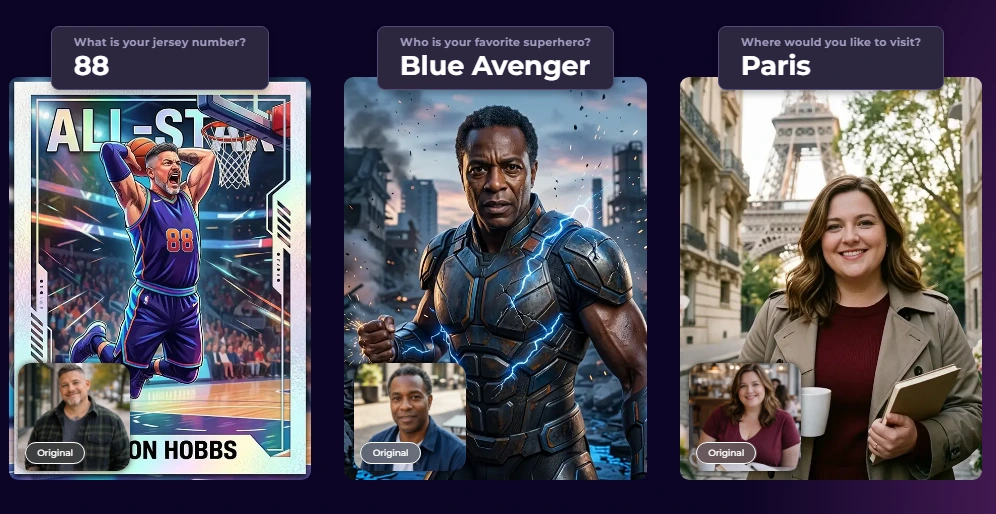
Simple Booth’s AI Photo Booth uses Nano Banana AI models to transform captured photos using text prompts.
Three models balance speed and quality: Nano Banana 1 (fastest, individuals), Nano Banana 2 (balanced, groups up to 5), and Nano Banana Pro (highest quality, groups up to 5). The platform automatically preserves identity and likeness, so guests remain recognizable regardless of how dramatic the transformation.
Source: Simple Booth
What sets Simple Booth apart is that AI effects composite directly with the Layout Designer: brand overlays, logos, and graphic frames layer on top of AI-generated photos in a single workflow.
Operators can assign a unique AI prompt to every frame in a multi-frame layout, enabling sequential narrative strips (comic books, cinematic scenes). On Pro and Select plans, Guest Input injects participant answers into the AI prompt as template variables, producing a personalized output for every guest.
Operators can test prompts outside of booth mode without consuming credits, iterating freely before the event. Credits cost $0.10 each, purchased credits never expire, and new subscriptions include bonus credits (50 on Core, up to 200 on Select).
Layout Designer and Brand Customization: Build branded templates without external software
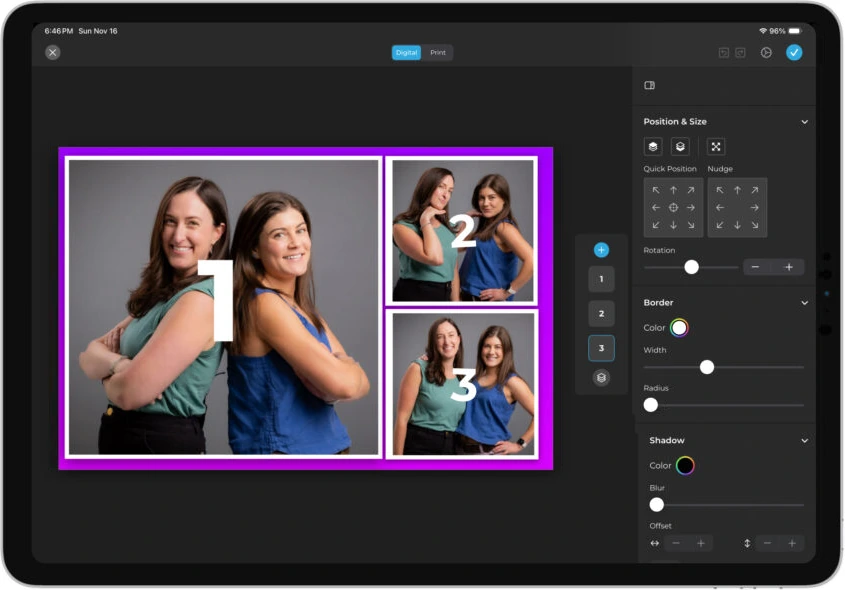
HALO 5.0 introduced the Layout Designer, a full in-app design tool with layers, fonts, gradients, QR code embedding, and multi-layout support. Operators build overlays and templates directly in the app or web dashboard, eliminating dependence on external graphic design software. AI-Generated Layout Images let operators generate design elements (logos, borders, themed frames) using AI at no credit cost.
Source: Simple Booth
Guest-editable text layers (Plus+ plans) let participants type names, captions, or hashtags directly onto their photo before sharing, with dynamic text sizing that keeps designs clean regardless of message length.
Hardware and Setup: Ring light with sub-one-minute deployment
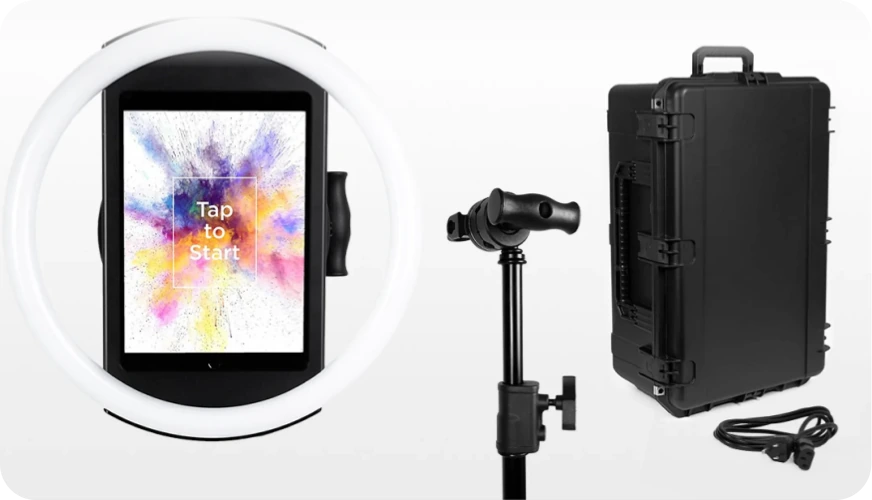
The HALO ring-light hardware is machined from a single billet of aluminum with 112 LEDs producing up to 2,100 lumens, rated for 50,000 hours of operation. The iPad snaps in via a tool-less faceplate with a concealed USB-C charging cable. Available as an Event Kit (selfie stand + travel case) or Install Kit (wall mount for permanent venues).
Source: Simple Booth
G7 Entertainment Marketing has been a Simple Booth customer for over 10 years, capturing 136,000+ fan interactions across brand activations. (G7 Entertainment Marketing Case Study)
Lead Capture and Marketing: Turn photo interactions into measurable data
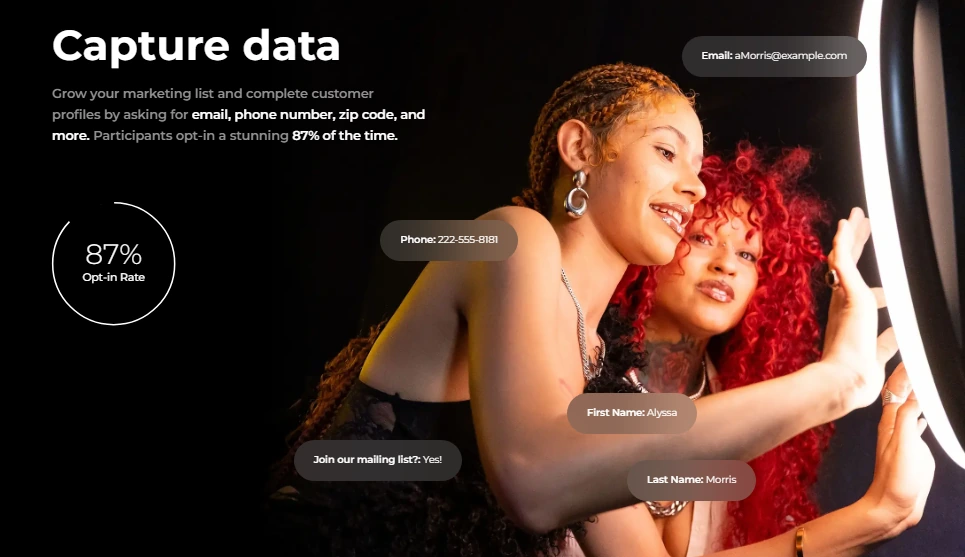
Simple Booth captures opt-in rates as high as 87-89% when guests receive their photos, well above typical marketing form conversion rates. Data capture forms collect up to 10 custom fields on Select, with native MailChimp sync and API integration for custom CRM delivery (Pro+). Photo delivery options include QR code, email, SMS, AirDrop, and WhatsApp.
Source: Simple Booth
Treetop Golf built 150,000 unique email addresses across its locations using Simple Booth’s lead capture features. (Treetop Golf Case Study)
Simple Booth Pricing
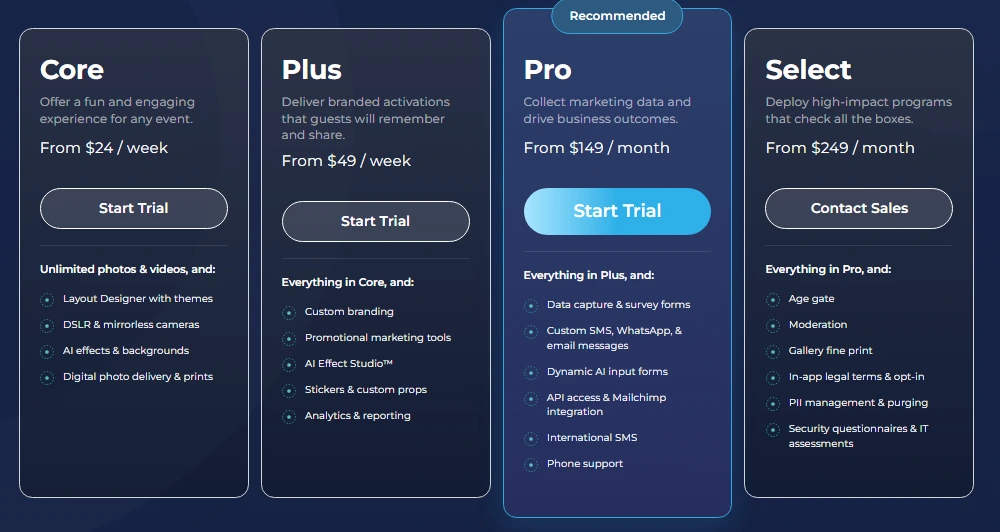
Simple Booth uses a per-license subscription model with weekly, monthly, and yearly billing. Each plan includes one device license; additional devices require add-on licenses. AI credits cost $0.10 each.
- Lite starts at $14.99/week or $289.99/year (App Store only; includes ads, excludes custom branding and AI effects)
- Core starts at $24/week or $49/month or $490/year (adds DSLR support, AI effects, background replacement, Virtual Booth)
- Plus starts at $49/week or $99/month or $990/year (adds custom branding, analytics, guest-editable text, custom AI effects)
- Pro starts at $149/month or $1,490/year (adds lead capture, API integration, phone support, moderation)
- Select starts at $249/month or $2,490/year (adds custom legal terms, demographic analytics, security questionnaires)
- Enterprise — custom pricing (tailored solutions for large-scale deployments)
A 7-day free trial is available with 25 free AI credits.
Source: Simple Booth
Use Simple Booth if:
- You want an integrated hardware-software system with studio-grade lighting that sets up in under a minute
- You need AI-generated backgrounds and artistic transformations with built-in identity preservation and zero-cost prompt testing
- You want to build branded overlays and templates without external design software using the Layout Designer
- You need lead capture with high opt-in rates and CRM integration for brand activations
- You want both physical (HALO) and virtual (browser-based) AI photo booth experiences under one platform
Why Simple Booth Topped Our List
Simple Booth earned the top spot because it combines AI-generated backgrounds with something no other platform on this list offers: an integrated hardware-software system designed for self-operating reliability.
The patented HALO ring light, the Layout Designer that layers brand assets onto AI-generated outputs, and the 87%+ opt-in lead capture rates make it a complete system for event professionals and brand marketers who want reliable results without assembling separate components.
2. Snappic: Best for Growing Operators Who Run Multiple Booth Formats From a Single Subscription
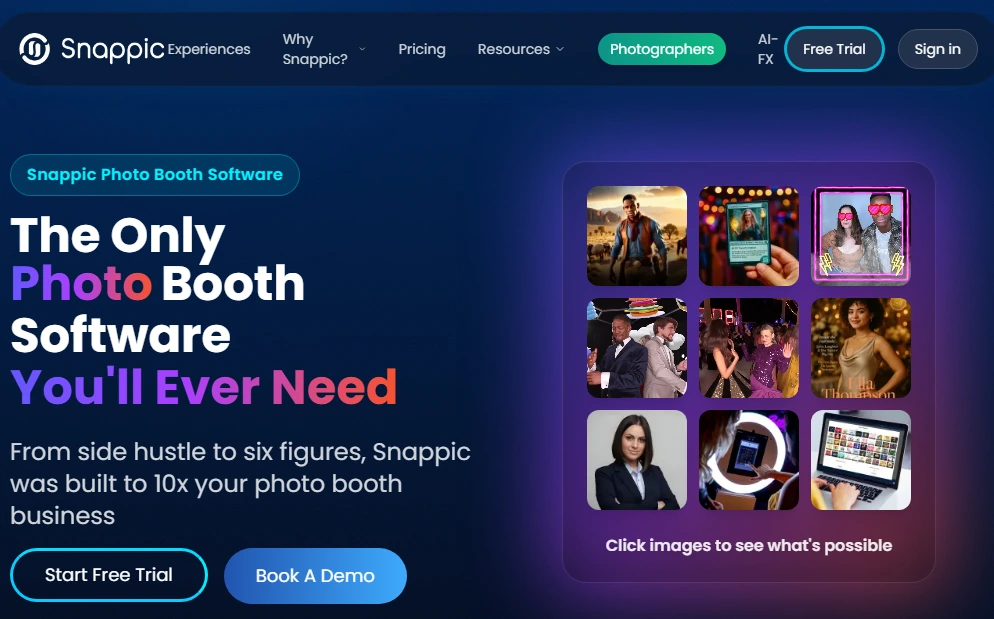
As a photo booth business grows, the equipment lineup grows with it: an iPad booth for weddings, a 360° rig for corporate events, maybe a robot arm for red-carpet activations. The problem is that each new booth format often means another software subscription.
Snappic eliminates this by supporting iPad booths, 360-degree video, robot arm/Glambot, mirror booths, DSLR setups, and roaming photography from a single account, the widest booth-type coverage among platforms in this category. With 8,000+ operators across 100,000+ events worldwide, it has a large community and a long track record.
| Snappic Pros | Snappic Cons |
|---|---|
| - Every major booth format under one subscription | - AI-FX and VideoFX require Business plan or above |
| - Offline on-device AI background removal (no green screen) | - Background removal and AI-FX credits billed separately |
| - $29 per-event license for variable schedules | - White-label URLs are a paid add-on |
| - Canon, Sony, and Nikon DSLR support |
Snappic: Top 3 Unique Features
- Multi-format booth coverage (iPad, 360°, Glambot, mirror, DSLR, roaming) under one subscription
- Offline on-device AI background removal plus a predefined AI art filter library
- Per-event licensing option at $29 for operators with variable calendars
Snappic offers four distinct background removal methods: physical green/blue screen, on-device offline AI removal (no backdrop or credits required), cloud-processed AI removal (highest quality, credit-based), and video-mode AI segmentation. The offline path is particularly valuable for venues with unreliable WiFi.
For artistic AI effects, the AI-FX preset filter library covers art styles, seasonal themes, pop culture formats, and professional scenarios, with no prompt writing required. Operators who need creative control can use custom prompts or BananaFX, a separate AI engine running on Google’s Gemini 2.5 model for new image generation.
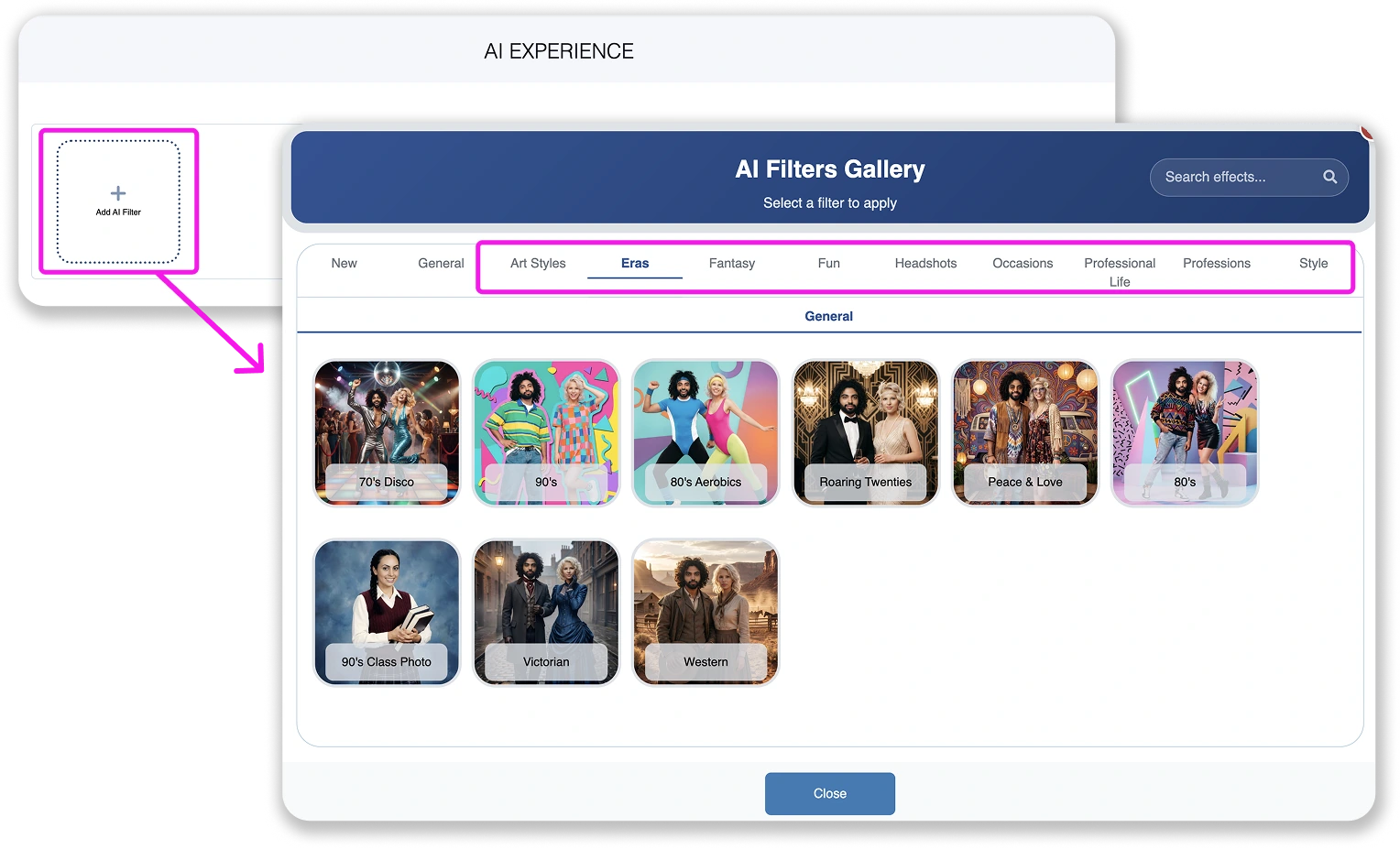
Source: Snappic
The per-event license at $29 (Starter-level) grants 48-hour access without a subscription commitment, a low-risk entry point for operators still building consistent volume.
Snappic Pricing
- Per-Event: $29/event (Starter) or $79/event (Business), 48-hour access
- Starter: $69/month ($499/year) with 1 booth license; still photo, GIF, SMS/email sharing, 60+ templates
- Business: $189/month ($1,799/year) adds VideoFX, AI-FX, branded microsites, green screen and AI background removal, Roaming Mode, Priority Support
- Premium: $279/month ($2,799/year) adds white-label URLs, webhooks, SmartShare AI (400 credits included)
- Scale: $399/month ($3,999/year) adds multi-client management, Grey Label App, dedicated Customer Success Manager
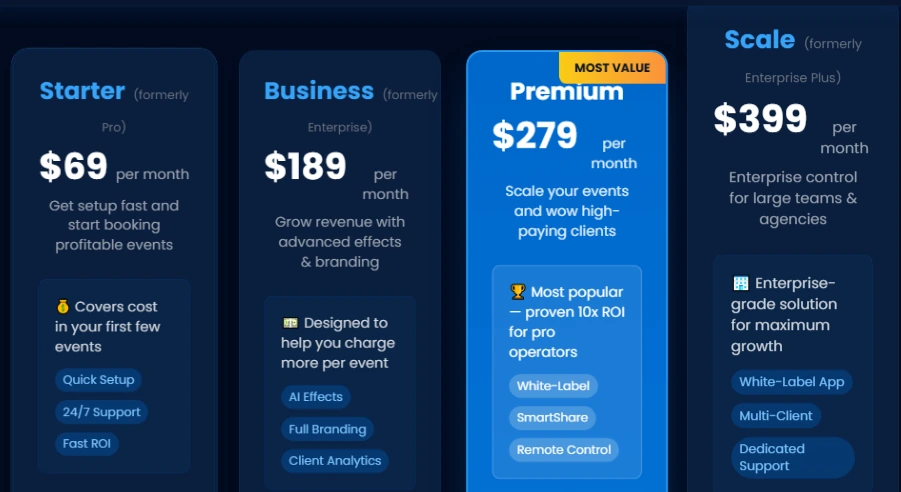
Source: Snappic
Note: AI background removal credits ($15 per 100 images) and AI-FX credits ($20 per 200 images, consuming 1-6 credits per image) are billed separately on top of the subscription.
Use Snappic if:
- You operate multiple booth formats and want to manage them all from one platform
- You want AI background replacement that works offline without a green screen
- Your event calendar is variable and you need a low-commitment $29 per-event entry point
- You already own Canon, Sony, or Nikon cameras and don’t want hardware lock-in
3. Snapbar: Best for Managed Enterprise AI Photo Activations
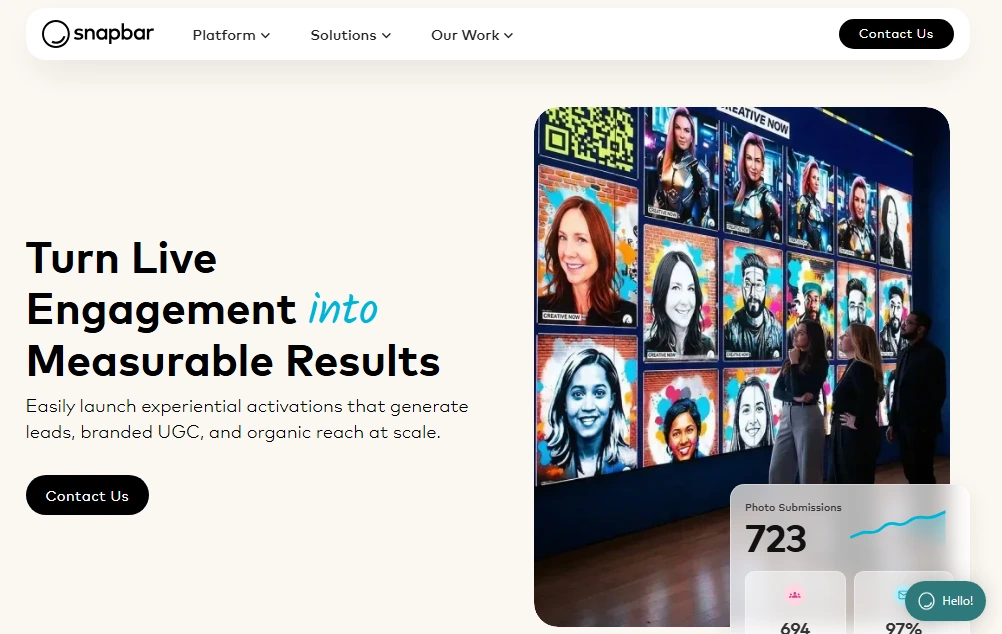
Most photo booth platforms hand operators a dashboard and say “configure it yourself.” Snapbar inverts this model: its in-house creative team builds a custom AI style for each activation based on the brand’s visual identity and campaign direction, producing output that a competitor cannot reproduce with a generic preset library.
Snapbar runs in-browser with no app download or dedicated hardware, scaling from 50 to 50,000+ participants without configuration changes. Its client roster includes Visa, Adobe, Netflix, Microsoft, Cisco, Dell, and Wells Fargo.
| Snapbar Pros | Snapbar Cons |
|---|---|
| - Custom AI style built per activation by Snapbar’s design team | - No public pricing; quote-based only |
| - Browser-based, scales to 50,000+ attendees | - Not a self-serve platform (DIY score of 3/10) |
| - Lead capture with CRM-ready CSV export | - Not suited for small or budget-conscious operators |
| - 95% average email open rate on delivery emails |
Snapbar: Top 3 Unique Features
- Custom AI styles designed per brand activation by an in-house creative team
- Browser-based architecture that scales without hardware or app downloads
- Integrated lead capture with CRM-ready CSV export to Salesforce, HubSpot, and Marketo
What sets Snapbar apart is the managed creative model. Rather than offering a preset library, Snapbar’s team builds a proprietary AI style for each activation based on the brand’s visual identity.
For enterprise buyers running branded events where appearing at a conference with the same AI filter as a competing booth is a real risk, this custom approach is the primary value.
Lead capture is embedded in the activation itself: the form that delivers the guest’s AI portrait doubles as the CRM intake form. Snapbar frames its ROI model as “Cost Per Lead = total event spend / qualified leads generated,” giving marketing teams direct language for justifying budgets. The Persona Quiz and AI Stories experience types extend this, adding qualitative context to each CRM record.
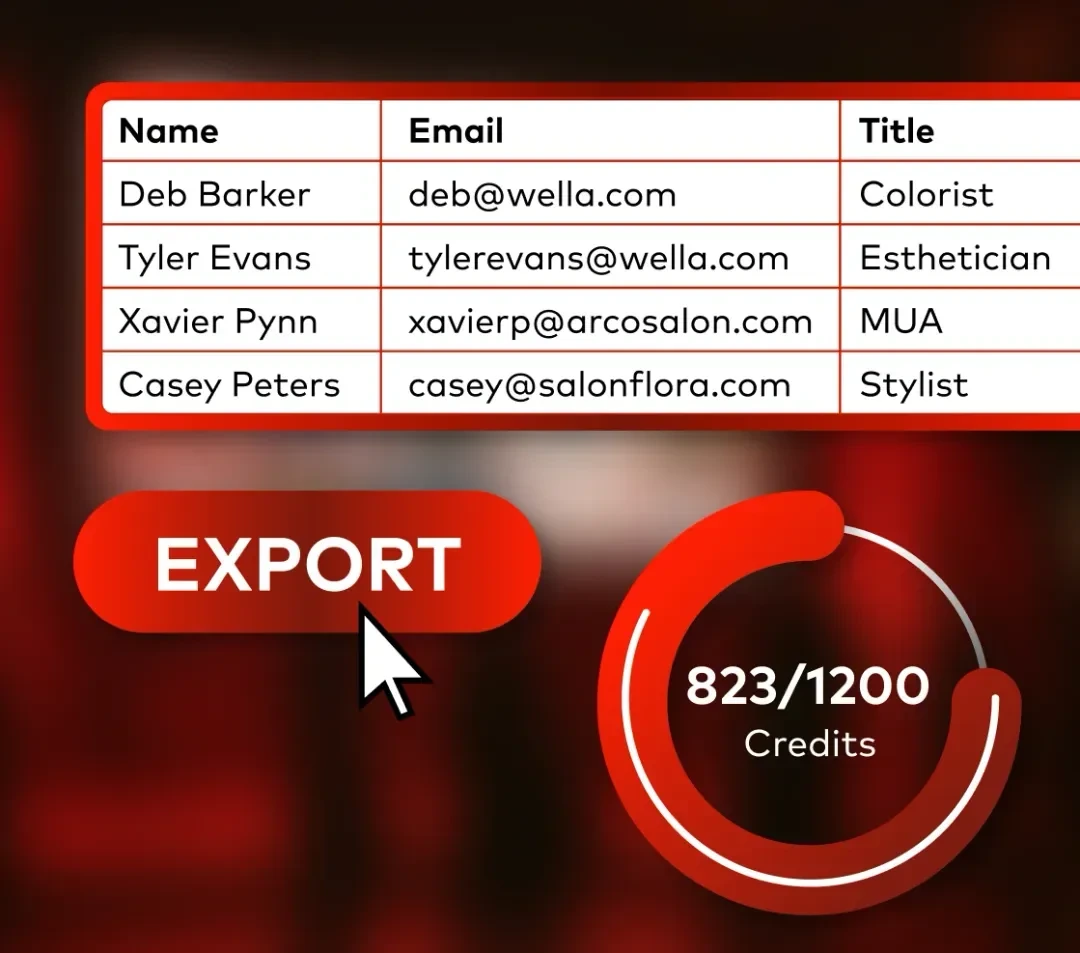
Source: Snapbar
Snapbar Pricing
Snapbar uses a build-your-own quote model. Pricing depends on experience type, customization scope, and expected volume.
All engagements include a custom AI style, branded microsite, lead capture configuration, delivery email design, analytics dashboard, and Customer Success Manager support. Snapbar is not the cheapest option for smaller events, but for enterprise activations, the managed approach removes operational burden from the marketing team.
Use Snapbar if:
- You run corporate events at 500+ attendees and want a fully managed activation, not a self-serve dashboard
- You need AI photo styles that are visually unique to your brand and cannot be replicated by competitors
- Your event marketing goals include quantifiable lead generation with CRM pipeline attribution
- You’re running multi-event annual programs across conferences, trade shows, or global roadshows
4. TouchPix: Best for Operators Who Need Offline AI and Cross-Platform Device Support
When the venue is a basement ballroom with no guest WiFi or a festival field with spotty cellular coverage, cloud-dependent AI effects become a liability. TouchPix solves this by routing its core AI operations (including background removal and AI face replacement) through on-device processing. No cloud connection required for the core AI background experience.
TouchPix runs natively on iOS, iPadOS, macOS, Android, Windows, Linux, and Raspberry Pi, a wider hardware footprint than most photo booth software.
| TouchPix Pros | TouchPix Cons |
|---|---|
| - Offline AI background removal (no internet needed) | - Cloud-based AI styles require separate credit purchases |
| - Runs on Android, Windows, iOS, macOS, Linux | - More complex setup than plug-and-play alternatives |
| - AI backgrounds extend to video and boomerang formats | - 6-month cloud storage limit on base plans |
| - GoPro 7-14 plus Canon, Nikon, Sony DSLR support |
TouchPix: Top 3 Unique Features
- On-device offline AI background replacement and face replacement
- True cross-platform support including Android
- AI environment replacement applied to video clips and boomerangs, not just still photos
The offline AI capability is the main advantage. An operator running a 360 spinning-arm booth at an outdoor venue can deliver AI background replacement in real time without internet connectivity. Guests can also receive their media without venue WiFi via Scanpix 2, TouchPix’s built-in sharing system that uses QR codes over a local network.
TouchPix applies its AI environment replacement to video clips and boomerangs in addition to still photos, one of the few platforms where AI-generated backgrounds work across every content format. The AI Photo Booth feature includes 80+ ready-to-use transformation styles, plus a custom text prompt mode for brand-specific themes. New accounts receive 15 free AI credits to test the system.
Camera support spans GoPro models 7 through 14 (wired and wireless), plus Canon, Nikon, and Sony DSLRs.
TouchPix Pricing
All plans include unlimited devices. Yearly billing saves about 40% versus annualized monthly rates.
- PhotoPass: $439.90/year (2 active events; photos, Photo AI, GIFs only)
- MultiPass: $879.99/year (4 active events; adds video, slow-motion, boomerang)
- MultiPass Pro: $1,407.99/year (8 active events; adds Virtual Booth, Advanced Surveys)
- MultiPass Enterprise: $2,199.99/year (12 active events; adds Mosaic, RAW backup)
AI Pro credits for cloud-based styles are an additional cost, ranging from $12 for 100 credits to $375 for 5,000 credits. A 14-day free trial is available with no credit card required.
Use TouchPix if:
- Your events frequently take place at venues with unreliable or absent WiFi
- You run a mixed-device fleet including Android tablets or non-Apple hardware
- You want AI-generated backgrounds on video clips and boomerangs, not just still photos
- You operate 360-degree booths with GoPro cameras and need native Bluetooth trigger support
5. LumaBooth: Best for Budget-Conscious Operators Who Want AI Portraits Without Prompt Writing
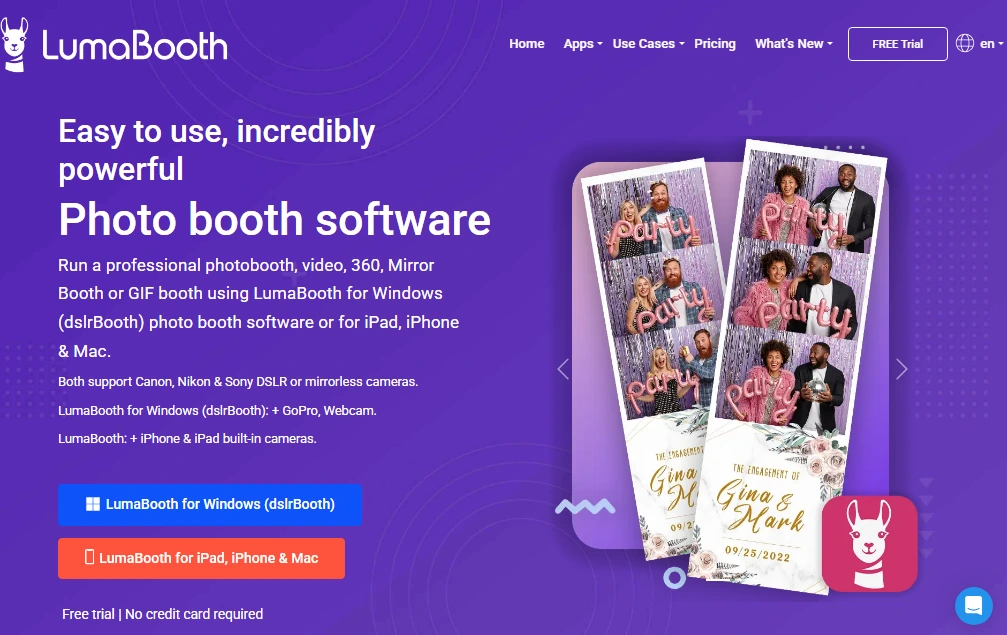
For operators new to AI-generated photo experiences, the biggest barrier is often creative: writing prompts that consistently produce attractive, event-appropriate results. LumaBooth removes this by making every AI experience selection-based rather than creation-based.
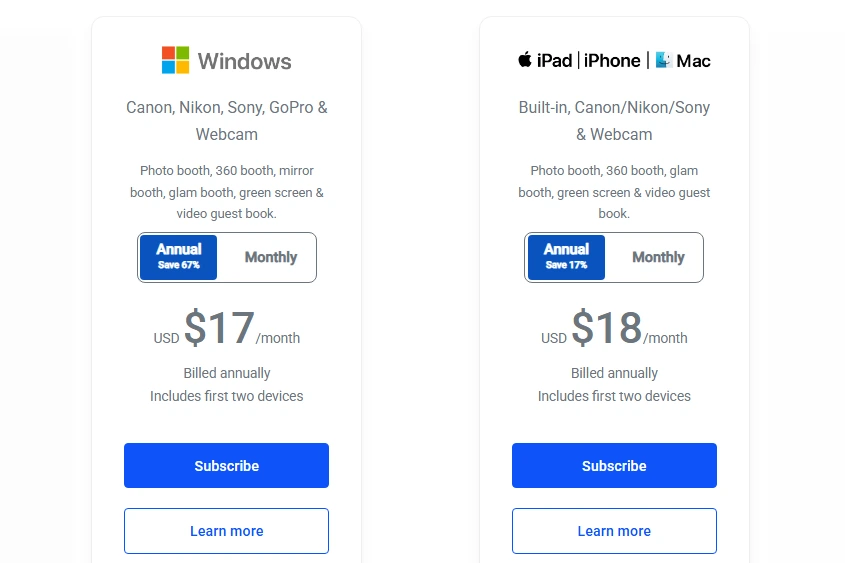
Its library of over 170 AI portrait presets covers superheroes, oil paintings, 3D characters, magazine covers, and more. Guests select a theme on-screen, and the system handles the rest. Starting at $17-18 per month billed annually for two device licenses, it is one of the lowest-priced professional photo booth subscriptions available.
| LumaBooth Pros | LumaBooth Cons |
|---|---|
| - 170+ preset AI portrait styles, no prompt writing needed | - AI credits billed separately from base subscription |
| - Both Windows and Apple supported in one subscription | - No dedicated ring-light hardware ecosystem |
| - Sub-$20/month annual pricing with two device licenses | - Windows version required for full DSLR range |
| - Free trial with no time limit and no credit card required |
LumaBooth: Top 3 Unique Features
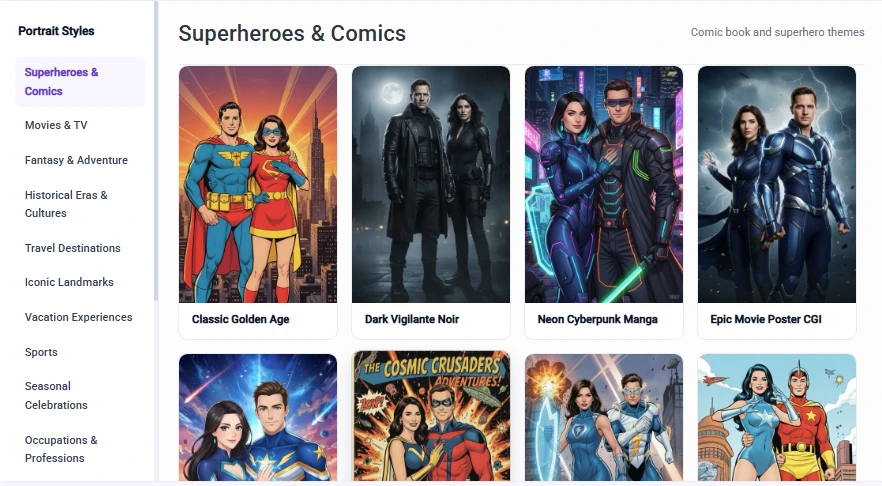
- 170+ AI portrait presets organized by category (Superheroes, Art Styles, Sports, Seasonal)
- Cross-platform Windows and Apple support under one subscription and dashboard
- Sub-$20/month annual pricing with two included device licenses
The preset library is organized by category: Superheroes & Comics, Art Styles, Historical Eras, Sports, Seasonal, and more. Operators configure which presets to display at each event through the LumaBooth Dashboard, with a recommendation of no more than 15 presets per event to keep the guest experience focused. Generation takes about 10 seconds per portrait and works without a green screen.
Source: LumaBooth
For operators who want more control, Custom AI Portraits lets them write free-text prompts, upload reference images, and inject per-guest personalization (a name, jersey number, or event-specific detail) into the generated artwork.
LumaBooth is the only platform that spans Windows and Apple under one brand, one dashboard, and one fotoShare Cloud account. Event settings sync automatically across all connected devices regardless of platform, and the sync feature doubles as a cloud backup for solo operators.
LumaBooth Pricing
- LumaBooth for Windows: $17/month billed annually (~$204/year); $49.99/month on a monthly basis; 2 devices included
- LumaBooth for Apple: $18/month billed annually (~$216/year); $19.99/month on a monthly basis; 2 devices included
AI credits are an add-on: from $14.99/month for 150 credits to $199.99/month for 2,000 credits, with non-expiring pay-as-you-go packs also available. New subscribers receive 20 free AI credits. The free trial has no time limit and requires no credit card; output carries a watermark until a subscription is activated.
Source: LumaBooth
Use LumaBooth if:
- You want to offer AI portrait experiences immediately using a preset library, no prompt engineering required
- You already run Windows hardware and want Apple device flexibility without a second subscription
- You need a budget entry price under $20/month with two included device licenses
- You want a risk-free evaluation with an unlimited free trial before committing
6. BoothLedger: Best for Operators Who Want Every AI Effect Bundled at a Flat Monthly Rate
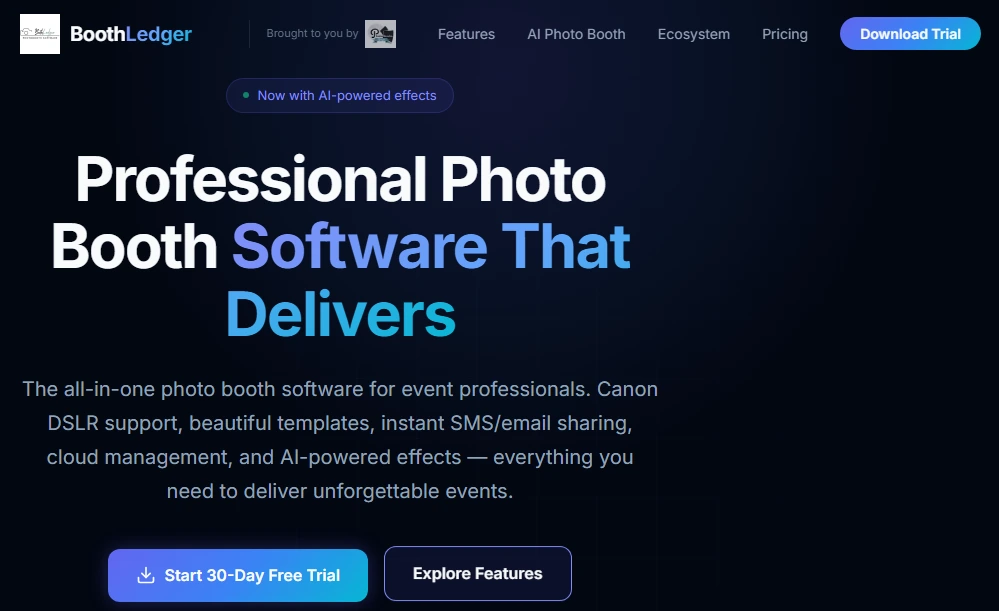
Per-image AI credit costs add up at high-volume events. An operator running a 500-person corporate conference where every guest takes an AI photo can burn through a credit pack in a single evening.
BoothLedger takes a different approach: the €35/month AI Photobooth plan bundles two AI engines, face swap, green screen-free background replacement, and over 50 creative styles into one subscription with no per-image charges.
Built by PhotoBooth Guys, an active Irish event rental company, BoothLedger is a Windows-first platform designed by operators who run events themselves.
| BoothLedger Pros | BoothLedger Cons |
|---|---|
| - Flat-rate AI with no per-image credit costs | - Windows-only (no iOS or Android app) |
| - Two AI engines (Core + Nano Banana Pro) included | - Canon DSLRs only; no Sony or Nikon support yet |
| - Offline-first architecture for unreliable venues | - New entrant (launched April 2026) with limited independent reviews |
| - 2 device licenses included on all plans |
BoothLedger: Top 3 Unique Features
- Dual-engine AI (Core + Nano Banana Pro) bundled at one flat monthly price with no per-image charges
- AI background removal without a green screen, plus face swap, 50+ art styles, and a newspaper front-page template
- Offline-first architecture that queues AI processing and sharing for when connectivity returns
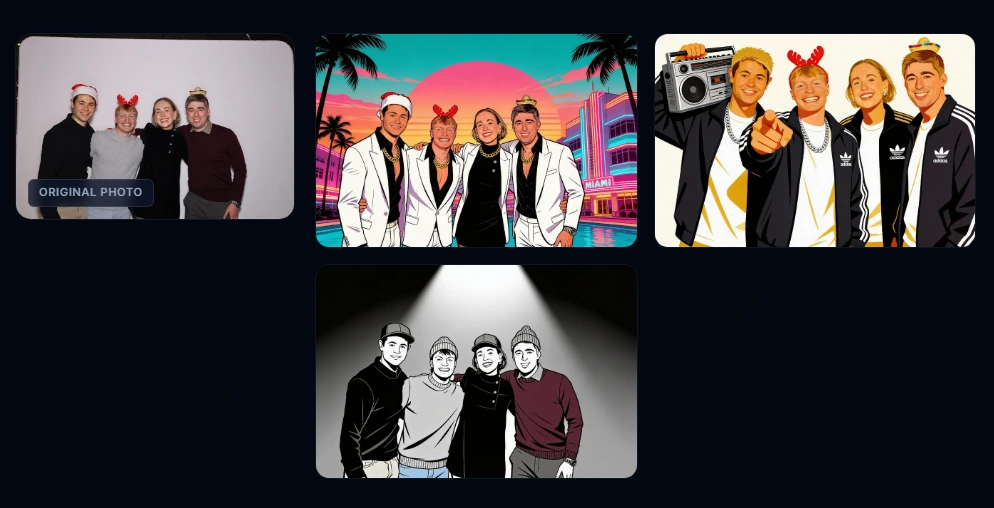
The AI Photobooth plan includes the Core engine (pencil sketches, oil paintings, pop art, Vogue portraits, magazine covers) and Nano Banana Pro (face swap, photo-realistic background replacement). The practical result: an operator running a 500-person conference pays the same €35 as one running a 40-person dinner.
Source: BoothLedger
BoothLedger’s AI background removal detects and isolates subjects automatically, with hundreds of preset scenes or operator-uploaded branded backdrops available for compositing. The newspaper front-page template places guest photos on a custom editorial layout with headlines, a novelty format not widely available elsewhere.
The company reports zero mid-event crashes across 500+ events, with deployments for clients including Google, Microsoft, LinkedIn, and Meta.
BoothLedger Pricing
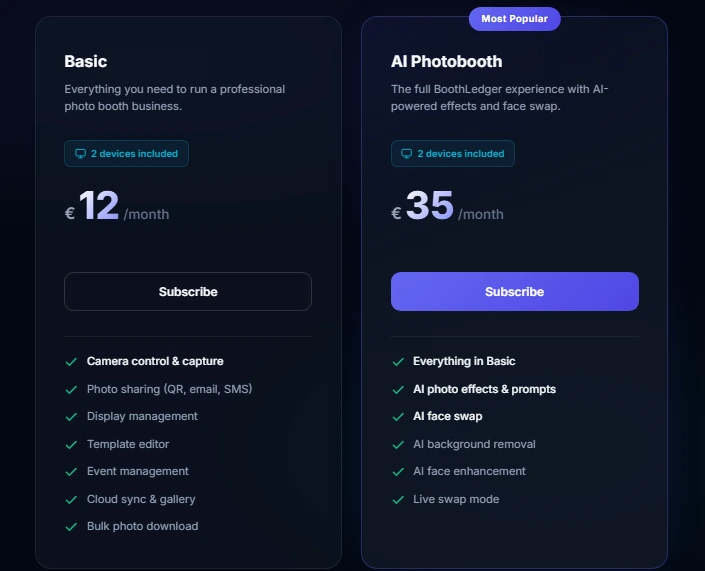
All plans include 2 device licenses. No per-image, per-event, or usage-based charges apply.
- Basic: €12/month (Canon DSLR tethering, template editor, QR/email/SMS sharing, cloud gallery)
- AI Photobooth: €35/month (adds both AI engines, face swap, AI background removal, 50+ art styles, face enhancement)
Annual billing saves about 15%. All prices are in EUR. Data and events are preserved after subscription lapses; resubscribing restores access without data loss.
Source: BoothLedger
Use BoothLedger if:
- You run a Windows-based Canon DSLR setup and want flat-rate AI with no per-image credit surprises
- You frequently work at venues with unreliable internet and need AI effects to keep working offline
- You run high-volume events where per-image AI costs would otherwise add up
- You want novelty output formats like newspaper front-pages and trading cards bundled at the base price
7. AI PhotoBooth: Best for Pay-Per-Use AI Photo Experiences With No Monthly Subscription
Not every photo booth operator runs events every week. For seasonal professionals, occasional brand activators, and operators testing AI-generated backgrounds for the first time, a recurring monthly subscription means paying for months between events.
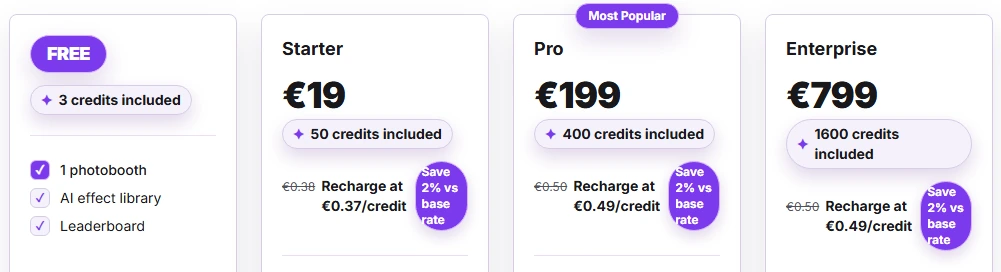
AI PhotoBooth eliminates this with a credit-based model: operators buy credits (roughly €0.37-0.50 each) and spend them only when they run events. No monthly fee, no annual commitment, no idle subscription costs between events. A free plan with 3 credits at €0 and no credit card required makes it the lowest-barrier entry point in the category.
| AI PhotoBooth Pros | AI PhotoBooth Cons |
|---|---|
| - No recurring subscription; pay only when you run events | - No on-device/offline AI processing |
| - Four distinct AI transformation types in one platform | - Per-credit costs can exceed subscription value at high volume |
| - GDPR-native with EU infrastructure | - Newer platform with limited independent review presence |
| - 19-language support for international events |
AI PhotoBooth: Top 3 Unique Features
- Credit-based pricing with no monthly subscription and a free plan to start
- Four structurally different AI modes: Live Edit, Face Swap, Virtual Try-On, and Product Placement
- GDPR-native compliance with EU data residency and built-in consent management
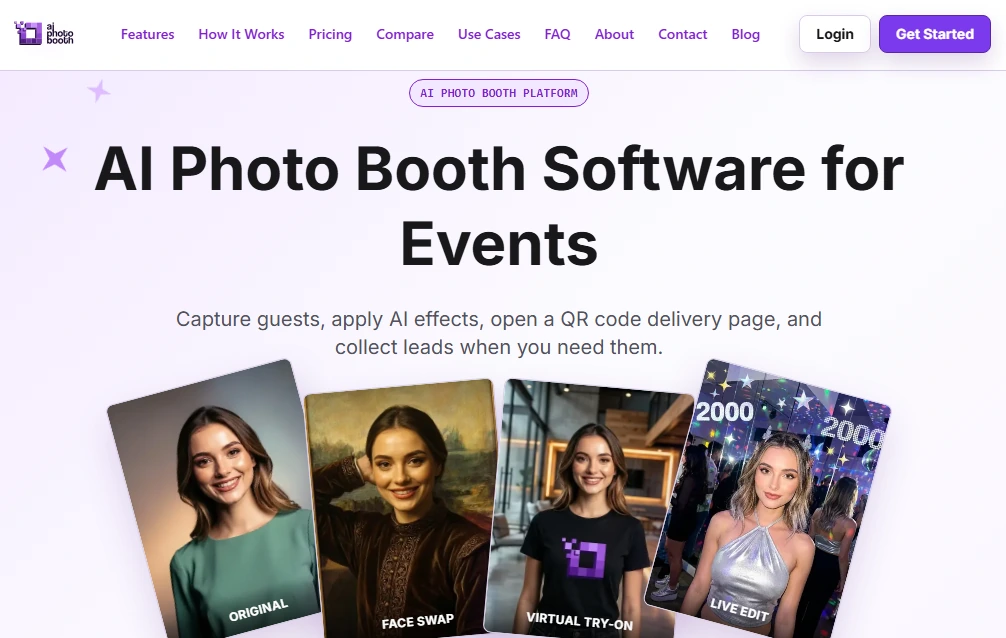
The platform offers four AI transformation types from one dashboard. Live Edit uses open-ended text prompts for scene generation. Face Swap Templates provide brand-controlled composites with pre-loaded character sets. Virtual Try-On digitally places guests in garments from a brand’s catalog. Product Placement composites sponsor logos and products into guest photos.
The AI stack runs across multiple providers (Fal.ai, Gemini, Replicate) with automatic failover, reducing single-provider downtime risk.
For European events, AI PhotoBooth runs on Cloudflare’s EU edge network with built-in consent steps, configurable data retention, and per-visitor deletion links, supporting 19 languages. The platform was recognized at WebSummit Alpha Startup in 2024 and 2025.
AI PhotoBooth Pricing
Pay-as-you-go credit model, not a subscription. Standard effects cost 1 credit per generation; Virtual Try-On costs 3 credits.
- Free: €0, 3 credits, 1 photobooth, no credit card required
- Starter: €19 (one-time), 50 credits, 1 photobooth, adds event galleries
- Pro: €199 (one-time), 400 credits, up to 5 photobooths, adds branding, custom AI effects, lead capture, live mosaic wall
- Enterprise: €799 (one-time), 1,600 credits, up to 100 photobooths, adds white-label software, photo sales, Scan & Go, Virtual Try-On, AI video
Source: AI PhotoBooth
Recharge packs are available at approximately €0.37-0.49/credit.
Use AI PhotoBooth if:
- Your event schedule is irregular or seasonal and a monthly subscription means paying for idle months
- You need multiple AI transformation types (scene generation, face swap, virtual try-on, product placement) in one platform
- Your events are in Europe or your clients have GDPR procurement requirements
- You want the lowest possible entry point to evaluate AI-generated backgrounds before committing to a paid plan
Final Verdict
Every platform on this list delivers AI-generated backgrounds, but the best choice depends on your business model, hardware setup, and event volume.
Our top picks for the three most common scenarios:
- Simple Booth: If you want a self-operating AI photo booth with integrated ring-light hardware, brand design tools, and lead capture that turns event interactions into measurable marketing results. Start your free trial with Simple Booth.
- Snappic: If you’re a growing operator managing multiple booth formats (iPad, 360°, Glambot, mirror) and need one subscription covering everything, with flexible per-event pricing for variable schedules.
- LumaBooth: If you want to start offering AI portrait experiences immediately at the lowest entry price, with 170+ preset styles and no prompt writing required.
For managed enterprise activations, Snapbar removes the creative and operational burden. For offline operations at venues with poor connectivity, TouchPix processes AI on-device. For flat-rate AI costs at high volume, BoothLedger bundles everything without credit charges. And for pay-per-use flexibility with no recurring fees, AI PhotoBooth aligns costs to event volume.
Best Photo Booth Software With AI-Generated Backgrounds FAQ
Which photo booth software is best for AI-generated backgrounds without a green screen?
Simple Booth, Snappic, TouchPix, LumaBooth, and BoothLedger all offer AI background replacement without a physical green screen. Simple Booth’s AI Effects use Nano Banana models with automatic identity preservation and zero-cost prompt testing. TouchPix stands out for processing AI backgrounds on-device without an internet connection, the most reliable option for venues with poor connectivity.
Is there free photo booth software with AI-generated backgrounds?
AI PhotoBooth offers a free plan with 3 AI credits at no cost and no credit card required. LumaBooth provides an unlimited free trial (with watermarked output) plus 20 free AI credits on signup. TouchPix offers a 14-day free trial with 15 free AI credits. Simple Booth offers a 7-day free trial with 25 free AI credits. All are viable options for testing AI-generated backgrounds before committing to a paid plan.
Do AI-generated backgrounds work offline without the internet?
TouchPix and BoothLedger both support offline AI processing. TouchPix routes background removal and AI face replacement through on-device processing, requiring no cloud connection. BoothLedger queues AI processing and share requests offline, syncing when connectivity returns.
Most other platforms, including Simple Booth and Snappic’s cloud AI modes, require an active internet connection for AI-generated effects.
How much do AI credits cost for photo booth software?
Pricing varies by platform. Simple Booth charges $0.10 per credit with no expiration on purchased credits. Snappic charges $15 per 100 background removal credits and $20 per 200 AI-FX credits. TouchPix ranges from $12 for 100 credits to $375 for 5,000. LumaBooth starts at $14.99/month for 150 credits. BoothLedger is the only platform that bundles unlimited AI effects at a flat €35/month with no per-image charges.
Which AI photo booth software supports the most device types?
TouchPix has the widest hardware support, running natively on iOS, iPadOS, macOS, Android, Windows, Linux, and Raspberry Pi. LumaBooth covers both Windows and Apple (iPad/iPhone/Mac) under one subscription. BoothLedger is Windows-only. Simple Booth is iPad-only. Snapbar and AI PhotoBooth are browser-based, requiring no dedicated hardware or app installation.
Can AI photo booth software capture leads and marketing data?
Yes. Simple Booth captures lead data with opt-in rates as high as 87-89% and integrates with MailChimp natively, with an open API for custom CRM delivery. Snapbar exports lead data in CRM-ready CSV format for Salesforce, HubSpot, and Marketo. AI PhotoBooth includes email forms, quizzes, and opt-in fields on its Pro plan and above. Snappic offers client analytics and custom surveys on Business tier and above.
What is the most affordable photo booth software with AI backgrounds?
LumaBooth offers the lowest base subscription at $17-18/month billed annually for two device licenses, with AI credits as a separate add-on.
BoothLedger’s AI Photobooth plan at €35/month includes all AI effects with no per-image charges. AI PhotoBooth has no monthly fee at all, with credits starting at €19 for a 50-credit one-time purchase. For operators with irregular schedules, Snappic’s $29 per-event license provides access without any subscription commitment.
Which platform is best for enterprise brand activations with AI-generated backgrounds?
Snapbar is designed for enterprise activations, offering custom AI styles created per brand by an in-house creative team, browser-based delivery scaling to 50,000+ attendees, and integrated lead capture with CRM-ready export.
Simple Booth’s Pro and Select tiers also serve enterprise use cases with moderation, age gating, compliance tools, and security questionnaire support, while maintaining a self-serve model that gives marketing teams direct control over configuration.
Keep reading
 Best Of
7 Best Photo Booth Software with Video Message and Slo-Mo Capture [2026]
Booths that capture heartfelt video notes and buttery slo-mo. The moving stuff.
 Best Of
6 Best Photo Booth Software With QR Code Sharing [August 2026]
Booths that beam every snap to a phone with a quick scan. QR sharing done right.
 Best Of
7 Best Photo Booth Software With Real-Time Analytics and Dashboards [August 2026]
Booths that show the numbers as the party happens. Live dashboards, real insight.