7 Best Photo Booths for Permanent Installations [June 2026]

Photo booths are no longer just a rental add-on for Saturday night weddings.
Hotels, bars, restaurants, entertainment venues, and retail spaces now treat photo booths as permanent fixtures: guest engagement tools that capture leads, generate social media content, and create memorable experiences without a dedicated staff member. The math works. A well-placed permanent booth can collect thousands of email addresses per month, produce organic social posts daily, and (in some configurations) generate direct revenue from walk-up guests paying per session.
But the requirements for a permanent installation differ from a one-night event rental.
The hardware needs to withstand months or years of continuous use, not just a four-hour reception. The software needs to run unattended, recover from connectivity drops, and accept remote management. The economics need to work over a multi-year horizon, not a single booking. And the guest experience needs to stay fresh for regulars who walk past the booth every week, not just first-time visitors at a party.
We researched and tested the leading photo booth platforms to find the best options for permanent installations across a range of use cases:
- A self-running iPad system with integrated hardware and marketing tools
- A pay-per-session platform that turns installations into passive income streams
- A customizable Windows solution for enterprise kiosk deployments
- Cross-platform software covering both Windows and iPad hardware
- A perpetual-license option for operators who want to pay once, not forever
- A free, open-source solution for technically capable builders
- A commercial kiosk with integrated payment hardware
Let’s look at each platform and what makes it the right fit for a specific type of permanent installation.
| Best Photo Booths for Permanent Installations | |
|---|---|
![7 Best Photo Booths for Permanent Installations [June 2026]](/content/best-photo-booths-for-permanent-installations/image1.webp) | Simple Booth Best for venue operators wanting a self-running iPad photo booth with integrated ring-light hardware, lead capture, and remote management. |
![7 Best Photo Booths for Permanent Installations [June 2026]](/content/best-photo-booths-for-permanent-installations/image2.webp) | Snappic Best for operators building passive income from permanent installations through built-in pay-per-session monetization via Stripe. |
![7 Best Photo Booths for Permanent Installations [June 2026]](/content/best-photo-booths-for-permanent-installations/image3.webp) | Breeze Remote Pro Best for enterprise operators needing full UI customization, integrated payment processing (card and cash), and offline architecture on Windows. |
![7 Best Photo Booths for Permanent Installations [June 2026]](/content/best-photo-booths-for-permanent-installations/image4.webp) | LumaBooth Best for operators needing cross-platform flexibility (Windows and iPad) with five distinct capture formats under a single subscription. |
![7 Best Photo Booths for Permanent Installations [June 2026]](/content/best-photo-booths-for-permanent-installations/image5.webp) | Darkroom Booth Best for Windows operators who want a one-time software purchase with no ongoing subscription fees and built-in remote monitoring. |
![7 Best Photo Booths for Permanent Installations [June 2026]](/content/best-photo-booths-for-permanent-installations/image6.webp) | Photobooth Project Best free option for technically capable operators who want full control over a permanent installation with zero ongoing software costs. |
![7 Best Photo Booths for Permanent Installations [June 2026]](/content/best-photo-booths-for-permanent-installations/image7.webp) | Foto ATM Best for high-traffic commercial venues wanting dedicated kiosk hardware with integrated payment processing and real-time revenue analytics. |
What Is a Permanent Photo Booth Installation?
A permanent photo booth installation is a photo booth system deployed at a fixed location for continuous, long-term use, as opposed to a temporary setup rented for a single event. These installations are typically found in hospitality venues (hotels, bars, restaurants), entertainment spaces (arcades, bowling alleys, theme parks), retail locations, corporate lobbies, and cultural institutions (museums, aquariums).
The defining characteristics of a permanent installation include:
- Unattended operation: the booth runs without a dedicated attendant during business hours
- Durability: hardware must withstand daily use over months or years
- Remote management: operators need to monitor, update, and troubleshoot from off-site
- Revenue potential: many permanent installs generate income through guest payments, lead capture, or advertising
- Fresh experiences: returning guests need variety to keep engaging with the booth
Choosing the right platform depends on your venue type, technical capabilities, budget model (subscription vs. one-time purchase), and what you want the booth to accomplish beyond taking photos.
How to Choose the Best Photo Booth for a Permanent Installation
Here’s a short checklist to help you find the right platform for your venue:
- Hardware Durability: Your booth will run daily for months or years. Prioritize commercial-grade construction over lightweight event hardware designed for occasional transport.
- Unattended Reliability: The software should handle connectivity drops, recover from errors, and require minimal day-to-day attention from staff.
- Remote Management: You won’t be standing next to the booth. Look for platforms that let you monitor status, swap content, and troubleshoot from any device.
- Revenue Model Fit: Decide whether the booth is a marketing tool (lead capture, social sharing) or a direct revenue generator (pay-per-session). Not every platform supports both.
- Long-Term Economics: Calculate the total cost over 2-3 years, not just the monthly price. Subscription models, perpetual licenses, and hardware costs create very different long-term economics.
- Guest Experience Freshness: Returning guests need reasons to engage again. AI effects, rotating themes, and varied capture formats keep permanent installations relevant week after week.
How We Picked the Platforms
We started by identifying the most-discussed photo booth platforms among operators running permanent installations, drawing from industry forums, user reviews, and operator communities. We focused on platforms with documented permanent installation use cases rather than those designed exclusively for event rentals.
We then evaluated each platform across four criteria tailored to permanent deployment:
- Unattended Operation: Can the booth run reliably without staff present for extended periods?
- Remote Management: How easily can operators monitor and update the booth from off-site?
- Long-Term Economics: What does the total cost look like over a multi-year installation?
- Guest Engagement: Does the platform keep the experience fresh for repeat visitors?
This produced a list of seven platforms, each excelling at a different permanent installation scenario. Let’s dive in.
1. Simple Booth: Best Premium iPad Photo Booth for Venues Wanting Integrated Hardware, Lead Capture, and Remote Management
When a venue decides to install a permanent photo booth, the biggest risk isn’t choosing the wrong features; it’s choosing a system that breaks down, looks cheap, or requires constant babysitting. A hotel lobby, a restaurant entrance, or an entertainment venue needs something that runs itself, looks like it belongs there, and delivers value beyond just photos.
That’s where Simple Booth comes in.
Source: Simple Booth
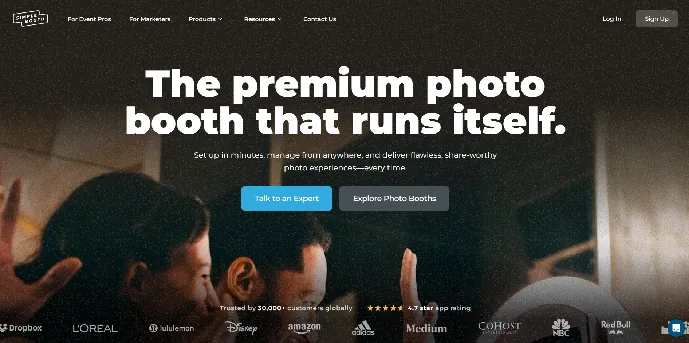
Simple Booth is a photo booth system pairing a subscription-based iPad app (the HALO app) with proprietary ring-light hardware (the HALO kits), plus a browser-based Virtual Booth product for digital activations. It has 30,000+ customers globally, a 4.7-star App Store rating from 2,400+ ratings, and 40 million+ moments captured since 2012. Its core features for permanent installations include:
- HALO Install Kit with a heavy-duty steel wall mount designed for permanent venue deployments
- 112 LEDs producing up to 2,100 lumens in a machined aluminum chassis rated for 50,000 hours of operation
- Remote management via an online dashboard that syncs preset changes to the iPad without exiting booth mode
- Offline mode that queues sessions and delivers them when connectivity returns
- Customizable lead capture with an 87% opt-in rate when guests receive their photos
- AI effects, background replacement, DSLR camera support, and a built-in Layout Designer for template creation
| Simple Booth Pros | Simple Booth Cons |
|---|---|
| Machined aluminum hardware built for permanent use | iPad-only; no Android or Windows support |
| 1-minute setup with tool-less faceplate | Some users report post-update bugs in App Store reviews |
| 4.7-star rating from 2,400+ reviews | Lower tiers exclude custom branding and lead capture |
| Remote dashboard management with offline resilience | AI effects require per-credit purchases beyond plan bonuses |
| Lead capture and marketing analytics |
Why Choose Simple Booth for Permanent Installations?
Simple Booth offers a dedicated Permanent Install Guide and an Install Kit with a heavy-duty steel wall mount, signaling that permanent deployment is a core use case, not an afterthought. Top venues including Ole Red Bar & Restaurant, Creole Cuisine, and Treetop Golf run Simple Booth as permanent installations.
To see why 30,000+ customers trust Simple Booth, start a free trial.
Hardware Built for Permanence
The HALO chassis is machined from a single billet of anodized aluminum with a patented ring-light system.
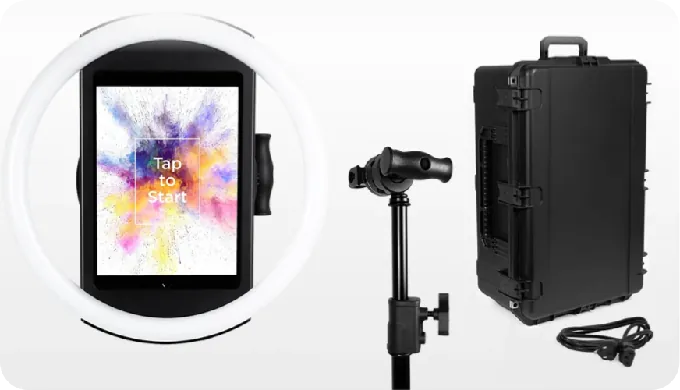
The LEDs are rated for up to 50,000 hours, which translates to over five years of continuous 24-hour operation. A concealed built-in USB-C cable keeps the iPad charged without dangling cables, and the tool-less faceplate means maintenance swaps take seconds.
For international venues, HALO supports dual voltage (110V-240V) and requires only a plug adapter. Rendering optimizations deliver image previews up to 12x faster, keeping the guest experience responsive during high-traffic periods.
Remote Management and Unattended Operation
Operators configure and update presets remotely via the online dashboard, with changes syncing to the iPad without exiting booth mode.
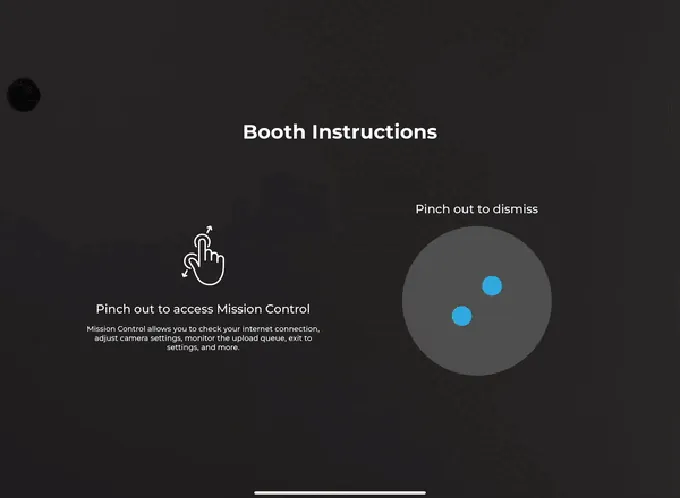
The Mission Control overlay, triggered by a two-finger pinch gesture, lets on-site staff monitor device health and adjust camera settings without disrupting the guest experience. iPad Guided Access prevents guests from navigating away from the booth app.
Source: Simple Booth
The booth interface lets guests navigate the entire photo experience without attendant guidance, a critical requirement for permanent installations where no staff is stationed at the booth. Individual upload privacy settings let guests choose whether their photos appear in the public gallery, giving venues control over content visibility while respecting guest preferences.
Lead Capture and Marketing Tools
For venues, the real value of a permanent photo booth goes beyond entertainment. Simple Booth captures opt-in rates as high as 87-89% through its data capture form, which collects email, phone, and custom fields as a natural part of receiving a photo.
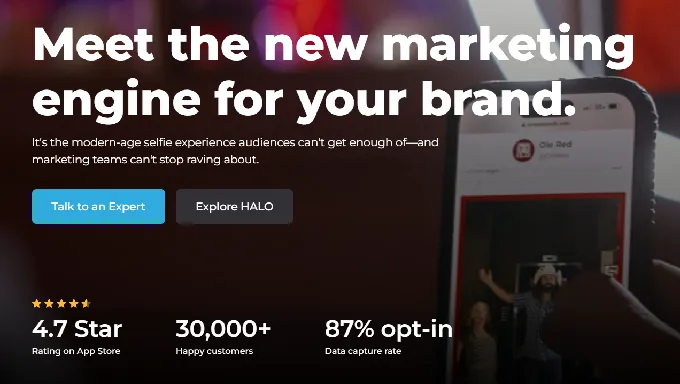
Data syncs natively with MailChimp or exports via CSV and an Open API on Pro+ plans. The analytics dashboard tracks gallery views, social shares, and participant demographics (at Select tier via face detection).
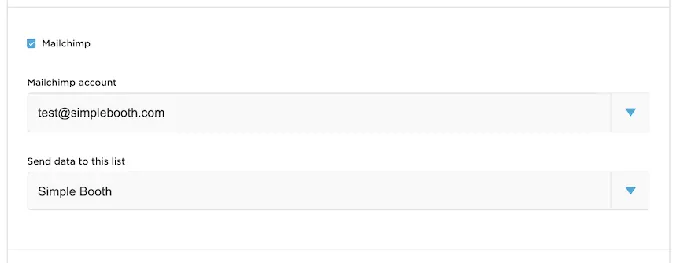
Treetop Golf built 150,000 unique email addresses across its permanent photo booth installations, turning a guest entertainment feature into a measurable marketing channel. (Simple Booth)
AI and Creative Tools
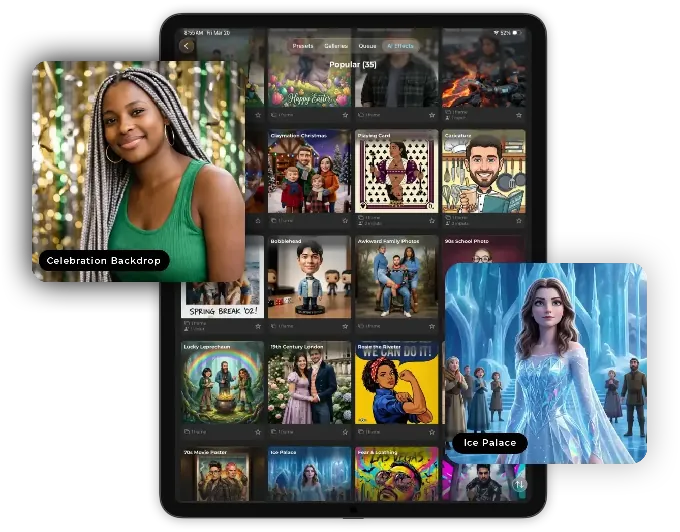
AI Effects powered by Nano Banana models transform guest photos using text prompts, giving returning guests a different experience each visit. The platform automatically handles identity preservation and likeness, so operators don’t need prompt engineering expertise to keep guests recognizable.
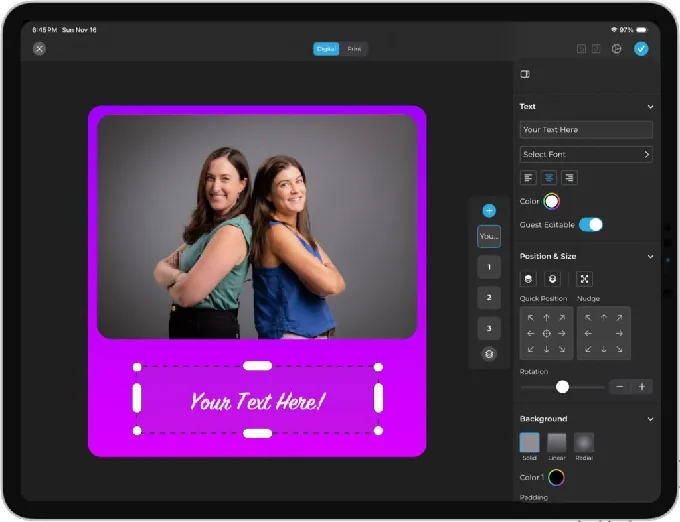
The Layout Designer lets operators create branded templates with layers, fonts, gradients, and embedded QR codes directly in the app or dashboard, eliminating the need for external design software.
DSLR/mirrorless camera support (Canon, Core plan and above) connects via USB for long-event reliability or wirelessly over Wi-Fi for flexible venue placement. Background Blur on Core plans and above adds a bokeh effect directly in the app, delivering polished portraits without dedicated camera equipment. All effects, filters, and capture modes work together, including with DSLR integration and in offline mode, so operators don’t need to navigate complex feature compatibility rules when configuring a permanent booth.
Creole Cuisine has captured over 200,000 photos through its permanent Simple Booth installation, with management noting they don’t see many competitors offering this kind of guest engagement. (Simple Booth)
Simple Booth Pricing
Simple Booth uses a per-license subscription model with weekly, monthly, and yearly billing:
- Lite at $14.99/week, $290/year: basic features with ads; excludes custom branding, analytics, and lead capture
- Core at $49/month| $490/year: removes ads, adds DSLR support, video, background replacement, AI effects, and Virtual Booth
- Plus at $99/month, $990/year: adds custom branding, analytics, guest-editable text layers, and custom AI effects
- Pro at $149/month, $1,490/year: adds lead capture, API integration, phone support, moderation, and age gate
- Select at $249/month, $2,490/year: adds custom legal terms, security questionnaires, and demographic analytics
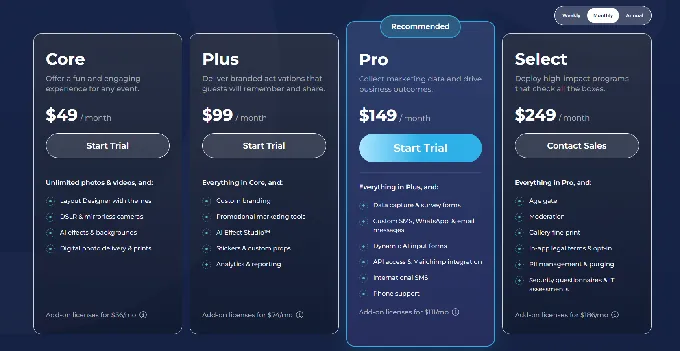
Additional devices require add-on licenses at the plan rate. AI credits cost $0.10 each beyond plan bonuses. HALO hardware kits (sold separately at buy.simplebooth.com) start at approximately $2,090 for the Event Kit. A 7-day free trial is available.
Use Simple Booth If:
- You want an integrated hardware-software system designed to look professional in a venue setting
- You need reliable unattended operation with offline resilience and remote management
- Lead capture and marketing analytics are as important as the guest photo experience
- You want AI effects and creative tools that keep the experience fresh for returning guests
- You’re willing to invest in dedicated hardware for long-term durability
- You want an accessible entry point starting at $14.99/week with the ability to scale features as your installation evolves
Why Simple Booth Topped Our List
We’ll be upfront: Simple Booth is our platform, so take our #1 ranking with that context. That said, our recommendation here is specific. Simple Booth tops this list for venues that want an iPad-based system where the hardware, software, and marketing tools are designed together, and where the booth needs to function as both a guest experience and a lead generation engine without staff supervision. For operators who need Windows compatibility, perpetual licensing, or built-in cashless payment processing, other platforms on this list are better fits. Read on to find the right match for your installation.
2. Snappic: Best for Building Passive Income From Permanent Installations With Built-in Pay-Per-Session Monetization
For operators who want their permanent photo booth to generate direct revenue from every guest interaction, the central question is monetization infrastructure. How does a guest pay at the booth when no attendant is present?
Source: Snappic
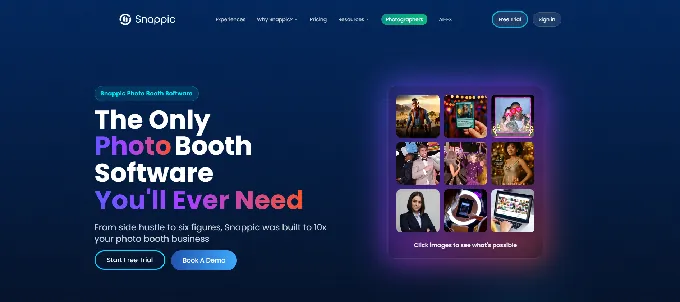
Snappic answers this with a Stripe-powered in-booth payment system where guests scan a QR code, pay on their phone, and the session unlocks. Combined with real-time event analytics and LiveConnect remote management, Snappic provides the infrastructure to run a photo booth as a self-sustaining revenue source.
| Snappic Pros | Snappic Cons |
|---|---|
| In-booth Stripe payment collection | Business plan ($189/month) required for payments and AI |
| LiveConnect browser-based remote control | AI credits billed separately per use |
| Multiple AI engines (AI-FX, PersonaFX, BananaFX) | Grey-label app only on Scale plan ($399/month) |
| Scale plan with sub-account management | Settings interface can feel overwhelming for new operators |
Snappic: Top 3 Unique Features
- In-booth pay-per-session monetization via Stripe QR payments
- Multiple AI transformation engines for repeat-visit freshness
- Sub-account management for multi-venue operations on the Scale plan
Snappic’s payment system is available on Business plans and above. Operators set the session price, and guests complete checkout on their own phones before the session begins. For a venue install running seven days a week, this turns a promotional amenity into a profit center.
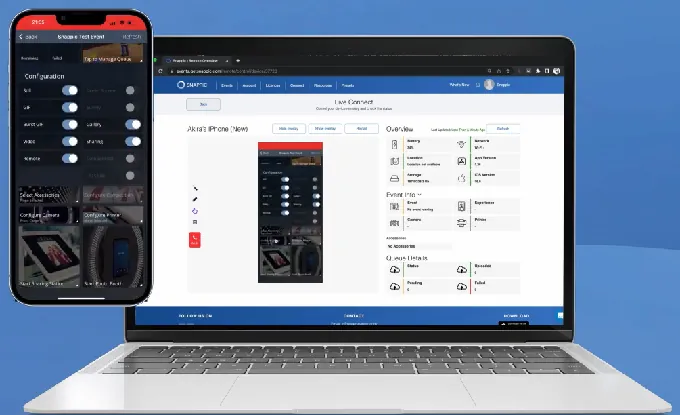
LiveConnect provides browser-based remote control from any device, letting operators switch presets, verify the booth is running, and adjust settings without visiting the venue. The analytics layer captures total sessions by type, shares by channel, peak engagement windows, and estimated reach per location.
Source: Snappic
For permanent venues where returning guests need variety, Snappic runs multiple AI engines: AI-FX with art styles and seasonal themes, PersonaFX for avatar generation, and BananaFX powered by Google Gemini for fully AI-regenerated images. Operators can rotate themed presets to match game days, holidays, and events, giving regulars a different output each visit.

Source: Snappic
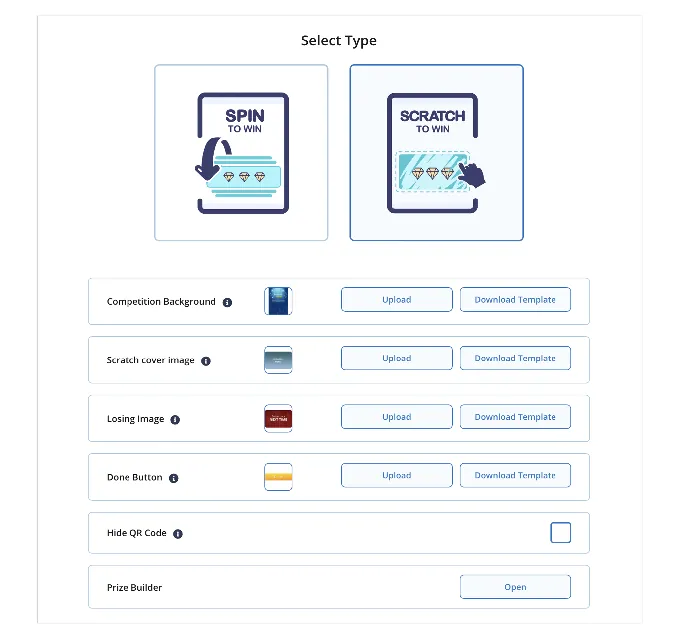
The Competition system (Scratch and Spin) adds gamified prize mechanics as an additional engagement driver.
Source: Snappic
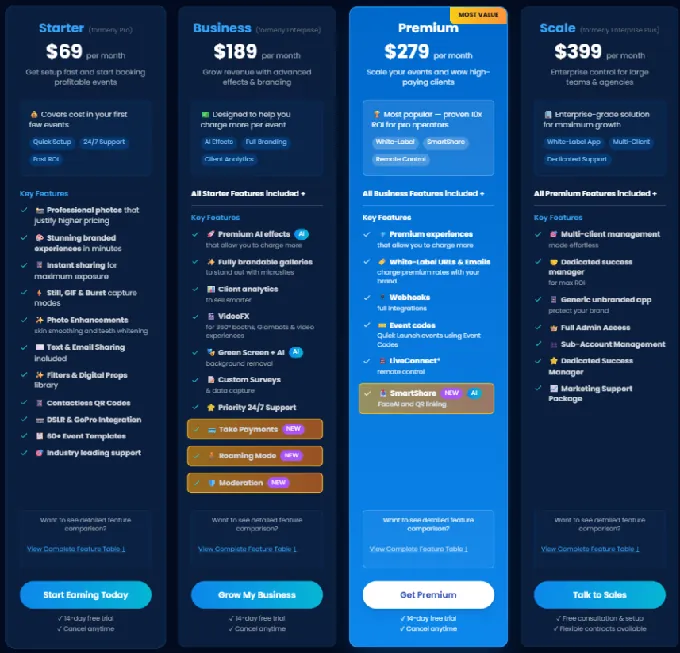
Snappic Pricing
- Business at $189/month: 1 booth license, full AI suite, Stripe payments, analytics, moderation; additional licenses at $109/month
- Premium at $279/month: adds white-label, webhooks, LiveConnect, SmartShare AI (400 credits)
- Scale at $399/month: adds sub-accounts, grey-label app, dedicated success manager
Source: Snappic
A 14-day free trial is available with no credit card required. Per-event licenses ($29-$79 for 48 hours) are available for testing before committing.
Use Snappic If:
- You want the booth to collect payment from guests automatically via in-booth Stripe transactions
- You’re managing permanent installations across multiple venues and need real-time session and revenue data per location
- You want varied AI experiences that keep returning guests engaged week after week
- You’re scaling toward a multi-venue operation and need sub-account management and a dedicated success manager
3. Breeze Remote Pro: Best for Enterprise Operators Needing Deep Customization, Integrated Payments, and Offline-First Architecture
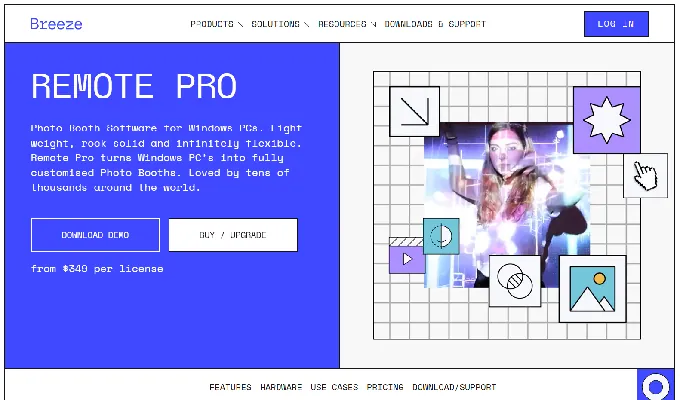
When a permanent installation requires full control over every screen, every payment flow, and every byte of guest data, most consumer-grade photo booth software hits its ceiling. Breeze Remote Pro is built for the operator who needs no ceiling.
Source: Breeze Remote Pro
This Windows-based platform, in active development since 2001 and trusted by tens of thousands of operators across 80 countries, gives technically proficient operators control over every element of the booth experience: built-in payment processing for both contactless cards and cash, and an architecture that runs fully offline with no data touching a third-party server.
| Breeze Remote Pro Pros | Breeze Remote Pro Cons |
|---|---|
| Full UI customization with no design constraints | Steep learning curve; rewards technical operators |
| Integrated MDB and Stripe QR payments | Windows-only; no iPad or Mac support |
| Fully offline operation with local data encryption | Cloud features require separate Breeze Cloud subscription |
| Perpetual license at $349 per device |
Breeze Remote Pro: Top 3 Unique Features
- Full-file UI customization where every screen is a standard image/video designed in external tools
- Two-path payment processing: hardware (Nayax MDB for contactless and cash) and software (Stripe QR codes)
- Offline-first architecture with no third-party data transmission
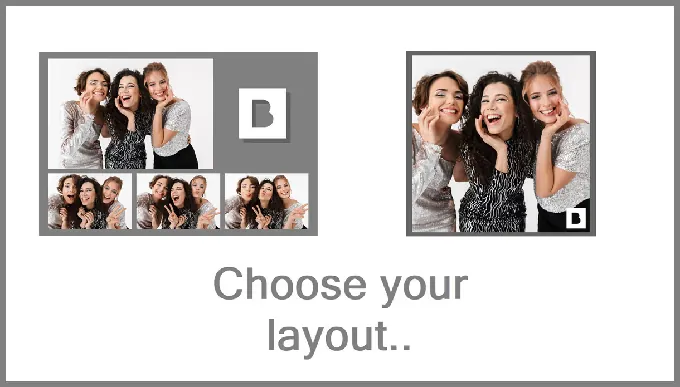
Every screen in the booth flow is a standard image or video file that operators design in Photoshop, After Effects, or any tool they prefer, then placed in a folder.
The Touch Screen Designer layers interactive zones with precise placement, including hidden operator control zones outside the guest-visible area. A profile system lets a single kiosk offer multiple distinct booth experiences from a menu screen.
Source: Breeze Remote Pro
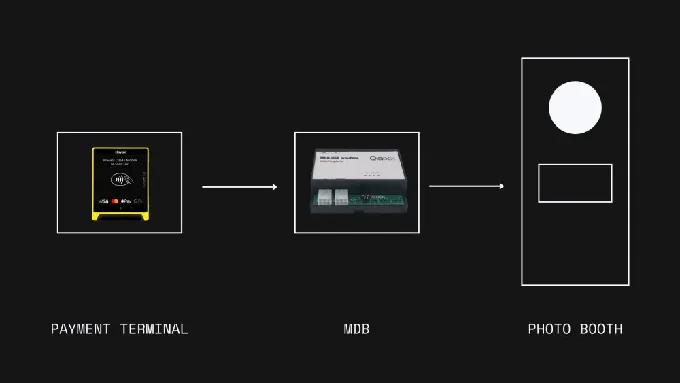
For revenue-generating permanent installs, Breeze Remote Pro offers a two-path payment architecture. The hardware path uses the MDB protocol via a Nayax VPOS reader for contactless cards, Apple Pay, and Google Pay, plus cash via MDB-compatible bill and coin acceptors.
Source: Breeze Remote Pro
The MDB integration allows the software to request exact payment amounts and confirm authorization before the session begins, making reprints and multi-tier pricing possible within the same unattended session. The software path uses Stripe QR codes via Breeze Cloud: guests scan, pay on their phone, and the booth unlocks with no physical card reader required.
The entire software runs offline by default. No personal data or images are transmitted to third parties. Guest data is encrypted locally. For operators in regulated environments or locations with unreliable internet, this is often a primary selection criterion.
Breeze Remote Pro Pricing
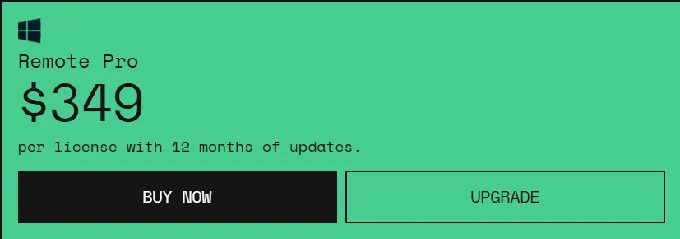
- Remote Pro at $349 per device: one-time perpetual license with 12 months of updates included; software continues to function after the update period
- Breeze Cloud at free Basic tier (50GB storage, QR codes, gallery); Pro tier at $39.99/month for custom domains, webhooks, and API access
- Breeze FX: pay-per-image AI effects (Face Swap from $0.032/image, AI Background Removal from $0.195/image)
Source: Breeze Remote Pro
The perpetual license means a fleet of five booths costs $1,745 in software, with no recurring fees required to keep the core software running.
Use Breeze Remote Pro If:
- You need control over every screen, interaction, and payment flow in a Windows-based permanent kiosk
- Your installation needs to generate revenue unattended via contactless payments, cash, or QR checkout
- You operate in a venue with strict data governance requirements where offline-first architecture is mandatory
- You want perpetual license economics rather than indefinite subscription costs
4. LumaBooth: Best for Operators Needing Cross-Platform Support (Windows and iPad) With Versatile Capture Formats
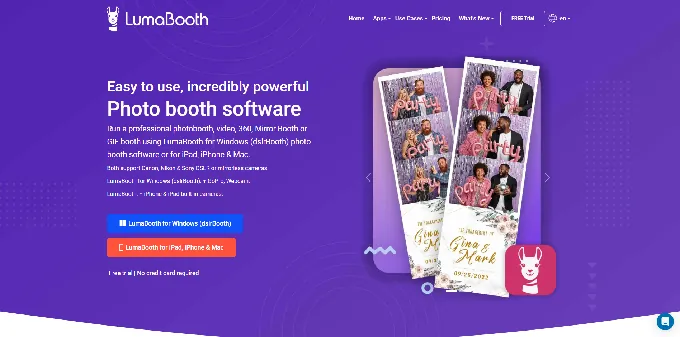
Permanent installation operators often manage a portfolio of venues with mixed hardware: some locations have Windows PCs embedded in custom kiosk cabinets, while others use open-face iPad setups.
Source: LumaBooth
LumaBooth (by Lumasoft, previously sold as dslrBooth on Windows) is the platform built to cover both without fragmenting across multiple software subscriptions.
| LumaBooth Pros | LumaBooth Cons |
|---|---|
| Cross-platform: Windows and iPad/iPhone/Mac | Cashless payments only available on Windows |
| Five capture formats in one subscription | Add-ons (cloud, AI, SMS) increase per-location costs |
| Built-in Stripe cashless payments (Windows) | Base subscription covers two devices only |
| Browser-based Dashboard for remote configuration | Design tools more limited than dedicated layout editors |
LumaBooth: Top 3 Unique Features
- True cross-platform operation on Windows and iOS under one account and Dashboard
- Five capture formats: photos, GIFs, boomerangs, full video, and 360/slow-motion video
- Built-in QR-based cashless payments on Windows via Stripe
The Windows version connects to Canon EOS, Nikon, Sony mirrorless, and GoPro hardware. The Apple version runs on iPad, iPhone, and Mac.
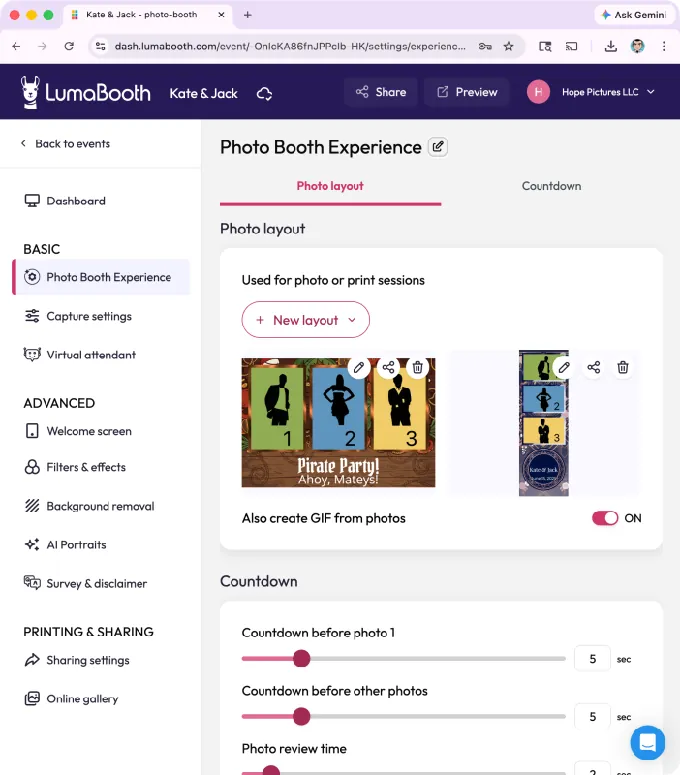
Operators managing installations across both hardware types can configure all of them from a single browser-based Dashboard.
Source: LumaBooth
For venues wanting self-service monetization, LumaBooth for Windows includes a no-extra-hardware cashless payment system where guests scan a QR code and pay via Apple Pay, Google Pay, Amazon Pay, PayPal, or card.

Source: LumaBooth
Operators can charge separately for prints and digital downloads, and set payment to trigger before or after the session. One important caveat: cashless payments are exclusive to LumaBooth for Windows, so iPad-based permanent installs do not have built-in monetization.
The 360 booth capability captures high frame-rate footage (up to 120 fps on Windows and up to 240 fps on recent iPads) with automatic speed ramps, animated overlays, and branded intro/outro clips. Motion-activated recording enables fully unattended spinner operation.
LumaBooth Pricing
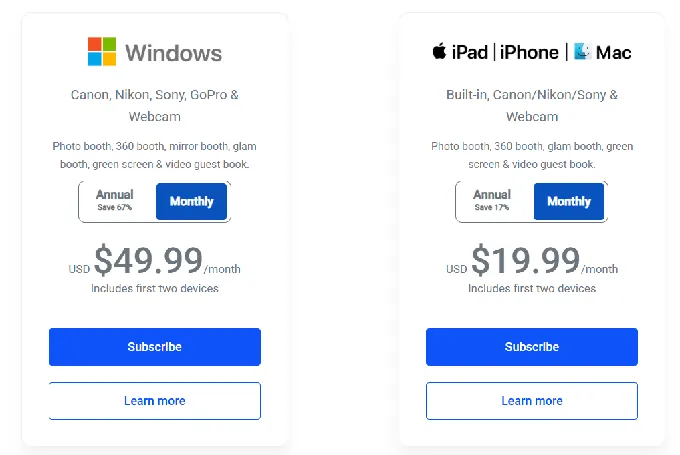
- Windows at $17/month billed annually (~$204/year for 2 devices), $49.99/month on monthly billing
- Apple at $18/month billed annually (~$216/year for 2 devices), $19.99/month on monthly billing
Source: LumaBooth
Optional add-ons: fotoShare Cloud Plus ($19.99/month), fotoShare Cloud Business ($39.99/month), AI Portraits ($14.99-$199.99/month), SMS ($10/month). A free trial with watermarked output is available with no time limit or credit card required.
Use LumaBooth If:
- You manage installations across both Windows PC kiosks and iPad setups and want one platform for all of them
- You need 360 video, standard photos, GIFs, boomerangs, and full video from a single subscription
- Your Windows-based venue install needs self-service cashless payment without dedicated payment hardware
- You need Canon, Nikon, or Sony DSLR/mirrorless camera support for professional-grade output
5. Darkroom Booth: Best for Windows Operators Who Prefer a One-Time Purchase With No Subscription Fees
When a venue commits to running a photo booth for years rather than months, the economics of a subscription model work against the operator: every month generates another billing event, and any payment disruption deactivates the software.
Source: Darkroom Booth
Darkroom Booth inverts this with a perpetual license model designed for long-term permanence.
| Darkroom Booth Pros | Darkroom Booth Cons |
|---|---|
| $295 one-time license; software runs indefinitely | Windows-only; no iPad or Mac support |
| Booth Control remote monitoring via local Wi-Fi | Remote management limited to the local network |
| Booth Stats automated usage reporting | Cloud email and hosted image delivery require active $95/year maintenance |
| Broad DSLR support (Canon, Nikon, GoPro) |
Darkroom Booth: Top 3 Unique Features
- Perpetual license with no recurring fees required to keep the software running
- Booth Control for remote monitoring and management from any device on the local network
- Automated Booth Stats reporting delivered by email or text on a configurable schedule
The $295 one-time license covers full software ownership on up to two computers. An optional $95/year maintenance plan provides continued updates and support, but the software itself continues to run after maintenance expires. For a venue running a booth continuously for three years, the maximum total software cost is $485: a fixed ceiling versus open-ended subscription fees.
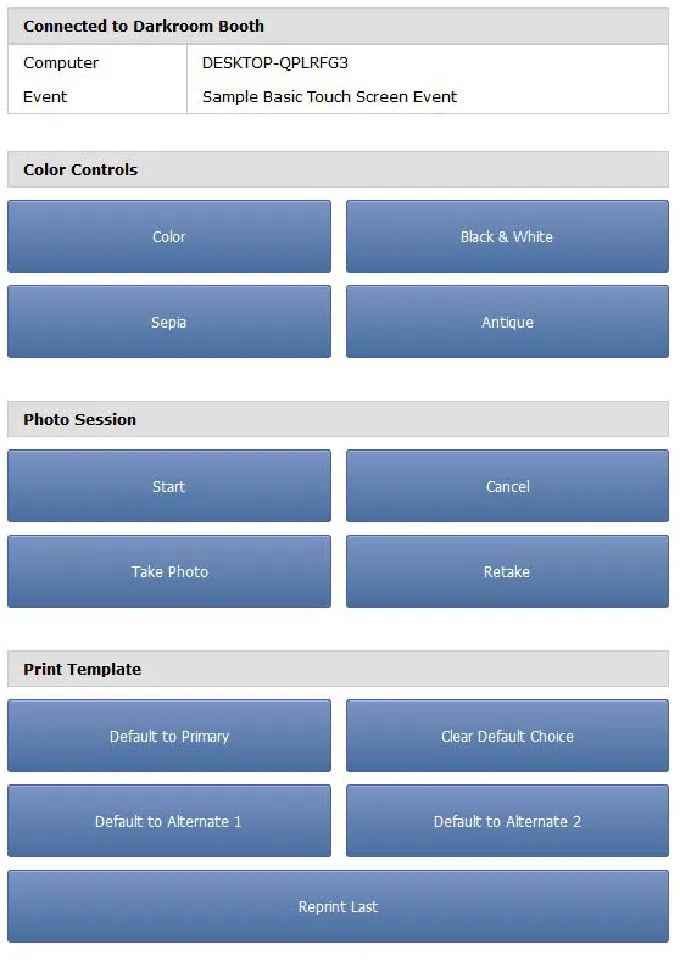
Booth Control connects over the local Wi-Fi network, letting operators monitor status, lock the booth for maintenance, and display custom out-of-service screens from any phone or tablet.
Source: [Darkroom Booth](https://support.darkroomsoftware.com/portal/en/kb/articles/booth-control-booth-control?_gl=13lhcwk_gcl_auMjAxMTk1OTkxNC4xNzgxNDQ5MDcx_gaMTcyNTQ2NDg5NS4xNzgxNDQ5MDcx_ga_EEDNVNB7PKczE3ODE0NDkwNzAkbzEkZzEkdDE3ODE0NDkyNjMkajI2JGwwJGgw)*
Booth Stats automates the reporting loop: usage activity and print counts arrive by email or text on a schedule the operator configures, eliminating the need to log into a dashboard. Note that Booth Control operates over the local network, which makes it ideal for single-venue permanent installs rather than centralized multi-location fleet management.
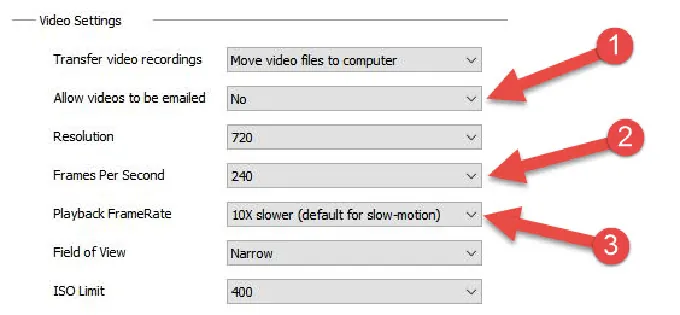
Darkroom Booth natively tethers Canon EOS, Nikon Z/D series, and GoPro HERO 9/10 cameras via USB or Wi-Fi, delivering full-frame image quality for venues where print output needs to look professional.
Source: Darkroom Booth
Slow-motion video at 120 fps in 1080p or 240 fps in 720p adds a high-end output option alongside standard photo, GIF, and boomerang formats.
Darkroom Booth Pricing
- Full License at $295 one-time: perpetual license for up to 2 computers; includes 1 year of updates
- Maintenance at $95/year (optional; also required to keep cloud-dependent email delivery and hosted image features active)
- 10-Day Temporary License at $45 for existing customers needing a second booth briefly
Use Darkroom Booth If:
- You want to pay once and run the software indefinitely without subscription pressure
- You already own Canon, Nikon, or GoPro hardware and want to use it directly
- You need automated usage reporting and remote management for a single-venue permanent installation
- Long-term cost predictability matters more than having the latest cloud-connected features
6. Photobooth Project: Best Free Option for Technically Capable Operators
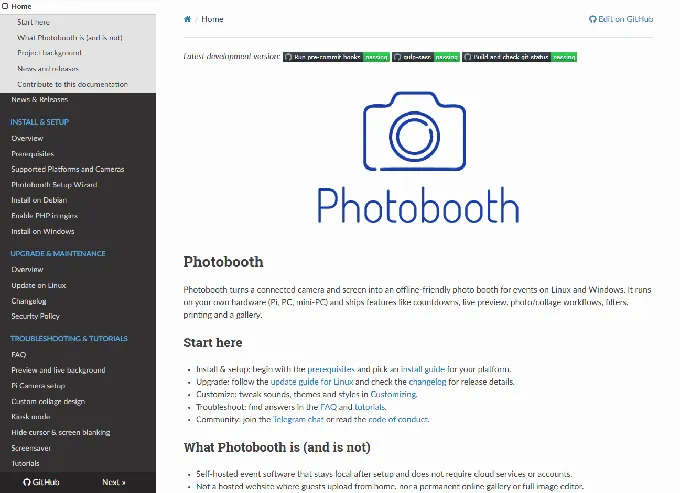
For operators who want a permanent photo booth at zero ongoing software cost and have the technical skills to configure a Linux web server, Photobooth Project is a free, open-source application with no pricing tiers, no per-event fees, and no feature gates.
Source: Photobooth Project
| Photobooth Project Pros | Photobooth Project Cons |
|---|---|
| Completely free with no feature restrictions | Requires Linux/Windows setup and configuration skills |
| Runs on Raspberry Pi, mini-PCs, or full Windows/Linux machines | No commercial support; community Telegram group only |
| Full offline operation with local photo distribution | No built-in payment processing |
| Kiosk mode designed for unattended permanent deployment | No cloud dashboard for remote management |
Photobooth Project: Top 3 Unique Features
- MIT-licensed and completely free with commercial use permitted
- Kiosk mode with automatic startup, hardware button triggers, and cursor hiding
- Offline-first architecture with local AI background removal, printing, and QR-code photo delivery
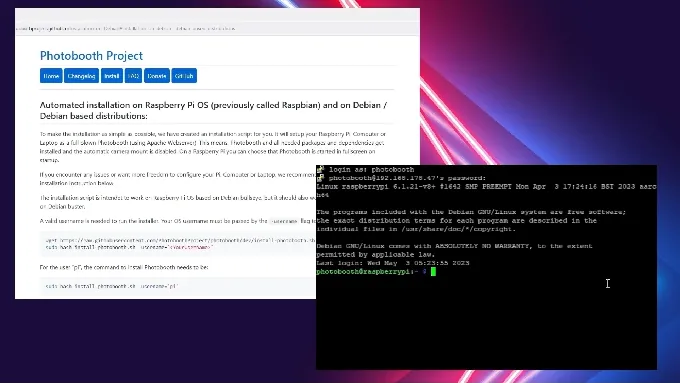
Photobooth Project runs on Raspberry Pi 3/4/5, generic Debian/Ubuntu PCs, and Windows PCs. The kiosk mode documentation covers the complete unattended deployment stack: Chromium kiosk flags, OS-level autostart, cursor hiding, and screen blanking prevention.
A Setup Wizard handles autostart configuration automatically, so the booth powers on and launches to the guest-facing interface without manual intervention.
Hardware trigger support includes keyboard hotkeys, USB HID via the Remotebuzzer server, Socket.io events, and HTTP REST endpoints for WiFi IoT buttons. The PhotoboothProject GitHub organization hosts companion firmware for Raspberry Pi Pico, ESP32, and other microcontrollers. A real-world permanent installation at the seal station Norddeich (a public aquarium) demonstrates the platform in production unattended kiosk use.
Source: Photobooth Project
Every component of the workflow runs locally with no internet dependency. Physical printing runs through CUPS. The built-in gallery at /gallery lets guests browse photos on the local network. QR codes link to a local download endpoint, so guests on the same LAN scan and download directly to their phone without any internet connection. The rembg AI background removal service runs locally as a system daemon with five selectable AI models, requiring no cloud API key.
Photobooth Project Pricing
- Software: free. No license fee, no subscription, no per-event charge. MIT license permits commercial use.
- Hardware: operator-supplied. Supported platforms include Raspberry Pi 3/4/5, Linux PCs, and Windows PCs with gphoto2-compatible DSLRs or USB webcams.
- Support: Telegram community group; no paid support tier exists.
The software costs $0, but operators should budget for hardware, a compatible camera, and the technical setup time required for configuration.
Use Photobooth Project If:
- You’re comfortable configuring a Linux web server and want a fully capable booth at zero software cost
- You’re building a permanent kiosk for a museum, school, or community venue where a recurring subscription isn’t in the budget
- You need all photos and data to stay on your own hardware with no cloud dependency
- You want the freedom to modify every aspect of the booth at the code level under an MIT license
7. Foto ATM: Best for High-Traffic Commercial Venues Wanting Purpose-Built Kiosk Hardware With Integrated Payment Processing
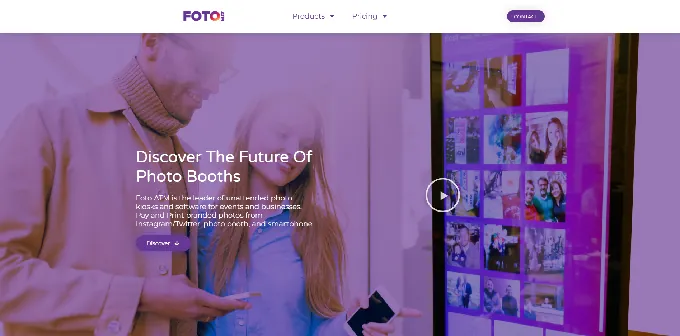
Most photo booth platforms are software-first: you provide the hardware, they provide the app.
Source: Foto ATM
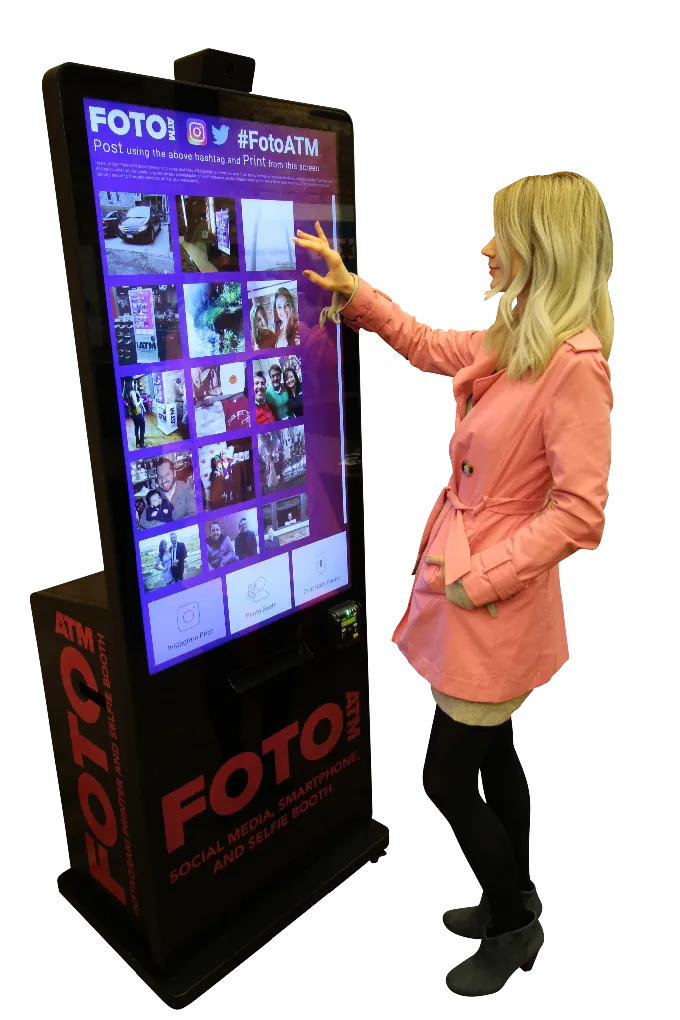
Foto ATM flips this model by selling commercial kiosk hardware paired with its FotoBooth cloud software, creating a system designed from the ground up for unattended, revenue-generating permanent deployments.
| Foto ATM Pros | Foto ATM Cons |
|---|---|
| 49” kiosk with locking cabinets and tempered glass | Hardware starts at $6,999 |
| Accepts card, digital wallet, cash, and arcade credits | Enterprise plan limited to 2 software licenses |
| Real-time revenue analytics per kiosk | AI green screen requires per-credit purchase |
| Advertising carousel for idle-screen monetization |
Foto ATM: Top 3 Unique Features
- Solid metal construction with 75-lb pressure-rated tempered glass and individually locking internal cabinets
- Accepts Visa, Mastercard, Amex, Apple Pay, Google Pay, cash, and arcade credits via Embed and Sacoa
- Real-time revenue analytics tracking transactions, gross revenue, fees, and net profit per kiosk
The Foto ATM kiosk was designed with the assumption that no operator will be present.
Source: Foto ATM
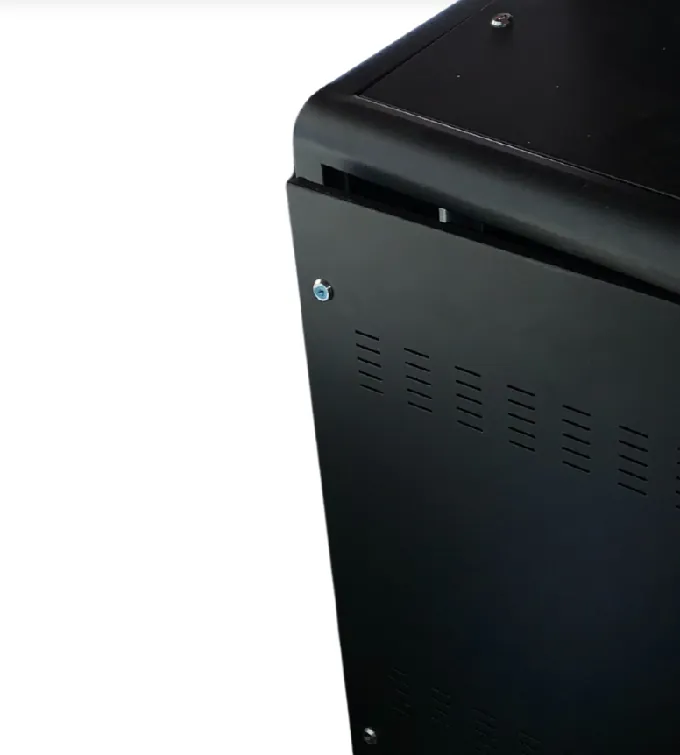
The locking cabinet system secures the bill acceptor, computer, printer, and media rolls behind individually locked trays and cabinets.
Source: Foto ATM
Tempered glass rated to 75 lbs of pressure and solid metal construction mean the kiosk can survive night after night of unsupervised high-traffic use. FotoBooth sends email alerts when print media runs low, and each kiosk has its own dedicated phone number for independent tracking.
The payment breadth stands out. Beyond standard card and digital wallet support via a Nayax EMV reader, Foto ATM accepts cash through Pyramid bill acceptors and natively supports Embed and Sacoa pulse readers for arcades and family entertainment centers. Guests pay for prints the same way they pay for games, with no separate terminal required. No general-purpose photo booth software has this out-of-the-box integration with arcade payment infrastructure.
Source: Foto ATM
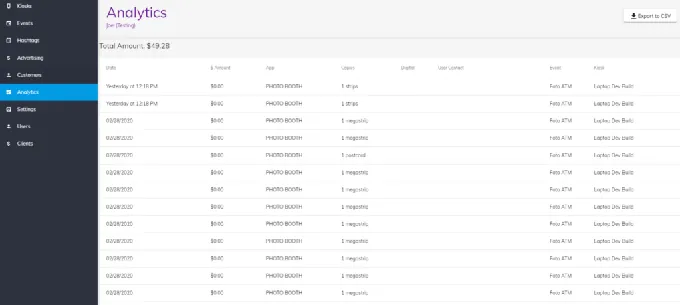
The FotoBooth analytics dashboard tracks photo sessions, gross revenue, payment processing fees, and net profit per kiosk with daily breakdowns, all exportable to CSV. The advertising carousel adds a second revenue stream by playing promotional content on the idle screen between sessions.
Foto ATM Pricing
- Hardware starting at $6,999 one-time: includes 49” LED touchscreen, modular payment mounting plate, and locking cabinets
- Standard Software at $49/month: photo booth, analytics, advertising, data capture
- Professional at $119/month: adds AI green screen, white label, hashtag wall
- Enterprise at $299/month: adds 2 software licenses, on-demand support
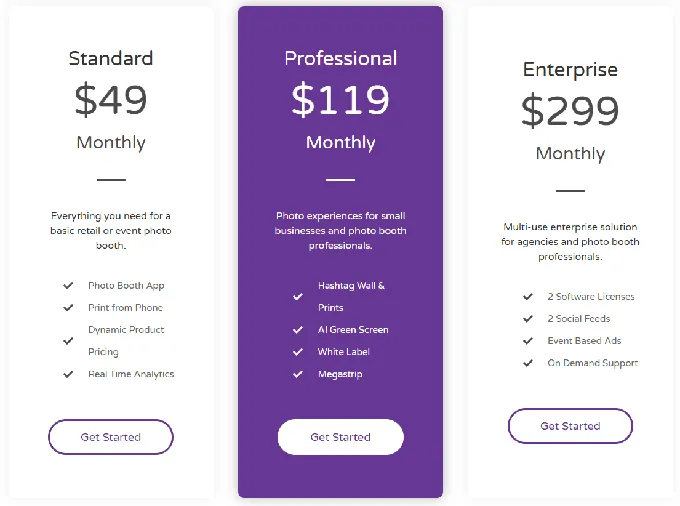
Source: Foto ATM
Annual billing reduces costs by approximately 15%. AI green screen credits ($20-$160/month) and Twilio phone numbers are additional costs.
Use Foto ATM If:
- You’re placing kiosks in arcades or family entertainment centers and need native Embed or Sacoa payment integration
- You want commercial hardware designed for unattended, high-traffic venue operation
- You need real-time revenue analytics per kiosk to manage a multi-unit vending route
- You want to monetize idle screen time with paid advertising alongside photo session revenue
Final Verdict
Permanent photo booth installations span a wide range of venues, budgets, and technical requirements. Here are our top picks for the three most common scenarios:
- Simple Booth: If you want an integrated iPad system with dedicated hardware, remote management, and built-in lead capture and marketing tools for venues where guest data and brand experience matter as much as the photos themselves. Get started with a free trial of Simple Booth.
- Snappic: If you want your permanent installation to generate direct revenue from every guest through in-booth Stripe payments, with AI-powered experiences that keep returning visitors engaged.
- Breeze Remote Pro: If you need full control over a Windows-based permanent kiosk with integrated card and cash payment processing, complete UI customization, and offline architecture at a one-time license cost of $349.
Best Photo Booths for Permanent Installations FAQ
What makes a photo booth suitable for permanent installation versus event rental?
Permanent installations require hardware durability rated for months or years of daily use, software that runs unattended without crashing, remote management capabilities so operators can monitor from off-site, and offline resilience for venues with unreliable connectivity. Event rental booths prioritize portability and quick setup instead.
Is there a free photo booth software option for permanent installations?
Yes. Photobooth Project is free and MIT-licensed, with no pricing tiers or feature restrictions. It runs on Raspberry Pi, Linux, or Windows hardware and includes kiosk mode for unattended operation, local AI background removal, and QR-code photo delivery. The trade-off is that it requires technical Linux or Windows configuration skills and has no commercial support beyond a community Telegram group.
Which photo booth platform is best for generating revenue from walk-up guests?
Snappic and Foto ATM are the strongest options for direct revenue generation. Snappic offers Stripe-powered in-booth QR payments starting at its Business plan ($189/month). Foto ATM provides the broadest payment coverage (contactless cards, cash, and arcade credit systems like Embed and Sacoa) paired with commercial kiosk hardware starting at $6,999.
What is the most cost-effective photo booth software for a multi-year installation?
For Windows operators, Darkroom Booth’s $295 one-time perpetual license is the most cost-effective option over a multi-year horizon, with an optional $95/year maintenance plan. Breeze Remote Pro offers a similar model at $349 per device. Photobooth Project eliminates software costs entirely for operators with the technical skills to self-host.
Can I use an iPad-based photo booth for a permanent installation?
Yes. Simple Booth’s HALO Install Kit includes a heavy-duty steel wall mount designed for permanent deployments, with a machined aluminum chassis rated for 50,000 hours of LED operation and a concealed USB-C cable for continuous iPad charging. Snappic also supports iPad-based permanent installations with remote management via LiveConnect.
Which platform is best for managing photo booths across multiple venue locations?
Snappic’s Scale plan ($399/month) offers sub-account management, a grey-label app, and a dedicated success manager for multi-venue operations. Simple Booth supports multiple devices under one account with remote preset sync via its online dashboard. Foto ATM’s cloud platform provides per-kiosk revenue analytics and remote content management for fleet operators.
Do permanent photo booth installations require an internet connection?
Not necessarily. Breeze Remote Pro runs entirely offline by default with no third-party data transmission. Photobooth Project operates fully offline with local printing, gallery, and QR downloads. Simple Booth’s HALO app queues sessions in offline mode and delivers them when connectivity returns. However, platforms that rely on cloud-based AI effects or payment processing do require an active connection for those specific features.
What should I budget for a permanent photo booth installation?
Costs vary widely depending on the platform and configuration. Software-only options range from free (Photobooth Project) to $295 one-time (Darkroom Booth) to $189-$399/month (Snappic). Hardware costs range from a Raspberry Pi setup under $500 to Simple Booth’s HALO kits starting around $2,090 to Foto ATM’s commercial kiosk at $6,999 and above. Factor in the total cost of ownership over your intended deployment period, including software subscriptions, hardware, add-ons (AI credits, SMS, cloud services), and optional maintenance plans.
Keep reading
 Best Of
7 Best Photo Booth Software with Video Message and Slo-Mo Capture [2026]
Booths that capture heartfelt video notes and buttery slo-mo. The moving stuff.
 Best Of
6 Best Photo Booth Software With QR Code Sharing [August 2026]
Booths that beam every snap to a phone with a quick scan. QR sharing done right.
 Best Of
7 Best Photo Booth Software With Real-Time Analytics and Dashboards [August 2026]
Booths that show the numbers as the party happens. Live dashboards, real insight.