7 Best Photo Booths to Start a Rental Business in 2026

The photo booth rental industry has quietly become one of the most accessible and profitable side businesses in the events space. A single booth can earn $300 to $1,500 per event, weekend demand stays strong year-round, and the startup costs are far lower than most service businesses.
But the gap between “bought a photo booth” and “running a profitable rental company” often comes down to one thing: the software running behind the screen.
The right platform handles more than just snapping pictures. It manages branding, automates photo delivery, captures lead data, and (ideally) lets you drop off the booth and walk away while it runs itself. The wrong one creates headaches at live events, eats into margins with hidden fees, or locks you into hardware you’ll outgrow in six months.
We researched and tested the leading photo booth platforms on the market and shortlisted the seven best options for operators starting or scaling a rental business in 2026:
- A self-running iPad system with integrated ring-light hardware
- A multi-format platform for operators expanding into 360, Glambot, and mirror booths
- A 360-video specialist built around GoPro spinning-arm rigs
- An affordable iPad app for solo operators on a budget
- A perpetual-license Windows option for photographers with existing DSLR gear
- A free-to-start app with pay-per-event pricing
- A Windows-native DSLR platform with flat-rate AI effects
Let’s start with a quick overview.
| Best Photo Booths to Start a Rental Business in 2026 | |
|---|---|
 | Simple Booth Best for operators who want a self-running iPad photo booth with integrated ring-light hardware and cloud management. |
 | Snappic Best for operators running multiple booth formats (iPad, 360, Glambot, mirror, DSLR) under one platform. |
 | TouchPix Best for operators building a 360-degree spinning-arm video booth rental business with GoPro integration. |
 | LumaBooth Best for solo operators who want the lowest monthly cost among full-featured iPad photo booth apps. |
 | Darkroom Booth Best for professional photographers expanding into photo booth rentals on Windows with existing DSLR gear and a one-time license fee. |
 | Booth.Events Best for operators who want to run real client events for free before committing to any subscription. |
 | BoothLedger Best for Windows-native DSLR operators who want built-in AI effects at a flat monthly rate with no per-image fees. |
What Is a Photo Booth Rental Business?
A photo booth rental business provides photo and video experiences at events (weddings, corporate parties, brand activations, festivals) by supplying the booth hardware, software, and often an attendant. Revenue comes from per-event rental fees, with operators typically charging a flat rate that covers setup, operation, teardown, and digital delivery of photos to guests.
The business model works because demand is consistent (weddings alone create 52-weekend cycles of bookings), startup costs are modest compared to other event services, and recurring software subscriptions mean the technology side scales predictably. Most operators start with a single booth and expand as booking volume grows.
The software you choose determines how much of that process you can automate, what your guests’ experience looks like, and how quickly your investment pays for itself.
How To Choose the Best Photo Booth for Your Rental Business
Here’s a checklist to help you find the right platform:
- Hardware Fit: Does the software work with the devices and cameras you already own, or does it require a specific ecosystem (iPad only, Windows only, proprietary hardware)?
- Setup Speed and Reliability: Can you or your staff set up and start the booth in minutes without technical troubleshooting? Will it keep running if the venue’s WiFi drops?
- Photo and Video Quality: Does the platform produce output that justifies higher rental pricing? Look for ring lighting, AI enhancements, background removal, and DSLR support.
- Guest Delivery Options: Guests expect their photos immediately. Check for QR code, SMS, email, AirDrop, and WhatsApp delivery at the base tier, not as paid add-ons.
- Pricing That Matches Your Volume: Weekly plans suit operators building up. Monthly and annual plans reward consistency. Pay-per-event options cover seasonal businesses. Avoid paying for months you’re not booking.
- Scalability: Can you add more booths, manage them remotely, and maintain consistent branding across multiple simultaneous events?
How We Picked the Platforms
We started with the most widely used photo booth platforms based on App Store ratings, operator community feedback, and event industry visibility. We then evaluated each platform against four criteria:
- Ease of Use: How quickly can a new operator go from download to running their first event?
- Output Quality: What do the photos, videos, and GIFs actually look like? Does the software produce share-worthy content?
- Business Features: Does the platform support lead capture, analytics, branding, and remote management for a rental company, not just a single user?
- Pricing Transparency: What does the platform really cost when you factor in add-ons, per-image fees, and multi-device licensing?
This gave us the seven platforms that best serve the range of operators starting photo booth rental businesses in 2026. Let’s dive in.
1. Simple Booth: Best Self-Running iPad Photo Booth System
Starting a photo booth rental business is one thing. Building one that runs itself at events, commands higher pricing, and scales without operational problems is another.
That’s where Simple Booth comes in.
Simple Booth is an integrated photo booth system pairing a subscription-based iPad app (HALO) with proprietary ring-light hardware (HALO kits), plus a browser-based Virtual Booth product that requires no hardware at all. The platform is built for operators who want to “build a more profitable photo booth business” with minimal hands-on management.
With 30,000+ customers, a 4.7-star App Store rating from 2,400+ ratings, and 40 million+ photos captured since 2012, Simple Booth has proven itself as a reliable foundation for rental businesses.
| Simple Booth Pros | Simple Booth Cons |
|---|---|
| Integrated ring-light hardware | iPad-only (no Android or Windows support) |
| Sub-one-minute setup with no tools required | AI effects require per-credit purchases beyond bonus credits |
| Built-in Layout Designer replaces external design software | Entry-tier Lite plan shows ads in the app |
| Offline mode keeps the booth running without WiFi | |
| Remote preset management across multiple devices |
Why Choose Simple Booth for Your Rental Business?
Simple Booth topped our list because it is the most complete system for operators who want to set up a booth in under a minute, walk away, and know it will run without problems. The app is intuitive enough that new staff learn it quickly, but stocked with features that justify higher pricing. Here’s why.
HALO Hardware: Professional Lighting in a One-Minute Setup
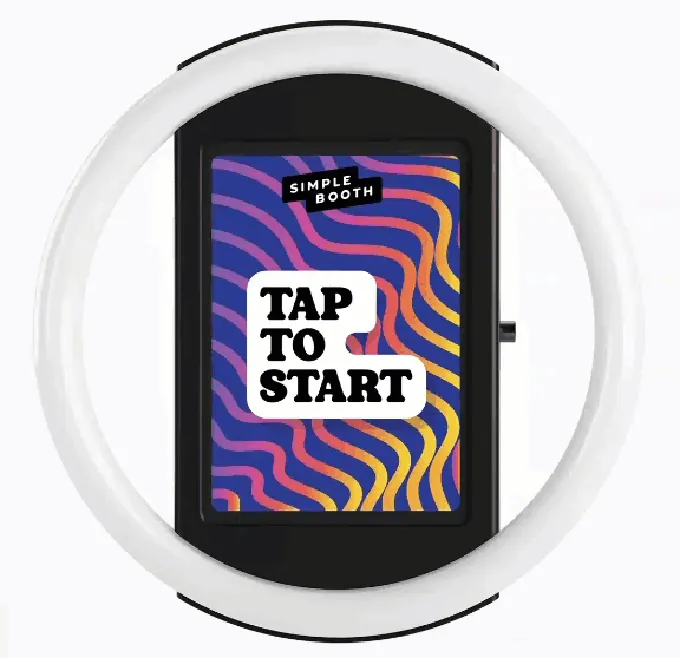
The Simple Booth HALO is a ring-light photo booth kit with a machined aluminum chassis, 112 LEDs producing up to 2,100 lumens, and a patented ring-light system rated for 50,000 hours of operation. The iPad snaps in via a tool-less faceplate with a concealed USB-C cable for continuous charging, and the full Event Kit (including rolling travel case) weighs 49 lbs.
Source: Simple Booth
Groups can stand 6 to 8 feet from the camera and still be evenly lit in dim venues. Setup takes under one minute with no tools. For operators running multiple events per week, that speed adds up.
The HALO comes in two configurations: the Event Kit with an adjustable selfie stand and waterproof travel case, and the Install Kit with a steel wall mount for permanent venues. Both support portrait and landscape orientation, and a steel baby pin on the back is compatible with grip accessories for custom mounting.
Source: Simple Booth
“I knew nothing about photo booths when we started,” but Simple Booth’s system allowed the company to scale to multiple booths from scratch. (Amore Entertainment)
Software: AI Effects, Layout Designer, and Remote Management
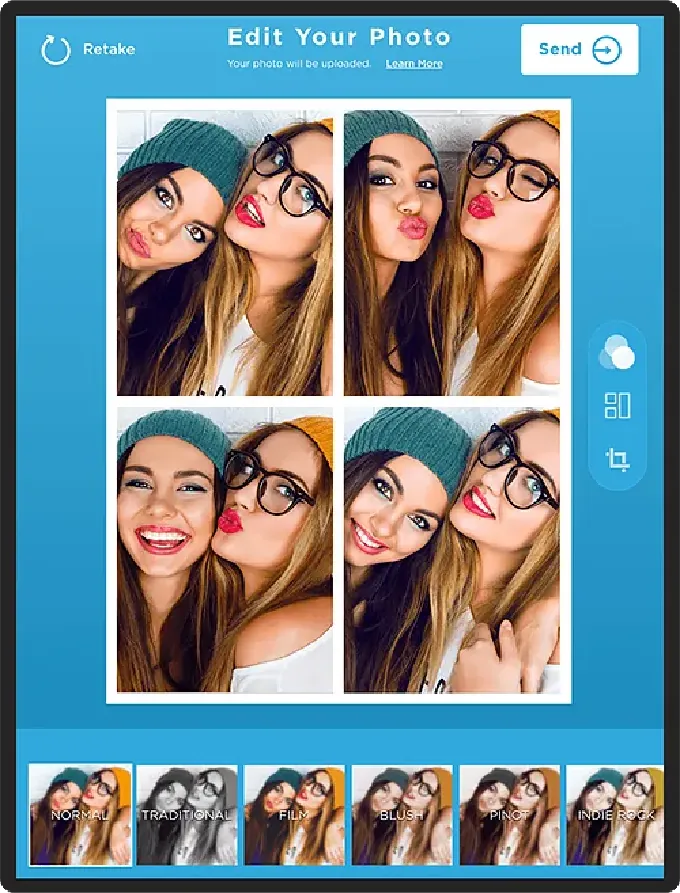
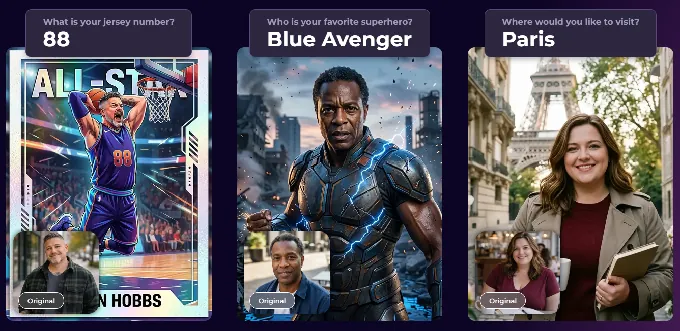
The HALO iPad app handles the full guest experience: still photos, classic photo strips, custom layouts, GIFs, Rebound clips, and video (5 to 120 seconds). AI Effects powered by Nano Banana models transform guest photos using text prompts while preserving the guest’s identity, so faces stay recognizable regardless of the style applied.
Source: Simple Booth
Operators can also assign unique AI prompts to each frame in a multi-frame layout, creating comic-strip or narrative sequences.
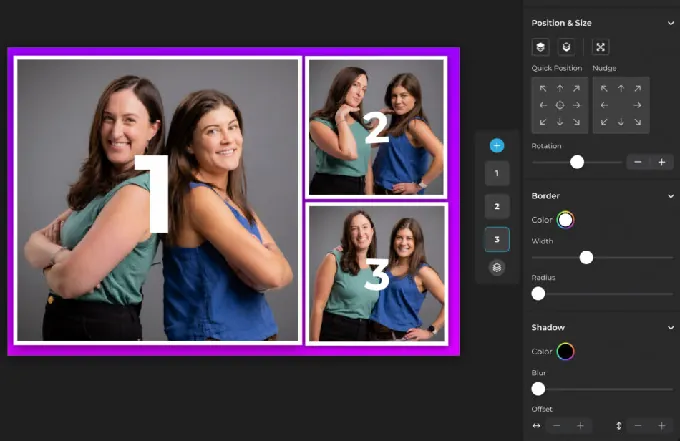
The Layout Designer (introduced in HALO 5.0) is an in-app design tool with layers, fonts, gradients, QR code embedding, and multi-layout support, so operators no longer need external software for custom templates. Simple Booth calls it “the most powerful design tool in the photo booth industry.”
Source: Simple Booth
Image quality features work across all capture modes. Background Blur (Core and above) produces a bokeh effect from the iPad camera, while color filters and Glam mode refine every shot. Image previews render up to 12x faster than previous versions.
All effects (filters, background blur, DSLR integration) work in offline mode and across stills, video, and GIFs, so operators don’t need to worry about which settings can be combined.
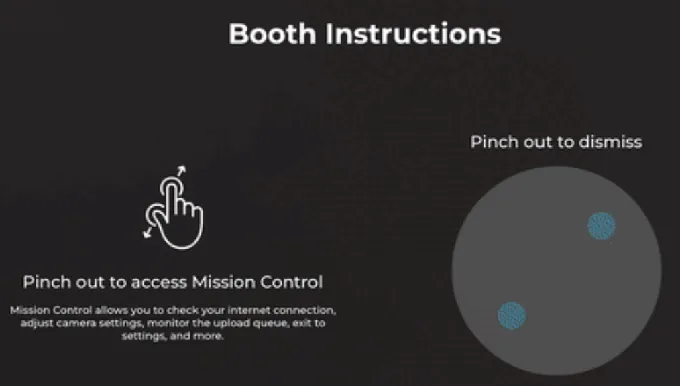
Remote management is built into the platform. Operators configure and update presets via the online dashboard, and changes sync to the iPad without exiting booth mode. Mission Control, accessed via a hidden two-finger pinch, lets operators monitor device health and adjust camera settings mid-event.
Source: Simple Booth
The app also supports DSLR and mirrorless camera integration (Canon bodies on Core and above) via wired USB and wireless WiFi. Wireless DSLR is a capability most competing platforms do not offer.
When venue WiFi fails, the offline upload queue stores sessions and delivers them when connectivity returns.
Guest photo delivery spans multiple channels: AirDrop (works even offline with no personal information required), WhatsApp (ideal for international events where SMS isn’t reliable), text, email, and QR codes. Guests choose whichever method works for them, and operators avoid carrier fee surprises or geographic limitations.
Lead Capture and Marketing Tools
For operators who serve corporate clients and brand activations, Simple Booth’s lead capture forms achieve opt-in rates of 87 to 89%, collected as part of receiving a photo.
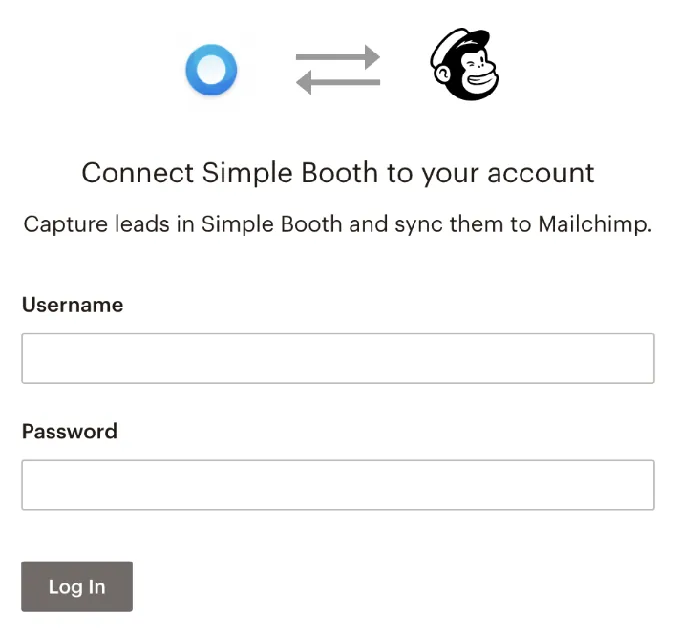
Data exports as CSV, syncs with MailChimp, and connects to CRMs via the Open API (Pro and above). Online galleries, social sharing prompts with auto-populated event hashtags, and a Live Feed slideshow for TVs and projectors round out the marketing toolkit.
Source: Simple Booth
“It paid for itself pretty quickly. Now it’s just extra money coming in.” (Kurt Nielson Photography)
Simple Booth Pricing
Simple Booth offers weekly, monthly, and yearly billing. Each plan includes one device license; additional devices require add-on licenses at the same rate.
- Lite starts at $14.99/week ($290/year): custom layouts, motion and still capture, photo delivery, galleries, and dashboard. Ads are displayed in the app at this tier.
- Core starts at $24.99/week ($490/year): removes ads, adds DSLR camera support, video, background replacement, AI effects, and Virtual Booth.
- Plus starts at $49.99/week ($990/year): adds custom branding, analytics, guest-editable text layers, and custom AI effects.
- Pro at $149/month ($1,490/year): adds lead capture, phone support, API integration, moderation, and age gate.
- Select at $249/month ($2,490/year): adds in-app custom legal terms, demographic analytics via face detection, and security questionnaire support.
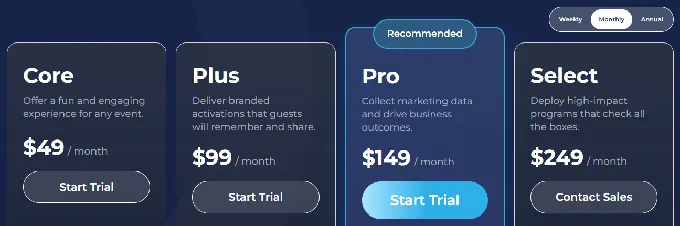
AI credits are $0.10 each, with bonus credits on new subscriptions (50 on Core through 200 on Select). Credits do not expire once purchased. Hardware kits (HALO Event Kit or Install Kit) are sold separately through buy.simplebooth.com with 0% financing available.
A 7-day free trial is available with 25 free AI credits.
Use Simple Booth if:
- You want a complete hardware and software system that sets up in under a minute and runs without an attendant
- You value quality lighting and photo output as a competitive advantage for higher pricing
- You need remote management to operate multiple booths across simultaneous events
- You serve corporate clients or brand activations that require lead capture, analytics, and branded experiences
- You’re growing a team and need software that new staff can learn quickly
Malik McGhie built a six-figure photo booth events business using Simple Booth’s system. (Malik McGhie Case Study)
Why Simple Booth Topped Our List
Of the platforms we tested, Simple Booth earned the top spot because it is the only one that ships a complete, integrated system (hardware, software, and cloud) designed for unattended, self-running rental operations. Other platforms on this list excel at specific niches: 360 video, budget pricing, Windows DSLR workflows, or pay-per-event models.
Simple Booth delivers the broadest combination of setup speed, photo quality, remote management, and guest delivery in a single package, which is why operators like G7 Entertainment Marketing have run it for 10+ years across 136,000+ events.
Read on to learn what makes each alternative the best choice for its own niche.
2. Snappic: Best for Operators Running Multiple Booth Formats
Most photo booth platforms are built around a single hardware type. Snappic is built for the operator who already runs an iPad booth and is expanding into 360 spinners, Glambot robot arms, mirror booths, or DSLR setups.
Snappic is a cloud-backed iOS platform that consolidates every major booth format under a single subscription. Its VideoFX Template Builder produces slow-motion output with branded intros, animated overlays, and custom soundtracks, while AI Segmentation replaces physical green screens in video mode.
For corporate clients, the Send to Client analytics feature packages event data into a branded post-event ROI report.
| Snappic Pros | Snappic Cons |
|---|---|
| Covers iPad, 360, Glambot, mirror, and DSLR booths | AI and background removal credits billed separately |
| VideoFX engine for slow-motion output | Full-featured plans start at $189/month |
| 24/7/365 live support with remote booth access | Entry Starter plan excludes VideoFX and AI features; sharing limited to email and text |
| Client analytics and white-label capabilities |
Snappic: Top 3 Unique Features
Multi-format unification: iPad, 360-degree video, Glambot/robot arm, mirror booth, and roaming configurations all run from one dashboard with the same template builder and event setup workflow. Staff trained on one booth type carry that knowledge to every other.
VideoFX for video output: Three pre-built Glambot templates (MultiZoom, FastZoom, and DoubleSlowMo) produce 8x slow-motion clips from just 2 to 3 seconds of capture. Operators have documented filming and processing 100 branded Glambot videos in under an hour.
Scaling tools: The Scale plan ($399/month) includes sub-account management, an unbranded grey-label app, multi-client administration, and a dedicated customer success manager, so a solo operator can grow into a multi-client agency without switching platforms.
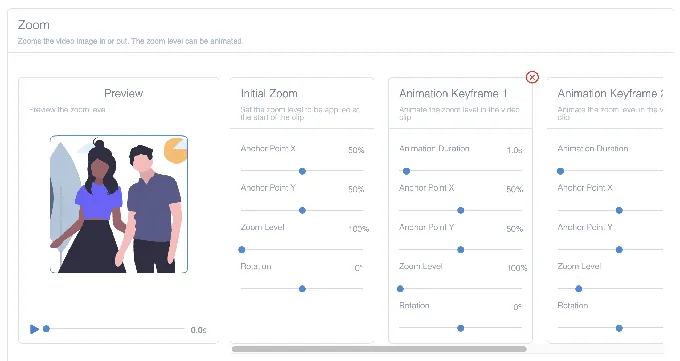
Source: Snappic
Snappic Pricing
Snappic uses a per-booth license model. A 14-day free trial is available with no credit card required.
- Starter at $69/month ($499/year): standard iPad booths, 60+ templates, DSLR and GoPro integration, 24/7 support. VideoFX and AI features require a plan upgrade, and photo delivery is limited to email and text on this tier.
- Business at $189/month ($1,799/year): adds VideoFX (360/Glambot), AI-FX filters, brandable galleries, green screen, client analytics, and Roaming Mode.
- Premium at $279/month: adds white-label URLs, webhooks, LiveConnect remote booth control, and SmartShare AI.
- Scale at $399/month ($3,999/year): adds multi-client management, grey-label app, and dedicated success manager.
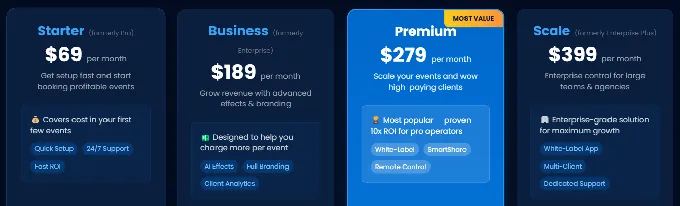
Note: AI background removal credits ($15/100 images) and AI-FX generation credits ($20/200) are billed separately on all plans. Factor these variable costs into your total cost if you run AI-heavy corporate events.
Use Snappic if:
- You are expanding into multiple booth formats (360, Glambot, mirror) and need one platform for your entire fleet
- Your corporate clients expect branded post-event analytics and ROI reporting
- You need 24/7 live support with remote access for weekend event emergencies
- You’re building toward a multi-operator agency with sub-account management
3. TouchPix: Best for Launching a 360-Video Booth Rental Business
The 360-degree spinning-arm video booth is one of the highest-margin formats in the rental market. TouchPix is the platform built to run it.
TouchPix is a subscription-based photo and video booth app with GoPro integration (models 7 through 13) via wired USB and wireless WiFi, Bluetooth-automated spinning-arm triggers, and deployment across iOS, Android, macOS, Windows, Linux, and Raspberry Pi. All plans include unlimited devices, so adding a second booth or upgrading hardware doesn’t add to the subscription cost.
| TouchPix Pros | TouchPix Cons |
|---|---|
| Best GoPro integration for 360 spinning-arm rigs | Entry-tier PhotoPass excludes video capture entirely |
| Runs on iOS, Android, Windows, Mac, Linux, and Raspberry Pi | AI credits purchased separately |
| Offline QR delivery via Scanpix 2 (no venue WiFi needed) | Interface can overwhelm first-time users |
| AI background removal runs entirely on-device | Launched in 2020; still maturing, with some users reporting slower rendering speeds |
TouchPix: Top 3 Unique Features
GoPro 360 workflow: Wired USB connection is recommended for reliability, with Bluetooth rig triggering that starts the capture sequence automatically. The platform also supports Canon, Nikon, and Sony DSLRs for operators who run both flat photo booths and 360 rigs under the same license.
Cross-platform support: Operators can run a Windows controller on the 360 rig, an Android tablet at the sharing station, and a Mac at home for gallery management, all under one subscription.
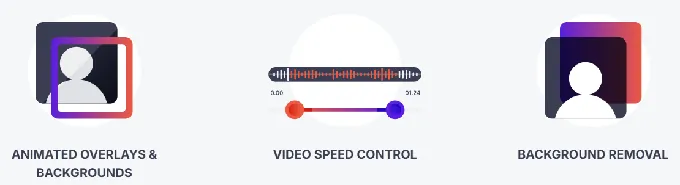
Offline-first delivery: The Scanpix 2 system delivers 360 video clips to guests via QR code with no internet connection at the venue. AI background removal also runs on-device, so the effects pipeline works at outdoor festivals, basements, and rural estate weddings.
Source: TouchPix
TouchPix Pricing
TouchPix prices by active simultaneous event slots, not device count.
- PhotoPass at $439.90/year (~$36.65/month): 2 simultaneous events, still photos and GIFs only. Does not include video or 360 capture.
- MultiPass at $879.99/year (~$73.33/month): 4 simultaneous events, adds video, slow-mo, boomerang, and full 360 workflow. Also available weekly at $43.99/week.
- MultiPass Pro at $1,407.99/year: 8 simultaneous events, adds Virtual Booth and advanced surveys.
- MultiPass Enterprise at $2,199.99/year: 12 simultaneous events, adds Mosaic and RAW cloud backups.
A 14-day free trial with no credit card is available, plus 15 free AI credits. Operators building a 360 business will need at minimum the MultiPass tier for video access.
Use TouchPix if:
- You’re building a 360-degree video booth rental business and need GoPro integration with automated rig triggering
- You need software that runs across multiple operating systems and device types under one subscription
- Your events frequently take place at venues with unreliable internet where offline delivery is essential
4. LumaBooth: Best Affordable Monthly iPad App for Solo Operators
Not every operator is ready to invest in expensive hardware and software from day one. If you’re testing whether photo booth rentals work as a business before committing to higher costs, LumaBooth is one of the most accessible entry points.
LumaBooth is a professional photo booth app for iPad, iPhone, Mac, and Windows that includes five capture modes, 820-plus templates, and AI portrait generation in a single subscription.
At $19.99/month on Apple platforms (or $18/month annually), it is the lowest monthly commitment among full-featured iPad photo booth apps. It also offers an unlimited-duration free trial (watermark only) with no credit card required.
| LumaBooth Pros | LumaBooth Cons |
|---|---|
| Lowest monthly cost among full-featured iPad apps | Best suited for attended events with an operator present |
| 5 capture modes in one subscription (photo, GIF, boomerang, video, 360) | Optional add-ons (LumaShare, SMS, AI credits) can add up |
| Canon, Nikon, and Sony DSLR/mirrorless support via USB | No integrated hardware ecosystem |
| 170+ AI portrait presets with custom prompt capability | No web dashboard for remote device management or advance event setup |
LumaBooth: Top 3 Unique Features
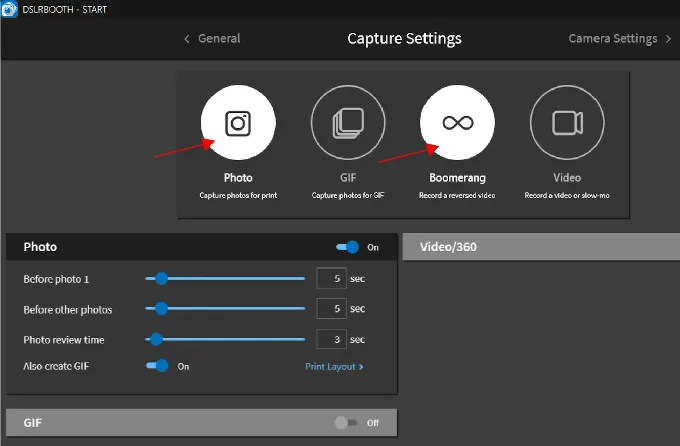
All capture modes included: Photo, GIF, boomerang, video, and 360/slow-motion are available under the base subscription. 360 slow-motion captures at up to 120 fps on compatible iPads with motion-activated recording, automatic speed ramps, and animated overlays.
AI Portraits: 170-plus presets spanning Superheroes, Fantasy, Art Styles, Historical Eras, and more. LumaBooth says AI Portraits can generate $1,000 to $3,000 in additional revenue per event. Credits start at $14.99/month for 150, with pay-as-you-go packs that never expire.
DSLR support from day one: Canon, Nikon, and Sony cameras connect via USB on Windows and iPad/Mac, so operators with existing gear can use their cameras without buying additional hardware.
Source: LumaBooth
LumaBooth Pricing
- Apple (iPad/iPhone/Mac): $19.99/month or $18/month annually. Covers two devices. Includes all capture modes, 820+ templates, AI Background Removal, Green Screen, Mirror Booth, and Glam Booth.
- Optional add-ons: LumaShare at $7.99/month (dedicated sharing station), SMS plan at $10/month, AI credits from $14.99/month for 150.
- Five sharing channels included: email, SMS, QR code, WhatsApp, and AirDrop.
- New subscribers receive 20 free AI portrait credits.
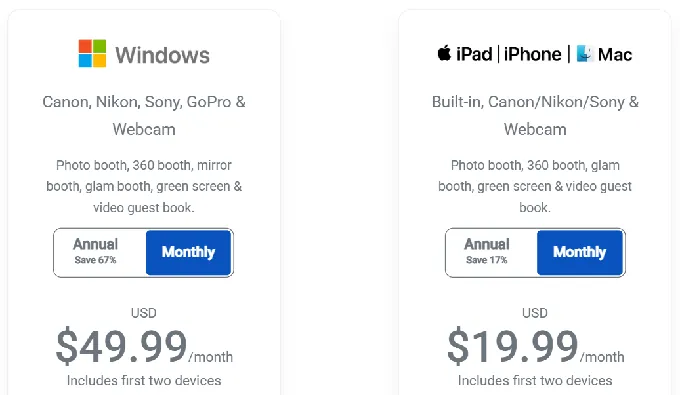
Note that LumaBooth requires a monthly subscription. There are no weekly passes or pay-per-event options for operators with variable booking schedules.
Use LumaBooth if:
- You’re in the first 6 to 12 months of your rental business and want the lowest monthly commitment among full-featured iPad apps
- You already own Canon, Nikon, or Sony camera gear and want to use it immediately
- You want to pitch multiple booth formats (photo, GIF, 360, AI portraits) to different client types without buying separate software
- You run attended events where a human operator manages the guest flow
5. Darkroom Booth: Best for Photographers Expanding Into Photo Booth Rentals
If you’re already a professional event photographer running Windows hardware and Canon or Nikon cameras, Darkroom Booth lets you add a photo booth service line without changing your equipment or committing to a subscription.
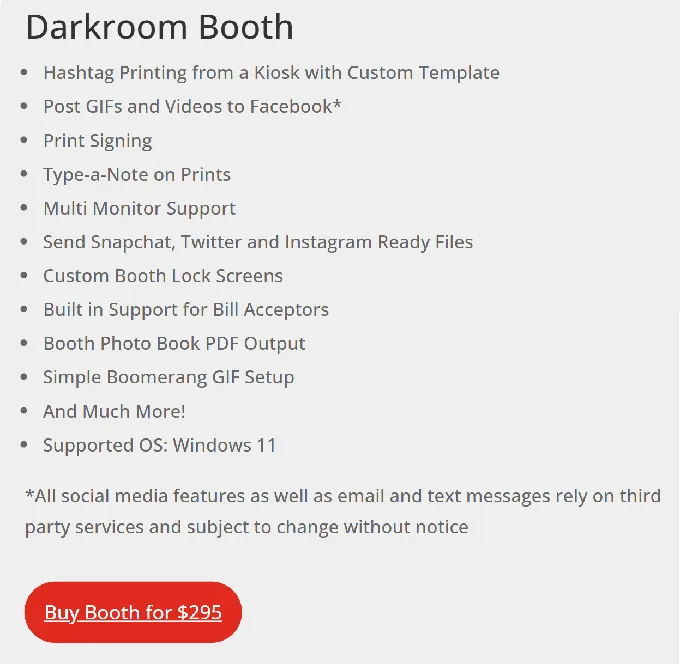
Darkroom Booth is Windows-native photo booth software from a family-owned company with roots stretching back to 1992. Its core appeal is a one-time $295 perpetual license that never requires a subscription to keep the software running.
It tethers to Canon EOS, Nikon Z and D series, GoPro HERO 9/10, and any Windows-compatible webcam, and ships with 75+ customizable templates, green screen compositing, 360 and VR 180 output, and Booth Control remote management from any phone on the same network.
| Darkroom Booth Pros | Darkroom Booth Cons |
|---|---|
| One-time $295 purchase, no subscription required | Windows only (no iPad or Mac support) |
| Broad Canon, Nikon, and GoPro DSLR tethering | Optional $95/year maintenance plan needed for updates and support |
| 75+ templates, green screen, AI transformations, and contest engine | Better suited for attended events with operator present |
| Software continues running even if maintenance plan lapses |
Darkroom Booth: Top 3 Unique Features
Perpetual license economics: The $295 one-time purchase covers activation on up to 2 computers. The software continues to run indefinitely even if the optional $95/year maintenance plan is not renewed. For an operator running fifty events per year, the $295 amortizes to nothing over time.
DSLR tethering with slow-motion: Canon and Nikon bodies deliver up to 60 fps for slow-motion, while GoPro HERO cameras record at 120 fps in 1080p or 240 fps in 720p. Supports USB and wireless connections.
Corporate activation features: Built-in surveys and quizzes with nine question types, a contest engine with remote winner selection, AI-powered photo transformations (generative portraits, face swap, custom shirts), and VR 180/360 panoramic output.

Source: Darkroom Booth
Darkroom Booth Pricing
- Full license: $295 one-time. Two computer activations. First year of updates and support included.
- Maintenance plan: $95/year (optional renewal). Restores updates, new versions, support, and Darkroom’s email/Twilio hosting.
- Upgrade from Booth 2.x: $195 in-app purchase.
- 10-day temporary license: $45 for overbooking situations.
Use Darkroom Booth if:
- You’re an event photographer who already owns Canon or Nikon gear and a Windows laptop
- You want to own your software outright and avoid ongoing subscription fees
- Your business model centers on attended corporate activations requiring surveys, contests, green screen, and AI effects
6. Booth.Events: Best for Starting Free With Pay-Per-Event Pricing
The biggest risk for a new photo booth operator isn’t buying the wrong software; it’s committing to monthly payments before you know if the business will generate bookings. Booth.Events removes that risk.
Booth.Events is an iPad photo booth app where every new account starts with a permanent free Starter tier that includes three events with no payment information required. Each free event supports up to 100 photo uploads with a seven-day gallery, enough for a real wedding or corporate booking.
After those three events, operators can choose non-expiring Pro Event Credits (pay per event), non-renewing Week Passes, or monthly subscriptions, fitting the software cost to their actual booking volume.
The platform holds a 4.8-star App Store rating from 897+ reviews and connects to Canon, Nikon, and Sony cameras via USB-C using the cable that shipped with the camera, with no capture card or dongle required. The app’s founder built the predecessor Wifibooth after frustration with poor DSLR support in existing photo booth apps, so camera connectivity has been a priority from the start.
| Booth.Events Pros | Booth.Events Cons |
|---|---|
| 3 permanent free events, no credit card required | Free tier shows Booth.Events branding on galleries |
| Non-expiring event credits and week passes for variable schedules | Advanced features (white-label, webhooks, remote scheduling) require Pro+ |
| USB DSLR tethering with Canon, Nikon, and Sony cameras | Subscription pricing renders dynamically; not published in static content |
| AI Glam Filter and SceneSelect background removal included on paid plans |
Booth.Events: Top 3 Unique Features
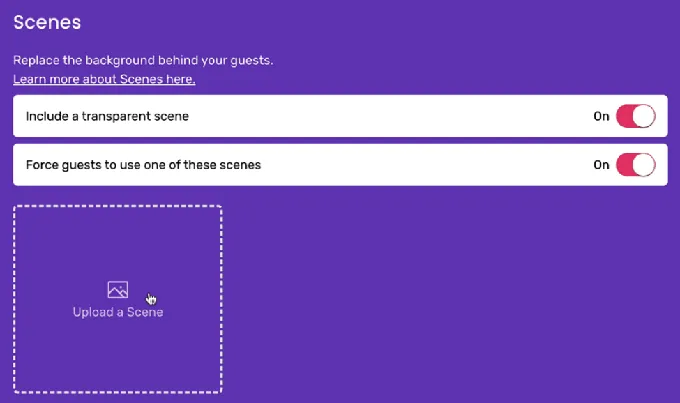
Free-to-start with real client events: Three permanent free events let operators quote clients, deliver the job, collect payment, and evaluate the platform before spending anything on software. Galleries are shared via Shared.Gallery and look the same to guests as they would on a paid plan.
Pay-per-event model: 4x Pro Event Credits are non-expiring and prepaid; Week Passes provide seven days of access with no auto-renewal. A DJ who adds photo booth services during wedding season can buy credits before a busy stretch and spend them only on events that materialize.
USB DSLR tethering from the iPad: Cameras connect using the cable that shipped with the camera. SceneSelect AI background removal works with USB-connected DSLRs as of app version 1.20.0, combining DSLR image quality with AI background replacement.
Source: Booth.Events
Booth.Events Pricing
- Free Starter (permanent, no credit card): 3 events, 100 photos per event, 7-day gallery, Booth.Events branding visible.
- 1 Week Pass (non-renewing): Basic-level access for seven days, single iPad.
- 4x Pro Event Credits (non-expiring, prepaid): Full Pro features per event; multiple packs purchasable.
- Basic Subscription: 1 iPad, 3-month gallery storage, SMS in USA and Canada.
- Pro Subscription: 1 iPad + unlimited iPhones, 1-year gallery, worldwide SMS, customized HTML microsites.
- Pro+ Subscription: 4 iPads, 2-year gallery, custom domain, white-label app, webhooks, remote event scheduling, emergency phone support.
All paid subscriptions include a 14-day free trial. AI credits cost $8 per 100; SceneSelect and Glam Filter are included on all plans with no per-image cost.
Use Booth.Events if:
- You want to test photo booth rentals with real paid client events before committing to software spend
- Your booking volume fluctuates seasonally, making a flat monthly subscription inefficient
- You own a Canon, Nikon, or Sony camera and want to connect it to an iPad using only its existing USB cable
7. BoothLedger: Best for Windows DSLR Operators Who Want Flat-Rate AI
AI photo effects are one of the strongest upsell opportunities in the photo booth rental market. But when most platforms charge per image, the cost of running AI at a large corporate event becomes hard to predict when quoting clients. BoothLedger solves that with flat-rate AI pricing.
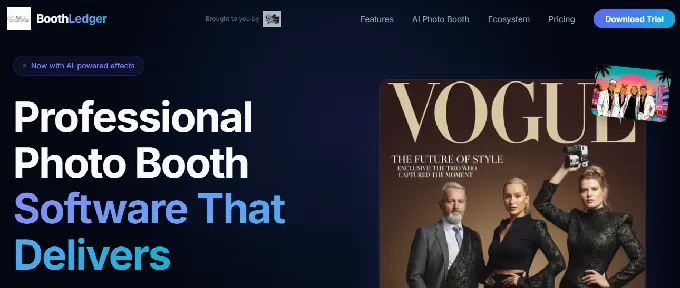
BoothLedger is a Windows-native photo booth platform built by PhotoBooth Guys, an Irish event hire company that tested the software across 500+ events before releasing it to other operators.
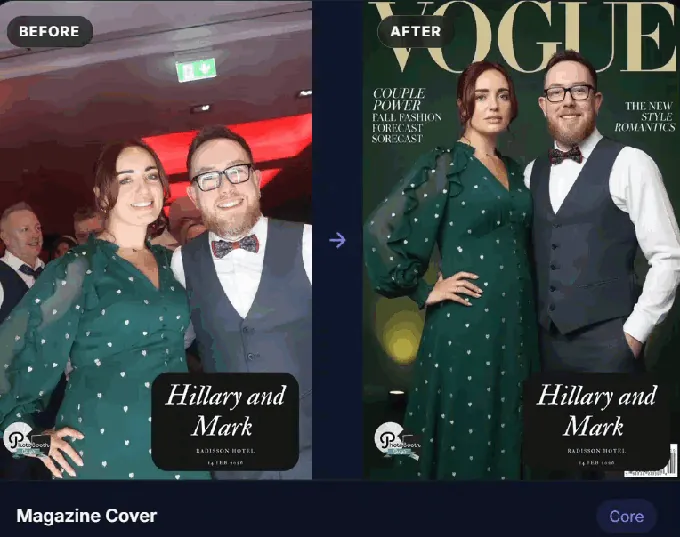
The AI Photobooth plan at €35/month includes two AI processing engines (Core and Nano Banana Pro), 50+ creative styles spanning magazine covers, movie posters, oil paintings, anime, and pop art, plus AI face swap and background removal, all with no per-image surcharges.
Canon DSLR tethering is built on Canon’s official EDSDK, providing live view streaming, per-shot autofocus, simultaneous RAW+JPEG capture, and automatic reconnection if the USB cable is jostled mid-event.
| BoothLedger Pros | BoothLedger Cons |
|---|---|
| Flat-rate AI with no per-image fees | Windows only; Canon cameras only for DSLR tethering |
| Canon EDSDK integration with live view and auto-reconnect | New platform (public beta April 2026) with limited independent reviews |
| Two device licenses included on all plans | Priced in Euros, which may fluctuate for non-EU operators |
| 30-day free trial with no credit card |
BoothLedger: Top 3 Unique Features
Dual AI engines at a flat monthly rate: Core for high-throughput events, Nano Banana Pro for higher fidelity. Both included in the €35/month subscription with no per-photo or per-effect charges.
Canon tethering via EDSDK: Live view, per-shot autofocus, simultaneous RAW+JPEG, and auto-reconnect. The supported Canon lineup covers Rebel series through the EOS R mirrorless range. Real-time filters render on the live view stream before capture, so guests see exactly how their photo will look.
45-second cloud sync to active booths: Update templates, AI prompts, camera settings, and sharing text remotely via the BoothLedger Cloud dashboard. Changes apply without interrupting the guest experience, which is useful for permanent installations and multi-day events.
Source: BoothLedger
BoothLedger Pricing
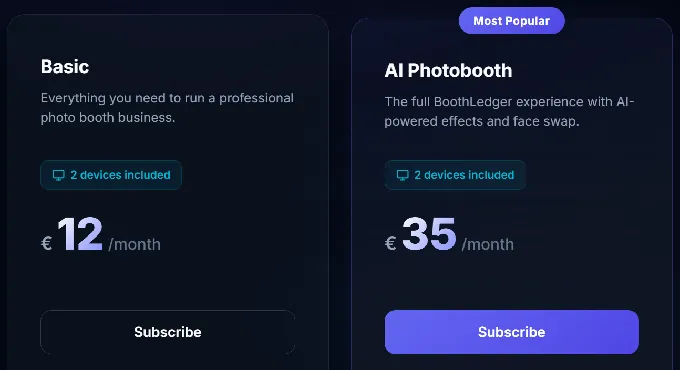
Both tiers include two device licenses. Annual billing saves approximately 15%. No per-event, per-photo, or usage-based charges on either tier.
- Basic at €12/month: Canon DSLR tethering, template editor, QR/email/SMS sharing, cloud gallery, boomerang and GIF modes, dye-sublimation print support.
- AI Photobooth at €35/month: Everything in Basic plus dual AI engines, 50+ creative styles, AI face swap, AI background removal, and face enhancement.
A 30-day free trial with no credit card is available. BoothLedger entered public beta in April 2026 and does not yet have independent reviews on platforms like G2 or Capterra. The pricing and feature set look good, but operators should factor in its early-stage status.
Use BoothLedger if:
- You run Canon DSLRs on Windows hardware and want AI-enhanced outputs without per-image processing fees
- You need predictable monthly software costs regardless of event size or guest count
- You’re starting a DSLR rental business on a budget, with the full AI tier at €35/month
Final Verdict
Every platform on this list can run a profitable photo booth rental business. The right choice depends on your hardware, your budget, and the events you plan to serve. Here are our top three picks:
- Simple Booth: If you want the most complete system for starting and scaling a rental business. The integrated HALO hardware, sub-one-minute setup, offline reliability, and remote management make it the strongest all-around choice for operators who want high quality with minimal overhead. Get started with a free trial of Simple Booth.
- Snappic: If you’re expanding beyond iPad booths into 360, Glambot, mirror, and DSLR formats and need one platform to manage your fleet with client reporting and 24/7 live support.
- LumaBooth: If you’re a solo operator testing the market and want the lowest monthly cost ($19.99/month) with five capture modes, DSLR support, and AI portraits in one subscription.
Best Photo Booths to Start a Rental Business FAQ
How much does it cost to start a photo booth rental business?
Software costs range from free (Booth.Events’ three permanent free events) to $249/month (Simple Booth Select). Hardware costs vary: you can start with an iPad you already own and a basic stand, or invest in a dedicated system like the Simple Booth HALO Event Kit. Most operators report their initial investment pays for itself within the first few events.
Do I need a DSLR camera, or is an iPad camera enough?
For most events, a modern iPad camera paired with quality lighting (like Simple Booth’s HALO ring light with 2,100 lumens) produces share-worthy results. If you already own a Canon, Nikon, or Sony camera, platforms like LumaBooth, Booth.Events, Darkroom Booth, and BoothLedger all support DSLR tethering. Simple Booth also supports Canon DSLR and mirrorless cameras on its Core plan and above.
Which photo booth software is best for 360-degree video booths?
TouchPix leads for 360-degree spinning-arm video booths, with GoPro integration (models 7 through 14), Bluetooth rig triggering, and offline video delivery via Scanpix 2. Snappic also supports 360 video as part of its multi-format platform, making it a better fit if you plan to run 360 alongside other booth types under one dashboard.
Can I run a photo booth business without attending every event?
Yes. Simple Booth is designed for unattended, self-running operation with its HALO hardware, remote preset management, and offline mode. Booth.Events’ Pro+ tier supports remote event scheduling with automatic open and close screens. Most other platforms on this list are better suited for attended events where an operator manages the guest flow.
Is there free photo booth software for starting out?
Booth.Events offers three permanent free events with no credit card required, enough to test the business with real client bookings. LumaBooth provides an unlimited free trial with a watermark. TouchPix and Snappic both offer 14-day free trials. Simple Booth includes a 7-day free trial with 25 AI credits. BoothLedger offers a 30-day free trial with no credit card.
Which platform is best if I already use Windows and Canon cameras?
Darkroom Booth and BoothLedger are both Windows-native with Canon DSLR tethering. Darkroom Booth’s one-time $295 license is ideal if you want to avoid subscriptions entirely. BoothLedger’s €35/month AI Photobooth tier is the better choice if you want flat-rate AI effects included without per-image charges.
How do photo booth rental operators typically price their services?
Most operators charge between $300 and $1,500 per event depending on the booth type, duration, and add-ons (prints, custom overlays, AI effects). 360-degree video booths and Glambot activations typically command higher rates than standard photo booths. Corporate brand activations with lead capture and analytics reporting can be priced at a premium above social events like weddings and birthdays.
What should I look for in photo booth software if I’m just starting out?
Prioritize reliability, ease of setup, and photo quality over feature count. A booth that fails at a live event costs you a client and a referral. Look for offline resilience, fast setup times, and delivery options (QR, SMS, email) that work without depending on venue WiFi. Start with the simplest plan that covers your event type and upgrade as your booking volume justifies it.
Keep reading
 Best Of
7 Best Photo Booth Software with Video Message and Slo-Mo Capture [2026]
Booths that capture heartfelt video notes and buttery slo-mo. The moving stuff.
 Best Of
6 Best Photo Booth Software With QR Code Sharing [August 2026]
Booths that beam every snap to a phone with a quick scan. QR sharing done right.
 Best Of
7 Best Photo Booth Software With Real-Time Analytics and Dashboards [August 2026]
Booths that show the numbers as the party happens. Live dashboards, real insight.