7 Best Portable Photo Booths for Any Venue [June 2026]

Photo booths are no longer bulky, curtained enclosures in the corner of a banquet hall.
Today’s event professionals need portable photo booths that can travel from a rooftop cocktail reception on Friday to a corporate product launch on Saturday and a barn wedding on Sunday. The venue changes every time, the WiFi is never guaranteed, and the expectation is always the same: shareable photos that guests love.
But finding the right portable photo booth is harder than it looks. Some are easy to transport but produce mediocre output. Others deliver great photos but require a technician and 30 minutes of setup. And a growing number of platforms now offer AI effects, 360-degree video, and virtual booth capabilities that turn a photo moment into a full brand activation.
We tested and researched the leading platforms and narrowed the field to the seven best portable photo booths built to perform at any venue, covering:
- Self-running hardware that sets up in under a minute
- Brand activation software for agencies
- All-in-one business ecosystems for new operators
- 360-degree video booth specialists
- Budget-friendly DSLR-powered solutions
- Free starting points for first-time operators
- AI-powered Windows platforms for Canon shooters
Let’s look at a quick summary of these platforms in 2026 and beyond.
What Is a Portable Photo Booth?
A portable photo booth is a compact, transportable photo system designed for events, venues, and activations. Unlike traditional enclosed photo booths, modern portable setups pair lightweight hardware (ring lights, iPad mounts, camera rigs, or 360 spinning arms) with cloud-connected software to capture photos, GIFs, videos, and AI-enhanced content that guests can share instantly.
The best portable photo booths share three traits: they transport easily between venues, they set up quickly without technical knowledge, and they deliver consistent, high-quality output regardless of the environment. Whether you run a photo booth rental business, operate a permanent install at a restaurant, or activate a brand at a music festival, portability means the hardware and software work together to reduce setup friction and improve the guest experience.
Best Portable Photo Booths for Any Venue
 | Simple Booth Best self-running iPad photo booth with sub-1-minute setup, patented ring-light hardware, and cloud management for unattended operation at any venue. |
|---|---|
 | Snappic Best for brand activations and agencies managing multi-format booth fleets (iPad, 360, Glambot, Mirror, and Roaming) under one platform. |
 | Photobooth Supply Co. (Fiesta) Best all-in-one ecosystem for entrepreneurs building a photo booth business from scratch, with bundled hardware, training, and marketing materials. |
 | Touchpix Best for operators specializing in 360-degree spinning-arm video booth experiences across iOS, Android, Windows, Mac, and Linux. |
 | LumaBooth Best budget-friendly DSLR photo booth software with two device licenses included and every booth mode in one subscription. |
 | Booth.Events Best free starting point for first-time operators, with three full Pro-tier events free and no credit card required. |
 | BoothLedger Best for Windows-based Canon DSLR operators who want modern AI effects with offline operation. |
How to Choose the Best Portable Photo Booth
Here’s a short checklist to help you find the right portable photo booth for your events:
- Portability and Setup Speed: The whole point is ease of transport and deployment. Look for compact form factors, protective travel cases, and tool-free assembly. If you run multiple events per week, every minute of setup time matters.
- Photo Quality and Lighting: Ambient venue lighting varies wildly, from bright outdoor patios to dim hotel ballrooms. The best systems include integrated lighting or support external DSLR cameras that adapt to any environment.
- Software Reliability: Events are live, one-shot moments. Your booth software needs to work offline, handle spotty WiFi, and recover from interruptions without losing guest photos.
- Guest Sharing Options: Guests expect their photos instantly. Look for multiple delivery channels: QR code, SMS, email, AirDrop, WhatsApp. International events may need more than US-based SMS.
- Branding and Customization: For corporate events and brand activations, custom overlays, branded layouts, and personalized start screens turn a photo booth into a marketing tool.
- Scalability: Whether you run one booth or ten, the platform should grow with your business. Consider per-device pricing, remote management, and multi-event support.
How We Picked the Platforms
We focused on platforms built for professional event operators, not consumer selfie apps. Our research included hands-on testing through free trials and demos, analysis of user reviews across the App Store and industry forums, and evaluation of help center documentation and support responsiveness.
We assessed each platform on four criteria:
- Portability: How easily does the system travel and deploy at different venue types?
- Output Quality: What is the photo, video, and AI experience quality?
- Operational Reliability: How does the platform perform at live events, including offline scenarios?
- Value for Money: What do you get relative to the subscription cost?
These factors narrowed the field to seven portable photo booth platforms, each excelling in a specific use case. Let’s dive in.
1. Simple Booth, Best Self-Running Photo Booth for Any Venue
Whether you are setting up in a grand ballroom, a rooftop bar, or a countryside barn, the biggest frustration with portable photo booths is inconsistency. The lighting looks great at one venue and terrible at the next. The software crashes mid-event with no WiFi fallback. Setup takes 20 minutes when the event coordinator told you to be ready in five.
Simple Booth was built to eliminate those variables.
Simple Booth is a photo booth that runs itself, pairing a subscription-based iPad app (the HALO app) with ring-light hardware (the HALO kits) and a browser-based Virtual Booth product. With 30,000+ customers globally, a 4.7-star App Store rating from 2,400+ ratings, and 40 million+ moments captured since 2013, it is one of the most established platforms in the portable photo booth market.
Its core features include:
- Patented ring-light hardware in machined aluminum with 112 LEDs producing up to 2,100 lumens
- Tool-free, sub-1-minute setup on a deployable selfie stand with rolling travel case
- Cloud-connected dashboard for remote preset management across multiple booths
- AI Effects powered by Nano Banana models, plus AI background replacement, Glam smoothing, and Background Blur
- Layout Designer with layers, fonts, gradients, and QR code embedding
- Photo delivery via QR code, SMS, email, AirDrop, and WhatsApp
- Virtual Booth for hardware-free, browser-based activations
- Lead capture with up to 87-89% opt-in rates
| Simple Booth Pros | Simple Booth Cons |
|---|---|
| Sub-1-minute setup with no tools required | iPad-only (no Android support) |
| Patented ring light with 2,100 lumens | Software updates occasionally introduce bugs |
| 4.7-star App Store rating from 2,400+ reviews | Lite plan includes ads and limited features |
| Offline mode with automatic upload when connectivity returns | CRM integrations limited to MailChimp and API |
| Remote management from anywhere via online dashboard | |
| WhatsApp and AirDrop delivery for international venues |
Why Choose Simple Booth as Your Portable Photo Booth?
Top brands including Live Nation, Sports Illustrated Tickets, and Gibson Brands deploy Simple Booth for high-volume activations. With the HALO 5.0 update (November 2025), it became one of the most feature-complete iPad photo booth apps on the market.
Ready to see why 30,000+ operators trust Simple Booth? Start with a free trial.
Hardware Built for Any Venue
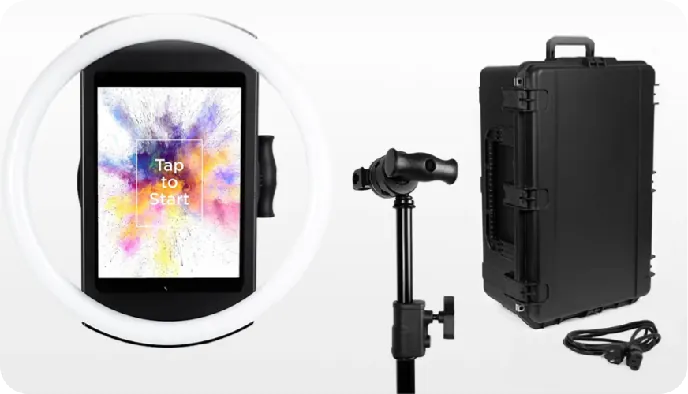
The HALO chassis is machined from a single billet of aluminum with a patented ring-light system. Those 112 LEDs produce up to 2,100 lumens with a refined diffuser, lighting groups 6-8 feet back from the camera in virtually any indoor setting. The LEDs are rated for up to 50,000 hours, so replacement is a non-issue for commercial operations.
For portability, the Event Kit includes an adjustable selfie stand and waterproof rolling travel case. The HALO body weighs 6.5 lbs; the full kit with case weighs 49 lbs with wheels and an extendable handle. The iPad snaps in via a tool-less faceplate, and a concealed built-in USB-C cable keeps it charged without dangling wires.
For venues without wall power, compatible portable batteries provide 6+ hours of runtime. For international deployments, HALO supports dual voltage (110V-240V) and requires only a plug adapter.
Source: Simple Booth
“It paid for itself pretty quickly. Now it’s just extra money coming in.” (Kurt Nielson Photography)
A Self-Running System You Manage from Anywhere
What makes Simple Booth suited for any venue is its unattended operation. Once configured, the app locks into booth mode. Operators monitor device health, adjust camera settings, and sync dashboard changes mid-event through Mission Control, a hidden overlay triggered by a two-finger pinch gesture that keeps the guest-facing experience uninterrupted.
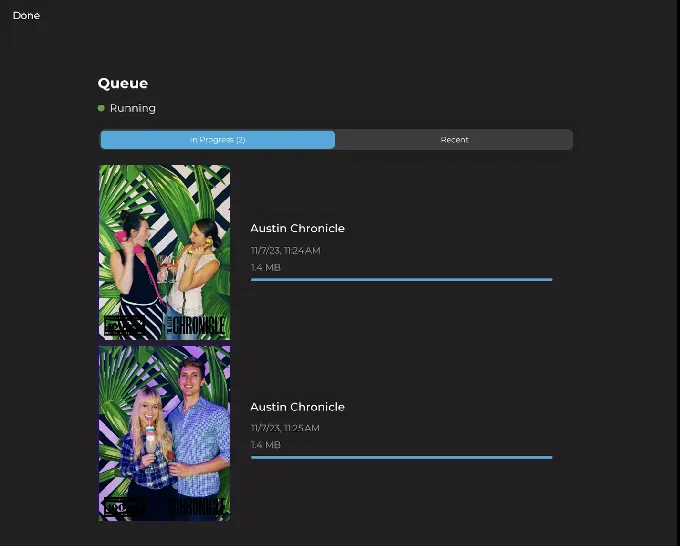
The offline upload queue stores sessions and delivers them automatically when connectivity returns, a critical feature for venues with unreliable WiFi. A Preflight Check screen catches configuration issues before each event launch.
Source: Simple Booth
For operators running multiple booths, settings configured in the online dashboard sync automatically to the iPad without exiting booth mode. This lets a single operator manage multi-venue operations from anywhere.
AI-Powered Experiences with Built-In Brand Integration
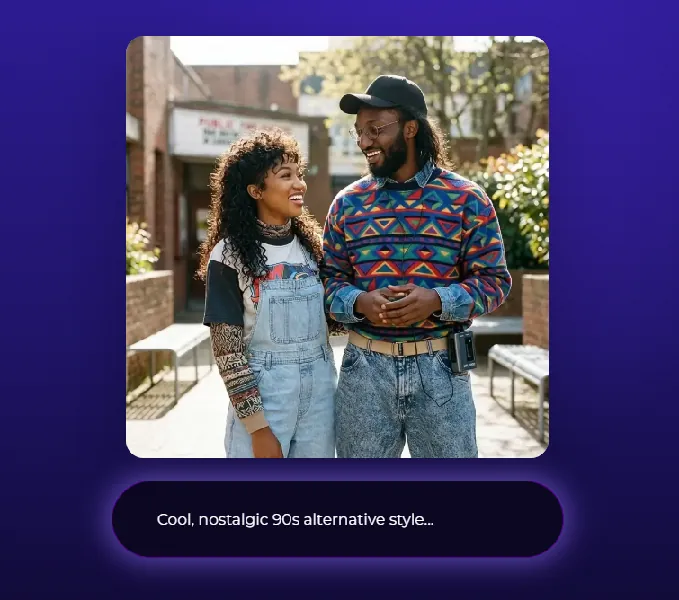
The AI Photo Booth suite transforms guest photos using text prompts through three Nano Banana AI models balanced for speed, quality, and group size. The platform automatically preserves identity, keeping guests recognizable regardless of the artistic transformation, without requiring prompt engineering from the operator.
Source: Simple Booth
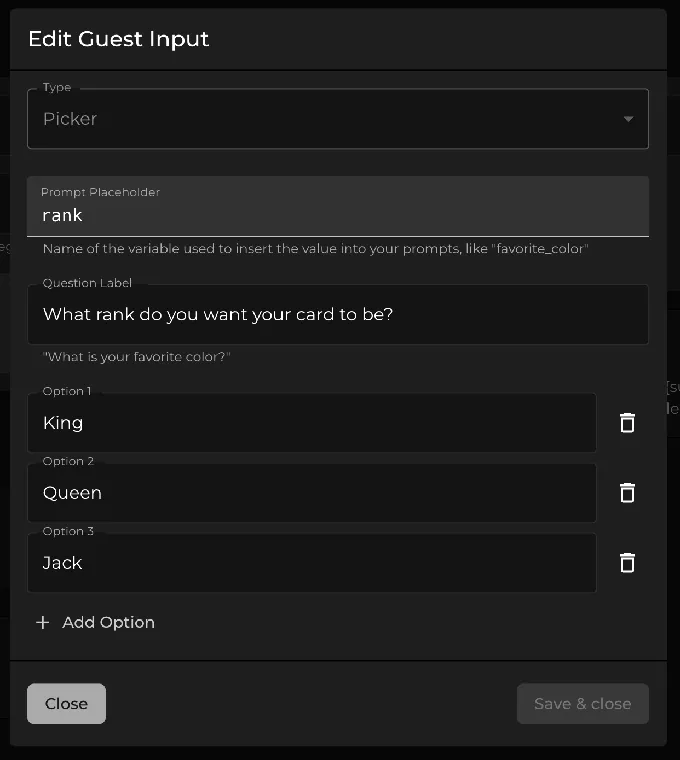
For brand activations, AI effects composite directly with the Layout Designer’s brand overlays, creating a single workflow instead of stitching two tools together. The Guest Input system injects participant answers into AI prompts as template variables, producing personalized output at scale. Operators can test prompts outside of booth mode at zero credit cost.
Source: Simple Booth
The Virtual Booth extends the same branded experience to participants on any device via a link or QR code, with no hardware or app installation required. It supports Magic Background replacement, AI effects, and multi-language localization across nine languages, making it a good fit for hybrid events or always-on marketing campaigns.
Simple Booth Pricing
Simple Booth uses a per-license subscription model with weekly, monthly, and yearly billing. Each plan includes one device license; additional devices require add-on licenses. AI effect credits cost $0.10 each and do not expire once purchased.
- Lite starts at $14.99/week ($290/year): custom layouts, photo delivery, online galleries; ads displayed in the app
- Core starts at $24.99/week ($490/year): ads removed, DSLR/mirrorless camera support, video, background replacement, AI effects, Virtual Booth
- Plus starts at $49.99/week ($990/year): custom branding, analytics, guest-editable text layers, custom AI effects
- Pro starts at $149/month ($1,490/year): lead capture, API integration, phone support, moderation, age gate
- Select starts at $249/month ($2,490/year): custom legal terms, security questionnaires, demographic analytics via face detection
A 7-day free trial is available with 25 free AI credits. HALO hardware kits are sold separately through buy.simplebooth.com with 0% financing available.
Use Simple Booth if:
- You need a portable photo booth with integrated lighting that delivers consistent photo quality at any venue
- You want unattended, self-running operation with remote management from a single dashboard
- You run brand activations and need lead capture with high opt-in rates
- You value a self-contained hardware and software ecosystem with a proven track record
- You need WhatsApp, AirDrop, and QR delivery for international venues or areas with poor cell coverage
Why Simple Booth Topped Our List
Simple Booth earned the top position because no other platform combines hardware portability with this level of software polish for unattended, venue-agnostic operation.
The sub-1-minute setup, patented ring light, wired and wireless DSLR integration, offline resilience, and remote dashboard management solve the pain points that matter most when you move between venues every week. Image previews render up to 12x faster than before, and every feature (filters, Background Blur, video, and DSLR) works together without compatibility restrictions.
Snappic offers deeper agency infrastructure, Touchpix leads in 360-degree video, and LumaBooth wins on price. But for a portable, self-running photo booth system that delivers consistent results at any venue, Simple Booth sets the standard.
2. Snappic, Best for Brand Activations and Multi-Format Agency Operations
When a single booth format is not enough, agencies managing high-profile brand activations need software that adapts to whatever hardware the event requires. Running a 360 rig at a stadium concert on Friday, an iPad booth at a corporate gala on Saturday, and a roaming photographer setup at a product launch on Monday means juggling multiple platforms… unless you use Snappic.
Snappic is a photo booth software platform built for agencies and operators who manage multi-format booth fleets across simultaneous client events.
| Snappic Pros | Snappic Cons |
|---|---|
| Supports iPad, 360, Glambot, Mirror, and Roaming booths under one account | AI credits billed separately, adding variable costs |
| Sub-account management for multi-client agencies | Entry price higher than single-format platforms |
| Grey Label unbranded app for white-label deployments | Most agency-tier features require the Scale plan |
| 24/7/365 live support during events | Entry-tier sharing limited to email and text delivery |
Snappic: Top 3 Unique Features
- Multi-format booth support from a single subscription
- Agency-tier sub-account management with grey label app
- AI-FX suite with multiple engines (AI-FX, PersonaFX, BananaFX powered by Google Gemini 2.5)
Snappic’s core advantage is that iPad booths, 360 video booths, Robot Arm/Glambot configurations, Mirror booths, and Roaming mode all operate under a single platform. The VideoFX Template Builder handles both 360 and Glambot output using the same configuration interface, so staff trained on one format can operate any other without relearning.
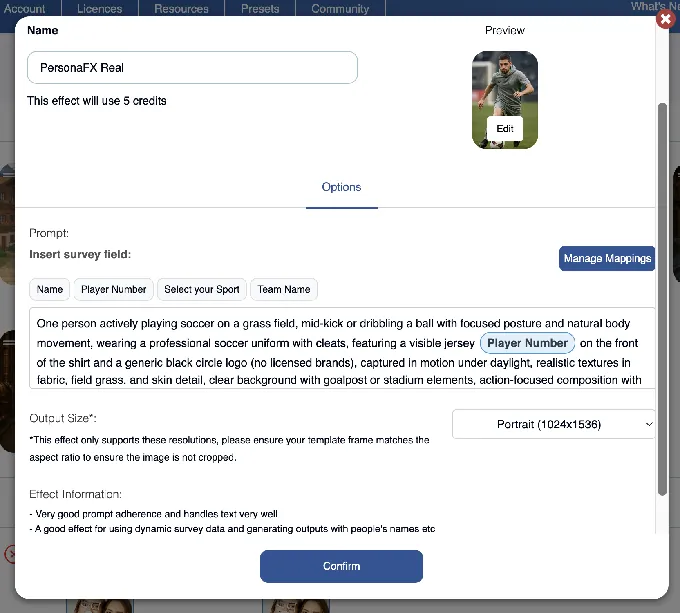
The AI-FX platform runs multiple AI engines in parallel: core AI-FX for style transfers from a library of art styles, seasonal themes, and professional scenarios; PersonaFX for survey-driven personalized avatars with dynamic field injection; and BananaFX for full image regeneration from custom prompts. The platform prices professional headshot experiences at $50-$100 per headshot or $1,500-$3,000 per event at corporate conferences.
Source: Snappic
For agencies, the Scale plan ($399/month) includes unlimited sub-accounts, a Grey Label unbranded app, and a Dedicated Customer Success Manager. The SmartShare system uses AI facial recognition to deliver subsequent captures to returning guests automatically, reducing queuing bottlenecks at high-volume events.
Event analytics capture share data, participation counts, peak engagement timelines, and estimated reach. The Automated Vision Analytics (AVA) layer adds anonymized demographic data (gender distribution, age ranges, face counts). The Send to Client feature packages everything into a branded, white-labeled analytics page delivered under the operator’s domain.
Snappic Pricing
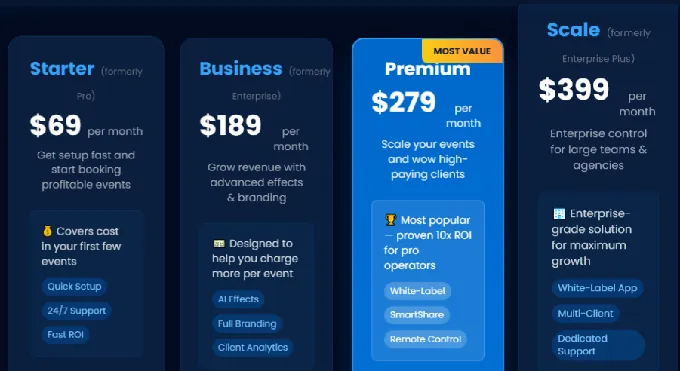
- Starter at $69/month: one booth license, professional photos, stills & GIFs, sharing
- Business at $189/month: one booth license, full AI-FX suite, branded galleries, analytics
- Premium at $279/month: adds white-label URLs and emails, webhooks, SmartShare (400 credits/month)
- Scale at $399/month: unlimited sub-accounts, grey label app, dedicated success manager
Per-event pricing ($29-$79/event) available for occasional use. 14-day free trial, no credit card required.
Source: Snappic
Use Snappic if:
- You manage a multi-client photo booth agency and need centralized billing with scoped client access
- You run more than one booth format (360, Glambot, Mirror, iPad, Roaming) and want one platform for all of them
- Your clients expect AI-powered activation deliverables with post-event analytics and demographic data
- You need 24/7/365 live support during events where a software failure has direct revenue consequences
3. Photobooth Supply Co. (Fiesta), Best All-in-One Ecosystem for Building a Photo Booth Business
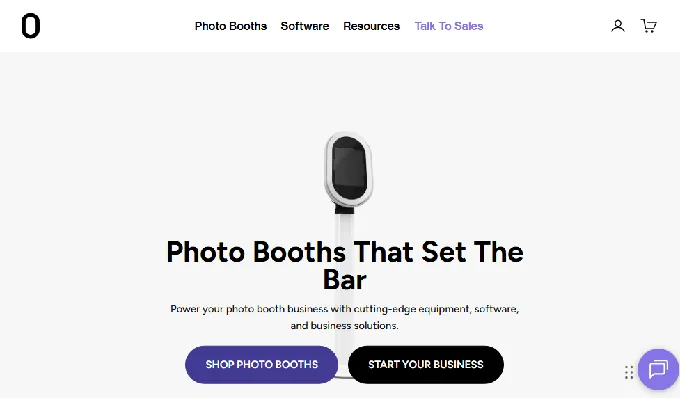
Starting a photo booth business means assembling hardware, learning software, building a portfolio, and figuring out pricing, often from separate vendors who have never met each other. Photobooth Supply Co. takes a different approach by putting everything under one roof.
Photobooth Supply Co. (PBSCO) is a vertically integrated company selling hardware, software, training, marketing materials, and community access as a single ecosystem. Its software platform, Fiesta, carries the tagline “More than just an app for your events. Fiesta is a software to run your business.”
| Fiesta Pros | Fiesta Cons |
|---|---|
| Hardware discounts compound for annual subscribers | Ecosystem benefits strongest when buying PBSCO hardware |
| 100+ video classes and live webinars with Photobooth Academy | Higher entry price than software-only platforms |
| Every major capture format in one subscription | 360 features require PBSCO’s Tortilla hardware |
| 4,500+ marketing assets included with hardware purchase |
Fiesta: Top 3 Unique Features
- Hardware discounts that reward long-term subscribers
- Photobooth Academy with 100+ classes and over six hours of professional advice
- Widest capture format library in a single subscription (photos, GIFs, boomerangs, video, slow-motion, 360, green screen, AI Masks)
Annual Fiesta subscribers receive ongoing hardware discounts on every PBSCO booth purchase: up to $1,000 off the Tortilla 360 booth, $750 off the Salsa 2 iPad booth, and $500 off the Guac & Chips DSLR booth on the Pro annual plan. These discounts stay active for the life of the subscription and can be used unlimited times.
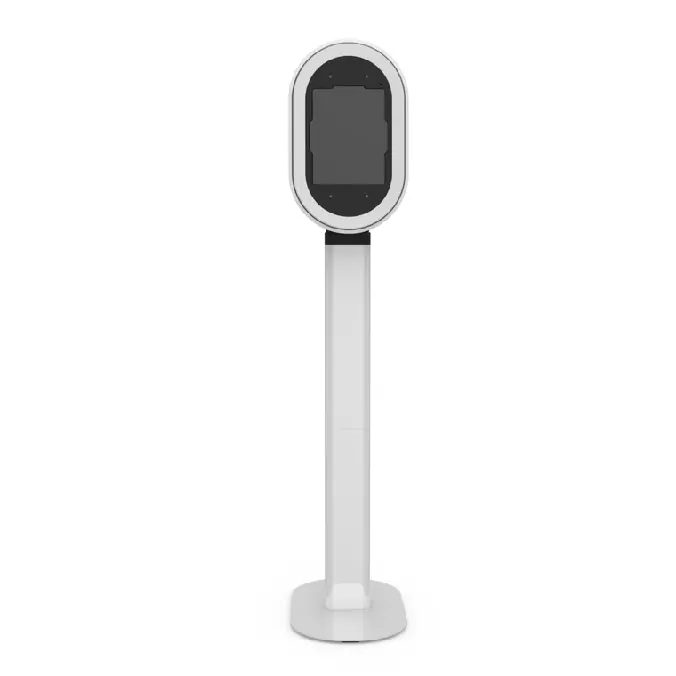
Source: Photobooth Supply Co.
Fiesta covers every major photo booth output format: photos, GIFs, boomerangs, video, Testimonial Videos, Group Shots, Face Masks, Slow Motion, 360-degree video, Green Screen with AI background removal, Glam mode, and AI Masks.
Fiesta was “the first photo booth software engineered alongside its 360 booth counterpart” (the Tortilla), with features like auto-trigger on arm movement and beat-synchronized soundtracks co-designed with the hardware. The Virtual Booth module extends the platform to browser-based remote events.
Fiesta Pricing
Flat-rate subscription with no per-event, per-capture, or usage-based charges. Base licenses cover one device.
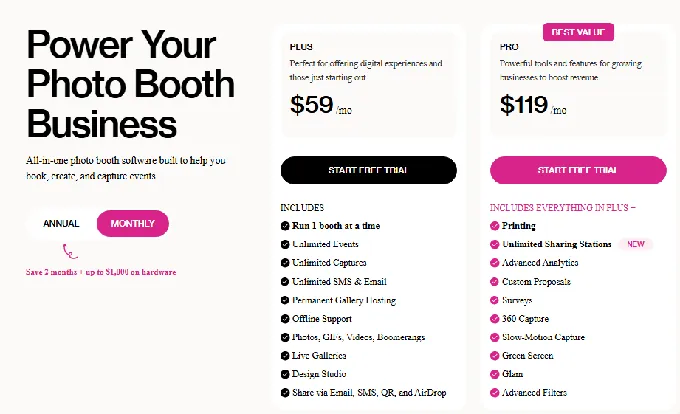
- Plus at $59/month ($49/month annual): 1 device, unlimited events and captures, SMS/email sharing, Photobooth Academy, community access, 7-day support
- Pro at $119/month ($99/month annual): everything in Plus, plus printing, unlimited Sharing Stations, 360 capture, slow motion, green screen, Glam, AI Masks, advanced analytics, portfolio website, proposals, phone support
Free trial available with no credit card required.
Source: Photobooth Supply Co.
Use Fiesta if:
- You are entering the photo booth business and want hardware, software, training, and marketing materials from a single vendor
- You are building a multi-booth fleet and want compounding hardware discounts that grow over time
- You need every major booth format (including 360) from one subscription without managing multiple platforms
- You value peer-based business education from operators who have built real photo booth businesses
4. Touchpix, Best for 360-Degree Video Booth Specialists
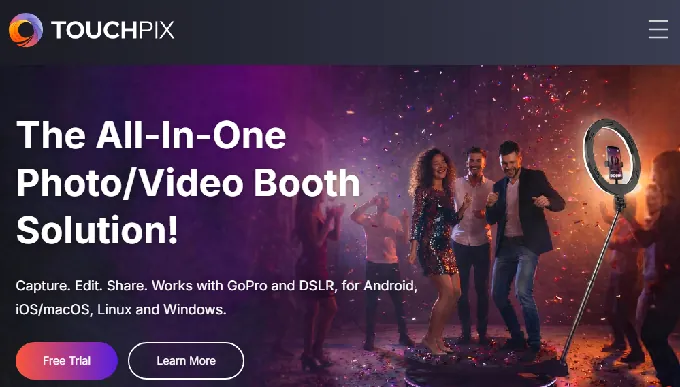
For operators whose business revolves around the 360-degree spinning-arm video booth, general-purpose photo booth software that treats 360 as an afterthought creates constant friction. Touchpix was built for this use case.
Touchpix is a subscription-based photo and video booth platform that launched in 2020. Founder Martin Modderkolk ran Propfun, his own rental company, and built the software to control his own 360 hardware.
| Touchpix Pros | Touchpix Cons |
|---|---|
| Native 360 workflows with Bluetooth arm triggers | Annual entry price higher than some competitors |
| Runs on iOS, Android, Windows, Mac, Linux, and Raspberry Pi | Cloud AI credits purchased separately |
| GoPro 7-14 integration (wired and wireless) | Pricing based on concurrent event slots, not devices |
| 4.8 App Store rating from 6,600+ reviews |
Touchpix: Top 3 Unique Features
- 360 booth architecture with Bluetooth trigger integration and 300+ animated overlays designed for video output
- Cross-platform support across six operating systems with unlimited devices per account
- On-device AI face replacement without internet, plus 80+ cloud AI transformation styles with custom prompt support
The Bluetooth 360 trigger connects directly to spinning-arm hardware so capture starts automatically at the right position, removing the need for a manual button press or a second operator at the rig. The 300+ animated overlays are motion-native, designed for video rather than repurposed photo templates.
Touchpix runs natively on iOS, Android, macOS, Windows, Linux, and Raspberry Pi under a single subscription with unlimited devices. For 360 operators working with Windows laptops, Android tablets, or Raspberry Pi controllers alongside iPads, this cross-platform coverage removes the multi-license problem entirely.
The on-device AI face replacement runs locally without internet and applies to both stills and video. A 360 slow-motion clip can be delivered with an AI transformation at the event with no cloud round-trip. The AI Photo Booth feature adds 80+ styles with custom prompt support for branded corporate activations. Offline background removal enables green-screen-quality compositing at outdoor venues with no internet.
Touchpix Pricing
Pricing is based on active event slots (concurrent events), not device count. All plans include unlimited devices.
- PhotoPass at $439.90/year (2 active events): photos, Photo AI, animated GIFs
- MultiPass at $879.99/year (4 active events): adds video, slow-motion, Boomerang
- MultiPass Pro at $1,407.99/year (8 active events): adds Virtual Booth, Advanced Surveys
- MultiPass Enterprise at $2,199.99/year (12 active events): adds Mosaic, RAW cloud backups
14-day free trial, no credit card required. AI credits purchased separately (100 credits for $12).
Use Touchpix if:
- Your business is built around 360-degree spinning-arm video booths with GoPro hardware
- You run equipment across mixed operating systems and need one subscription for all of them
- You target corporate activations where branded AI video output is part of the client deliverable
- You need concurrent event slot capacity for running multiple simultaneous bookings at different venues
5. LumaBooth, Best Budget-Friendly DSLR Photo Booth Software
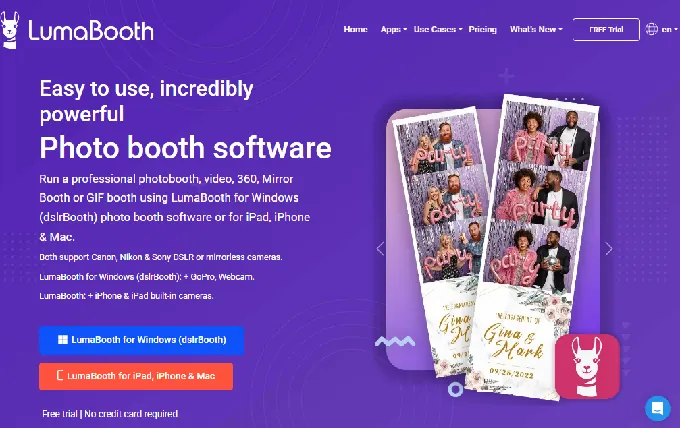
For solo operators and photographers who already own a Canon, Nikon, or Sony camera, the cost of professional photo booth software can feel like an unnecessary barrier. LumaBooth removes that barrier with one of the lowest per-device entry prices in the market.
LumaBooth (formerly dslrBooth) by Lumasoft is professional photo booth software that runs on Windows PC, iPad, iPhone, and Mac, with two device licenses included in every base subscription.
| LumaBooth Pros | LumaBooth Cons |
|---|---|
| Two devices included starting at $17/month (annual) | Add-ons (AI credits, SMS, cloud upgrades) stack quickly |
| Canon, Nikon, and Sony DSLR/mirrorless support | Cashless Payments is Windows-only |
| Every booth mode in one subscription (360, Mirror, Glam, AI) | Sony cameras limited to photo capture only |
| 820+ professionally designed templates | No web-based dashboard for remote device management |
LumaBooth: Top 3 Unique Features
- Two-device base plan starting at $17/month (Windows) or $18/month (Apple) billed annually
- Broad DSLR compatibility: Canon EOS, Nikon D/Z-series, Sony mirrorless, and GoPro 5-13 on Windows
- AI Portraits with 170+ preset styles and Custom AI builder with per-guest personalization
LumaBooth includes 360 Booth, Mirror Booth, Glam Booth, Green Screen/AI Background Removal, Video Guestbook, GIF Booth, Boomerang, Slow-Mo, and AI Portraits in a single subscription. An operator booking weddings, corporate events, and brand activations can handle all of them without managing multiple software licenses.
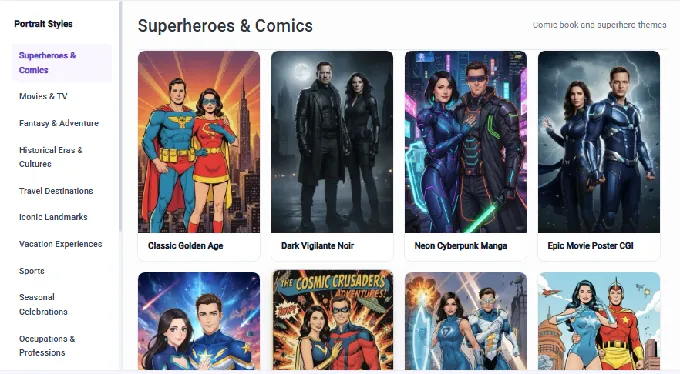
The AI Portraits feature offers 170+ preset styles spanning superheroes, vintage art, anime, and seasonal categories, plus a Custom AI Portraits builder for free-text prompts and per-guest personalization.
AI credits are purchased separately ($14.99/month for 150 credits up to $199.99/month for 2,000 credits); new subscribers receive 20 free credits.
Source: LumaBooth
On Windows, LumaBooth also includes a built-in Cashless Payments system powered by Stripe, allowing operators to charge guests per print or download via QR code with no card reader hardware required.
LumaBooth Pricing
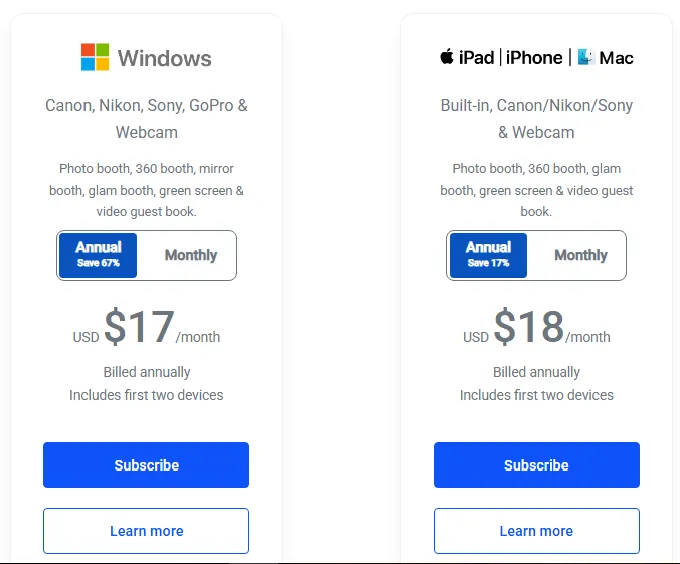
- Windows at $17/month (billed annually, ~$204/year): 2 devices, all features included
- Apple at $18/month (billed annually, ~$216/year): 2 devices, all in-app features
- Windows Monthly at $49.99/month: 2 devices
Optional add-ons: fotoShare Cloud Plus ($19.99/month), fotoShare Cloud Business ($39.99/month), SMS unlimited US/Canada ($10/month), LumaShare companion app ($7.99/month). Free unlimited trial with watermarked output, no credit card required.
Source: LumaBooth
Use LumaBooth if:
- You already own a Canon, Nikon, or Sony camera and want to convert it into a professional photo booth rig
- You run a solo or two-person operation and need two devices covered at the entry price
- You need every booth mode (360, glam, mirror, video guestbook) in one subscription without add-on charges
- You want AI portrait experiences as a premium upsell without additional equipment
6. Booth.Events, Best Free Starting Point for First-Time Operators
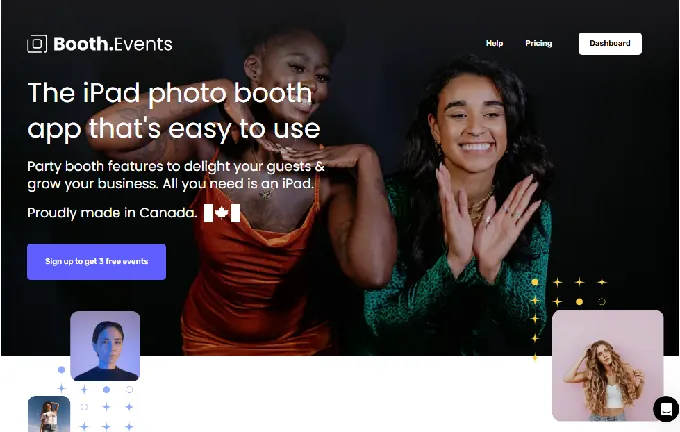
The biggest risk in starting a photo booth business is not knowing whether the software fits your events before you commit money. Booth.Events eliminates that risk entirely.
Booth.Events is an iPad and iPhone photo booth app that gives first-time operators three complete, fully featured Pro events at no charge, with no credit card required and no watermarks on guest photos.
| Booth.Events Pros | Booth.Events Cons |
|---|---|
| Three free Pro-tier events, no credit card or watermarks | Post-free events, Starter limited to 100 media per event |
| AI Glam Filter and SceneSelect on all paid plans | Fleet management features limited to Pro+ tier |
| Canon, Nikon, and Sony DSLR support on all tiers | Less established brand than some competitors |
| GDPR-compliant data capture built in from day one |
Booth.Events: Top 3 Unique Features
- Three free Pro events including DSLR tethering, AI effects, and branded galleries, with no watermarks
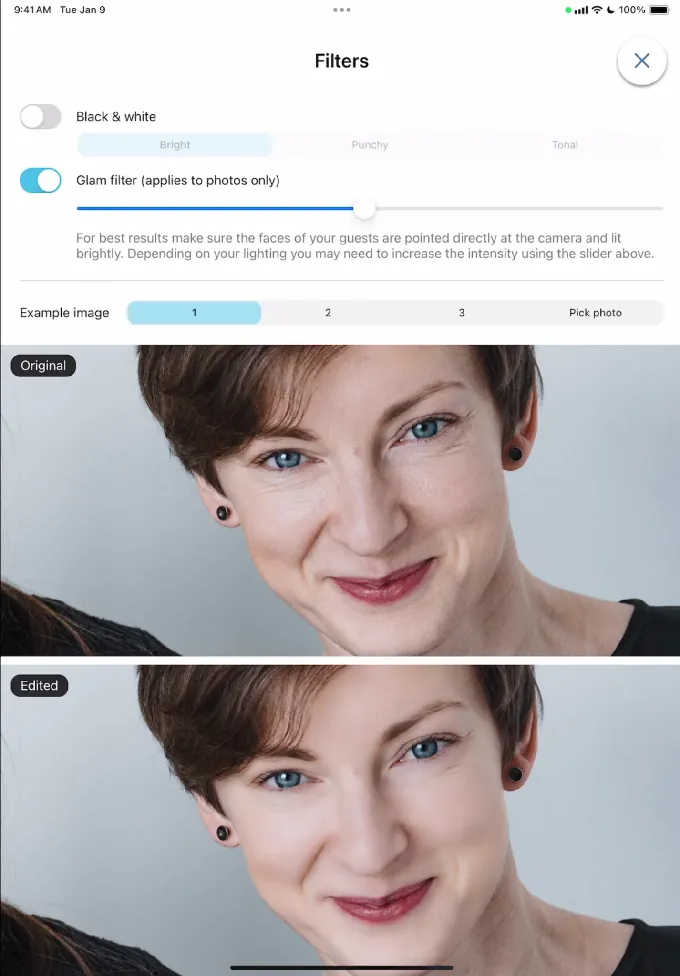
- AI Glam Filter (skin smoothing, teeth whitening) and SceneSelect AI background removal on all paid tiers with no per-image cost
- Built-in Survey system with GDPR consent fields and webhook integrations for CRM connections
The free events use the full Pro feature set: DSLR tethering via USB for Canon, Nikon, and Sony cameras; AI background removal; AI Glam Filter; branded galleries; and multi-format capture (photos, GIFs, boomerangs, slow-mo, and video). Operators can run their first three events for actual paying clients and test whether the product fits their workflow before spending anything.
The AI Glam Filter applies machine-learning skin smoothing, acne removal, and teeth whitening with an adjustable intensity slider for different skin tones. SceneSelect detects subjects without a physical green screen and composites them onto operator-uploaded backgrounds. Both features run on every photo at every event as a flat cost included in the plan, with no credit-based charges.
Source: Booth.Events
The data capture Survey system supports ten field types, including checkbox and rich-text fields designed for GDPR consent language. Pro+ subscribers get two webhook types for real-time CRM integration via Zapier, IFTTT, or any HTTP endpoint.
Booth.Events Pricing
- Starter (Free): 3 Pro events, then 100 media/event with 7-day gallery
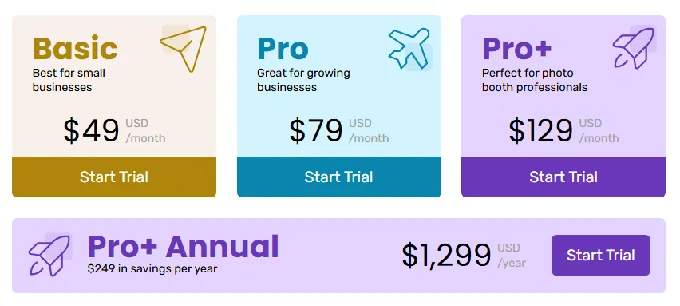
- Basic ($49/month): 1 iPad, 3-month gallery, SMS (USA/Canada), DSLR support, AI Glam, SceneSelect
- Pro ($79/month): 1 iPad + unlimited iPhones, 1-year gallery, worldwide SMS, custom HTML microsites
- Pro+ ($129/month): 4 iPads + unlimited iPhones, 2-year gallery, custom domain, white-label app, webhooks, AI Portraits (160+ styles)
Non-subscription options available: 1 Week Pass for occasional events and 4x Pro Event Credit packs that never expire. AI credits at $8 per 100.
Source: Booth.Events
Use Booth.Events if:
- You want to run real events with real clients before committing to a subscription
- You are a DJ or photographer adding photo booth as a secondary service and need polished AI-enhanced output on every tier
- You shoot with Canon, Nikon, or Sony and want DSLR support without a premium-tier upgrade
- You run occasional events and prefer pay-as-you-go options over monthly commitments
7. BoothLedger, Best for Windows-Based Canon DSLR Operations with Modern AI
Operators running Windows PCs with Canon cameras often find themselves stuck between dated software with limited AI and modern platforms that require migrating to iPad. BoothLedger fills that gap.
BoothLedger is a Windows-native photo booth platform built by PhotoBooth Guys, an active Irish event rental company that has run 500+ events for clients including Google, LinkedIn, Microsoft, Meta, Diageo, and Mastercard.
| BoothLedger Pros | BoothLedger Cons |
|---|---|
| Two device licenses included on every plan | Canon-only camera support (no Nikon or Sony) |
| 50+ AI creative styles at a low monthly price | New to market (launched publicly April 2026) |
| Fully offline capture, print, and QR sharing | Limited independent user review history |
| Built and tested at 500+ events |
BoothLedger: Top 3 Unique Features
- Canon DSLR tethering via Canon’s official EDSDK with live view, per-shot autofocus, face detection, and RAW+JPEG capture
- Dual-engine AI processing: Core for cost-efficient volume and Nano Banana Pro for high fidelity, with 50+ creative art styles
- Fully offline operation with automatic BoothLedger Cloud sync when connectivity returns
BoothLedger was created because, as the company describes, “off-the-shelf apps were unreliable at events and support was inaccessible from a different timezone mid-event.” The result is a platform with automatic USB reconnect logic, offline-first capture, and zero reported mid-event crashes across 500+ events.
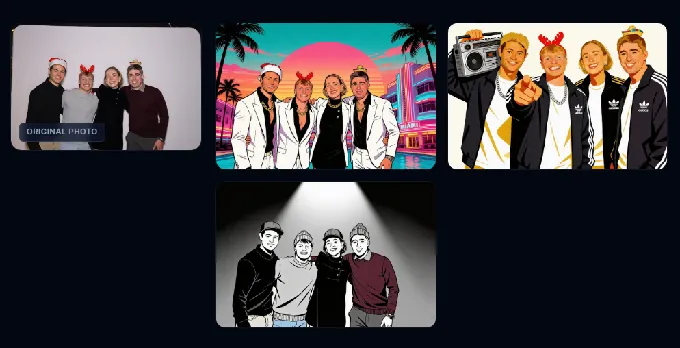
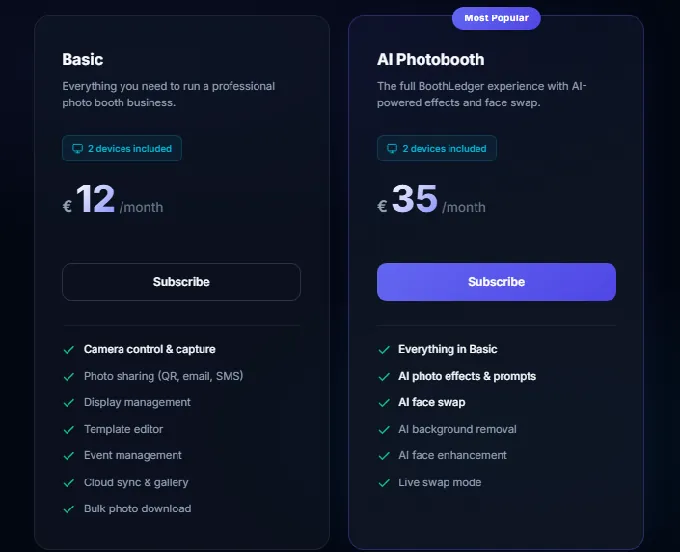
The AI suite offers two processing engines: Core, optimized for volume events, and Nano Banana Pro, built for premium activations. The effects library covers 50+ creative styles including magazine covers, movie posters, pop art, pencil sketches, and anime. Face swap, AI face enhancement, and background removal without a green screen are all included in the AI Photobooth plan at no per-image surcharge.
Source: BoothLedger
Canon camera support covers an extensive lineup through EDSDK: EOS Rebel series, full-frame and APS-C pro bodies (5D Mark III/IV, 6D Mark II, 7D Mark II), and the complete EOS R mirrorless range (R, RP, R5, R6, R6 II, R7, R8, R10, R50, R100).
BoothLedger Pricing
All plans include two device licenses with no per-event or per-photo charges.
- Basic at 12€/month: Canon DSLR tethering, template editor, photo sharing, BoothLedger Cloud, mirror/green screen/GIF/boomerang/glam modes
- AI Photobooth at 35€/month: everything in Basic, plus dual-engine AI, 50+ styles, face swap, AI background removal
30-day free trial, no credit card required. Annual billing saves approximately 15%.
Source: BoothLedger
Use BoothLedger if:
- You are a Canon DSLR operator on Windows who wants modern AI effects without migrating to iPad
- You run one or two booths and want dual-device licensing at the entry price
- Your events are at venues with unreliable or absent WiFi where offline operation is essential
- You want AI creative capabilities at a low monthly price and are comfortable evaluating a newer platform
And That’s Our List of…
…the best portable photo booths built to deliver consistent, high-quality experiences at any venue. Each platform on this list excels at a specific use case, and the right choice depends on your hardware, event types, and business model.
Here are our top three picks for the most common portable photo booth needs:
- Simple Booth: If you need a self-running system with integrated lighting that sets up in under a minute and delivers reliable, branded experiences at any venue, from hotel ballrooms to outdoor festivals. Get started with a free Simple Booth trial.
- Snappic: If you are an agency managing multi-format booth fleets for enterprise clients and need centralized account management, white-label capabilities, and AI-powered activation deliverables.
- Photobooth Supply Co. (Fiesta): If you are building a photo booth business from scratch and want hardware, software, training, and marketing materials from a single vendor with compounding discounts over time.
Best Portable Photo Booths FAQ
What is the best portable photo booth for weddings and private events?
Simple Booth is the top choice for weddings and private events. Its HALO Event Kit weighs 49 lbs in a rolling travel case, sets up in under a minute with no tools, and runs unattended with offline mode for venues with unreliable WiFi. The patented ring light delivers consistent, flattering photo quality regardless of ambient venue lighting.
Is there a free photo booth app for trying before buying?
Yes. Booth.Events offers three complete Pro-tier events free with no credit card required and no watermarks on guest photos, including DSLR camera support, AI background removal, AI Glam Filter, and branded galleries. Simple Booth also offers a 7-day free trial with 25 free AI credits. LumaBooth provides an unlimited free trial with watermarked output for extended evaluation.
Which portable photo booth supports the most device types?
Touchpix supports six operating systems (iOS, Android, macOS, Windows, Linux, and Raspberry Pi) under a single subscription with unlimited devices. This makes it the most hardware-flexible option for operators running mixed-device setups across different venue types and 360 rig configurations.
What is the most affordable professional photo booth software?
LumaBooth offers one of the lowest entry prices at $17/month (billed annually) on Windows or $18/month on Apple, with two device licenses included. BoothLedger is also competitively priced at 12€/month for its Basic plan with two devices. Both platforms include all core booth modes without tiered feature gates.
Which photo booth platform is best for brand activations and lead capture?
Simple Booth and Snappic both excel here. Simple Booth captures leads with up to 87-89% opt-in rates and offers custom branding, AI effects, and analytics through its integrated hardware-software system. Snappic adds multi-format booth support, agency sub-accounts, and Automated Vision Analytics for demographic data and post-event ROI reporting.
Can portable photo booths work without internet at a venue?
Yes. Simple Booth, BoothLedger, and Touchpix all support offline operation.
Simple Booth’s offline upload queue stores sessions and delivers them automatically when connectivity returns. BoothLedger captures, prints, and shares via QR code entirely offline. Touchpix processes AI face replacement on-device with no cloud dependency. For venues with unreliable WiFi (barns, basements, outdoor locations), offline capability is a critical feature to verify before purchasing.
What should I look for when choosing a portable photo booth for any venue?
Focus on four factors: portability (weight, travel case, setup time), lighting consistency (integrated lights vs. relying on venue ambient lighting), software reliability (offline mode, session recovery, update stability), and delivery options (QR, SMS, email, WhatsApp, AirDrop). The best portable photo booth produces consistent results whether you are in a dim hotel basement or a sunlit rooftop patio.
Which portable photo booth is best for 360-degree video?
Touchpix is the clear leader for 360 video booth operations, with native Bluetooth arm triggers, 300+ motion-designed overlays, GoPro 7-14 integration, and cross-platform support across six operating systems. Fiesta by Photobooth Supply Co. also offers strong 360 capture co-designed with its Tortilla hardware. LumaBooth includes 360 booth mode in its standard subscription as well, though it is less specialized.
Keep reading
 Best Of
7 Best Photo Booth Software with Video Message and Slo-Mo Capture [2026]
Booths that capture heartfelt video notes and buttery slo-mo. The moving stuff.
 Best Of
6 Best Photo Booth Software With QR Code Sharing [August 2026]
Booths that beam every snap to a phone with a quick scan. QR sharing done right.
 Best Of
7 Best Photo Booth Software With Real-Time Analytics and Dashboards [August 2026]
Booths that show the numbers as the party happens. Live dashboards, real insight.