7 Breeze Booth Alternatives: Photo Booth Solutions for Every Operator (2026)

Breeze Booth is well-regarded among photo booth operators, and for good reason. Its design flexibility gives operators full creative control over every screen, layout, and animation in the guest experience. It integrates with Canon DSLRs, Nayax payment terminals, 360-degree spinning rigs, Arduino devices, and DMX lighting controllers. And its 100% offline capability with optional data encryption makes it a solid choice for privacy-sensitive corporate deployments.
But that customization comes with a documented learning curve. The platform requires operators to configure events across two separate applications (the Event Editor and the Breeze Booth App), design custom interfaces using external tools like Photoshop or After Effects, and manage a layered pricing system where Breeze Cloud Pro and Breeze FX add costs on top of the $49/month per-device base subscription. For operators who thrive on that control, it works. But many professionals need something different.
That’s where this guide comes in. Whether you’re looking to:
- Set up and run photo booth experiences in under a minute, with no technical configuration
- Present a fully white-labeled software experience for enterprise brand activation clients
- Deploy professionally designed templates across a growing team without hiring a graphic designer
- Run photo booths across iOS, Android, Windows, and Mac under a single subscription
- Test professional-grade software by running real events before making any financial commitment
- Own your photo booth software outright with a one-time purchase and no recurring fees
- Access AI photo transformations at a flat monthly rate without per-image credit billing
We’ve identified seven Breeze Booth alternatives that each excel in one of these areas.
This isn’t about finding a “better” platform than Breeze Booth. It’s about finding the right fit for your business model, technical comfort level, and growth plans. Let’s look at the options.
| The Best Breeze Booth Alternatives | |
|---|---|
 | Simple Booth Best Alternative for Turnkey Photo Booth Experiences with Integrated Hardware We chose Simple Booth because its integrated HALO ring-light hardware and cloud-managed iPad app deliver professional photo quality and 87%+ opt-in lead capture with sub-one-minute setup, no external design tools required. |
 | Snappic Best Alternative for Enterprise White-Label Operations and Agency-Scale Activations We chose Snappic because its Grey Label App, client-facing analytics dashboards, and multi-engine AI effects suite give agencies what they need to present a fully branded software experience at corporate activations. |
 | LumaBooth Best Alternative for Growing Teams That Need Ready-Made Professional Templates We chose LumaBooth because its 820-plus template library, multi-brand camera support (Canon, Nikon, Sony, GoPro), and flat all-inclusive pricing let growing businesses maintain design consistency without a dedicated graphic designer. |
 | Touchpix Best Alternative for Cross-Platform Device Flexibility and 360-Video Operations We chose Touchpix because it runs natively on iOS, Android, Windows, Mac, Linux, and Raspberry Pi with unlimited devices per subscription, and offers native GoPro integration designed for 360-degree spinning-arm booths. |
 | Booth.Events Best Alternative for Risk-Free Professional Events Without Upfront Commitment We chose Booth.Events because it lets operators run three complete events with SMS sharing, Canon DSLR support, and AI background removal before requiring any payment or credit card. |
 | Sparkbooth Best Alternative for Mac and Windows Operators Who Want to Own Their Software Outright We chose Sparkbooth because its one-time lifetime license eliminates recurring software costs entirely, runs on both Mac and Windows, and supports Canon and Nikon DSLR cameras for professional-quality output. |
 | BoothLedger Best Alternative for Windows Operators Who Want All-Inclusive AI Without Per-Image Billing We chose BoothLedger because it bundles 50+ AI art style transformations, Canon DSLR tethering, and cloud gallery delivery into a flat monthly rate with two device licenses included and no per-image charges. |
What is Breeze Booth?
- Source: Breeze Booth
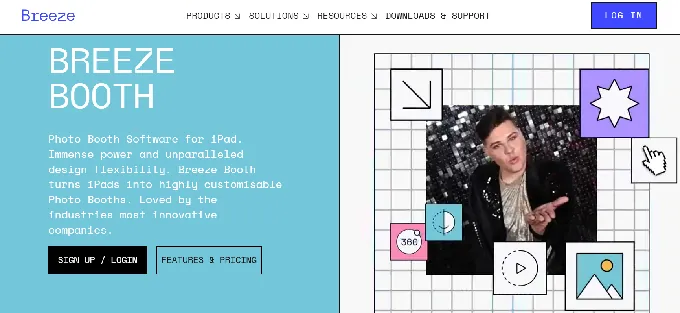
Breeze Booth is professional photo booth software for iPad and iPhone, developed by We Fly Kites Inc. (doing business as Breeze Software). The product traces its lineage to Breeze Systems Ltd., a UK-based camera software company founded in 2001 with deployments at the Super Bowl, the Olympics, and Everest expeditions, and is now trusted in 80 countries.
Its key features include:
- Full creative control over the guest-facing user interface via Touch Screen Designer, Photo Layout Editor, and fully branded screens
- Photos, GIFs, and video in a single app, including 360 booth, slow-motion, boomerang, and Glam Robot support
- Canon DSLR and mirrorless camera tethering via USB for professional-quality capture
- AI background removal running locally on-device with no internet or credits required
- Cloud-based AI image transformation via Breeze FX (OpenAI GPT-4o, face swap, cartoon styles)
- 100% offline operation with optional encryption for email addresses and phone numbers
- Integration with Nayax contactless payment terminals, Stripe, coin/bill acceptors for unattended revenue-generating kiosks
- A token system that injects survey responses into print layouts and file names in real time
Breeze Booth’s architecture gives operators complete freedom to design every screen, countdown, and output layout from scratch. That depth serves agencies delivering custom branded activations where no two events look alike.
But as your business grows, you may need something that requires less setup time, runs on more device types, or includes AI effects without a separate per-image billing layer. That’s why this article focuses on tools that specialize where Breeze Booth may not be the ideal fit.
Looking for a photo booth that runs itself? Simple Booth’s HALO hardware and cloud-managed app deliver professional photo experiences with sub-one-minute setup. Start your free trial and see the difference.
How We Curated Our List of Breeze Booth Alternatives
After testing Breeze Booth and researching the photo booth software market, we found that operators have needs that extend well beyond design customization. While Breeze Booth excels at giving expert operators full creative control, many businesses need more focused solutions for:
- Running turnkey, self-operating photo booth experiences without extensive technical configuration
- Presenting fully white-labeled booth software with client-facing analytics for enterprise and agency operations
- Maintaining design consistency across a growing team using ready-made professional templates
- Deploying photo booths across multiple operating systems and device types under one account
- Evaluating professional software risk-free before committing to a monthly subscription
- Eliminating recurring software costs entirely with a one-time ownership model
- Offering AI photo transformations to every client without managing per-image credit billing
Each tool on this list leads in one of these areas. Some operators might use them to complement their existing Breeze Booth setup for specific event types, while others might switch entirely to a platform that better fits their workflow.
| ❗DISCLAIMER: We aren’t covering every photo booth tool on the market. Our focus is on the best alternatives that address specific needs where Breeze Booth’s flexibility-first approach may not be the ideal fit. |
|---|
1. Simple Booth: Best Alternative for Turnkey Photo Booth Experiences with Integrated Hardware
- Source: Simple Booth
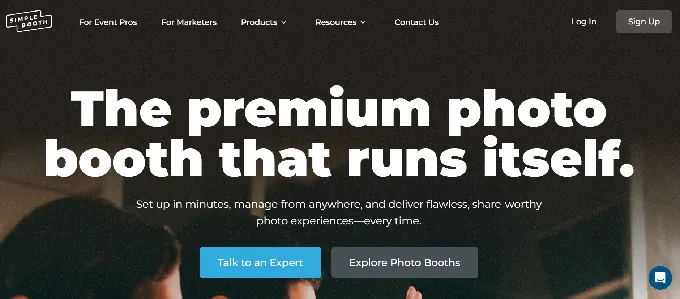
Simple Booth is the photo booth that runs itself, pairing a subscription-based iPad app (the HALO app) with proprietary ring-light hardware (the HALO kits) and a browser-based Virtual Booth product that requires no hardware at all. Used by 30,000+ customers globally with 40 million+ moments captured since 2013, its key features include:
- Integrated HALO hardware: Precision-machined aluminum ring light with 112 LEDs producing up to 2,100 lumens, rated for 50,000 hours of operation
- Sub-one-minute setup: Tool-less faceplate, deployable selfie stand, and concealed USB-C charging for rapid deployment
- Lead capture: Customizable data capture forms achieving 87%+ opt-in rates with MailChimp integration and API access
- AI Effects with brand integration: Nano Banana AI models that transform guest photos while preserving identity, composited directly with brand overlays
- Virtual Booth: Browser-based photo experiences requiring no hardware, no app install, compatible with any device
- Remote management: Configure and update presets via the online dashboard with changes syncing to iPads without exiting booth mode
- DSLR and mirrorless camera support: Connects to Canon cameras via USB for long-event reliability or wirelessly over WiFi for flexible setups (wireless DSLR integration is something most competitors don’t offer)
- Flexible photo delivery: AirDrop for instant sharing even offline, WhatsApp for international events where carrier fees are a concern, plus text, email, and QR code delivery
For event rental companies, venue operators, and brand marketers who need a system that’s reliable, professional, and operational in under a minute, Simple Booth provides a complete, integrated solution where Breeze Booth offers software only, requiring operators to source and assemble their own hardware, lighting, and design assets.
Why Choose Simple Booth Over Breeze Booth
While Breeze Booth offers deep customization for operators who build interfaces from scratch, Simple Booth takes an integrated approach: hardware and software designed to deliver professional results with minimal setup time. Here’s where it stands out:
Setup and Operation: Go Live in Under a Minute with No Technical Expertise
Breeze Booth’s setup spans two applications: the Event Editor web tool for configuring screens, layouts, hardware connections, and tokens, plus the Breeze Booth App for guest-facing capture. Operators need to design replacement screens in external tools, structure Profile folders, and test configurations across iPad models before running a single live event.
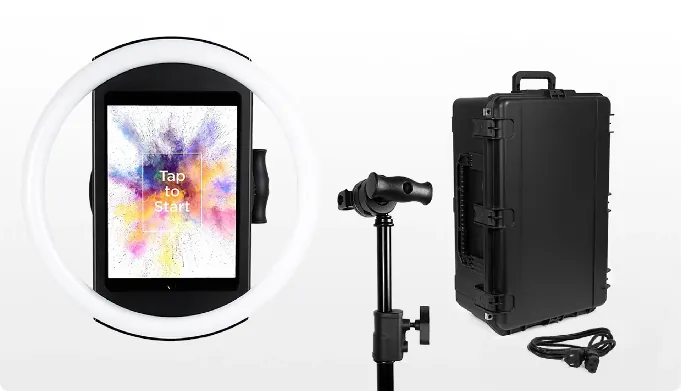
Simple Booth collapses this into a single workflow. The HALO ring light snaps onto its stand via a tool-less faceplate, a concealed USB-C cable keeps the iPad charged throughout the event, and operators configure everything from a redesigned preset editor that presents the entire booth flow visually.
Source: Simple Booth
A Preflight Check screen catches configuration issues before launch, and Mission Control (triggered by a two-finger pinch) lets operators monitor device health and adjust settings during live events without breaking the guest experience.
The HALO 5.0 Layout Designer puts the entire template design workflow inside the app or web dashboard: photo placement, text layers, gradients, logos, and dynamic QR codes. No Photoshop, no After Effects, no external design pipeline required.
Rendering optimizations deliver image previews up to 12x faster than previous versions, so guests see polished results instantly. A reliable offline queue keeps the booth capturing and queues photos for upload when connectivity returns (matching Breeze Booth’s offline capability without extra configuration).
All features work together across every capture mode, including video and offline operation, so operators don’t have to navigate complex compatibility rules.
⚡Simple Booth in Action: You arrive at a corporate event 30 minutes before doors open. You pull the HALO Event Kit from its rolling travel case, snap the iPad into the ring light, power it on, and select a preset you configured from your hotel room that morning via the online dashboard.
The Preflight Check confirms everything is green. Guests start taking photos within minutes of your arrival. No laptop, no design files, no troubleshooting a multi-app sync process.
“I knew nothing about photo booths when we started.” Amore Entertainment launched a photo booth business during COVID and scaled to multiple booths using Simple Booth’s turnkey system. (Amore Entertainment)
Lead Capture and Marketing: Turn Every Photo Into a First-Party Data Opportunity
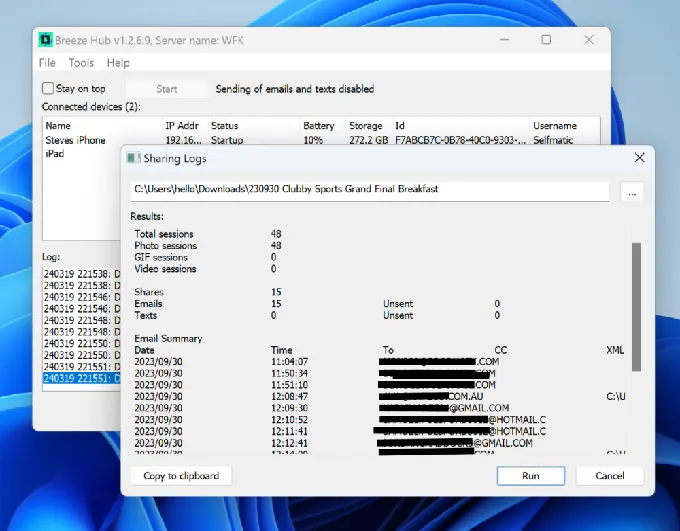
Breeze Booth captures survey data through its token system and exports it to CSV via Breeze Hub reports. There is no native CRM integration, no client-facing analytics dashboard, and no automated data routing to marketing platforms.
- Source: Simple Booth
Simple Booth treats lead capture as a core function. The platform captures email, phone, name, postal code, and date of birth through customizable forms embedded in the booth flow, with up to 10 custom fields including checkboxes and required legal terms on the Select plan. Data syncs automatically to MailChimp or routes to any CRM via the Open API (Pro+).
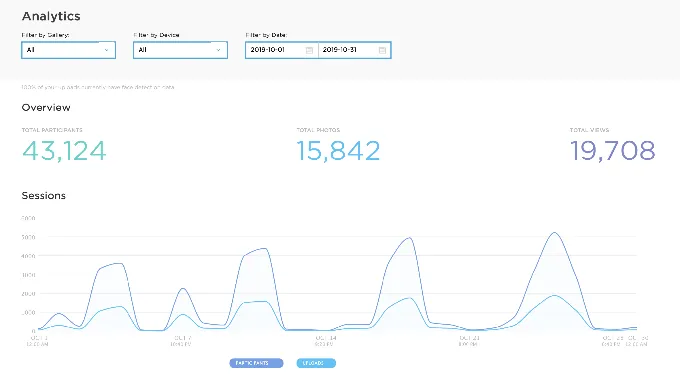
The analytics dashboard tracks total participants, gallery views, social shares by channel, and demographic insights via face detection (age estimation, gender breakdown, average group size) on the Select tier.
Source: Simple Booth
⚡Simple Booth in Action: A multi-location entertainment venue installs HALO booths permanently in each location. Guests take photos, enter their email to receive them, and opt in to marketing communications at an 87%+ rate. The venue tracks gallery views and social shares from the dashboard, proving engagement ROI to sponsors.
Treetop Golf built 150,000 unique email addresses across locations using Simple Booth’s lead capture, turning a photo booth into a first-party data engine.
Virtual Booth: Deliver Branded Photo Experiences Without Any Hardware
Breeze Booth runs exclusively on iPad and iPhone, with Mac support listed as “coming soon.” Every activation requires a physical device on-site.
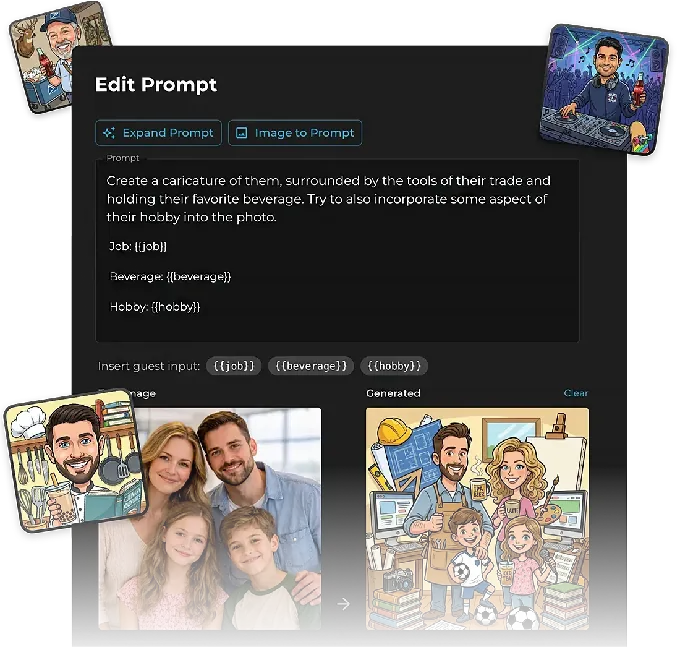
Simple Booth’s Virtual Booth runs entirely in a web browser with no app installation required. Participants join from their own phone or laptop via a QR code or link. Hosts configure branding, overlays, AI effects, and data capture fields from the online dashboard. Each event generates a unique link and QR code to share via email, website, or printed signs.
Source: Simple Booth
Virtual Booth supports Magic Background Replacement (no green screen needed), AI Effects with guest-input personalization, and multi-language localization into nine languages. It connects to the same analytics, Live Feed, and Gallery infrastructure as the HALO app, so brands running hybrid events can operate physical kiosks for in-room attendees and Virtual Booth for remote participants, with all submissions feeding a single combined gallery.
⚡Simple Booth in Action: A consumer goods brand prints QR codes on product packaging that link to a Virtual Booth experience. Customers scan from home, take a branded AI photo, share it on social media, and opt in to the brand’s email list. The brand captures first-party data and generates UGC without deploying a single piece of hardware.
AI Photo Booth: Transform Guest Photos with Built-In Brand Integration
Breeze Booth routes cloud AI through Breeze FX, which charges per image: Face Swap from $0.032, Cartoon at $0.195, and GPT Image at $0.455 per image. Processing takes 10-60 seconds depending on the effect type.
Simple Booth’s AI Effects are built natively into the app. Three Nano Banana AI models balance speed, quality, and group size, and the platform handles identity preservation automatically, so guests stay recognizable no matter how dramatic the transformation. Operators can test unlimited prompts at zero credit cost outside of booth mode, and AI effects are composited directly with the Layout Designer’s brand overlays in a single workflow.

Source: Simple Booth
Credits cost $0.10 each and never expire once purchased. New subscriptions include bonus credits (50 on Core, up to 200 on Select).
G7 Entertainment Marketing has been a Simple Booth user for “10+ years” and has captured over 136,000 fan interactions.
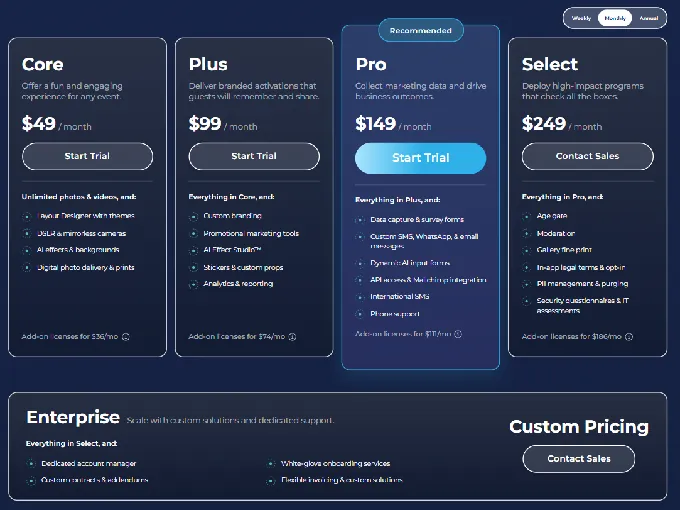
Simple Booth Pricing
Simple Booth offers tiered weekly, monthly, and annual plans. Each plan includes one device license, with add-on licenses available for multi-booth operators.
Everyday Plans:
- Lite: $14.99/week, ~$72/month, $290/year. Custom layouts, motion and still capture, photo delivery, online galleries. Includes ads in the app; excludes DSLR, video, custom branding, analytics, and lead capture.
- Core: $24.99/week, ~$49/month, $490/year. Everything in Lite plus ads removed, DSLR/mirrorless camera support, full-length video, background replacement, Dropbox integration, AI effects, and Virtual Booth.
- Plus: $49.99/week, ~$99/month, $990/year. Adds custom branding, analytics and reporting, guest-editable text layers, and custom AI effects.
Business Plans:
- Pro: $149/month, $1,490/year. Adds lead capture, API integration, phone support, moderation, age gate, and data compliance tools.
- Select: $249/month, $2,490/year. Adds in-app custom legal terms, security questionnaires, and demographic analytics via face detection.
Simple Booth sells HALO hardware kits separately at buy.simplebooth.com, with 0% financing available. A 7-day free trial is available with 25 free AI credits.
Source: Simple Booth
“It paid for itself pretty quickly. Now it’s just extra money coming in.” (Kurt Nielson Photography)
Who Should Use Simple Booth?
Choose Simple Booth if:
- You run a photo booth rental business and need a complete, plug-and-play system that sets up in under a minute, operates without an attendant, and commands premium rental rates through professional photo quality and integrated ring-light hardware. The intuitive interface also means training new staff takes minimal time (a real advantage when scaling to multiple events per weekend).
- You manage marketing activations or permanent venue installations and need a platform that captures first-party data at 87%+ opt-in rates, generates branded UGC, and provides analytics on audience engagement.
- You want to offer both physical and virtual photo experiences from a single platform, running in-person HALO kiosks alongside browser-based Virtual Booth activations for remote participants and always-on campaigns.
Ready for a photo booth that delivers professional experiences with minimal effort? Start your Simple Booth free trial and see how 30,000+ operators run flawless events, every time.
2. Snappic: Best Alternative for Enterprise White-Label Operations and Agency-Scale Activations
Source: Snappic
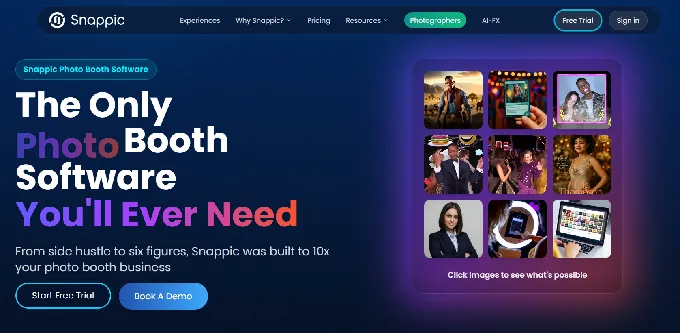
Snappic is a cloud-native iPad photo booth platform used at 100,000+ events by 8,000+ operators worldwide that positions itself as infrastructure for professional photo booth businesses scaling toward multi-client agency operations. Its key capabilities include:
- Full grey-label white labeling on the Scale plan: remove all Snappic branding from the iPad app and present it as your own software
- A multi-engine AI effects suite (AI-FX, PersonaFX, BananaFX) spanning style transfers, AI avatars, trading cards, and generative image transformation
- VideoFX covering 360, GlamBot, Mirror booth, and Roaming mode from a single template system
- Client-facing analytics reporting via a one-click “Send to Client” dashboard with downloadable share data and engagement metrics
Why Choose Snappic Over Breeze Booth for Enterprise White-Label Operations
Snappic stands out in the following areas:
A Deployable Grey-Label App vs. Manual White-Labeling Breeze Booth supports white-labeling through its profile-based design system, but it requires significant manual work: sourcing assets, designing replacement screens, and testing across iPad models. Snappic’s Scale plan ($399/month) ships a fully unbranded version of the iOS app with no Snappic identity in the interface. Combined with white-label URLs and emails (included at Premium and Scale tiers), every touchpoint carries the operator’s brand.
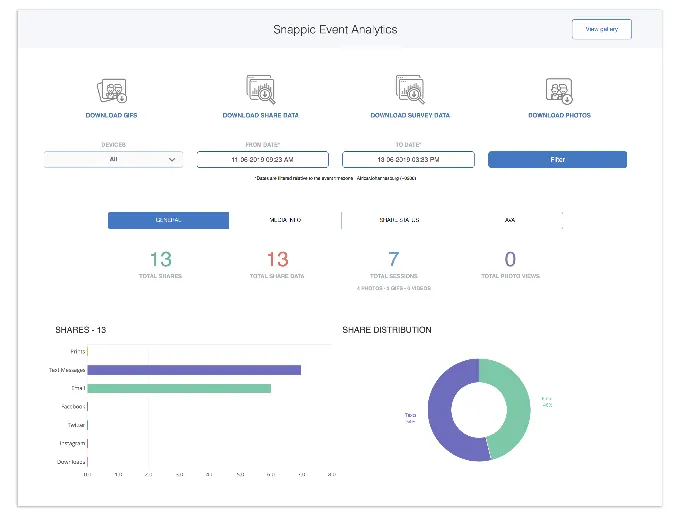
Analytics as a Client Deliverable Breeze Booth’s reporting is an operator-side tool: survey data exports to CSV via Breeze Hub. Snappic’s Send to Client feature (Business+ plans) converts event data into a live client-facing webpage with branded gallery, downloadable media, share data, and engagement metrics. Automated Vision Analytics (AVA) adds anonymized demographic data without identifying individual guests.
Source: Snappic
- Multi-Engine AI Effects Breeze FX processes images in 10-60 seconds through a single pipeline. Snappic runs three AI subsystems optimized for different output types: core AI-FX for style transfers via a preset filter library, PersonaFX for avatar generation, and BananaFX (Google Gemini 2.5) noted for faster render times.
*🏅 NOTE: We also evaluated Darkroom Booth and dslrBooth. While Darkroom Booth offers a perpetual license at $295, and dslrBooth provides solid Windows compatibility, Snappic offers the most complete combination of enterprise white-labeling, client analytics infrastructure, and multi-hardware video support for agencies running brand activations at scale.*
Snappic Pricing
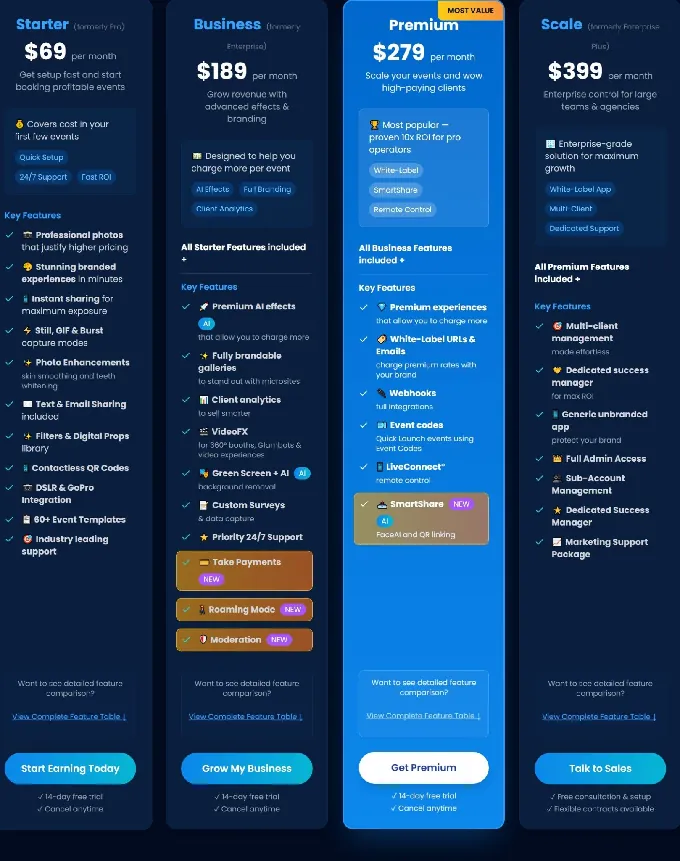
- Per-Event License: $29 per event (Starter) or $79 per event (Business), 48-hour access
- Starter: $69/month or $499/year. Core capture modes, SMS/email sharing (USA/Canada unlimited)
- Business: $189/month or $1,799/year. Adds VideoFX, AI-FX, microsite galleries, client analytics, surveys
- Premium: $279/month. All Business features plus white-label URLs/emails, webhooks, SmartShare
- Scale: $399/month or $3,999/year. All Premium plus Grey Label App, unlimited sub-accounts, dedicated Customer Success Manager
Source: Snappic
AI-FX credits, background removal credits, and international SMS are additional variable costs. Operators new to the platform should also expect a learning curve given the breadth of settings and configuration options across Snappic’s feature set.
Who Should Use Snappic?
Choose Snappic if:
- You run a photo booth agency managing multiple client accounts and need a fully unbranded app your corporate clients never associate with a third-party platform.
- You serve brand activation clients who require post-event analytics reports proving audience engagement, demographic reach, and social sharing activity.
- You need round-the-clock support with a response SLA that holds during live corporate activations.
3. LumaBooth: Best Alternative for Growing Teams That Need Ready-Made Professional Templates
Source: LumaBooth
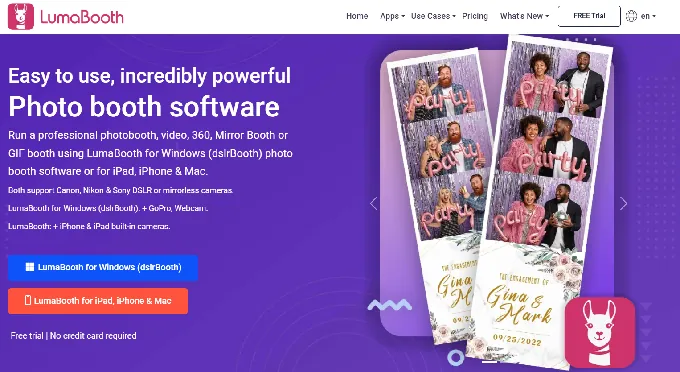
LumaBooth is professional photo booth software by Lumasoft, spanning iPad, iPhone, Mac, and Windows under a unified dashboard. Where Breeze Booth is built around design flexibility for operators who create custom interfaces from scratch, LumaBooth ships with an 820-plus professionally designed template library ready to deploy. Its key capabilities include:
- 820+ templates browsable from the cloud Dashboard, covering weddings, corporate events, and holidays
- Multi-brand camera support including Canon, Nikon, Sony mirrorless (18+ models), and GoPro 5-13
- Over 170 AI Portrait transformation presets plus custom prompt capability
- Flat $17-$20 per month (billed annually) for two devices with all features included
Why Choose LumaBooth Over Breeze Booth for Growing Teams
LumaBooth stands out in the following areas:
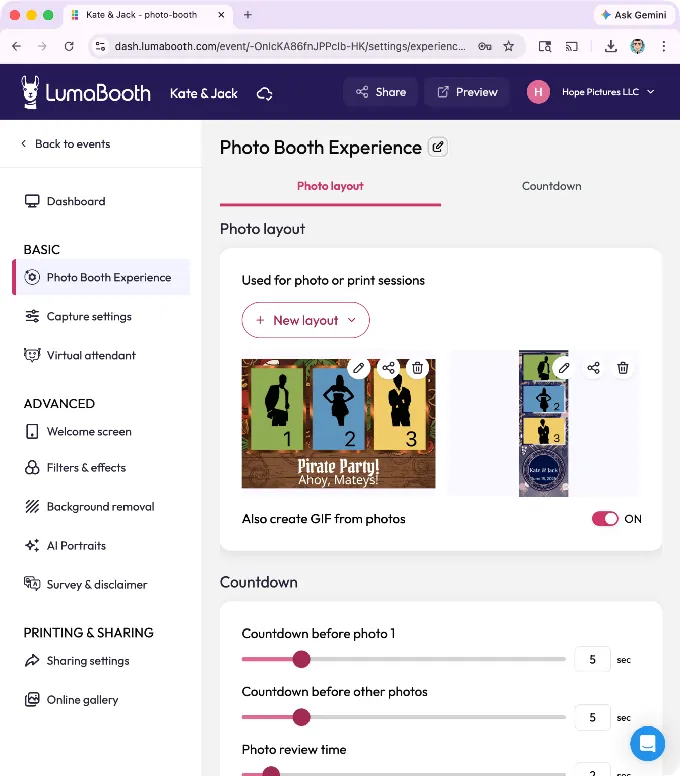
- A Ready-Made Template Ecosystem Breeze Booth promises full creative control, but every event requires either design resources or significant operator time. LumaBooth’s Dashboard ships with 820+ professionally designed templates organized by occasion and style. A Canva Direct Import feature lets operators who design their own layouts bring them in as Canva PDFs with layer preservation. Note that while template browsing and deployment happen through the cloud Dashboard, most event configuration and booth customization is handled within the app itself rather than from a web interface.
Source: LumaBooth
Multi-Brand Camera Flexibility Breeze Booth’s DSLR integration is Canon-specific. LumaBooth for Windows supports Canon, Nikon, Sony mirrorless, GoPro 5-13, and webcams via USB. The Apple app supports Canon and Nikon DSLR/mirrorless via USB, and Sony via PC Remote mode, giving operators camera flexibility without manufacturer lock-in.
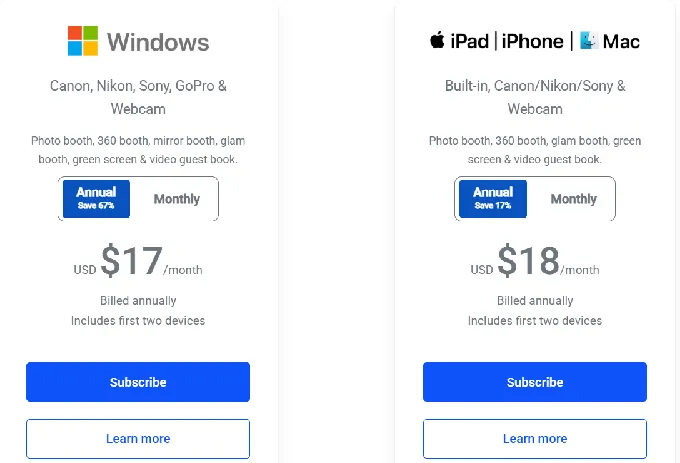
Flat All-Inclusive Subscription Breeze Booth’s $49/month per device is the base: Breeze Cloud Pro at $39.99/month and Breeze FX per-image charges add to the total. LumaBooth’s Apple plan at $18/month billed annually covers two devices and all features: 360 Booth, Glam Booth, Mirror Booth, Green Screen, Video Guestbook, and AI Portrait presets. AI credits scale to actual usage rather than a mandatory per-image cloud service.
*🏅 NOTE: We also evaluated TouchPix and Snappic. While TouchPix excels at 360 video experiences and Snappic provides enterprise white-labeling, LumaBooth offers the most accessible combination of template depth, multi-camera flexibility, and inclusive pricing for growing operations.*
LumaBooth Pricing
- Apple (iPad/iPhone/Mac): $18/month billed annually (~$216/year) for two devices, all features included
- Windows: $17/month billed annually (~$204/year) for two devices, includes Booth CoPilot management app
- Add-ons: fotoShare Cloud Plus (+$19.99/month), SMS plan (+$10/month), AI credit packs from $14.99/month (150 credits)
Source: LumaBooth
Who Should Use LumaBooth?
Choose LumaBooth if:
- Your photo booth business is growing and you need a large library of ready-made templates so multiple staff members can run events with consistent, professional designs.
- You own or plan to invest in Nikon, Sony, or GoPro cameras alongside Canon, and want software that supports your full camera inventory.
- You want all core booth modes included in one flat monthly subscription, with AI costs scaling to actual usage.
4. Touchpix: Best Alternative for Cross-Platform Device Flexibility and 360-Video Operations
Source: TouchPix
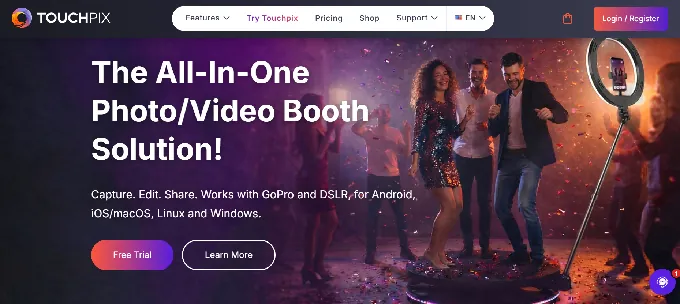
Touchpix is subscription-based photo and video booth software built for event professionals who operate across multiple device types and booth formats. Where Breeze Booth runs exclusively on iPad and iPhone, Touchpix runs natively on iOS, Android, macOS, Windows, Linux, and Raspberry Pi. Its key capabilities include:
- Six capture modes: still photos, AI photos, boomerangs, video, animated GIFs, and slow-motion video
- Native 360-degree video booth support with Bluetooth trigger automation for spinning-arm rigs
- GoPro 7-14 wired and wireless integration plus Canon, Nikon, and Sony camera support
- AI Face Replacement running fully on-device with no internet required
- Unlimited devices per subscription on all tiers
Why Choose Touchpix Over Breeze Booth for Cross-Platform Operations
Touchpix stands out in the following areas:
True Cross-Platform Support Breeze Booth runs on iPad and iPhone only. Touchpix runs natively on iOS, iPadOS, Android, macOS, Windows, Linux, and Raspberry Pi, and every tier includes unlimited devices. An operator can deploy an iPad booth Saturday afternoon, a Windows laptop rig Saturday evening, and an Android tablet Sunday morning, all running the same account and event configurations.
360-Video Booth with Native GoPro Integration Breeze Booth’s 360 capability relies on Auto Motion Start for detecting spinner motion. Touchpix natively controls GoPro models 7 through 14 over both wired USB and wireless connections, with wired mode recommended for live event reliability. A dedicated Bluetooth trigger automates the spin sequence without an attendant pressing any button.
Slot-Based Pricing Instead of Per-Device Licensing Breeze Booth’s per-device model means a three-booth operator pays $147/month. Touchpix’s MultiPass at $879.99/year covers four active event slots with unlimited devices (~$73/month), and scales by event volume rather than device count.
*🏅 NOTE: We also evaluated Snappic and LumaBooth for this cross-platform positioning. While Snappic remains primarily iPad-and-browser focused, and LumaBooth handles desktop deployments, Touchpix offers the most cohesive single-subscription solution for device parity and 360-spinning-arm activations.*
Touchpix Pricing
- PhotoPass: $439.90/year (~$37/month). 2 active events, unlimited devices. Photos, Photo AI, and GIFs.
- MultiPass: $879.99/year (~$73/month). 4 active events. Adds video, slow-mo, boomerang.
- MultiPass Pro: $1,407.99/year. 8 active events. Adds Virtual Booth and Advanced Surveys.
- MultiPass Enterprise: $2,199.99/year. 12 active events. Adds Mosaic and RAW cloud backups.
A 14-day free trial with full feature access is available, no credit card required.
Who Should Use Touchpix?
Choose Touchpix if:
- You operate a mixed-hardware fleet (iOS, Android, Windows, or Mac) and need one subscription that covers all devices without per-device fees.
- 360-degree spinning-arm video booths are a core part of your business, and you need native GoPro integration with a large operator community.
- You work at venues with unreliable internet, since both AI Face Replacement and background removal run fully on-device.
5. Booth.Events: Best Alternative for Risk-Free Professional Events Without Upfront Commitment
- Source: Booth.Events
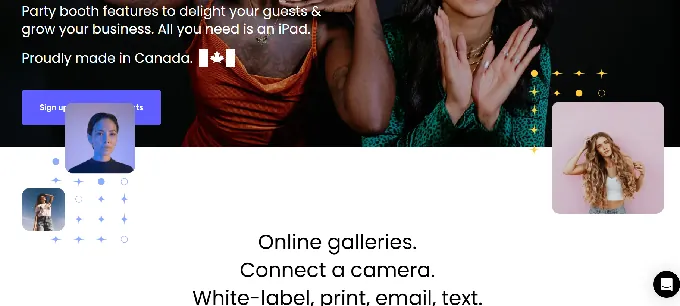
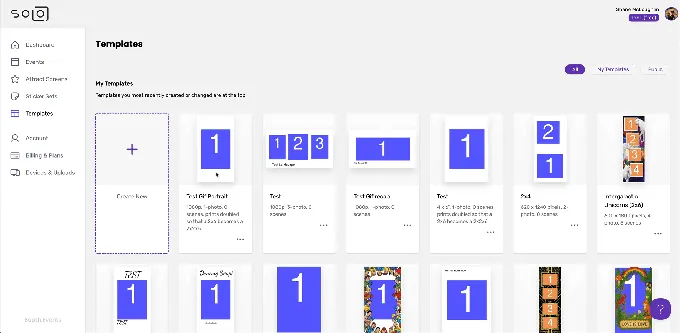
Booth.Events is an iPad and iPhone photo booth app by Solodigitalis Inc. that lets operators run three complete events with SMS sharing, AI background removal, Canon DSLR support, and branded galleries before requiring any payment or credit card. Its key capabilities include:
- Three free events with full Pro-level features, no watermark on the first 100 photos per event
- SceneSelect AI background removal running entirely on-device, offline
- Canon EOS DSLR connectivity on all paid plans
- Live Sync for propagating template and settings changes to running booths instantly
- Bundled SMS delivery requiring no Twilio account or A2P registration
Why Choose Booth.Events Over Breeze Booth for Risk-Free Evaluation
Booth.Events stands out in the following areas:
Zero Financial Commitment to Run Real Events Breeze Booth’s free trial is functional but output is watermarked after 10 sessions per day. Booth.Events takes a different approach: all new accounts start on a permanent Starter tier that includes three full events, no time limit, no credit card, and no watermark on the first 100 photos per event. For an operator testing a new venue or adding photo booth services for the first time, this removes all financial risk.
Offline AI Background Removal Included on Every Plan Breeze Booth offers local AI background removal (included) and higher-quality cloud removal via remove.bg through Breeze FX (per-image fee). Booth.Events’ SceneSelect runs entirely on-device with no internet required, including a scene blending mode for natural composites and a transparency layer mode for magazine covers and trading cards. Included on all pricing tiers with no credit cost.
Source: Booth.Events
- No Twilio Setup Required for SMS Sharing Most photo booth platforms require operators to create and register a Twilio A2P 10DLC campaign before sending a single SMS. Booth.Events handles all SMS infrastructure internally, with no Twilio account, no A2P registration, and no carrier fees.
*🏅 NOTE: We also evaluated CyraTok as a free-tier alternative. While CyraTok offers a free entry point, it requires CyraTok’s proprietary hardware, eliminating it for operators who already own Canon DSLRs or standard iPads. Booth.Events offers the most complete free option for operators using hardware they already own.*
Booth.Events Pricing
- Starter (permanent free): 3 events at full Pro features, no credit card required, 100 photo cap per event
- Basic: 1 iPad or 1 iPhone, 3-month gallery storage, SMS in USA and Canada
- Pro: 1 iPad + unlimited iPhones, 1-year gallery storage, worldwide SMS, custom HTML microsites
- Pro+: 4 iPads + unlimited iPhones, 2-year gallery storage, custom domain, white-label app, webhooks, phone support
- Non-subscription: 1 Week Pass (Basic-level features) and 4x Pro Event Credits (non-expiring)
Who Should Use Booth.Events?
Choose Booth.Events if:
- You want to run real, professional events with print, SMS, and Canon DSLR support before paying anything.
- You run fewer than six to eight events per year and need to avoid monthly subscription costs during slow periods.
- You need to avoid the Twilio A2P registration process and start delivering SMS to guests from day one.
6. Sparkbooth: Best Alternative for Mac and Windows Operators Who Want to Own Their Software Outright
- Source: Sparkbooth
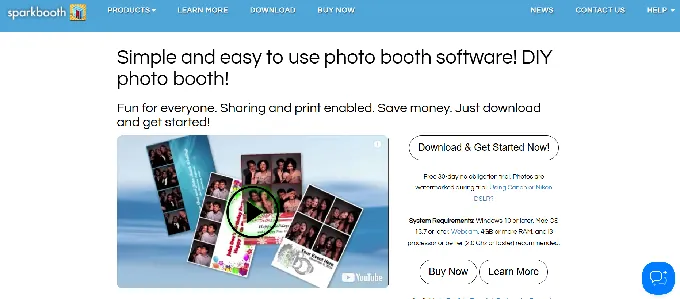
Sparkbooth is DIY photo booth software for Windows and Mac that turns any laptop (equipped with a webcam or a tethered Canon or Nikon DSLR) into a functional event photo booth. Where Breeze Booth requires a monthly subscription, Sparkbooth offers a one-time lifetime license. Its key capabilities include:
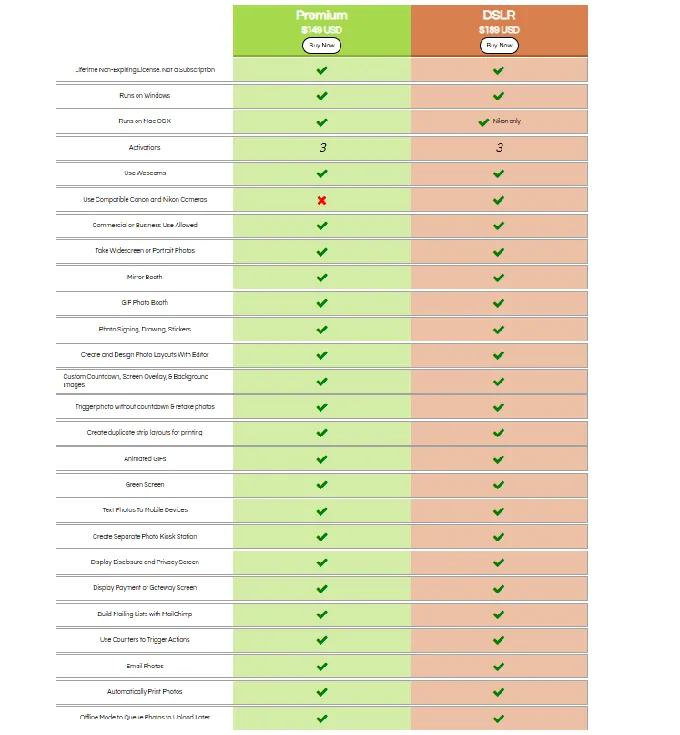
- One-time licenses at $149 (Premium/webcam) or $189 (DSLR) with no recurring fees
- Full Mac (OS 13.7+) and Windows (10+) support
- A visual drag-and-drop Layout Editor for building custom photo strip templates
- Green screen chroma key and AI-powered offline background removal via UnlimitedBG
- Animated GIF output including boomerang and rewind formats, Mirror Booth mode, and automatic print output
- 11-language interface for multilingual and international events
Why Choose Sparkbooth Over Breeze Booth for Software Ownership
Sparkbooth stands out in the following areas:
One-Time Ownership vs. Perpetual Monthly Billing Breeze Booth’s $49/month per-device subscription costs $588 per year, per device, indefinitely, and full capability adds Breeze Cloud Pro at $39.99/month plus Breeze FX per-image fees. Sparkbooth’s $149 Premium or $189 DSLR license covers everything: green screen, GIFs, mirror booth, photo kiosk, layout editor, SMS/email delivery, and MailChimp integration. Three activations are included, and a 60-day refund window on unactivated licenses gives buyers an evaluation period.
Mac and Windows Flexibility Breeze Booth is exclusively iOS-native. Sparkbooth runs on Windows 10+ and Mac OS 13.7+, so operators build photo booths around laptops they already own. The DSLR license supports Canon and Nikon cameras on Windows (including Canon EOS R5 Mark II, R6 Mark II, and Nikon Z8, Z9) and Nikon on Mac.
Operational Simplicity Breeze Booth separates configuration across two applications. Sparkbooth is a single application on the operator’s computer with no separate web-based configuration layer. The Setup Checklist describes placing a computer, launching the software, and configuring start behavior. A 30-day trial unlocks every feature (photos are watermarked only).
*🏅 NOTE: We also evaluated Darkroom Booth and dslrBooth. While Darkroom Booth offers a capable Windows-first feature set, it lacks Sparkbooth’s Mac support. dslrBooth targets Windows power users with strong DSLR control but has a steeper configuration curve. Sparkbooth delivers the strongest combination of one-time pricing, Mac-and-Windows parity, and accessible setup.*
Sparkbooth Pricing
- Premium License: $149 USD, one-time. Windows + Mac. Webcam only. 3 activations. All features included.
- DSLR License: $189 USD, one-time. Canon + Nikon DSLR support (Nikon only on Mac). All Premium features included.
- Add-ons: UnlimitedBG (offline AI background removal, separate subscription), qrcode.photos (QR delivery, separate subscription)
Source: Sparkbooth
Who Should Use Sparkbooth?
Choose Sparkbooth if:
- You want to eliminate recurring monthly software fees entirely, especially if you operate seasonally or are building your event calendar.
- You own a Windows or Mac laptop and want to build a photo booth around hardware you already have rather than acquiring a dedicated iPad.
- You own a compatible Canon or Nikon DSLR and want to convert it into a professional photo booth rig for a one-time $189 investment.
7. BoothLedger: Best Alternative for Windows Operators Who Want All-Inclusive AI Without Per-Image Billing
- Source: BoothLedger
BoothLedger is a Windows-native photo booth platform built by PhotoBooth Guys, an Irish event hire company that has deployed Canon DSLRs at events for clients including Google, Microsoft, Meta, LinkedIn, Diageo, and Mastercard.
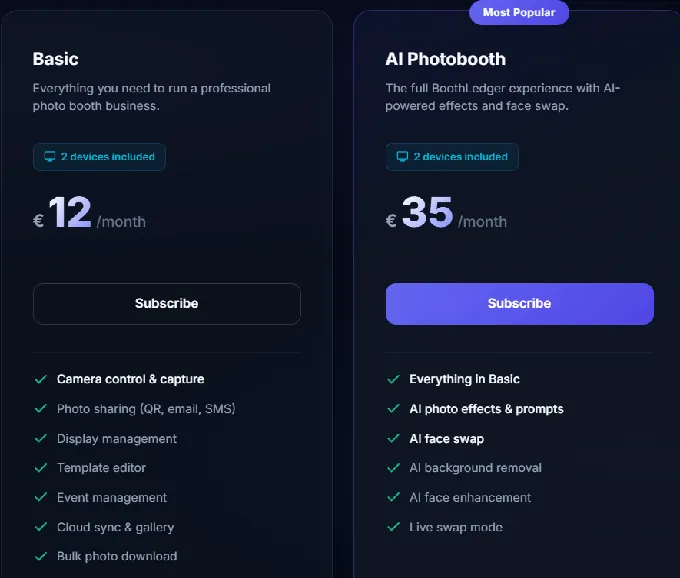
Where Breeze Booth charges separately for cloud delivery and AI transformations, BoothLedger bundles everything into a single flat monthly rate starting at €12/month for two device licenses. Its key capabilities include:
- Canon DSLR USB tethering via EDSDK with live view preview, autofocus with face detection, and simultaneous RAW+JPEG capture
- 50+ AI art style transformations delivered through dual AI engines (Core and Nano Banana Pro) at no per-image charge
- AI face swap and AI background removal with no physical green screen
- BoothLedger Cloud included: remote device management, QR gallery links, and live configuration push
- Offline-first architecture: captures, prints, and shares via QR/AirDrop without internet
Why Choose BoothLedger Over Breeze Booth for All-Inclusive Pricing
BoothLedger stands out in the following areas:
Flat-Rate AI Without Per-Image Credit Billing Breeze FX charges per image: Face Swap from $0.032, Cartoon at $0.195, and GPT Image at $0.455. BoothLedger’s AI Photobooth plan at €35/month bundles both AI engines, face swap, AI background removal, face enhancement, live swap mode, and all 50+ creative styles into a single flat rate covering two devices. No credit buckets to monitor mid-event, no per-session AI charges to reconcile.
Native Windows Canon DSLR Integration Breeze Booth runs on iPad/iPhone and connects to Canon cameras through iOS. BoothLedger is built for Windows 10/11 and communicates with Canon cameras via Canon’s EDSDK, delivering live view streaming, per-shot autofocus with face detection, and simultaneous RAW+JPEG capture. Supported bodies include the Canon EOS Rebel range, mid-range bodies (80D, 90D), full-frame pro bodies (5D Mark III/IV, 6D Mark II), and the full EOS R mirrorless lineup.
Two Device Licenses Included on Every Plan Breeze Booth’s per-device model means a two-booth operator pays $98/month. Every BoothLedger plan includes two device licenses as standard. An operator deploying two booths at a large wedding or conference pays the same price as one running a single booth.
Note: BoothLedger launched publicly in April 2026 and is Windows-only (no iPad or macOS support). It supports Canon cameras only; Nikon and Sony support is announced as coming soon. Buyers should weigh the platform’s pricing against the maturity tradeoff of a recently launched product.
*🏅 NOTE: We also evaluated dslrBooth/LumaBooth and Darkroom Booth. While LumaBooth has a longer market track record and solid Windows DSLR support, and Darkroom Booth is worth considering for desktop operators, BoothLedger presents the best all-inclusive pricing for Windows Canon users who want professional DSLR quality and a full AI effect suite without per-feature billing.*
BoothLedger Pricing
- Basic: €12/month (~$14 USD). 2 device licenses. Canon DSLR capture, template editor, QR/email/SMS sharing, BoothLedger Cloud, offline capture and print.
- AI Photobooth: €35/month (~$38 USD). Everything in Basic plus 50+ AI styles, AI face swap, AI background removal, AI face enhancement, live swap mode.
Source: BoothLedger
A 30-day free trial with no credit card required is available.
Who Should Use BoothLedger?
Choose BoothLedger if:
- You run a Windows-based photo booth operation with Canon DSLR or EOS R series hardware and want native SDK-level camera integration.
- You want to offer AI-transformed experiences to every client at every event without managing per-image credit accounts or tracking AI spend mid-event.
- You routinely deploy two booths at a single event and want both covered under one subscription at no additional cost.
The Final Verdict
Breeze Booth excels as a customization-first platform for technically skilled operators, but different business models and growth stages call for specialized tools. Based on our research, here are the best alternatives:
- Simple Booth for turnkey photo booth experiences with integrated hardware, high-converting lead capture, and remote management
- Snappic for enterprise white-label operations with client-facing analytics and multi-engine AI
- LumaBooth for growing teams that need ready-made professional templates and multi-brand camera support
- Touchpix for cross-platform device flexibility and 360-degree video booth specialization
- Booth.Events for risk-free professional events without upfront financial commitment
- Sparkbooth for Mac and Windows operators who want one-time software ownership with no recurring fees
- BoothLedger for Windows operators who want flat-rate AI transformations without per-image billing
You don’t have to choose between Breeze Booth and these alternatives exclusively. Many operators use different platforms for different event types or client requirements. Consider your needs, hardware investments, and growth plans when deciding which solution fits best.
Ready for a photo booth that delivers professional experiences with minimal effort? Simple Booth’s integrated HALO hardware and cloud-managed app have powered 40 million+ moments for 30,000+ operators. Start your free trial and see the difference.
Breeze Booth Alternatives FAQ
Why do operators look for Breeze Booth alternatives?
Breeze Booth is capable, but its learning curve, multi-app configuration system, and modular pricing (base subscription plus Breeze Cloud Pro plus Breeze FX per-image charges) are the most common reasons operators explore other options. Some also need cross-platform support beyond iPad/iPhone, integrated hardware, or ready-made templates rather than designing every screen from scratch.
What is the best overall Breeze Booth alternative?
There is no single best alternative because Breeze Booth covers a wide range of use cases. Simple Booth is the top choice for operators who want a turnkey system with integrated hardware and marketing tools. LumaBooth leads for growing teams needing template libraries and multi-camera support. Touchpix is strongest for operators running mixed-hardware fleets and 360-video booths.
Is there a free alternative to Breeze Booth?
Booth.Events offers the most generous free tier: three complete events with full Pro-level features, including SMS sharing, Canon DSLR support, and AI background removal, with no credit card required and no watermark on the first 100 photos per event. Breeze Booth’s own trial is fully featured but watermarks output after 10 sessions per day.
Which Breeze Booth alternative is best for brand activations and marketing?
Simple Booth is built for marketing use cases, offering 87%+ opt-in lead capture rates, MailChimp integration, analytics dashboards with social sharing metrics, and a Virtual Booth product that delivers branded photo experiences through any web browser without hardware. Its enterprise Select tier includes demographic analytics, age gating, and compliance tools for regulated brand activations.
Which alternative works best for 360-degree video booths?
Touchpix is the strongest platform for 360-video operations, with native GoPro 7-14 integration, Bluetooth spin trigger automation, and a large community of 360-booth operators reflected in its 6,600+ App Store reviews at a 4.8-star rating. It also supports six capture modes (photos, AI photos, boomerangs, video, GIFs, and slow-motion) in a single subscription.
Is it expensive to switch from Breeze Booth to one of these alternatives?
Switching costs depend on your current setup. If you primarily use Breeze Booth for iPad photo booths, transitioning to Simple Booth, Snappic, or Booth.Events is straightforward since they all run on iPad. Operators who have built extensive custom interface assets in Breeze Booth’s Profile system will need to recreate their designs in the new platform’s template system. Hardware-specific alternatives like Sparkbooth (Windows/Mac) or BoothLedger (Windows) may require a change in your physical setup.
Which alternative has the lowest total cost of ownership?
Sparkbooth has the lowest long-term cost with a one-time $149-$189 purchase and no recurring fees. For subscription-based options, BoothLedger at approximately $14-$38/month with two devices included and no per-image AI charges offers the lowest ongoing cost for operators who want AI features. Simple Booth’s weekly billing model ($14.99-$49.99/week for everyday plans) provides flexibility for seasonal operators who only pay during active periods.
Can I use any of these alternatives for permanent venue installations?
Yes. Simple Booth supports permanent installations with its Install Kit (wall mount), remote dashboard management, and a dedicated Permanent Install Guide. Breeze Booth also handles this well with device lockdown and payment kiosk capabilities. LumaBooth offers remote device management through its Booth CoPilot app.
The choice depends on whether you prioritize lead capture and marketing (Simple Booth), design flexibility (Breeze Booth), or template convenience and camera variety (LumaBooth).
Keep reading
 Showdowns
Simple Booth vs Breeze Booth: Which iPad Photo Booth Software Fits Your Business in 2026?
Turnkey system vs pixel-level control. Simple Booth or Breeze Booth?
 Showdowns
Breeze Booth vs Touchpix (vs Simple Booth): Which Photo Booth Software Wins in 2026?
Breeze Booth versus Touchpix. Which one fits how you actually work?
 Reviews
Breeze Booth Review 2026: Is This Photo Booth Software Right for You?
Breeze Booth, reviewed without the fluff. The brilliant bits and the annoying ones.