Breeze Booth Review 2026: Is This Photo Booth Software Right for You?

Breeze Booth has built a reputation as the power user’s choice in iPad photo booth software. Developed by We Fly Kites Inc. (doing business as Breeze Software), it promises what most competing apps cannot: creative control over every screen, animation, and output your guests see. For operators willing to invest the time to learn it, Breeze Booth can produce experiences that look nothing like a template.
To create this Breeze Booth review, we’ve analyzed it extensively. We believe it’s the ideal choice if:
- You need pixel-perfect brand customization for corporate activations
- You want control over every screen in the guest journey, not just the output
- You run specialized booth formats like 360 video, Glam Robot, or trading cards
- You need hardware flexibility (Canon DSLRs, payment terminals, 360 spinners, Arduino)
- Privacy and offline operation are non-negotiable requirements for your clients
However, Breeze Booth might not be a good choice if:
- You want a turnkey system that’s ready to run within minutes of downloading
- You prefer an integrated hardware-and-software solution from a single vendor
- You need lead capture, marketing analytics, and CRM integrations
- You value a large support community and a proven App Store track record
- You want a built-in design tool instead of creating assets in external software
In this case, you should consider Simple Booth: a photo booth platform built around the opposite philosophy. Where Breeze Booth hands you a blank canvas and says “build it yourself,” Simple Booth pairs its HALO iPad app with ring-light hardware designed for photo booths, a built-in Layout Designer, and a cloud dashboard for remote device management and lead capture. With 30,000+ customers and a 4.7-star App Store rating from 2,400+ reviews, it’s designed for operators who want professional results without the learning curve.
We’ve included a detailed look at Simple Booth at the end of this Breeze Booth review as the best alternative for operators who prioritize ease of use and marketing value over customization depth. If you’d rather explore it now, you can start a free trial of Simple Booth here.
What is Breeze Booth?
Source: Breeze Booth
Breeze Booth is photo booth software for iPad and iPhone, built for professional booth operators and brand activation agencies. The product traces its lineage to Breeze Systems Ltd., a UK camera software company founded in 2001 by Chris Breeze and Sue Breeze.
The business transferred to We Fly Kites, Inc. on October 19, 2023, a Delaware-incorporated company operated from Australia by a team with over 10 years in the event industry.
The company says it is “trusted in 80 countries by leading photographers”, with deployments at the Super Bowl, the Olympics, and Everest expeditions. The iPad-specific product has been on the App Store since at least 2018, and the broader Breeze software suite now spans nine products including Breeze Cloud for galleries and media delivery, Breeze FX for cloud-based AI image transformation, and Remote Pro for Windows DSLR control.
Breeze Booth’s central promise is “Your way, not our way”, meaning creative control over every guest-facing screen, output layout, and interaction point. The target buyer is the professional photo booth operator or brand activation agency willing to master a deep toolset to deliver experiences that competitors using template-driven apps cannot match.
Breeze Booth Pros & Cons
| Pros | Cons |
|---|---|
| Full design control over every guest-facing screen | Steep learning curve for new operators |
| Photos, GIFs, and video in a single app | iPad/iPhone only (no Android) |
| 100% offline mode with GDPR compliance | Fragmented pricing across Booth, Cloud, and FX products |
| Broad hardware support (Canon DSLRs, 360 spinners, payment terminals, Arduino, DMX) | Printing to non-AirPrint printers requires a Windows intermediary |
| On-device AI background removal included at no extra cost | No native CRM or marketing automation integrations |
| Survey tokens drive personalized prints in real time | Limited independent reviews (only 5 App Store ratings) |
| Generous free trial with no time limit | Cloud AI effects add per-image costs on top of base subscription |
Breeze Booth Review: How It Works & Key Features
Design & Custom UI: Breeze Booth gives operators creative control over every screen a guest touches.
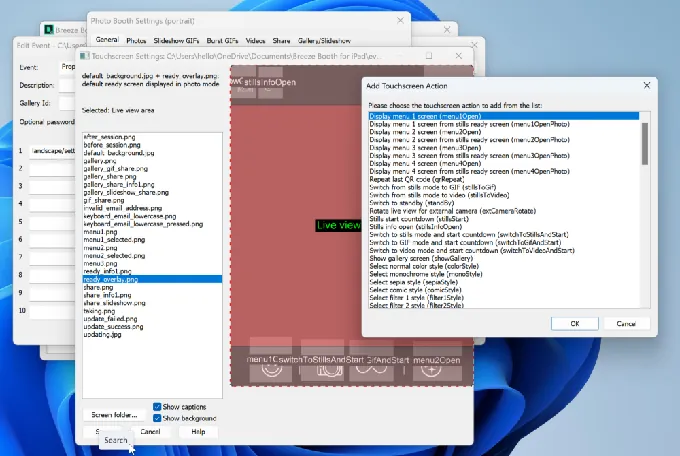
Where most photo booth apps offer a logo upload and a color picker, Breeze Booth replaces the entire interface. The Touch Screen Designer lets operators place and size interactive touch zones on any custom-designed screen, with positions stored as percentages of screen dimensions so layouts render consistently across different iPad models.
Source: Breeze Booth
The Photo Layout Editor is a drag-and-drop canvas for print outputs where operators position photos, logos, QR codes, and text captions with layering control.
The design system is file-based. Operators create screens in tools like Photoshop or After Effects, then place those files into a Profile folder structure. Named files trigger automatically at the correct moment in the booth workflow.
Breeze Booth supports JPG, PNG, GIF, MOV, and MP4 files on the same screen, enabling layered animated interfaces. HEVC video with alpha channel transparency can overlay the live camera view, making cinematic animated booth UIs possible without coding.
The Multi Profile / Menu system allows a single event to house multiple UI configurations that guests switch between via touchscreen, useful for team-selection experiences at sports events or format-choice menus. Multi-language support, white labelling, and a token system that injects survey responses into print layouts round out the customization.
The token system powers Breeze Booth’s trading card use case: a guest enters their name, team, and player number in a survey, and those answers render onto the print layout at capture time with no post-processing.
Photos, GIFs & Video: All three output formats live inside one app with a shared branding system.
Breeze Booth handles photos, GIFs, and video in a single application. Operators switch between event types by loading a different event profile, not a different app.
For photos, the app supports 0 to 10 captures per session at full resolution from the iPad camera or a tethered Canon DSLR/mirrorless camera. Processing options include AI background removal, custom LUT color filters, digital props, and branded overlays. Photographer Mode supports tethered event and portrait photography.
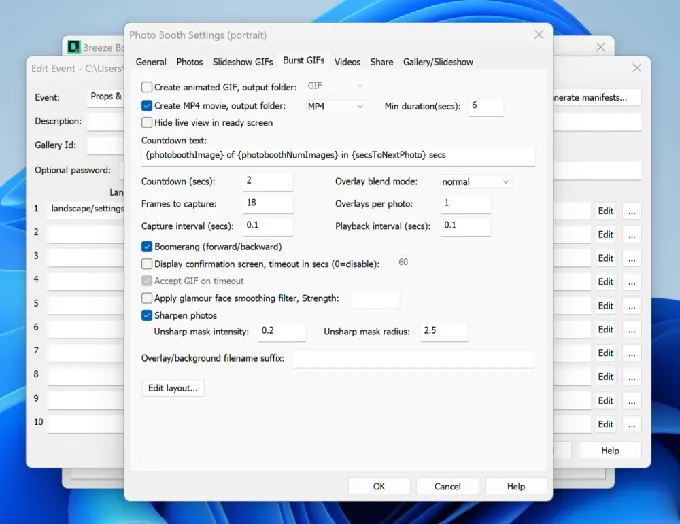
GIFs come in two forms: Burst GIFs capture rapid frame sequences with configurable intervals (minimum ~0.05 seconds per frame) and support boomerang playback, while Slideshow GIFs assemble multi-shot stills into animated outputs. Both support frame-by-frame animated overlays using sequentially numbered PNG files.
Source: Breeze Booth
For video, the standout feature is Auto Motion Start, which detects when a 360 spinner or robot arm begins moving and triggers recording automatically. Breeze calls it “compatible with any 360 on the market,” removing the need for proprietary hardware.
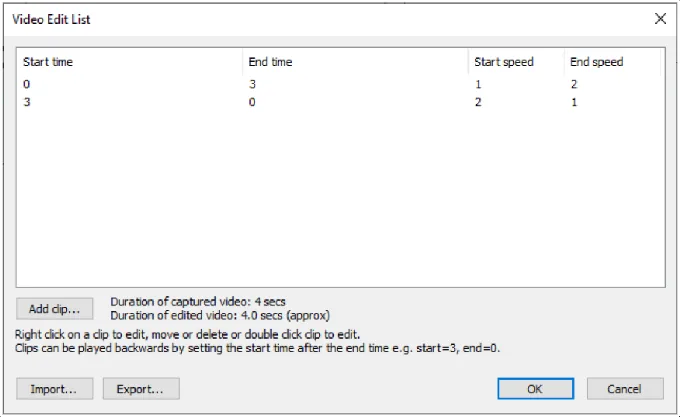
The Video Edit List adds frame-level editing with speed ramps, jump cuts, pans, zooms, and rotations, all configurable as a reusable file.
Source: Breeze Booth
AI Effects & Image Processing: A two-tier system combining free on-device AI with cloud-based generative effects.
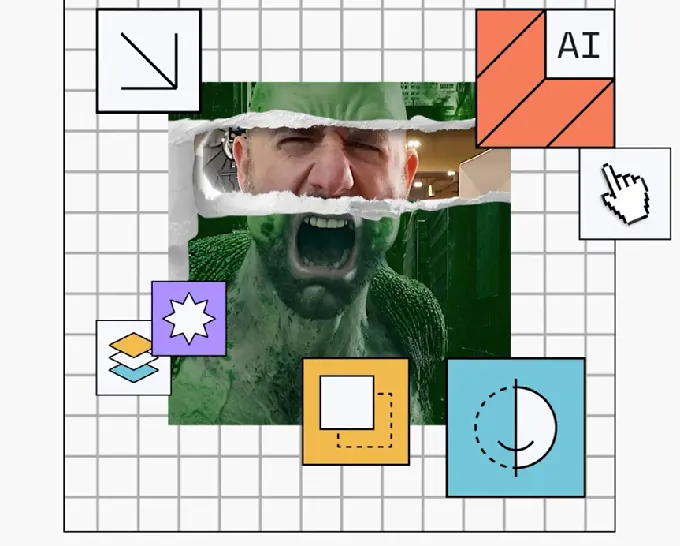
Breeze Booth’s AI capabilities operate on two tiers. The on-device tier runs on the iPad: local AI background removal works offline, requires no credits, and is included in the subscription (2022 iPad models recommended for best live-view performance). Custom LUT filters, manual adjustments (blur, contrast, saturation), and 14 blending modes round out the local processing.
The cloud tier operates through Breeze FX, a separate AI image transformation service. FX types include GPT Image generation powered by OpenAI GPT-4o, Face Swap, Cartoon conversion in nine anime-inspired styles, skin smoothing, head extraction, and additional models from BytePlus Seedream and Google Gemini. Processing takes 10 to 60 seconds depending on the effect.
Source: Breeze Booth
What makes the GPT Image integration distinctive is survey token injection: guest answers entered at the kiosk (team color, shirt number, favorite character) are injected into the AI prompt, personalizing each output image.
A Nudity Moderation FX scans for nudity, weapons, underage participants, hate speech, and other content categories before saving, printing, or sharing, acting as a safety layer for corporate events.
Breeze FX operates on a credit system separate from the Breeze Booth subscription. Costs range from $0.032 per image for Face Swap to $0.455 per image for GPT Image generation.
Sharing & Cloud Distribution: Multiple delivery channels plus a cloud platform for galleries, microsites, and remote monitoring.
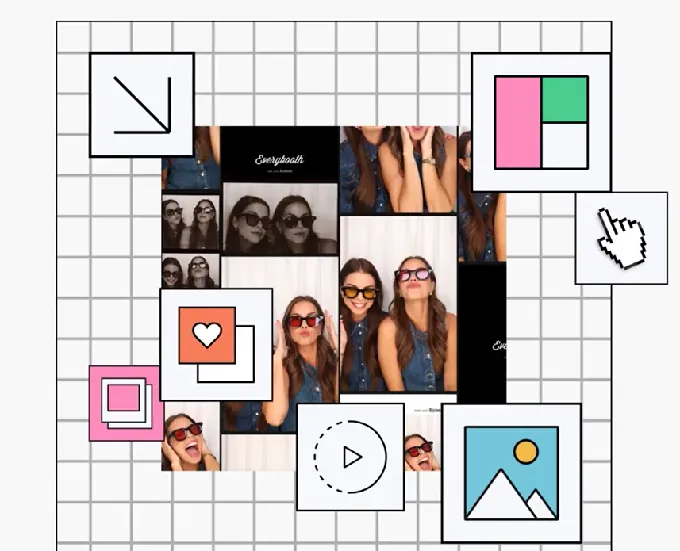
After a session, Breeze Booth delivers media through SMS, custom HTML email, MMS (US and Canada), QR code, and print. The cloud layer is handled by Breeze Cloud, a companion product that auto-uploads every session as it completes.
Source: Breeze Booth
Breeze Cloud creates two types of online destinations: Galleries showing all media from an event, and Microsites showing only a single guest’s session. Microsites are particularly useful for sharing videos, which are often too large for SMS or email. URLs at the gallery, session, and individual media level are distinct and non-guessable, providing privacy by default.
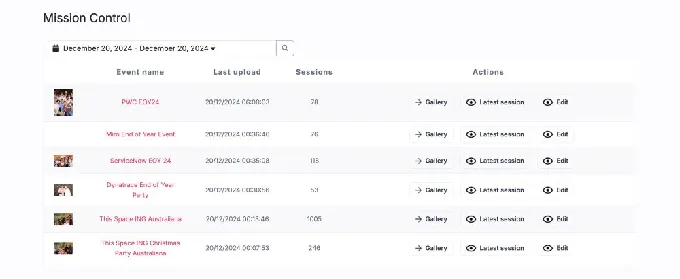
Mission Control provides a live dashboard for monitoring images from all events in progress, useful for operators running multiple booths at once. The Pro plan ($39.99/month) adds custom domains, webhooks, and API access.
Source: Breeze Booth
For contactless operation, guests register via a Breeze Cloud-hosted microsite, receive a personal QR code, and scan it at the booth to trigger sessions and route media automatically, with no touchscreen input required at the point of sharing.
Surveys, Payments & Data Capture: Data collection and payment processing in a single system.
Breeze Booth’s survey system goes beyond passive data collection. Operators add survey screens at defined points in the guest flow with text fields, checkboxes, and radio buttons. The app stores responses in XML and accesses them through a token system that injects data into print layouts, file names, sharing messages, and overlay selection logic in real time.
A guest’s radio button selection can change which background overlay renders in their photo, and their entered name appears on the printed strip without post-processing.
For payment, Breeze Booth supports two paths: hardware-based payment through Nayax VPOS terminals (contactless cards, Apple/Google Pay, chip/PIN) and MDB-compatible coin and bill acceptors, plus QR code payment via Stripe through Breeze Cloud. Operators can deploy either or both within the same event. The Breeze MDB Utility is provided free, lowering the barrier to hardware payment integration.
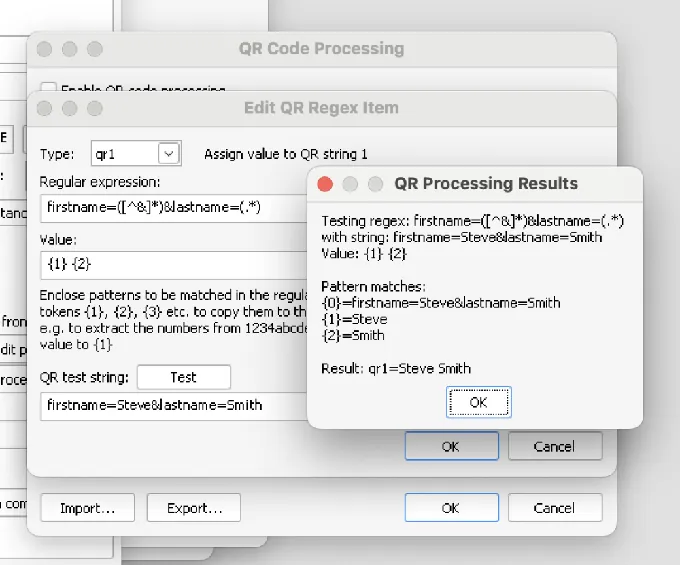
QR Code Processing uses configurable regular expressions to parse and map data from any QR format to Breeze tokens and commands, enabling integration with existing badge, access control, or ticketing systems. Single Use QR Codes are SHA1-signed with optional device-locked Vendor IDs and expiry timestamps, suitable for theme parks, paid activations, and pre-sold event access.
Source: Breeze Booth
Breeze Hub handles data export through tab-delimited reports for spreadsheet import. No native CRM connectors (MailChimp, HubSpot, Zapier) are documented in official materials.
Pricing: A single full-featured plan at $49/month per device, with add-on costs for cloud AI and advanced cloud features.
Breeze Booth uses a per-device subscription model with one plan that includes all features:
- Monthly: $49 per month, per device
- Annual: $499 per year, per device (approximately $41.58/month, roughly 15% off)
Every subscriber gets the full feature set: all capture modes, the Touch Screen Designer, Photo Layout Editor, hardware integrations, and on-device AI background removal. Breeze Cloud Basic is included free with any valid license (galleries, microsites, QR sharing, Mission Control, 50 GB storage).
The free trial is fully featured with no time limit. Output is watermarked after 10 sessions per day; the first 10 daily sessions are unwatermarked.
Additional costs layer on for operators who need the full ecosystem:
| Add-On | Cost |
|---|---|
| Breeze Cloud Pro (custom domains, webhooks, API) | $39.99/month |
| Breeze FX: Face Swap | From $0.032/image |
| Breeze FX: GPT Image (OpenAI generation) | From $0.455/image |
| Breeze FX: Cartoon / remove.bg | From $0.195/image |
| Breeze FX: Skin Smoothing / Head Extraction / NSFW | From $0.065/image |
| Extra cloud storage | From $30/month beyond 50 GB |
| Stripe QR payment transactions | ~$0.05 per transaction plus Stripe fees |
The EULA states a no-refund policy, citing the unlimited trial as the evaluation mechanism. No volume discounts for multi-device operators are publicly disclosed.
Where Breeze Booth Falls Short
Breeze Booth delivers deep customization, but several limitations show up in practice. These reflect a platform built for power users who prioritize creative control over operational simplicity.
Steep Learning Curve: The breadth of configuration options (custom interfaces, tokens, hardware integrations, post-processing pipelines) demands significant technical investment before the first live event.
The Event Editor web application and the Breeze Booth capture app are two separate environments, and operators must design screens externally in tools like Photoshop before deploying them. For operators who just want to run a branded booth at a wedding this weekend, that workflow is a real barrier.
Fragmented Ecosystem Pricing: The $49/month headline covers the core app, but full capability requires layering on Breeze Cloud Pro ($39.99/month) for webhooks and API access, plus per-image Breeze FX credits for AI effects.
An operator running AI-transformed photos at a high-volume corporate activation could see total monthly costs well above what the base subscription suggests. Each product has its own billing, account, and credit system.
Thin Independent Review Base: The App Store shows only 5 ratings with a 3.6-star average. Breeze Booth has no presence on G2, Capterra, or TrustRadius. For buyers doing due diligence, this makes it hard to assess reliability and user satisfaction beyond the company’s own materials and a small Facebook community group.
No Native CRM or Marketing Integrations: Survey data captured at the booth must be manually exported to CSV. There are no documented native connectors for MailChimp, HubSpot, Salesforce, or Zapier. For operators serving marketing-driven clients who need lead data flowing into campaigns automatically, this creates a manual bottleneck.
iPad/iPhone Only: Breeze Booth runs exclusively on iOS. Android tablet users have no option. Windows operators must use Remote Pro, a separate product, creating platform fragmentation for operators with mixed hardware fleets.
Printing Complexity: Printing to Windows-compatible printers from an iPad requires the Breeze Hub companion app running on a Windows machine, adding another piece of equipment to manage at every event.
These limitations are the natural cost of building a platform around flexibility. But they create a clear opening for operators who want professional results with less setup overhead, stronger marketing tools, and a proven track record at scale.
Top Breeze Booth Alternative: Simple Booth
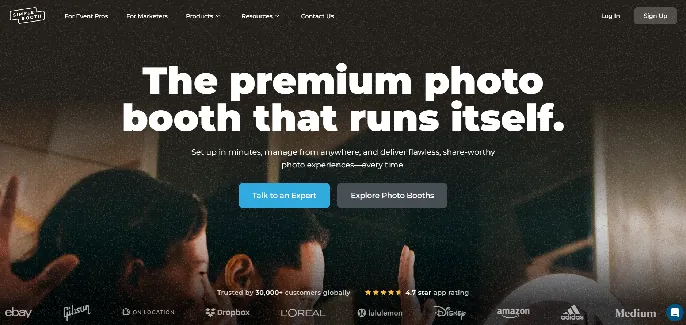
Simple Booth addresses Breeze Booth’s complexity and marketing gaps by taking the opposite approach: an integrated hardware-software system designed to deliver professional photo experiences with minimal setup and lead capture built in from the start.
In development since 2012 as one of the first iPad photo booth apps, Simple Booth has grown to serve 30,000+ customers globally with 40 million+ moments captured. The platform pairs the HALO iPad app with ring-light hardware, a cloud dashboard for remote management, and a Virtual Booth product for hardware-free digital experiences.
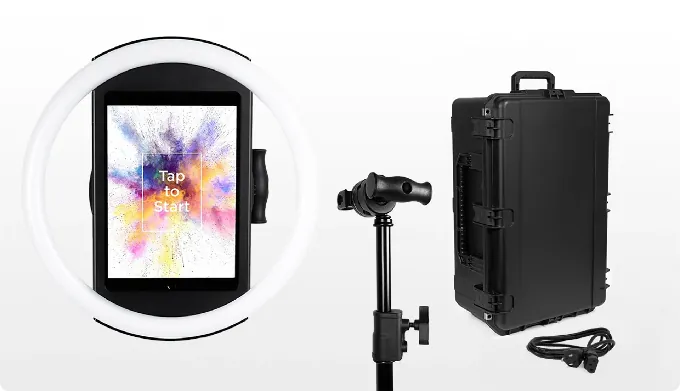
Integrated Hardware-Software System: Simple Booth’s HALO combines a ring light, iPad mount, and software in one package.
Where Breeze Booth is software-only (operators source their own hardware), Simple Booth sells a complete system. The HALO chassis is machined from a single billet of aluminum with a patented ring-light system producing up to 2,100 lumens from 112 LEDs, rated for 50,000 hours of operation. The iPad snaps in via a tool-less faceplate, and a concealed USB-C cable keeps it charged throughout the event.
Source: Simple Booth
The result: setup in under one minute, no tools required. The Event Kit includes a selfie stand and waterproof rolling travel case; the Install Kit adds a wall mount for permanent venues. For operators running multiple events per week, this setup speed translates to higher margins and lower labor costs.
Simple Booth is built for unattended selfie stands and drop-off events where operators leave equipment running for hours without an attendant, and the intuitive guest interface means new staff can learn the system quickly as the business scales.
Arizona Opera grew its email list by 1,000 addresses in just a few events using HALO’s integrated lead capture. (Simple Booth)
Built-In Layout Designer: Create branded templates inside the app without external design software.
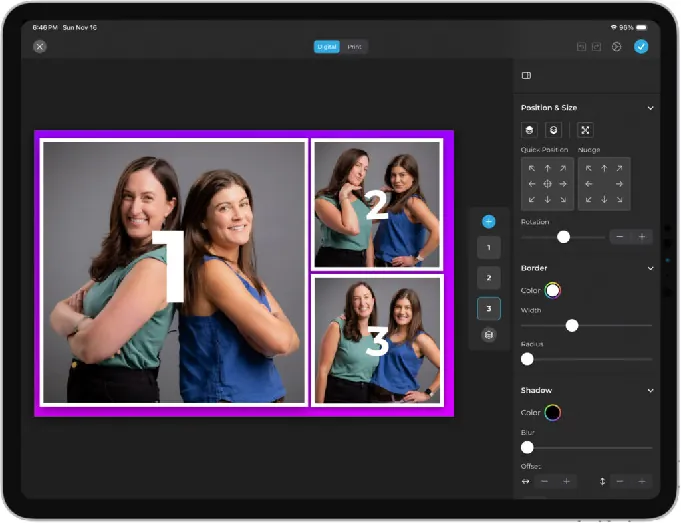
HALO 5.0 introduced the Layout Designer, an in-app design tool with layers, fonts, gradients, QR code embedding, logo positioning, and multi-layout support. Operators create custom branded templates in the app or web dashboard without touching Photoshop or After Effects.
Source: Simple Booth
The designer supports photo placement, text layers with font/color/alignment/shadow controls, background gradients, border rounding, and element alignment. Dynamic QR codes can be embedded in layouts. Each event can have multiple layout options, each with its own motion type.
For operators who need quick turnaround between events, 60+ themes and 100+ digital props provide ready-made starting points. Guest-editable text layers (Plus+ plans) let participants type their own names or captions onto photos before sharing, adding personalization without operator involvement.
Lead Capture & Marketing Analytics: Turn every photo session into a measurable marketing touchpoint.
Simple Booth’s lead capture operates at the point of highest engagement: the moment a guest receives their photo. The platform reports opt-in rates as high as 87-89%, because data collection happens as a natural, consent-driven part of the photo delivery flow rather than as a separate marketing ask.
Photo delivery supports multiple channels: AirDrop for instant, no-contact sharing that works offline without requiring personal information, WhatsApp for international events where carrier-based SMS is unreliable, plus traditional text, email, and QR code options.
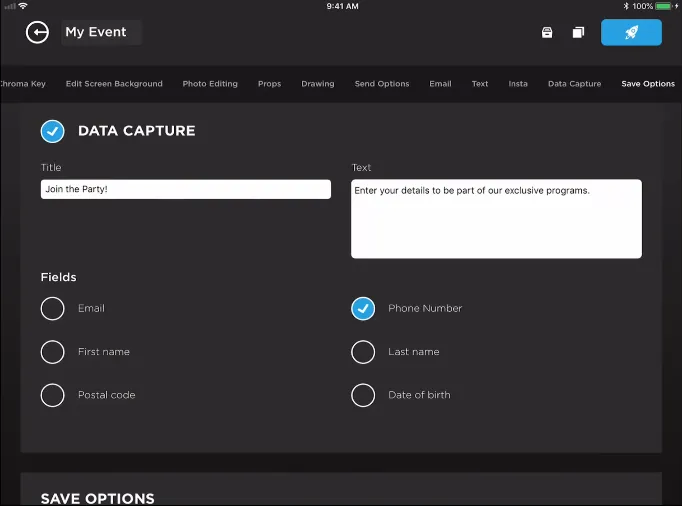
Data capture fields include email, first name, last name, phone, postal code, and date of birth on the Pro plan, expanding to up to 10 custom fields including checkboxes and required legal terms on Select. Data exports as CSV and syncs natively with MailChimp, with an Open API available for custom CRM delivery on Pro and above.
Source: Simple Booth
The analytics dashboard tracks total participants, gallery views, social shares across Facebook, X, LinkedIn, and Instagram, and referred views. The Select tier adds demographic insights via face detection, including estimated age, gender breakdown, and average group size, data that brand marketers use to understand who engages with their activations.
Treetop Golf built 150,000 unique email addresses across its locations using Simple Booth’s lead capture. (Simple Booth)
AI Effects & Virtual Booth: AI photo transformation plus a hardware-free digital experience product.
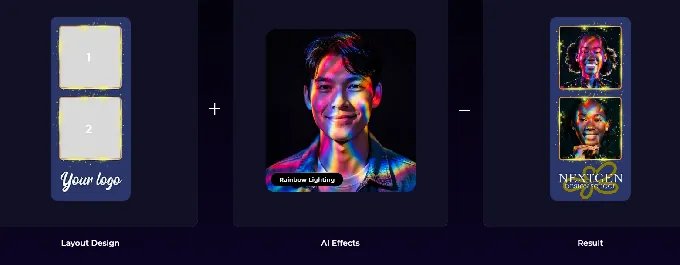
Simple Booth’s AI Photo Booth transforms guest photos using text prompts through Nano Banana AI models. Three models balance speed, quality, and group size (1x, 2x, and 3x credits per generation). The platform automatically preserves identity and likeness, so guests remain recognizable regardless of how extreme the artistic transformation.
Source: Simple Booth
Operators can test prompts outside booth mode at zero credit cost, iterating freely before events.
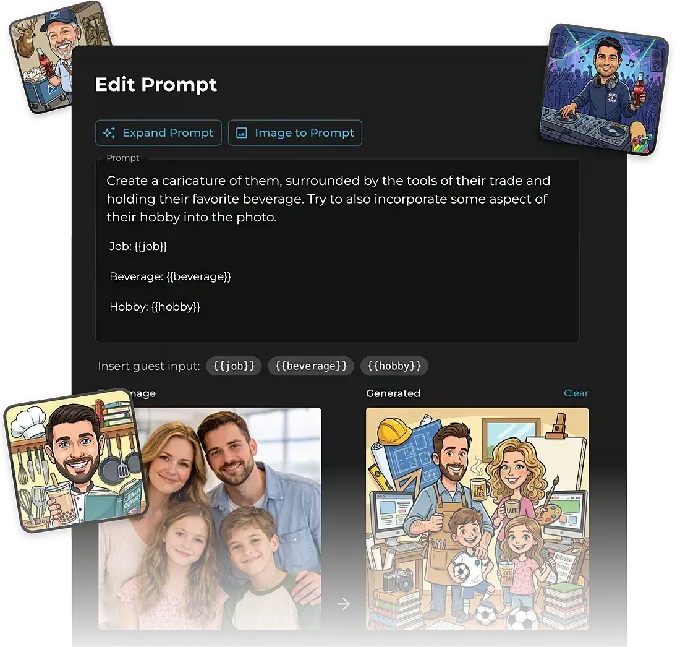
AI results composite with the Layout Designer’s brand overlays in a single workflow. Guest Input (Pro/Select) lets participants answer questions that inject into the AI prompt as template variables, producing personalized outputs per guest.
Virtual Booth extends the platform beyond physical hardware entirely. Running in any browser with no app install required, it delivers branded photo experiences via a QR code or link. Participants can apply overlays, stickers, background replacement, and AI effects from their own device.
Source: Simple Booth
Both products feed the same analytics, galleries, and Live Feed infrastructure, enabling hybrid deployments where in-person HALO booths and remote Virtual Booth participants contribute to a single event gallery.
Pricing & Plans: Tiered from $14.99/week to enterprise, with weekly billing for variable-volume operators.
Simple Booth uses a per-license subscription model with weekly, monthly, and yearly billing:
| Plan | Weekly | Monthly | Yearly | Key Additions |
|---|---|---|---|---|
| Lite | $14.99 | ~$72 | $290 | Basic capture, galleries, themes/props (includes ads) |
| Core | $24.99 | ~$49 | $490 | Ads removed, DSLR camera, video, background replacement, AI effects, Virtual Booth |
| Plus | $49.99 | ~$99 | $990 | Custom branding, analytics, custom delivery messages, guest-editable text, custom AI prompts |
| Pro | , | $149 | $1,490 | Lead capture, API, phone support, moderation, age gate, compliance tools |
| Select | , | $249 | $2,490 | Custom legal terms, security questionnaires, demographic analytics |
AI credits cost $0.10 each and do not expire. New subscriptions receive bonus credits (50-200 depending on plan). A 7-day free trial is available with 25 free AI credits.
The weekly billing option is distinctive in the photo booth software market. Operators with variable event volumes pay only during active weeks rather than committing to monthly or annual plans during slow seasons.
Breeze Booth or Simple Booth: Comparison Summary
| Breeze Booth | Simple Booth | |
|---|---|---|
| Target user | Power users and brand activation agencies | Rental operators, venues, and brand marketers |
| Setup approach | Software-only; bring your own hardware | Integrated hardware + software (HALO kits) |
| Design workflow | External tools (Photoshop, After Effects) + file-based profiles | Built-in Layout Designer + 60+ themes |
| Learning curve | Steep; extensive configuration required | Minimal; ready to run in minutes |
| UI customization depth | Every screen fully replaceable | Layout Designer on all plans; custom branding on Plus+ |
| Capture formats | Photos, GIFs, video (360, slow-mo, Glam Robot) | Photos, GIFs, video, Rebound clips |
| DSLR camera support | Canon DSLR/mirrorless (all plans) | Canon DSLR/mirrorless, wired + wireless (Core+) |
| AI effects | On-device (free) + Breeze FX cloud ($0.032, $0.455/image) | Nano Banana models ($0.10/credit; 1-3x per generation) |
| Offline capability | 100% offline mode with encryption | Offline mode with upload queue; auto-syncs on reconnect |
| Lead capture | Survey export to CSV; no CRM connectors | Native MailChimp, Open API, up to 10 custom fields |
| Marketing analytics | Basic export reports | Dashboard with social tracking, demographic insights |
| Payment processing | Nayax, Stripe QR, coin/bill acceptors | Not available |
| Hardware integrations | Arduino, DMX, 360 spinners, robot arms, Zebra scanners | HALO ring light, selfie stand, wall mount |
| Virtual/remote booth | Not available | Virtual Booth (browser-based, no hardware) |
| App Store rating | 3.6 stars (5 ratings) | 4.7 stars (2,400+ ratings) |
| Base pricing | $49/month per device | $14.99, $249/week or month depending on plan |
| Free trial | Unlimited time; watermark after 10 daily sessions | 7-day trial |
| Billing flexibility | Monthly or annual | Weekly, monthly, or annual |
Final Verdict
The choice between Breeze Booth and Simple Booth comes down to what you need more: creative depth or operational ease.
Choose Breeze Booth if you are a professional operator or brand activation agency that needs to deliver fully custom booth experiences with no template constraints. Breeze Booth is built for operators who think of their photo booth as a blank canvas.
If you run specialized formats like 360 video, trading cards with personalized guest data, or pay-per-session kiosks, its hardware integration breadth and design flexibility are hard to match. The unlimited free trial gives you time to evaluate whether the investment in learning the platform pays off for your business.
Choose Simple Booth if you want a system that delivers professional photo experiences with minimal setup, captures leads automatically, and gives you marketing data you can act on. Whether you’re a rental company scaling to multiple booths, a venue adding a guest engagement tool, or a brand team running activations, Simple Booth’s integrated hardware, built-in Layout Designer, and cloud dashboard let you focus on running events rather than configuring software.
The 4.7-star rating from 2,400+ reviews reflects what 30,000+ customers have confirmed: it works reliably when it matters most.
Get started with Simple Booth here.
Both platforms serve the professional photo booth market well. Breeze Booth rewards operators who invest in mastering its depth. Simple Booth proves that simplicity and capability aren’t mutually exclusive, delivering professional results without the detour through complexity.
Breeze Booth FAQ
What devices does Breeze Booth run on?
Breeze Booth runs on iPad and iPhone only. There is no Android version. Windows operators must use Remote Pro, a separate product in the Breeze Software suite. Mac support (M Series) is listed as coming soon on the product page but is not yet available.
Simple Booth’s HALO app is also iPad-only, though its Virtual Booth product runs in any browser on any device.
How much does Breeze Booth actually cost?
The base subscription is $49/month or $499/year per device. However, full capability often requires Breeze Cloud Pro ($39.99/month) for webhooks, API access, and custom domains, plus Breeze FX credits for AI effects ranging from $0.032 to $0.455 per image depending on the effect type. A multi-device operator running AI-enhanced booths will spend more than the $49 headline suggests.
Simple Booth plans range from $14.99/week (Lite) to $249/month (Select), with AI credits at $0.10 each.
Does Breeze Booth offer a free trial?
Yes, Breeze Booth offers a fully featured trial with no time limit. The only restriction is that output is watermarked after 10 sessions per day; the first 10 sessions each day are unwatermarked. This is more generous than most competitors, giving operators time to learn the platform before committing. Simple Booth offers a 7-day free trial with 25 AI credits included.
Can Breeze Booth run completely offline?
Yes. Breeze Booth can run 100% offline with no personal data or images sent to any third parties, including Breeze Software itself. Operators can optionally encrypt collected email addresses and phone numbers. GDPR compliance is stated on the product page. This matters for operators working with privacy-sensitive corporate clients or at venues with unreliable internet.
Simple Booth also supports offline operation through an upload queue that delivers sessions when connectivity returns.
Does Breeze Booth support payment processing?
Yes. Breeze Booth integrates with Nayax VPOS contactless card readers (supporting Apple Pay, Google Pay, Samsung Pay, and chip/PIN), coin acceptors, bill acceptors, and Stripe via QR code payments through Breeze Cloud. This enables pay-per-print, pay-per-session, and pay-per-share models for unattended kiosk deployments. Simple Booth does not offer integrated payment processing.
What hardware does Breeze Booth support?
Breeze Booth connects to Canon DSLR and mirrorless cameras, Windows printers via AirPrint (or through Breeze Hub on a Windows PC), Bluetooth devices, Arduino, DMX lighting controllers, Nayax payment terminals, Zebra barcode scanners, 360 spinning platforms, and robot arms. Auto Motion Start detects spinner or arm movement and triggers recording automatically, making the software compatible with any 360 hardware.
Is Breeze Booth hard to learn?
Breeze Booth has a steeper learning curve than most photo booth apps. The design system is file-based, meaning operators create custom screens in external software like Photoshop or After Effects and load them into the app through a folder structure. Configuration happens in a separate Event Editor web application.
The platform offers a help center, a YouTube channel, a video learning course with 11 lessons, a Facebook community group, and a forum for support. Operators comfortable with design tools and technical configuration will find the depth rewarding; those looking for a quick-start experience should consider alternatives with built-in design tools.
Does Breeze Booth integrate with CRM or email marketing platforms?
Not natively. Survey data captured at the booth is stored in XML and can be exported to CSV through Breeze Hub reports, but there are no documented native connectors for MailChimp, HubSpot, Salesforce, or Zapier. Operators needing automated data flow into marketing platforms would need to build custom integrations using the Status URL webhook system or the Breeze Cloud API (Pro plan).
Simple Booth offers native MailChimp sync and an Open API on Pro and above for custom CRM delivery.
Keep reading
 Showdowns
Simple Booth vs Breeze Booth: Which iPad Photo Booth Software Fits Your Business in 2026?
Turnkey system vs pixel-level control. Simple Booth or Breeze Booth?
 Showdowns
Breeze Booth vs Touchpix (vs Simple Booth): Which Photo Booth Software Wins in 2026?
Breeze Booth versus Touchpix. Which one fits how you actually work?
 Alternatives
7 Breeze Booth Alternatives: Photo Booth Solutions for Every Operator (2026)
Outgrowing Breeze Booth? These alternatives might fit you better.