Breeze Booth vs Darkroom Booth (vs Simple Booth): Which Photo Booth Software Wins in 2026?
Choosing between Breeze Booth vs Darkroom Booth for your photo booth business often comes down to five questions:
- Do you run your booths on iPads or Windows PCs?
- Is pixel-level design control over every screen worth a steep learning curve?
- Would you rather pay a monthly subscription or a one-time perpetual license?
- Do you need your booth to run fully offline for privacy-sensitive corporate events?
- Is ease of setup more important than customization depth?
In short, here’s what we recommend:
Breeze Booth is built for operators who want creative control over every element of the guest experience. Running on iPad and iPhone, it lets you design every screen a guest touches, from the welcome page through every countdown frame, menu, keyboard, and print layout. Combined with cloud-based AI transformations via Breeze FX, 100% offline operation, and support for Canon DSLRs, 360 spinners, robot arms, and contactless payment hardware, Breeze Booth handles nearly any activation format.
The trade-off is complexity: unlocking that capability requires real technical investment, and the full ecosystem (Breeze Booth + Breeze Cloud + Breeze FX) adds costs beyond the $49/month per-device base price.
Darkroom Booth is the Windows workhorse for photographers and operators who already own Canon or Nikon DSLRs and dye-sublimation printers. Its $295 perpetual license means you own the software outright, with an optional $95/year maintenance plan for updates and support. It ships with over 75 customizable templates, a drag-and-drop editor that doesn’t require Photoshop, and recently added AI features including generative portraits and face swap.
However, it’s Windows-only, support is limited to business hours, and the interface feels dated next to newer alternatives.
Both platforms deliver real capability for professional operators. But they share an assumption: that the operator has the time and technical skill to configure a complex tool. For businesses that want professional-quality results without that overhead, there’s a third approach.
Simple Booth pairs a subscription iPad app with HALO ring-light hardware designed for the purpose, delivering a complete photo booth system that sets up in under a minute and runs itself. The HALO app handles photos, GIFs, video, AI effects, branded layouts, lead capture, and multi-channel sharing from a single interface managed through an online dashboard. With a 4.7-star App Store rating from 2,400+ reviews and 30,000+ customers globally, Simple Booth shows that ease of use doesn’t require sacrificing capability. For operators who’d rather run events than troubleshoot software, it’s the fastest path from unboxing to revenue.
If a self-managing photo booth system sounds like what your business needs, start your free trial of Simple Booth.
Breeze Booth vs Darkroom Booth vs Simple Booth at a glance
| Breeze Booth | Darkroom Booth | Simple Booth | |
|---|---|---|---|
| Platform | iPad / iPhone | Windows only | iPad (with HALO hardware) |
| Pricing model | $49/month per device | $295 one-time + $95/year optional | $14.99, $249/week or month per license |
| Free trial | Unlimited (watermarked after 10 sessions/day) | Unlimited (watermarked, no video) | 7-day full trial |
| Customization depth | Full control over every screen | 75+ templates + drag-and-drop editor | Layout Designer + 60+ themes |
| AI effects | Cloud AI via Breeze FX (per-image credits) | Built-in AI portraits, face swap, scene generation | Native AI effects (credit-based) |
| Camera support | Canon DSLR/mirrorless + iPad camera | Canon, Nikon, GoPro, webcams | iPad camera + Canon DSLR/mirrorless (wired + wireless) |
| Offline capability | Full 100% offline mode | Runs locally (Windows desktop) | Offline queue with auto-upload |
| Learning curve | Steep | Moderate | Minimal |
| Lead capture | Survey data to CSV export | Survey/quiz data to SQLite + PDF | Up to 10 custom fields + MailChimp + API |
| Support | Email, community forum, help docs | Phone/email (Mon, Fri, 9am, 5pm CT) | Email, chat, phone (Pro+), 7 days/week |
| Best for | Advanced operators wanting full design control | Windows-based operators wanting a perpetual license | Operators who prioritize ease of use and fast ROI |
The platform divide shapes everything
Your operating system choice narrows this decision before features enter the conversation.
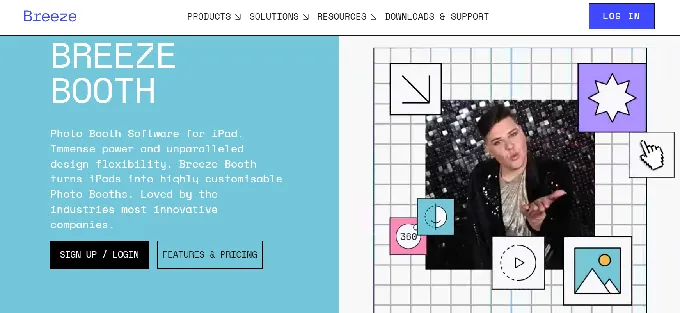
Breeze Booth runs exclusively on iPad and iPhone, with M Series Mac support listed as coming soon. The app handles capture and guest interaction, while a separate web-based Event Editor at breezebooth.net handles configuration and design. This two-application architecture gives operators flexibility but adds complexity that single-app solutions avoid.
Source: Breeze Booth
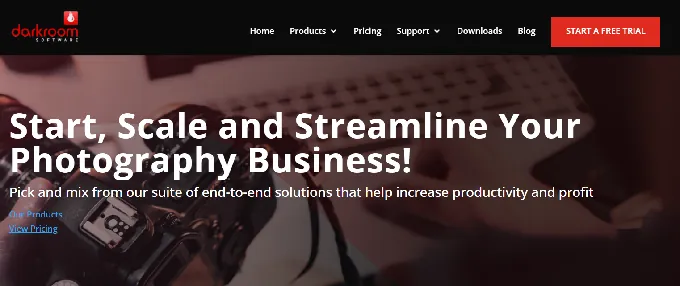
Darkroom Booth is Windows-only. It runs on any Windows 10 or 11 machine with at least an Intel i3 and 4 GB of RAM, and an i5 or higher for video and green screen work. It can run under Boot Camp on Intel Macs, but there’s no native macOS version and no announced plans for one.
Source: Darkroom Booth
For operators whose businesses run on Windows PCs and DSLR cameras, this is a natural fit. For everyone else, it’s a hard stop.
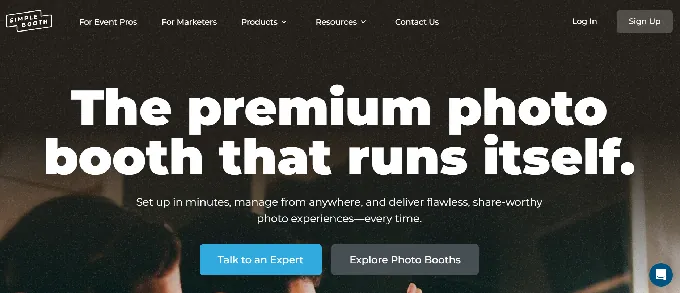
Simple Booth runs on iPad, paired with the company’s own HALO hardware. The key difference from Breeze Booth is integration.
Source: Simple Booth
Where Breeze separates the configuration tool from the capture tool, Simple Booth unifies setup, operation, and management into one app backed by a cloud dashboard that syncs settings to the device automatically. Change a preset on your laptop, and the booth updates without leaving booth mode.
The platform question also determines your hardware options.
Darkroom Booth’s Windows base gives it the broadest camera support: Canon, Nikon, GoPro Hero 9/10, and any Windows webcam.
Breeze Booth connects to Canon DSLR and mirrorless cameras via iPad tethering.
Simple Booth added Canon DSLR/mirrorless support in HALO 5.0 with both wired USB and wireless WiFi connections, a differentiator since most photo booth apps only support wired tethering or don’t offer external camera support at all.
That said, most operators use the iPad’s built-in camera combined with the HALO’s 112-LED ring light producing up to 2,100 lumens for consistently flattering photos.
Customization: full control vs. practical flexibility
This is where the three platforms diverge most.
Breeze Booth offers the deepest customization of any iPad photo booth software. Operators design every guest-facing screen from scratch using external design tools like Photoshop or After Effects, then place those files into a profile folder structure.
The Touch Screen Designer uses percentage-based positioning so layouts render correctly across different iPad models.
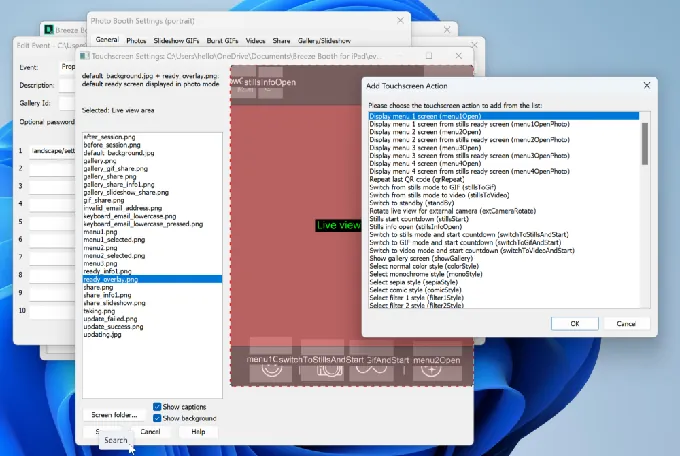
Source: Breeze Booth
The Print Layout Editor supports drag-and-drop layering of photos, logos, QR codes, and text. Breeze’s token system lets survey responses populate print layouts in real time (a guest’s name and team number appear on their trading card without post-processing).
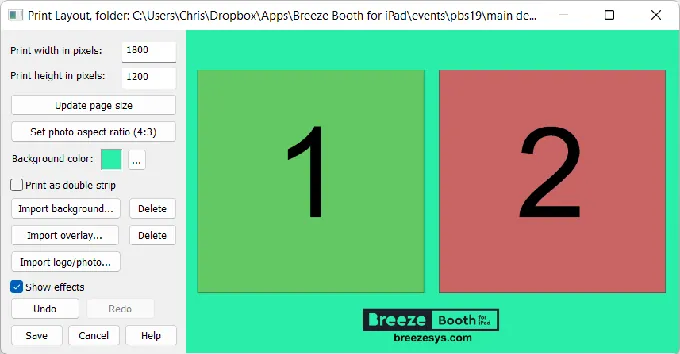
Source: Breeze Booth
The price of that flexibility is time. Breeze’s file-based design system, multi-profile architecture, and token variable logic demand real upfront investment. Operators building a corporate activation with animated countdown screens, alpha-channel video overlays, and survey-driven dynamic output need to understand the platform before going live.
Darkroom Booth takes a more accessible approach. Its built-in template editor lets operators drag and drop images with full customization, and the FAQ directly reassures buyers: “Darkroom Booth is intuitive and easy to use” without requiring Photoshop skills.
The 75+ included templates cover both print and screen formats, and a third-party template marketplace at DarkroomTemplates.com offers hundreds more from independent designers. Custom lock screens let the idle booth display sponsor branding. For most event types, operators can be ready within hours of installing the software.
Simple Booth’s Layout Designer, introduced in HALO 5.0, brings full design capability inside both the app and the web dashboard on all plans. Operators create layouts with photo placement, text layers (with font, color, alignment, and shadow controls), background gradients, logo positioning, and embedded QR codes, all without external software.
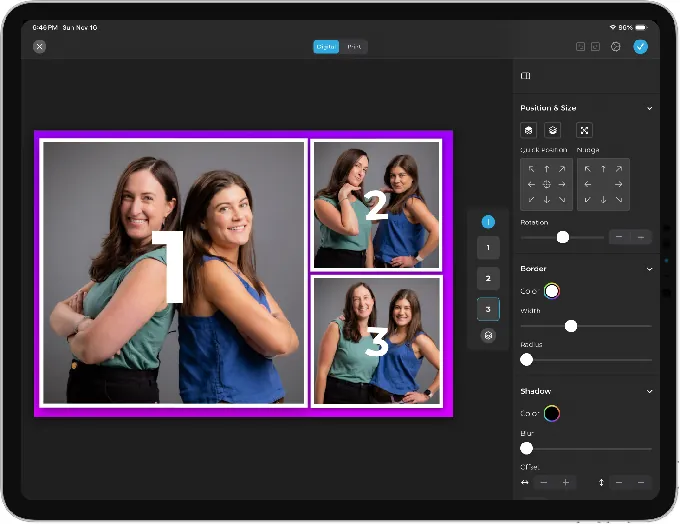
Source: Simple Booth
The platform includes 60+ themes and 100+ digital props as starting points. For operators who need guest personalization, guest-editable text layers let participants type names or messages directly onto their photo before sharing.
The trade-off is clear: Breeze Booth gives you a blank canvas with no guardrails. Darkroom Booth gives you a strong starting library with a capable editor.
Simple Booth gives you an all-in-one design tool that eliminates external software while still producing polished, branded results. Its features also work together without restrictions; filters, Glam, background blur, and DSLR integration all function across video, GIFs, and offline mode, so operators don’t have to navigate rules about which settings can be combined.
AI effects: three different approaches
All three platforms now offer AI-powered photo transformations, but they’ve built them differently.
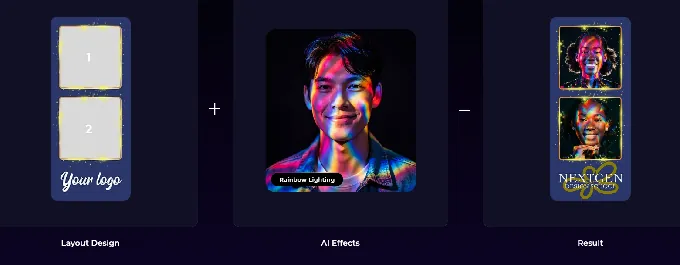
Breeze.FX is Breeze Booth’s cloud-based AI service, operating as a separate product with its own credit system. It exposes multiple AI models under one account: OpenAI GPT-4o for image generation, Face Swap, Cartoon conversion in nine styles, skin smoothing, head extraction, and content moderation. Processing takes 10 to 60 seconds per image depending on the effect.
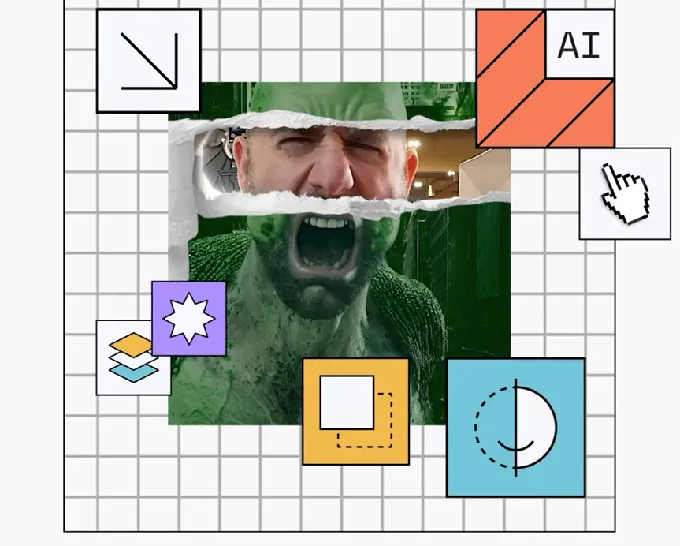
Source: Breeze Booth
The standout capability is survey-driven AI prompts: guest answers (team color, player number) can be injected directly into the OpenAI prompt, producing personalized outputs. Breeze Booth also includes on-device AI background removal that runs offline at no extra cost.

Source: Breeze Booth
Per-image costs vary: Face Swap starts at $0.032/image, skin smoothing and moderation at $0.065, cartoon and remove.bg at $0.195, and GPT image generation at $0.455/image. At high-volume events, these credits add up.
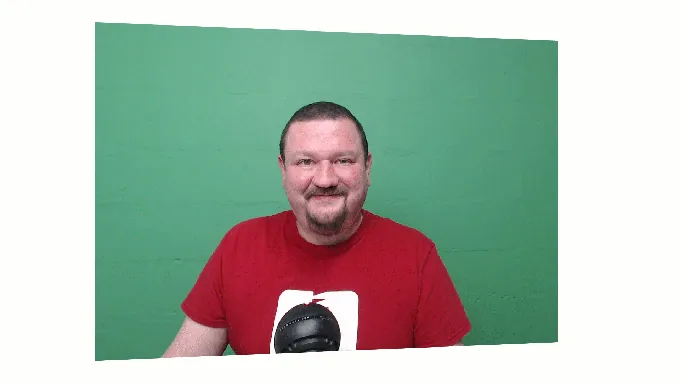
Darkroom Booth introduced AI features in May 2025: generative portraits, face swap, custom AI prompts, and scene generation that eliminates the need for a physical green screen. The company has been expanding, adding AI custom shirts and AI lenticular prints in 2026. AI effects are selectable within templates and included in the base software.
Source: Darkroom Booth
These are newer additions, and the range of AI models is narrower than Breeze FX’s multi-model approach, but they come at no per-image cost beyond the base license.
Simple Booth’s AI Effects use Nano Banana models in three tiers: Nano Banana 1 (fastest, for individuals, 1 credit), Nano Banana 2 (balanced, groups up to 5, 2 credits), and Nano Banana Pro (highest quality, groups up to 5, 3 credits). Credits cost $0.10 each. Operators can test prompts unlimited times outside of booth mode at zero credit cost, removing the financial risk of experimentation.
Source: Breeze Booth
The platform automatically preserves identity, keeping guests recognizable regardless of artistic transformation. For multi-frame layouts, operators can assign a unique AI prompt to every individual frame, enabling narrative photo strips.
All three platforms include background removal without a physical green screen. Breeze does it on-device for free. Darkroom uses remove.bg integration alongside its native chroma key. Simple Booth offers background replacement and background blur on Core plans and above.
Sharing and data capture reveal different priorities
How each platform delivers photos to guests and collects data tells you who they were built for.
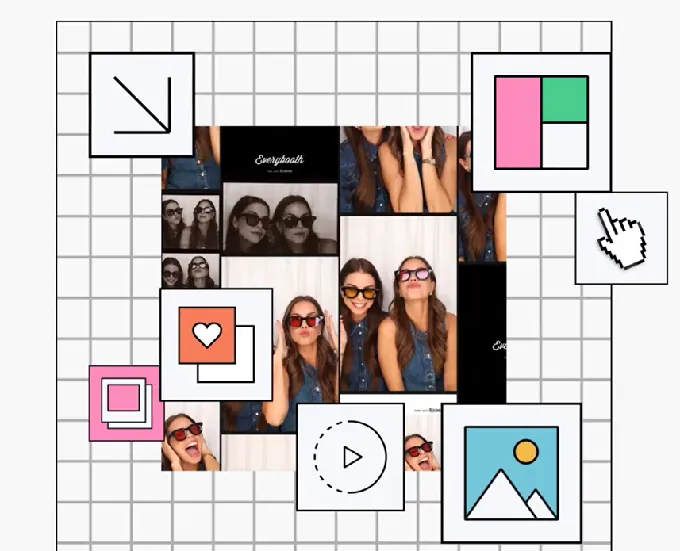
Breeze Booth routes sharing through two layers. On-device, guests receive photos via SMS, custom HTML email, MMS (US and Canada), and QR code. Cloud-side, Breeze Cloud auto-uploads every session to branded galleries and microsites with a three-level URL privacy hierarchy that prevents guests from discovering each other’s sessions.
Source: Breeze Booth
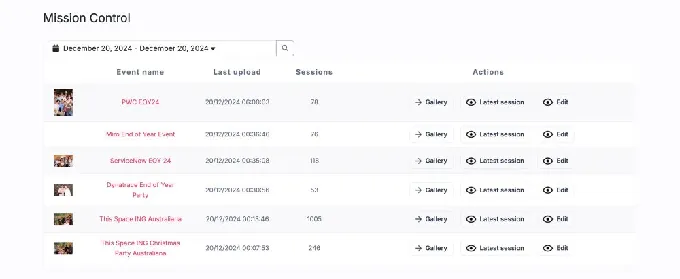
For operators running multiple booths, Mission Control provides a live dashboard showing images from all events in progress. The contactless workflow is native: guests register via a cloud-hosted microsite, receive a personal QR code, and scan it at the booth to trigger sessions and receive media automatically.
Source: Breeze Booth
Data capture uses surveys with XML export to CSV, but there are no native CRM integrations. Getting lead data into Mailchimp or HubSpot requires manual export.
Darkroom Booth shares photos, videos, and GIFs via text or email directly from the booth, with Darkroom Phone handling SMS delivery without requiring a Twilio account. It generates Snapchat, Twitter, and Instagram-ready files sized correctly for each platform.
Dropbox integration provides automatic cloud archiving, and EventGallery.com auto-upload populates branded online galleries in real time (EventGallery is a separate Darkroom subscription product). Surveys export to PDF and store in a local SQLite database. Like Breeze, there are no native CRM connectors.
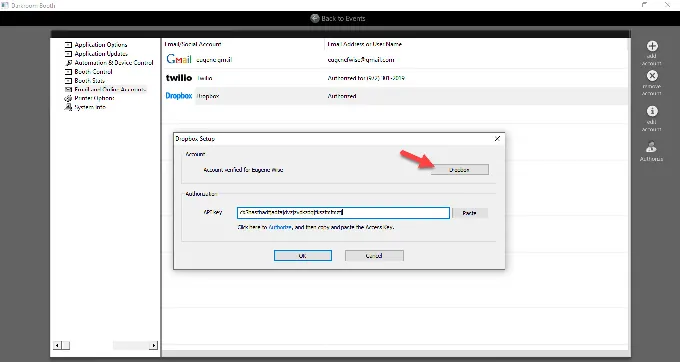
Source: Darkroom Booth
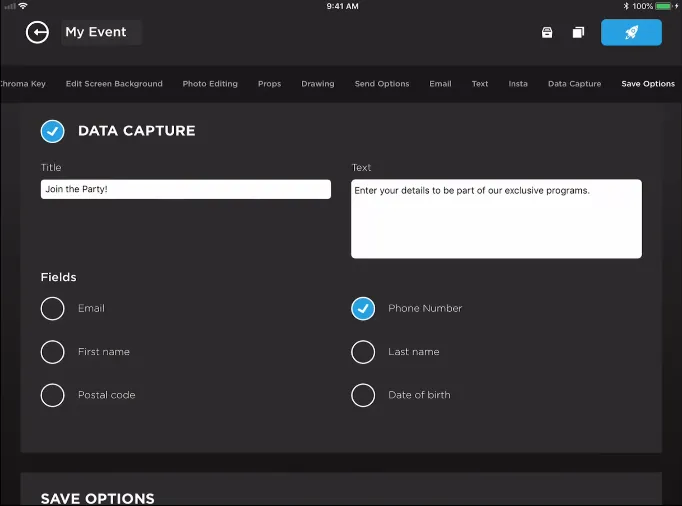
Simple Booth treats lead capture as a core function, not an afterthought. The platform captures opt-in rates as high as 87 to 89% because data collection happens naturally during the photo delivery flow. Pro plans support up to 6 standard fields, and Select plans extend to 10 custom fields including checkboxes and required legal terms.
Source: Simple Booth
Data syncs natively with MailChimp and can be pushed to custom CRMs via the Open API. Photo delivery spans QR code, email, SMS, AirDrop, and WhatsApp, with WhatsApp opening international deployments that SMS-only platforms cannot serve. Every public gallery can become a Live Feed for TV or projector display with a single tap.
Treetop Golf built 150,000 unique email addresses across their locations using Simple Booth’s lead capture during the photo booth experience. (Simple Booth)
Pricing philosophies couldn’t be more different
Each platform’s pricing model tells you who they expect their customer to be.
Breeze Booth charges $49/month or $499/year per device. Every subscriber gets the full feature set, including local AI background removal. But the headline price doesn’t tell the whole story. Operators who want cloud galleries, microsites, and mission control need Breeze Cloud, which is free at the basic tier but costs $39.99/month for Pro features (webhooks, API, custom domains per event). AI effects through Breeze FX are billed separately per image, from $0.032 to $0.455 depending on the effect.
A three-device operator running AI effects at a high-volume corporate event could see monthly costs well above the $147/month base. The trial is fully featured with no time limit, but outputs are watermarked after 10 sessions per day.
Darkroom Booth is the outlier: a $295 one-time perpetual license that includes one year of updates and support, with an optional $95/year maintenance renewal. If you let maintenance lapse, the software continues to run. You lose updates and support, but you don’t lose your investment. A single license covers two computers simultaneously.
For operators who want to own their tools rather than rent them, this model is hard to argue with. The main add-on cost is Event Gallery for online gallery hosting, a separate subscription. If maintenance lapses for over a year, the renewal price jumps from $95 to $195.
Simple Booth uses a per-license subscription with five tiers. Lite starts at $14.99/week (about $290/year) for basic functionality with ads. Core at $24.99/week (about $490/year) removes ads and adds DSLR support, video, background features, and AI effects. Plus at $49.99/week (about $990/year) adds custom branding, analytics, and custom AI effects. Pro at $149/month ($1,490/year) adds lead capture, phone support, and moderation.
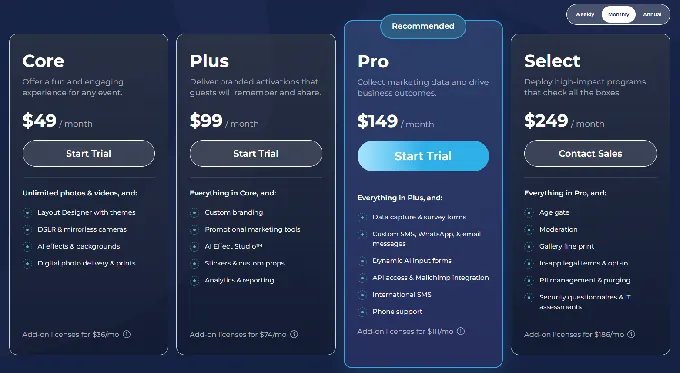
Select at $249/month ($2,490/year) adds enterprise compliance tools. Each additional device requires an add-on license at the same tier rate. AI credits cost $0.10 each beyond plan bonuses. The HALO hardware is sold separately starting around $2,090 for an Event Kit.
For a solo operator running one booth at weddings and parties, Darkroom Booth’s $295 one-time cost is the cheapest path to professional photo booth software, though Simple Booth’s $14.99/week pricing lets new operators pay per event while building their client base, avoiding a large upfront commitment.
For an operator running three iPads at corporate brand activations with AI effects and lead capture, Simple Booth’s subscription model spreads costs predictably. For an operator whose clients demand pixel-perfect custom interfaces, Breeze Booth’s per-device fee unlocks design depth the others can’t match.
Setup and ease of use favor different skill levels
Breeze Booth’s tagline is “Your way, not our way”, and that freedom comes with expectations. Setup involves the Event Editor web application for configuring events, the Touchscreen Editor for interactive screen zones, the Print Layout Editor for output design, and a profile/token system for dynamic content.
The documentation spans syncing, importing, camera setup, print setup, screen designs, backgrounds, overlays, profiles, and device lockdown, all before running a live event. Reviewer “Zschiffy” called it “the best Photo Booth app for pro users in the industry,” which underscores both the capability and the expected skill level.
Darkroom Booth sits in the middle. The software is designed for operators who don’t know Photoshop, with a drag-and-drop editor and templates that get you running quickly. But the depth is there for those who want it: advanced modes for video, slow-motion, green screen, and AI require progressively more configuration.
The company offers Getting Started and Advanced webinars hosted by a named Customer Education Manager, acknowledging a real learning curve. One testimonial captured it well: “it could take minutes to learn, but a lifetime to master.”
Simple Booth was designed from the start for operators without technical backgrounds. The numbered Start Guide walks through plan selection, app download, preset creation, and event-day operations in ordered steps. The redesigned preset editor in HALO 5.0 presents the entire booth flow visually rather than as a settings list. A Preflight Check screen catches configuration issues before each event launch.
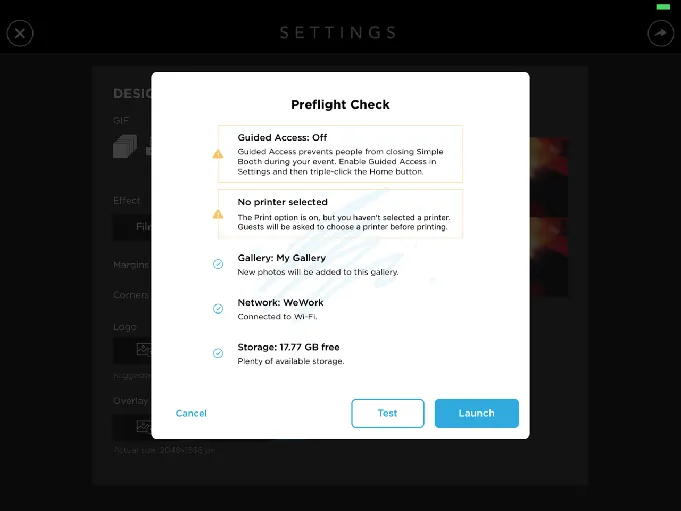
Source: Simple Booth
The HALO hardware deploys in under a minute with no tools, so the physical setup matches the software’s accessibility. For rental companies running drop-off events, an operator can set up, launch, and walk away (the booth handles guest interaction on its own), enabling companies to service multiple events in a single night.
Amore Entertainment launched their photo booth business with no prior experience: “I knew nothing about photo booths when we started.” (Simple Booth)
Reliability and support when it matters
Photo booths work at events, which means failures happen in front of paying clients. Support responsiveness is a real purchasing decision.
Breeze Booth offers email support, a help center, a video learning course, a Facebook community group, and a forum. There is no live chat or phone support in official materials, and no published response time commitments. The company is regularly present at Photo Booth Expo in Las Vegas and Photo Booth Expo Europe in Amsterdam.
Darkroom Booth provides phone and email support at 214-390-3258, Monday through Friday, 9am, 5pm Central. Support requires an active maintenance plan ($95/year). The gap between when booths operate (evenings, weekends) and when support is available is the most cited limitation in user reviews. On the positive side, customers praise the personal support culture: “ALWAYS AMAZING with their Support & Customer Service”.
Simple Booth offers support seven days a week, tiered by plan: email and chat on Lite through Plus, phone support on Pro, and a dedicated account manager on Select. The company responds actively to negative App Store reviews with troubleshooting guidance. The help center spans 148+ articles across 10 collections, and a 5.0 Transition Guide on GitBook includes an AI assistant for natural language documentation queries.
For stability, Darkroom Booth has the longest track record. Operators describe years of reliable use across hundreds of events. Breeze Booth’s offline-first architecture means it doesn’t depend on internet connectivity at the point of capture, which is its own form of reliability.
Simple Booth’s offline upload queue stores sessions and delivers them when connectivity returns, backed by a platform in continuous development since 2012 that has processed over 40 million moments. Some App Store reviewers have reported post-update bugs with the HALO app, though the company addresses these through rapid patch releases.
Privacy and compliance differ by market
Breeze Booth takes the strongest position on data privacy. The software can run 100% offline with no personal data or images sent to any third parties, including Breeze Software itself. Collected email addresses and phone numbers can be optionally encrypted on-device. GDPR compliance is stated on the product homepage, and the Privacy Policy references GDPR legal bases per the ICO framework.
For European operators or corporate clients with strict data sovereignty requirements, this offline-first architecture is a purchasing requirement, not a feature.
Darkroom Booth, as a Windows desktop application, stores all data locally by default. Guest images shared via Darkroom Phone are stored anonymously for 100 days; via Twilio, images are stored up to 48 hours. The privacy policy documents data handling but does not reference specific regulatory frameworks like GDPR or CCPA by name. For US-based operators serving domestic events, this is standard for the category.
Simple Booth addresses compliance through its enterprise tiers. Select plans include data compliance tools, in-app custom legal terms, moderation, age gating, and security questionnaire support. The company states it does not use facial recognition or biometric processing, and the privacy policy enumerates rights under GDPR, CCPA, and Nevada Revised Statutes.
Capture modes and output formats
All three platforms produce photos, GIFs, and video, but the specifics matter for different event types.
Breeze Booth handles photos, GIFs, and video in a single app, including 360 booth, slow-motion, boomerang, and Glam Robot video. Its Auto Motion Start detects when a 360 spinner or robot arm begins moving and triggers capture automatically, making it hardware-agnostic for 360 setups.
The Video Edit List provides frame-level editing with speed ramps, jump cuts, pans, zooms, and rotations. For GIFs, Breeze supports both burst capture and slideshow assembly from stills, each with frame-by-frame animated overlays.
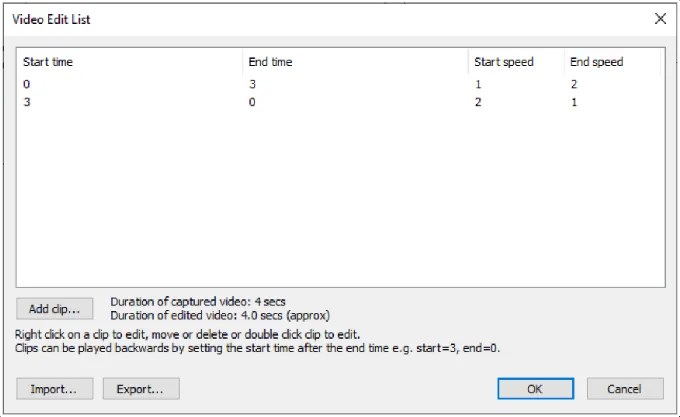
Source: Breeze Booth
Darkroom Booth offers six output types: still photos, standard video, slow-motion video, animated GIFs, Burst Mode/Boomerang GIFs, and VR 180°/360° panoramic images.
Slow-motion recording reaches 240 fps via GoPro Hero cameras, producing more pronounced slow-motion than Canon or Nikon tethering at 60 fps. Its best pose selection lets guests take three shots and choose their favorite before finalizing, designed for formal events like school dances and galas. Lenticular printing support (added in 2026) creates animated physical prints that shift when tilted.
Simple Booth captures still photos, classic photo strips, custom layouts, GIFs, looping Rebound clips, and video up to 120 seconds. The HALO hardware’s patented ring light and software-based Glam smoothing and DSLR-style bokeh produce flattering output from the iPad camera alone. Multiple layouts per event, each with its own motion type, are configurable through the Layout Designer.
Image previews and rendered output appear up to 12x faster than previous versions, keeping guest throughput high at busy events.
G7 Entertainment Marketing has driven 136,000+ fan interactions over 10+ years as Simple Booth users, showing sustained reliability at high-volume brand activations. (Simple Booth)
Breeze Booth vs Darkroom Booth vs Simple Booth: Which should you choose?
The right platform depends on your technical comfort, hardware ecosystem, and business model.
Choose Breeze Booth if:
- You need pixel-level control over every screen, animation, and output layout
- Your clients require fully branded, white-labelled corporate activations
- You run 360 booths, robot arms, or other non-standard hardware on iPad
- Offline operation and GDPR compliance are hard requirements
- You’re willing to invest setup time for creative flexibility
Choose Darkroom Booth if:
- You run a Windows-based operation with Canon or Nikon DSLRs
- A one-time $295 license fits your budget better than ongoing subscriptions
- You want a proven, reliable platform with 30+ years of photography software heritage
- Built-in templates and a drag-and-drop editor meet your customization needs
- You’re comfortable with business-hours-only support
Choose Simple Booth if:
- You want a complete, self-running photo booth system that sets up in minutes
- You run drop-off events or unattended activations and need a booth that operates without an attendant
- Ease of use and fast ROI matter more than unlimited configuration options
- Lead capture, marketing analytics, and CRM integration are part of your value proposition
- You need to manage multiple booths remotely from a single dashboard
- You’d rather focus on running events than troubleshooting software
Start your free 7-day trial of Simple Booth and see why 30,000+ customers trust it for their events.
Photo booth software has grown from simple camera triggers into platforms handling AI effects, data capture, and multi-channel distribution. Breeze Booth gives advanced operators a blank canvas. Darkroom Booth gives photographers a reliable Windows workhorse they can own outright. Simple Booth gives operators of all skill levels a system that runs itself.
The best choice is the one that matches how you actually work.
Kurt Nielson Photography found that Simple Booth “paid for itself pretty quickly. Now it’s just extra money coming in.” (Simple Booth)
Breeze Booth vs Darkroom Booth vs Simple Booth FAQ
What is the main difference between Breeze Booth, Darkroom Booth, and Simple Booth?
Breeze Booth is iPad-based photo booth software built for operators who want creative control over every screen and output, with a steep learning curve and a $49/month per-device subscription. Darkroom Booth is Windows-only software with a $295 one-time perpetual license, designed for photographers who already own DSLRs and dye-sub printers.
Simple Booth combines a subscription iPad app with HALO ring-light hardware for a system that sets up in under a minute and includes lead capture, marketing analytics, and remote management.
Which platform is cheapest overall?
Darkroom Booth has the lowest total cost for a single-booth operator at $295 one-time plus an optional $95/year for updates. Breeze Booth costs $49/month ($499/year) per device before Breeze Cloud Pro and Breeze FX credits. Simple Booth’s pricing ranges from about $290/year on Lite to $2,490/year on Select per license, plus separate hardware costs.
For multi-device operators, per-device pricing on all three platforms multiplies with fleet size.
Which platform is easiest to learn?
Simple Booth is the most accessible, with a visual preset editor, in-app Layout Designer, numbered onboarding guide, and a Preflight Check that catches issues before events.
Darkroom Booth is moderately easy to start with, thanks to 75+ included templates and a drag-and-drop editor, though advanced features add complexity. Breeze Booth has the steepest learning curve due to its file-based design system, separate Event Editor, and multi-layer token architecture.
Can any of these platforms run without an internet connection?
Breeze Booth can run fully offline with no data sent to any third party, including Breeze Software itself. Darkroom Booth runs as a local Windows application and does not depend on internet for core capture and printing.
Simple Booth queues sessions in an offline upload queue and delivers them when connectivity returns, though AI effects require an active internet connection.
Which platform has the best AI photo effects?
Breeze FX offers the widest range of AI models (OpenAI GPT-4o, Google Gemini, BytePlus Seedream, plus cartoon and face swap) with survey-driven dynamic prompts, but charges per image ($0.032 to $0.455).
Simple Booth’s Nano Banana models offer three quality tiers at $0.10 per credit with free unlimited testing outside booth mode and automatic identity preservation. Darkroom Booth includes AI portraits, face swap, and scene generation in the base license with no per-image fees, though the model selection is more limited.
Which platform supports the most camera types?
Darkroom Booth has the broadest camera support, including Canon, Nikon, GoPro Hero 9/10, and any Windows-compatible webcam via direct tether. Breeze Booth supports Canon DSLR and mirrorless cameras plus the iPad’s built-in camera. Simple Booth supports Canon DSLR/mirrorless cameras via wired or wireless connections (on Core plans and above) plus the iPad camera, with the HALO ring light compensating for the iPad camera’s limitations.
Which platform is best for lead capture and marketing?
Simple Booth is the strongest for marketing use cases, with up to 10 custom data capture fields, native MailChimp integration, an Open API for CRM delivery, analytics dashboards with demographic insights, and documented opt-in rates of 87-89%.
Darkroom Booth offers surveys and quizzes with local SQLite export and PDF reports. Breeze Booth captures survey data via tokens and exports to CSV, but has no native CRM integrations.
Can I use any of these on both Mac and Windows?
Darkroom Booth is Windows-only (it can run under Boot Camp on Intel Macs). Breeze Booth and Simple Booth are iPad apps and work on any iPad regardless of whether your desktop computer is Mac or Windows. Breeze Booth’s Event Editor is web-based and accessible from any browser. Simple Booth’s dashboard is also web-based for cross-platform management.
Keep reading
 Showdowns
Simple Booth vs Darkroom Booth: Which Photo Booth Software Fits Your Business in 2026?
iPad turnkey vs Windows DSLR veteran. Simple Booth or Darkroom Booth?
 Showdowns
Simple Booth vs Breeze Booth: Which iPad Photo Booth Software Fits Your Business in 2026?
Turnkey system vs pixel-level control. Simple Booth or Breeze Booth?
 Showdowns
Darkroom Booth vs Snappic (vs Simple Booth): Which Photo Booth Software Should You Choose in 2026?
Own-it-forever desktop vs slick iPad subscription. Darkroom Booth or Snappic?