7 Curator Live Alternatives: Specialized Photo Booth Software for Every Operator (2026)

Curator Live has earned its reputation as a capable iOS-native photo booth platform. It supports broad capture formats, AI photo rendering, a 360 CustomFX timeline editor, facial recognition delivery, and hands-on customer service, giving professional operators a genuine all-in-one solution for events, activations, and venue installations.
But as your photo booth business grows or your needs shift, you may find that Curator Live’s iOS-only architecture, per-event pricing, or feature priorities don’t align with how you run your business. Some operators need Windows or Android compatibility. Others want a perpetual license instead of a recurring subscription. Others need a platform optimized for a specific use case, whether that’s cloud-based fleet management, cross-platform DSLR workflows, or branded marketing experiences.
That’s where this guide comes in. We’ll explore Curator Live alternatives that excel where you need them most, whether you’re looking to:
- Deliver branded photo experiences with built-in lead capture and marketing analytics
- Manage a growing multi-booth fleet from a centralized cloud dashboard
- Run professional DSLR booths across Windows, Mac, and iPad under one subscription
- Deploy photo booth software on any device or operating system you already own
- Own your software outright with a one-time perpetual license and no recurring fees
- Access professional AI effects and Canon DSLR integration at entry-level pricing
- Evaluate full-featured photo booth software free before spending anything
This isn’t about finding a “better” platform than Curator Live. It’s about finding the right fit for your hardware, budget, and business model.
| The Best Curator Live Alternatives | ||
|---|---|---|
 | Starts at: $14.99/week App Store: 4.7 (2,400+) | Simple Booth Best Alternative for Premium Branded Photo Experiences & Lead Capture We chose Simple Booth because its integrated hardware-software system, 87%+ opt-in lead capture, and Layout Designer deliver branded experiences with measurable marketing ROI. |
 | Starts at: $69/mo App Store: N/A | Snappic Best Alternative for Growing Multi-Booth Fleet Management We chose Snappic because its cloud-first architecture, VideoFX engine, and sub-account infrastructure are built for operators scaling from one booth to many. |
 | Starts at: $17/mo App Store: 4.6 (1,400+) | LumaBooth Best Alternative for Cross-Platform DSLR Operators (Windows, Mac & iPad) We chose LumaBooth because it’s the only photo booth platform that natively spans Windows, Mac, and iPad under one subscription, with broad Canon, Nikon, and Sony camera support. |
 | Starts at: $439.90/yr App Store: 4.8 (6,600+) | Touchpix Best Alternative for Device & Operating System Flexibility We chose Touchpix because it runs natively on iOS, Android, macOS, Windows, Linux, and Raspberry Pi under a single subscription, and is the industry standard for 360 spinning-arm booths. |
 | Starts at: $295 (one-time) Reviews: 4.9 (vendor site) | Darkroom Booth Best Alternative for Windows DSLR Operators Who Want a Perpetual License We chose Darkroom Booth because its one-time $295 perpetual license, offline Windows operation, and open hardware compatibility eliminate ongoing subscription costs entirely. |
 | Starts at: €12/mo | BoothLedger Best Alternative for Professional AI Effects at Entry-Level Pricing We chose BoothLedger because it bundles two AI engines and Canon DSLR integration into a flat €35/month subscription with no per-image credit charges. |
 | Starts at: $149 (one-time) | SparkBooth Best Alternative for Evaluating Software Free Before Any Financial Commitment We chose SparkBooth because its 30-day full-featured free trial and $149 perpetual license offer the lowest-risk entry point to professional photo booth software on Windows and Mac. |
What is Curator Live?
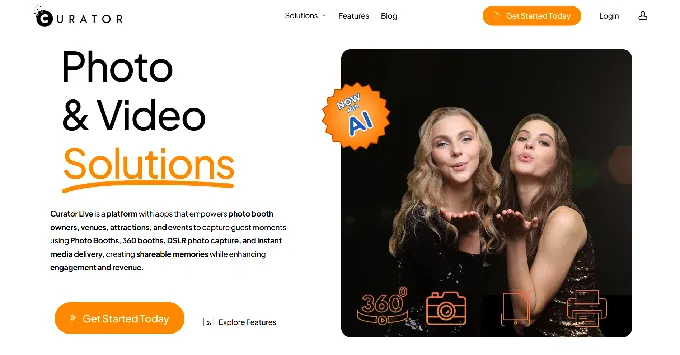
- Source: Curator Live
Curator Live is an iOS-native platform and app suite that helps photo booth owners, venues, attractions, and events capture guest moments using photo booths, 360 booths, DSLR cameras, and instant media delivery. The company calls itself the ”#1 iOS apps and Platform for Photo Booths, 360 Spinners, Roamers, and Photographers” and operates in over 90 countries.
Its key features include:
- Multi-format capture in one app: single/multi-photo, GIF, boomerang, video guest book, 360 CustomFX, and AI photo rendering
- AI effects suite including AI-FX (Nano Banana), background removal, face swap, and facial recognition delivery
- 360 booth and CustomFX timeline builder with transparent HEVC video layers, pre/post-roll, audio layering, and OrcaVue/GlamBot Bluetooth integration
- DSLR Photography Mode supporting over 100 camera bodies across Canon, Nikon, Olympus, and Sony for roaming event photography
- Branded delivery infrastructure with custom microsites, white-label URLs, SMS (via Twilio), email, QR codes, and AirDrop
- E-commerce and kiosk features for permanent venue installations with watermark-and-purchase photo sales
- 24-hour support including during live events, with emergency phone support and a dedicated account representative on all paid tiers
When a guest steps up to a Curator Live booth, the platform handles the full workflow: capture, AI transformation or overlay compositing, branded delivery via the guest’s preferred channel, and analytics tracking. Everything flows through one iOS app connected to a cloud-based event management dashboard. Curator Live’s rapid release cadence (multiple updates per month) and founder-led support model have earned it a loyal following, with App Store reviewers consistently praising its feature velocity and customer service.
That said, Curator Live’s iOS-only architecture means operators who run Windows, Android, or mixed-device fleets can’t use the platform without investing in Apple hardware. Its per-event pricing ($29-$99/event) and AI credit costs ($0.45-$1.00 per image) can also add up for high-volume operators. These are the gaps the alternatives in this guide fill.
Looking for a photo booth that runs itself, captures leads, and delivers branded experiences? Simple Booth’s integrated hardware-software system sets up in under a minute and captures opt-in data at 87%+ rates. Learn more about Simple Booth.
How We Curated Our List of Curator Live Alternatives
After testing Curator Live and researching the photo booth software market, we found that operators’ needs vary based on their hardware, operating systems, business models, and specializations. While Curator Live is a strong platform for iOS-based operators, businesses often need specific capabilities for:
- Delivering branded experiences with integrated hardware, lead capture, and marketing analytics
- Managing multi-format booth fleets from a centralized cloud dashboard without device-by-device syncing
- Running professional DSLR photo booths across Windows, Mac, and iPad under a single subscription
- Deploying on any operating system or device type, not just Apple hardware
- Owning software outright with a one-time license to eliminate recurring costs
- Accessing AI effects and DSLR integration at a fraction of the cost of iOS-first platforms
- Trying full-featured software risk-free before making any financial commitment
Each tool on this list leads in one of these areas. Some operators may use them alongside Curator Live; others may find a better primary platform for their workflow.
| ❗DISCLAIMER: We aren’t covering every single photo booth software on the market! Our focus is on highlighting the best alternatives that address specific operational needs and hardware requirements that Curator Live’s iOS-only architecture may not serve. |
|---|
1. Simple Booth, Best Alternative for Premium Branded Photo Experiences & Lead Capture
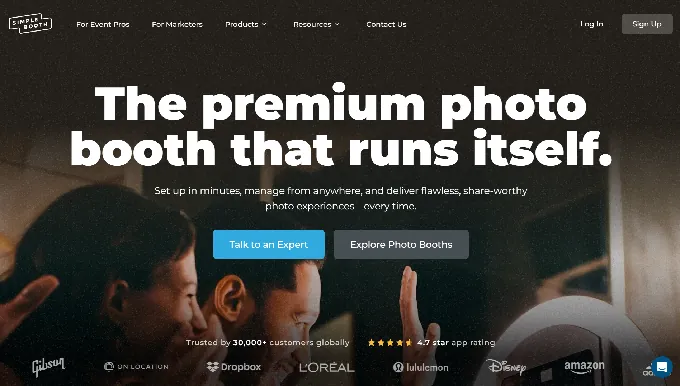
Simple Booth is an integrated photo booth hardware-software system that pairs a subscription-based iPad app with proprietary ring-light hardware, plus a browser-based Virtual Booth product that requires no hardware at all. With 30,000+ customers globally, a 4.7-star App Store rating from 2,400+ ratings, and 40 million+ moments captured since 2013, Simple Booth has been building iPad photo booth software since 2012, making it one of the most mature platforms in the category. It’s built for operators and marketers who want a complete system that delivers quality photos and measurable marketing results. Its key features include:
- Integrated HALO hardware with 112 LEDs producing up to 2,100 lumens in a patented, precision-machined aluminum chassis rated for 50,000 hours of operation
- Layout Designer (v5.0): a full design tool on both the iPad app and web dashboard (on all plans) with layers, fonts, gradients, QR code embedding, and multi-layout support, eliminating dependence on external design software
- High-converting lead capture with opt-in rates as high as 87-89% when guests receive photos
- AI Effects powered by Nano Banana models that transform captured photos using text prompts, with built-in identity preservation
- DSLR/mirrorless camera support for Canon cameras (Core plan and above) via both wired USB and wireless Wi-Fi connections, a flexibility most competitors don’t offer
- Virtual Booth: a browser-based, hardware-free photo experience accessible from any device via link or QR code
- Multi-channel delivery via QR code, SMS, email, AirDrop, and WhatsApp
- Fast rendering engine with image previews appearing up to 12x faster, so guests see their photos instantly
For operators and marketing teams who need a complete, self-running system (from unattended selfie stands and drop-off events to permanent venue installations) Simple Booth provides an integrated solution that captures first-party data while delivering branded experiences worth sharing. Unlike Curator Live, which focuses on creative breadth across AI, 360, and roaming photography, Simple Booth concentrates on making the core photo booth experience reliable and measurably valuable as a marketing channel. All effects, filters, and delivery options work together (with video, DSLR integration, and in offline mode) so operators don’t have to navigate complex compatibility rules during event setup.
Why Choose Simple Booth Over Curator Live for Premium Branded Experiences
While Curator Live offers a wide range of creative features and capture formats, Simple Booth excels as an integrated system built for operators who need their photo booth to be both a guest experience and a marketing engine. Here’s where Simple Booth stands apart.
Integrated Hardware-Software System: Quality Without the Complexity
Most photo booth platforms, including Curator Live, are software-only solutions that require operators to source their own ring lights, stands, and enclosures. Simple Booth takes a different approach: the HALO chassis is precision-machined from a single billet of aluminum with a patented ring-light system designed to work as a single integrated unit. The result is consistent, flattering illumination at every event without the variability of mixing consumer ring lights with third-party software.
The operational impact matters. The iPad snaps in via a tool-less faceplate, and the selfie stand deploys without assembly, enabling setup in under one minute. A concealed built-in USB-C cable keeps the iPad charged throughout events without dangling cables. The full Event Kit weighs 49 lbs with wheels and an extendable handle for easy transport between venues.
For operators running multiple events per week, one-minute setup with no tools means less time deploying gear and more capacity for bookings. The intuitive interface also simplifies staff training, a real advantage for growing rental companies that hire event staff rather than running every booth personally.
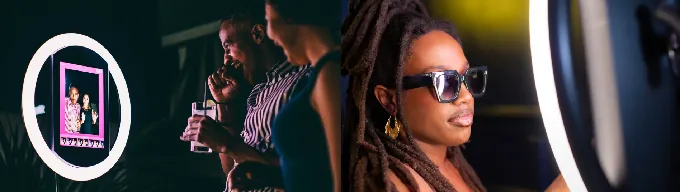
⚡ Simple Booth in Action: You arrive at a corporate event venue 30 minutes before doors open. Roll in the HALO Event Kit, extend the selfie stand, snap in the iPad, and you’re live. No cables to untangle, no ring light to position, no software to configure on-site. The preset you built remotely on the dashboard last night is already synced. Guests start lining up before you’ve finished placing the backdrop.
Lead Capture & Marketing Analytics: Turn Every Photo Into a Data Point
This is where Simple Booth diverges most from Curator Live. While Curator Live focuses on creative capture and branded delivery, Simple Booth is built around a core marketing proposition: every photo interaction is a lead capture opportunity.
The platform captures opt-in rates as high as 87-89% when guests receive their photos, a conversion rate that dwarfs typical marketing form submissions. This isn’t accidental. The data capture form is embedded in the natural flow of receiving a photo, so guests provide their information as part of a positive experience rather than a transactional ask.
Lead capture on the Pro plan supports up to 6 standard fields (email, first name, last name, phone, postal code, date of birth), while the Select plan extends this to up to 10 custom fields including checkboxes and required legal terms. Data exports as CSV, integrates natively with MailChimp, and can be routed to custom CRMs via the Open API.
Curator Live captures contact data for sharing and offers Google Analytics and Facebook Pixel tracking on microsites. But Simple Booth treats lead capture as the product’s core value, with analytics covering total participants, gallery views, social share clicks, referred views, and (on the Select tier) demographic insights via face detection including estimated age, gender breakdown, and average group size.
Documented outcomes back this up: Arizona Opera grew its email list by 1,000 addresses in a few events; Treetop Golf built 150,000 unique email addresses across locations.
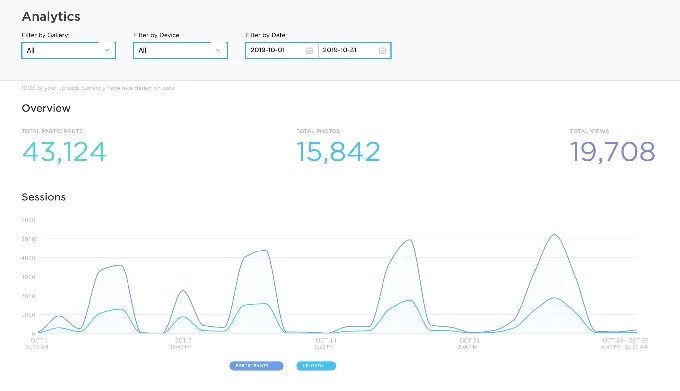
⚡ Simple Booth in Action: You manage marketing for a restaurant chain running HALO booths at three locations permanently. Each month, your dashboard shows how many emails each location captured, which social channels guests share to most, and how gallery views translate to organic reach. When leadership asks for the ROI on the booth investment, you pull up the analytics: 4,200 new email addresses this quarter, 1,800 social shares, and 12,000 gallery views. The data is already in MailChimp, feeding your next promotional campaign.
Virtual Booth: Reach Beyond the Physical Event
Simple Booth’s Virtual Booth is a browser-based, hardware-free photo experience that participants access from their own device via a QR code or link. No app installation required, no kiosk needed. This extends branded experiences beyond the physical event to email campaigns, product packaging, website embeds, and always-on marketing activations.
Virtual Booth includes background replacement without a green screen, overlay frames and stickers, AI effects with guest co-creation (where participant answers feed into the AI prompt as template variables), and multi-language support across English, Spanish, French, Dutch, and five additional languages.
For hybrid events or always-on campaigns, Virtual Booth connects to the same analytics, Live Feed, and Gallery infrastructure as HALO hardware, so brands running both physical and virtual activations see all submissions in one combined view.
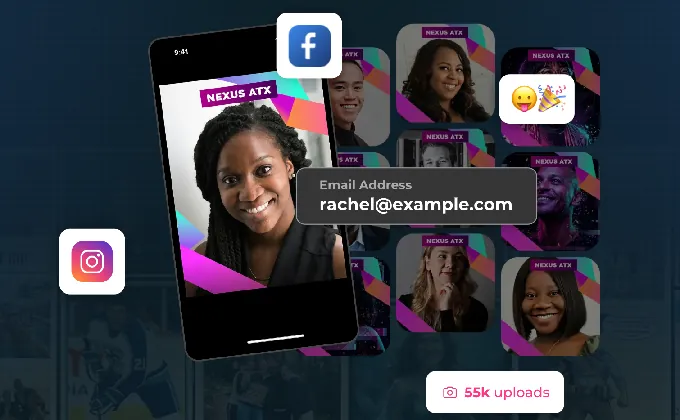
Curator Live doesn’t offer a comparable browser-based virtual product; its platform centers on iOS device-based capture at in-person events.
⚡ Simple Booth in Action: A consumer goods brand prints QR codes on 500,000 product packages linking to a Virtual Booth experience. Customers scan the code, take a branded photo with background replacement, and share to Instagram with the campaign hashtag. The brand captures email opt-ins from 15% of participants and tracks social sharing analytics in real time, all without shipping a single piece of hardware.
Remote Management & Offline Resilience: Operations That Scale
Simple Booth operators configure and update presets remotely via the online dashboard, with changes syncing to the iPad without exiting booth mode. The Mission Control overlay (triggered by a two-finger pinch gesture) lets operators monitor device health, adjust camera settings, and sync dashboard changes during live events without breaking the guest-facing interface. A Preflight Check screen runs before each event launch to catch configuration issues in advance.
When Wi-Fi is unreliable, the HALO app queues sessions in offline mode and delivers them automatically when connectivity returns. For venues where carrier coverage is poor, AirDrop delivery provides a local transfer option. WhatsApp delivery (added in HALO 5.0) opens international deployments that SMS-only systems cannot serve.
Simple Booth customer G7 Entertainment Marketing has powered 136,000+ fan interactions over 10+ years, calling themselves “big Simple Booth believers.” (simplebooth.com)
Simple Booth Pricing
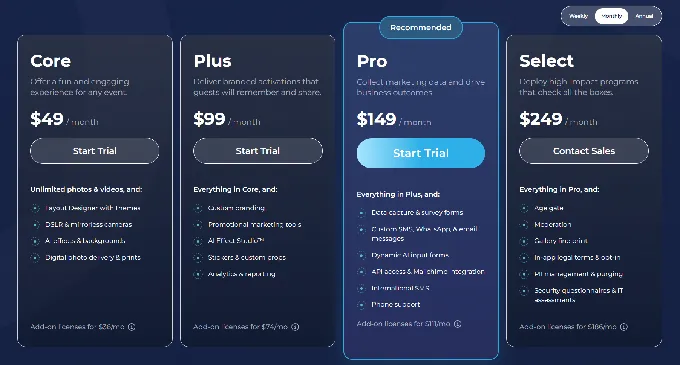
Simple Booth uses a per-license subscription model with weekly, monthly, and yearly billing. Each plan includes one device license; additional devices require add-on licenses at the same rate. AI effects are a separate, consumption-based cost.
Everyday Plans:
- Lite, $14.99/week, ~$72/month, $290/year: Custom layouts, motion and still capture, photo delivery, online galleries, library of themes and props. Includes ads; excludes custom branding, analytics, DSLR, and lead capture.
- Core, $24.99/week, ~$49/month, $490/year: Ads removed, multiple layouts, DSLR/mirrorless camera connection, full-length video, background replacement and blur, Dropbox integration, AI effects, Virtual Booth. 50 bonus AI credits.
- Plus, $49.99/week, ~$99/month, $990/year: Custom branding, custom photo delivery messages, analytics and reporting, guest-editable text layers, custom AI effects. 100 bonus AI credits.
Business Plans:
- Pro, $149/month,| $1,490/year: Lead capture, advanced SMS/email customization, API integration, phone support, moderation, age gate, data compliance tools. 150 bonus AI credits.
- Select, $249/month, $2,490/year: In-app custom legal terms, security questionnaires and IT assessments, demographic analytics via face detection. 200 bonus AI credits.
AI effect credits cost $0.10 each and are purchased separately. HALO hardware kits are sold separately starting at approximately $2,090 (Event Kit with iPad and Simple Care). A 7-day free trial is available.
Who Should Use Simple Booth?
Choose Simple Booth if:
- You run or are starting a photo booth rental business and want an integrated hardware-software system that delivers quality photos, sets up in under a minute, and runs reliably without an attendant, all starting at $14.99/week, making it accessible for per-event pricing while you build clientele.
- You manage marketing for a brand, venue, or agency and need a photo booth that functions as a first-party data capture tool with 87%+ opt-in rates, social sharing tracking, and analytics dashboards that demonstrate event marketing ROI.
- You want to extend branded photo experiences beyond physical events with a browser-based Virtual Booth that requires no hardware, supports AI effects, and captures lead data from participants on any device.
Want a photo booth system that runs itself, captures leads, and delivers branded experiences every time? Start your free Simple Booth trial and see why 30,000+ customers trust it for their most important moments.
2. Snappic, Best Alternative for Growing Multi-Booth Fleet Management
- Source: Snappic
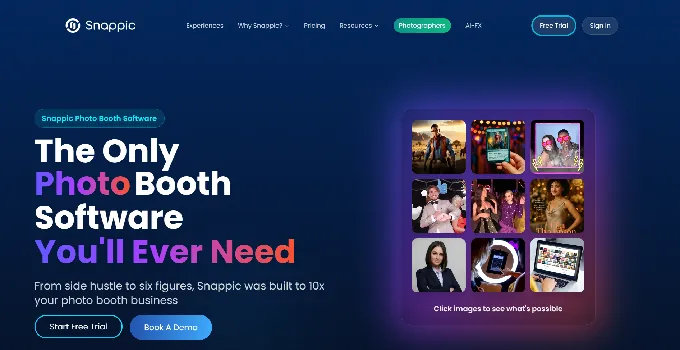
Snappic is a cloud-first photo booth software platform, acquired by Banyan Software in July 2024, that positions itself as the operating system for professional photo booth businesses running more than one booth type. Used at 100,000+ events worldwide by 8,000+ operators, Snappic’s feature density and configuration depth come with a steeper learning curve than simpler alternatives, but its key capabilities are built for operators who need that level of control:
- Unified multi-format support: iPad photo booths, 360 spinners, GlamBots, mirror booths, and roaming photography from one subscription
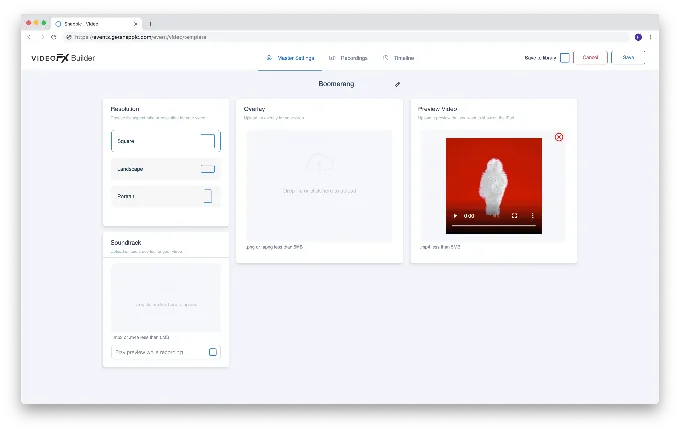
- VideoFX engine: a video template builder with per-clip slow-motion control, pre/post-roll clips, and branded soundtracks
- Cloud-first fleet management: remotely configure booths, push template updates, and sync event settings across multiple devices from a centralized web portal
- AI effects suite: AI-FX, PersonaFX, and BananaFX (Google Gemini 2.5-powered) for creative photo transformations
- SmartShare: face-linked automated photo delivery that sends every subsequent capture to a guest without repeat contact entry
Why Choose Snappic Over Curator Live for Multi-Format Fleet Management
Snappic stands out in the following areas:
Cloud-First Fleet Management Built for Scale
Curator Live requires each iPad to download event settings, and operators must manually sync changes via an in-app refresh gesture. For a business running four booth types across three simultaneous weekend events, the friction compounds. Snappic’s centralized web portal pushes configurations, template updates, and event settings across a fleet of devices simultaneously without requiring local action on each iPad. Operators can change a template from their desk and have it live across every active booth without dispatching staff or triggering device-by-device updates.
VideoFX Engine for Cinematic 360 and Glambot Content
Both platforms support 360 video with timeline-based editors, but Snappic’s VideoFX Template Builder includes per-clip slow-motion control with a defined frame rate matrix. Three GlamBot-specific preset templates produce 8-11-second cinematic outputs from just 2-3 seconds of capture, achieving the slow-motion ratio used in commercial red-carpet and brand activation content.
Scaling Infrastructure for Agencies
Curator Live’s Agency Pro plan ($249/month) includes sub-account management and event login codes. Snappic’s Scale plan ($399/month) adds unlimited sub-accounts, a Grey Label App (an unbranded iPad app that presents under the operator’s own identity), a dedicated customer success manager, and a marketing support package. For operators building sub-brands or reselling booth access, this is materially different from a plan that simply allows multiple event codes.
- Source: Snappic
*🏅 NOTE: We also evaluated Touchpix (strong 360-first tooling) and LumaBooth (multi-platform flexibility at a competitive price). Snappic offers the most established cloud-first fleet management infrastructure built for operators scaling from a single booth into multi-format operations, backed by 8,000+ active operators. Note that Snappic’s 2024 acquisition by Banyan Software has shifted the platform in a more corporate direction, which may affect the startup-friendly culture some operators valued.*
Snappic Pricing
Snappic uses a per-device license subscription model. A 14-day free trial is available with no credit card required.
- Starter, $69/month ($499/year): One Photo Booth License; core photo, GIF, Burst capture; SMS and email sharing; 60+ event templates; DSLR and GoPro integration; 24/7 support.
- Business, $189/month ($1,799/year): One Photo Booth + one Sharing Station License; adds VideoFX, Premium AI-FX, branded microsites, client analytics, Roaming Mode, in-app Stripe payments, Priority Support.
- Premium, $279/month: All Business features plus white-label URLs and emails, webhooks, event codes, LiveConnect remote control, SmartShare AI (400 credits included).
- Scale, $399/month ($3,999/year): All Premium features plus unlimited sub-accounts, Grey Label App, dedicated customer success manager, marketing support package.
Per-event licenses are also available starting at $29/event (Starter) or $79/event (Business). AI-FX credits and Background Removal credits are billed separately on top of any subscription.
Who Should Use Snappic?
Choose Snappic if:
- You run two or more booth types simultaneously (iPad booth + 360 + GlamBot or mirror) and need centralized cloud-based fleet management rather than device-by-device event syncs.
- Your business has moved into multi-booth corporate activations where cinematic GlamBot video and an AI effects suite justify $2,000-$4,000+ per-event pricing.
- You are building toward a multi-client agency structure and need Grey Label App capability, unlimited sub-accounts, and a dedicated success manager.
3. LumaBooth, Best Alternative for Cross-Platform DSLR Operators (Windows, Mac & iPad)
- Source: LumaBooth
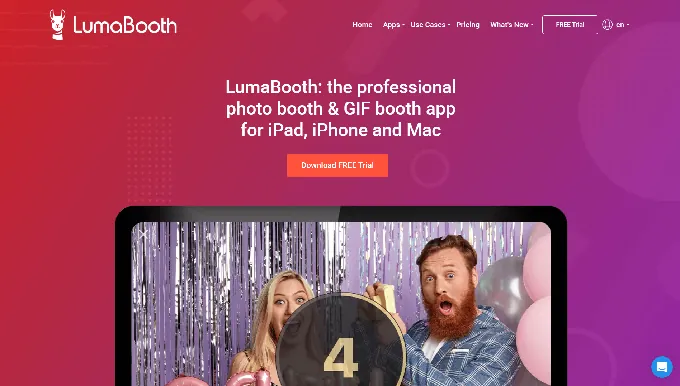
LumaBooth (by Lumasoft, formerly known as dslrBooth) is the only platform in the photo booth software category that natively spans Windows and Apple operating systems under one product. Trusted by tens of thousands of operators in over 150 countries, it carries a 4.8-star rating from 1,668 reviews on Windows and a 4.6-star rating from 1,400+ App Store ratings. Its key capabilities include:
- Native apps for Windows PC, iPad, iPhone, and Mac with browser-based LumaBooth Dashboard syncing to all devices
- Broad camera support across Canon EOS, Nikon D/Z-series, Sony Alpha mirrorless, and GoPro 5-13
- A full capture suite including photos, GIFs, boomerangs, video, 360 video, Mirror Booth, and Glam Booth in one subscription
- 170+ AI Portrait presets plus custom prompt builder with per-guest personalization
- Built-in AI Background Removal processed entirely on-device with no internet required
Why Choose LumaBooth Over Curator Live for Cross-Platform DSLR Operations
LumaBooth stands out in the following areas:
Windows Support Eliminates the iOS Hardware Constraint
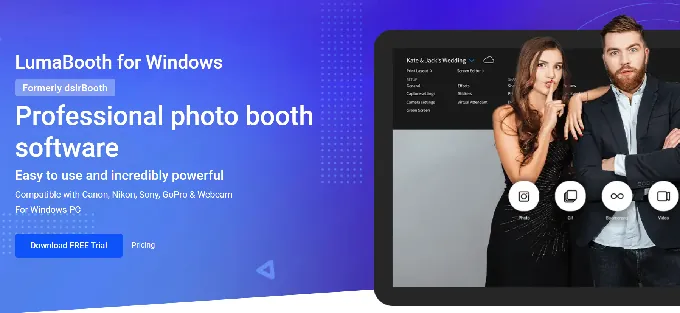
Curator Live requires an iPad or iPhone for every event. For operators who already own Windows-based booth hardware or prefer laptops depending on venue requirements, Curator Live is inaccessible. LumaBooth for Windows runs on any quad-core Windows 10 or 11 machine and supports full DSLR tethering over USB. The March 2026 rebrand unified both platforms under one account: run LumaBooth on a Windows PC at a corporate event on Friday, on an iPad at a wedding on Saturday, with templates syncing automatically. The Windows interface retains some of the traditional desktop aesthetic from its dslrBooth heritage and offers more limited design tools than platforms with dedicated layout editors, but the cross-platform flexibility is unmatched in this category.
Camera Brand Freedom Across Canon, Nikon, and Sony
LumaBooth supports Canon EOS, Nikon D/Z-series, Sony Alpha mirrorless (18+ bodies), and GoPro models 5-13 with automatic Wi-Fi management. Operators who own gear from multiple manufacturers can use all of it without switching software. Operators who want 360 video via GoPro on Windows also have a supported path.
All-Inclusive Subscription With No Per-Event Fees
A single annual subscription at $17/month (Windows) or $18/month (Apple) includes every booth mode: 360, Glam, Mirror, Green Screen, AI Background Removal, Video Guestbook, GIF, Boomerang, and Slow-Mo. No tier-gating on booth types. Curator Live’s comparable features require the $149/month Event Pro or $249/month Agency Pro tiers, plus separate AI credits.
Source: LumaBooth
*🏅 NOTE: We also evaluated Darkroom Booth (strong Windows-native print-production workflow) and Foto Master (enterprise hardware-plus-software combination). LumaBooth offers the most complete cross-platform solution for operators who need studio-quality DSLR results across Windows, Mac, and iPad under a single brand.*
LumaBooth Pricing
- LumaBooth for Windows, $17/month billed annually (~$204/year) or $49.99/month: Two device licenses; all booth modes; Booth CoPilot mobile app; LumaShare companion app; fotoShare Cloud Basic.
- LumaBooth for Apple, $18/month billed annually (~$216/year) or $19.99/month: Two device licenses; all booth modes; fotoShare Cloud Basic; LumaBooth Dashboard access.
Add-ons include fotoShare Cloud Plus (+$19.99/month), SMS Plan (+$10/month), and AI Credits ($14.99-$199.99/month). An unlimited-duration free trial with watermarked output is available.
Who Should Use LumaBooth?
Choose LumaBooth if:
- You already own Windows-based booth hardware or want the flexibility to run on Windows PCs or iPads depending on the event.
- You own Canon, Nikon, or Sony camera gear and want a single subscription that covers all three manufacturers.
- You need the full range of modern booth experiences in one annual subscription without per-booth-type upsells.
4. Touchpix, Best Alternative for Device & Operating System Flexibility
- Source: Touchpix
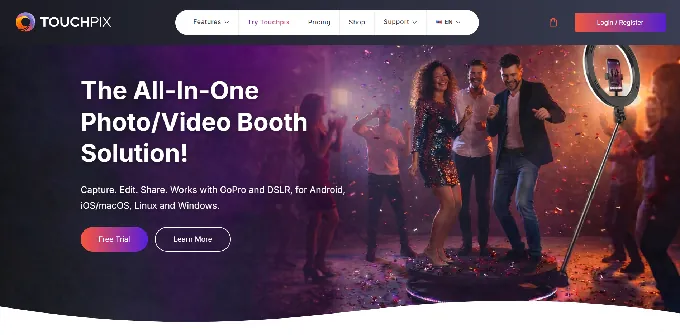
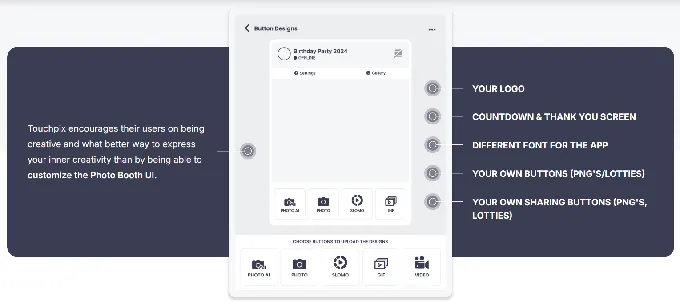
Touchpix is a subscription-based photo and video booth platform whose defining capability is native support for iOS, Android, macOS, Windows, Linux, and Raspberry Pi under a single subscription with unlimited devices. With a 4.8-star App Store rating across 6,600+ reviews, it has become the industry standard for 360 spinning-arm video booth operations. Having launched in 2020, Touchpix scaled rapidly with the 360 booth trend, though some operators note that growth has outpaced platform polish in areas like rendering speed and interface clarity. Its key capabilities include:
- Cross-platform deployment across six operating systems under one subscription
- Six capture modes: still photos, AI-transformed photos, boomerangs, video, animated GIFs, and slow-motion video
- 80+ AI transformation styles with custom text prompt support
- Offline-first architecture: AI face replacement, background removal, and Scanpix 2 QR delivery all work without internet
- Native Bluetooth trigger integration and wired GoPro 7-14 support for 360 booths
Why Choose Touchpix Over Curator Live for Device & OS Flexibility
Touchpix stands out in the following areas:
True Cross-Platform Support
Curator Live runs exclusively on iPad and iPhone. Touchpix removes this constraint entirely: its subscription covers all six platforms with unlimited devices. An operator can run a Windows kiosk at one venue, an iPad open-air booth at another, and an Android roaming setup at a third, all under the same license with no per-device fees. The BoothBuilder Touch partnership confirms the platform is being embedded into third-party hardware beyond the Apple ecosystem.
The Industry Standard for 360 Spinning-Arm Video
Touchpix’s Bluetooth trigger integration automates the 360-degree capture sequence without an attendant. Its wired GoPro connection supports models 7-14 with firmware-specific documentation per camera model. The platform’s 6,600+ App Store reviews reflect widespread adoption among 360 operators specifically.
Offline-First Architecture
Curator Live depends on internet for sharing delivery and AI features. Touchpix processes AI face replacement entirely on-device, runs background removal locally without internet, and delivers media to guests via Scanpix 2 QR code with no Wi-Fi at all. For outdoor festivals, venues with saturated Wi-Fi, or international deployments, the guest experience never breaks because of connectivity.
Source: Touchpix
*🏅 NOTE: We also evaluated LumaBooth (multi-platform flexibility with strong features) and Snappic (cloud-first fleet management). Touchpix offers the broadest combination of operating system coverage, hardware compatibility, and 360-booth-specific depth for operators who need their software to run across the full spectrum of devices.*
Touchpix Pricing
Touchpix uses a subscription model priced by active event slots (simultaneous activations). All plans include unlimited devices.
- PhotoPass, $439.90/year: 2 active events; Photos, Photo AI, and Animated GIFs.
- MultiPass, $879.99/year (most popular): 4 active events; adds Video, Slomo, and Boomerang.
- MultiPass Pro, $1,407.99/year: 8 active events; adds Virtual Booth and Advanced Surveys.
- MultiPass Enterprise, $2,199.99/year: 12 active events; adds Mosaic and RAW cloud backups.
AI Pro credits for cloud AI transformations are purchased separately ($12/100 credits to $375/5,000 credits). A 14-day free trial with no watermarks is available via the Request Trial page.
Who Should Use Touchpix?
Choose Touchpix if:
- Your hardware fleet spans multiple operating systems and you need one subscription that covers iOS, Android, Windows, Mac, Linux, and Raspberry Pi.
- 360 spinning-arm video booths are your primary revenue driver and you need the platform with the deepest GoPro compatibility and Bluetooth triggering.
- You regularly operate at venues with poor or no Wi-Fi and need AI processing, background removal, and guest delivery to work entirely offline.
5. Darkroom Booth, Best Alternative for Windows DSLR Operators Who Want a Perpetual License
- Source: Darkroom Booth
Darkroom Booth is Windows-native photo booth software made by Darkroom Software, LLC, a family-owned company with roots going back to 1992. It is built for operators who want full hardware control and a one-time purchase model. Its key capabilities include:
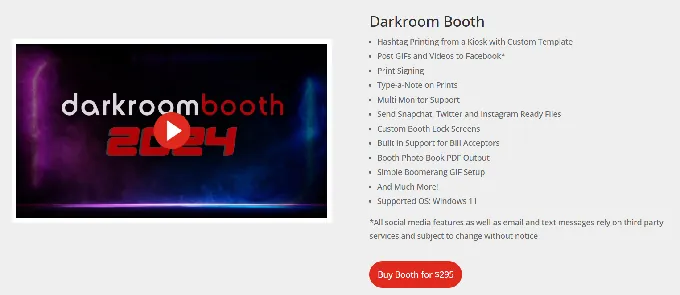
- One-time perpetual license at $295 with no recurring subscription
- Direct USB or wireless tether with Canon EOS, Nikon Z/D-series, GoPro HERO 9/10, and Windows webcams
- 75+ professionally designed templates included at no additional cost
- Booth Control remote management from any device on the same Wi-Fi network
- Support for Phidget hardware interfaces for bill acceptors, coin-op mechanisms, and arcade buttons
Why Choose Darkroom Booth Over Curator Live for Windows Perpetual Licensing
Darkroom Booth stands out in the following areas:
Perpetual Licensing With No Monthly Obligation
Curator Live starts at $69/month for Standard, rising to $249/month for Agency Pro, totaling $828-$2,988/year before add-ons. Darkroom Booth’s full perpetual license is a one-time $295 purchase with one year of updates and support included. After that, optional annual maintenance costs $95/year, and critically, the software continues to run even if maintenance lapses. For operators running steady event volumes, total cost of ownership drops sharply.
Windows-Native With True Offline Operation
Darkroom Booth runs as a local Windows application with no requirement for continuous internet. Events execute entirely on the host PC: photos are captured, processed, printed, and displayed from the local machine. Sharing features work when connectivity exists and are simply absent when it doesn’t. The core booth experience never depends on a connection.
Open Hardware Compatibility
Any Windows-compatible printer works, including the full range of dye-sublimation models from DNP, Fujifilm, Mitsubishi, Sony, Shinko/Sinfonia, Ciaat, and HiTi. Phidget hardware interface support enables pay-per-print kiosk deployments with bill acceptors and coin-op mechanisms.
Source: Darkroom Booth
*🏅 NOTE: We also evaluated SparkBooth (also a one-time purchase on Windows and Mac) and BoothLedger (Windows-based with AI features). Darkroom Booth offers the most established and feature-complete one-time purchase option for Windows operators, with a 13-year product history and the widest printer and camera compatibility.*
Darkroom Booth Pricing
- Full License, $295 (one-time purchase): Complete software for Windows 10/11; one year of updates and support; installation on up to 2 computers; all core features included.
- Optional Annual Maintenance, $95/year: Renews updates, new versions, and tech support access.
- Upgrade From Booth 2.x, $195 (in-app purchase).
- 10-Day Temporary License, $45 (for existing license holders needing a second booth temporarily).
Event Gallery, premium templates, and SMS delivery via Twilio carry separate costs.
Who Should Use Darkroom Booth?
Choose Darkroom Booth if:
- You already operate a Windows-based photo booth setup with Canon or Nikon cameras and dye-sublimation printers.
- You want to own your software outright and avoid recurring subscription billing.
- You need a coin-operated or pay-per-print booth with native support for bill acceptors and hardware interfaces.
6. BoothLedger, Best Alternative for Professional AI Effects at Entry-Level Pricing
- Source: BoothLedger
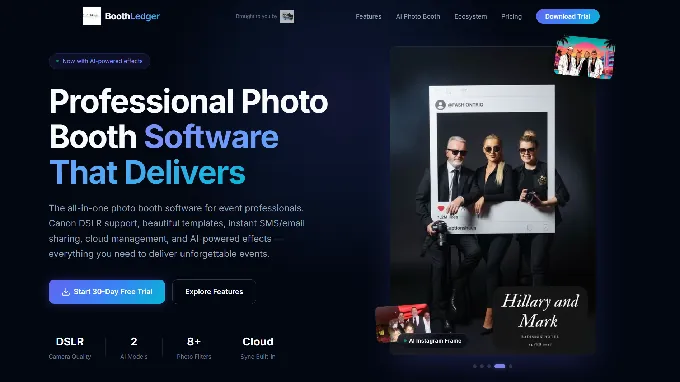
BoothLedger is a Windows-native photo booth platform built and tested by PhotoBooth Guys, an active Irish event hire company that has run events for enterprise clients including Google, Microsoft, Meta, LinkedIn, Diageo, and Mastercard. Its key capabilities include:
- Native Canon DSLR tethering via Canon EDSDK with live view streaming, per-shot autofocus with face detection, and RAW + JPEG capture
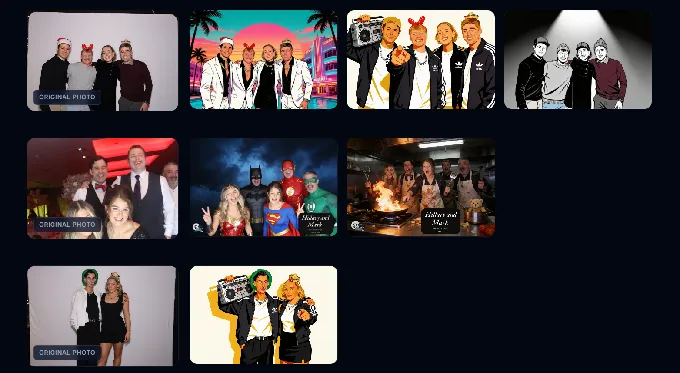
- Two AI engines (Core for high-volume; Nano Banana Pro for group fidelity) with 50+ creative styles
- AI face swap, background removal, and face enhancement bundled at a flat rate
- €12/month Basic and €35/month AI Photobooth plans, each covering two device licenses
Why Choose BoothLedger Over Curator Live for AI Effects at Entry Pricing
BoothLedger stands out in the following areas:
Windows-First for Canon DSLR Operators
Curator Live requires Apple hardware. BoothLedger is built around Windows 10/11 with direct Canon EDSDK integration, using Canon’s official SDK for low-level camera communication. This delivers per-shot autofocus with face detection, real-time live view streaming, and remote exposure control from within the booth interface. The system supports a wide range of Canon bodies from EOS Rebels through the full EOS R mirrorless range.
Flat-Rate AI That Undercuts Per-Image Credit Models
Curator Live’s AI rendering runs on credits at roughly $0.45-$1.00 per image on top of the subscription. At a busy activation generating 200 AI photos, that’s $90-$200 in variable costs. BoothLedger’s AI Photobooth plan at €35/month bundles both AI engines, face swap, background removal, and 50+ styles with no per-image charge.
Two-Device Economics From the Entry Plan
Curator Live’s Event Pro plan covers one device at $149/month; adding a second device costs $79/month more. BoothLedger’s Basic plan covers two device licenses at €20/month with cloud sync, gallery hosting, and remote template management included.
Source: BoothLedger
*🏅 NOTE: We also evaluated Booth.Events and Photo Booth Connected. BoothLedger offers the strongest combination of AI capability, Canon DSLR integration, and accessible pricing. Note that BoothLedger launched publicly in April 2026 and does not yet have independent reviews on G2 or Capterra; its social proof comes from its parent company’s 500+ event record and enterprise client portfolio.*
BoothLedger Pricing
All plans include two device licenses. Prices are in Euros.
- Basic, €12/month: Camera control and Canon DSLR tethering, template editor with cloud sync, photo sharing via QR/email/SMS, BoothLedger Cloud gallery, event management.
- AI Photobooth, €35/month: Everything in Basic plus both AI engines, face swap, background removal, face enhancement, 50+ creative styles, live swap mode.
A 30-day free trial with no credit card required is available. Event data is preserved if the trial expires.
Who Should Use BoothLedger?
Choose BoothLedger if:
- You own Canon DSLR hardware and run Windows-based booth setups, and want native EDSDK integration without buying Apple hardware.
- You want AI effects at a flat monthly rate rather than paying $0.45-$1.00 per image on top of a separate subscription.
- You’re running a two-booth operation and want both devices covered from day one at €20-€35/month total.
7. SparkBooth, Best Alternative for Evaluating Software Free Before Any Financial Commitment
- Source: SparkBooth
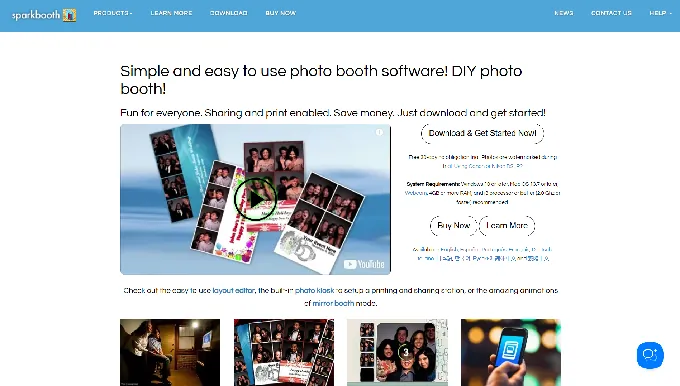
SparkBooth is DIY photo booth software for Windows and Mac that converts any webcam-equipped computer, or a compatible Canon or Nikon DSLR, into a functional event photo booth. Sold under a one-time perpetual license, its key capabilities include:
- Full-featured 30-day free trial with all Premium features unlocked (only output carries a watermark)
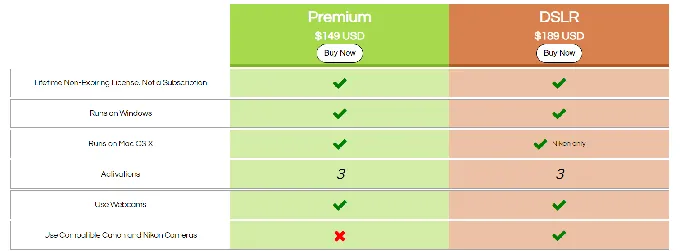
- One-time lifetime license at $149 (Premium/webcam) or $189 (DSLR)
- Runs natively on Windows 10+ and Mac OS 13.7+
- Canon and Nikon DSLR/mirrorless camera tethering in the DSLR edition
- Built-in layout editor with mirror booth mode, GIF booth, and photo kiosk
- Full offline operation with queued uploads
Why Choose SparkBooth Over Curator Live for Risk-Free Evaluation
SparkBooth stands out in the following areas:
A Full-Featured Free Trial
Curator Live’s evaluation path requires either a per-event purchase ($29-$99) or a monthly subscription before running unwatermarked events. SparkBooth’s 30-day free trial unlocks every Premium feature: green screen, GIFs and boomerangs, mirror booth mode, DSLR support, the layout editor, and offline queuing. The only difference is a watermark on output. Trial extensions are available by email.
One-Time Perpetual License at the Category’s Lowest Price
At $149 (webcam) or $189 (DSLR) paid once, SparkBooth costs less than three months of Curator Live’s entry-level monthly plan. After that payment, the operating cost drops to zero. Updates within the same major version are included, and a 60-day refund window provides a financial backstop.
Windows and Mac Without iOS Requirements
SparkBooth runs natively on both platforms. The software has run on Windows and Mac since 2009, and version 7.2 (July 2025) migrated to 64-bit architecture on both platforms.
Source: SparkBooth
*🏅 NOTE: We also evaluated CyraTok (free but locked to proprietary hardware) and Darkroom Booth (higher starting price). SparkBooth offers the most accessible combination of a full-featured trial, a permanent license, and Windows/Mac support, making it the lowest-friction entry point for operators evaluating before they spend anything.*
SparkBooth Pricing
- Premium, $149 USD (one-time, lifetime): Windows and Mac; 3 activations; webcam-based capture; full feature set including green screen, GIFs, mirror booth, layout editor, SMS delivery, and offline queuing.
- DSLR, $189 USD (one-time, lifetime): All Premium features plus Canon and Nikon DSLR/mirrorless tethering. Canon DSLR support requires Windows; Mac supports Nikon only.
Add-ons such as UnlimitedBG offline AI background removal and qrcode.photos QR delivery service are sold as separate subscriptions. SMS delivery requires a third-party Twilio or Vonage account.
Who Should Use SparkBooth?
Choose SparkBooth if:
- You want to run real events with every professional feature before spending anything, using the 30-day full-access trial.
- You own Windows or Mac hardware and don’t want to invest in an iPad to run photo booth software.
- You want to own your software outright at the category’s lowest price point and eliminate all recurring platform fees.
The Final Verdict
Curator Live excels as a feature-rich, iOS-native platform with strong AI capabilities and responsive customer service. But different operators have different hardware, budget, and business model requirements. Based on our research, here are the best alternatives:
- Simple Booth for branded photo experiences with integrated hardware, 87%+ lead capture rates, and marketing analytics
- Snappic for growing photo booth businesses managing multiple booth types from a centralized cloud dashboard
- LumaBooth for cross-platform DSLR operators who need Windows, Mac, and iPad under one subscription
- Touchpix for device flexibility across iOS, Android, Windows, Mac, Linux, and Raspberry Pi
- Darkroom Booth for Windows DSLR operators who want a one-time perpetual license with no recurring costs
- BoothLedger for professional AI effects and Canon DSLR integration at the most accessible pricing in the market
- SparkBooth for operators who want to evaluate full-featured software free before making any financial commitment
You don’t have to choose between Curator Live and these alternatives exclusively. Many operators run different platforms for different booth types or event contexts. Consider your hardware investments, pricing preferences, and growth plans when deciding which solution fits your business.
Want a photo booth system that captures leads at 87%+ rates and manages everything from a single dashboard? Start your free Simple Booth trial and see the difference an integrated hardware-software system makes.
Curator Live Alternatives FAQ
Why do photo booth operators look for Curator Live alternatives?
The most common reasons are Curator Live’s iOS-only architecture (operators with Windows, Android, or mixed-device fleets can’t use the platform), its subscription-based pricing model (some operators prefer one-time licenses), and its per-image AI credit costs that add variable expenses on top of monthly fees. Operators may also need specific capabilities like cloud-based fleet management, cross-platform DSLR support, or offline-first operation.
What is the best overall Curator Live alternative?
There is no single best alternative because operators’ needs vary widely. Simple Booth is the top choice for branded experiences and lead capture. Snappic leads for multi-booth fleet management. LumaBooth is strongest for cross-platform DSLR operators. The right choice depends on your hardware, business model, and primary use case.
Is there a free alternative to Curator Live?
SparkBooth offers a 30-day free trial with every feature unlocked and only a watermark on output. Touchpix provides a 14-day free trial with no watermarks via its Request Trial page. Snappic offers a 14-day free trial with no credit card required. Curator Live itself offers a free demo mode with watermarked output. No platform on this list offers a permanent full-featured free plan.
Which Curator Live alternative works on Windows?
LumaBooth, Touchpix, Darkroom Booth, BoothLedger, and SparkBooth all run natively on Windows. LumaBooth is unique in also supporting Mac and iPad under the same subscription. Touchpix extends further to include Android, Linux, and Raspberry Pi. Simple Booth and Snappic are iOS-only like Curator Live.
Which alternative is cheapest for high-volume operators?
BoothLedger at €35/month (two device licenses, AI effects included with no per-image charges) offers the lowest total cost for AI-heavy operations. SparkBooth at $189 one-time is the cheapest perpetual option with DSLR support. Darkroom Booth at $295 one-time provides the most feature-complete perpetual license. For subscription platforms, LumaBooth at $17-$18/month is the most affordable annual option.
Can I use any of these alternatives for 360 video booths?
Touchpix is the industry standard for 360 spinning-arm video with native Bluetooth trigger integration and GoPro 7-14 support. Snappic offers strong 360 capabilities through its VideoFX engine with per-clip slow-motion control and GlamBot templates. LumaBooth includes 360 video as part of its base subscription. Darkroom Booth supports VR 180/360 panoramic images on Windows.
Which Curator Live alternative is best for brand activations and marketing?
Simple Booth is built for this use case, combining integrated ring-light hardware, 87-89% opt-in lead capture rates, marketing analytics dashboards, social sharing tracking, and a Virtual Booth product for digital activations requiring no hardware. Its documented enterprise deployments include Live Nation, Sports Illustrated Tickets, and Gibson Brands.
How difficult is it to switch from Curator Live to one of these alternatives?
The transition depends on your hardware situation. If you already own iPads, switching to Simple Booth or Snappic is straightforward since both are iOS-based. Moving to a Windows platform (LumaBooth, Darkroom Booth, BoothLedger) requires Windows hardware but lets you use any Canon, Nikon, or Sony cameras you already own. Touchpix supports virtually any device you already have. Event templates and overlays will need to be recreated in any new platform, but most offer template editors that simplify this process.
Keep reading
 Showdowns
Simple Booth vs Curator Live: Which Photo Booth Platform Fits Your Business in 2026?
Integrated hardware vs one-app-everything. Simple Booth or Curator Live?
 Reviews
Curator Live Review 2026: Is This Photo Booth Platform Right for You?
One iOS app juggling photos, 360 spins and AI art. Does Curator Live pull it off?
 Pricing
Curator Live Pricing: Worth It or Add Simple Booth? June 2026
Curator Live pricing without the guesswork. The real cost, laid out.