Curator Live Pricing: Worth It or Add Simple Booth? June 2026

If you’ve tried to choose between Curator Live’s $29 per-event Standard and its $99 Agency Pro (for facial recognition and photography mode), while realizing that SMS delivery runs through your own Twilio account and AI rendering costs extra on top, you already know: photo booth pricing can feel like a budget where the final number keeps shifting.
Curator Live is an iOS photo booth platform offering 360 video, AI photo rendering, and DSLR tethering across over 90 countries. It packs photo, GIF, boomerang, video guest book, 360 CustomFX, and DSLR photography into one app, with 24-hour support including during live events. But as the platform grew from a simple iPad capture app into a full event photography and AI effects system, its pricing stacked per-event fees, monthly subscriptions, annual plans, device licenses, AI credit costs, and third-party SMS charges into a structure that takes careful calculation.
We analyzed Curator Live’s pricing tiers, billing cycles, and added costs. It’s the right choice if:
- You run a photo booth business that needs 360 video, DSLR tethering, and AI effects in one iOS app
- You operate permanent installations at venues, FECs, or attractions that need kiosk mode and facial recognition
- You want the CustomFX timeline editor for producing branded 360 video content without external software
- You have iOS hardware and want AI rendering, AR backgrounds, and green screen in a single subscription
- You need per-event pricing for occasional or seasonal activations
However, Curator Live’s pricing might not be a good choice if:
- You want predictable pricing without separate AI credit costs and third-party SMS fees
- You need dedicated hardware with studio-grade lighting for consistent photo quality
- Your priority is lead capture, marketing analytics, and first-party data collection alongside photo experiences
- You prefer a browser-based virtual booth option for remote and hybrid events
- You want a layout designer and brand customization tools that don’t require external design software on lower tiers
In this case, consider Simple Booth: a photo booth platform that pairs its HALO ring-light hardware with subscription software, a built-in Layout Designer, AI effects, and a Virtual Booth for activations without hardware. Pricing is weekly, monthly, or annual. Photo delivery is included, and AI credits never expire.
We’ve included a pricing comparison with Simple Booth in this review, as the stronger choice for operators and marketers who want a combined hardware-software system with built-in lead capture. If you’d rather jump straight to the Simple Booth pricing breakdown, go ahead with this link.
Curator Live Pricing Summary
| Curator Live | Simple Booth | |
|---|---|---|
| Free Trial | Free account with DEMO watermark - 14-day free trial - Free 30-minute onboarding session | 7-day free trial - 25 free AI credits - No permanent free plan |
| Entry Level | Standard: $29/event or $69/month - All capture experiences included - No AI FX, no contact downloads | Lite: $14.99/week (~$72/month) - Custom layouts, motion & still capture - Ads shown in app |
| Mid-Tier | Event Pro: $59/event or $149/month - Sharing Station & Slideshow included - Facial recognition (monthly/yearly) | Core: $24.99/week (~$49/month) - DSLR support, video, background replacement - AI effects (public library) |
| High-Tier | Agency Pro: $99/event or $249/month - Photography Mode, BETA features - White-Label URL (yearly only) | Pro: $149/month - Lead capture, API, phone support - Moderation and age gate |
| Best For | Photo booth operators needing 360 video, DSLR tethering, and AI/AR creative tools on iOS | Event professionals and marketers who want combined hardware, built-in lead capture, and a virtual booth option |
Curator Live Pricing: In-Depth Overview
Curator Live uses a per-device license model with three billing cycles: per-event, monthly, and yearly. Every plan includes one Capture Device License, with additional device licenses purchased separately. Three tiers (Standard, Event Pro, and Agency Pro) span all billing cycles, letting operators match their payment structure to their event volume. Beyond base subscriptions, costs come from additional device licenses, AI rendering credits, third-party SMS via Twilio, and white-label URL add-ons. Here’s how each tier and billing cycle breaks down.
Curator Live Free Account and Trial
| Feature | Details |
|---|---|
| Price | $0 |
| Dashboard Access | Full event creation and setup |
| App Testing | Fully functional with DEMO watermark |
| Trial Period | 14-day free trial |
| Onboarding | Free 30-minute one-on-one session |
| Support | 24-hour chat, emergency phone |
Curator Live lets new users create a free account, build events on the dashboard, and test them in the app before paying anything. The app works fully but stamps a DEMO watermark on all captured media. The homepage mentions a 14-day free trial, though the terms about which tier is trialed aren’t detailed publicly. Every new account gets a free 30-minute one-on-one training session.
| Free Account | |
|---|---|
| Pros | Cons |
| No credit card to test the dashboard | DEMO watermark on all captures |
| Free onboarding call included | Trial terms not publicly detailed |
| Full app functionality for testing | Cannot deliver clean media to guests |
| 24-hour chat support access | No production use without paying |
👉 The Bottom Line: The free account works for evaluating Curator Live’s event setup workflow and testing capture modes before committing, but you’ll need a paid plan for any real event.
Curator Live Standard Plan: $29/event, $69/month, or $499/year
Per-Event Pricing:
| Feature | Details |
|---|---|
| Base Price | $29/event |
| Activation Duration | 3 days |
| Additional Devices | $19/device/event |
| Sharing Station | Not included |
| AI FX | Not included |
| Contact Downloads | Not included |
Monthly and Yearly Pricing:
| Feature | Monthly | Yearly |
|---|---|---|
| Base Price | $69/month | $499/year (~$42/month) |
| Additional Devices | $29/device/month | $199/device/year |
| White-Label URL | N/A | $449/year add-on |
| Event Activations | Unlimited | Unlimited |
| Sharing Station | Not included | Not included |
Standard includes all capture experiences (single photo, multi-photo strips, GIF, boomerang, 360 CustomFX, video guest book, AI background removal, green screen, digital props, and filters) plus all delivery methods (SMS via Twilio, email, AirDrop, QR codes, RFID/NFC, and online gallery). It also includes DSLR camera support, Dropbox storage, Google Analytics, Facebook Pixel tracking, and hardware integrations.
Standard excludes AI FX and contact data downloads. Subscribers who need Pro features for a single event can select an “Upgraded Event” option during event creation without switching plans.
| Standard Plan | |
|---|---|
| Pros | Cons |
| Low $29 per-event entry point | No AI FX features |
| All capture modes included | No contact data downloads |
| 24-hour support on all tiers | No Sharing Station included |
| Per-event pricing suits occasional operators | Slideshow limited to simple mode |
👉 The Bottom Line: Standard suits occasional operators running a few events per month where basic capture and delivery are sufficient, but anyone needing AI effects or lead data needs Event Pro.
Curator Live Event Pro Plan: $59/event, $149/month, or $1,499/year
Per-Event Pricing:
| Feature | Details |
|---|---|
| Base Price | $59/event |
| Activation Duration | 3 days |
| Additional Devices | $39/device/event |
| Sharing Station | 1 included |
| Full Slideshow | Included |
| Facial Recognition | Not included (per-event) |
Monthly and Yearly Pricing:
| Feature | Monthly | Yearly |
|---|---|---|
| Base Price | $149/month | $1,499/year (~$125/month) |
| Additional Devices | $79/device/month | $799/device/year |
| White-Label URL | N/A | $449/year add-on |
| Facial Recognition | Included | Included |
| Full Analytics | Included | Included |
Event Pro unlocks AI FX, a Sharing Station, full Slideshow, and full analytics. On monthly and yearly billing, facial recognition is included, letting guests search event galleries by scanning their face. The Sharing Station app (iOS) gives guests a second device to browse and share photos without waiting at the booth.
The jump from Standard to Event Pro doubles the per-event price ($29 to $59) and more than doubles the monthly rate ($69 to $149), but AI effects, a Sharing Station, and contact data downloads make this the practical minimum for professional operators.
| Event Pro Plan | |
|---|---|
| Pros | Cons |
| AI FX access unlocked | Per-event pricing excludes facial recognition |
| Sharing Station included | $149/month is a notable jump from $69 |
| Contact data downloads enabled | No Photography Mode |
| Facial recognition on monthly/yearly | White-Label URL requires $449/year add-on |
👉 The Bottom Line: Event Pro is the practical starting point for professional booth operators who need AI effects and guest data, though the price jump from Standard is steep for the incremental features.
Curator Live Agency Pro Plan: $99/event, $249/month, or $2,499/year
Per-Event Pricing:
| Feature | Details |
|---|---|
| Base Price | $99/event |
| Activation Duration | 3 days |
| Additional Devices | $79/device/event |
| Photography Mode | Included |
| Facial Recognition | BETA (per-event) |
| BETA Features | Early access |
Monthly and Yearly Pricing:
| Feature | Monthly | Yearly |
|---|---|---|
| Base Price | $249/month | $2,499/year (~$208/month) |
| Additional Devices | $99/device/month | $999/device/year |
| White-Label URL | $59/month add-on | 1 included |
| Photography Mode | Included | Included |
| BETA Features | Early access | Early access |
Agency Pro is Curator Live’s top tier, adding Photography Mode (DSLR roaming capture with instant delivery), BETA features access, and full facial recognition. Photography Mode turns a DSLR tethered to an iPhone into a mobile capture-and-delivery unit supporting up to six concurrent photographers per event. Facial recognition groups all photos of a guest into a personalized gallery.
The yearly plan includes one White-Label URL (a $449/year add-on on lower tiers or $59/month for Agency Pro monthly subscribers). Agency Pro yearly subscribers also get event login codes for staff to activate experiences without accessing main account credentials.
| Agency Pro Plan | |
|---|---|
| Pros | Cons |
| Photography Mode for roaming DSLR capture | $249/month is a substantial commitment |
| White-Label URL included on yearly | Per-event pricing at $99 adds up fast |
| BETA features early access | Additional devices cost $99/device/month |
| Facial recognition across all billing cycles | DSLR Photography Mode is Agency Pro exclusive |
👉 The Bottom Line: Agency Pro makes sense for multi-booth operations, agencies running branded activations, and operators offering roaming DSLR photography, but the pricing requires consistent event volume to justify.
Curator Live Additional and Hidden Costs
Beyond base subscriptions, Curator Live’s true costs come from several add-ons:
Additional Device Licenses:
| Tier | Per-Event | Monthly | Yearly |
|---|---|---|---|
| Standard | $19/device | $29/device | $199/device |
| Event Pro | $39/device | $79/device | $799/device |
| Agency Pro | $79/device | $99/device | $999/device |
Additional licenses renew automatically and must be cancelled before the renewal date.
AI Photo Rendering Credits (Nano Banana):
| Model | Credits Per Image | Approximate Cost |
|---|---|---|
| Face Swap | 0 credits | Free |
| Nano Banana (standard) | 45 credits | ~$0.45/image |
| Nano Banana Pro (groups 8+) | 100 credits | ~$1.00/image |
AI credit pricing isn’t on the main pricing page; you find it in the documentation.
SMS/Text Messaging: Curator Live integrates with Twilio, which operators must connect via their own Twilio account. SMS costs are billed by Twilio at Twilio’s rates, not by Curator Live.
White-Label URL: $59/month or $449/year for Standard and Event Pro. Included with Agency Pro yearly only.
Enterprise Storage: Google Cloud Bucket and AWS S3 are available on Event Pro and Agency Pro but classified as “Enterprise” with unpublished pricing requiring a sales contact.
Where Curator Live Falls Short
Curator Live has creative range with its 360 CustomFX timeline, AI rendering, and DSLR photography mode. But its pricing structure and platform limits create problems for operators who want an all-in-one solution:
Unpublished AI Credit Costs Create Budget Uncertainty
- AI photo rendering (Nano Banana) costs about $0.45, $1.00 per image, but this pricing is buried in documentation rather than shown on the pricing page
- Operators can’t quote AI-enhanced activations to clients without first looking up credit costs in the help center
- At a 200-guest corporate event with AI effects, credit costs alone could add $90, $200 on top of the subscription
Third-Party SMS Adds Complexity and Cost
- Text delivery requires operators to create and connect their own Twilio account rather than using built-in messaging
- Twilio bills SMS separately, making total event costs harder to predict
- New operators face an extra setup step and another vendor to manage
No Integrated Hardware Solution
- Curator Live is software-only; operators must source their own iPad stands, ring lights, and enclosures from third-party vendors
- Photo quality depends on the operator’s hardware choices and venue lighting
- No guaranteed consistency between setups, unlike combined hardware-software systems
No Virtual or Browser-Based Booth Option
- All capture requires a physical iOS device running the Curator Live app
- No way to offer remote participants a branded photo experience without hardware
- Hybrid and virtual events need a separate tool
iOS-Only Limits Operator Hardware Choices
- Curator Live runs exclusively on iPad and iPhone
- Operators with Android tablets or Windows-based booth hardware have no path to the platform
- The Sharing Station app is also iOS-only, requiring a second Apple device for guest browsing
These limitations have led many operators and marketers to explore platforms that bundle hardware, software, lead capture, and photo delivery into a single predictable cost…
Best Curator Live Alternative: Simple Booth
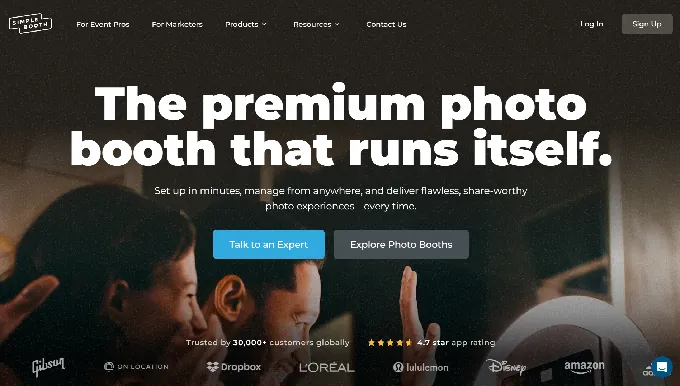
Simple Booth combines dedicated ring-light hardware with subscription photo booth software, a built-in design tool, and a browser-based Virtual Booth in one platform.
If Curator Live’s unpublished AI credit costs, third-party SMS setup, and software-only approach frustrate you, Simple Booth fills those gaps with weekly/monthly/annual pricing, HALO ring-light hardware, built-in photo delivery via QR code, SMS, email, AirDrop, and WhatsApp, and a Virtual Booth that requires no hardware at all.
Trusted by 30,000+ customers with a 4.7-star App Store rating from 2,400+ reviews, Simple Booth has powered over 40 million photo moments since 2012. Its strength is that the company makes both the hardware (the machined aluminum HALO, with 112 LEDs producing up to 2,100 lumens) and the software, so photo quality stays consistent without the guesswork of assembling third-party components.
Simple Booth works well for rental companies running unattended selfie stands and drop-off events across multiple bookings per night, venues installing permanent photo experiences, and brand marketers capturing first-party data with 87%+ opt-in rates at activations. Guests can use the interface without an attendant, making it reliable for self-running operations.
Arizona Opera grew its email list by 1,000 addresses in just a few events using Simple Booth’s lead capture. (Simple Booth)
Simple Booth Lite Plan: $14.99/week, ~$72/month, or $290/year
| Feature | Details |
|---|---|
| Price | $14.99/week (base rate) |
| Licenses | 1 included |
| Capture Modes | Motion and still |
| Layouts | Custom digital and print |
| Galleries | Online galleries and dashboard |
| Support | 7-day support |
Lite covers the basics: custom layouts, motion and still capture, photo delivery, online galleries, a library of 60+ themes and 100+ digital props, and filters including the Glam skin-smoothing effect. At $14.99/week, it costs less than a single Curator Live Standard per-event activation. Lite shows ads in the app and excludes DSLR, video, custom branding, AI effects, analytics, and lead capture.
| Lite Plan | |
|---|---|
| Pros | Cons |
| Lowest entry price in the category | Ads shown in the app |
| Custom layouts included | No DSLR or video |
| No per-event calculations needed | No lead capture or analytics |
| Online galleries on all plans | No custom branding |
👉 The Bottom Line: Lite suits personal events and operators testing the platform, but professional use requires Core at minimum to remove ads and access video and DSLR support.
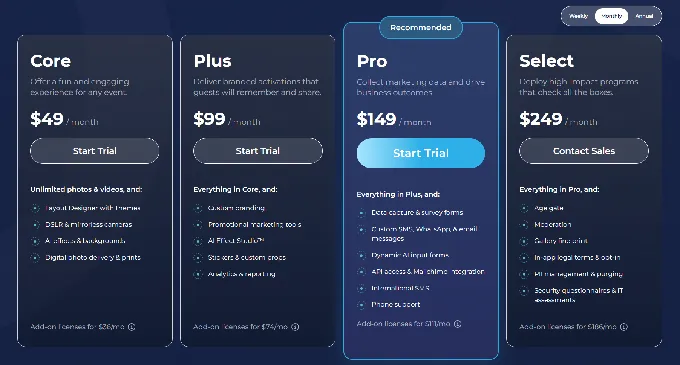
Simple Booth Core Plan: $24.99/week, ~$49/month, or $490/year
| Feature | Details |
|---|---|
| Price | $24.99/week (base rate) |
| Licenses | 1 included |
| Key Additions | Ads removed, DSLR camera support |
| Video | Full-length (5 to 120 seconds) |
| Background | Replacement and blur |
| AI Effects | Public library (Beta) |
| Virtual Booth | Included |
Core removes ads and adds what most professionals need: Canon DSLR and mirrorless camera integration, full-length video capture, background replacement without a green screen, background blur, Dropbox integration, and access to the AI effects public library. It also includes Virtual Booth for browser-based activations. At $24.99/week (~$49/month), Core costs less than Curator Live’s Event Pro ($149/month) while including DSLR support, video, and a virtual booth that Curator Live doesn’t offer at any tier.
| Core Plan | |
|---|---|
| Pros | Cons |
| DSLR support at a lower price than Curator Live | No custom branding |
| Virtual Booth included | No lead capture or analytics |
| Background replacement without green screen | AI effects limited to public library |
| Full-length video capture | No custom AI prompts |
👉 The Bottom Line: Core is the practical starting point for professional operators, delivering DSLR support, video, and a virtual booth for less than Curator Live’s mid-tier pricing.
Simple Booth Plus Plan: $49.99/week, ~$99/month, or $990/year
| Feature | Details |
|---|---|
| Price | $49.99/week (base rate) |
| Licenses | 1 included |
| Key Additions | Custom branding, analytics |
| Custom AI | Custom prompt creation (Beta) |
| Guest Text | Guest-editable text layers |
| Delivery | Custom photo delivery messages |
Plus unlocks custom branding, analytics and reporting, custom digital props, guest-editable text layers where participants type names or captions onto their photo, and custom AI effect creation. Analytics and custom branding make Plus the first tier suited to branded corporate activations.
| Plus Plan | |
|---|---|
| Pros | Cons |
| Custom branding for corporate events | No lead capture (requires Pro) |
| Custom AI prompt creation | No phone support |
| Guest-editable text layers | Higher weekly cost adds up |
| Analytics and reporting included | No moderation or age gate |
👉 The Bottom Line: Plus suits operators running branded events who need custom overlays, analytics, and AI prompt control but don’t yet need lead capture or enterprise compliance.
Simple Booth Pro and Select Plans: $149/month or $249/month
| Feature | Pro | Select |
|---|---|---|
| Price | $149/month ($1,490/year) | $249/month ($2,490/year) |
| Lead Capture | Up to 6 standard fields | Up to 10 custom fields |
| API | Included | Included |
| Phone Support | Included | Included |
| Moderation | Approve before delivery | Approve before delivery |
| Age Gate | Included | Included |
| Custom Legal Terms | Not included | In-app privacy policy and ToS |
| Demographics | Not included | Face-detection analytics |
| AI Credits Bonus | 150 | 200 |
Pro and Select serve operators and marketers who need lead capture, data compliance, and brand safety. Pro adds lead capture with 6 fields, API integration, phone support, moderation, and age gating. Select adds custom in-app legal terms, security questionnaire support, and demographic analytics via face detection (estimated age, gender breakdown, average group size).
At $149/month, Simple Booth Pro matches Curator Live Event Pro’s price while including lead capture, API access, and phone support. Curator Live offers basic support across all tiers but lacks comparable lead capture tools.
| Pro/Select Plans | |
|---|---|
| Pros | Cons |
| Lead capture with high opt-in rates | $149, $249/month commitment |
| API for CRM integration | Add-on device licenses multiply cost |
| Moderation prevents off-brand content | Enterprise features only on Select |
| Phone support during events | Annual billing needed for best rates |
👉 The Bottom Line: Pro is the right tier for operators who need lead capture and brand control. Select adds the compliance and demographic tools that enterprise brand activations require.
Treetop Golf built 150,000 unique email addresses across locations using Simple Booth’s data capture. (Simple Booth)
Simple Booth AI Credits and Additional Costs
AI Effect Credits: $0.10 per credit, purchased in increments of 100 to 10,000. Models consume 1x (Nano Banana 1), 2x (Nano Banana 2), or 3x (Nano Banana Pro) credits per generation. Purchased credits never expire. Testing prompts outside of booth mode costs zero credits.
Add-On Device Licenses: Same per-plan rate as the primary license. A 3-booth Core operation on weekly billing would cost $24.99 x 3 = $74.97/week.
HALO Hardware Kits: Sold separately, starting at about $2,090 for an Event Kit with iPad. 0% financing available. Simple Care protection plan costs $299 at purchase.
SMS and Delivery: Text, email, QR code, AirDrop, and WhatsApp delivery are included in all plans. No separate Twilio account required.
Curator Live Feature Value Breakdown (vs Simple Booth)
Pricing Model and Predictability
Curator Live’s Approach: Curator Live has three billing cycles (per-event, monthly, yearly) across three tiers, creating nine base price points before device licenses. SMS delivery requires a separate Twilio account with its own billing. AI rendering credits are purchased separately at rates listed only in the help center. A single-booth operator on Agency Pro monthly with AI effects at a 200-guest event could pay $249 (subscription) + Twilio SMS costs + $90, $200 in AI credits, with the total depending on variables outside the pricing page.
Simple Booth’s Approach: Simple Booth uses per-license pricing with weekly, monthly, and yearly options. Photo delivery via SMS, email, QR code, AirDrop, and WhatsApp is included on all plans at no extra cost. AI credits are $0.10 each with no expiration, published on the pricing page. The total cost for any month is the subscription rate plus AI credits consumed, with no third-party vendor bills to reconcile.
🪙 Value Verdict: Simple Booth is better for predictable budgeting, with all delivery methods included and AI credit pricing published. Curator Live’s per-event option gives occasional operators flexibility but creates billing complexity at scale.
Hardware and Photo Quality
Curator Live’s Approach: Curator Live is software-only. Operators bring their own iPad, stand, lighting, and enclosure. This gives flexibility in hardware selection but means photo quality varies with each operator’s setup. The platform supports over 100 DSLR and mirrorless camera bodies for tethered shooting, delivering professional image quality for operators who invest in camera gear.
Simple Booth’s Approach: Simple Booth sells the HALO hardware kit: a machined aluminum ring light with 112 LEDs producing 2,100 lumens (rated for 50,000 hours), a tool-less iPad faceplate, and a concealed USB-C charging cable. The Event Kit includes a selfie stand and rolling travel case for setup in under one minute. DSLR and mirrorless camera support (Canon) is available on Core and above, with both wired USB and wireless WiFi connections (wireless DSLR is a feature most competitors lack).
The platform’s offline queue ensures photos upload even if internet drops during an event, and image previews load up to 12x faster than before. All effects, filters, and DSLR integration work together, including in offline mode. The result is consistent photo quality across deployments.

🪙 Value Verdict: Curator Live is better for operators who already own specific hardware or need flexibility in their rig configuration. Simple Booth is better for operators who want consistent photo quality out of the box, with wireless DSLR support and offline reliability that keep events running without constant monitoring.
Creative Effects and Customization
Curator Live’s Approach: Curator Live offers more creative tools. The CustomFX timeline builder lets operators layer transparent HEVC video overlays, backgrounds, pre-roll, post-roll, and audio into composited 360 video productions. AI Photo Rendering supports up to 40 prompts per experience with a Curator Prompt Builder GPT for crafting custom prompts. AR backgrounds process on-device without internet.
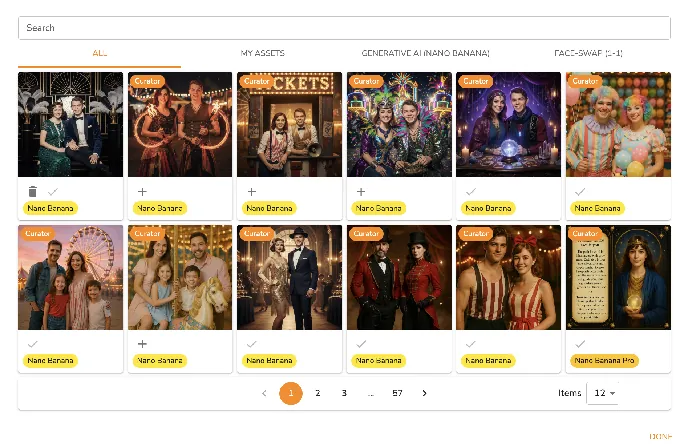
Source: Curator Live
Simple Booth’s Approach: Simple Booth focuses on accessible creativity. The Layout Designer, available on both the iPad app and web dashboard on all plans, provides a design tool with layers, fonts, gradients, and QR code embedding, eliminating the need for separate graphics programs. AI effects use the same Nano Banana models with zero-cost prompt testing outside booth mode. Guest Input injects participant responses into AI prompts for personalized outputs. The per-frame multi-prompt system lets operators build storyboard-style strips with a unique AI prompt on each frame.

🪙 Value Verdict: Curator Live is better for operators who need advanced video compositing, particularly for 360 booths where the CustomFX timeline is a differentiator. Simple Booth is better for operators who want a built-in design tool on both app and web dashboard, accessible AI customization without external software, and effects that work together across DSLR, video, and offline mode.
Lead Capture and Marketing Value
Curator Live’s Approach: Curator Live includes data capture and online galleries across all tiers, but contact data downloads are excluded from Standard. The platform offers Google Analytics and Facebook Pixel tracking on microsites. But it has no native CRM integrations, no marketing analytics beyond basic event metrics, and no lead capture form customization comparable to marketing-focused platforms.
Simple Booth’s Approach: Simple Booth treats lead capture as a core feature. Pro supports 6 standard fields with configurable required/optional settings; Select supports up to 10 custom fields including checkboxes and legal terms. The platform integrates with MailChimp and offers an Open API for custom CRM delivery. Demographic analytics via face detection (age estimation, gender breakdown, group size) are on Select.
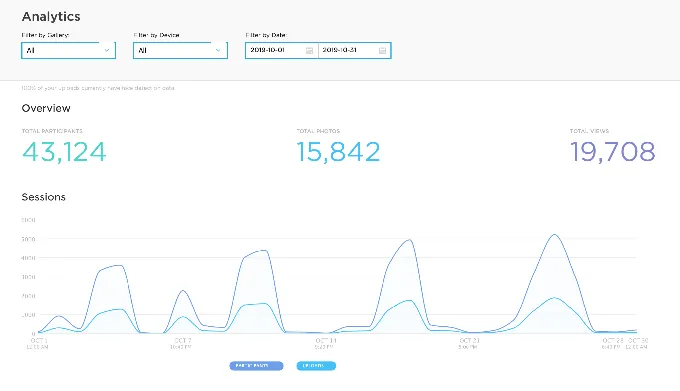
🪙 Value Verdict: Simple Booth is better for operators and marketers who use the photo booth as a data capture and marketing tool, with stronger lead collection, CRM integration, and demographic analytics. Curator Live prioritizes creative output over marketing tools.
G7 Entertainment Marketing has used Simple Booth for 10+ years, capturing 136,000+ fan interactions for their brand clients. (Simple Booth)
Virtual and Remote Capabilities
Curator Live’s Approach: Curator Live does not offer a virtual or browser-based booth. All capture requires a physical iOS device running the app. Remote participants at hybrid events cannot join the same branded photo experience.
Simple Booth’s Approach: Virtual Booth runs in a web browser with no app install, supporting iOS, Android, and desktop. Participants join via a QR code or link, capture or upload a photo, apply AI effects and background replacement, and share to social media. Virtual Booth connects to the same analytics, gallery, and Live Feed as the HALO app, letting hybrid events share a single gallery between in-person and remote participants.
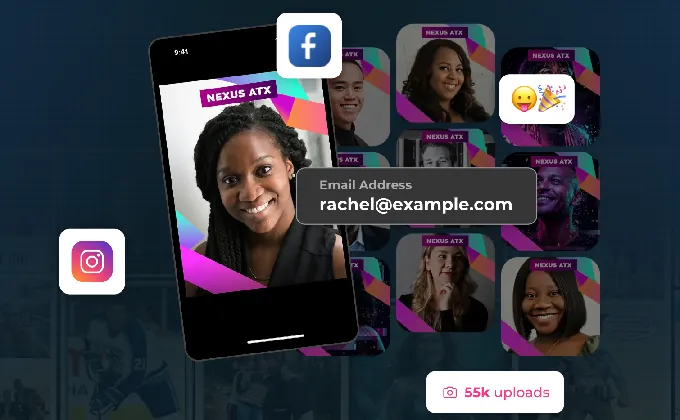
🪙 Value Verdict: Simple Booth is better for any operator or marketer who needs to reach participants beyond a physical location, whether for hybrid events, always-on campaigns, or product packaging activations.
Final Verdict: Curator Live vs Simple Booth
The choice between Curator Live and Simple Booth depends on whether you prioritize creative range on iOS or a combined, marketing-ready photo booth system:
Curator Live is an iOS photo booth platform for operators who want the widest creative toolkit. With per-event pricing from $29, $99 and subscriptions from $69, $249/month, it delivers 360 CustomFX video compositing, AI photo rendering with 40 prompts per experience, DSLR tethering across 100+ camera models, and AR backgrounds that process on-device. It works best for photo booth companies specializing in 360 video and branded video content, operators who already own iOS hardware and want creative flexibility, and agencies producing branded activations where the CustomFX timeline is a production tool.
Simple Booth is a combined hardware-software platform built on the idea that a photo booth should be simple to set up and able to run itself as a marketing tool. By pairing HALO ring-light hardware with subscription pricing from $14.99/week to $249/month, a built-in Layout Designer, a browser-based Virtual Booth, and lead capture with 87%+ opt-in rates, it eliminates the need to assemble components from multiple vendors. Guests don’t need an attendant, making it ideal for drop-off events where operators leave equipment running and move on to the next booking. This approach fits rental companies scaling a multi-booth business, venues installing permanent photo experiences with lead capture, and brand marketers who measure success in contacts collected and social shares alongside photos taken.
Get started with Simple Booth here.
The difference isn’t just features but philosophy. Curator Live asks, “How do we give operators the most creative tools for every capture format?” Simple Booth asks, “How do we make a photo booth that runs itself and pays for itself?”
Curator Live Pricing FAQ
Is Curator Live free to use?
Curator Live offers a free account where you can build events on the dashboard and test them in the app, with a DEMO watermark on all captures. There’s also a 14-day free trial and a free 30-minute onboarding session. Delivering watermark-free media to guests at a real event requires a paid plan starting at $29 per event.
What is the cheapest way to use Curator Live?
The Standard per-event plan at $29 per event is the lowest-cost option for occasional use. For operators running more than one event per month, the Standard monthly plan at $69/month with unlimited activations becomes more economical. The Standard yearly plan at $499/year (roughly $42/month) is the best value for consistent users.
Does Curator Live charge extra for text message delivery?
Yes. Curator Live uses Twilio for SMS delivery, so operators must create and connect their own Twilio account. Twilio bills SMS costs at its per-message rates, not Curator Live. This adds a separate vendor and variable cost to every event.
How much do Curator Live’s AI effects cost?
AI photo rendering uses credits purchased separately from the subscription. Face Swap is free. The standard Nano Banana model costs about $0.45 per image (45 credits), and Nano Banana Pro (recommended for groups of 8 or more) costs about $1.00 per image (100 credits). Credit pricing is documented in the help center rather than on the main pricing page.
Does Curator Live work on Android or Windows?
No. Curator Live runs only on iPad and iPhone via the App Store. Operators with Android tablets or Windows-based booth hardware cannot use the platform without buying Apple devices. The Sharing Station app is also iOS-only.
What is the difference between Event Pro and Agency Pro?
Event Pro ($59/event or $149/month) unlocks AI FX access, a Sharing Station, full analytics, and facial recognition on monthly and yearly plans. Agency Pro ($99/event or $249/month) adds Photography Mode for roaming DSLR capture, BETA features early access, and a White-Label URL included with the yearly plan. Photography Mode is exclusive to Agency Pro.
How does Simple Booth compare to Curator Live on pricing?
Simple Booth starts lower at $14.99/week for Lite and includes photo delivery via SMS, email, QR code, AirDrop, and WhatsApp on all plans, with no separate Twilio account needed. AI credits are $0.10 each, never expire, and pricing is published on the plans page. Curator Live’s per-event model offers more flexibility for occasional use, but Simple Booth’s included delivery and published AI pricing are simpler to budget.
Can I use Curator Live for virtual or remote events?
No. Curator Live requires a physical iOS device for all capture modes. There is no browser-based or virtual booth option. Simple Booth offers Virtual Booth, a browser-based product that works on any device without hardware or an app install, supporting hybrid and remote activations.
Keep reading
 Showdowns
Simple Booth vs Curator Live: Which Photo Booth Platform Fits Your Business in 2026?
Integrated hardware vs one-app-everything. Simple Booth or Curator Live?
 Reviews
Curator Live Review 2026: Is This Photo Booth Platform Right for You?
One iOS app juggling photos, 360 spins and AI art. Does Curator Live pull it off?
 Alternatives
7 Curator Live Alternatives: Specialized Photo Booth Software for Every Operator (2026)
Hunting for a Curator Live replacement? Start here.