Curator Live Review 2026: Is This Photo Booth Platform Right for You?
Curator Live has built a following among photo booth operators who want one iOS app for photo strips, AI-generated art, and 360-degree video. A photo booth operator founded it after seeing what existing software lacked, and the platform covers a wide range of capture modes, effects, and delivery options in a single subscription.
To write this Curator Live review, we analyzed it closely. We believe it’s the right choice if:
- You need a single iOS app that handles photos, GIFs, boomerangs, 360 video, DSLR tethering, and AI effects
- You value direct support from the company’s founder during live events
- You run a photo booth rental business and prefer per-event pricing
- You want creative tools like a video timeline editor and transparent video compositing
- You need drone booth or robotic arm (GlamBot) integration in your workflow
However, Curator Live might not be the best choice if:
- You want hardware designed alongside the software for consistent photo quality
- You need a browser-based virtual booth that works without physical equipment
- Marketing lead capture and first-party data collection are primary goals
- You prefer an in-app design tool that replaces external graphic software
- You need enterprise compliance features like age gating, moderation, and custom legal terms
In this case, consider Simple Booth: a platform that pairs its HALO iPad app with proprietary ring-light hardware, a built-in Layout Designer, and a Virtual Booth product for hardware-free activations, all backed by marketing tools that turn every photo session into a lead capture opportunity with documented opt-in rates above 87%.
We’ve included a detailed look at Simple Booth at the end of this Curator Live review as the top alternative for operators who want an integrated hardware-software system with marketing capabilities. If you’re ready to explore it, you can start with Simple Booth’s free trial here.
What is Curator Live?
Curator Live is an iOS-native photo and video capture platform built for photo booth operators, venues, attractions, and event professionals. Created by Nebular Design, LLC and co-founded by James Trivlis and Todd Albert, it grew out of Trivlis’s experience building his first photo booth in 2012 and recognizing a gap in software quality.
The platform evolved from an earlier product called PixBooth 2 into the current Curator Live app, which combines photo booths, 360 spinners, DSLR photography, video guest books, and AI effects in a single iOS application. It operates in over 90 countries and holds a 4.5-star App Store rating from 49 ratings.
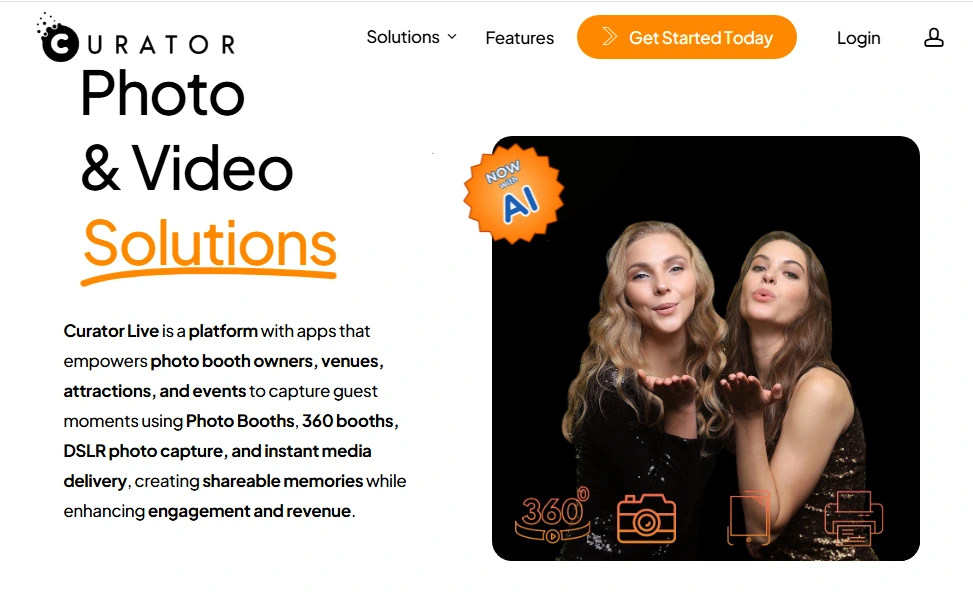
Curator Live’s ideal customer is the professional photo booth rental operator deploying iPad-based setups at weddings, corporate events, festivals, and nightlife venues. A secondary audience includes permanent-install venues like family entertainment centers, museums, zoos, haunted houses, resorts, and cruise lines that need always-on branded photo experiences.
Curator Live Pros & Cons
| Pros | Cons |
|---|---|
| - All capture modes (photo, GIF, boomerang, 360, video, DSLR) in one app | - iOS-only (no Android or Windows support) |
| - Founder-led support available during live events | - No presence on G2, Capterra, or TrustRadius |
| - Per-event pricing starting at $29 | - SMS delivery requires a separate Twilio account |
| - CustomFX timeline editor for 360 video production | - AI credits purchased separately, pricing not on main page |
| - On-device AI background removal at no extra cost | - Marketing pages contain placeholder/lorem ipsum content |
| - DSLR support for 100+ camera models across Canon, Nikon, Olympus, Sony | - Printing workflows generate frequent support issues |
| - Facial recognition delivery groups photos by guest | - White-label URL restricted to highest annual tier |
| - 14-day free trial and free demo with watermark | - No public API or developer documentation |
Curator Live Review: How it Works & Key Features
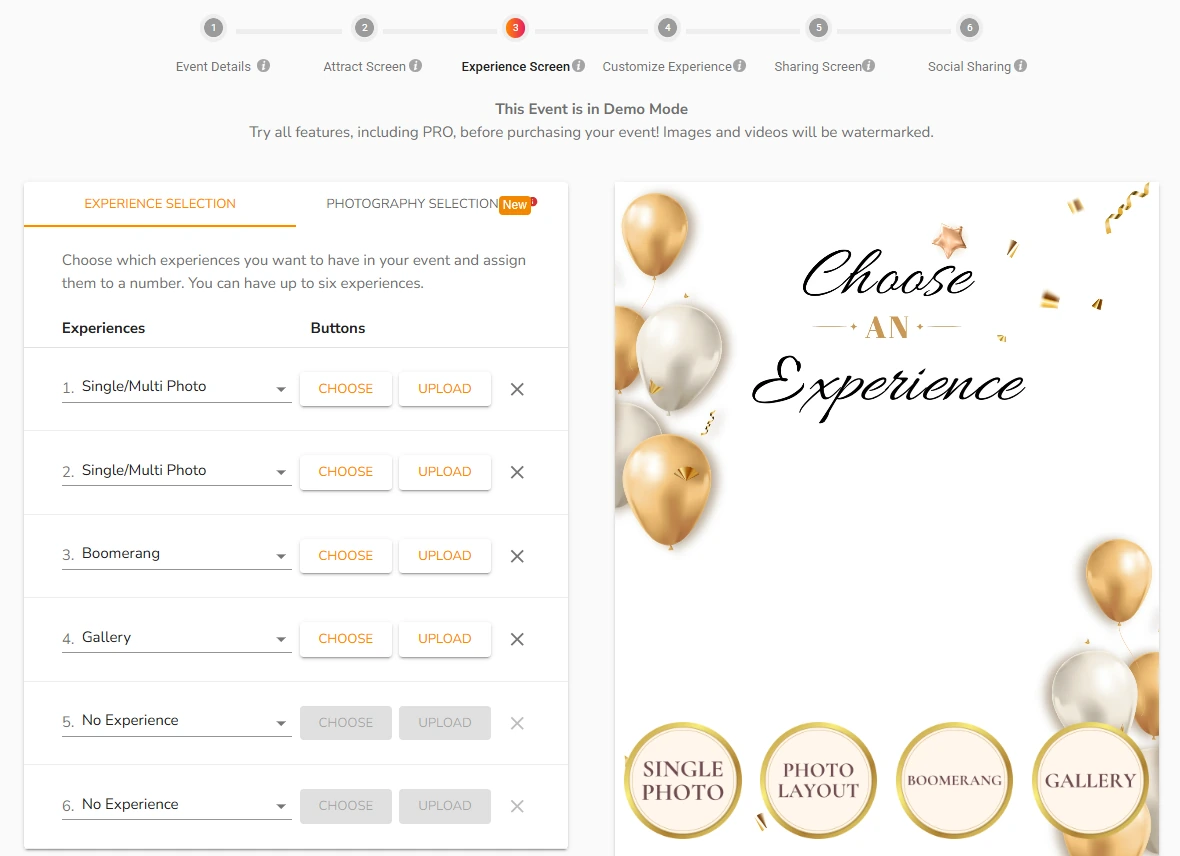
Photo & Video Capture: Curator Live consolidates every common booth format into one app with up to six simultaneous experiences per event.
Curator Live’s capture engine covers single photos, multi-photo strips, GIFs, boomerangs, video guest books, and basic video, formats that competing apps typically split across separate products. Operators can run up to six experiences at once, each with its own guest-selectable button, so a single event can offer a photo, an animated GIF, and a video guest book without switching apps.
Operators configure all experiences through a web-based Event Form before downloading them to the iOS app. The Layout Designer handles multi-photo strip canvases in any dimensions (2x6, 4x6, or square), with drag-and-drop positioning and native GIF/boomerang placeholder support, removing the need for external design files.
Source: Curator Live
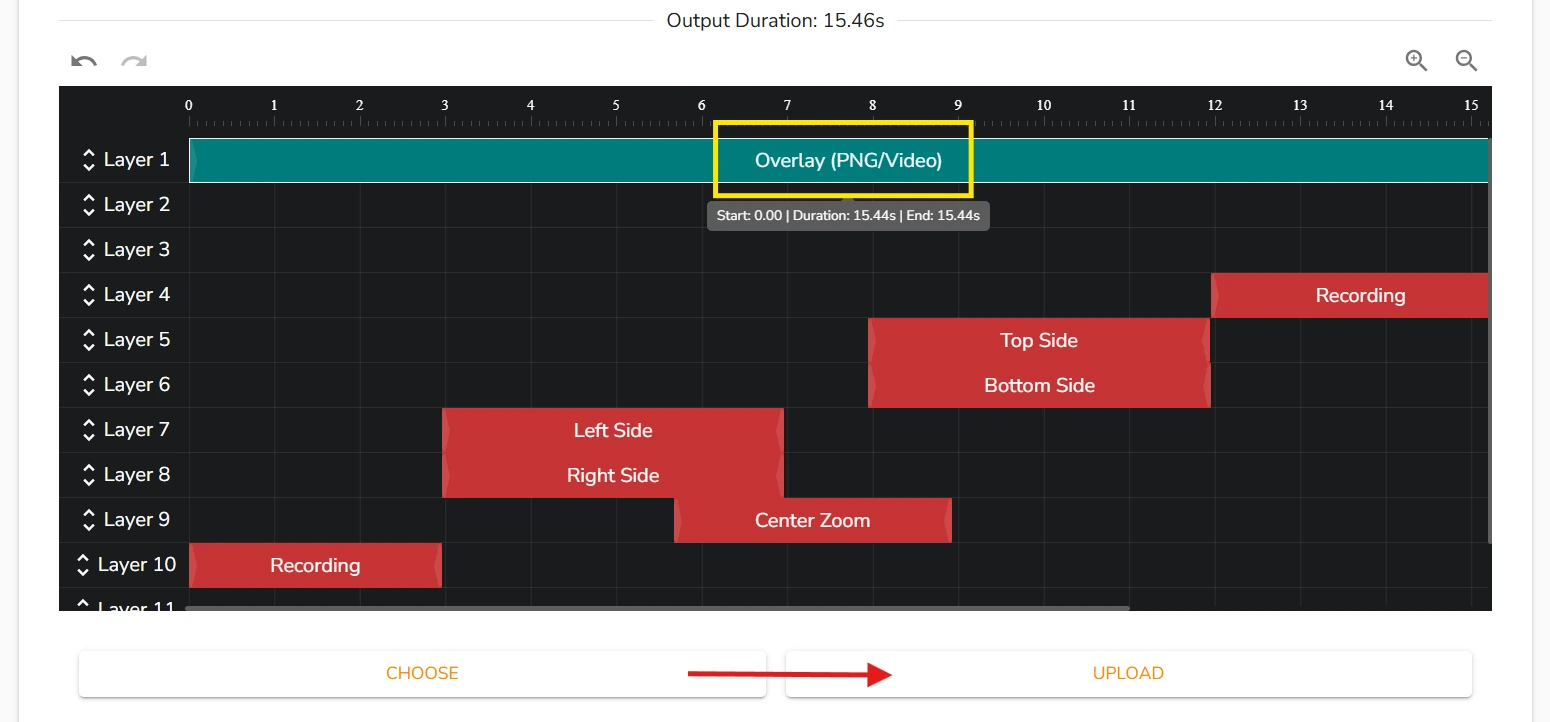
The video guest book runs through the CustomFX experience type, using the same timeline-based overlay, background, and audio compositing that powers the platform’s 360-degree experiences. Basic video supports configurable dimensions for vertical or horizontal output with timeline layers for overlays, backgrounds, and audio.
After capture, guests receive their media via SMS, email, QR code, or AirDrop. The app stores all captured media locally first and uploads when connectivity returns, so events do not require continuous internet access.
360 Booth & CustomFX: A built-in video timeline editor that turns raw 360 footage into branded, shareable content.
The CustomFX experience is Curator Live’s tool for operators running spinning-platform 360 video who need video rendering without external editing software.
It works as a visual, layer-based timeline builder where operators add overlay layers (transparent PNG or HEVC .mp4), backgrounds with AI background removal, pre-roll and post-roll intro/outro videos, and audio tracks, all with timing controlled by dragging layer edges.
Source: Curator Live
What makes CustomFX distinctive is its support for transparent HEVC .mp4 video layers, effects composited both in front of and behind the recorded subject in the same render. This approaches the layered compositing found in dedicated video post-production tools, delivered within an event-day iOS workflow.
The 360 feature set extends to hardware integrations.
OrcaVue 360 platforms and GlamBot robotic arms connect via Bluetooth within the Curator Live app, with rotation start/stop and speed controlled from one interface. For drone booth operators, the Picture Mosaics integration creates an automated pipeline: the drone captures video, Curator receives it in real time via Wi-Fi, applies the CustomFX timeline, and delivers the finished video to guests.
AR backgrounds process on-device with no internet connection required, an advantage at events where Wi-Fi is unreliable.
DSLR & Photography Mode: Turning a professional camera tethered to an iPhone into a mobile capture-and-delivery unit.
Traditional photo booth software assumes a fixed kiosk.
Curator Live’s Photography Mode inverts that model: photographers roam freely through an event, capturing with a DSLR tethered to an iPhone via USB. Photos appear in the app the moment the shutter fires, and guests receive them through text, email, print, or QR code.
The platform supports over 100 DSLR and mirrorless bodies across Canon EOS (R-series and DSLR lines), Nikon Z-series and D-series, Olympus OM-D and PEN lines, and Sony Alpha and RX-series cameras. Operators can run up to six concurrent photographer experiences per event, each with unique landscape and portrait overlays.
The standout capability is facial recognition delivery.
When enabled, the app groups all photos of the same person across an event into one collection, then pushes a secure link to that guest. Six photographers shooting hundreds of guests at a resort pool or museum gallery no longer means hours of manual file sorting; the system groups and delivers in real time without separate recognition software.
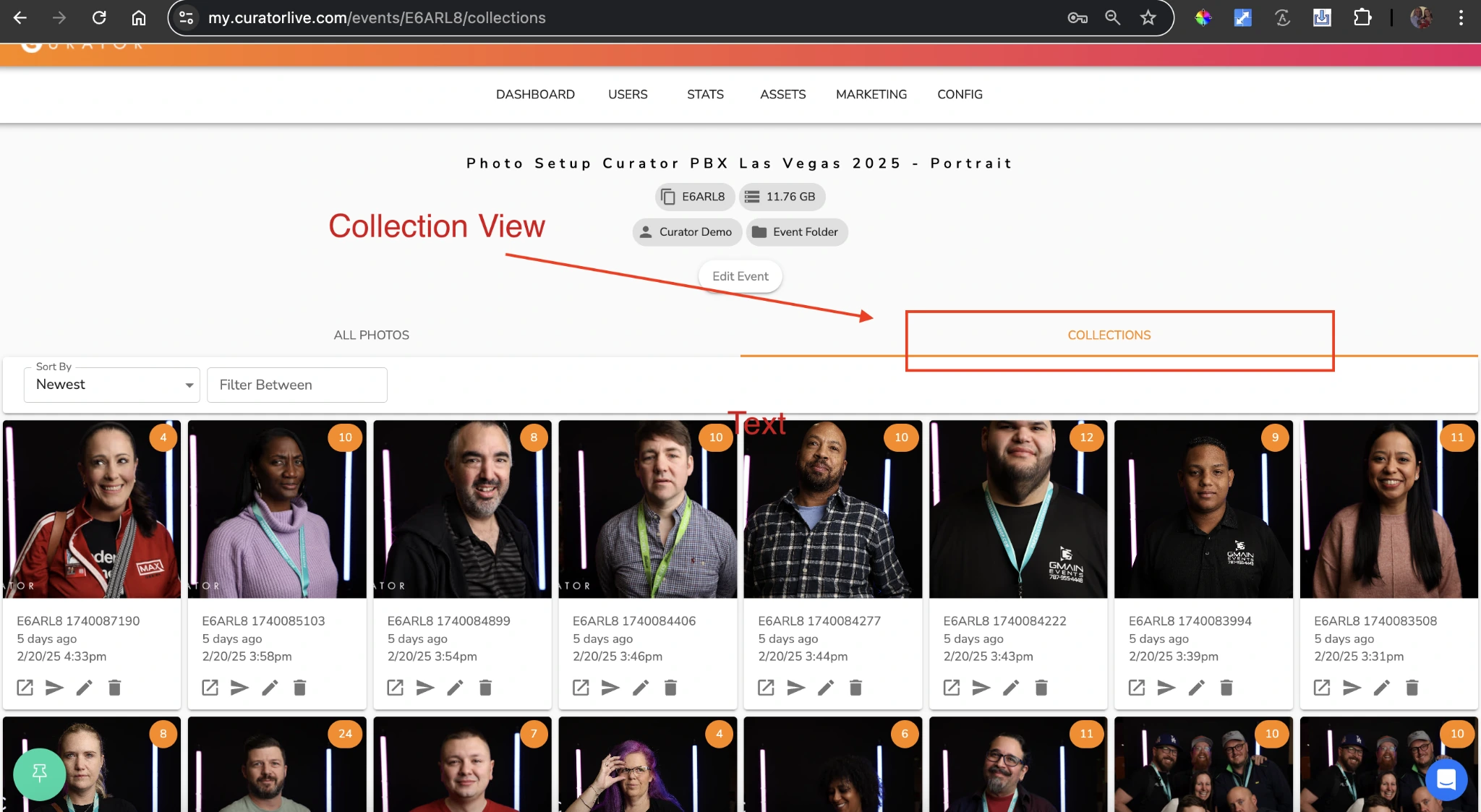
Source: Curator Live
Photography Mode also supports a specialized IRIS event type, where a photographer uses a macro lens to capture a guest’s eye, and AI IRIS processing transforms the close-up into stylized artwork.
AI Features & Effects: Generative AI and computer-vision tools built into the capture workflow.
Curator Live’s AI suite covers six capabilities.
The headline feature is AI Photo Rendering (branded as AI-FX powered by Nano Banana), which applies generative AI transformations to booth photos in about seven seconds. Guests select an AI effect from preview images on the iPad, take a photo, and receive a generated AI image (superheroes, cinematic scenes, fashion editorial looks) delivered via SMS, email, QR code, or microsite.
The platform offers three AI model tiers: Face Swap at zero credits, Nano Banana standard at roughly $0.45 per image, and Nano Banana Pro at roughly $1.00 per image. The Pro tier handles group photos, rated for groups of eight or more with high fidelity, a capability most photo booth software lacks.
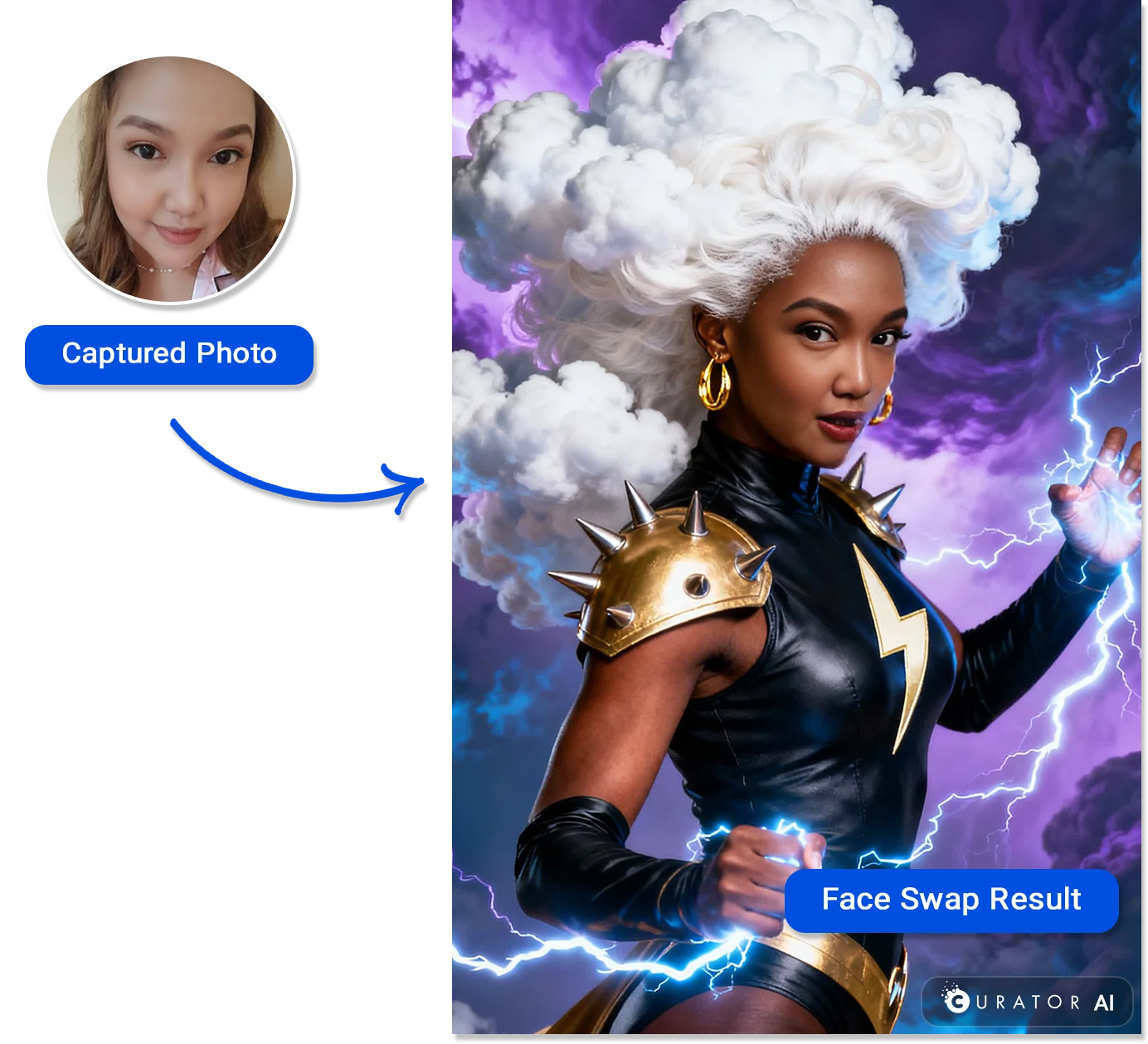
Source: Curator Live
Rather than offering a fixed menu of AI styles, Curator Live exposes the full prompt layer to operators.
The CustomFX AI prompt system supports custom text prompts, fixed background images, style reference images, and variation counts. A dedicated Curator Prompt Builder GPT helps operators craft and test prompts before deploying them live. Up to 40 prompts can load per AI-FX experience, with up to six AI-FX experiences per event.
Magic AI Background Removal runs on-device without internet and at no credit cost. It works across single photos, boomerangs, standard video, and 360 video, a cost and reliability advantage at high-volume installations where competing platforms charge per-use credits or require a cloud round-trip.
AI Face Recognition adds a search button to the event gallery or microsite. Guests scan their face via their device camera, and the system returns only their photos and videos from the event. Sensitivity is adjustable between levels one and three, and a private gallery mode ensures only the searching guest sees their content.
Pricing: A per-device license model with per-event, monthly, and yearly options.
Curator Live offers three tiers across three billing cycles:
Per-Event Pricing (activations stay active for 3 days):
| Standard | Event Pro | Agency Pro | |
|---|---|---|---|
| Price | $29/event | $59/event | $99/event |
| Additional device | $19/device | $39/device | $79/device |
| Sharing Station | Not included | Included | Included |
| Facial Recognition | No | No | BETA |
| Photography Mode | No | No | Yes (BETA) |
Monthly Pricing (unlimited events):
| Standard | Event Pro | Agency Pro | |
|---|---|---|---|
| Price | $69/month | $149/month | $249/month |
| Additional device | $29/device/month | $79/device/month | $99/device/month |
| Facial Recognition | No | Yes | Yes |
| Photography Mode | No | No | Yes |
Yearly Pricing (unlimited events):
| Standard | Event Pro | Agency Pro | |
|---|---|---|---|
| Price | $499/year | $1,499/year | $2,499/year |
| White-Label URL | $449/year add-on | $449/year add-on | 1 included |
Additional costs: SMS delivery requires connecting your own Twilio account (billed at Twilio’s rates). AI rendering credits are purchased separately. Each active device beyond the first requires an additional license.
Curator Live offers a free account that lets you build events and test the app with a watermark, plus a 14-day free trial and a free 30-minute onboarding session.
Where Curator Live Falls Short
Curator Live packs a wide range of features into one platform, but several limitations show up with regular use. These reflect a company focused on creative depth over operational polish and market reach.
iOS-Only Platform: Curator Live runs exclusively on iPad and iPhone. Operators using Android tablets or Windows-based booth hardware cannot access the platform without replacing their equipment. No cross-platform expansion has been announced, making this the most common adoption barrier among operators comparing platforms.
Unfinished Marketing Presence: The Photobooth Owners, Venues and FECs, Live Events, and Features pages on the Curator Live website contain lorem ipsum placeholder text and placeholder testimonials. For buyers doing pre-purchase research, this undercuts credibility at a critical decision point.
No B2B Review Platform Presence: Curator Live has no listing on G2, Capterra, or TrustRadius. Buyers who compare software through these aggregators will not find Curator Live, limiting discoverability in formal procurement.
Hidden AI Credit Costs: AI photo rendering consumes credits purchased separately (roughly $0.45 per standard image, $1.00 per Pro image), but this pricing does not appear on the main pricing page. Operators discover the cost structure only in the documentation, which complicates budget planning.
Printing Friction: The printing subsystem generates disproportionate support volume. The Printing category accounts for a significant share of knowledge base articles, and recurring bug fixes across recent releases for strip printing and DSLR multi-photo layouts suggest on-site printing remains a pain point.
Limited Integration Ecosystem: Beyond hardware integrations (OrcaVue, Mobibooth, Picture Mosaics) and Twilio for SMS, Curator Live offers no CRM integrations, no booking system connections (HoneyBook, Dubsado), and no public API. Operators who need photo booth data flowing into a marketing or business management stack must handle this manually.
These limitations follow naturally from a small, founder-led team investing in creative features and hands-on support rather than platform breadth and enterprise infrastructure. But they leave gaps for operators who need integrated hardware, marketing tools, and a polished buying experience.
Top Curator Live Alternative: Simple Booth
Simple Booth takes a different approach to the same problem.
Where Curator Live focuses on creative feature depth in a software-only product, Simple Booth pairs its HALO iPad app with proprietary ring-light hardware, a browser-based Virtual Booth for hardware-free activations, and a marketing layer that turns every photo session into a lead capture event.
Founded in 2013 by Mark Hennings and Jeremy Cox, Simple Booth is intuitive enough for unattended drop-off events and flexible enough for operators who want full creative control. The platform serves over 30,000 customers globally and holds a 4.7-star App Store rating from 2,400+ ratings.
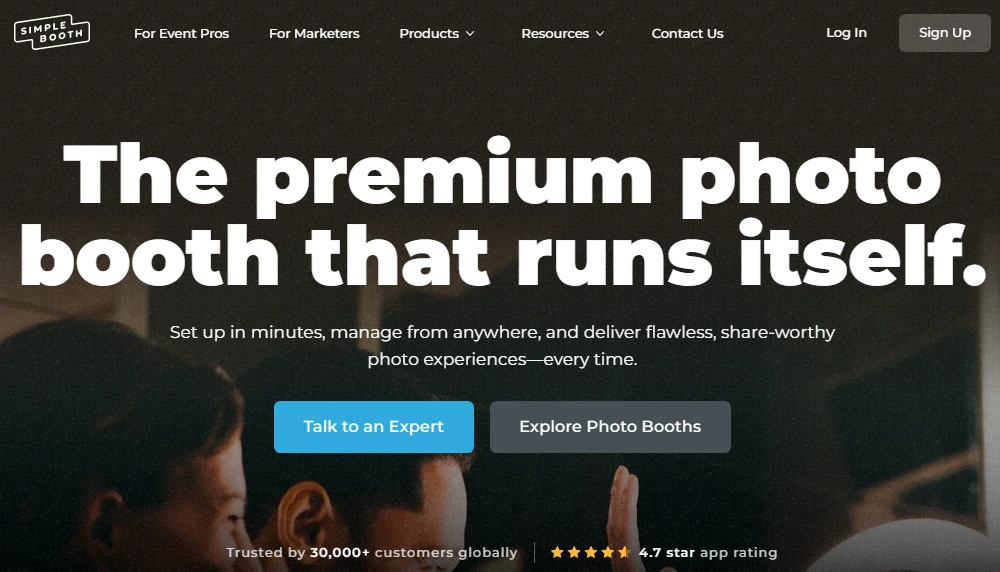
Arizona Opera grew its email list by 1,000 addresses in a few events using Simple Booth’s in-booth data capture. (Simple Booth)
HALO Hardware: An engineered ring light, iPad mount, and mounting system in one aluminum chassis.
The HALO photo booth kit integrates the chassis, ring light, iPad mount, built-in charging, and software into one product. The body is machined from a single billet of anodized aluminum with a patented ring-light system featuring 112 LEDs producing up to 2,100 lumens, rated for 50,000 hours of operation.
The iPad snaps in via a tool-less faceplate, and a concealed USB-C cable keeps it charged throughout the event. The full Event Kit deploys in under one minute and travels in a rolling hard case weighing 49 pounds. This matters for rental companies running multiple events per week: no assembly, no loose cables, no separate lighting to manage.

Source: Simple Booth
For photo quality, the hardware delivers consistent illumination that works well with groups standing six to eight feet from the camera. Combined with the software’s Glam smoothing, background blur, and AI background replacement, the iPad produces output quality associated with more expensive dedicated camera rigs.
“It paid for itself pretty quickly. Now it’s just extra money coming in.” (Kurt Nielson Photography)
HALO App & Layout Designer: An in-app design tool that eliminates external graphic software.
HALO 5.0 introduced the Layout Designer, a full in-app design tool with layers, fonts, gradients, logo positioning, QR code embedding, and multi-layout support. Operators create photo strip templates, branded frames, and custom overlays inside the app or web dashboard (no Photoshop or Canva required).
The app supports still photos, animated GIFs, Rebound boomerang clips, and full-length video (five to 120 seconds). Canon DSLR and mirrorless camera integration is available on Core and above, supporting both wired USB connections for long-event reliability and wireless connections over Wi-Fi for flexible setups (a wireless option most competing platforms do not offer). Image previews appear up to 12x faster than previous versions, and photos, GIFs, and effects with filters, frames, and digital props process quickly for instant delivery.
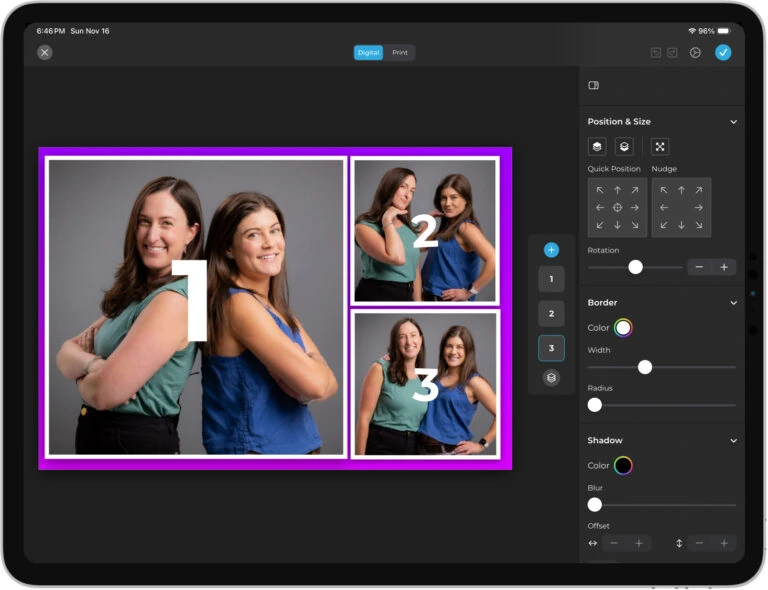
Source: Simple Booth
A feature called Guest-Editable Text Layers lets participants type names, captions, or hashtags directly onto their photo before sharing, with dynamic text sizing that keeps designs polished regardless of message length. This scales to high-volume events without adding operator steps.
For operators managing multiple events or locations, the web dashboard monitors every iPad booth in real time, tracking battery level, disk space, upload queue status, and which preset is running, with the ability to switch presets remotely.
On the device itself, the Mission Control overlay (triggered by a two-finger pinch gesture) lets operators adjust camera settings and sync changes during live events without breaking the guest-facing interface.
Virtual Booth: A browser-based photo experience that requires no hardware at all.
Virtual Booth is Simple Booth’s answer to a problem Curator Live does not address: activations that need to reach people beyond a physical location. Participants join from their own phone or laptop via a QR code or link. No app installation, no hardware, no iPad.
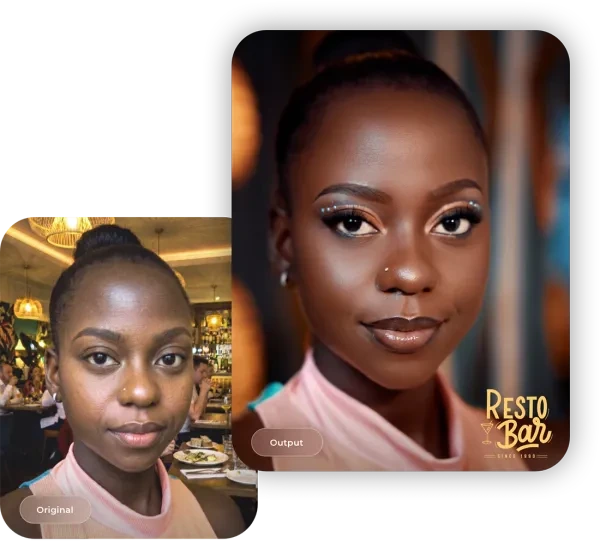
The product supports background replacement, overlays, digital props, and AI effects, all running in a web browser. An AI feature called Guest Input lets participants answer questions (free-text or picker) that feed into the AI prompt, producing personalized outputs for every guest while the operator controls the prompt structure.
Source: Simple Booth
Virtual Booth connects to the same analytics, Live Feed, and Gallery infrastructure as the HALO hardware app. Brands running hybrid events can operate physical kiosks for in-room attendees and Virtual Booth for remote participants, with all submissions feeding a single combined gallery.
The product also works as an always-on campaign tied to product packaging, email outreach, or a brand website, an activation channel with no physical-event dependency.
It automatically localizes into nine languages including English, Spanish, French, German, Dutch, and Polish based on browser settings.
AI Photo Booth: Generative AI with built-in identity preservation and brand integration.
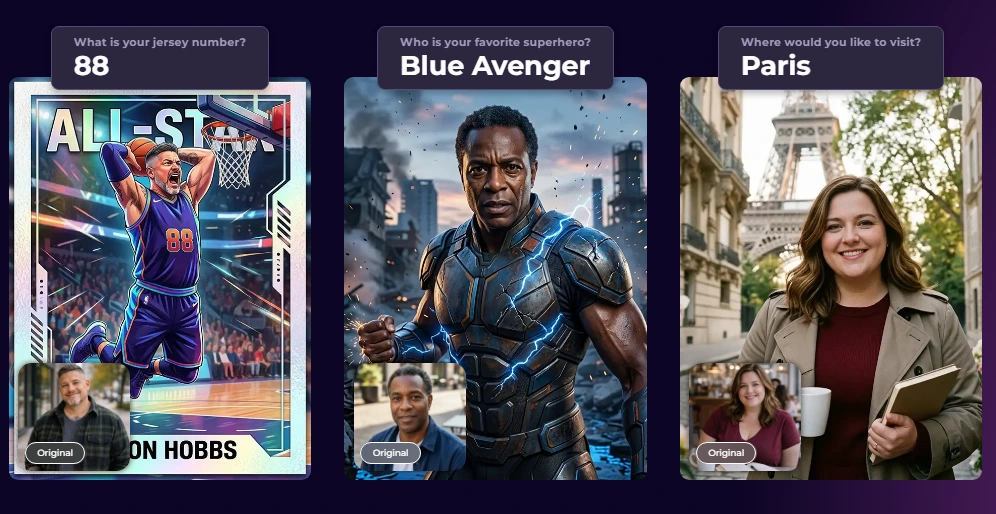
Simple Booth’s AI Photo Booth uses the same Nano Banana AI models as Curator Live but wraps them in a workflow built for operators who want reliable, brand-safe output without prompt engineering expertise. The platform handles identity preservation automatically, so guests stay recognizable regardless of the transformation, without any operator configuration.
Three model tiers (Nano Banana 1, 2, and Pro) serve individual subjects and groups up to five. Operators choose from a public library of ready-made prompts or create custom prompts with style dropdowns and pose-preservation toggles. Testing prompts outside of booth mode costs zero credits, so operators can iterate freely before events.
Source: Simple Booth
A distinctive capability is per-frame multi-prompt storyboarding: the system supports assigning a unique AI prompt to every frame in a multi-frame layout, enabling comic strip or cinematic narrative strips where each frame is a different scene. AI effects composite directly with the Layout Designer’s brand overlays, logos, and graphic layers in a single workflow.
AI credits cost $0.10 each, with models consuming one, two, or three credits per generation. Purchased credits do not expire.
Galleries, Sharing & Marketing Tools: Converting every photo session into measurable marketing data.
Where Curator Live focuses on creative capture, Simple Booth builds a marketing layer on top. The platform captures opt-in rates as high as 87 to 89% through in-booth lead capture forms that collect email, phone, and custom fields as a natural part of receiving a photo.
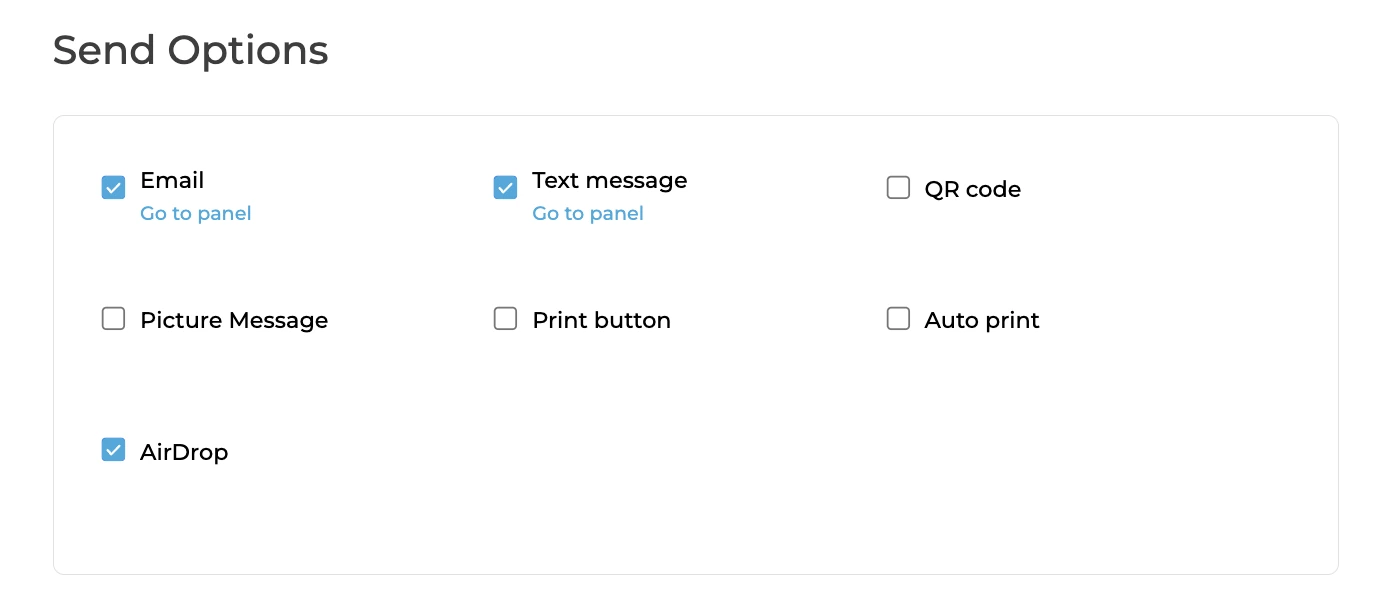
Photo delivery spans QR code, SMS, email, AirDrop, and WhatsApp. The WhatsApp addition in HALO 5.0 opens international deployments that SMS-only systems struggle to serve. Each shared photo automatically includes branded hashtags that pre-populate on social media platforms, creating searchable streams of user-generated content.
Source: Simple Booth
The analytics dashboard tracks total participants, gallery views, social shares, and referred views from each platform. On the Select tier, demographic insights via face detection provide estimated age, gender breakdown, and average group size, audience composition data uncommon in the photo booth category.
Lead data syncs natively with MailChimp and exports as CSV. An open API on Pro and above supports custom CRM delivery.
Treetop Golf built 150,000 unique email addresses across its locations using Simple Booth’s lead capture system. (Simple Booth)
Simple Booth Pricing: Weekly, monthly, and annual plans from personal to enterprise.
Simple Booth offers five tiers with weekly, monthly, and yearly billing:
| Plan | Weekly | Monthly | Yearly |
|---|---|---|---|
| Lite | $14.99/week | — | $290/year |
| Core | $24.99/week | $49/month | $490/year |
| Plus | $49.99/week | $99/month | $990/year |
| Pro | — | $149/month | $1,490/year |
| Select | — | $249/month | $2,490/year |
Key features by tier: Lite includes basic capture with ads; Core adds DSLR support, video, background replacement, Dropbox, and Virtual Booth access; Plus adds custom branding, analytics, guest-editable text, and custom AI effects; Pro adds lead capture, API integration, phone support, and moderation; Select adds custom legal terms, demographic analytics, and security questionnaire support.
A 7-day free trial is available with 25 free AI credits. HALO hardware kits are sold separately starting at approximately $2,090 for an Event Kit with iPad and protection plan, with 0% financing available.
Curator Live or Simple Booth: Comparison Summary
| Curator Live | Simple Booth | |
|---|---|---|
| Primary Focus | Creative capture depth and effects | Integrated hardware-software with marketing tools |
| Hardware | Third-party only (OrcaVue, Mobibooth, etc.) | Proprietary HALO ring-light kits |
| Virtual/Remote Booth | Not available | Virtual Booth (browser-based, no hardware) |
| Platform | iOS only (iPad/iPhone) | iOS only (iPad) |
| Capture Formats | Photo, GIF, boomerang, 360, video, DSLR, drone | Photo, GIF, boomerang, video, DSLR |
| 360 Video | CustomFX timeline editor with layer compositing | Not available |
| AI Effects | Nano Banana with full prompt customization | Nano Banana with identity preservation |
| AI Credit Cost | ~$0.45 to $1.00 per image | $0.10 to $0.30 per image (1 to 3 credits) |
| Background Removal | On-device, no cost, no internet required | Available (Core+) |
| In-App Design Tool | Layout Designer (strip layouts) | Layout Designer (full design tool with layers, fonts, gradients) |
| Lead Capture | Basic data capture | Up to 10 custom fields with 87%+ opt-in rates |
| Marketing Analytics | Google Analytics and Facebook Pixel | Social tracking, demographic insights, gallery analytics |
| CRM Integrations | None | MailChimp native; open API (Pro+) |
| Support | 24-hour chat, emergency phone, founder-led | 7-day human support; tiered from email to dedicated account manager |
| Per-Event Pricing | $29 to $99/event | Weekly plans from $14.99/week |
| Monthly Pricing | $69 to $249/month | ~$72 to $249/month |
| Free Trial | 14-day trial + free watermarked demo | 7-day trial |
| App Store Rating | 4.5 stars (49 ratings) | 4.7 stars (2,400+ ratings) |
| Facial Recognition | Event Pro+ (delivery grouping) | Not available (no biometric processing) |
| WhatsApp Delivery | Not documented | Available (all plans) |
| Best For | 360 booths, roaming DSLR photography, creative activations | Drop-off rentals, unattended venues, brand marketing |
Final Verdict
The choice between Curator Live and Simple Booth depends on what kind of photo booth business you are building and which trade-offs matter most.
Choose Curator Live if you need the widest creative toolkit in a single iOS app.
It is the stronger choice for operators running 360 spinner booths, drone booth activations, or roaming DSLR photography at scale. The CustomFX timeline editor, transparent HEVC compositing, and facial recognition delivery address specialized workflows that most competitors do not touch. Per-event pricing starting at $29 fits low-volume operators or those testing the platform, and the founder-led live-event support matters for operators who cannot afford booth downtime.
Choose Simple Booth if you want a system where hardware, software, and marketing work together out of the box.
The HALO ring-light hardware delivers consistent photo quality without sourcing separate lighting, the Layout Designer replaces external design tools, and the interface means you can run unattended drop-off events or train new staff quickly. Wireless DSLR integration, rendering previews up to 12x faster, and the Virtual Booth for hardware-free activations round out the operational toolkit.
For operators focused on lead capture, brand marketing, and scaling a rental business, Simple Booth’s documented 87%+ opt-in rates, CRM integrations, and enterprise compliance features make it the more complete business platform, with weekly plans starting at $14.99 for operators just getting started. The 4.7-star rating across 2,400+ reviews and enterprise deployments with Live Nation, Sports Illustrated Tickets, and Gibson Brands provide additional confidence at scale.
Get started with Simple Booth HALO here.
Both platforms serve the iPad photo booth market well, but from different starting points. Curator Live builds outward from creative features and capture formats. Simple Booth builds outward from operational reliability and marketing ROI. Your choice depends on whether your priority is what happens inside the booth or what happens after.
Curator Live FAQ
Is Curator Live free to use?
Curator Live offers a free account that lets you create events on the dashboard and test them in the app with a watermark on all captured images. No payment is required until you activate a per-event purchase or subscribe to a plan. A 14-day free trial is also available, along with a free 30-minute onboarding session. Simple Booth offers a 7-day free trial with 25 AI credits included.
How much does Curator Live cost?
Per-event pricing ranges from $29 (Standard) to $99 (Agency Pro). Monthly subscriptions run $69 to $249 per month, and yearly plans range from $499 to $2,499. Each plan includes one device license; additional active devices require separate license purchases. AI rendering credits and SMS delivery via Twilio are billed separately. Simple Booth’s plans start at $14.99 per week for Lite and go up to $249 per month for Select.
Does Curator Live work on Android or Windows?
No. Curator Live is available only on iPad and iPhone through the Apple App Store.
Operators using Android tablets or Windows-based booth hardware cannot use the platform without purchasing Apple devices. No cross-platform expansion has been announced. Simple Booth is also iPad-only for its HALO app, but offers a browser-based Virtual Booth product that works on any device without app installation.
What camera brands does Curator Live support for DSLR tethering?
Curator Live supports over 100 DSLR and mirrorless camera bodies across Canon EOS (R-series and DSLR lines), Nikon Z-series and D-series, Olympus OM-D and PEN lines, and Sony Alpha and RX-series cameras. The camera connects to the iPhone via USB cable, and photos appear in the app the moment the shutter fires. Simple Booth supports Canon DSLR and mirrorless cameras on its Core plan and above.
Does Curator Live support 360 video booths?
Yes. Curator Live’s CustomFX experience is designed for 360 spinner booths.
It includes a visual timeline editor for adding overlays, backgrounds, pre-roll and post-roll video, and audio tracks. The platform also integrates with OrcaVue 360 platforms and GlamBot robotic arms via Bluetooth, and supports an automated drone booth pipeline through Picture Mosaics integration. Simple Booth does not currently offer 360 video booth support.
How does Curator Live’s AI photo rendering work?
Guests select an AI effect from preview images on the iPad, take a photo, and receive an AI-generated transformation in about seven seconds. The system uses Nano Banana AI models in two tiers: standard (roughly $0.45 per image) and Pro (roughly $1.00 per image, designed for groups of eight or more). Face Swap is available at zero credit cost. Operators can create custom AI prompts or use the Curator Prompt Builder GPT tool.
Simple Booth uses the same Nano Banana models at $0.10 per credit, with automatic identity preservation that requires no operator prompt engineering.
Does Curator Live offer white-labeling?
White-label (vanity) URLs are available, but access depends on your plan. The Agency Pro yearly plan ($2,499/year) includes one white-label URL. Standard and Event Pro subscribers can add it for $449 per year or $59 per month. All tiers include custom overlays, branded emails, and custom microsites for client-facing branding.
Simple Booth removes its branding on Plus plans and above but does not offer white-label URLs for Virtual Booth.
What kind of customer support does Curator Live provide?
All paid tiers include 24-hour chat support, emergency phone support, and a dedicated account representative. Support is available during live events, not just business hours. New customers receive a free 30-minute onboarding session. Multiple App Store reviewers cite the founder personally assisting with setup and troubleshooting.
Simple Booth offers support 7 days a week from real humans, with email and chat on lower tiers, phone support on Pro, and a dedicated account manager on Select.
Keep reading
 Showdowns
Simple Booth vs Curator Live: Which Photo Booth Platform Fits Your Business in 2026?
Integrated hardware vs one-app-everything. Simple Booth or Curator Live?
 Alternatives
7 Curator Live Alternatives: Specialized Photo Booth Software for Every Operator (2026)
Hunting for a Curator Live replacement? Start here.
 Pricing
Curator Live Pricing: Worth It or Add Simple Booth? June 2026
Curator Live pricing without the guesswork. The real cost, laid out.