Darkroom Booth Review 2026: Is This Photo Booth Software Right for You?

Darkroom Booth has been a fixture in the photo booth industry since 2013, built by a family-owned company with roots in professional photography dating back to 1992. It’s a Windows desktop application designed for one audience: professional photo booth operators who want full control over the guest experience, from camera tethering and print layout to payment hardware and remote booth monitoring.
To write this Darkroom Booth review, we analyzed it extensively. We believe it’s the ideal choice if:
- You run a Windows-based photo booth operation and want a perpetual license you own outright
- You need broad hardware compatibility across Canon, Nikon, GoPro, and dye-sub printers
- You want customization through templates, surveys, and physical hardware controls
- You prefer a one-time purchase over recurring subscription costs
- You value the ability to run unattended booths with remote monitoring
However, Darkroom Booth might not be the best choice if:
- You want an iPad-based setup with integrated hardware and cloud management
- You need a platform that works without Windows
- After-hours and weekend support is important to your operations
- You want built-in lead capture, analytics, and marketing tools in one platform
- You prefer a cloud-first interface with remote dashboard management
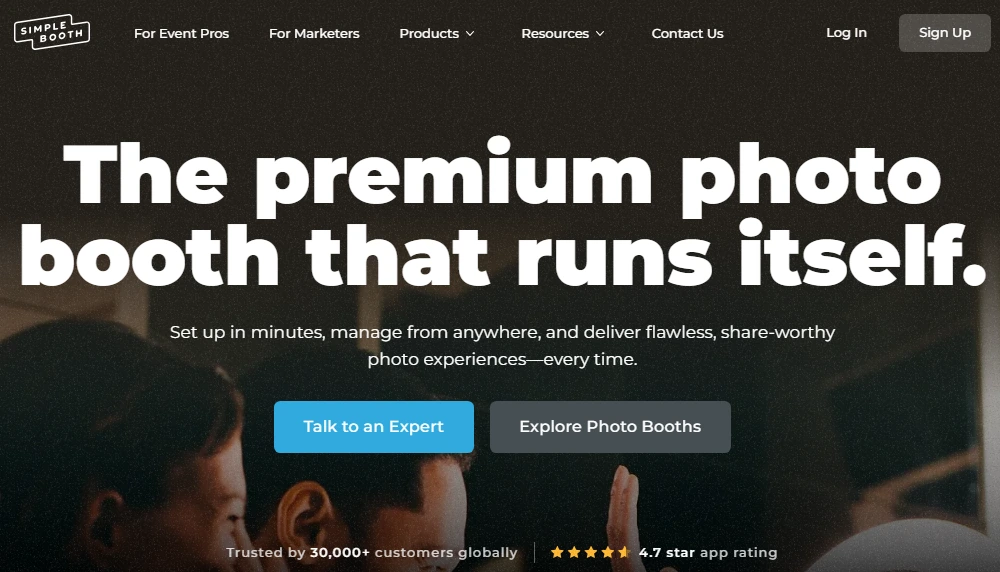
In this case, you should consider Simple Booth: an iPad-based photo booth platform that pairs a subscription app with dedicated ring-light hardware, cloud management, and built-in marketing tools. Where Darkroom Booth gives operators configurability on Windows, Simple Booth gives them a turnkey system that captures leads, generates social shares, and manages multiple booths remotely from a single dashboard.
We’ve included a brief overview of Simple Booth at the end of this Darkroom Booth review as the best alternative for operators who want an integrated, cloud-managed photo booth system. If you’re ready to try Simple Booth, you can start your free trial here.
What is Darkroom Booth?
Darkroom Booth is a Windows desktop application made by Darkroom Software, LLC, a private, family-owned company based in Plano, Texas.
The company’s history stretches back to 1992, when the Woodchek brothers founded Imaging Spectrum, Inc. as a photography equipment distributor. The software concept originated in 1994, when a hobby photographer and Windows programmer wanted to print custom baseball cards on-site at little league games.
In October 2010, Brian, Eric, and Mike Woodchek formed Darkroom Software, LLC and acquired the Darkroom product line from Express Digital Graphics. The photo booth product officially launched in June 2013 at $295, a price that remains unchanged today.
The platform targets independent and small-team professional photo booth operators running attended events: weddings, corporate activations, school events, and holiday experiences. Named clients include Carnival Cruise Line, Canon, Fujifilm, and Picture People. The company’s tagline, “Made For Photographers, By Photographers”, reflects its heritage in professional photography rather than consumer entertainment.
The current version, Booth 2025, supports still photos, GIFs, Boomerangs, slow-motion video, green screen, VR 180/360 panoramic images, and recently added AI features including generative portraits, face swap, and scene generation.
Darkroom Booth Pros & Cons
| Pros | Cons |
|---|---|
| $295 one-time license with no subscription required | Windows-only (no native Mac or iPad support) |
| Works with most Canon, Nikon DSLRs, GoPro, and webcams | Support limited to Mon–Fri, 9am–5pm Central |
| 75+ included templates with built-in drag-and-drop editor | Operator interface feels dated compared to newer platforms |
| Remote booth monitoring via Booth Control™ | No direct Facebook upload (requires separate Event Gallery subscription) |
| Reliable under sustained production loads | No built-in lead capture analytics or marketing dashboard |
| AI features including generative portraits and face swap | Video features require separate FFMPEG installation |
| Phidget support for bill acceptors, coin-op, and custom controls | No cloud-based multi-venue management |
| Two-computer activation per license | Limited third-party integrations (no API or webhooks) |
Darkroom Booth Review: How It Works & Key Features
Hardware Flexibility: Darkroom Booth works with virtually any Windows-compatible camera, printer, and peripheral.
Darkroom Booth runs on any Windows 10 or 11 PC, laptop, all-in-one, or tablet with a minimum of an Intel i3 processor and 4 GB of RAM. For video, Boomerangs, and green screen, an i5 or higher is recommended.
Camera support spans a wide range: Canon EOS R50, R100, M50, M200, Rebel Series, and PowerShot Series; Nikon Z7 II, Z6 II, Z7, Z6, Z5, Z50, D6, D780, and D850; GoPro HERO 9 and HERO 10; and most Windows webcams via direct wireless or USB tether.
On the printing side, any Windows-compatible printer works, with built-in drivers for 20+ dye-sublimation models from DNP, Fujifilm, Mitsubishi, Sony, Shinko/Sinfonia, HiTi, and Ciaat.
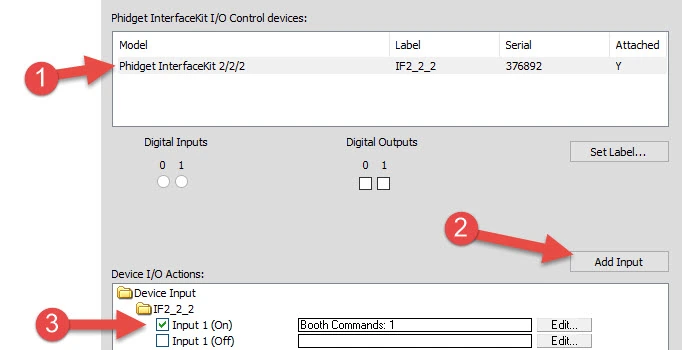
Where Darkroom Booth stands apart from most photo booth software is its Phidget hardware support.
Phidgets are programmable USB interface boards used in automation and interactive installations. This native support lets operators wire in bill acceptors, coin mechanisms, arcade buttons, lights, bells, and custom external controls without writing integration code. For operators running coin-operated or amusement-venue deployments, this is a capability that generic photo booth apps cannot match.
Source: Darkroom Software
User input is equally flexible: sessions can be triggered by touchscreen, keyboard, USB button, voice activation, or QR code. For remote management, Booth Control™ lets operators monitor and control the booth from any phone, computer, or tablet on the same Wi-Fi network, including receiving stats and reports via email or text.
A single license covers installation on up to 2 computers simultaneously.
Customization and Templates: Over 75 included templates with a built-in editor that doesn’t require design software.
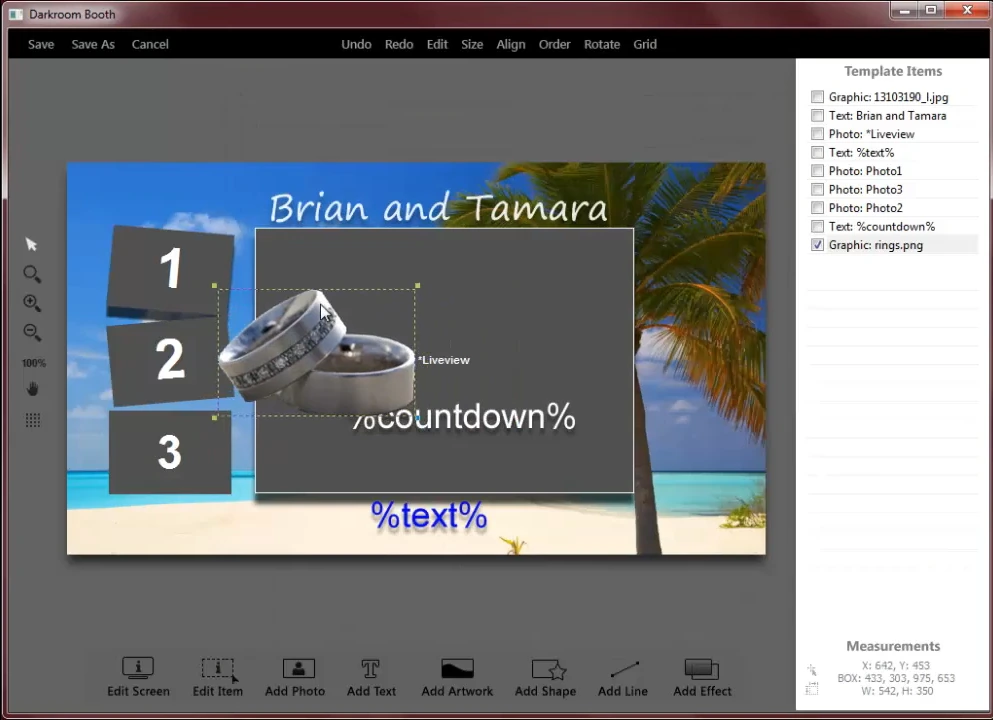
Photo booth operators need to deliver branded, event-specific experiences. Darkroom Booth ships with over 75 free, customizable templates covering both print output and on-screen display.
The built-in drag-and-drop template editor lets operators create and modify designs without Photoshop or any external design tool. Operators who do use design software can import graphics from Photoshop, Illustrator, or Canva as .jpg or .png files and place them inside templates.
Source: Darkroom Software
Beyond visual design, the template system includes built-in surveys, quizzes, and data collection with nine question types: checkboxes, multiple choice, date fields, email, scale ratings, text, messages, True/False, and yes/no. Survey results export as PDFs and store in a local SQLite database. For corporate clients who want lead capture as part of the photo session, this is built directly into the workflow.
The Custom Booth Lock Screen feature lets the idle booth display carry the client’s or sponsor’s brand. Multi-monitor support runs a custom slideshow on an external display independent of the active booth screen.
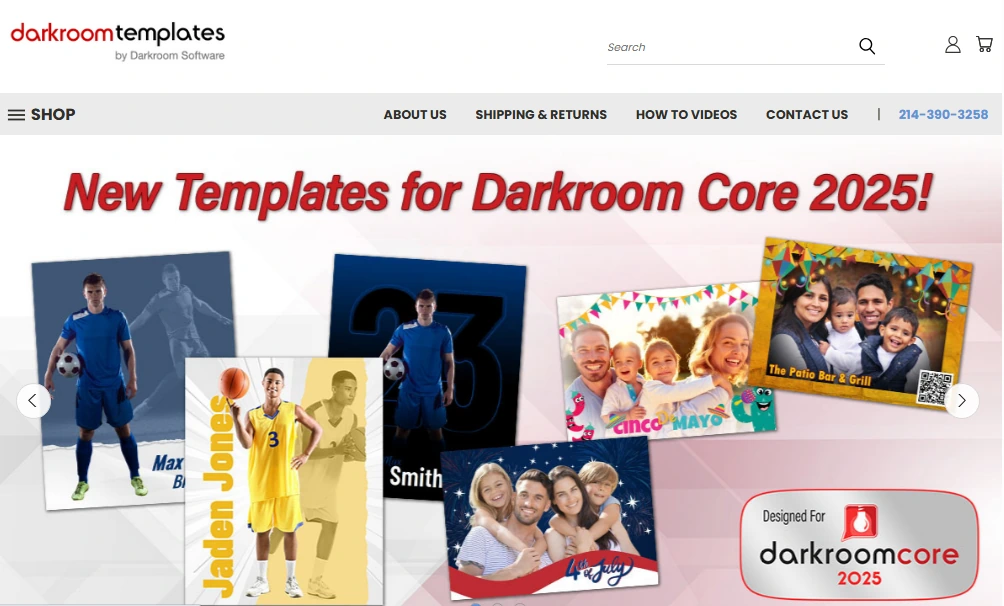
For operators who want more variety, DarkroomTemplates.com is an independent marketplace with templates from multiple designers, organized by event type (weddings, birthdays, corporate, Bar/Bat Mitzvahs, and more).
Source: Darkroom Templates
Capture Modes and Media Output: Six distinct output types from a single installation.
Darkroom Booth consolidates every modern capture format into one application: still photos, standard video, slow-motion video, animated GIFs, Boomerang/Burst Mode GIFs, and VR 180°/360° panoramic images.
Still photos are captured via direct tether to the camera. Guests can take a photo at the touch of a button rather than relying on a countdown timer alone. The best pose selection feature lets guests take three shots and choose their favorite before finalizing, a workflow designed for formal events like school dances and galas. Individual shots within a multi-shot session can be re-taken without restarting.
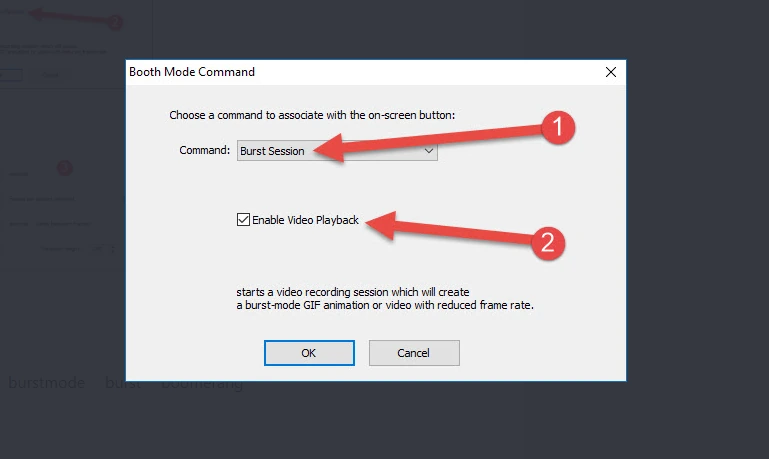
For video-based output, Darkroom Booth offers two distinct GIF modes. Animated GIFs are assembled from individual still photos, giving precise per-frame visual control. Burst Mode/Boomerang GIFs are extracted from a short video clip, producing the fluid motion of an Instagram Boomerang effect. Both modes give operators different tools for different event aesthetics.
Source: Darkroom Software
Slow-motion capability varies by camera: Canon and Nikon deliver up to 60 fps, while GoPro HERO cameras can record at 120 fps in 1080p or 240 fps in 720p, producing smoother slow-motion output.
Green screen with chroma key supports green, blue, or auto-detection knockout modes, with a fallback to Remove.bg for AI-powered background removal. The green screen works with both static image and video backgrounds, so operators can run chroma key against a moving video background during a Boomerang session.
One important note: all video-based output (video, slow motion, Boomerang/Burst GIFs) requires the free FFMPEG utility to be installed separately.
Sharing and Engagement: Built-in delivery channels and interactive features.
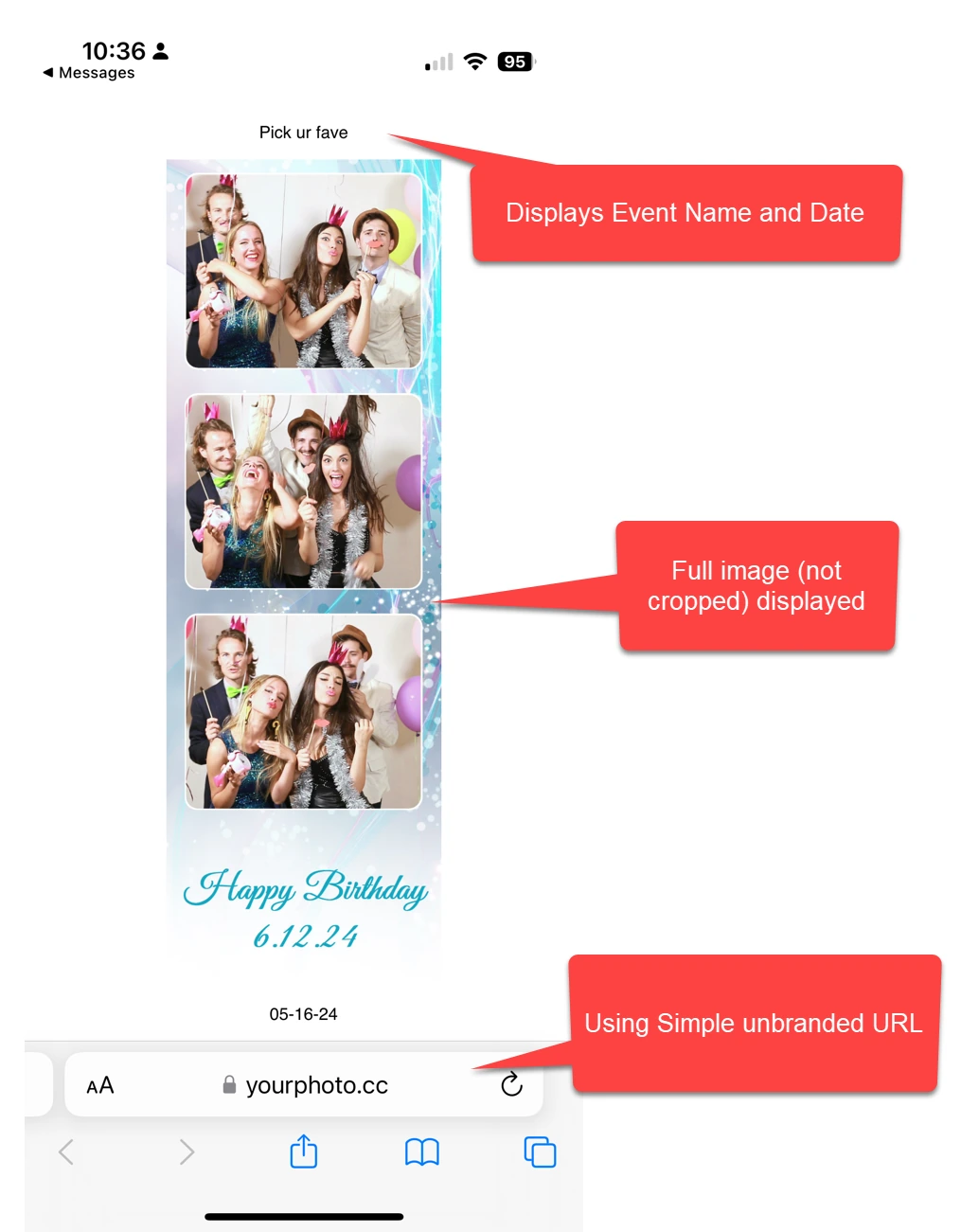
After each session, Darkroom Booth shares photos, videos, and GIFs via text or email directly from the booth. The software generates files sized for specific platforms: Snapchat, Twitter, and Instagram Ready Files are formatted to each platform’s requirements so guests can post without cropping or converting.
For SMS delivery, operators can use Darkroom Phone (Darkroom’s own texting service, no Twilio account needed) or configure their own Twilio account. Dropbox integration provides automatic cloud archiving to a designated event folder.
Source: Darkroom Software
For ongoing guest access, sessions can auto-upload to EventGallery.com, populating a branded online gallery in real time. EventGallery is a separate Darkroom Software subscription product that supports photos, GIFs, and MP4 files, with white-label branding, password protection, and a custom API.
Interactive features go beyond photo delivery.
Light painting offers a creative capture mode. Type-a-note on prints and print signing let guests personalize their output. The quiz and contest engine supports random or manual winner selection from the Booth Control™ app, and winning can trigger a special template, coupon, lights and sounds through Phidget hardware integration.
One limitation: Facebook no longer allows direct uploading from third-party software. Operators who need Facebook delivery must use Event Gallery as a workaround, which requires a separate subscription.
AI Features: Generative portraits, face swap, and scene generation added in 2025.
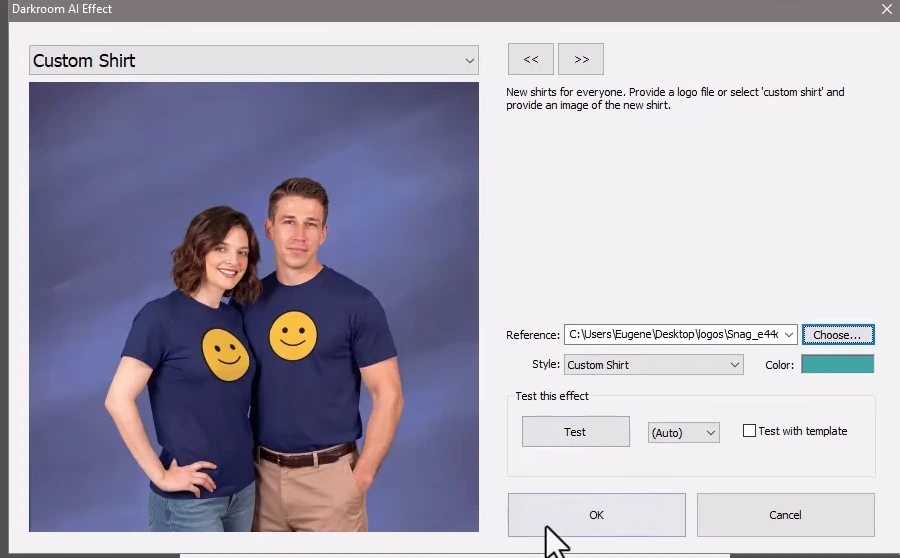
Darkroom Booth launched AI features in May 2025, including generative portraits, face swap, custom prompts, and scene generation that replaces physical green screen backgrounds. The AI additions continued through Photo Booth Expo 2026 with features like AI Custom Shirts and AI Lenticular Prints.
Source: Darkroom Software
These features let operators charge more per activation by turning a standard photo session into a shareable experience. A free AI Western template package was distributed as an entry point for operators testing the feature.
Pricing: A $295 perpetual license with no subscription required.
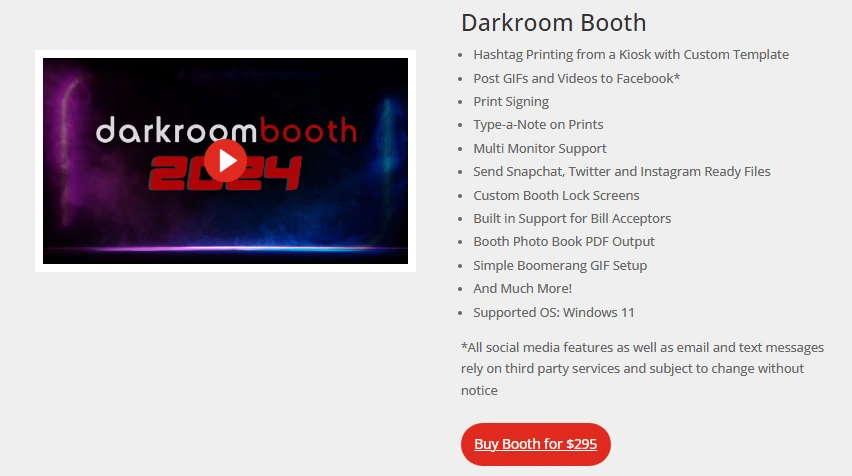
Darkroom Booth’s pricing model is its most distinctive feature. The full license costs $295 as a one-time purchase, including the complete software, one year of updates and maintenance, and tech support during the active maintenance period.
After the first year, an optional $95/year maintenance plan renews access to updates and support. If maintenance lapses, the software continues to run. It doesn’t deactivate. Cloud-dependent features like Darkroom’s email server and Twilio-based image hosting require an active maintenance plan, but core booth operation continues.
Source: Darkroom Software
Existing Booth 2.x owners can upgrade for $195. A $45 ten-day temporary license is available for existing customers who need a second booth for an overbooking.
A free trial is available without a time limit. The trial is functionally complete but prints and email outputs are watermarked and video recording is disabled. Templates and events built during the trial transfer to a licensed installation.
Additional costs to consider: Event Gallery is a separate subscription required for Facebook gallery uploads. Premium templates are sold separately via DarkroomTemplates.com. If the maintenance plan lapses for more than one year, the upgrade price returns to $195 rather than the $95 renewal rate.
Where Darkroom Booth Falls Short
Darkroom Booth delivers broad functionality at a low total cost of ownership, but several limitations reflect its design as a Windows desktop application built for a specific operator profile.
Windows-Only Platform: Darkroom Booth has no macOS version. It can run under Boot Camp on Intel Macs, but there’s no native Mac or iPad support. In a market where many creative freelancers and rental operators work on Apple hardware, this narrows the buyer pool. No Mac port has been signaled in any public communication.
Business-Hours-Only Support: Phone and email support is available Monday through Friday, 9am to 5pm Central. Photo booth operators work evenings and weekends. A software issue at a Saturday wedding with no available support is a real risk that Capterra reviewers have flagged.
Desktop-Centric Architecture: Darkroom Booth has no cloud dashboard, no public API, no webhook endpoints, and no Zapier integration. Configuration, template management, and reporting happen on the local machine. For operators managing multiple booths across venues, this means physically configuring each machine rather than pushing changes from a central dashboard.
Dated Operator Interface: Capterra reviewers note that initial setup can feel inconsistent, with button labels like “Settings” and “Global Settings” described as vague. The interface design has not kept pace with cloud-first alternatives.
No Built-In Marketing or Lead Analytics: The survey and quiz features capture data locally, but Darkroom Booth doesn’t include an analytics dashboard, social sharing tracking, or CRM integration. Operators who want to measure lead capture rates, gallery views, or social shares need separate tools.
These limitations follow naturally from a Windows-native, desktop-first design built for operators who prioritize hardware control and low ongoing costs. But they create a clear gap for operators who want a cloud-managed system that handles both the booth experience and the marketing workflow around it.
Top Darkroom Booth Alternative: Simple Booth
Simple Booth takes a different approach to the same problem. Instead of desktop configurability, it delivers a cloud-connected iPad platform paired with dedicated hardware, designed to run itself at events while feeding captured data into a marketing workflow.
In development since 2012 and co-founded by Mark Hennings (a wedding videographer who taught himself app development) and Jeremy Cox (an Austin-based DJ running photo booths for events), Simple Booth was one of the first photo booth apps for iPad.
It has since grown to serve 30,000+ customers with a 4.7-star App Store rating from 2,400+ ratings and 40 million+ moments captured. Enterprise clients include Live Nation, Sports Illustrated Tickets, and Gibson Brands.
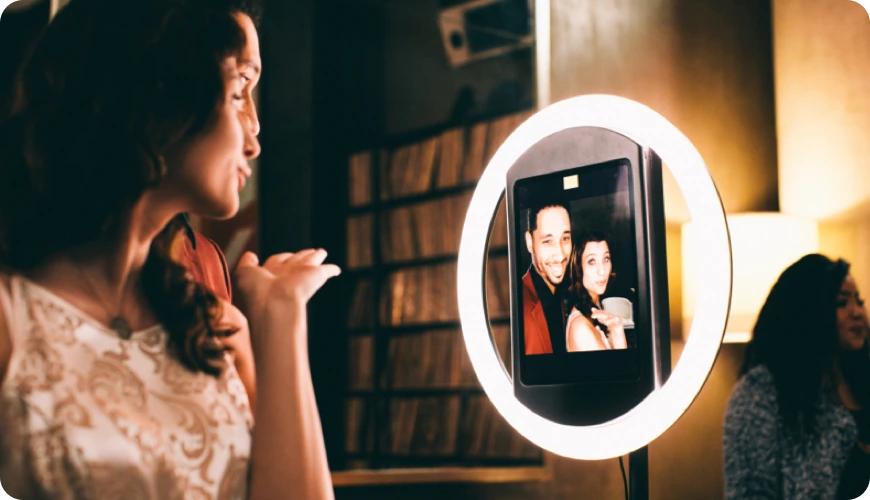
Integrated Hardware: HALO pairs a machined aluminum ring light with iPad-based software in a system that sets up in under a minute.
The Simple Booth HALO is a photo booth kit that integrates a ring light, iPad mount, and mounting system into a single aluminum chassis. The ring light uses 112 LEDs producing up to 2,100 lumens with a diffuser, rated for 50,000 hours of operation. The chassis is machined from a single billet of anodized aluminum with a patented ring-light system.
The iPad snaps in via a tool-less faceplate, and a concealed built-in USB-C cable keeps it charged throughout the event. Setup takes under one minute with no tools required. The Event Kit includes a selfie stand and waterproof rolling travel case (49 lbs total); the Install Kit provides a wall mount for permanent venues.
Source: Simple Booth
The hardware includes post-processing features that close the quality gap between iPad cameras and DSLRs: Glam skin smoothing, DSLR-style background blur/bokeh, and AI background replacement without a physical green screen.
All effects, filters, and capture modes work together (with video, DSLR integration, and in offline mode) so operators don’t have to navigate compatibility rules between features. Image previews render up to 12x faster than previous versions, giving guests instant results rather than visible wait times.
For operators who want studio-grade image quality, HALO 5.0 added Canon DSLR and mirrorless camera integration through the same iPad workflow, supporting both wired USB and wireless WiFi connections. Wireless DSLR tethering is a differentiating capability that most competing platforms don’t offer, giving operators more flexibility in how they position cameras relative to the booth.
Creole Cuisine has captured over 200,000 photos across their venues, with operators noting “I don’t see too many of our competitors with this.” (Simple Booth)
Cloud Dashboard and Remote Management: Configure, monitor, and update booths from anywhere without touching the device.
Where Darkroom Booth requires on-machine configuration, Simple Booth manages everything through a cloud-based online dashboard. Operators create “presets” (event profiles defining the booth experience) in the dashboard, and settings sync automatically to the iPad without exiting booth mode.
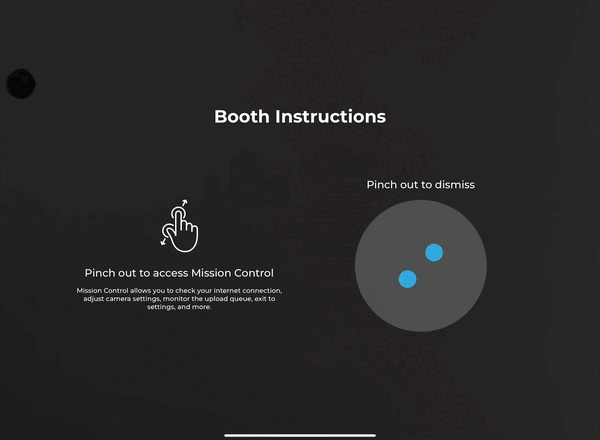
The Mission Control overlay, triggered by a two-finger pinch gesture, lets operators monitor device health (network, storage, upload queue), adjust camera settings, and sync dashboard changes during live events without breaking the guest-facing interface. The HALO app queues sessions in offline mode and delivers them when connectivity returns, handling venues with unreliable Wi-Fi.
Source: Simple Booth
HALO 5.0 introduced the Layout Designer, an in-app design tool with layers, fonts, gradients, QR code embedding, and multi-layout support. Simple Booth calls it “the most powerful design tool in the photo booth industry”, eliminating dependence on external design software.
Operators who previously needed Photoshop for template work can now build complete branded layouts inside the app or dashboard.
Treetop Golf built 150,000 unique email addresses across locations using Simple Booth’s cloud dashboard and lead capture workflow. (Simple Booth)
Lead Capture and Marketing Tools: Every photo session feeds a measurable marketing workflow.
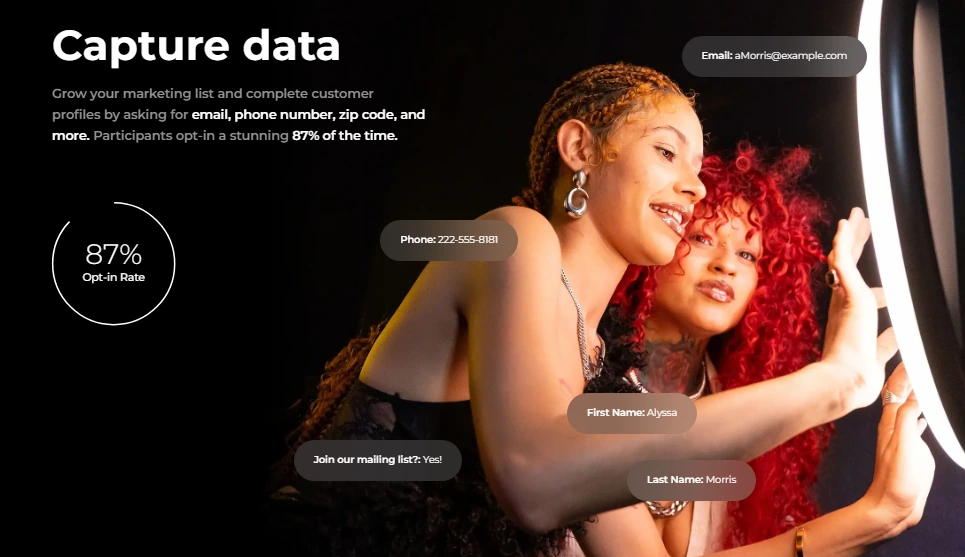
The most significant gap Simple Booth fills is turning photo booth interactions into marketing data. The platform captures opt-in rates as high as 87 to 89% when guests receive photos, because the data capture form is embedded in the natural flow of receiving a photo rather than presented as a separate ask.
Lead capture fields include email, first name, last name, phone, postal code, and date of birth on the Pro plan, expanding to 10 custom fields with checkboxes and required legal terms on the Select plan. Data exports as CSV, integrates natively with MailChimp, and connects to custom CRMs via an Open API.
Source: Simple Booth
The analytics dashboard tracks total participants, uploads, gallery views, and social sharing activity across Facebook, X/Twitter, LinkedIn, and Instagram. The Select tier adds demographic insights via face detection (estimated age, gender breakdown, average group size), giving marketers audience composition data from activations.
Each event generates an online gallery that can become a Live Feed display for TV or projector with a single tap. Gallery customization includes titles, hashtags that auto-populate on X/Twitter shares, color themes, header images, and interstitial ads.
Arizona Opera grew its email list by 1,000 addresses in a few events using Simple Booth’s lead capture workflow. (Simple Booth)
AI Photo Booth: Native AI effects with identity preservation and zero-cost testing.
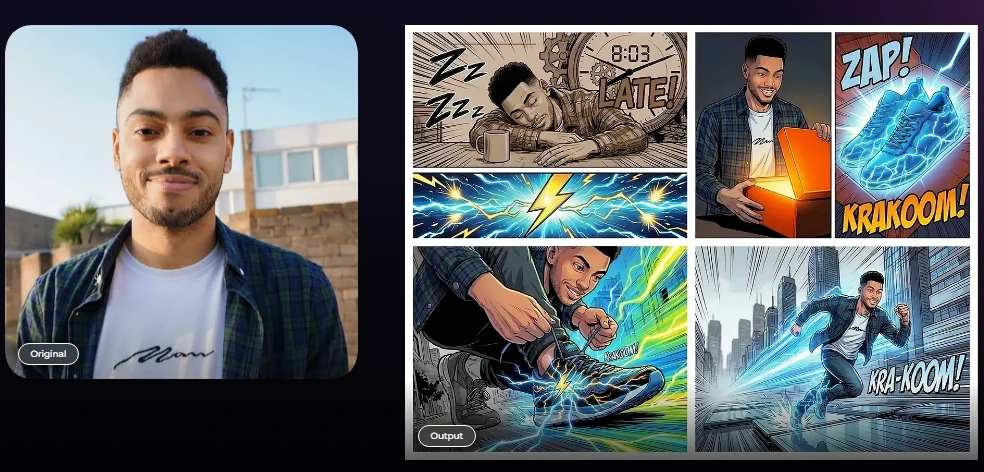
Simple Booth’s AI Photo Booth transforms guest photos using text prompts through three Nano Banana AI models that balance speed, quality, and group size. The system automatically preserves identity and likeness at the platform level, keeping guests recognizable regardless of the transformation applied, without prompt engineering from the operator.
A distinctive feature is per-frame multi-prompt storyboarding: operators can assign a unique AI prompt to every individual frame in a multi-frame layout, enabling comic strip or cinematic scene strips. The Guest Input system lets participants answer questions that feed directly into the AI prompt as template variables, producing personalized outputs per guest.
Source: Simple Booth
AI effects are composited directly with the Layout Designer, so brand overlays and graphic layers apply on top of AI-generated photos in a single workflow. Testing prompts outside of booth mode consumes zero credits, letting operators iterate freely before events.
Credits cost $0.10 each, with model consumption ranging from 1x to 3x per generation depending on the model selected. Purchased credits do not expire.
Virtual Booth: A browser-based photo experience with no hardware required.
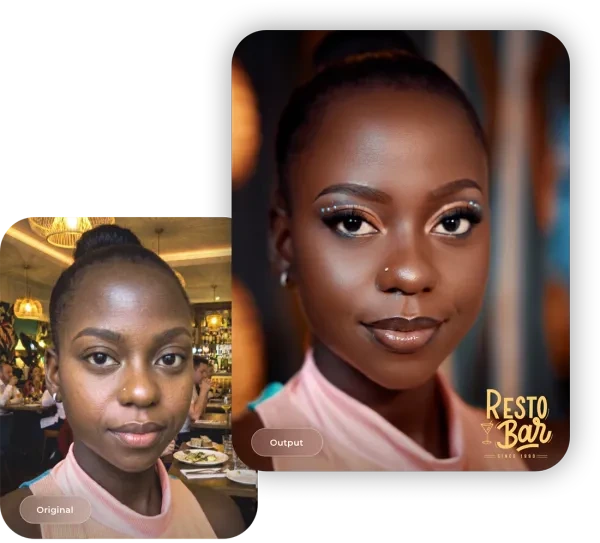
Virtual Booth extends Simple Booth beyond physical hardware entirely. Participants visit a branded link or scan a QR code from any device, grant camera permissions or upload an existing photo, apply effects (overlays, stickers, AI transformations, background replacement), and submit to a gallery. No app install required.
Source: Simple Booth
This makes Virtual Booth useful for hybrid events (physical kiosks for in-room attendees, Virtual Booth for remote participants), always-on campaigns on product packaging or websites, and situations where shipping hardware isn’t practical. All submissions feed the same analytics and gallery infrastructure as HALO sessions.
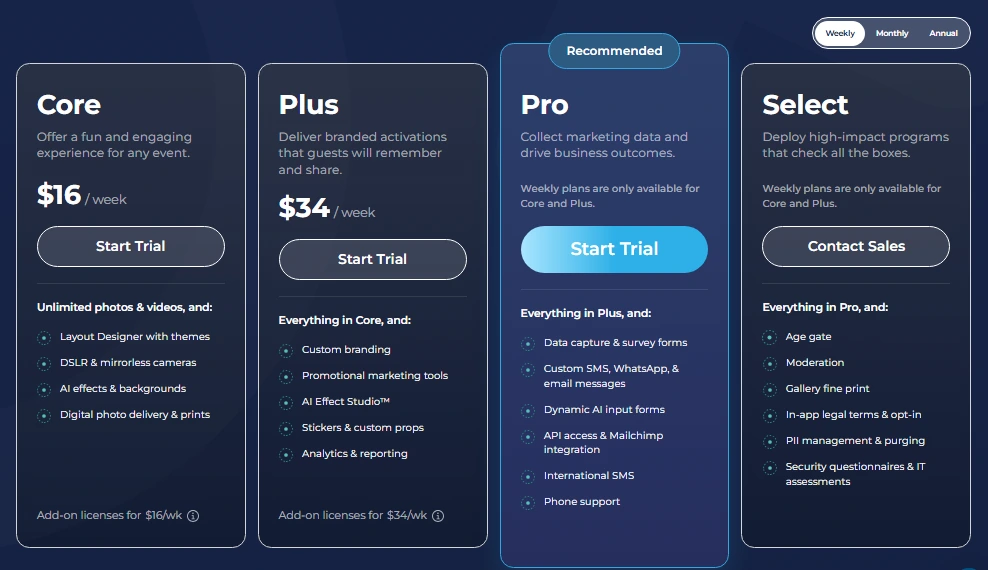
Simple Booth Pricing: Subscription plans from $14.99/week to $249/month.
Simple Booth uses a per-license subscription model with weekly, monthly, and annual billing:
- Lite ($14.99/week, $290/year): Basic features with ads shown in the app. No DSLR, video, custom branding, AI, analytics, or lead capture.
- Core ($24.99/week, $490/year): Ads removed. Adds DSLR/mirrorless connection, video, background replacement, Dropbox integration, AI effects, and Virtual Booth.
- Plus ($49.99/week, $990/year): Adds custom branding, analytics, guest-editable text layers, and custom AI effects.
- Pro ($149/month, $1,490/year): Adds lead capture, API integration, phone support, moderation, and age gate.
- Select ($249/month, $2,490/year): Adds custom legal terms, security questionnaires, and demographic analytics.
Source: Simple Booth
Each plan includes one license. Additional devices require add-on licenses at the same rate. HALO hardware kits are sold separately, starting at approximately $2,090 for an Event Kit.
Darkroom Booth or Simple Booth: Comparison Summary
| Darkroom Booth | Simple Booth | |
|---|---|---|
| Platform | Windows desktop application | iPad app with cloud dashboard |
| Hardware approach | Hardware-agnostic (bring your own) | Integrated HALO ring-light kits |
| Pricing model | $295 one-time license | $14.99–$249/week or month subscription |
| Camera support | Canon, Nikon, GoPro, webcams via tether | iPad camera + Canon DSLR/mirrorless via USB or WiFi (Core+) |
| Printer support | 20+ dye-sub models + any Windows printer | iPad-based (no native print driver layer) |
| Setup time | Varies by hardware configuration | Under 1 minute with HALO kit |
| Remote management | Booth Control™ (same Wi-Fi network) | Cloud dashboard (anywhere) |
| Lead capture | Local surveys/quizzes with SQLite export | Cloud-based forms with 87%+ opt-in, CRM sync |
| Analytics | Basic stats via Booth Control™ | Dashboard with social tracking and demographics |
| AI features | Generative portraits, face swap, scene generation | AI effects with identity preservation, per-frame prompts |
| Template design | Built-in editor + external import | Layout Designer (in-app/dashboard) |
| Photo delivery | SMS, email, QR code, Dropbox | SMS, email, QR code, AirDrop, WhatsApp, Dropbox |
| Virtual/remote option | None | Virtual Booth (browser-based) |
| Offline operation | Full (desktop application) | Offline queue with auto-upload on reconnect |
| Support hours | Mon–Fri, 9am–5pm Central | 7-day support; phone on Pro+ |
| Free trial | No time limit (watermarked output) | 7-day trial |
| Payment hardware | Bill acceptors, coin-op via Phidgets | Not supported |
Final Verdict
The choice between Darkroom Booth and Simple Booth comes down to your operating model and what you need the booth to do beyond taking photos.
Choose Darkroom Booth if you run a Windows-based operation and want hardware flexibility with low ongoing costs.
The $295 perpetual license is hard to beat for operators who already own Canon or Nikon gear, dye-sub printers, and Windows PCs. The customization options (Phidget support, bill acceptors, coin-op, six capture modes, VR 180/360) make it the right tool for operators who build custom enclosures, run unattended kiosk deployments, or need capabilities that consumer-oriented platforms don’t offer.
If you value owning your software outright and configuring every detail of the booth experience, Darkroom Booth delivers.
Choose Simple Booth if you want a complete system that handles the booth experience and the marketing workflow around it.
The iPad-based platform with integrated HALO hardware sets up in under a minute, manages remotely from a cloud dashboard, captures leads at near-90% opt-in rates, and tracks social sharing and gallery engagement through built-in analytics. The intuitive interface means new staff can be trained quickly, a real advantage for growing rental companies that hire event staff rather than running every booth personally.
For rental companies running multiple events per week, marketing teams measuring activation ROI, and venue operators who want a self-running guest engagement tool, Simple Booth turns every photo session into measurable marketing data. The subscription costs more over time than a one-time license, but it includes ongoing updates, cloud infrastructure, and the marketing tools that increasingly define the photo booth’s value to clients.
Get started with Simple Booth here.
Darkroom Booth FAQ
How much does Darkroom Booth cost?
Darkroom Booth costs $295 as a one-time purchase, including the complete software and one year of updates and support. After the first year, an optional $95/year maintenance plan renews access to updates, support, and cloud-dependent features like email delivery.
The software continues to run its core functions without an active maintenance plan. Simple Booth uses a subscription model starting at $14.99/week for its Lite tier, with business-grade plans at $149/month (Pro) and $249/month (Select).
Does Darkroom Booth work on Mac or iPad?
Darkroom Booth is Windows-only. It can run under Boot Camp on Intel Macs, but there is no native macOS or iPad version. No Mac port has been announced. Simple Booth runs on iPad, with its HALO app available on the App Store and a Virtual Booth product that works in any browser on any device.
What cameras does Darkroom Booth support?
Darkroom Booth supports a wide range of cameras via direct tether: Canon EOS mirrorless and DSLR models, Nikon Z and D series, GoPro HERO 9 and 10, and most Windows-compatible webcams. GoPro cameras can record at up to 240 fps for slow-motion output.
Simple Booth uses the iPad’s built-in camera by default and added Canon DSLR/mirrorless support in its HALO 5.0 update (with both wired USB and wireless WiFi tethering) for operators who need studio-grade image quality.
Does Darkroom Booth have after-hours support?
No. Phone and email support is available Monday through Friday, 9am to 5pm Central. There is no weekend, evening, or emergency support coverage. Since photo booth operators primarily work evenings and weekends, this is a frequently cited limitation.
Simple Booth offers 7-day support on all plans, with phone support available on its Pro and Select tiers.
Can Darkroom Booth upload photos to Facebook?
Not directly. Facebook’s API restrictions prevent Darkroom Booth from uploading photos to Facebook. The workaround is Event Gallery, a separate Darkroom Software subscription product that creates online galleries where guests can share to their personal Facebook page.
Simple Booth handles Facebook sharing through its built-in gallery system, automatically drafting a post in the native Facebook app.
Does Darkroom Booth offer AI features?
Yes. Darkroom Booth launched AI features in May 2025, including generative portraits, face swap, scene generation without a physical green screen, and custom prompts. More recent additions include AI Custom Shirts and AI Lenticular Prints.
Simple Booth’s AI effects use three Nano Banana models with automatic identity preservation, zero-cost prompt testing, per-frame multi-prompt storyboarding, and guest co-creation through variable injection into prompts.
Is there a free trial for Darkroom Booth?
Yes. Darkroom Booth offers a free trial with no time limit. The trial provides access to most features, but prints and email outputs are watermarked and video recording is disabled. Templates and events built during the trial transfer to a licensed installation.
Simple Booth offers a 7-day free trial with 25 bonus AI credits.
What sharing options does Darkroom Booth include?
Darkroom Booth shares photos, videos, and GIFs via SMS/MMS (through Darkroom Phone or a personal Twilio account), email, and QR codes. It generates platform-specific files formatted for Snapchat, Twitter, and Instagram. Dropbox integration provides automatic cloud archiving. Event Gallery auto-upload creates branded online galleries.
Simple Booth adds AirDrop and WhatsApp delivery to a similar set of sharing channels, with social sharing tracking and analytics built into the dashboard.
Keep reading
 Showdowns
Simple Booth vs Darkroom Booth: Which Photo Booth Software Fits Your Business in 2026?
iPad turnkey vs Windows DSLR veteran. Simple Booth or Darkroom Booth?
 Alternatives
7 Darkroom Booth Alternatives: Photo Booth Software for Every Operator (2026)
Outgrowing Darkroom Booth's Windows-only world? These picks move you forward.
 Showdowns
Darkroom Booth vs Snappic (vs Simple Booth): Which Photo Booth Software Should You Choose in 2026?
Own-it-forever desktop vs slick iPad subscription. Darkroom Booth or Snappic?