6 LumaBooth Alternatives: Specialized Photo Booth Solutions for Every Operator (2026)

LumaBooth is one of the most established photo booth software platforms, offering a cross-platform solution on Windows and iOS with support for Canon, Nikon, Sony, and GoPro cameras.
With over 14 years in the market and tens of thousands of operators in 150+ countries, it covers a wide range of booth formats: photo, 360, mirror, glam, green screen, video guestbook, and AI portraits, all within a single subscription.
But as your photo booth business evolves, you may need more specialized capabilities. LumaBooth’s split architecture between Windows and Apple means feature parity is still a work in progress (cashless payments remain Windows-only, and event sync only works Windows-to-Windows).
Its Apple ratings trail behind its Windows scores, and the software requires operators to source their own hardware separately.
That’s where this guide comes in. Whether you’re looking to:
- Get an integrated photo booth system with built-in ring lighting and lead capture rates above 87%
- Manage multi-format booth fleets from a single enterprise platform with white-label support
- Run photo booth software across Android, Linux, and Raspberry Pi alongside iOS and Windows
- Own your software outright with a one-time perpetual license instead of a recurring subscription
- Run AI photo effects on Canon DSLR hardware at the lowest monthly cost
- Start a photo booth side business with minimal upfront investment and no subscription commitment
We’ll explore alternatives that excel in each of these areas.
Some operators use one of these tools alongside LumaBooth for specific event types, while others switch entirely. This isn’t about finding a “better” platform; it’s about finding the right fit for your business model, hardware, and growth plans.
Here are the LumaBooth alternatives and how they fit different photo booth operations.
The Best LumaBooth Alternatives
| The Best LumaBooth Alternatives | ||
|---|---|---|
 | Starts at: $49/mo App Store: 4.7 (2,400+ ratings) | Simple Booth Best Alternative for Integrated Photo Booth Experiences & Lead Capture We chose Simple Booth because its HALO hardware and cloud-connected iPad app deliver a self-operating photo booth system with lead capture opt-in rates above 87%, making it ideal for rental companies and brand marketers who need ready-to-use operation and measurable results. |
 | Starts at: $69/mo | Snappic Best Alternative for Enterprise Multi-Booth Fleet Management We chose Snappic because it consolidates every major booth format (360, GlamBot, mirror, DSLR, photo, roaming) into a single iOS app with white-label sub-account infrastructure and 24/7/365 support. |
 | Starts at: $439.90/yr | TouchPix Best Alternative for Cross-Platform Device Flexibility & 360 Video We chose TouchPix because it runs full booth capture software across iOS, Android, macOS, Windows, Linux, and Raspberry Pi with unlimited devices per account, alongside dedicated 360 video integration with GoPro 7-14. |
 | Starts at: $295 (one-time) | Darkroom Booth Best Alternative for Windows DSLR Operators Who Want a Perpetual License We chose Darkroom Booth because its one-time purchase model with no subscription requirement gives Windows-based Canon and Nikon operators full control over their software costs, with native Phidget hardware support for permanent kiosk deployments. |
 | Starts at: €20/mo | BoothLedger Best Alternative for Affordable AI Photo Booth Effects on Canon DSLR We chose BoothLedger because it delivers dual-engine AI effects, Canon DSLR tethering, and cloud management at the lowest published all-in monthly price for Windows operators, with no per-credit AI billing. |
 | Starts at: $149 (one-time) | SparkBooth Best Alternative for Budget-Conscious DIY Operators Without a Subscription We chose SparkBooth because its flat one-time license at $149-$189 gives occasional and freelance operators DSLR-quality photo booth capability, including GIF, mirror, and green screen modes, with no recurring fees. |
What is LumaBooth?
LumaBooth is professional photo booth software by Lumasoft that runs on Windows PC, iPad, iPhone, and Mac.
Previously known as dslrBooth on Windows, the platform unified under the LumaBooth brand in March 2026 with version 8.0, bringing both platforms under a single dashboard for the first time.
Its key features include:
- Photo, GIF, boomerang, and video capture with Canon, Nikon, Sony DSLRs, GoPro, and webcams
- 360 Booth with high frame-rate capture and speed ramp controls
- Mirror Booth with Virtual Attendant video/audio prompts
- AI Portraits with 170+ presets and custom prompt capability
- Green screen and AI background removal without a physical backdrop
- Cashless payments via QR code with Stripe integration (Windows only)
- LumaBooth Dashboard for browser-based event configuration and cross-device sync
- 820+ professionally designed templates included with the subscription
- Video Guestbook, Glam Booth, and Roaming Photography modes
A single LumaBooth subscription covers all of these booth formats, and the Dashboard lets operators configure events from any browser before arriving at the venue. No other photo booth platform connects Windows and iOS under one roof, which is an advantage for operators running mixed hardware.
However, as your business grows, you may need more specialized tools: integrated hardware for hands-off operation, enterprise fleet management, broader device support, or a different pricing model entirely. That’s where the alternatives on this list come in.
Looking for a self-operating photo booth with built-in lead capture? Simple Booth’s HALO system sets up in under a minute and captures leads at 87%+ opt-in rates. Learn more about Simple Booth.
How We Curated Our List of LumaBooth Alternatives
After testing LumaBooth and researching the photo booth software market, we focused on finding tools that serve specific operator types well. While LumaBooth handles many booth formats in one subscription, different businesses need more specialized solutions for:
- Getting a complete, integrated hardware+software system that operates unattended and captures marketing data
- Managing large multi-booth fleets across formats with white-label infrastructure
- Running booth software on devices beyond Windows and iOS, including Android and Raspberry Pi
- Owning software outright instead of paying recurring subscriptions
- Running AI photo effects at the lowest monthly cost on professional cameras
- Entering the photo booth market with minimal financial commitment
Each tool on this list leads in one of these areas. You might use them alongside LumaBooth for specific event types or switch entirely; it depends on what your photo booth business needs most.
| ❗DISCLAIMER: We aren’t covering every single photo booth tool on the market! Our focus is on highlighting the best alternatives that address specific operator needs where LumaBooth’s approach may not be the ideal fit. |
|---|
1. Simple Booth: Best Alternative for Integrated Photo Booth Experiences & Lead Capture
Simple Booth is the photo booth that runs itself, pairing a subscription-based iPad app with proprietary HALO ring-light hardware and a browser-based Virtual Booth product.
With 30,000+ customers globally, a 4.7-star App Store rating from 2,400+ ratings, and 40 million+ moments captured since 2013, it serves two buyer segments: event rental professionals who want to build a more profitable photo booth business, and marketing teams who need a new marketing engine for their brand. Its key features include:
- Integrated HALO hardware: Ring-light photo booth kits in machined aluminum with patented lighting, paired with an iPad app and cloud dashboard
- High-converting lead capture: Customizable data capture forms achieving opt-in rates as high as 87-89% during the photo-taking experience
- Virtual Booth: Browser-based photo experiences that require no hardware, no app install, and work on any device
- AI Photo Booth: Nano Banana AI models that transform guest photos with text prompts, composited directly with brand overlays
- Layout Designer: Full in-app design tool for creating templates with layers, fonts, gradients, and QR codes, replacing external design software
- DSLR & mirrorless camera integration: Canon and Sony camera support via USB or WiFi on Core plans and up, with wireless connectivity that most competitors don’t offer
- Multi-channel delivery: AirDrop on all plans, plus QR code, SMS, email, and WhatsApp delivery across paid tiers
Unlike LumaBooth, which is software-only and requires operators to source their own camera, lighting, and mounting hardware, Simple Booth is an integrated system where the chassis, ring light, iPad mount, charging, and software are all designed together.
For rental companies and brand marketers who need a ready-to-use system that captures both great photos and marketing data, Simple Booth is built for that job.
Why Choose Simple Booth Over LumaBooth for Premium Photo Booth Experiences
While LumaBooth offers broad booth format support at an affordable price, Simple Booth excels as an integrated system built for operators who value hands-off reliability and measurable marketing outcomes.
Here’s where Simple Booth differs.
Integrated Hardware & Software: A Complete Photo Booth System in One Package
Simple Booth’s HALO chassis is machined from a single billet of aluminum with a patented ring-light system featuring 112 LEDs producing up to 2,100 lumens, rated for up to 50,000 hours of operation. Groups can stand 6-8 feet back from the camera and still be adequately lit in most indoor environments.
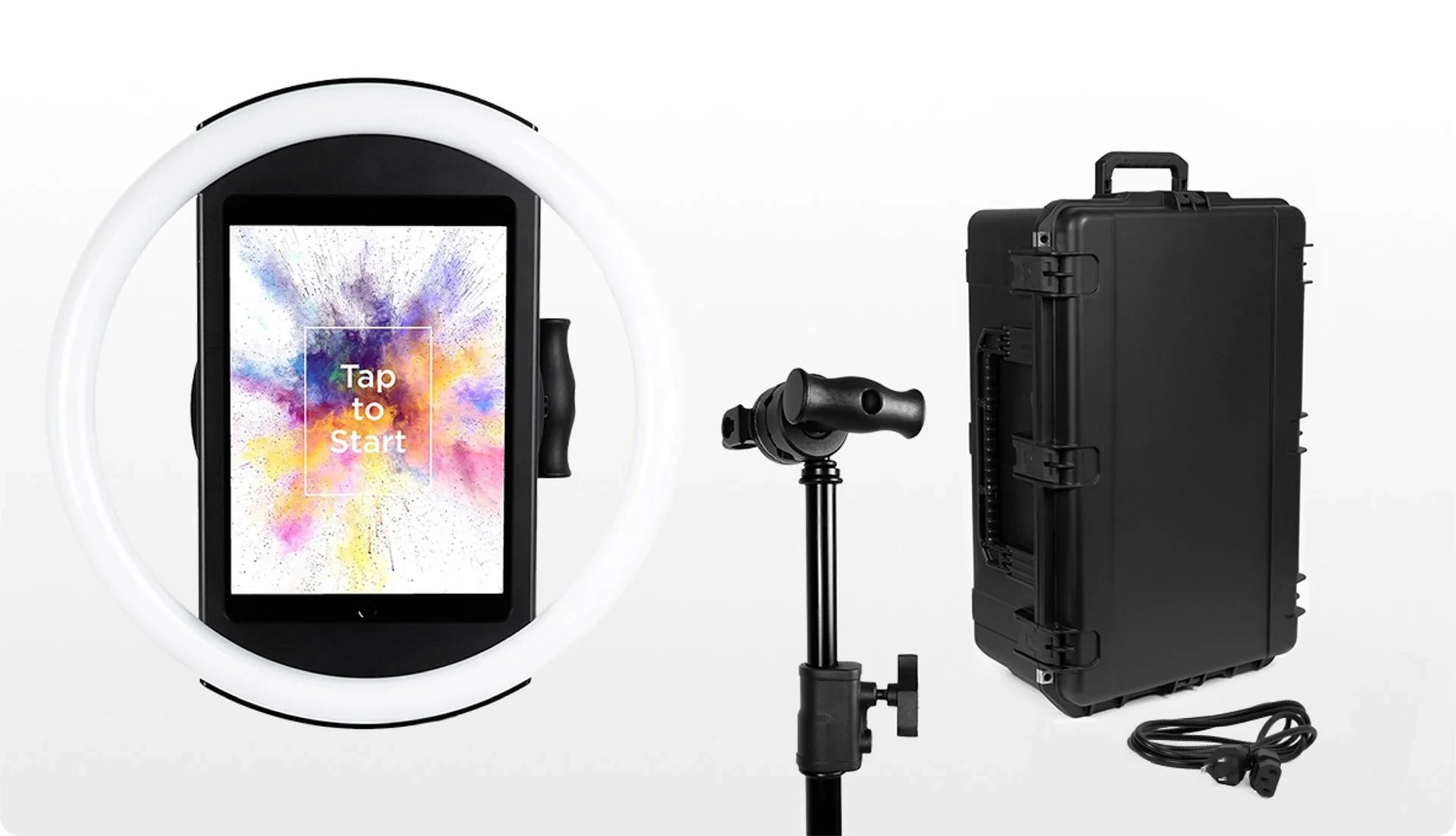
The iPad snaps in via a tool-less faceplate, and a concealed built-in USB-C cable keeps the device charged throughout events without dangling cables. The entire system sets up in under one minute with no tools required.
A Preflight Check screen runs before each event launch to catch configuration issues in advance. Once live, the app renders image previews up to 12x faster, so guests see their photos and GIFs instantly.
LumaBooth, by contrast, is software-only: operators assemble their own camera, lighting rig, stand, and iPad mount from separate vendors. This gives operators hardware flexibility, but it also means inconsistent lighting quality, longer setup times, and more points of failure at live events.
⚡Simple Booth in Action: A rental operator arrives at a wedding venue 15 minutes before the reception.
They roll in the HALO Event Kit (a 49-lb waterproof travel case with wheels and an extendable handle), deploy the selfie stand, snap in the iPad, and launch the preset they configured remotely from the online dashboard that morning. The booth is running before the first guest arrives. If venue Wi-Fi drops, the offline upload queue stores sessions and delivers them when connectivity returns.
G7 Entertainment Marketing has relied on Simple Booth for over 10 years, capturing 136,000+ fan interactions across live events. (Simple Booth Case Study)
Marketing & Lead Capture: Turn Every Photo Into a Business Opportunity
Simple Booth captures opt-in rates as high as 87-89% when guests receive photos, because the app embeds the data capture form directly into the photo-taking experience rather than presenting it as a separate ask. This is well above typical marketing form conversion rates.
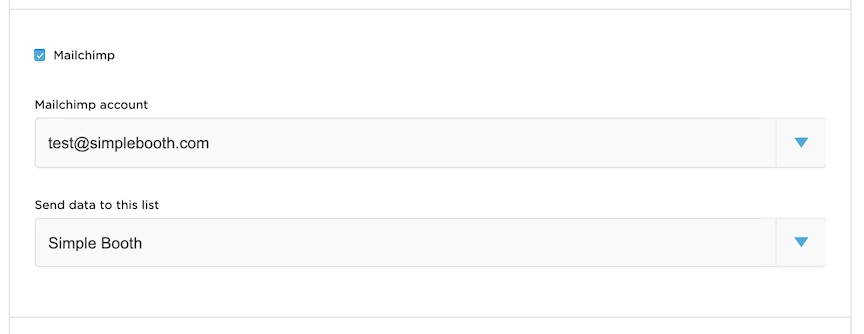
The platform collects up to 6 standard fields (email, first name, last name, phone, postal code, date of birth) on the Pro plan, and up to 10 custom fields including checkboxes and required legal terms on the Select plan. Data exports as CSV and integrates natively with MailChimp, with custom CRM delivery available via the Open API on Pro and Select tiers.
Source: SimpleBooth
The analytics dashboard tracks total participants, uploads, gallery views, social sharing activity (Facebook, X/LinkedIn, Instagram), and on the Select plan, demographic insights via face detection including estimated age, gender breakdown, and average group size.
LumaBooth offers surveys with data collection and can log email addresses and phone numbers from shares, but it treats data collection as a secondary feature within the booth workflow. Simple Booth builds its entire value proposition around it.
⚡Simple Booth in Action: A brand activation team sets up HALO at a product launch. Guests take photos, receive them via QR code, and provide their email and phone number with a required opt-in checkbox. By the end of the event, the team has 400 verified leads with full contact information, social sharing data, and gallery analytics. They export the CSV to their CRM and show the client exactly how many leads, shares, and gallery views the activation generated.
Treetop Golf built 150,000 unique email addresses across its locations using Simple Booth’s lead capture capabilities. (Simple Booth)
Virtual Booth: Reach Audiences Beyond Physical Events
Virtual Booth is Simple Booth’s browser-based photo experience that requires no hardware, no app install, and works on any device.
Participants join via a QR code or link, grant camera permissions (or upload an existing photo), apply branded effects, and share to social media.
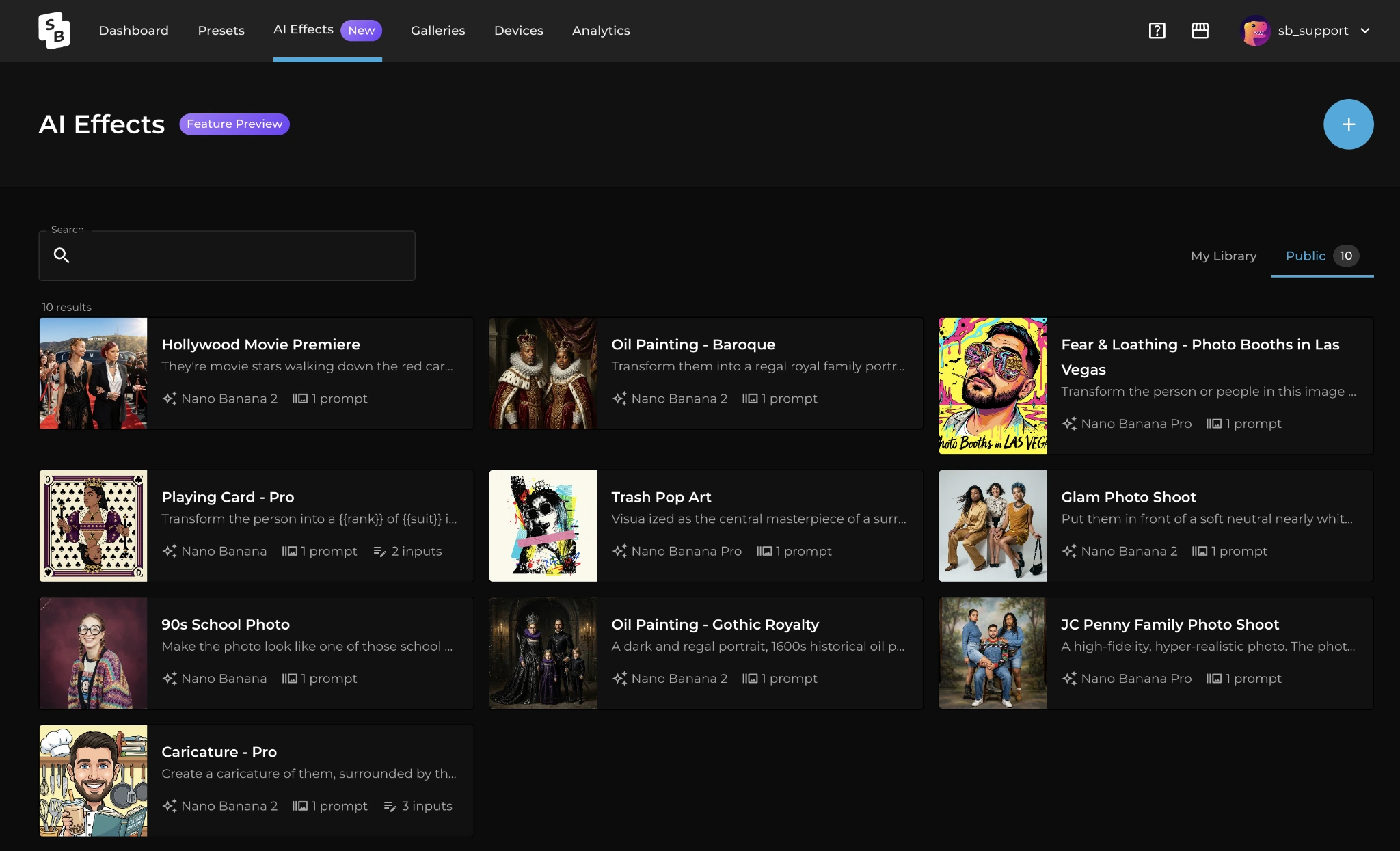
Key capabilities include Magic Background Replacement without a green screen, drag-and-drop digital props, AI Effects with custom prompts and guest input variables, and multi-language support that automatically localizes into nine languages based on the browser’s settings.
Source: SimpleBooth
LumaBooth has no virtual or browser-based product. Its closest equivalent is LumaShare for Android, which is a sharing kiosk, not a photo capture experience. For brands running hybrid events, always-on campaigns embedded in email or product packaging, or remote activations where shipping hardware isn’t practical, Virtual Booth fills a gap that LumaBooth doesn’t address.
⚡Simple Booth in Action: A consumer goods brand prints QR codes on product packaging that link to a branded Virtual Booth experience. Customers scan the code at home, take a photo with a branded overlay, share it on social media, and the brand captures their contact information. The campaign runs continuously with no hardware, no event staff, and no geographic limitation.
AI Photo Booth: Brand-Integrated AI Transformations with Zero-Cost Testing
Simple Booth’s AI Photo Booth uses Nano Banana AI models to transform guest photos using text prompts, with three models balancing speed, quality, and group size (supporting up to 5 subjects).
The platform handles identity preservation and likeness automatically, keeping guests recognizable regardless of the artistic transformation.
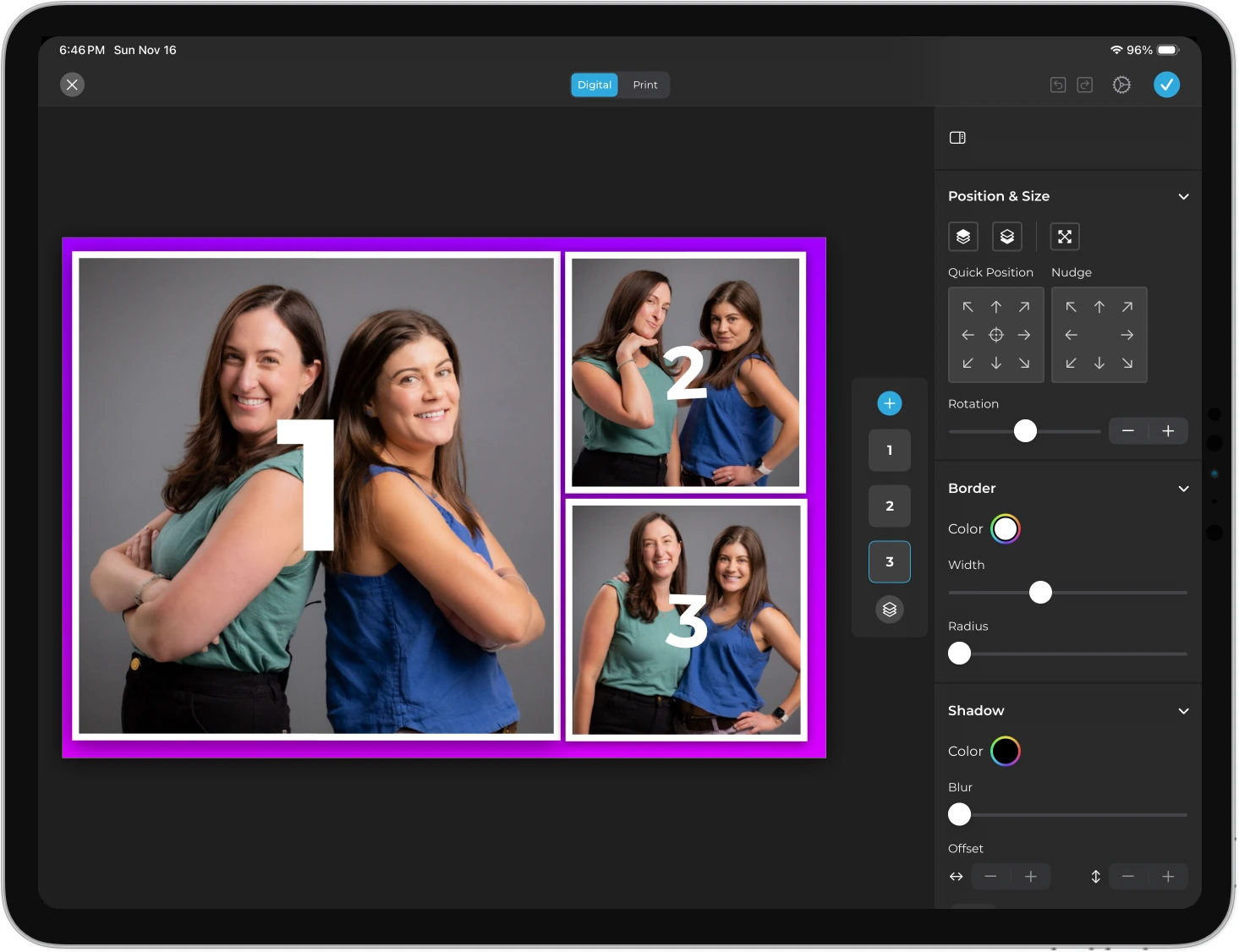
A key differentiator: AI effects are composited directly with the Layout Designer, so brand overlays, logos, and graphic frames layer on top of the AI-generated photo in a single workflow. Operators can also assign a unique AI prompt to every individual frame in a multi-frame layout, enabling sequential narrative strips.
Source: Simple Booth
The Guest Input system (Pro/Select) injects participant answers directly into the AI prompt as named variables, so every guest receives a uniquely personalized generation while the operator controls the surrounding prompt structure. Unlike most generative AI platforms, Simple Booth does not charge credits for testing prompts outside of booth mode, letting operators iterate freely before the event.
LumaBooth’s AI Portraits offer a comparable feature set with 170+ presets and custom prompt support. Both platforms deliver capable AI features; the difference is that Simple Booth’s AI output flows through the same Layout Designer pipeline used for all other booth content, while LumaBooth’s AI Portraits operate as a separate processing layer.
AI credits are priced at $0.10 each and purchased credits do not expire, giving operators flexibility for variable event calendars.
Simple Booth Pricing
Simple Booth uses a per-license subscription model with weekly, monthly, and annual billing. Each plan includes one device license; additional devices require add-on licenses at a discounted rate.
Everyday Plans:
- Lite: $14.99/week, $29.99/month, or $289.99/year (App Store only). Designed for personal events and casual use. Custom layouts, motion and still capture, photo delivery, galleries, themes, and props. Includes ads in the app.
- Core: $24/week, $49/month, or $490/year. Adds: ads removed, multiple layouts, DSLR/mirrorless camera connection, full-length video, background replacement and blur, Dropbox integration, AI effects, and Virtual Booth.
- Plus: $49/week, $99/month, or $990/year. Adds: custom branding, analytics and reporting, guest-editable text layers, custom AI effects.
Business Plans:
- Pro: $149/month or $1,490/year. Adds: lead capture, API integration, phone support, AI guest inputs, moderation, age gate, and data compliance tools.
- Select: $249/month or $2,490/year. Adds: in-app custom legal terms, security questionnaires, and demographic analytics via face detection.
- Enterprise: Custom pricing. For organizations with advanced security, compliance, or scale requirements.
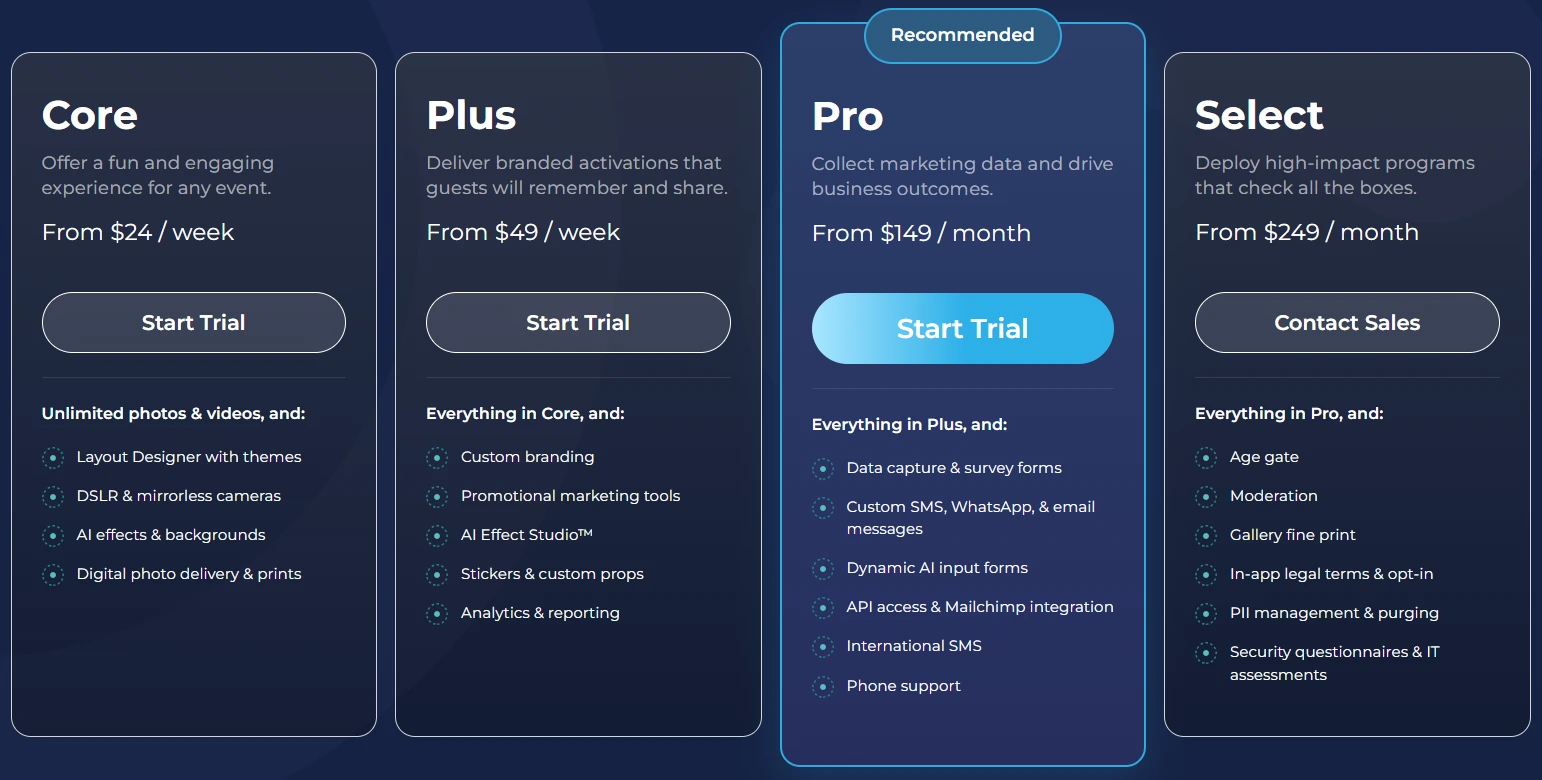
HALO hardware kits are sold separately at buy.simplebooth.com with 0% financing available. A 7-day free trial is available with 25 free AI credits.
Who Should Use Simple Booth?
Choose Simple Booth if:
- You run a photo booth rental company and want a complete, integrated hardware+software system that sets up in under a minute, operates unattended, and delivers quality photos through patented ring-light technology.
- You’re a brand marketer or experiential agency that needs measurable event results, with lead capture opt-in rates above 87%, social sharing analytics, and first-party data collection built directly into the photo experience.
- You want to extend branded photo experiences beyond physical events with Virtual Booth, reaching audiences via QR codes on packaging, email campaigns, or website embeds with no hardware required.
Want a photo booth that captures leads and runs itself? Start your Simple Booth free trial and see what 30,000+ operators already know.
2. Snappic: Best Alternative for Enterprise Multi-Booth Fleet Management
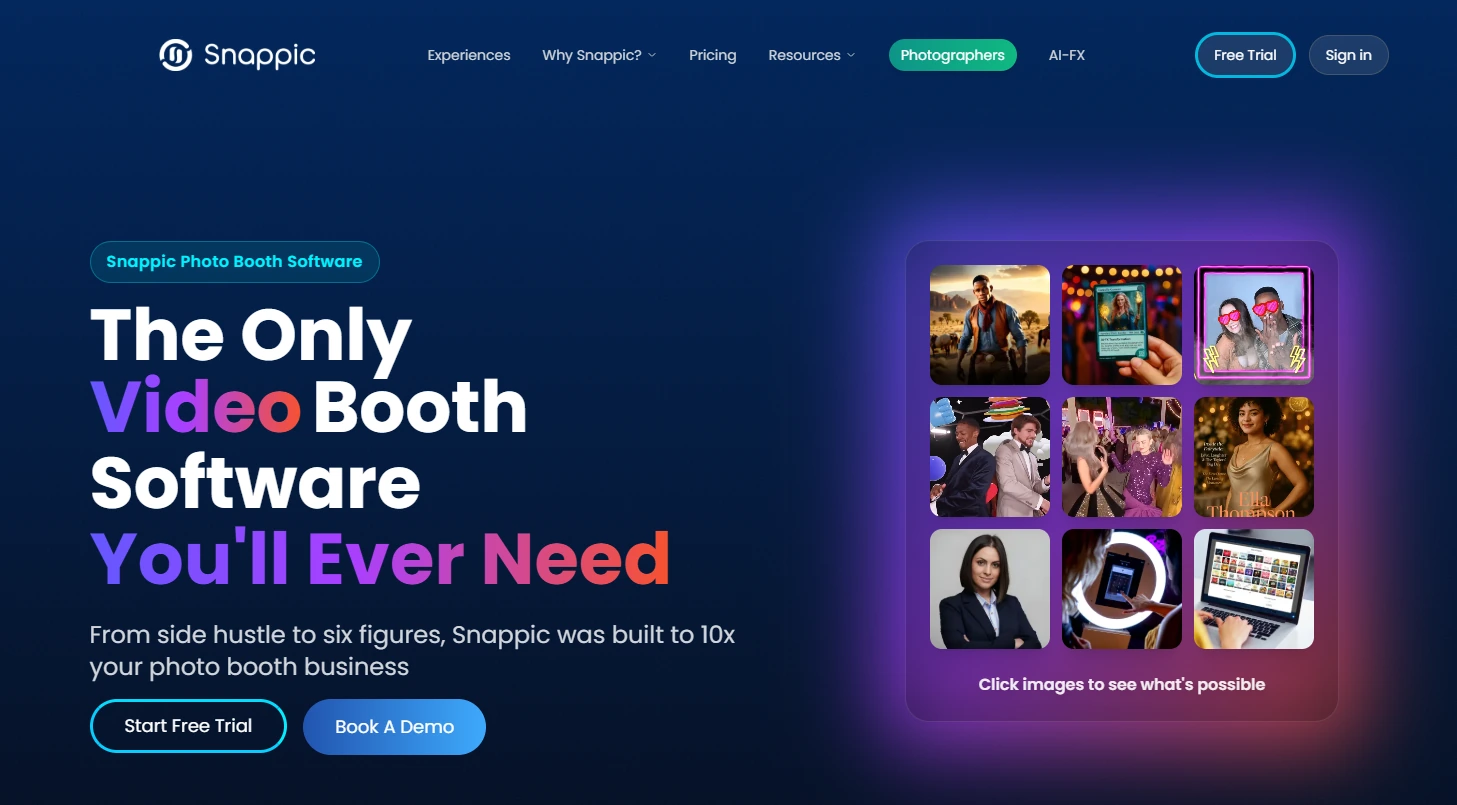
Snappic is photo booth software for professional event operators that consolidates every major booth format into a single iOS-first platform and subscription. With 8,000+ operators and 100,000+ events, it serves photo booth agencies and large multi-booth operators who have outgrown a single booth format.
Its key features include:
- All booth types under one subscription: 360 video, GlamBot/robot arm, mirror, DSLR-tethered, standard photo, and roaming photography
- Multi-engine AI suite: PersonaFX, BananaFX (built on Google Gemini 2.5), Photo Glam (offline, no credits), and AI Touchups
- SmartShare with Face Linking: AI facial recognition dispatches every subsequent capture to a guest automatically after a single contact-info entry
- LiveConnect: Browser-based remote booth control from any device
- Scale plan agency infrastructure: Unlimited sub-accounts, unbranded grey-label iPad app, white-label URLs and emails
- 24/7/365 live support accessible from the dashboard, including during events
Why Choose Snappic Over LumaBooth for Enterprise Multi-Booth Fleet Management
Snappic stands out in the following areas:
- Multi-Format Unification
LumaBooth splits booth capability across two separate product lines with divergent feature sets, and event settings synchronization only works Windows-to-Windows.
Snappic runs all booth formats from one app on iPad, with plan tiers differentiated only by simultaneous device count rather than feature gating. An operator scaling from two photo booths to a 360 rig to a GlamBot trains on one interface once and never hits a format-specific paywall.
- Fleet Infrastructure for Agencies
LumaBooth has no agency or multi-client reseller tier, no sub-account architecture, and no white-label delivery.
Snappic’s Scale plan ($399/month) offers unlimited sub-accounts with independent event management, a generic grey-label iPad app, white-label URLs and emails, and a dedicated customer success manager. The platform has been part of Banyan Software’s portfolio since July 2024, providing long-term stability.
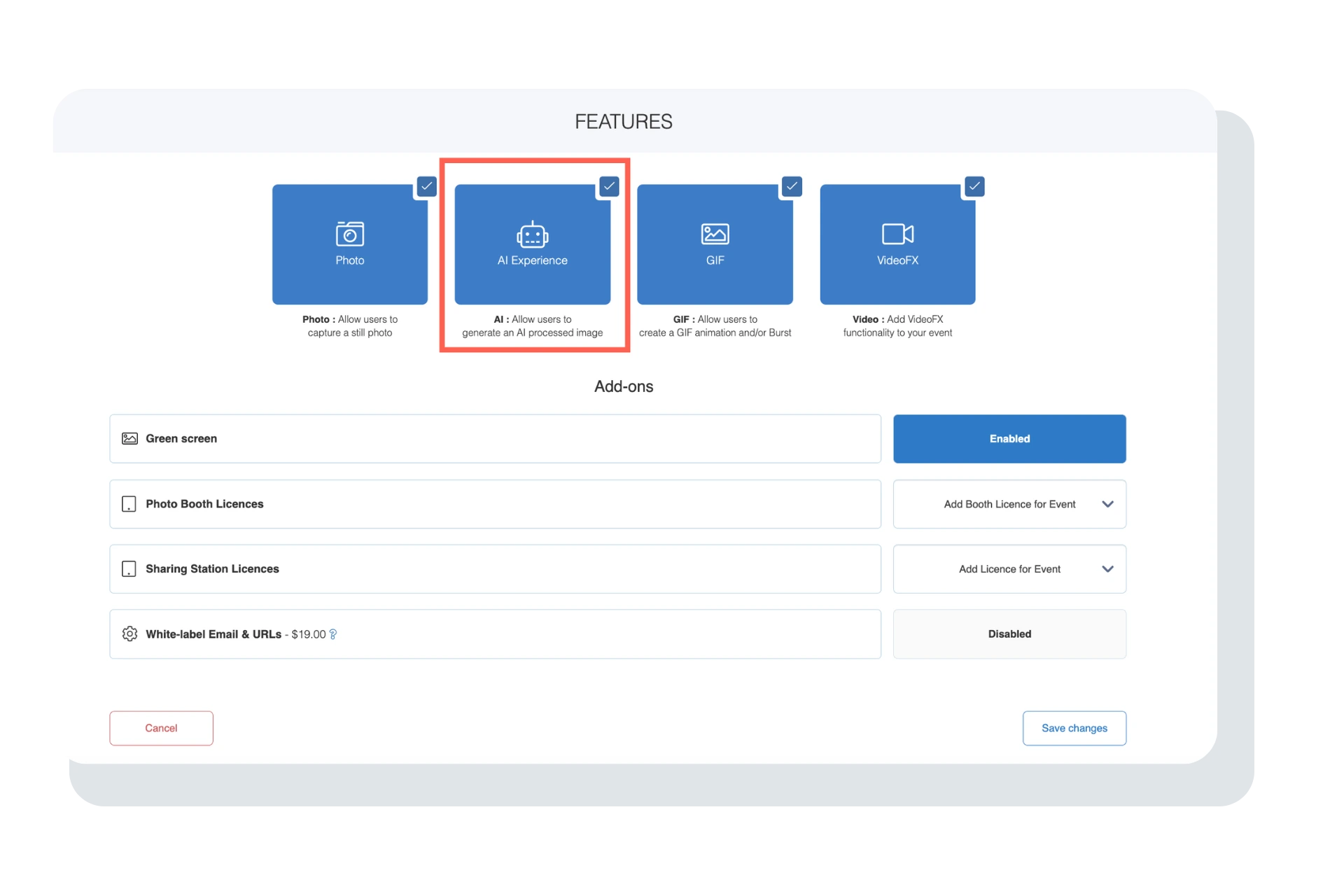
- Multiple AI Engines Matched to Output Type
LumaBooth’s AI Portraits run through a single generative pipeline.
Snappic deploys four AI subsystems: PersonaFX for avatar/character generation, BananaFX (powered by Google Gemini 2.5) for prompt-based image generation, Photo Glam for offline skin smoothing with no credits, and AI Touchups for 40+ enhancement parameters. Operators route each event to the engine that fits the output type best.
Source: Snappic
🏅 NOTE: We also evaluated alternatives such as TouchPix and Darkroom Booth. While TouchPix excels at 360-specific video capture with a flexible multi-platform deployment model, Snappic offers the most complete multi-format fleet management for operators who run more than one booth type, and is the only platform in this roundup with white-label sub-account infrastructure.
Snappic Pricing
Snappic uses per-booth license pricing with annual billing saving approximately 20%. A 14-day free trial is available with no credit card required.
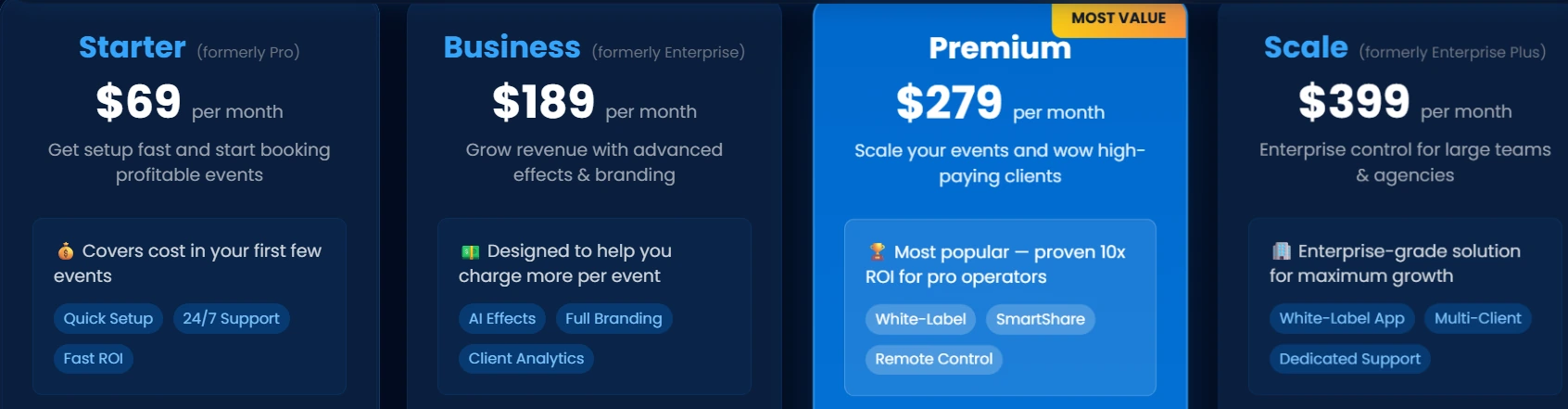
- Starter: $69/month ($499/year). One Photo Booth License; standard iPad photo booth only. 24/7 support.
- Business: $189/month. Adds VideoFX (360, GlamBot, Mirror), AI-FX, green screen, client analytics, roaming mode, and Priority Support.
- Premium: $279/month. All Business features plus white-label URLs, webhooks, LiveConnect, and SmartShare bundled.
- Scale: $399/month ($3,999/year). All Premium features plus unlimited sub-accounts, grey-label app, and dedicated success manager.
AI background removal, AI-FX generation, SmartShare FaceAI, and international SMS credits are billed separately on top of subscription pricing.
Who Should Use Snappic?
Choose Snappic if:
- You operate multiple booth formats (360, mirror, GlamBot, photo) and need one platform to run all of them from a single subscription and app.
- You’re building or running an agency where clients expect white-labeled experiences, from the iPad app to the gallery URLs.
- You manage booths across multiple simultaneous locations and need centralized oversight through LiveConnect remote control.
3. TouchPix: Best Alternative for Cross-Platform Device Flexibility & 360 Video
TouchPix is subscription-based photo and video booth software built for event professionals who need a single app across virtually every device ecosystem. Where LumaBooth covers Windows and iOS/Mac, TouchPix extends the range to Android, Linux, and Raspberry Pi.
Its key features include:
- Native support across iOS, Android, macOS, Windows, Linux, and Raspberry Pi with unlimited devices per account
- Built-in 360 video booth with wired and wireless GoPro integration (models 7-14)
- Offline AI background removal and face replacement running entirely on-device
- Scanpix 2 offline QR-code sharing without any internet connection
- AI Photo Booth with 80+ transformation styles and custom text prompts
- Bluetooth spinner integration for automated 360 capture without a human attendant
Why Choose TouchPix Over LumaBooth for Cross-Platform Flexibility & 360 Video
TouchPix stands out in the following areas:
- Wider Hardware Ecosystem
LumaBooth runs on Windows and iOS/Mac only; its Android app (LumaShare) is a sharing kiosk, not a capture application.
TouchPix’s single subscription covers all six operating systems with unlimited devices per account. Operators with Android tablets, repurposed laptops, or Raspberry Pi kiosk installations can bring everything under one subscription without being locked into a specific hardware ecosystem.
- 360 Video as a Core Product
TouchPix built its identity around the 360 spinning-arm workflow. The platform supports GoPro models 7 through 14 in both wired and wireless modes, with Bluetooth spinner integration that triggers capture automatically without a human operator.
The October 2024 BoothBuilder Touch hardware partnership, where TouchPix software was embedded into BoothBuilder’s turnkey 360 hardware, confirms the platform’s standing in this segment.
- Flexible Billing Cadences
LumaBooth offers monthly and annual billing only. TouchPix provides four billing cadences: weekly, monthly, half-yearly, and annual. The MultiPass weekly plan at $43.99/week gives operators a burst-billing option for concentrated event seasons without committing to annual pricing.
🏅 NOTE: We also evaluated alternatives such as Snappic and Simple Booth. While Snappic covers 360 functionality at a higher price point and Simple Booth excels on iPad, TouchPix offers the strongest combination of 360-video depth and cross-platform hardware coverage for operators who want format breadth without committing to enterprise pricing.
TouchPix Pricing
- PhotoPass: $439.90/year. 2 active event slots, unlimited devices. Photos, Photo AI effects, and animated GIFs. Excludes video and 360.
- MultiPass: $879.99/year (also $43.99/week). 4 active event slots. All PhotoPass features plus full video, slow-motion, boomerang, and 360.
- MultiPass Pro: $1,407.99/year. 8 event slots. Adds Virtual Booth and Advanced Surveys.
- MultiPass Enterprise: $2,199.99/year. 12 event slots. Adds Mosaic and RAW cloud backups.
A 14-day free trial is available with no credit card required.
Who Should Use TouchPix?
Choose TouchPix if:
- Your device inventory includes Android tablets, Linux machines, or Raspberry Pi hardware and you need full booth capture software (not just a sharing companion) across all platforms.
- 360 spinning-arm video is your primary or growing service offering and you need dedicated GoPro integration with Bluetooth spinner automation.
- You want to start at a photo-only tier and upgrade to video as your business grows, with weekly billing available for seasonal operators.
4. Darkroom Booth: Best Alternative for Windows DSLR Operators Who Want a Perpetual License
Darkroom Booth is a Windows-only photo booth application by Darkroom Software, LLC, a family-owned company with origins in professional photography supply dating back to 1992. It is built for customization-focused professional attended events with a one-time perpetual license.
Its key features include:
- One-time perpetual license at $295 with no subscription required
- Direct USB tethering for Canon EOS, Nikon D/Z-series, GoPro HERO 9/10, and Windows webcams
- 75+ included print and screen templates with a built-in drag-and-drop editor
- Full chroma key green screen compositing and AI background removal via Remove.bg
- Booth Control™ remote monitoring from any smartphone on the local network
- Native Phidget support for coin acceptors, bill validators, and custom arcade buttons
Why Choose Darkroom Booth Over LumaBooth for Perpetual License Ownership
Darkroom Booth stands out in the following areas:
- Perpetual License Eliminates Subscription Exposure
LumaBooth’s Windows subscription costs $17/month billed annually, roughly $204 per year before add-ons. Over three years on two devices, cumulative software costs can exceed $1,200 when you factor in AI Credits, fotoShare Cloud upgrades, SMS plans, and extra device seats.
Darkroom Booth’s $295 one-time purchase covers the complete software with activation on up to two computers. An optional $95/year maintenance plan continues updates and support, but the software keeps running even if maintenance lapses.
- Phidget Hardware Extensibility for Physical Kiosk Deployments
Darkroom’s native Phidget support lets operators wire in coin acceptors, bill validators, custom arcade-style buttons, and lighting rigs without custom integration code.
This makes it viable for permanent kiosk deployments at amusement venues, arcades, and malls where LumaBooth’s QR-code-based Stripe payments don’t naturally fit.
- AI Features Included Without Per-Generation Metering
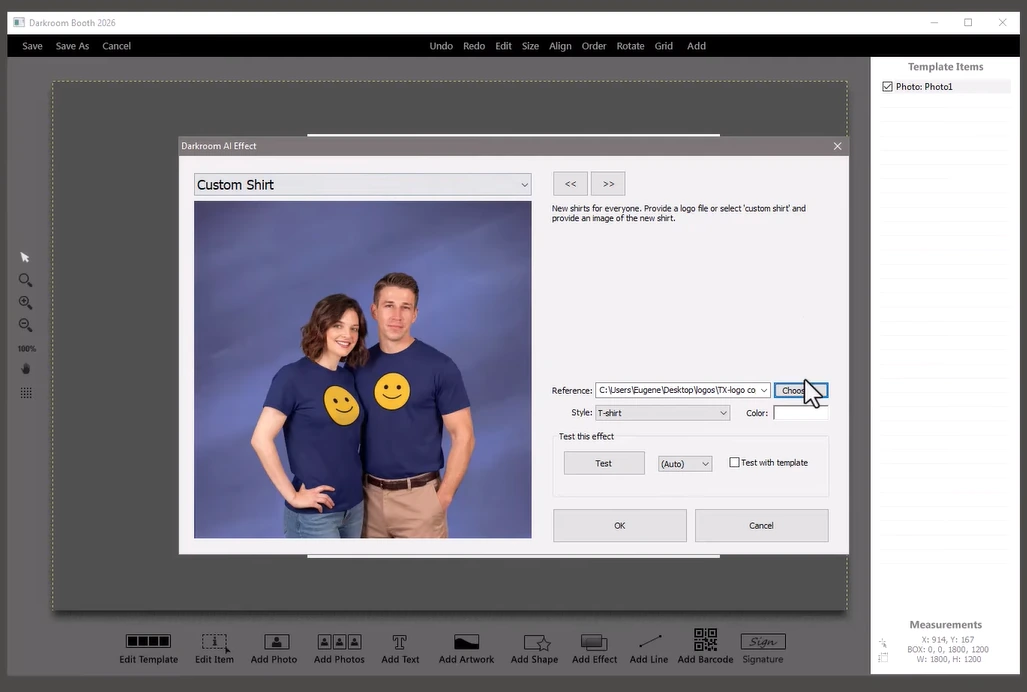
Darkroom launched AI portrait transformations in May 2025 and expanded to AI custom shirts and AI lenticular prints at Photo Booth Expo 2026. These features are part of the base software rather than metered via a separate credit system like LumaBooth’s AI Credits ($14.99-$199.99/month).
Source: Darkroom Booth
🏅 NOTE: We also evaluated SparkBooth as another perpetual license option. While SparkBooth offers a lower entry price at $189, Darkroom Booth’s broader DSLR compatibility, larger template library, Phidget hardware integration, and newer AI transformation features make it the stronger fit for established photographers building a professional booth service on Windows.
Darkroom Booth Pricing
- Full License: $295 (one-time). Complete software for Windows 10/11, one year of updates and support, activation on up to two computers. All core features included.
- Annual Maintenance: $95/year (optional). Continued updates and tech support after the first year. Core booth operation continues regardless of renewal status.
- 10-Day Temporary License: $45. For existing customers needing a second booth for overbooking scenarios.
Note: Facebook gallery delivery requires the separate EventGallery companion product (Pro $30/month, Pro Plus $45/month, Enterprise $75/month).
Who Should Use Darkroom Booth?
Choose Darkroom Booth if:
- You run a Windows-based photo booth operation with Canon or Nikon cameras and want to own your software outright with no recurring subscription.
- You’re building a permanent kiosk installation where Phidget-based coin acceptors and hardware buttons are required.
- You want AI portrait activations without committing to a monthly credit plan on top of a base subscription.
5. BoothLedger: Best Alternative for Affordable AI Photo Booth Effects on Canon DSLR
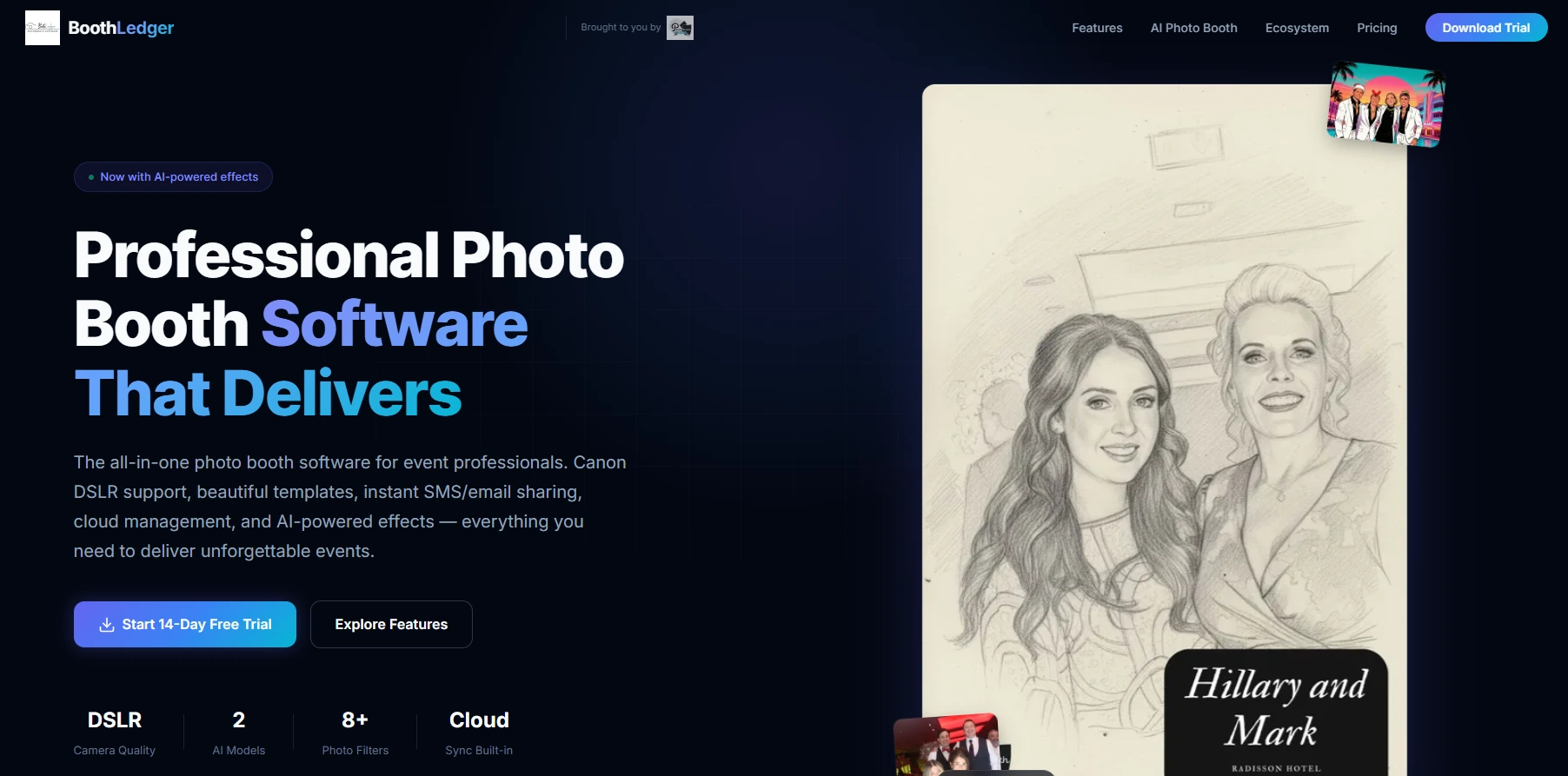
BoothLedger is a Windows-first photo booth platform built and proven by PhotoBooth Guys, an active Irish event hire company with 500+ events on the platform. It delivers Canon DSLR-quality capture, a dual-engine AI effects suite, and cloud management at the lowest published all-in monthly price for Windows operators.
Its key features include:
- Native Canon DSLR tethering via EDSDK with live view, per-shot autofocus, and simultaneous RAW+JPEG capture
- Two selectable AI engines (Core and Nano Banana Pro) delivering 50+ creative styles without per-effect surcharges
- €20/month (Basic) and €35/month (AI Photobooth), both including two device licenses and cloud galleries
- Offline-first architecture: captures, prints, and shares via QR/AirDrop without internet
- Remote configuration via BoothLedger Cloud with 45-second live sync
Why Choose BoothLedger Over LumaBooth for Affordable AI on Canon DSLR
BoothLedger stands out in the following areas:
- Lower All-In Monthly Price
LumaBooth’s $17/month annual price grows quickly when you add AI Credits ($14.99-$199.99/month), fotoShare Cloud upgrades ($19.99-$39.99/month), SMS sharing ($10/month), and LumaShare ($7.99/month).
BoothLedger’s AI Photobooth plan at €35/month includes two device licenses, cloud galleries, sharing, remote configuration, DSLR connectivity, and the full AI effects suite with no credit system.
- Two Tiered AI Engines
BoothLedger runs two separate AI pipelines: Core for high-volume events where throughput matters, and Nano Banana Pro for higher-quality outputs. Operators select the engine per event at the configuration level, using one subscription for both a high-volume trade show floor and a smaller branding activation.
- Offline-First Core Operation
LumaBooth’s AI Portraits require a stable internet connection at every event. BoothLedger captures, prints, and shares offline via QR/AirDrop without any internet connection, syncing to BoothLedger Cloud when connectivity returns. AI effects still need connectivity, but core booth functions run independently.
🏅 NOTE: We also evaluated Darkroom Booth and Snappic. While Darkroom Booth excels with its perpetual license model, and Snappic suits iPad-based operators who want cloud-first event management, BoothLedger offers the most complete Canon DSLR integration combined with AI effects at the lowest published all-in monthly price.
BoothLedger Pricing
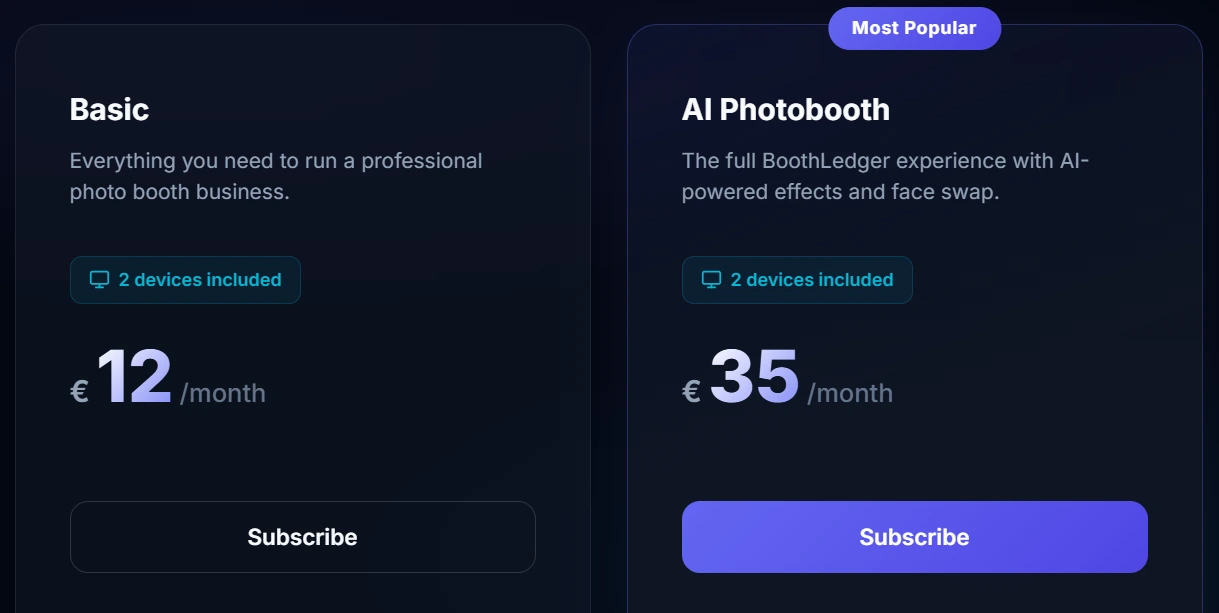
- Basic: €12/month. 2 device licenses, Canon DSLR tethering, template editor, QR/email/SMS sharing, cloud gallery, event management, and lead capture with GDPR opt-in.
- AI Photobooth: €35/month. Everything in Basic plus 50+ AI styles, AI face swap, AI background removal, AI face enhancement, and selectable AI engine (Core or Nano Banana Pro).
A 30-day free trial is available with no credit card required.
Who Should Use BoothLedger?
Choose BoothLedger if:
- You operate Canon DSLR or EOS R-series hardware on Windows and want EDSDK tethering with live view and autofocus.
- You need AI-transformed shareable content at events but cannot justify per-credit billing on top of a base subscription.
- You frequently work at venues with unreliable WiFi where core booth functions (capture, print, QR share) must keep running regardless of connectivity.
6. SparkBooth: Best Alternative for Budget-Conscious DIY Operators Without a Subscription
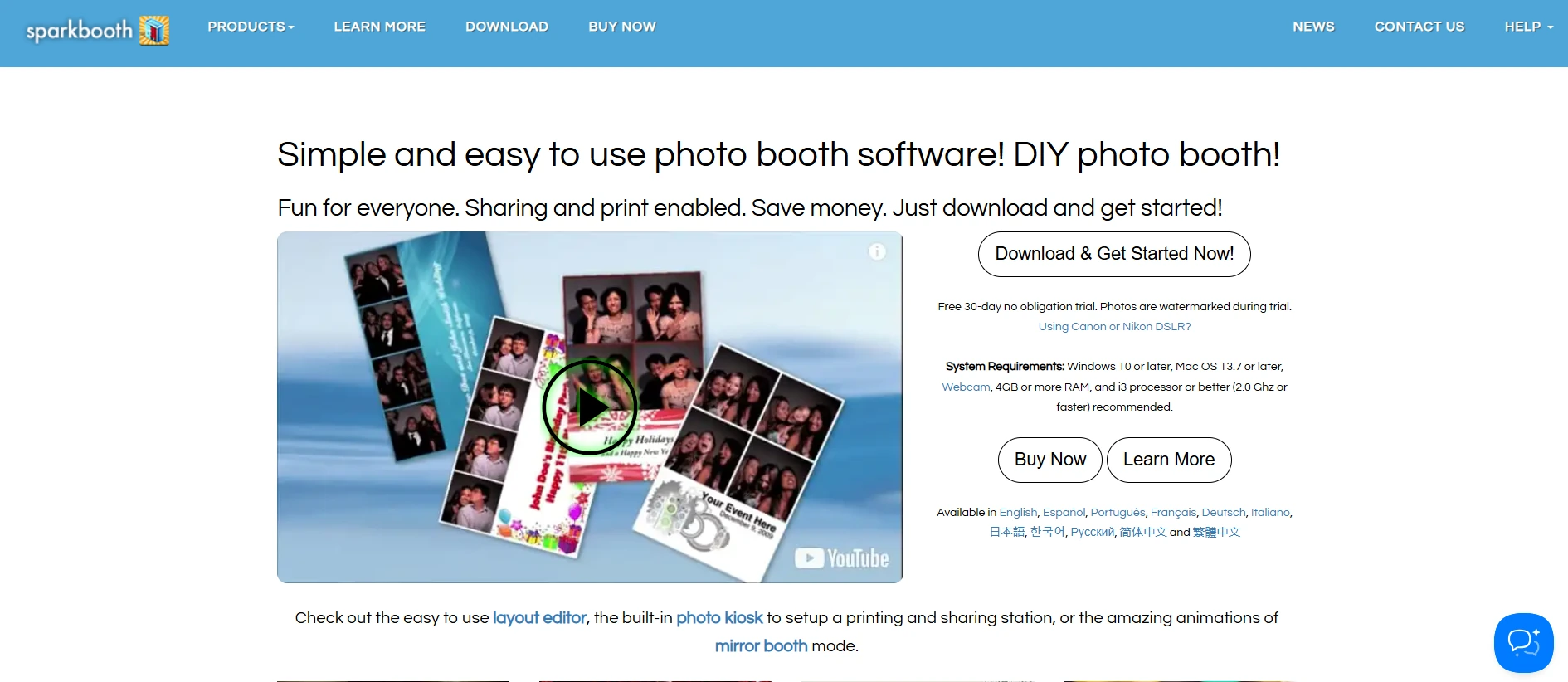
SparkBooth is Windows and Mac photo booth software by JWP, LLC, continuously developed since 2009, that turns any webcam-equipped computer or compatible Canon/Nikon DSLR into a functional event photo booth. It positions itself as “the DIY Photo booth solution that’s dynamic, easy to operate and is a fraction of the cost of a traditional photo booth rental.”
Its key features include:
- Flat one-time license at $149 (Premium/webcam) or $189 (DSLR) with 3 PC activations and commercial use permitted
- Canon and Nikon DSLR/mirrorless camera tethering including Canon EOS R-series and Nikon Z-series
- Animated GIF, boomerang, and rewind GIF output from photo sequences
- Mirror Booth mode, green screen, and offline AI background removal via UnlimitedBG
- Offline operation with locally queued email and SMS delivery
Why Choose SparkBooth Over LumaBooth for No-Subscription Photo Booth Capability
SparkBooth stands out in the following areas:
- Perpetual Ownership at the Lowest Entry Price
LumaBooth’s Windows subscription compounds to over $600 across three years on annual billing, before any add-ons. SparkBooth’s DSLR license is a one-time $189 with 3 PC activations, and within-version updates are included at no additional cost. For seasonal operators with months between bookings, a flat perpetual license costs less over time.
- Perpetual Free Trial with a Refund Safety Net
SparkBooth’s trial includes all Premium and DSLR features with no locks beyond the watermark, and operators can request a trial extension via email. After purchase, a 60-day refund window applies to non-activated licenses, giving operators a safety net that LumaBooth’s no-refund policy does not match.
- Multi-Mode Versatility in One License
A single SparkBooth DSLR license unlocks photo booth, GIF booth, mirror booth, photo kiosk, green screen, boomerang, drawing and stickers, offline mode, and SMS delivery, all for the one-time price.
SparkBooth sells AI background removal (via UnlimitedBG) and photo galleries (via qrcode.photos) as separate services, but core booth functionality lives within the one-time license.
🏅 NOTE: We also evaluated Snappic and TouchPix. While Snappic offers broader marketing integrations with monthly pricing, and TouchPix specializes in 360-video with multi-platform support, SparkBooth offers the most straightforward no-subscription entry point for operators who own Canon or Nikon cameras and need photo, GIF, and mirror booth capability without a recurring fee.
SparkBooth Pricing
- Premium: $149 (one-time). Windows 10+ and Mac OS 13.7+. Webcam support only. All features included: green screen, animated GIFs, boomerang, mirror booth, photo kiosk, layout editor, email/SMS delivery, MailChimp integration, and offline mode.
- DSLR: $189 (one-time). All Premium features plus Canon and Nikon DSLR/mirrorless camera tethering. Windows: full Canon and Nikon support; Mac: Nikon-only.
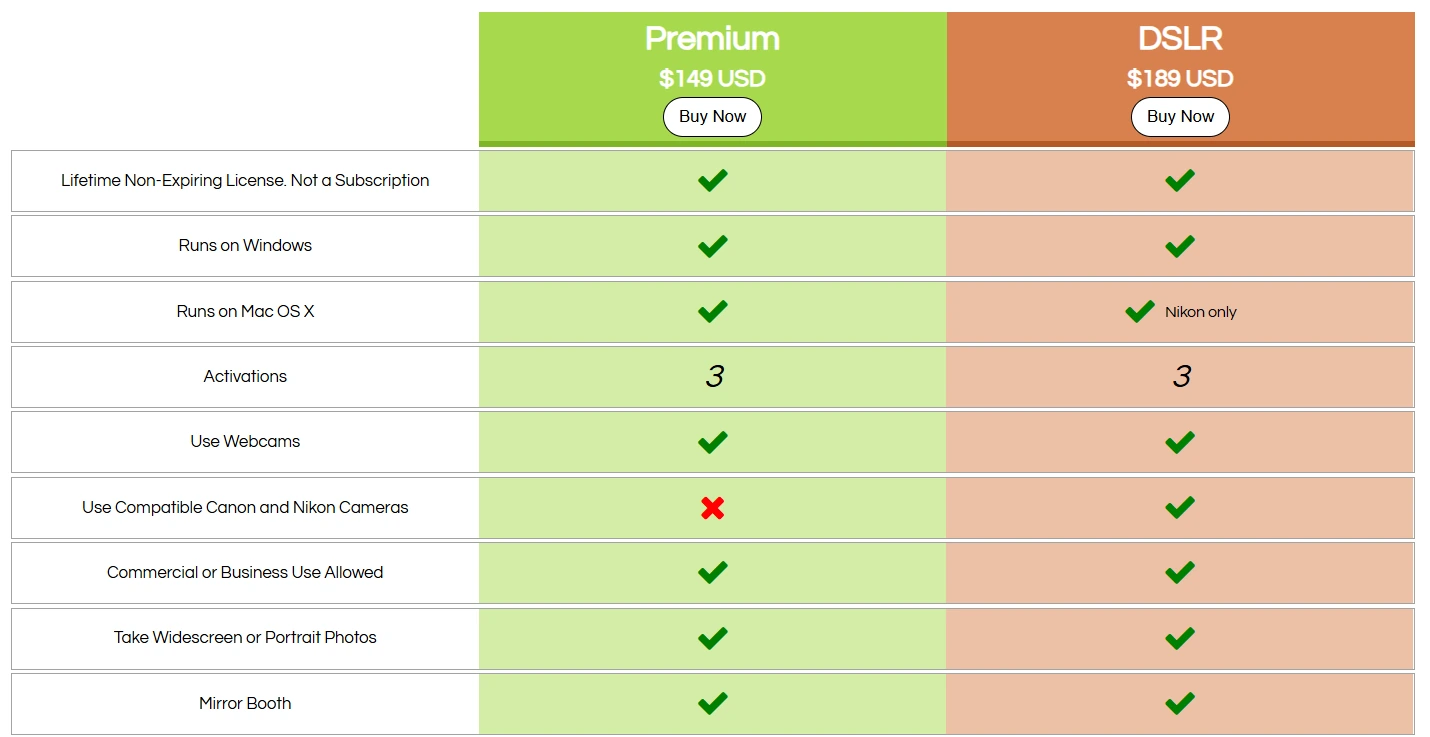
Both licenses include 3 PC activations and permit commercial use. Major version upgrades may require an upgrade fee; within-version updates are free. A perpetual free trial with all features (watermarked output) is available with no time limit.
Who Should Use SparkBooth?
Choose SparkBooth if:
- You are entering the photo booth rental market as a solo or occasional operator and want DSLR image quality, GIF output, and mirror booth capability in one flat-cost purchase.
- You already own a compatible Canon or Nikon camera and want to convert existing equipment into a deployable photo booth on Windows or Mac hardware you already have.
- You operate at outdoor venues or locations with unreliable internet, where SparkBooth’s offline photo queuing and optional offline AI background removal keep core features functioning without connectivity.
The Final Verdict
LumaBooth excels as a cross-platform photo booth solution with broad camera support and a wide range of booth formats. But different operator types have specific requirements that benefit from specialized tools. Based on our research, here are the best alternatives:
- Simple Booth for an integrated hardware+software system with lead capture and unattended operation
- Snappic for enterprise multi-booth fleet management with white-label infrastructure
- TouchPix for cross-platform device flexibility across iOS, Android, Windows, Linux, and Raspberry Pi with 360 video integration
- Darkroom Booth for Windows DSLR operators who want perpetual software ownership with Phidget hardware extensibility
- BoothLedger for Canon DSLR operators who need AI effects at the lowest all-in monthly subscription price
- SparkBooth for budget-conscious DIY operators who want DSLR-quality booth capability without recurring fees
You don’t have to choose between LumaBooth and these alternatives exclusively. Many operators use different software for different booth formats and event types. Consider your specific hardware, event volume, and growth plans when deciding which solution fits best.
Want a photo booth that captures leads and runs itself? Simple Booth’s HALO system sets up in under a minute and delivers share-worthy experiences every time. Start your free trial and see the difference integrated hardware and software makes.
LumaBooth Alternatives FAQ
Why do photo booth operators look for LumaBooth alternatives?
LumaBooth is a solid platform, but operators often look for alternatives when they need more specialized capabilities. Common reasons include wanting integrated hardware instead of sourcing cameras and lighting separately, needing enterprise fleet management with white-label support, requiring software that runs on Android or Linux devices, or preferring a one-time license over a recurring subscription.
Some operators also need better marketing and lead capture tools than LumaBooth’s survey-based data collection provides.
What is the best overall LumaBooth alternative?
There is no single best alternative because LumaBooth serves many different operator types. Simple Booth is the top choice for operators who want an integrated system with marketing-focused lead capture. Snappic leads for multi-booth agencies needing fleet management.
For budget-conscious operators, SparkBooth and Darkroom Booth offer one-time purchase options that eliminate subscription costs entirely.
Is there a free alternative to LumaBooth?
LumaBooth itself offers an unlimited free trial (output is watermarked). Several alternatives offer similar trial models: SparkBooth provides a perpetual free trial with all features and watermarked output. TouchPix and Snappic both offer 14-day free trials with no credit card required. BoothLedger offers a 30-day free trial. Simple Booth offers a 7-day free trial with 25 free AI credits.
Which LumaBooth alternative works on Android devices?
TouchPix is the only platform in this roundup that offers full booth capture software on Android, in addition to iOS, macOS, Windows, Linux, and Raspberry Pi.
LumaBooth’s LumaShare app runs on Android but functions as a sharing kiosk only, not a full capture application. Snappic’s Booth CoPilot is available on Android for remote management but not for booth capture.
How does Simple Booth compare to LumaBooth for lead capture?
Simple Booth reports opt-in rates as high as 87-89% because data capture is embedded directly into the photo-taking experience. It offers up to 10 custom fields, MailChimp integration, API access for CRM delivery, and analytics tracking social shares, gallery views, and demographic data via face detection.
LumaBooth offers surveys and logs email/phone data from shares, but treats data collection as secondary to the photo experience rather than as a dedicated marketing tool.
Which alternative is cheapest for a new photo booth operator?
SparkBooth has the lowest total cost of entry at $149 (Premium/webcam) or $189 (DSLR) as a one-time purchase with no recurring fees. Darkroom Booth follows at $295 one-time. For subscription-based options, BoothLedger starts at €20/month and LumaBooth itself starts at $17/month on annual billing. The right choice depends on whether you prefer flat ownership costs or subscription flexibility.
Can I use LumaBooth alongside one of these alternatives?
Yes. Many operators use different software for different booth formats or event types. For example, you might run LumaBooth on a Windows PC for 360 video events while using Simple Booth on iPad for corporate activations where lead capture is the priority. The tools on this list are not necessarily replacements; some serve as complementary solutions for specific use cases.
Which LumaBooth alternative is best for 360 video booths?
TouchPix is built for 360 spinning-arm workflows, with GoPro 7-14 integration in both wired and wireless modes, Bluetooth spinner automation, and slow-motion speed ramp controls. Snappic also supports 360 video as part of its multi-format suite.
LumaBooth itself handles 360 well on Windows with GoPro and on Apple with device cameras, so the decision depends on whether you need broader device support (TouchPix) or enterprise fleet management (Snappic).
Keep reading
 Showdowns
Simple Booth vs LumaBooth: Which Photo Booth Software Fits Your Business in 2026?
Turnkey hardware vs budget cross-platform app. Simple Booth or LumaBooth?
 Pricing
LumaBooth Pricing: Worth It or Consider Simple Booth? (August 2026)
Cheap sticker price, pricey add-ons. LumaBooth pricing, fully unpacked.
 Reviews
LumaBooth Review 2026: Is This Photo Booth Software Right for You?
Loads of booth formats, no hardware or leads. LumaBooth, reviewed straight.