LumaBooth vs dslrBooth (vs Simple Booth): Which Photo Booth Software Should You Use in 2026?

If you’re searching for LumaBooth vs dslrBooth, here’s the first thing you need to know: they’re the same product.
In March 2026, Lumasoft rebranded dslrBooth for Windows to “LumaBooth for Windows”, bringing its Windows software and existing LumaBooth for Apple app (iPad, iPhone, Mac) under one name and cloud dashboard. The “vs” in your search isn’t a competition. It’s a rebrand.
But the question behind your search still matters, because the Windows and Apple versions of LumaBooth aren’t identical. They share a brand, a dashboard, and a template library, but they differ in camera support, feature availability, and pricing. And if you’re evaluating photo booth software for your events business, there’s a third option worth considering.
The real questions you should be asking are:
- Do you run your photo booth from a Windows PC with a DSLR camera, or from an iPad?
- Do you need features like cashless payments, mirror booth mode, or hashtag printing that exist only on Windows?
- How important are data capture, lead generation, and analytics to your business?
- Are you looking for affordable software to pair with hardware you already own, or an integrated system?
- Do you need a virtual photo booth option for remote activations or always-on campaigns?
In short, here’s what we recommend:
LumaBooth for Windows (formerly dslrBooth) is the most feature-rich version, built for operators running booths from Windows PCs with Canon, Nikon, or Sony cameras.
It covers the widest range of booth types in a single subscription: photo, GIF, boomerang, video, 360, mirror booth, glam booth, green screen, AI portraits, video guestbook, and roaming photography. At $17/month on an annual plan, it’s one of the cheapest professional options. The trade-off: no integrated hardware, limited marketing data tools, and no virtual booth.
LumaBooth for Apple runs natively on iPad, iPhone, and Mac, making it a fit for operators who prefer Apple hardware and want a portable, lightweight setup. It shares most features with the Windows version but lacks cashless payments, mirror booth mode, and glam booth filters.
Its strength is portability and Apple-native integration: AirDrop sharing, Guided Access kiosk mode, and offline share queuing work without workarounds.
Both versions of LumaBooth give operators flexibility and value. But they’re software tools, not business systems. If your photo booth is a marketing channel, not just an entertainment service, there’s a gap neither version fills.
Simple Booth pairs its HALO ring-light hardware with an iPad app and cloud dashboard to deliver an integrated photo booth system built around data capture and brand engagement. The HALO sets up in under a minute, produces consistent lighting from a machined aluminum chassis, and the software captures first-party lead data at an 87% opt-in rate.
For operators who want each photo session to generate contacts and social shares, Simple Booth turns the photo booth from an event add-on into a lead-capture tool.
If turning every photo into a lead sounds right for your business, see Simple Booth in action with a free trial.
LumaBooth for Windows vs LumaBooth for Apple vs Simple Booth at a glance
| LumaBooth for Windows | LumaBooth for Apple | Simple Booth | |
|---|---|---|---|
| Platform | Windows PC | iPad, iPhone, Mac | iPad only |
| Hardware | BYO camera + computer | BYO iPad/iPhone or external camera | Proprietary HALO ring-light kit |
| Camera support | Canon, Nikon, Sony, GoPro, webcam | Canon, Nikon, Sony + built-in | iPad camera or Canon DSLR/mirrorless (wired or wireless) |
| Booth modes | Photo, GIF, boomerang, video, 360, mirror, glam, green screen, AI portraits, video guestbook, roaming | Photo, GIF, boomerang, 360/slow-mo, green screen, video guestbook, roaming | Photo, GIF, boomerang, video, AI effects, background replacement |
| Cashless payments | Yes | No | No |
| Lead capture | Survey fields (exportable) | Survey fields (exportable) | Custom forms with 87%+ opt-in, MailChimp sync, API |
| Virtual booth | No | No | Yes (browser-based) |
| AI features | 170+ AI portrait presets, custom prompt builder | AI background removal | AI effects (Nano Banana), AI layout images, guest co-creation |
| Annual price | $17/month | $18/month | $490, $2,490/year (Core, Select) |
The rebrand explained: dslrBooth became LumaBooth
If you’ve used dslrBooth on Windows for years and suddenly see ”LumaBooth” everywhere, nothing broke.
On March 24, 2026, Lumasoft renamed the Windows app from dslrBooth to LumaBooth for Windows with the version 8.0 release. The iOS/Mac app had always been called LumaBooth, so the rebrand brought both platforms under one name.
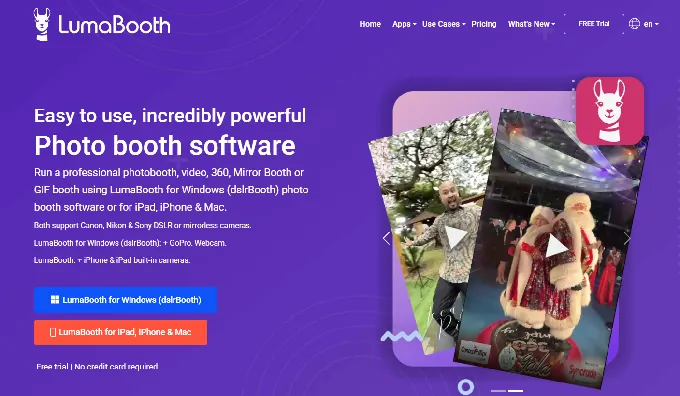
The change wasn’t just cosmetic. Version 8.0 introduced a shared LumaBooth Dashboard that lets operators configure templates, overlays, and event settings from any browser, syncing changes automatically to both Windows and Apple devices. Lumasoft calls it an industry first: no other photo booth platform connects Windows and iOS under one dashboard.
For existing users, the transition was simple: same license, same subscription, same features, new name. For new buyers, the single brand eliminates the confusion of two differently named products from the same company.
The Windows and Apple versions aren’t identical
Despite sharing a name and dashboard, the two LumaBooth apps have real feature gaps that matter when choosing your booth platform.
Windows-only features:
- Cashless payments accepting Google Pay, Apple Pay, Amazon Pay, PayPal, and card via QR code, with no card reader hardware required
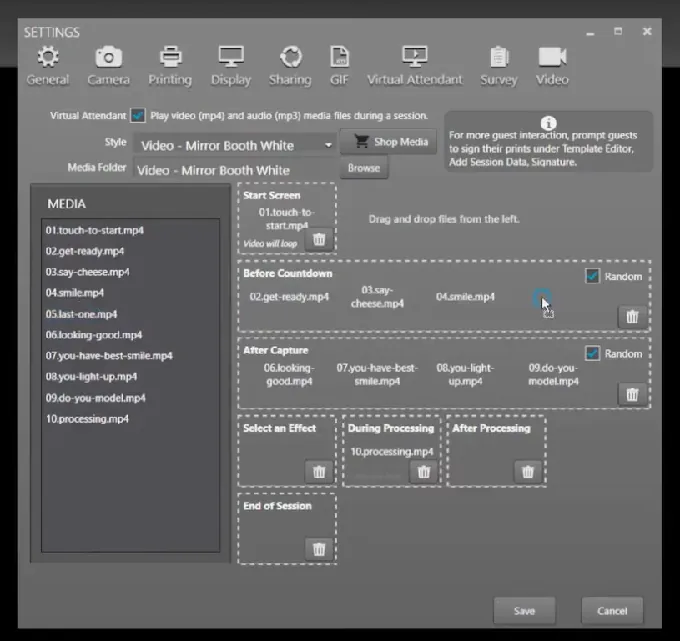
- Mirror Booth mode with the Virtual Attendant system, which replaces a human operator with animated video and audio prompts
- Glam Booth beauty filters with adjustable skin smoothing and black-and-white glamour output
- AI background removal using a locally trained AI model (can use an Nvidia GPU)
- Webhook and API system with ten event types for integrating external lighting rigs, databases, or custom applications
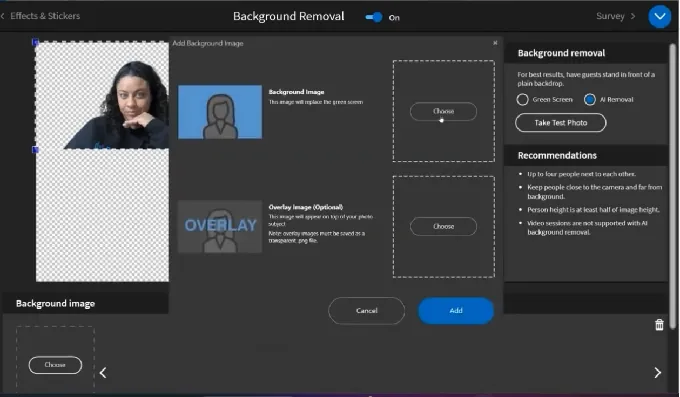
Source: LumaBooth
Apple-only advantages:
- Runs on hardware most operators already own: any iPad or iPhone with iOS 15+ and any Mac with macOS 14+
- Native AirDrop sharing, AirPrint, and Guided Access kiosk mode without workarounds
- Automatic 360 recording when the spinner moves, eliminating manual session timing
- Offline share queuing that holds and delivers email and SMS shares when connectivity returns
At least one reviewer flagged the gap directly: “dslrBooth for Mac should be cheaper than Windows’; Windows has more features than Mac but they’re the same price.” LumaBooth’s $18/month annual price for Apple and $17/month annual for Windows are nearly identical, but the feature sets are not.
One important cloud sync caveat: settings sync works between Windows machines only; Mac-to-Windows sync is not supported. Operators running a mixed fleet of Windows PCs and iPads will need to configure each platform separately despite the shared dashboard.
Camera support and hardware flexibility
Camera compatibility often decides which platform operators pick, because most already own their gear.
LumaBooth for Windows supports the widest range: Canon, Nikon, and Sony DSLR and mirrorless cameras via USB, plus GoPro Hero 5 to 11 and webcams.
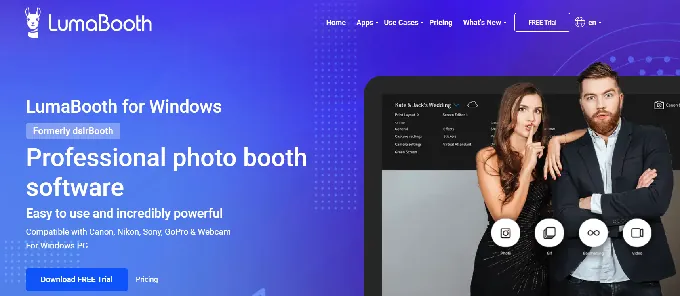
The Canon list alone covers everything from the Rebel series through the EOS R5, R6, and R7. USB tethering on Windows provides full live view and manual camera control, and runs more reliably than tethering on other platforms.
LumaBooth for Apple supports Canon, Nikon, and Sony cameras connected externally, plus the iPad or iPhone’s built-in front, rear, telephoto, wide, and ultra-wide cameras.
For 360 booths, the app captures at 120 or 240 fps using the device’s native camera. The portability advantage is real: an iPad on a stand is lighter and faster to deploy than a Windows laptop connected to a DSLR.
Simple Booth takes a different approach.
The HALO app runs exclusively on iPad and supports the iPad’s built-in camera on all plans. Canon DSLR and mirrorless camera integration is available on Core plans and above, with both wired USB and wireless WiFi connections (a capability most competitors, including LumaBooth, don’t offer).
Source: Simple Booth
Simple Booth narrows the gap with dedicated camera gear through Background Blur on Core plans and up, which keeps subjects sharp against a softened background to produce a bokeh effect from the iPad app.
The proprietary HALO ring light adds 112 LEDs producing up to 2,100 lumens through a diffuser, rated for 50,000 hours. The ring light sits around the iPad camera, delivering consistent, even illumination that reduces dependence on camera gear.
The hardware philosophy separates these platforms. LumaBooth says: bring your own camera, computer or iPad, and lighting, and we’ll provide the software. Simple Booth says: buy our integrated system, and the hardware and software work together out of the box.
For operators who already own a Canon, Nikon, or Sony body and want to use it, LumaBooth (either version) is the natural fit. For operators who prioritize setup speed and consistent output over camera flexibility, Simple Booth’s integrated system removes variables.
AI features: portraits vs. transformations
Both platforms have invested in AI, but they’ve bet on different capabilities.
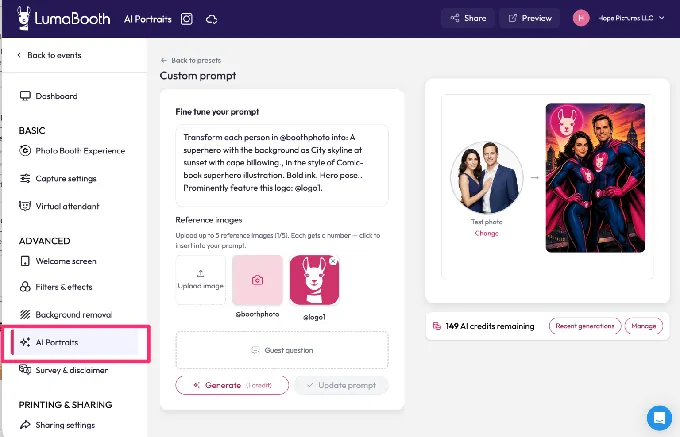
LumaBooth ships with 170+ AI portrait presets spanning superheroes, film noir, historical eras, art movements, and travel destinations.
Source: LumaBooth
A guest captures a photo, selects a style, and the platform delivers a transformed portrait in approximately 10 seconds. The May 2026 custom prompt builder goes further, letting operators embed guest names, jersey numbers, or sponsor logos directly into AI-generated artwork. LumaBooth estimates operators can add $1,000, $3,000 per event by running AI portrait activations at corporate events.
Pay-as-you-go credit packs never expire, so operators who add AI to occasional events avoid recurring costs. Monthly plans range from 150 credits at $14.99/month to 2,000 credits at $199.99/month, with 20 free credits for new subscribers. Each portrait uses one credit.
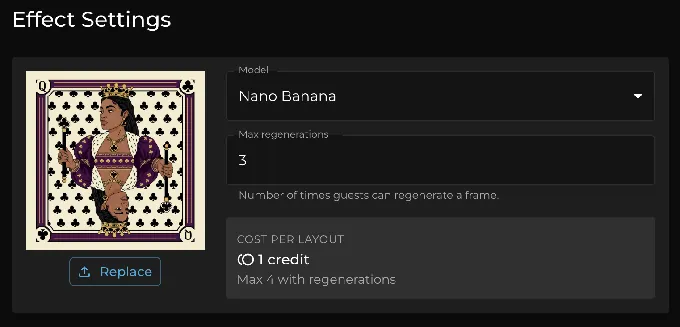
Simple Booth’s AI takes a different approach with its Nano Banana models, which transform the captured photo itself using text prompts rather than generating a separate portrait.
Source: Simple Booth
Three models balance speed and quality: Nano Banana 1 for individual subjects (1 credit), Nano Banana 2 for groups up to five (2 credits), and Nano Banana Pro for groups at the highest quality (3 credits). Credits cost $0.10 each and never expire.
Where Simple Booth pulls ahead is brand integration.
AI transformations composite directly with the Layout Designer, so brand overlays, logos, and graphic frames layer on top of AI-generated photos in a single workflow.
The Guest Input system lets participants answer questions (free-text or dropdown) that feed into the AI prompt as template variables, producing personalized outputs per guest. Operators can also assign a unique AI prompt to every frame in a multi-frame layout, enabling comic-strip or multi-scene narrative strips.
Simple Booth offers unlimited free prompt testing outside of booth mode, so operators can iterate on effects before an event without spending credits. LumaBooth provides 20 free trial credits on sign-up for the same purpose.
Sharing and gallery tools
Getting photos into guests’ hands quickly matters for event throughput and marketing reach. Both platforms have built sharing ecosystems, but they’re structured differently.
LumaBooth uses a multi-app approach.
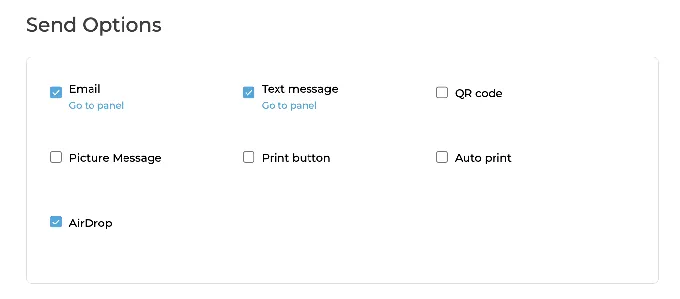
The booth software handles direct sharing via email, SMS, QR code, WhatsApp, AirDrop, and Instagram. fotoShare Cloud syncs all session media to a branded event microsite with no manual upload, and a free tier comes with every subscription.
LumaShare runs on a separate tablet as a dedicated sharing station, so one guest can share while the next is already posing. HashPrinter monitors Instagram and Facebook for an event hashtag and prints user-generated content on-site with event branding. Together these tools create a full sharing pipeline, but each is a separate subscription and device to manage.
Simple Booth builds sharing into the core app and dashboard.
Guests receive photos via QR code, email, SMS, AirDrop, or WhatsApp. Each event generates an online gallery that feeds a Live Feed display for TVs or projectors. The platform pre-populates event hashtags on X/Twitter and Facebook shares and converts incompatible layouts into Instagram-compatible files automatically.
Source: Simple Booth
The key difference: Simple Booth logs every share (email addresses, phone numbers, opt-in data) into a centralized dashboard with analytics. LumaBooth’s fotoShare Cloud also logs share data, but analytics depth scales with the paid tier: the Free plan offers basic hosting, while the $39.99/month Business plan adds Google Analytics integration and event-level analytics.
Arizona Opera grew its email list by 1,000 addresses in a few events using Simple Booth’s lead capture, and Treetop Golf built 150,000 unique email addresses across locations. (Simple Booth)
The marketing and data capture gap
This is where the platforms diverge most.
Lumasoft built LumaBooth for photo booth operators.
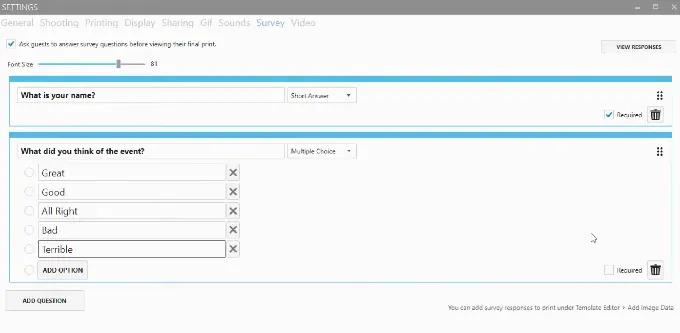
Its survey feature collects guest responses mid-session and can inject answers into printed output as personalized fields, export responses as reports, and save survey data to Google Drive or Dropbox.
Source: LumaBooth
It works for personalization and basic data collection, but there’s no native CRM integration, no email marketing pipeline, and no Zapier connector. The webhook and API layer on Windows can bridge to external systems, but that requires technical expertise.
Simple Booth targets marketing teams.
The data capture system offers up to 6 standard fields on Pro (email, name, phone, postal code, date of birth) and up to 10 custom fields on Select, including required checkboxes and legal terms. Simple Booth reports 87 to 90% opt-in rates because the data collection happens as part of receiving a photo, not as a separate form.
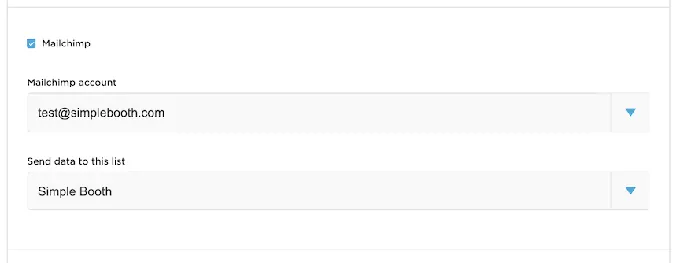
Captured data syncs to MailChimp natively without developer involvement, or to custom CRMs via the Open API on Pro plans and above. The analytics dashboard tracks gallery views, social shares, Facebook reactions, and X/LinkedIn engagement. The Select tier adds demographic insights via face detection (estimated age, gender breakdown, average group size).
Source: Simple Booth
Enterprise features reinforce the marketing focus: brand moderation lets operators approve photos before they reach galleries (critical for corporate brands), age gating handles age-restricted activations, and in-app custom legal terms embed client-specific privacy policies directly into the booth flow.
Simple Booth’s Virtual Booth extends data capture beyond physical events.
A browser-based photo experience accessible via QR code or link, Virtual Booth runs on any device with no app install, and can be embedded in email campaigns, printed on product packaging, or deployed as an always-on activation on a brand’s website. All submissions feed the same analytics and gallery infrastructure as the physical HALO booths.
LumaBooth has no equivalent virtual product.
G7 Entertainment Marketing has used Simple Booth for 10+ years, capturing 136,000+ fan interactions across branded activations. (Simple Booth)
Pricing: how the models compare
The pricing structures reflect each platform’s target buyer.
LumaBooth for Windows bills at $17/month annually or $49.99/month on a monthly plan.
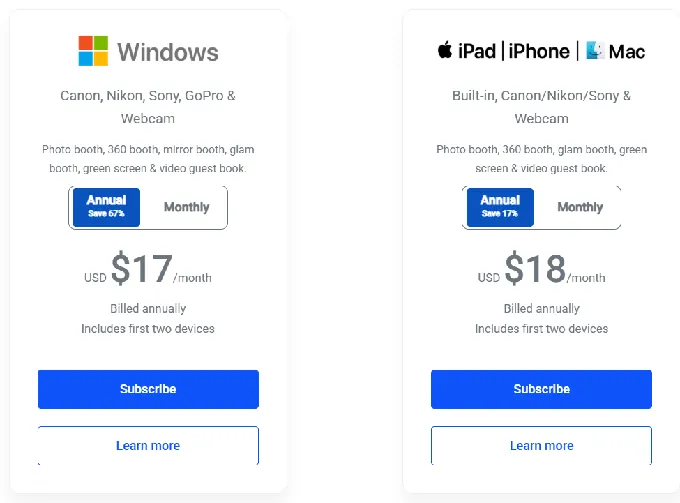
Each subscription covers two devices. Add-on services are separate: LumaShare at $7.99/month, HashPrinter at $25/month, SMS at $10/month, and fotoShare Cloud Plus at $19.99/month or Business at $39.99/month. A fully loaded Windows setup with sharing station, cloud hosting, and SMS runs about $80/month, still below most competitors.
LumaBooth for Apple bills at $18/month annually or $19.99/month on a monthly plan, also covering two devices.
The same add-on pricing applies, minus cashless payments (unavailable on Apple). Both versions offer a fully functioning free trial with no time limit and no credit card required. The only restriction: images carry a watermark until you subscribe.
Simple Booth uses weekly, monthly, and annual billing across five tiers.
The entry point is Lite at $14.99/week ($290/year), but it includes ads in the app and excludes custom branding, analytics, DSLR support, and lead capture. Professional use starts at Core: $24.99/week ($490/year), which adds DSLR support, video, background replacement, and AI effects.
Plus at $49.99/week ($990/year) adds custom branding and analytics. Pro at $149/month ($1,490/year) adds lead capture, API access, moderation, and phone support. Select at $249/month ($2,490/year) adds demographic analytics, custom legal terms, and security questionnaire support.
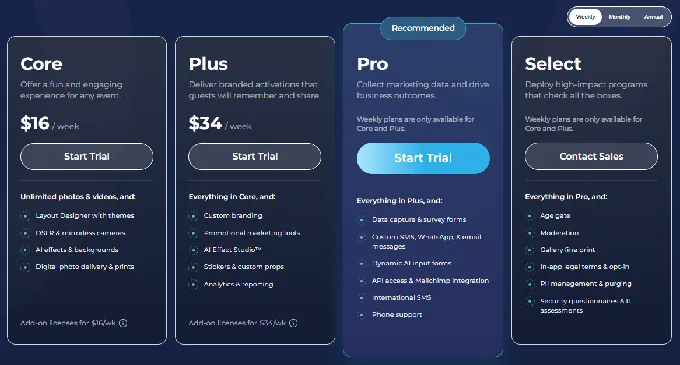
Weekly pricing gives operators flexibility to pay only when they have bookings (useful for companies starting out or running photo booths as a side business). Each Simple Booth plan covers one device. Additional devices require add-on licenses at the same per-license rate. A five-booth rental company on Plus would pay $49.99/week times five, or $249.95/week in software alone.
Then there’s hardware. LumaBooth requires no proprietary hardware. Simple Booth’s HALO Event Kit starts at approximately $2,090 (with iPad and Simple Care protection). Zero-percent financing is available.
The math is clear: LumaBooth costs less for operators who already own their hardware and need booth software. Simple Booth costs more because you’re buying an integrated system, not just an app. The question is whether the data capture, ease of use, and hardware justify the difference for your business.
Booth modes and creative range
LumaBooth offers the broadest range of booth experiences in a single subscription.
On Windows alone: photo, GIF, boomerang, video, 360, mirror booth, glam booth, green screen, AI background removal, AI portraits, video guestbook, and roaming photography. The Apple version shares most of these but drops mirror booth and glam filters.
The 360 booth mode works across GoPro, DSLR/mirrorless, iPhone, and iPad with speed ramping, animated overlays, and custom soundtracks. The Virtual Attendant replaces a human operator for mirror booth deployments, guiding guests through each session with built-in or custom animations.
Source: LumaBooth
LumaBooth’s v8.0 release added 820+ professionally designed templates for weddings, birthdays, corporate events, and holidays, included with the subscription. Operators can also build custom templates using the print layout designer with support for 4x6, 2x6 strips, and any paper size.
Simple Booth’s mode list is shorter: still photos, classic photo strips, custom layouts, GIFs, Rebound boomerang clips, and video (5 to 120 seconds).
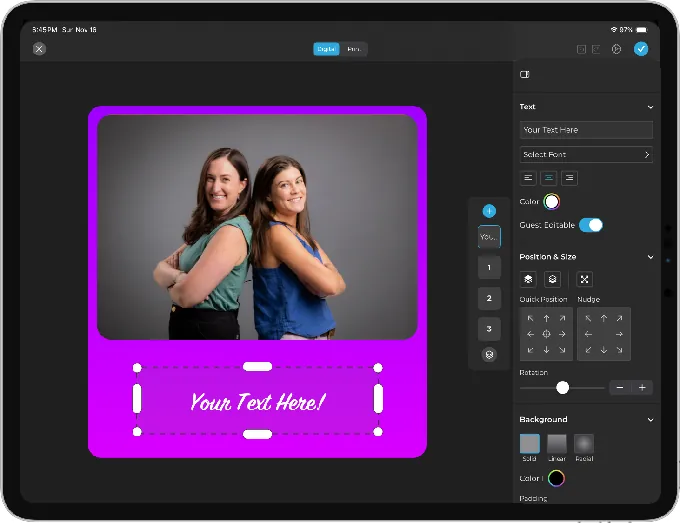
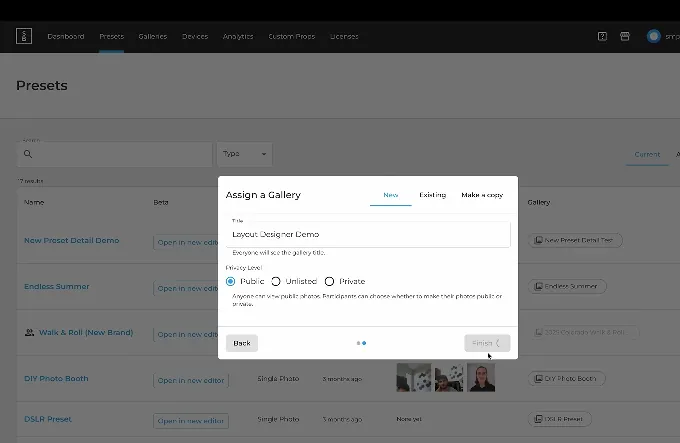
No dedicated 360 mode, no mirror booth mode, no video guestbook. But what Simple Booth offers, it wraps in more polish. The Layout Designer gives operators a design tool with layers, fonts, gradients, QR code embedding, and multi-layout support. Guest-editable text layers let participants type names or captions directly onto their photo before sharing. And 60+ themes and 100+ digital props come included.
Source: Simple Booth
For operators offering 360 booths, mirror booths, video guestbooks, or glam experiences, LumaBooth is the only option among these three. For operators focused on branded photo experiences with design control and data capture, Simple Booth covers fewer booth types but wraps each in customization and built-in data capture, reducing setup complexity.
All of Simple Booth’s features (filters, effects, Background Blur, DSLR integration, and video) work together without compatibility restrictions, so operators don’t need to navigate rules about which settings can coexist.
Setup, reliability, and support
Event-day reliability separates professional tools from hobby projects. A photo booth that crashes during a wedding creates problems no refund can fix.
LumaBooth’s setup involves downloading the app, connecting a supported camera, and configuring event settings.
The LumaBooth Dashboard enables remote configuration before arriving on-site. User reviews give the platform a 4.8-star rating from 1,668 reviews (Windows) and 4.6 from 696 reviews (Apple), with operators consistently citing reliability and fast support.
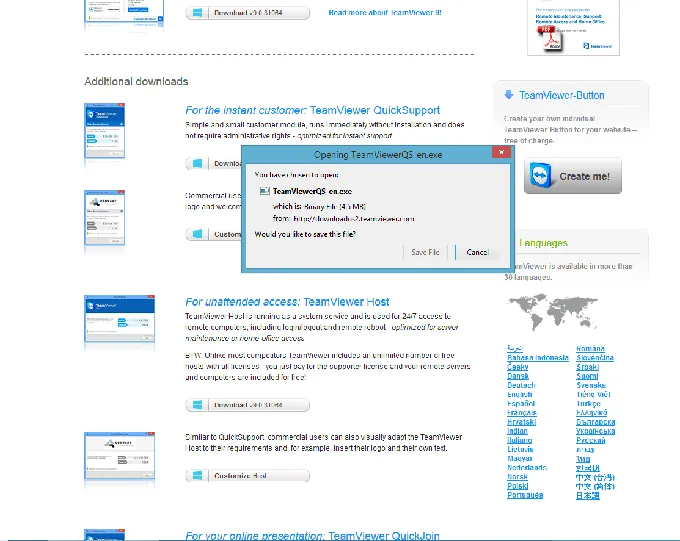
LumaBooth publishes point releases every 1 to 2 weeks, maintaining an active release cadence across its 14-year history. Support channels include a knowledge base, in-app ticketing through an AI assistant that escalates to human agents, remote desktop support via AnyDesk or TeamViewer for complex issues, and community Facebook groups for both platforms.
Source: LumaBooth
Simple Booth emphasizes simplicity.
The company has developed iPad photo booth apps since 2012 and now serves over 30,000 customers across more than 40 million captured moments. The HALO hardware sets up in under a minute with no tools. The preset editor uses a visual workflow that displays the entire booth flow upfront, making event configuration faster than scrolling through disconnected settings panels.
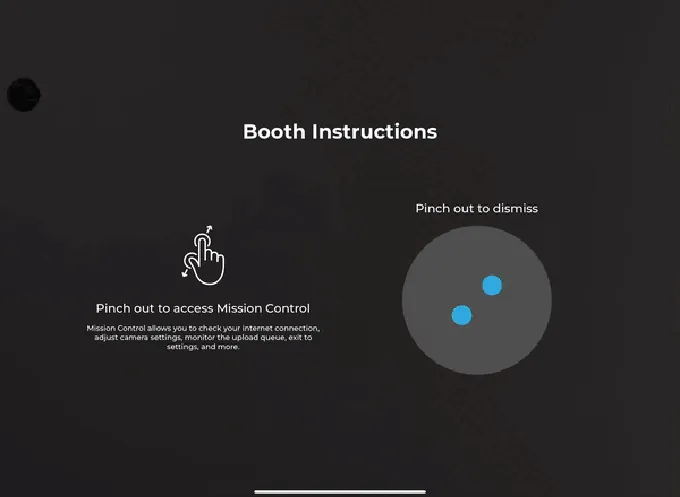
A Preflight Check screen catches configuration issues before the event starts, including automatic camera detection for DSLR setups. Mission Control, triggered by a two-finger pinch, lets operators monitor device health and adjust settings during live events without disrupting the guest interface.
Source: Simple Booth
The web dashboard extends this with remote device management: operators can monitor battery levels, disk space, and upload queues across all booths, and switch presets without being on-site (essential for companies running multiple events or locations).
The app holds 4.7 stars from 2,400+ ratings, and the guest interface runs without an attendant (a key advantage for drop-off events where operators leave equipment running and return later). A reliable offline queue ensures photos upload even if connectivity drops mid-event. Image previews now render up to 12x faster, so guests see their photos immediately rather than waiting.
Rental companies also report that training new staff on Simple Booth is straightforward, which matters when scaling operations. Support is available 7 days a week, with tiers scaling by plan: email and chat for most users, phone support on Pro, and a dedicated account manager on Select.
One pattern worth noting in Simple Booth’s App Store reviews: post-update bugs appear as a recurring theme. Simple Booth responds and resolves issues, but operators may want to disable auto-updates before high-stakes events.
LumaBooth for Windows vs LumaBooth for Apple vs Simple Booth: Which should you choose?
Choose LumaBooth for Windows if:
- You run booths from a Windows PC with a Canon, Nikon, Sony, or GoPro camera
- You need mirror booth, glam booth, or cashless payment capabilities
- You want the broadest range of booth types in a single subscription
- Budget matters and you want professional features at $17/month
- You need API and webhook integration with external systems like lighting rigs or CRMs
Choose LumaBooth for Apple if:
- You prefer running your booth from an iPad, iPhone, or Mac
- Portability and fast deployment matter more than Windows-exclusive features
- You want native AirDrop sharing, Guided Access kiosk mode, and offline resilience
- You’re running 360 booths with an iPad on a spinner rig
- You want affordable professional software at $18/month
Choose Simple Booth if:
- Your photo booth is a marketing tool, not just an entertainment service
- Lead capture, data analytics, and CRM integration are priorities
- You want an integrated hardware-software system with built-in lighting
- You need virtual photo booth capability for remote or always-on activations
- You’re running branded corporate activations where moderation, compliance, and brand control matter
- You run unattended or drop-off events and need software that works without an attendant
- You’re scaling your team and need software that’s easy to train new staff on
- You value sub-one-minute setup with no technical assembly
See your events powered by Simple Booth with a free trial.
Deep Eddy Vodka generated 14,000 social posts across field marketing activations using Simple Booth. (Simple Booth)
LumaBooth and Simple Booth serve the same industry from opposite ends. LumaBooth gives operators flexibility and low cost, trusting them to build their own hardware setup and marketing workflow. Simple Booth packages hardware, software, and data capture into a single system that costs more but removes the assembly.
The best choice depends on what your photo booth business sells. If you sell photo booth rentals and need versatile, affordable software, LumaBooth delivers. If you sell branded experiences with measurable lead generation, Simple Booth is built for that.
LumaBooth vs dslrBooth vs Simple Booth FAQ
Are LumaBooth and dslrBooth the same thing?
Yes. In March 2026, Lumasoft rebranded dslrBooth for Windows to LumaBooth for Windows with the version 8.0 release. The iOS/Mac app had always been called LumaBooth. Both apps now share a single brand, a cloud dashboard, and a template library. If you see “dslrBooth” and “LumaBooth” in forums or reviews, they’re the same product family from the same company.
Which LumaBooth version has more features, Windows or Apple?
LumaBooth for Windows. It exclusively offers cashless payments, mirror booth mode with the Virtual Attendant, glam booth beauty filters, AI background removal with GPU acceleration, and a webhook/API system for integrating with external hardware and software.
LumaBooth for Apple compensates with native Apple ecosystem integration: AirDrop, AirPrint, Guided Access kiosk mode, and motion-triggered 360 recording.
How much does each platform cost for a single booth?
LumaBooth for Windows costs $17/month on an annual plan ($49.99 monthly). LumaBooth for Apple costs $18/month annually ($19.99 monthly). Both cover two devices.
Simple Booth starts at $490/year for Core (the first plan with DSLR support and no ads), covering one device. HALO hardware kits start at approximately $2,090 and are purchased separately.
Can I use LumaBooth without buying a DSLR camera?
Yes. LumaBooth for Apple works with the iPad or iPhone’s built-in cameras, requiring no external camera. LumaBooth for Windows supports webcams and GoPro Hero 5 to 11 in addition to DSLRs and mirrorless cameras.
Simple Booth works with the iPad’s built-in camera on all plans, with Canon DSLR/mirrorless support on Core and above.
Which platform is best for corporate brand activations?
Simple Booth. It offers brand moderation (approve photos before gallery display), custom legal terms in the booth flow, age gating, demographic analytics via face detection, and a dedicated account manager on the Select plan. Its Virtual Booth also extends branded photo experiences to remote audiences via a browser link.
LumaBooth’s custom AI prompt builder with sponsor logo embedding works well for branded AI portrait activations specifically, but it lacks the compliance and moderation layers that corporate procurement teams typically require.
Does either platform offer a virtual or remote photo booth?
Only Simple Booth. Virtual Booth runs in a web browser with no app install, supporting AI effects, background replacement, data capture, and social sharing. It can be deployed via QR code, link, or website embed for remote events, hybrid events, or always-on campaigns.
LumaBooth has no virtual booth equivalent.
Which platform has better AI features?
It depends on what you need. LumaBooth offers 170+ AI portrait presets with a custom prompt builder that can embed guest names and logos into AI-generated artwork, at approximately $0.10 per portrait or less on subscription plans.
Simple Booth’s Nano Banana models transform the captured photo itself using text prompts, with per-frame multi-prompt storyboarding and guest co-creation via template variables. Both platforms price AI credits at $0.10 each, and purchased credits don’t expire.
Can I run multiple booths on a single subscription?
LumaBooth subscriptions cover two devices each. Additional Windows devices require vouchers at $199.99 each. Simple Booth subscriptions cover one device each, with additional devices at the same per-license rate.
For multi-booth operations, LumaBooth scales more affordably: five booths cost roughly $85 to 90/month total, while five booths on Simple Booth Core cost $490/year times five ($2,450/year).
Keep reading
 Showdowns
Simple Booth vs LumaBooth: Which Photo Booth Software Fits Your Business in 2026?
Turnkey hardware vs budget cross-platform app. Simple Booth or LumaBooth?
 Showdowns
LumaBooth vs Snappic (vs Simple Booth): Which Photo Booth Software Fits Your Business in 2026?
Budget multi-format app vs enterprise fleet platform. LumaBooth or Snappic?
 Showdowns
LumaBooth vs Touchpix (vs Simple Booth): Which Photo Booth Software Wins in 2026?
Cross-platform all-rounder vs 360 video specialist. LumaBooth or Touchpix?