Mini Photobooth vs Sparkbooth (vs Simple Booth): Which Photo Booth Software Fits Your Events in 2026?

Choosing between Mini Photobooth vs Sparkbooth for your event photo booth often comes down to five questions:
- Do you need an iPad-based solution you can carry in one hand, or a desktop computer setup with more hardware flexibility?
- Would you rather pay a monthly subscription or make a one-time purchase?
- How important are professional lighting, build quality, and a polished guest experience?
- Do you just need to capture and share photos, or do you also need lead capture, analytics, and marketing integration?
- Are you hosting a single personal event, or building a photo booth business?
In short, here’s what we recommend:
Mini Photobooth is the choice for DIY event hosts who want a photo booth running on their iPhone or iPad in under an hour. Its 100+ templates, 1,000+ built-in graphics, and AI green screen make it easy to create themed photos without design skills. With a 4.7-star rating across 8.9K App Store reviews, it works well for personal events. However, Mini Photobooth is iOS-only, locked to portrait orientation, and offers no lead capture, analytics, or integrations beyond the iOS share sheet. Those constraints surface quickly once you move past birthday parties into professional use.
Sparkbooth is the affordable choice for operators who already own a Windows or Mac computer and want a photo booth at a one-time cost. At $149 for webcam or $189 with DSLR support, the lifetime license covers green screen, animated GIFs, mirror booth mode, photo kiosk, SMS delivery, and MailChimp integration, with no recurring fees. Sparkbooth supports a wide range of Canon and Nikon cameras and runs fully offline. But its desktop-only platform means no tablet portability, support comes from a solo developer and a Facebook user group, and it lacks the cloud management and marketing tools that professional operators need.
Both platforms work well at accessible prices. But neither was designed to run a photo booth business or power a brand activation. For operators who need professional hardware, cloud management, and marketing capabilities, there’s a third option built for that job.
Simple Booth pairs its HALO ring-light hardware (machined aluminum chassis, 112 LEDs producing up to 2,100 lumens) with a cloud-connected iPad app and online dashboard. The system sets up in under a minute and runs unattended. Beyond photo capture, Simple Booth collects first-party guest data with opt-in rates of 87 to 89%, delivers photos via QR code, SMS, email, AirDrop, or WhatsApp, and feeds everything into analytics dashboards. Its Virtual Booth extends beyond physical events, delivering branded photo experiences through a browser with no hardware required. With 30,000+ customers and 40 million moments captured since 2013, Simple Booth is built for rental companies, venues, and brand marketers who need booth sessions to produce results they can measure.
If a self-running photo booth system sounds like what your business needs, start a free trial of Simple Booth.
Mini Photobooth vs Sparkbooth vs Simple Booth at a glance
| Mini Photobooth | Sparkbooth | Simple Booth | |
|---|---|---|---|
| Platform | iOS only (iPhone and iPad) | Windows and Mac | iPad with HALO hardware |
| Camera options | iPad camera, Canon EOS, Sony DSLR | Webcam, Canon DSLR, Nikon DSLR | iPad camera, Canon and Sony DSLR/mirrorless (wired or wireless) |
| Template editor | Built-in with 100+ templates and 1,000+ graphics | Drag-and-drop layout editor with overlay support | Layout Designer with layers, fonts, gradients, and AI generation |
| Output formats | Photos, GIFs, video, boomerang | Photos, GIFs, boomerang, rewind | Photos, GIFs, video, boomerang, Rebound clips |
| Green screen | AI background removal | Physical chroma key and AI background removal | AI background replacement (no physical screen needed) |
| Sharing methods | Email, iMessage, social media, Web Gallery QR code | Email, SMS, QR code, Facebook, photo kiosk | QR code, SMS, email, AirDrop, WhatsApp, online gallery |
| Lead capture | None | MailChimp email collection | Custom forms (up to 10 fields), MailChimp, API |
| Offline mode | Sharing requires Wi-Fi | Full offline with queued delivery | Full offline with queued upload |
| Support | Email only | Email and Facebook group | 7-day live chat and email, phone (Pro+), account manager (Select) |
| Pricing model | Subscription: $44.99/mo or $269.99/yr | One-time: $149 (webcam) or $189 (DSLR) | Subscription: $49/mo (Core) to $249/mo (Select), plus hardware |
| Free trial | Full-feature app trial | 30-day trial (watermarked) | 7-day trial with 25 AI credits |
| Best for | DIY event hosts on iPad | Budget-conscious operators on desktop | Professional operators and brand marketers |
Three platforms, three philosophies
Mini Photobooth, Sparkbooth, and Simple Booth all turn hardware you may already own into event photo booths. But each starts from a different premise, and the right choice depends on which constraints matter most to you.
Mini Photobooth is a mobile app.
The developer built the first version for their own wedding, liked the result, and expanded it into a product. You download it from the App Store, pick a template, and your iPad becomes the booth. The entire workflow (design, capture, share) lives on a single device. It’s the most portable option: an iPad on a tripod is the whole rig. But it’s also the most constrained. iOS-only means no Android, no Windows, no web access. Portrait orientation limits which stands and enclosures you can use.
Sparkbooth is desktop software, in continuous development since 2009.
You install it on a Windows or Mac computer, connect a webcam or DSLR, and run the booth from a laptop or touchscreen. A single license unlocks standard photo booth, mirror booth, GIF booth, and photo kiosk modes. It offers the most hardware flexibility (any USB webcam works, plus dozens of Canon and Nikon cameras), but requires a full computer at the venue. No tablet, no phone, no cloud dashboard.
Simple Booth is an integrated system.
The HALO chassis is a machined aluminum ring light with a built-in iPad mount, concealed USB-C charging cable, and patented lighting technology. The iPad app connects to a cloud dashboard where operators configure presets using a visual workflow, manage analytics, and monitor booths remotely.
Where Mini Photobooth and Sparkbooth are software you pair with whatever hardware you assemble, Simple Booth is a single-vendor product where hardware, software, and cloud services work together.
The difference matters most at the venue. Mini Photobooth and Sparkbooth require operators to source their own lighting, stands, and charging solutions. Simple Booth’s tool-less faceplate and deployable selfie stand mean the physical setup takes under a minute: the iPad snaps in, the ring light powers on, and the booth is ready for guests.
“I knew nothing about photo booths when we started,” yet Amore Entertainment launched during COVID and scaled to a multi-booth rental business with Simple Booth. (Simple Booth)
Camera support and photo quality
Photo quality depends on two things: the camera sensor and the lighting. Each platform handles both differently.
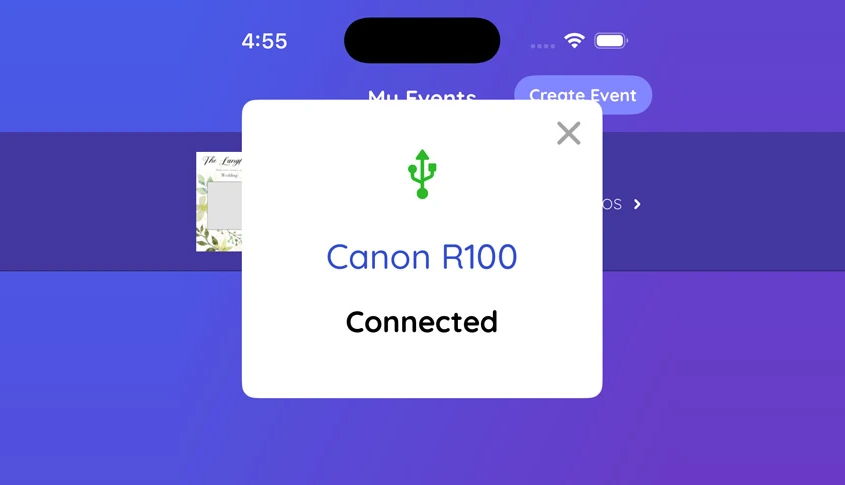
Mini Photobooth supports Canon EOS and Sony DSLRs connected via USB, with Nikon listed as coming soon.
A documented wired setup connects a DSLR, DNP printer, and continuous power through a single USB-C hub into the iPad. For casual use, the iPad’s built-in camera handles selfie-distance shots adequately. Camera images must be captured in JPEG at Medium quality for reliable transfer. Lighting is the operator’s responsibility: bring your own ring light, softbox, or work with venue ambient light.
Source: Mini Photobooth
Sparkbooth has the widest camera compatibility.
The DSLR tier supports a large list of Canon and Nikon bodies, including current-generation mirrorless cameras like the Canon EOS R1 and R5 Mark II, plus Nikon Z9 and Z8. Version 7.2 unified Canon and Nikon into a single application, and camera compatibility updates ship regularly, most recently adding Canon EOS R1 and R50V in November 2025.
One limitation: Canon DSLR support on Mac is not available, so Mac users must use Nikon. Webcam mode works with any USB camera but depends on the webcam’s quality. Like Mini Photobooth, lighting is the operator’s problem.
Simple Booth added Canon and Sony DSLR and mirrorless camera support in HALO 5.0 (Core plan and above), with Nikon listed as coming soon.
The integration supports both wired USB connections for long-event reliability and wireless connections over Wi-Fi for flexible setups (a feature most competitors don’t offer).
But the primary experience relies on the iPad’s built-in camera paired with the HALO ring light. The ring light’s 2,100 lumens from 112 LEDs provide even illumination for groups standing 6 to 8 feet from the camera. Software post-processing adds Glam skin smoothing, DSLR-style background blur, and AI background replacement without a physical green screen. Image previews appear up to 12x faster thanks to rendering optimizations, so guests see their photos almost instantly. The integrated approach produces consistent results regardless of venue lighting, something DIY rigs struggle to match.

Source: Simple Booth
For operators who own Canon or Nikon cameras and want the best sensor quality, Sparkbooth supports the most models. For operators who want consistent results without managing camera settings and external lighting, Simple Booth’s integrated hardware (including wireless DSLR connections) handles it.
Design tools and AI capabilities
A photo booth’s output is only as good as its design. All three platforms include template editors, but the tools vary in depth and the AI features diverge.
Mini Photobooth ships with 100+ templates and 1,000+ graphics for weddings, birthdays, and corporate events. The built-in editor supports 120+ fonts, custom graphic uploads, text layers, and filters across photo, GIF, and video formats. Multiple templates per event let guests choose their preferred design at the booth. On the AI side, Mini Photobooth offers AI green screen background removal.
Known editor limitations include a missing save button (users report losing 15 minutes of work when the editor closes) and no undo/redo during template decoration.
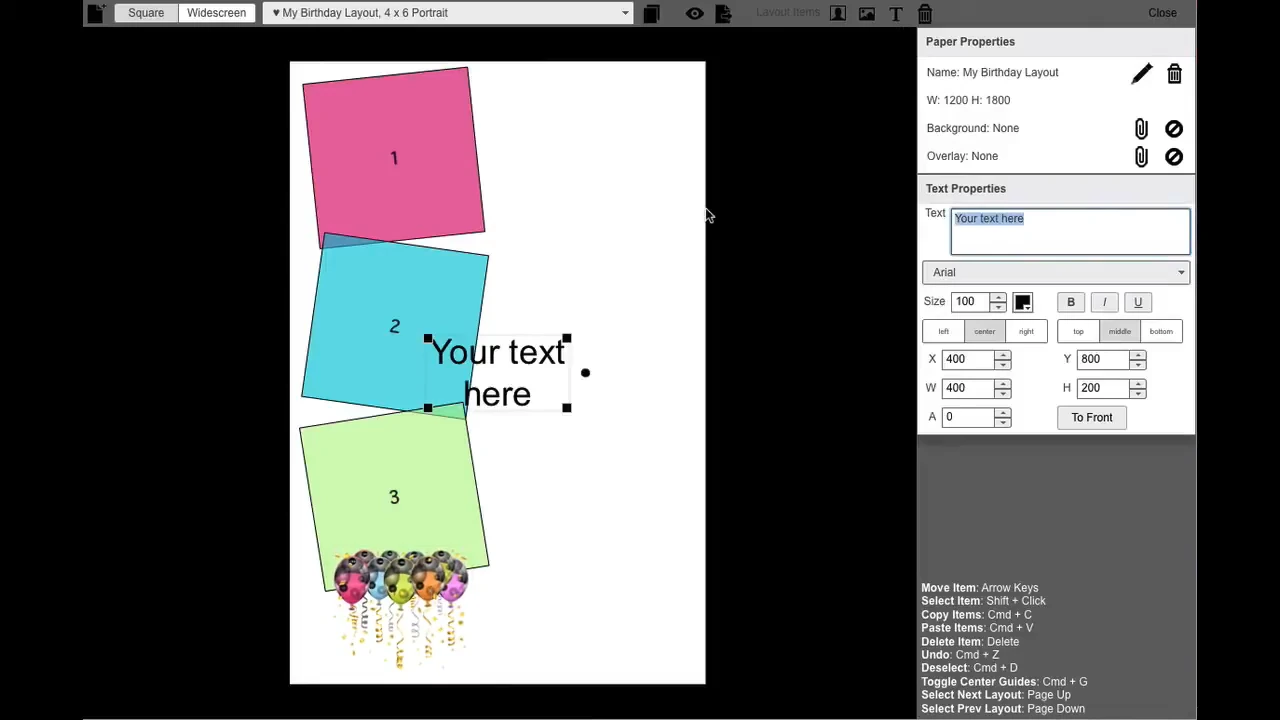
Sparkbooth includes a drag-and-drop layout editor focused on printed photo strips. Operators add text, logos, and background images, then position photo boxes by dragging handles.
A two-layer system separates background images (below photos) from transparent overlay images (above photos), enabling branded frames that print over guest photos. Built-in layouts can be cloned as starting points. Background preparation typically requires external software like Photoshop or Paint.net. For AI, Sparkbooth integrates with five third-party AI background removal services (UnlimitedBG, PhotoRoom, Remove.bg, Removal.ai, and Slazzer), with UnlimitedBG supporting fully offline operation.
Source: Sparkbooth
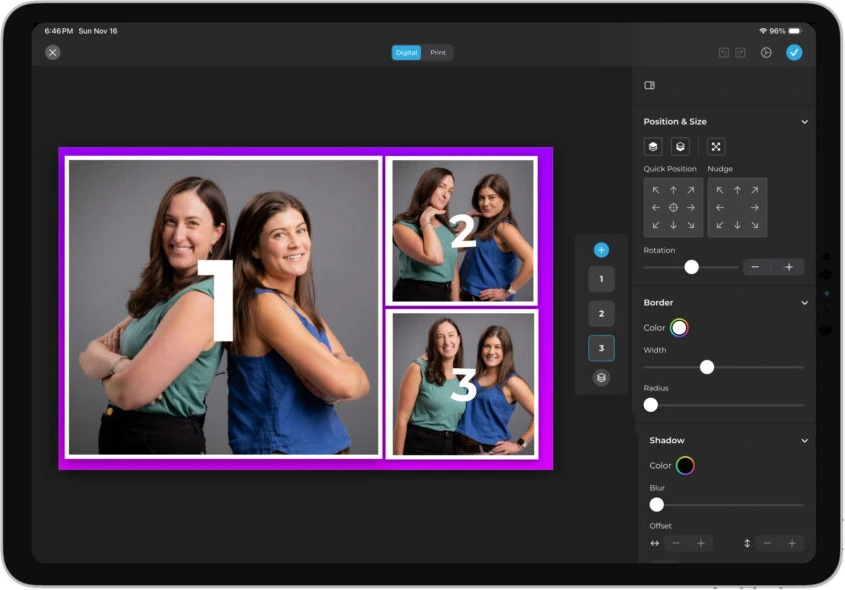
Simple Booth introduced the Layout Designer in HALO 5.0, available in both the iPad app and web dashboard. It supports photo placement, text layers with font, color, and alignment controls, background gradients, logo positioning, border rounding, and embeddable QR codes.
Two features stand out: AI-generated layout images let operators create graphic elements using AI at no credit cost, and guest-editable text layers (Plus+) let participants type their own names or captions onto photos before sharing.
Source: Simple Booth
Simple Booth’s AI goes beyond background removal.
AI Effects use three Nano Banana models to transform entire photos through text prompts, turning a standard portrait into an illustrated character, a comic book panel, or a themed scene while preserving the guest’s identity. Unique prompts can be assigned to each frame in a multi-frame layout, enabling narrative photo strips.
Guest Input (Pro/Select) lets participants answer questions that feed into the AI prompt, producing personalized results per guest. Operators can test prompts unlimited times at zero credit cost outside of booth mode, removing cost risk during preparation.
How guests receive their photos
The gap between these platforms is widest in what happens after the shutter clicks.
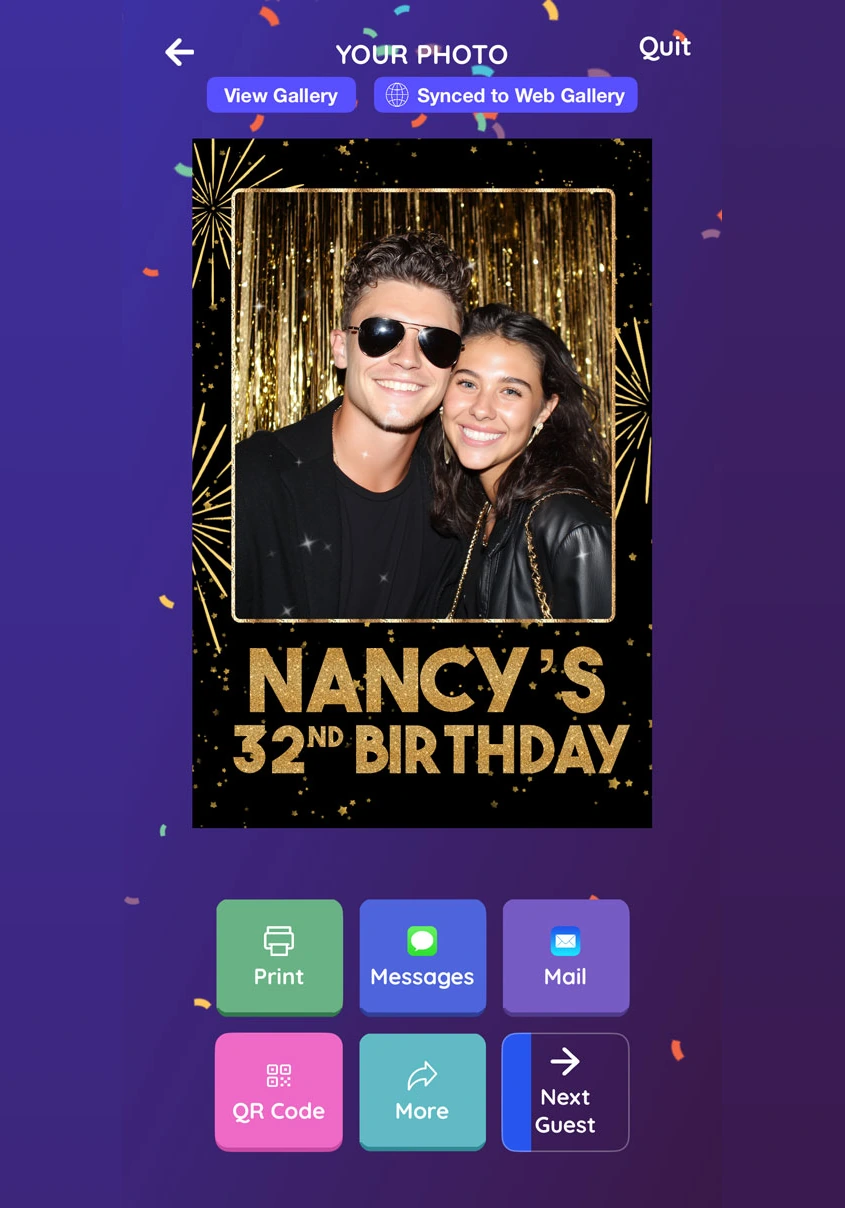
Mini Photobooth shares photos through email, iMessage, and social media via the iOS share sheet.
A Web Gallery with QR code access lets guests browse all event photos from their phones. Printing uses Apple AirPrint or a wired DNP dye-sub setup for 10 to 20 second output. The Web Gallery stays live after the event for guests who missed the QR scan, though galleries deactivate when a subscription lapses. The main limitation: sharing requires Wi-Fi or cellular data. At venues with poor connectivity, guests leave without their photos.
Source: Mini Photobooth
Sparkbooth gives operators the most control over delivery infrastructure. Choose from seven email providers and four SMS providers, each connected through API credentials. QR codes can be embedded into printed layouts so every physical print doubles as a digital retrieval link.
A separate photo kiosk runs on a second computer to offload browsing and reprinting from the capture station. Sparkbooth’s standout delivery feature is its offline queue: it stores guest contact details locally and sends all photos in batch when internet becomes available.
Simple Booth covers more channels with less configuration.
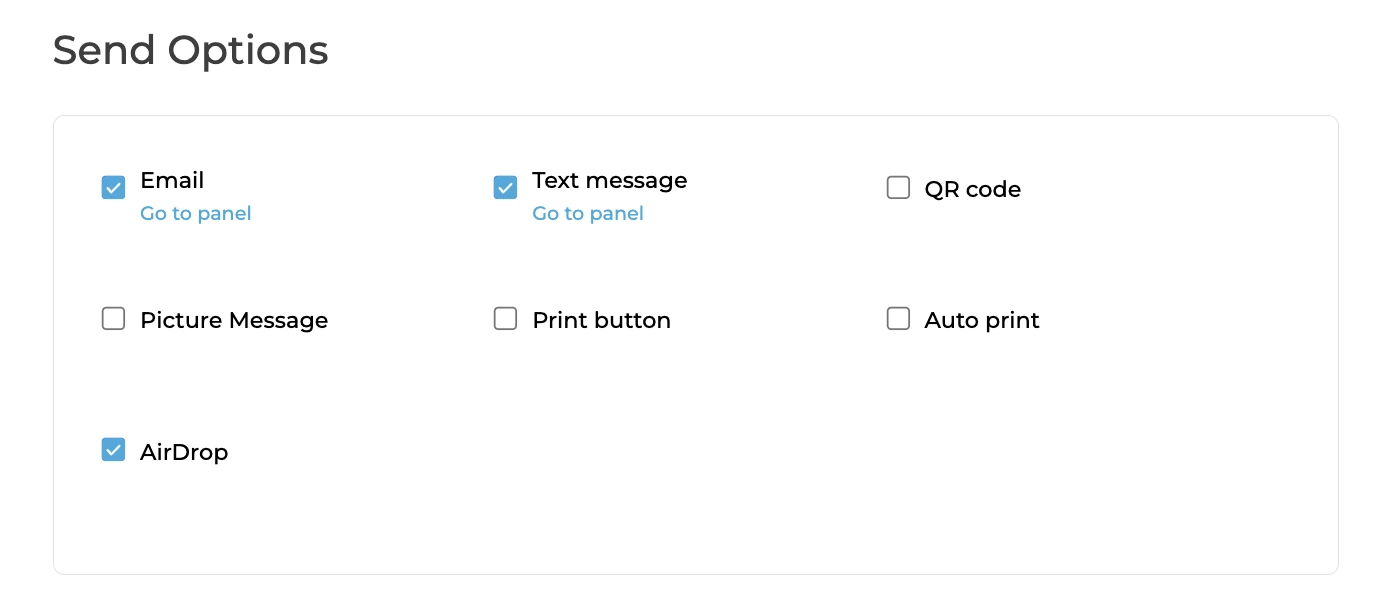
Guests receive photos via QR code, email, SMS, AirDrop, or WhatsApp, all from the same post-session screen. WhatsApp delivery, added in HALO 5.0, opens international markets where SMS is uncommon. Each event generates an online gallery that can run as a Live Feed for real-time slideshow on a TV or projector. The app queues sessions offline and delivers them when connectivity returns.
Source: Simple Booth
Photo delivery is also where Simple Booth’s marketing value shows. Mini Photobooth and Sparkbooth treat delivery as the final step: the guest gets their photo and moves on. Simple Booth treats it as the beginning of a data capture workflow.
Lead capture separates consumer tools from business tools
This is where the three platforms diverge most.
Mini Photobooth collects no guest data. There is no form, no integration, no analytics. The app was designed for personal events where the photo is the deliverable, not the start of a marketing pipeline.
Sparkbooth offers one marketing integration: MailChimp.
Email addresses entered at the booth go directly to a mailing list. It works for basic list-building, but there are no custom fields, no CRM connectors beyond MailChimp, and no analytics dashboard. Operators who want to collect phone numbers, consent checkboxes, or custom data fields have no path forward within Sparkbooth.
Simple Booth was designed around data capture.
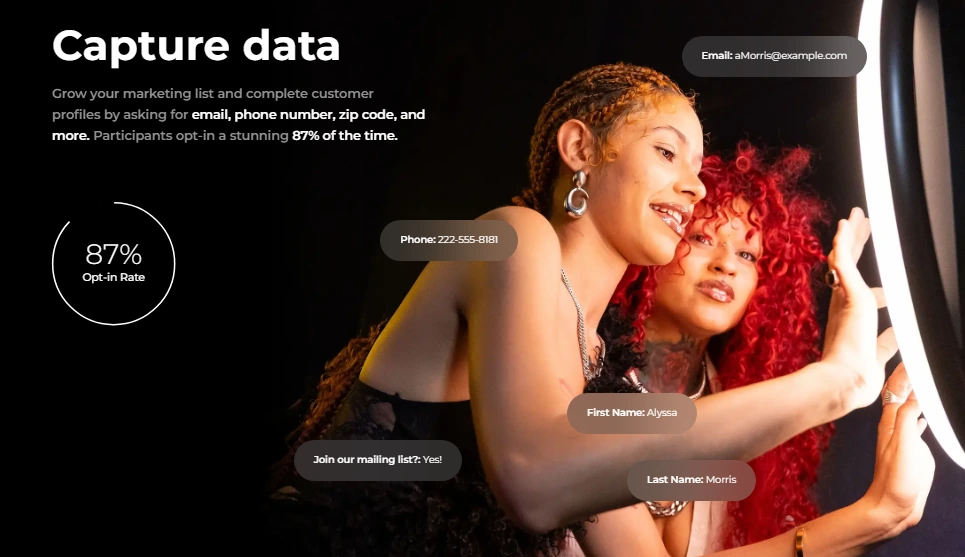
It collects guest information as part of the photo-receiving flow, not as a separate ask, which is why the platform reports opt-in rates of 87 to 89%. Pro plans support 6 standard fields (email, name, phone, postal code, date of birth); Select plans allow up to 10 custom fields including checkboxes and required legal disclosures. Data exports as CSV, syncs natively with MailChimp, and routes to custom CRMs via the Open API on Pro+.
Source: Simple Booth
The analytics dashboard tracks participants, uploads, gallery views, social shares, and referred views. Select-tier demographic analytics estimate age, gender, and group size through face detection. Brand moderation (Pro/Select) lets operators approve photos before they reach the gallery or go to guests.
For venue operators tracking ROI or brands measuring activation performance, this data layer turns a photo booth from an entertainment expense into a marketing tool.
Treetop Golf collected 150,000 email addresses across its locations using Simple Booth’s data capture forms. (Simple Booth)
Setup and event-day reliability
A photo booth that fails during a wedding doesn’t get a second chance. Each platform handles event-day operations differently.
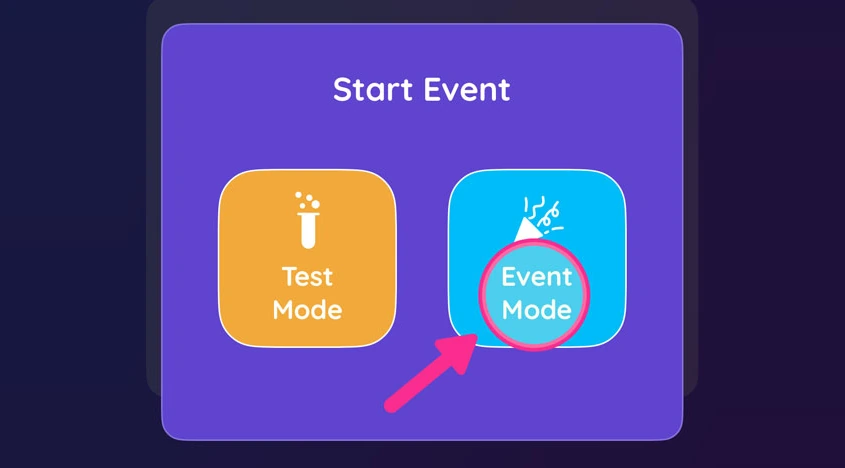
Mini Photobooth optimizes for fast first-time setup. The app walks new users through an 8-step process to get running in under 60 seconds. Event Mode locks the iPad into the booth experience using iOS Guided Access, preventing guests from navigating away. A passcode protects Event Mode from accidental exits, and if the camera flow is interrupted, the app restores it automatically.
The weakest link is connectivity: print and share features depend on Wi-Fi, and the app has no offline delivery queue.
Source: Mini Photobooth
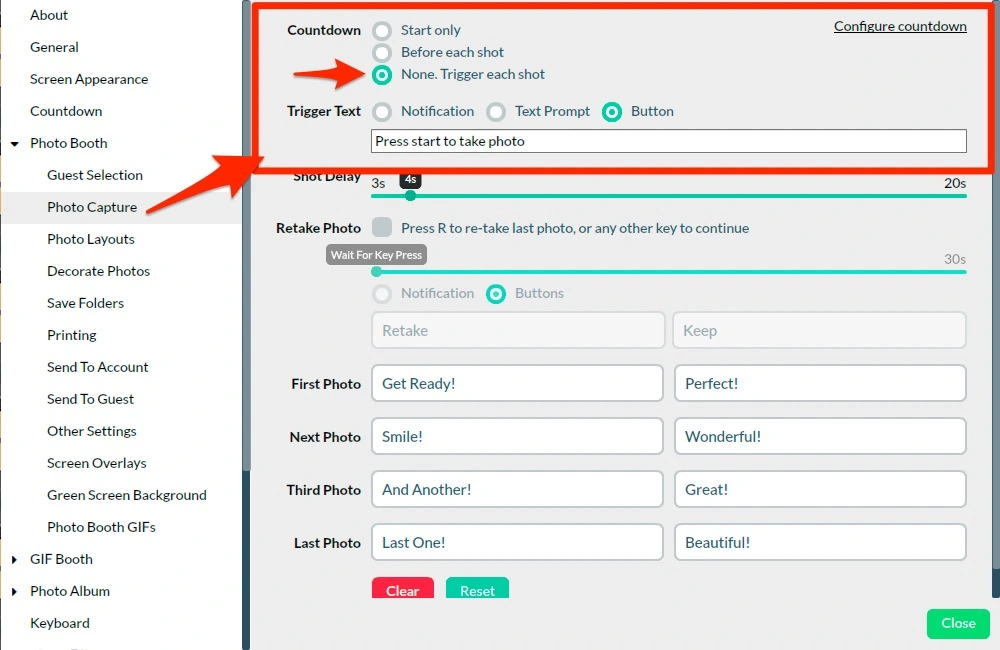
Sparkbooth is built for unattended deployment. Application lock, hidden buttons, and hot corners prevent guests from accessing settings. Manual trigger mode gives operators per-shot control when needed. The software runs fully offline, queuing all sharing for later. A counter screen overlay monitors print and session counts in real time.
The trade-off is setup complexity: operators must configure printer settings, network sharing for the kiosk, and potentially DSLR live view parameters (manageable steps, but not instant).
Source: Sparkbooth
Simple Booth adds operational tools on top of its kiosk lock.
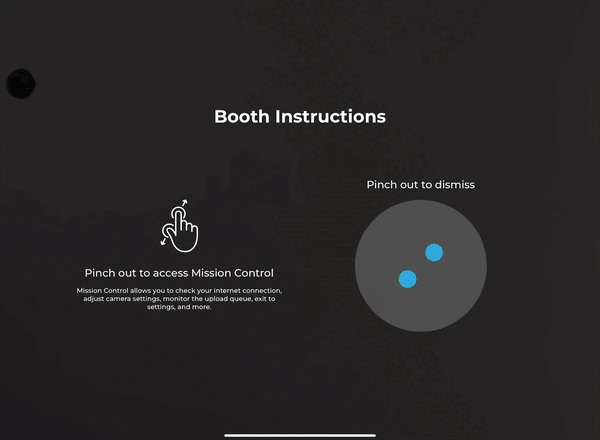
A Preflight Check screen runs before each event, detecting connected DSLR cameras, showing a live preview, and catching configuration issues early. During the event, Mission Control (triggered by a two-finger pinch) lets operators monitor device health, adjust camera settings, and sync dashboard changes without breaking the guest-facing interface.
Operators can update settings remotely through the online dashboard and sync them to the iPad in real time. Filters, Glam, and background blur all work with video, DSLR integration, and offline mode without compatibility conflicts. For operators managing multiple booths at different venues, remote management is a real advantage. The intuitive interface makes training new staff straightforward, a benefit for growing rental companies that hire event staff rather than running every booth personally.
Source: Simple Booth
The HALO hardware adds physical reliability. The chassis is rated for 50,000 hours of LED operation, and the built-in USB-C cable keeps the iPad charged throughout the event without exposed cables. Compatible portable batteries provide 6+ hours of runtime for events without wall power.
For travel, the Event Kit packs into a rolling hard case weighing 49 lbs with an extendable handle. Simple Booth also supports dual voltage (110V–240V), requiring only a plug adapter for international events.
One documented concern: App Store reviews report occasional bugs after software updates, and the company advises disabling auto-updates before events. Testing before event day matters with any platform.
What the pricing models reveal
How each product charges tells you who it was built for.
Mini Photobooth uses a single-tier subscription called Pro Mode: $44.99/month or $269.99/year through the App Store, with a 20% discount for website purchases.
All features are included on both cadences, covering unlimited devices, events, and templates. The app is free to download and try before subscribing. For a DIY host running one wedding, the monthly cost is manageable: subscribe for a month, run the event, cancel. For someone running events regularly, the annual cost adds up. Two years of Mini Photobooth costs more than a Sparkbooth lifetime license.
Sparkbooth charges once and never again: $149 for the Premium license or $189 for DSLR.
Each license includes 3 activations and covers commercial use. Updates within the same major version are free; major version upgrades may carry a fee. Add-on services like UnlimitedBG AI background removal and the qrcode.photos delivery service are separate subscriptions, so total cost can exceed the headline price. Still, for operators running events frequently, the one-time model is hard to beat on cost.
Simple Booth uses tiered subscriptions that scale with capability.
Core starts at $49/month or $490/year; Plus is $99/month or $990/year; Pro is $149/month or $1,490/year; Select is $249/month or $2,490/year. Each plan includes one device license, with add-on licenses for additional devices. AI effects cost $0.10 per credit beyond plan bonuses. The HALO hardware kits are purchased separately (Event Kits start around $2,090).
The total investment is higher, but the pricing reflects a different category. Simple Booth is a business tool with lead capture, analytics, and enterprise compliance features designed to generate return; custom Enterprise plans are also available for large deployments. Weekly billing (Core at $24/week, Plus at $49/week) lets rental companies with variable schedules pay only during active weeks.
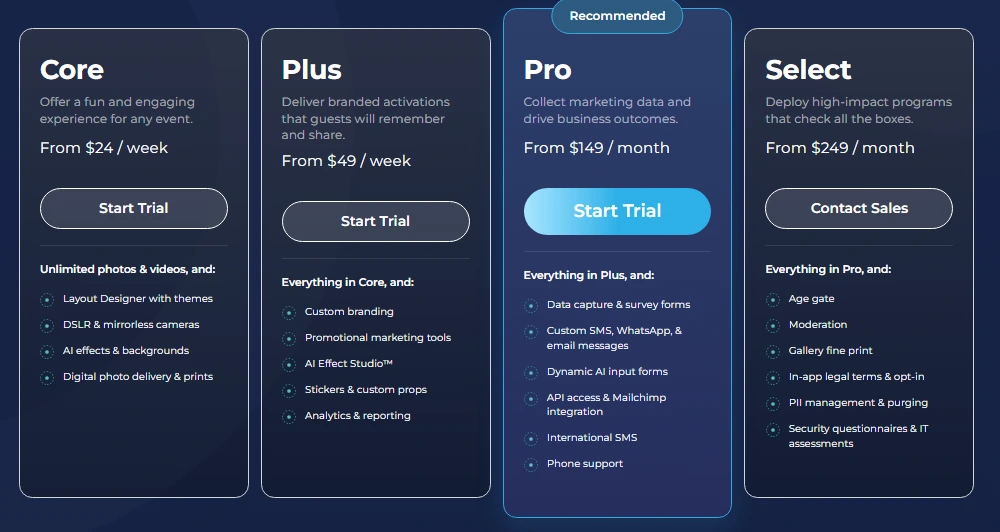
Source: Simple Booth
“It paid for itself pretty quickly. Now it’s just extra money coming in.” (Kurt Nielson Photography)
Mini Photobooth vs Sparkbooth vs Simple Booth: Which should you choose?
The right photo booth platform depends on your situation, not on which one has the longest feature list.
Choose Mini Photobooth if:
- You’re hosting a personal event (wedding, birthday, holiday party) and want a quick, polished setup
- You already own an iPad and want the simplest path to a working photo booth
- You prefer ready-made templates you can customize in minutes
- You don’t need lead capture, analytics, or CRM integration
- You want to try before you buy with a full-feature free trial
Download Mini Photobooth and start customizing your first template.
Choose Sparkbooth if:
- You want a photo booth at a one-time cost with no recurring fees
- You already own a Canon or Nikon DSLR and want to put it to work
- You need a desktop-based solution on Windows or Mac
- Mirror booth mode, GIF booth, or photo kiosk is part of your event offering
- Offline operation at venues with poor connectivity is a hard requirement
Start a free 30-day trial of Sparkbooth to test with your own hardware.
Choose Simple Booth if:
- You run a photo booth rental business and need a complete, professional system
- Lead capture, guest data, and marketing analytics are part of your value proposition
- You want integrated hardware with consistent lighting that sets up in under a minute
- You manage multiple booths and need remote configuration through a cloud dashboard
- AI photo transformations, branded layouts, and WhatsApp delivery matter to your clients
- You’re running brand activations where ROI justifies the investment
Start a free trial of Simple Booth and see the HALO system in action.
Mini Photobooth and Sparkbooth have made photo booths accessible to anyone with a tablet or laptop. For personal events and budget-conscious operators, that accessibility is valuable.
But for professionals who rely on photo booths as a business or marketing channel, Simple Booth delivers what the other two were not designed to provide: a system that captures data, generates insights, and runs reliably without an attendant, turning a guest experience into a business asset.
Mini Photobooth vs Sparkbooth vs Simple Booth FAQ
What is the fundamental difference between Mini Photobooth, Sparkbooth, and Simple Booth?
Mini Photobooth is an iOS app that turns an iPhone or iPad into a photo booth using built-in templates and the device’s camera.
Sparkbooth is desktop software for Windows and Mac that works with webcams or Canon and Nikon DSLRs.
Simple Booth is an integrated system combining HALO ring-light hardware with a cloud-connected iPad app, designed for professional operators and brand marketers who need lead capture, analytics, and remote booth management alongside photo capture.
Which platform is cheapest?
Sparkbooth has the lowest total cost at $149 (webcam) or $189 (DSLR) as a one-time lifetime license with no subscription.
Mini Photobooth costs $44.99/month or $269.99/year as a subscription, with a 20% discount available through website purchases. Simple Booth starts at $49/month on its Core plan and requires a separate HALO hardware purchase starting around $2,090, making it the most expensive option but also the most capable for professional use.
Can I use any of these platforms on Android or Windows tablets?
No. Mini Photobooth is iOS-only and runs on iPhone and iPad. Simple Booth runs only on iPad. Sparkbooth runs on Windows and Mac desktop computers but has no tablet or mobile app. None of the three support Android devices.
Which platform has the best camera support?
Sparkbooth supports the widest range of cameras, with dozens of Canon and Nikon DSLR and mirrorless models plus any USB webcam.
Mini Photobooth supports Canon EOS and Sony DSLRs via USB, with Nikon support coming soon. Simple Booth supports Canon and Sony DSLR and mirrorless cameras on its Core plan and above (with both wired and wireless connections), plus the iPad’s built-in camera enhanced by the HALO ring light’s 2,100 lumens.
Do any of these platforms work without internet?
Sparkbooth offers the strongest offline capability, running fully without internet and queuing all photo delivery for later batch sending. Simple Booth queues sessions offline and delivers them when connectivity returns. Mini Photobooth can capture photos offline, but sharing via text, email, or Web Gallery requires Wi-Fi or cellular data at the time of delivery.
Which platform is best for a photo booth rental business?
Simple Booth is designed for this use case. It offers remote dashboard management, multi-device licensing, HALO hardware, lead capture forms, analytics, and weekly billing for variable event schedules.
Sparkbooth can work for small rental operations on a budget, with its one-time license covering commercial use, but it lacks cloud management and marketing tools. Mini Photobooth is better suited for personal events than commercial rental.
Does any platform offer lead capture or CRM integration?
Simple Booth has the most developed lead capture, with customizable forms supporting up to 10 fields on the Select plan, native MailChimp sync, and an Open API for custom CRM delivery on Pro and above. Sparkbooth offers basic MailChimp integration for email list building. Mini Photobooth has no lead capture or CRM integration.
Which platform has the most advanced AI features?
Simple Booth leads with AI Effects that transform entire photos using text prompts while preserving guest identity. It also offers AI-generated layout images and guest-input AI personalization where participants’ answers shape the AI output.
Sparkbooth integrates with five third-party AI background removal services, including one that runs offline. Mini Photobooth offers AI green screen background removal. All three support AI background replacement in some form, but only Simple Booth offers full artistic photo transformation.
Keep reading
 Showdowns
Darkroom Booth vs Sparkbooth (vs Simple Booth): Which Photo Booth Software Wins in 2026?
Two old-school Windows booths, one showdown. Darkroom Booth or Sparkbooth?
 Alternatives
7 Mini Photobooth Alternatives: Professional Photo Booth Solutions for Every Operator (2026)
Outgrowing Mini Photobooth? Here are the pro-grade booths worth a look.
 Showdowns
Simple Booth vs Darkroom Booth: Which Photo Booth Software Fits Your Business in 2026?
iPad turnkey vs Windows DSLR veteran. Simple Booth or Darkroom Booth?