Simple Booth vs Darkroom Booth: Which Photo Booth Software Fits Your Business in 2026?

Choosing between Simple Booth and Darkroom Booth for your photo booth business often comes down to five questions:
- Do you want an iPad-based cloud platform or a Windows desktop application?
- Does a subscription with ongoing updates or a one-time perpetual license fit your budget better?
- Do you need integrated proprietary hardware, or do you want to use any camera and printer you already own?
- Is remote cloud management across multiple devices a priority, or do you prefer local control at each booth?
- Are lead capture and marketing analytics central to your business, or is hardware customization what matters most?
In short, here’s what we recommend:
Simple Booth is the iPad-based photo booth platform built for operators and marketers who want a cloud-connected system ready to run out of the box. Its HALO hardware pairs a patented aluminum ring light with the HALO iPad app, delivering setup in under a minute and remote management from anywhere via an online dashboard. With 30,000+ customers, a 4.7-star App Store rating from 2,400+ reviews, and built-in lead capture achieving 87%+ opt-in rates, Simple Booth turns every session into a marketing asset. Plans start at $49/month for Core, with a browser-based Virtual Booth product that requires no hardware at all.
Darkroom Booth is the Windows-only desktop application built for professional operators who want full control over their hardware and guest experience. At a $295 one-time perpetual license, it works with most Canon and Nikon DSLRs, GoPro cameras, any Windows-compatible webcam, and nearly any printer. With 75+ included templates, six capture modes (photos, video, slow-motion, GIFs, Boomerangs, and VR 360), and support for physical payment hardware like bill acceptors and coin-op mechanisms, Darkroom Booth gives operators granular control that iPad-based platforms cannot match.
Both platforms serve professional photo booth operators, but they reflect different philosophies: cloud-first simplicity versus desktop-powered depth.
Simple Booth vs Darkroom Booth at a glance
| Simple Booth | Darkroom Booth | |
|---|---|---|
| Platform | iPad (iOS) | Windows 10/11 |
| Hardware Model | Proprietary HALO ring-light kits | Hardware-agnostic (any Windows-compatible gear) |
| Camera Support | iPad camera + Canon/Sony DSLR/mirrorless (Core+) | Canon, Nikon, GoPro, any Windows webcam |
| Printing | Wireless printers (AirCast Pro, DNP WCM) | Any Windows printer + built-in dye-sub drivers |
| Cloud Dashboard | Full remote management | Local software + Booth Control (same-network) |
| Lead Capture | Built-in with 87%+ opt-in rate | Built-in surveys and data collection |
| AI Features | AI Effects, AI backgrounds, AI layout images | AI portraits, face swap, scene generation |
| Capture Modes | Photos, GIFs, Rebound clips, video | Photos, video, slow-motion, GIFs, Boomerangs, VR 360 |
| Template Design | In-app Layout Designer | Built-in drag-and-drop template editor |
| Offline Operation | Offline queue with auto-upload | Full local operation (no internet required) |
| Pricing Model | Subscription (weekly/monthly/annual) | $295 one-time + $95/year optional maintenance |
| Starting Price | $49/month (Core) | $295 one-time |
| Best For | Operators and marketers wanting cloud management | Operators wanting hardware control and customization |
The core difference: Cloud-connected iPad versus Windows desktop control
Simple Booth was built around a single premise: a photo booth should run itself.
Founded in 2013 by Mark Hennings (a wedding videographer who taught himself app development) and Jeremy Cox (an Austin DJ who designed the original HALO hardware prototype), the company launched one of the first photo booth apps designed for live events on iPad. The platform evolved from software into an integrated hardware-software-cloud system when the first HALO kits shipped in 2015 and the cloud platform launched in 2016.
Every design decision reflects this cloud-first philosophy. Operators configure presets on a web dashboard, changes sync automatically to iPads in the field, and all session data flows back to centralized analytics.
The result: an operator can manage multiple booths from a laptop without being at any of the events. The trade-off is that Simple Booth is iPad-only (no Android, no Windows, no option to bring your own hardware chassis).
Darkroom Booth comes from a different tradition.
Darkroom Software traces its roots to 1992, when Imaging Spectrum was founded as a photography equipment distributor. The software brand grew through Darkroom Core and Darkroom Pro (workflow tools for volume photographers) before Darkroom Booth launched in 2013 as a dedicated photo booth product. The Woodchek family (Brian, Eric, and Mike) have run the company throughout.
Darkroom Booth runs as a local Windows application with no mandatory cloud dependency. The software tethers directly to cameras via USB or Wi-Fi, communicates with printers through Windows drivers, and stores all session data locally. Booth Control adds remote monitoring from a phone or tablet on the same Wi-Fi network, but the booth itself doesn’t need the internet to operate.
This architecture gives operators total control over their hardware stack, at the cost of being tied to Windows and managing each installation individually.
Simple Booth delivers a managed, ready-to-run experience
Simple Booth reduces the distance between unboxing and running a paid event to nearly zero.
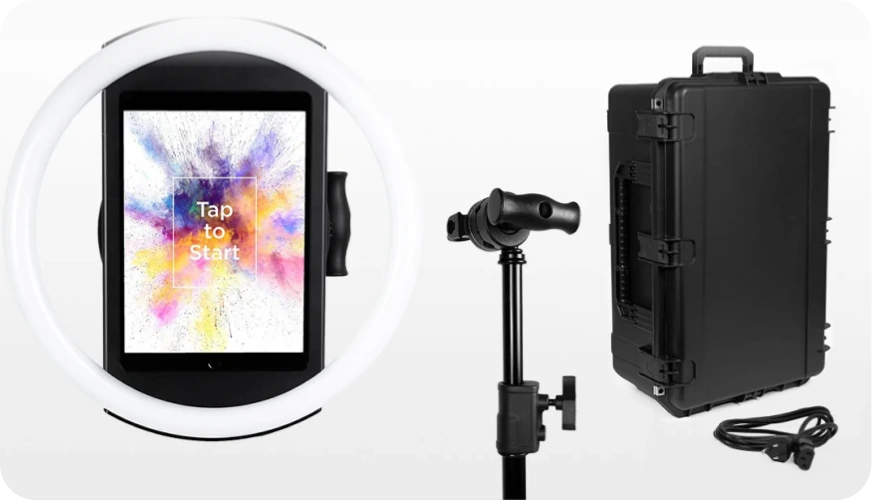
The HALO hardware is a precision-machined aluminum ring light with 112 LEDs producing up to 2,100 lumens, rated for 50,000 hours of operation. The iPad snaps into a tool-less faceplate with a concealed USB-C charging cable, and the selfie stand deploys without tools. Simple Booth claims setup in under one minute, a real advantage for operators running multiple events per week.
Source: Simple Booth
The cloud dashboard is where the managed experience pays off.
Operators build presets (event configurations defining the full booth flow) on a web interface, and settings sync to iPads automatically. The HALO 5.0 update introduced the Layout Designer, an in-app design tool with layers, fonts, gradients, and QR code embedding that eliminates the need for external graphic design software.
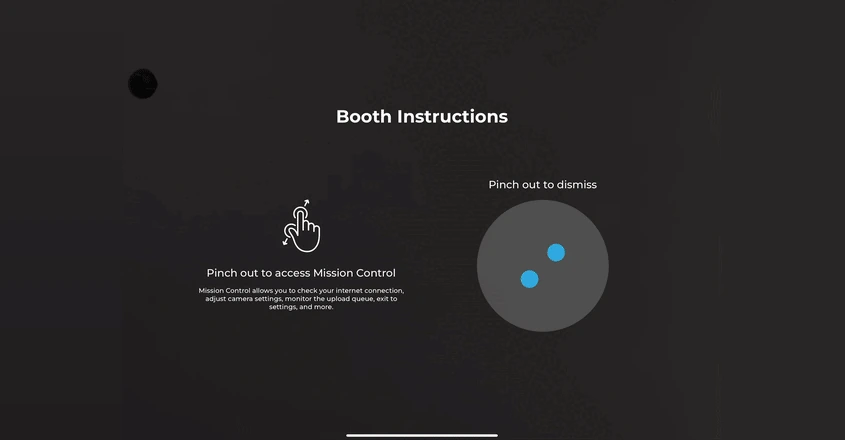
During live events, Mission Control (a hidden overlay triggered by a two-finger pinch) lets operators monitor device health, adjust camera settings, and sync dashboard changes without interrupting the guest-facing interface.
Source: Simple Booth
Photo delivery options include QR code, email, SMS, AirDrop, and WhatsApp, with WhatsApp added in the 5.0 release for international events. An offline upload queue stores sessions and delivers them when connectivity returns, handling unreliable venue Wi-Fi without operator intervention.
Where Simple Booth stands apart from Darkroom Booth is its marketing infrastructure.
The platform captures first-party data with opt-in rates as high as 87 to 89% during the photo-taking flow itself. Each event generates an online gallery with social sharing prompts, and the analytics dashboard tracks gallery views, social shares, and lead data across all events. For brand marketers, this turns the photo booth from entertainment into a measurable campaign channel.
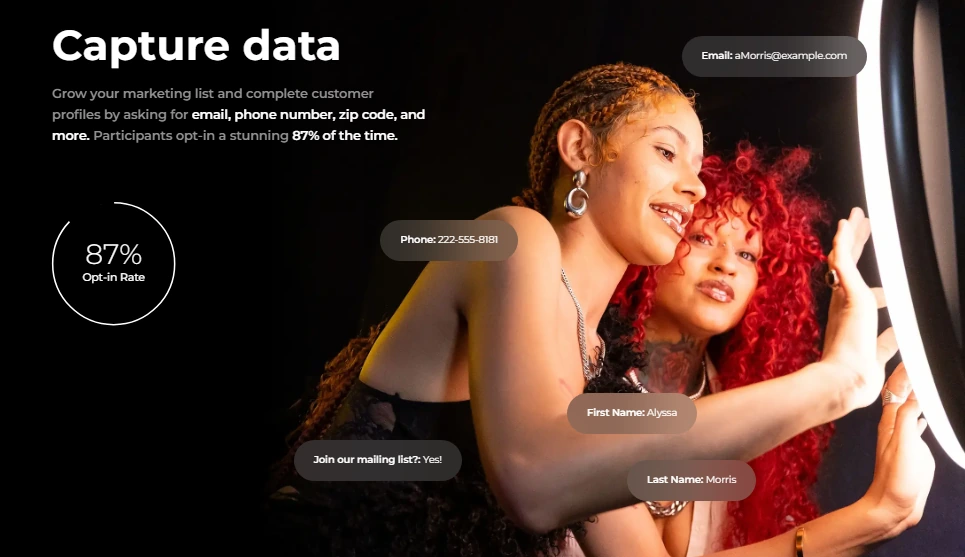
Source: Simple Booth
The Virtual Booth product extends this further: a browser-based photo experience that runs on any device without hardware, accessible via a link or QR code. It shares the same analytics, gallery, and lead capture infrastructure as the HALO app, making it useful for hybrid events or always-on digital campaigns.
Arizona Opera grew its email list by 1,000 addresses in a few events using Simple Booth’s built-in data capture. (Simple Booth)
Darkroom Booth offers hardware flexibility and depth
Darkroom Booth gives operators a level of hardware control that iPad-based platforms cannot replicate.
The software tethers natively to Canon EOS, Nikon Z/D series, GoPro HERO 9/10, and any Windows-compatible webcam via direct USB or wireless connections. Printing works with any Windows-compatible printer, with built-in accelerated drivers for over 20 dye-sublimation models from DNP, Fujifilm, Mitsubishi, Sony, Shinko/Sinfonia, HiTi, and Ciaat. Operators who already own professional camera and printer gear can start using Darkroom Booth immediately without buying proprietary hardware.
This flexibility extends to physical controls.
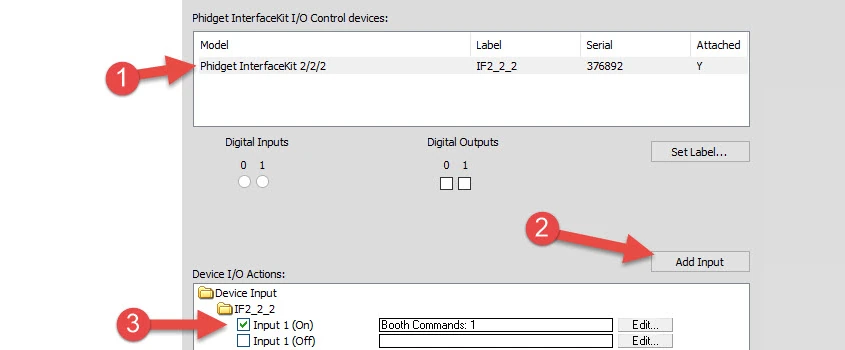
Phidget USB interface support lets operators wire in bill acceptors, coin-op mechanisms, arcade buttons, and custom lighting rigs directly into the booth workflow. For operators running pay-per-print kiosks, coin-operated arcade setups, or permanent installations in amusement venues, this hardware extensibility is a deciding factor.
Source: Darkroom Software
Capture modes are another area where Darkroom Booth leads.
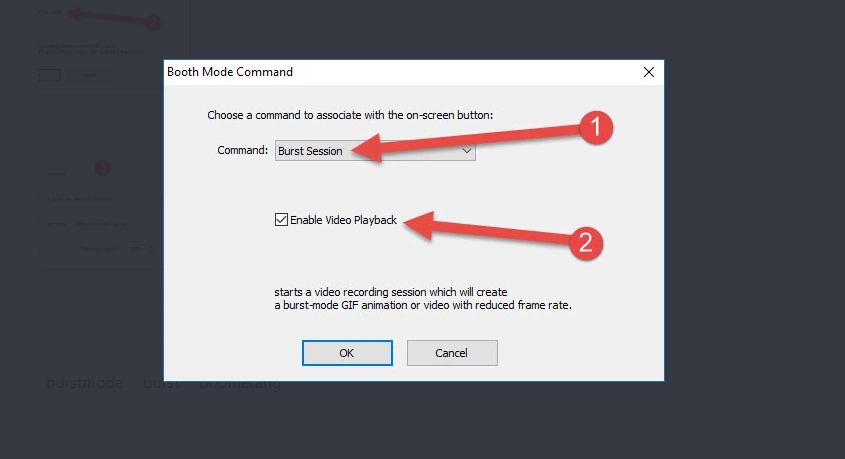
From a single installation, operators can deliver still photos, standard video, slow-motion video at up to 240 fps via GoPro, photo-based animated GIFs, video-based Boomerang GIFs, and VR 180/360 panoramic images formatted for Facebook’s VR viewer. The distinction between the two GIF types matters: animated GIFs assemble individual still photos for precise per-frame control, while Boomerangs extract frames from a short video clip for fluid motion.
Source: Darkroom Software
The guest experience features are designed for attended events where the booth doubles as entertainment.
A best pose selection mode lets guests take three shots and choose their favorite, built for formal events like proms and black-tie galas. Light painting, print signing, and type-a-note on prints add personalization layers. A quiz and contest engine with random or manual winner selection (via the Booth Control app) can trigger special templates, coupons, and even physical lights and sounds through the Phidget hardware integration.
Darkroom Booth’s newest additions include AI-powered photo transformations (generative portraits, face swap, scene generation), lenticular printing for animated physical takeaways, and a Kiosk Gallery for handling reprint and resend requests without interrupting the booth workflow.
Template design and customization
Both platforms provide built-in design tools, but they serve different workflows.
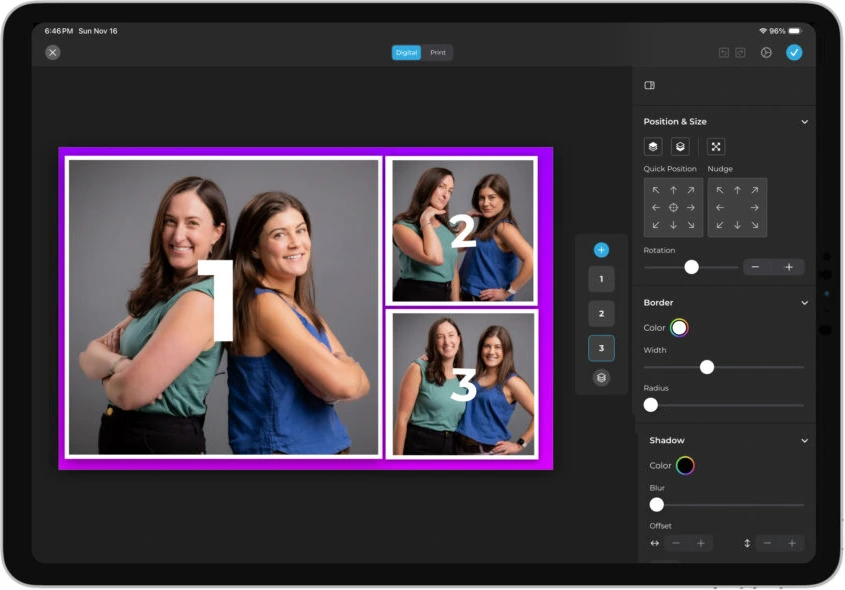
Simple Booth’s Layout Designer (introduced in HALO 5.0) brings template creation into the app and web dashboard.
Operators place photo frames, add text layers with font and color controls, position logos and overlays, apply background gradients, and embed dynamic QR codes, all without external software. The platform includes 60+ themes and 100+ digital props as starting points. On Plus plans and above, guest-editable text layers let participants type names, captions, or hashtags directly onto their photo before sharing, with dynamic text sizing that keeps the layout clean regardless of message length.
Because the Layout Designer lives in the cloud dashboard, designs sync across devices automatically. An operator can finalize a layout on their laptop and have it ready on the event iPad within minutes. Designs are preserved with the account, not stored on individual devices.
Source: Simple Booth
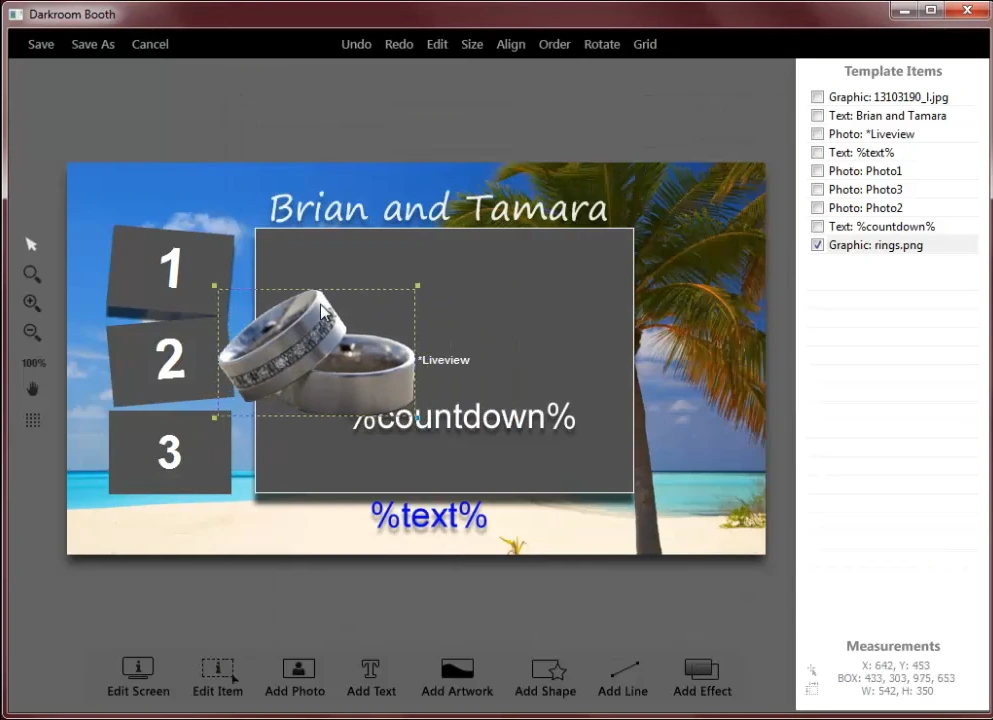
Darkroom Booth’s built-in template editor is a drag-and-drop tool that covers both print output templates and screen display templates.
The software ships with 75+ customizable templates spanning print layouts and on-screen flows, and operators can import graphics from Photoshop, Illustrator, or Canva as .jpg or .png files. Templates save as portable .xbdr files that can be designed on one machine and transferred to the booth PC.
Source: Darkroom Software
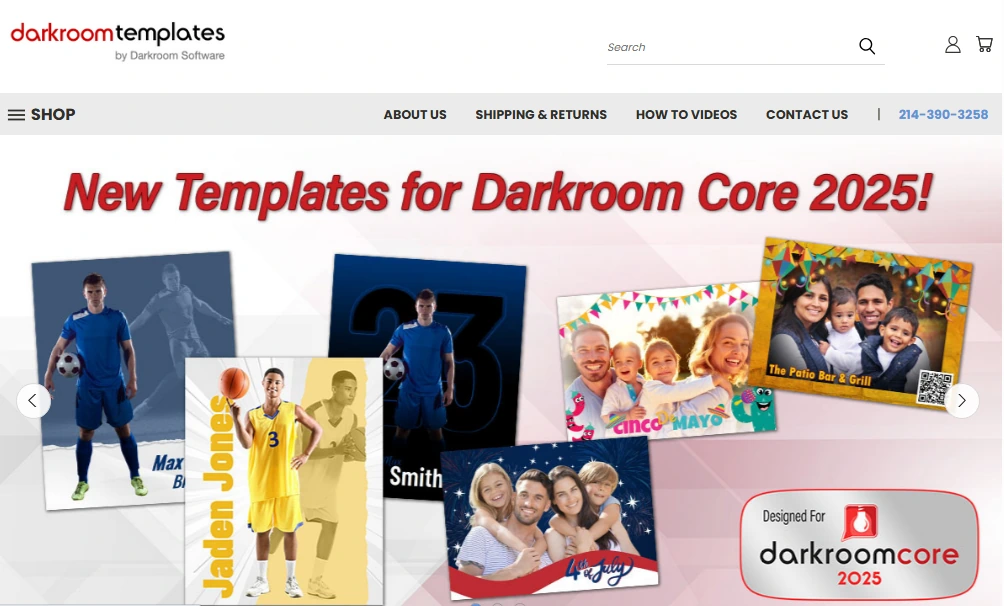
Darkroom Booth’s template ecosystem extends beyond the built-in editor.
An independent Darkroom Templates marketplace sells templates from multiple third-party designers across categories (weddings, birthdays, corporate, Bar/Bat Mitzvahs, Instagram Stories), giving operators access to more designs than either company could produce alone. Beyond aesthetics, templates in Darkroom Booth can include functional elements: surveys and quizzes with nine question types (multiple choice, email capture, scale rating, True/False, and more), with results exporting to PDF and stored in a local SQLite database.
Source: Darkroom Templates
The customization philosophies mirror the platforms themselves. Simple Booth optimizes for cloud-synced, brand-consistent designs managed from anywhere. Darkroom Booth optimizes for per-event customization with local data ownership and a broader template ecosystem.
AI capabilities
Both platforms have added AI features, approaching them from their respective architectures.
Simple Booth embeds AI into the HALO app and Virtual Booth through Booth Mode AI Effects.
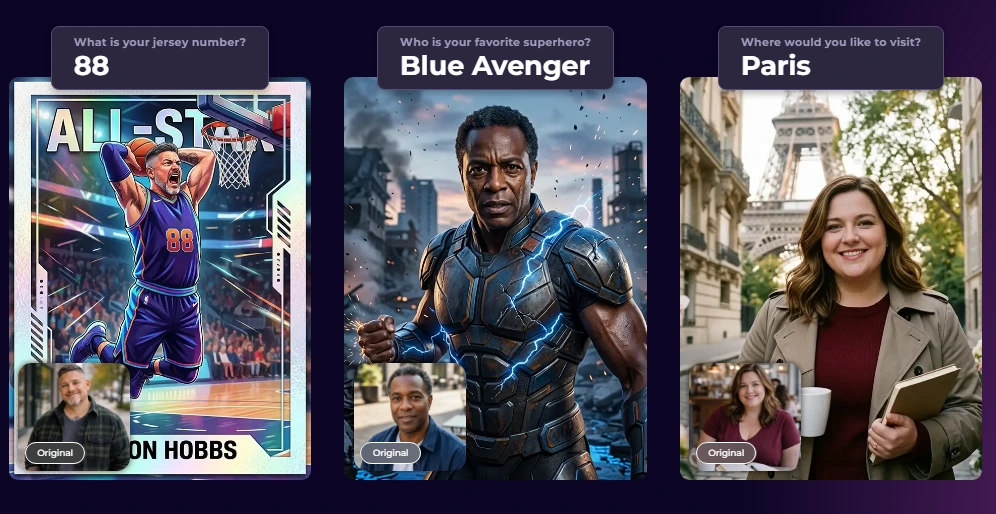
Three Nano Banana AI models balance speed, quality, and group size: Nano Banana 1 (fastest, individual subjects, 1 credit), Nano Banana 2 (balanced, groups up to 5, 2 credits), and Nano Banana Pro (highest quality, groups up to 5, 3 credits). Operators choose from ready-made prompts or write custom ones, and the platform automatically preserves identity so guests stay recognizable regardless of the transformation applied.
Source: Simple Booth
A notable feature is the Guest Input system (Pro/Select): guests answer questions after capture, and their responses inject into the AI prompt as template variables, producing a personalized output for every participant. Operators can test prompts unlimited times outside booth mode at zero credit cost, iterating freely before an event. Credits cost $0.10 each and never expire.
Simple Booth also offers AI-generated layout images that create graphic design elements (borders, frames, themed graphics) inside the Layout Designer at no credit cost, an AI-assisted design tool rather than just a photo filter.
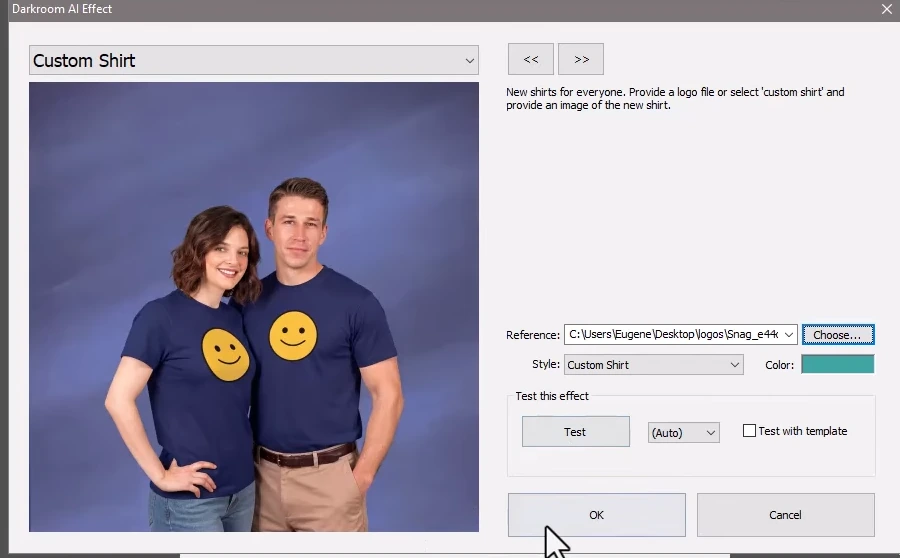
Darkroom Booth launched AI features in May 2025, including generative portraits, face swap, scene generation (removing the need for a physical green screen), and facial enhancement. The 2026 additions include AI custom shirts and AI lenticular prints, physical takeaways that animate when tilted, combining AI generation with a tangible product guests can hold.
Source: Darkroom Software
Darkroom Booth’s AI features run within its existing template system, so AI effects can be configured per template and combined with the software’s other output modes. The AI push is newer than Simple Booth’s, and the feature set is still expanding. Where Simple Booth treats AI as a cloud-processed, credit-based service, Darkroom Booth integrates AI into its local-first workflow.
Sharing and photo delivery
Simple Booth builds photo delivery and social sharing into the core platform.
Guests receive photos via QR code, email, SMS, AirDrop, or WhatsApp, with custom delivery messages on Plus plans and above. Each event automatically generates a branded online gallery where all captures aggregate, with configurable privacy levels (public, unlisted, private). Any public gallery can become a Live Feed slideshow for display on a TV or projector with a single tap.
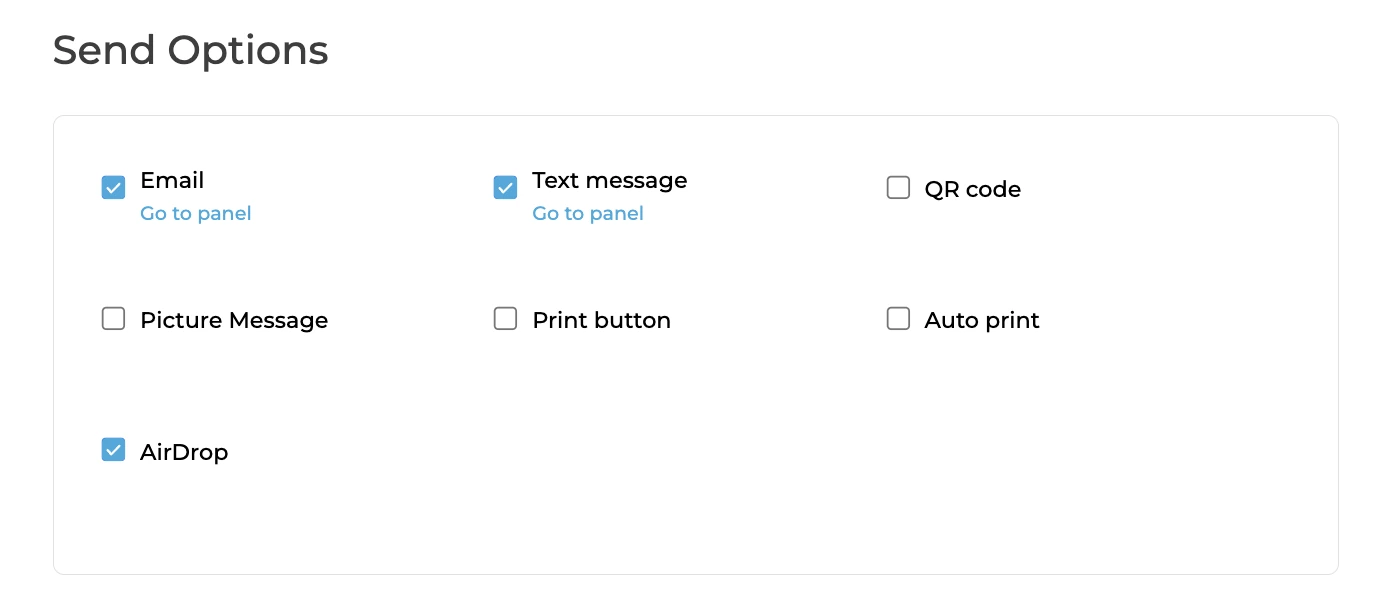
Source: Simple Booth
Social sharing handles platform-specific friction automatically. Facebook and X draft posts in the native app. For Instagram, which prohibits direct third-party uploads, Simple Booth reformats layouts into Instagram-compatible files and can deliver the ready-to-post asset via MMS. Event hashtags auto-populate on X and Facebook shares, creating a searchable stream of branded content.
Darkroom Booth handles sharing through a combination of built-in tools and companion products.
The software shares photos, videos, and GIFs via text or email after each session, and generates Snapchat, Twitter, and Instagram-ready files formatted to each platform’s specifications. Darkroom Phone provides built-in SMS delivery without requiring a separate Twilio account, though operators can also configure their own Twilio account instead.
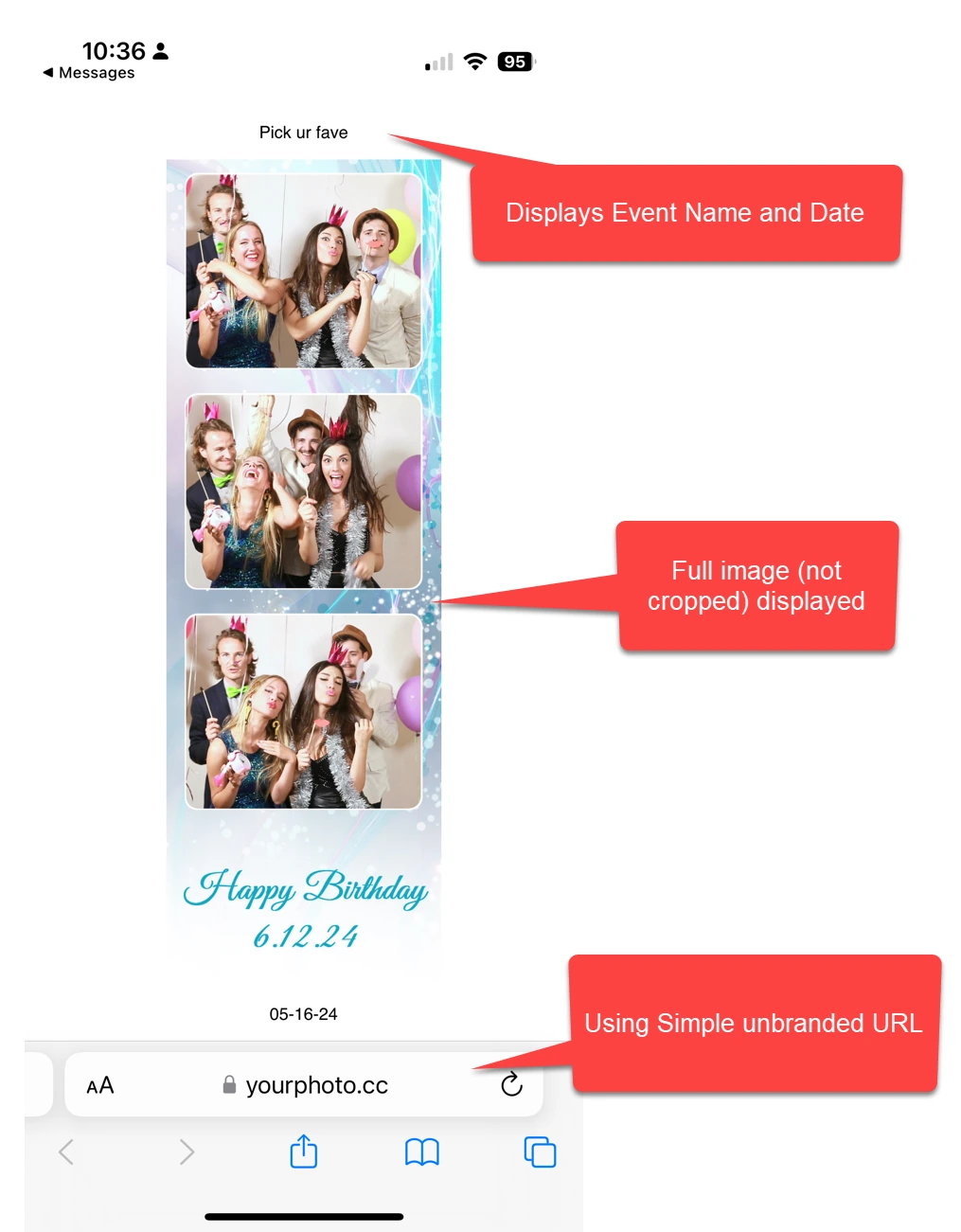
Source: Darkroom Software
For online galleries, Darkroom Booth integrates with Event Gallery, a separate Darkroom Software subscription ($30–$75/month). Sessions auto-upload as they complete, populating a branded gallery that supports photos, GIFs, and MP4 files, with password protection, white-label branding, and a custom API. Dropbox integration provides automatic cloud archiving to a designated event folder.
One limitation worth noting: Facebook’s API restrictions prevent Darkroom Booth from uploading photos directly to Facebook. Operators who need Facebook delivery must use Event Gallery as an intermediary.
Pricing comparison
The pricing models reflect each platform’s business philosophy.
Simple Booth uses a per-license subscription. Each plan includes one device license, with additional devices requiring add-on licenses. There are no caps on photos or events; the only limit is the number of licensed devices.
| Plan | Weekly | Monthly | Annual | Key additions |
|---|---|---|---|---|
| Lite | $14.99 | $29.99 | $289.99 | Basic capture, galleries, themes, props (ads shown) |
| Core | $24 | $49 | $490 | Ads removed, DSLR support, video, background replacement, Virtual Booth |
| Plus | $49 | $99 | $990 | Custom branding, analytics, guest-editable text, custom AI effects |
| Pro | — | $149 | $1,490 | Lead capture, API, phone support, moderation, age gate |
| Select | — | $249 | $2,490 | Custom legal terms, security questionnaires, demographic analytics |
For multi-booth operations, cost scales with add-on licenses. A company running 3 booths on the Core annual plan pays $490 + ($360 x 2) = $1,210/year. AI credits add a variable cost at $0.10 per credit, and HALO hardware kits are purchased separately (starting around $2,090 for an Event Kit with iPad). A 7-day free trial with 25 AI credits is available to start.
Darkroom Booth operates on a perpetual license model: pay once, own the software indefinitely.
| Item | Cost | Notes |
|---|---|---|
| Full License | $295 (one-time) | Includes all features + 1 year of updates/support |
| Annual Maintenance | $95/year (optional) | Updates, support, and cloud-dependent features |
| Upgrade (from 2.x) | $195 | In-app purchase for existing Booth 2.x owners |
| 10-Day Temporary License | $45 | For overbooking situations |
The license covers installation on up to 2 computers simultaneously, and the software continues to run after maintenance expires. Core functions work indefinitely, though cloud-dependent features (email delivery, Darkroom Phone) require an active maintenance plan. If maintenance lapses for over a year, the renewal price rises to $195 instead of $95.
Additional costs include Event Gallery for online galleries ($30–$75/month), premium templates from the Darkroom Templates marketplace, and any Twilio usage fees for operators using their own SMS account.
The total cost comparison depends on time horizon and scale. A single-booth operator on Darkroom Booth pays $295 upfront + $95/year for maintenance = $390 in the first year. The same operator on Simple Booth Core pays $490/year (annual billing). Over three years, Darkroom Booth costs $580 total; Simple Booth Core costs $1,470.
The gap narrows when Darkroom operators add Event Gallery ($360–$900/year) for comparable online gallery capabilities. For operators who don’t need online galleries, Darkroom Booth’s perpetual license is cheaper over time.
Remote management and multi-booth operations
Simple Booth manages multi-booth operations through its cloud dashboard.
Operators create presets centrally and push them to any connected iPad. Settings, branding, and gallery configurations sync automatically. Multiple devices run under one account with add-on licenses, and staff accounts let team members access shared presets without full admin privileges. The Permanent Install Guide documents long-term unattended deployments for venues.
The cloud architecture means an operator in Austin can configure a booth running at an event in Miami, check analytics from a third booth in Denver, and adjust branding for all three from a single browser tab. For companies scaling beyond a handful of booths, this is a real operational advantage.
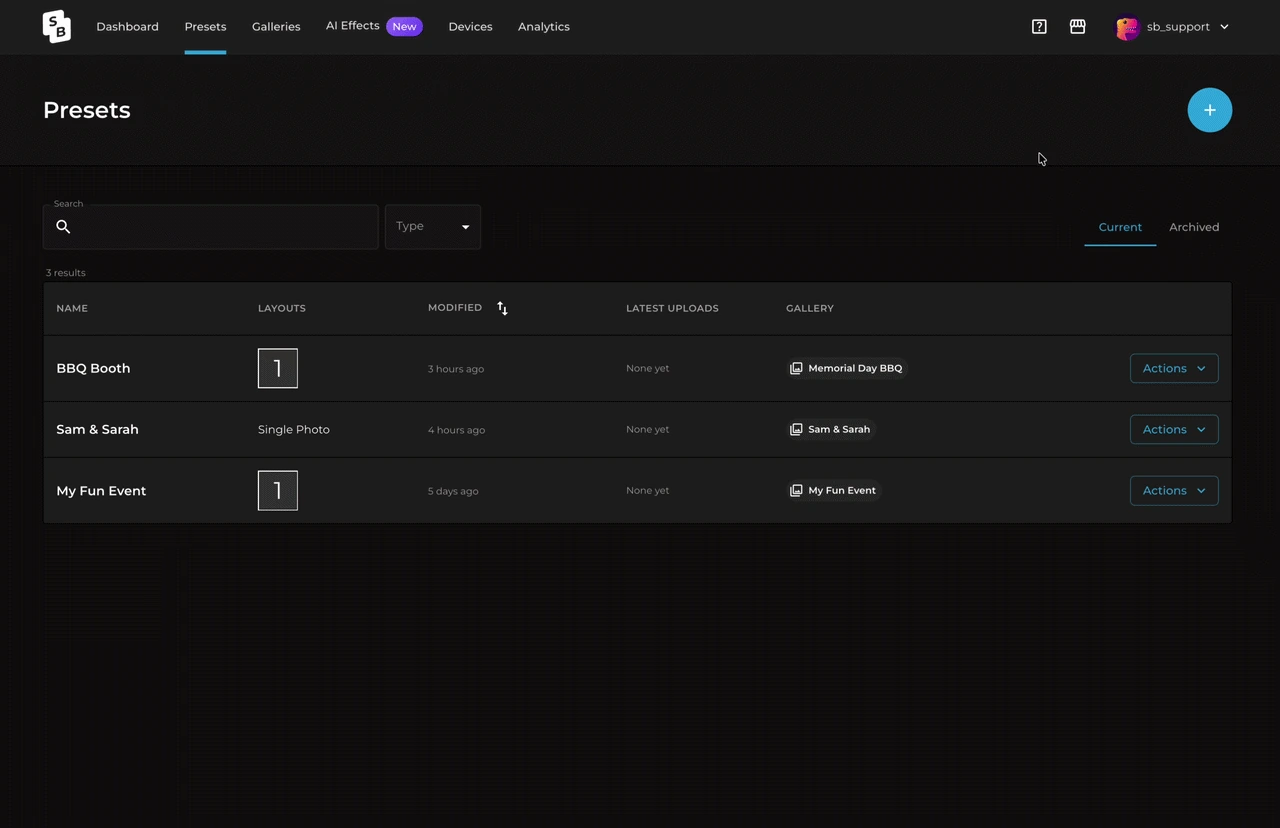
Source: Simple Booth
Darkroom Booth approaches remote management differently.
Booth Control connects to the booth over the local Wi-Fi network, letting operators monitor status, trigger sessions, and receive statistics and reports via email or text from a phone, computer, or tablet. This works well for managing a booth at the same event without standing next to it, but it does not extend to managing booths across different locations from a centralized dashboard.
For operators running a single booth or a small fleet at one venue, Booth Control is adequate. For companies running simultaneous events at different locations, Simple Booth’s cloud management provides centralized control that Darkroom Booth’s local architecture does not match.
Support and learning curve
Simple Booth tiers its support by plan.
Lite users get 7-day email/chat support. Core and Plus add email and chat. Pro adds phone support. Select includes a dedicated account manager during events. Documentation lives across a 148+ article Help Center and a 5.0 Transition Guide with an AI assistant for natural-language queries. The learning curve is gentle for basic operation (the Start Guide walks through numbered, sequential onboarding), though advanced features like API integration and custom AI prompts require more investment.
Darkroom Booth provides phone and email support during business hours only: Monday through Friday, 9am to 5pm Central. Support requires an active maintenance plan ($95/year). The Help Center organizes documentation across 25 topic categories, and free webinars run at beginner and advanced levels, hosted by a named Customer Education Manager.
The business-hours-only limitation deserves attention.
Photo booth operators work evenings and weekends, the hours when support is unavailable and problems are most likely to occur. Capterra reviewers flag this as a concrete operational risk. Simple Booth’s 7-day support on all plans addresses this gap, though neither platform offers 24/7 coverage.
The learning curve differs by design.
Simple Booth’s cloud interface and numbered onboarding guide aim to get operators running within a day. Darkroom Booth offers deeper functionality, but its interface has drawn feedback about inconsistent labeling (terms like “Settings” and “Global Settings” noted as vague in Capterra reviews), and the breadth of its feature set means operators invest more time in initial configuration.
Simple Booth vs Darkroom Booth: Which should you choose?
The choice depends on your operating model, hardware preferences, and what you need the photo booth to accomplish beyond taking photos.
Choose Simple Booth if:
- You want a system that sets up in under a minute with no tools required
- Remote cloud management across multiple locations matters to your business
- Lead capture, analytics, and marketing ROI are core objectives, not afterthoughts
- You prefer an iPad-based workflow with automatic updates and cloud-synced settings
- You need a Virtual Booth product for remote or hybrid events
- WhatsApp delivery is important for international events
- You want an in-app design tool that eliminates external graphic design software
- You value 7-day support availability for weekend events
Start with Simple Booth’s 7-day free trial to test the full experience.
Choose Darkroom Booth if:
- You already own Canon or Nikon DSLRs, GoPro cameras, or specific dye-sub printers and want software that works with your gear
- A one-time $295 license fits your budget better than ongoing subscription costs
- You need hardware extensibility (bill acceptors, coin-op, arcade buttons, Phidget controls) for kiosk or permanent installations
- Slow-motion video, VR 360 panoramic images, or lenticular printing are part of your service offering
- You prefer full local control with no cloud dependency for core booth operation
- You want access to a third-party template marketplace with designs from independent creators
- Built-in surveys, quizzes, and contest engines are important for your events
These platforms serve the same industry but reflect different assumptions about how photo booths should work. Simple Booth assumes operators want a managed, cloud-connected system that handles logistics and marketing in one workflow. Darkroom Booth assumes operators want a local application that adapts to whatever hardware and use case they bring to it.
For operators building a rental business around ease and speed, especially those who value lead capture and analytics, Simple Booth’s integrated approach removes friction at every step. For operators who need to control every variable (from the exact camera body to the physical payment hardware to the slow-motion frame rate) Darkroom Booth’s open architecture and perpetual license deliver capabilities that a subscription iPad app was not designed to provide.
Your choice should match your hardware reality, your business model, and what role the photo booth plays beyond entertainment.
Simple Booth vs Darkroom Booth FAQ
What is the main difference between Simple Booth and Darkroom Booth?
Simple Booth is an iPad-based, cloud-connected photo booth platform with proprietary HALO ring-light hardware, subscription pricing, and built-in marketing tools. Darkroom Booth is a Windows-only desktop application with a one-time perpetual license that works with nearly any camera, printer, and peripheral hardware the operator already owns.
Which platform is cheaper in the long run?
Darkroom Booth has a lower total cost of ownership for operators who don’t need online galleries. The perpetual license costs $295 plus $95/year for optional maintenance, compared to Simple Booth Core at $490/year. Over three years, Darkroom Booth costs roughly $580 versus $1,470 for Simple Booth Core.
However, adding Darkroom’s Event Gallery subscription for online galleries ($360-$900/year) narrows or closes the gap.
Can I use my own DSLR camera with either platform?
Both platforms support external cameras, but with different scope. Simple Booth added Canon and Sony DSLR and mirrorless camera support in the HALO 5.0 update (Core plan and above). Darkroom Booth supports a wider range including Canon, Nikon, and GoPro cameras via direct USB or wireless tether, plus any Windows-compatible webcam.
Does either platform work on Mac?
Neither has a native Mac application. Darkroom Booth can run under Boot Camp on Intel Macs but has no macOS version. Simple Booth runs on iPad only, not on macOS directly, though the online dashboard for managing presets and analytics is accessible from any browser including Mac.
Which platform is better for lead capture and marketing?
Simple Booth is the stronger choice for marketing use cases, with built-in lead capture forms achieving 87-89% opt-in rates, centralized analytics tracking gallery views and social shares, native MailChimp integration, and an Open API for CRM delivery on Pro plans.
Darkroom Booth includes surveys and data collection with local SQLite storage, but does not offer the same depth of marketing analytics or CRM integration.
Can Darkroom Booth run without an internet connection?
Yes. Darkroom Booth runs as a local Windows application and does not require the internet for core functions including photo capture, printing, and template management. Cloud-dependent features like email delivery and Darkroom Phone texting require connectivity and an active maintenance plan.
Simple Booth’s HALO app also works offline by queuing sessions and uploading them when connectivity returns, though it is designed around cloud operation.
Which platform has more capture modes?
Darkroom Booth offers more capture variety from a single installation: still photos, standard video, slow-motion video (up to 240 fps via GoPro), photo-based animated GIFs, video-based Boomerang GIFs, and VR 180/360 panoramic images.
Simple Booth supports still photos, GIFs, Rebound boomerang clips, and full-length video, but does not offer slow-motion, VR panoramic output, or the distinction between photo-based and video-based GIF workflows.
Does either platform support physical payment hardware?
Darkroom Booth includes built-in support for bill acceptors, coin-op mechanisms, and arcade buttons through Phidget USB interface integration, making it suitable for pay-per-print kiosks and amusement venue deployments. Simple Booth does not support physical payment hardware.
Keep reading
 Showdowns
Simple Booth vs Flassh: Which Photo Booth Platform Fits Your Events in 2026?
Integrated system vs speedy setup. Simple Booth or Flassh?
 Showdowns
Simple Booth vs LumaBooth: Which Photo Booth Software Fits Your Business in 2026?
Turnkey hardware vs budget cross-platform app. Simple Booth or LumaBooth?
 Showdowns
Simple Booth vs POV Camera: Professional Photo Booth or Crowdsourced Guest Photos in 2026?
Branded booth vs crowdsourced phone snaps. Simple Booth or POV Camera?